tire type FORD F150 2017 13.G Owner's Manual
[x] Cancel search | Manufacturer: FORD, Model Year: 2017, Model line: F150, Model: FORD F150 2017 13.GPages: 599, PDF Size: 7.34 MB
Page 502 of 599
3D city models are complete 3D models
of entire city areas including navigable
roads, parks, rivers and rendered buildings.
3D landmarks and city models appear in
3D map mode only. Coverage of these
varies and improves with updated map
releases.
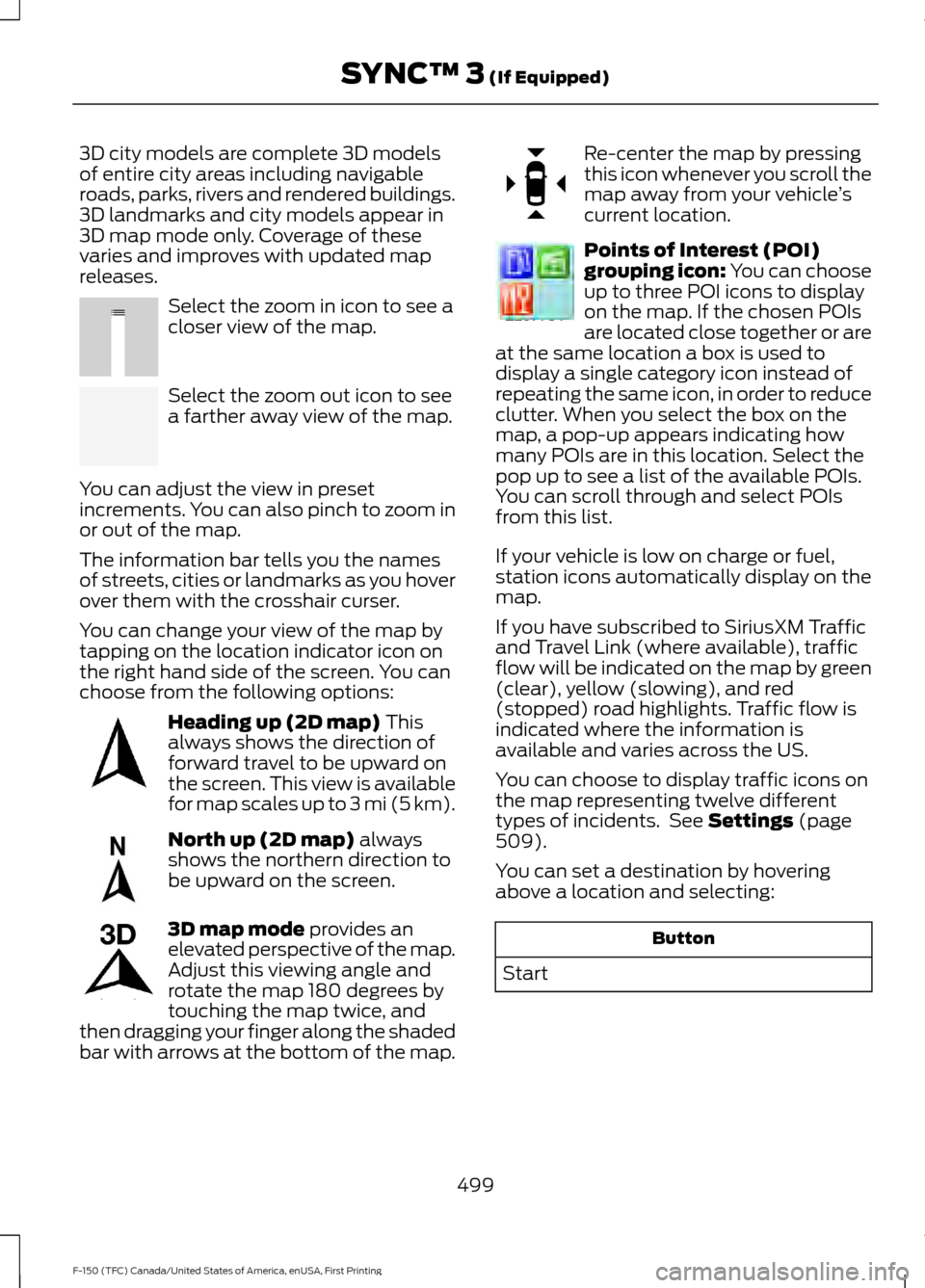
Select the zoom in icon to see a
closer view of the map.
Select the zoom out icon to see
a farther away view of the map.
You can adjust the view in preset
increments. You can also pinch to zoom in
or out of the map.
The information bar tells you the names
of streets, cities or landmarks as you hover
over them with the crosshair curser.
You can change your view of the map by
tapping on the location indicator icon on
the right hand side of the screen. You can
choose from the following options: Heading up (2D map) This
always shows the direction of
forward travel to be upward on
the screen. This view is available
for map scales up to
3 mi (5 km). North up (2D map)
always
shows the northern direction to
be upward on the screen. 3D map mode
provides an
elevated perspective of the map.
Adjust this viewing angle and
rotate the map 180 degrees by
touching the map twice, and
then dragging your finger along the shaded
bar with arrows at the bottom of the map. Re-center the map by pressing
this icon whenever you scroll the
map away from your vehicle
’s
current location. Points of Interest (POI)
grouping icon: You can choose
up to three POI icons to display
on the map. If the chosen POIs
are located close together or are
at the same location a box is used to
display a single category icon instead of
repeating the same icon, in order to reduce
clutter. When you select the box on the
map, a pop-up appears indicating how
many POIs are in this location. Select the
pop up to see a list of the available POIs.
You can scroll through and select POIs
from this list.
If your vehicle is low on charge or fuel,
station icons automatically display on the
map.
If you have subscribed to SiriusXM Traffic
and Travel Link (where available), traffic
flow will be indicated on the map by green
(clear), yellow (slowing), and red
(stopped) road highlights. Traffic flow is
indicated where the information is
available and varies across the US.
You can choose to display traffic icons on
the map representing twelve different
types of incidents. See
Settings (page
509).
You can set a destination by hovering
above a location and selecting: Button
Start
499
F-150 (TFC) Canada/United States of America, enUSA, First Printing SYNC™ 3
(If Equipped)E207752 E207753 E207750 E207749 E207748 E207751 E207754
Page 585 of 599
WARNING
Driving while distracted can result in
loss of vehicle control, crash and
injury. We strongly recommend that
you use extreme caution when using any
device that may take your focus off the
road. Your primary responsibility is the safe
operation of your vehicle. We recommend
against the use of any hand-held device
while driving and encourage the use of
voice-operated systems when possible.
Make sure you are aware of all applicable
local laws that may affect the use of
electronic devices while driving. TYPE APPROVALS
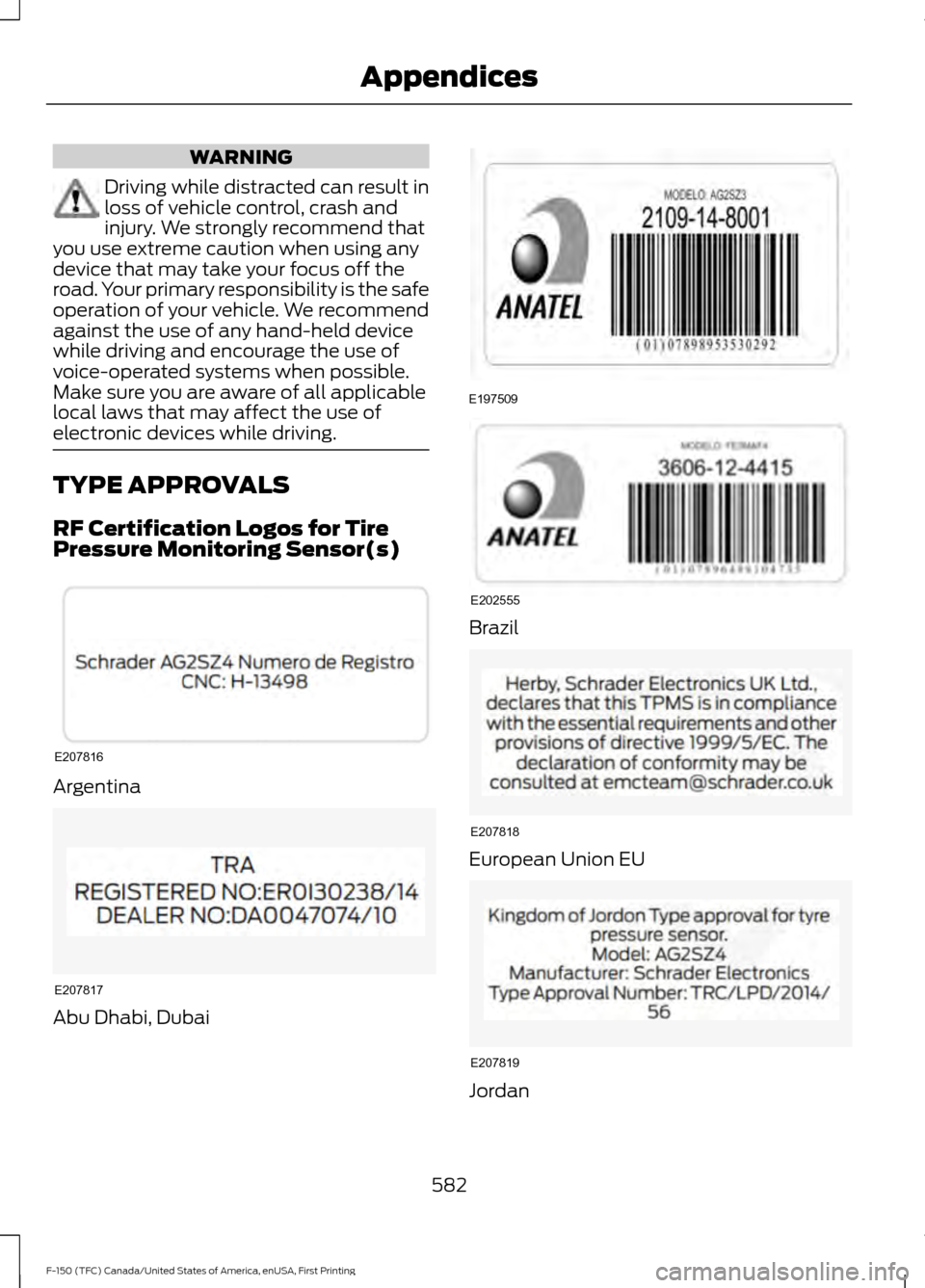
RF Certification Logos for Tire
Pressure Monitoring Sensor(s)
Argentina
Abu Dhabi, Dubai Brazil
European Union EU
Jordan
582
F-150 (TFC) Canada/United States of America, enUSA, First Printing AppendicesE207816 E207817 E197509 E202555 E207818 E207819
Page 590 of 599
Changing a Road Wheel............................372
Dissimilar Spare Wheel and Tire Assembly
Information...................................................... 372
Tire Change Procedure.................................... 373
Changing the 12V Battery.........................329 Battery Management System...................... 330
Changing the Engine Air Filter................339
Changing the Wiper Blades......................331
Checking MyKey System Status................61
Checking the Wiper Blades.......................331
Child Restraint and Seatbelt Maintenance.................................................42
Child Restraint Positioning..........................31
Child Safety.......................................................16 General Information............................................. 16
Child Safety Locks..........................................32 Left-Hand Side...................................................... 33
Right-Hand Side................................................... 33
Cleaning Leather Seats.............................344 With King Ranch Edition................................. 345
Without King Ranch Edition.......................... 344
Cleaning Products
......................................340
Cleaning the Engine....................................342
Cleaning the Exterior...................................341 Exterior Chrome Parts....................................... 341
Exterior Plastic Parts......................................... 341
Stripes or Graphics............................................. 341
Underbody........................................................... 342
Under Hood.......................................................... 342
Cleaning the Instrument Panel and Instrument Cluster Lens........................344
Cleaning the Interior...................................343
Cleaning the Wheels
..................................346
Cleaning the Windows and Wiper Blades...........................................................343
Clearing All MyKeys......................................60
Climate...........................................................490
Climate Control
..............................................141
Climate Controlled Seats...........................157 Cooled Seats........................................................ 158
Collision Warning System
........................244
Principle Of Operation..................................... 244
Coolant Check See: Engine Coolant Check............................ 323
Crash Sensors and Airbag Indicator.........51
Creating a MyKey...........................................60 Programming/Changing Configurable
Settings.............................................................. 60Cross Traffic Alert
........................................240
False Alerts........................................................... 242
Switching the System Off and On...............243
System Errors...................................................... 243
System Lights, Messages and Audible Alerts.................................................................. 242
System Limitations........................................... 242
Using the System.............................................. 240
Cruise Control..................................................82 Principle of Operation...................................... 224
Type 1........................................................................\
82
Type 2....................................................................... 82
Cruise control See: Using Cruise Control............................... 224
Customer Assistance
................................300
D
Data Recording
..................................................9
Event Data Recording.......................................... 10
Service Data Recording........................................ 9
Daytime Running Lamps............................89 Type 1 - Conventional
(Non-Configurable)....................................... 89
Type 2 - Configurable......................................... 89
Digital Radio
....................................................417
HD Radio Reception and Station
Troubleshooting............................................. 418
Direction Indicators
........................................91
Lane Change........................................................... 91
Doors and Locks.............................................64
Drive Control.................................................246 Selectable Steering.......................................... 246
Driver Alert
......................................................232
Using Driver Alert............................................... 232
Driver and Passenger Airbags...................46 Children and Airbags.......................................... 46
Proper Driver and Front Passenger Seating Adjustment....................................................... 46
Driving Aids
.....................................................232
Driving Hints..................................................288
Driving Through Water..............................289
DRL See: Daytime Running Lamps........................ 89
E
Economical Driving
.....................................288
587
F-150 (TFC) Canada/United States of America, enUSA, First Printing Index
Page 597 of 599
Steering...........................................................243
Electric Power Steering................................... 243
Steering Wheel Lock...................................169
Steering Wheel...............................................80
Storage Compartments............................166
Sunroof See: Moonroof..................................................... 100
Sun Visors
.......................................................100
Illuminated Vanity Mirror................................. 100
Supplementary Restraints System.........45 Principle of Operation........................................ 45
Symbols Glossary
.............................................7
SYNC™ 3.........................................................461 General Information.......................................... 461
SYNC™ 3 Troubleshooting.......................521
SYNC™ Applications and Services........................................................439
911 Assist............................................................... 439
SYNC Mobile Apps............................................. 441
SYNC™............................................................423 General Information......................................... 423
SYNC™ Troubleshooting.........................453
T
Tailgate Lock
....................................................69
Tailgate Step.....................................................71
Closing the Step..................................................... 71
Opening the Step................................................... 71
Tailgate..............................................................69
Technical Specifications See: Capacities and Specifications.............381
The Better Business Bureau (BBB) Auto Line Program (U.S. Only).......................302
Tire Care
...........................................................351
Glossary of Tire Terminology......................... 352
Information About Uniform Tire Quality Grading.............................................................. 351
Information Contained on the Tire Sidewall............................................................ 353
Temperature A B C............................................ 352
Traction AA A B C................................................ 351
Treadwear.............................................................. 351
Tire Pressure Monitoring System...........367 Changing Tires With a Tire Pressure
Monitoring System....................................... 368
Understanding Your Tire Pressure Monitoring System ...................................... 368Tires
See: Wheels and Tires..................................... 349
Towing a Trailer
............................................256
Load Placement................................................. 257
Towing Points
...............................................298
Towing the Vehicle on Four Wheels..........................................................285
Emergency Towing............................................ 285
Recreational Towing......................................... 285
Towing.............................................................256
Traction Control
...........................................208
Principle of Operation..................................... 208
Trailer Reversing Aids..................................257 Principle of Operation...................................... 258
Pro Trailer Backup Assist™............................ 257
Setting Up Pro Trailer Backup Assist.........258
Troubleshooting................................................. 262
Using Pro Trailer Backup Assist..................... 261
Trailer Sway Control....................................267
Transfer Case Fluid Check........................328
Transmission Code Designation............387
Transmission..................................................186
Transmission See: Transmission.............................................. 186
Transporting the Vehicle...........................297
Type Approvals
............................................582
RF Certification Logos for Tire Pressure
Monitoring Sensor(s).................................. 582
U
Under Hood Overview - 2.7L EcoBoost™..................................................318
2.7L EcoBoost...................................................... 318
Under Hood Overview - 3.5L Ecoboost™.................................................320
Under Hood Overview - 3.5L....................319
Under Hood Overview - 5.0L....................321
Unique Driving Characteristics.................174
Universal Garage Door Opener...............160 HomeLink Wireless Control System...........160
USB Port
..........................................................422
Using Adaptive Cruise Control................225 Blocked Sensor.................................................. 230
Changing the Set Speed................................. 228
Detection Issues................................................. 229
Disengaging the System................................. 228
Following a Vehicle........................................... 226
594
F-150 (TFC) Canada/United States of America, enUSA, First Printing Index