display FORD F150 2017 13.G Owner's Guide
[x] Cancel search | Manufacturer: FORD, Model Year: 2017, Model line: F150, Model: FORD F150 2017 13.GPages: 599, PDF Size: 7.34 MB
Page 122 of 599
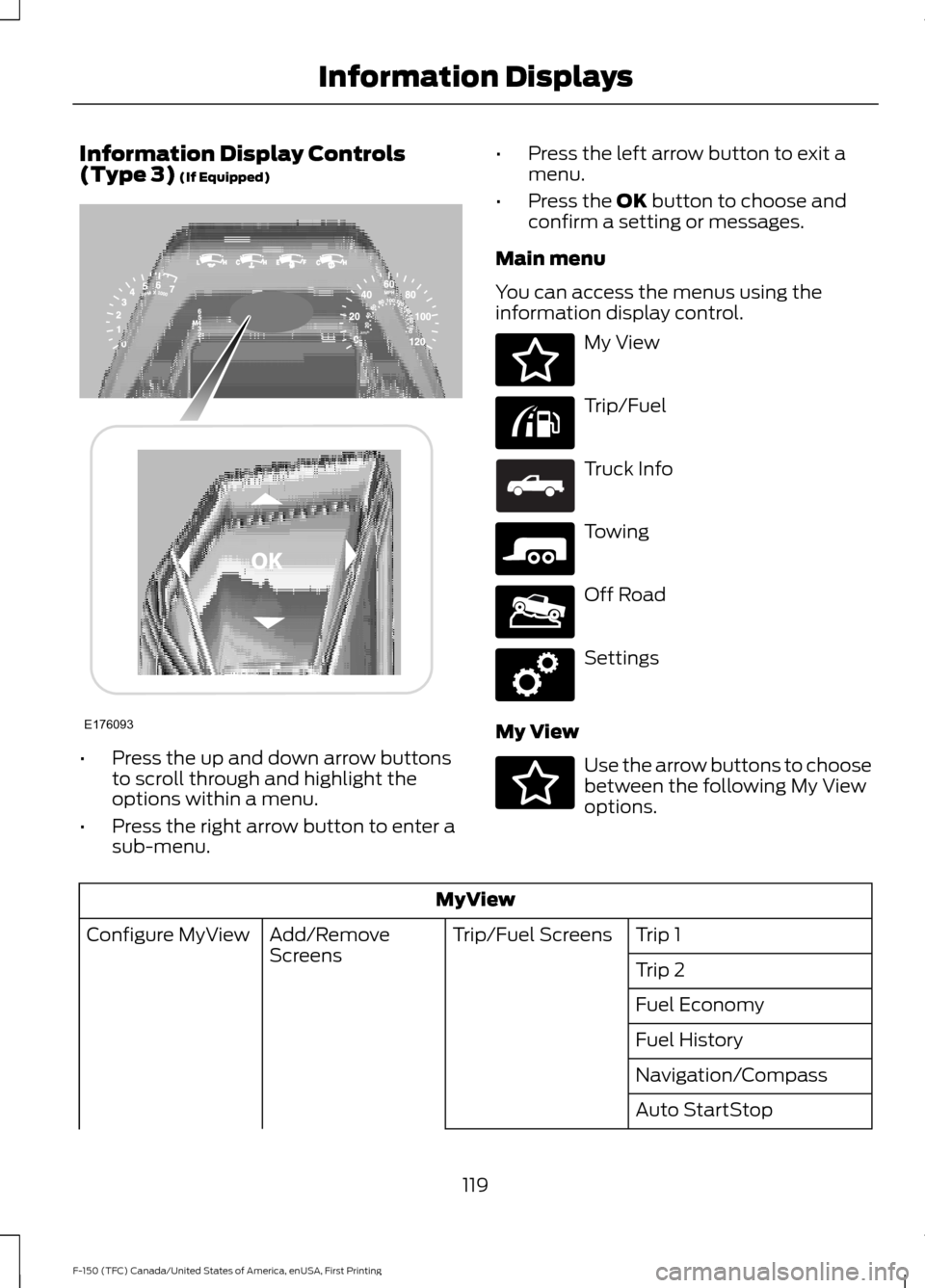
Information Display Controls
(Type 3) (If Equipped)
•
Press the up and down arrow buttons
to scroll through and highlight the
options within a menu.
• Press the right arrow button to enter a
sub-menu. •
Press the left arrow button to exit a
menu.
• Press the
OK button to choose and
confirm a setting or messages.
Main menu
You can access the menus using the
information display control. My View
Trip/Fuel
Truck Info
Towing
Off Road
Settings
My View Use the arrow buttons to choose
between the following My View
options.
MyView
Trip 1
Trip/Fuel Screens
Add/Remove
Screens
Configure MyView
Trip 2
Fuel Economy
Fuel History
Navigation/Compass
Auto StartStop
119
F-150 (TFC) Canada/United States of America, enUSA, First Printing Information DisplaysE176093 E176094 E176095 E163181 E176096 E176097 E176098 E176094
Page 123 of 599
MyView
Gauge View
Truck Info Screens
Tire Pressure
Digital Speedometer
Engine Information
MyKey Status
Trailer Status
Towing Screens
Trailer Information
Trailer Light Check
Off Road Status
Off Road Screens
Power Distribution
Up/Down moves selec-
tion in the list
Screen Selection 1
- 7
Reorder Screens
Press OK to select
Trip/Fuel Use the arrow buttons to choose
between the following trip and
fuel options.
Trip/Fuel
Trip 1 or 2
Fuel Economy
Fuel History
Navigation
120
F-150 (TFC) Canada/United States of America, enUSA, First Printing Information DisplaysE176095
Page 124 of 599
Trip/Fuel
Select Your Setting
Compass
Auto StartStop status
Trip 1 or 2
• Trip Timer - Registers the time of individual journeys.
• DTE - Shows the approximate distance your vehicle can travel before running out of
fuel.
• Mi - Registers the mileage of individual journeys.
• Avg mpg - Shows the average fuel economy for a given trip.
Fuel
• Fuel Economy - Shows your instantaneous fuel usage as a bar graph and average
mpg.
• Fuel History - Shows your fuel usage based on time. The graph is updated each minute
with the fuel economy that you achieved during 30 minutes of driving.
• Navigation - Shows navigation turn by turn (Compass displayed when a route in
Navigation is not set).
• Auto StartStop status - Shows the current status of the auto startstop system.
Note: Press and hold OK to reset the currently displayed information.
Truck Info In this mode, off-road
information depicted with
graphics are available.
Note: Use the arrow buttons to choose between the following display options. Truck Info
Gauge View
Tire Pressure
Digital Speedometer - Press OK for km/h
121
F-150 (TFC) Canada/United States of America, enUSA, First Printing Information DisplaysE163181
Page 125 of 599
Truck Info
Engine Information - Oil Life, Engine Hours, Engine Idle Hours - Hold OK to Reset
MyKey Status - Admin Keys, MyKeys and MyKey Mileage
• Gauge View - Shows the turbo boost or transmission temp value.
• Tire Pressure - Shows the tire pressure psi. See Tire Pressure Monitoring System
(page 367).
• Digital Speedometer - Shows a digital display of your vehicle speed.
• Engine Information - Shows engine information.
• MyKey Status - Shows the status of your MyKeys.
Towing Use the arrow buttons to choose
between the following towing
options.
Note: Once you select a trailer, it remains active until you set it as no longer active. An active
trailer still accumulates miles even after you physically disconnect it from your vehicle. Towing
% Grade, steering angle, gain and output display
Towing
Status
Trailer Name, Accumulated Miles, Pro Trailer Backup Assist Status and
Trailer BLIS Status - Press OK for Trailer Options
Towing
Informa-
tion
Running, Brake and Turn Signal Light Status or No Trailer Detected
Trailer
Light
Status
Trailer Sway Control
Trailer
Setup
no active trailer
Select trailer
Programmed trailers
Default TrailerList of named
trailers, No Stored
Trailers - Press OK
to rename
Rename Trailer
Change Trailer Settings
122
F-150 (TFC) Canada/United States of America, enUSA, First Printing Information DisplaysE176096
Page 126 of 599
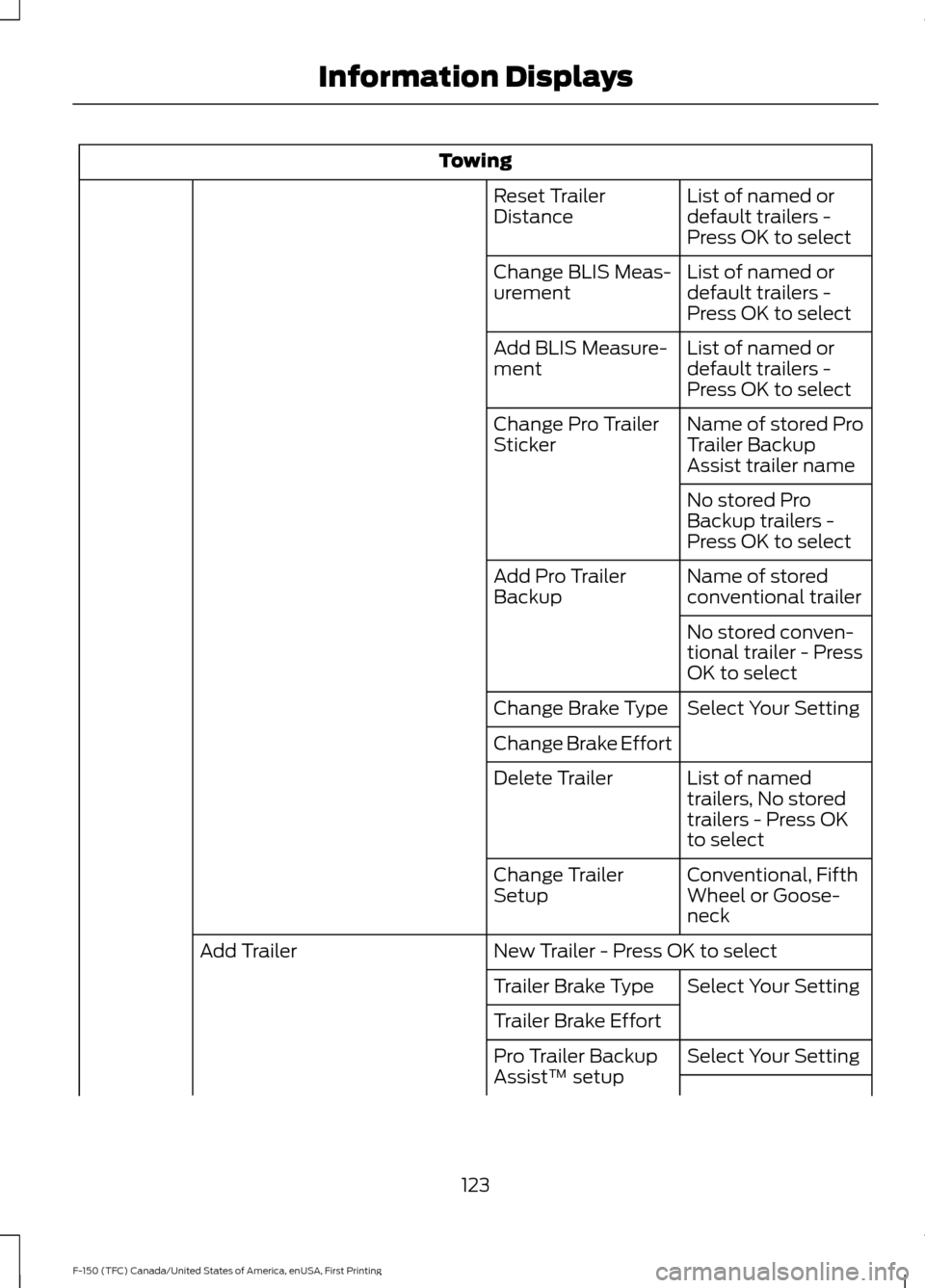
Towing
List of named or
default trailers -
Press OK to select
Reset Trailer
Distance
List of named or
default trailers -
Press OK to select
Change BLIS Meas-
urement
List of named or
default trailers -
Press OK to select
Add BLIS Measure-
ment
Name of stored Pro
Trailer Backup
Assist trailer name
Change Pro Trailer
Sticker
No stored Pro
Backup trailers -
Press OK to select
Name of stored
conventional trailer
Add Pro Trailer
Backup
No stored conven-
tional trailer - Press
OK to select
Select Your Setting
Change Brake Type
Change Brake Effort
List of named
trailers, No stored
trailers - Press OK
to select
Delete Trailer
Conventional, Fifth
Wheel or Goose-
neck
Change Trailer
Setup
New Trailer - Press OK to select
Add Trailer
Select Your Setting
Trailer Brake Type
Trailer Brake Effort
Select Your Setting
Pro Trailer Backup
Assist™ setup
123
F-150 (TFC) Canada/United States of America, enUSA, First Printing Information Displays
Page 127 of 599
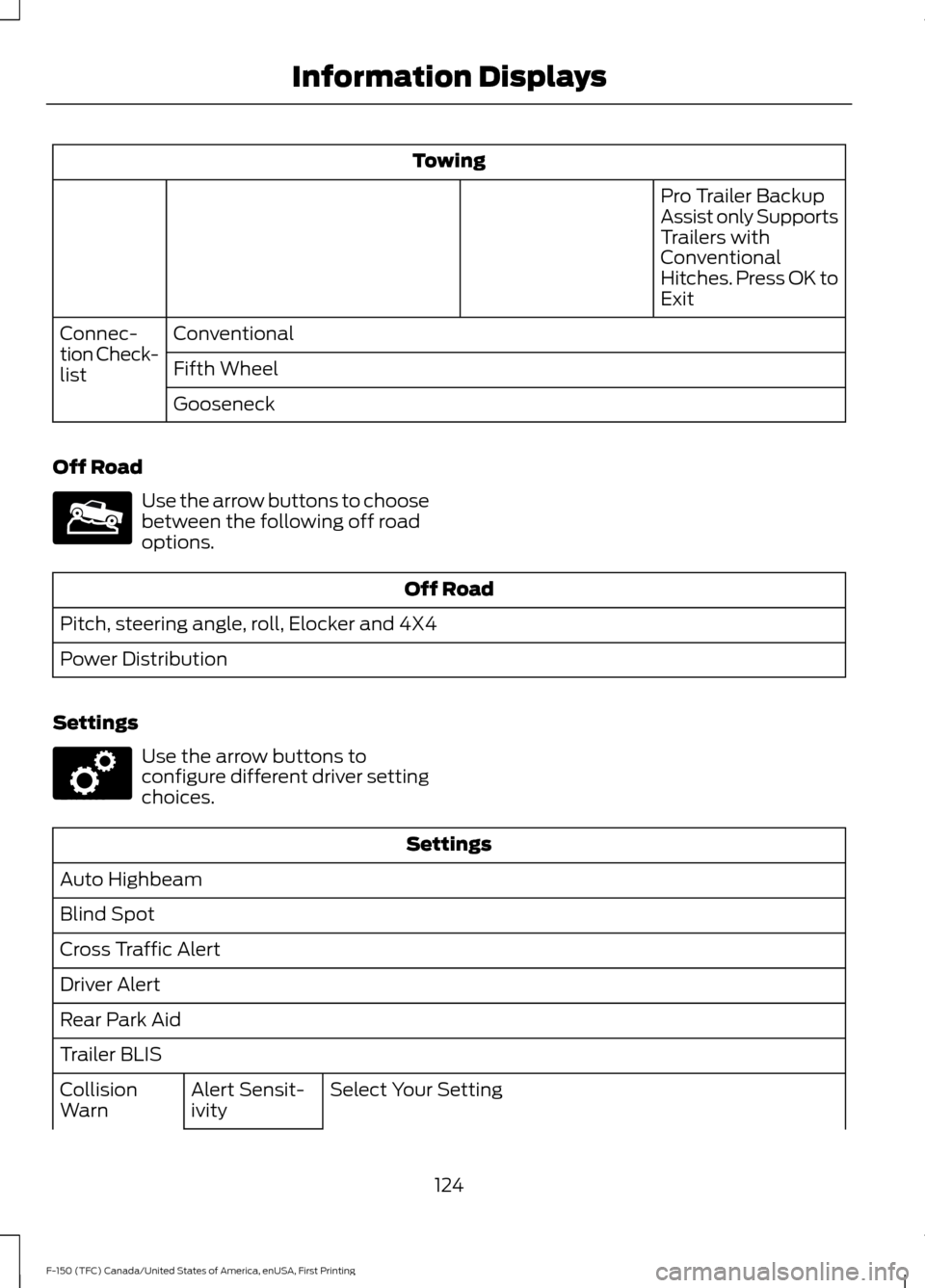
Towing
Pro Trailer Backup
Assist only Supports
Trailers with
Conventional
Hitches. Press OK to
Exit
Conventional
Connec-
tion Check-
list Fifth Wheel
Gooseneck
Off Road Use the arrow buttons to choose
between the following off road
options.
Off Road
Pitch, steering angle, roll, Elocker and 4X4
Power Distribution
Settings Use the arrow buttons to
configure different driver setting
choices.
Settings
Auto Highbeam
Blind Spot
Cross Traffic Alert
Driver Alert
Rear Park Aid
Trailer BLIS Select Your Setting
Alert Sensit-
ivity
Collision
Warn
124
F-150 (TFC) Canada/United States of America, enUSA, First Printing Information DisplaysE176097 E176098
Page 128 of 599
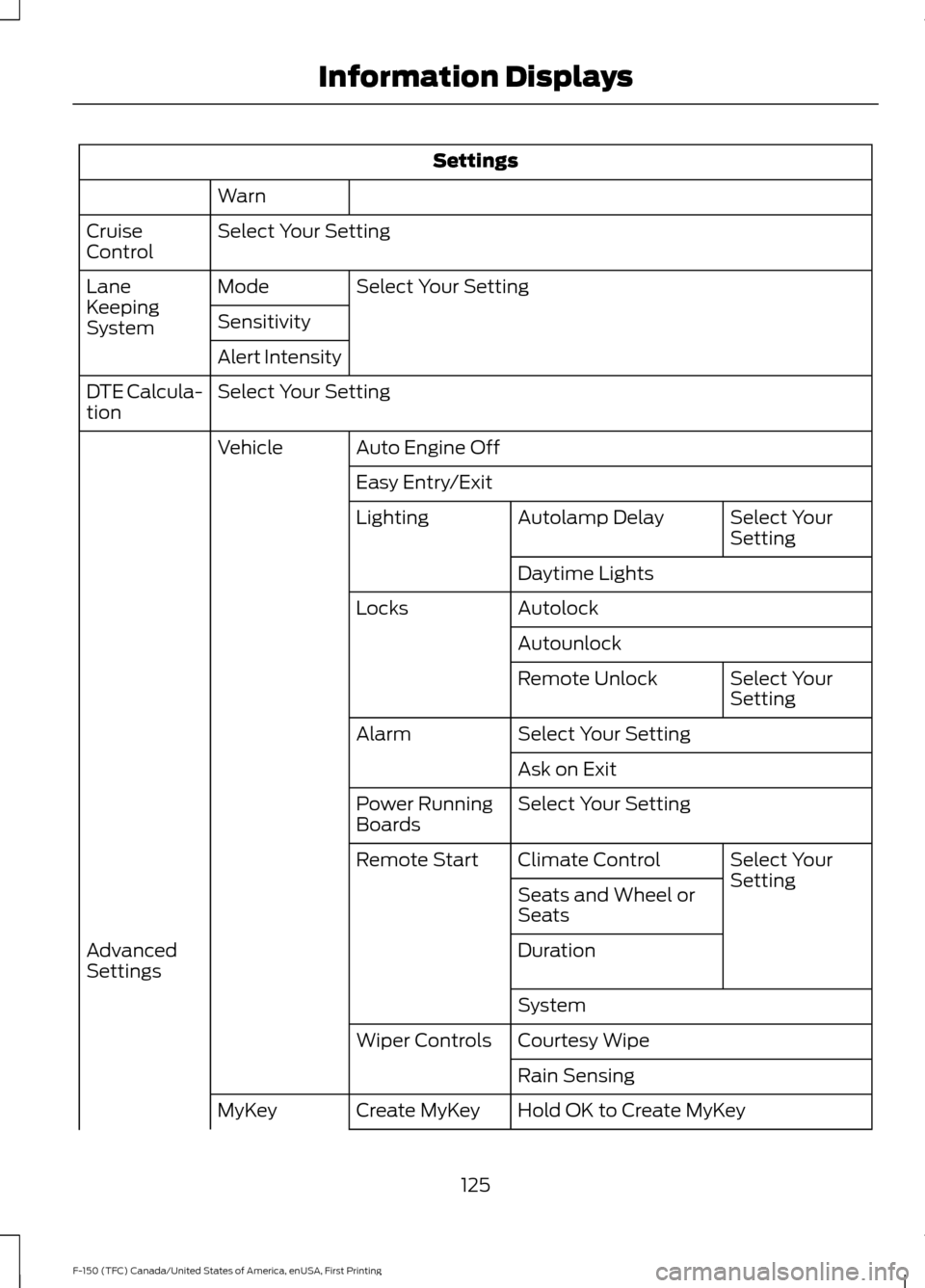
Settings
Warn
Select Your Setting
Cruise
Control
Select Your Setting
Mode
Lane
Keeping
System Sensitivity
Alert Intensity
Select Your Setting
DTE Calcula-
tion
Auto Engine Off
Vehicle
Easy Entry/Exit Select Your
Setting
Autolamp Delay
Lighting
Daytime Lights
Autolock
Locks
Autounlock Select Your
Setting
Remote Unlock
Select Your Setting
Alarm
Ask on Exit
Select Your Setting
Power Running
Boards
Select Your
Setting
Climate Control
Remote Start
Seats and Wheel or
Seats
Duration
Advanced
Settings
System
Courtesy Wipe
Wiper Controls
Rain Sensing
Hold OK to Create MyKey
Create MyKey
MyKey
125
F-150 (TFC) Canada/United States of America, enUSA, First Printing Information Displays
Page 129 of 599
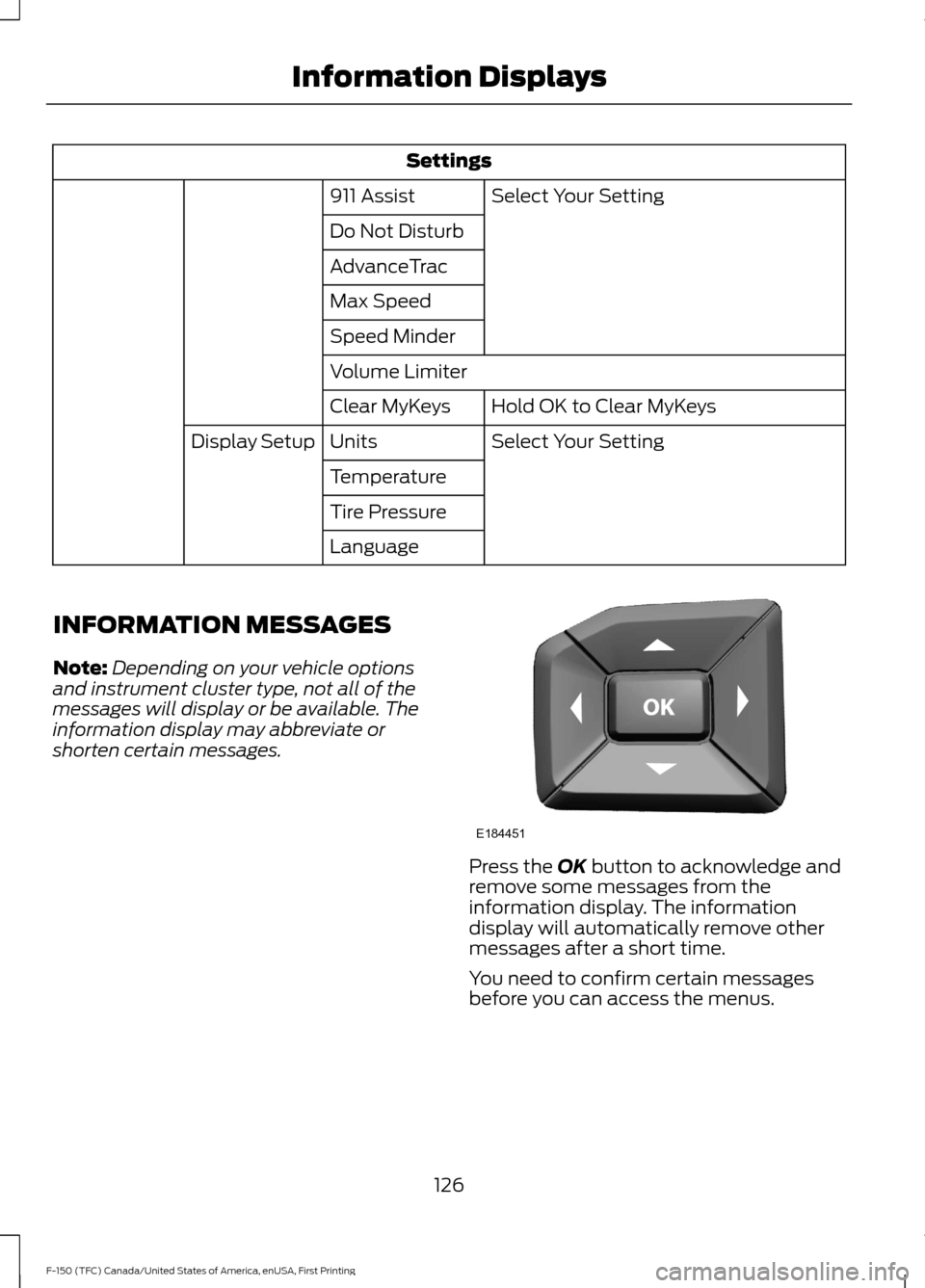
Settings
Select Your Setting
911 Assist
Do Not Disturb
AdvanceTrac
Max Speed
Speed Minder
Volume Limiter
Hold OK to Clear MyKeys
Clear MyKeys
Select Your Setting
Units
Display Setup
Temperature
Tire Pressure
Language
INFORMATION MESSAGES
Note: Depending on your vehicle options
and instrument cluster type, not all of the
messages will display or be available. The
information display may abbreviate or
shorten certain messages. Press the OK button to acknowledge and
remove some messages from the
information display. The information
display will automatically remove other
messages after a short time.
You need to confirm certain messages
before you can access the menus.
126
F-150 (TFC) Canada/United States of America, enUSA, First Printing Information DisplaysE184451
Page 130 of 599
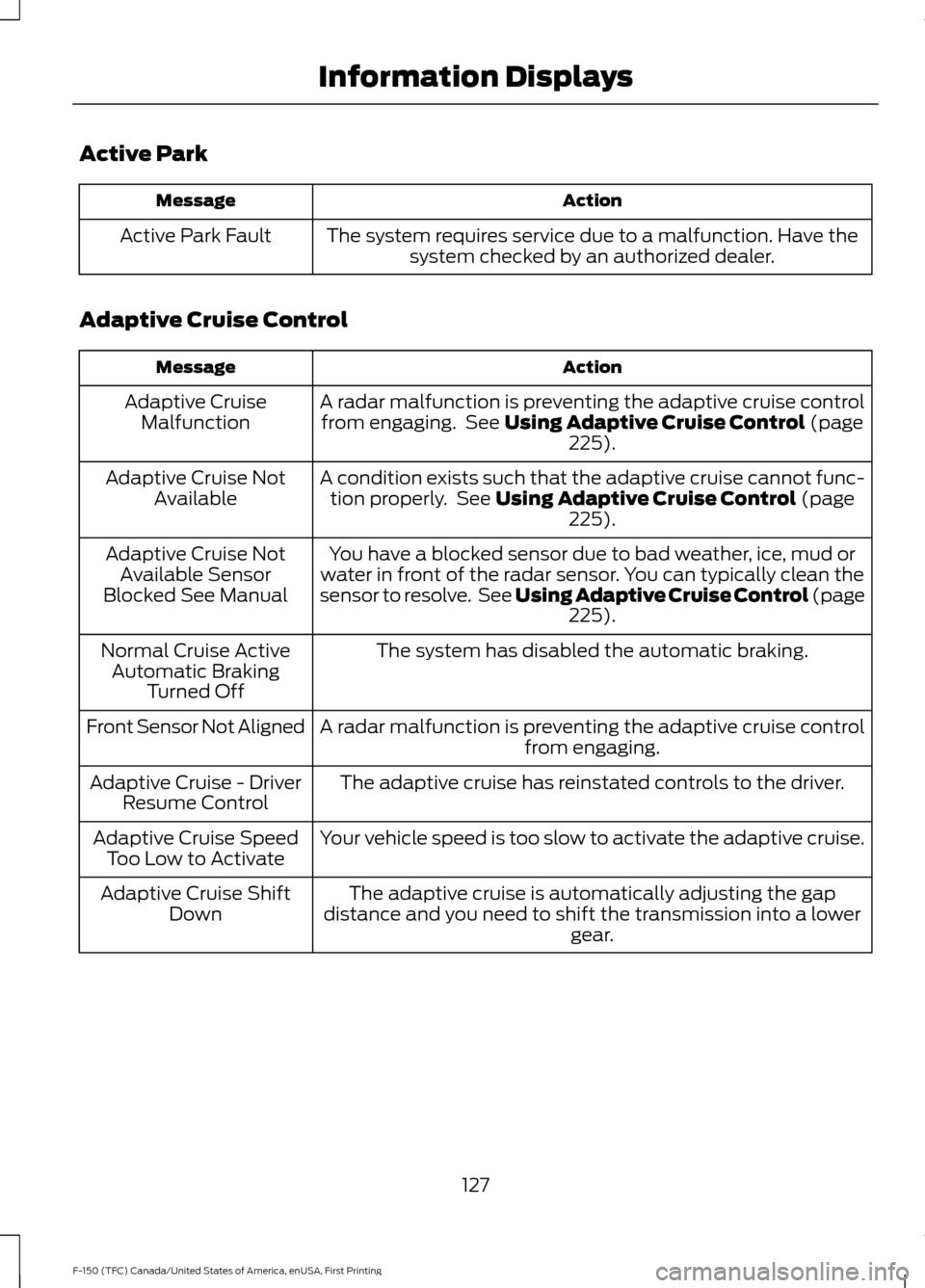
Active Park
Action
Message
The system requires service due to a malfunction. Have thesystem checked by an authorized dealer.
Active Park Fault
Adaptive Cruise Control Action
Message
A radar malfunction is preventing the adaptive cruise controlfrom engaging. See Using Adaptive Cruise Control (page
225).
Adaptive Cruise
Malfunction
A condition exists such that the adaptive cruise cannot func-tion properly. See
Using Adaptive Cruise Control (page
225).
Adaptive Cruise Not
Available
You have a blocked sensor due to bad weather, ice, mud or
water in front of the radar sensor. You can typically clean the
sensor to resolve. See Using Adaptive Cruise Control
(page
225).
Adaptive Cruise Not
Available Sensor
Blocked See Manual
The system has disabled the automatic braking.
Normal Cruise Active
Automatic Braking Turned Off
A radar malfunction is preventing the adaptive cruise control from engaging.
Front Sensor Not Aligned
The adaptive cruise has reinstated controls to the driver.
Adaptive Cruise - Driver
Resume Control
Your vehicle speed is too slow to activate the adaptive cruise.
Adaptive Cruise Speed
Too Low to Activate
The adaptive cruise is automatically adjusting the gap
distance and you need to shift the transmission into a lower gear.
Adaptive Cruise Shift
Down
127
F-150 (TFC) Canada/United States of America, enUSA, First Printing Information Displays
Page 131 of 599
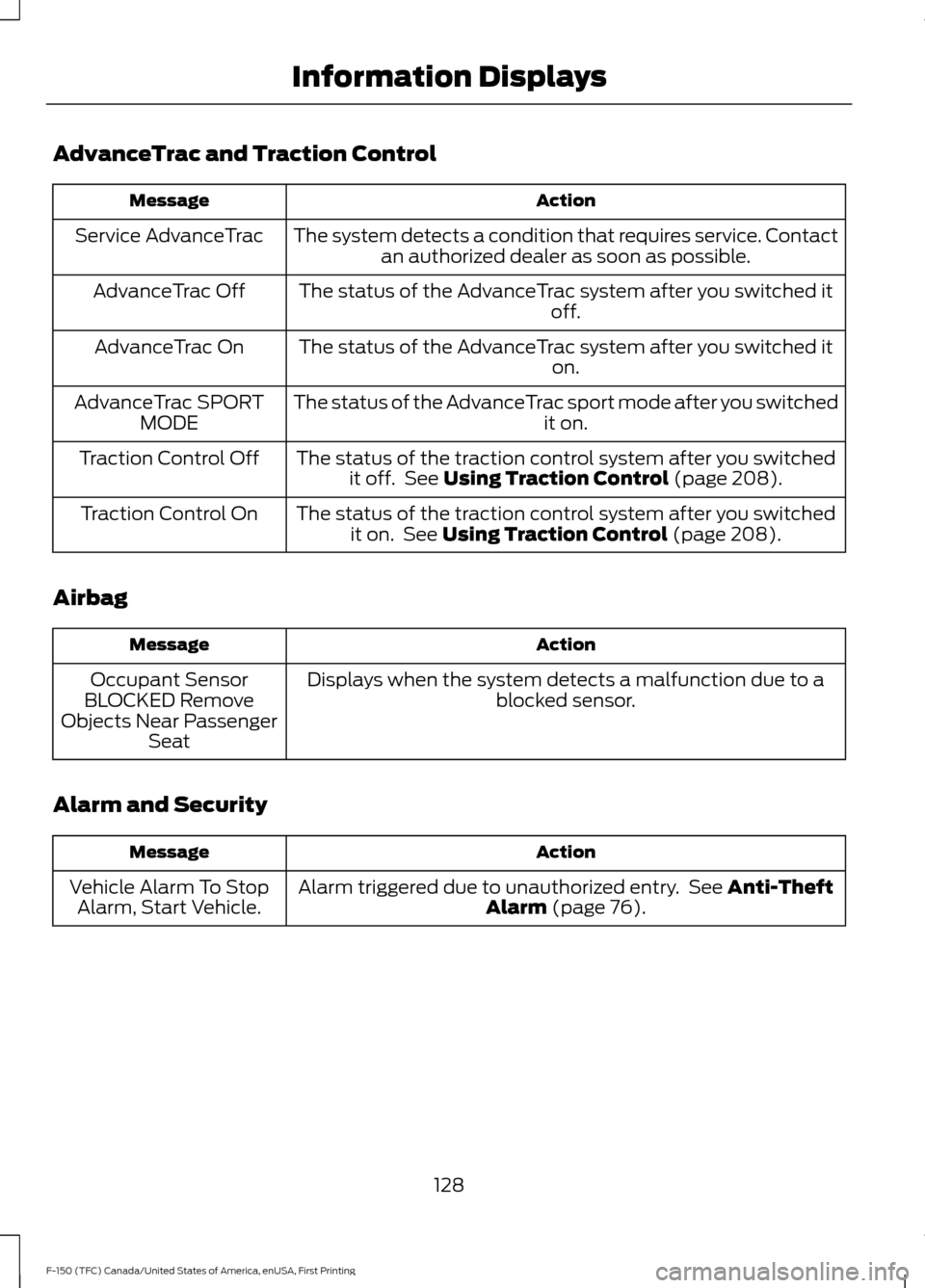
AdvanceTrac and Traction Control
Action
Message
The system detects a condition that requires service. Contactan authorized dealer as soon as possible.
Service AdvanceTrac
The status of the AdvanceTrac system after you switched it off.
AdvanceTrac Off
The status of the AdvanceTrac system after you switched it on.
AdvanceTrac On
The status of the AdvanceTrac sport mode after you switched it on.
AdvanceTrac SPORT
MODE
The status of the traction control system after you switchedit off. See Using Traction Control (page 208).
Traction Control Off
The status of the traction control system after you switchedit on. See
Using Traction Control (page 208).
Traction Control On
Airbag Action
Message
Displays when the system detects a malfunction due to a blocked sensor.
Occupant Sensor
BLOCKED Remove
Objects Near Passenger Seat
Alarm and Security Action
Message
Alarm triggered due to unauthorized entry. See
Anti-Theft
Alarm (page 76).
Vehicle Alarm To Stop
Alarm, Start Vehicle.
128
F-150 (TFC) Canada/United States of America, enUSA, First Printing Information Displays