flat FORD F150 2017 13.G Workshop Manual
[x] Cancel search | Manufacturer: FORD, Model Year: 2017, Model line: F150, Model: FORD F150 2017 13.GPages: 599, PDF Size: 7.34 MB
Page 383 of 599
TECHNICAL SPECIFICATIONS
Wheel Lug Nut Torque Specifications
WARNING
When you install a wheel, always remove any corrosion, dirt or foreign materials
present on the mounting surfaces of the wheel or the surface of the wheel hub,
brake drum or brake disc that contacts the wheel. Make sure to secure any fasteners
that attach the rotor to the hub so they do not interfere with the mounting surfaces of
the wheel. Installing wheels without correct metal-to-metal contact at the wheel mounting
surfaces can cause the wheel nuts to loosen and the wheel to come off while your vehicle
is in motion, resulting in loss of vehicle control, personal injury or death. lb.ft (Nm)
Bolt size
150 lb.ft (204 Nm)
M14 x 1.5
* Torque specifications are for nut and bolt threads free of dirt and rust. Use only Ford
recommended replacement fasteners.
Retighten the lug nuts to the specified torque within 100 miles (160 kilometers) after any
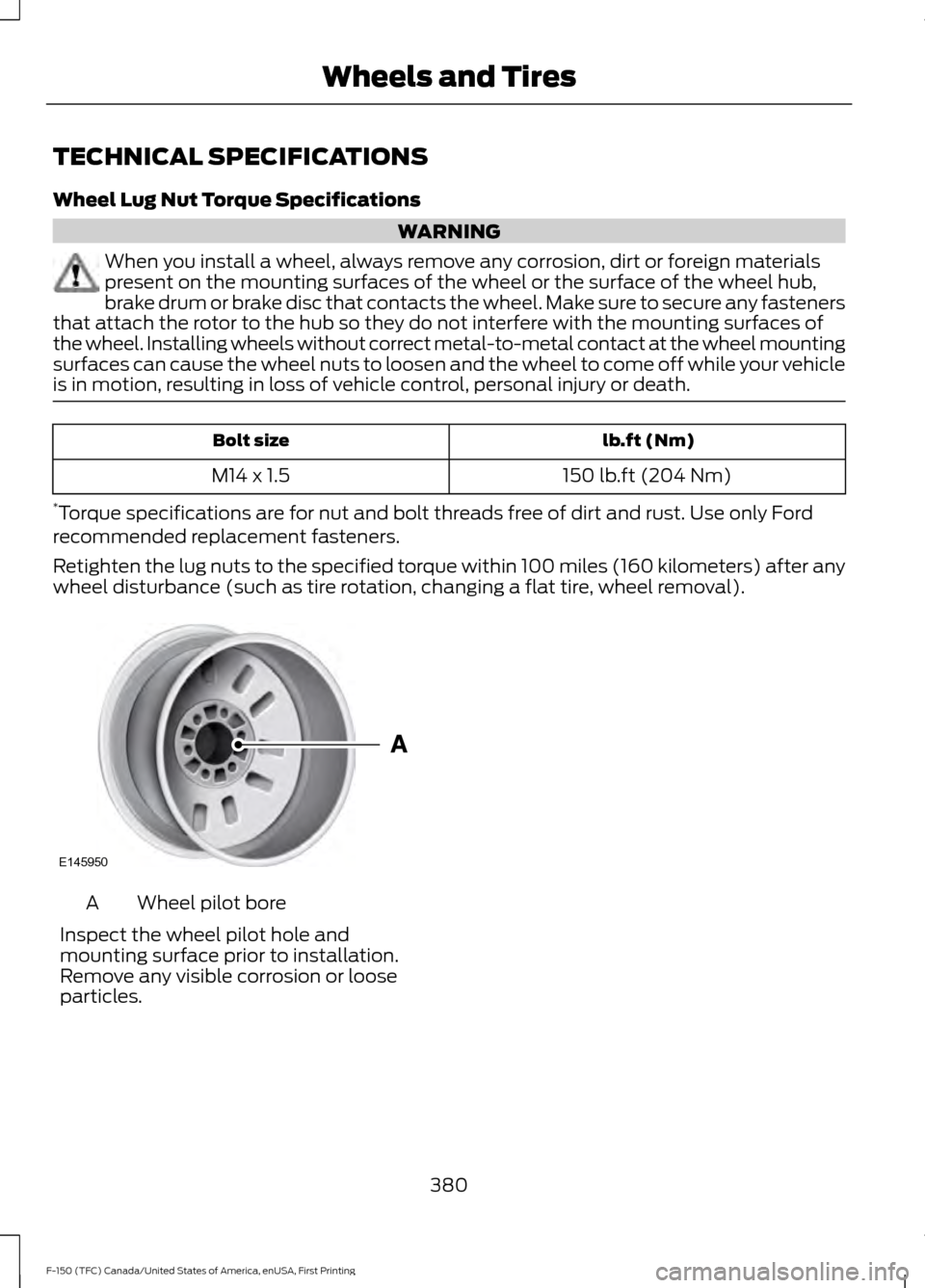
wheel disturbance (such as tire rotation, changing a flat tire, wheel removal). Wheel pilot bore
A
Inspect the wheel pilot hole and
mounting surface prior to installation.
Remove any visible corrosion or loose
particles.
380
F-150 (TFC) Canada/United States of America, enUSA, First Printing Wheels and TiresE145950
Page 442 of 599
SYNC™ APPLICATIONS AND
SERVICES (If Equipped)
In order for the following features to work,
your cellular phone must be compatible
with SYNC. To check your phone's
compatibility, visit www.SYNCMyRide.com,
www.SYNCMyRide.ca or
www.syncmaroute.ca.
• 911 Assist: Can alert 911 in the event of
an emergency.
• SYNC AppLink: Allows you to connect
to and use certain applications such as
Spotify and Glympse (if your phone is
compatible).
These features may require activation.
Available AppLink enabled apps vary by
market.
911 Assist WARNINGS
Unless the 911 Assist setting is set on
before a crash, the system will not
dial for help which could delay
response time, potentially increasing the
risk of serious injury or death after a crash. Do not wait for 911 Assist to make an
emergency call if you can do it
yourself. Dial emergency services
immediately to avoid delayed response
time which could increase the risk of
serious injury or death after a crash. If you
do not hear 911 Assist within five seconds
of the crash, the system or phone may be
damaged or non-functional. Always place your phone in a secure
location in your vehicle so it does not
become a projectile or get damaged
in a crash. Failure to do so may cause
serious injury to someone or damage the
phone which could prevent 911 Assist from
working properly. Note:
The SYNC 911 Assist feature must be
set on before the incident.
Note: The SYNC 911 Assist feature only
operates in the U.S., Canada or in a territory
in which 911 is the emergency number.
Note: Before setting this feature on, make
sure that you read the 911 Assist Privacy
Notice later in this section for important
information.
Note: If any user switches 911 Assist to on
or off, that setting applies for all paired
phones. If 911 Assist is switched off, either
a voice message plays or a display message
or an icon comes on when your vehicle is
started and after a previously paired phone
connects.
Note: Every phone operates differently.
While SYNC 911 Assist works with most
cellular phones, some may have trouble
using this feature.
If a crash deploys an airbag (excluding
knee airbags and rear inflatable safety
belts [if equipped]) or activates the fuel
pump shut-off, your SYNC-equipped
vehicle may be able to contact emergency
services by dialing 911 through a paired and
connected Bluetooth-enabled phone. You
can learn more about the 911 Assist
feature, visit www.SYNCMyRide.com,
www.SYNCMyRide.ca or
www.syncmaroute.ca.
See
Supplementary Restraints System
(page 45). Important information about
airbag deployment is in this chapter.
See
Roadside Emergencies (page 293).
Important information about the fuel pump
shut-off is in this chapter.
439
F-150 (TFC) Canada/United States of America, enUSA, First Printing SYNC™
(If Equipped)
Page 470 of 599
Note:
Before setting this feature on, make
sure that you read the 911 Assist Privacy
Notice later in this section for important
information.
Note: If any user sets 911 Assist to on or off,
that setting applies for all paired phones. If
911 Assist is switched off and the phone is
connected to SYNC, an icon displays on the
status bar.
Note: Every phone operates differently.
While SYNC 911 Assist works with most
cellular phones, some may have trouble
using this feature.
If a crash deploys an airbag (excluding
knee airbags and rear inflatable safety
belts [if equipped]) or activates the fuel
pump shut-off, your SYNC-equipped
vehicle may be able to contact emergency
services by dialing 911 through a paired and
connected Bluetooth-enabled phone. You
can learn more about the 911 Assist
feature, by visiting: Website
www.owner.ford.com
www.syncmyride.ca
www.syncmaroute.ca
See Supplementary Restraints System
(page 45). Important information about
airbag deployment is in this chapter.
See
Roadside Emergencies (page 293).
Important information about the fuel pump
shut-off is in this chapter.
To switch 911 Assist on and off please view
the settings information. See
Settings
(page 509). To make sure that 911 Assist works
correctly:
•
SYNC must be powered and working
properly at the time of the incident and
throughout feature activation and use.
• The 911 Assist feature must be set on
before the incident.
• You must pair and connect a
Bluetooth-enabled and compatible
cell phone to SYNC.
• A connected Bluetooth-enabled phone
must have the ability to make and
maintain an outgoing call at the time
of the incident.
• A connected Bluetooth-enabled phone
must have adequate network coverage,
battery power and signal strength.
• The vehicle must have battery power
and be located in the U.S., Canada or
in a territory in which 911 is the
emergency number.
In the Event of a Crash
Not all crashes will deploy an airbag or
activate the fuel pump shut-off (the
triggers for 911 Assist). If a connected cell
phone sustains damage or loses its
connection to SYNC during a crash, SYNC
will search for and try to connect to a
previously paired cell phone; SYNC will
then attempt to call the emergency
services.
Before making the call:
• SYNC provides a short window of time
(about 10 seconds) to cancel the call.
If you fail to cancel the call, SYNC
attempts to dial 911.
• SYNC says the following, or a similar
message: "SYNC will attempt to call
911, to cancel the call, press Cancel on
your screen or press and hold the
phone button on your steering wheel."
467
F-150 (TFC) Canada/United States of America, enUSA, First Printing SYNC™ 3
(If Equipped)
Page 540 of 599
PROTECT YOURSELF FROM THE RISING
COST OF VEHICLE REPAIRS WITH A FORD
PROTECT EXTENDED SERVICE PLAN.
Ford Protect Extended Service
Plans (U.S. Only)
Ford Protect Extended Service Plan means
peace of mind. It’
s the extended service
plan backed by Ford Motor Company, and
provides more protection beyond the New
Vehicle Limited Warranty coverage. When
you visit your Ford Dealer, Insist on genuine
Ford Protect extended service plans!
Ford Protect Can Quickly Pay for Itself
One trip to the Service Center could easily
exceed the price of your Ford Protect
Extended Service Plan. With Ford Protect
you minimize your risk for unexpected
repair bills and rising repair costs.
Up to 1,000+ Covered Vehicle
Components
There are four mechanical Ford Protect
Extended Service Plans with different
levels of coverage. Ask your authorized
dealer for details.
1. PremiumCARE - Our most comprehensive coverage. With over
1,000 covered components, this plan
is so complete it’ s probably easier to
list what’ s not covered.
2. ExtraCARE - Covers 113 components, and includes many high-tech items.
3. BaseCARE - Covers 84 components.
4. PowertrainCARE - Covers 29 critical components.
Ford Protect Extended Service Plans are
honored by all authorized Ford dealers in
the U.S., Canada and Mexico. That means you get:
•
Reliable, quality service at any Ford or
Lincoln dealership.
• Repairs performed by factory trained
technicians, using genuine parts.
Rental Car Reimbursement
1st day Rental Benefit
If you bring your car into your dealer for
service, we ’ll give you a loaner to use for
the day.
Extended Rental Benefits
If your vehicle is kept overnight for covered
repairs, you are eligible for rental car
coverage, including bumper to bumper
warranty repairs, and Field Service Actions.
Roadside Assistance
Exclusive 24/7 roadside assistance,
including:
• Towing, flat-tire change and battery
jump starts.
• Out of fuel and lock-out assistance.
• Travel expense reimbursement for
lodging, meals and rental car.
• Assistance for taxi, shuttle, rental car
coverage or other transportation.
Transferable Coverage
If you sell your vehicle before your Ford
Protect Extended Service plan coverage
expires, you can transfer any remaining
coverage to the new owner. Which should
give you and your potential buyer a little
more peace of mind.
537
F-150 (TFC) Canada/United States of America, enUSA, First Printing Ford Protect
Page 546 of 599
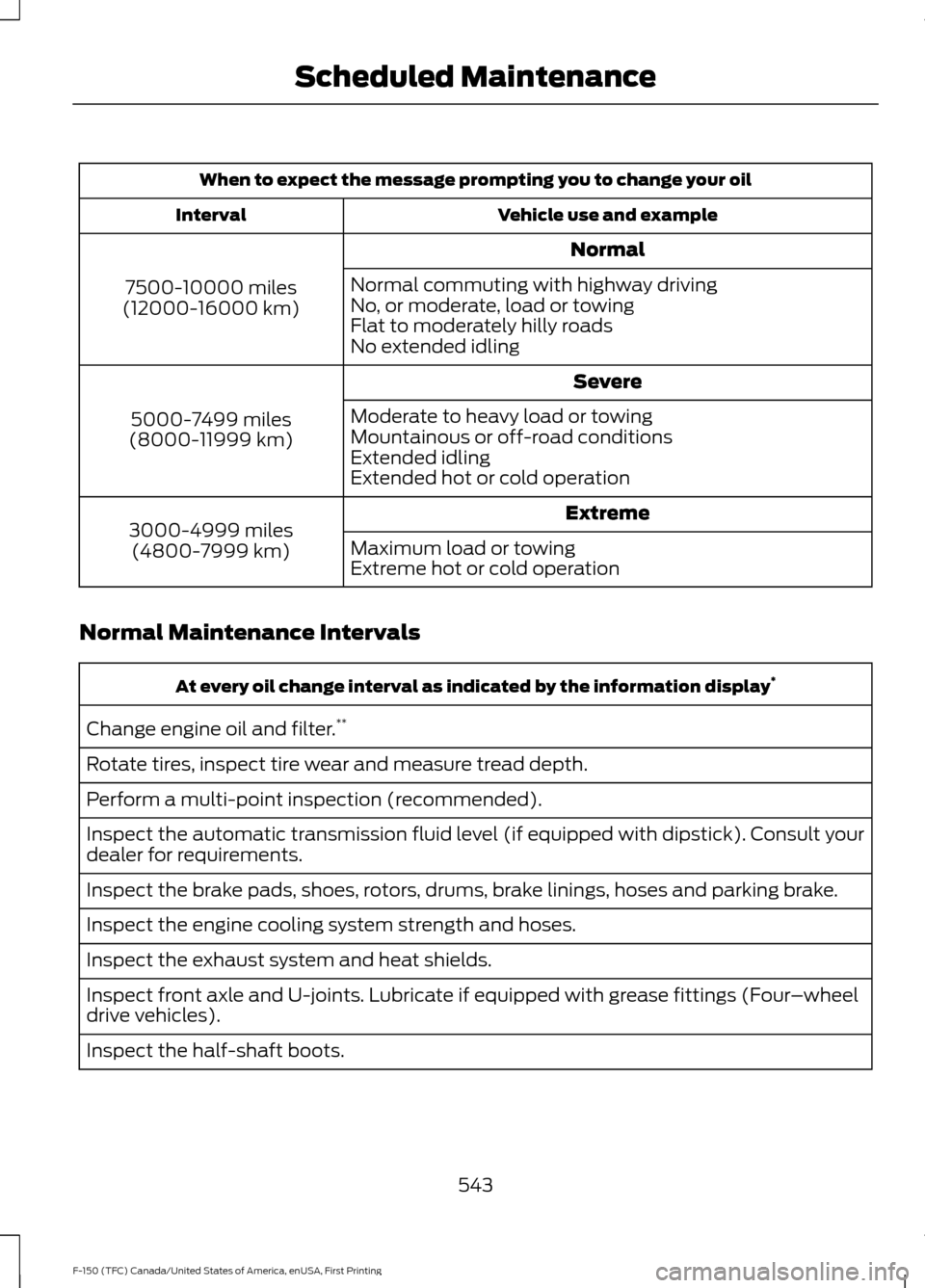
When to expect the message prompting you to change your oil
Vehicle use and example
Interval
Normal
7500-10000 miles
(12000-16000 km) Normal commuting with highway driving
No, or moderate, load or towing
Flat to moderately hilly roads
No extended idling
Severe
5000-7499 miles
(8000-11999 km) Moderate to heavy load or towing
Mountainous or off-road conditions
Extended idling
Extended hot or cold operation
Extreme
3000-4999 miles
(4800-7999 km) Maximum load or towing
Extreme hot or cold operation
Normal Maintenance Intervals At every oil change interval as indicated by the information display
*
Change engine oil and filter. **
Rotate tires, inspect tire wear and measure tread depth.
Perform a multi-point inspection (recommended).
Inspect the automatic transmission fluid level (if equipped with dipstick). Consult your
dealer for requirements.
Inspect the brake pads, shoes, rotors, drums, brake linings, hoses and parking brake.
Inspect the engine cooling system strength and hoses.
Inspect the exhaust system and heat shields.
Inspect front axle and U-joints. Lubricate if equipped with grease fittings (Four –wheel
drive vehicles).
Inspect the half-shaft boots.
543
F-150 (TFC) Canada/United States of America, enUSA, First Printing Scheduled Maintenance
Page 592 of 599
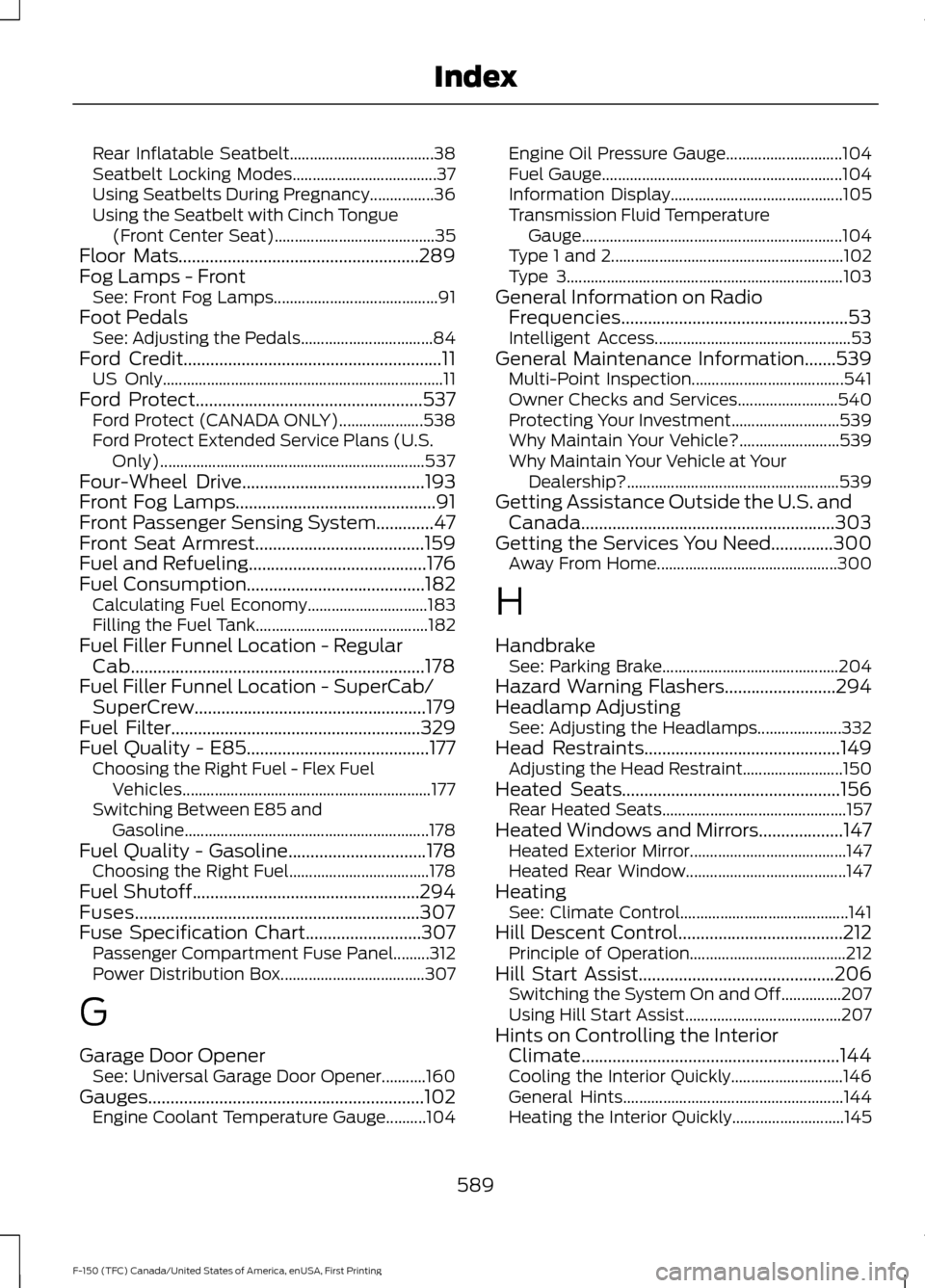
Rear Inflatable Seatbelt....................................
38
Seatbelt Locking Modes.................................... 37
Using Seatbelts During Pregnancy................36
Using the Seatbelt with Cinch Tongue (Front Center Seat)........................................ 35
Floor Mats......................................................289
Fog Lamps - Front See: Front Fog Lamps......................................... 91
Foot Pedals See: Adjusting the Pedals................................. 84
Ford Credit..........................................................11
US Only...................................................................... 11
Ford Protect
...................................................537
Ford Protect (CANADA ONLY)..................... 538
Ford Protect Extended Service Plans (U.S. Only).................................................................. 537
Four-Wheel Drive
.........................................193
Front Fog Lamps.............................................91
Front Passenger Sensing System.............47
Front Seat Armrest......................................159
Fuel and Refueling........................................176
Fuel Consumption........................................182 Calculating Fuel Economy.............................. 183
Filling the Fuel Tank........................................... 182
Fuel Filler Funnel Location - Regular Cab..................................................................178
Fuel Filler Funnel Location - SuperCab/ SuperCrew....................................................179
Fuel Filter
........................................................329
Fuel Quality - E85.........................................177 Choosing the Right Fuel - Flex Fuel
Vehicles.............................................................. 177
Switching Between E85 and Gasoline............................................................. 178
Fuel Quality - Gasoline
...............................178
Choosing the Right Fuel................................... 178
Fuel Shutoff...................................................294
Fuses................................................................307
Fuse Specification Chart..........................307 Passenger Compartment Fuse Panel.........312
Power Distribution Box.................................... 307
G
Garage Door Opener See: Universal Garage Door Opener...........160
Gauges ..............................................................
102
Engine Coolant Temperature Gauge..........104 Engine Oil Pressure Gauge.............................
104
Fuel Gauge............................................................ 104
Information Display........................................... 105
Transmission Fluid Temperature Gauge................................................................. 104
Type 1 and 2.......................................................... 102
Type 3..................................................................... 103
General Information on Radio Frequencies...................................................53
Intelligent Access................................................. 53
General Maintenance Information
.......539
Multi-Point Inspection...................................... 541
Owner Checks and Services......................... 540
Protecting Your Investment........................... 539
Why Maintain Your Vehicle?......................... 539
Why Maintain Your Vehicle at Your Dealership?..................................................... 539
Getting Assistance Outside the U.S. and Canada.........................................................303
Getting the Services You Need..............300 Away From Home............................................. 300
H
Handbrake See: Parking Brake............................................ 204
Hazard Warning Flashers.........................294
Headlamp Adjusting See: Adjusting the Headlamps..................... 332
Head Restraints
............................................149
Adjusting the Head Restraint......................... 150
Heated Seats
.................................................156
Rear Heated Seats.............................................. 157
Heated Windows and Mirrors...................147 Heated Exterior Mirror....................................... 147
Heated Rear Window........................................ 147
Heating See: Climate Control.......................................... 141
Hill Descent Control.....................................212 Principle of Operation....................................... 212
Hill Start Assist
............................................206
Switching the System On and Off...............207
Using Hill Start Assist....................................... 207
Hints on Controlling the Interior Climate..........................................................144
Cooling the Interior Quickly............................ 146
General Hints....................................................... 144
Heating the Interior Quickly............................ 145
589
F-150 (TFC) Canada/United States of America, enUSA, First Printing Index
Page 593 of 599
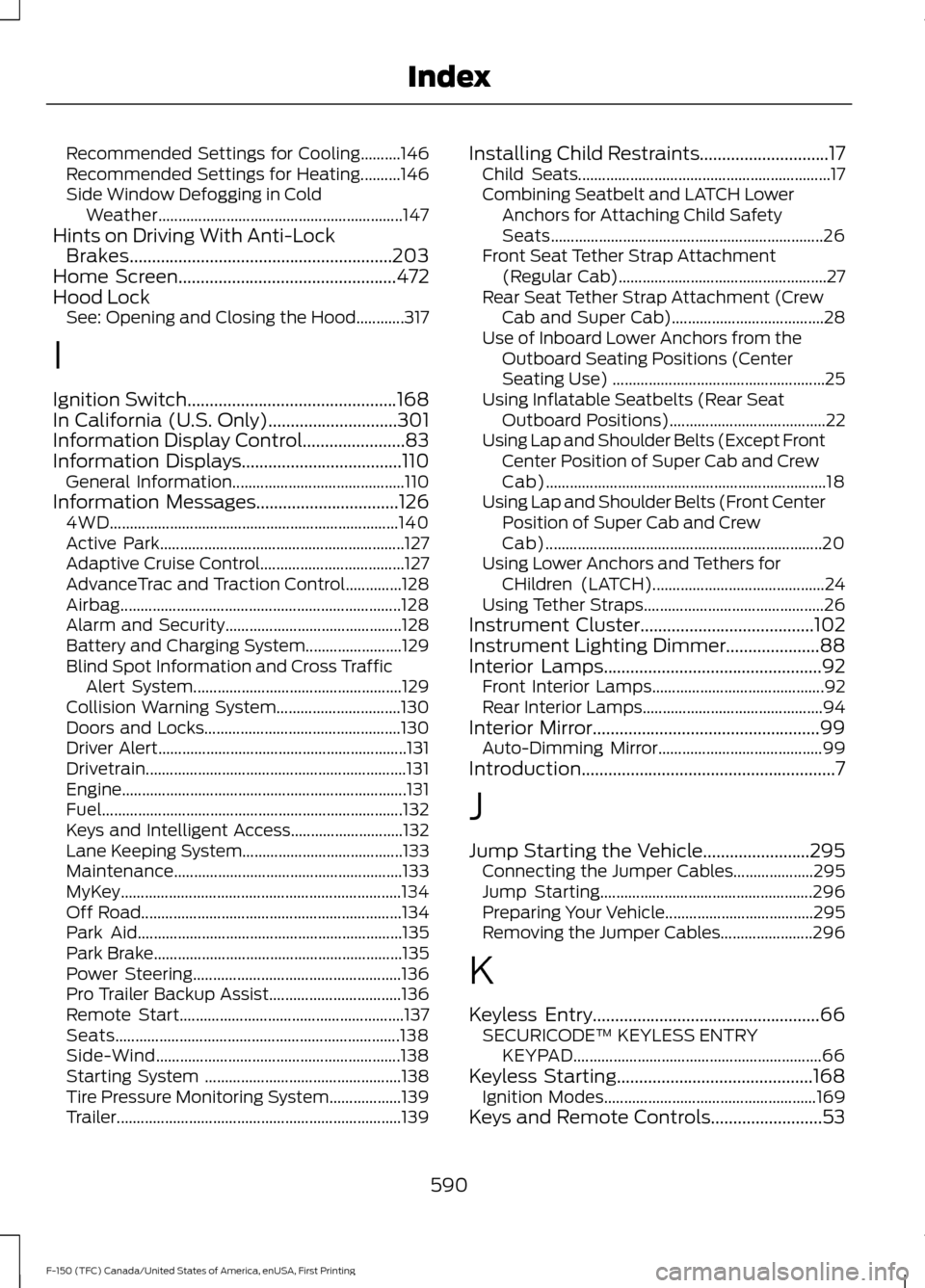
Recommended Settings for Cooling..........146
Recommended Settings for Heating..........146
Side Window Defogging in Cold
Weather............................................................. 147
Hints on Driving With Anti-Lock Brakes...........................................................203
Home Screen.................................................472
Hood Lock See: Opening and Closing the Hood............317
I
Ignition Switch
...............................................168
In California (U.S. Only).............................301
Information Display Control
.......................83
Information Displays....................................110
General Information........................................... 110
Information Messages
................................126
4WD........................................................................\
140
Active Park............................................................. 127
Adaptive Cruise Control.................................... 127
AdvanceTrac and Traction Control..............128
Airbag...................................................................... 128
Alarm and Security............................................ 128
Battery and Charging System........................ 129
Blind Spot Information and Cross Traffic Alert System.................................................... 129
Collision Warning System............................... 130
Doors and Locks................................................. 130
Driver Alert.............................................................. 131
Drivetrain................................................................. 131
Engine....................................................................... 131
Fuel........................................................................\
... 132
Keys and Intelligent Access............................ 132
Lane Keeping System........................................ 133
Maintenance......................................................... 133
MyKey...................................................................... 134
Off Road................................................................. 134
Park Aid.................................................................. 135
Park Brake.............................................................. 135
Power Steering.................................................... 136
Pro Trailer Backup Assist................................. 136
Remote Start........................................................ 137
Seats....................................................................... 138
Side-Wind............................................................. 138
Starting System ................................................. 138
Tire Pressure Monitoring System.................. 139
Trailer....................................................................... 139Installing Child Restraints.............................17
Child Seats............................................................... 17
Combining Seatbelt and LATCH Lower Anchors for Attaching Child Safety
Seats.................................................................... 26
Front Seat Tether Strap Attachment (Regular Cab).................................................... 27
Rear Seat Tether Strap Attachment (Crew Cab and Super Cab)...................................... 28
Use of Inboard Lower Anchors from the Outboard Seating Positions (Center
Seating Use) ..................................................... 25
Using Inflatable Seatbelts (Rear Seat Outboard Positions)....................................... 22
Using Lap and Shoulder Belts (Except Front Center Position of Super Cab and Crew
Cab)...................................................................... 18
Using Lap and Shoulder Belts (Front Center Position of Super Cab and Crew
Cab)..................................................................... 20
Using Lower Anchors and Tethers for CHildren (LATCH)........................................... 24
Using Tether Straps............................................. 26
Instrument Cluster
.......................................102
Instrument Lighting Dimmer.....................88
Interior Lamps
.................................................92
Front Interior Lamps........................................... 92
Rear Interior Lamps............................................. 94
Interior Mirror
...................................................99
Auto-Dimming Mirror......................................... 99
Introduction.........................................................7
J
Jump Starting the Vehicle........................295 Connecting the Jumper Cables.................... 295
Jump Starting..................................................... 296
Preparing Your Vehicle.....................................295
Removing the Jumper Cables....................... 296
K
Keyless Entry...................................................66 SECURICODE™ KEYLESS ENTRY
KEYPAD.............................................................. 66
Keyless Starting............................................168 Ignition Modes..................................................... 169
Keys and Remote Controls.........................53
590
F-150 (TFC) Canada/United States of America, enUSA, First Printing Index