wheel FORD F250 2013 Owners Manual
[x] Cancel search | Manufacturer: FORD, Model Year: 2013, Model line: F250, Model: FORD F250 2013Pages: 577, PDF Size: 7.74 MB
Page 400 of 577
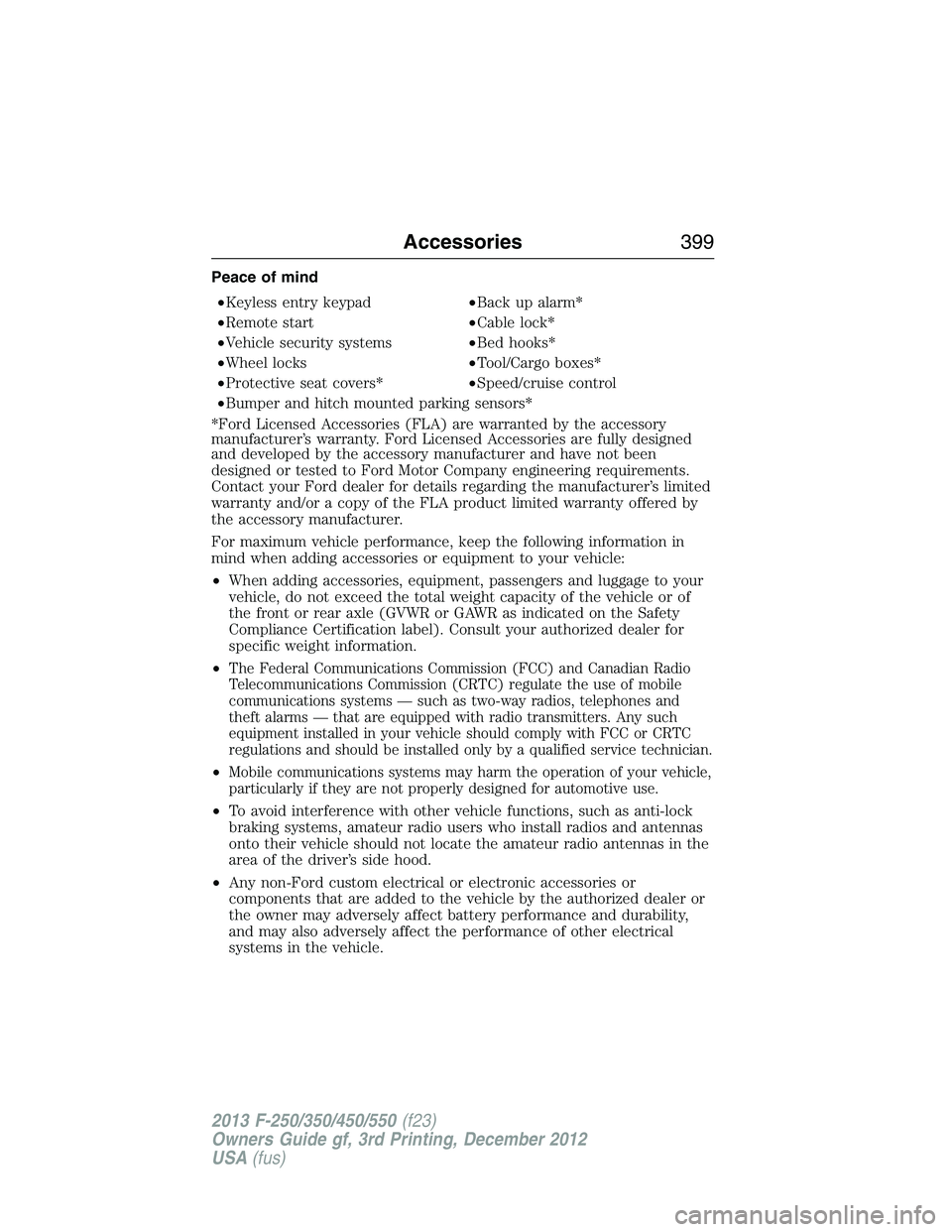
Peace of mind
•Keyless entry keypad•Back up alarm*
•Remote start•Cable lock*
•Vehicle security systems•Bed hooks*
•Wheel locks•Tool/Cargo boxes*
•Protective seat covers*•Speed/cruise control
•Bumper and hitch mounted parking sensors*
*Ford Licensed Accessories (FLA) are warranted by the accessory
manufacturer’s warranty. Ford Licensed Accessories are fully designed
and developed by the accessory manufacturer and have not been
designed or tested to Ford Motor Company engineering requirements.
Contact your Ford dealer for details regarding the manufacturer’s limited
warranty and/or a copy of the FLA product limited warranty offered by
the accessory manufacturer.
For maximum vehicle performance, keep the following information in
mind when adding accessories or equipment to your vehicle:
•When adding accessories, equipment, passengers and luggage to your
vehicle, do not exceed the total weight capacity of the vehicle or of
the front or rear axle (GVWR or GAWR as indicated on the Safety
Compliance Certification label). Consult your authorized dealer for
specific weight information.
•
The Federal Communications Commission (FCC) and Canadian Radio
Telecommunications Commission (CRTC) regulate the use of mobile
communications systems — such as two-way radios, telephones and
theft alarms — that are equipped with radio transmitters. Any such
equipment installed in your vehicle should comply with FCC or CRTC
regulations and should be installed only by a qualified service technician.
•Mobile communications systems may harm the operation of your vehicle,
particularly if they are not properly designed for automotive use.
•To avoid interference with other vehicle functions, such as anti-lock
braking systems, amateur radio users who install radios and antennas
onto their vehicle should not locate the amateur radio antennas in the
area of the driver’s side hood.
•Any non-Ford custom electrical or electronic accessories or
components that are added to the vehicle by the authorized dealer or
the owner may adversely affect battery performance and durability,
and may also adversely affect the performance of other electrical
systems in the vehicle.
Accessories399
2013 F-250/350/450/550(f23)
Owners Guide gf, 3rd Printing, December 2012
USA(fus)
Page 409 of 577
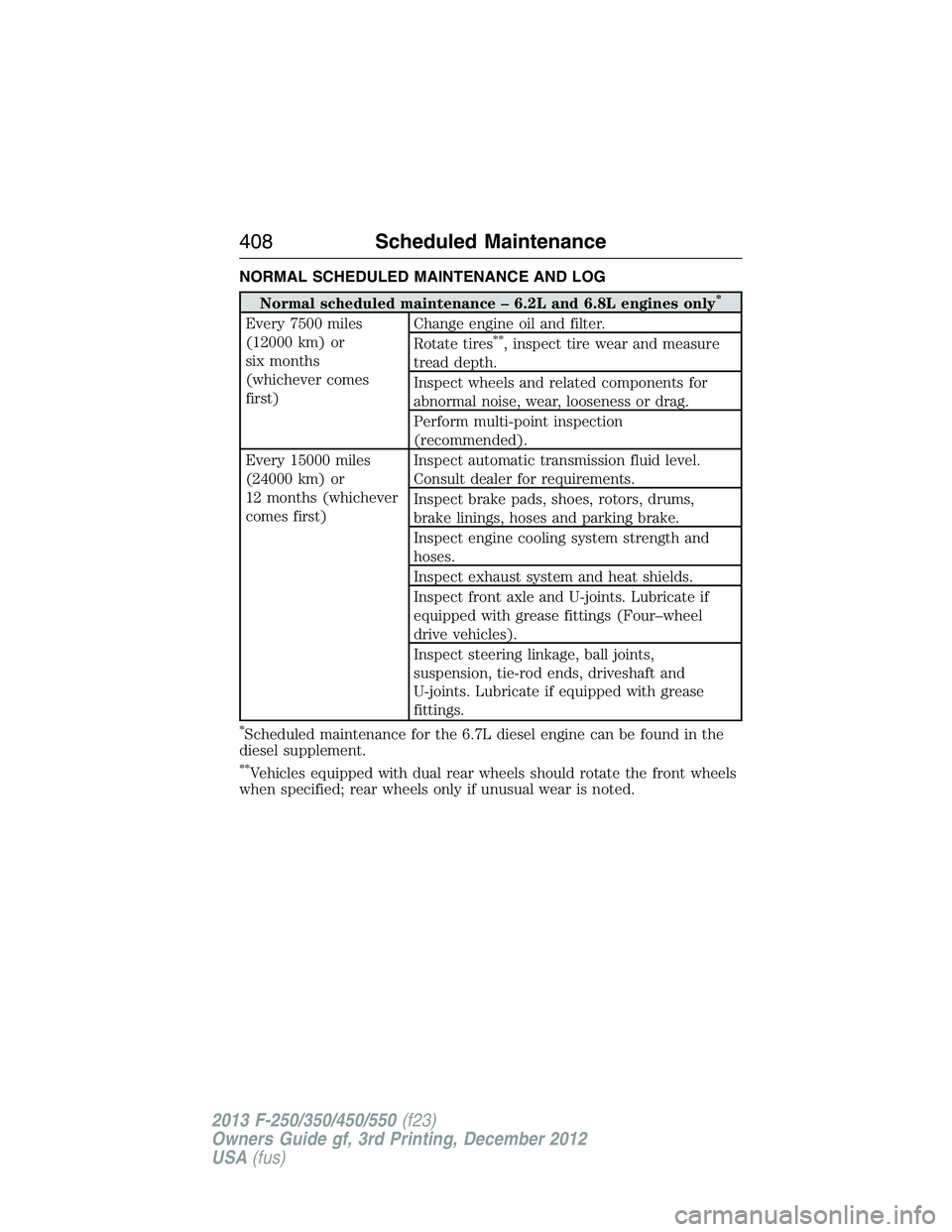
NORMAL SCHEDULED MAINTENANCE AND LOG
Normal scheduled maintenance – 6.2L and 6.8L engines only*
Every 7500 miles
(12000 km) or
six months
(whichever comes
first)Change engine oil and filter.
Rotate tires**, inspect tire wear and measure
tread depth.
Inspect wheels and related components for
abnormal noise, wear, looseness or drag.
Perform multi-point inspection
(recommended).
Every 15000 miles
(24000 km) or
12 months (whichever
comes first)Inspect automatic transmission fluid level.
Consult dealer for requirements.
Inspect brake pads, shoes, rotors, drums,
brake linings, hoses and parking brake.
Inspect engine cooling system strength and
hoses.
Inspect exhaust system and heat shields.
Inspect front axle and U-joints. Lubricate if
equipped with grease fittings (Four–wheel
drive vehicles).
Inspect steering linkage, ball joints,
suspension, tie-rod ends, driveshaft and
U-joints. Lubricate if equipped with grease
fittings.
*Scheduled maintenance for the 6.7L diesel engine can be found in the
diesel supplement.
**Vehicles equipped with dual rear wheels should rotate the front wheels
when specified; rear wheels only if unusual wear is noted.
408Scheduled Maintenance
2013 F-250/350/450/550(f23)
Owners Guide gf, 3rd Printing, December 2012
USA(fus)
Page 410 of 577
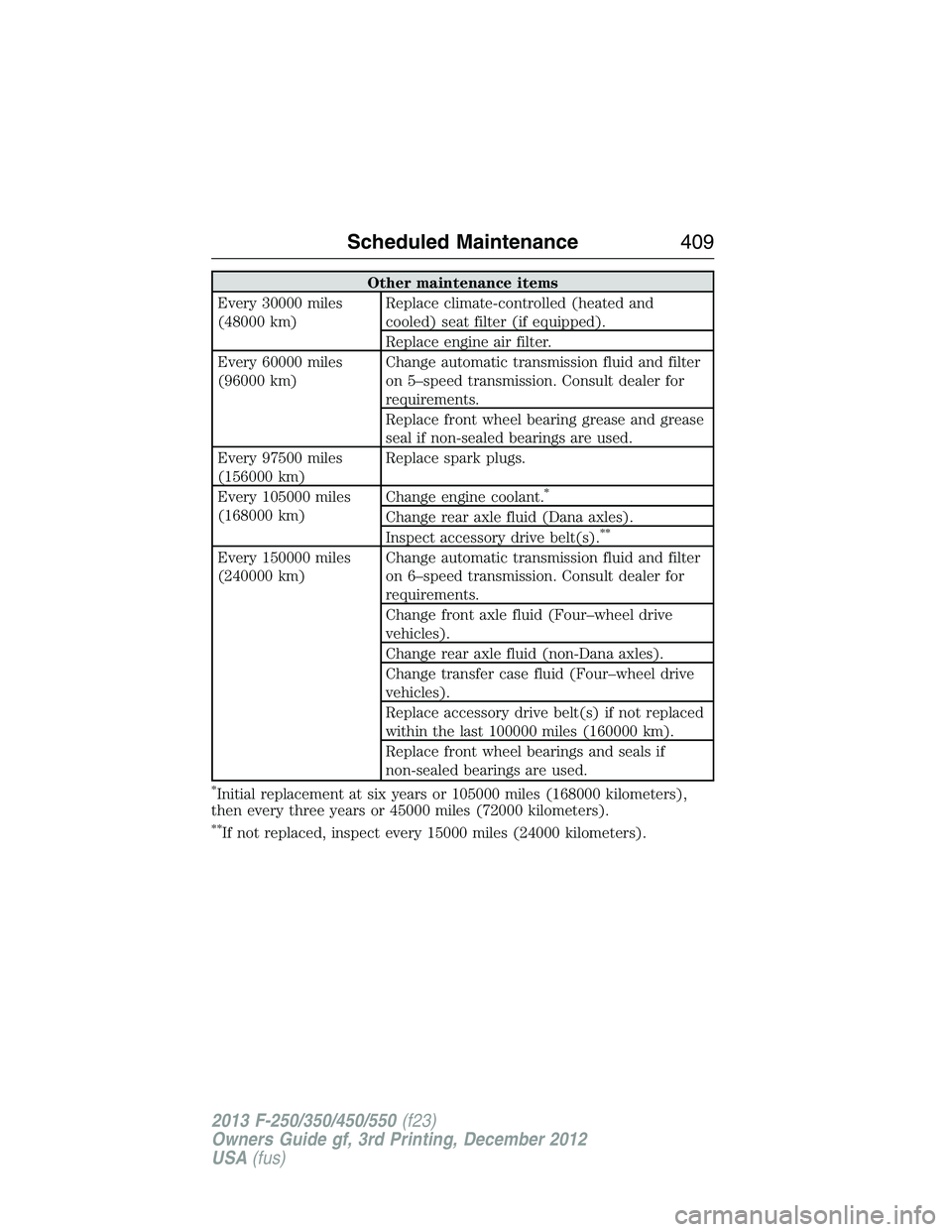
Other maintenance items
Every 30000 miles
(48000 km)Replace climate-controlled (heated and
cooled) seat filter (if equipped).
Replace engine air filter.
Every 60000 miles
(96000 km)Change automatic transmission fluid and filter
on 5–speed transmission. Consult dealer for
requirements.
Replace front wheel bearing grease and grease
seal if non-sealed bearings are used.
Every 97500 miles
(156000 km)Replace spark plugs.
Every 105000 miles
(168000 km)Change engine coolant.
*
Change rear axle fluid (Dana axles).
Inspect accessory drive belt(s).**
Every 150000 miles
(240000 km)Change automatic transmission fluid and filter
on 6–speed transmission. Consult dealer for
requirements.
Change front axle fluid (Four–wheel drive
vehicles).
Change rear axle fluid (non-Dana axles).
Change transfer case fluid (Four–wheel drive
vehicles).
Replace accessory drive belt(s) if not replaced
within the last 100000 miles (160000 km).
Replace front wheel bearings and seals if
non-sealed bearings are used.
*Initial replacement at six years or 105000 miles (168000 kilometers),
then every three years or 45000 miles (72000 kilometers).
**If not replaced, inspect every 15000 miles (24000 kilometers).
Scheduled Maintenance409
2013 F-250/350/450/550(f23)
Owners Guide gf, 3rd Printing, December 2012
USA(fus)
Page 414 of 577
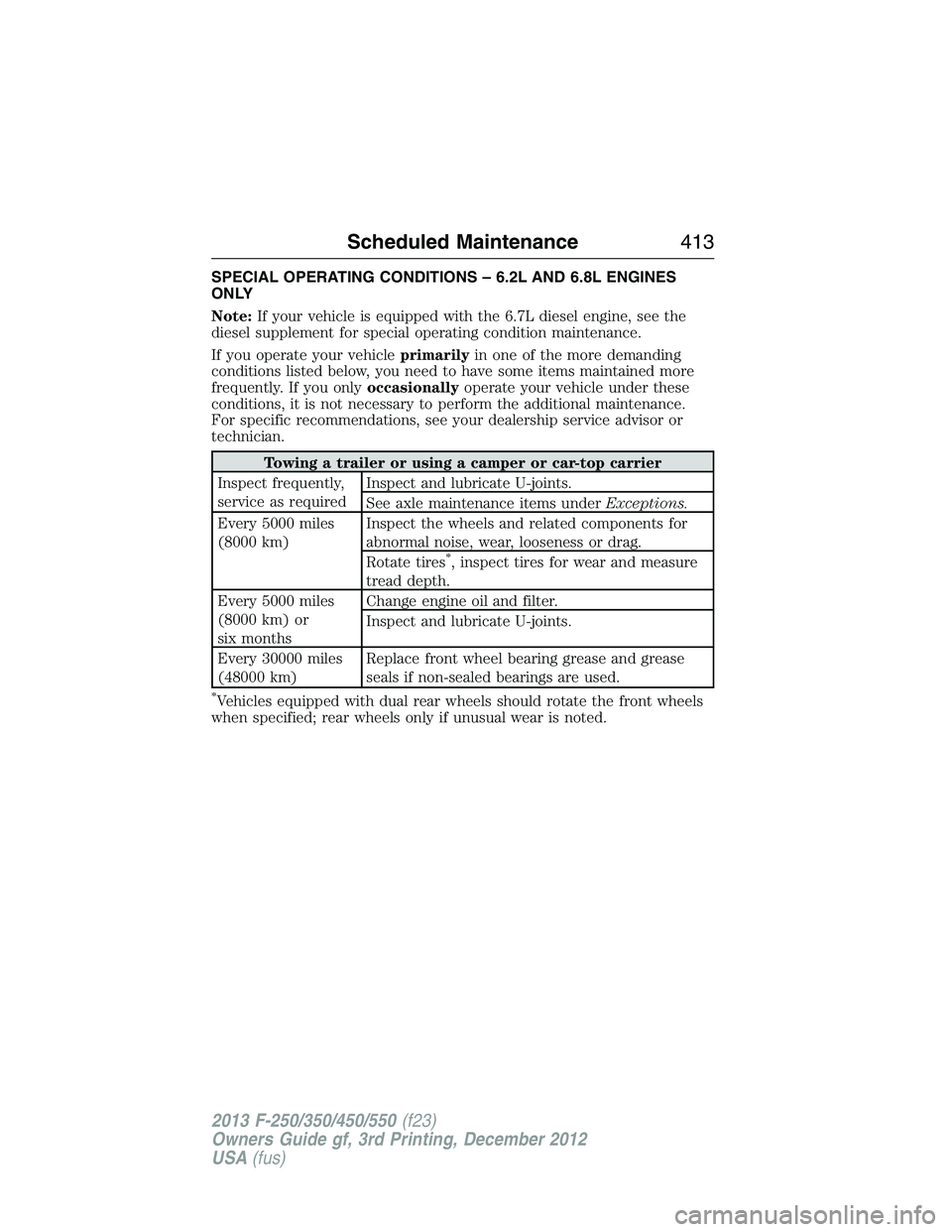
SPECIAL OPERATING CONDITIONS – 6.2L AND 6.8L ENGINES
ONLY
Note:If your vehicle is equipped with the 6.7L diesel engine, see the
diesel supplement for special operating condition maintenance.
If you operate your vehicleprimarilyin one of the more demanding
conditions listed below, you need to have some items maintained more
frequently. If you onlyoccasionallyoperate your vehicle under these
conditions, it is not necessary to perform the additional maintenance.
For specific recommendations, see your dealership service advisor or
technician.
Towing a trailer or using a camper or car-top carrier
Inspect frequently,
service as requiredInspect and lubricate U-joints.
See axle maintenance items underExceptions.
Every 5000 miles
(8000 km)Inspect the wheels and related components for
abnormal noise, wear, looseness or drag.
Rotate tires
*, inspect tires for wear and measure
tread depth.
Every 5000 miles
(8000 km) or
six monthsChange engine oil and filter.
Inspect and lubricate U-joints.
Every 30000 miles
(48000 km)Replace front wheel bearing grease and grease
seals if non-sealed bearings are used.
*Vehicles equipped with dual rear wheels should rotate the front wheels
when specified; rear wheels only if unusual wear is noted.
Scheduled Maintenance413
2013 F-250/350/450/550(f23)
Owners Guide gf, 3rd Printing, December 2012
USA(fus)
Page 415 of 577
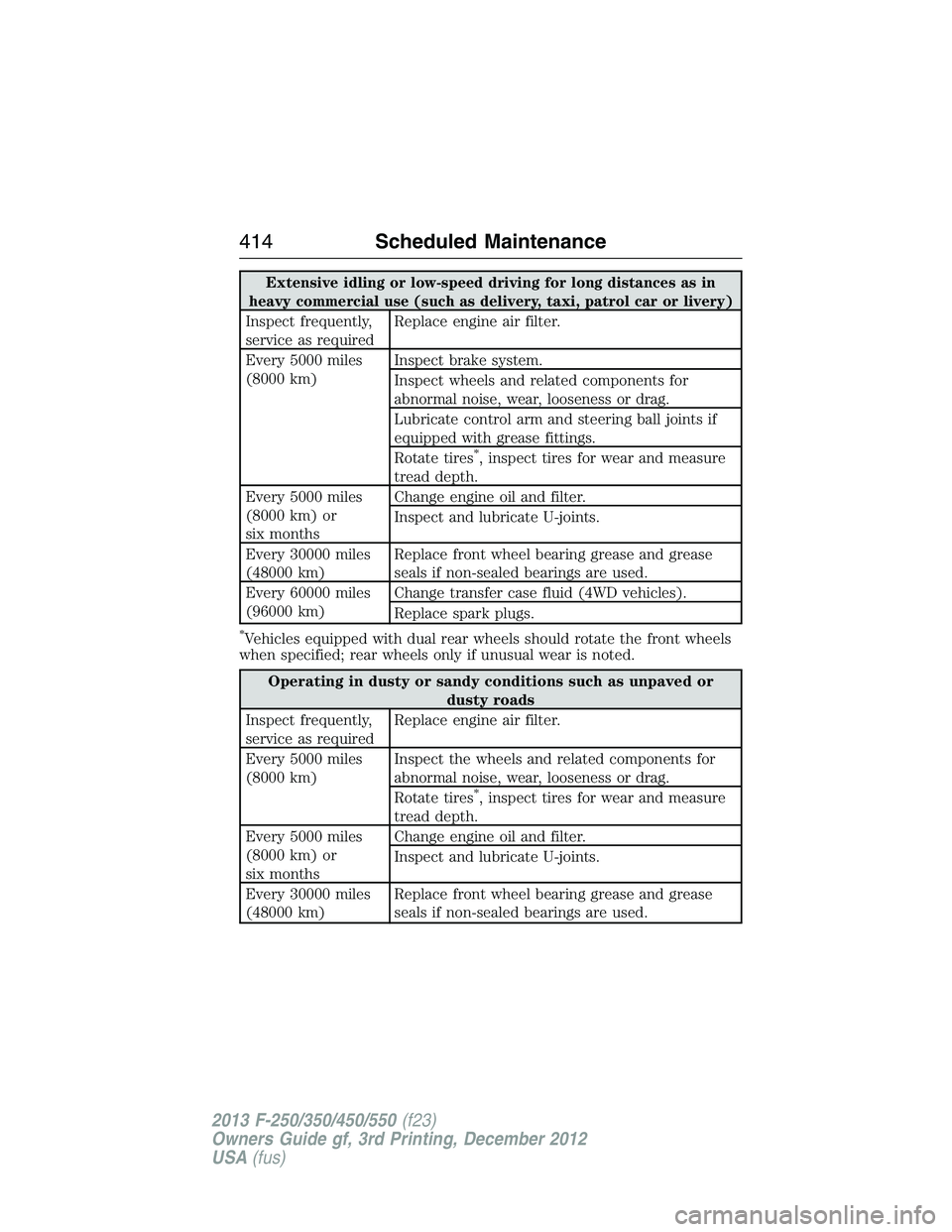
Extensive idling or low-speed driving for long distances as in
heavy commercial use (such as delivery, taxi, patrol car or livery)
Inspect frequently,
service as requiredReplace engine air filter.
Every 5000 miles
(8000 km)Inspect brake system.
Inspect wheels and related components for
abnormal noise, wear, looseness or drag.
Lubricate control arm and steering ball joints if
equipped with grease fittings.
Rotate tires
*, inspect tires for wear and measure
tread depth.
Every 5000 miles
(8000 km) or
six monthsChange engine oil and filter.
Inspect and lubricate U-joints.
Every 30000 miles
(48000 km)Replace front wheel bearing grease and grease
seals if non-sealed bearings are used.
Every 60000 miles
(96000 km)Change transfer case fluid (4WD vehicles).
Replace spark plugs.
*Vehicles equipped with dual rear wheels should rotate the front wheels
when specified; rear wheels only if unusual wear is noted.
Operating in dusty or sandy conditions such as unpaved or
dusty roads
Inspect frequently,
service as requiredReplace engine air filter.
Every 5000 miles
(8000 km)Inspect the wheels and related components for
abnormal noise, wear, looseness or drag.
Rotate tires
*, inspect tires for wear and measure
tread depth.
Every 5000 miles
(8000 km) or
six monthsChange engine oil and filter.
Inspect and lubricate U-joints.
Every 30000 miles
(48000 km)Replace front wheel bearing grease and grease
seals if non-sealed bearings are used.
414Scheduled Maintenance
2013 F-250/350/450/550(f23)
Owners Guide gf, 3rd Printing, December 2012
USA(fus)
Page 416 of 577
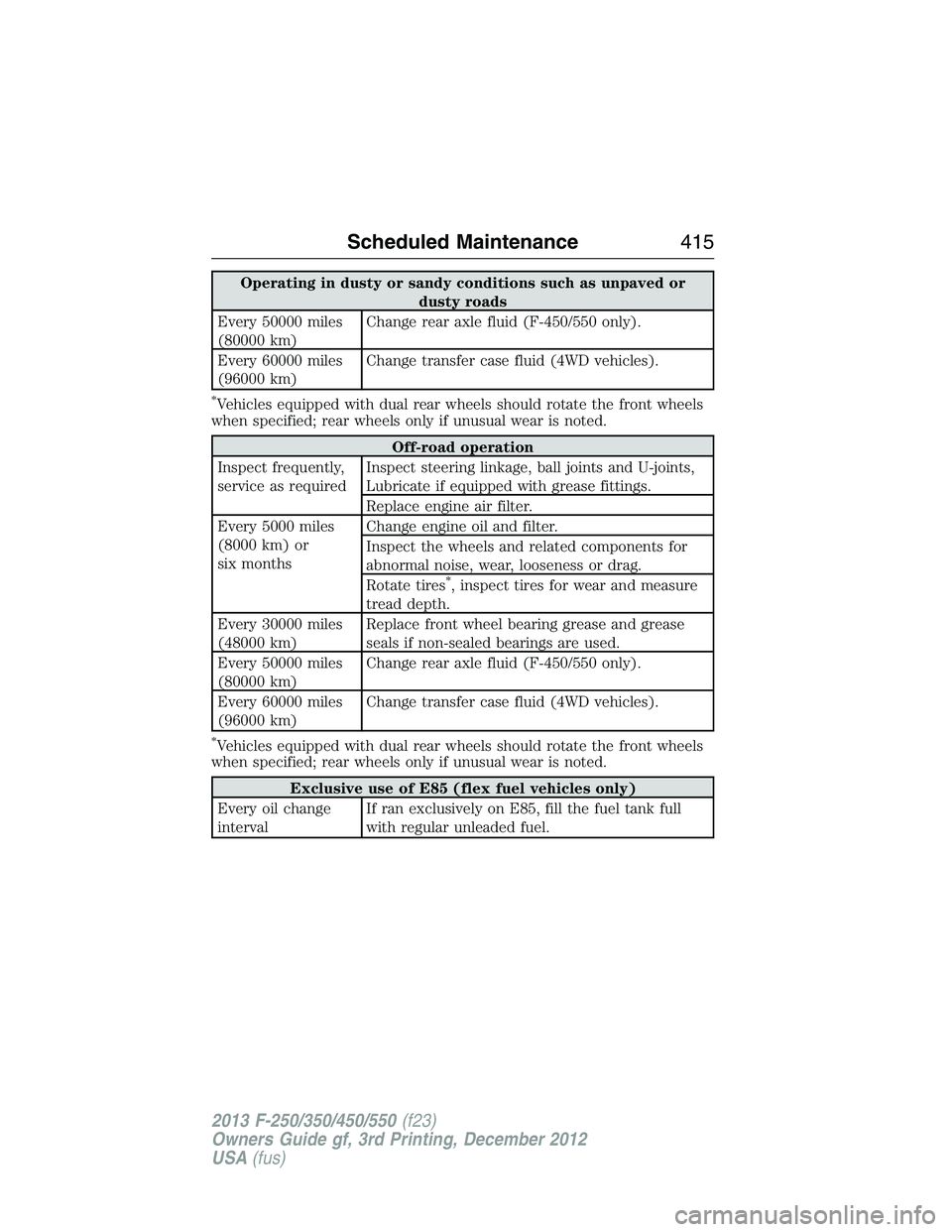
Operating in dusty or sandy conditions such as unpaved or
dusty roads
Every 50000 miles
(80000 km)Change rear axle fluid (F-450/550 only).
Every 60000 miles
(96000 km)Change transfer case fluid (4WD vehicles).
*Vehicles equipped with dual rear wheels should rotate the front wheels
when specified; rear wheels only if unusual wear is noted.
Off-road operation
Inspect frequently,
service as requiredInspect steering linkage, ball joints and U-joints,
Lubricate if equipped with grease fittings.
Replace engine air filter.
Every 5000 miles
(8000 km) or
six monthsChange engine oil and filter.
Inspect the wheels and related components for
abnormal noise, wear, looseness or drag.
Rotate tires
*, inspect tires for wear and measure
tread depth.
Every 30000 miles
(48000 km)Replace front wheel bearing grease and grease
seals if non-sealed bearings are used.
Every 50000 miles
(80000 km)Change rear axle fluid (F-450/550 only).
Every 60000 miles
(96000 km)Change transfer case fluid (4WD vehicles).
*Vehicles equipped with dual rear wheels should rotate the front wheels
when specified; rear wheels only if unusual wear is noted.
Exclusive use of E85 (flex fuel vehicles only)
Every oil change
intervalIf ran exclusively on E85, fill the fuel tank full
with regular unleaded fuel.
Scheduled Maintenance415
2013 F-250/350/450/550(f23)
Owners Guide gf, 3rd Printing, December 2012
USA(fus)
Page 424 of 577
The cellular profile, media device index, and development log remain in
the vehicle unless you delete them and are generally accessible only in
the vehicle when the cellular phone or media player is connected. If you
no longer plan to use the system or the vehicle, we recommend you
perform a Master Reset to erase all stored information.
System data cannot be accessed without special equipment and access to
the vehicle’s SYNC module. Ford Motor Company and Ford of Canada do
not access the system data for any purpose other than as described absent
consent, a court order, or where required by law enforcement, other
government authorities, or other third parties acting with lawful authority.
Other parties may seek to access the information independently of Ford
Motor Company and Ford of Canada. For further privacy information, see
the sections on 911 Assist, Vehicle Health Report, and Traffic, Directions
and Information.
USING VOICE RECOGNITION
This system helps you control many features using voice commands.
This allows you to keep your hands on the wheel and focus on what is in
front of you.
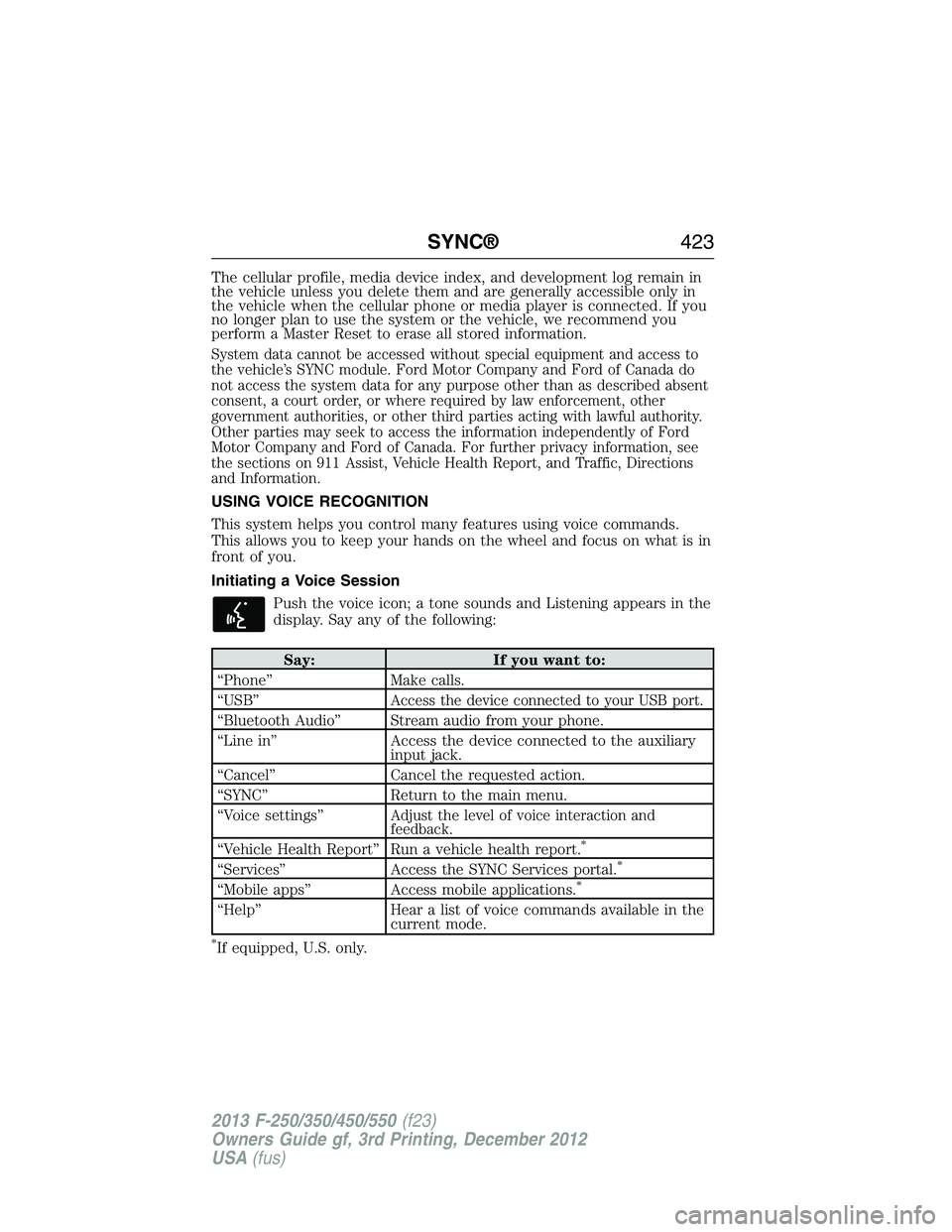
Initiating a Voice Session
Push the voice icon; a tone sounds and Listening appears in the
display. Say any of the following:
Say: If you want to:
“Phone” Make calls.
“USB”
Access the device connected to your USB port.
“Bluetooth Audio” Stream audio from your phone.
“Line in” Access the device connected to the auxiliary
input jack.
“Cancel” Cancel the requested action.
“SYNC” Return to the main menu.
“Voice settings”
Adjust the level of voice interaction and
feedback.
“Vehicle Health Report” Run a vehicle health report.*
“Services” Access the SYNC Services portal.*
“Mobile apps” Access mobile applications.*
“Help” Hear a list of voice commands available in the
current mode.
*If equipped, U.S. only.
SYNC®423
2013 F-250/350/450/550(f23)
Owners Guide gf, 3rd Printing, December 2012
USA(fus)
Page 443 of 577
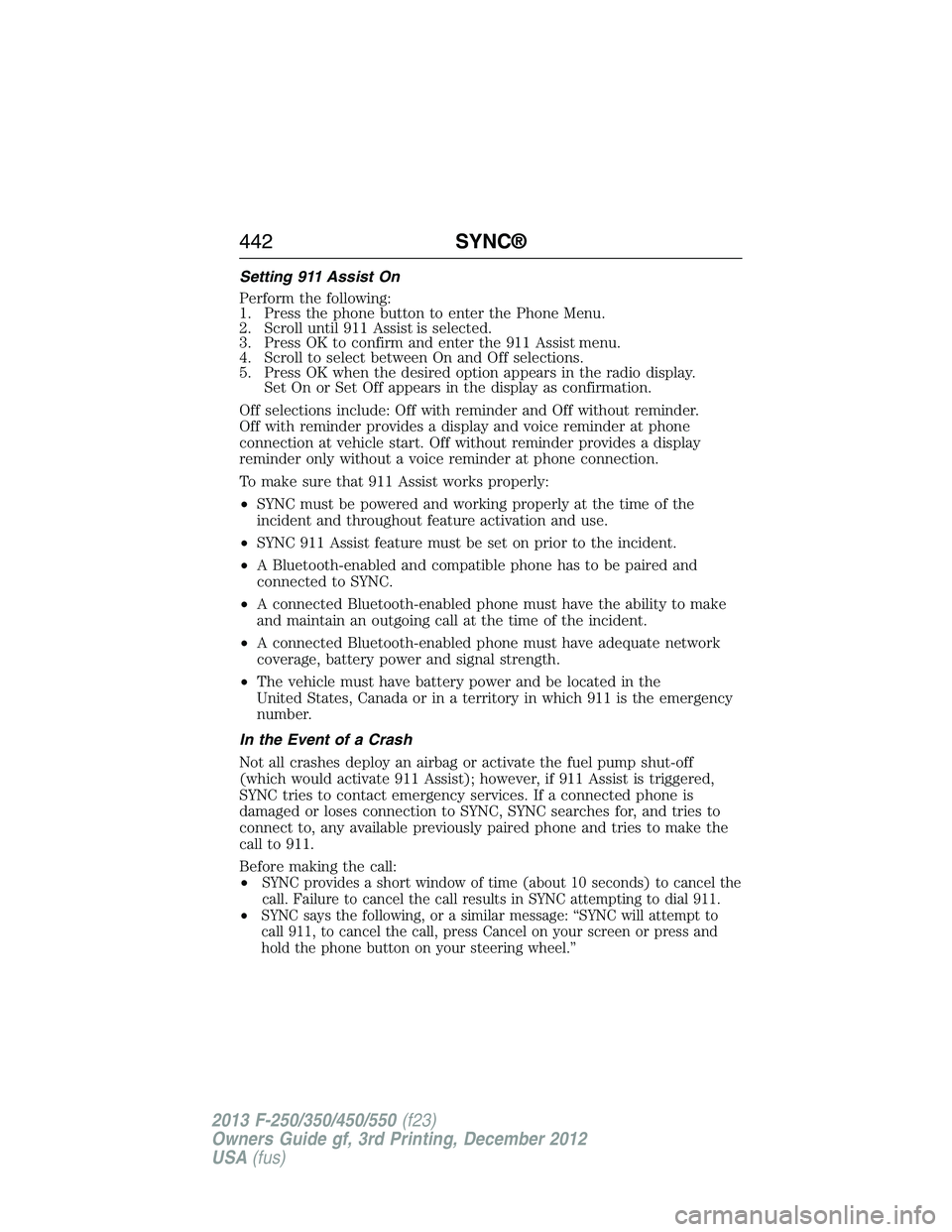
Setting 911 Assist On
Perform the following:
1. Press the phone button to enter the Phone Menu.
2. Scroll until 911 Assist is selected.
3. Press OK to confirm and enter the 911 Assist menu.
4. Scroll to select between On and Off selections.
5. Press OK when the desired option appears in the radio display.
Set On or Set Off appears in the display as confirmation.
Off selections include: Off with reminder and Off without reminder.
Off with reminder provides a display and voice reminder at phone
connection at vehicle start. Off without reminder provides a display
reminder only without a voice reminder at phone connection.
To make sure that 911 Assist works properly:
•SYNC must be powered and working properly at the time of the
incident and throughout feature activation and use.
•SYNC 911 Assist feature must be set on prior to the incident.
•A Bluetooth-enabled and compatible phone has to be paired and
connected to SYNC.
•A connected Bluetooth-enabled phone must have the ability to make
and maintain an outgoing call at the time of the incident.
•A connected Bluetooth-enabled phone must have adequate network
coverage, battery power and signal strength.
•The vehicle must have battery power and be located in the
United States, Canada or in a territory in which 911 is the emergency
number.
In the Event of a Crash
Not all crashes deploy an airbag or activate the fuel pump shut-off
(which would activate 911 Assist); however, if 911 Assist is triggered,
SYNC tries to contact emergency services. If a connected phone is
damaged or loses connection to SYNC, SYNC searches for, and tries to
connect to, any available previously paired phone and tries to make the
call to 911.
Before making the call:
•
SYNC provides a short window of time (about 10 seconds) to cancel the
call. Failure to cancel the call results in SYNC attempting to dial 911.
•SYNC says the following, or a similar message: “SYNC will attempt to
call 911, to cancel the call, press Cancel on your screen or press and
hold the phone button on your steering wheel.”
442SYNC®
2013 F-250/350/450/550(f23)
Owners Guide gf, 3rd Printing, December 2012
USA(fus)
Page 449 of 577
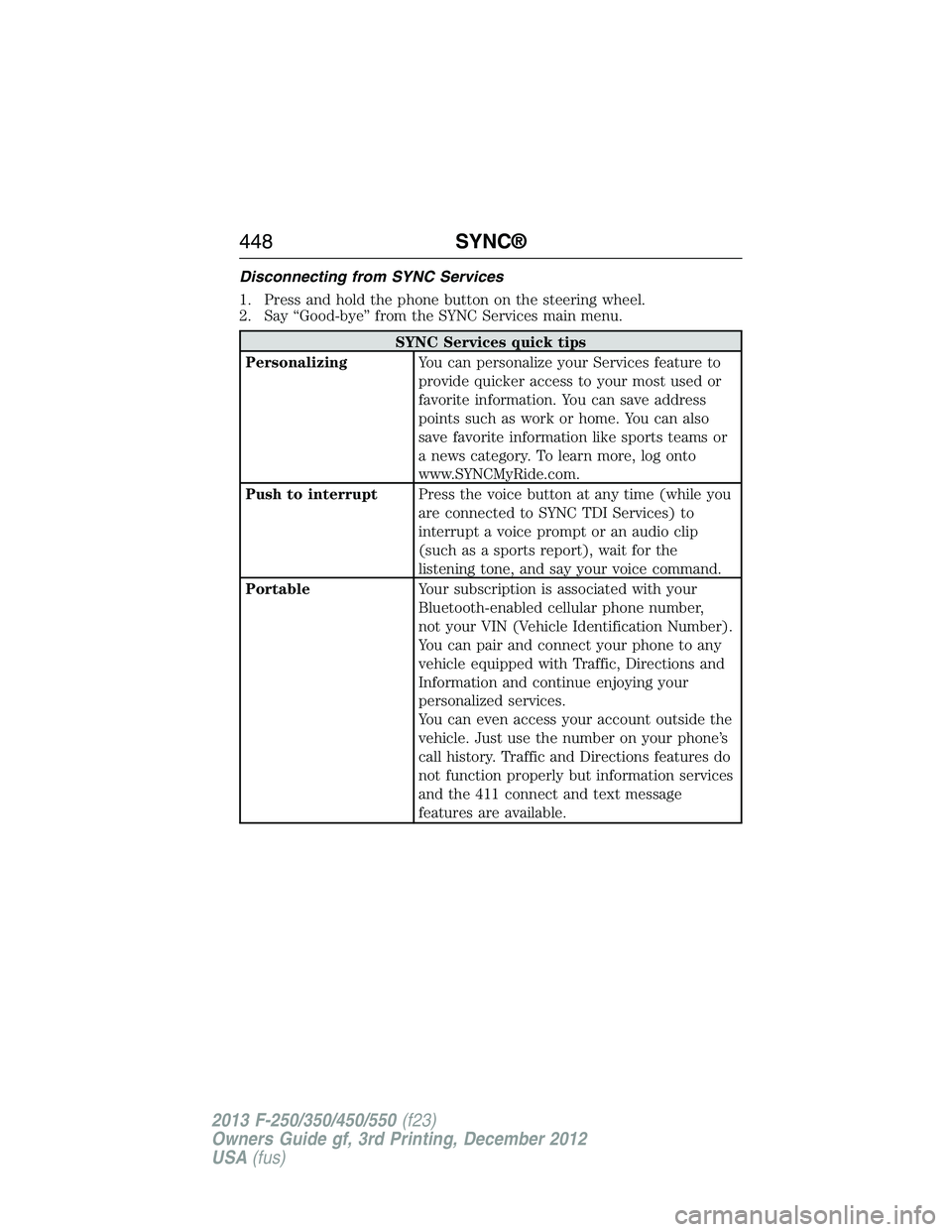
Disconnecting from SYNC Services
1. Press and hold the phone button on the steering wheel.
2. Say “Good-bye” from the SYNC Services main menu.
SYNC Services quick tips
PersonalizingYou can personalize your Services feature to
provide quicker access to your most used or
favorite information. You can save address
points such as work or home. You can also
save favorite information like sports teams or
a news category. To learn more, log onto
www.SYNCMyRide.com.
Push to interruptPress the voice button at any time (while you
are connected to SYNC TDI Services) to
interrupt a voice prompt or an audio clip
(such as a sports report), wait for the
listening tone, and say your voice command.
PortableYour subscription is associated with your
Bluetooth-enabled cellular phone number,
not your VIN (Vehicle Identification Number).
You can pair and connect your phone to any
vehicle equipped with Traffic, Directions and
Information and continue enjoying your
personalized services.
You can even access your account outside the
vehicle. Just use the number on your phone’s
call history. Traffic and Directions features do
not function properly but information services
and the 411 connect and text message
features are available.
448SYNC®
2013 F-250/350/450/550(f23)
Owners Guide gf, 3rd Printing, December 2012
USA(fus)
Page 450 of 577
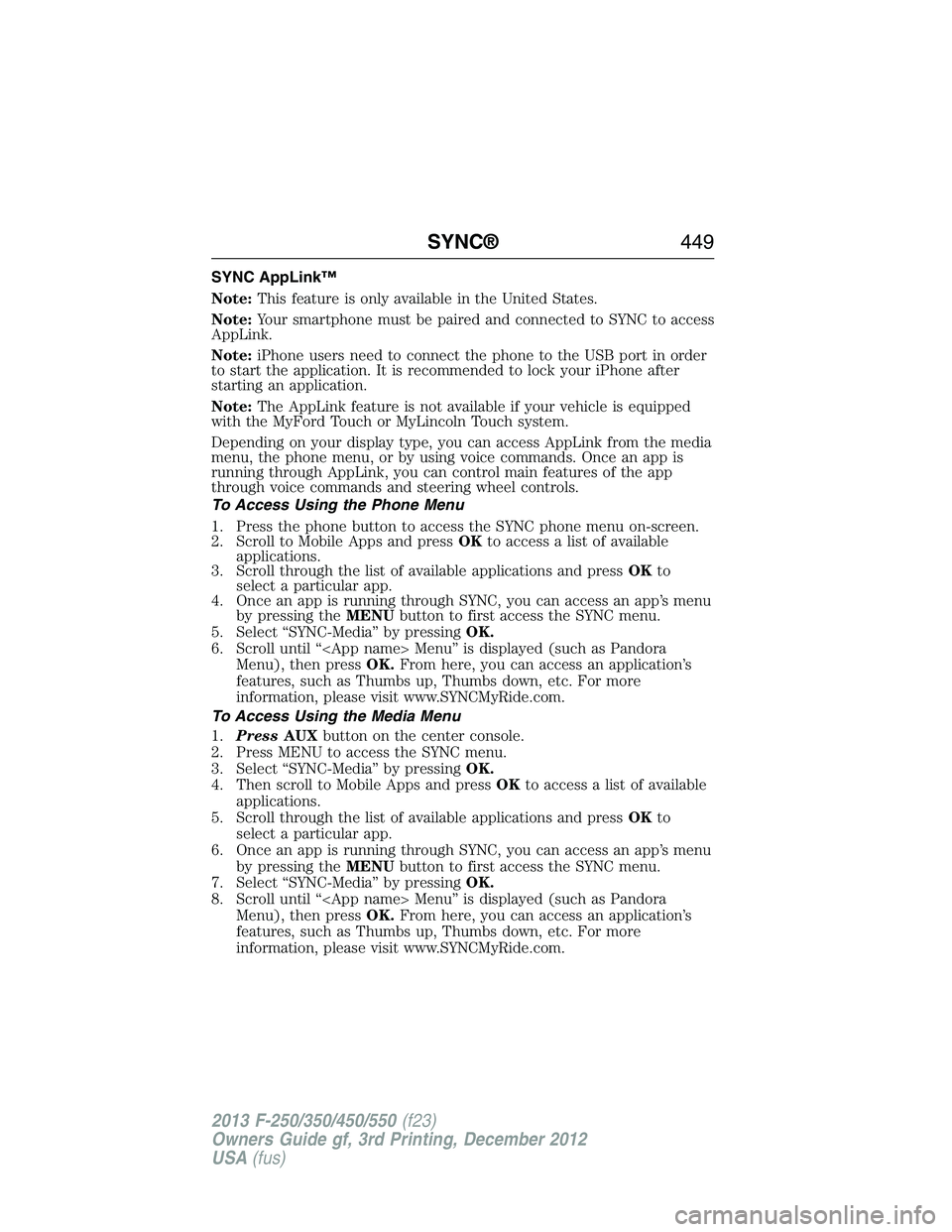
SYNC AppLink™
Note:This feature is only available in the United States.
Note:Your smartphone must be paired and connected to SYNC to access
AppLink.
Note:iPhone users need to connect the phone to the USB port in order
to start the application. It is recommended to lock your iPhone after
starting an application.
Note:The AppLink feature is not available if your vehicle is equipped
with the MyFord Touch or MyLincoln Touch system.
Depending on your display type, you can access AppLink from the media
menu, the phone menu, or by using voice commands. Once an app is
running through AppLink, you can control main features of the app
through voice commands and steering wheel controls.
To Access Using the Phone Menu
1. Press the phone button to access the SYNC phone menu on-screen.
2. Scroll to Mobile Apps and pressOKto access a list of available
applications.
3. Scroll through the list of available applications and pressOKto
select a particular app.
4. Once an app is running through SYNC, you can access an app’s menu
by pressing theMENUbutton to first access the SYNC menu.
5. Select “SYNC-Media” by pressingOK.
6. Scroll until “
Menu), then pressOK.From here, you can access an application’s
features, such as Thumbs up, Thumbs down, etc. For more
information, please visit www.SYNCMyRide.com.
To Access Using the Media Menu
1.PressAUXbutton on the center console.
2. Press MENU to access the SYNC menu.
3. Select “SYNC-Media” by pressingOK.
4. Then scroll to Mobile Apps and pressOKto access a list of available
applications.
5. Scroll through the list of available applications and pressOKto
select a particular app.
6. Once an app is running through SYNC, you can access an app’s menu
by pressing theMENUbutton to first access the SYNC menu.
7. Select “SYNC-Media” by pressingOK.
8. Scroll until “
Menu), then pressOK.From here, you can access an application’s
features, such as Thumbs up, Thumbs down, etc. For more
information, please visit www.SYNCMyRide.com.
SYNC®449
2013 F-250/350/450/550(f23)
Owners Guide gf, 3rd Printing, December 2012
USA(fus)