lock FORD F250 2013 Owners Manual
[x] Cancel search | Manufacturer: FORD, Model Year: 2013, Model line: F250, Model: FORD F250 2013Pages: 577, PDF Size: 7.74 MB
Page 519 of 577

If you do not cancel the call, and SYNC makes a successful call, a
pre-recorded message plays for the 911 operator, and then the occupant(s)
in your vehicle is able to talk with the operator. Be prepared to provide
your name, phone number and location immediately, because not all 911
systems are capable of receiving this information electronically.
911 Assist May Not Work If
•
Your cellular phone or 911 Assist hardware sustains damage in a crash.
•The vehicle’s battery or SYNC system has no power.
•The phone(s) thrown from your vehicle are the ones paired and
connected to the system.
911 Assist Privacy Notice
When you turn on 911 Assist, it may disclose to emergency services that
your vehicle has been in a crash involving the deployment of an airbag or
activation of the fuel pump shut-off. Certain versions or updates to 911
Assist may also be capable of electronically or verbally disclosing to 911
operators your vehicle location or other details about your vehicle or
crash to assist 911 operators to provide the most appropriate emergency
services. If you do not want to disclose this information, do not turn the
feature on.
Vehicle Health Report (If Equipped, United States Only)
WARNING:Always follow scheduled maintenance instructions,
regularly inspect your vehicle, and seek repair for any damage or
problem you suspect. Vehicle Health Report supplements, but cannot
replace, normal maintenance and vehicle inspection. Vehicle Health
Report only monitors certain systems electronically monitored by your
vehicle and will not monitor or report the status of any other system,
(such as brake lining wear). Failure to perform scheduled maintenance
and regularly inspect your vehicle may result in vehicle damage and
serious injury.
Note:
Your Vehicle Health Report feature requires activation prior to use.
Visit www.SYNCMyRide.com to register. There is no fee or subscription
associated with Vehicle Health Report, but you must register to use this
feature.
Note:This feature may not function properly if you have enabled caller
ID blocking on your mobile phone. Before running a report, review the
Vehicle Health Report Privacy Notice.
518MyFord Touch® (If Equipped)
2013 F-250/350/450/550(f23)
Owners Guide gf, 3rd Printing, December 2012
USA(fus)
Page 521 of 577
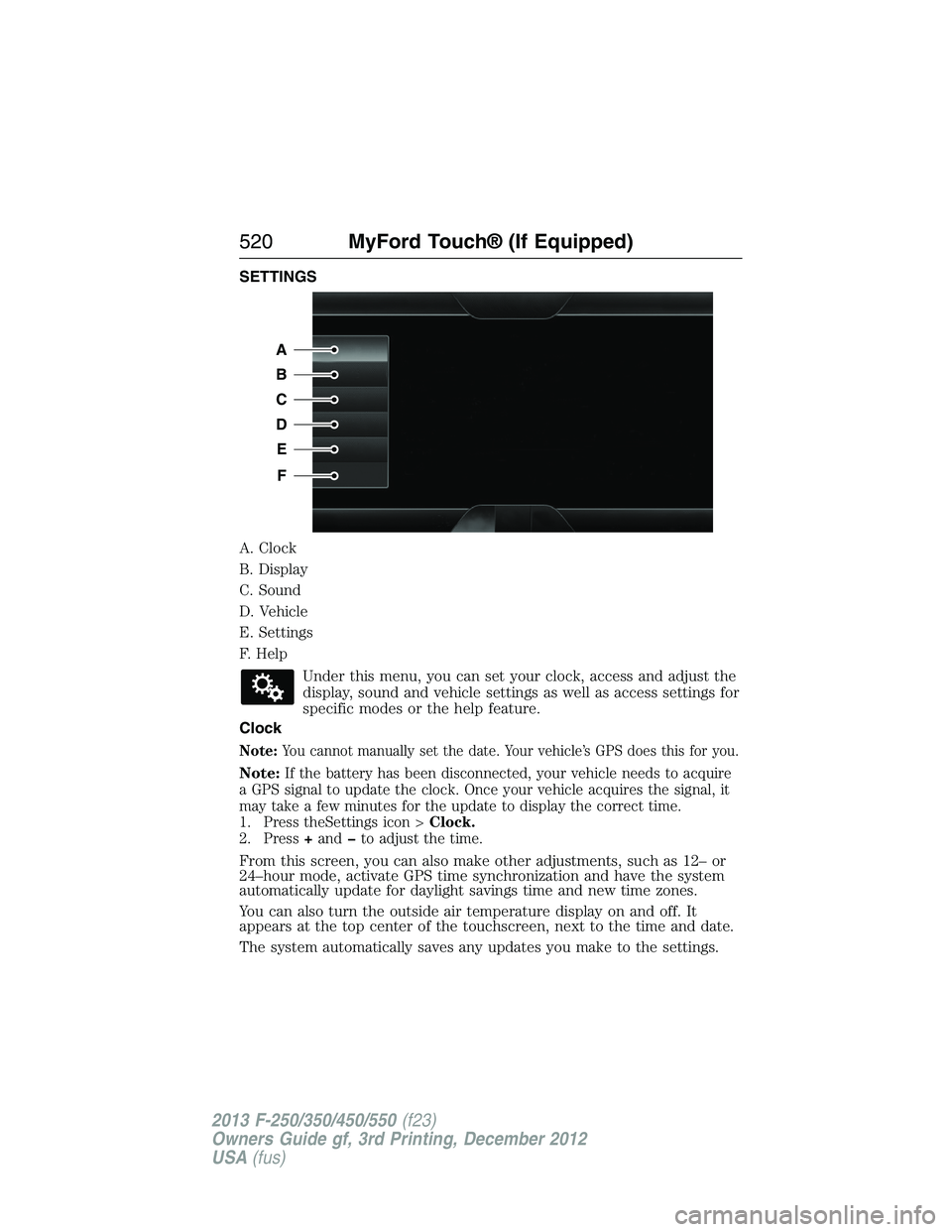
SETTINGS
A. Clock
B. Display
C. Sound
D. Vehicle
E. Settings
F. Help
Under this menu, you can set your clock, access and adjust the
display, sound and vehicle settings as well as access settings for
specific modes or the help feature.
Clock
Note:You cannot manually set the date. Your vehicle’s GPS does this for you.
Note:If the battery has been disconnected, your vehicle needs to acquire
a GPS signal to update the clock. Once your vehicle acquires the signal, it
may take a few minutes for the update to display the correct time.
1. Press theSettings icon >Clock.
2. Press+andto adjust the time.
From this screen, you can also make other adjustments, such as 12– or
24–hour mode, activate GPS time synchronization and have the system
automatically update for daylight savings time and new time zones.
You can also turn the outside air temperature display on and off. It
appears at the top center of the touchscreen, next to the time and date.
The system automatically saves any updates you make to the settings.
A
B
C
D
E
F
520MyFord Touch® (If Equipped)
2013 F-250/350/450/550(f23)
Owners Guide gf, 3rd Printing, December 2012
USA(fus)
Page 524 of 577
Vehicle Health Report
Turn Automatic Reminders on and off and set the mileage interval at
which you would like to receive the reports. Press?for more information
on these selections.
When done making your selections, pressRun Vehicle Health Report
Nowif you want your report.
Door Keypad Code
To change the keypad code for your keyless entry keypad system:
1. Press the Settings icon >Vehicle>Door Keypad Code.
2. Enter your current factory code, then, when prompted, enter your
new code.
Rear View Camera
This menu allows you to access settings for your rear view camera.
Press the Settings icon >Vehicle>Rear View Camera,then select
from the following settings:
•Rear Camera Delay
•Visual Park Aid Alert
•Guidelines.
Enable Valet Mode
Note:If the system locks, and you need to reset the PIN, enter 3681 and
the system unlocks.
Valet mode allows you to lock the system. No information is accessible
until the system is unlocked with the correct PIN.
1. Press the Settings icon >Vehicle>Enable Valet Mode.
2. When prompted, enter a four-digit PIN.
After you press Continue, the system locks until you enter the PIN again.
Settings
Access and adjust system settings, voice features, as well as phone,
navigation and wireless settings.
MyFord Touch® (If Equipped)523
2013 F-250/350/450/550(f23)
Owners Guide gf, 3rd Printing, December 2012
USA(fus)
Page 536 of 577
F.A/C:Touch to turn the air conditioning on or off.
•Use with recirculated air to improve cooling performance and
efficiency.
•Engages automatically in MAX A/C, defrost and floor/defrost.
G.AUTO:Touch to engage automatic operation, then set the
temperature using the temperature control. The system automatically
controls:
•Fan speed
•Airflow distribution
•A/Conoroff
•Outside or recirculated air.
H.Rear defroster:Touch to turn the rear window defroster and heated
mirrors.
I.Defrost:Touch to clear the windshield of fog and thin ice. Touch
again to return to the previous airflow selection. When on, defrost:
•Provides outside air to reduce window fogging.
•Distributes air through the windshield defroster vents and demister
vents.
J.Manual controls:Select any of the following airflow distribution
modes:
•Floor and Defrost:Distributes air through the windshield defroster
vents, demister vents, floor vents and rear seat floor vents, and
provides outside air to reduce window fogging.
•Panel:Distributes air through the instrument panel vents.
•Panel and Floor:Distributes air through the instrument panel vents,
demister vents, floor vents and rear seat floor vents.
•Floor:Distributes air through the demister vents, floor vents and
rear seat floor vents.
K.Driver settings:Depending on your vehicle and option package, you
may have the following features:
•Touch+or–to adjust the temperature.
•If your vehicle is equipped with heated seats, touch the heated seat
icon to control the heated seat. See theSeatschapter.
•If your vehicle is equipped with cooled seats, touch the cooled seat
icon to control the cooled seat. See theSeatschapter.
•Touch and holdMyTempto select a temperature you would like your
vehicle to remember and maintain for you.
•If your vehicle is equipped with a heated steering wheel, touch the
heated steering wheel icon to warm the steering wheel.
Note:If your vehicle is equipped with a wood-trimmed steering wheel, it
does not heat between the 10 o’clock and 2 o’clock positions.
MyFord Touch® (If Equipped)535
2013 F-250/350/450/550(f23)
Owners Guide gf, 3rd Printing, December 2012
USA(fus)
Page 544 of 577
When you select: You can:
Traffic PreferencesChoose how you want the system to handle
traffic problems along your route.
Automatic:Have the system reroute you to
avoid traffic incidents that develop and
impact the current route (no notification is
provided).
Manual:Have the system always provide a
traffic alert notification for traffic incidents
along the planned route. You have a choice to
accept or ignore the notification before
making the route deviation.
Turn on certain, or all, traffic icons on the
map (such as road work, incident, accidents
and closed roads).
Avoid AreasChoose areas which you want the system to
avoid when calculating a route for you. Press
Addto select a category.
Once you select, the system tries to avoid the
area(s) if possible for all routes. To delete a
selection, choose the listing on the screen.
When the screen changes toAvoid Areas
Edit,you can pressDeleteat the bottom
right of the screen.
Map Mode
Press the green bar in the upper right area of the touchscreen to view
map mode. Map mode shows advanced viewing comprised of both 2D
city maps as well as 3D landmarks (when available).
2D city mapsshow detailed outlines of buildings, visible land use and
land elements and detailed railway infrastructure for the most essential
cities around the globe. These maps also contain features, such as town
blocks, building footprints, and railways.
3D landmarksappear as clear, visible objects that are typically
recognizable and have a certain tourist value. The 3D landmarks appear
in 3D map mode only. Coverage varies, and improves with updated map
releases.
MyFord Touch® (If Equipped)543
2013 F-250/350/450/550(f23)
Owners Guide gf, 3rd Printing, December 2012
USA(fus)
Page 570 of 577
911 Assist™ ......................441, 516
A
ABS (see Brakes) .....................223
Accessing and using your
USB port ....................................494
Accessing call history/phone
book during active call .............429
Accessing your calendar ..........515
Accessing your media menu
features ......................................454
Accessing your phone menu
features ......................................431
Accessory delay ..........................92
Active call menu options .........429
Adding (pairing) a phone ........502
Advanced menu options ...439, 459
Advanced menu options
(prompts, languages, defaults,
master reset, installing
applications) ..............................439
Airbag supplemental restraint
system ..........................................48
and child safety seats ..............49
description ................................48
disposal ......................................60
driver airbag ..............................48
passenger airbag .......................48
passenger deactivation
switch ........................................51
side airbag ...........................48, 56
Air cleaner filter ...............323, 395
Air conditioning ........................146
manual heating and air
conditioning system ...............146
Air filter .............................323, 395All Wheel Drive (AWD),
driving off road .........................209
Ambient mood/lighting .....522–523
Ambulance packages ..................16
AM/FM .......................................481
Antifreeze
(see Engine coolant) ................307
Anti-lock brake system
(see Brakes) ..............................223
Anti-theft system ..................77, 79
arming the system ..............77, 79
disarming a triggered system ..79
AppLink™ .................................449
Audio system
Single CD ................136–137, 140
Audio system
(see Radio) ................136–137, 140
Automatic transmission ............201
driving an automatic
overdrive .................................199
fluid, adding ............................313
fluid, checking ........................313
fluid, refill capacities ..............391
fluid, specification ..................391
Selectshift (SST) ....................204
Auxiliary Input Jack .................490
Auxiliary input jack (Line in) ..141
Auxiliary powerpoint ................178
A/V inputs ..........................143, 498
Axle
refill capacities ........................391
B
Battery .......................................318
acid, treating emergencies .....318
jumping a disabled battery ....279
Index569
2013 F-250/350/450/550(f23)
Owners Guide gf, 3rd Printing, December 2012
USA(fus)
Page 571 of 577
maintenance-free ....................318
replacement, specifications ...395
servicing ..................................318
Bed extender ............................251
Booster seats ...............................23
Brakelamp
bulb replacement ............329–330
Brakes ........................................223
anti-lock ...................................223
anti-lock brake system (ABS)
warning light ...........................223
brake warning light ................223
fluid, checking and adding ....317
fluid, refill capacities ..............391
fluid, specifications .................391
parking ....................................224
shift interlock ..........................206
trailer ...............................258–259
Bulbs ..........................................331
C
Capacities for refilling fluids ....391
Car2U® Home Automation
System .......................................168
CD ..............................136–137, 140
CD player ..........................134, 492
CD voice commands .................493
Cell phone use ............................17
Changing a tire .........................371
Changing the air filter ..............323
Child safety seats
attaching with tether straps ....31
automatic locking mode
(retractor) .................................40
in front seat ..............................28
in rear seat ................................28
LATCH .......................................31Child safety seats -
booster seats ...............................23
Cleaning the touchscreen ........469
Cleaning your vehicle ...............332
engine compartment ..............334
exterior ....................................332
instrument panel ............336–337
interior .....................................335
plastic parts ............................334
washing ....................................332
waxing .....................................334
wheels ......................................340
wiper blades ............................335
Climate control (see Air
conditioning or Heating) ..........146
Climate voice commands .........536
Clock ..........................136–137, 520
Console ......................................181
overhead ..................................181
Controls
power seat ...............................159
Coolant ......................................307
checking and adding ..............307
recovery reservoir ..................304
refill capacities ........................391
Customer Assistance ................276
Ford Extended Service
lan ............................................400
Getting roadside assistance ...276
Getting the service
you need .................................282
Ordering additional
owner’s literature ...................288
Utilizing the
Mediation/Arbitration
Program ...................................286
570Index
2013 F-250/350/450/550(f23)
Owners Guide gf, 3rd Printing, December 2012
USA(fus)
Page 572 of 577
D
Daytime running lamps
(see Lamps) ................................87
Defrost ...............................146, 148
rear window ............................152
Dipstick
automatic transmission
fluid ..........................................313
engine oil .........................304, 306
Display settings .........................521
Drivebelt ....................................389
Driving under special
conditions ..................207, 218, 220
sand .........................................218
snow and ice ...........................221
through water .................219, 270
Dual automatic temperature
control (DATC) .........................148
E
Electronic message center .......104
Electronic stability control ......228
Emergencies, roadside
jump-starting ..........................279
running out of fuel .................192
Emergency Flashers .................278
Emission control system ..........195
End user license agreement ....549
Engine ................................304, 389
cleaning ...................................334
coolant .....................................307
fail-safe cooling .......................310
refill capacities ........................391
service points ..................304–305
Engine block heater .................186Engine oil
checking and adding ..............306
dipstick ....................................306
filter, specifications ................395
refill capacities ........................391
Event data recording ..................12
Exhaust fumes ..........................185
F
Fail safe cooling ........................310
Filter
fuel ...........................................317
Fleet MyKey programming ........67
Flexible Fuel Vehicle (FFV) ....188
Floor mats .................................271
Fluid capacities .........................391
Fog lamps ....................................88
Four-Wheel Drive vehicles .......209
driving off road .......................216
electronic shift ................209, 213
indicator light .........................210
lever operated shift ................211
manual locking hubs ..............209
Fuel
cap ...........................................193
capacity ...................................391
choosing the right fuel ...190–191
filler funnel .............................192
filling your vehicle with
fuel ...........................................193
fuel pump shut-off ..................278
octane rating ...................191, 389
quality ......................................190
running out of fuel .................192
safety information relating to
automotive fuels .....................188
Index571
2013 F-250/350/450/550(f23)
Owners Guide gf, 3rd Printing, December 2012
USA(fus)
Page 573 of 577
Fuel - flex fuel vehicle
(FFV) .................................188, 191
Fuses ..........................290–291, 296
G
Garage door opener ..........168, 172
Gas cap (see Fuel cap) ............193
Gauges .........................................97
H
Hazard flashers .........................278
HD Radio™ ...............................482
Headlamps ...................................85
aiming ......................................325
autolamp system .......................86
bulb specifications ..................331
checking alignment ................325
daytime running lights .............87
flash to pass ..............................85
high beam .................................85
replacing bulbs .......................327
turning on and off ....................85
Head restraints .........................155
Heated steering wheel ..............534
Heating ..............................146, 148
Help ............................................533
Hill descent mode .....................230
Hill start assist ..........................208
Homelink wireless control
system ........................................172
Hood ..........................................303
How to use voice commands ...473
I
Ignition ...............................183, 389Illuminated visor mirror .............95
Information displays .................104
Inspection/maintenance (I/M)
testing ........................................198
Instrument panel
cleaning ...........................336–337
cluster ........................................99
lighting up panel and
interior .......................................87
J
Jack ............................................371
positioning ...............................371
storage .....................................371
Joining two calls
(multiparty/conference call) ....429
Jump-starting your vehicle ......279
K
Keyless entry system
autolock .....................................73
keypad .......................................75
locking and unlocking doors ....76
programming entry code .........75
Keys .......................................62, 77
positions of the ignition .........183
L
Lamps ..........................................85
autolamp system .......................86
bulb replacement
specifications chart ................331
daytime running light ...............87
fog lamps ...................................88
headlamps .................................85
headlamps, flash to pass ..........85
instrument panel, dimming .....87
572Index
2013 F-250/350/450/550(f23)
Owners Guide gf, 3rd Printing, December 2012
USA(fus)
Page 574 of 577
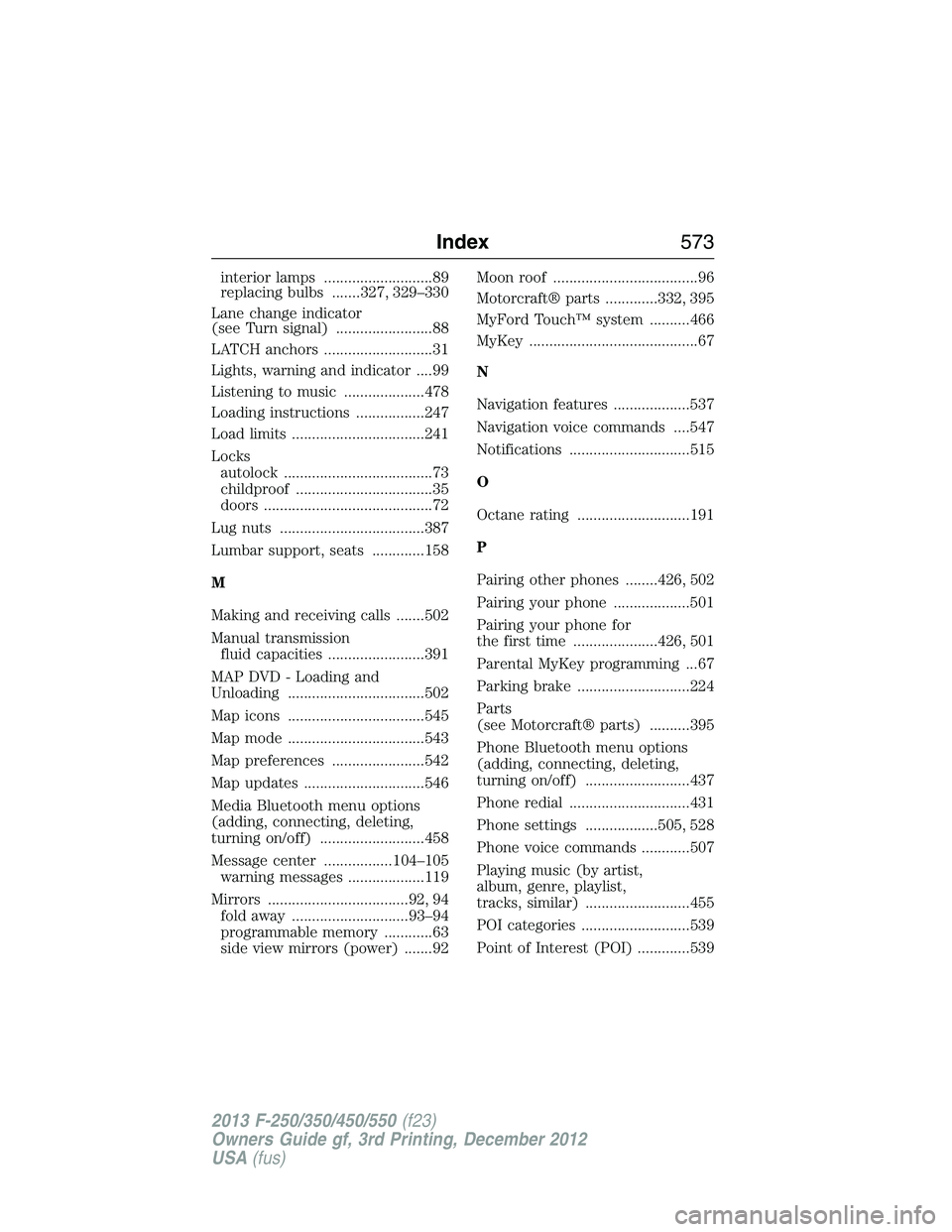
interior lamps ...........................89
replacing bulbs .......327, 329–330
Lane change indicator
(see Turn signal) ........................88
LATCH anchors ...........................31
Lights, warning and indicator ....99
Listening to music ....................478
Loading instructions .................247
Load limits .................................241
Locks
autolock .....................................73
childproof ..................................35
doors ..........................................72
Lug nuts ....................................387
Lumbar support, seats .............158
M
Making and receiving calls .......502
Manual transmission
fluid capacities ........................391
MAP DVD - Loading and
Unloading ..................................502
Map icons ..................................545
Map mode ..................................543
Map preferences .......................542
Map updates ..............................546
Media Bluetooth menu options
(adding, connecting, deleting,
turning on/off) ..........................458
Message center .................104–105
warning messages ...................119
Mirrors ...................................92, 94
fold away .............................93–94
programmable memory ............63
side view mirrors (power) .......92Moon roof ....................................96
Motorcraft® parts .............332, 395
MyFord Touch™ system ..........466
MyKey ..........................................67
N
Navigation features ...................537
Navigation voice commands ....547
Notifications ..............................515
O
Octane rating ............................191
P
Pairing other phones ........426, 502
Pairing your phone ...................501
Pairing your phone for
the first time .....................426, 501
Parental MyKey programming ...67
Parking brake ............................224
Parts
(see Motorcraft® parts) ..........395
Phone Bluetooth menu options
(adding, connecting, deleting,
turning on/off) ..........................437
Phone redial ..............................431
Phone settings ..................505, 528
Phone voice commands ............507
Playing music (by artist,
album, genre, playlist,
tracks, similar) ..........................455
POI categories ...........................539
Point of Interest (POI) .............539
Index573
2013 F-250/350/450/550(f23)
Owners Guide gf, 3rd Printing, December 2012
USA(fus)