ECO mode FORD F250 2013 User Guide
[x] Cancel search | Manufacturer: FORD, Model Year: 2013, Model line: F250, Model: FORD F250 2013Pages: 577, PDF Size: 7.74 MB
Page 103 of 577
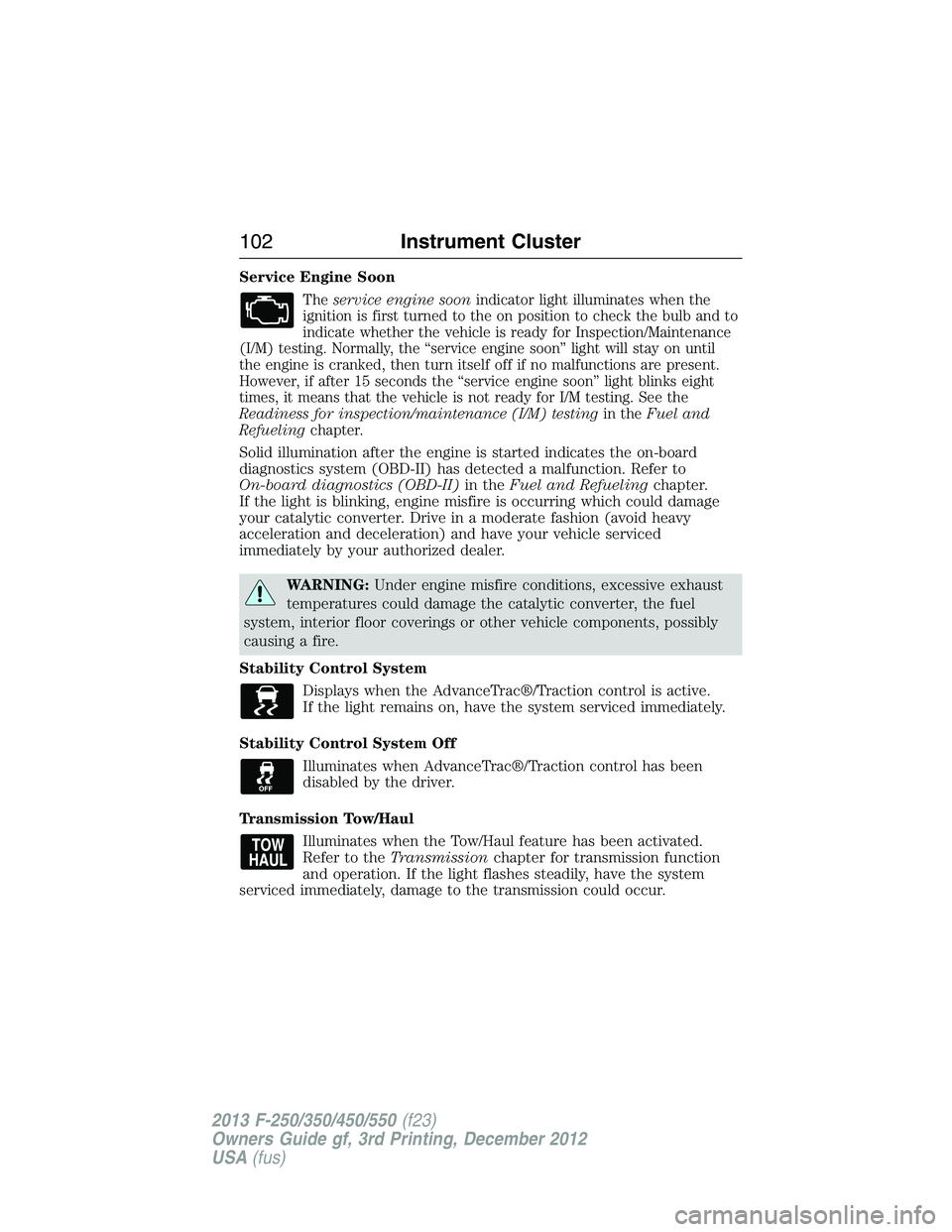
Service Engine Soon
Theservice engine soonindicator light illuminates when the
ignition is first turned to the on position to check the bulb and to
indicate whether the vehicle is ready for Inspection/Maintenance
(I/M) testing. Normally, the “service engine soon” light will stay on until
the engine is cranked, then turn itself off if no malfunctions are present.
However, if after 15 seconds the “service engine soon” light blinks eight
times, it means that the vehicle is not ready for I/M testing. See the
Readiness for inspection/maintenance (I/M) testingin theFuel and
Refuelingchapter.
Solid illumination after the engine is started indicates the on-board
diagnostics system (OBD-II) has detected a malfunction. Refer to
On-board diagnostics (OBD-II)in theFuel and Refuelingchapter.
If the light is blinking, engine misfire is occurring which could damage
your catalytic converter. Drive in a moderate fashion (avoid heavy
acceleration and deceleration) and have your vehicle serviced
immediately by your authorized dealer.
WARNING:Under engine misfire conditions, excessive exhaust
temperatures could damage the catalytic converter, the fuel
system, interior floor coverings or other vehicle components, possibly
causing a fire.
Stability Control System
Displays when the AdvanceTrac®/Traction control is active.
If the light remains on, have the system serviced immediately.
Stability Control System Off
Illuminates when AdvanceTrac®/Traction control has been
disabled by the driver.
Transmission Tow/Haul
Illuminates when the Tow/Haul feature has been activated.
Refer to theTransmissionchapter for transmission function
and operation. If the light flashes steadily, have the system
serviced immediately, damage to the transmission could occur.
102Instrument Cluster
2013 F-250/350/450/550(f23)
Owners Guide gf, 3rd Printing, December 2012
USA(fus)
Page 106 of 577
Info
Press the INFO button repeatedly to cycle through the following
features:
Note:Some options may appear slightly different or not at all if the
items are optional.
INFO
TRIP A/B
XXX° (if equipped)
MYKEY MILES (km) (if programmed)
XXX MILES (km) TO E
XX.X AVG MPG (L/100km)
MPG (L/km)
TIMER
TBC GAIN (if equipped)
EXHAUST FILTER (diesel only)
•TRIP A/B: Registers the distance of individual journeys. Press and
release the INFO button until TRIP A/B appears in the display (this
represents the trip mode). Press and hold the RESET button to reset.
Refer toUNITSlater in this section to switch the display from metric
to English.
•XXX° (outside air temperature) (if equipped): This displays the
outside temperature.
•MYKEY MILES (km) (if programmed): For more information, refer to
theMyKey®chapter.
•XXX MILES (km) TO E: This displays an estimate of approximately
how far you can drive with the fuel remaining in your tank under
normal driving conditions. Remember to turn the ignition off when
refueling to allow this feature to correctly detect the added fuel.
Distance to empty is calculated using a running average fuel economy,
which is based on your recent driving history of 500 miles (800 km).
This value is not the same as the average fuel economy display. The
running average fuel economy is re-initialized to a factory default
value if the battery is disconnected.
•XX.X AVG MPG (L/100km): Average fuel economy displays your
average fuel economy in miles/gallon or liters/100 km.
•MPG (L/km): This displays instantaneous fuel economy as a bar graph.
Your vehicle must be moving to calculate instantaneous fuel economy.
Instantaneous fuel economy cannot be reset.
Information Displays105
2013 F-250/350/450/550(f23)
Owners Guide gf, 3rd Printing, December 2012
USA(fus)
Page 108 of 577
SETUP
OIL LIFE
UNITS press the
RESET buttonDistance English
Metric
Temperature Fahrenheit
Celsius
AUTOLAMP
(SEC)0 to 180 seconds
AUTOLOCK On or Off
AUTOUNLOCK On or Off
COURTESY
WIPEOn or Off
REMOTE
WINDOW OPENOn or Off
CREATE MYKEY / MYKEY SETUP / CLEAR MYKEY
RESET FOR ZONE SETTING (if equipped)
ZONE XX RESET = CHANGE (if equipped)
RESET FOR CALIBRATION (if equipped)
RESET FOR
REMOTE START
(if equipped)press the
RESET buttonOn or Off
5, 10, 15 minutes
TBC MODE (if
equipped)Electric or EOH
TRAILER SWAY
(if equipped)On or Off
LANGUAGE =
ENGLISH /
SPANISH /
FRENCHEnglish / Spanish / French
•RESET FOR SYSTEM CHECK: The message center will begin to cycle
through the vehicle systems and provide a status of the item if
needed. Some systems show a message only if a condition is present.
•
OIL LIFE: This displays the remaining oil life. An oil change is required
whenever indicated by the message center and according to the
recommended maintenance schedule. USE ONLY RECOMMENDED
ENGINE OILS.
Information Displays107
2013 F-250/350/450/550(f23)
Owners Guide gf, 3rd Printing, December 2012
USA(fus)
Page 111 of 577
3. The compass is now calibrated.
•RESET FOR REMOTE START (if equipped)
•REAR PARK AID (if equipped): This feature sounds a warning tone to
warn the driver of obstacles near the rear bumper, and functions only
when R (Reverse) gear is selected.
•TBC MODE (if equipped): Allows you to choose the trailer brake
mode.
•TRAILER SWAY (if equipped): This feature uses the electronic
stability control to mitigate trailer sway.
•LANGUAGE = ENGLISH / SPANISH / FRENCH: Allows you to choose
which language the message center will display in.
Waiting four seconds or pressing the RESET button cycles the message
center through each of the language choices.
Press the RESET button to set the language choice.
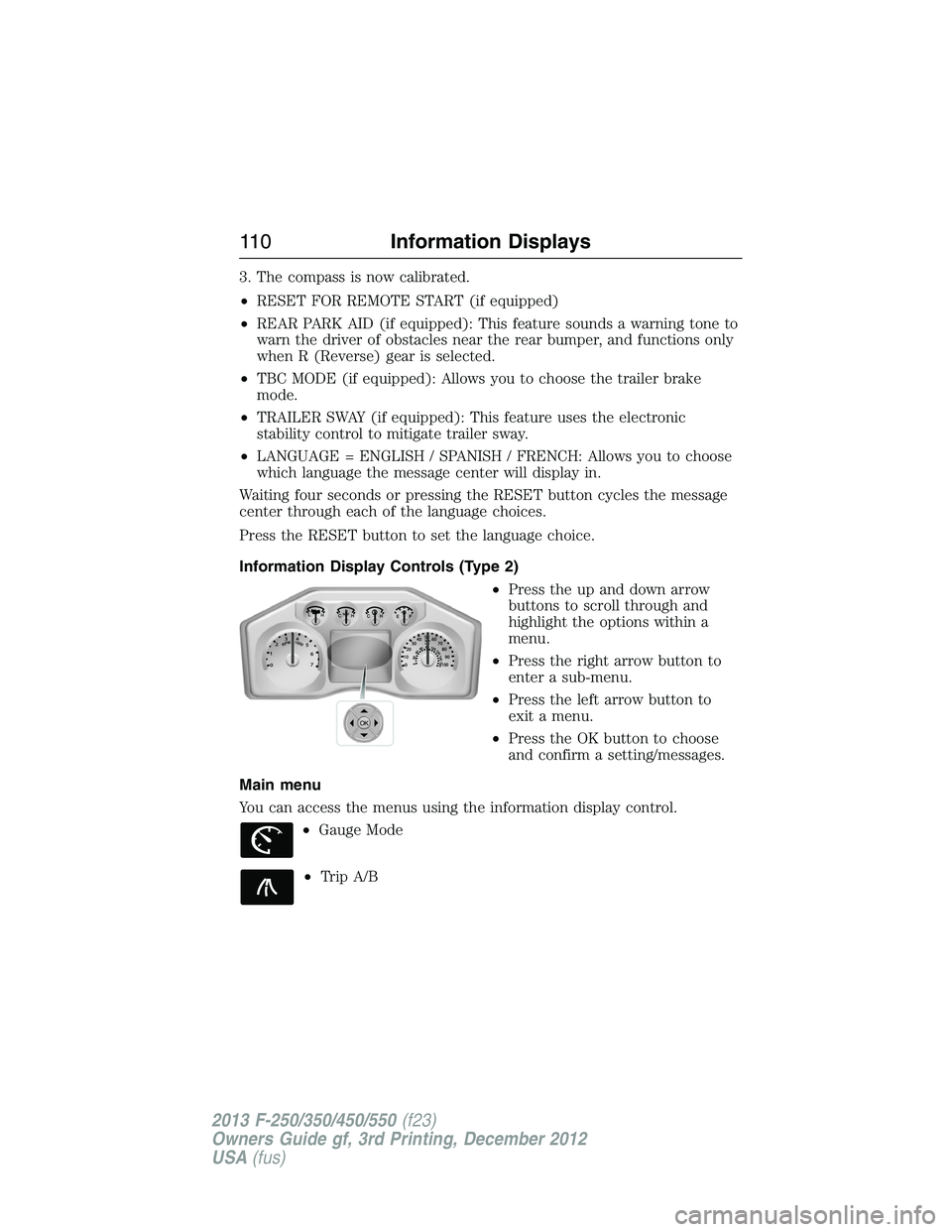
Information Display Controls (Type 2)
•Press the up and down arrow
buttons to scroll through and
highlight the options within a
menu.
•Press the right arrow button to
enter a sub-menu.
•Press the left arrow button to
exit a menu.
•Press the OK button to choose
and confirm a setting/messages.
Main menu
You can access the menus using the information display control.
•Gauge Mode
•Trip A/B
OK
11 0Information Displays
2013 F-250/350/450/550(f23)
Owners Guide gf, 3rd Printing, December 2012
USA(fus)
Page 112 of 577
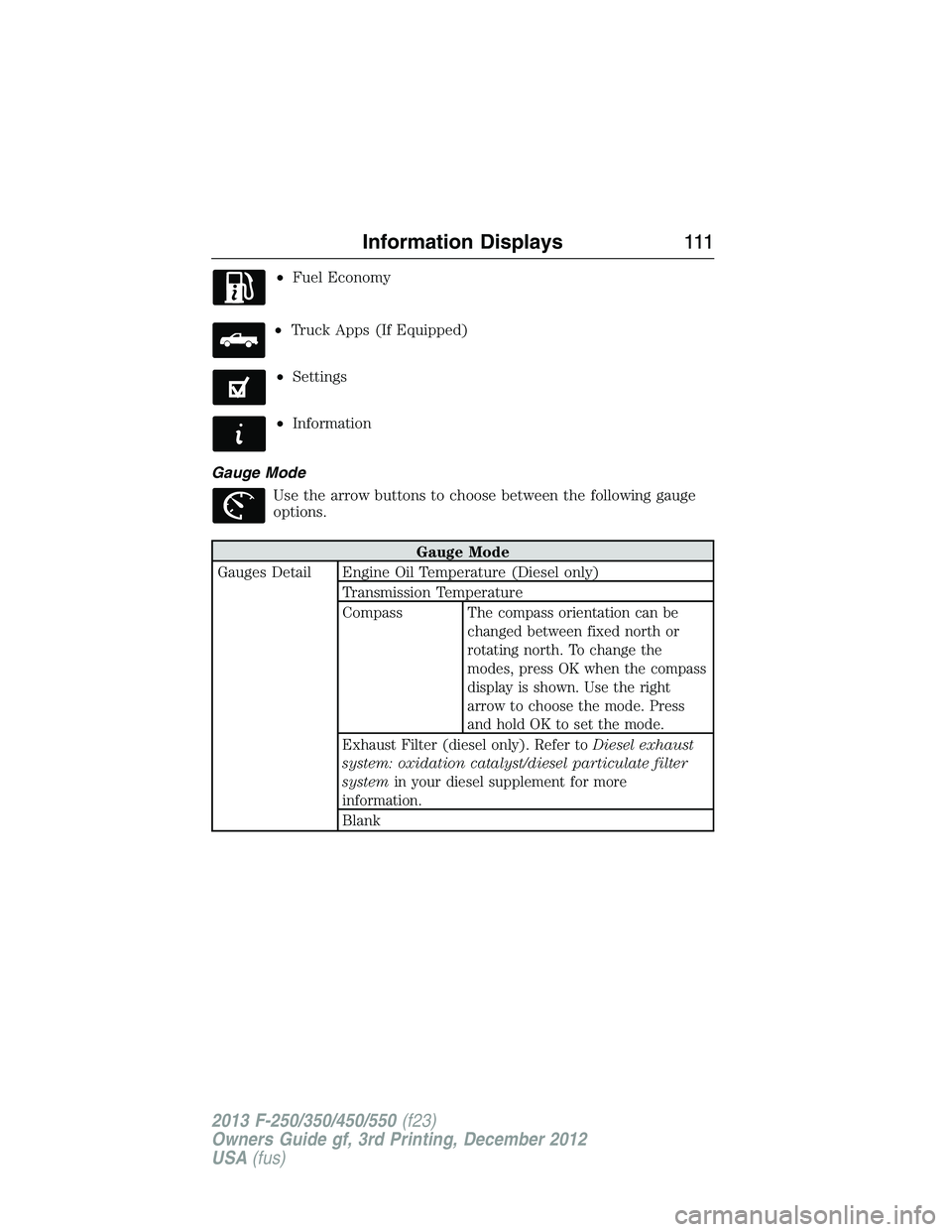
•Fuel Economy
•Truck Apps (If Equipped)
•Settings
•Information
Gauge Mode
Use the arrow buttons to choose between the following gauge
options.
Gauge Mode
Gauges Detail Engine Oil Temperature (Diesel only)
Transmission Temperature
Compass
The compass orientation can be
changed between fixed north or
rotating north. To change the
modes, press OK when the compass
display is shown. Use the right
arrow to choose the mode. Press
and hold OK to set the mode.
Exhaust Filter (diesel only). Refer toDiesel exhaust
system: oxidation catalyst/diesel particulate filter
systemin your diesel supplement for more
information.
Blank
Information Displays111
2013 F-250/350/450/550(f23)
Owners Guide gf, 3rd Printing, December 2012
USA(fus)
Page 122 of 577
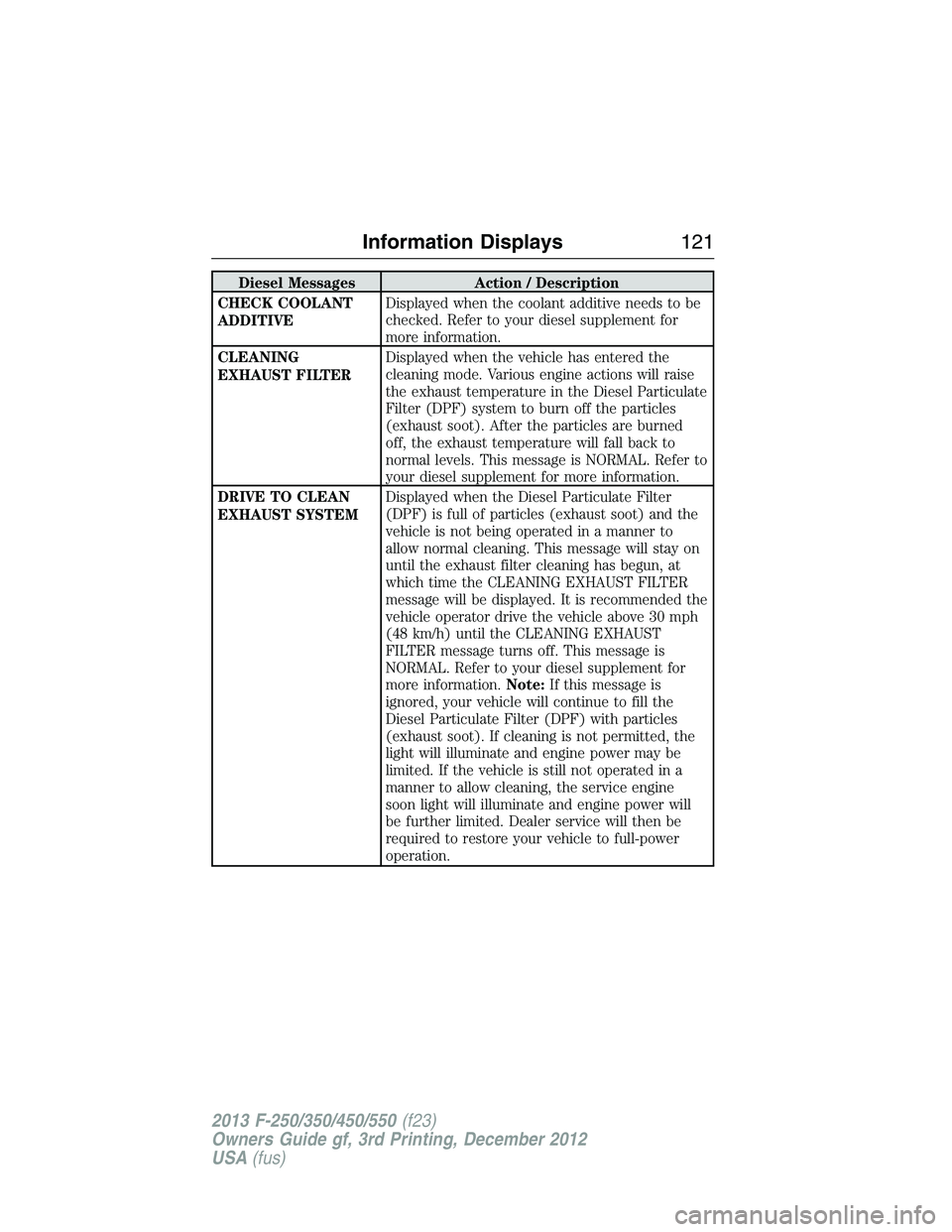
Diesel Messages Action / Description
CHECK COOLANT
ADDITIVEDisplayed when the coolant additive needs to be
checked. Refer to your diesel supplement for
more information.
CLEANING
EXHAUST FILTERDisplayed when the vehicle has entered the
cleaning mode. Various engine actions will raise
the exhaust temperature in the Diesel Particulate
Filter (DPF) system to burn off the particles
(exhaust soot). After the particles are burned
off, the exhaust temperature will fall back to
normal levels. This message is NORMAL. Refer to
your diesel supplement for more information.
DRIVE TO CLEAN
EXHAUST SYSTEMDisplayed when the Diesel Particulate Filter
(DPF) is full of particles (exhaust soot) and the
vehicle is not being operated in a manner to
allow normal cleaning. This message will stay on
until the exhaust filter cleaning has begun, at
which time the CLEANING EXHAUST FILTER
message will be displayed. It is recommended the
vehicle operator drive the vehicle above 30 mph
(48 km/h) until the CLEANING EXHAUST
FILTER message turns off. This message is
NORMAL. Refer to your diesel supplement for
more information.Note:If this message is
ignored, your vehicle will continue to fill the
Diesel Particulate Filter (DPF) with particles
(exhaust soot). If cleaning is not permitted, the
light will illuminate and engine power may be
limited. If the vehicle is still not operated in a
manner to allow cleaning, the service engine
soon light will illuminate and engine power will
be further limited. Dealer service will then be
required to restore your vehicle to full-power
operation.
Information Displays121
2013 F-250/350/450/550(f23)
Owners Guide gf, 3rd Printing, December 2012
USA(fus)
Page 125 of 577
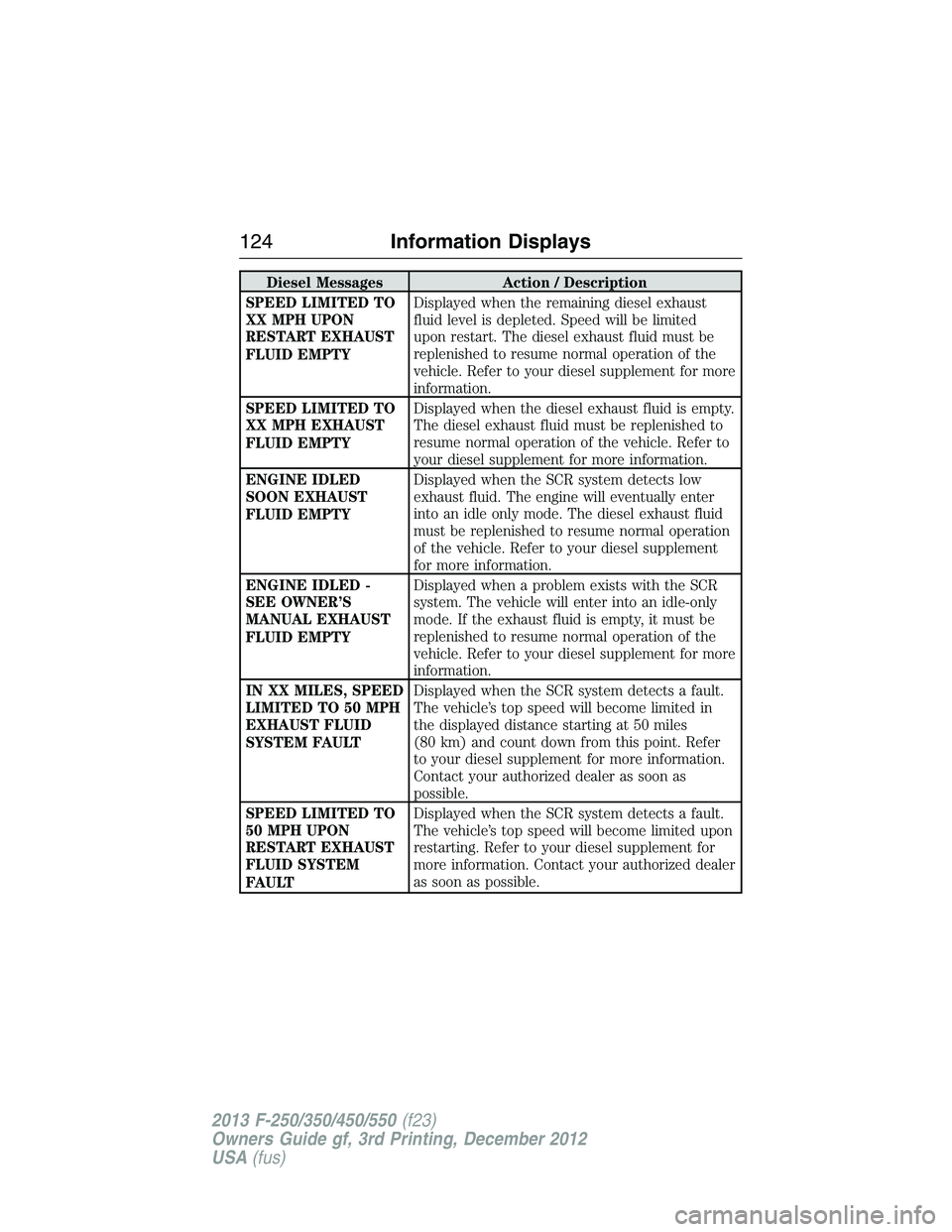
Diesel Messages Action / Description
SPEED LIMITED TO
XX MPH UPON
RESTART EXHAUST
FLUID EMPTYDisplayed when the remaining diesel exhaust
fluid level is depleted. Speed will be limited
upon restart. The diesel exhaust fluid must be
replenished to resume normal operation of the
vehicle. Refer to your diesel supplement for more
information.
SPEED LIMITED TO
XX MPH EXHAUST
FLUID EMPTYDisplayed when the diesel exhaust fluid is empty.
The diesel exhaust fluid must be replenished to
resume normal operation of the vehicle. Refer to
your diesel supplement for more information.
ENGINE IDLED
SOON EXHAUST
FLUID EMPTYDisplayed when the SCR system detects low
exhaust fluid. The engine will eventually enter
into an idle only mode. The diesel exhaust fluid
must be replenished to resume normal operation
of the vehicle. Refer to your diesel supplement
for more information.
ENGINE IDLED -
SEE OWNER’S
MANUAL EXHAUST
FLUID EMPTYDisplayed when a problem exists with the SCR
system. The vehicle will enter into an idle-only
mode. If the exhaust fluid is empty, it must be
replenished to resume normal operation of the
vehicle. Refer to your diesel supplement for more
information.
IN XX MILES, SPEED
LIMITED TO 50 MPH
EXHAUST FLUID
SYSTEM FAULTDisplayed when the SCR system detects a fault.
The vehicle’s top speed will become limited in
the displayed distance starting at 50 miles
(80 km) and count down from this point. Refer
to your diesel supplement for more information.
Contact your authorized dealer as soon as
possible.
SPEED LIMITED TO
50 MPH UPON
RESTART EXHAUST
FLUID SYSTEM
FAULTDisplayed when the SCR system detects a fault.
The vehicle’s top speed will become limited upon
restarting. Refer to your diesel supplement for
more information. Contact your authorized dealer
as soon as possible.
124Information Displays
2013 F-250/350/450/550(f23)
Owners Guide gf, 3rd Printing, December 2012
USA(fus)
Page 129 of 577
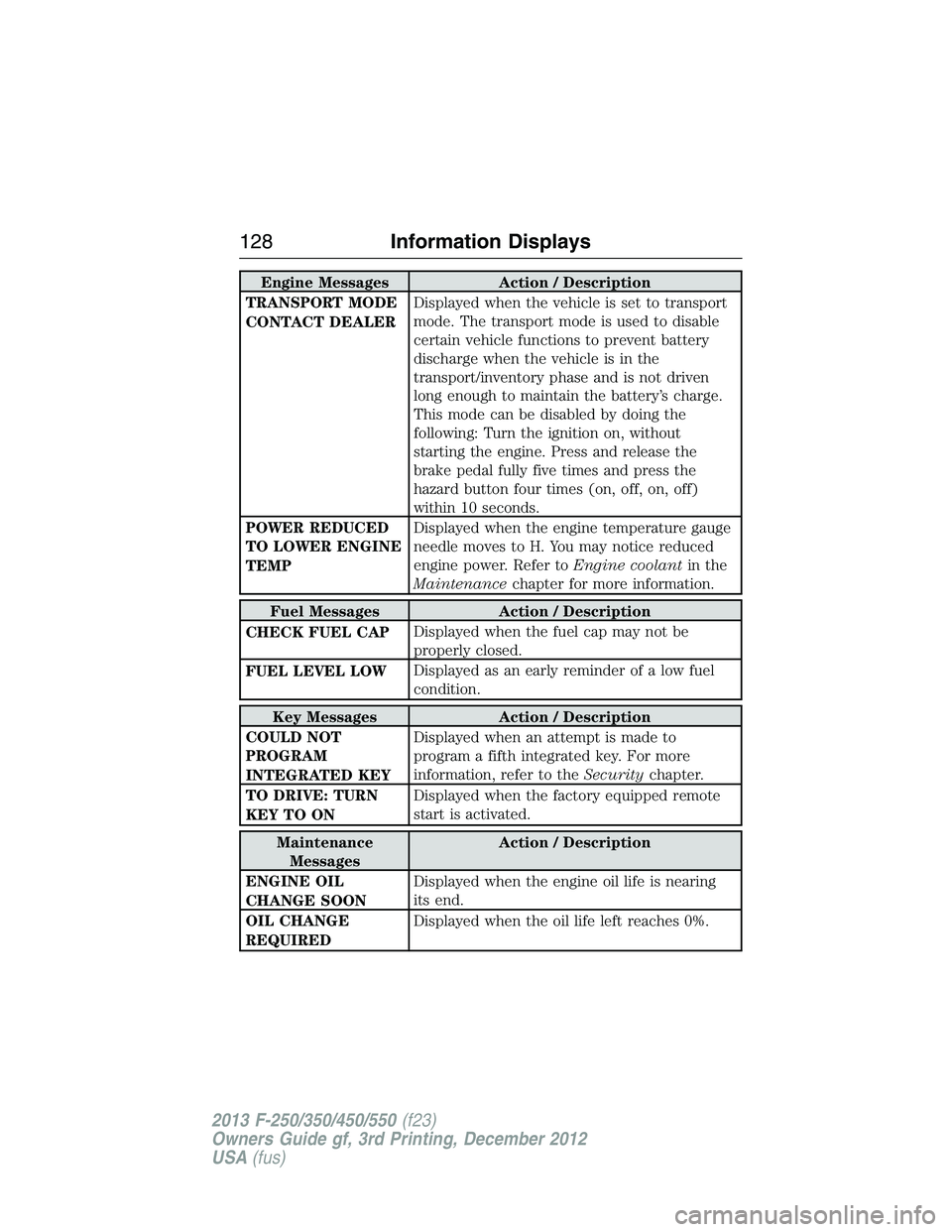
Engine Messages Action / Description
TRANSPORT MODE
CONTACT DEALERDisplayed when the vehicle is set to transport
mode. The transport mode is used to disable
certain vehicle functions to prevent battery
discharge when the vehicle is in the
transport/inventory phase and is not driven
long enough to maintain the battery’s charge.
This mode can be disabled by doing the
following: Turn the ignition on, without
starting the engine. Press and release the
brake pedal fully five times and press the
hazard button four times (on, off, on, off)
within 10 seconds.
POWER REDUCED
TO LOWER ENGINE
TEMPDisplayed when the engine temperature gauge
needle moves to H. You may notice reduced
engine power. Refer toEngine coolantin the
Maintenancechapter for more information.
Fuel Messages Action / Description
CHECK FUEL CAPDisplayed when the fuel cap may not be
properly closed.
FUEL LEVEL LOWDisplayed as an early reminder of a low fuel
condition.
Key Messages Action / Description
COULD NOT
PROGRAM
INTEGRATED KEYDisplayed when an attempt is made to
program a fifth integrated key. For more
information, refer to theSecuritychapter.
TO DRIVE: TURN
KEY TO ONDisplayed when the factory equipped remote
start is activated.
Maintenance
MessagesAction / Description
ENGINE OIL
CHANGE SOONDisplayed when the engine oil life is nearing
its end.
OIL CHANGE
REQUIREDDisplayed when the oil life left reaches 0%.
128Information Displays
2013 F-250/350/450/550(f23)
Owners Guide gf, 3rd Printing, December 2012
USA(fus)
Page 131 of 577
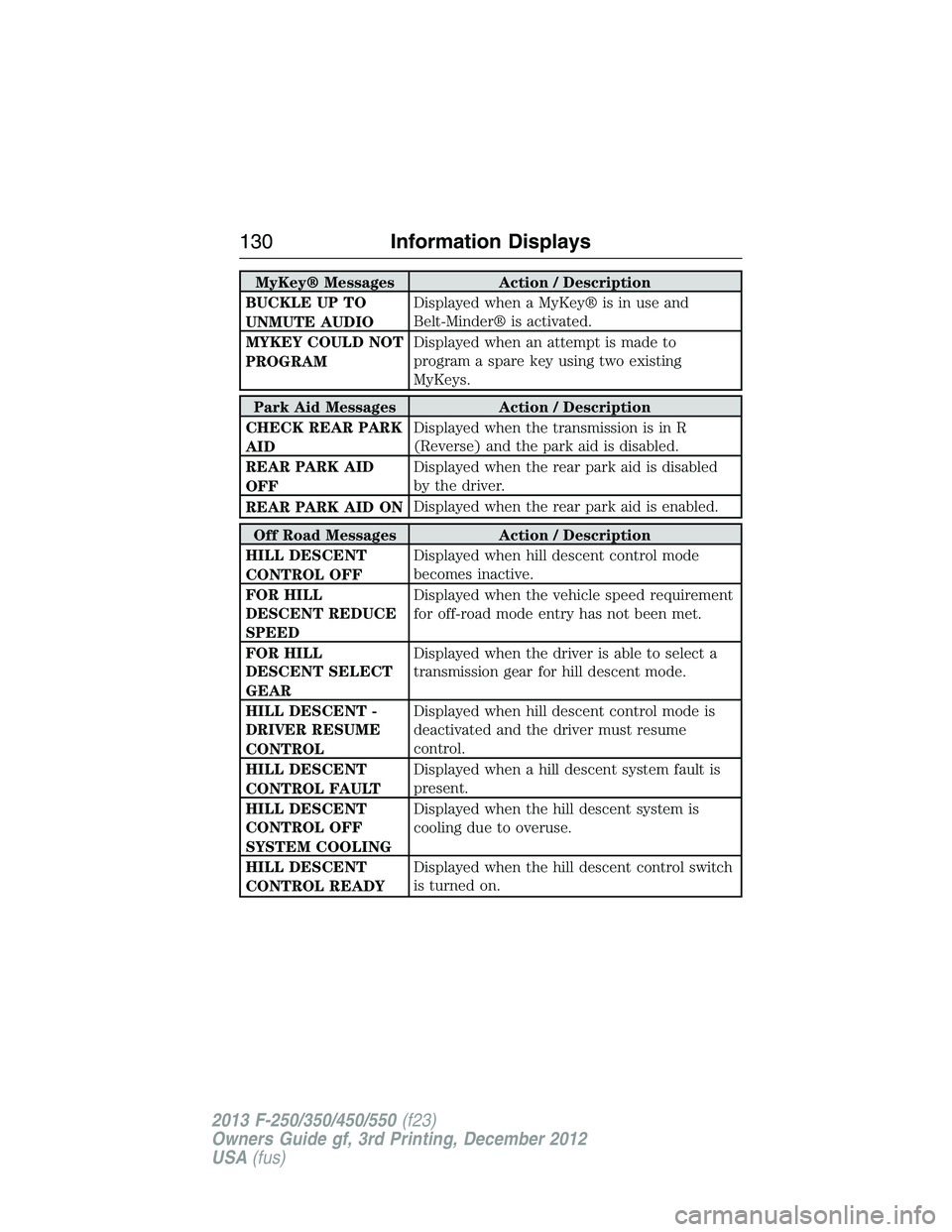
MyKey® Messages Action / Description
BUCKLE UP TO
UNMUTE AUDIODisplayed when a MyKey® is in use and
Belt-Minder® is activated.
MYKEY COULD NOT
PROGRAMDisplayed when an attempt is made to
program a spare key using two existing
MyKeys.
Park Aid Messages Action / Description
CHECK REAR PARK
AIDDisplayed when the transmission is in R
(Reverse) and the park aid is disabled.
REAR PARK AID
OFFDisplayed when the rear park aid is disabled
by the driver.
REAR PARK AID ONDisplayed when the rear park aid is enabled.
Off Road Messages Action / Description
HILL DESCENT
CONTROL OFFDisplayed when hill descent control mode
becomes inactive.
FOR HILL
DESCENT REDUCE
SPEEDDisplayed when the vehicle speed requirement
for off-road mode entry has not been met.
FOR HILL
DESCENT SELECT
GEARDisplayed when the driver is able to select a
transmission gear for hill descent mode.
HILL DESCENT -
DRIVER RESUME
CONTROLDisplayed when hill descent control mode is
deactivated and the driver must resume
control.
HILL DESCENT
CONTROL FAULTDisplayed when a hill descent system fault is
present.
HILL DESCENT
CONTROL OFF
SYSTEM COOLINGDisplayed when the hill descent system is
cooling due to overuse.
HILL DESCENT
CONTROL READYDisplayed when the hill descent control switch
is turned on.
130Information Displays
2013 F-250/350/450/550(f23)
Owners Guide gf, 3rd Printing, December 2012
USA(fus)
Page 136 of 577
MP3 Track and Folder Structure
Audio systems capable of recognizing and playing MP3 individual tracks
and folder structures work as follows:
•There are two different modes for MP3 disc playback: MP3 track
mode (system default) and MP3 folder mode.
•MP3 track mode ignores any folder structure on the MP3 disc. The
player numbers each MP3 track on the disc (noted by the .mp3 file
extension) from T001 to a maximum of T255.Note:The maximum
number of playable MP3 files may be less depending on the structure
of the CD and exact model of radio present.
•MP3 folder mode represents a folder structure consisting of one level
of folders. The CD player numbers all MP3 tracks on the disc (noted
by the .mp3 file extension) and all folders containing MP3 files, from
F001 (folder) T001 (track) to F253 T255.
•Creating discs with only one level of folders helps with navigation
through the disc files.
If you are burning your own MP3 discs, it is important to understand
how the system reads the structures you create. While various files
may be present, (files with extensions other than mp3), only files with
the .mp3 extension are played; other files are ignored by the system.
This enables you to use the same MP3 disc for a variety of tasks on
your work computer, home computer and your in-vehicle system.
In track mode, the system displays and plays the structure as if it were
only one level deep (all .mp3 files play, regardless of being in a specific
folder). In folder mode, the system only plays the .mp3 files in the
current folder.
Audio System135
2013 F-250/350/450/550(f23)
Owners Guide gf, 3rd Printing, December 2012
USA(fus)