brake FORD F250 2013 Owner's Manual
[x] Cancel search | Manufacturer: FORD, Model Year: 2013, Model line: F250, Model: FORD F250 2013Pages: 577, PDF Size: 7.74 MB
Page 129 of 577
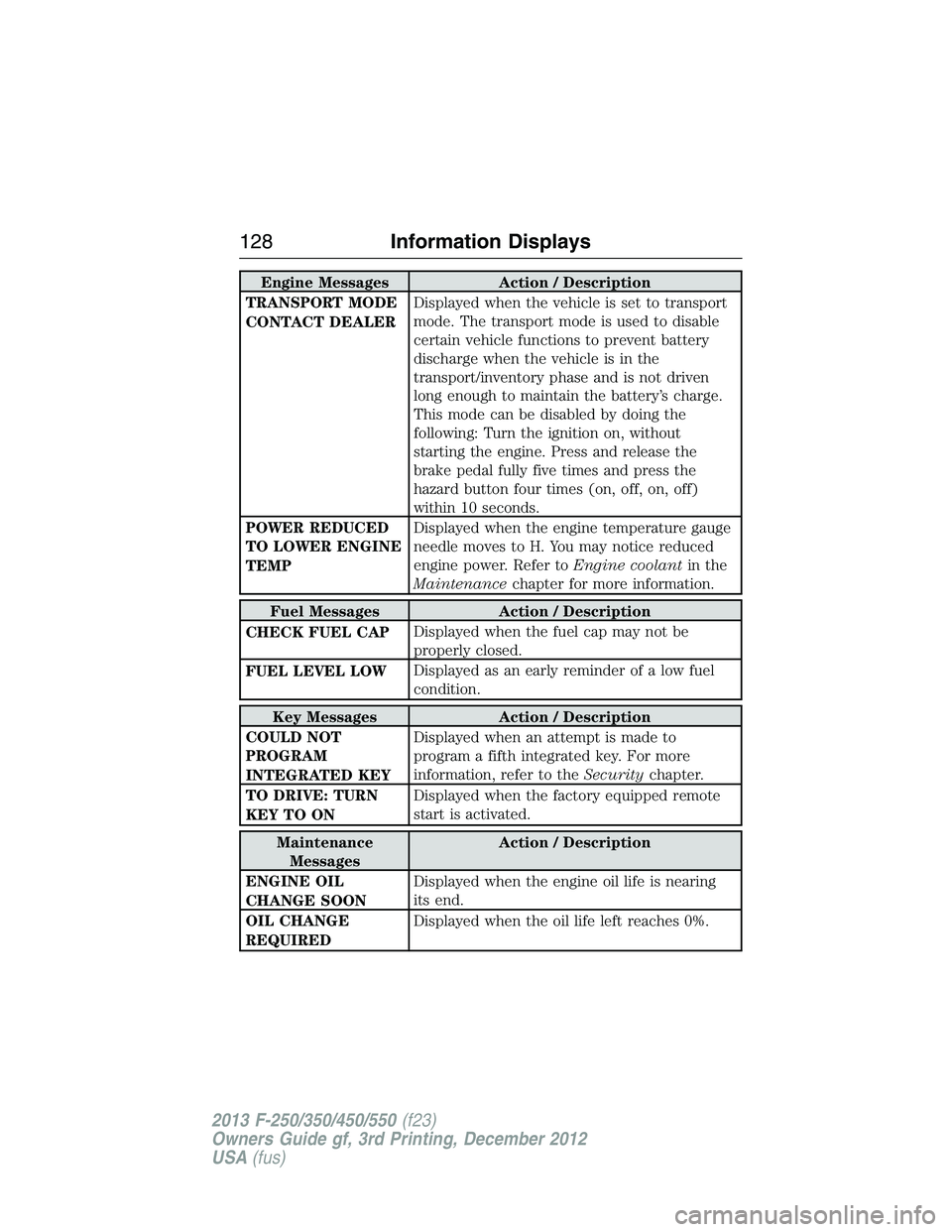
Engine Messages Action / Description
TRANSPORT MODE
CONTACT DEALERDisplayed when the vehicle is set to transport
mode. The transport mode is used to disable
certain vehicle functions to prevent battery
discharge when the vehicle is in the
transport/inventory phase and is not driven
long enough to maintain the battery’s charge.
This mode can be disabled by doing the
following: Turn the ignition on, without
starting the engine. Press and release the
brake pedal fully five times and press the
hazard button four times (on, off, on, off)
within 10 seconds.
POWER REDUCED
TO LOWER ENGINE
TEMPDisplayed when the engine temperature gauge
needle moves to H. You may notice reduced
engine power. Refer toEngine coolantin the
Maintenancechapter for more information.
Fuel Messages Action / Description
CHECK FUEL CAPDisplayed when the fuel cap may not be
properly closed.
FUEL LEVEL LOWDisplayed as an early reminder of a low fuel
condition.
Key Messages Action / Description
COULD NOT
PROGRAM
INTEGRATED KEYDisplayed when an attempt is made to
program a fifth integrated key. For more
information, refer to theSecuritychapter.
TO DRIVE: TURN
KEY TO ONDisplayed when the factory equipped remote
start is activated.
Maintenance
MessagesAction / Description
ENGINE OIL
CHANGE SOONDisplayed when the engine oil life is nearing
its end.
OIL CHANGE
REQUIREDDisplayed when the oil life left reaches 0%.
128Information Displays
2013 F-250/350/450/550(f23)
Owners Guide gf, 3rd Printing, December 2012
USA(fus)
Page 132 of 577
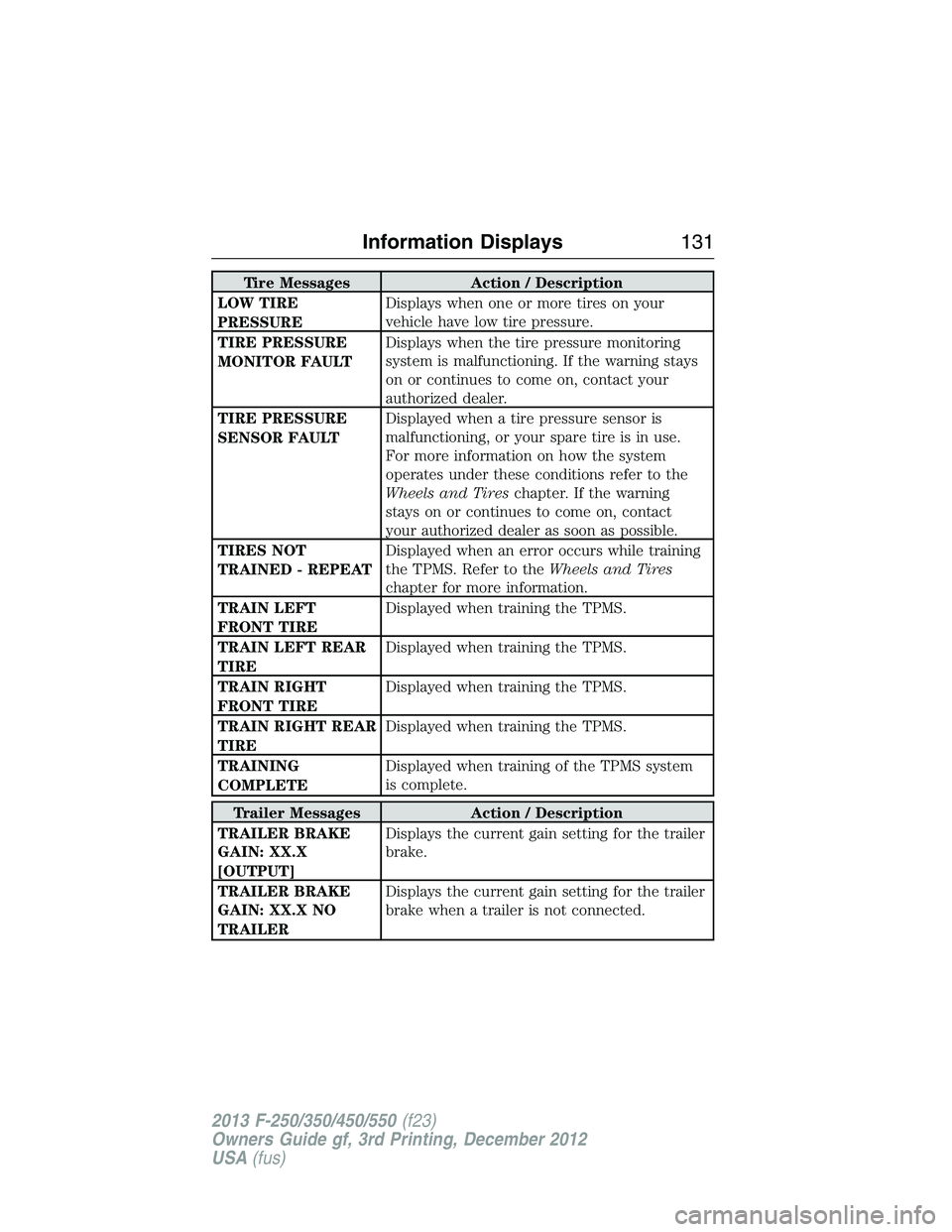
Tire Messages Action / Description
LOW TIRE
PRESSUREDisplays when one or more tires on your
vehicle have low tire pressure.
TIRE PRESSURE
MONITOR FAULTDisplays when the tire pressure monitoring
system is malfunctioning. If the warning stays
on or continues to come on, contact your
authorized dealer.
TIRE PRESSURE
SENSOR FAULTDisplayed when a tire pressure sensor is
malfunctioning, or your spare tire is in use.
For more information on how the system
operates under these conditions refer to the
Wheels and Tireschapter. If the warning
stays on or continues to come on, contact
your authorized dealer as soon as possible.
TIRES NOT
TRAINED - REPEATDisplayed when an error occurs while training
the TPMS. Refer to theWheels and Tires
chapter for more information.
TRAIN LEFT
FRONT TIREDisplayed when training the TPMS.
TRAIN LEFT REAR
TIREDisplayed when training the TPMS.
TRAIN RIGHT
FRONT TIREDisplayed when training the TPMS.
TRAIN RIGHT REAR
TIREDisplayed when training the TPMS.
TRAINING
COMPLETEDisplayed when training of the TPMS system
is complete.
Trailer Messages Action / Description
TRAILER BRAKE
GAIN: XX.X
[OUTPUT]Displays the current gain setting for the trailer
brake.
TRAILER BRAKE
GAIN: XX.X NO
TRAILERDisplays the current gain setting for the trailer
brake when a trailer is not connected.
Information Displays131
2013 F-250/350/450/550(f23)
Owners Guide gf, 3rd Printing, December 2012
USA(fus)
Page 133 of 577
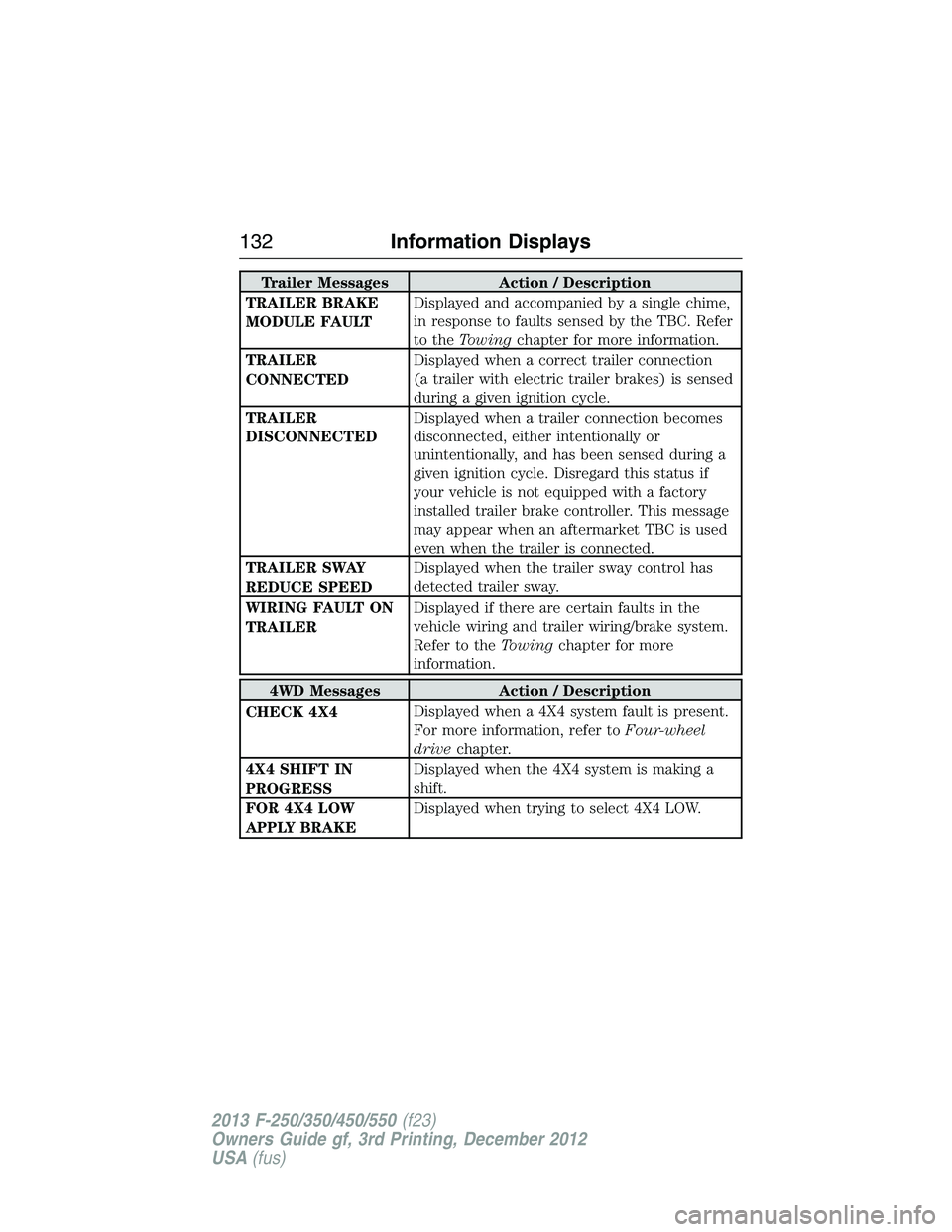
Trailer Messages Action / Description
TRAILER BRAKE
MODULE FAULTDisplayed and accompanied by a single chime,
in response to faults sensed by the TBC. Refer
to theTowingchapter for more information.
TRAILER
CONNECTEDDisplayed when a correct trailer connection
(a trailer with electric trailer brakes) is sensed
during a given ignition cycle.
TRAILER
DISCONNECTEDDisplayed when a trailer connection becomes
disconnected, either intentionally or
unintentionally, and has been sensed during a
given ignition cycle. Disregard this status if
your vehicle is not equipped with a factory
installed trailer brake controller. This message
may appear when an aftermarket TBC is used
even when the trailer is connected.
TRAILER SWAY
REDUCE SPEEDDisplayed when the trailer sway control has
detected trailer sway.
WIRING FAULT ON
TRAILERDisplayed if there are certain faults in the
vehicle wiring and trailer wiring/brake system.
Refer to theTowingchapter for more
information.
4WD Messages Action / Description
CHECK 4X4Displayed when a 4X4 system fault is present.
For more information, refer toFour-wheel
drivechapter.
4X4 SHIFT IN
PROGRESSDisplayed when the 4X4 system is making a
shift.
FOR 4X4 LOW
APPLY BRAKEDisplayed when trying to select 4X4 LOW.
132Information Displays
2013 F-250/350/450/550(f23)
Owners Guide gf, 3rd Printing, December 2012
USA(fus)
Page 134 of 577
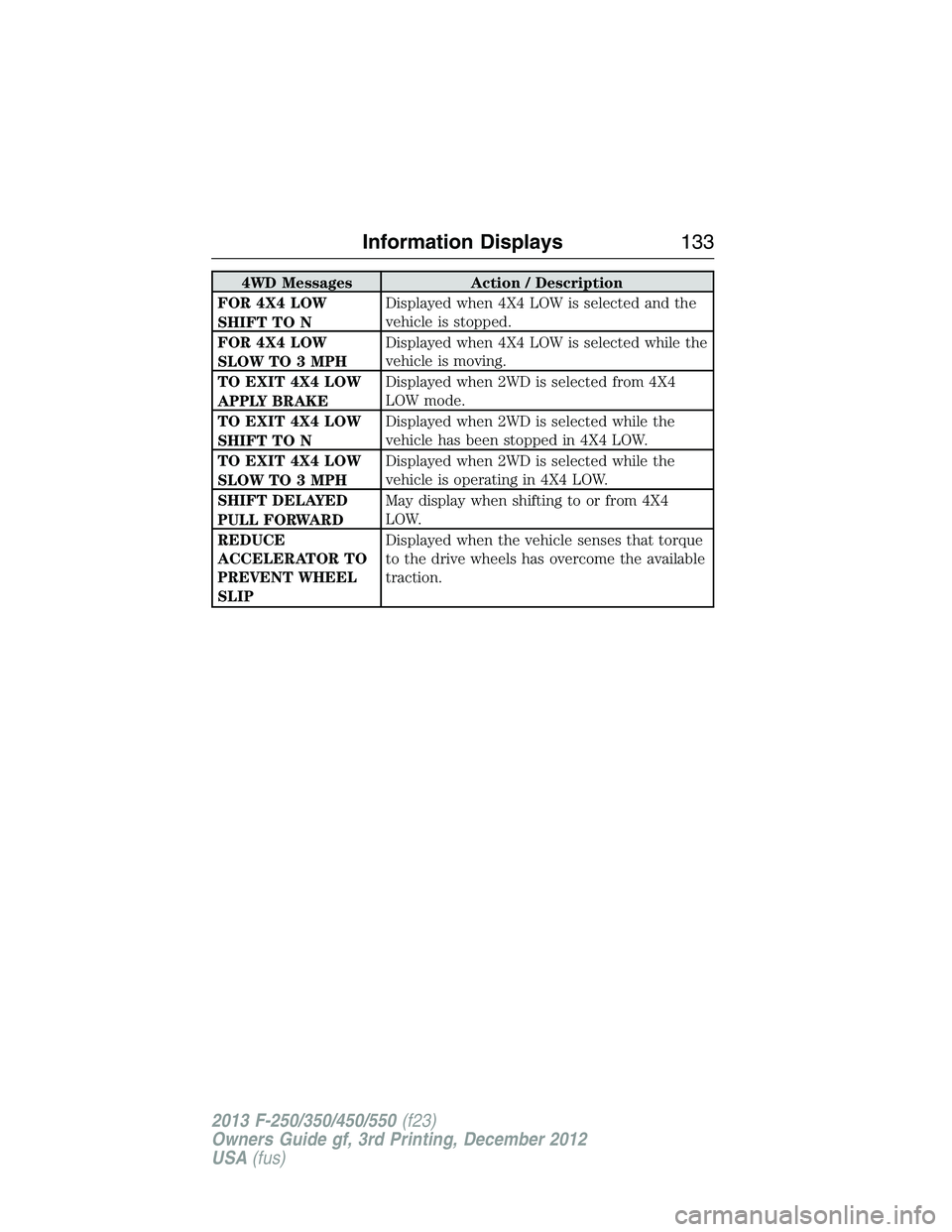
4WD Messages Action / Description
FOR 4X4 LOW
SHIFT TO NDisplayed when 4X4 LOW is selected and the
vehicle is stopped.
FOR 4X4 LOW
SLOW TO 3 MPHDisplayed when 4X4 LOW is selected while the
vehicle is moving.
TO EXIT 4X4 LOW
APPLY BRAKEDisplayed when 2WD is selected from 4X4
LOW mode.
TO EXIT 4X4 LOW
SHIFT TO NDisplayed when 2WD is selected while the
vehicle has been stopped in 4X4 LOW.
TO EXIT 4X4 LOW
SLOW TO 3 MPHDisplayed when 2WD is selected while the
vehicle is operating in 4X4 LOW.
SHIFT DELAYED
PULL FORWARDMay display when shifting to or from 4X4
LOW.
REDUCE
ACCELERATOR TO
PREVENT WHEEL
SLIPDisplayed when the vehicle senses that torque
to the drive wheels has overcome the available
traction.
Information Displays133
2013 F-250/350/450/550(f23)
Owners Guide gf, 3rd Printing, December 2012
USA(fus)
Page 143 of 577
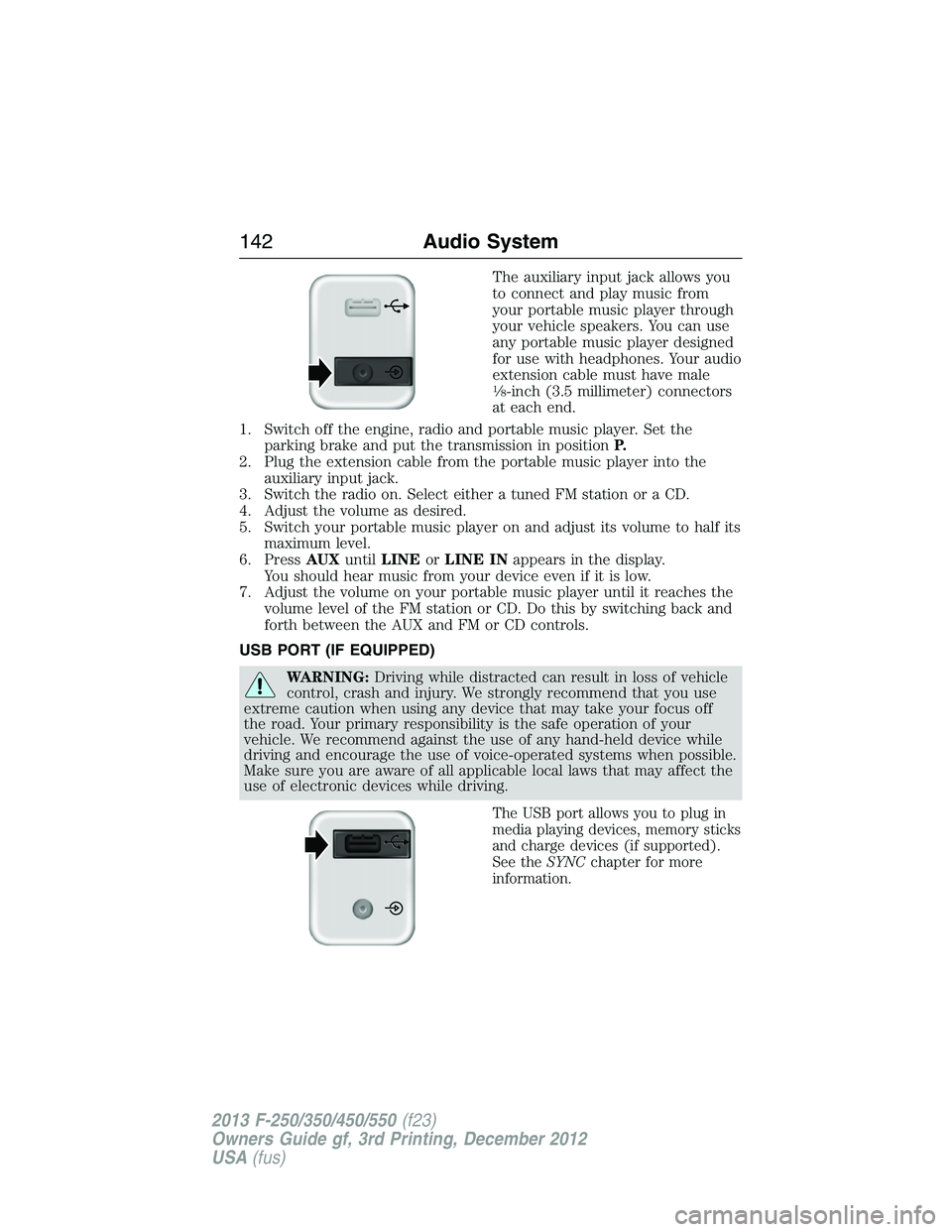
The auxiliary input jack allows you
to connect and play music from
your portable music player through
your vehicle speakers. You can use
any portable music player designed
for use with headphones. Your audio
extension cable must have male
18-inch (3.5 millimeter) connectors
at each end.
1. Switch off the engine, radio and portable music player. Set the
parking brake and put the transmission in positionP.
2. Plug the extension cable from the portable music player into the
auxiliary input jack.
3. Switch the radio on. Select either a tuned FM station or a CD.
4. Adjust the volume as desired.
5. Switch your portable music player on and adjust its volume to half its
maximum level.
6. PressAUXuntilLINEorLINE INappears in the display.
You should hear music from your device even if it is low.
7. Adjust the volume on your portable music player until it reaches the
volume level of the FM station or CD. Do this by switching back and
forth between the AUX and FM or CD controls.
USB PORT (IF EQUIPPED)
WARNING:Driving while distracted can result in loss of vehicle
control, crash and injury. We strongly recommend that you use
extreme caution when using any device that may take your focus off
the road. Your primary responsibility is the safe operation of your
vehicle. We recommend against the use of any hand-held device while
driving and encourage the use of voice-operated systems when possible.
Make sure you are aware of all applicable local laws that may affect the
use of electronic devices while driving.
The USB port allows you to plug in
media playing devices, memory sticks
and charge devices (if supported).
See theSYNCchapter for more
information.
142Audio System
2013 F-250/350/450/550(f23)
Owners Guide gf, 3rd Printing, December 2012
USA(fus)
Page 184 of 577
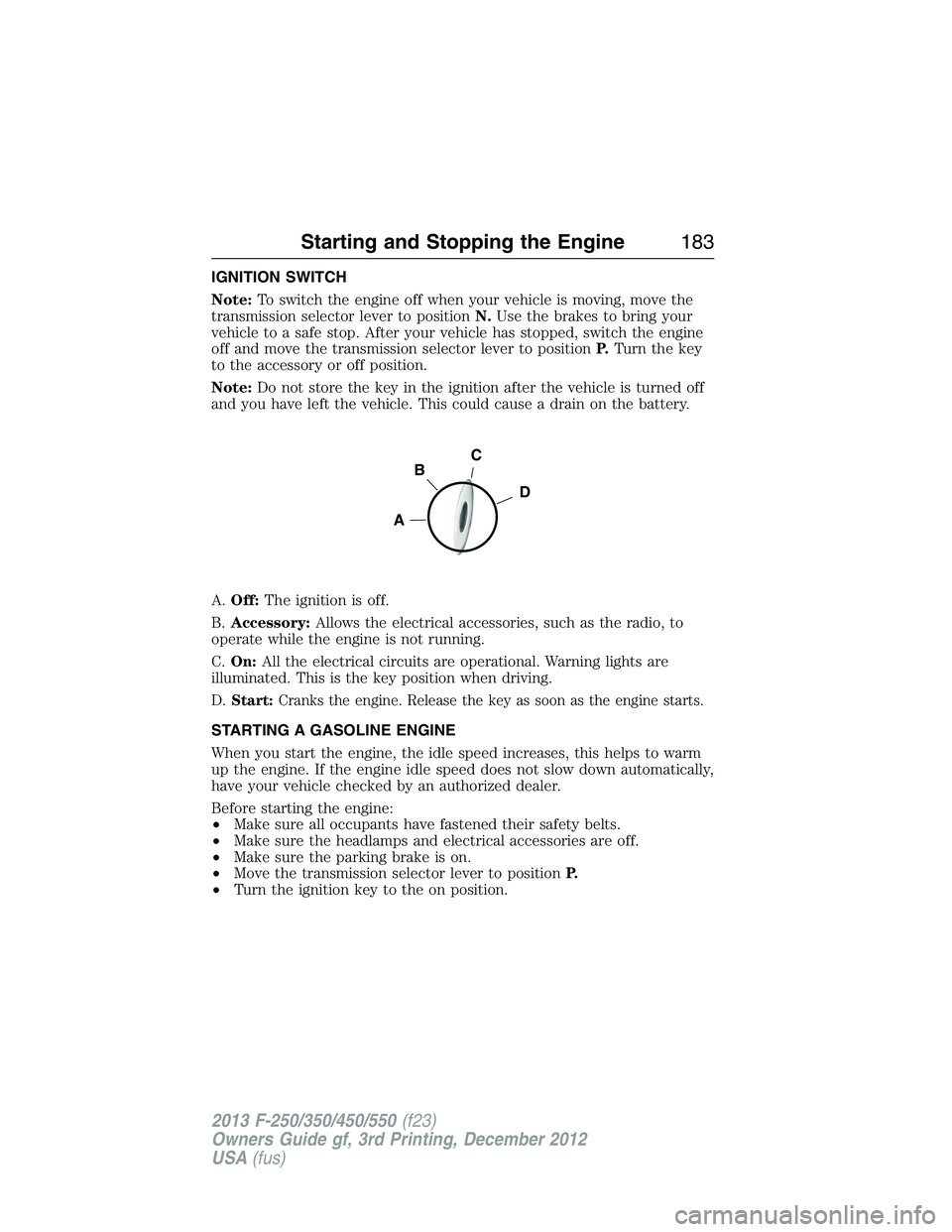
IGNITION SWITCH
Note:To switch the engine off when your vehicle is moving, move the
transmission selector lever to positionN.Use the brakes to bring your
vehicle to a safe stop. After your vehicle has stopped, switch the engine
off and move the transmission selector lever to positionP.Turn the key
to the accessory or off position.
Note:Do not store the key in the ignition after the vehicle is turned off
and you have left the vehicle. This could cause a drain on the battery.
A.Off:The ignition is off.
B.Accessory:Allows the electrical accessories, such as the radio, to
operate while the engine is not running.
C.On:All the electrical circuits are operational. Warning lights are
illuminated. This is the key position when driving.
D.
Start:Cranks the engine. Release the key as soon as the engine starts.
STARTING A GASOLINE ENGINE
When you start the engine, the idle speed increases, this helps to warm
up the engine. If the engine idle speed does not slow down automatically,
have your vehicle checked by an authorized dealer.
Before starting the engine:
•Make sure all occupants have fastened their safety belts.
•Make sure the headlamps and electrical accessories are off.
•Make sure the parking brake is on.
•Move the transmission selector lever to positionP.
•Turn the ignition key to the on position.
C
D
B
A
Starting and Stopping the Engine183
2013 F-250/350/450/550(f23)
Owners Guide gf, 3rd Printing, December 2012
USA(fus)
Page 185 of 577
Some warning lights briefly illuminate.
Note:Do not touch the accelerator pedal.
1. Fully press the brake pedal.
2. Turn the key to the start position to start the engine. Release the key
when the engine starts.
Note:The engine may continue cranking for up to 15 seconds or until it
starts.
Note:If you cannot start the engine on the first try, wait for a short
period and try again.
If you have difficulty starting the engine when the temperature is below
-13°F (-25°C), press the accelerator pedal slightly and try again.
Failure to Start
If you cannot start the engine after three attempts, wait 10 seconds and
follow this procedure:
1. Fully press the brake pedal.
2. Fully press the accelerator pedal and hold it there.
3. Start the engine.
Stopping the Engine When Your Vehicle is Stationary
1. Move the transmission selector lever to positionP.
2. Turn the key to the off position.
Stopping the Engine When Your Vehicle is Moving
WARNING:When you switch off the engine when your vehicle is
still moving, this results in a loss of brake and steering assistance.
The steering does not lock, but higher effort is required. When you
switch off the ignition, some electrical circuits, warning lamps and
indicators may also be off.
1. Move the transmission selector lever to positionNand use the brakes
to bring your vehicle to a safe stop.
2. When your vehicle has stopped, move the transmission selector lever
to positionPand turn the key to the off position.
184Starting and Stopping the Engine
2013 F-250/350/450/550(f23)
Owners Guide gf, 3rd Printing, December 2012
USA(fus)
Page 200 of 577
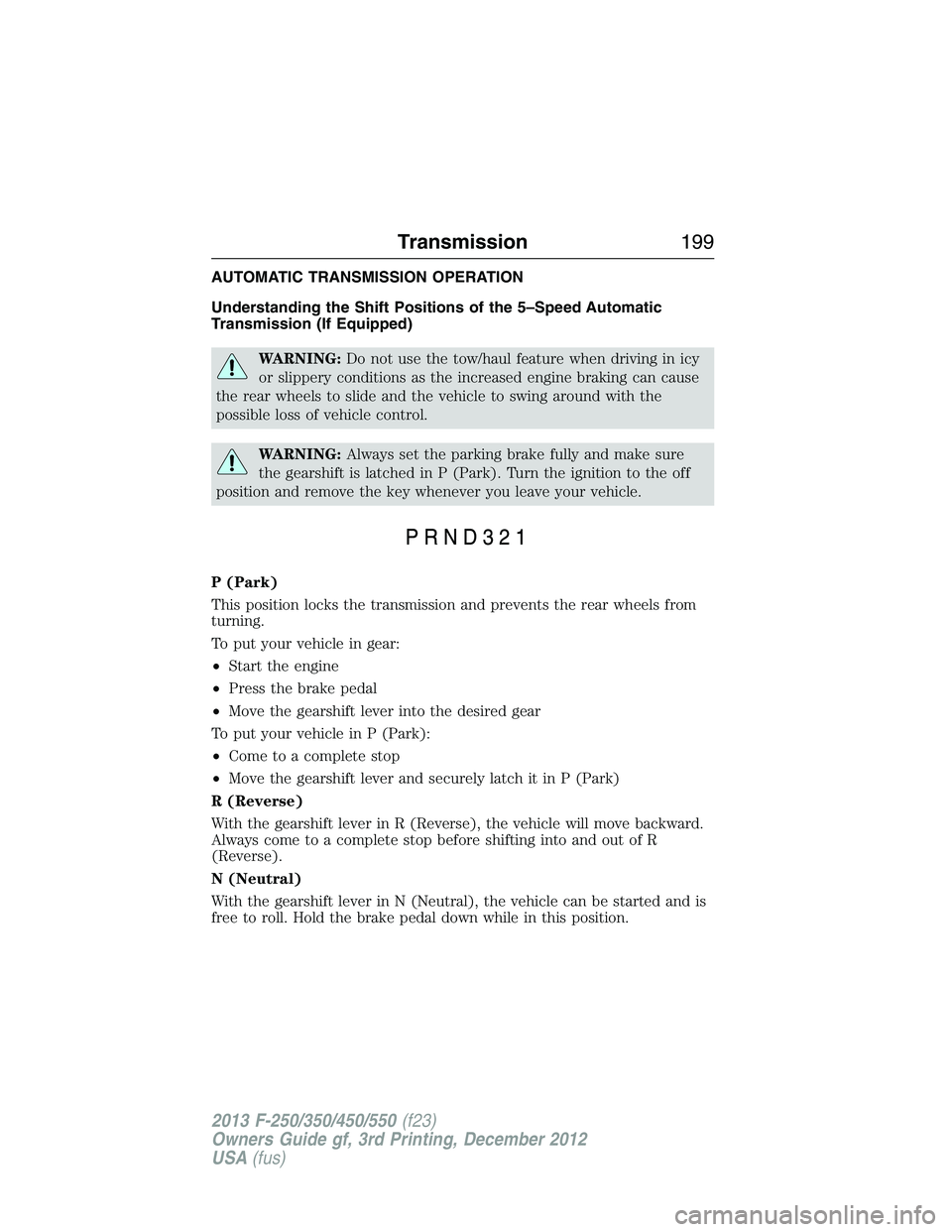
AUTOMATIC TRANSMISSION OPERATION
Understanding the Shift Positions of the 5–Speed Automatic
Transmission (If Equipped)
WARNING:Do not use the tow/haul feature when driving in icy
or slippery conditions as the increased engine braking can cause
the rear wheels to slide and the vehicle to swing around with the
possible loss of vehicle control.
WARNING:Always set the parking brake fully and make sure
the gearshift is latched in P (Park). Turn the ignition to the off
position and remove the key whenever you leave your vehicle.
P (Park)
This position locks the transmission and prevents the rear wheels from
turning.
To put your vehicle in gear:
•Start the engine
•Press the brake pedal
•Move the gearshift lever into the desired gear
To put your vehicle in P (Park):
•Come to a complete stop
•Move the gearshift lever and securely latch it in P (Park)
R (Reverse)
With the gearshift lever in R (Reverse), the vehicle will move backward.
Always come to a complete stop before shifting into and out of R
(Reverse).
N (Neutral)
With the gearshift lever in N (Neutral), the vehicle can be started and is
free to roll. Hold the brake pedal down while in this position.
Transmission199
2013 F-250/350/450/550(f23)
Owners Guide gf, 3rd Printing, December 2012
USA(fus)
Page 202 of 577
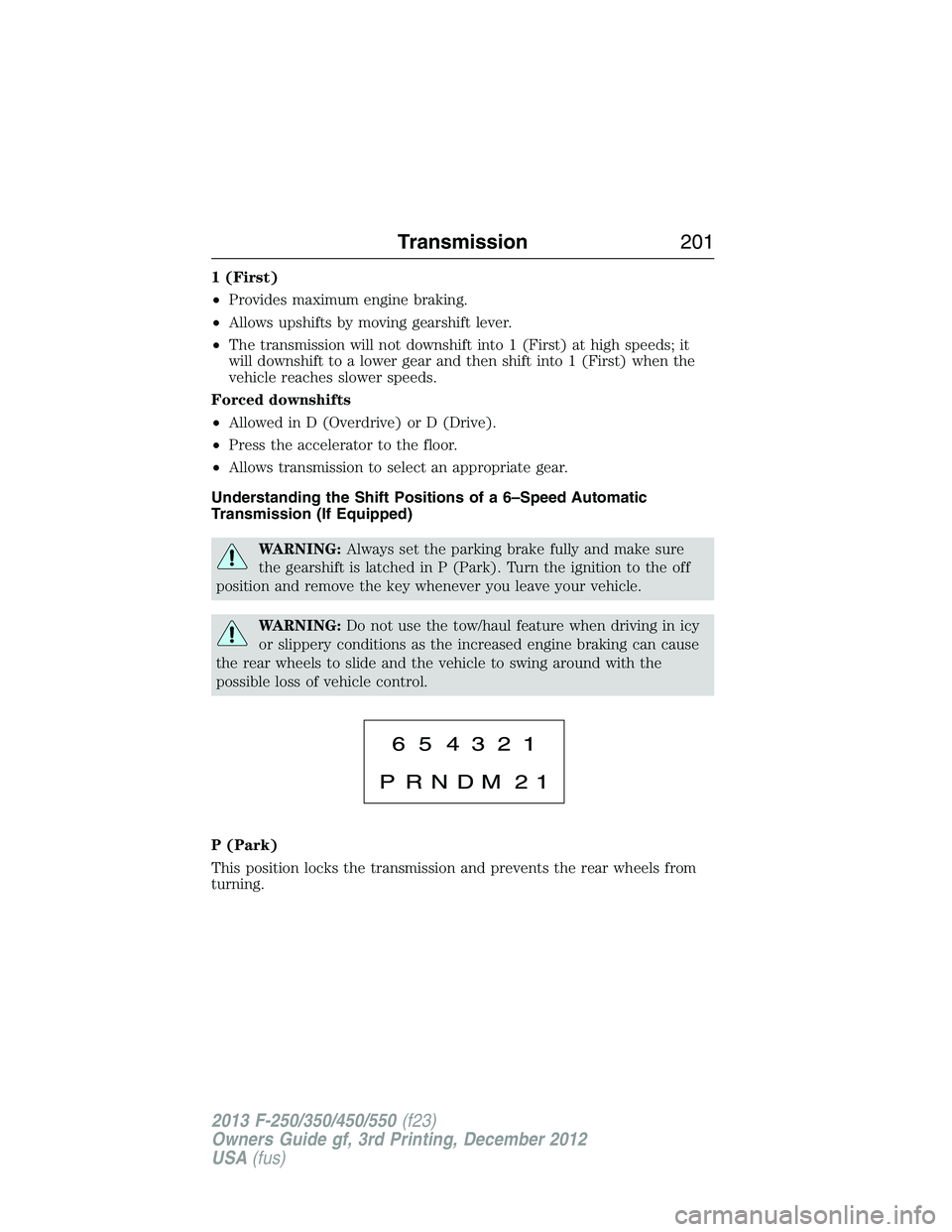
1 (First)
•Provides maximum engine braking.
•Allows upshifts by moving gearshift lever.
•The transmission will not downshift into 1 (First) at high speeds; it
will downshift to a lower gear and then shift into 1 (First) when the
vehicle reaches slower speeds.
Forced downshifts
•Allowed in D (Overdrive) or D (Drive).
•Press the accelerator to the floor.
•Allows transmission to select an appropriate gear.
Understanding the Shift Positions of a 6–Speed Automatic
Transmission (If Equipped)
WARNING:Always set the parking brake fully and make sure
the gearshift is latched in P (Park). Turn the ignition to the off
position and remove the key whenever you leave your vehicle.
WARNING:Do not use the tow/haul feature when driving in icy
or slippery conditions as the increased engine braking can cause
the rear wheels to slide and the vehicle to swing around with the
possible loss of vehicle control.
P (Park)
This position locks the transmission and prevents the rear wheels from
turning.
Transmission201
2013 F-250/350/450/550(f23)
Owners Guide gf, 3rd Printing, December 2012
USA(fus)
Page 203 of 577
To put your vehicle in gear:
1. Start the engine
2. Press the brake pedal
3. Move the gearshift lever into the desired gear
To put your vehicle in P (Park):
1. Come to a complete stop
2. Move the gearshift lever and securely latch it in P (Park)
R (Reverse)
With the gearshift lever in R (Reverse), the vehicle will move backward.
Always come to a complete stop before shifting into and out of R
(Reverse).
N (Neutral)
With the gearshift lever in N (Neutral), the vehicle can be started and is
free to roll. Hold the brake pedal down while in this position.
D (Overdrive) with Tow/Haul Off
D (Overdrive) with tow/haul off is the normal driving position for the
best fuel economy. The overdrive function allows automatic upshifts and
downshifts through gears one through six.
D (Overdrive) with Tow/Haul On
The tow/haul feature improves transmission operation when towing a
trailer or a heavy load. All transmission gear ranges are available when
using tow/haul.
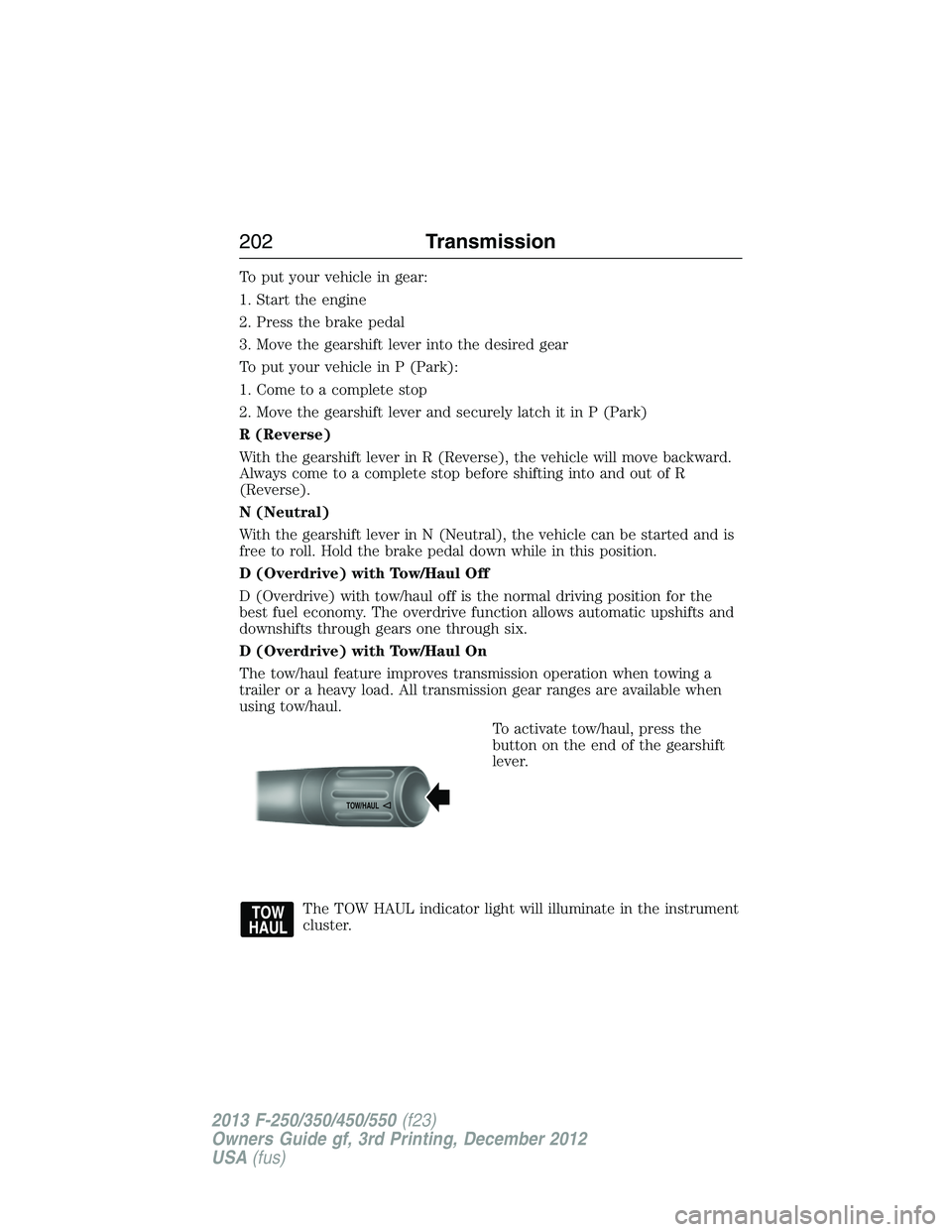
To activate tow/haul, press the
button on the end of the gearshift
lever.
The TOW HAUL indicator light will illuminate in the instrument
cluster.
TOW/H
AUL
202Transmission
2013 F-250/350/450/550(f23)
Owners Guide gf, 3rd Printing, December 2012
USA(fus)