climate control FORD F250 2013 Owner's Manual
[x] Cancel search | Manufacturer: FORD, Model Year: 2013, Model line: F250, Model: FORD F250 2013Pages: 577, PDF Size: 7.74 MB
Page 470 of 577
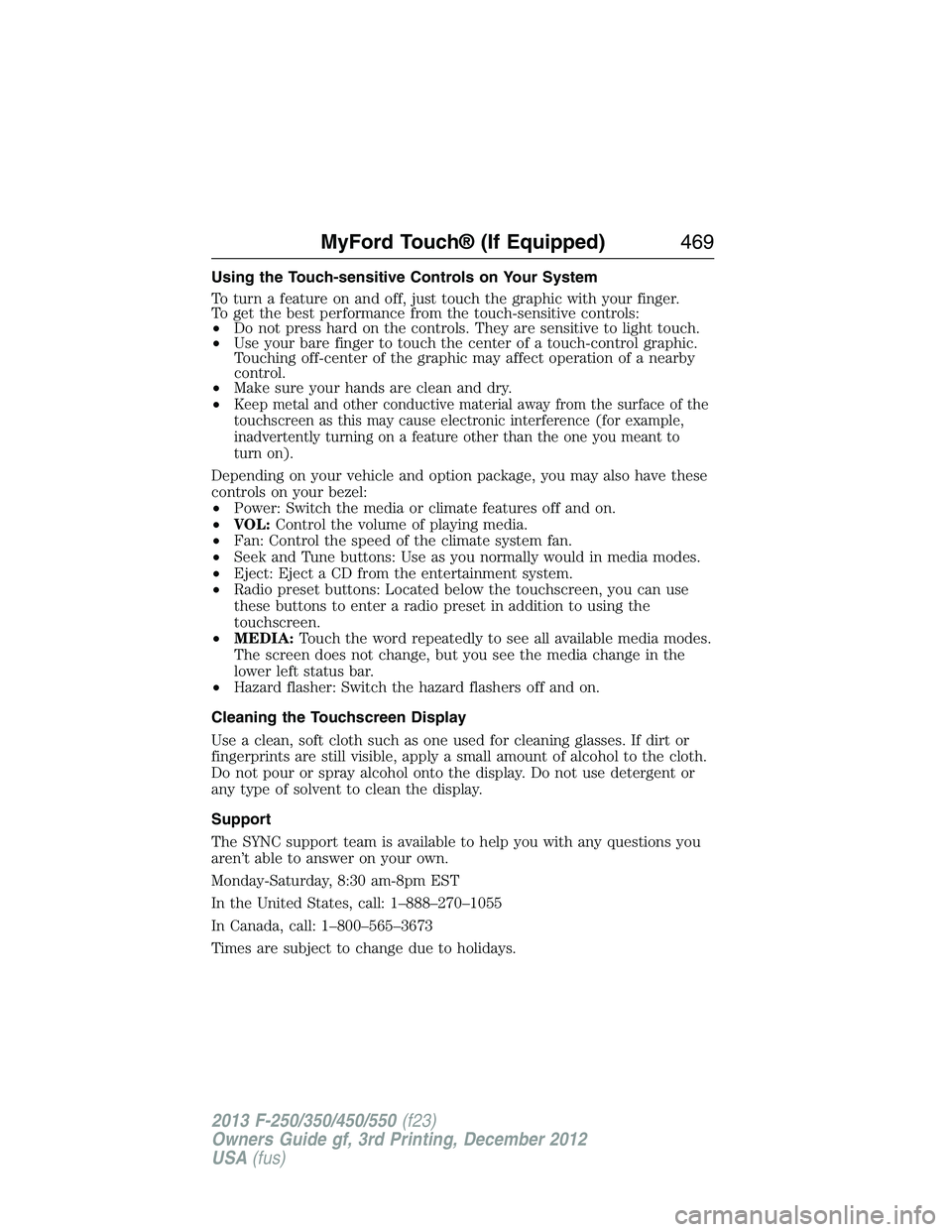
Using the Touch-sensitive Controls on Your System
To turn a feature on and off, just touch the graphic with your finger.
To get the best performance from the touch-sensitive controls:
•Do not press hard on the controls. They are sensitive to light touch.
•Use your bare finger to touch the center of a touch-control graphic.
Touching off-center of the graphic may affect operation of a nearby
control.
•Make sure your hands are clean and dry.
•
Keep metal and other conductive material away from the surface of the
touchscreen as this may cause electronic interference (for example,
inadvertently turning on a feature other than the one you meant to
turn on).
Depending on your vehicle and option package, you may also have these
controls on your bezel:
•Power: Switch the media or climate features off and on.
•VOL:Control the volume of playing media.
•Fan: Control the speed of the climate system fan.
•Seek and Tune buttons: Use as you normally would in media modes.
•Eject: Eject a CD from the entertainment system.
•Radio preset buttons: Located below the touchscreen, you can use
these buttons to enter a radio preset in addition to using the
touchscreen.
•MEDIA:Touch the word repeatedly to see all available media modes.
The screen does not change, but you see the media change in the
lower left status bar.
•Hazard flasher: Switch the hazard flashers off and on.
Cleaning the Touchscreen Display
Use a clean, soft cloth such as one used for cleaning glasses. If dirt or
fingerprints are still visible, apply a small amount of alcohol to the cloth.
Do not pour or spray alcohol onto the display. Do not use detergent or
any type of solvent to clean the display.
Support
The SYNC support team is available to help you with any questions you
aren’t able to answer on your own.
Monday-Saturday, 8:30 am-8pm EST
In the United States, call: 1–888–270–1055
In Canada, call: 1–800–565–3673
Times are subject to change due to holidays.
MyFord Touch® (If Equipped)469
2013 F-250/350/450/550(f23)
Owners Guide gf, 3rd Printing, December 2012
USA(fus)
Page 475 of 577
Accessing a List of Available Commands
•If you use the touchscreen, press the Settings icon >Help>Voice
Command List.
•If you use the steering wheel control, press the voice icon. After the
tone, speak your command clearly.
Voice command list
“Audio list of commands”
“Bluetooth audio list of commands”
“Browse list of commands”
“CD list of commands”
“Climate control list of commands”
“List of commands”
“Navigation list of commands”
*
“Phone list of commands”
“Radio list of commands”
“SD card list of commands”
“Sirius satellite list of commands”
**
“Travel link list of commands”*
“USB list of commands”
“Voice instructions list of commands”
“Voice settings list of commands”
“Help”
*This command is only available when your vehicle is equipped with the
navigation system, and the navigation system SD card is in the card slot.
**This command is only available when you have an active SIRIUS
satellite radio subscription.
474MyFord Touch® (If Equipped)
2013 F-250/350/450/550(f23)
Owners Guide gf, 3rd Printing, December 2012
USA(fus)
Page 535 of 577
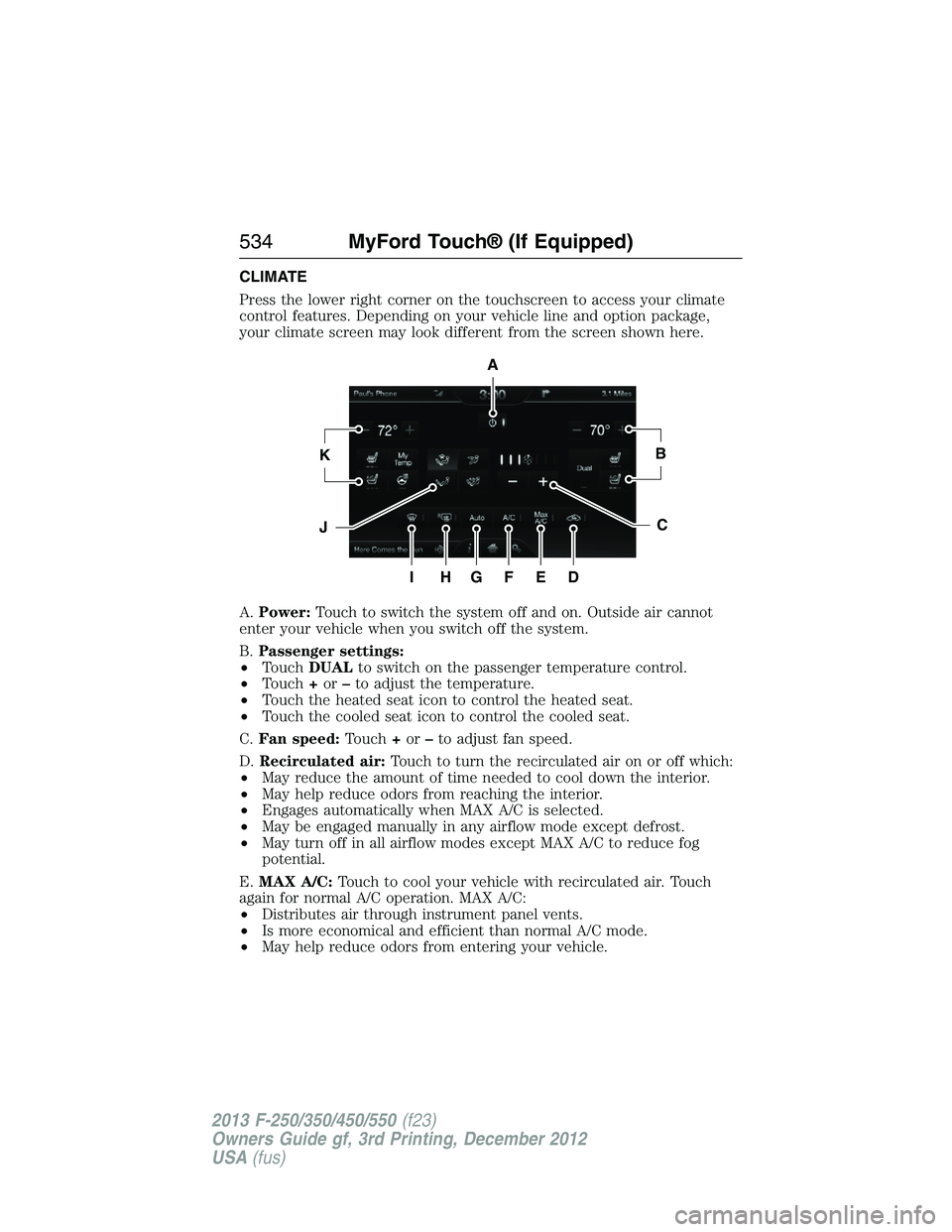
CLIMATE
Press the lower right corner on the touchscreen to access your climate
control features. Depending on your vehicle line and option package,
your climate screen may look different from the screen shown here.
A.Power:Touch to switch the system off and on. Outside air cannot
enter your vehicle when you switch off the system.
B.Passenger settings:
•TouchDUALto switch on the passenger temperature control.
•Touch+or–to adjust the temperature.
•Touch the heated seat icon to control the heated seat.
•Touch the cooled seat icon to control the cooled seat.
C.Fan speed:Touch+or–to adjust fan speed.
D.Recirculated air:Touch to turn the recirculated air on or off which:
•May reduce the amount of time needed to cool down the interior.
•May help reduce odors from reaching the interior.
•Engages automatically when MAX A/C is selected.
•May be engaged manually in any airflow mode except defrost.
•May turn off in all airflow modes except MAX A/C to reduce fog
potential.
E.MAX A/C:Touch to cool your vehicle with recirculated air. Touch
again for normal A/C operation. MAX A/C:
•Distributes air through instrument panel vents.
•Is more economical and efficient than normal A/C mode.
•May help reduce odors from entering your vehicle.
A
KB
JC
IHGFED
534MyFord Touch® (If Equipped)
2013 F-250/350/450/550(f23)
Owners Guide gf, 3rd Printing, December 2012
USA(fus)
Page 537 of 577
Climate Control Voice Commands
The following voice commands are available at the main menu
level of a voice session. For example, press the voice button
and after the prompt, “Say a command”; say any of the
following commands:
Climate control voice commands
“Climate automatic”
“Climate my temperature”
“Climate off”
“Climate on”
“Climate temperature <15.5–29.5> degrees”
“Climate temperature <60–85> degrees”
“Help”
There are additional climate control commands but in order to access
them, you have to say “Climate” first, then when the system is ready to
listen, you may say any of the following commands:
Additional climate control voice commands
“Automatic” “Panel off”
“A/C off” “Panel on”
“A/C on” “Rear defrost off”
“Defrost off” “Rear defrost on”
“Defrost on” “Recirc off”
“Dual off” “Recirc on”
“Fan decrease” “Temperature”
*
“Fan increase” “Temperature <15.5–29.5> degrees”
“Floor on” “Temperature <60–85> degrees”
“Max A/C off” “Temperature decrease”
“Max A/C on” “Temperature high”
“My temp” “Temperature increase”
“Off” “Temperature low”
“On” “Windshield floor on”
“Panel floor on” “Help”
*If you have said “Temperature”, you can say any of the commands in the
following “Temperature” chart.
536MyFord Touch® (If Equipped)
2013 F-250/350/450/550(f23)
Owners Guide gf, 3rd Printing, December 2012
USA(fus)
Page 571 of 577
maintenance-free ....................318
replacement, specifications ...395
servicing ..................................318
Bed extender ............................251
Booster seats ...............................23
Brakelamp
bulb replacement ............329–330
Brakes ........................................223
anti-lock ...................................223
anti-lock brake system (ABS)
warning light ...........................223
brake warning light ................223
fluid, checking and adding ....317
fluid, refill capacities ..............391
fluid, specifications .................391
parking ....................................224
shift interlock ..........................206
trailer ...............................258–259
Bulbs ..........................................331
C
Capacities for refilling fluids ....391
Car2U® Home Automation
System .......................................168
CD ..............................136–137, 140
CD player ..........................134, 492
CD voice commands .................493
Cell phone use ............................17
Changing a tire .........................371
Changing the air filter ..............323
Child safety seats
attaching with tether straps ....31
automatic locking mode
(retractor) .................................40
in front seat ..............................28
in rear seat ................................28
LATCH .......................................31Child safety seats -
booster seats ...............................23
Cleaning the touchscreen ........469
Cleaning your vehicle ...............332
engine compartment ..............334
exterior ....................................332
instrument panel ............336–337
interior .....................................335
plastic parts ............................334
washing ....................................332
waxing .....................................334
wheels ......................................340
wiper blades ............................335
Climate control (see Air
conditioning or Heating) ..........146
Climate voice commands .........536
Clock ..........................136–137, 520
Console ......................................181
overhead ..................................181
Controls
power seat ...............................159
Coolant ......................................307
checking and adding ..............307
recovery reservoir ..................304
refill capacities ........................391
Customer Assistance ................276
Ford Extended Service
lan ............................................400
Getting roadside assistance ...276
Getting the service
you need .................................282
Ordering additional
owner’s literature ...................288
Utilizing the
Mediation/Arbitration
Program ...................................286
570Index
2013 F-250/350/450/550(f23)
Owners Guide gf, 3rd Printing, December 2012
USA(fus)
Page 575 of 577
Power distribution box
(see Fuses) ...............................291
Power door locks ........................72
Power mirrors .............................92
Powerpoint ................................178
Power steering ..........................240
fluid, checking and adding ....317
fluid, refill capacity ................391
Power Windows ...........................90
Privacy information ..........422, 472
Putting a call on/off hold .........429
Q
Quick touch buttons .................546
R
Radio ..........................136–137, 140
AM/FM .....................................481
Single CD ................136–137, 140
Radio reception .........................134
Radio voice commands .............486
Rear heated seats .....................163
Rear view camera
display ................................234, 523
Rear window defroster .....146, 148
Receiving a text
message .............................433, 505
Recommendations for
attaching safety restraints
for children ..................................25
Relays ................................290–291
Remote entry system
illuminated entry ......................74
locking/unlocking doors ...........72
replacing the batteries .............62Reverse sensing system ...........233
Roadside assistance ..................276
Roll stability control .................228
Route preferences ....................542
S
Safety Belt Maintenance ............45
Safety belts
(see Safety restraints) .........38, 42
Safety defects, reporting ..........289
Safety information ............422, 470
Safety restraints ..............38, 40, 42
Belt-Minder® ............................43
extension assembly ..................42
for adults .............................38, 40
for children .........................20, 25
safety belt maintenance ...........45
seat belt maintenance ..............45
warning light and chime ..........43
Safety restraints -
LATCH anchors ...........................31
Safety seats for children ......20, 25
Safety Compliance
Certification Label ....................396
Satellite Radio ...........................487
Scheduled Maintenance Guide
Normal Scheduled
Maintenance and Log .............408
SD card ......................143, 494, 537
Seat belts
(see Safety restraints) ...............38
Seats
child safety seats ................20, 25
cleaning ...................................338
climate control ........................166
filter .........................................166
574Index
2013 F-250/350/450/550(f23)
Owners Guide gf, 3rd Printing, December 2012
USA(fus)
Page 576 of 577
heated ......................................163
memory seat .....................63, 160
SecuriCode keyless entry
system ..........................................75
SecuriLock passive anti-theft
system ..........................................77
Selecting your media source
(USB, Line in, BT audio) .........454
Sending new text messages .....504
Setting a destination ................537
Setting a destination
by voice .....................................537
Settings ......................................520
Setting the clock .......136–137, 520
Side air curtain ...........................57
Side-curtain airbags system .......57
SIRIUS® satellite radio ............487
SIRIUS satellite radio voice
commands .................................489
SIRIUS Travel Link ...................512
SIRIUS Travel Link voice
commands .................................514
Snowplowing ...............16, 272–274
SOS Post Crash Alert .................47
Spark plugs,
specifications .....................389, 395
Special notice ..............................17
ambulance conversions ............16
four-wheel drive vehicles .......275
Stability system .........................228
Starting a flex fuel vehicle .......185
Starting your vehicle ........183, 185
jump starting ..........................279
Steering wheel ............................80controls ......................................80
tilting .........................................80
Supplemental Restraint System
(SRS) (see airbags) ....................48
Supported media file types ......497
Supported player, media
formats and metadata
information ................................497
SYNC® AppLink™ ...................449
SYNC® customer support ........421
SYNC® Services ................445, 508
System settings .........................524
T
Tailgate ......................................248
Tail lamps
bulb replacement ............329–330
Temperature control
(see Climate control) ..............146,
148, 534
Text messaging .................432, 504
Text messaging (sending,
downloading, deleting) .....433, 435
Tilt steering wheel ......................80
Tires ...........................345–346, 371
alignment ................................361
care ..........................................345
changing ..........................371, 376
checking the pressure ............355
inflating ...................................353
label .........................................352
replacing ..................................359
rotating ....................................362
safety practices .......................360
sidewall information ...............348
snow tires and chains ............363
spare tire .................................372
Index575
2013 F-250/350/450/550(f23)
Owners Guide gf, 3rd Printing, December 2012
USA(fus)
Page 577 of 577
terminology .............................347
tire grades ...............................346
treadwear ........................346, 358
Touchscreen features
(climate) ....................................534
Towing .......................253, 266, 268
recreational towing .................268
Trailer Brake
Controller-Integrated ..............259
trailer towing ..........................253
wrecker ....................................266
Traction control ........................225
Traffic, Directions and
Information ................................445
Traffic preferences ...................542
Trailer Brake
Controller-Integrated ................259
Trailer sway control ..................254
Transfer case
fluid checking .........................316
Transmission .............................199
brake-shift interlock (BSI) ....206
fluid, checking and adding
(automatic) .............................313
fluid, refill capacities ..............391
Turn signal ..................................88
U
Universal garage door opener ..168
Upfitter controls .......................300
USB port ....................142–143, 494Using privacy mode ..................429
V
Vehicle health report ........443, 518
Vehicle Identification Number
(VIN) ..........................................395
Vehicle loading ..........................241
Ventilating your vehicle ...........186
Voice commands in media
mode ..........................................451
Voice commands in phone
mode ..........................................427
Voice recognition ......................472
W
Warning lights (see Lights) .......99
Washer fluid ..............................318
reservoir ..................................304
Water, Driving through .............270
Wi-Fi ..........................................531
Windows
power .........................................90
Windshield washer fluid and
wipers ..........................................84
checking and adding fluid .....318
replacing wiper blades ...........322
reservoir ..................................304
Wrecker towing .........................266
576Index
2013 F-250/350/450/550(f23)
Owners Guide gf, 3rd Printing, December 2012
USA(fus)