service schedule FORD F250 2013 Owner's Manual
[x] Cancel search | Manufacturer: FORD, Model Year: 2013, Model line: F250, Model: FORD F250 2013Pages: 577, PDF Size: 7.74 MB
Page 445 of 577
Note:In order to allow a break-in period for your vehicle, you may not
be able to create a Vehicle Health Report until your vehicle odometer has
reached 200 miles.
Register for Vehicle Health Report and set your report preferences at
www.SYNCMyRide.com. After registering, you can request a Vehicle
Health Report (inside your vehicle). Return to your account at
www.SYNCMyRide.com to view your report. You can also choose for
SYNC to automatically remind you to run reports at specific mileage
intervals. Cellular phone airtime usage may apply when reporting.
The system allows you to check your vehicle’s overall health in the form
of a diagnostic report card. The vehicle health report contains valuable
information such as:
•Vehicle Diagnostic Information
•Scheduled maintenance
•Open Recalls and Field Service Actions
•Unserviced items from vehicle inspections by your authorized dealer.
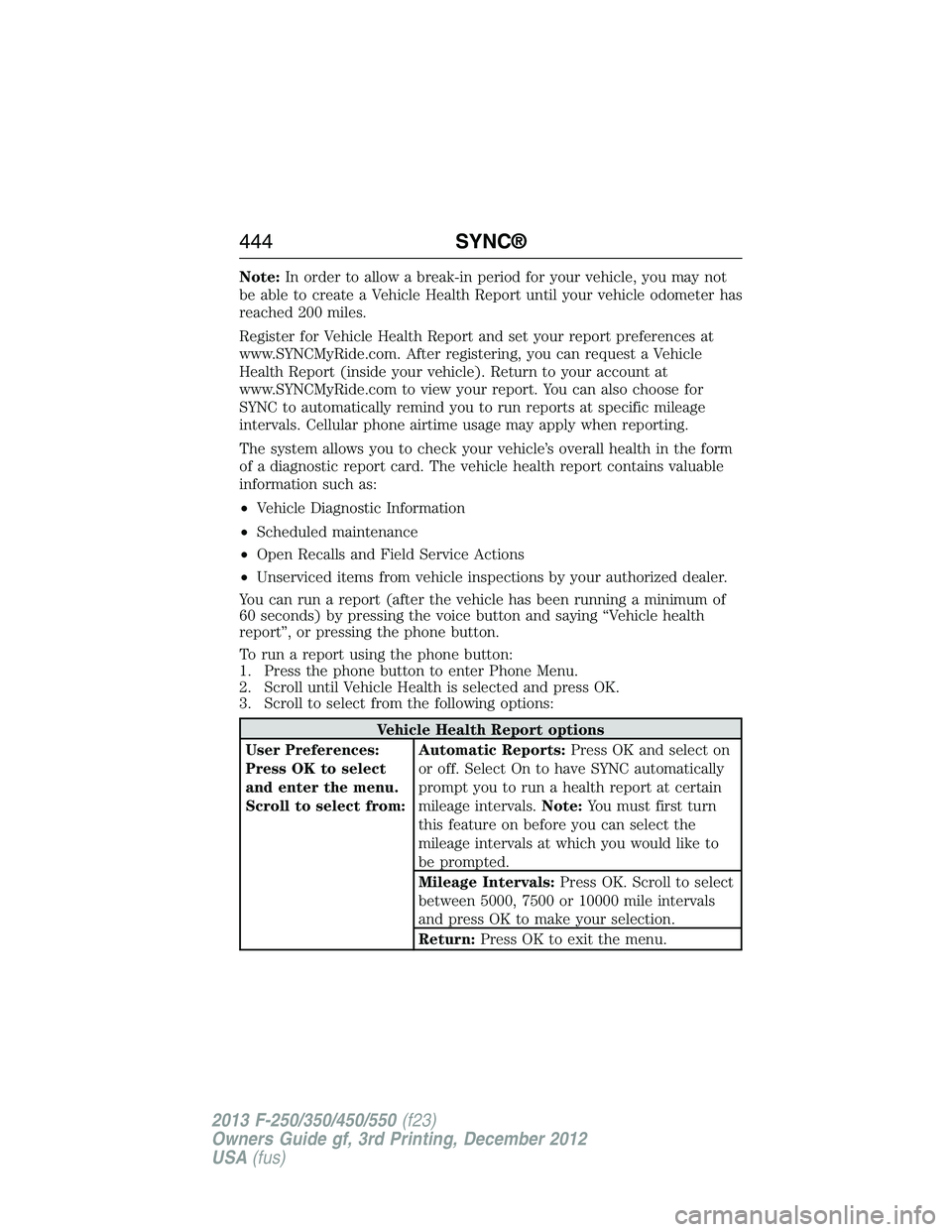
You can run a report (after the vehicle has been running a minimum of
60 seconds) by pressing the voice button and saying “Vehicle health
report”, or pressing the phone button.
To run a report using the phone button:
1. Press the phone button to enter Phone Menu.
2. Scroll until Vehicle Health is selected and press OK.
3. Scroll to select from the following options:
Vehicle Health Report options
User Preferences:
Press OK to select
and enter the menu.
Scroll to select from:Automatic Reports:Press OK and select on
or off. Select On to have SYNC automatically
prompt you to run a health report at certain
mileage intervals.Note:You must first turn
this feature on before you can select the
mileage intervals at which you would like to
be prompted.
Mileage Intervals:Press OK. Scroll to select
between 5000, 7500 or 10000 mile intervals
and press OK to make your selection.
Return:Press OK to exit the menu.
444SYNC®
2013 F-250/350/450/550(f23)
Owners Guide gf, 3rd Printing, December 2012
USA(fus)
Page 446 of 577
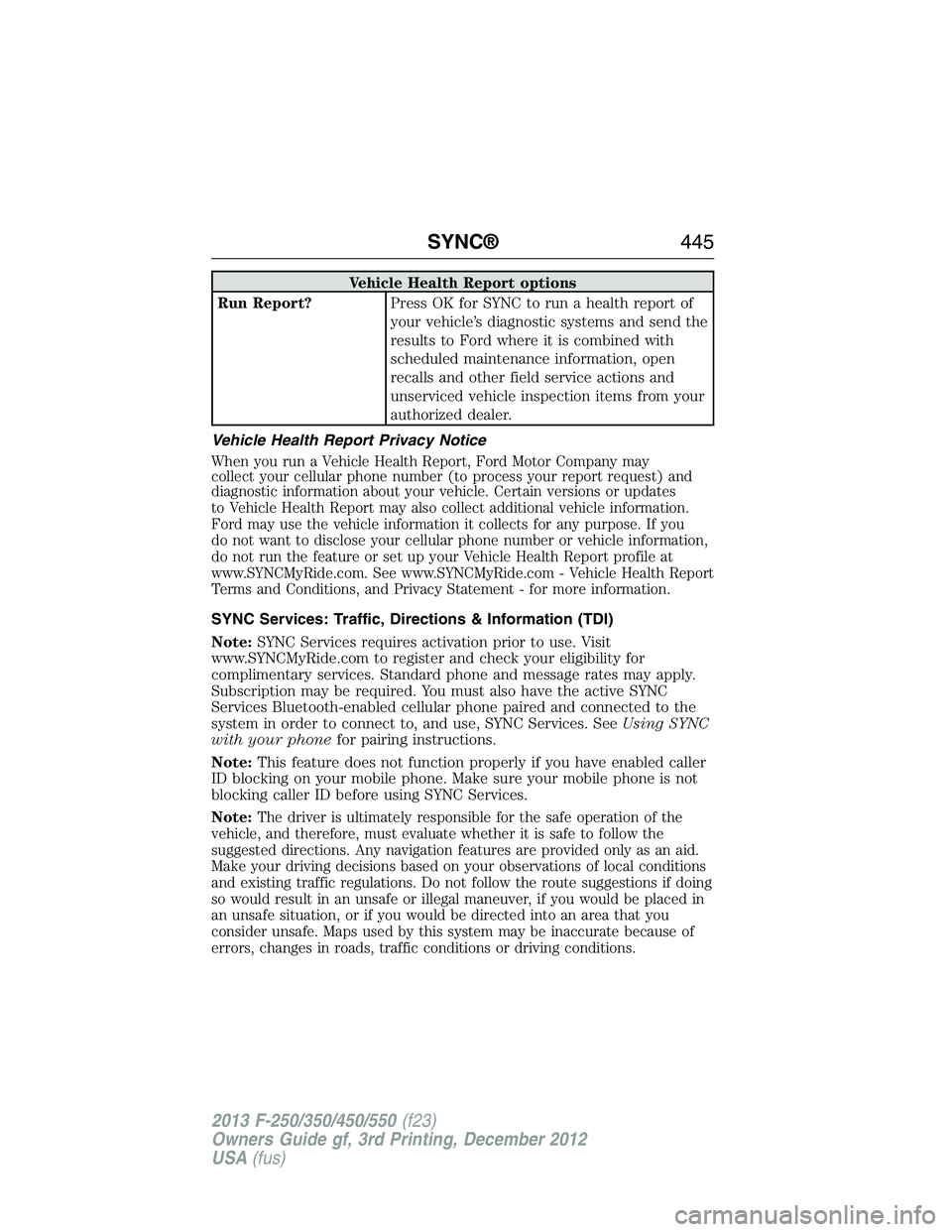
Vehicle Health Report options
Run Report?Press OK for SYNC to run a health report of
your vehicle’s diagnostic systems and send the
results to Ford where it is combined with
scheduled maintenance information, open
recalls and other field service actions and
unserviced vehicle inspection items from your
authorized dealer.
Vehicle Health Report Privacy Notice
When you run a Vehicle Health Report, Ford Motor Company may
collect your cellular phone number (to process your report request) and
diagnostic information about your vehicle. Certain versions or updates
to Vehicle Health Report may also collect additional vehicle information.
Ford may use the vehicle information it collects for any purpose. If you
do not want to disclose your cellular phone number or vehicle information,
do not run the feature or set up your Vehicle Health Report profile at
www.SYNCMyRide.com. See www.SYNCMyRide.com - Vehicle Health Report
Terms and Conditions, and Privacy Statement - for more information.
SYNC Services: Traffic, Directions & Information (TDI)
Note:SYNC Services requires activation prior to use. Visit
www.SYNCMyRide.com to register and check your eligibility for
complimentary services. Standard phone and message rates may apply.
Subscription may be required. You must also have the active SYNC
Services Bluetooth-enabled cellular phone paired and connected to the
system in order to connect to, and use, SYNC Services. SeeUsing SYNC
with your phonefor pairing instructions.
Note:This feature does not function properly if you have enabled caller
ID blocking on your mobile phone. Make sure your mobile phone is not
blocking caller ID before using SYNC Services.
Note:
The driver is ultimately responsible for the safe operation of the
vehicle, and therefore, must evaluate whether it is safe to follow the
suggested directions. Any navigation features are provided only as an aid.
Make your driving decisions based on your observations of local conditions
and existing traffic regulations. Do not follow the route suggestions if doing
so would result in an unsafe or illegal maneuver, if you would be placed in
an unsafe situation, or if you would be directed into an area that you
consider unsafe. Maps used by this system may be inaccurate because of
errors, changes in roads, traffic conditions or driving conditions.
SYNC®445
2013 F-250/350/450/550(f23)
Owners Guide gf, 3rd Printing, December 2012
USA(fus)
Page 514 of 577
Note:Neither SIRIUS nor Ford is responsible for any errors or
inaccuracies in the SIRIUS Travel Link services or its use in vehicles.
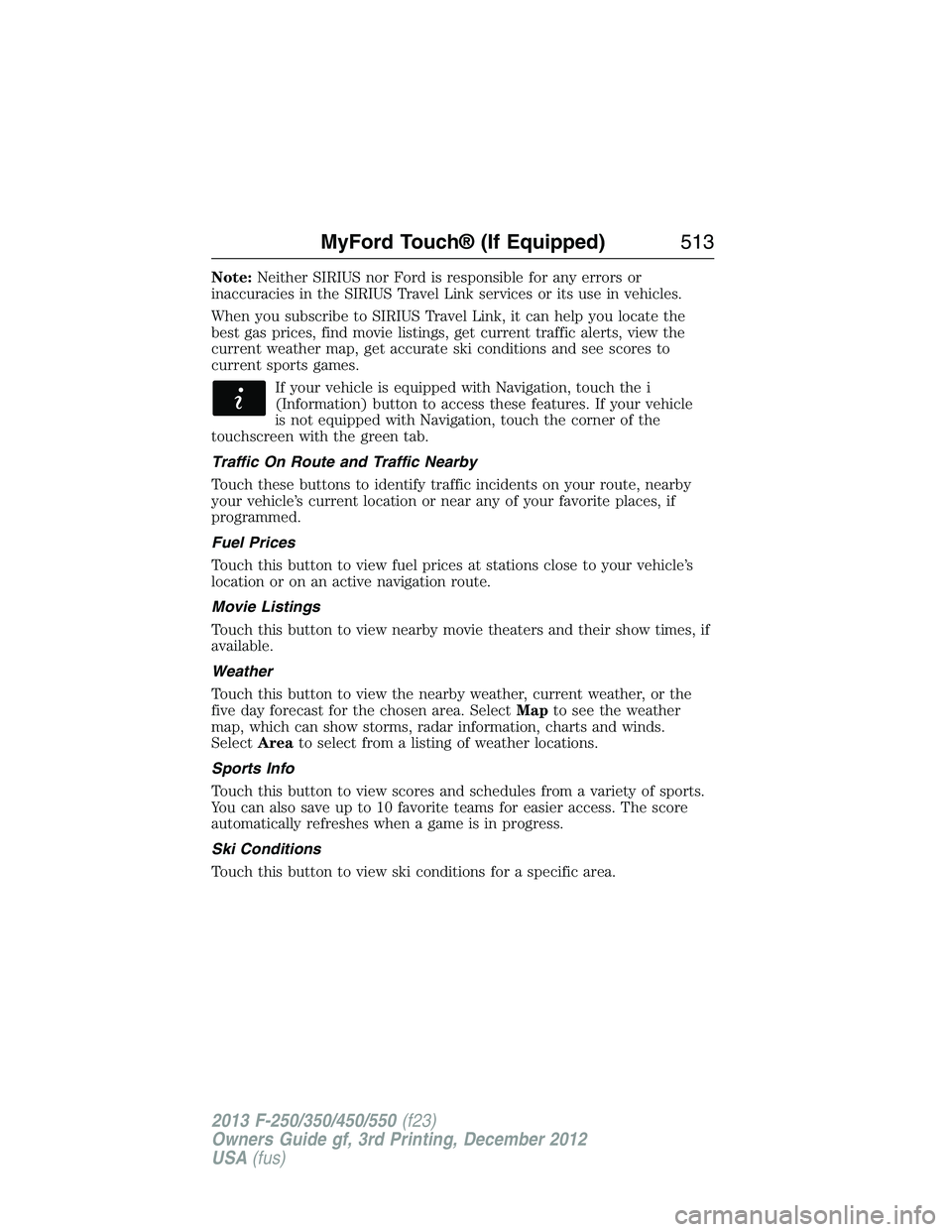
When you subscribe to SIRIUS Travel Link, it can help you locate the
best gas prices, find movie listings, get current traffic alerts, view the
current weather map, get accurate ski conditions and see scores to
current sports games.
If your vehicle is equipped with Navigation, touch the i
(Information) button to access these features. If your vehicle
is not equipped with Navigation, touch the corner of the
touchscreen with the green tab.
Traffic On Route and Traffic Nearby
Touch these buttons to identify traffic incidents on your route, nearby
your vehicle’s current location or near any of your favorite places, if
programmed.
Fuel Prices
Touch this button to view fuel prices at stations close to your vehicle’s
location or on an active navigation route.
Movie Listings
Touch this button to view nearby movie theaters and their show times, if
available.
Weather
Touch this button to view the nearby weather, current weather, or the
five day forecast for the chosen area. SelectMapto see the weather
map, which can show storms, radar information, charts and winds.
SelectAreato select from a listing of weather locations.
Sports Info
Touch this button to view scores and schedules from a variety of sports.
You can also save up to 10 favorite teams for easier access. The score
automatically refreshes when a game is in progress.
Ski Conditions
Touch this button to view ski conditions for a specific area.
MyFord Touch® (If Equipped)513
2013 F-250/350/450/550(f23)
Owners Guide gf, 3rd Printing, December 2012
USA(fus)
Page 516 of 577
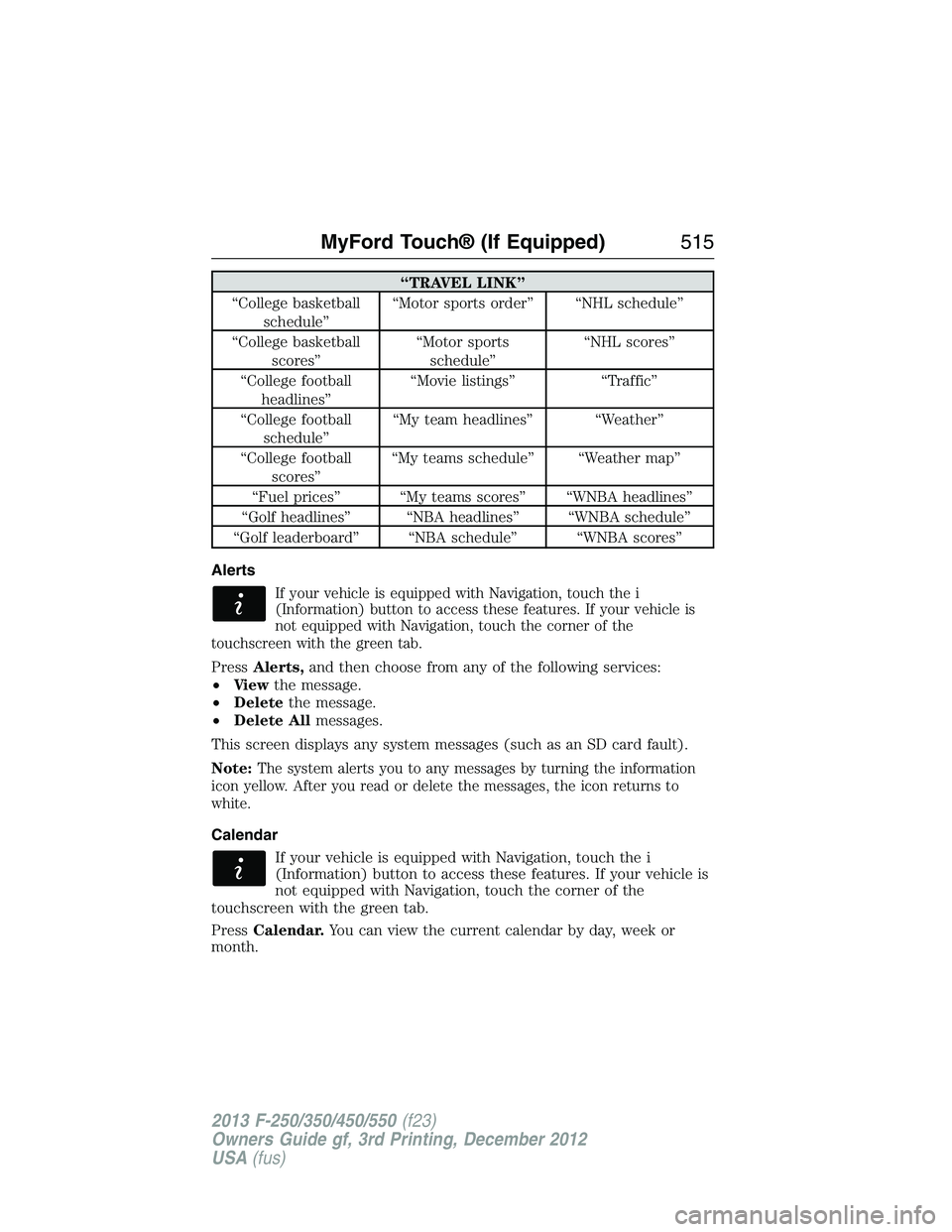
“TRAVEL LINK”
“College basketball
schedule”“Motor sports order” “NHL schedule”
“College basketball
scores”“Motor sports
schedule”“NHL scores”
“College football
headlines”“Movie listings” “Traffic”
“College football
schedule”“My team headlines” “Weather”
“College football
scores”“My teams schedule” “Weather map”
“Fuel prices” “My teams scores” “WNBA headlines”
“Golf headlines” “NBA headlines” “WNBA schedule”
“Golf leaderboard” “NBA schedule” “WNBA scores”
Alerts
If your vehicle is equipped with Navigation, touch the i
(Information) button to access these features. If your vehicle is
not equipped with Navigation, touch the corner of the
touchscreen with the green tab.
PressAlerts,and then choose from any of the following services:
•Vi e wthe message.
•Deletethe message.
•Delete Allmessages.
This screen displays any system messages (such as an SD card fault).
Note:
The system alerts you to any messages by turning the information
icon yellow. After you read or delete the messages, the icon returns to
white.
Calendar
If your vehicle is equipped with Navigation, touch the i
(Information) button to access these features. If your vehicle is
not equipped with Navigation, touch the corner of the
touchscreen with the green tab.
PressCalendar.You can view the current calendar by day, week or
month.
MyFord Touch® (If Equipped)515
2013 F-250/350/450/550(f23)
Owners Guide gf, 3rd Printing, December 2012
USA(fus)
Page 519 of 577

If you do not cancel the call, and SYNC makes a successful call, a
pre-recorded message plays for the 911 operator, and then the occupant(s)
in your vehicle is able to talk with the operator. Be prepared to provide
your name, phone number and location immediately, because not all 911
systems are capable of receiving this information electronically.
911 Assist May Not Work If
•
Your cellular phone or 911 Assist hardware sustains damage in a crash.
•The vehicle’s battery or SYNC system has no power.
•The phone(s) thrown from your vehicle are the ones paired and
connected to the system.
911 Assist Privacy Notice
When you turn on 911 Assist, it may disclose to emergency services that
your vehicle has been in a crash involving the deployment of an airbag or
activation of the fuel pump shut-off. Certain versions or updates to 911
Assist may also be capable of electronically or verbally disclosing to 911
operators your vehicle location or other details about your vehicle or
crash to assist 911 operators to provide the most appropriate emergency
services. If you do not want to disclose this information, do not turn the
feature on.
Vehicle Health Report (If Equipped, United States Only)
WARNING:Always follow scheduled maintenance instructions,
regularly inspect your vehicle, and seek repair for any damage or
problem you suspect. Vehicle Health Report supplements, but cannot
replace, normal maintenance and vehicle inspection. Vehicle Health
Report only monitors certain systems electronically monitored by your
vehicle and will not monitor or report the status of any other system,
(such as brake lining wear). Failure to perform scheduled maintenance
and regularly inspect your vehicle may result in vehicle damage and
serious injury.
Note:
Your Vehicle Health Report feature requires activation prior to use.
Visit www.SYNCMyRide.com to register. There is no fee or subscription
associated with Vehicle Health Report, but you must register to use this
feature.
Note:This feature may not function properly if you have enabled caller
ID blocking on your mobile phone. Before running a report, review the
Vehicle Health Report Privacy Notice.
518MyFord Touch® (If Equipped)
2013 F-250/350/450/550(f23)
Owners Guide gf, 3rd Printing, December 2012
USA(fus)
Page 520 of 577
Note:In order to allow a break-in period for your vehicle, you may not
be able to create a Vehicle Health Report until your vehicle odometer has
reached 200 miles.
Note:Cellular phone and SMS charges may apply when making a report.
Register for Vehicle Health Report and set your report preferences at
www.SYNCMyRide.com. After registering, you can request a Vehicle
Health Report (inside your vehicle). Return to your account at
www.SYNCMyRide.com to view your report. You can also choose for
SYNC to remind you automatically to run reports at specific mileage
intervals. Cellular phone airtime usage may apply when reporting.
The system allows you to check your vehicle’s overall health in the form
of a diagnostic report card. The Vehicle Health Report contains valuable
information, such as:
•Vehicle Diagnostic Information
•Scheduled maintenance
•Open Recalls and Field Service Actions
•Items noted during vehicle inspections by your authorized dealer that
still need servicing.
Making a Report
If your vehicle is equipped with Navigation, touch the i
(Information) button to access these features. If your vehicle is
not equipped with Navigation, touch the corner of the
touchscreen with the green tab.
If you want to run a report by using the touchscreen, touchApps>
Vehicle Health Report.
To run a report by voice command, press the voice button on
the steering wheel and, when prompted, say “Vehicle health
report”.
Vehicle Health Report Privacy Notice
When you create a Vehicle Health Report, Ford Motor Company may
collect your cellular phone number (to process your report request) and
diagnostic information about your vehicle. Certain versions or updates to
Vehicle Health Report may also collect more vehicle information. Ford
may use your vehicle information it collects for any purpose. If you do
not want to disclose your cellular phone number or vehicle information,
do not run the feature or set up your Vehicle Health Report profile at
www.SYNCMyRide.com. See www.SYNCMyRide.com (Vehicle Health
Report Terms and Conditions, and Privacy Statement) for more
information.
MyFord Touch® (If Equipped)519
2013 F-250/350/450/550(f23)
Owners Guide gf, 3rd Printing, December 2012
USA(fus)