phone FORD F250 2013 Owners Manual
[x] Cancel search | Manufacturer: FORD, Model Year: 2013, Model line: F250, Model: FORD F250 2013Pages: 577, PDF Size: 7.74 MB
Page 8 of 577
Wheels and Tires 343
Tire care...........................................345
Tire Pressure Monitoring System (TPMS)...................364
Changing a road wheel.................................371
Technical specifications.................................387
Wheel lug nut torque..................................387
Capacities and Specifications 389
Engine specifications..................................389
Engine drivebelt......................................389
Part numbers........................................395
Vehicle identification number............................395
Vehicle certification label...............................396
Transmission code designation............................397
Accessories 398
Accessories.........................................398
Ford Extended Service Plan 400
Scheduled Maintenance 403
Normal scheduled maintenance and log.....................408
SYNC® 420
Pairing your phone for the first time.......................426
911 Assist™.........................................441
Vehicle Health Report..................................443
Table of Contents7
2013 F-250/350/450/550(f23)
Owners Guide gf, 3rd Printing, December 2012
USA(fus)
Page 9 of 577
MyFord Touch® (If Equipped) 466
Privacy Information...................................472
Voice recognition.....................................472
Listening to music....................................478
Phone features.......................................500
Information Menu.....................................508
Settings............................................520
Climatefeatures......................................534
Navigation system.....................................537
Appendices 549
Index 569
The information contained in this publication was correct at the time of going to
print. In the interest of continuous development, we reserve the right to change
specifications, design or equipment at any time without notice or obligation. No
part of this publication may be reproduced, transmitted, stored in a retrieval
system or translated into any language in any form by any means without our
written permission. Errors and omissions excepted.
© Ford Motor Company 2013
8Table of Contents
2013 F-250/350/450/550(f23)
Owners Guide gf, 3rd Printing, December 2012
USA(fus)
Page 14 of 577
Note: EDR data is recorded by your vehicle only if a non-trivial
crash situation occurs; no data is recorded by the EDR under
normal driving conditions and no personal data or information
(e.g., name, gender, age, and crash location) is recorded (see
limitations regarding 911 Assist and Traffic, Directions and
Information privacy below). However, parties, such as law
enforcement, could combine the EDR data with the type of
personally identifying data routinely acquired during a crash
investigation.
To read data recorded by an EDR, special equipment is required,
and access to the vehicle or the EDR is needed. In addition to the
vehicle manufacturer, other parties, such as law enforcement, that
have such special equipment, can read the information if they have
access to the vehicle or the EDR. Ford Motor Company and Ford of
Canada do not access event data recorder information without
obtaining consent, unless pursuant to court order or where
required by law enforcement, other government authorities or
other third parties acting with lawful authority. Other parties may
seek to access the information independently of Ford Motor
Company and Ford of Canada.
Note: Including to the extent that any law pertaining to Event
Data Recorders applies to SYNC® or its features, please note the
following: Once 911 Assist (if equipped) is enabled (set ON), 911
Assist may, through any paired and connected cell phone, disclose
to emergency services that the vehicle has been in a crash
involving the deployment of an airbag or, in certain vehicles, the
activation of the fuel pump shut-off. Certain versions or updates
to 911 Assist may also be capable of being used to electronically
or verbally provide to 911 operators the vehicle location (such as
latitude and longitude), and/or other details about the vehicle or
crash or personal information about the occupants to assist 911
operators to provide the most appropriate emergency services.
If you do not want to disclose this information, do not activate
the 911 Assist feature. See your SYNC® chapter for more
information.
Introduction13
2013 F-250/350/450/550(f23)
Owners Guide gf, 3rd Printing, December 2012
USA(fus)
Page 15 of 577
Additionally, when you connect to Traffic, Directions and
Information (if equipped, U.S. only), the service uses GPS
technology and advanced vehicle sensors to collect the vehicle’s
current location, travel direction, and speed (“vehicle travel
information”), only to help provide you with the directions,
traffic reports, or business searches that you request. If you do
not want Ford or its vendors to receive this information, do not
activate the service. Ford Motor Company and the vendors it uses
to provide you with this information do not store your vehicle
travel information. For more information, see Traffic, Directions
and Information, Terms and Conditions. See your SYNC® chapter
for more information.
CALIFORNIA PROPOSITION 65
WARNING:Some constituents of engine exhaust, certain vehicle
components, certain fluids contained in vehicles and certain
products of component wear contain or emit chemicals known to
the State of California to cause cancer and birth defects or other
reproductive harm.
PERCHLORATE MATERIAL
Note:Certain components in your vehicle, such as airbag modules,
safety belt pretensioners, and remote control batteries, may contain
perchlorate material. Special handling may apply for service or vehicle
end of life disposal. See www.dtsc.ca.gov/hazardouswaste/perchlorate for
more information.
FORD CREDIT (U.S. ONLY)
Ford Credit offers a full range of financing and lease plans to help you
acquire your vehicle. If you have financed or leased your vehicle through
Ford Credit, thank you for your business.
For your convenience, we offer a number of ways to contact us, as well
as help manage your account.
Phone: 1-800-727-7000
For more information regarding Ford Credit, as well as access to
Account Manager, please go to www.fordcredit.com.
14Introduction
2013 F-250/350/450/550(f23)
Owners Guide gf, 3rd Printing, December 2012
USA(fus)
Page 17 of 577
Special Instructions
For your added safety, your vehicle is fitted with sophisticated electronic
controls.
WARNING:Please read theSupplementary Restraints System
chapter. Failure to follow the specific warnings and instructions
could result in personal injury.
WARNING:Front seat mounted rear-facing child or infant seats
shouldNEVERbe placed in front of an active passenger airbag.
Using your vehicle with a snowplow
For more information and guidelines for using your vehicle with a
snowplow, refer to theSnowplowsection in theDriving Hintschapter.
Using your vehicle as an ambulance
If your light truck is equipped with the Ford Ambulance Preparation
Package, it may be utilized as an ambulance. Ford urges ambulance
manufacturers to follow the recommendations of theFord Incomplete
Vehicle Manual, Ford Truck Body Builder’s Layout Bookand the
Qualified Vehicle Modifiers (QVM) Guidelinesas well as pertinent
supplements. For additional information, please contact the Truck Body
Builders Advisory Service at http://www.fleet.ford.com/truckbbas/ and
then by selecting “Contact Us” or by phone at 1–877–840–4338.
Use of your Ford light truck as an ambulance, without the Ford
Ambulance Preparation Package voids the Ford New Vehicle Limited
Warranty and may void the Emissions Warranties. In addition, ambulance
usage without the preparation package could cause high underbody
temperatures, overpressurized fuel and a risk of spraying fuel which
could lead to fires.
If your vehicle is equipped with the Ford Ambulance Preparation
Package, it will be indicated on the Safety Compliance Certification
Label. The label is located on the driver’s side door pillar or on the rear
edge of the driver’s door. You can determine whether the ambulance
manufacturer followed Ford’s recommendations by directly contacting
that manufacturer. Ford Ambulance Preparation Package is only available
on certain Diesel engine equipped vehicles.
16Introduction
2013 F-250/350/450/550(f23)
Owners Guide gf, 3rd Printing, December 2012
USA(fus)
Page 18 of 577
Using your vehicle as a stationary power source (PTO)
Refer to theDriving Hintschapter for more information and guidelines
for operating a vehicle equipped with an aftermarket power take-off
system.
MOBILE COMMUNICATIONS EQUIPMENT
Using mobile communications equipment is becoming increasingly
important in the conduct of business and personal affairs. However,
you must not compromise your own or others’ safety when using such
equipment. Mobile communications can enhance personal safety and
security when appropriately used, particularly in emergency situations.
Safety must be paramount when using mobile communications
equipment to avoid negating these benefits.
Mobile communication equipment includes, but is not limited to, cellular
phones, pagers, portable email devices, text messaging devices and
portable two-way radios.
WARNING:Driving while distracted can result in loss of vehicle
control, accident and injury. Ford strongly recommends that you
use extreme caution when using any device or feature that may take
your focus off the road. Your primary responsibility is the safe operation
of your vehicle. We recommend against the use of any handheld device
while driving, encourage the use of voice operated systems when
possible and that you become aware of applicable state and local laws
that may affect use of electronic devices while driving.
EXPORT UNIQUE (NON–UNITED STATES/CANADA) VEHICLE
SPECIFIC INFORMATION
For your particular global region, your vehicle may be equipped with
features and options that are different from the features and options that
are described in this owner’s manual. A market unique supplement may
be supplied that complements this book. By referring to the market
unique supplement, if provided, you can properly identify those features,
recommendations and specifications that are unique to your vehicle. This
owner’s manual is written primarily for the U.S. and Canadian Markets.
Features or equipment listed as standard may be different on units built
for Export.See this owner’s manual for all other required
information and warnings.
Introduction17
2013 F-250/350/450/550(f23)
Owners Guide gf, 3rd Printing, December 2012
USA(fus)
Page 62 of 577
GENERAL INFORMATION ON RADIO FREQUENCIES
This device complies with part 15 of the FCC Rules and with Industry
Canada license-exempt RSS standard(s). Operation is subject to the
following two conditions: (1) This device may not cause harmful
interference, and (2) This device must accept any interference received,
including interference that may cause undesired operation.
Note:Changes or modifications not expressly approved by the party
responsible for compliance could void the user’s authority to operate
the equipment. The termICbefore the radio certification number only
signifies that Industry Canada technical specifications were met.
The typical operating range for your transmitter is approximately 33 feet
(10 meters). Vehicles with the remote start feature will have a greater
range. A decrease in operating range could be caused by:
•weather conditions
•nearby radio towers
•structures around your vehicle
•other vehicles parked next to your vehicle.
The radio frequency used by your remote control can also be used by
other short-distance radio transmissions, for example amateur radios,
medical equipment, wireless headphones, remote controls and alarm
systems. If the frequencies are jammed, you will not be able to use your
remote control. You can lock and unlock the doors with the key.
Note:Make sure your vehicle is locked before leaving it unattended.
Note:If you are in range, the remote control will operate if you press
any button unintentionally.
Keys and Remote Control61
2013 F-250/350/450/550(f23)
Owners Guide gf, 3rd Printing, December 2012
USA(fus)
Page 82 of 577
Media
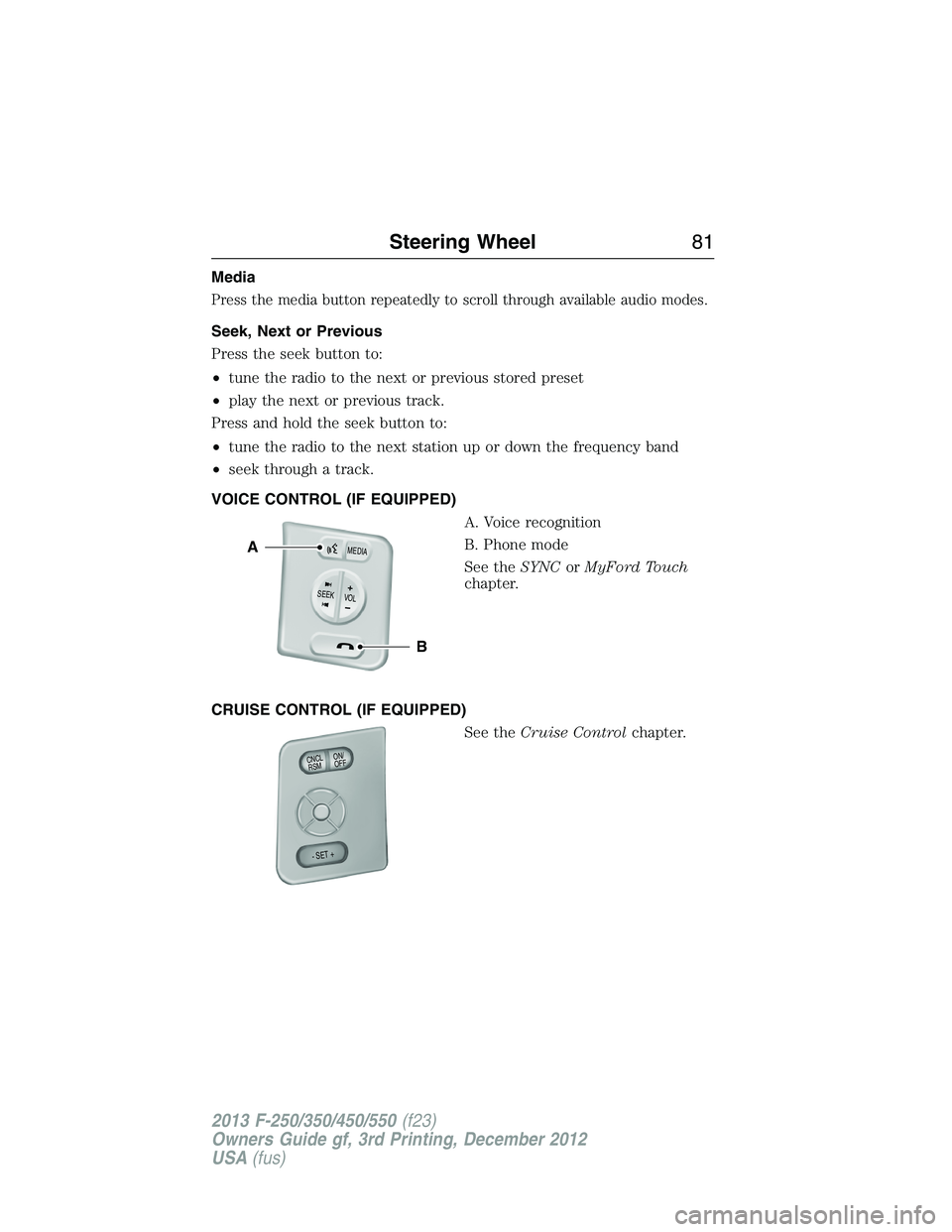
Press the media button repeatedly to scroll through available audio modes.
Seek, Next or Previous
Press the seek button to:
•tune the radio to the next or previous stored preset
•play the next or previous track.
Press and hold the seek button to:
•tune the radio to the next station up or down the frequency band
•seek through a track.
VOICE CONTROL (IF EQUIPPED)
A. Voice recognition
B. Phone mode
See theSYNCorMyFord Touch
chapter.
CRUISE CONTROL (IF EQUIPPED)
See theCruise Controlchapter.
B
A
VOLSEE
K+
M
E
D
IA
ON/
OFF CNCLR
S
M
- SET +
Steering Wheel81
2013 F-250/350/450/550(f23)
Owners Guide gf, 3rd Printing, December 2012
USA(fus)
Page 138 of 577
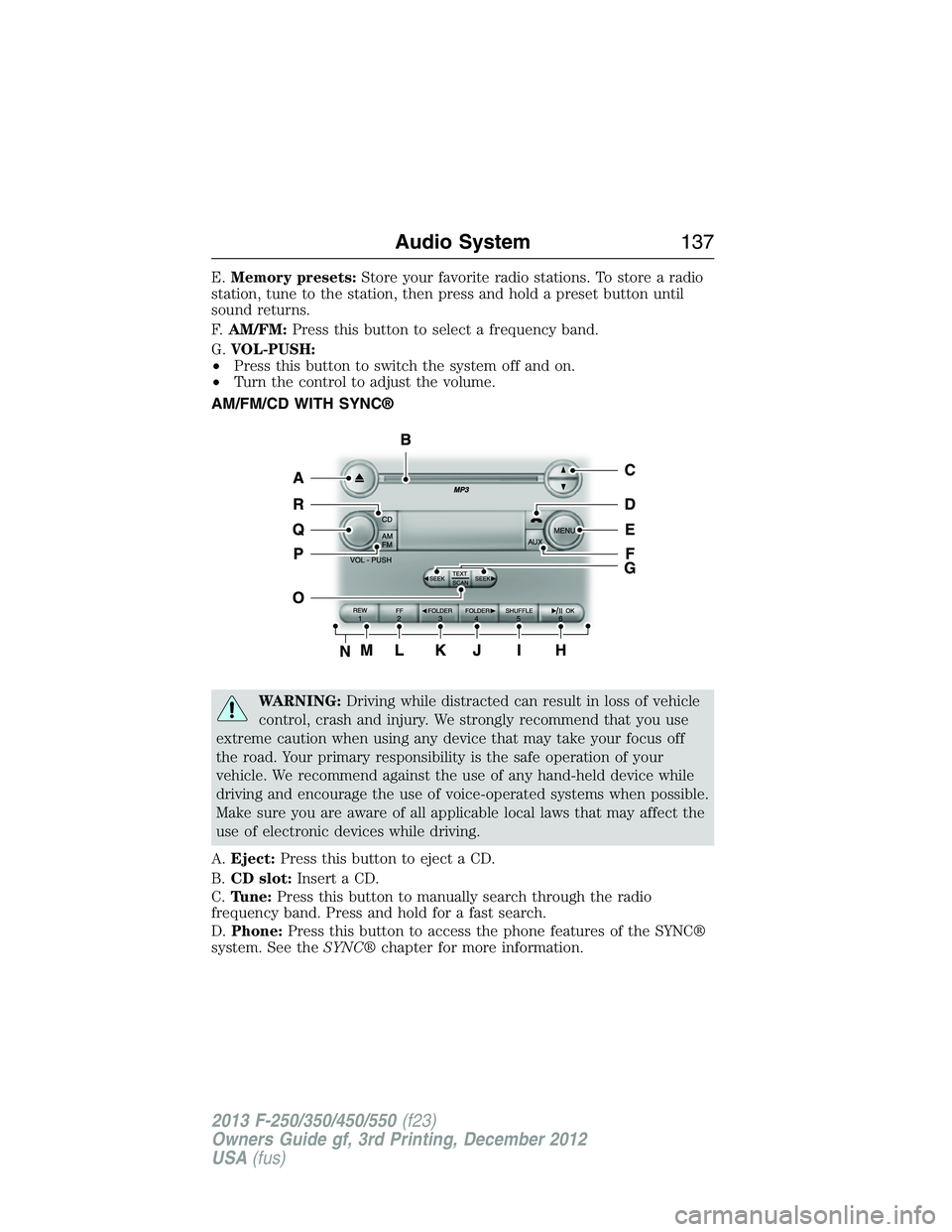
E.Memory presets:Store your favorite radio stations. To store a radio
station, tune to the station, then press and hold a preset button until
sound returns.
F.AM/FM:Press this button to select a frequency band.
G.VOL-PUSH:
•Press this button to switch the system off and on.
•Turn the control to adjust the volume.
AM/FM/CD WITH SYNC®
WARNING:Driving while distracted can result in loss of vehicle
control, crash and injury. We strongly recommend that you use
extreme caution when using any device that may take your focus off
the road. Your primary responsibility is the safe operation of your
vehicle. We recommend against the use of any hand-held device while
driving and encourage the use of voice-operated systems when possible.
Make sure you are aware of all applicable local laws that may affect the
use of electronic devices while driving.
A.Eject:Press this button to eject a CD.
B.CD slot:Insert a CD.
C.Tune:Press this button to manually search through the radio
frequency band. Press and hold for a fast search.
D.Phone:Press this button to access the phone features of the SYNC®
system. See theSYNC®chapter for more information.
Audio System137
2013 F-250/350/450/550(f23)
Owners Guide gf, 3rd Printing, December 2012
USA(fus)
Page 140 of 577
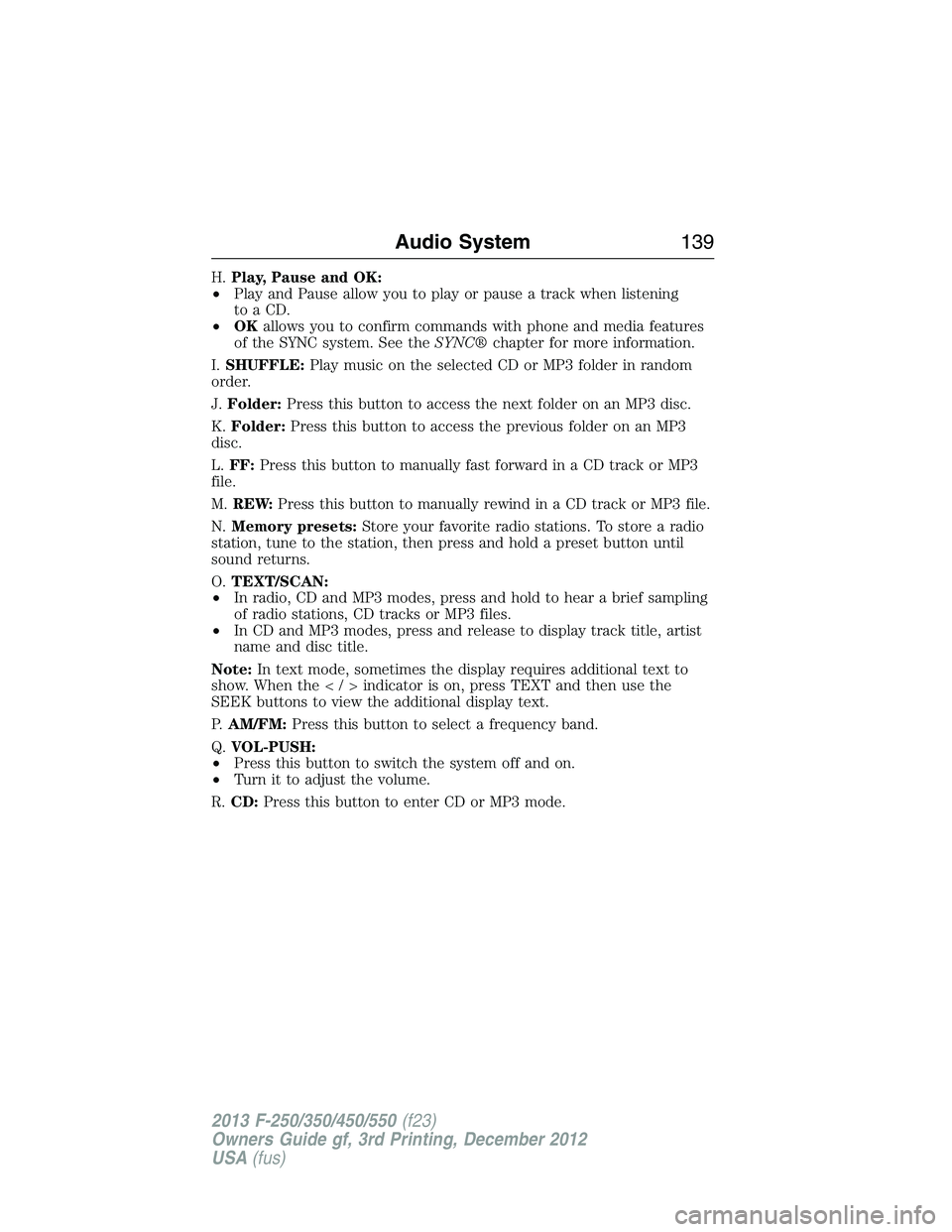
H.Play, Pause and OK:
•Play and Pause allow you to play or pause a track when listening
to a CD.
•OKallows you to confirm commands with phone and media features
of the SYNC system. See theSYNC®chapter for more information.
I.SHUFFLE:Play music on the selected CD or MP3 folder in random
order.
J.Folder:Press this button to access the next folder on an MP3 disc.
K.Folder:Press this button to access the previous folder on an MP3
disc.
L.FF:Press this button to manually fast forward in a CD track or MP3
file.
M.REW:Press this button to manually rewind in a CD track or MP3 file.
N.Memory presets:Store your favorite radio stations. To store a radio
station, tune to the station, then press and hold a preset button until
sound returns.
O.TEXT/SCAN:
•In radio, CD and MP3 modes, press and hold to hear a brief sampling
of radio stations, CD tracks or MP3 files.
•In CD and MP3 modes, press and release to display track title, artist
name and disc title.
Note:In text mode, sometimes the display requires additional text to
show. When theindicatorison,pressTEXT and then use the
SEEK buttons to view the additional display text.
P.AM/FM:Press this button to select a frequency band.
Q.VOL-PUSH:
•Press this button to switch the system off and on.
•Turn it to adjust the volume.
R.CD:Press this button to enter CD or MP3 mode.
Audio System139
2013 F-250/350/450/550(f23)
Owners Guide gf, 3rd Printing, December 2012
USA(fus)