mirror FORD F250 2014 User Guide
[x] Cancel search | Manufacturer: FORD, Model Year: 2014, Model line: F250, Model: FORD F250 2014Pages: 460, PDF Size: 5.33 MB
Page 109 of 460
Note:
You may feel a small amount of air
from the floor air vents regardless of the air
distribution setting.
During extreme high ambient temperatures
when idling stationary for extended periods
in gear, it is recommended to run the A/C
in the MAX A/C mode, adjust the blower
fan speed to the lowest setting and put
the vehicle ’s transmission into position P
to continue to receive cool air from your
A/C system.
For maximum cooling performance in
AUTO (automatic climate system) or
panel mode, press
MAX A/C.
For maximum cooling performance in
panel and floor mode:
1. Adjust the temperature control to the coolest setting.
2. Select
A/C and recirculated air to
provide colder airflow.
3. Set the fan to the highest speed initially, and then adjust to maintain
comfort.
To aid in side window defogging and
demisting in cold or humid weather:
1. Select the floor and panel mode.
2. Press
A/C.
3. Adjust the temperature control to maintain comfort.
4. Set the fan speed to the highest setting.
5. Direct the outer instrument panel vents
toward the side windows.
6. To increase airflow to the outer instrument panel vents, close the vents
located in the middle of the instrument
panel. HEATED WINDOWS AND
MIRRORS
Heated Rear Window
(If Equipped)
Note: The engine must be running to use
this feature.
Note: If your vehicle is equipped with a
sliding rear window, the feature still
operates when you open the window.
Press the button to clear the rear window
of thin ice and fog. Press the button again
within 10 minutes to switch it off. It
switches off automatically after 10
minutes, or when you switch the ignition
off.
Do not use razor blades or other sharp
objects to clean the inside of the rear
window or to remove decals from the
inside of the rear window. This may
cause damage to the heated grid lines.
Your warranty does not cover this
damage.
Heated Exterior Mirror
(If Equipped)
Note: Do not remove ice from the mirrors
with a scraper or attempt to readjust the
mirror glass that has frozen in place. These
actions could cause damage to the glass
and mirrors.
Note: Do not clean the housing or glass of
any mirror with harsh abrasives, fuel or other
petroleum-based cleaning products.
The heated mirrors remove ice, mist and
fog when you switch on the heated rear
window.
REMOTE START
(IF EQUIPPED)
The climate control system adjusts the
cabin temperature during remote start.
106
Super Duty (TFA) Climate Control
Page 110 of 460
You cannot adjust the system during
remote start operation. Turn the ignition
on to return the system to its previous
settings. You can now make adjustments.
You will need to turn certain
vehicle-dependent features back on, such
as:
•
heated seats
• cooled seats
• heated steering wheel
• heated mirrors
• heated rear window.
You can adjust the settings using the
information display controls. See
Information Displays (page 81).
Automatic Settings
You can set the climate control to operate
in AUTO mode through the information
display setting: Remote Start > Climate
Control > Heater-A/C > Auto. The climate
control system automatically sets the
interior temperature to 72°F (22°C).
In hot weather, the system is set to 72°F
(22°C). Cooled seats are set to high (if
available, and selected to AUTO in the
information display).
In moderate weather, the system either
heats or cools (based on previous
settings). The rear defroster, heated
mirrors, heated seats and cooled seats do
not automatically turn on.
In cold weather, the system is set to 72°F
(22°C). The heated seats and heated
steering wheel are set to high (if available,
and selected to AUTO in the information
display). The rear defroster and heated
mirrors automatically turn on. Heated and Cooled Devices
The climate control system controls other
heated and cooled devices inside the
vehicle. You can switch these devices on
(if available, and selected to AUTO in the
information displays) during remote start.
Heated devices usually switch on during
cold weather, and cooled devices during
hot weather. If your vehicle is equipped
with a diesel engine and a supplemental
heater, the supplemental heater also turns
on.
107
Super Duty (TFA) Climate Control
Page 115 of 460
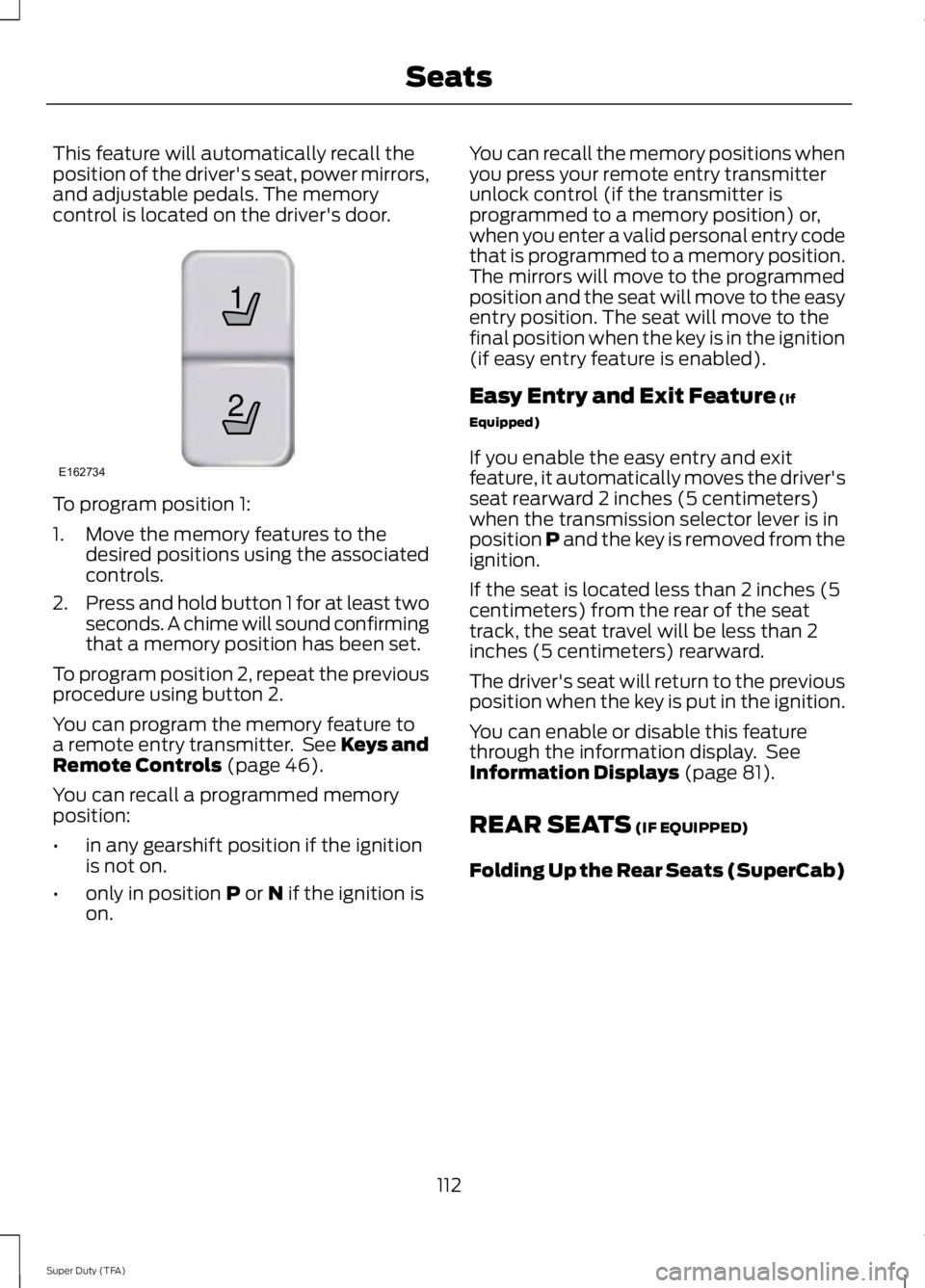
This feature will automatically recall the
position of the driver's seat, power mirrors,
and adjustable pedals. The memory
control is located on the driver's door.
To program position 1:
1. Move the memory features to the
desired positions using the associated
controls.
2. Press and hold button 1 for at least two
seconds. A chime will sound confirming
that a memory position has been set.
To program position 2, repeat the previous
procedure using button 2.
You can program the memory feature to
a remote entry transmitter. See Keys and
Remote Controls (page 46).
You can recall a programmed memory
position:
• in any gearshift position if the ignition
is not on.
• only in position
P or N if the ignition is
on. You can recall the memory positions when
you press your remote entry transmitter
unlock control (if the transmitter is
programmed to a memory position) or,
when you enter a valid personal entry code
that is programmed to a memory position.
The mirrors will move to the programmed
position and the seat will move to the easy
entry position. The seat will move to the
final position when the key is in the ignition
(if easy entry feature is enabled).
Easy Entry and Exit Feature
(If
Equipped)
If you enable the easy entry and exit
feature, it automatically moves the driver's
seat rearward 2 inches (5 centimeters)
when the transmission selector lever is in
position P and the key is removed from the
ignition.
If the seat is located less than 2 inches (5
centimeters) from the rear of the seat
track, the seat travel will be less than 2
inches (5 centimeters) rearward.
The driver's seat will return to the previous
position when the key is put in the ignition.
You can enable or disable this feature
through the information display. See
Information Displays
(page 81).
REAR SEATS
(IF EQUIPPED)
Folding Up the Rear Seats (SuperCab)
112
Super Duty (TFA) Seats21
E162734
Page 174 of 460
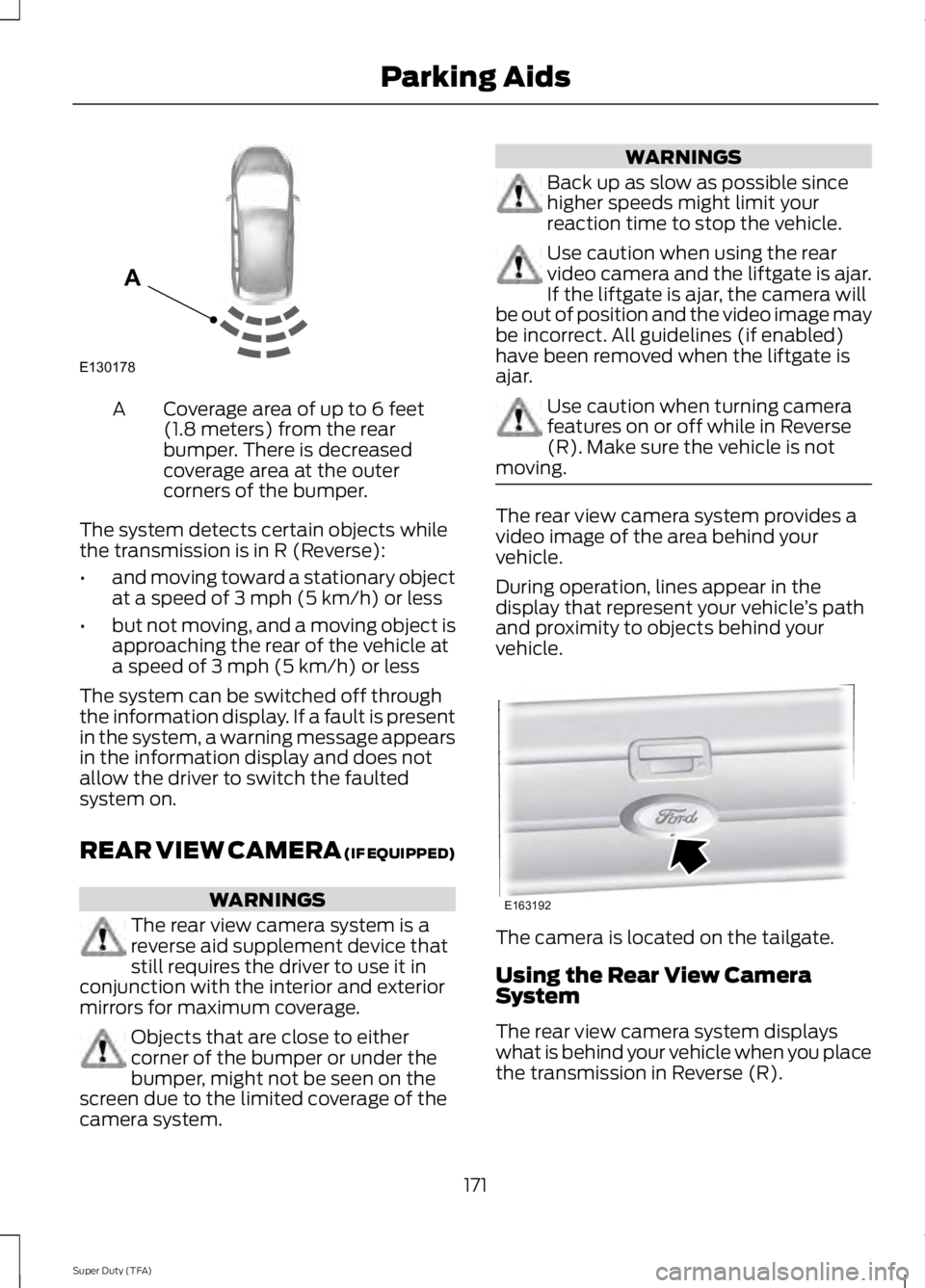
Coverage area of up to 6 feet
(1.8 meters) from the rear
bumper. There is decreased
coverage area at the outer
corners of the bumper.
A
The system detects certain objects while
the transmission is in R (Reverse):
• and moving toward a stationary object
at a speed of 3 mph (5 km/h) or less
• but not moving, and a moving object is
approaching the rear of the vehicle at
a speed of 3 mph (5 km/h) or less
The system can be switched off through
the information display. If a fault is present
in the system, a warning message appears
in the information display and does not
allow the driver to switch the faulted
system on.
REAR VIEW CAMERA (IF EQUIPPED) WARNINGS
The rear view camera system is a
reverse aid supplement device that
still requires the driver to use it in
conjunction with the interior and exterior
mirrors for maximum coverage. Objects that are close to either
corner of the bumper or under the
bumper, might not be seen on the
screen due to the limited coverage of the
camera system. WARNINGS
Back up as slow as possible since
higher speeds might limit your
reaction time to stop the vehicle.
Use caution when using the rear
video camera and the liftgate is ajar.
If the liftgate is ajar, the camera will
be out of position and the video image may
be incorrect. All guidelines (if enabled)
have been removed when the liftgate is
ajar. Use caution when turning camera
features on or off while in Reverse
(R). Make sure the vehicle is not
moving. The rear view camera system provides a
video image of the area behind your
vehicle.
During operation, lines appear in the
display that represent your vehicle
’s path
and proximity to objects behind your
vehicle. The camera is located on the tailgate.
Using the Rear View Camera
System
The rear view camera system displays
what is behind your vehicle when you place
the transmission in Reverse (R).
171
Super Duty (TFA) Parking AidsE130178
A E163192
Page 175 of 460
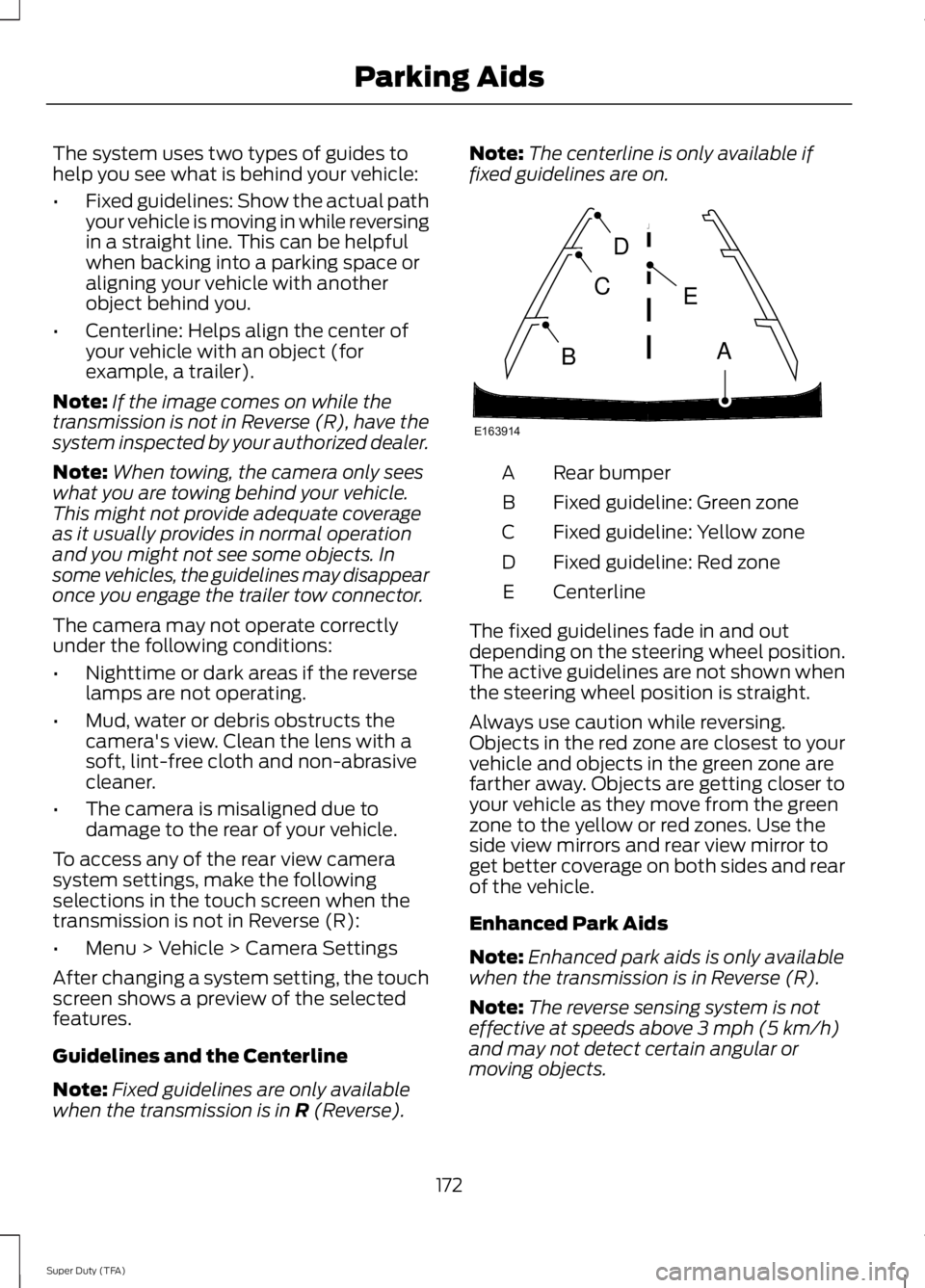
The system uses two types of guides to
help you see what is behind your vehicle:
•
Fixed guidelines: Show the actual path
your vehicle is moving in while reversing
in a straight line. This can be helpful
when backing into a parking space or
aligning your vehicle with another
object behind you.
• Centerline: Helps align the center of
your vehicle with an object (for
example, a trailer).
Note: If the image comes on while the
transmission is not in Reverse (R), have the
system inspected by your authorized dealer.
Note: When towing, the camera only sees
what you are towing behind your vehicle.
This might not provide adequate coverage
as it usually provides in normal operation
and you might not see some objects. In
some vehicles, the guidelines may disappear
once you engage the trailer tow connector.
The camera may not operate correctly
under the following conditions:
• Nighttime or dark areas if the reverse
lamps are not operating.
• Mud, water or debris obstructs the
camera's view. Clean the lens with a
soft, lint-free cloth and non-abrasive
cleaner.
• The camera is misaligned due to
damage to the rear of your vehicle.
To access any of the rear view camera
system settings, make the following
selections in the touch screen when the
transmission is not in Reverse (R):
• Menu > Vehicle > Camera Settings
After changing a system setting, the touch
screen shows a preview of the selected
features.
Guidelines and the Centerline
Note: Fixed guidelines are only available
when the transmission is in R (Reverse). Note:
The centerline is only available if
fixed guidelines are on. Rear bumper
A
Fixed guideline: Green zone
B
Fixed guideline: Yellow zone
C
Fixed guideline: Red zone
D
Centerline
E
The fixed guidelines fade in and out
depending on the steering wheel position.
The active guidelines are not shown when
the steering wheel position is straight.
Always use caution while reversing.
Objects in the red zone are closest to your
vehicle and objects in the green zone are
farther away. Objects are getting closer to
your vehicle as they move from the green
zone to the yellow or red zones. Use the
side view mirrors and rear view mirror to
get better coverage on both sides and rear
of the vehicle.
Enhanced Park Aids
Note: Enhanced park aids is only available
when the transmission is in Reverse (R).
Note: The reverse sensing system is not
effective at speeds above 3 mph (5 km/h)
and may not detect certain angular or
moving objects.
172
Super Duty (TFA) Parking AidsE163914
A
E
D
C
B
Page 218 of 460
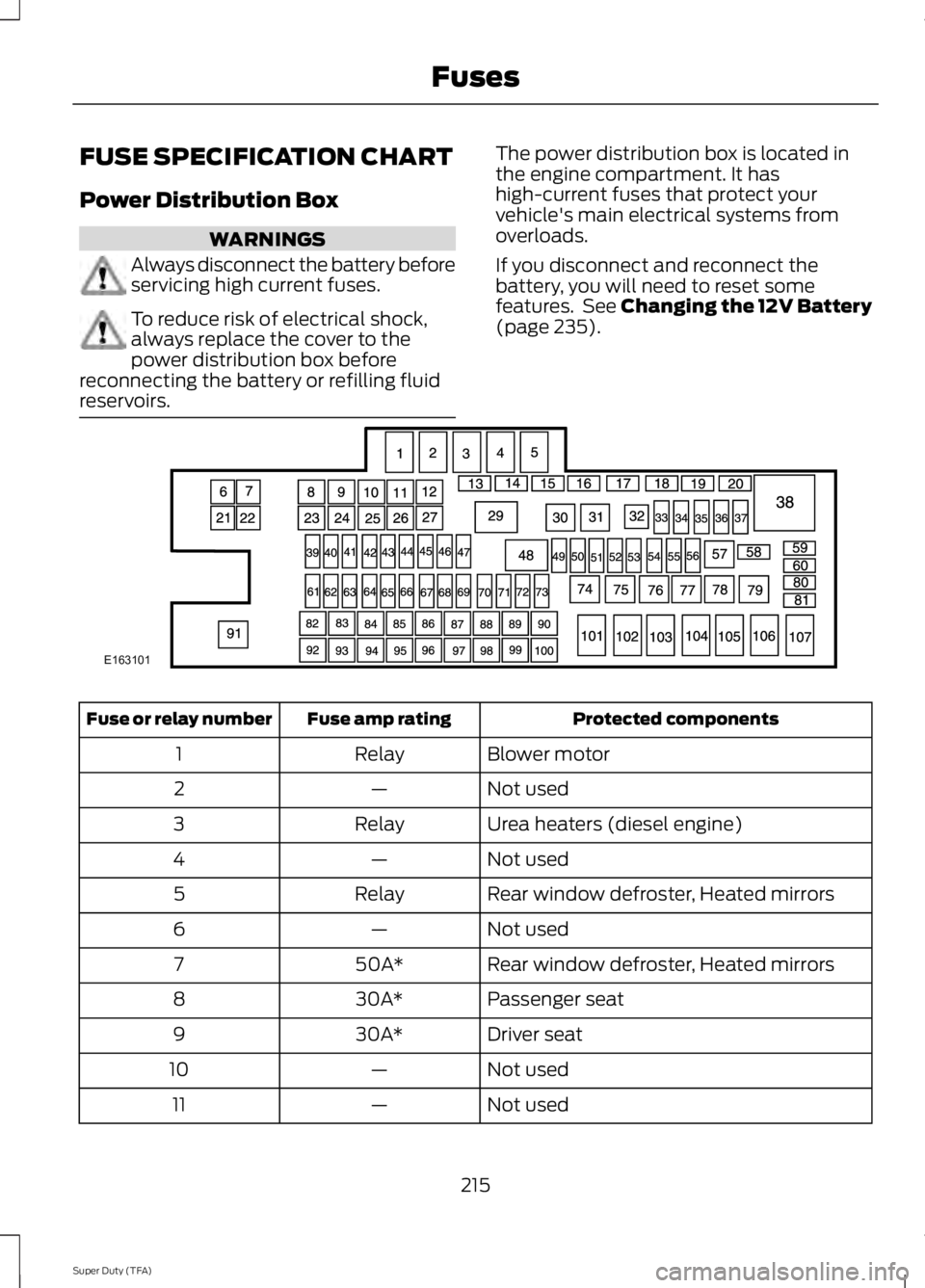
FUSE SPECIFICATION CHART
Power Distribution Box
WARNINGS
Always disconnect the battery before
servicing high current fuses.
To reduce risk of electrical shock,
always replace the cover to the
power distribution box before
reconnecting the battery or refilling fluid
reservoirs. The power distribution box is located in
the engine compartment. It has
high-current fuses that protect your
vehicle's main electrical systems from
overloads.
If you disconnect and reconnect the
battery, you will need to reset some
features. See Changing the 12V Battery
(page 235).
Protected components
Fuse amp rating
Fuse or relay number
Blower motor
Relay
1
Not used
—
2
Urea heaters (diesel engine)
Relay
3
Not used
—
4
Rear window defroster, Heated mirrors
Relay
5
Not used
—
6
Rear window defroster, Heated mirrors
50A*
7
Passenger seat
30A*
8
Driver seat
30A*
9
Not used
—
10
Not used
—
11
215
Super Duty (TFA) FusesE163101
Page 219 of 460
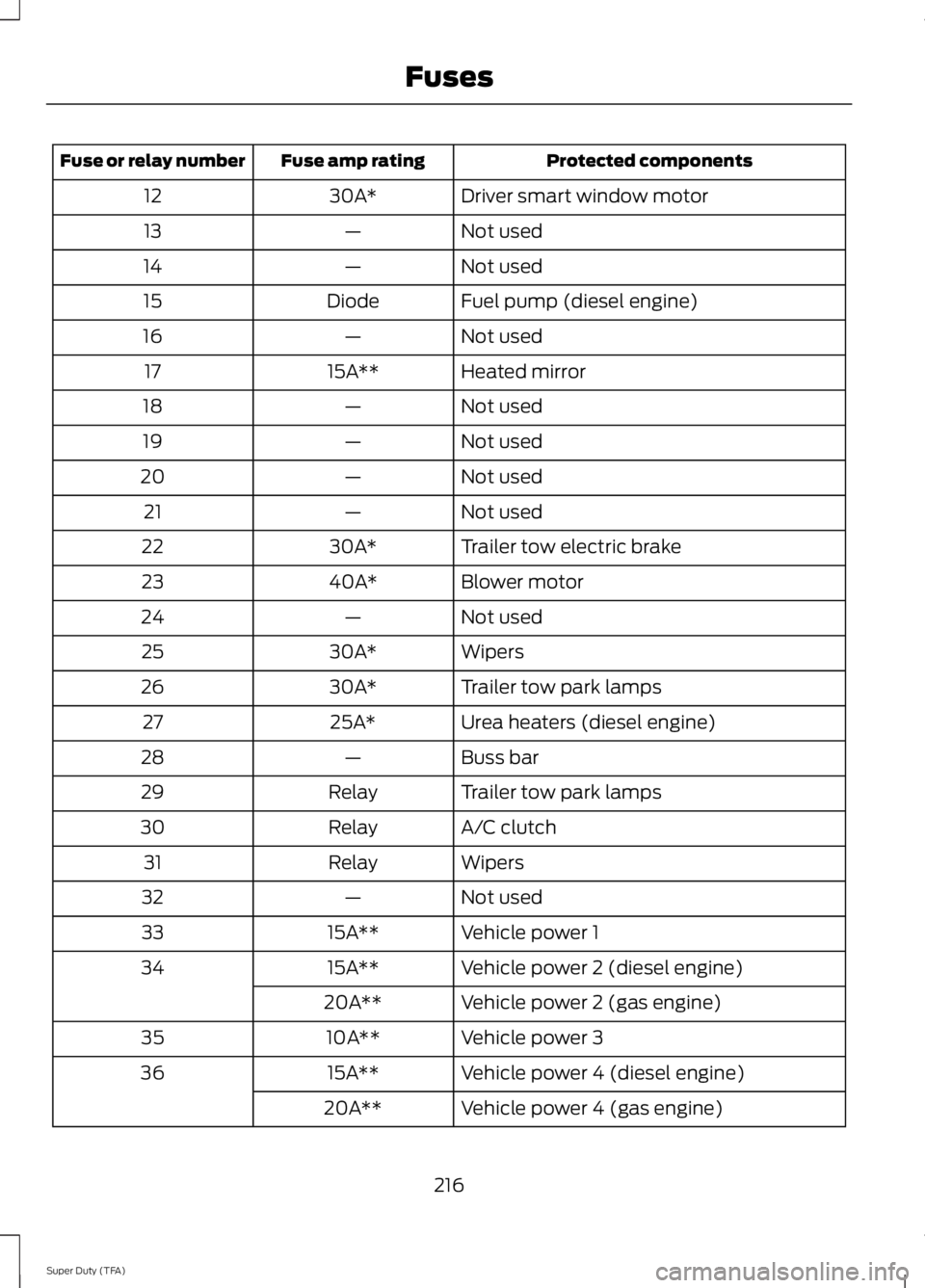
Protected components
Fuse amp rating
Fuse or relay number
Driver smart window motor
30A*
12
Not used
—
13
Not used
—
14
Fuel pump (diesel engine)
Diode
15
Not used
—
16
Heated mirror
15A**
17
Not used
—
18
Not used
—
19
Not used
—
20
Not used
—
21
Trailer tow electric brake
30A*
22
Blower motor
40A*
23
Not used
—
24
Wipers
30A*
25
Trailer tow park lamps
30A*
26
Urea heaters (diesel engine)
25A*
27
Buss bar
—
28
Trailer tow park lamps
Relay
29
A/C clutch
Relay
30
Wipers
Relay
31
Not used
—
32
Vehicle power 1
15A**
33
Vehicle power 2 (diesel engine)
15A**
34
Vehicle power 2 (gas engine)
20A**
Vehicle power 3
10A**
35
Vehicle power 4 (diesel engine)
15A**
36
Vehicle power 4 (gas engine)
20A**
216
Super Duty (TFA) Fuses
Page 223 of 460
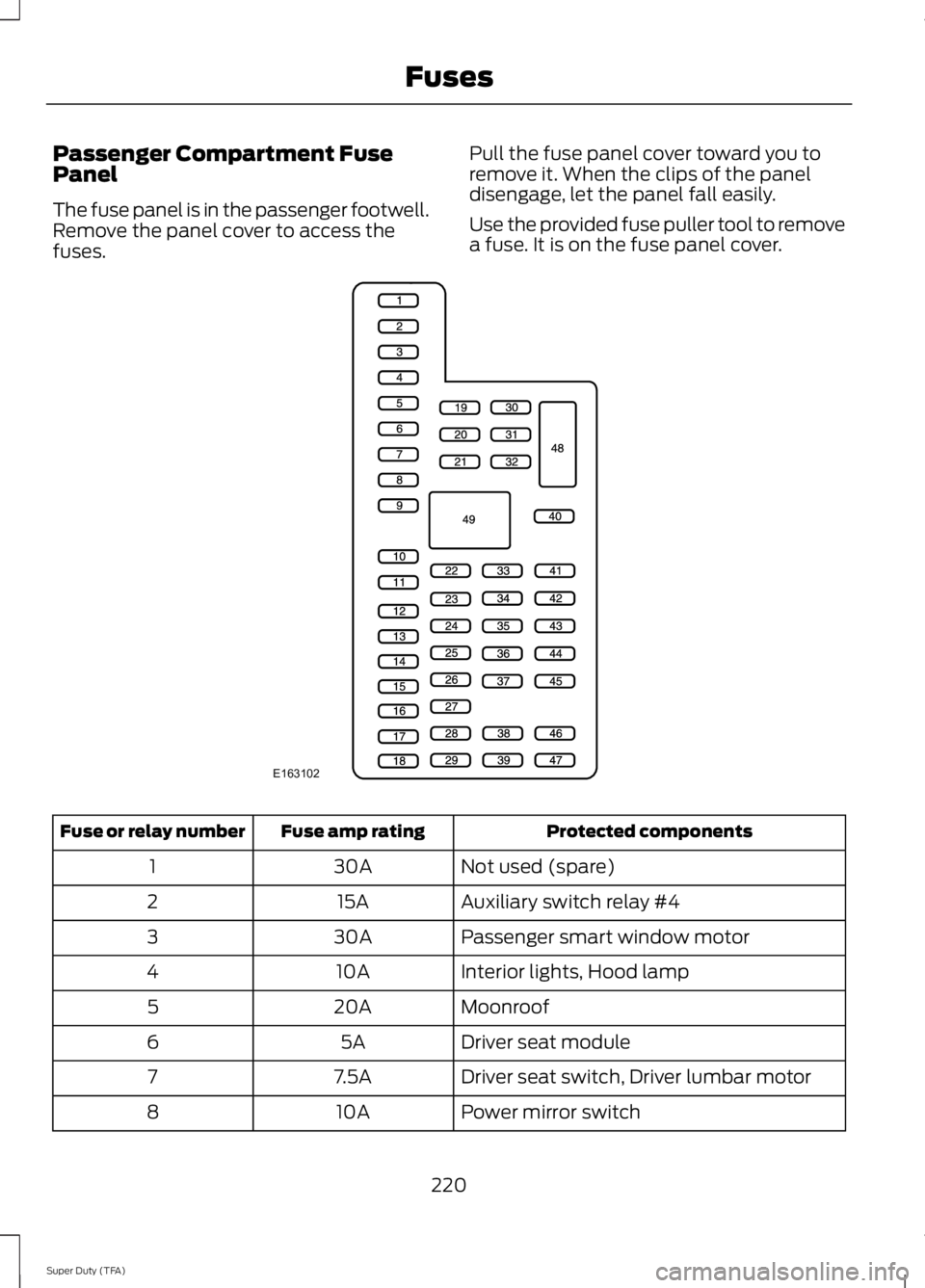
Passenger Compartment Fuse
Panel
The fuse panel is in the passenger footwell.
Remove the panel cover to access the
fuses.
Pull the fuse panel cover toward you to
remove it. When the clips of the panel
disengage, let the panel fall easily.
Use the provided fuse puller tool to remove
a fuse. It is on the fuse panel cover. Protected components
Fuse amp rating
Fuse or relay number
Not used (spare)
30A
1
Auxiliary switch relay #4
15A
2
Passenger smart window motor
30A
3
Interior lights, Hood lamp
10A
4
Moonroof
20A
5
Driver seat module
5A
6
Driver seat switch, Driver lumbar motor
7.5A
7
Power mirror switch
10A
8
220
Super Duty (TFA) FusesE163102
Page 224 of 460
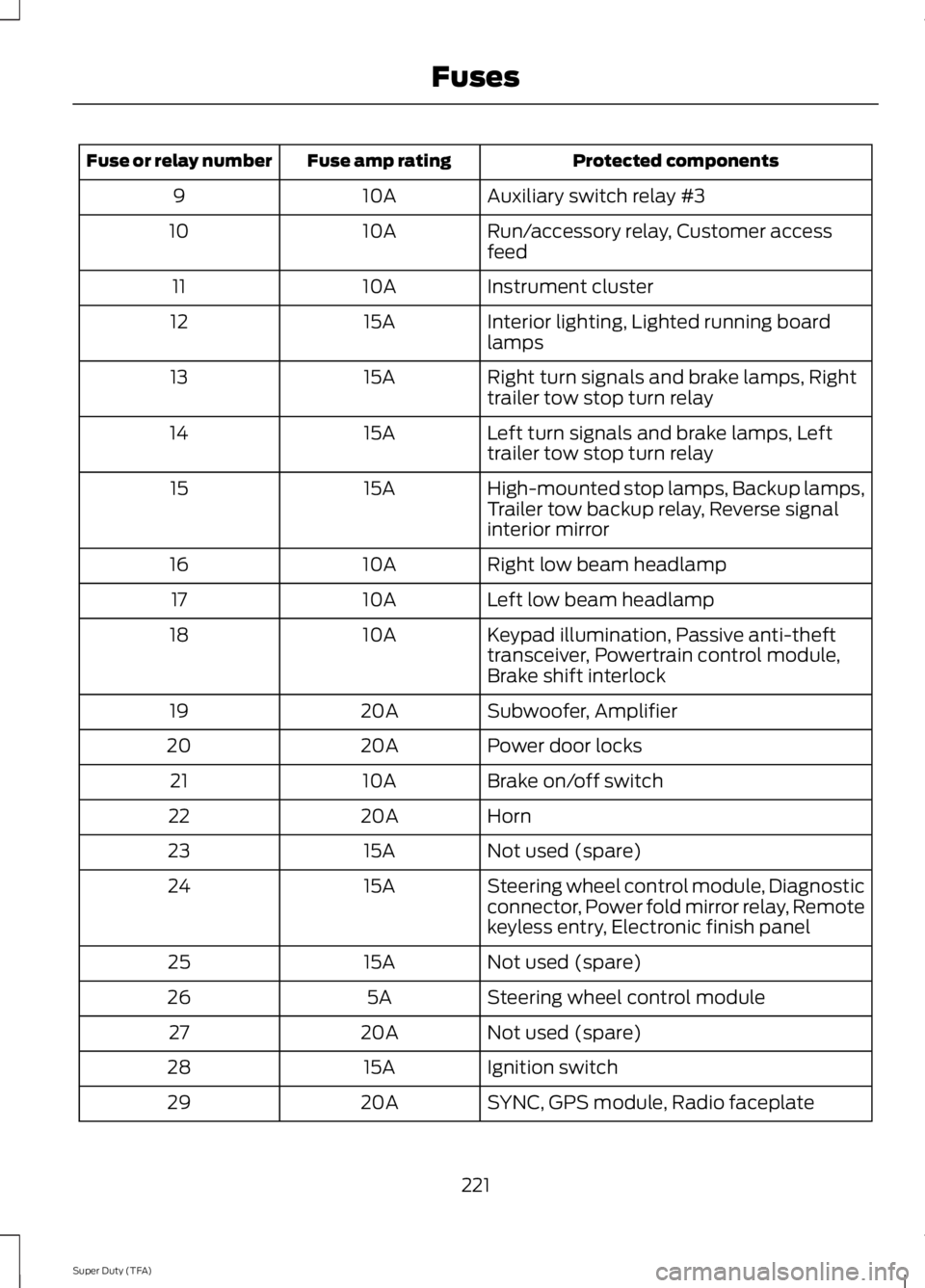
Protected components
Fuse amp rating
Fuse or relay number
Auxiliary switch relay #3
10A
9
Run/accessory relay, Customer access
feed
10A
10
Instrument cluster
10A
11
Interior lighting, Lighted running board
lamps
15A
12
Right turn signals and brake lamps, Right
trailer tow stop turn relay
15A
13
Left turn signals and brake lamps, Left
trailer tow stop turn relay
15A
14
High-mounted stop lamps, Backup lamps,
Trailer tow backup relay, Reverse signal
interior mirror
15A
15
Right low beam headlamp
10A
16
Left low beam headlamp
10A
17
Keypad illumination, Passive anti-theft
transceiver, Powertrain control module,
Brake shift interlock
10A
18
Subwoofer, Amplifier
20A
19
Power door locks
20A
20
Brake on/off switch
10A
21
Horn
20A
22
Not used (spare)
15A
23
Steering wheel control module, Diagnostic
connector, Power fold mirror relay, Remote
keyless entry, Electronic finish panel
15A
24
Not used (spare)
15A
25
Steering wheel control module
5A
26
Not used (spare)
20A
27
Ignition switch
15A
28
SYNC, GPS module, Radio faceplate
20A
29
221
Super Duty (TFA) Fuses
Page 225 of 460
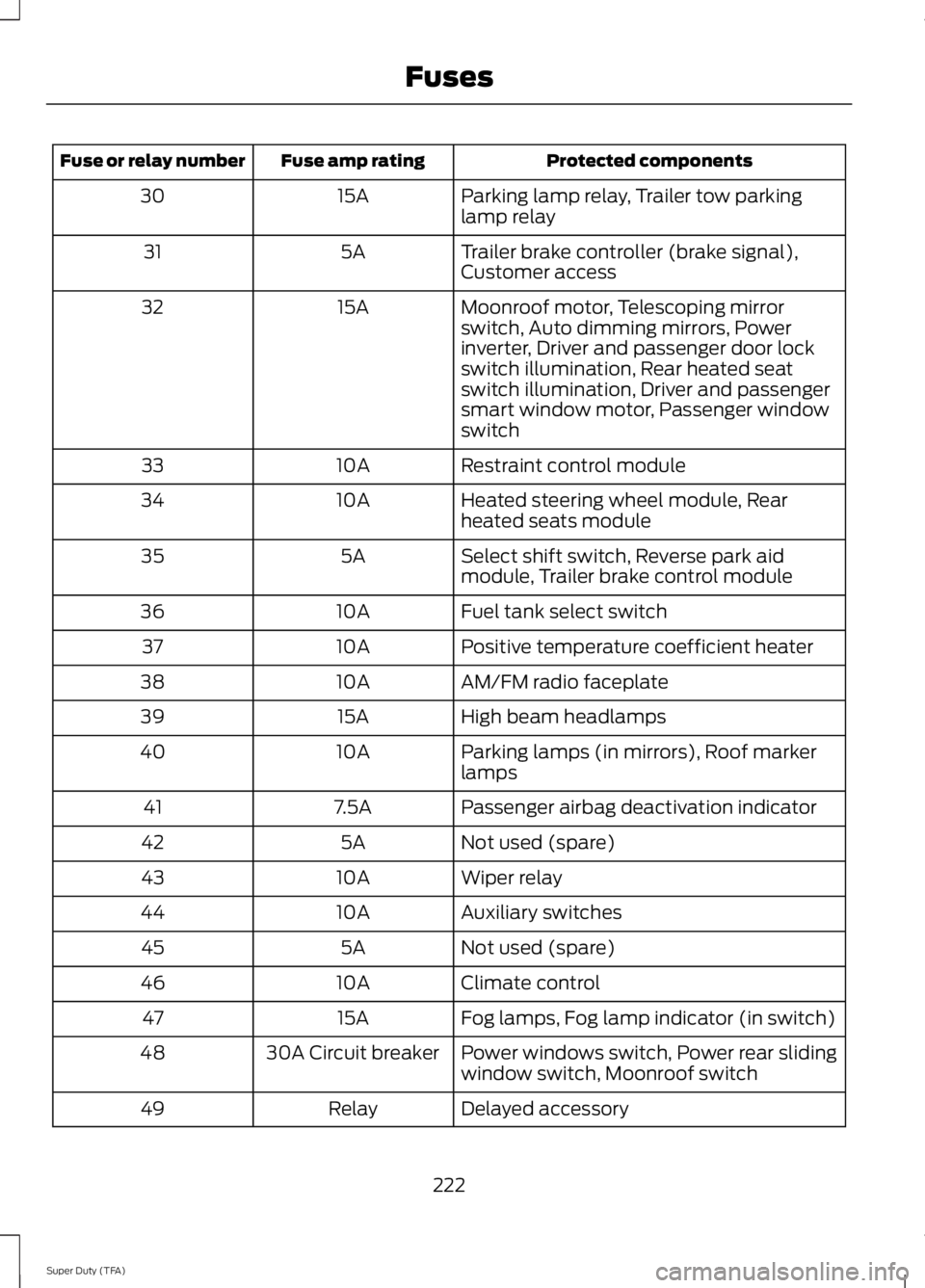
Protected components
Fuse amp rating
Fuse or relay number
Parking lamp relay, Trailer tow parking
lamp relay
15A
30
Trailer brake controller (brake signal),
Customer access
5A
31
Moonroof motor, Telescoping mirror
switch, Auto dimming mirrors, Power
inverter, Driver and passenger door lock
switch illumination, Rear heated seat
switch illumination, Driver and passenger
smart window motor, Passenger window
switch
15A
32
Restraint control module
10A
33
Heated steering wheel module, Rear
heated seats module
10A
34
Select shift switch, Reverse park aid
module, Trailer brake control module
5A
35
Fuel tank select switch
10A
36
Positive temperature coefficient heater
10A
37
AM/FM radio faceplate
10A
38
High beam headlamps
15A
39
Parking lamps (in mirrors), Roof marker
lamps
10A
40
Passenger airbag deactivation indicator
7.5A
41
Not used (spare)
5A
42
Wiper relay
10A
43
Auxiliary switches
10A
44
Not used (spare)
5A
45
Climate control
10A
46
Fog lamps, Fog lamp indicator (in switch)
15A
47
Power windows switch, Power rear sliding
window switch, Moonroof switch
30A Circuit breaker
48
Delayed accessory
Relay
49
222
Super Duty (TFA) Fuses