automatic transmission FORD F250 2014 Owner's Manual
[x] Cancel search | Manufacturer: FORD, Model Year: 2014, Model line: F250, Model: FORD F250 2014Pages: 460, PDF Size: 5.33 MB
Page 208 of 460
HAZARD WARNING FLASHERS
Note:
The hazard warning flashers will
operate when the ignition is in any position
or if the key is not in the ignition. If used
when the engine is not running, the battery
will lose charge. As a result, there may be
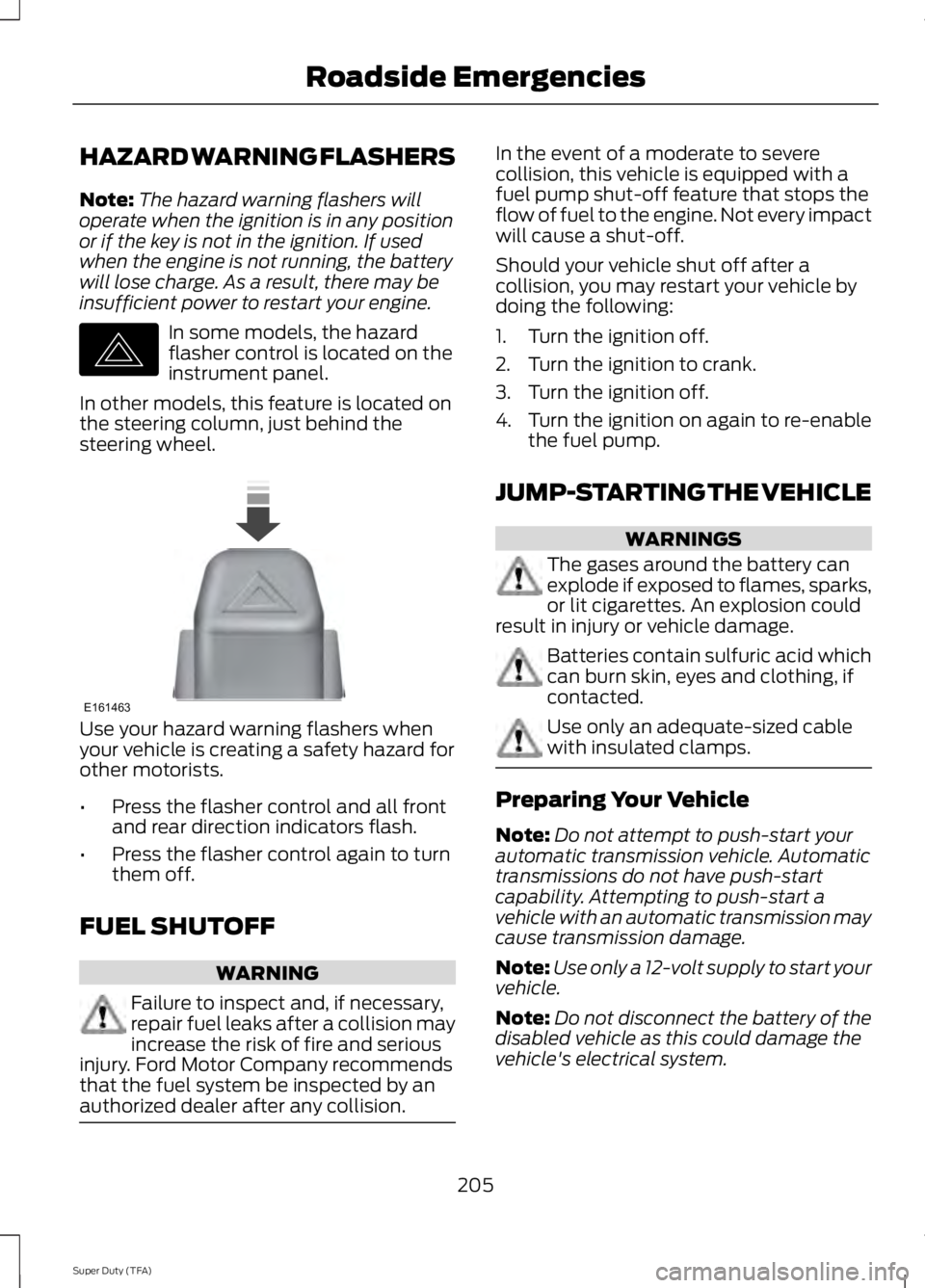
insufficient power to restart your engine. In some models, the hazard
flasher control is located on the
instrument panel.
In other models, this feature is located on
the steering column, just behind the
steering wheel. Use your hazard warning flashers when
your vehicle is creating a safety hazard for
other motorists.
•
Press the flasher control and all front
and rear direction indicators flash.
• Press the flasher control again to turn
them off.
FUEL SHUTOFF WARNING
Failure to inspect and, if necessary,
repair fuel leaks after a collision may
increase the risk of fire and serious
injury. Ford Motor Company recommends
that the fuel system be inspected by an
authorized dealer after any collision. In the event of a moderate to severe
collision, this vehicle is equipped with a
fuel pump shut-off feature that stops the
flow of fuel to the engine. Not every impact
will cause a shut-off.
Should your vehicle shut off after a
collision, you may restart your vehicle by
doing the following:
1. Turn the ignition off.
2. Turn the ignition to crank.
3. Turn the ignition off.
4.
Turn the ignition on again to re-enable
the fuel pump.
JUMP-STARTING THE VEHICLE WARNINGS
The gases around the battery can
explode if exposed to flames, sparks,
or lit cigarettes. An explosion could
result in injury or vehicle damage. Batteries contain sulfuric acid which
can burn skin, eyes and clothing, if
contacted.
Use only an adequate-sized cable
with insulated clamps.
Preparing Your Vehicle
Note:
Do not attempt to push-start your
automatic transmission vehicle. Automatic
transmissions do not have push-start
capability. Attempting to push-start a
vehicle with an automatic transmission may
cause transmission damage.
Note: Use only a 12-volt supply to start your
vehicle.
Note: Do not disconnect the battery of the
disabled vehicle as this could damage the
vehicle's electrical system.
205
Super Duty (TFA) Roadside EmergenciesE142663 E161463
Page 227 of 460
2. Go to the front of the vehicle and
locate the secondary release lever,
which is located under the front of the
hood, to your right of the center of the
vehicle (driver's side), toward the
headlight.
3. Release the hood latch by pushing the secondary release lever to your left,
toward the center of the vehicle.
4. Raise the hood. 5.
To close the hood, lower the hood and
allow it to drop the last 8 to 11 inches
(20 to 30 centimeters).
Note: Make sure that the hood is closed
properly.
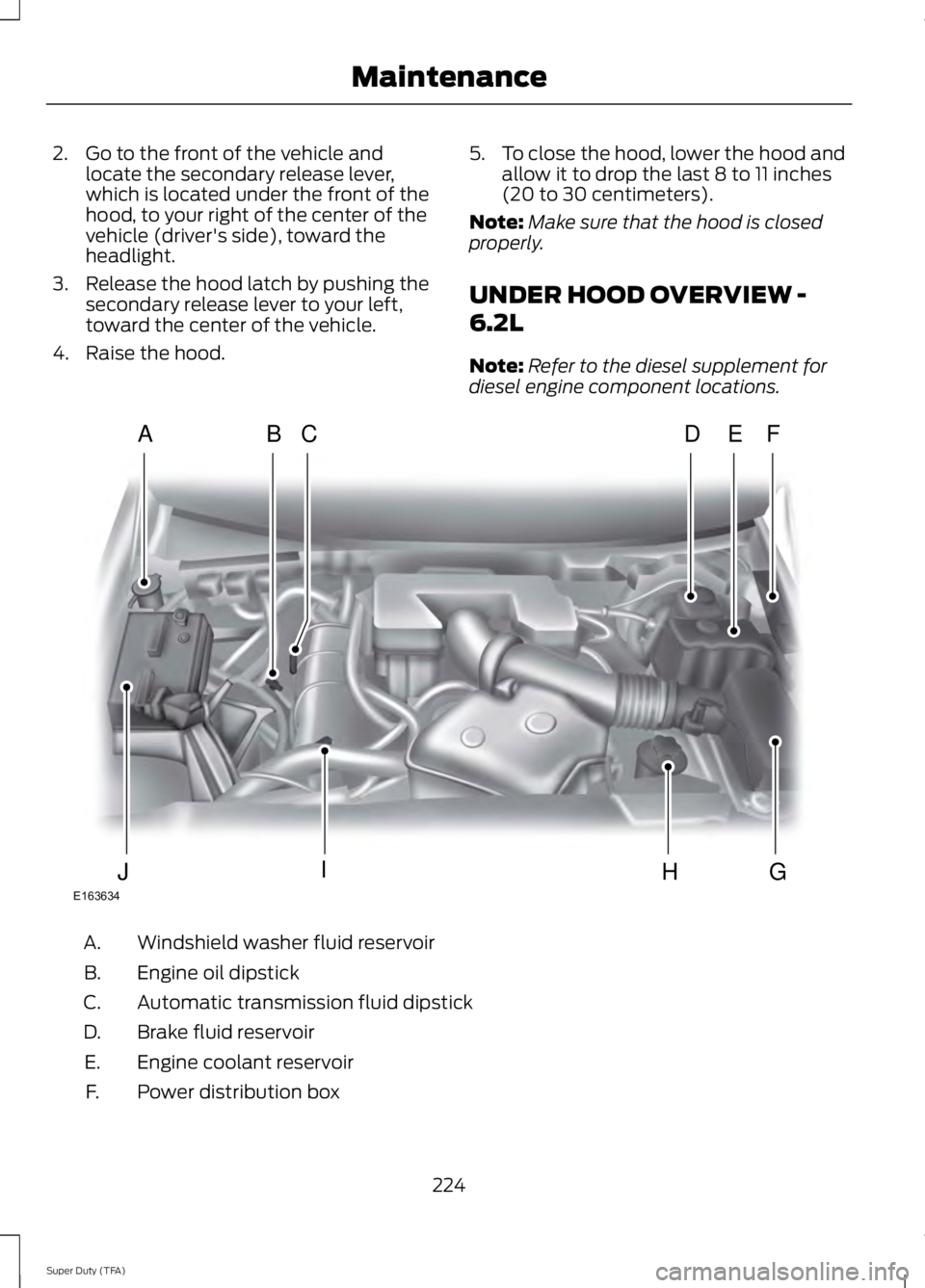
UNDER HOOD OVERVIEW -
6.2L
Note: Refer to the diesel supplement for
diesel engine component locations. Windshield washer fluid reservoir
A.
Engine oil dipstick
B.
Automatic transmission fluid dipstick
C.
Brake fluid reservoir
D.
Engine coolant reservoir
E.
Power distribution box
F.
224
Super Duty (TFA) MaintenanceE163634
ADFEBC
GHIJ
Page 228 of 460
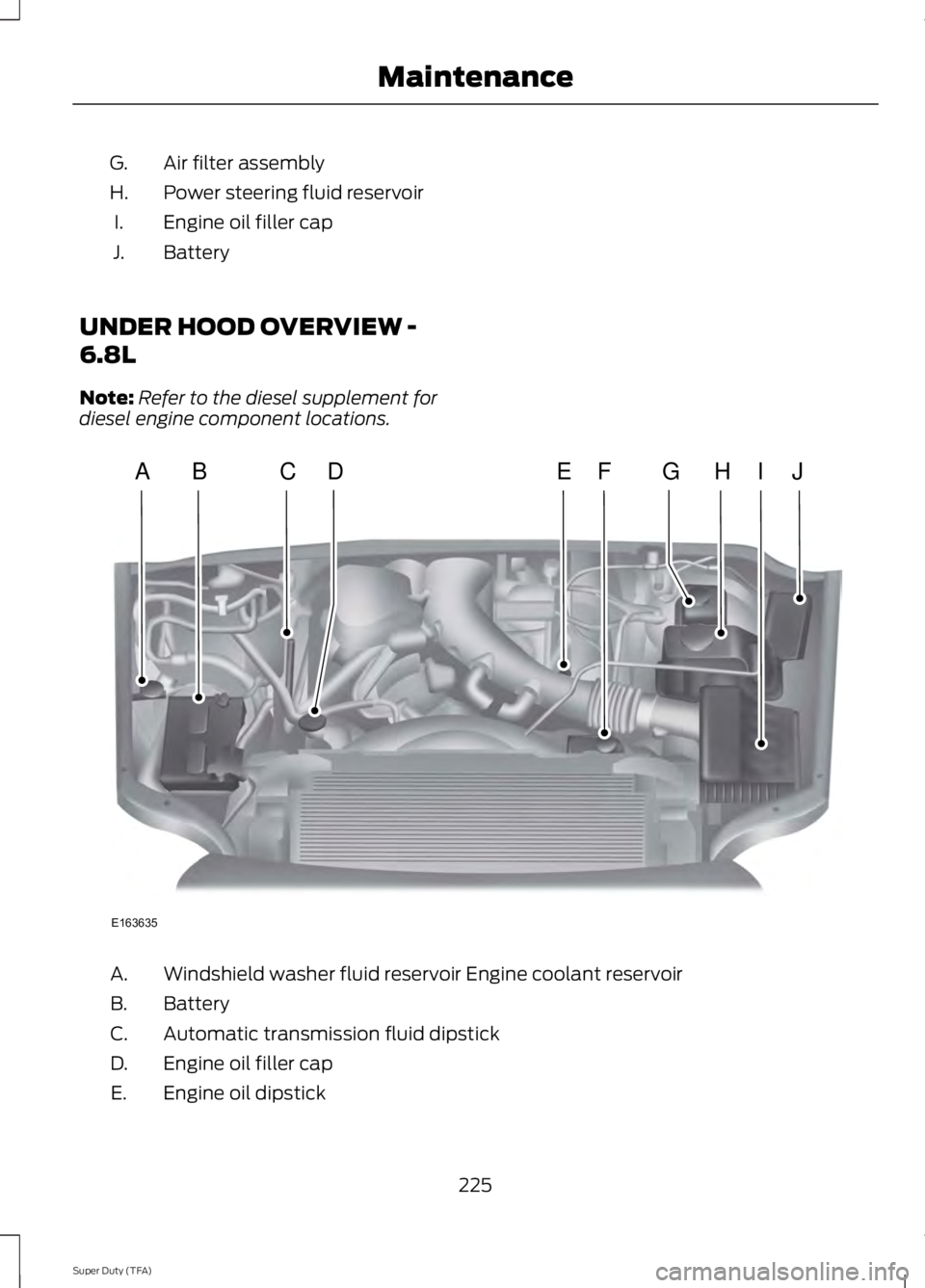
Air filter assembly
G.
Power steering fluid reservoir
H.
Engine oil filler cap
I.
Battery
J.
UNDER HOOD OVERVIEW -
6.8L
Note: Refer to the diesel supplement for
diesel engine component locations. Windshield washer fluid reservoir Engine coolant reservoir
A.
Battery
B.
Automatic transmission fluid dipstick
C.
Engine oil filler cap
D.
Engine oil dipstick
E.
225
Super Duty (TFA) MaintenanceE163635
ABCEHIJFDG
Page 234 of 460
•
the engine coolant temperature gauge
moves fully into the red (hot) area
• the coolant temperature warning light
illuminates
• the service engine soon indicator
illuminates. WARNING
Never remove the coolant reservoir
cap while the engine is running or hot.
1. Pull off the road as soon as safely
possible and place the vehicle in P
(Park).
2. Leave the engine running until the coolant temperature gauge needle
moves away from the H range. After
several minutes, if this does not
happen, follow the remaining steps.
3. Turn the engine off and wait for it to cool before checking the coolant level.
4. If the coolant level is normal, you may restart your engine and continue on.
5. If the coolant is low, add coolant, restart the engine and take your vehicle
to an authorized dealer. See Adding
engine coolant in this chapter for more
information. Refer to fail-safe cooling
for additional information.
AUTOMATIC TRANSMISSION
FLUID CHECK
Have an authorized dealer check and
change the transmission fluid and filter at
the correct service interval. See
Scheduled Maintenance (page 430).
Do not use supplemental transmission
fluid additives, treatments or cleaning
agents. The use of these materials may
affect transmission operation and result
in damage to internal transmission
components. Checking Automatic Transmission
Fluid (If Equipped)
For scheduled intervals of the fluid checks
and changes, See
Scheduled
Maintenance (page 430). Your
transmission does not consume fluid.
However, the fluid level should be checked
if the transmission is not working properly,
i.e., if the transmission slips or shifts slowly
or if you notice some sign of fluid leakage.
Automatic transmission fluid expands
when warmed. To obtain an accurate fluid
check, drive the vehicle until it is at normal
operating temperature (approximately
19 mi (30 km)
). Verify that the
transmission fluid temperature gauge,
located on the instrument cluster, is within
normal range.
1. Drive the vehicle
19 mi (30 km)until it
reaches normal operating temperature.
2. Park the vehicle on a level surface and
engage the parking brake.
3. With the engine running, parking brake
engaged and your foot on the brake
pedal, move the gearshift lever through
all of the gear ranges. Allow sufficient
time for each gear to engage.
4. Latch the gearshift lever in P and leave
the engine running.
5. Remove the dipstick, wiping it clean with a clean, dry lint free rag. If
necessary, refer to the Under Hood
Overview in this chapter for the
location of the dipstick.
6. Install the dipstick making sure it is fully
seated in the filler tube.
7. Remove the dipstick and inspect the fluid level. The fluid should be in the
designated area for normal operating
temperature or ambient temperature.
Low Fluid Level
Type A
231
Super Duty (TFA) Maintenance
Page 236 of 460
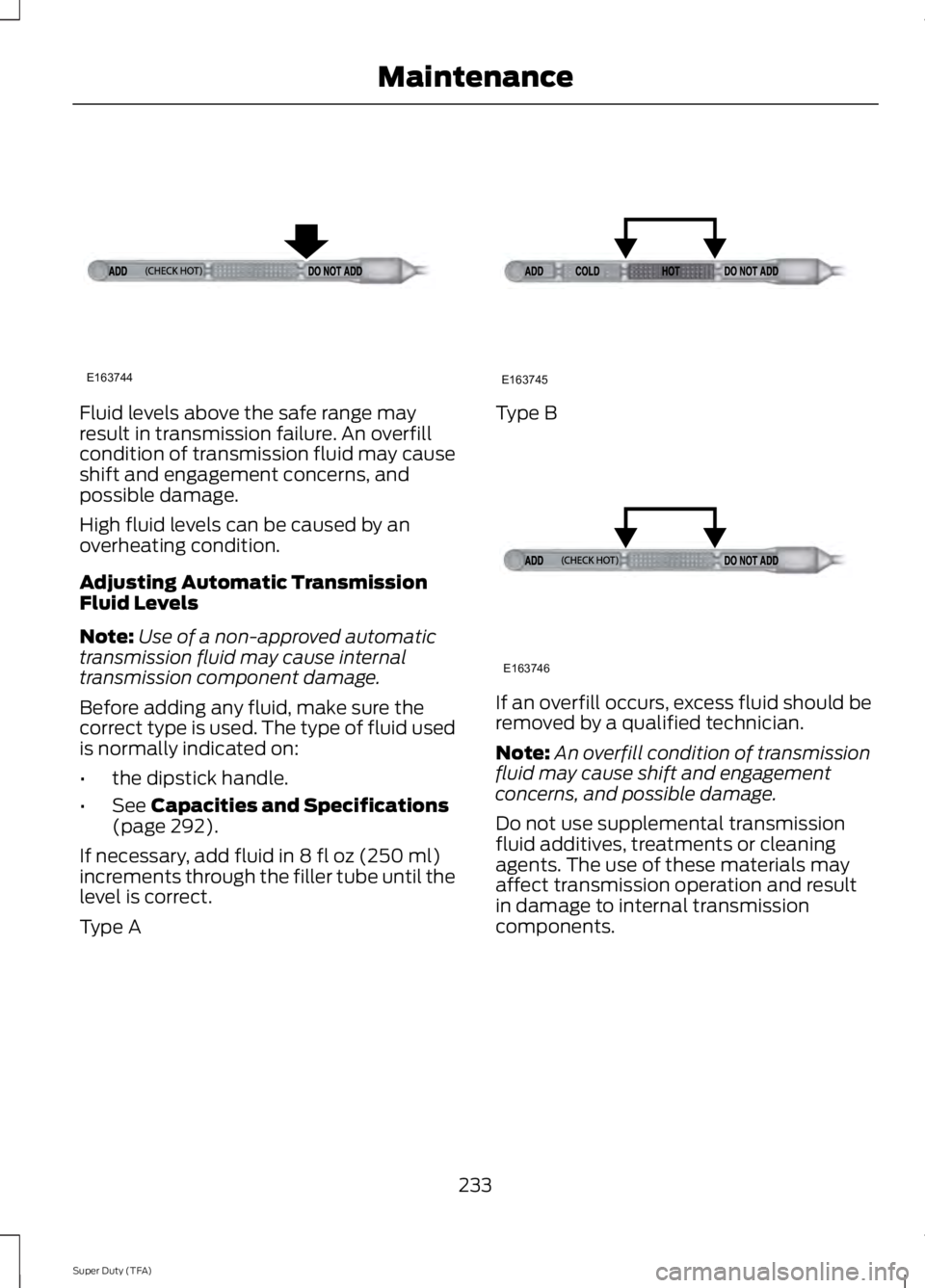
Fluid levels above the safe range may
result in transmission failure. An overfill
condition of transmission fluid may cause
shift and engagement concerns, and
possible damage.
High fluid levels can be caused by an
overheating condition.
Adjusting Automatic Transmission
Fluid Levels
Note:
Use of a non-approved automatic
transmission fluid may cause internal
transmission component damage.
Before adding any fluid, make sure the
correct type is used. The type of fluid used
is normally indicated on:
• the dipstick handle.
• See Capacities and Specifications
(page 292).
If necessary, add fluid in
8 fl oz (250 ml)
increments through the filler tube until the
level is correct.
Type A Type B
If an overfill occurs, excess fluid should be
removed by a qualified technician.
Note:
An overfill condition of transmission
fluid may cause shift and engagement
concerns, and possible damage.
Do not use supplemental transmission
fluid additives, treatments or cleaning
agents. The use of these materials may
affect transmission operation and result
in damage to internal transmission
components.
233
Super Duty (TFA) MaintenanceE163744 E163745 E163746
Page 298 of 460
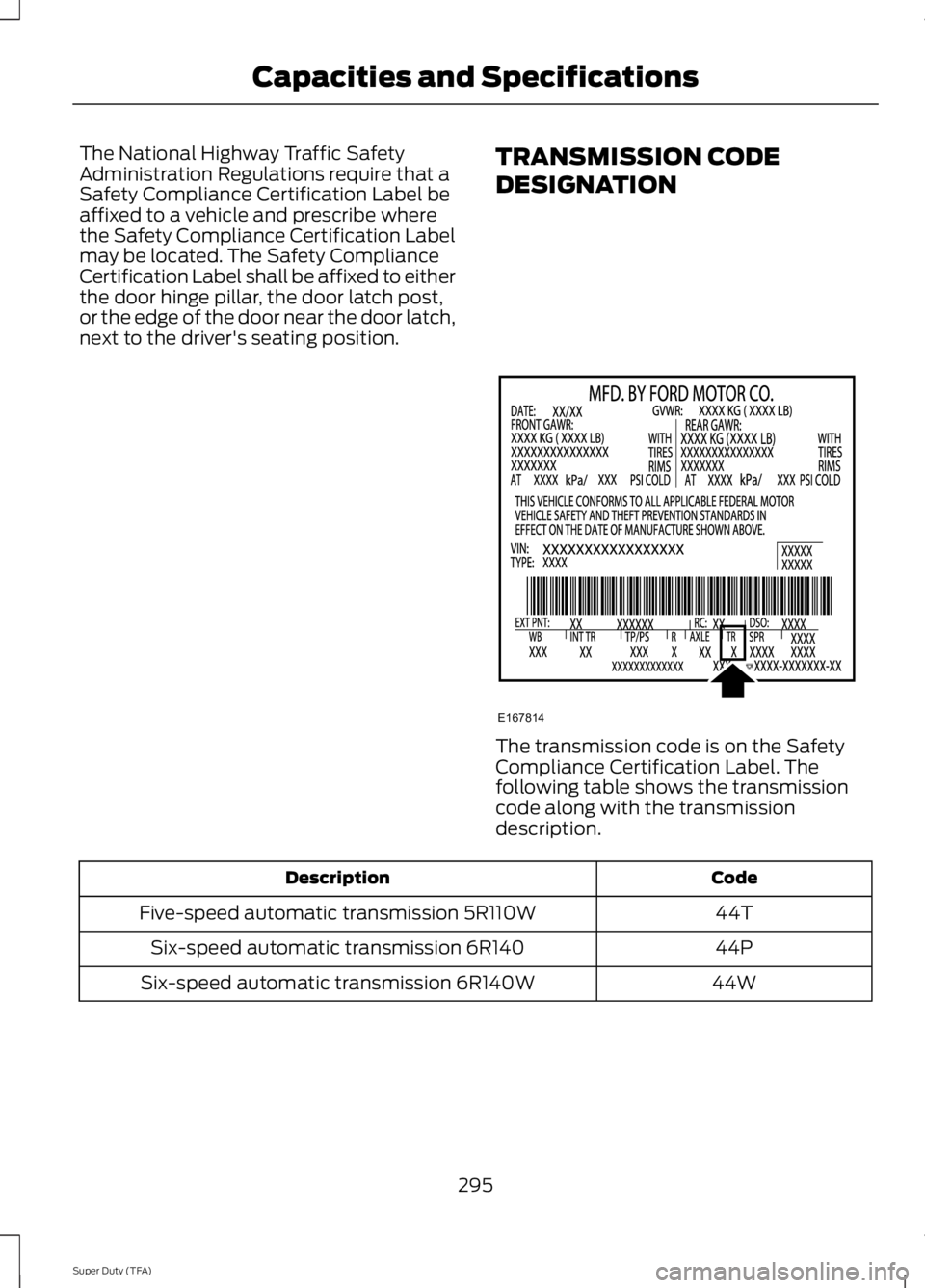
The National Highway Traffic Safety
Administration Regulations require that a
Safety Compliance Certification Label be
affixed to a vehicle and prescribe where
the Safety Compliance Certification Label
may be located. The Safety Compliance
Certification Label shall be affixed to either
the door hinge pillar, the door latch post,
or the edge of the door near the door latch,
next to the driver's seating position.
TRANSMISSION CODE
DESIGNATION The transmission code is on the Safety
Compliance Certification Label. The
following table shows the transmission
code along with the transmission
description.
Code
Description
44T
Five-speed automatic transmission 5R110W
44P
Six-speed automatic transmission 6R140
44W
Six-speed automatic transmission 6R140W
295
Super Duty (TFA) Capacities and SpecificationsE167814
Page 301 of 460
Ford part number /
Ford specification
Ford part name or
equivalent
Capacity
Item
XG-1-E /
Motorcraft Premium
Long-Life Grease
—
Transmission, parking
brake linkages and
pivots, brake pedal shift WSD-M1C227-A
XT-10–QLV /
Motorcraft MERCON
LV ATF
—
Power steering fluid
Automatic transmis-sion MERCON LV
XL-12 /
Motorcraft Transfer
Case Fluid
2.0 quarts (1.9L)
Transfer case fluid
ESP-M2C166-H
XT-10–QLV /
Motorcraft MERCON
LV ATF
17.5 quarts
(16.6L)
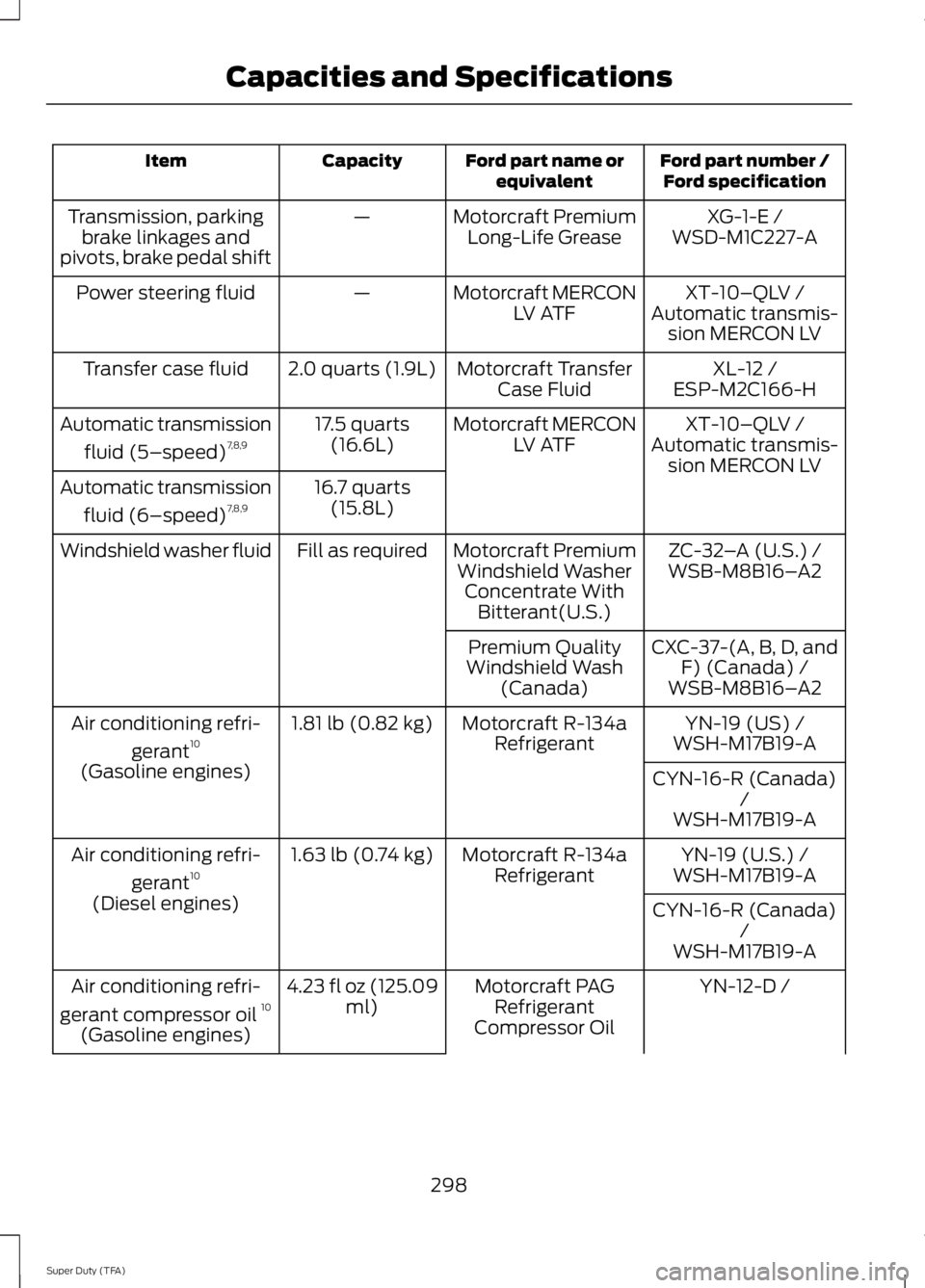
Automatic transmission
fluid (5–speed) 7,8,9
Automatic transmis-
sion MERCON LV
16.7 quarts (15.8L)
Automatic transmission
fluid (6–speed) 7,8,9
ZC-32–A (U.S.) /
Motorcraft Premium
Windshield Washer Concentrate With Bitterant(U.S.)
Fill as required
Windshield washer fluid
WSB-M8B16–A2
CXC-37-(A, B, D, and F) (Canada) /
Premium Quality
Windshield Wash (Canada) WSB-M8B16– A2
YN-19 (US) /
Motorcraft R-134a
Refrigerant
1.81 lb (0.82 kg)
Air conditioning refri-
gerant10
WSH-M17B19-A
(Gasoline engines) CYN-16-R (Canada)
/
WSH-M17B19-A
YN-19 (U.S.) /
Motorcraft R-134a
Refrigerant
1.63 lb (0.74 kg)
Air conditioning refri-
gerant10
WSH-M17B19-A
(Diesel engines) CYN-16-R (Canada)
/
WSH-M17B19-A
YN-12-D /
Motorcraft PAG
Refrigerant
Compressor Oil
4.23 fl oz (125.09
ml)
Air conditioning refri-
gerant compressor oil 10
(Gasoline engines)
298
Super Duty (TFA) Capacities and Specifications
Page 303 of 460
1
Add 8 oz. (236 ml) of Additive Friction Modifier XL-3 or equivalent meeting Ford
Specification EST-M2C118– A for complete refill of limited slip Ford axles. Ford design
rear axles contain a synthetic lubricant that does not require changing unless you submerge
the axle in water.
2 Ford recommends using Motorcraft (Ford) DOT 3 LV High Performance Motor Vehicle
Brake Fluid, Motorcraft (Ford) DOT 4 LV High Performance Motor Vehicle Brake Fluid or
equivalent meeting WSS-M6C65-A1 or WSS-M6C65-A2. Use of any fluid other than the
recommended fluid may cause degraded brake performance and not meet the Ford
performance standards. Keep brake fluid clean and dry. Contamination with dirt, water,
petroleum products or other materials may result in brake system damage and possible
failure.
3 Add the coolant type originally equipped in your vehicle.
4 Ford has designed your engine to use Motorcraft engine oils or equivalent oils that meet
Ford ’s specification. It is also acceptable to use an engine oil of recommended viscosity
grade that meets API SN requirements and displays the API Certification Mark for gasoline
engines.
5 Do not use oils labeled as API SN unless the label also display the API certification mark.
These oils do not meet the requirements of your vehicles engine and emissions system.
6 Do not use supplemental engine oil additives. They are unnecessary and could lead to
engine damage not covered by your Ford warranty.
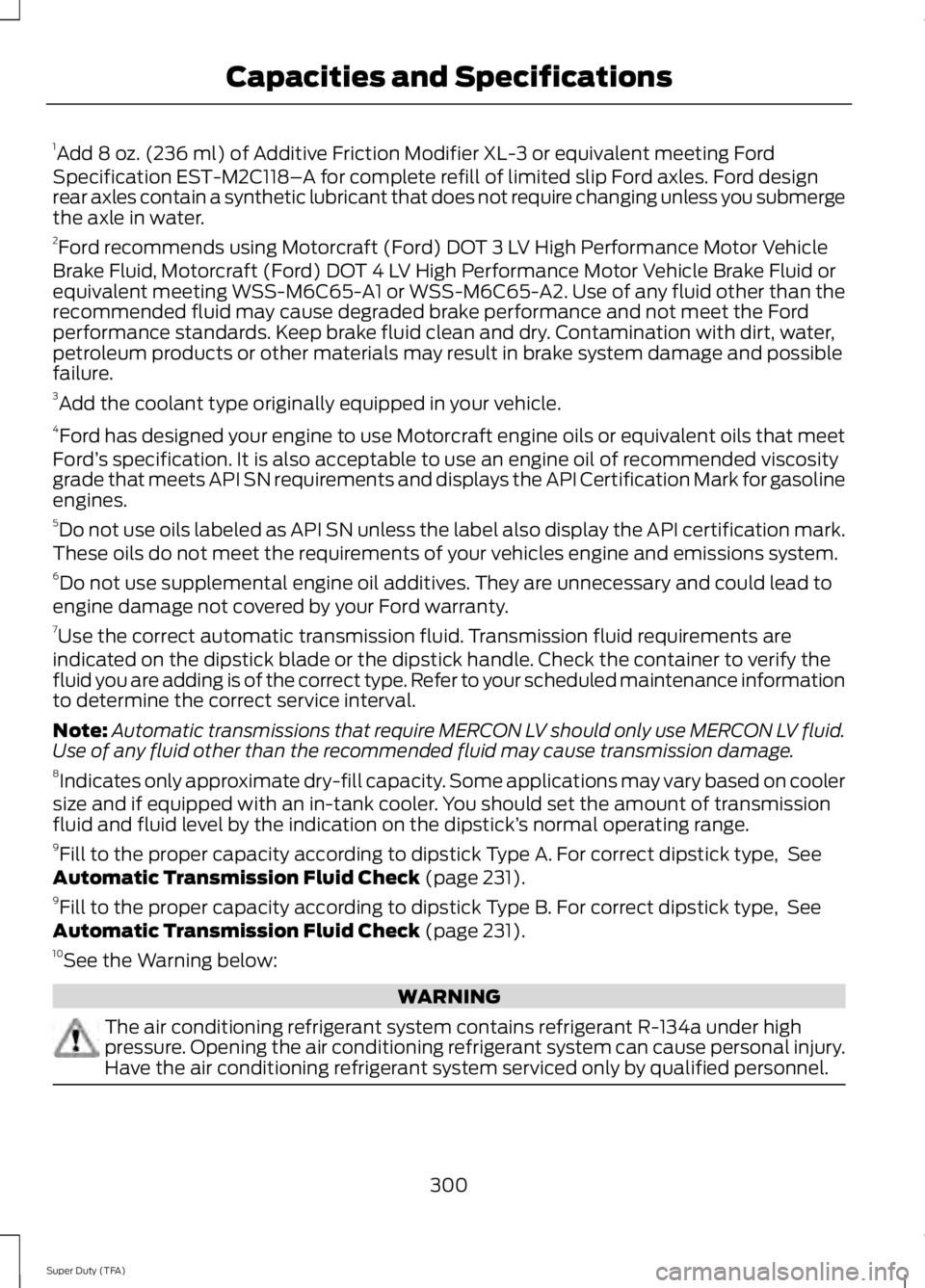
7 Use the correct automatic transmission fluid. Transmission fluid requirements are
indicated on the dipstick blade or the dipstick handle. Check the container to verify the
fluid you are adding is of the correct type. Refer to your scheduled maintenance information
to determine the correct service interval.
Note: Automatic transmissions that require MERCON LV should only use MERCON LV fluid.
Use of any fluid other than the recommended fluid may cause transmission damage.
8 Indicates only approximate dry-fill capacity. Some applications may vary based on cooler
size and if equipped with an in-tank cooler. You should set the amount of transmission
fluid and fluid level by the indication on the dipstick’ s normal operating range.
9 Fill to the proper capacity according to dipstick Type A. For correct dipstick type, See
Automatic Transmission Fluid Check (page 231).
9 Fill to the proper capacity according to dipstick Type B. For correct dipstick type, See
Automatic Transmission Fluid Check
(page 231).
10 See the Warning below: WARNING
The air conditioning refrigerant system contains refrigerant R-134a under high
pressure. Opening the air conditioning refrigerant system can cause personal injury.
Have the air conditioning refrigerant system serviced only by qualified personnel.
300
Super Duty (TFA) Capacities and Specifications
Page 321 of 460
Pairing a Phone for the First Time
Note:
SYNC can support downloading up
to approximately 1000 entries per
Bluetooth-enabled cellular phone.
Note: Make sure to switch on the ignition
and the radio. Put the transmission in
position P.
Note: To scroll through the menus, press
the up and down arrows on your audio
system.
Wirelessly pairing your phone with SYNC
allows you to make and receive hands-free
calls.
1. Press the phone button. When the display indicates there is no phone
paired, press
OK.
2. When
Find SYNC appears in the
display, press OK.
3. Put your phone into Bluetooth discovery mode. See your device's
manual if necessary.
4. When prompted on your phone's display, enter the six-digit PIN provided
by SYNC in the radio display. The
display indicates when the pairing is
successful.
Depending on your phone's capability and
your market, the system may prompt you
with questions, such as setting the current
phone as the primary phone (the phone
SYNC automatically tries to connect with
first upon vehicle start-up) and
downloading your phonebook.
Pairing Subsequent Phones
Note: Make sure to switch on the ignition
and the radio. Put the transmission in
position
P.
Note: To scroll through the menus, press
the up and down arrows on your audio
system. 1.
Press the phone button, and then scroll
to System Settings. Press
OK.
2. Scroll to Bluetooth Devices. Press
OK.
3. Scroll to Add Bluetooth Device. Press OK
.
4. When
Find SYNC appears in the
display, press OK.
5. Put your phone into Bluetooth discovery mode. See your phone's
manual if necessary.
6. When prompted on your phone's display, enter the six-digit PIN provided
by SYNC in the radio display. The
display indicates when the pairing is
successful.
The system then prompts with questions,
such as if you would like to set the current
phone as the primary phone (the phone
SYNC automatically tries to connect with
first upon vehicle start-up) and download
your phone book.
Phone Voice Commands
Press the voice icon and say "Phone". Say
any of the following: "PHONE"
"Call
"Call
"Call
"Call
"Call
"Call
"Call history incoming" 2
"Call history missed" 2
318
Super Duty (TFA) SYNC™
(If Equipped)
Page 387 of 460
Phone
A
Quick Dial
B
Phonebook
C
History
D
Messaging
E
Settings
F
Hands-free calling is one of the main
features of SYNC. Once you pair your
phone, you can access many options using
the touchscreen or voice commands. While
the system supports a variety of features,
many are dependent on your cellular
phone ’s functionality.
At a minimum, most cellular phones with
Bluetooth wireless technology support the
following functions:
• Answering an incoming call
• Ending a call
• Using privacy mode
• Dialing a number
• Redialing
• Call waiting notification
• Caller ID.
Other features, such as text messaging
using Bluetooth and automatic phonebook
download, are phone-dependent features.
To check your phone ’s compatibility, see
your phone ’s user manual and visit
www.SYNCMyRide.com,
www.SYNCMyRide.ca or
www.syncmaroute.ca. Pairing Your Phone for the First
Time WARNING
Driving while distracted can result in
loss of vehicle control, crash and
injury. We strongly recommend that
you use extreme caution when using any
device that may take your focus off the
road. Your primary responsibility is the safe
operation of your vehicle. We recommend
against the use of any handheld device
while driving and encourage the use of
voice-operated systems when possible.
Make sure you are aware of all applicable
local laws that may affect the use of
electronic devices while driving. The first thing you must do to use the
phone features of SYNC is to pair your
Bluetooth-enabled cellular phone with
SYNC. This allows you to use your phone
in a hands-free manner.
Note:
Put the transmission in position P.
Turn on your vehicle ignition and the radio.
1. Touch
Add Phone in the upper left
corner of the touchscreen. Find SYNC
appears on the screen, and instructs
you to begin the pairing process from
your device.
2. Make sure that Bluetooth is set to
On
and that your cellular phone is in the
proper mode. See your phone ’s manual
if necessary.
384
Super Duty (TFA) MyFord Touch
™
(If Equipped)