ignition FORD F250 2014 Manual PDF
[x] Cancel search | Manufacturer: FORD, Model Year: 2014, Model line: F250, Model: FORD F250 2014Pages: 460, PDF Size: 5.33 MB
Page 363 of 460
Voice control
Standard interaction mode provides more detailed inter-
action and guidance. Advanced mode has less audible
interaction and more tone prompts.
Interaction Mode
Have the system ask you short questions if it has not
clearly heard or understood your request. *
Confirmation Prompts
Candidate lists are possible results from your voice
commands. The system simply makes a best guess at
your request with these turned off.
Media Candidate Lists
Candidate lists are possible results from your voice
commands. The system simply makes a best guess at
your request with these turned off.
Phone Candidate Lists
This allows you to adjust the system ’s voice volume level.
Voice Control Volume
* Even with confirmation prompts turned off, the system may occasionally ask you to
confirm settings
Media Player Press the Settings icon >
Settings > Media Player, then
select from the following: Media player
When this feature is on, the system automatically switches
to the media source upon initial connection. This allows
you to listen to music during the indexing process. When
this feature is off, the system does not automatically
switch to the inserted media source.
Autoplay
Select to connect, disconnect, add or delete a device. You
can also set a device as your favorite so that the system
automatically attempts to connect to that device at every
ignition cycle.
Bluetooth Devices
When this feature is on, the system automatically indexes
media on your connected Bluetooth device.
Index Bluetooth Audio
Devices
360
Super Duty (TFA) MyFord Touch
™
(If Equipped)E142607
Page 383 of 460
Playing Video from Your Device
To access and play video from your device,
your vehicle's transmission must be in
position P with the ignition in accessory
mode. See Starting and Stopping the
Engine (page 130).
SD Card and USB Voice Commands If you are listening to a USB
device or an SD card, press the
voice button on the steering
wheel controls. When prompted, say any
of the following commands.
If you are not listening to a USB device or
an SD card, press the voice button and,
after the tone, say "USB" or "SD card",
then any of the following commands. "USB" or "SD CARD"
"Browse" *
"Next"
"Pause" "Play"
"Play album
"Play artist
"Play audiobook
"Play composer
"Play movie
"Play music video
"Play playlist
"Play podcast
"Play podcast episode
"Play song
"Play TV show
"Play TV show episode
"Play video
"Play video podcast
"Play video podcast episode
"Play video playlist
"Previous"
"Repeat all"
"Repeat off"
"Repeat one" "Shuffle"
"Shuffle album" "Shuffle off"
"What's this?" "Help"
* If you have said you would like to browse
your USB or SD card, the system prompts
you to specify what you would like to
browse. When prompted, see the following
"Browse" chart.
** These commands are only available in
USB mode and are device-dependent.
380
Super Duty (TFA) MyFord Touch
™
(If Equipped)E142599
Page 387 of 460
Phone
A
Quick Dial
B
Phonebook
C
History
D
Messaging
E
Settings
F
Hands-free calling is one of the main
features of SYNC. Once you pair your
phone, you can access many options using
the touchscreen or voice commands. While
the system supports a variety of features,
many are dependent on your cellular
phone ’s functionality.
At a minimum, most cellular phones with
Bluetooth wireless technology support the
following functions:
• Answering an incoming call
• Ending a call
• Using privacy mode
• Dialing a number
• Redialing
• Call waiting notification
• Caller ID.
Other features, such as text messaging
using Bluetooth and automatic phonebook
download, are phone-dependent features.
To check your phone ’s compatibility, see
your phone ’s user manual and visit
www.SYNCMyRide.com,
www.SYNCMyRide.ca or
www.syncmaroute.ca. Pairing Your Phone for the First
Time WARNING
Driving while distracted can result in
loss of vehicle control, crash and
injury. We strongly recommend that
you use extreme caution when using any
device that may take your focus off the
road. Your primary responsibility is the safe
operation of your vehicle. We recommend
against the use of any handheld device
while driving and encourage the use of
voice-operated systems when possible.
Make sure you are aware of all applicable
local laws that may affect the use of
electronic devices while driving. The first thing you must do to use the
phone features of SYNC is to pair your
Bluetooth-enabled cellular phone with
SYNC. This allows you to use your phone
in a hands-free manner.
Note:
Put the transmission in position P.
Turn on your vehicle ignition and the radio.
1. Touch
Add Phone in the upper left
corner of the touchscreen. Find SYNC
appears on the screen, and instructs
you to begin the pairing process from
your device.
2. Make sure that Bluetooth is set to
On
and that your cellular phone is in the
proper mode. See your phone ’s manual
if necessary.
384
Super Duty (TFA) MyFord Touch
™
(If Equipped)
Page 388 of 460
Note:
Select SYNC, and a six-digit PIN
appears on your device.
3. If prompted to enter a PIN on your device, it does not support Secure
Simple Pairing. To pair, enter the PIN
displayed on the touchscreen. Skip the
next step.
4. When prompted on your phone ’s
display, confirm that the PIN provided
by SYNC matches the PIN displayed
on your cellular phone.
5. The display indicates when the pairing
is successful.
SYNC may prompt you with more phone
options. For more information on your
phone's capability, see your phone's
manual and visit the website.
Pairing Subsequent Phones
Note: Put the transmission in position
P.
Turn on your vehicle ignition and the radio.
1. Press the
Phone corner of the
touchscreen > Settings > BT Devices
>
Add Device.
2. Make sure that Bluetooth is set to
On
and that your cellular phone is in the
proper mode. See your phone ’s manual
if necessary.
Note: Select
SYNC, and a six-digit PIN
appears on your device.
3. If prompted to enter a PIN on your device, it does not support Secure
Simple Pairing. To pair, enter the PIN
displayed on the touchscreen. Skip the
next step.
4. When prompted on your phone ’s
display, confirm that the PIN provided
by SYNC matches the PIN displayed
on your cellular phone.
5. The display indicates when the pairing
is successful. SYNC may prompt you with more phone
options. For more information on your
phone's capability, see your phone's
manual and visit the website.
Making Calls Press the voice button on your
steering wheel controls. When
prompted, say, "Call
or say "Dial", then the desired number. To end the call or exit phone
mode, press and hold the phone
button.
Receiving Calls
During an incoming call, an audible tone
sounds. Call information appears in the
display if it is available. Accept the call by pressing
Accept
on the touchscreen or
by pressing the phone button on
your steering wheel controls.
Reject the call by pressing
Reject on the
touchscreen or by pressing and holding the
phone button on your steering wheel
controls.
Ignore the call by doing nothing. SYNC logs
it as a missed call.
Phone Menu Options
Press the top left corner on your
touchscreen to select from the following
options:
Phone
Touch this button to access the on-screen
numerical pad to enter a number and place
a call. During an active call, you can also
choose to:
• Mute the call
• Put the call on hold
• Turn on the privacy feature
385
Super Duty (TFA) MyFord Touch
™
(If Equipped)E142599 E165966 E165966
Page 413 of 460
For maximum vehicle performance, keep
the following information in mind when
adding accessories or equipment to your
vehicle:
•
When adding accessories, equipment,
passengers and luggage to your
vehicle, do not exceed the total weight
capacity of the vehicle or of the front
or rear axle (GVWR or GAWR as
indicated on the Safety Compliance
Certification label). Ask an authorized
dealer for specific weight information.
• The Federal Communications
Commission (FCC) and Canadian
Radio Telecommunications
Commission (CRTC) regulate the use
of mobile communications systems
that are equipped with radio
transmitters, for example, two-way
radios, telephones and theft alarms.
Any such equipment installed in your
vehicle should comply with Federal
Communications Commission (FCC)
and Canadian Radio
Telecommunications Commission
(CRTC) regulations and should be
installed only by an authorized dealer.
• An authorized dealer needs to install
mobile communications systems.
Improper installation may harm the
operation of your vehicle, particularly
if the manufacturer did not design the
mobile communication system
specifically for automotive use.
• If you or an authorized Ford dealer add
any non-Ford custom electrical or
electronic accessories or components
to your vehicle, you may adversely
affect battery performance and
durability. In addition, you may also
adversely affect the performance of
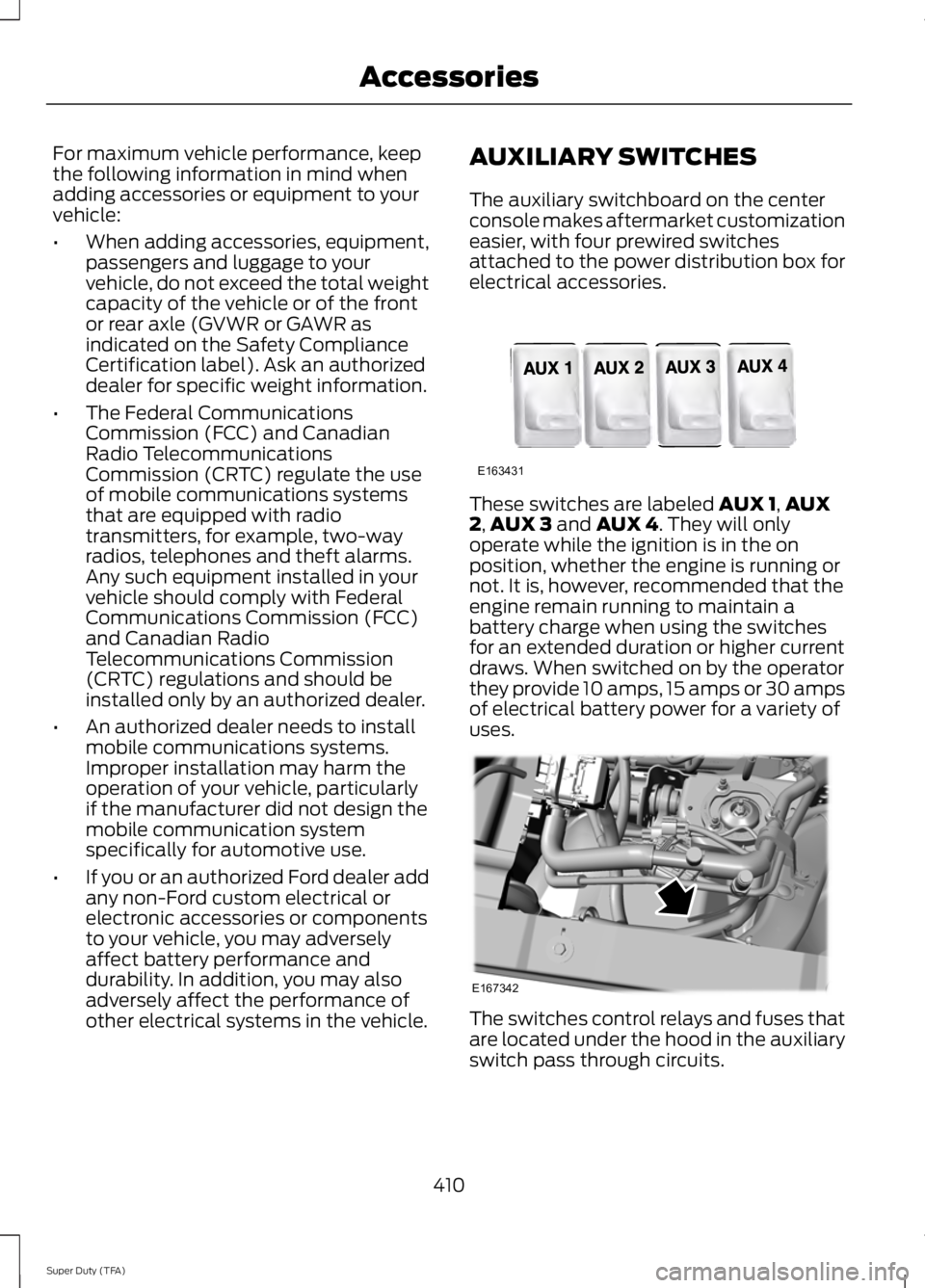
other electrical systems in the vehicle. AUXILIARY SWITCHES
The auxiliary switchboard on the center
console makes aftermarket customization
easier, with four prewired switches
attached to the power distribution box for
electrical accessories.
These switches are labeled AUX 1,
AUX
2, AUX 3 and AUX 4. They will only
operate while the ignition is in the on
position, whether the engine is running or
not. It is, however, recommended that the
engine remain running to maintain a
battery charge when using the switches
for an extended duration or higher current
draws. When switched on by the operator
they provide 10 amps, 15 amps or 30 amps
of electrical battery power for a variety of
uses. The switches control relays and fuses that
are located under the hood in the auxiliary
switch pass through circuits.
410
Super Duty (TFA) AccessoriesE163431 E167342
Page 450 of 460
4
4WD
See: Four-Wheel Drive..................................... 149
A
A/C See: Climate Control......................................... 103
About This Manual...........................................7
Protecting the Environment................................ 7
ABS See: Brakes........................................................... 160
ABS driving hints See: Hints on Driving With Anti-Lock
Brakes................................................................ 160
Accessories...................................................409 Exterior style....................................................... 409
Interior style........................................................ 409
Lifestyle................................................................ 409
Peace of mind.................................................... 409
Accessories See: Replacement Parts
Recommendation............................................ 12
Adjusting the Headlamps.........................238 Horizontal Aim Adjustment........................... 239
Vertical Aim Adjustment................................. 238
Adjusting the Pedals.....................................63
Adjusting the Steering Wheel...................60
Airbag Disposal...............................................45
Air Conditioning See: Climate Control......................................... 103
Alarm See: Anti-Theft Alarm........................................ 59
Anti-Theft Alarm............................................59 Arming the Alarm................................................. 59
Disarming the Alarm........................................... 59
Appendices.....................................................412
Audible Warnings and Indicators............80 Headlamps On Warning Chime..................... 80
Key in Ignition Warning Chime........................ 80
Parking Brake On Warning Chime.................80
Audio Control..................................................60 Media........................................................................\
. 61
Seek, Next or Previous......................................... 61
Audio Input Jack
.............................................311
Audio System.................................................301 General Information.......................................... 301Audio unit - Vehicles With: AM/FM/CD/
SYNC.............................................................303
Audio unit - Vehicles With: AM/ FM...................................................................302
Audio unit - Vehicles With: Sony AM/FM/ CD
...................................................................305
Autolamps........................................................65 Autolamps - Programmable Exit
Delay.................................................................... 66
Automatic Climate Control......................104
Automatic Transmission
............................142
Brake-Shift Interlock......................................... 146
If Your Vehicle Gets Stuck In Mud or Snow.................................................................. 148
Understanding the Shift Positions of a 6– Speed Automatic Transmission.........143
Understanding the Shift Positions of the 5– Speed Automatic Transmission.........142
Understanding your SelectShift Automatic® transmission.......................... 145
Automatic Transmission Fluid Check..............................................................231
Checking Automatic Transmission Fluid (If Equipped)......................................................... 231
Auxiliary Power Points.................................127 110 Volt AC Power Points.................................. 127
12 Volt DC Power Point...................................... 127
Locations................................................................ 127
Auxiliary Switches........................................410
B
Bonnet Lock See: Opening and Closing the Hood...........223
Booster Seats..................................................24 Types of Booster Seats...................................... 25
Brake Fluid Check
........................................234
Brakes...............................................................160 General Information.......................................... 160
Breaking-In....................................................200
Bulb Specification Chart...........................243
C
California Proposition 65..............................11
Capacities and Specifications................292 Technical Specifications................................. 296
447
Super Duty (TFA) Index
Page 453 of 460
Fuel Consumption........................................138
Calculating Fuel Economy.............................. 138
Filling the Tank.................................................... 138
Fuel Filter
........................................................235
Fuel Quality.....................................................135
Choosing the Right Fuel................................... 135
Choosing the Right Fuel With a Flex Fuel Vehicle (If Equipped)................................... 135
Diesel Engine........................................................ 135
Octane Recommendations............................ 135
Fuel Shutoff
..................................................205
Fuses.................................................................214
Fuse Specification Chart............................215 Passenger Compartment Fuse
Panel................................................................. 220
Power Distribution Box..................................... 215
G
Garage Door Opener See: Universal Garage Door Opener.............119
Gauges................................................................75 Engine Coolant Temperature Gauge.............76
Engine Oil Pressure Gauge................................ 76
Fuel Gauge.............................................................. 76
Information Display.............................................. 77
Transmission Fluid Temperature Gauge................................................................... 76
General Information on Radio Frequencies...................................................46
General Maintenance Information.......430 Multi-point Inspection..................................... 432
Owner Checks and Services........................... 431
Protecting Your Investment.......................... 430
Why Maintain Your Vehicle?......................... 430
Why Maintain Your Vehicle at Your Dealership?..................................................... 430
Getting Assistance Outside the U.S. and Canada...........................................................211
Getting the Services You Need..............208 Away From Home............................................. 208
Global Opening...............................................70 Opening the Windows........................................ 70
H
Handbrake See: Parking Brake.............................................. 161Hazard Warning Flashers
.........................205
HDC See: Using Hill Descent Control.................... 168
Head Restraints............................................108 Adjusting the Head Restraint........................ 109
Heated Seats...................................................115
Heated Steering Wheel
................................62
Heated Windows and Mirrors..................106
Heated Exterior Mirror...................................... 106
Heated Rear Window....................................... 106
Heating See: Climate Control......................................... 103
Hill Start Assist...............................................161 Using Hill Start Assist........................................ 161
Hints on Controlling the Interior Climate..........................................................105
Hints on Driving With Anti-Lock Brakes............................................................160
Hood Lock See: Opening and Closing the Hood...........223
I
Ignition Switch
...............................................130
In California (U.S. Only)............................209
Information Display Control
........................61
Type 1........................................................................\
. 61
Type 2....................................................................... 62
Information Displays
......................................81
General Information............................................. 81
Information....................................................389 911 Assist............................................................... 395
Alerts...................................................................... 395
Calendar............................................................... 395
Sirius Travel Link................................................ 392
SYNC Services (If Equipped, United States Only)................................................................. 390
Vehicle Health Report...................................... 397
450
Super Duty (TFA) Index
Page 457 of 460
Speed Control
See: Cruise Control............................................. 174
Stability Control............................................165 Principle of Operation....................................... 165
Starter Switch See: Ignition Switch........................................... 130
Starting a Gasoline Engine.........................131 Cold Weather Starting (Flexible Fuel
Vehicles Only).................................................. 131
Failure to Start...................................................... 131
Guarding Against Exhaust Fumes................132
Important Ventilating Information...............132
Stopping the Engine When Your Vehicle is Moving................................................................. 131
Stopping the Engine When Your Vehicle is Stationary.......................................................... 131
Starting and Stopping the Engine.........130
General Information.......................................... 130
Steering.............................................................175
Steering Wheel
...............................................60
Storage Compartments.............................129
Sunroof See: Moonroof....................................................... 73
Sun Visors
..........................................................73
Illuminated Vanity Mirror.................................... 73
Slide-on-rod........................................................... 73
Supplementary Restraints System.........36 Principle of Operation........................................ 36
Symbols Glossary
.............................................7
SYNC™ Applications and Services........................................................328
911 Assist............................................................... 328
SYNC AppLink.................................................... 334
SYNC Services: Traffic, Directions & Information (TDI) (If Equipped, Unites
States Only)..................................................... 331
Vehicle Health Report...................................... 330
SYNC™.............................................................313 General Information.......................................... 313
SYNC™ Troubleshooting
.........................343
T
Tailgate.............................................................183 Bed Extender........................................................ 185
Tailgate Lock........................................................ 183
Tailgate Removal................................................ 184
Tailgate Step........................................................ 184Technical Specifications
See: Capacities and Specifications............292
Terrain Response
..........................................168
Principle of Operation...................................... 168
The Better Business Bureau (BBB) Auto Line Program (U.S. Only)........................210
Tire Care
..........................................................256
Glossary of Tire Terminology......................... 257
Information About Uniform Tire Quality Grading............................................................. 256
Information Contained on the Tire Sidewall........................................................... 258
Temperature A B C............................................. 257
Traction AA A B C.............................................. 256
Treadwear............................................................ 256
Tire Pressure Monitoring System...........273 Changing Tires With a Tire Pressure
Monitoring System........................................ 274
Understanding Your Tire Pressure Monitoring System ....................................... 275
Tires See: Wheels and Tires..................................... 254
Towing a Trailer..............................................187 Load Placement.................................................. 187
Towing Points
................................................196
Towing the Vehicle on Four Wheels..........................................................198
Emergency Towing............................................ 198
Recreational Towing......................................... 198
Towing...............................................................187
Traction Control
............................................163
Principle of Operation....................................... 163
Trailer Sway Control....................................188
Transfer Case Fluid Check........................234
Transmission Code Designation............295
Transmission..................................................142
Transmission See: Transmission.............................................. 142
Transporting the Vehicle............................197
U
Under Hood Overview - 6.2L...................224
Under Hood Overview - 6.8L...................225
Universal Garage Door Opener
................119
CAR2U® Home Automation System...........119
HomeLink Wireless Control System............122
USB Port
...........................................................312
454
Super Duty (TFA) Index