tow FORD F250 2014 Manual Online
[x] Cancel search | Manufacturer: FORD, Model Year: 2014, Model line: F250, Model: FORD F250 2014Pages: 460, PDF Size: 5.33 MB
Page 336 of 460
Connecting to SYNC Services Using
the Phone Menu
1. Press the phone button to enter the
phone menu.
2. Scroll to Services.
3. Press OK to confirm and enter the
Services menu. The display indicates
the system is connecting.
4. Press
OK. SYNC initiates the call to the
Services portal.
5. Once you connect to the service, follow
the voice prompts to request the
desired service, such as Traffic or
Directions. You can also say, "What are
my choices?" to receive a list of
available services from which to
choose.
6. Say, "Services" to return to the Services
main menu or for help, say, "Help".
Receiving Turn-by-Turn Directions
1. When connected to SYNC Services, say "Directions" or "Business search".
To find the closest business or type of
business to your current location, just
say "Business search" and then
"Search near me". If you need further
assistance in finding a location you can
say "Operator" at any time within a
Directions or Business search to speak
with a live operator. The system may
prompt you to speak with an operator
when it has difficulty matching your
voice request. The live operator can assist you by searching for businesses
by name or by category, residential
addresses by street address or by
name or specific street intersections.
Operator Assist is a feature of your
SYNC Services subscription. For more
information on Operator Assist, visit
www.SYNCMyRide.com/support.
2. Follow the voice prompts to select your
destination. Once you select your
destination, the system uploads your
current vehicle location, calculates a
route based on current traffic
conditions and sends it back to your
vehicle. After the route download is
complete, the phone call automatically
ends. You then receive audible and
visual driving instructions as you travel
toward your destination.
3. While on an active route, you can select
or say "Route summary" or "Route
status" to view the Route Summary
turn list or the Route Status ETA. You
can also turn voice guidance on or off,
cancel the route or update the route.
If you miss a turn, SYNC automatically asks
if you want the route updated. Just say,
"Yes" when prompted and the system
sends a new route to your vehicle.
Disconnecting from SYNC Services
1. Press and hold the phone button on the steering wheel.
2. Say "Goodbye" from the SYNC Services main menu.
333
Super Duty (TFA) SYNC™
(If Equipped)
Page 378 of 460
SIRIUS Satellite Radio Reception Factors and Troubleshooting
Potential reception issues
For optimal reception performance, keep the antenna
clear of snow and ice build-up and keep luggage and other
materials as far away from the antenna as possible.
Antenna obstructions
Hills, mountains, tall buildings, bridges, tunnels, freeway
overpasses, parking garages, dense tree foliage and
thunderstorms can interfere with your reception.
Terrain
When you pass a ground-based broadcast-repeating
tower, a stronger signal may overtake a weaker one and
the audio system may mute.
Station overload
Your display may show ACQUIRING... to indicate the
interference and the audio system may mute.
Satellite radio signal interfer-
ence Troubleshooting tips
Action
Cause
Radio display
No action required. This
message should disappear
shortly.
Radio requires more than
two seconds to produce
audio for the selected
channel.
Acquiring...
If this message does not
clear shortly, or with an igni-
tion key cycle, your receiver
may have a fault. See an
authorized dealer for service.
There is an internal module
or system failure present.
Sat Fault/SIRIUS System
Failure.
Tune to another channel or
choose another preset.
The channel is no longer
available.
Invalid Channel.
Contact SIRIUS at 1-888-
539-7474 to subscribe to
the channel, or tune to
another channel.
Your subscription does not
include this channel.
Unsubscribed Channel.
The signal is blocked. When
you move into an open area,
the signal should return.
The signal is lost from the
SIRIUS satellite or SIRIUS
tower to your vehicle
antenna.
No Signal.
375
Super Duty (TFA) MyFord Touch
™ (If Equipped)
Page 408 of 460
2D city maps show detailed outlines of
buildings, visible land use and land
elements and detailed railway
infrastructure for the most essential cities
around the globe. These maps also contain
features, such as town blocks, building
footprints, and railways.
3D landmarks appear as clear, visible
objects that are typically recognizable and
have a certain tourist value. The 3D
landmarks appear in 3D map mode only.
Coverage varies, and improves with
updated map releases.
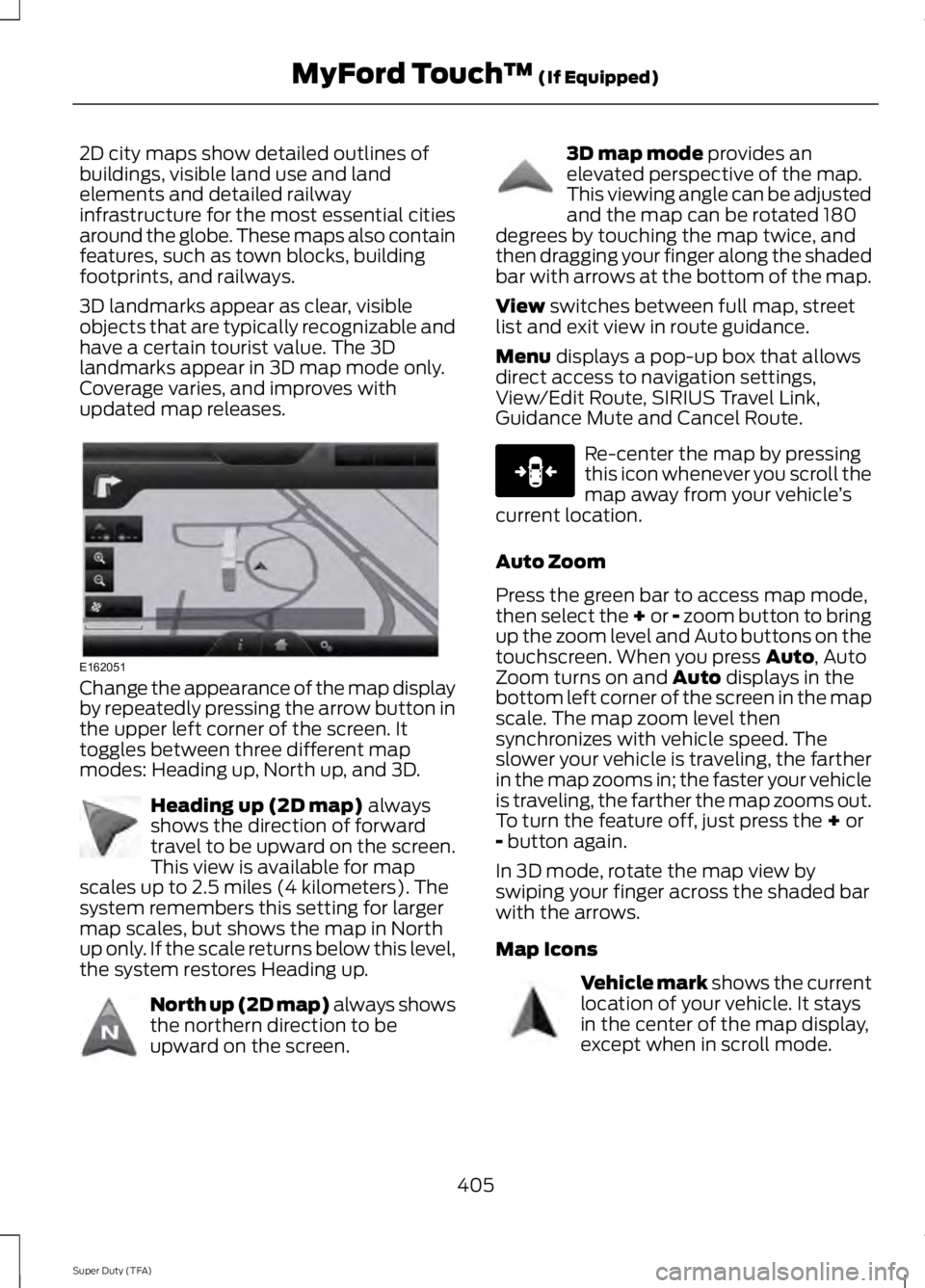
Change the appearance of the map display
by repeatedly pressing the arrow button in
the upper left corner of the screen. It
toggles between three different map
modes: Heading up, North up, and 3D.
Heading up (2D map) always
shows the direction of forward
travel to be upward on the screen.
This view is available for map
scales up to 2.5 miles (4 kilometers). The
system remembers this setting for larger
map scales, but shows the map in North
up only. If the scale returns below this level,
the system restores Heading up. North up (2D map) always shows
the northern direction to be
upward on the screen. 3D map mode
provides an
elevated perspective of the map.
This viewing angle can be adjusted
and the map can be rotated 180
degrees by touching the map twice, and
then dragging your finger along the shaded
bar with arrows at the bottom of the map.
View
switches between full map, street
list and exit view in route guidance.
Menu
displays a pop-up box that allows
direct access to navigation settings,
View/Edit Route, SIRIUS Travel Link,
Guidance Mute and Cancel Route. Re-center the map by pressing
this icon whenever you scroll the
map away from your vehicle
’s
current location.
Auto Zoom
Press the green bar to access map mode,
then select the + or - zoom button to bring
up the zoom level and Auto buttons on the
touchscreen. When you press
Auto, Auto
Zoom turns on and Auto displays in the
bottom left corner of the screen in the map
scale. The map zoom level then
synchronizes with vehicle speed. The
slower your vehicle is traveling, the farther
in the map zooms in; the faster your vehicle
is traveling, the farther the map zooms out.
To turn the feature off, just press the
+ or
- button again.
In 3D mode, rotate the map view by
swiping your finger across the shaded bar
with the arrows.
Map Icons Vehicle mark
shows the current
location of your vehicle. It stays
in the center of the map display,
except when in scroll mode.
405
Super Duty (TFA) MyFord Touch
™
(If Equipped)E162051 E142642 E142643 E142644 E146188 E142646
Page 411 of 460
Navigation system voice commands
"Zoom out""Help"
1 These commands are only available when
a navigation route is active.
2 If you say "Destination", you can then say
any command in the following
"Destination" chart.
3 If you say "Navigation", you can then say
any command in the following
"Navigation" chart. "DESTINATION"
"
"
"Intersection"
"Nearest
"Play nametags" "POI category"
"Previous destination" "Street address" "Help" "NAVIGATION"
"Destination" *
"Zoom city"
"Zoom country"
"Zoom minimum" "NAVIGATION"
"Zoom maximum" "Zoom province" "Zoom state"
"Zoom street"
"Zoom to
* If you say "Destination", you can then say
any command in the "Destination" chart.
One-shot Destination Street Address
When you say either "Navigation
destination street address" or "Destination
street address", the system asks you to say
the full address. The system displays an
example on-screen. You can then speak
the address naturally, such as "One two
three four Main Street, Anytown".
408
Super Duty (TFA) MyFord Touch
™ (If Equipped)
Page 430 of 460
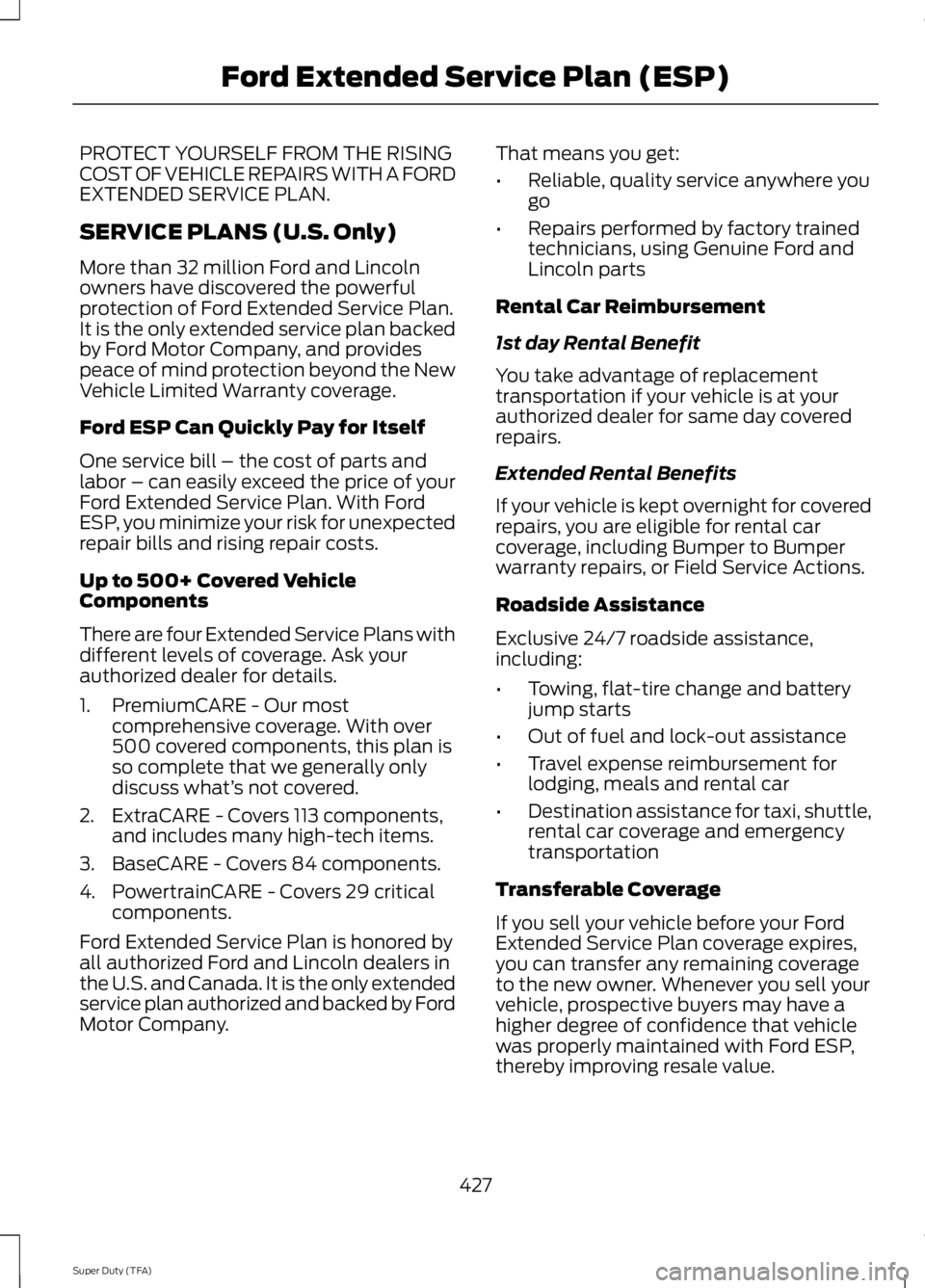
PROTECT YOURSELF FROM THE RISING
COST OF VEHICLE REPAIRS WITH A FORD
EXTENDED SERVICE PLAN.
SERVICE PLANS (U.S. Only)
More than 32 million Ford and Lincoln
owners have discovered the powerful
protection of Ford Extended Service Plan.
It is the only extended service plan backed
by Ford Motor Company, and provides
peace of mind protection beyond the New
Vehicle Limited Warranty coverage.
Ford ESP Can Quickly Pay for Itself
One service bill – the cost of parts and
labor – can easily exceed the price of your
Ford Extended Service Plan. With Ford
ESP, you minimize your risk for unexpected
repair bills and rising repair costs.
Up to 500+ Covered Vehicle
Components
There are four Extended Service Plans with
different levels of coverage. Ask your
authorized dealer for details.
1. PremiumCARE - Our most
comprehensive coverage. With over
500 covered components, this plan is
so complete that we generally only
discuss what’ s not covered.
2. ExtraCARE - Covers 113 components, and includes many high-tech items.
3. BaseCARE - Covers 84 components.
4. PowertrainCARE - Covers 29 critical components.
Ford Extended Service Plan is honored by
all authorized Ford and Lincoln dealers in
the U.S. and Canada. It is the only extended
service plan authorized and backed by Ford
Motor Company. That means you get:
•
Reliable, quality service anywhere you
go
• Repairs performed by factory trained
technicians, using Genuine Ford and
Lincoln parts
Rental Car Reimbursement
1st day Rental Benefit
You take advantage of replacement
transportation if your vehicle is at your
authorized dealer for same day covered
repairs.
Extended Rental Benefits
If your vehicle is kept overnight for covered
repairs, you are eligible for rental car
coverage, including Bumper to Bumper
warranty repairs, or Field Service Actions.
Roadside Assistance
Exclusive 24/7 roadside assistance,
including:
• Towing, flat-tire change and battery
jump starts
• Out of fuel and lock-out assistance
• Travel expense reimbursement for
lodging, meals and rental car
• Destination assistance for taxi, shuttle,
rental car coverage and emergency
transportation
Transferable Coverage
If you sell your vehicle before your Ford
Extended Service Plan coverage expires,
you can transfer any remaining coverage
to the new owner. Whenever you sell your
vehicle, prospective buyers may have a
higher degree of confidence that vehicle
was properly maintained with Ford ESP,
thereby improving resale value.
427
Super Duty (TFA) Ford Extended Service Plan (ESP)
Page 432 of 460
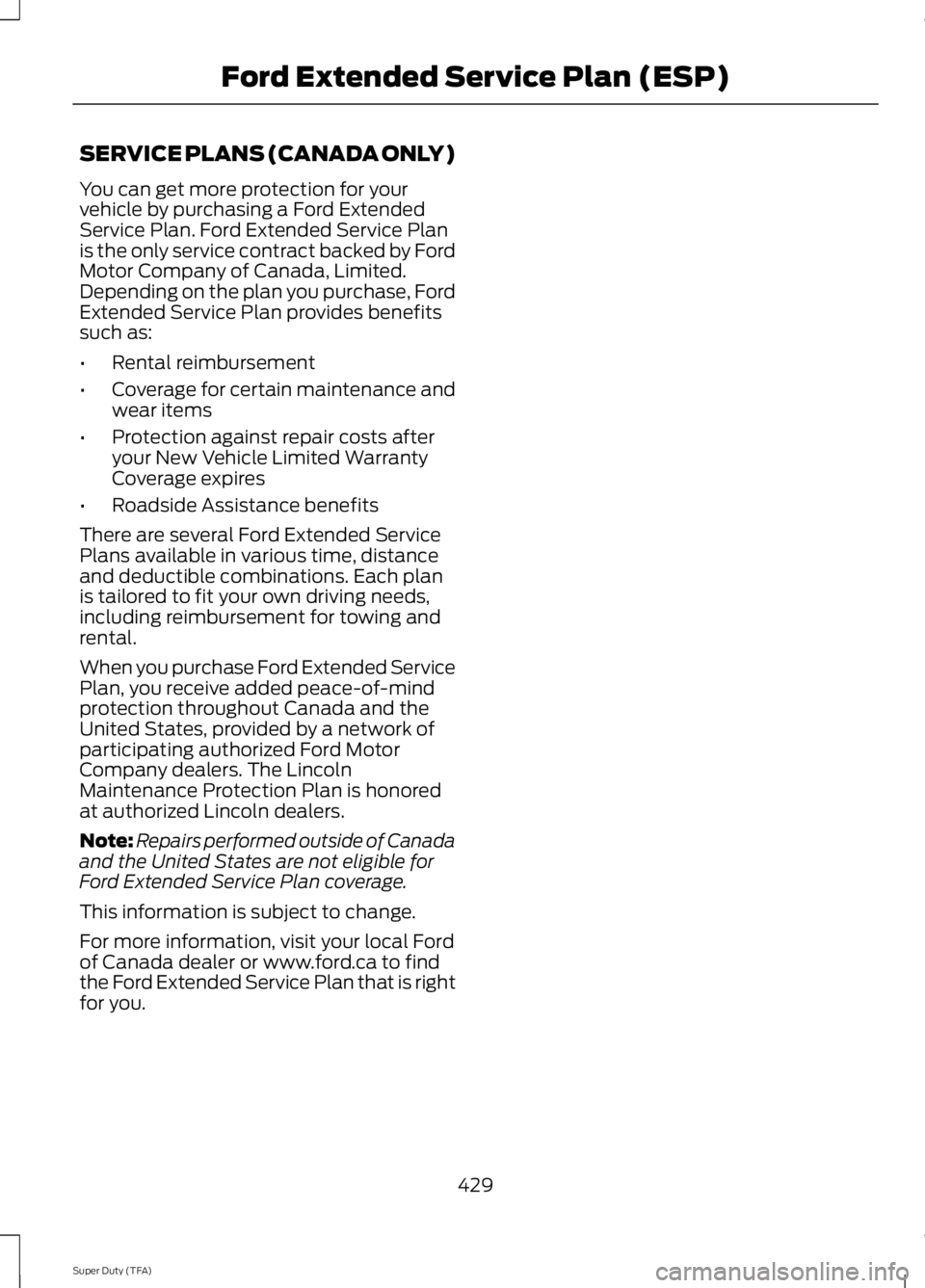
SERVICE PLANS (CANADA ONLY)
You can get more protection for your
vehicle by purchasing a Ford Extended
Service Plan. Ford Extended Service Plan
is the only service contract backed by Ford
Motor Company of Canada, Limited.
Depending on the plan you purchase, Ford
Extended Service Plan provides benefits
such as:
•
Rental reimbursement
• Coverage for certain maintenance and
wear items
• Protection against repair costs after
your New Vehicle Limited Warranty
Coverage expires
• Roadside Assistance benefits
There are several Ford Extended Service
Plans available in various time, distance
and deductible combinations. Each plan
is tailored to fit your own driving needs,
including reimbursement for towing and
rental.
When you purchase Ford Extended Service
Plan, you receive added peace-of-mind
protection throughout Canada and the
United States, provided by a network of
participating authorized Ford Motor
Company dealers. The Lincoln
Maintenance Protection Plan is honored
at authorized Lincoln dealers.
Note: Repairs performed outside of Canada
and the United States are not eligible for
Ford Extended Service Plan coverage.
This information is subject to change.
For more information, visit your local Ford
of Canada dealer or www.ford.ca to find
the Ford Extended Service Plan that is right
for you.
429
Super Duty (TFA) Ford Extended Service Plan (ESP)
Page 438 of 460
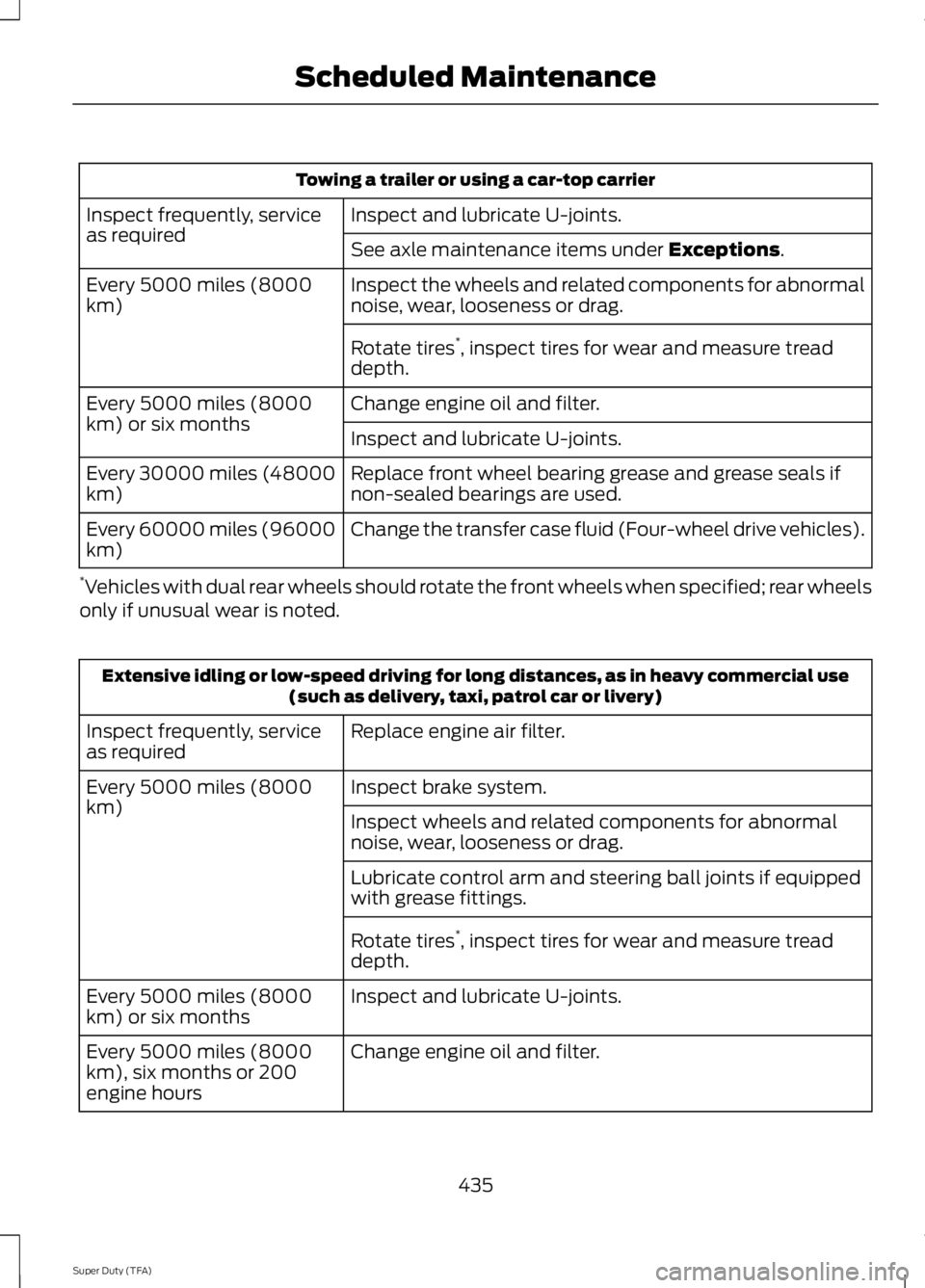
Towing a trailer or using a car-top carrier
Inspect and lubricate U-joints.
Inspect frequently, service
as required
See axle maintenance items under Exceptions.
Inspect the wheels and related components for abnormal
noise, wear, looseness or drag.
Every 5000 miles (8000
km)
Rotate tires*
, inspect tires for wear and measure tread
depth.
Change engine oil and filter.
Every 5000 miles (8000
km) or six months
Inspect and lubricate U-joints.
Replace front wheel bearing grease and grease seals if
non-sealed bearings are used.
Every 30000 miles (48000
km)
Change the transfer case fluid (Four-wheel drive vehicles).
Every 60000 miles (96000
km)
* Vehicles with dual rear wheels should rotate the front wheels when specified; rear wheels
only if unusual wear is noted. Extensive idling or low-speed driving for long distances, as in heavy commercial use
(such as delivery, taxi, patrol car or livery)
Replace engine air filter.
Inspect frequently, service
as required
Inspect brake system.
Every 5000 miles (8000
km)
Inspect wheels and related components for abnormal
noise, wear, looseness or drag.
Lubricate control arm and steering ball joints if equipped
with grease fittings.
Rotate tires*
, inspect tires for wear and measure tread
depth.
Inspect and lubricate U-joints.
Every 5000 miles (8000
km) or six months
Change engine oil and filter.
Every 5000 miles (8000
km), six months or 200
engine hours
435
Super Duty (TFA) Scheduled Maintenance
Page 440 of 460
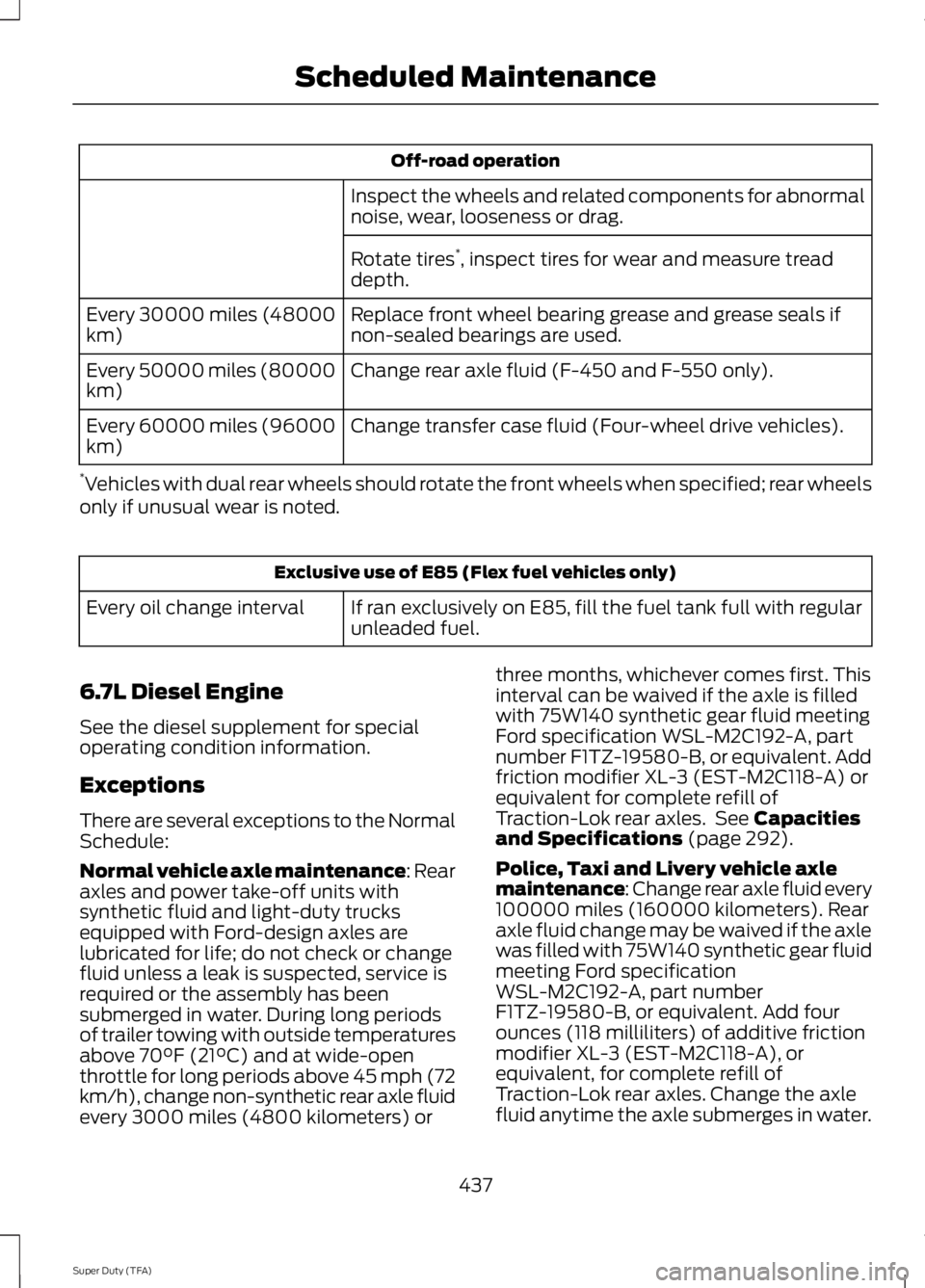
Off-road operation
Inspect the wheels and related components for abnormal
noise, wear, looseness or drag.
Rotate tires *
, inspect tires for wear and measure tread
depth.
Replace front wheel bearing grease and grease seals if
non-sealed bearings are used.
Every 30000 miles (48000
km)
Change rear axle fluid (F-450 and F-550 only).
Every 50000 miles (80000
km)
Change transfer case fluid (Four-wheel drive vehicles).
Every 60000 miles (96000
km)
* Vehicles with dual rear wheels should rotate the front wheels when specified; rear wheels
only if unusual wear is noted. Exclusive use of E85 (Flex fuel vehicles only)
If ran exclusively on E85, fill the fuel tank full with regular
unleaded fuel.
Every oil change interval
6.7L Diesel Engine
See the diesel supplement for special
operating condition information.
Exceptions
There are several exceptions to the Normal
Schedule:
Normal vehicle axle maintenance: Rear
axles and power take-off units with
synthetic fluid and light-duty trucks
equipped with Ford-design axles are
lubricated for life; do not check or change
fluid unless a leak is suspected, service is
required or the assembly has been
submerged in water. During long periods
of trailer towing with outside temperatures
above 70°F (21°C) and at wide-open
throttle for long periods above 45 mph (72
km/h), change non-synthetic rear axle fluid
every 3000 miles (4800 kilometers) or three months, whichever comes first. This
interval can be waived if the axle is filled
with 75W140 synthetic gear fluid meeting
Ford specification WSL-M2C192-A, part
number F1TZ-19580-B, or equivalent. Add
friction modifier XL-3 (EST-M2C118-A) or
equivalent for complete refill of
Traction-Lok rear axles. See Capacities
and Specifications (page 292).
Police, Taxi and Livery vehicle axle
maintenance: Change rear axle fluid every
100000 miles (160000 kilometers). Rear
axle fluid change may be waived if the axle
was filled with 75W140 synthetic gear fluid
meeting Ford specification
WSL-M2C192-A, part number
F1TZ-19580-B, or equivalent. Add four
ounces (118 milliliters) of additive friction
modifier XL-3 (EST-M2C118-A), or
equivalent, for complete refill of
Traction-Lok rear axles. Change the axle
fluid anytime the axle submerges in water.
437
Super Duty (TFA) Scheduled Maintenance
Page 452 of 460
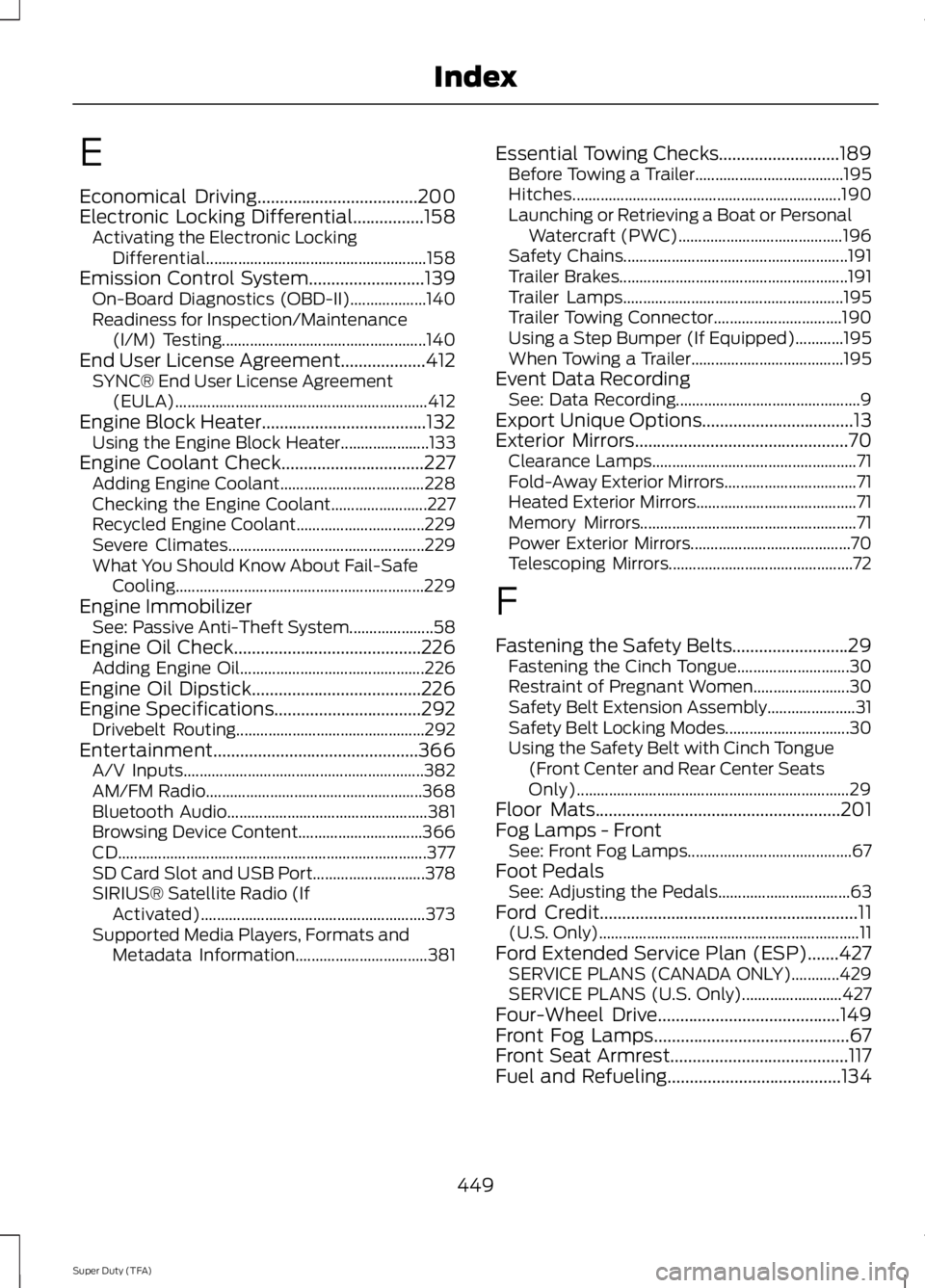
E
Economical Driving....................................200
Electronic Locking Differential................158
Activating the Electronic Locking
Differential....................................................... 158
Emission Control System..........................139 On-Board Diagnostics (OBD-II)................... 140
Readiness for Inspection/Maintenance (I/M) Testing................................................... 140
End User License Agreement...................412
SYNC® End User License Agreement
(EULA)............................................................... 412
Engine Block Heater.....................................132 Using the Engine Block Heater...................... 133
Engine Coolant Check
................................227
Adding Engine Coolant.................................... 228
Checking the Engine Coolant........................ 227
Recycled Engine Coolant................................ 229
Severe Climates................................................. 229
What You Should Know About Fail-Safe Cooling.............................................................. 229
Engine Immobilizer See: Passive Anti-Theft System..................... 58
Engine Oil Check..........................................226 Adding Engine Oil.............................................. 226
Engine Oil Dipstick
......................................226
Engine Specifications.................................292
Drivebelt Routing............................................... 292
Entertainment..............................................366 A/V Inputs............................................................ 382
AM/FM Radio...................................................... 368
Bluetooth Audio.................................................. 381
Browsing Device Content............................... 366
CD........................................................................\
..... 377
SD Card Slot and USB Port............................ 378
SIRIUS® Satellite Radio (If Activated)........................................................ 373
Supported Media Players, Formats and Metadata Information................................. 381Essential Towing Checks...........................189
Before Towing a Trailer..................................... 195
Hitches................................................................... 190
Launching or Retrieving a Boat or Personal Watercraft (PWC)......................................... 196
Safety Chains........................................................ 191
Trailer Brakes......................................................... 191
Trailer Lamps....................................................... 195
Trailer Towing Connector................................ 190
Using a Step Bumper (If Equipped)............195
When Towing a Trailer...................................... 195
Event Data Recording See: Data Recording.............................................. 9
Export Unique Options..................................13
Exterior Mirrors
................................................70
Clearance Lamps................................................... 71
Fold-Away Exterior Mirrors................................. 71
Heated Exterior Mirrors........................................ 71
Memory Mirrors...................................................... 71
Power Exterior Mirrors........................................ 70
Telescoping Mirrors.............................................. 72
F
Fastening the Safety Belts..........................29 Fastening the Cinch Tongue............................ 30
Restraint of Pregnant Women........................ 30
Safety Belt Extension Assembly...................... 31
Safety Belt Locking Modes............................... 30
Using the Safety Belt with Cinch Tongue (Front Center and Rear Center Seats
Only).................................................................... 29
Floor Mats
.......................................................201
Fog Lamps - Front See: Front Fog Lamps......................................... 67
Foot Pedals See: Adjusting the Pedals................................. 63
Ford Credit
..........................................................11
(U.S. Only)................................................................. 11
Ford Extended Service Plan (ESP)
.......427
SERVICE PLANS (CANADA ONLY)............429
SERVICE PLANS (U.S. Only)......................... 427
Four-Wheel Drive.........................................149
Front Fog Lamps............................................67
Front Seat Armrest........................................117
Fuel and Refueling
.......................................134
449
Super Duty (TFA) Index
Page 455 of 460
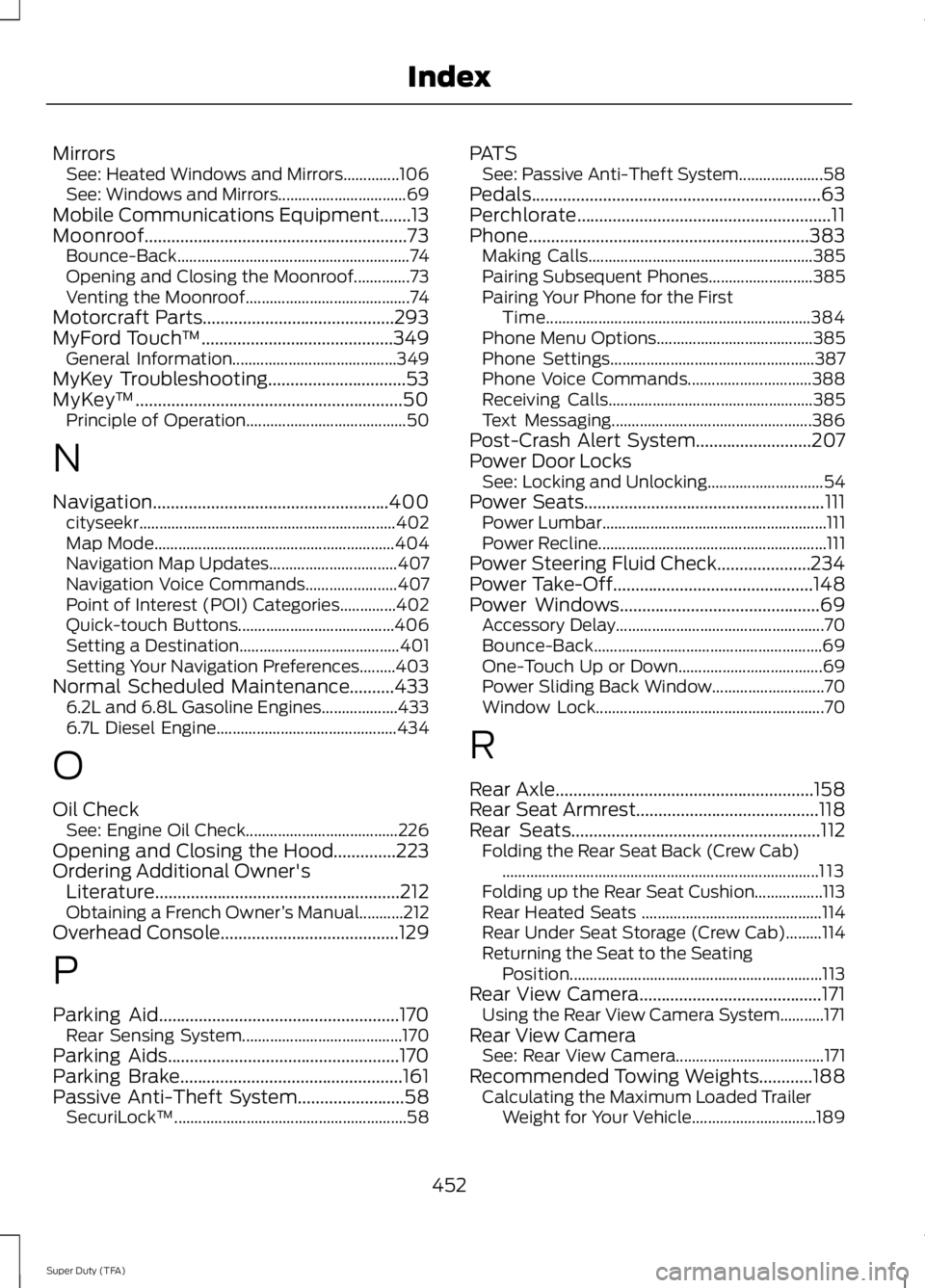
Mirrors
See: Heated Windows and Mirrors..............106
See: Windows and Mirrors................................ 69
Mobile Communications Equipment.......13
Moonroof...........................................................73 Bounce-Back.......................................................... 74
Opening and Closing the Moonroof..............73
Venting the Moonroof......................................... 74
Motorcraft Parts...........................................293
MyFord Touch ™...........................................349
General Information......................................... 349
MyKey Troubleshooting
...............................53
MyKey ™............................................................50
Principle of Operation........................................ 50
N
Navigation.....................................................400 cityseekr................................................................ 402
Map Mode............................................................ 404
Navigation Map Updates................................ 407
Navigation Voice Commands....................... 407
Point of Interest (POI) Categories..............402
Quick-touch Buttons....................................... 406
Setting a Destination........................................ 401
Setting Your Navigation Preferences.........403
Normal Scheduled Maintenance
..........433
6.2L and 6.8L Gasoline Engines................... 433
6.7L Diesel Engine............................................. 434
O
Oil Check See: Engine Oil Check...................................... 226
Opening and Closing the Hood..............223
Ordering Additional Owner's Literature.......................................................212
Obtaining a French Owner ’s Manual...........212
Overhead Console
........................................129
P
Parking Aid
......................................................170
Rear Sensing System........................................ 170
Parking Aids....................................................170
Parking Brake
..................................................161
Passive Anti-Theft System........................58
SecuriLock ™.......................................................... 58PATS
See: Passive Anti-Theft System..................... 58
Pedals.................................................................63
Perchlorate.........................................................11
Phone...............................................................383 Making Calls........................................................ 385
Pairing Subsequent Phones.......................... 385
Pairing Your Phone for the First Time.................................................................. 384
Phone Menu Options....................................... 385
Phone Settings................................................... 387
Phone Voice Commands............................... 388
Receiving Calls................................................... 385
Text Messaging.................................................. 386
Post-Crash Alert System
..........................207
Power Door Locks See: Locking and Unlocking............................. 54
Power Seats
......................................................111
Power Lumbar........................................................ 111
Power Recline......................................................... 111
Power Steering Fluid Check.....................234
Power Take-Off.............................................148
Power Windows
.............................................69
Accessory Delay.................................................... 70
Bounce-Back......................................................... 69
One-Touch Up or Down.................................... 69
Power Sliding Back Window............................ 70
Window Lock......................................................... 70
R
Rear Axle
..........................................................158
Rear Seat Armrest.........................................118
Rear Seats
........................................................112
Folding the Rear Seat Back (Crew Cab)
........................................................................\
....... 113
Folding up the Rear Seat Cushion.................113
Rear Heated Seats ............................................. 114
Rear Under Seat Storage (Crew Cab).........114
Returning the Seat to the Seating Position............................................................... 113
Rear View Camera.........................................171 Using the Rear View Camera System...........171
Rear View Camera See: Rear View Camera..................................... 171
Recommended Towing Weights............188 Calculating the Maximum Loaded Trailer
Weight for Your Vehicle............................... 189
452
Super Duty (TFA) Index