remote start FORD F250 2016 User Guide
[x] Cancel search | Manufacturer: FORD, Model Year: 2016, Model line: F250, Model: FORD F250 2016Pages: 507, PDF Size: 6.81 MB
Page 95 of 507
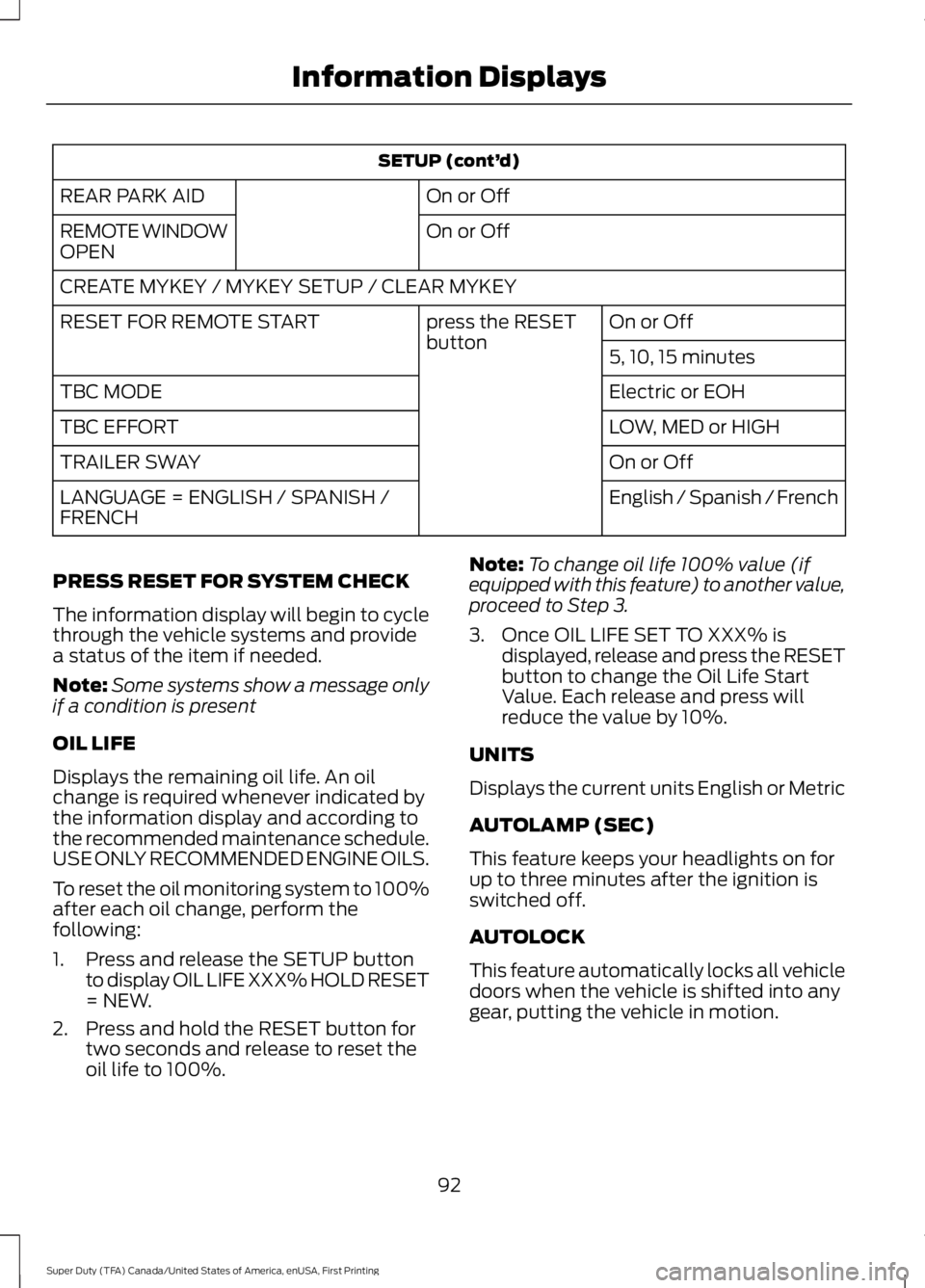
SETUP (cont’
d)
On or Off
REAR PARK AID
On or Off
REMOTE WINDOW
OPEN
CREATE MYKEY / MYKEY SETUP / CLEAR MYKEY
On or Off
press the RESET
button
RESET FOR REMOTE START
5, 10, 15 minutes
Electric or EOH
TBC MODE
LOW, MED or HIGH
TBC EFFORT
On or Off
TRAILER SWAY
English / Spanish / French
LANGUAGE = ENGLISH / SPANISH /
FRENCH
PRESS RESET FOR SYSTEM CHECK
The information display will begin to cycle
through the vehicle systems and provide
a status of the item if needed.
Note: Some systems show a message only
if a condition is present
OIL LIFE
Displays the remaining oil life. An oil
change is required whenever indicated by
the information display and according to
the recommended maintenance schedule.
USE ONLY RECOMMENDED ENGINE OILS.
To reset the oil monitoring system to 100%
after each oil change, perform the
following:
1. Press and release the SETUP button to display OIL LIFE XXX% HOLD RESET
= NEW.
2. Press and hold the RESET button for two seconds and release to reset the
oil life to 100%. Note:
To change oil life 100% value (if
equipped with this feature) to another value,
proceed to Step 3.
3. Once OIL LIFE SET TO XXX% is displayed, release and press the RESET
button to change the Oil Life Start
Value. Each release and press will
reduce the value by 10%.
UNITS
Displays the current units English or Metric
AUTOLAMP (SEC)
This feature keeps your headlights on for
up to three minutes after the ignition is
switched off.
AUTOLOCK
This feature automatically locks all vehicle
doors when the vehicle is shifted into any
gear, putting the vehicle in motion.
92
Super Duty (TFA) Canada/United States of America, enUSA, First Printing Information Displays
Page 96 of 507
AUTOUNLOCK
This feature automatically unlocks all
vehicle doors when the driver
’s door is
opened within 10 minutes of the ignition
being turned off.
COURTESY WIPE
This feature allows for an extra swipe of
the wipers after a wipe/wash cycle.
CREATE MYKEY / MYKEY SETUP /
CLEAR MYKEY
For more information, See Creating a
MyKey (page 52).
RESET FOR REMOTE START (if
equipped)
REAR PARK AID
This feature sounds a warning tone to warn
the driver of obstacles near the rear
bumper, and functions only when R
(Reverse) gear is selected.
TBC MODE (if equipped)
Allows you to choose the trailer brake
mode.
TBC EFFORT (if equipped)
Allows you to choose the level of initial
braking.
TRAILER SWAY (if equipped)
This feature uses the electronic stability
control to mitigate trailer sway.
LANGUAGE = ENGLISH / SPANISH /
FRENCH
Allows you to choose which language the
message center will display in.
Waiting four seconds or pressing the
RESET button cycles the message center
through each of the language choices. Press the RESET button to set the
language choice.
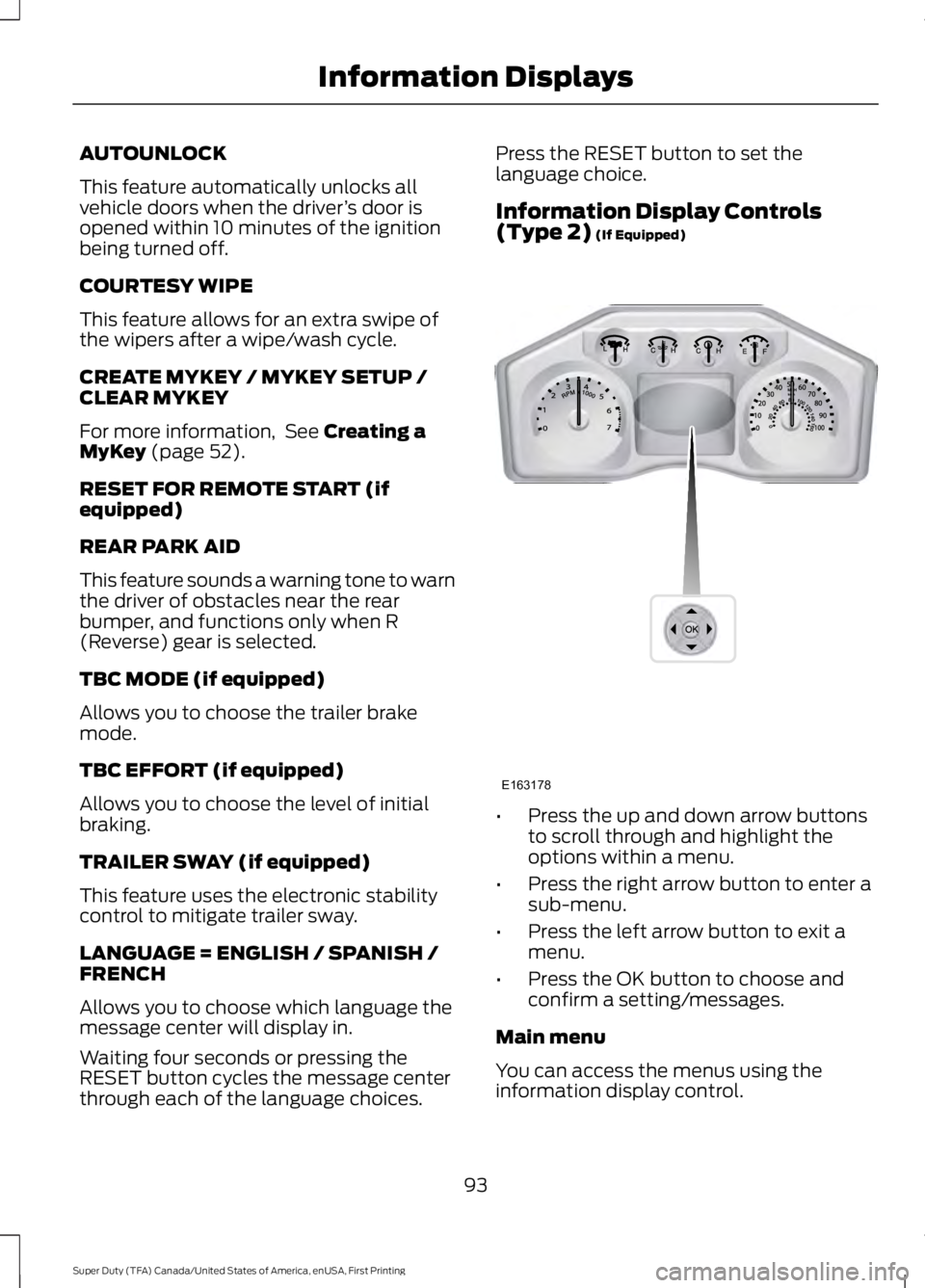
Information Display Controls
(Type 2)
(If Equipped)
•
Press the up and down arrow buttons
to scroll through and highlight the
options within a menu.
• Press the right arrow button to enter a
sub-menu.
• Press the left arrow button to exit a
menu.
• Press the OK button to choose and
confirm a setting/messages.
Main menu
You can access the menus using the
information display control.
93
Super Duty (TFA) Canada/United States of America, enUSA, First Printing Information DisplaysE163178
Page 101 of 507
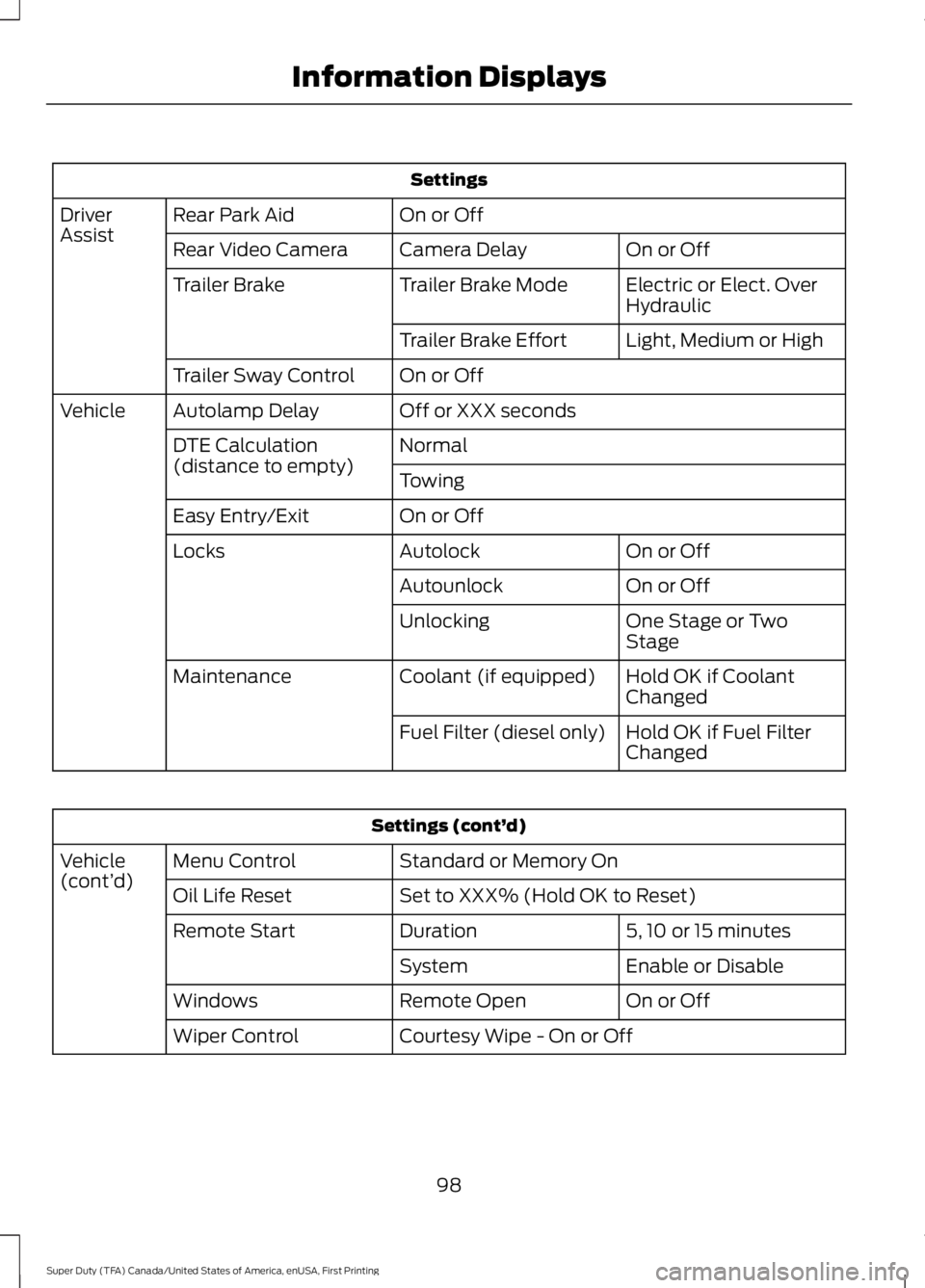
Settings
On or Off
Rear Park Aid
Driver
Assist
On or Off
Camera Delay
Rear Video Camera
Electric or Elect. Over
Hydraulic
Trailer Brake Mode
Trailer Brake
Light, Medium or High
Trailer Brake Effort
On or Off
Trailer Sway Control
Off or XXX seconds
Autolamp Delay
Vehicle
Normal
DTE Calculation
(distance to empty)
Towing
On or Off
Easy Entry/Exit
On or Off
Autolock
Locks
On or Off
Autounlock
One Stage or Two
Stage
Unlocking
Hold OK if Coolant
Changed
Coolant (if equipped)
Maintenance
Hold OK if Fuel Filter
Changed
Fuel Filter (diesel only) Settings (cont’
d)
Standard or Memory On
Menu Control
Vehicle
(cont’ d)
Set to XXX% (Hold OK to Reset)
Oil Life Reset
5, 10 or 15 minutes
Duration
Remote Start
Enable or Disable
System
On or Off
Remote Open
Windows
Courtesy Wipe - On or Off
Wiper Control
98
Super Duty (TFA) Canada/United States of America, enUSA, First Printing Information Displays
Page 108 of 507
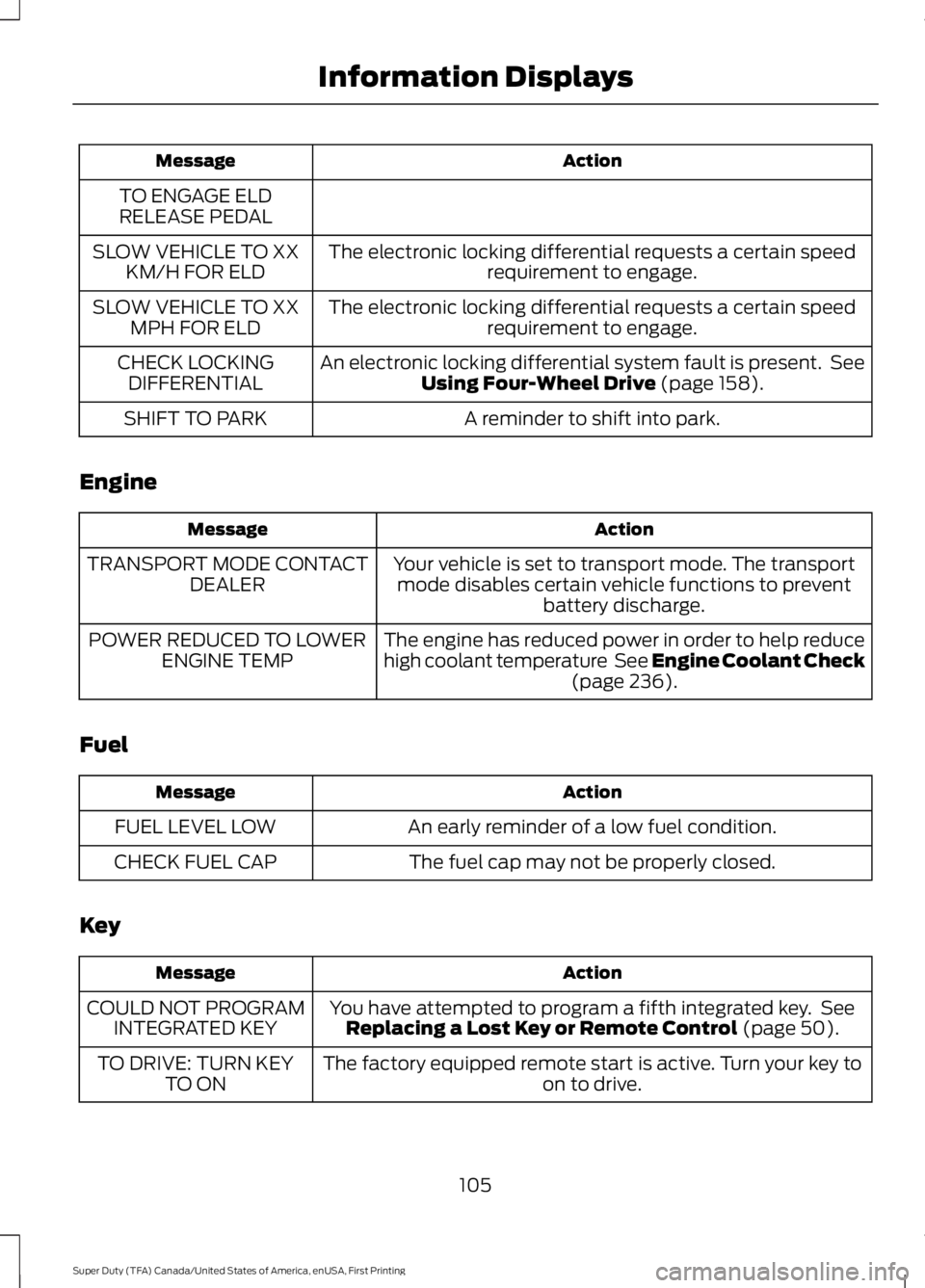
Action
Message
TO ENGAGE ELD
RELEASE PEDAL
The electronic locking differential requests a certain speedrequirement to engage.
SLOW VEHICLE TO XX
KM/H FOR ELD
The electronic locking differential requests a certain speedrequirement to engage.
SLOW VEHICLE TO XX
MPH FOR ELD
An electronic locking differential system fault is present. SeeUsing Four-Wheel Drive (page 158).
CHECK LOCKING
DIFFERENTIAL
A reminder to shift into park.
SHIFT TO PARK
Engine Action
Message
Your vehicle is set to transport mode. The transportmode disables certain vehicle functions to prevent battery discharge.
TRANSPORT MODE CONTACT
DEALER
The engine has reduced power in order to help reduce
high coolant temperature See Engine Coolant Check(page
236).
POWER REDUCED TO LOWER
ENGINE TEMP
Fuel Action
Message
An early reminder of a low fuel condition.
FUEL LEVEL LOW
The fuel cap may not be properly closed.
CHECK FUEL CAP
Key Action
Message
You have attempted to program a fifth integrated key. SeeReplacing a Lost Key or Remote Control
(page 50).
COULD NOT PROGRAM
INTEGRATED KEY
The factory equipped remote start is active. Turn your key to on to drive.
TO DRIVE: TURN KEY
TO ON
105
Super Duty (TFA) Canada/United States of America, enUSA, First Printing Information Displays
Page 119 of 507
REMOTE START (If Equipped)
The remote start feature allows you to
pre-condition the interior of your vehicle.
The climate control system works to
achieve comfort according to your previous
settings.
Note: You cannot adjust the system during
remote start operation.
Turn the ignition on to return the system
to its previous settings. You can now make
adjustments normally, but you need to turn
certain vehicle-dependent features back
on, such as:
• Heated seats.
• Cooled seats.
• Heated steering wheel.
• Heated mirrors.
• Heated rear window.
You can adjust the default remote start
settings using the information display
controls. See
Information Displays
(page 89).
Automatic Settings
In hot weather, the system is set to 72°F
(22°C). The cooled seats are set to high
(if available, and selected to AUTO in the
information display).
In moderate weather, the system either
heats or cools (based on previous
settings). The rear defroster, heated
mirrors and heated seats do not
automatically turn on.
In cold weather, the system is set to 72°F
(22°C). The heated seats are set to high
(if available, and selected to AUTO in the
information display). The rear defroster
and heated mirrors automatically turn on.
116
Super Duty (TFA) Canada/United States of America, enUSA, First Printing Climate Control
Page 136 of 507
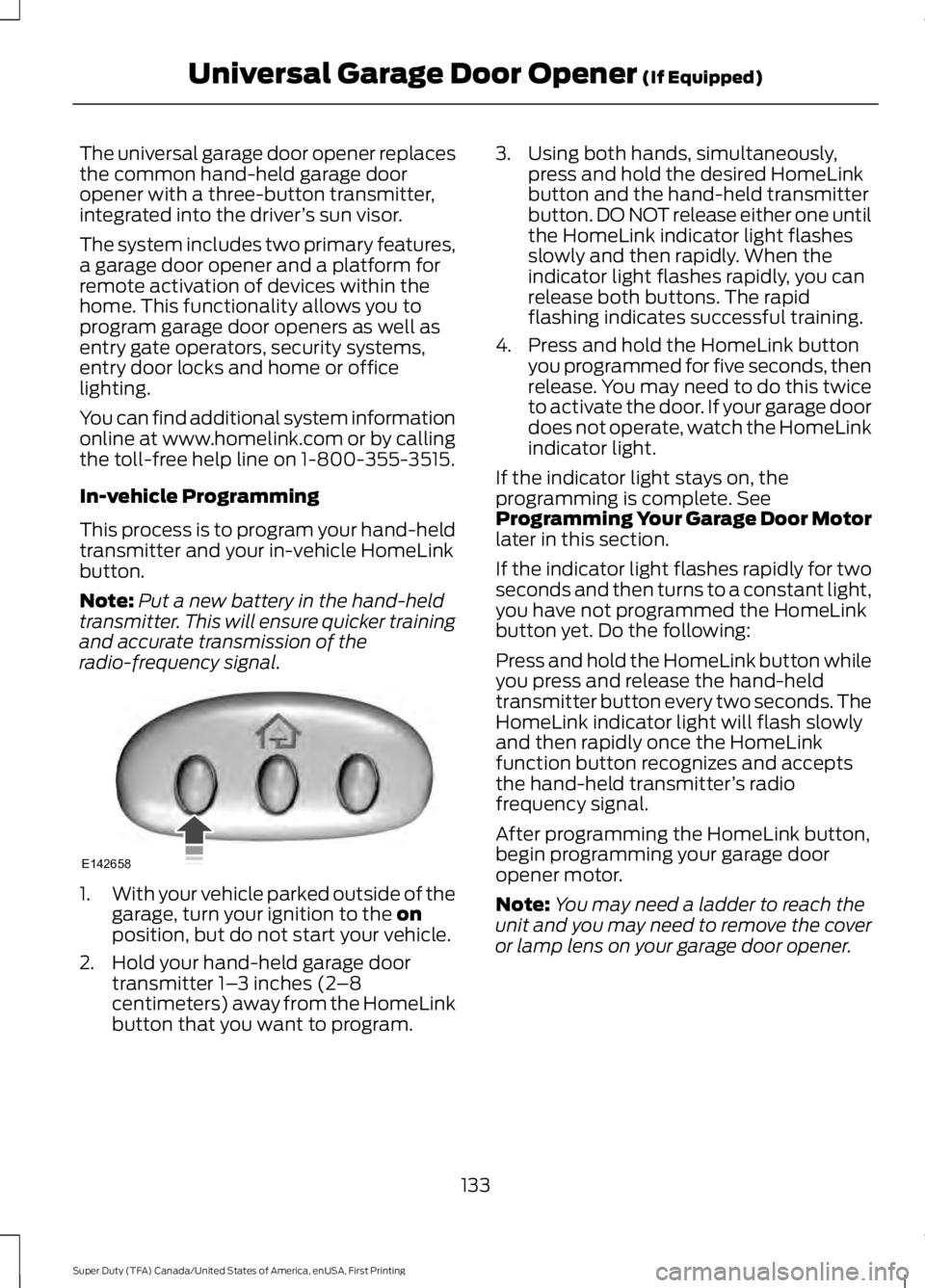
The universal garage door opener replaces
the common hand-held garage door
opener with a three-button transmitter,
integrated into the driver
’s sun visor.
The system includes two primary features,
a garage door opener and a platform for
remote activation of devices within the
home. This functionality allows you to
program garage door openers as well as
entry gate operators, security systems,
entry door locks and home or office
lighting.
You can find additional system information
online at www.homelink.com or by calling
the toll-free help line on 1-800-355-3515.
In-vehicle Programming
This process is to program your hand-held
transmitter and your in-vehicle HomeLink
button.
Note: Put a new battery in the hand-held
transmitter. This will ensure quicker training
and accurate transmission of the
radio-frequency signal. 1.
With your vehicle parked outside of the
garage, turn your ignition to the on
position, but do not start your vehicle.
2. Hold your hand-held garage door transmitter 1– 3 inches (2–8
centimeters) away from the HomeLink
button that you want to program. 3. Using both hands, simultaneously,
press and hold the desired HomeLink
button and the hand-held transmitter
button. DO NOT release either one until
the HomeLink indicator light flashes
slowly and then rapidly. When the
indicator light flashes rapidly, you can
release both buttons. The rapid
flashing indicates successful training.
4. Press and hold the HomeLink button you programmed for five seconds, then
release. You may need to do this twice
to activate the door. If your garage door
does not operate, watch the HomeLink
indicator light.
If the indicator light stays on, the
programming is complete. See
Programming Your Garage Door Motor
later in this section.
If the indicator light flashes rapidly for two
seconds and then turns to a constant light,
you have not programmed the HomeLink
button yet. Do the following:
Press and hold the HomeLink button while
you press and release the hand-held
transmitter button every two seconds. The
HomeLink indicator light will flash slowly
and then rapidly once the HomeLink
function button recognizes and accepts
the hand-held transmitter ’s radio
frequency signal.
After programming the HomeLink button,
begin programming your garage door
opener motor.
Note: You may need a ladder to reach the
unit and you may need to remove the cover
or lamp lens on your garage door opener.
133
Super Duty (TFA) Canada/United States of America, enUSA, First Printing Universal Garage Door Opener
(If Equipped)E142658
Page 216 of 507
Canadian roadside coverage and benefits
may differ from the U.S. coverage. If you
require more information, please refer to
the coverage section of your warranty
guide, call us in Canada at
1-800-665-2006, or visit our website at
www.ford.ca.
Sykes Assistance Services Corporation
administers the Roadside Assistance
program. You must receive covered
services in Canada or the continental
United States. Coverage extends to
vehicles that use public, non-seasonal,
annually traveled roadways. Roadside
Assistance coverage does not extend to
vehicles involved in cross-country driving,
logging, autocross and any other form of
off-road use. Well maintained roads and
surfaces help ensure safe travel for the
supplier, and allow their representatives
to perform service as per the standard
operating procedures.
In Remote Locations
If our supplier cannot take your vehicle by
road to the nearest authorized dealership,
transportation by rail or water may be
necessary. The program covers a tow to
the dock or rail terminal and also to the
dealership at the end of the trip.
For rail or water transportation, however,
contact your authorized dealer to confirm
if you are eligible for additional coverage
before you authorize or pay for the service.
Call Ford Roadside Assistance at
1-800-665-2006 for additional
information.
HAZARD WARNING FLASHERS
Note:
The hazard warning flashers will
operate when the ignition is in any position
or if the key is not in the ignition. If used
when the engine is not running, the battery
will lose charge. As a result, there may be
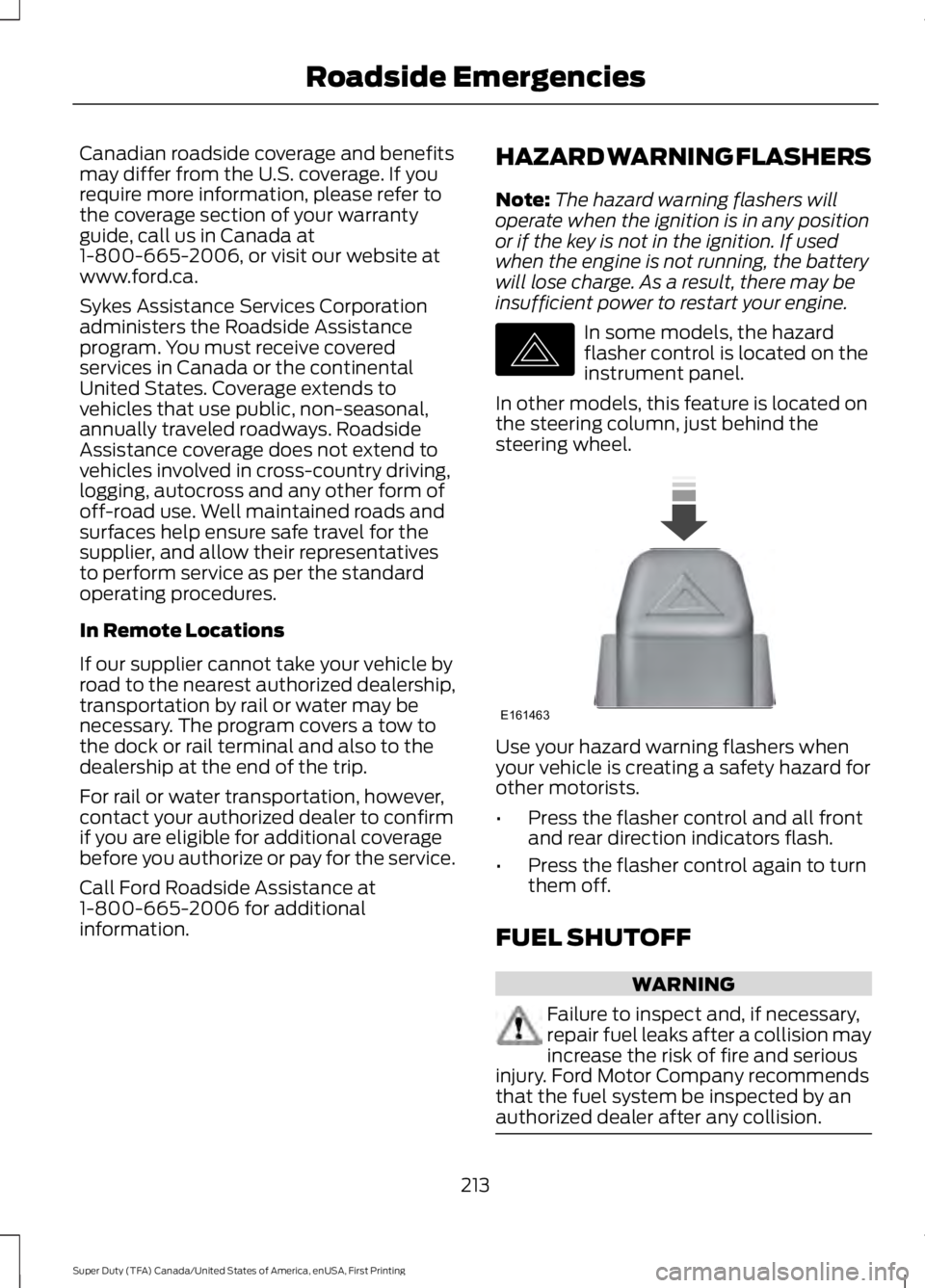
insufficient power to restart your engine. In some models, the hazard
flasher control is located on the
instrument panel.
In other models, this feature is located on
the steering column, just behind the
steering wheel. Use your hazard warning flashers when
your vehicle is creating a safety hazard for
other motorists.
•
Press the flasher control and all front
and rear direction indicators flash.
• Press the flasher control again to turn
them off.
FUEL SHUTOFF WARNING
Failure to inspect and, if necessary,
repair fuel leaks after a collision may
increase the risk of fire and serious
injury. Ford Motor Company recommends
that the fuel system be inspected by an
authorized dealer after any collision. 213
Super Duty (TFA) Canada/United States of America, enUSA, First Printing Roadside EmergenciesE142663 E161463
Page 450 of 507
For a complete listing of the accessories
that are available for your vehicle, please
contact your authorized dealer or visit the
online store web site:
Web Address (United States)
www.Accessories.Ford.com Web Address (Canada)
www.Accessories.Ford.ca
Ford Accessories are available for your
vehicle through an authorized Ford dealer.
Ford Motor Company will repair or replace
any properly authorized dealer-installed
Ford Original Accessory found to be
defective in factory-supplied materials or
workmanship during the warranty period,
as well as any component damaged by the
defective accessories.
Ford Motor Company will warrant your
vehicle through the warranty that provides
the greatest benefit:
• 24 months, unlimited mileage.
• The remainder of your new vehicle
limited warranty.
Contact an authorized dealer for details
and a copy of the warranty.
Exterior style
• Bug shields.
• Commercial graphics.*
• Commercial LED warning strobe lights.
• Deflectors.
• Exhaust tip.
• Fog lamps.
• Running boards.
• Splash guards.
• Stainless-steel wheel covers.* •
Step bars.
• Wheel well liners.
Interior style
• Cargo organizers.
• Custom seat covers.*
• Floor mats.
Lifestyle
• Ash cup / smoker's package.
• Bed extender.
• Bedliners and bedmats.
• Racks and carriers.*
• Rear-seat entertainment.*
• Sportliner cargo liner.*
• Tonneau covers*.
• Trailer hitches, wiring harnesses and
accessories.
• Truck bed camping tent.*
Peace of mind
• Back-up alarm.*
• Bed hooks.*
• Bumper and hitch-mounted parking
sensors.*
• Cable lock.*
• Ford Telematics.
• Keyless entry keypad.
• Protective seat covers.*
• Remote start and alarms.
• Speed/Cruise control.
• Tool or Cargo boxes.*
• Wheel locks.
447
Super Duty (TFA) Canada/United States of America, enUSA, First Printing Accessories
Page 502 of 507

Information Messages...............................100
4WD........................................................................\
109
AdvanceTrac ™................................................... 100
Alarm...................................................................... 100
Diesel Messages.................................................. 101
Doors and Locks................................................. 104
Drivetrain............................................................... 104
Engine..................................................................... 105
Fuel........................................................................\
.. 105
Key........................................................................\
... 105
Maintenance........................................................ 106
MyKey®.................................................................. 106
Off Road................................................................. 107
Park Aid.................................................................. 107
Park Brake.............................................................. 107
Power Steering.................................................... 107
Tire Pressure Monitoring System.................108
Trailer...................................................................... 108
Installing Child Seats.....................................16 Child Seats............................................................... 16
Tether Strap Attachment.................................. 22
Tether Strap Attachment (Rear SuperCab Only)..................................................................... 23
Using Cinch Tongue Lap and Shoulder Belts (All Front Center, Super Cab and Crew
Cab Rear Center Positions).......................... 19
Using Lap and Shoulder Belts.......................... 17
Using Lower Anchors and Tethers for CHildren (LATCH)............................................. 21
Using Tether Straps.............................................. 21
Instrument Cluster
.........................................82
Instrument Lighting Dimmer......................73
Interior Lamps..................................................74
Front Map Lamps (If equipped)..................... 74
Rear Dome and Map Lamps............................ 75
Interior Mirror
....................................................79
Auto-Dimming Mirror.......................................... 79
Introduction.........................................................7
J
Jump Starting the Vehicle.........................214 Connecting the Jumper Cables..................... 214
Jump Starting....................................................... 215
Preparing Your Vehicle...................................... 214
Removing the Jumper Cables........................ 215K
Keyless Entry....................................................57
SECURICODE™ KEYLESS ENTRY
KEYPAD
............................................................... 57
Unlocking and Locking the Doors.................. 59
Keys and Remote Controls.........................47
L
Lighting Control................................................71 Headlamp Flasher................................................ 72
High Beams.............................................................. 71
Lighting................................................................71 General Information............................................. 71
Limited Slip Differential
..............................167
Load Carrying.................................................185
Load Limit.......................................................185
Special Loading Instructions for Owners of
Pick-up Trucks and Utility-type
Vehicles.............................................................. 191
Vehicle Loading - with and without a Trailer................................................................. 185
Locking and Unlocking
.................................56
Autolock and Autounlock................................. 56
Battery Saver.......................................................... 57
Illuminated Entry................................................... 57
Power Door Locks................................................ 56
Remote Control.................................................... 56
Smart Unlocks...................................................... 56
Locks
...................................................................56
Lug Nuts See: Changing a Road Wheel....................... 290
M
Maintenance..................................................232 General Information.......................................... 232
Manual Climate Control
.............................110
Manual Seats..................................................119 Manual Lumbar .................................................. 120
Moving the Seat Backward and Forward.............................................................. 119
Recline Adjustment............................................ 119
Media Hub
......................................................328
499
Super Duty (TFA) Canada/United States of America, enUSA, First Printing Index
Page 504 of 507

........................................................................\
....... 122
Foldin")
Rear Seats........................................................122
Folding the Rear Seat Back (Crew Cab)
........................................................................\
....... 122
Folding up the Rear Seat Cushion................122
Rear Under Seat Storage (Crew Cab).........123
Returning the Seat to the Seating Position.............................................................. 122
Rear View Camera.......................................180 Using the Rear View Camera System........180
Rear View Camera See: Rear View Camera................................... 180
Recommended Towing Weights............193 Calculating the Maximum Loaded Trailer
Weight for Your Vehicle............................... 196
Refueling..........................................................146 Fuel Filler Cap....................................................... 147
Remote Control...............................................47 Car Finder................................................................ 48
Integrated Keyhead Transmitters .................. 47
Memory Feature................................................... 48
Remote Start ........................................................ 48
Replacing the Battery......................................... 47
Sounding a Panic Alarm.................................... 48
Remote Start
..................................................116
Automatic Settings............................................. 116
Removing a Headlamp..............................249
Removing the Tailgate
.................................60
Repairing Minor Paint Damage...............261
Replacement Parts Recommendation.........................................11
Collision Repairs..................................................... 11
Scheduled Maintenance and Mechanical Repairs................................................................... 11
Warranty on Replacement Parts..................... 12
Replacing a Lost Key or Remote Control............................................................50
Reporting Safety Defects (Canada Only)..............................................................222
Reporting Safety Defects (U.S. Only)...............................................................221 Roadside Assistance
...................................212
Vehicles Sold in Canada: Getting Roadside
Assistance......................................................... 212
Vehicles Sold in Canada: Using Roadside Assistance......................................................... 212
Vehicles Sold in the United States: Getting Roadside Assistance.................................... 212
Vehicles Sold in the United States: Using Roadside Assistance.................................... 212
Roadside Emergencies...............................212
Running-In See: Breaking-In................................................. 207
Running Out of Fuel....................................146
S
Safety Belt Height Adjustment.................33
Safety Belt Minder.........................................34 Belt-Minder™........................................................ 34
Safety Belts
......................................................29
Principle of Operation........................................ 29
Safety Belt Warning Lamp and Indicator Chime...............................................................33
Conditions of operation..................................... 34
Safety Canopy ™
............................................44
Safety Precautions......................................144
Satellite Radio
..............................................325
Satellite Radio Electronic Serial Number
(ESN)................................................................ 326
Satellite Radio Reception Factors...............326
SIRIUS® Satellite Radio Service.................. 326
Troubleshooting.................................................. 327
Scheduled Maintenance Record
...........462
Scheduled Maintenance...........................453
Seats...................................................................117
Security..............................................................64
Settings...........................................................382 Clock....................................................................... 382
Display................................................................... 383
Settings................................................................. 386
Sound.................................................................... 384
Vehicle................................................................... 384
Side Airbags
.....................................................43
Sitting in the Correct Position....................117
Sliding Windows
.............................................79
Power Sliding Back Window............................ 79
Snow Chains See: Using Snow Chains................................. 284
501
Super Duty (TFA) Canada/United States of America, enUSA, First Printing Index