AUX FORD F250 2016 Owner's Manual
[x] Cancel search | Manufacturer: FORD, Model Year: 2016, Model line: F250, Model: FORD F250 2016Pages: 507, PDF Size: 6.81 MB
Page 366 of 507
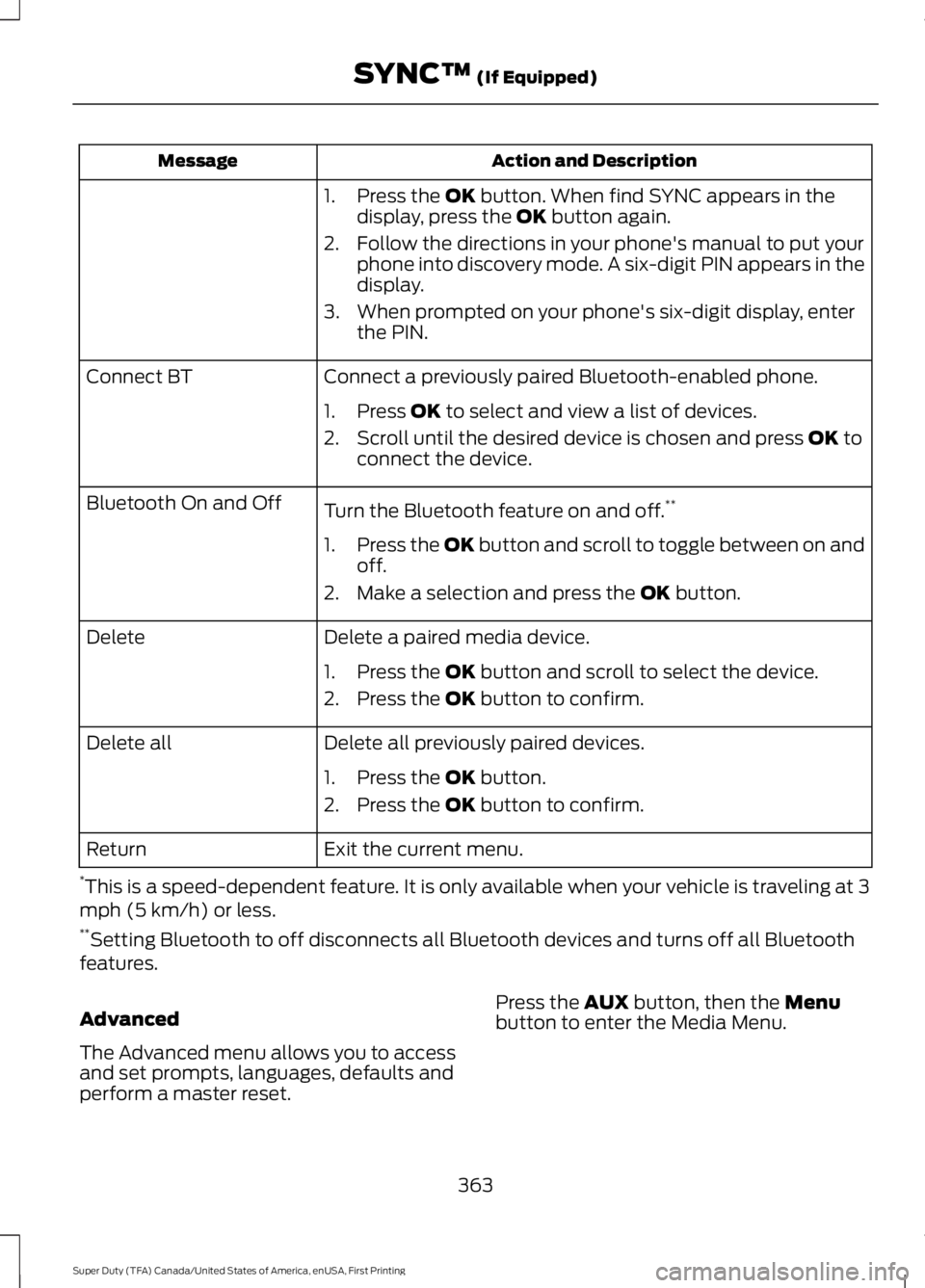
Action and Description
Message
1. Press the OK button. When find SYNC appears in the
display, press the OK button again.
2. Follow the directions in your phone's manual to put your phone into discovery mode. A six-digit PIN appears in the
display.
3. When prompted on your phone's six-digit display, enter the PIN.
Connect a previously paired Bluetooth-enabled phone.
Connect BT
1. Press
OK to select and view a list of devices.
2. Scroll until the desired device is chosen and press
OK to
connect the device.
Turn the Bluetooth feature on and off. **
Bluetooth On and Off
1.Press the OK button and scroll to toggle between on and
off.
2. Make a selection and press the
OK button.
Delete a paired media device.
Delete
1. Press the
OK button and scroll to select the device.
2. Press the
OK button to confirm.
Delete all previously paired devices.
Delete all
1. Press the
OK button.
2. Press the
OK button to confirm.
Exit the current menu.
Return
* This is a speed-dependent feature. It is only available when your vehicle is traveling at 3
mph (5 km/h) or less.
** Setting Bluetooth to off disconnects all Bluetooth devices and turns off all Bluetooth
features.
Advanced
The Advanced menu allows you to access
and set prompts, languages, defaults and
perform a master reset. Press the
AUX button, then the Menu
button to enter the Media Menu.
363
Super Duty (TFA) Canada/United States of America, enUSA, First Printing SYNC™
(If Equipped)
Page 451 of 507
*The accessory manufacturer designs,
develops and therefore warrants Ford
Licensed Accessories, and does not design
or test these accessories to Ford Motor
Company engineering requirements.
Contact an authorized Ford dealer for the
manufacturer
’s limited warranty details,
and request a copy of the Ford Licensed
Accessories product limited warranty from
the accessory manufacturer.
For maximum vehicle performance, keep
the following information in mind when
adding accessories or equipment to your
vehicle:
• When adding accessories, equipment,
passengers and luggage to your
vehicle, do not exceed the total weight
capacity of the vehicle or of the front
or rear axle (GVWR or GAWR as
indicated on the Safety Compliance
Certification label). Ask an authorized
dealer for specific weight information.
• The Federal Communications
Commission (FCC) and Canadian
Radio Telecommunications
Commission (CRTC) regulate the use
of mobile communications systems
that are equipped with radio
transmitters, for example, two-way
radios, telephones and theft alarms.
Any such equipment installed in your
vehicle should comply with Federal
Communications Commission (FCC)
and Canadian Radio
Telecommunications Commission
(CRTC) regulations and should be
installed only by an authorized dealer. •
An authorized dealer needs to install
mobile communications systems.
Improper installation may harm the
operation of your vehicle, particularly
if the manufacturer did not design the
mobile communication system
specifically for automotive use.
• If you or an authorized Ford dealer add
any non-Ford electrical or electronic
accessories or components to your
vehicle, you may adversely affect
battery performance and durability. In
addition, you may also adversely affect
the performance of other electrical
systems in the vehicle.
AUXILIARY SWITCHES
For maximum vehicle performance, keep
the following information in mind when
adding accessories or equipment to your
vehicle:
• When adding accessories, equipment,
passengers and luggage to your
vehicle, do not exceed the total weight
capacity of the vehicle or of the front
or rear axle (GVWR or GAWR as
indicated on the Safety Compliance
Certification label). Ask an authorized
dealer for specific weight information.
• The Federal Communications
Commission (FCC) and Canadian
Radio Telecommunications
Commission (CRTC) regulate the use
of mobile communications systems
equipped with radio transmitters, for
example, two-way radios, telephones
and theft alarms. Any such equipment
installed in your vehicle should comply
with Federal Communications
Commission (FCC) and Canadian
Radio Telecommunications
Commission (CRTC) regulations, and
should be installed by an authorized
dealer.
448
Super Duty (TFA) Canada/United States of America, enUSA, First Printing Accessories
Page 452 of 507
•
An authorized dealer needs to install
mobile communications systems.
Improper installation may harm the
operation of your vehicle, particularly
if the manufacturer did not design the
mobile communication system
specifically for automotive use.
• If you or an authorized Ford dealer add
any non-Ford electrical or electronic
accessories or components to your
vehicle, you may adversely affect
battery performance and durability. In
addition, you may also adversely affect
the performance of other electrical
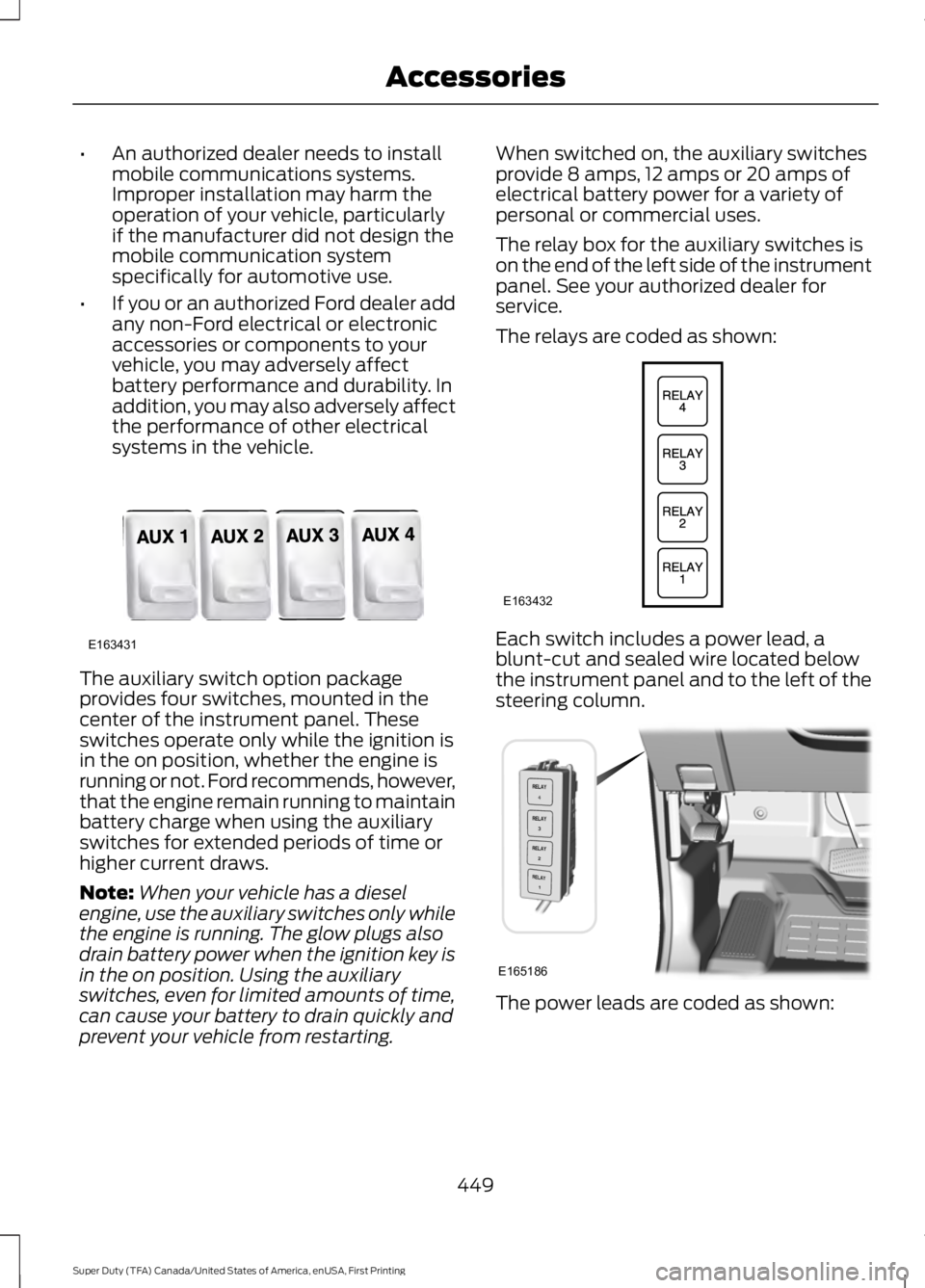
systems in the vehicle. The auxiliary switch option package
provides four switches, mounted in the
center of the instrument panel. These
switches operate only while the ignition is
in the on position, whether the engine is
running or not. Ford recommends, however,
that the engine remain running to maintain
battery charge when using the auxiliary
switches for extended periods of time or
higher current draws.
Note:
When your vehicle has a diesel
engine, use the auxiliary switches only while
the engine is running. The glow plugs also
drain battery power when the ignition key is
in the on position. Using the auxiliary
switches, even for limited amounts of time,
can cause your battery to drain quickly and
prevent your vehicle from restarting. When switched on, the auxiliary switches
provide 8 amps, 12 amps or 20 amps of
electrical battery power for a variety of
personal or commercial uses.
The relay box for the auxiliary switches is
on the end of the left side of the instrument
panel. See your authorized dealer for
service.
The relays are coded as shown:
Each switch includes a power lead, a
blunt-cut and sealed wire located below
the instrument panel and to the left of the
steering column.
The power leads are coded as shown:
449
Super Duty (TFA) Canada/United States of America, enUSA, First Printing AccessoriesE163431 E163432 E165186
Page 453 of 507
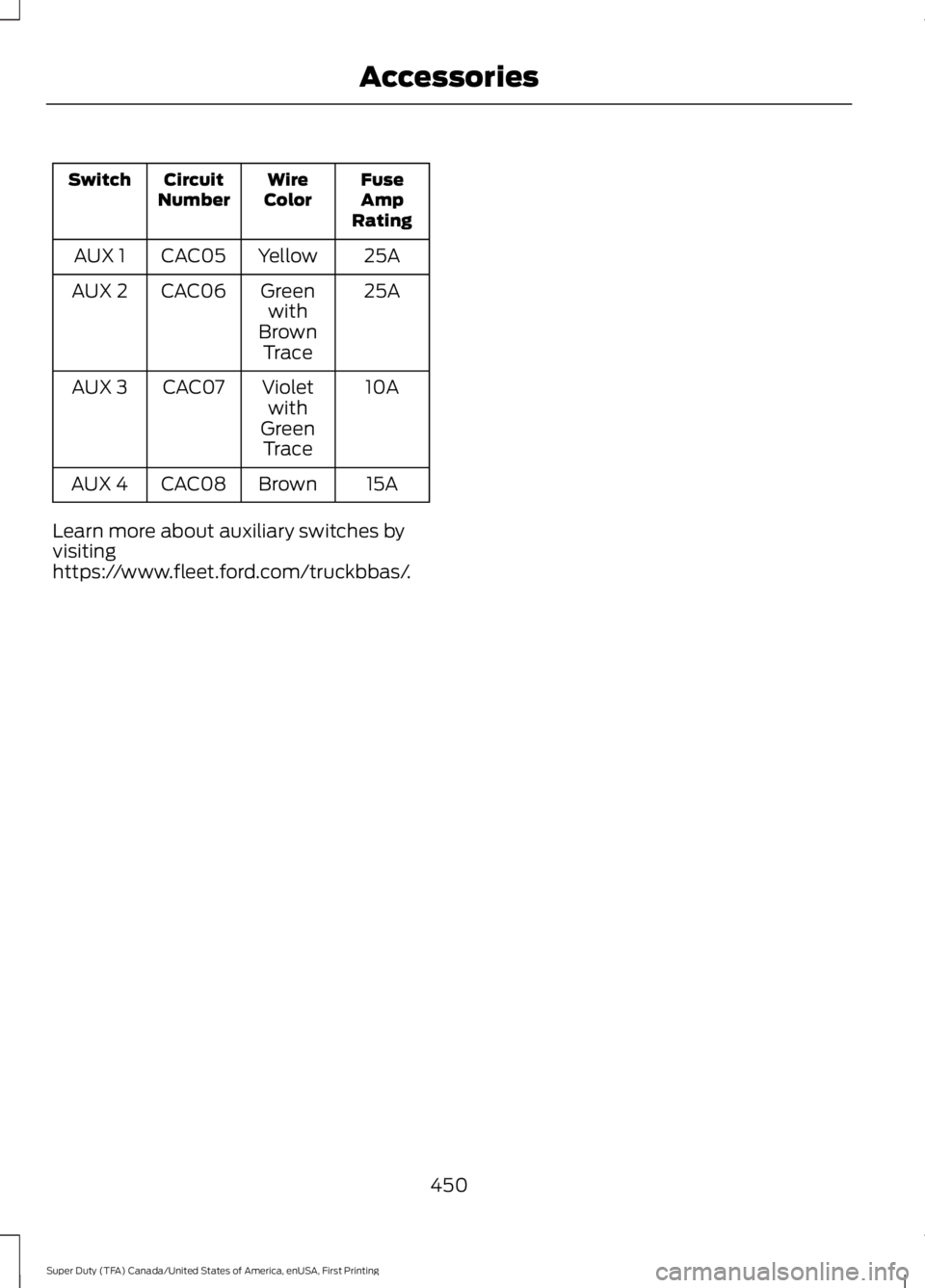
Fuse
Amp
Rating
Wire
Color
Circuit
Number
Switch
25A
Yellow
CAC05
AUX 1
25A
Green
with
Brown Trace
CAC06
AUX 2
10A
Violet
with
Green Trace
CAC07
AUX 3
15A
Brown
CAC08
AUX 4
Learn more about auxiliary switches by
visiting
https://www.fleet.ford.com/truckbbas/.
450
Super Duty (TFA) Canada/United States of America, enUSA, First Printing Accessories
Page 498 of 507
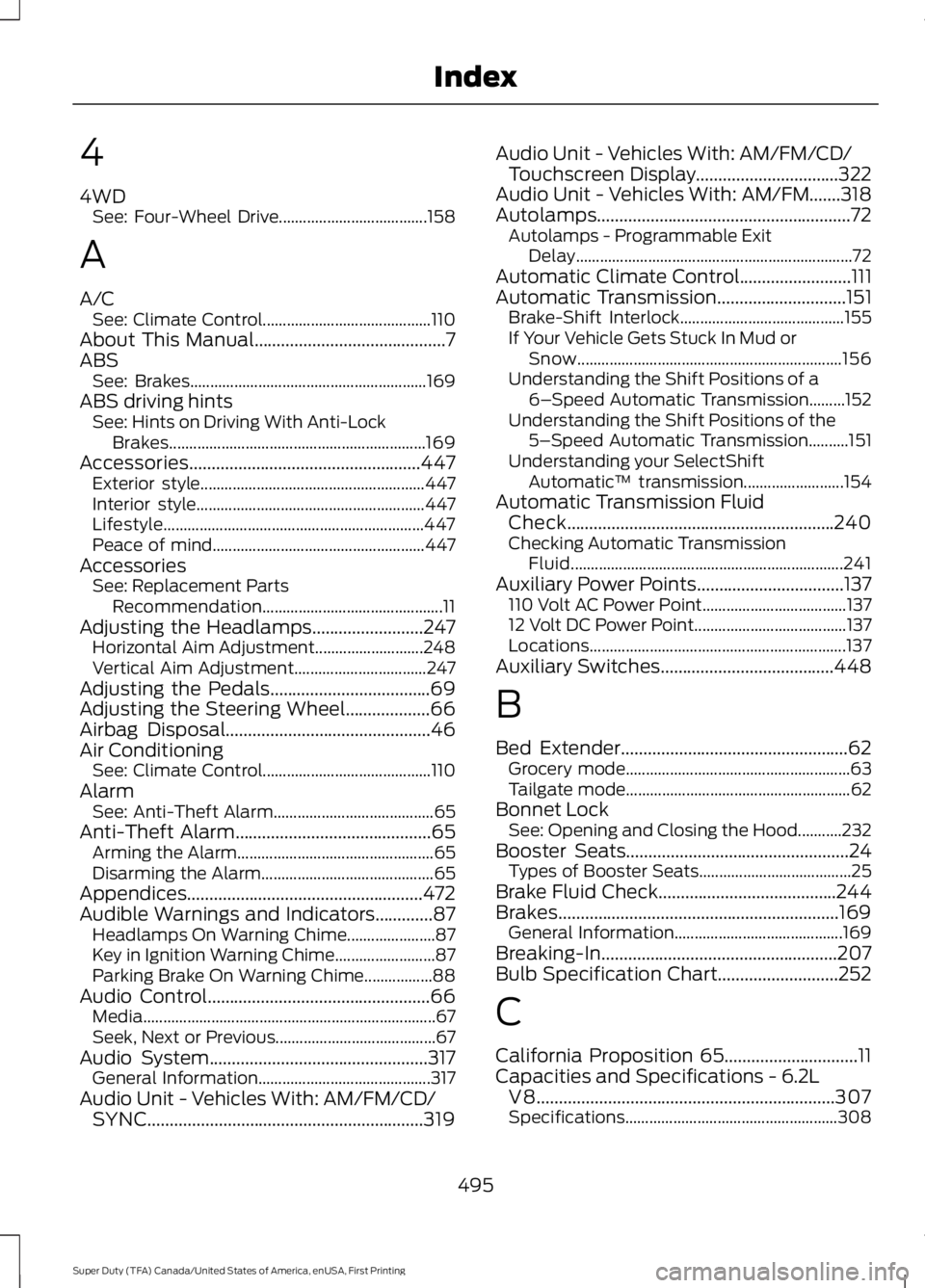
4
4WD
See: Four-Wheel Drive..................................... 158
A
A/C See: Climate Control.......................................... 110
About This Manual...........................................7
ABS See: Brakes........................................................... 169
ABS driving hints See: Hints on Driving With Anti-Lock
Brakes................................................................ 169
Accessories....................................................447 Exterior style........................................................ 447
Interior style......................................................... 447
Lifestyle................................................................. 447
Peace of mind..................................................... 447
Accessories See: Replacement Parts
Recommendation............................................. 11
Adjusting the Headlamps.........................247 Horizontal Aim Adjustment........................... 248
Vertical Aim Adjustment................................. 247
Adjusting the Pedals
....................................69
Adjusting the Steering Wheel...................66
Airbag Disposal
..............................................46
Air Conditioning See: Climate Control.......................................... 110
Alarm See: Anti-Theft Alarm........................................ 65
Anti-Theft Alarm
............................................65
Arming the Alarm................................................. 65
Disarming the Alarm........................................... 65
Appendices.....................................................472
Audible Warnings and Indicators.............87 Headlamps On Warning Chime...................... 87
Key in Ignition Warning Chime......................... 87
Parking Brake On Warning Chime.................88
Audio Control
..................................................66
Media........................................................................\
. 67
Seek, Next or Previous........................................ 67
Audio System.................................................317 General Information........................................... 317
Audio Unit - Vehicles With: AM/FM/CD/ SYNC..............................................................319 Audio Unit - Vehicles With: AM/FM/CD/
Touchscreen Display
................................322
Audio Unit - Vehicles With: AM/FM.......318
Autolamps.........................................................72 Autolamps - Programmable Exit
Delay..................................................................... 72
Automatic Climate Control.........................111
Automatic Transmission.............................151 Brake-Shift Interlock......................................... 155
If Your Vehicle Gets Stuck In Mud or Snow.................................................................. 156
Understanding the Shift Positions of a 6– Speed Automatic Transmission.........152
Understanding the Shift Positions of the 5– Speed Automatic Transmission..........151
Understanding your SelectShift Automatic ™ transmission......................... 154
Automatic Transmission Fluid Check............................................................240
Checking Automatic Transmission Fluid.................................................................... 241
Auxiliary Power Points.................................137 110 Volt AC Power Point.................................... 137
12 Volt DC Power Point...................................... 137
Locations................................................................ 137
Auxiliary Switches.......................................448
B
Bed Extender...................................................62 Grocery mode........................................................ 63
Tailgate mode........................................................ 62
Bonnet Lock See: Opening and Closing the Hood...........232
Booster Seats..................................................24 Types of Booster Seats...................................... 25
Brake Fluid Check........................................244
Brakes...............................................................169 General Information.......................................... 169
Breaking-In.....................................................207
Bulb Specification Chart
...........................252
C
California Proposition 65..............................11
Capacities and Specifications - 6.2L V8...................................................................307
Specifications..................................................... 308
495
Super Duty (TFA) Canada/United States of America, enUSA, First Printing Index