instrument panel FORD F250 2016 Owner's Manual
[x] Cancel search | Manufacturer: FORD, Model Year: 2016, Model line: F250, Model: FORD F250 2016Pages: 507, PDF Size: 6.81 MB
Page 235 of 507
GENERAL INFORMATION
Have your vehicle serviced regularly to help
maintain its roadworthiness and resale
value. There is a large network of
authorized dealers that are there to help
you with their professional servicing
expertise. We believe that their specially
trained technicians are best qualified to
service your vehicle properly and expertly.
They are supported by a wide range of
highly specialized tools developed
specifically for servicing your vehicle.
To help you service your vehicle, we
provide scheduled maintenance
information which makes tracking routine
service easy. See Scheduled
Maintenance (page 453).
If your vehicle requires professional service,
an authorized dealer can provide the
necessary parts and service. Check your
warranty information to find out which
parts and services are covered.
Use only recommended fuels, lubricants,
fluids and service parts conforming to
specifications. Motorcraft® parts are
designed and built to provide the best
performance in your vehicle.
Precautions
• Do not work on a hot engine.
• Make sure that nothing gets caught in
moving parts.
• Do not work on a vehicle with the
engine running in an enclosed space,
unless you are sure you have enough
ventilation.
• Keep all open flames and other burning
material (such as cigarettes) away
from the battery and all fuel related
parts. Working with the Engine Off
1.
Set the parking brake and shift to park
(P).
2. Switch off the engine.
3. Block the wheels.
Working with the Engine On WARNING
To reduce the risk of vehicle damage
and/or personal burn injuries, do not
start your engine with the air cleaner
removed and do not remove it while the
engine is running. 1.
Set the parking brake and shift to park
(P).
2. Block the wheels
OPENING AND CLOSING THE
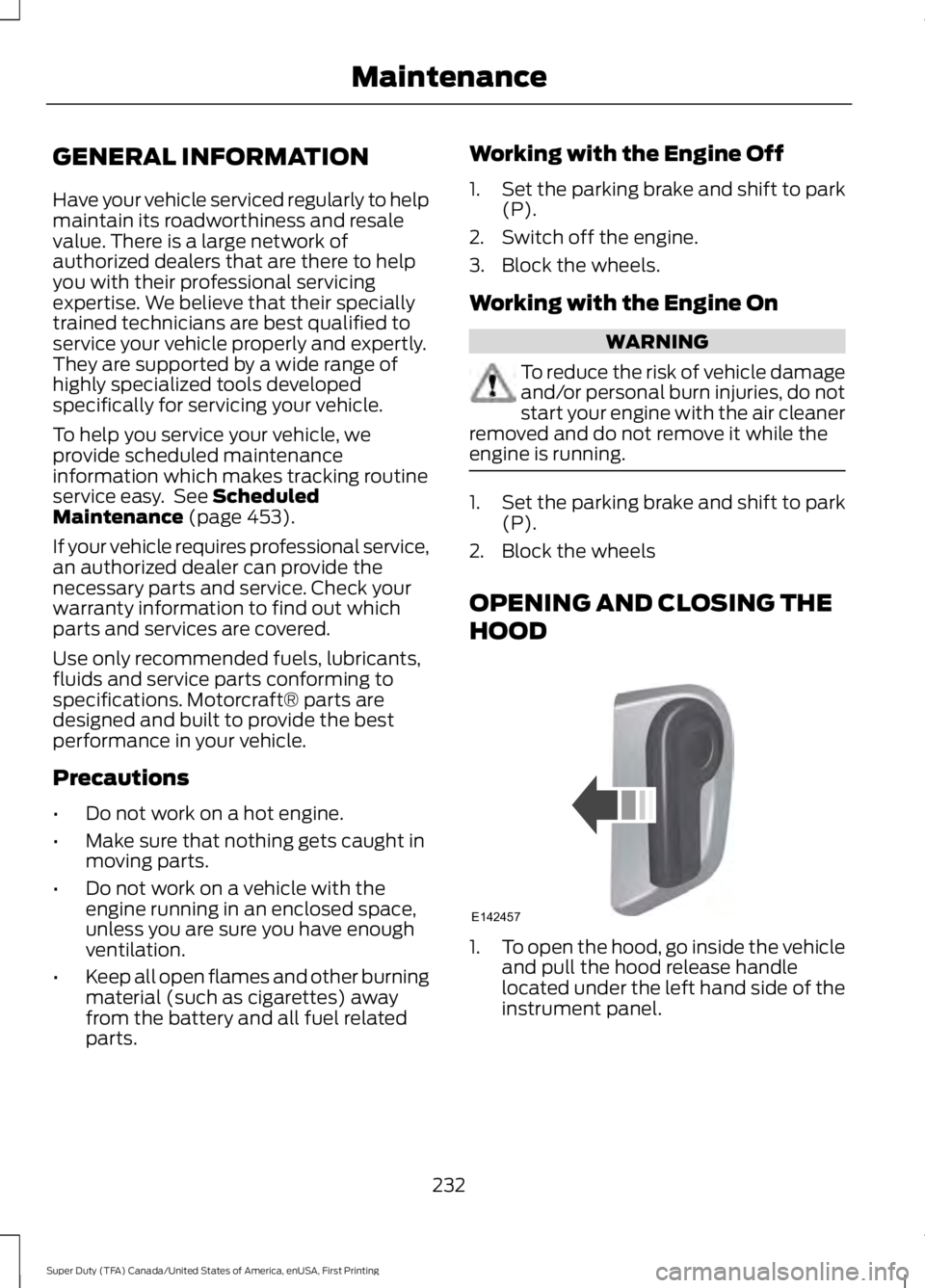
HOOD 1.
To open the hood, go inside the vehicle
and pull the hood release handle
located under the left hand side of the
instrument panel.
232
Super Duty (TFA) Canada/United States of America, enUSA, First Printing MaintenanceE142457
Page 256 of 507
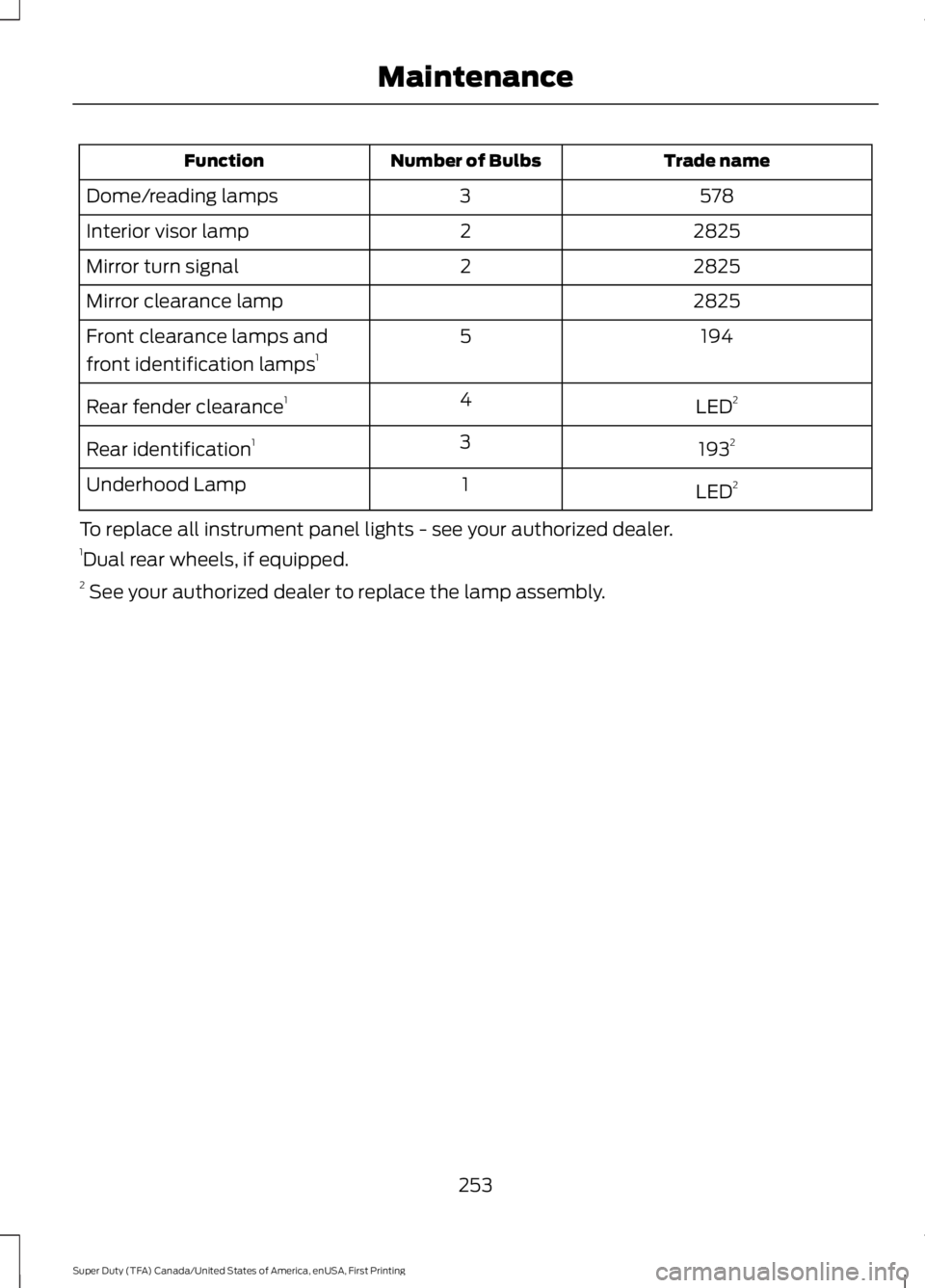
Trade name
Number of Bulbs
Function
578
3
Dome/reading lamps
2825
2
Interior visor lamp
2825
2
Mirror turn signal
2825
Mirror clearance lamp
194
5
Front clearance lamps and
front identification lamps 1
LED2
4
Rear fender clearance 1
1932
3
Rear identification 1
LED2
1
Underhood Lamp
To replace all instrument panel lights - see your authorized dealer.
1 Dual rear wheels, if equipped.
2 See your authorized dealer to replace the lamp assembly.
253
Super Duty (TFA) Canada/United States of America, enUSA, First Printing Maintenance
Page 261 of 507
•
Never wash or rinse any ignition coil,
spark plug wire or spark plug well, or
the area in and around these locations.
• Cover the battery, power distribution
box, and air filter assembly to prevent
water damage when cleaning the
engine.
CLEANING THE WINDOWS AND
WIPER BLADES
Car wash chemicals and environmental
fallout can result in windshield and wiper
blade contamination. Dirty windshield and
wipers will result in poor windshield wiper
operation. Keep the windshield and wiper
blades clean to maintain windshield wiper
performance.
To clean the windshield and wiper blades:
• Clean the windshield with a
non-abrasive glass cleaner. When
cleaning the interior of the windshield,
avoid getting any glass cleaner on the
instrument panel or door panels. Wipe
any glass cleaner off these surfaces
immediately.
• For windshields contaminated with
tree sap, chemicals, wax or bugs, clean
the entire windshield using steel wool
(no greater than 0000 grade) in a
circular motion and rinse with water.
• Clean the wiper blades with isopropyl
rubbing alcohol or windshield washer
concentrate.
Note: Do not use razor blades or other
sharp objects to clean or remove decals
from the inside of the heated rear window.
The vehicle warranty does not cover
damage caused to the heated rear window
grid lines. CLEANING THE INTERIOR WARNINGS
Do not use cleaning solvents, bleach
or dye on the vehicle
’s safety belts,
as these actions may weaken the
belt webbing. On vehicles equipped with
seat-mounted airbags, do not use
chemical solvents or strong
detergents. Such products could
contaminate the side airbag system and
affect performance of the side airbag in a
collision. For fabric, carpets, cloth seats, safety belts
and seats equipped with side airbags:
•
Remove dust and loose dirt with a
vacuum cleaner.
• Remove light stains and soil with
Motorcraft Professional Strength
Carpet & Upholstery Cleaner.
• If grease or tar is present on the
material, spot-clean the area first with
Motorcraft Spot and Stain Remover. In
Canada, use Motorcraft Multi-Purpose
Cleaner.
• If a ring forms on the fabric after spot
cleaning, clean the entire area
immediately (but do not oversaturate)
or the ring will set.
• Do not use household cleaning
products or glass cleaners, which can
stain and discolor the fabric and affect
the flame retardant abilities of the seat
materials.
258
Super Duty (TFA) Canada/United States of America, enUSA, First Printing Vehicle Care
Page 262 of 507
CLEANING THE INSTRUMENT
PANEL AND INSTRUMENT
CLUSTER LENS
WARNING
Do not use chemical solvents or
strong detergents when cleaning the
steering wheel or instrument panel
to avoid contamination of the airbag
system. Note:
Follow the same procedure as
cleaning leather seats for cleaning leather
instrument panels and leather interior trim
surfaces. See Cleaning Leather Seats
(page 259).
Clean the instrument panel and cluster
lens with a clean, damp and soft cloth,
then use a clean, dry and soft cloth to dry
these areas.
• Avoid cleaners or polishes that increase
the gloss of the upper portion of the
instrument panel. The dull finish in this
area helps protect you from
undesirable windshield reflection.
• Do not use any household cleaning
products or glass cleaners as these
may damage the finish of the
instrument panel, interior trim and
cluster lens.
• Wash or wipe your hands clean if you
have been in contact with certain
products such as insect repellent and
suntan lotion to avoid possible damage
to the interior painted surfaces.
• Do not allow air fresheners and hand
sanitizers to spill onto interior surfaces.
If a spill occurs, wipe off immediately.
Your warranty may not cover these
damages.
If a staining liquid like coffee or juice has
been spilled on the instrument panel or on
interior trim surfaces: 1. Wipe up spilled liquid using a clean,
soft cloth as quickly as possible.
2. Use Motorcraft Premium Leather and Vinyl Cleaner or a commercially
available leather cleaning product for
automotive interiors. Test any cleaner
or stain remover on an inconspicuous
area.
3. Alternatively, wipe the surface with a clean, soft cloth and a mild soap and
water solution. Dry the area with a
clean, soft cloth.
4. If necessary, apply more soap and water solution or cleaning product to
a clean, soft cloth and press it onto the
soiled area. Allow this to set at room
temperature for 30 minutes.
5. Remove the soaked cloth, then with a clean, damp cloth, use a rubbing
motion for 60 seconds on the soiled
area.
6. Dry the area with a clean, soft cloth.
CLEANING LEATHER SEATS
(If
Equipped)
Without King Ranch Edition
Note: Follow the same procedure as
cleaning leather seats for cleaning leather
instrument panels and leather interior trim
surfaces.
For routine cleaning, wipe the surface with
a soft, damp cloth and a mild soap and
water solution. Dry the area with a clean,
soft cloth.
For cleaning and removing spots and stains
such as dye transfer, use Motorcraft
Premium Leather and Vinyl Cleaner or a
commercially available leather cleaning
product for automotive interiors.
Note: Test any cleaner or stain remover on
an inconspicuous area.
259
Super Duty (TFA) Canada/United States of America, enUSA, First Printing Vehicle Care
Page 308 of 507
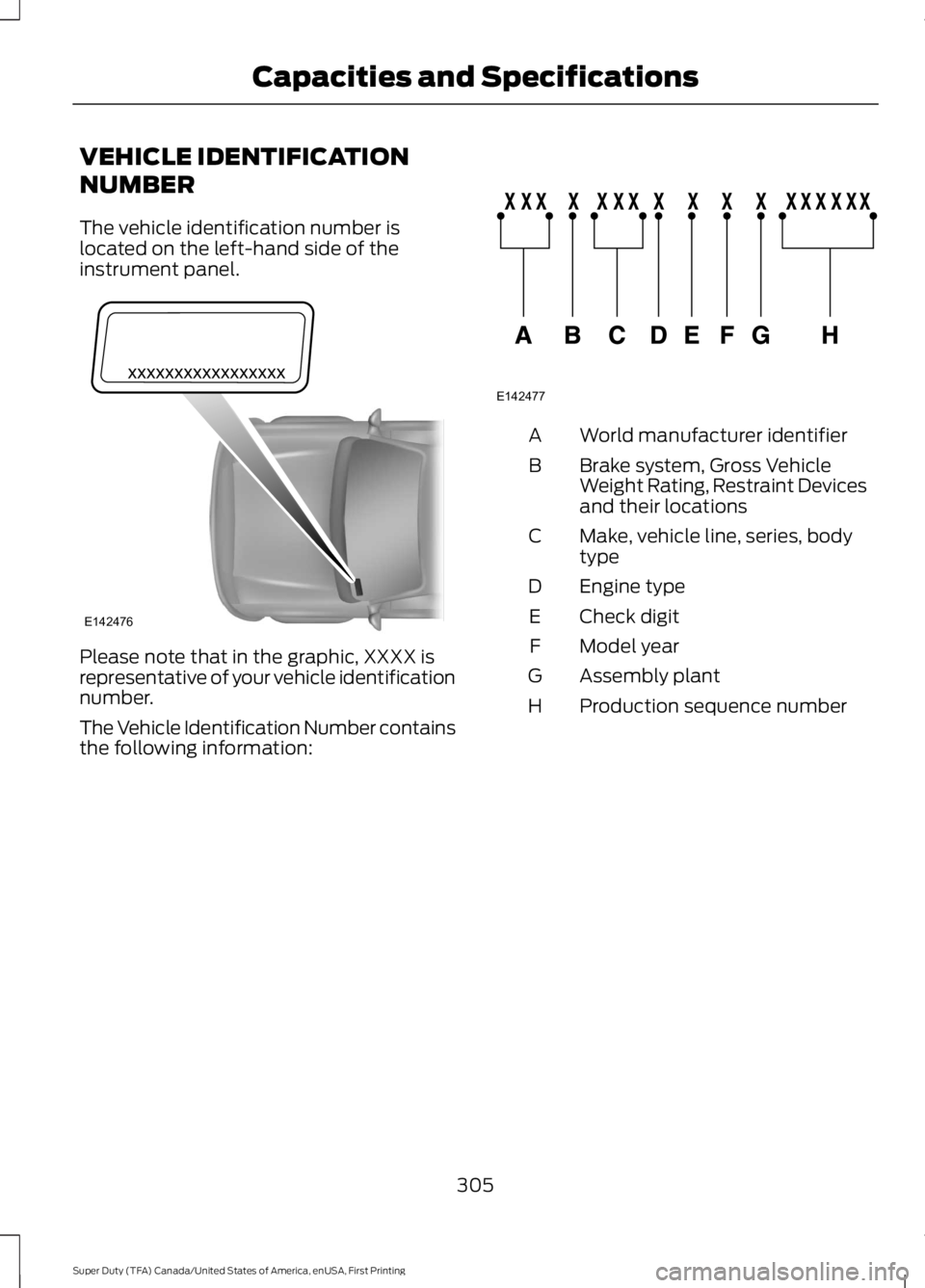
VEHICLE IDENTIFICATION
NUMBER
The vehicle identification number is
located on the left-hand side of the
instrument panel.
Please note that in the graphic, XXXX is
representative of your vehicle identification
number.
The Vehicle Identification Number contains
the following information: World manufacturer identifier
A
Brake system, Gross Vehicle
Weight Rating, Restraint Devices
and their locations
B
Make, vehicle line, series, body
type
C
Engine type
D
Check digit
E
Model year
F
Assembly plant
G
Production sequence number
H
305
Super Duty (TFA) Canada/United States of America, enUSA, First Printing Capacities and SpecificationsE142476 E142477
Page 331 of 507
USB PORT (If Equipped)
WARNING
Driving while distracted can result in
loss of vehicle control, crash and
injury. We strongly recommend that
you use extreme caution when using any
device that may take your focus off the
road. Your primary responsibility is the safe
operation of your vehicle. We recommend
against the use of any hand-held device
while driving and encourage the use of
voice-operated systems when possible.
Make sure you are aware of all applicable
local laws that may affect the use of
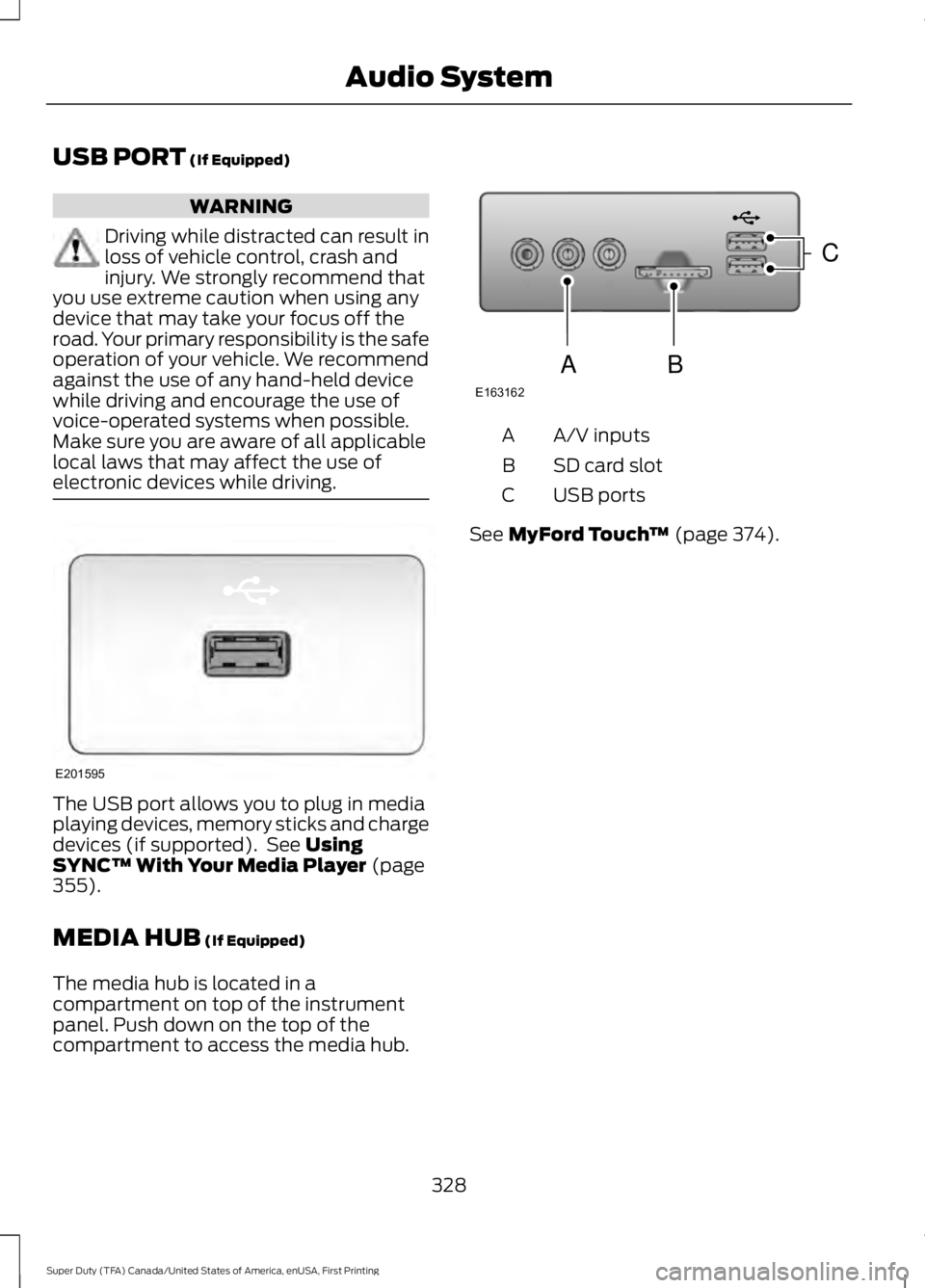
electronic devices while driving. The USB port allows you to plug in media
playing devices, memory sticks and charge
devices (if supported). See
Using
SYNC™ With Your Media Player (page
355).
MEDIA HUB
(If Equipped)
The media hub is located in a
compartment on top of the instrument
panel. Push down on the top of the
compartment to access the media hub. A/V inputs
A
SD card slot
B
USB ports
C
See
MyFord Touch ™ (page 374).
328
Super Duty (TFA) Canada/United States of America, enUSA, First Printing Audio SystemE201595 E163162
C
BA
Page 433 of 507
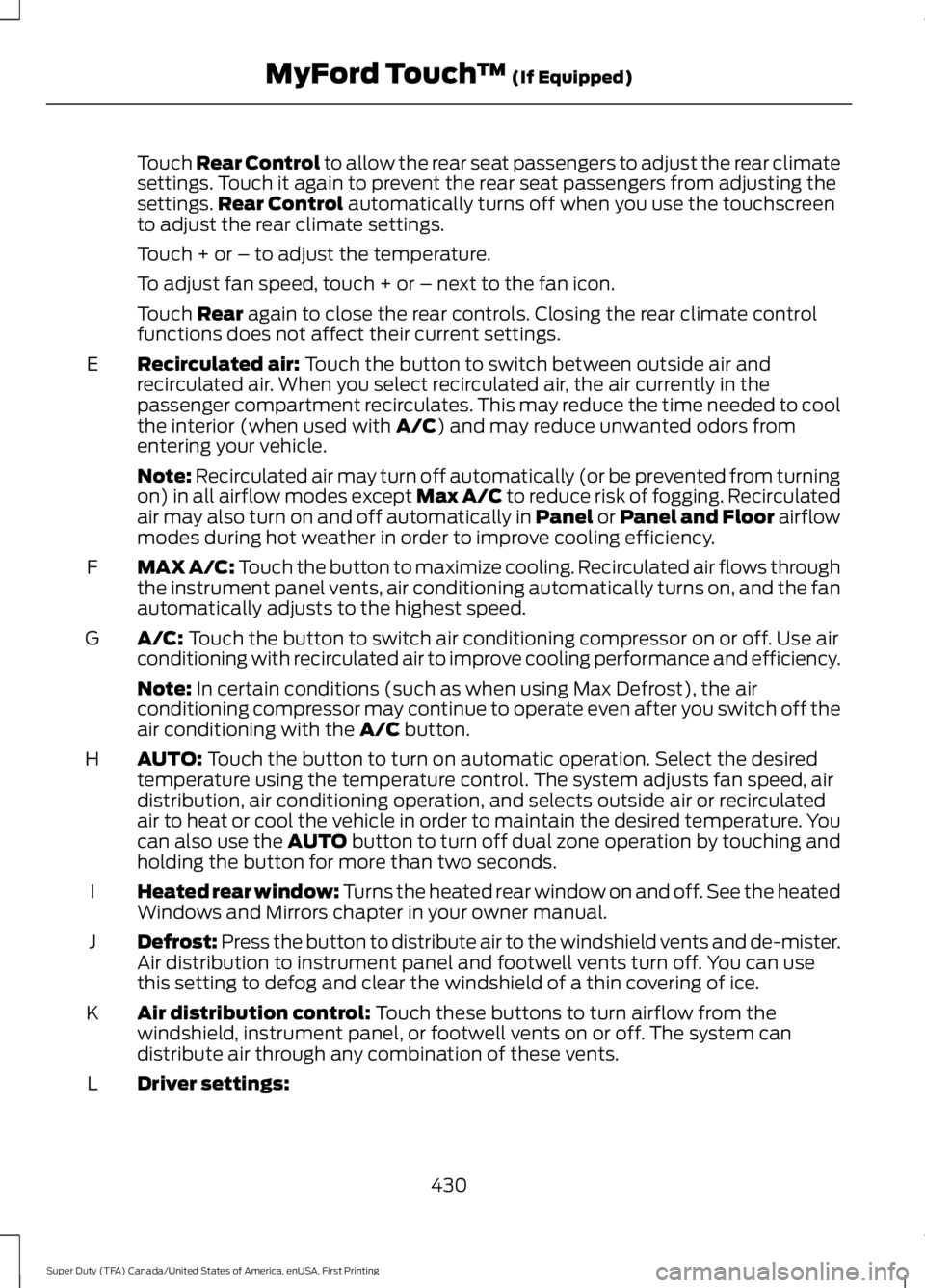
Touch Rear Control to allow the rear seat passengers to adjust the rear climate
settings. Touch it again to prevent the rear seat passengers from adjusting the
settings.
Rear Control automatically turns off when you use the touchscreen
to adjust the rear climate settings.
Touch + or – to adjust the temperature.
To adjust fan speed, touch + or – next to the fan icon.
Touch
Rear again to close the rear controls. Closing the rear climate control
functions does not affect their current settings.
Recirculated air:
Touch the button to switch between outside air and
recirculated air. When you select recirculated air, the air currently in the
passenger compartment recirculates. This may reduce the time needed to cool
the interior (when used with
A/C) and may reduce unwanted odors from
entering your vehicle.
E
Note:
Recirculated air may turn off automatically (or be prevented from turning
on) in all airflow modes except Max A/C to reduce risk of fogging. Recirculated
air may also turn on and off automatically in Panel or Panel and Floor airflow
modes during hot weather in order to improve cooling efficiency.
MAX A/C: Touch the button to maximize cooling. Recirculated air flows through
the instrument panel vents, air conditioning automatically turns on, and the fan
automatically adjusts to the highest speed.
F
A/C:
Touch the button to switch air conditioning compressor on or off. Use air
conditioning with recirculated air to improve cooling performance and efficiency.
G
Note:
In certain conditions (such as when using Max Defrost), the air
conditioning compressor may continue to operate even after you switch off the
air conditioning with the
A/C button.
AUTO:
Touch the button to turn on automatic operation. Select the desired
temperature using the temperature control. The system adjusts fan speed, air
distribution, air conditioning operation, and selects outside air or recirculated
air to heat or cool the vehicle in order to maintain the desired temperature. You
can also use the AUTO button to turn off dual zone operation by touching and
holding the button for more than two seconds.
H
Heated rear window: Turns the heated rear window on and off. See the heated
Windows and Mirrors chapter in your owner manual.
I
Defrost: Press the button to distribute air to the windshield vents and de-mister.
Air distribution to instrument panel and footwell vents turn off. You can use
this setting to defog and clear the windshield of a thin covering of ice.
J
Air distribution control:
Touch these buttons to turn airflow from the
windshield, instrument panel, or footwell vents on or off. The system can
distribute air through any combination of these vents.
K
Driver settings:
L
430
Super Duty (TFA) Canada/United States of America, enUSA, First Printing MyFord Touch
™
(If Equipped)
Page 452 of 507
•
An authorized dealer needs to install
mobile communications systems.
Improper installation may harm the
operation of your vehicle, particularly
if the manufacturer did not design the
mobile communication system
specifically for automotive use.
• If you or an authorized Ford dealer add
any non-Ford electrical or electronic
accessories or components to your
vehicle, you may adversely affect
battery performance and durability. In
addition, you may also adversely affect
the performance of other electrical
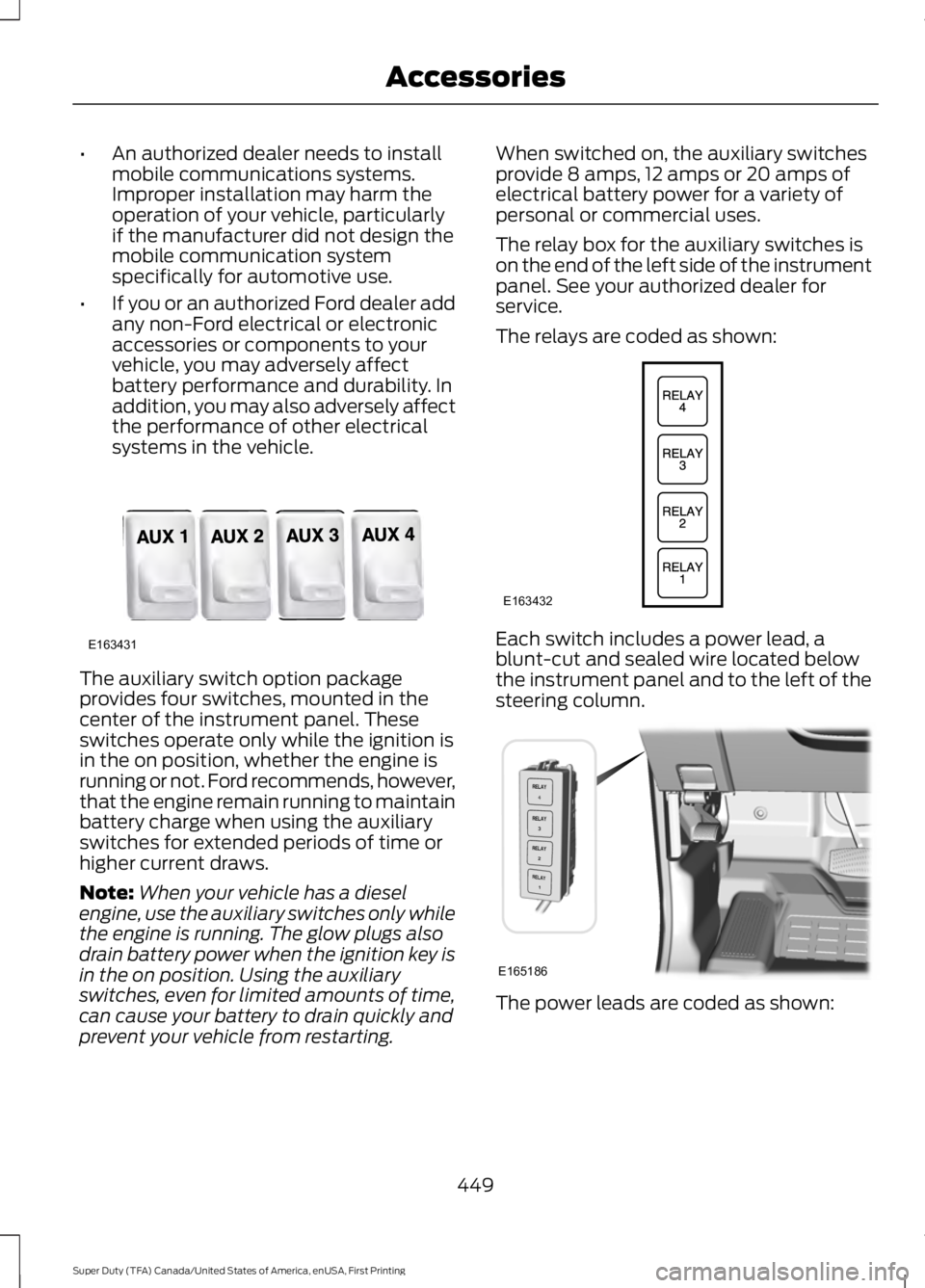
systems in the vehicle. The auxiliary switch option package
provides four switches, mounted in the
center of the instrument panel. These
switches operate only while the ignition is
in the on position, whether the engine is
running or not. Ford recommends, however,
that the engine remain running to maintain
battery charge when using the auxiliary
switches for extended periods of time or
higher current draws.
Note:
When your vehicle has a diesel
engine, use the auxiliary switches only while
the engine is running. The glow plugs also
drain battery power when the ignition key is
in the on position. Using the auxiliary
switches, even for limited amounts of time,
can cause your battery to drain quickly and
prevent your vehicle from restarting. When switched on, the auxiliary switches
provide 8 amps, 12 amps or 20 amps of
electrical battery power for a variety of
personal or commercial uses.
The relay box for the auxiliary switches is
on the end of the left side of the instrument
panel. See your authorized dealer for
service.
The relays are coded as shown:
Each switch includes a power lead, a
blunt-cut and sealed wire located below
the instrument panel and to the left of the
steering column.
The power leads are coded as shown:
449
Super Duty (TFA) Canada/United States of America, enUSA, First Printing AccessoriesE163431 E163432 E165186
Page 499 of 507
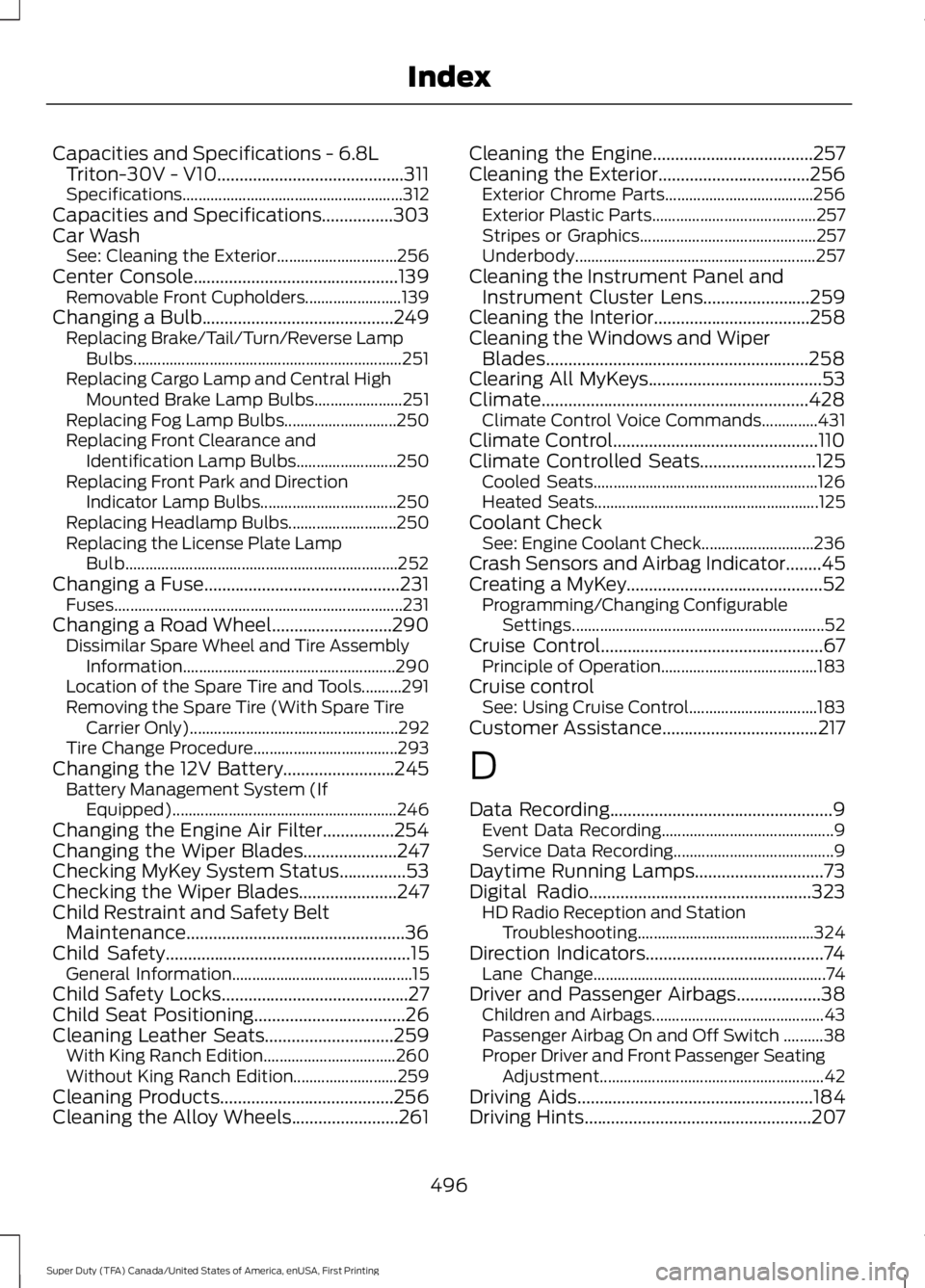
Capacities and Specifications - 6.8L
Triton-30V - V10..........................................311
Specifications....................................................... 312
Capacities and Specifications................303
Car Wash See: Cleaning the Exterior.............................. 256
Center Console..............................................139 Removable Front Cupholders........................ 139
Changing a Bulb...........................................249 Replacing Brake/Tail/Turn/Reverse Lamp
Bulbs................................................................... 251
Replacing Cargo Lamp and Central High Mounted Brake Lamp Bulbs...................... 251
Replacing Fog Lamp Bulbs............................ 250
Replacing Front Clearance and Identification Lamp Bulbs......................... 250
Replacing Front Park and Direction Indicator Lamp Bulbs.................................. 250
Replacing Headlamp Bulbs........................... 250
Replacing the License Plate Lamp Bulb.................................................................... 252
Changing a Fuse
............................................231
Fuses........................................................................\
231
Changing a Road Wheel
...........................290
Dissimilar Spare Wheel and Tire Assembly
Information..................................................... 290
Location of the Spare Tire and Tools..........291
Removing the Spare Tire (With Spare Tire Carrier Only).................................................... 292
Tire Change Procedure.................................... 293
Changing the 12V Battery.........................245 Battery Management System (If
Equipped) ........................................................ 246
Changing the Engine Air Filter................254
Changing the Wiper Blades
.....................247
Checking MyKey System Status...............53
Checking the Wiper Blades
......................247
Child Restraint and Safety Belt Maintenance
.................................................36
Child Safety.......................................................15
General Information............................................. 15
Child Safety Locks..........................................27
Child Seat Positioning..................................26
Cleaning Leather Seats.............................259 With King Ranch Edition................................. 260
Without King Ranch Edition.......................... 259
Cleaning Products.......................................256
Cleaning the Alloy Wheels........................261 Cleaning the Engine....................................257
Cleaning the Exterior
..................................256
Exterior Chrome Parts..................................... 256
Exterior Plastic Parts......................................... 257
Stripes or Graphics............................................ 257
Underbody............................................................ 257
Cleaning the Instrument Panel and Instrument Cluster Lens........................259
Cleaning the Interior
...................................258
Cleaning the Windows and Wiper Blades...........................................................258
Clearing All MyKeys.......................................53
Climate............................................................428 Climate Control Voice Commands..............431
Climate Control..............................................110
Climate Controlled Seats
..........................125
Cooled Seats........................................................ 126
Heated Seats........................................................ 125
Coolant Check See: Engine Coolant Check............................ 236
Crash Sensors and Airbag Indicator
........45
Creating a MyKey............................................52 Programming/Changing Configurable
Settings............................................................... 52
Cruise Control..................................................67 Principle of Operation....................................... 183
Cruise control See: Using Cruise Control................................ 183
Customer Assistance
...................................217
D
Data Recording
..................................................9
Event Data Recording........................................... 9
Service Data Recording........................................ 9
Daytime Running Lamps
.............................73
Digital Radio..................................................323 HD Radio Reception and Station
Troubleshooting............................................ 324
Direction Indicators........................................74 Lane Change.......................................................... 74
Driver and Passenger Airbags...................38 Children and Airbags........................................... 43
Passenger Airbag On and Off Switch ..........38
Proper Driver and Front Passenger Seating Adjustment........................................................ 42
Driving Aids
.....................................................184
Driving Hints...................................................207
496
Super Duty (TFA) Canada/United States of America, enUSA, First Printing Index