remote control FORD F250 2016 Owner's Manual
[x] Cancel search | Manufacturer: FORD, Model Year: 2016, Model line: F250, Model: FORD F250 2016Pages: 507, PDF Size: 6.81 MB
Page 125 of 507
Note:
If more than one linked remote
control or intelligent access key is in range,
the memory function moves to the settings
of the first key to initiate a memory recall.
Easy Entry and Exit Feature (If
Equipped)
If you enable the easy entry and exit
feature, it automatically moves the driver
seat rearward up to 2 inches (5
centimeters) when you put the
transmission in park (P) and remove the
key from the ignition.
The driver seat returns to the previous
position when you put the key in the
ignition.
You can enable or disable this feature
through the information display. See
Information Displays
(page 89).
REAR SEATS
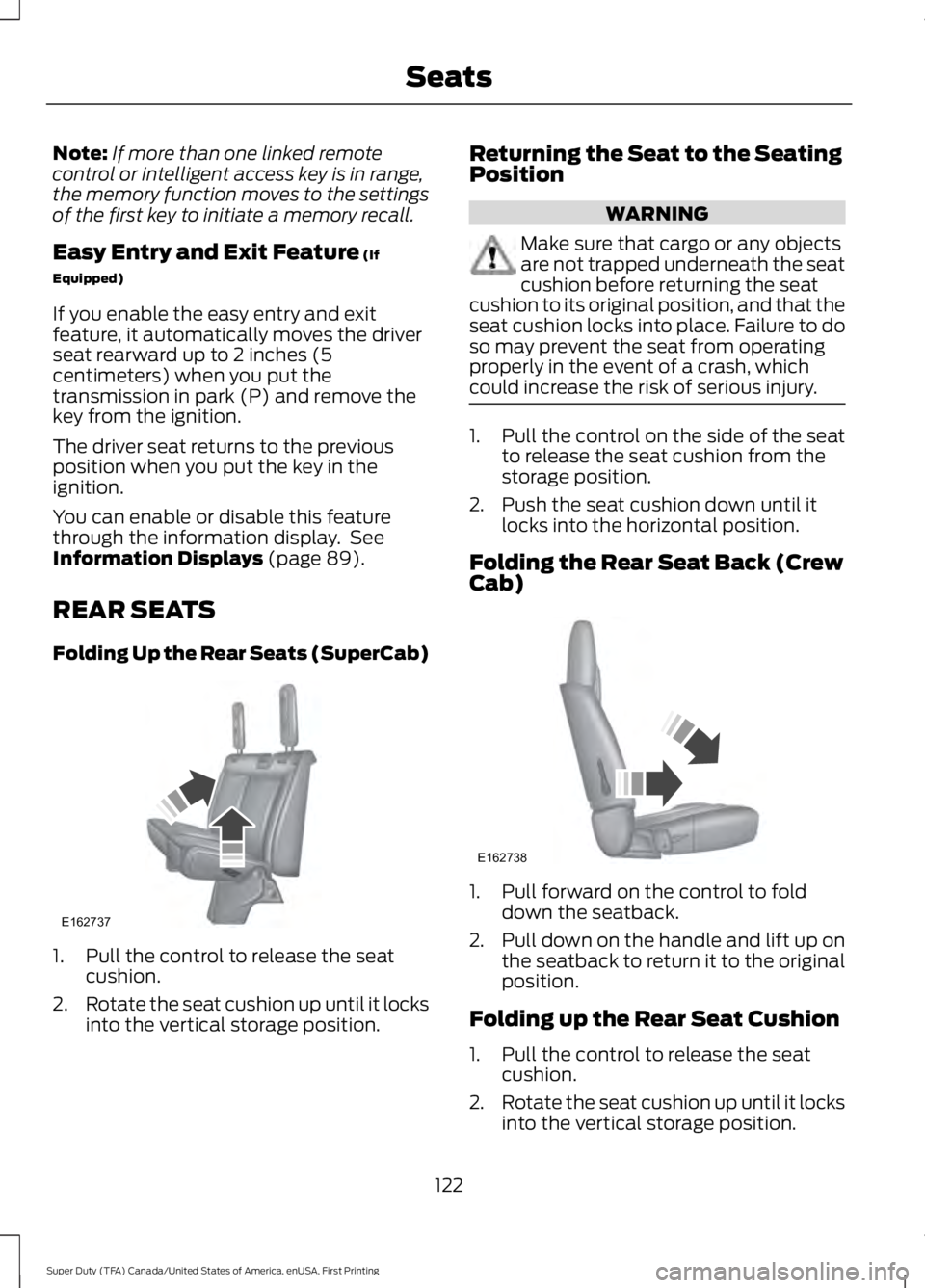
Folding Up the Rear Seats (SuperCab) 1. Pull the control to release the seat
cushion.
2. Rotate the seat cushion up until it locks
into the vertical storage position. Returning the Seat to the Seating
Position WARNING
Make sure that cargo or any objects
are not trapped underneath the seat
cushion before returning the seat
cushion to its original position, and that the
seat cushion locks into place. Failure to do
so may prevent the seat from operating
properly in the event of a crash, which
could increase the risk of serious injury. 1. Pull the control on the side of the seat
to release the seat cushion from the
storage position.
2. Push the seat cushion down until it locks into the horizontal position.
Folding the Rear Seat Back (Crew
Cab) 1. Pull forward on the control to fold
down the seatback.
2. Pull down on the handle and lift up on
the seatback to return it to the original
position.
Folding up the Rear Seat Cushion
1. Pull the control to release the seat cushion.
2. Rotate the seat cushion up until it locks
into the vertical storage position.
122
Super Duty (TFA) Canada/United States of America, enUSA, First Printing SeatsE162737 E162738
Page 132 of 507
The appearance of your vehicle
’s universal
garage door opener varies according to
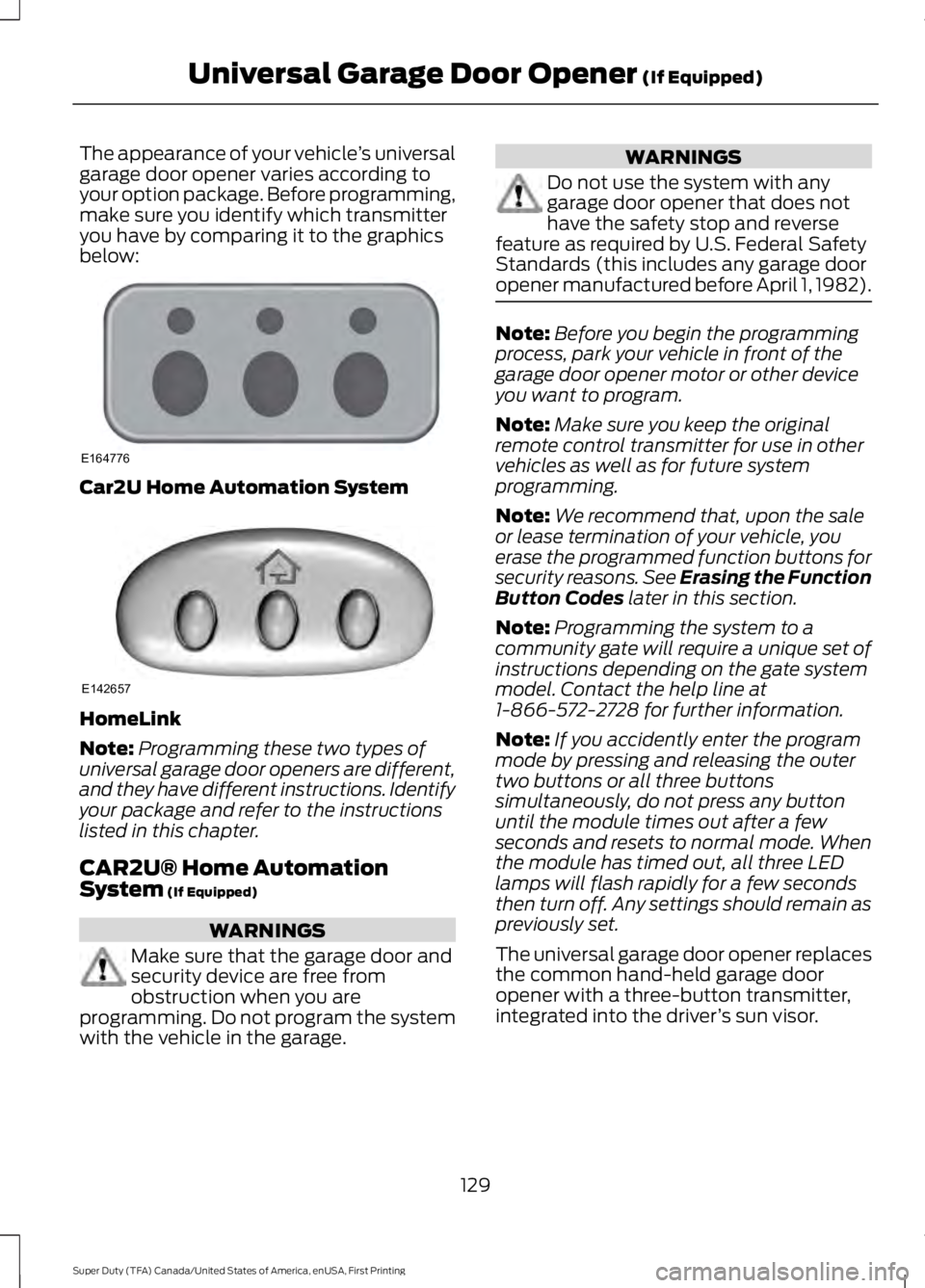
your option package. Before programming,
make sure you identify which transmitter
you have by comparing it to the graphics
below: Car2U Home Automation System
HomeLink
Note:
Programming these two types of
universal garage door openers are different,
and they have different instructions. Identify
your package and refer to the instructions
listed in this chapter.
CAR2U® Home Automation
System (If Equipped) WARNINGS
Make sure that the garage door and
security device are free from
obstruction when you are
programming. Do not program the system
with the vehicle in the garage. WARNINGS
Do not use the system with any
garage door opener that does not
have the safety stop and reverse
feature as required by U.S. Federal Safety
Standards (this includes any garage door
opener manufactured before April 1, 1982). Note:
Before you begin the programming
process, park your vehicle in front of the
garage door opener motor or other device
you want to program.
Note: Make sure you keep the original
remote control transmitter for use in other
vehicles as well as for future system
programming.
Note: We recommend that, upon the sale
or lease termination of your vehicle, you
erase the programmed function buttons for
security reasons. See Erasing the Function
Button Codes
later in this section.
Note: Programming the system to a
community gate will require a unique set of
instructions depending on the gate system
model. Contact the help line at
1-866-572-2728 for further information.
Note: If you accidently enter the program
mode by pressing and releasing the outer
two buttons or all three buttons
simultaneously, do not press any button
until the module times out after a few
seconds and resets to normal mode. When
the module has timed out, all three LED
lamps will flash rapidly for a few seconds
then turn off. Any settings should remain as
previously set.
The universal garage door opener replaces
the common hand-held garage door
opener with a three-button transmitter,
integrated into the driver ’s sun visor.
129
Super Duty (TFA) Canada/United States of America, enUSA, First Printing Universal Garage Door Opener
(If Equipped)E164776 E142657
Page 133 of 507
The system includes two primary features,
a garage door opener and a platform for
remote activation of devices within the
home. This functionality allows you to
program garage door openers as well as
security devices and home lighting
systems.
You can find additional system information
online at www.learcar2U.com or by calling
the toll-free help line on 1-866-572-2728.
Rolling Code Programming
Note:
If you do not follow the time-sensitive
instructions, the device will time out and
you will have to repeat the complete
procedure.
Note: It may be helpful to have another
person assist you in programming the
transmitter.
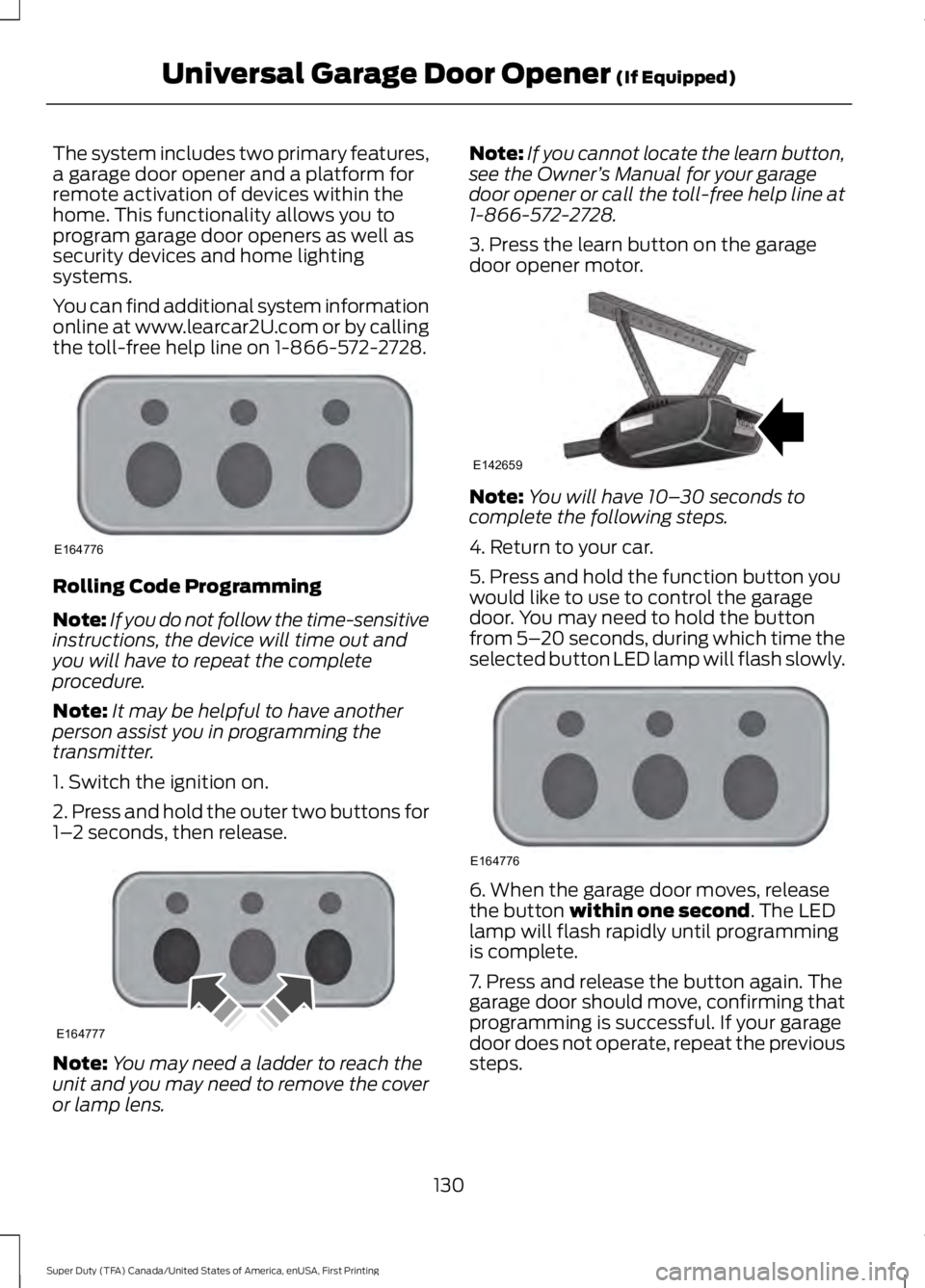
1. Switch the ignition on.
2. Press and hold the outer two buttons for
1– 2 seconds, then release. Note:
You may need a ladder to reach the
unit and you may need to remove the cover
or lamp lens. Note:
If you cannot locate the learn button,
see the Owner ’s Manual for your garage
door opener or call the toll-free help line at
1-866-572-2728.
3. Press the learn button on the garage
door opener motor. Note:
You will have 10– 30 seconds to
complete the following steps.
4. Return to your car.
5. Press and hold the function button you
would like to use to control the garage
door. You may need to hold the button
from 5– 20 seconds, during which time the
selected button LED lamp will flash slowly. 6. When the garage door moves, release
the button within one second. The LED
lamp will flash rapidly until programming
is complete.
7. Press and release the button again. The
garage door should move, confirming that
programming is successful. If your garage
door does not operate, repeat the previous
steps.
130
Super Duty (TFA) Canada/United States of America, enUSA, First Printing Universal Garage Door Opener
(If Equipped)E164776 E164777 E142659 E164776
Page 135 of 507
The LED lamp above the selected button
will illuminate to confirm that the system
is responding to the button command.
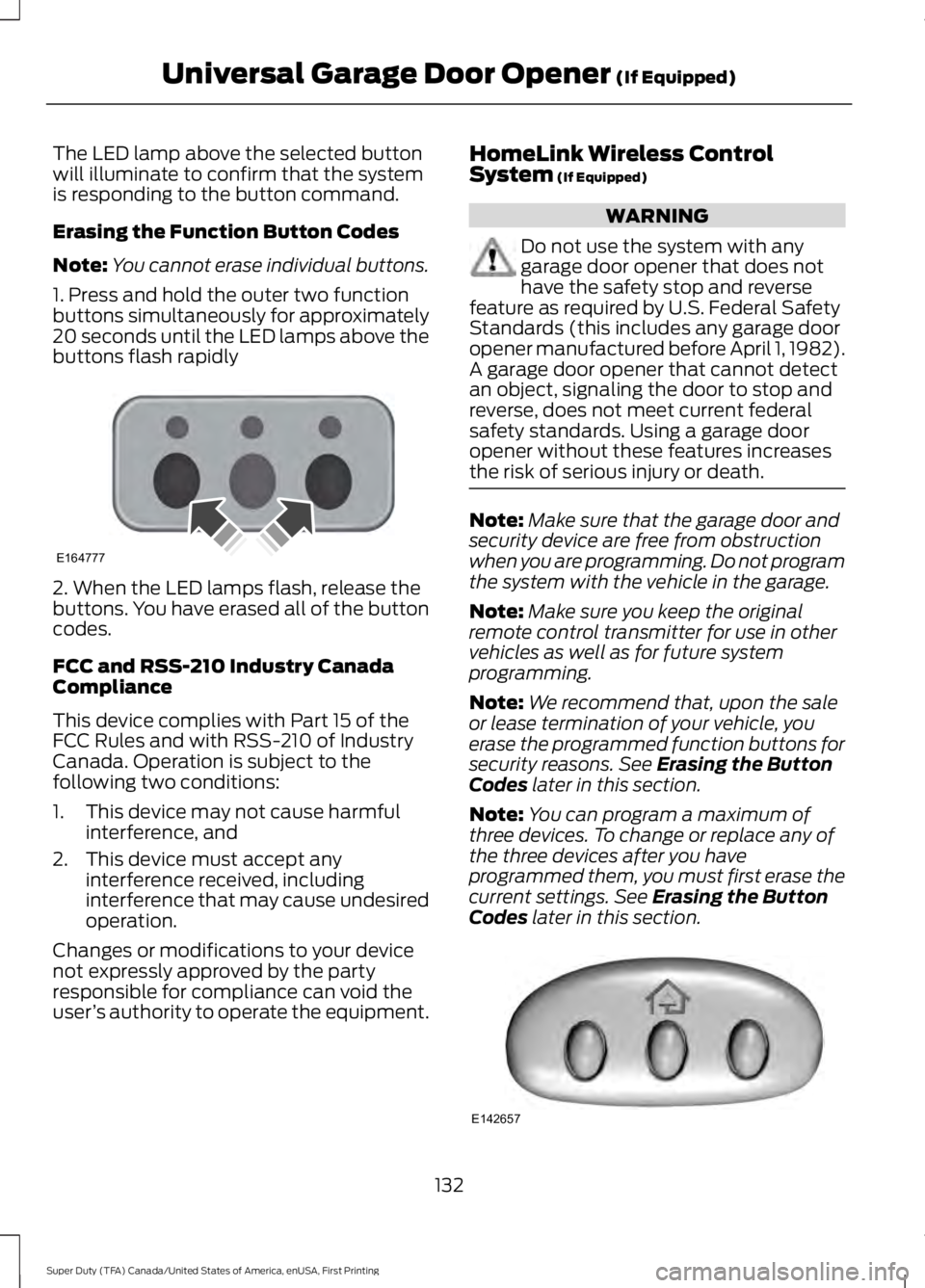
Erasing the Function Button Codes
Note:
You cannot erase individual buttons.
1. Press and hold the outer two function
buttons simultaneously for approximately
20 seconds until the LED lamps above the
buttons flash rapidly 2. When the LED lamps flash, release the
buttons. You have erased all of the button
codes.
FCC and RSS-210 Industry Canada
Compliance
This device complies with Part 15 of the
FCC Rules and with RSS-210 of Industry
Canada. Operation is subject to the
following two conditions:
1. This device may not cause harmful
interference, and
2. This device must accept any interference received, including
interference that may cause undesired
operation.
Changes or modifications to your device
not expressly approved by the party
responsible for compliance can void the
user ’s authority to operate the equipment. HomeLink Wireless Control
System (If Equipped) WARNING
Do not use the system with any
garage door opener that does not
have the safety stop and reverse
feature as required by U.S. Federal Safety
Standards (this includes any garage door
opener manufactured before April 1, 1982).
A garage door opener that cannot detect
an object, signaling the door to stop and
reverse, does not meet current federal
safety standards. Using a garage door
opener without these features increases
the risk of serious injury or death. Note:
Make sure that the garage door and
security device are free from obstruction
when you are programming. Do not program
the system with the vehicle in the garage.
Note: Make sure you keep the original
remote control transmitter for use in other
vehicles as well as for future system
programming.
Note: We recommend that, upon the sale
or lease termination of your vehicle, you
erase the programmed function buttons for
security reasons. See
Erasing the Button
Codes later in this section.
Note: You can program a maximum of
three devices. To change or replace any of
the three devices after you have
programmed them, you must first erase the
current settings. See
Erasing the Button
Codes later in this section. 132
Super Duty (TFA) Canada/United States of America, enUSA, First Printing Universal Garage Door Opener
(If Equipped)E164777 E142657
Page 216 of 507
Canadian roadside coverage and benefits
may differ from the U.S. coverage. If you
require more information, please refer to
the coverage section of your warranty
guide, call us in Canada at
1-800-665-2006, or visit our website at
www.ford.ca.
Sykes Assistance Services Corporation
administers the Roadside Assistance
program. You must receive covered
services in Canada or the continental
United States. Coverage extends to
vehicles that use public, non-seasonal,
annually traveled roadways. Roadside
Assistance coverage does not extend to
vehicles involved in cross-country driving,
logging, autocross and any other form of
off-road use. Well maintained roads and
surfaces help ensure safe travel for the
supplier, and allow their representatives
to perform service as per the standard
operating procedures.
In Remote Locations
If our supplier cannot take your vehicle by
road to the nearest authorized dealership,
transportation by rail or water may be
necessary. The program covers a tow to
the dock or rail terminal and also to the
dealership at the end of the trip.
For rail or water transportation, however,
contact your authorized dealer to confirm
if you are eligible for additional coverage
before you authorize or pay for the service.
Call Ford Roadside Assistance at
1-800-665-2006 for additional
information.
HAZARD WARNING FLASHERS
Note:
The hazard warning flashers will
operate when the ignition is in any position
or if the key is not in the ignition. If used
when the engine is not running, the battery
will lose charge. As a result, there may be
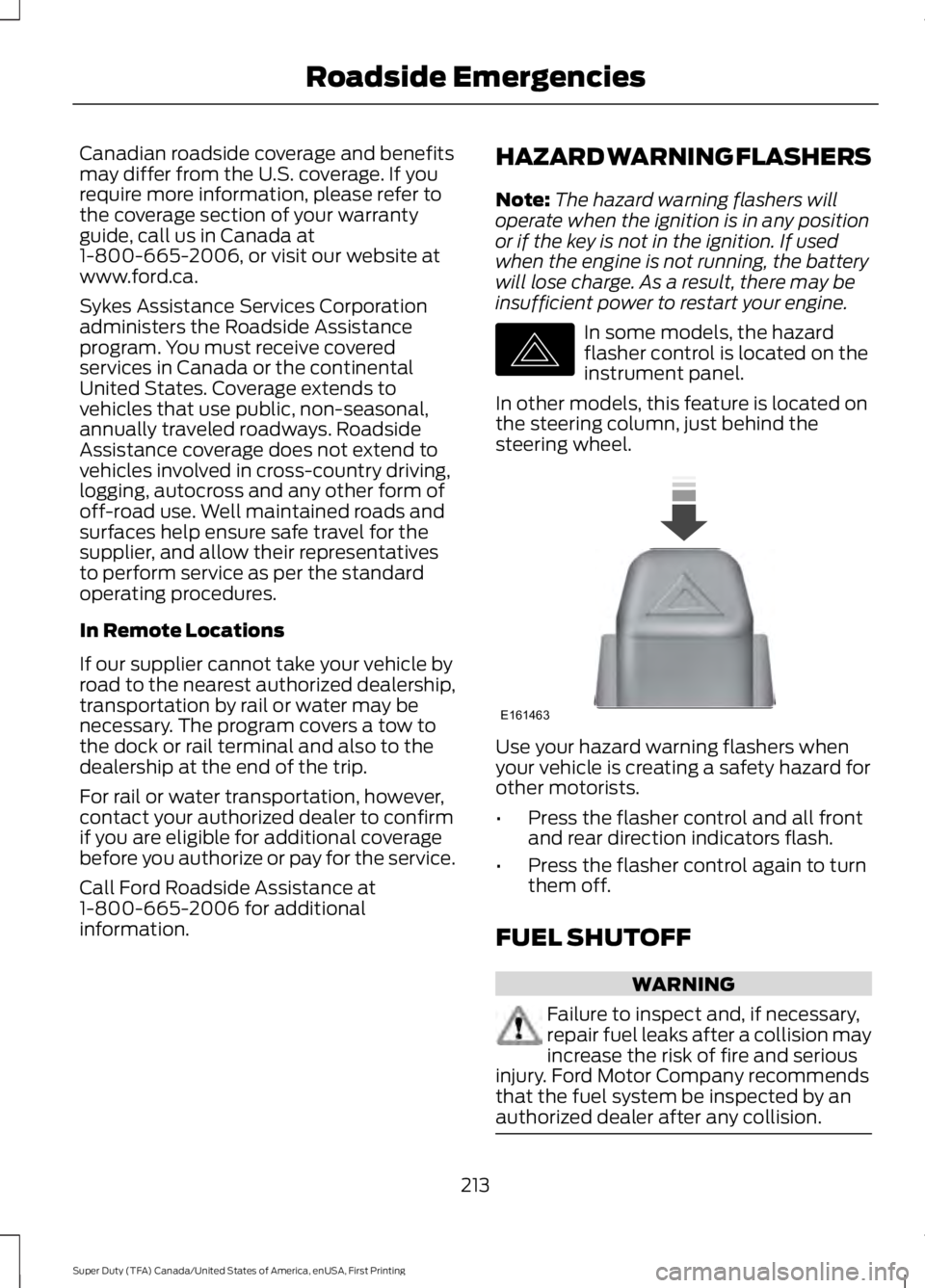
insufficient power to restart your engine. In some models, the hazard
flasher control is located on the
instrument panel.
In other models, this feature is located on
the steering column, just behind the
steering wheel. Use your hazard warning flashers when
your vehicle is creating a safety hazard for
other motorists.
•
Press the flasher control and all front
and rear direction indicators flash.
• Press the flasher control again to turn
them off.
FUEL SHUTOFF WARNING
Failure to inspect and, if necessary,
repair fuel leaks after a collision may
increase the risk of fire and serious
injury. Ford Motor Company recommends
that the fuel system be inspected by an
authorized dealer after any collision. 213
Super Duty (TFA) Canada/United States of America, enUSA, First Printing Roadside EmergenciesE142663 E161463
Page 219 of 507
2. Remove the jumper cable on the
negative (-) terminal of the booster
vehicle battery.
3. Remove the jumper cable from the positive (+) terminal of the booster
vehicle battery.
4. Remove the jumper cable from the positive (+) terminal of the disabled
vehicle battery.
5. Allow the engine to idle for at least one
minute.
POST-CRASH ALERT SYSTEM
The system flashes the direction indicators
and sounds the horn (intermittently) in the
event of a serious impact that deploys an
airbag (front, side, side curtain or Safety
Canopy) or the safety belt pretensioners.
The horn and indicators will turn off when:
• You press the hazard control button.
• You press the panic button on the
remote entry transmitter (if equipped).
• Your vehicle runs out of power.
216
Super Duty (TFA) Canada/United States of America, enUSA, First Printing Roadside Emergencies
Page 232 of 507
Protected components
Fuse amp rating
Fuse or relay number
Driver lumbar motor
7.5A
7
Driver seat switch
Power mirror switch
10A
8
Auxiliary switch relay #3
10A
9
Customer access feed
10A
10
Run/accessory relay
Instrument cluster
10A
11
Interior lighting
15A
12
Lighted running board lamps
Right turn signals and brake lamps
15A
13
Left turn signals and brake lamps
15A
14
Backup lamps, Trailer tow backup relay
15A
15
High-mounted stop lamps
Reverse signal interior mirror
Right low beam headlamp
10A
16
Left low beam headlamp
10A
17
Brake shift interlock
10A
18
Keypad illumination
Passive anti-theft transceiver
Powertrain control module
Amplifier
20A
19
Subwoofer
Power door locks
20A
20
Brake on/off switch
10A
21
Horn
20A
22
Not used (spare)
15A
23
Diagnostic connector
15A
24
Electronic finish panel
Power fold mirror relay
Remote keyless entry
Steering wheel control module
Not used (spare)
15A
25
229
Super Duty (TFA) Canada/United States of America, enUSA, First Printing Fuses
Page 450 of 507
For a complete listing of the accessories
that are available for your vehicle, please
contact your authorized dealer or visit the
online store web site:
Web Address (United States)
www.Accessories.Ford.com Web Address (Canada)
www.Accessories.Ford.ca
Ford Accessories are available for your
vehicle through an authorized Ford dealer.
Ford Motor Company will repair or replace
any properly authorized dealer-installed
Ford Original Accessory found to be
defective in factory-supplied materials or
workmanship during the warranty period,
as well as any component damaged by the
defective accessories.
Ford Motor Company will warrant your
vehicle through the warranty that provides
the greatest benefit:
• 24 months, unlimited mileage.
• The remainder of your new vehicle
limited warranty.
Contact an authorized dealer for details
and a copy of the warranty.
Exterior style
• Bug shields.
• Commercial graphics.*
• Commercial LED warning strobe lights.
• Deflectors.
• Exhaust tip.
• Fog lamps.
• Running boards.
• Splash guards.
• Stainless-steel wheel covers.* •
Step bars.
• Wheel well liners.
Interior style
• Cargo organizers.
• Custom seat covers.*
• Floor mats.
Lifestyle
• Ash cup / smoker's package.
• Bed extender.
• Bedliners and bedmats.
• Racks and carriers.*
• Rear-seat entertainment.*
• Sportliner cargo liner.*
• Tonneau covers*.
• Trailer hitches, wiring harnesses and
accessories.
• Truck bed camping tent.*
Peace of mind
• Back-up alarm.*
• Bed hooks.*
• Bumper and hitch-mounted parking
sensors.*
• Cable lock.*
• Ford Telematics.
• Keyless entry keypad.
• Protective seat covers.*
• Remote start and alarms.
• Speed/Cruise control.
• Tool or Cargo boxes.*
• Wheel locks.
447
Super Duty (TFA) Canada/United States of America, enUSA, First Printing Accessories
Page 502 of 507

Information Messages...............................100
4WD........................................................................\
109
AdvanceTrac ™................................................... 100
Alarm...................................................................... 100
Diesel Messages.................................................. 101
Doors and Locks................................................. 104
Drivetrain............................................................... 104
Engine..................................................................... 105
Fuel........................................................................\
.. 105
Key........................................................................\
... 105
Maintenance........................................................ 106
MyKey®.................................................................. 106
Off Road................................................................. 107
Park Aid.................................................................. 107
Park Brake.............................................................. 107
Power Steering.................................................... 107
Tire Pressure Monitoring System.................108
Trailer...................................................................... 108
Installing Child Seats.....................................16 Child Seats............................................................... 16
Tether Strap Attachment.................................. 22
Tether Strap Attachment (Rear SuperCab Only)..................................................................... 23
Using Cinch Tongue Lap and Shoulder Belts (All Front Center, Super Cab and Crew
Cab Rear Center Positions).......................... 19
Using Lap and Shoulder Belts.......................... 17
Using Lower Anchors and Tethers for CHildren (LATCH)............................................. 21
Using Tether Straps.............................................. 21
Instrument Cluster
.........................................82
Instrument Lighting Dimmer......................73
Interior Lamps..................................................74
Front Map Lamps (If equipped)..................... 74
Rear Dome and Map Lamps............................ 75
Interior Mirror
....................................................79
Auto-Dimming Mirror.......................................... 79
Introduction.........................................................7
J
Jump Starting the Vehicle.........................214 Connecting the Jumper Cables..................... 214
Jump Starting....................................................... 215
Preparing Your Vehicle...................................... 214
Removing the Jumper Cables........................ 215K
Keyless Entry....................................................57
SECURICODE™ KEYLESS ENTRY
KEYPAD
............................................................... 57
Unlocking and Locking the Doors.................. 59
Keys and Remote Controls.........................47
L
Lighting Control................................................71 Headlamp Flasher................................................ 72
High Beams.............................................................. 71
Lighting................................................................71 General Information............................................. 71
Limited Slip Differential
..............................167
Load Carrying.................................................185
Load Limit.......................................................185
Special Loading Instructions for Owners of
Pick-up Trucks and Utility-type
Vehicles.............................................................. 191
Vehicle Loading - with and without a Trailer................................................................. 185
Locking and Unlocking
.................................56
Autolock and Autounlock................................. 56
Battery Saver.......................................................... 57
Illuminated Entry................................................... 57
Power Door Locks................................................ 56
Remote Control.................................................... 56
Smart Unlocks...................................................... 56
Locks
...................................................................56
Lug Nuts See: Changing a Road Wheel....................... 290
M
Maintenance..................................................232 General Information.......................................... 232
Manual Climate Control
.............................110
Manual Seats..................................................119 Manual Lumbar .................................................. 120
Moving the Seat Backward and Forward.............................................................. 119
Recline Adjustment............................................ 119
Media Hub
......................................................328
499
Super Duty (TFA) Canada/United States of America, enUSA, First Printing Index
Page 503 of 507
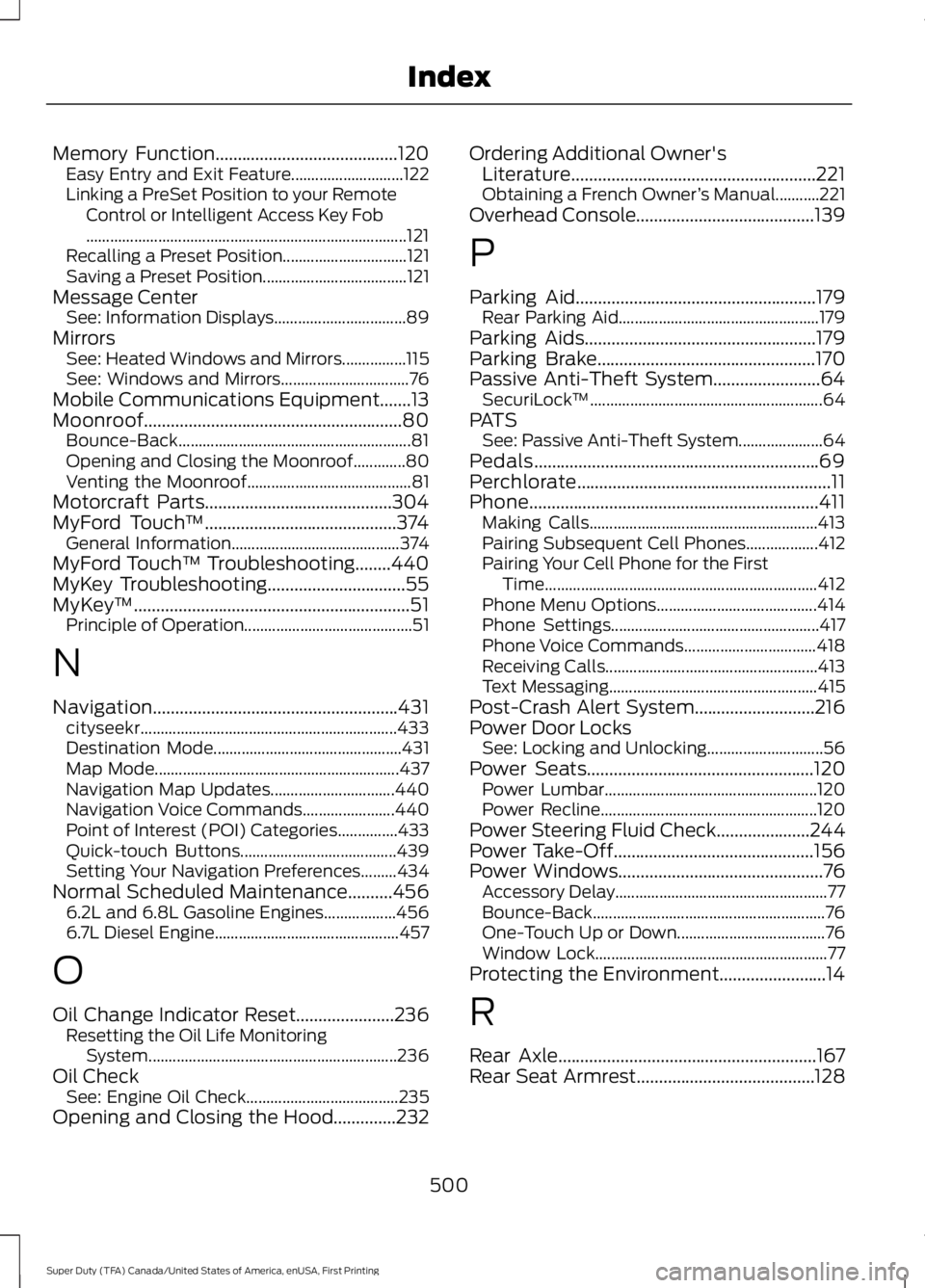
Memory Function.........................................120
Easy Entry and Exit Feature............................ 122
Linking a PreSet Position to your Remote Control or Intelligent Access Key Fob
........................................................................\
........ 121
Recalling a Preset Position............................... 121
Saving a Preset Position.................................... 121
Message Center See: Information Displays................................. 89
Mirrors See: Heated Windows and Mirrors................115
See: Windows and Mirrors................................ 76
Mobile Communications Equipment.......13
Moonroof..........................................................80 Bounce-Back
.......................................................... 81
Opening and Closing the Moonroof.............80
Venting the Moonroof......................................... 81
Motorcraft Parts
..........................................304
MyFord Touch ™...........................................374
General Information.......................................... 374
MyFord Touch ™ Troubleshooting........440
MyKey Troubleshooting...............................55
MyKey ™..............................................................51
Principle of Operation.......................................... 51
N
Navigation.......................................................431 cityseekr................................................................ 433
Destination Mode............................................... 431
Map Mode............................................................. 437
Navigation Map Updates............................... 440
Navigation Voice Commands....................... 440
Point of Interest (POI) Categories...............433
Quick-touch Buttons....................................... 439
Setting Your Navigation Preferences.........434
Normal Scheduled Maintenance..........456 6.2L and 6.8L Gasoline Engines.................. 456
6.7L Diesel Engine.............................................. 457
O
Oil Change Indicator Reset......................236 Resetting the Oil Life Monitoring
System.............................................................. 236
Oil Check See: Engine Oil Check...................................... 235
Opening and Closing the Hood..............232 Ordering Additional Owner's
Literature.......................................................221
Obtaining a French Owner ’s Manual...........221
Overhead Console
........................................139
P
Parking Aid
......................................................179
Rear Parking Aid.................................................. 179
Parking Aids
....................................................179
Parking Brake.................................................170
Passive Anti-Theft System........................64 SecuriLock ™.......................................................... 64
PATS See: Passive Anti-Theft System..................... 64
Pedals................................................................69
Perchlorate.........................................................11
Phone.................................................................411 Making Calls......................................................... 413
Pairing Subsequent Cell Phones.................. 412
Pairing Your Cell Phone for the First Time.................................................................... 412
Phone Menu Options........................................ 414
Phone Settings.................................................... 417
Phone Voice Commands................................. 418
Receiving Calls..................................................... 413
Text Messaging.................................................... 415
Post-Crash Alert System...........................216
Power Door Locks See: Locking and Unlocking............................. 56
Power Seats
...................................................120
Power Lumbar..................................................... 120
Power Recline...................................................... 120
Power Steering Fluid Check
.....................244
Power Take-Off.............................................156
Power Windows..............................................76 Accessory Delay..................................................... 77
Bounce-Back.......................................................... 76
One-Touch Up or Down..................................... 76
Window Lock.......................................................... 77
Protecting the Environment........................14
R
Rear Axle..........................................................167
Rear Seat Armrest........................................128
500
Super Duty (TFA) Canada/United States of America, enUSA, First Printing Index