buttons FORD F250 2016 Owner's Guide
[x] Cancel search | Manufacturer: FORD, Model Year: 2016, Model line: F250, Model: FORD F250 2016Pages: 507, PDF Size: 6.81 MB
Page 346 of 507
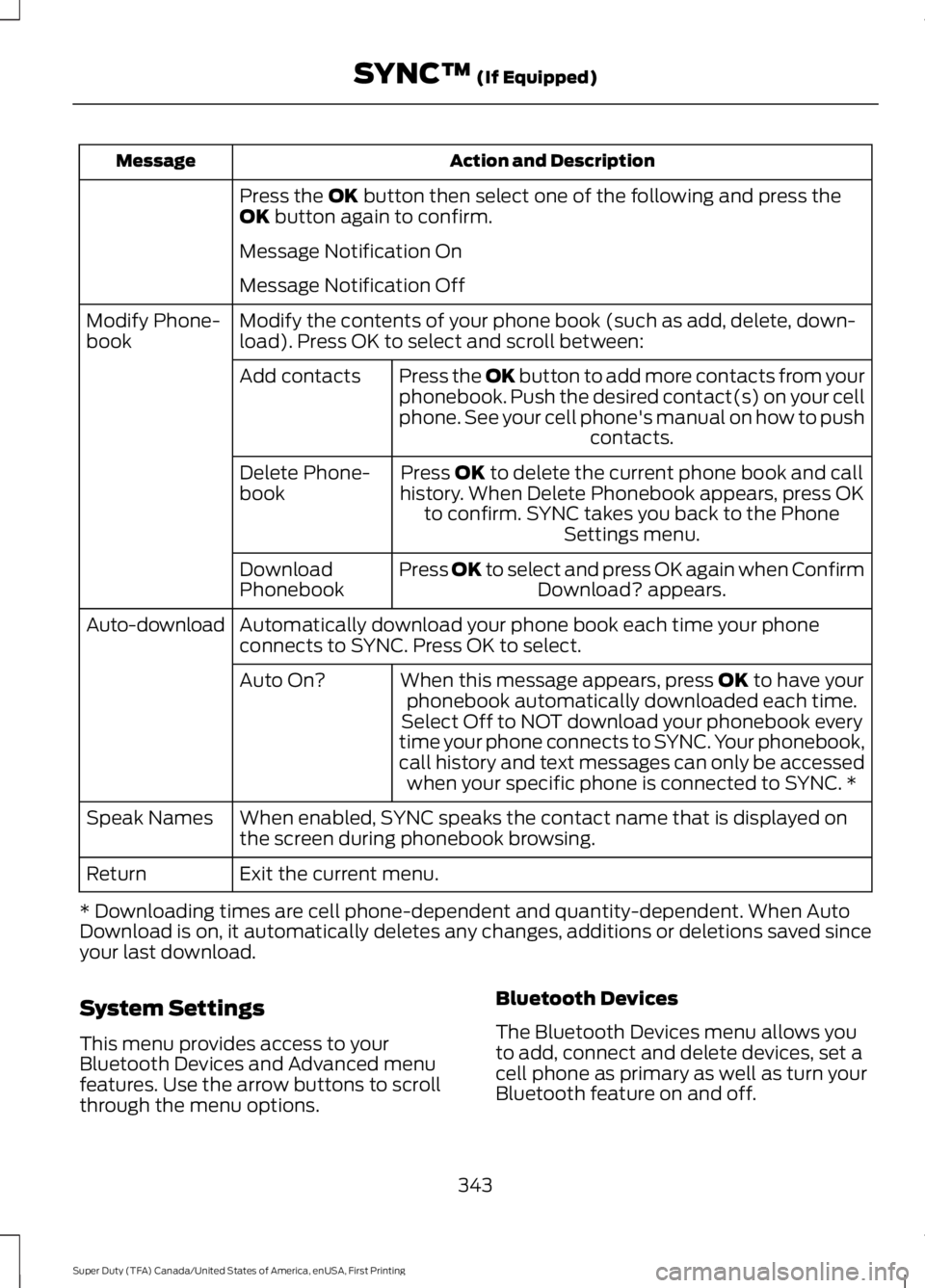
Action and Description
Message
Press the OK button then select one of the following and press the
OK button again to confirm.
Message Notification On
Message Notification Off
Modify the contents of your phone book (such as add, delete, down-
load). Press OK to select and scroll between:
Modify Phone-
book
Press the
OK button to add more contacts from your
phonebook. Push the desired contact(s) on your cell
phone. See your cell phone's manual on how to push contacts.
Add contacts
Press
OK to delete the current phone book and call
history. When Delete Phonebook appears, press OK to confirm. SYNC takes you back to the Phone Settings menu.
Delete Phone-
book
Press
OK to select and press OK again when ConfirmDownload? appears.
Download
Phonebook
Automatically download your phone book each time your phone
connects to SYNC. Press OK to select.
Auto-download
When this message appears, press
OK to have your
phonebook automatically downloaded each time.
Auto On?
Select Off to NOT download your phonebook every
time your phone connects to SYNC. Your phonebook,
call history and text messages can only be accessed when your specific phone is connected to SYNC. *
When enabled, SYNC speaks the contact name that is displayed on
the screen during phonebook browsing.
Speak Names
Exit the current menu.
Return
* Downloading times are cell phone-dependent and quantity-dependent. When Auto
Download is on, it automatically deletes any changes, additions or deletions saved since
your last download.
System Settings
This menu provides access to your
Bluetooth Devices and Advanced menu
features. Use the arrow buttons to scroll
through the menu options. Bluetooth Devices
The Bluetooth Devices menu allows you
to add, connect and delete devices, set a
cell phone as primary as well as turn your
Bluetooth feature on and off.
343
Super Duty (TFA) Canada/United States of America, enUSA, First Printing SYNC™
(If Equipped)
Page 376 of 507
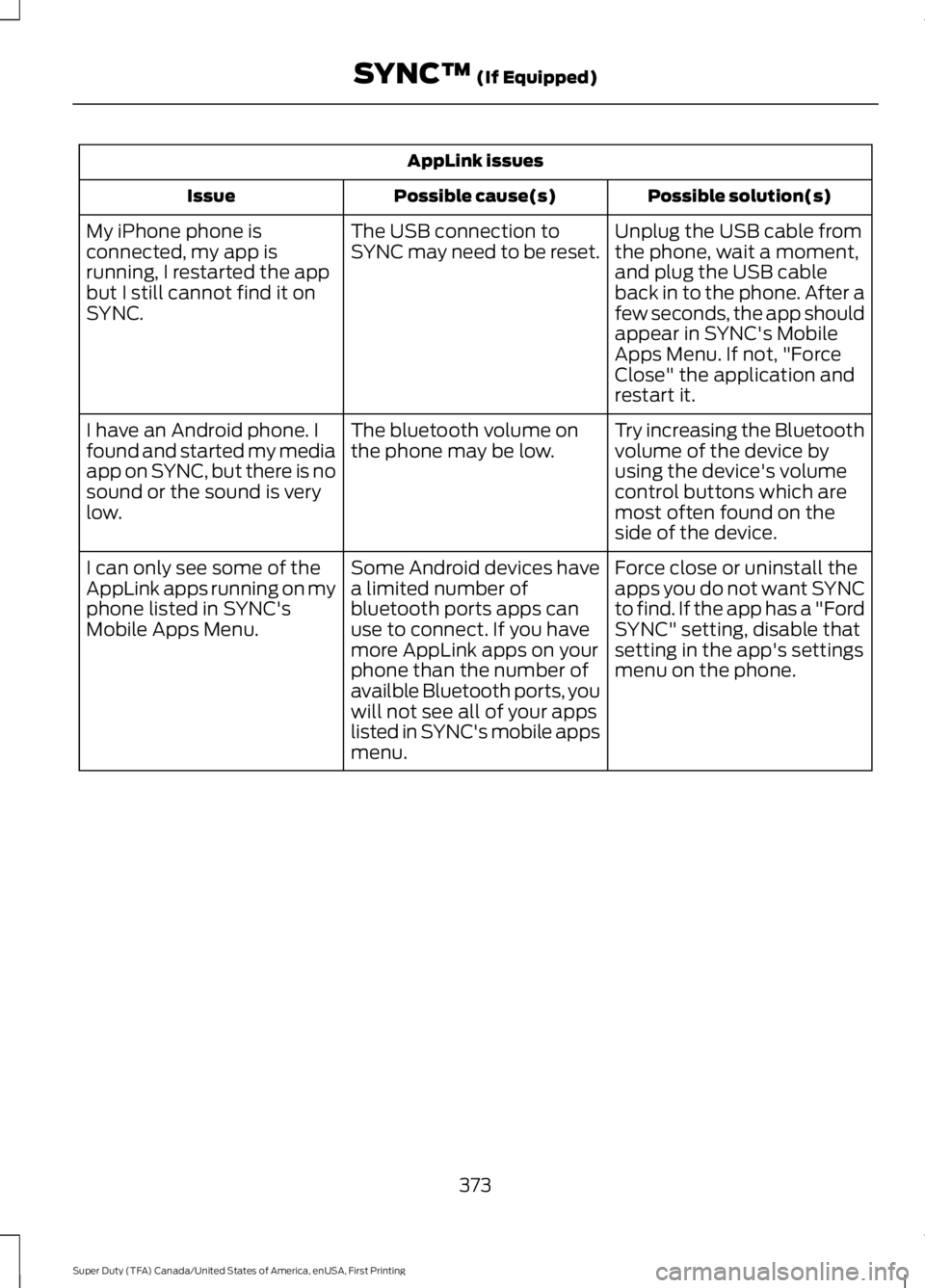
AppLink issues
Possible solution(s)
Possible cause(s)
Issue
Unplug the USB cable from
the phone, wait a moment,
and plug the USB cable
back in to the phone. After a
few seconds, the app should
appear in SYNC's Mobile
Apps Menu. If not, "Force
Close" the application and
restart it.
The USB connection to
SYNC may need to be reset.
My iPhone phone is
connected, my app is
running, I restarted the app
but I still cannot find it on
SYNC.
Try increasing the Bluetooth
volume of the device by
using the device's volume
control buttons which are
most often found on the
side of the device.
The bluetooth volume on
the phone may be low.
I have an Android phone. I
found and started my media
app on SYNC, but there is no
sound or the sound is very
low.
Force close or uninstall the
apps you do not want SYNC
to find. If the app has a "Ford
SYNC" setting, disable that
setting in the app's settings
menu on the phone.
Some Android devices have
a limited number of
bluetooth ports apps can
use to connect. If you have
more AppLink apps on your
phone than the number of
availble Bluetooth ports, you
will not see all of your apps
listed in SYNC's mobile apps
menu.
I can only see some of the
AppLink apps running on my
phone listed in SYNC's
Mobile Apps Menu.
373
Super Duty (TFA) Canada/United States of America, enUSA, First Printing SYNC™ (If Equipped)
Page 397 of 507
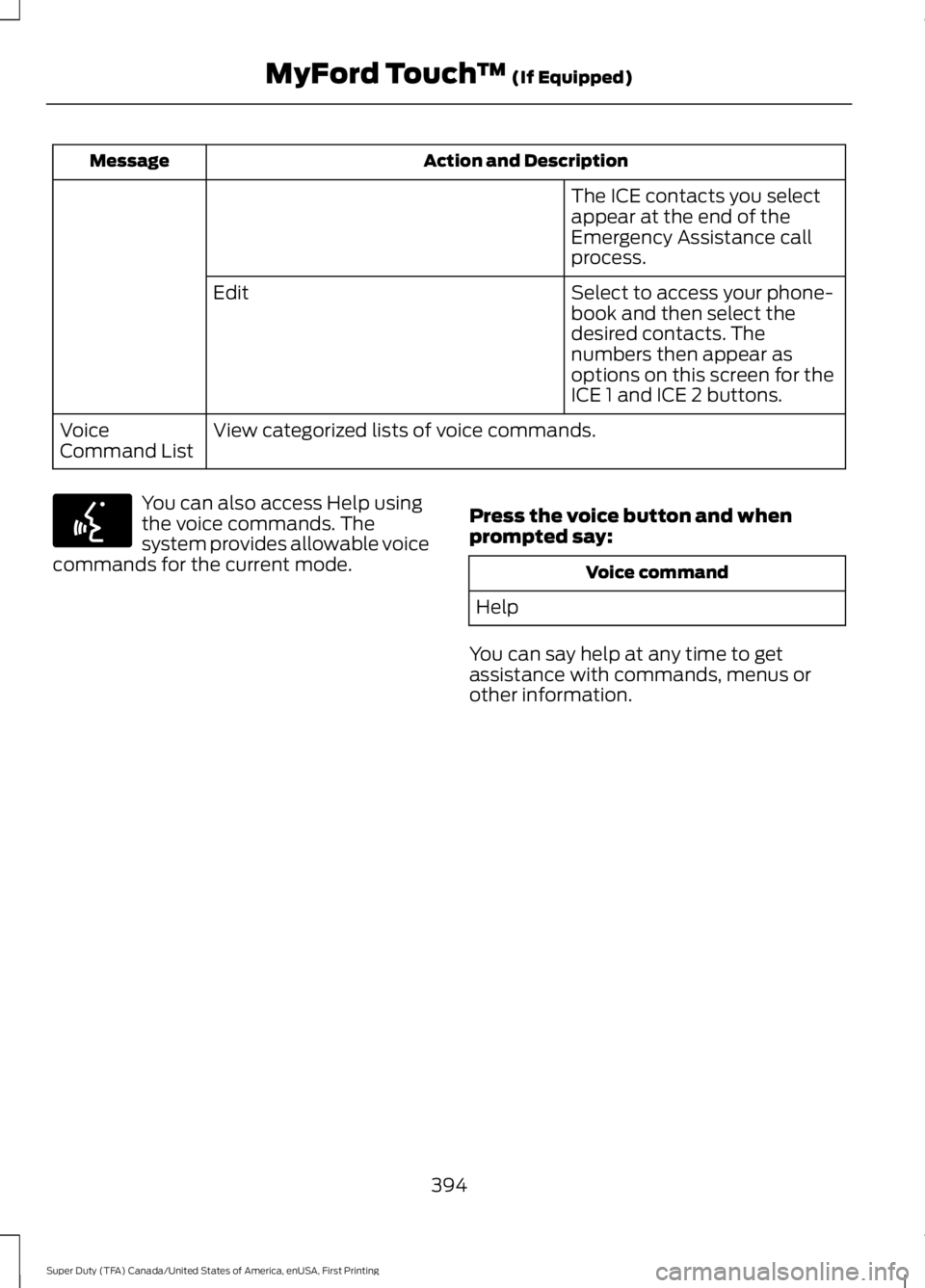
Action and Description
Message
The ICE contacts you select
appear at the end of the
Emergency Assistance call
process.
Select to access your phone-
book and then select the
desired contacts. The
numbers then appear as
options on this screen for the
ICE 1 and ICE 2 buttons.
Edit
View categorized lists of voice commands.
Voice
Command List You can also access Help using
the voice commands. The
system provides allowable voice
commands for the current mode. Press the voice button and when
prompted say: Voice command
Help
You can say help at any time to get
assistance with commands, menus or
other information.
394
Super Duty (TFA) Canada/United States of America, enUSA, First Printing MyFord Touch
™ (If Equipped)E142599
Page 398 of 507
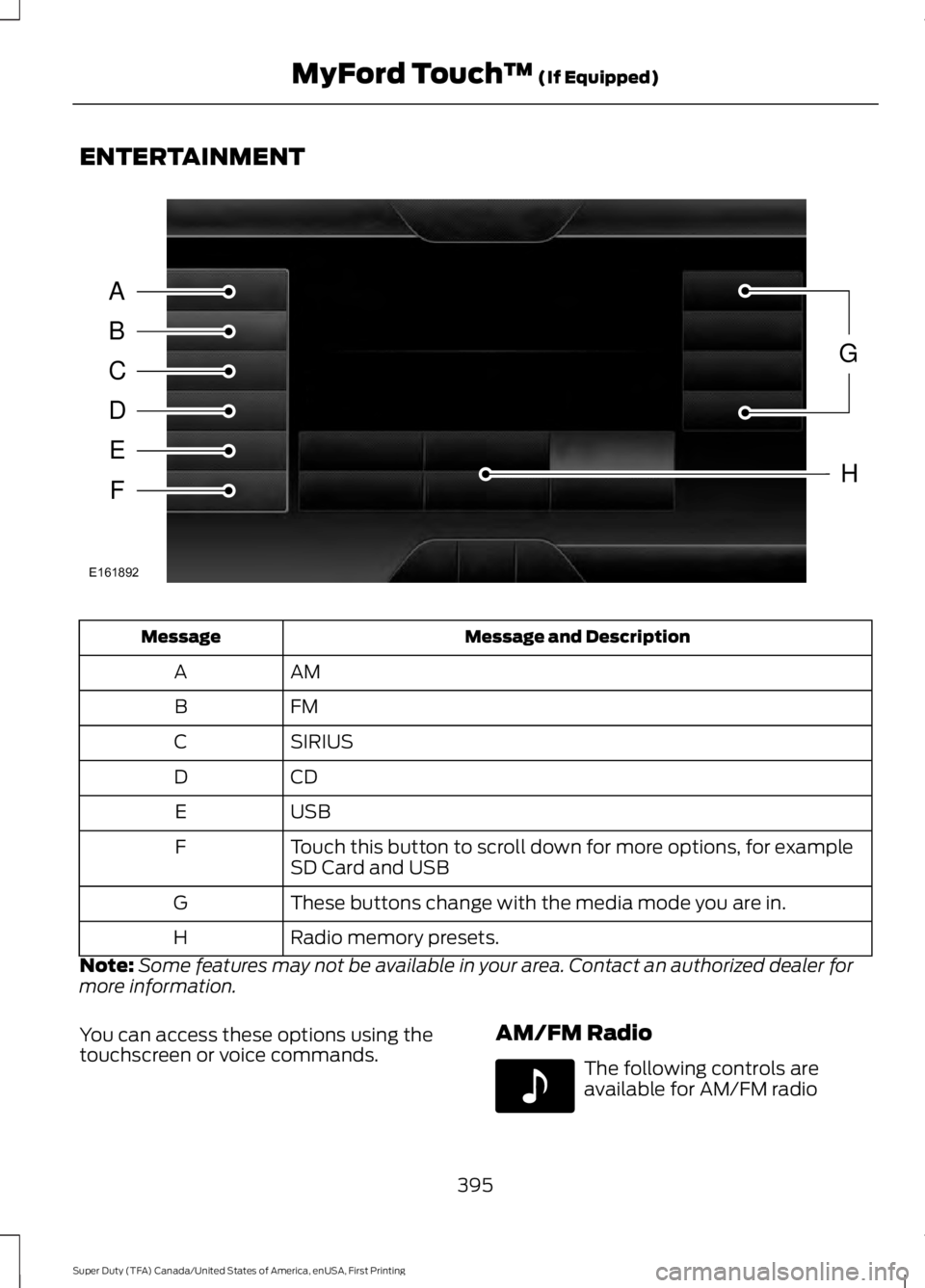
ENTERTAINMENT
Message and Description
Message
AM
A
FM
B
SIRIUS
C
CD
D
USB
E
Touch this button to scroll down for more options, for example
SD Card and USB
F
These buttons change with the media mode you are in.
G
Radio memory presets.
H
Note: Some features may not be available in your area. Contact an authorized dealer for
more information.
You can access these options using the
touchscreen or voice commands. AM/FM Radio The following controls are
available for AM/FM radio
395
Super Duty (TFA) Canada/United States of America, enUSA, First Printing MyFord Touch
™ (If Equipped)A
B
C
D
E
F
G
H
E161892 E142611
Page 404 of 507
SIRIUS® Satellite Radio (If
Activated)
To turn the feature on press the lower left corner of the touchscreen, and then
select:
Action and Description
Menu Item
SIRIUS
You can then select any of the following: Save a channel by pressing and holding one of the memory preset
areas. There is a brief mute while the radio saves the channel.
Sound returns when finished.
Presets
Save the current song, artist, or team as a favorite.
Alerts
If you are listening to music, you can save the song or artist, so the
system can alert you when they are playing on a satellite radio
channel. If you are listening to a sporting event, you can save your
favorite teams so the system can alert you when they are playing
on a satellite radio channel. You can also edit alerts or turn alerts
on or off.
When an alert appears on the screen, you can choose to tune to
the channel, cancel the alert or turn off alerts.
Replay audio on the current channel. You can replay approximately
45 minutes of audio as long as you have remained tuned to the
current station. Changing stations erases the previous audio.
Replay
While in replay mode:
Press and release the seek buttons to hear the previous or next
song.
Press and hold the seek buttons to reverse or fast forward in the
current track.
Press play or pause to play or pause the audio.
Press the button again to return to live audio.
Touch this button to hear a brief sampling of channels.
Scan
Touch this button to view a list of all available stations. Scroll to
see more categories. Touch the station you want to listen to.
Browse
Note: SIRIUS does not support the Alert feature on all channels. Ford Motor Company shall
not be responsible for Alert feature variation.
401
Super Duty (TFA) Canada/United States of America, enUSA, First Printing MyFord Touch
™ (If Equipped)E142611
Page 426 of 507
Sirius Travel Link (If Equipped)
WARNING
Driving while distracted can result in
loss of vehicle control, crash and
injury. We strongly recommend that
you use extreme caution when using any
device that may take your focus off the
road. Your primary responsibility is the safe
operation of your vehicle. We recommend
against the use of any handheld device
while driving and encourage the use of
voice-operated systems when possible.
Make sure you are aware of all applicable
local laws that may affect the use of
electronic devices while driving. Note:
In order to use Sirius Travel Link, your
vehicle must be equipped with navigation
and your navigation SD card must be in the
SD card slot. Note:
A paid subscription is required to
access and use these features. Go to
www.siriusxm.com/travellink for more
information.
Note: Visit www.siriusxm.com/traffic and
click on Coverage map and details for a
complete listing of all traffic areas covered
by Sirius Travel Link.
Note: Neither Sirius nor Ford is responsible
for any errors or inaccuracies in the Sirius
Travel Link services or its use in vehicles.
When you subscribe to Sirius Travel Link,
it can help you locate the best gas prices,
find movie listings, get current traffic alerts,
view the current weather map, get
accurate ski conditions and see scores to
current sports games. Action and Description
Menu Item
Touch these buttons to identify traffic incidents on your route,
nearby your vehicle ’s current location or near any of your
favorite places, if programmed.
Traffic on Route
Traffic Nearby
Touch this button to view fuel prices at stations close to your
vehicle’s location or on an active navigation route.
Fuel Prices
Touch this button to view nearby movie theaters and their
show times, if available.
Movie Listings
Touch this button to view the nearby weather, current weather,
or the five day forecast for the chosen area.
Weather
Select to see the weather map,
which can show storms, radar
information, charts and winds.
Map
423
Super Duty (TFA) Canada/United States of America, enUSA, First Printing MyFord Touch
™
(If Equipped)
Page 433 of 507
Touch Rear Control to allow the rear seat passengers to adjust the rear climate
settings. Touch it again to prevent the rear seat passengers from adjusting the
settings.
Rear Control automatically turns off when you use the touchscreen
to adjust the rear climate settings.
Touch + or – to adjust the temperature.
To adjust fan speed, touch + or – next to the fan icon.
Touch
Rear again to close the rear controls. Closing the rear climate control
functions does not affect their current settings.
Recirculated air:
Touch the button to switch between outside air and
recirculated air. When you select recirculated air, the air currently in the
passenger compartment recirculates. This may reduce the time needed to cool
the interior (when used with
A/C) and may reduce unwanted odors from
entering your vehicle.
E
Note:
Recirculated air may turn off automatically (or be prevented from turning
on) in all airflow modes except Max A/C to reduce risk of fogging. Recirculated
air may also turn on and off automatically in Panel or Panel and Floor airflow
modes during hot weather in order to improve cooling efficiency.
MAX A/C: Touch the button to maximize cooling. Recirculated air flows through
the instrument panel vents, air conditioning automatically turns on, and the fan
automatically adjusts to the highest speed.
F
A/C:
Touch the button to switch air conditioning compressor on or off. Use air
conditioning with recirculated air to improve cooling performance and efficiency.
G
Note:
In certain conditions (such as when using Max Defrost), the air
conditioning compressor may continue to operate even after you switch off the
air conditioning with the
A/C button.
AUTO:
Touch the button to turn on automatic operation. Select the desired
temperature using the temperature control. The system adjusts fan speed, air
distribution, air conditioning operation, and selects outside air or recirculated
air to heat or cool the vehicle in order to maintain the desired temperature. You
can also use the AUTO button to turn off dual zone operation by touching and
holding the button for more than two seconds.
H
Heated rear window: Turns the heated rear window on and off. See the heated
Windows and Mirrors chapter in your owner manual.
I
Defrost: Press the button to distribute air to the windshield vents and de-mister.
Air distribution to instrument panel and footwell vents turn off. You can use
this setting to defog and clear the windshield of a thin covering of ice.
J
Air distribution control:
Touch these buttons to turn airflow from the
windshield, instrument panel, or footwell vents on or off. The system can
distribute air through any combination of these vents.
K
Driver settings:
L
430
Super Duty (TFA) Canada/United States of America, enUSA, First Printing MyFord Touch
™
(If Equipped)
Page 441 of 507
You can also select the following
options:
Description
Menu Items
Switches between
full map, street list
and exit view in
route guidance.
View
Displays a pop-up
box that allows
direct access to
navigation settings.
Menu Press the speaker button on the
map to mute route guidance.
When the light on the button
illuminates, the feature is on. The speaker
button appears on the map only when
route guidance is active. Re-center the map by pressing
this icon whenever you scroll the
map away from your vehicle
’s
current location.
Auto Zoom
Press the green bar to access map mode,
then select the + or - zoom button to bring
up the zoom level and Auto buttons on the
touchscreen. When you press Auto, Auto
Zoom turns on and Auto displays in the
bottom left corner of the screen in the map
scale. The map zoom level then
synchronizes with vehicle speed. The
slower your vehicle is traveling, the farther
the map zooms in; the faster your vehicle
is traveling, the farther the map zooms out.
To switch off the feature, just press the
+
or - button again.
In 3D mode, rotate the map view by
swiping your finger across the shaded bar
with the arrows. The ETA box under the zoom buttons
appears when a route is active and
displays the distance and time to your
destination. If the button is pressed, a pop
up appears with the destination listed (and
waypoint if applicable) along with mileage
and time to destination. You may also
select to have either the estimated time
to reach your destination or your estimated
arrival time.
Map Icons
Vehicle mark shows the current
location of your vehicle. It stays
in the center of the map display,
except when in scroll mode.
Scroll cursor
allows you to
scroll the map; the fixed icon is
in the center of the screen. The
map position closest to the
cursor is in a window on the top
center part of the screen. Address book entry default
icon(s)
indicates the location
on the map of an address book
entry. This is the default symbol
shown after the entry has been
stored to the Address Book by any method
other than the map. You can select from
any of the 22 icons available. You can use
each icon more than once. Home
indicates the location on
the map currently stored as the
home position. You can only
save one address from the
Address Book as your Home
entry. You cannot change this icon. POI (Point Of Interest) icons
indicate locations of any point
of interest categories you choose
to display on the map. You can
choose to display three point of
interest categories on the map at one time.
438
Super Duty (TFA) Canada/United States of America, enUSA, First Printing MyFord Touch
™
(If Equipped)E174017 E146188 E142646 E142647 E142648 E142649 E142650
Page 442 of 507
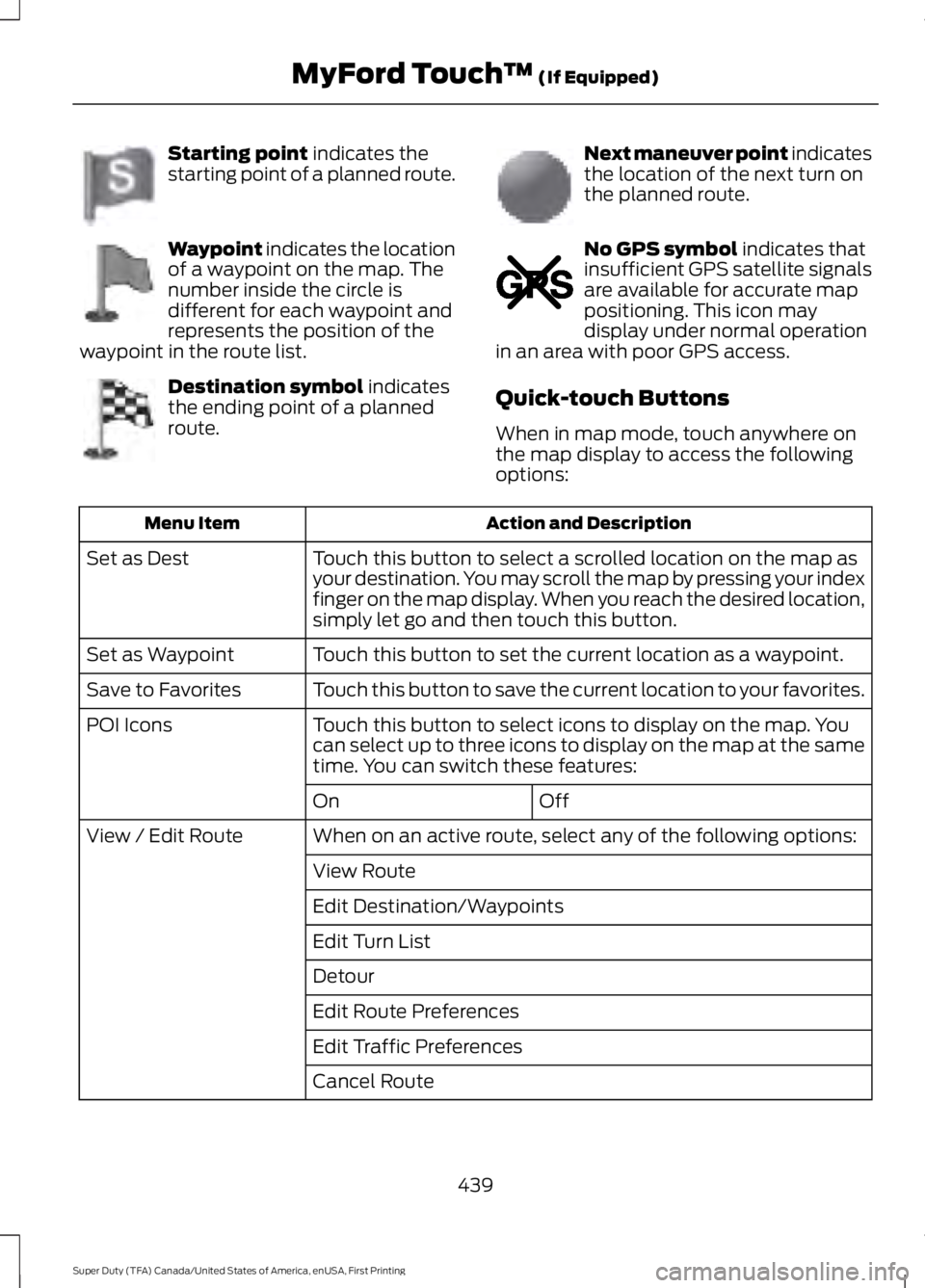
Starting point indicates the
starting point of a planned route. Waypoint indicates the location
of a waypoint on the map. The
number inside the circle is
different for each waypoint and
represents the position of the
waypoint in the route list. Destination symbol
indicates
the ending point of a planned
route. Next maneuver point indicates
the location of the next turn on
the planned route.
No GPS symbol
indicates that
insufficient GPS satellite signals
are available for accurate map
positioning. This icon may
display under normal operation
in an area with poor GPS access.
Quick-touch Buttons
When in map mode, touch anywhere on
the map display to access the following
options: Action and Description
Menu Item
Touch this button to select a scrolled location on the map as
your destination. You may scroll the map by pressing your index
finger on the map display. When you reach the desired location,
simply let go and then touch this button.
Set as Dest
Touch this button to set the current location as a waypoint.
Set as Waypoint
Touch this button to save the current location to your favorites.
Save to Favorites
Touch this button to select icons to display on the map. You
can select up to three icons to display on the map at the same
time. You can switch these features:
POI Icons
Off
On
When on an active route, select any of the following options:
View / Edit Route
View Route
Edit Destination/Waypoints
Edit Turn List
Detour
Edit Route Preferences
Edit Traffic Preferences
Cancel Route
439
Super Duty (TFA) Canada/United States of America, enUSA, First Printing MyFord Touch
™
(If Equipped)E142651 E142652 E142653 E142654 E142655
Page 503 of 507
Memory Function.........................................120
Easy Entry and Exit Feature............................ 122
Linking a PreSet Position to your Remote Control or Intelligent Access Key Fob
........................................................................\
........ 121
Recalling a Preset Position............................... 121
Saving a Preset Position.................................... 121
Message Center See: Information Displays................................. 89
Mirrors See: Heated Windows and Mirrors................115
See: Windows and Mirrors................................ 76
Mobile Communications Equipment.......13
Moonroof..........................................................80 Bounce-Back
.......................................................... 81
Opening and Closing the Moonroof.............80
Venting the Moonroof......................................... 81
Motorcraft Parts
..........................................304
MyFord Touch ™...........................................374
General Information.......................................... 374
MyFord Touch ™ Troubleshooting........440
MyKey Troubleshooting...............................55
MyKey ™..............................................................51
Principle of Operation.......................................... 51
N
Navigation.......................................................431 cityseekr................................................................ 433
Destination Mode............................................... 431
Map Mode............................................................. 437
Navigation Map Updates............................... 440
Navigation Voice Commands....................... 440
Point of Interest (POI) Categories...............433
Quick-touch Buttons....................................... 439
Setting Your Navigation Preferences.........434
Normal Scheduled Maintenance..........456 6.2L and 6.8L Gasoline Engines.................. 456
6.7L Diesel Engine.............................................. 457
O
Oil Change Indicator Reset......................236 Resetting the Oil Life Monitoring
System.............................................................. 236
Oil Check See: Engine Oil Check...................................... 235
Opening and Closing the Hood..............232 Ordering Additional Owner's
Literature.......................................................221
Obtaining a French Owner ’s Manual...........221
Overhead Console
........................................139
P
Parking Aid
......................................................179
Rear Parking Aid.................................................. 179
Parking Aids
....................................................179
Parking Brake.................................................170
Passive Anti-Theft System........................64 SecuriLock ™.......................................................... 64
PATS See: Passive Anti-Theft System..................... 64
Pedals................................................................69
Perchlorate.........................................................11
Phone.................................................................411 Making Calls......................................................... 413
Pairing Subsequent Cell Phones.................. 412
Pairing Your Cell Phone for the First Time.................................................................... 412
Phone Menu Options........................................ 414
Phone Settings.................................................... 417
Phone Voice Commands................................. 418
Receiving Calls..................................................... 413
Text Messaging.................................................... 415
Post-Crash Alert System...........................216
Power Door Locks See: Locking and Unlocking............................. 56
Power Seats
...................................................120
Power Lumbar..................................................... 120
Power Recline...................................................... 120
Power Steering Fluid Check
.....................244
Power Take-Off.............................................156
Power Windows..............................................76 Accessory Delay..................................................... 77
Bounce-Back.......................................................... 76
One-Touch Up or Down..................................... 76
Window Lock.......................................................... 77
Protecting the Environment........................14
R
Rear Axle..........................................................167
Rear Seat Armrest........................................128
500
Super Duty (TFA) Canada/United States of America, enUSA, First Printing Index