bluetooth FORD F250 SUPER DUTY 2014 Owner's Manual
[x] Cancel search | Manufacturer: FORD, Model Year: 2014, Model line: F250 SUPER DUTY, Model: FORD F250 SUPER DUTY 2014Pages: 460, PDF Size: 6.55 MB
Page 348 of 460
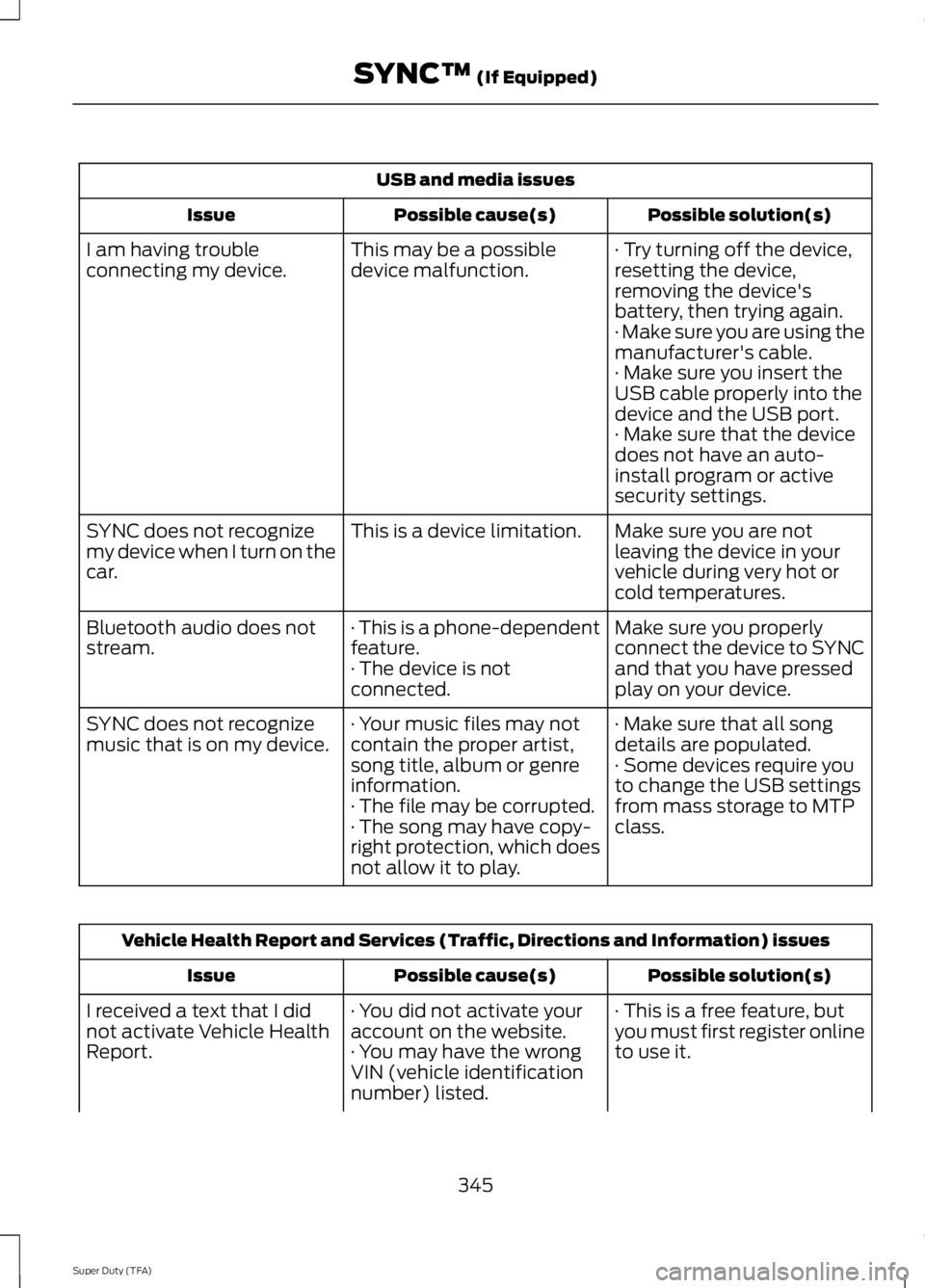
USB and media issues
Possible solution(s)Possible cause(s)Issue
· Try turning off the device,resetting the device,removing the device'sbattery, then trying again.
This may be a possibledevice malfunction.I am having troubleconnecting my device.
· Make sure you are using themanufacturer's cable.· Make sure you insert theUSB cable properly into thedevice and the USB port.· Make sure that the devicedoes not have an auto-install program or activesecurity settings.
Make sure you are notleaving the device in yourvehicle during very hot orcold temperatures.
This is a device limitation.SYNC does not recognizemy device when I turn on thecar.
Make sure you properlyconnect the device to SYNCand that you have pressedplay on your device.
· This is a phone-dependentfeature.· The device is notconnected.
Bluetooth audio does notstream.
· Make sure that all songdetails are populated.· Your music files may notcontain the proper artist,song title, album or genreinformation.
SYNC does not recognizemusic that is on my device.· Some devices require youto change the USB settingsfrom mass storage to MTPclass.· The file may be corrupted.· The song may have copy-right protection, which doesnot allow it to play.
Vehicle Health Report and Services (Traffic, Directions and Information) issues
Possible solution(s)Possible cause(s)Issue
· This is a free feature, butyou must first register onlineto use it.
· You did not activate youraccount on the website.· You may have the wrongVIN (vehicle identificationnumber) listed.
I received a text that I didnot activate Vehicle HealthReport.
345
Super Duty (TFA)
SYNC™ (If Equipped)
Page 349 of 460
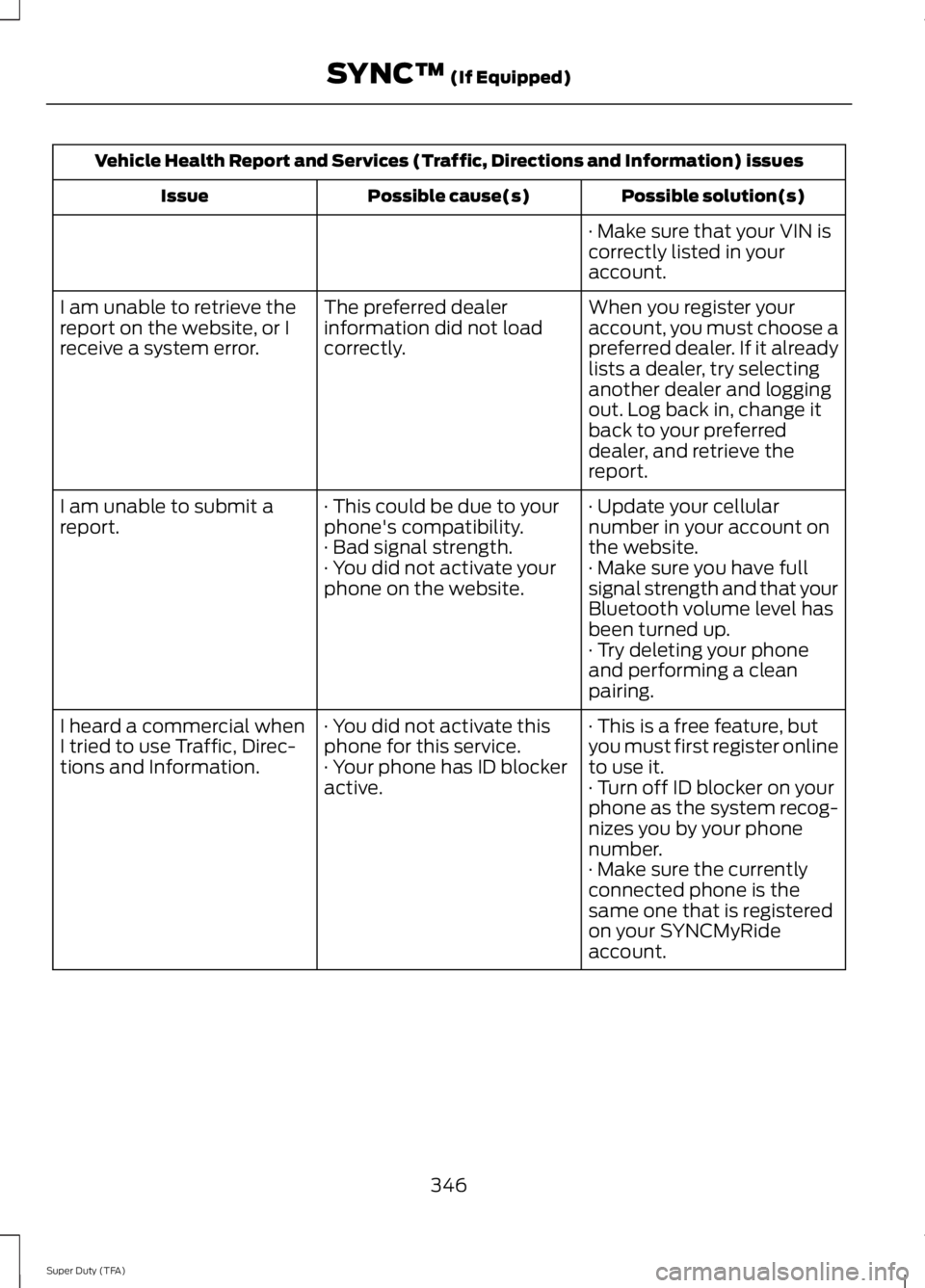
Vehicle Health Report and Services (Traffic, Directions and Information) issues
Possible solution(s)Possible cause(s)Issue
· Make sure that your VIN iscorrectly listed in youraccount.
When you register youraccount, you must choose apreferred dealer. If it alreadylists a dealer, try selectinganother dealer and loggingout. Log back in, change itback to your preferreddealer, and retrieve thereport.
The preferred dealerinformation did not loadcorrectly.
I am unable to retrieve thereport on the website, or Ireceive a system error.
· Update your cellularnumber in your account onthe website.
· This could be due to yourphone's compatibility.· Bad signal strength.
I am unable to submit areport.
· Make sure you have fullsignal strength and that yourBluetooth volume level hasbeen turned up.
· You did not activate yourphone on the website.
· Try deleting your phoneand performing a cleanpairing.
· This is a free feature, butyou must first register onlineto use it.
· You did not activate thisphone for this service.· Your phone has ID blockeractive.
I heard a commercial whenI tried to use Traffic, Direc-tions and Information.· Turn off ID blocker on yourphone as the system recog-nizes you by your phonenumber.· Make sure the currentlyconnected phone is thesame one that is registeredon your SYNCMyRideaccount.
346
Super Duty (TFA)
SYNC™ (If Equipped)
Page 355 of 460
Monday-Saturday, 8:30am-9:00pm EST.
Sunday, 10:30am-7:30pm EST.
In the United States, call: 1-800-392-3673.
In Canada, call: 1-800-565-3673.
Times are subject to change due toholidays.
Safety Information
WARNING
Driving while distracted can result inloss of vehicle control, crash andinjury. We strongly recommend thatyou use extreme caution when using anydevice that may take your focus off theroad. Your primary responsibility is the safeoperation of your vehicle. We recommendagainst the use of any hand-held devicewhile driving and encourage the use ofvoice-operated systems when possible.Make sure you are aware of all applicablelocal laws that may affect the use ofelectronic devices while driving.
•Do not attempt to service or repair thesystem. See an authorized dealer.
•Do not operate playing devices if thepower cords or cables are broken, splitor damaged. Place cords and cablesout of the way, so they do not interferewith the operation of pedals, seats,compartments or safe driving abilities.
•Do not leave playing devices in yourvehicle during extreme conditions as itcould cause them damage. See yourdevice's user guide for furtherinformation.
•For your safety, some SYNC functionsare speed-dependent. Their use islimited to when your vehicle is travelingat speeds under 3 mph (5 km/h).
Make sure that you review your device'smanual before using it with SYNC.
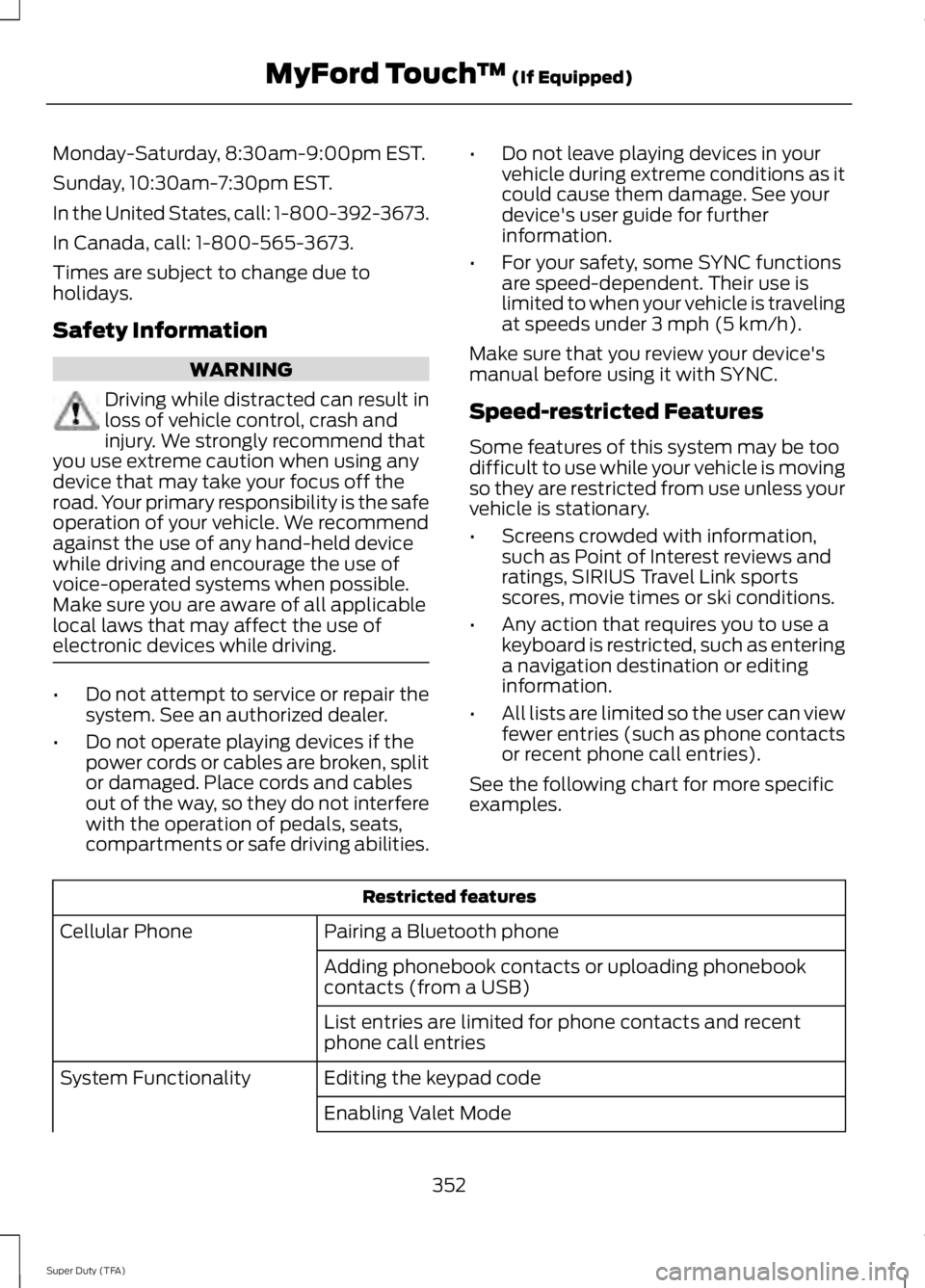
Speed-restricted Features
Some features of this system may be toodifficult to use while your vehicle is movingso they are restricted from use unless yourvehicle is stationary.
•Screens crowded with information,such as Point of Interest reviews andratings, SIRIUS Travel Link sportsscores, movie times or ski conditions.
•Any action that requires you to use akeyboard is restricted, such as enteringa navigation destination or editinginformation.
•All lists are limited so the user can viewfewer entries (such as phone contactsor recent phone call entries).
See the following chart for more specificexamples.
Restricted features
Pairing a Bluetooth phoneCellular Phone
Adding phonebook contacts or uploading phonebookcontacts (from a USB)
List entries are limited for phone contacts and recentphone call entries
Editing the keypad codeSystem Functionality
Enabling Valet Mode
352
Super Duty (TFA)
MyFord Touch™ (If Equipped)
Page 358 of 460
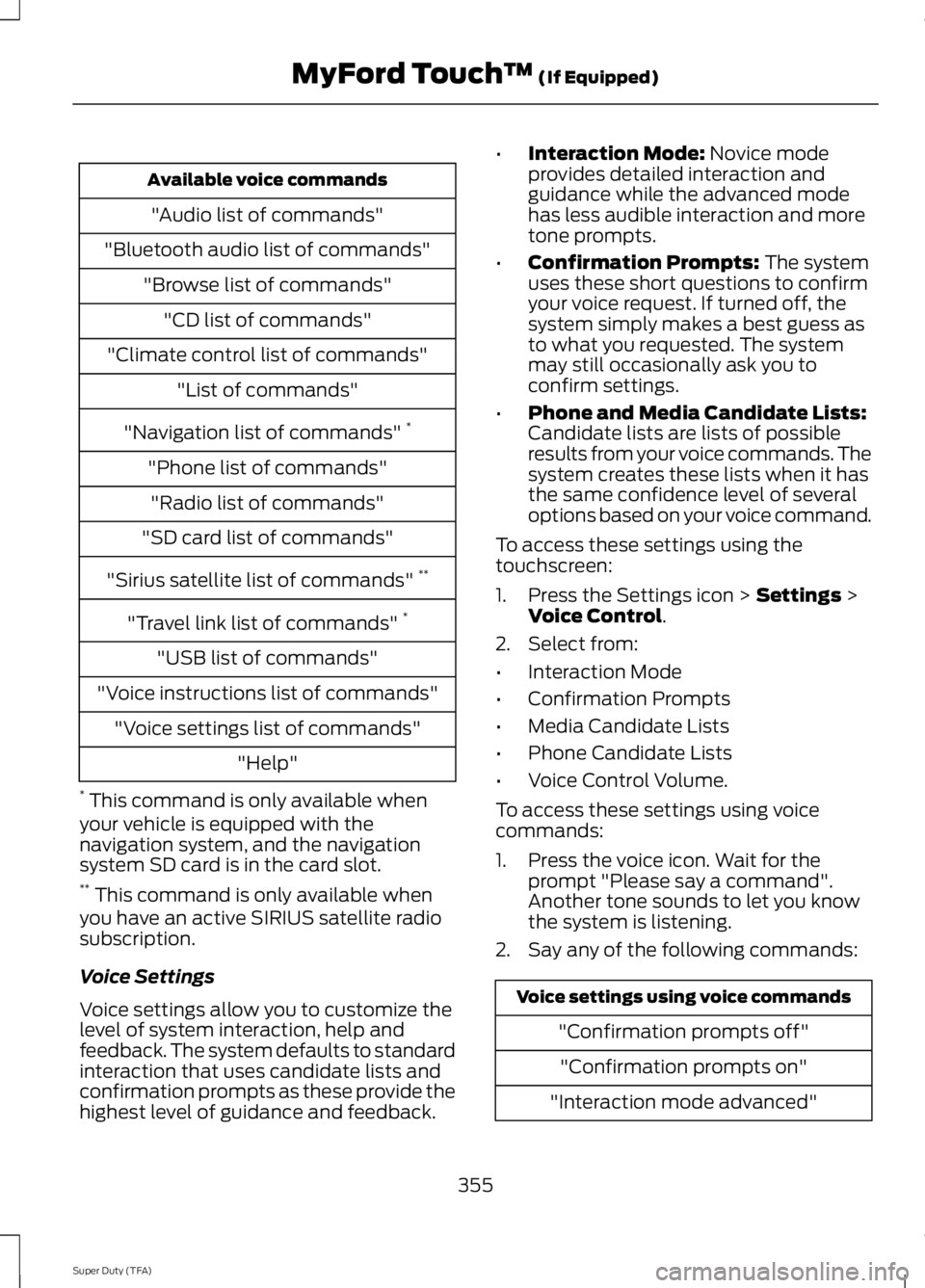
Available voice commands
"Audio list of commands"
"Bluetooth audio list of commands"
"Browse list of commands"
"CD list of commands"
"Climate control list of commands"
"List of commands"
"Navigation list of commands" *
"Phone list of commands"
"Radio list of commands"
"SD card list of commands"
"Sirius satellite list of commands" **
"Travel link list of commands" *
"USB list of commands"
"Voice instructions list of commands"
"Voice settings list of commands"
"Help"
* This command is only available whenyour vehicle is equipped with thenavigation system, and the navigationsystem SD card is in the card slot.** This command is only available whenyou have an active SIRIUS satellite radiosubscription.
Voice Settings
Voice settings allow you to customize thelevel of system interaction, help andfeedback. The system defaults to standardinteraction that uses candidate lists andconfirmation prompts as these provide thehighest level of guidance and feedback.
•Interaction Mode: Novice modeprovides detailed interaction andguidance while the advanced modehas less audible interaction and moretone prompts.
•Confirmation Prompts: The systemuses these short questions to confirmyour voice request. If turned off, thesystem simply makes a best guess asto what you requested. The systemmay still occasionally ask you toconfirm settings.
•Phone and Media Candidate Lists:Candidate lists are lists of possibleresults from your voice commands. Thesystem creates these lists when it hasthe same confidence level of severaloptions based on your voice command.
To access these settings using thetouchscreen:
1. Press the Settings icon > Settings >Voice Control.
2. Select from:
•Interaction Mode
•Confirmation Prompts
•Media Candidate Lists
•Phone Candidate Lists
•Voice Control Volume.
To access these settings using voicecommands:
1. Press the voice icon. Wait for theprompt "Please say a command".Another tone sounds to let you knowthe system is listening.
2. Say any of the following commands:
Voice settings using voice commands
"Confirmation prompts off"
"Confirmation prompts on"
"Interaction mode advanced"
355
Super Duty (TFA)
MyFord Touch™ (If Equipped)
Page 363 of 460
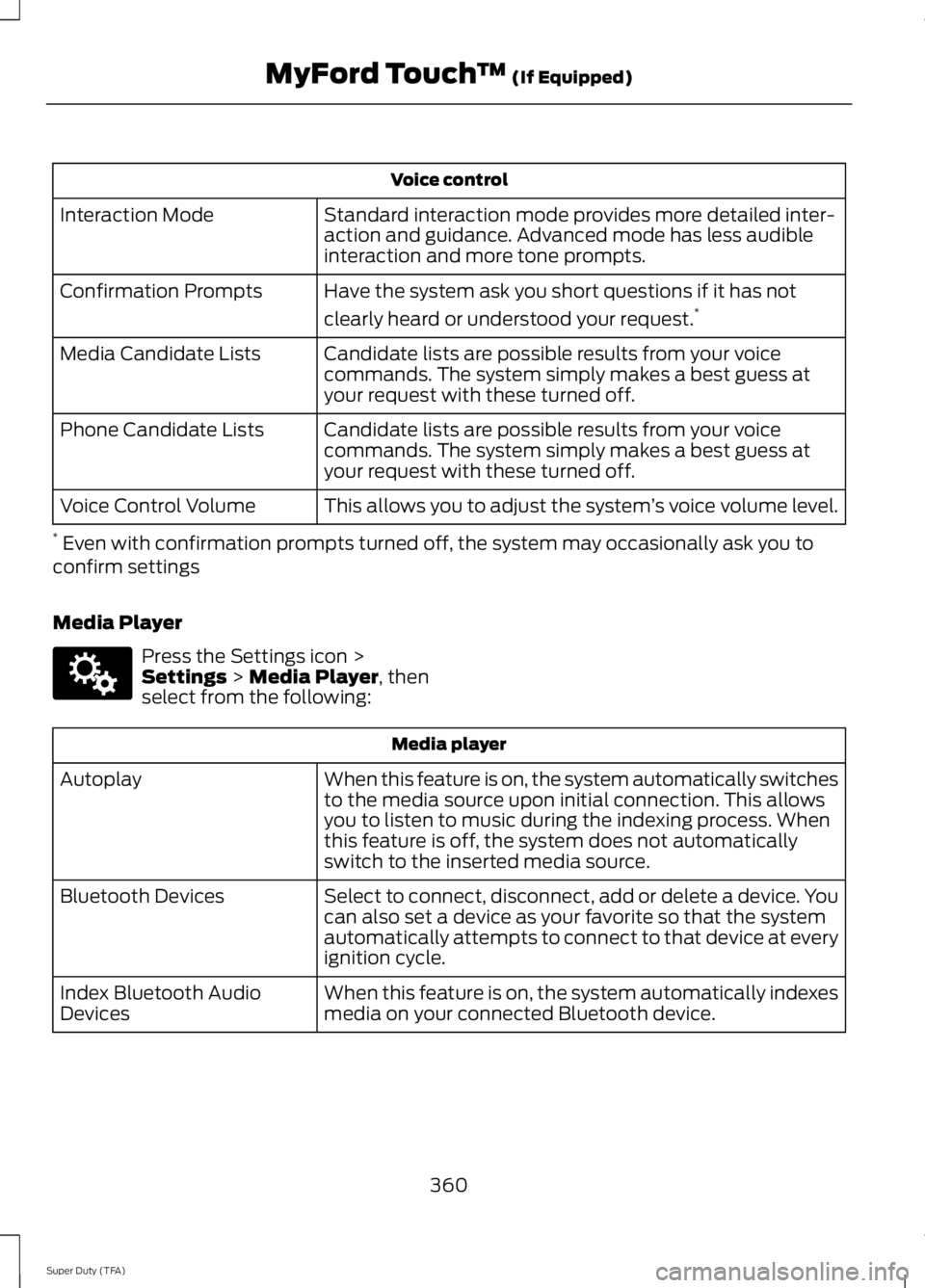
Voice control
Standard interaction mode provides more detailed inter-action and guidance. Advanced mode has less audibleinteraction and more tone prompts.
Interaction Mode
Have the system ask you short questions if it has not
clearly heard or understood your request.*Confirmation Prompts
Candidate lists are possible results from your voicecommands. The system simply makes a best guess atyour request with these turned off.
Media Candidate Lists
Candidate lists are possible results from your voicecommands. The system simply makes a best guess atyour request with these turned off.
Phone Candidate Lists
This allows you to adjust the system’s voice volume level.Voice Control Volume
* Even with confirmation prompts turned off, the system may occasionally ask you toconfirm settings
Media Player
Press the Settings icon >Settings > Media Player, thenselect from the following:
Media player
When this feature is on, the system automatically switchesto the media source upon initial connection. This allowsyou to listen to music during the indexing process. Whenthis feature is off, the system does not automaticallyswitch to the inserted media source.
Autoplay
Select to connect, disconnect, add or delete a device. Youcan also set a device as your favorite so that the systemautomatically attempts to connect to that device at everyignition cycle.
Bluetooth Devices
When this feature is on, the system automatically indexesmedia on your connected Bluetooth device.Index Bluetooth AudioDevices
360
Super Duty (TFA)
MyFord Touch™ (If Equipped)E142607
Page 365 of 460
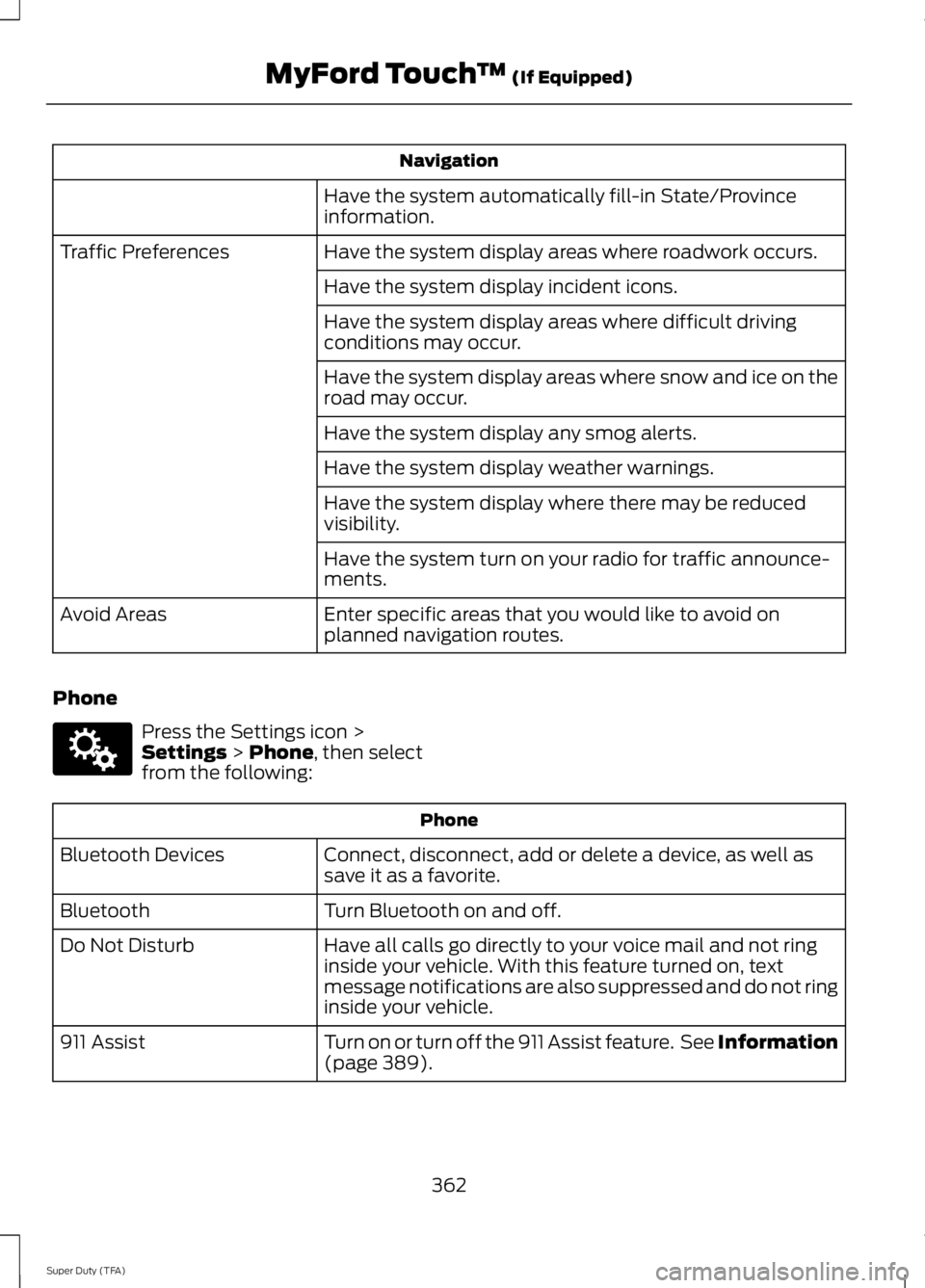
Navigation
Have the system automatically fill-in State/Provinceinformation.
Have the system display areas where roadwork occurs.Traffic Preferences
Have the system display incident icons.
Have the system display areas where difficult drivingconditions may occur.
Have the system display areas where snow and ice on theroad may occur.
Have the system display any smog alerts.
Have the system display weather warnings.
Have the system display where there may be reducedvisibility.
Have the system turn on your radio for traffic announce-ments.
Enter specific areas that you would like to avoid onplanned navigation routes.Avoid Areas
Phone
Press the Settings icon >Settings > Phone, then selectfrom the following:
Phone
Connect, disconnect, add or delete a device, as well assave it as a favorite.Bluetooth Devices
Turn Bluetooth on and off.Bluetooth
Have all calls go directly to your voice mail and not ringinside your vehicle. With this feature turned on, textmessage notifications are also suppressed and do not ringinside your vehicle.
Do Not Disturb
Turn on or turn off the 911 Assist feature. See Information(page 389).911 Assist
362
Super Duty (TFA)
MyFord Touch™ (If Equipped)E142607
Page 367 of 460
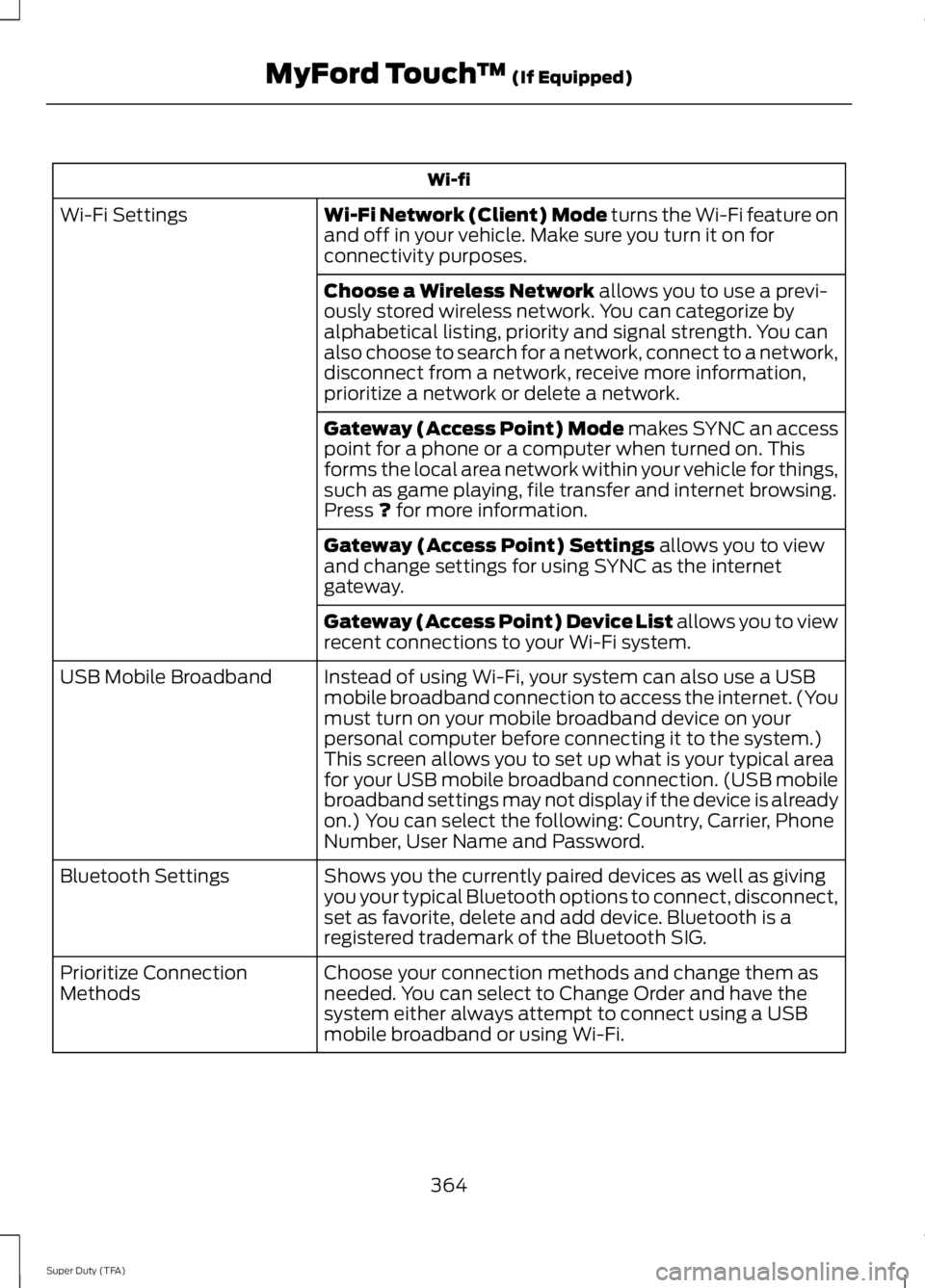
Wi-fi
Wi-Fi Network (Client) Mode turns the Wi-Fi feature onand off in your vehicle. Make sure you turn it on forconnectivity purposes.
Wi-Fi Settings
Choose a Wireless Network allows you to use a previ-ously stored wireless network. You can categorize byalphabetical listing, priority and signal strength. You canalso choose to search for a network, connect to a network,disconnect from a network, receive more information,prioritize a network or delete a network.
Gateway (Access Point) Mode makes SYNC an accesspoint for a phone or a computer when turned on. Thisforms the local area network within your vehicle for things,such as game playing, file transfer and internet browsing.Press ? for more information.
Gateway (Access Point) Settings allows you to viewand change settings for using SYNC as the internetgateway.
Gateway (Access Point) Device List allows you to viewrecent connections to your Wi-Fi system.
Instead of using Wi-Fi, your system can also use a USBmobile broadband connection to access the internet. (Youmust turn on your mobile broadband device on yourpersonal computer before connecting it to the system.)This screen allows you to set up what is your typical areafor your USB mobile broadband connection. (USB mobilebroadband settings may not display if the device is alreadyon.) You can select the following: Country, Carrier, PhoneNumber, User Name and Password.
USB Mobile Broadband
Shows you the currently paired devices as well as givingyou your typical Bluetooth options to connect, disconnect,set as favorite, delete and add device. Bluetooth is aregistered trademark of the Bluetooth SIG.
Bluetooth Settings
Choose your connection methods and change them asneeded. You can select to Change Order and have thesystem either always attempt to connect using a USBmobile broadband or using Wi-Fi.
Prioritize ConnectionMethods
364
Super Duty (TFA)
MyFord Touch™ (If Equipped)
Page 384 of 460
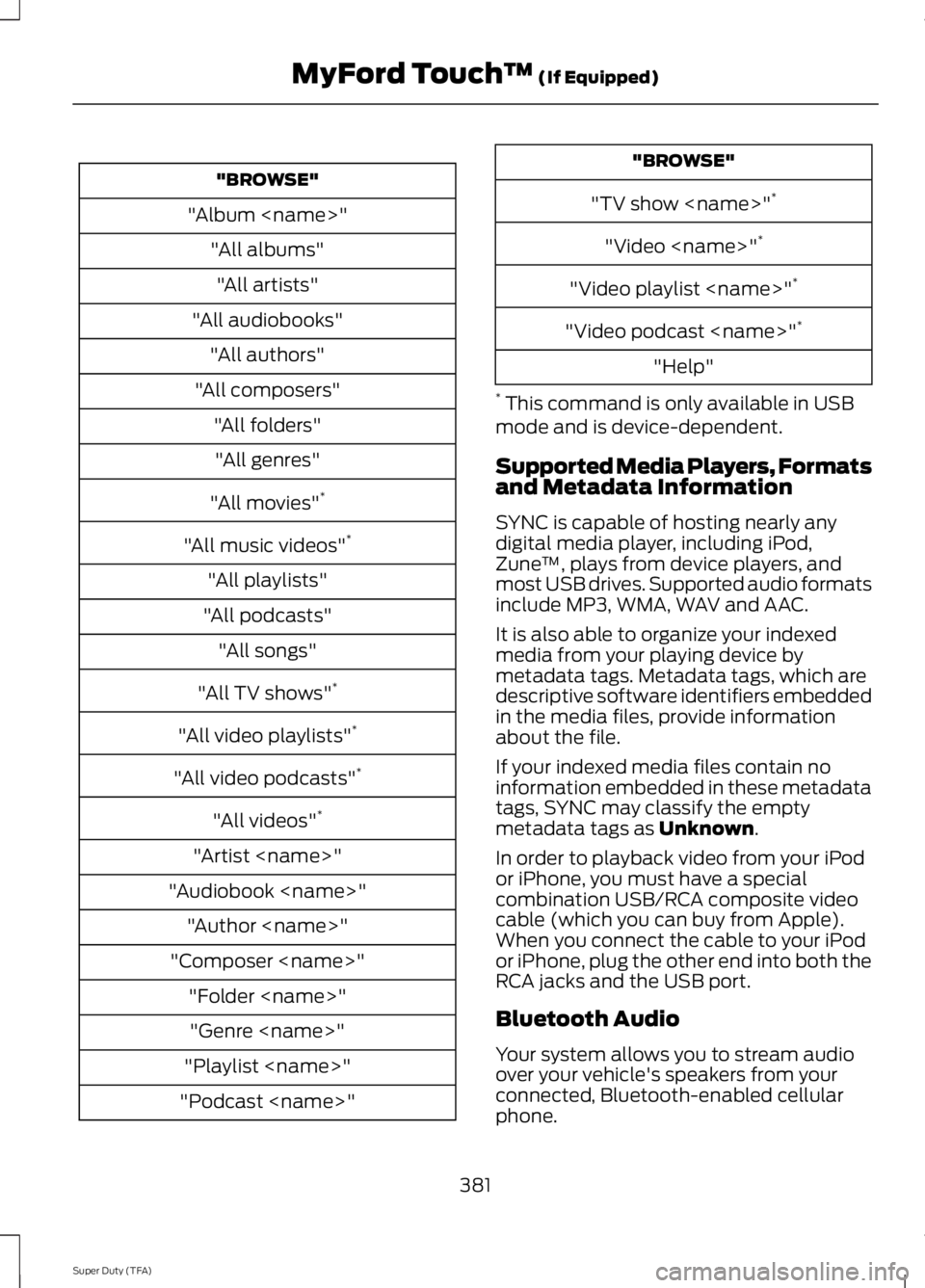
"BROWSE"
"Album
"All albums"
"All artists"
"All audiobooks"
"All authors"
"All composers"
"All folders"
"All genres"
"All movies"*
"All music videos"*
"All playlists"
"All podcasts"
"All songs"
"All TV shows"*
"All video playlists"*
"All video podcasts"*
"All videos"*
"Artist
"Audiobook
"Author
"Composer
"Folder
"Genre
"Playlist
"Podcast
"BROWSE"
"TV show
"Video
"Video playlist
"Video podcast
"Help"
* This command is only available in USBmode and is device-dependent.
Supported Media Players, Formatsand Metadata Information
SYNC is capable of hosting nearly anydigital media player, including iPod,Zune™, plays from device players, andmost USB drives. Supported audio formatsinclude MP3, WMA, WAV and AAC.
It is also able to organize your indexedmedia from your playing device bymetadata tags. Metadata tags, which aredescriptive software identifiers embeddedin the media files, provide informationabout the file.
If your indexed media files contain noinformation embedded in these metadatatags, SYNC may classify the emptymetadata tags as Unknown.
In order to playback video from your iPodor iPhone, you must have a specialcombination USB/RCA composite videocable (which you can buy from Apple).When you connect the cable to your iPodor iPhone, plug the other end into both theRCA jacks and the USB port.
Bluetooth Audio
Your system allows you to stream audioover your vehicle's speakers from yourconnected, Bluetooth-enabled cellularphone.
381
Super Duty (TFA)
MyFord Touch™ (If Equipped)
Page 385 of 460
To access, press the lower leftcorner on the touchscreen, thenselect the BT Stereo tab.
Bluetooth Audio Voice Commands
If you are listening to a Bluetoothaudio device, press the voicebutton on the steering wheelcontrol. When prompted, say "Next song","Pause", "Play" or "Previous song".
If you are not listening to a Bluetooth audiodevice, press the voice button and, afterthe tone, say "Next song", "Pause", "Play"or "Previous song".
A/V Inputs
WARNINGS
Driving while distracted can result inloss of vehicle control, crash andinjury. We strongly recommend thatyou use extreme caution when using anydevice that may take your focus off theroad. Your primary responsibility is the safeoperation of your vehicle. We recommendagainst the use of any handheld devicewhile driving and encourage the use ofvoice-operated systems when possible.Make sure you are aware of all applicablelocal laws that may affect the use ofelectronic devices while driving.
For safety reasons, do not connector adjust the settings on yourportable music player while yourvehicle is moving.
Store the portable music player in asecure location, such as the centerconsole or the glove box, when yourvehicle is moving. Hard objects maybecome projectiles in a crash or suddenstop, which may increase the risk of seriousinjury. The audio extension cable must belong enough to allow the portable musicplayer to be safely stored while yourvehicle is moving.
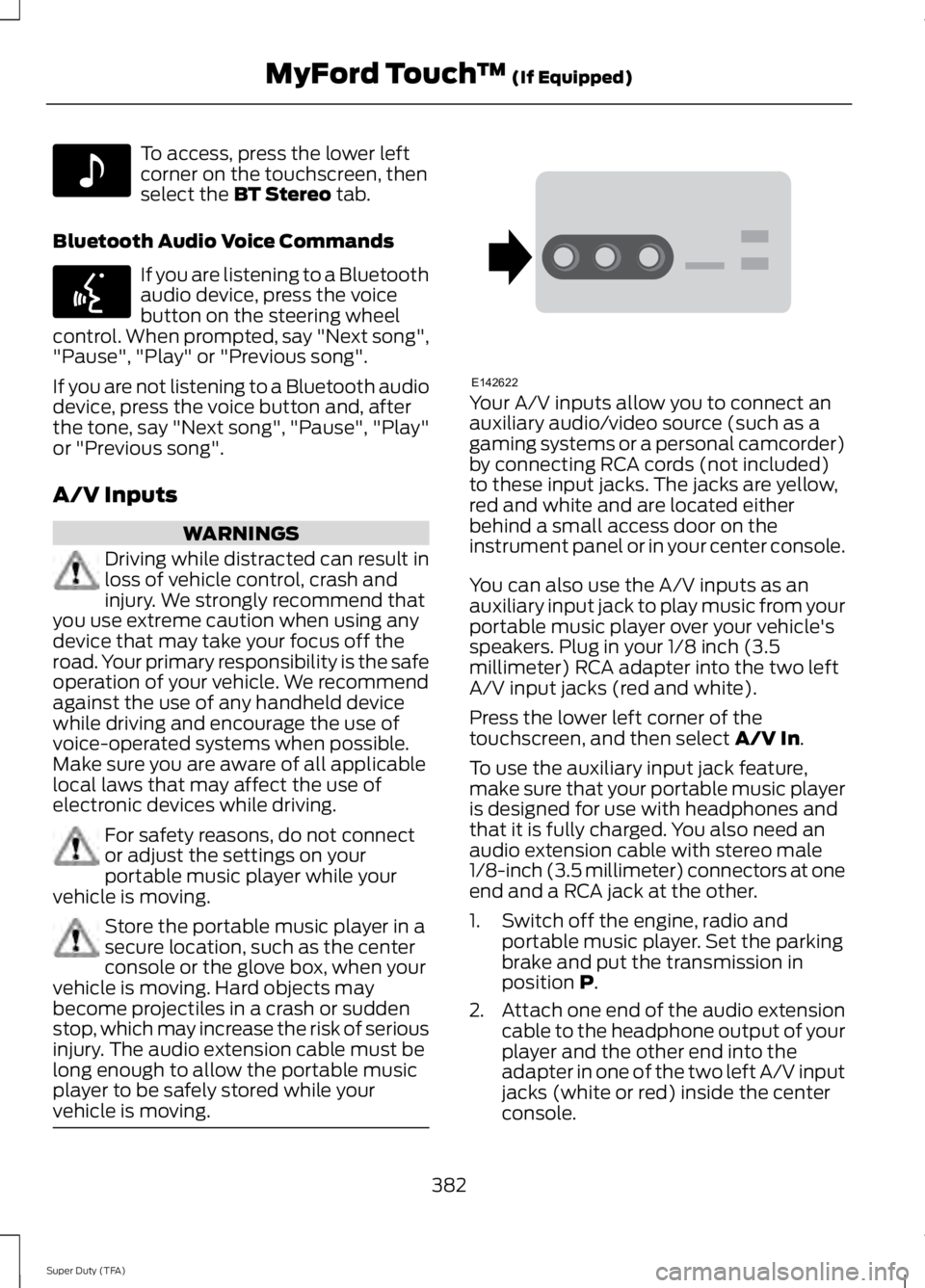
Your A/V inputs allow you to connect anauxiliary audio/video source (such as agaming systems or a personal camcorder)by connecting RCA cords (not included)to these input jacks. The jacks are yellow,red and white and are located eitherbehind a small access door on theinstrument panel or in your center console.
You can also use the A/V inputs as anauxiliary input jack to play music from yourportable music player over your vehicle'sspeakers. Plug in your 1/8 inch (3.5millimeter) RCA adapter into the two leftA/V input jacks (red and white).
Press the lower left corner of thetouchscreen, and then select A/V In.
To use the auxiliary input jack feature,make sure that your portable music playeris designed for use with headphones andthat it is fully charged. You also need anaudio extension cable with stereo male1/8-inch (3.5 millimeter) connectors at oneend and a RCA jack at the other.
1. Switch off the engine, radio andportable music player. Set the parkingbrake and put the transmission inposition P.
2.Attach one end of the audio extensioncable to the headphone output of yourplayer and the other end into theadapter in one of the two left A/V inputjacks (white or red) inside the centerconsole.
382
Super Duty (TFA)
MyFord Touch™ (If Equipped)E142611 E142599 E142622
Page 387 of 460
PhoneA
Quick DialB
PhonebookC
HistoryD
MessagingE
SettingsF
Hands-free calling is one of the mainfeatures of SYNC. Once you pair yourphone, you can access many options usingthe touchscreen or voice commands. Whilethe system supports a variety of features,many are dependent on your cellularphone’s functionality.
At a minimum, most cellular phones withBluetooth wireless technology support thefollowing functions:
•Answering an incoming call
•Ending a call
•Using privacy mode
•Dialing a number
•Redialing
•Call waiting notification
•Caller ID.
Other features, such as text messagingusing Bluetooth and automatic phonebookdownload, are phone-dependent features.To check your phone’s compatibility, seeyour phone’s user manual and visitwww.SYNCMyRide.com,www.SYNCMyRide.ca orwww.syncmaroute.ca.
Pairing Your Phone for the FirstTime
WARNING
Driving while distracted can result inloss of vehicle control, crash andinjury. We strongly recommend thatyou use extreme caution when using anydevice that may take your focus off theroad. Your primary responsibility is the safeoperation of your vehicle. We recommendagainst the use of any handheld devicewhile driving and encourage the use ofvoice-operated systems when possible.Make sure you are aware of all applicablelocal laws that may affect the use ofelectronic devices while driving.
The first thing you must do to use thephone features of SYNC is to pair yourBluetooth-enabled cellular phone withSYNC. This allows you to use your phonein a hands-free manner.
Note:Put the transmission in position P.Turn on your vehicle ignition and the radio.
1. Touch Add Phone in the upper leftcorner of the touchscreen.Find SYNCappears on the screen, and instructsyou to begin the pairing process fromyour device.
2. Make sure that Bluetooth is set to Onand that your cellular phone is in theproper mode. See your phone’s manualif necessary.
384
Super Duty (TFA)
MyFord Touch™ (If Equipped)