warning FORD F250 SUPER DUTY 2017 Owners Manual
[x] Cancel search | Manufacturer: FORD, Model Year: 2017, Model line: F250 SUPER DUTY, Model: FORD F250 SUPER DUTY 2017Pages: 642, PDF Size: 12.35 MB
Page 255 of 642
Setting up a Blind Spot Trailer
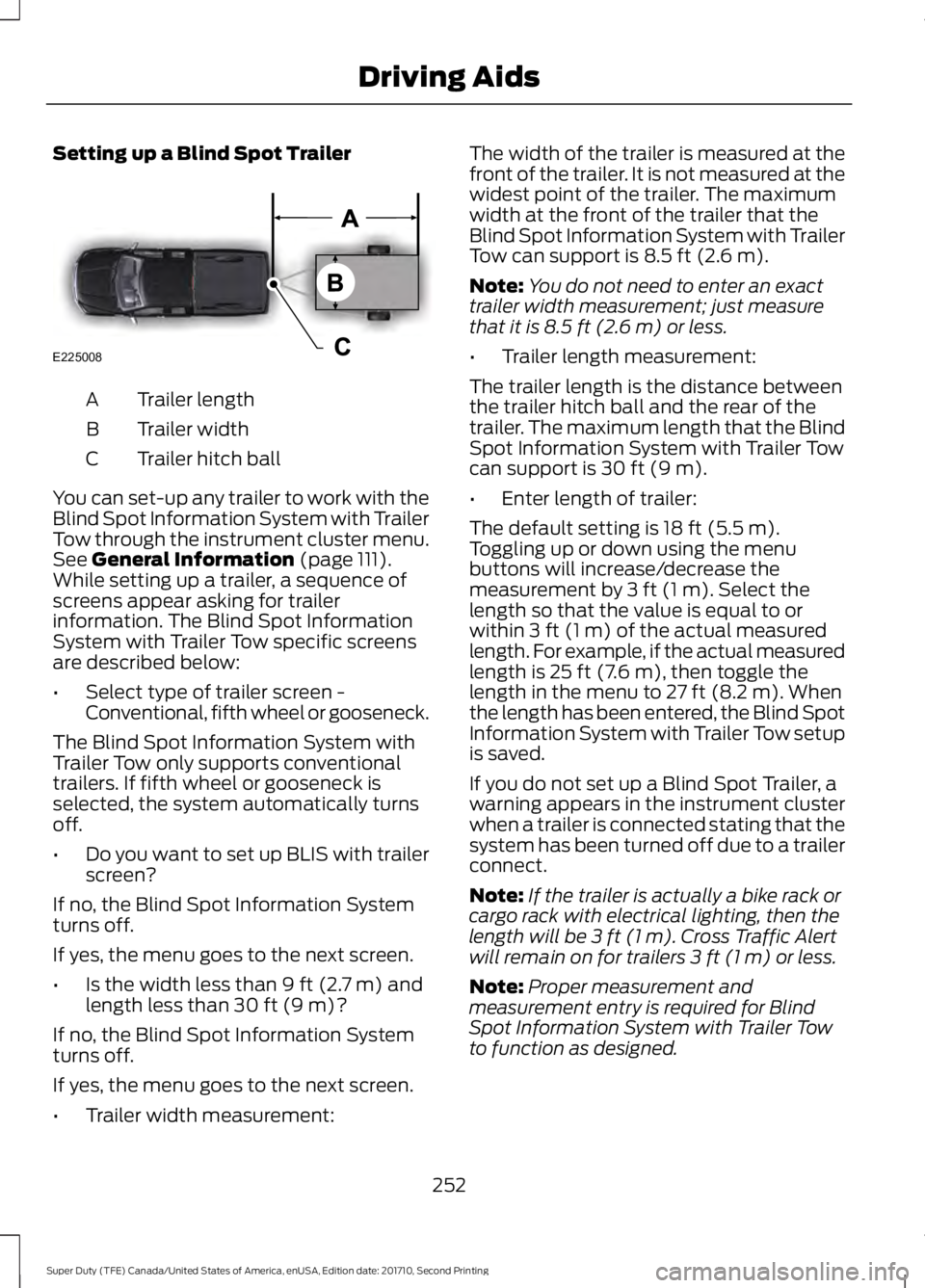
Trailer lengthA
Trailer widthB
Trailer hitch ballC
You can set-up any trailer to work with theBlind Spot Information System with TrailerTow through the instrument cluster menu.See General Information (page 111).While setting up a trailer, a sequence ofscreens appear asking for trailerinformation. The Blind Spot InformationSystem with Trailer Tow specific screensare described below:
•Select type of trailer screen -Conventional, fifth wheel or gooseneck.
The Blind Spot Information System withTrailer Tow only supports conventionaltrailers. If fifth wheel or gooseneck isselected, the system automatically turnsoff.
•Do you want to set up BLIS with trailerscreen?
If no, the Blind Spot Information Systemturns off.
If yes, the menu goes to the next screen.
•Is the width less than 9 ft (2.7 m) andlength less than 30 ft (9 m)?
If no, the Blind Spot Information Systemturns off.
If yes, the menu goes to the next screen.
•Trailer width measurement:
The width of the trailer is measured at thefront of the trailer. It is not measured at thewidest point of the trailer. The maximumwidth at the front of the trailer that theBlind Spot Information System with TrailerTow can support is 8.5 ft (2.6 m).
Note:You do not need to enter an exacttrailer width measurement; just measurethat it is 8.5 ft (2.6 m) or less.
•Trailer length measurement:
The trailer length is the distance betweenthe trailer hitch ball and the rear of thetrailer. The maximum length that the BlindSpot Information System with Trailer Towcan support is 30 ft (9 m).
•Enter length of trailer:
The default setting is 18 ft (5.5 m).Toggling up or down using the menubuttons will increase/decrease themeasurement by 3 ft (1 m). Select thelength so that the value is equal to orwithin 3 ft (1 m) of the actual measuredlength. For example, if the actual measuredlength is 25 ft (7.6 m), then toggle thelength in the menu to 27 ft (8.2 m). Whenthe length has been entered, the Blind SpotInformation System with Trailer Tow setupis saved.
If you do not set up a Blind Spot Trailer, awarning appears in the instrument clusterwhen a trailer is connected stating that thesystem has been turned off due to a trailerconnect.
Note:If the trailer is actually a bike rack orcargo rack with electrical lighting, then thelength will be 3 ft (1 m). Cross Traffic Alertwill remain on for trailers 3 ft (1 m) or less.
Note:Proper measurement andmeasurement entry is required for BlindSpot Information System with Trailer Towto function as designed.
252
Super Duty (TFE) Canada/United States of America, enUSA, Edition date: 201710, Second Printing
Driving AidsE225008
Page 257 of 642
CROSS TRAFFIC ALERT (If
Equipped)
WARNING
Never use the Cross Traffic Alertsystem as a replacement for usingthe interior and exterior mirrors andlooking over your shoulder before backingout of a parking space. Cross Traffic Alertis not a replacement for careful driving.
Note:When a trailer is detected, CrossTraffic Alert automatically turns off.
Cross Traffic Alert is designed to warn youof vehicles approaching from the sideswhen the transmission is in reverse (R).
Using the System
Cross Traffic Alert turns on when you startthe engine and you shift into reverse (R).Once shifted out of reverse (R), CrossTraffic Alert turns off.
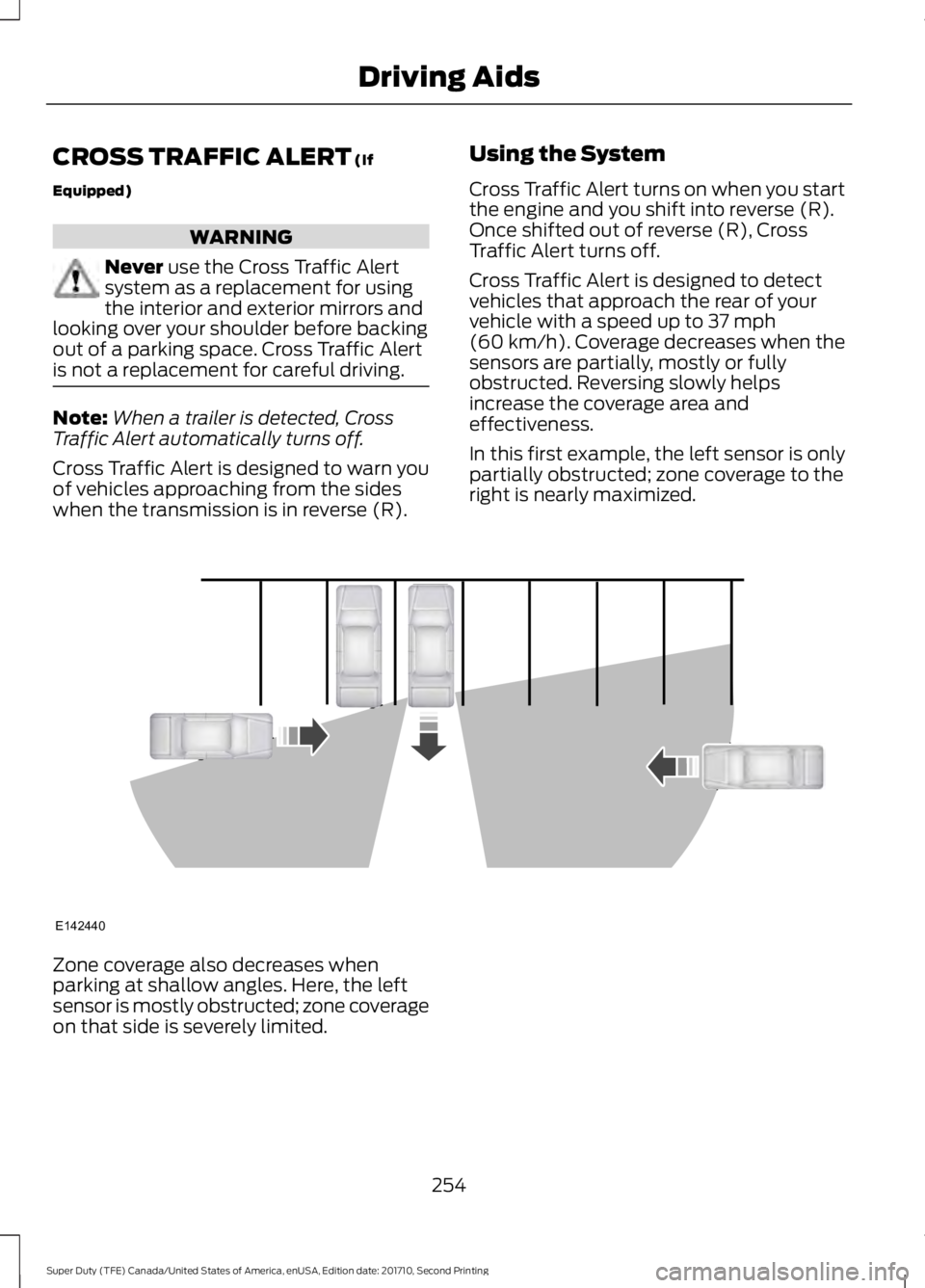
Cross Traffic Alert is designed to detectvehicles that approach the rear of yourvehicle with a speed up to 37 mph(60 km/h). Coverage decreases when thesensors are partially, mostly or fullyobstructed. Reversing slowly helpsincrease the coverage area andeffectiveness.
In this first example, the left sensor is onlypartially obstructed; zone coverage to theright is nearly maximized.
Zone coverage also decreases whenparking at shallow angles. Here, the leftsensor is mostly obstructed; zone coverageon that side is severely limited.
254
Super Duty (TFE) Canada/United States of America, enUSA, Edition date: 201710, Second Printing
Driving AidsE142440
Page 260 of 642
If the power steering system breaks down(or if the engine is turned off), you cansteer the vehicle manually, but it takesmore effort.
If the steering wanders or pulls, check for:
•an improperly inflated tire
•uneven tire wear
•loose or worn suspension components
•loose or worn steering components
•improper vehicle alignment
If any steering components are serviced orreplaced, install new fasteners (many arecoated with thread adhesive or haveprevailing torque features which may notbe re-used). Never re-use a bolt or nut.Torque fasteners to specifications.
A high crown in the road or high crosswindsmay also make the steering seem towander or pull.
Adaptive Steering (If Equipped)
WARNING
The adaptive steering system hasdiagnostic checks that continuouslymonitor the system. If a fault isdetected a message displays in theinformation display. Stop your vehicle assoon as it is safe to do so. This warningmessage may clear if the fault is no longerpresent. If an adaptive steering systemwarning message appears each time youstart your vehicle, have the systemchecked as soon as possible.
The adaptive steering system continuallychanges the steering ratio with changes tovehicle speed, optimizing the steeringresponse in all conditions. The system alsochanges when you switch on thetransmission tow/haul feature. When youselect the tow/haul button, the adaptivesteering system reduces vehicle sensitivityto steering inputs at higher vehicle speeds,while maintaining the ease of parking andmaneuverability at low speeds.
Note:The adaptive steering system isdesigned with a locking device. With thelock engaged, the adaptive steering systemremains mechanically locked at a fixedsteering ratio. You may also notice a clickwhen you switch the vehicle on or after youswitch it off, as the lock disengages orengages.
Note:If your vehicle loses electrical poweror detects a fault when you are driving, thesystem automatically shuts down and youretain normal steering function with a fixedsteering ratio. During this time it is possiblethat the steering wheel may not be straightwhen the vehicle is driving straight ahead.In addition, the driver may notice that thesteering wheel angle required to steer thevehicle may be different.
Note:During parking maneuvers, theadaptive steering system balances the driverwork load for various steering wheel inputsand vehicle loading conditions. Underextreme operating conditions the systemlocking device may engage. This strategyprevents overheating and permanentdamage to the adaptive steering system.Typical steering and driving maneuversallow the system to cool and return tonormal operation.
257
Super Duty (TFE) Canada/United States of America, enUSA, Edition date: 201710, Second Printing
Driving Aids
Page 261 of 642
COLLISION WARNING SYSTEM
(If Equipped)
Principle Of Operation (If Equipped)
WARNINGS
This system is an extra driving aid. Itdoes not replace your attention andjudgment, or the need to apply thebrakes. This system does NOTautomatically brake your vehicle. If you failto press the brake pedal when necessary,you may collide with another vehicle.
The collision warning system withbrake support cannot help preventall collisions. Do not rely on thissystem to replace your judgment and theneed to maintain correct distance andspeed.
Note:The system does not detect, warn orrespond to potential collisions with vehiclesto the rear or sides of your vehicle.
Note:The collision warning system is activeat speeds above approximately 5 mph(8 km/h).
Note:The collision warning system will beunavailable if you disable the electronicstability control. See Using StabilityControl (page 227).
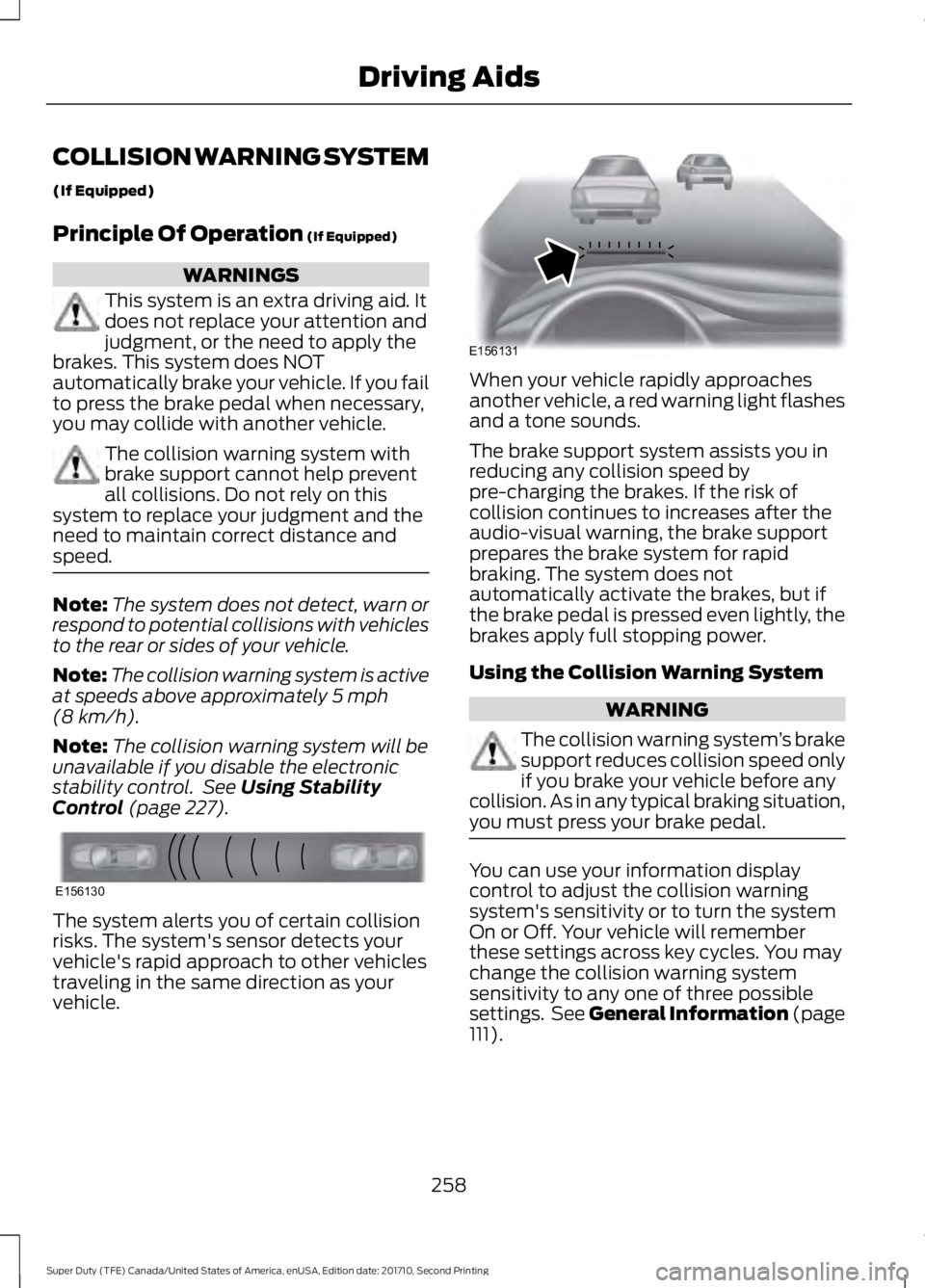
The system alerts you of certain collisionrisks. The system's sensor detects yourvehicle's rapid approach to other vehiclestraveling in the same direction as yourvehicle.
When your vehicle rapidly approachesanother vehicle, a red warning light flashesand a tone sounds.
The brake support system assists you inreducing any collision speed bypre-charging the brakes. If the risk ofcollision continues to increases after theaudio-visual warning, the brake supportprepares the brake system for rapidbraking. The system does notautomatically activate the brakes, but ifthe brake pedal is pressed even lightly, thebrakes apply full stopping power.
Using the Collision Warning System
WARNING
The collision warning system’s brakesupport reduces collision speed onlyif you brake your vehicle before anycollision. As in any typical braking situation,you must press your brake pedal.
You can use your information displaycontrol to adjust the collision warningsystem's sensitivity or to turn the systemOn or Off. Your vehicle will rememberthese settings across key cycles. You maychange the collision warning systemsensitivity to any one of three possiblesettings. See General Information (page111).
258
Super Duty (TFE) Canada/United States of America, enUSA, Edition date: 201710, Second Printing
Driving AidsE156130 E156131
Page 262 of 642
Note:It is recommended that you turn thecollision warning system off if a snow plowor similar object is installed in such a waythat it may block the radar sensor. Yourvehicle will remember the selected settingacross key cycles.
Note:When possible, the manufacturerrecommends using the highest sensitivitysetting. If warnings are too frequent, you canreduce your system's sensitivity. Reducedsensitivity causes fewer and later systemwarnings. See General Information (page111).
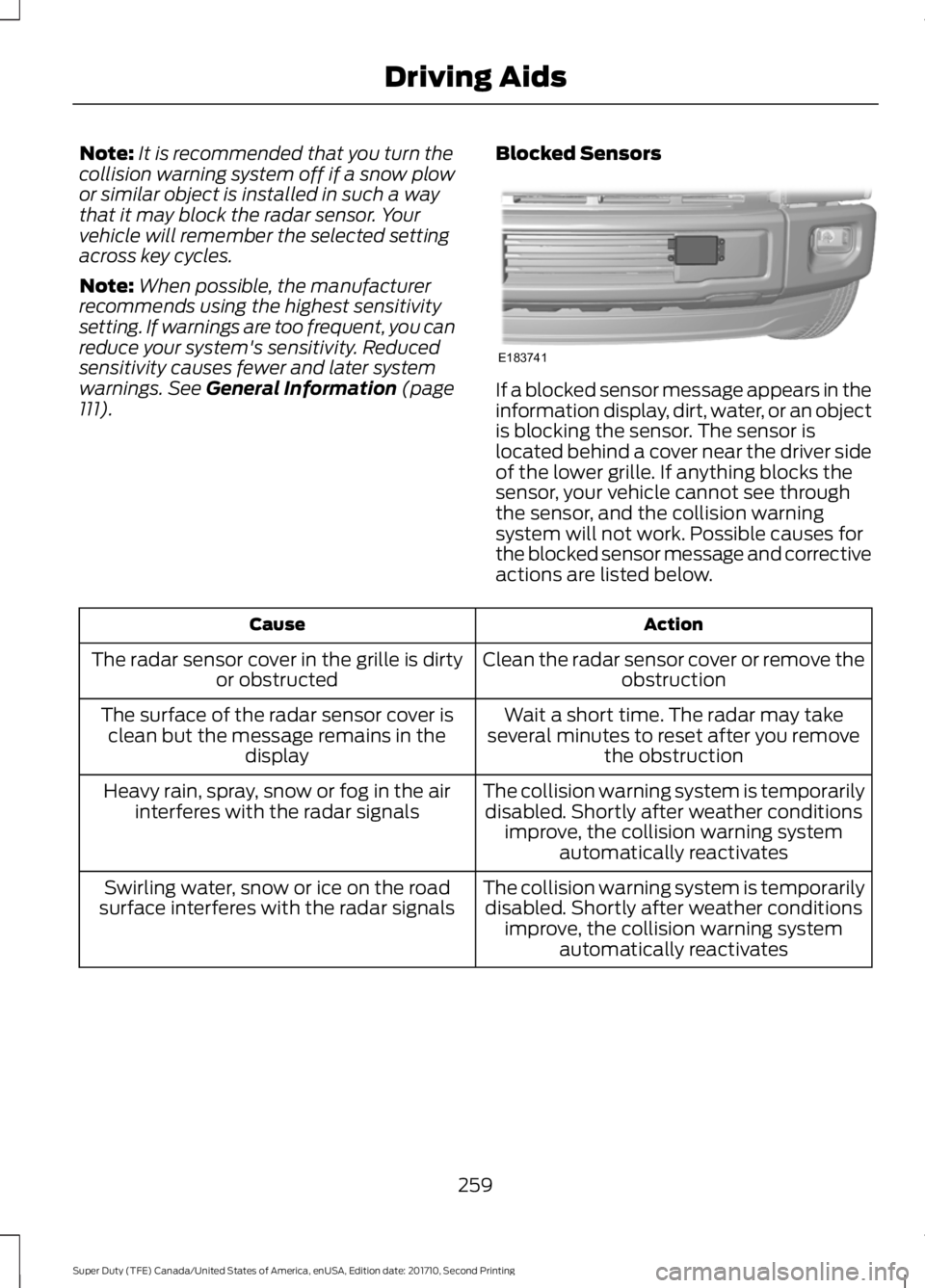
Blocked Sensors
If a blocked sensor message appears in theinformation display, dirt, water, or an objectis blocking the sensor. The sensor islocated behind a cover near the driver sideof the lower grille. If anything blocks thesensor, your vehicle cannot see throughthe sensor, and the collision warningsystem will not work. Possible causes forthe blocked sensor message and correctiveactions are listed below.
ActionCause
Clean the radar sensor cover or remove theobstructionThe radar sensor cover in the grille is dirtyor obstructed
Wait a short time. The radar may takeseveral minutes to reset after you removethe obstruction
The surface of the radar sensor cover isclean but the message remains in thedisplay
The collision warning system is temporarilydisabled. Shortly after weather conditionsimprove, the collision warning systemautomatically reactivates
Heavy rain, spray, snow or fog in the airinterferes with the radar signals
The collision warning system is temporarilydisabled. Shortly after weather conditionsimprove, the collision warning systemautomatically reactivates
Swirling water, snow or ice on the roadsurface interferes with the radar signals
259
Super Duty (TFE) Canada/United States of America, enUSA, Edition date: 201710, Second Printing
Driving AidsE183741
Page 263 of 642
System Limitations
WARNING
The collision warning system’s brakesupport only reduces collision speedif you first apply your brakes. Youmust brake as you would in any typicalbraking situation.
Due to the nature of radar technology,there may be certain instances wherevehicles do not provide a collision warning.These include:
•Stationary vehicles or vehicles movingbelow 6 mph (10 km/h).
•Pedestrians or objects in the roadway.
•Oncoming vehicles in the same lane.
•Severe weather conditions (seeblocked sensor section).
•Debris build-up on the grille near theheadlamps (see blocked sensorsection).
•Small distance to vehicle ahead.
•Large steering wheel and pedalmovements (very active driving style).
Damage to the front end of your vehiclemay alter the radar sensor's coverage area.This may result in missed or false collisionwarnings. Have an authorized dealer checkyour radar sensor for proper coverage andoperation.
260
Super Duty (TFE) Canada/United States of America, enUSA, Edition date: 201710, Second Printing
Driving Aids
Page 265 of 642
Payload is the combined weightof cargo and passengers that yourvehicle is carrying. The maximumpayload for your vehicle appearson the Tire and Loading label. Thelabel is either on the B-pillar or theedge of the driver door. Vehiclesexported outside the US andCanada may not have a tire andloading label. Look for “Thecombined weight of occupantsand cargo should never exceedXXX kg OR XXX lb” for maximumpayload. The payload listed on theTire and Loading Information labelis the maximum payload for yourvehicle as built by the assemblyplant. If you install any additionalequipment on your vehicle, youmust determine the new payload.Subtract the weight of theequipment from the payload listedon the Tire and Loading label.When towing, trailer tongueweight or king pin weight is alsopart of payload.
WARNING
The appropriate loadingcapacity of your vehicle canbe limited either by volumecapacity (how much space isavailable) or by payload capacity(how much weight the vehicleshould carry). Once you havereached the maximum payload ofyour vehicle, do not add morecargo, even if there is spaceavailable. Overloading orimproperly loading your vehicle
can contribute to loss of vehiclecontrol and vehicle rollover.
GAWR (Gross Axle WeightRating)
GAWR is the maximum allowableweight that a single axle (front orrear) can carry. These numbersare on the Safety ComplianceCertification label. The label islocated on the door hinge pillar,door-latch post, or the door edgethat meets the door-latch post,next to the driver seating position.
The total load on each axle mustnever exceed its Gross AxleWeight Rating.
GVWR (Gross Vehicle WeightRating)
GVWR is the maximum allowableweight of the fully loaded vehicle.
This includes all options,equipment, passengers and cargo.It appears on the SafetyCompliance Certification label.The label is located on the doorhinge pillar, door-latch post, or thedoor edge that meets thedoor-latch post, next to the driverseating position.
The gross vehicle weight mustnever exceed the Gross VehicleWeight Rating.
262
Super Duty (TFE) Canada/United States of America, enUSA, Edition date: 201710, Second Printing
Load Carrying
Page 266 of 642
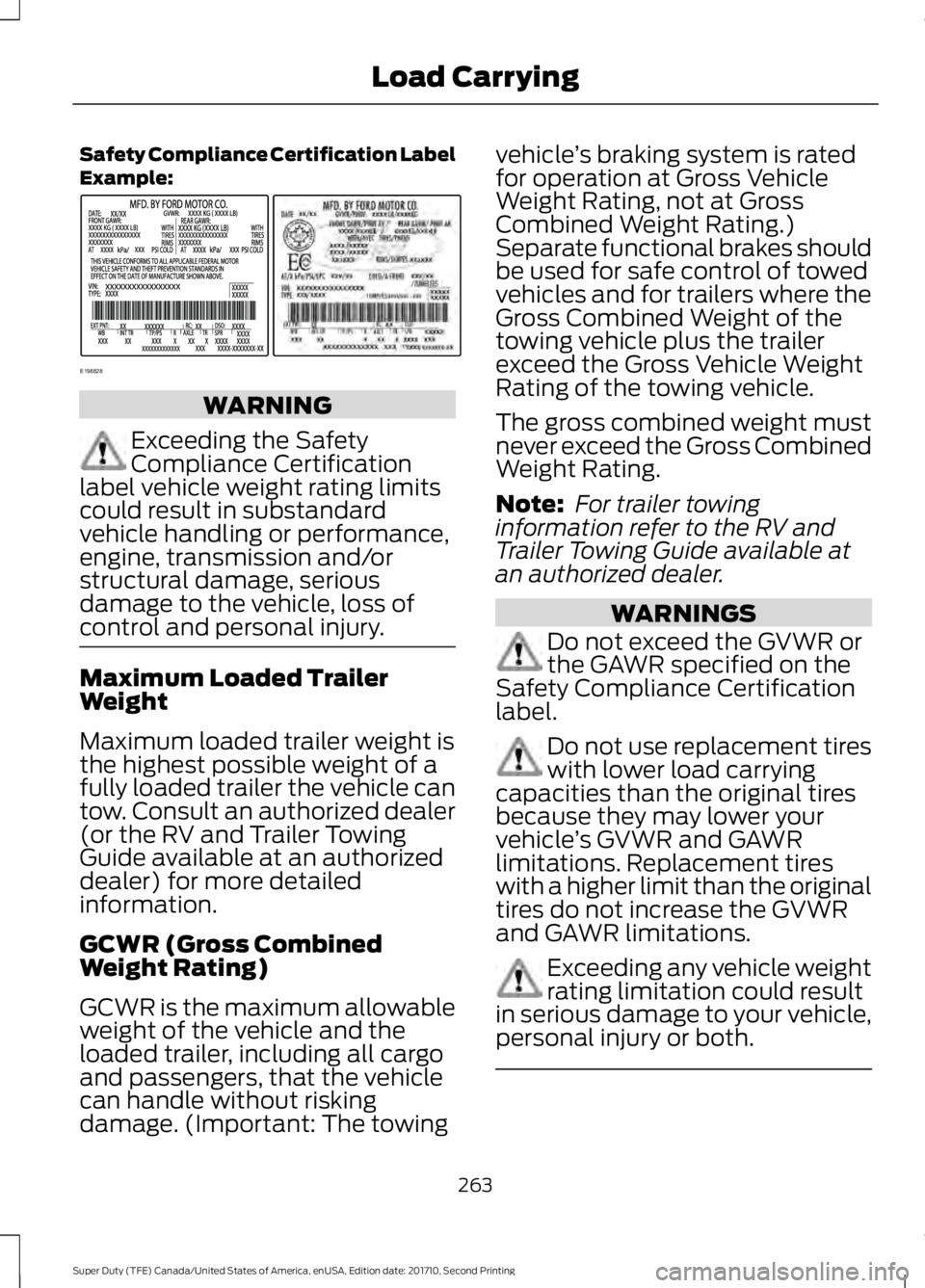
Safety Compliance Certification LabelExample:
WARNING
Exceeding the SafetyCompliance Certificationlabel vehicle weight rating limitscould result in substandardvehicle handling or performance,engine, transmission and/orstructural damage, seriousdamage to the vehicle, loss ofcontrol and personal injury.
Maximum Loaded TrailerWeight
Maximum loaded trailer weight isthe highest possible weight of afully loaded trailer the vehicle cantow. Consult an authorized dealer(or the RV and Trailer TowingGuide available at an authorizeddealer) for more detailedinformation.
GCWR (Gross CombinedWeight Rating)
GCWR is the maximum allowableweight of the vehicle and theloaded trailer, including all cargoand passengers, that the vehiclecan handle without riskingdamage. (Important: The towing
vehicle’s braking system is ratedfor operation at Gross VehicleWeight Rating, not at GrossCombined Weight Rating.)Separate functional brakes shouldbe used for safe control of towedvehicles and for trailers where theGross Combined Weight of thetowing vehicle plus the trailerexceed the Gross Vehicle WeightRating of the towing vehicle.
The gross combined weight mustnever exceed the Gross CombinedWeight Rating.
Note: For trailer towinginformation refer to the RV andTrailer Towing Guide available atan authorized dealer.
WARNINGS
Do not exceed the GVWR orthe GAWR specified on theSafety Compliance Certificationlabel.
Do not use replacement tireswith lower load carryingcapacities than the original tiresbecause they may lower yourvehicle’s GVWR and GAWRlimitations. Replacement tireswith a higher limit than the originaltires do not increase the GVWRand GAWR limitations.
Exceeding any vehicle weightrating limitation could resultin serious damage to your vehicle,personal injury or both.
263
Super Duty (TFE) Canada/United States of America, enUSA, Edition date: 201710, Second Printing
Load CarryingE198828
Page 268 of 642
- 1200 = - 240 pounds. No, you donot have enough cargo capacityto carry that much weight. Inmetric units, the calculation wouldbe: 635 kilograms - (2 x 99kilograms) - (12 x 45 kilograms) =635 - 198 - 540 = -103 kilograms.You will need to reduce the loadweight by at least 240 pounds(104 kilograms). If you removethree 100-pound (45-kilogram)cement bags, then the loadcalculation would be:1400 - (2 x220) - (9 x 100) = 1400 - 440 -900 = 60 pounds. Now you havethe load capacity to transport thecement and your friend home. Inmetric units, the calculation wouldbe: 635 kilograms - (2 x 99kilograms) - (9 x 45 kilograms) =635 - 198 - 405 = 32 kilograms.
The above calculations alsoassume that the loads arepositioned in your vehicle in amanner that does not overloadthe front or the rear gross axleweight rating specified for yourvehicle on the Safety ComplianceCertification label.
Special Loading Instructionsfor Owners of Pick-up Trucksand Utility-type Vehicles
WARNING
Loaded vehicles may handledifferently than unloadedvehicles. Take extra precautions,such as slower speeds andincreased stopping distance, whendriving a heavily loaded vehicle.
BED RAMPS (If Equipped)
WARNINGS
The slide action of the ramp is apinch point. Do not place fingers orhands in the pinch point.
Extend and retract the ramp onlywhen connected to the tailgateplate.
Be sure the ramp is installedcorrectly when loading andunloading equipment on and off theramp.
Do not step or sit on the ramp whenit is in the stowed position.
Install the ramp only within theprescribed ramp angles.
Note:The ramp maximum capacity is800 lb (363 kg).
Note:Verify the ramp is on stable groundbefore usage.
Note:For loading and unloadingequipment, your ramp should be setbetween 10° upward and 26° downward toavoid damage to the ramp claw and tailgateplate.
Using the Bed Ramp
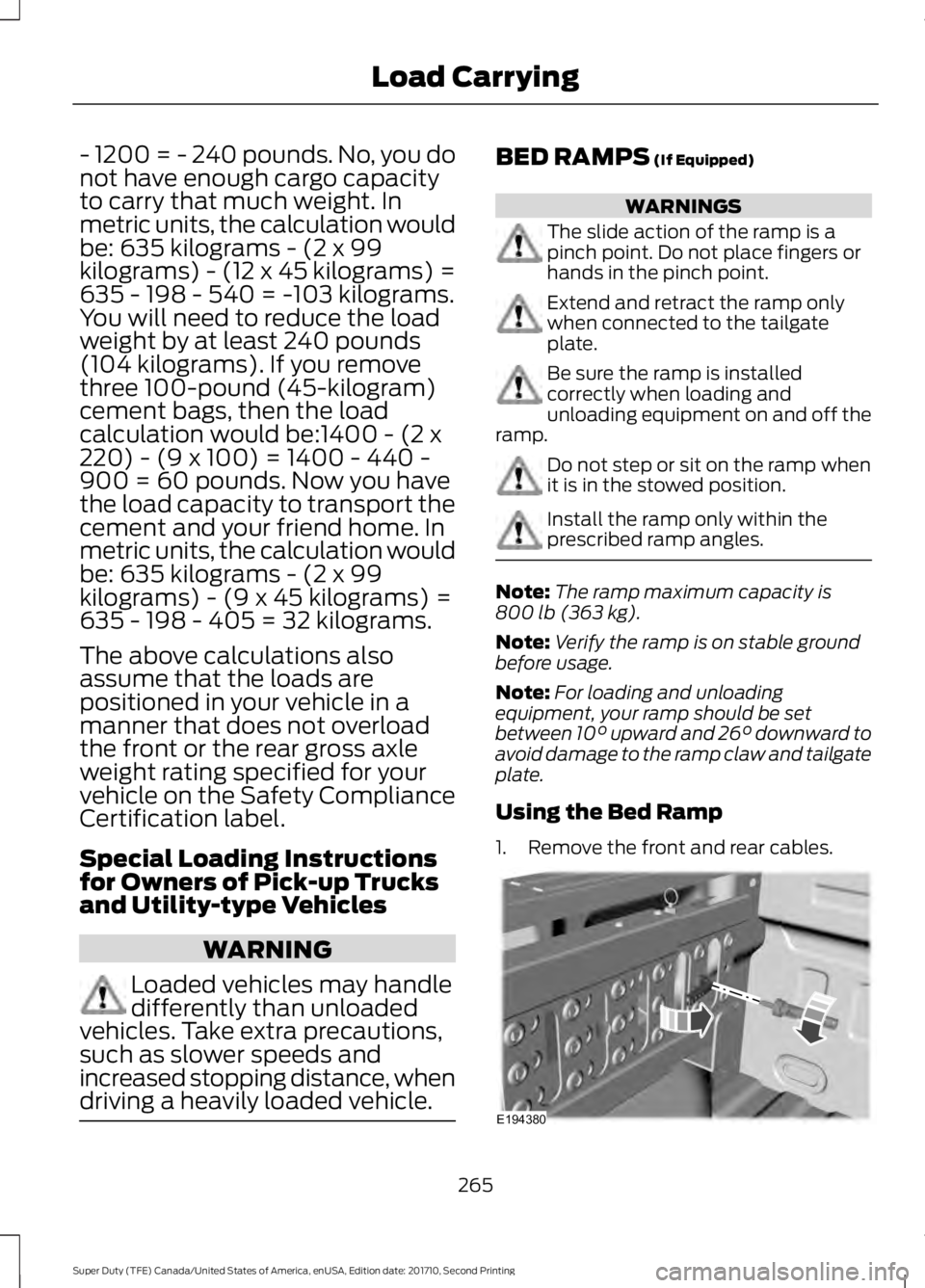
1. Remove the front and rear cables.
265
Super Duty (TFE) Canada/United States of America, enUSA, Edition date: 201710, Second Printing
Load CarryingE194380
Page 271 of 642
TOWING A TRAILER
WARNINGS
Towing trailers beyond themaximum recommendedgross trailer weight exceeds thelimit of your vehicle and couldresult in engine damage,transmission damage, structuraldamage, loss of vehicle control,vehicle rollover and personalinjury.
Do not exceed the GVWR orthe GAWR specified on thecertification label.
Note: See RecommendedTowing Weights (page 277).
Your vehicle may have electricalitems, such as fuses or relays,related to towing. See Fuses(page 312).
Your vehicle's load capacitydesignation is by weight, not byvolume, so you cannot necessarilyuse all available space whenloading a vehicle or trailer.
Towing a trailer places an extraload on your vehicle's engine,transmission, axle, brakes, tiresand suspension. Inspect thesecomponents periodically during,and after, any towing operation.
Load Placement
To help minimize how trailermovement affects your vehiclewhen driving:
•Load the heaviest items closestto the trailer floor.
•Load the heaviest itemscentered between the left andright side trailer tires.
•Load the heaviest items abovethe trailer axles or just slightlyforward toward the trailertongue. Do not allow the finaltrailer tongue weight to goabove or below 10-15% of theloaded trailer weight.
•Select a ball mount with thecorrect rise or drop and loadcapacity. When both theloaded vehicle and trailer areconnected, the trailer frameshould be level, or slightlyangled down toward yourvehicle, when viewed from theside.
When driving with a trailer orpayload, a slight takeoff vibrationor shudder may be present due tothe increased payload weight.Additional information regardingproper trailer loading and settingyour vehicle up for towing islocated in another chapter of thismanual. See Load Limit (page261).
You can also find information inthe RV & Trailer Towing Guideavailable at your authorizeddealer, or online.
268
Super Duty (TFE) Canada/United States of America, enUSA, Edition date: 201710, Second Printing
Towing