ESP FORD F250 SUPER DUTY 2017 User Guide
[x] Cancel search | Manufacturer: FORD, Model Year: 2017, Model line: F250 SUPER DUTY, Model: FORD F250 SUPER DUTY 2017Pages: 642, PDF Size: 12.35 MB
Page 65 of 642
•Various vehicle speed limits so theMyKey driver cannot exceed certainspeeds. The information display showswarnings followed by an audible tonewhen the MyKey driver reaches the setspeed. You cannot override the setspeed by fully depressing theaccelerator pedal.
WARNING
Do not set MyKey maximum speedlimit to a limit that will prevent thedriver from maintaining a safe speedconsidering posted speed limits andprevailing road conditions. The driver isalways responsible to drive in accordancewith local laws and prevailing conditions.Failure to do so could result in accident orinjury.
•Various vehicle speed reminders soMyKey drivers know when their vehiclespeed approaches the limits. Warningsappear in your information display anda tone sounds when the MyKey driversexceed the set vehicle speed.
•The audio system's maximum volumelimits to 45% so MyKey drivers canconcentrate on the road. A messageappears in the information displaywhen MyKey drivers attempt to exceedthe limited volume. MyKey alsodisables the automatic volume control.
•Always on setting. This setting forcescertain features to remain on andactive for MyKey drivers. For example,E911 or emergency assistance and thedo not disturb features stay on even ifa MyKey driver uses the feature'scontrol to switch it off.
Note:If your vehicle includes an AM/FMradio or a very basic audio system, then theradio may not mute.
CREATING A MYKEY
Use the information display to create aMyKey.
1. Switch the ignition on using the key orthe transmitter you want to program.
2. Access the main menu in theinformation display and then scrollthrough the menus to beginprogramming your MyKey. SeeInformation Displays (page 111).
3. Follow the instructions in the display.
4.A confirmation message appears in thedisplay after you finish programmingyour MyKey. The programmedrestrictions apply when you key off,open and close driver door and restartyour vehicle with the programmed keyor transmitter.
Note:Make sure you label the programmedMyKey so you can distinguish it from theadmin keys.
You can also program the optional MyKeysettings.
Programming or ChangingConfigurable Settings
Use the information display to program orchange your optional MyKey settings.
1. Switch the ignition on using the key orthe transmitter you want to program.
2. Access the main menu in theinformation display and then scrollthrough the menus to change thesettings of your MyKey. SeeInformation Displays (page 111).
3. Follow the instructions in the display.
4.A confirmation message appears in thedisplay after you finish programmingyour MyKey. The programmedrestrictions apply when you restart yourvehicle with the programmed key ortransmitter.
62
Super Duty (TFE) Canada/United States of America, enUSA, Edition date: 201710, Second Printing
MyKey™
Page 73 of 642
TAILGATE LOCK (If Equipped)
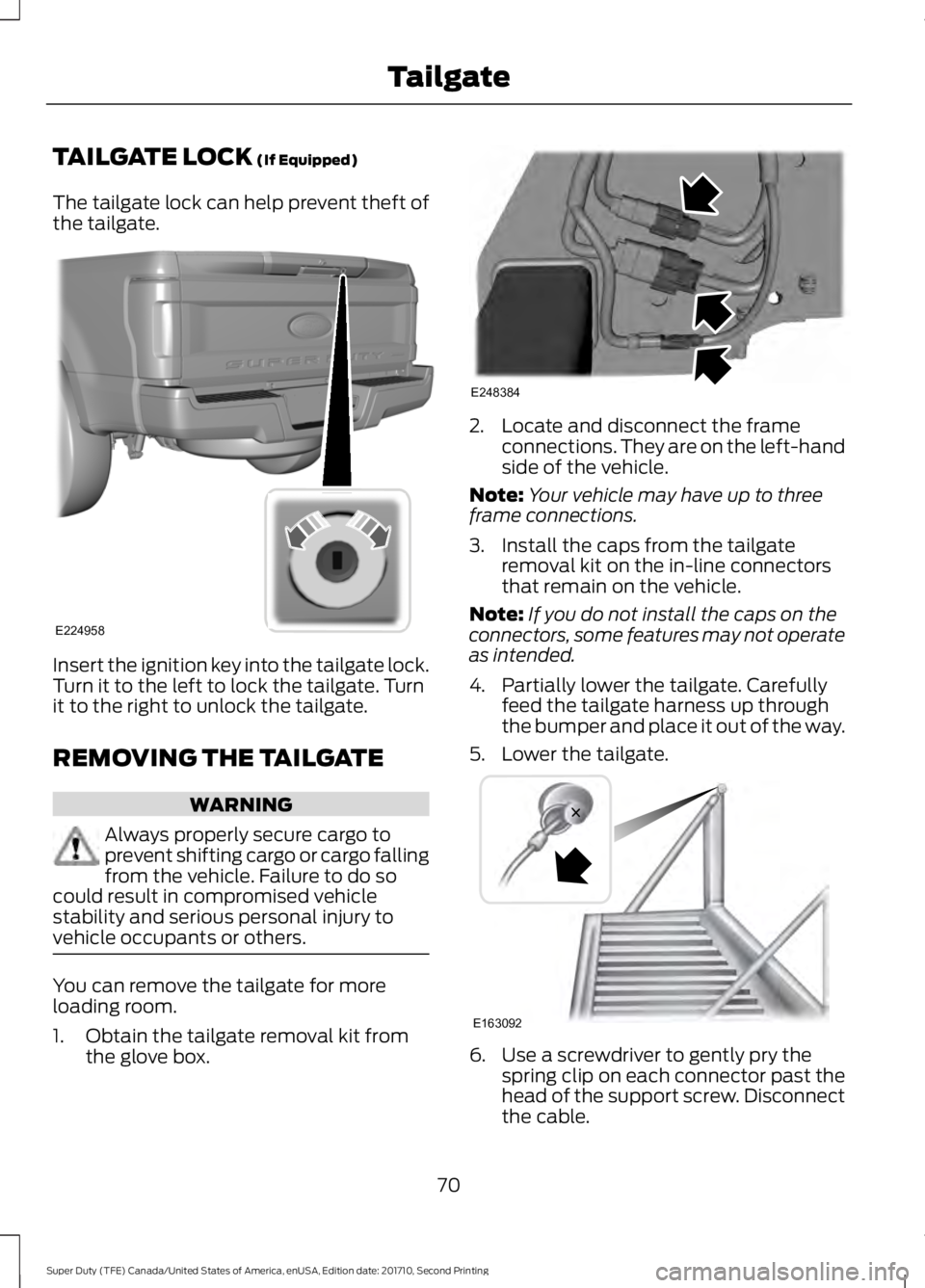
The tailgate lock can help prevent theft ofthe tailgate.
Insert the ignition key into the tailgate lock.Turn it to the left to lock the tailgate. Turnit to the right to unlock the tailgate.
REMOVING THE TAILGATE
WARNING
Always properly secure cargo toprevent shifting cargo or cargo fallingfrom the vehicle. Failure to do socould result in compromised vehiclestability and serious personal injury tovehicle occupants or others.
You can remove the tailgate for moreloading room.
1. Obtain the tailgate removal kit fromthe glove box.
2. Locate and disconnect the frameconnections. They are on the left-handside of the vehicle.
Note:Your vehicle may have up to threeframe connections.
3. Install the caps from the tailgateremoval kit on the in-line connectorsthat remain on the vehicle.
Note:If you do not install the caps on theconnectors, some features may not operateas intended.
4. Partially lower the tailgate. Carefullyfeed the tailgate harness up throughthe bumper and place it out of the way.
5. Lower the tailgate.
6. Use a screwdriver to gently pry thespring clip on each connector past thehead of the support screw. Disconnectthe cable.
70
Super Duty (TFE) Canada/United States of America, enUSA, Edition date: 201710, Second Printing
TailgateE224958 E248384 E163092
Page 77 of 642
PASSIVE ANTI-THEFT
SYSTEM
Note: The system is not compatible withnon-Ford aftermarket remote start systems.Use of these systems may result in enginestarting problems and a loss of securityprotection.
Note: Metallic objects, electronic devicesor a second coded key on the same keychain may result in vehicle startingproblems, especially if they are too close tothe key when starting your vehicle. Preventthese objects from touching the coded keywhen starting your vehicle. Switch theignition off, move all objects on the keychain away from the coded key and restartyour vehicle if a problem occurs.
Note: Do not leave a duplicate coded keyin your vehicle. Always take your keys andlock all doors when leaving your vehicle.
SecuriLock®
The system helps prevent the engine fromstarting unless you use a coded keyprogrammed to your vehicle. Using thewrong key may prevent your vehicle fromstarting. A message may appear in theinformation display.
If you are unable to start your vehicle witha coded key, it is not operating correctly.A message may appear in the informationdisplay.
Automatic Arming
The system arms when you switch theignition off.
Automatic Disarming
The system disarms when you switch theignition on with a coded key.
Replacement Keys
Note:Your vehicle comes with two keys.
The integrated keyhead transmitterfunctions as a programmed ignition keythat operates all the locks and starts yourvehicle, as well as a remote control.
The intelligent access key functions as aprogrammed key that operates the driverdoor lock and turns on the intelligentaccess with push button start system, aswell as a remote control.
If your coded keys are lost or stolen andyou do not have an extra coded key, youneed to erase the key codes from yourvehicle and program new coded keys.Contact an authorized dealer.
Store an extra programmed key away fromyour vehicle in a safe place. You canpurchase replacement keys or remotecontrols from an authorized dealer.
Programming a Spare IntegratedKeyhead Transmitter
Note:You can program a maximum of sixkeys to your vehicle. All six can be integratedkeyhead transmitters.
You can program your own integratedkeyhead transmitter or standardSecuriLock coded keys to your vehicle.This procedure programs both the vehicleimmobilizer keycode and the remotecontrol to your vehicle.
Only use integrated keyhead transmittersor standard SecuriLock keys.
You must have two previouslyprogrammed coded keys and the newunprogrammed key readily accessible.Contact an authorized dealer to have thespare key programmed if two previouslyprogrammed keys are not available.
Read and understand the entire procedurebefore you begin.
1.Insert the first previously programmedcoded key into the ignition.
74
Super Duty (TFE) Canada/United States of America, enUSA, Edition date: 201710, Second Printing
Security
Page 78 of 642
2.Switch the ignition from off to on. Keepthe ignition on for at least 3 seconds,but no more than 10 seconds.
3.Switch the ignition off and remove thefirst coded key from the ignition.
4. After at least 3 seconds but within 10seconds of switching the ignition off,insert the second previously coded keyinto the ignition.
5.Switch the ignition from off to on. Keepthe ignition on for at least 3 seconds,but no more than 10 seconds.
6.Switch the ignition off and remove thesecond previously programmed codedkey from the ignition.
7. After at least 3 seconds but within 10seconds of switching the ignition offand removing the previouslyprogrammed coded key, insert the newunprogrammed key into the ignition.
8.Switch the ignition from off to on. Keepthe ignition on for at least six seconds.
9.Remove the newly programmed codedkey from the ignition.
If you have successfully programmed thenew integrated keyhead transmitter, it willstart your vehicle and operate the remoteentry system.
If programming was unsuccessful, wait 10seconds and repeat steps 1 through 9. Ifyou are still unsuccessful, take your vehicleto your authorized dealer.
Programming a Spare IntelligentAccess Key
Note:You can program a maximum of sixkeys to your vehicle. All six must beintelligent access keys.
This procedure programs both the vehicleimmobilizer keycode and the remotecontrol to your vehicle.
You must have two previouslyprogrammed intelligent access keys insideyour vehicle and the new unprogrammedintelligent access key readily accessible.Contact an authorized dealer to have thespare key programmed if two previouslyprogrammed keys are not available.
Make sure that the ignition is switched offbefore beginning this procedure. Make surethat you close all the doors beforebeginning and that they remain closedthroughout the procedure. Carry out allsteps within 30 seconds of starting thesequence. Stop and wait for at least oneminute before starting again if you carryout any steps out of sequence.
Read and understand the entire procedurebefore you begin.
1. Remove the key blade from thetransmitter.
75
Super Duty (TFE) Canada/United States of America, enUSA, Edition date: 201710, Second Printing
Security
Page 84 of 642
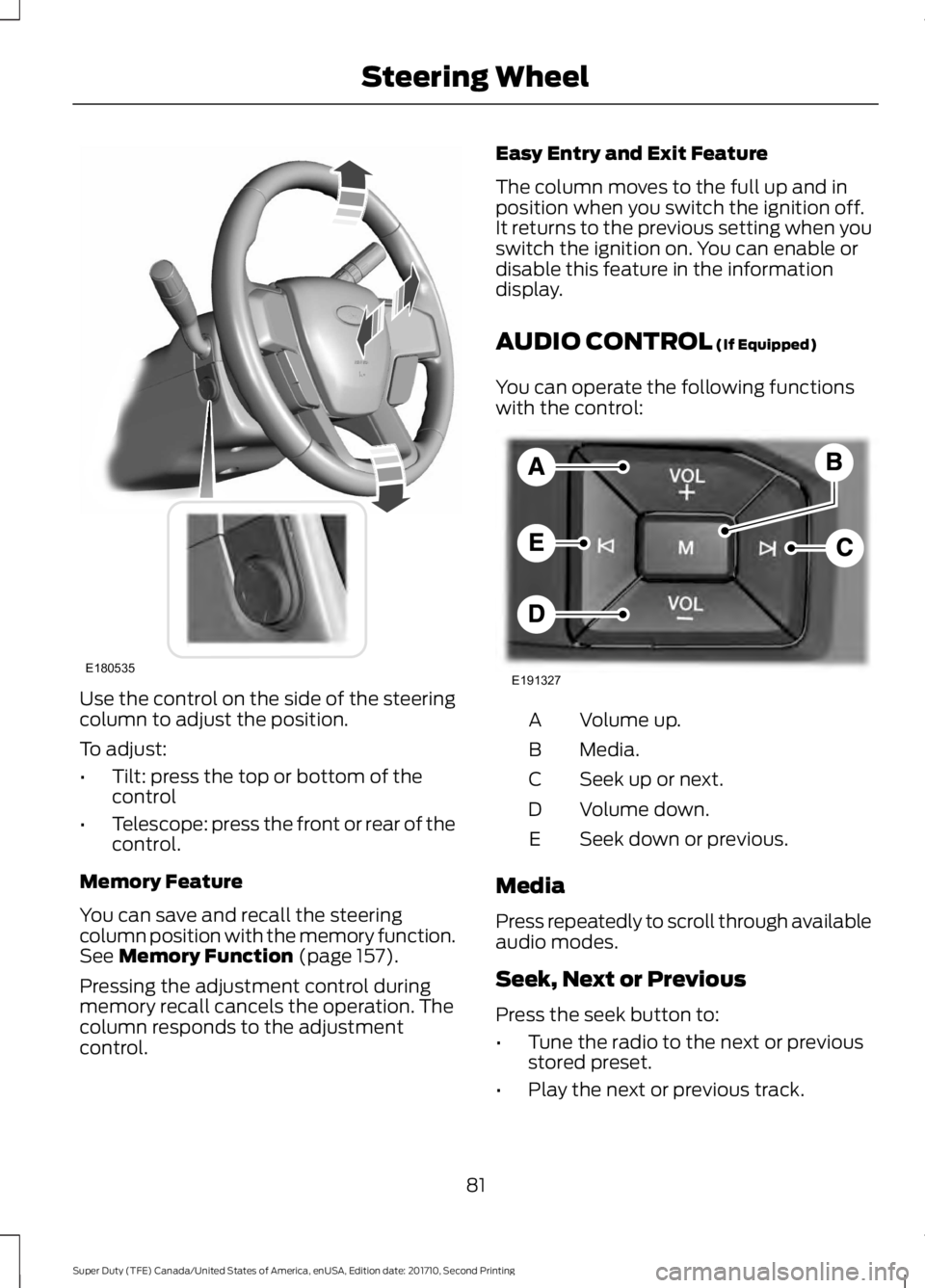
Use the control on the side of the steeringcolumn to adjust the position.
To adjust:
•Tilt: press the top or bottom of thecontrol
•Telescope: press the front or rear of thecontrol.
Memory Feature
You can save and recall the steeringcolumn position with the memory function.See Memory Function (page 157).
Pressing the adjustment control duringmemory recall cancels the operation. Thecolumn responds to the adjustmentcontrol.
Easy Entry and Exit Feature
The column moves to the full up and inposition when you switch the ignition off.It returns to the previous setting when youswitch the ignition on. You can enable ordisable this feature in the informationdisplay.
AUDIO CONTROL (If Equipped)
You can operate the following functionswith the control:
Volume up.A
Media.B
Seek up or next.C
Volume down.D
Seek down or previous.E
Media
Press repeatedly to scroll through availableaudio modes.
Seek, Next or Previous
Press the seek button to:
•Tune the radio to the next or previousstored preset.
•Play the next or previous track.
81
Super Duty (TFE) Canada/United States of America, enUSA, Edition date: 201710, Second Printing
Steering WheelE180535 E191327
Page 86 of 642
ADJUSTING THE PEDALS
Note:Never use the controls when your feetare on the accelerator or brake pedals,especially when the vehicle is moving.
Note:Adjust the pedals only when yourvehicle is in park (P).
Depending on your vehicle and equipmentlevel, the shape and location of yourpower-adjustable pedal control can vary.
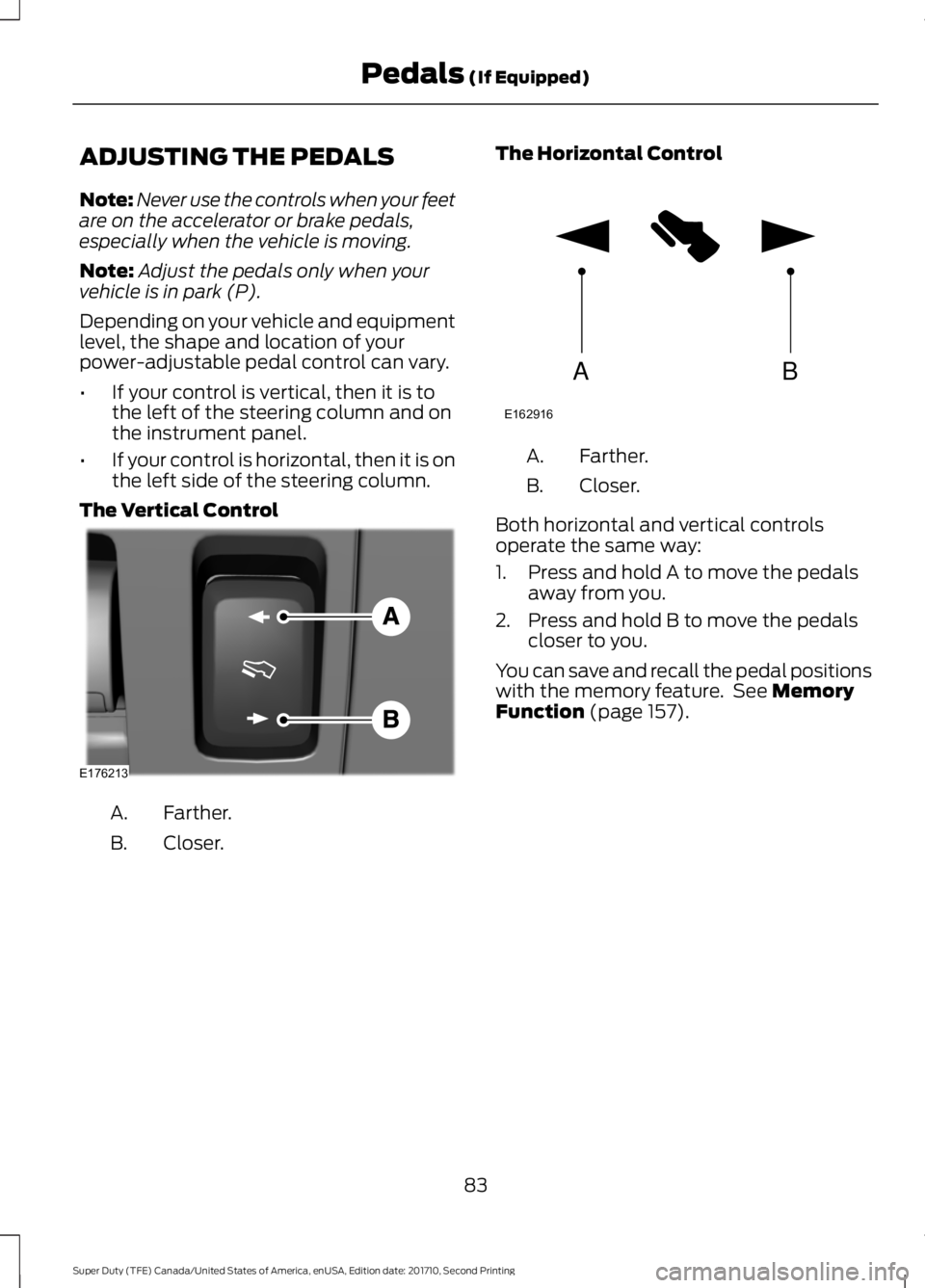
•If your control is vertical, then it is tothe left of the steering column and onthe instrument panel.
•If your control is horizontal, then it is onthe left side of the steering column.
The Vertical Control
Farther.A.
Closer.B.
The Horizontal Control
Farther.A.
Closer.B.
Both horizontal and vertical controlsoperate the same way:
1. Press and hold A to move the pedalsaway from you.
2. Press and hold B to move the pedalscloser to you.
You can save and recall the pedal positionswith the memory feature. See MemoryFunction (page 157).
83
Super Duty (TFE) Canada/United States of America, enUSA, Edition date: 201710, Second Printing
Pedals (If Equipped)E176213 AB
E162916
Page 92 of 642
Note:If it appears that automatic controlof the high beams is not functioningproperly, check the windshield in front ofthe camera for a blockage. A clear view ofthe road is required for proper systemoperation. Have any windshield damage inthe area of the camera’s field-of-viewrepaired.
Note:If the system detects a blockage, forexample bird droppings, bug splatter, snowor ice, the system will go into low beammode until you clear the blockage. Amessage may also appear in the instrumentcluster display noting the front camera isblocked.
Note:Typical road dust, dirt and waterspots will not affect the performance of theautomatic high beam system. However, incold or inclement weather conditions, youwill notice a decrease in the availability ofthe high beam system, especially at startup. If you want to change the beam stateindependently of the system, you mayswitch the high beams on or off using themultifunction switch. Automatic control willresume when conditions are correct.
Note:Modification of the vehicle ride heightsuch as using much larger tires, maydegrade feature performance.
A camera sensor, centrally mountedbehind the windshield of your vehicle,continuously monitors conditions to decidewhen to switch the high beams off and on.
Once the system is active, the high beamswill switch on if:
•the ambient light level is low enough
•there is no traffic in front of the vehicle
•the vehicle speed is greater thanapproximately 32 mph (52 km/h).
The high beams will switch off if:
•the system detects the headlamps ofan approaching vehicle or the taillamps of a preceding vehicle.
•vehicle speed falls belowapproximately 27 mph (44 km/h)
•the ambient light level is high enoughthat high beams are not required
•the system detects severe rain, snowor fog
•the camera is blocked.
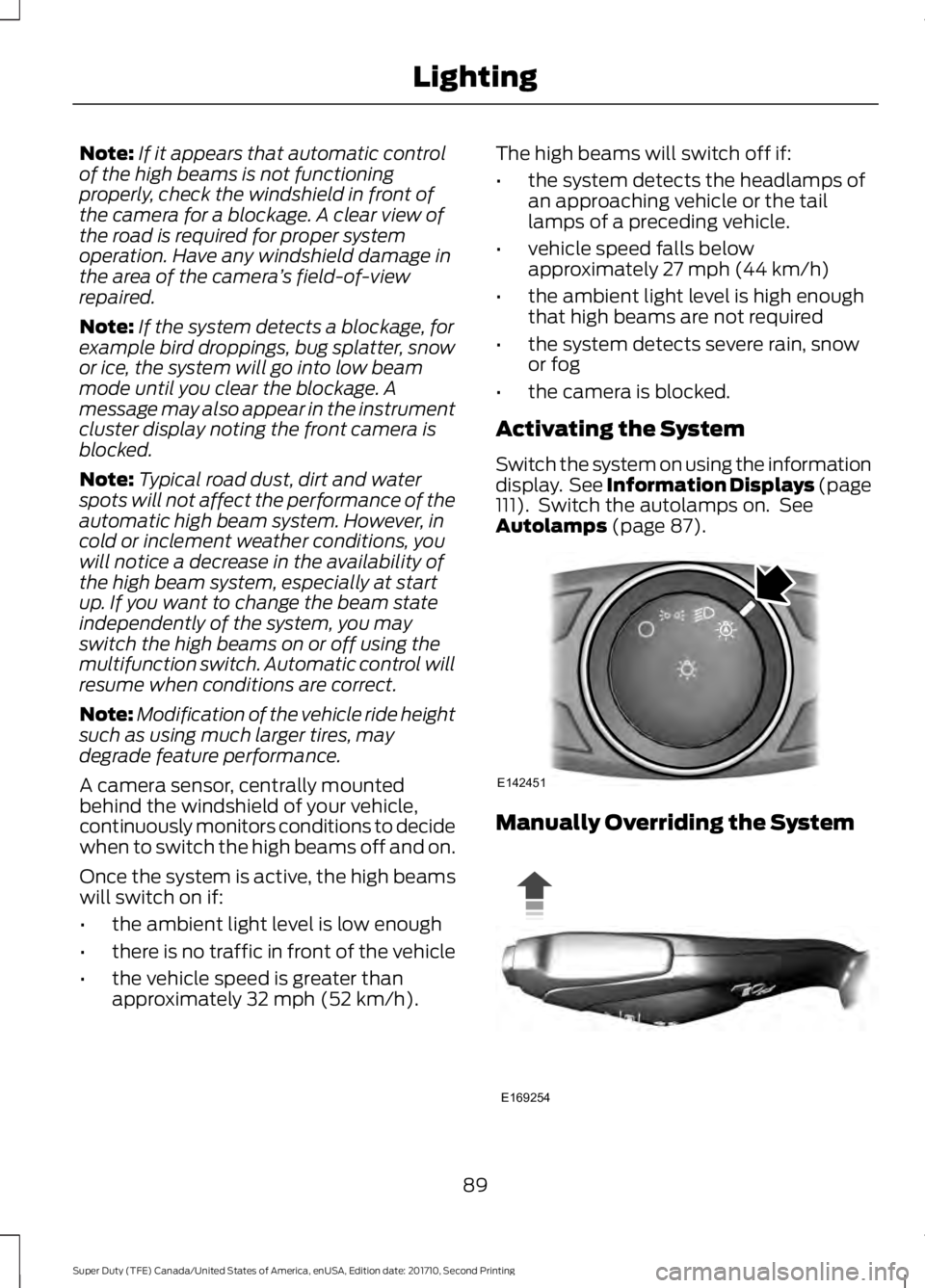
Activating the System
Switch the system on using the informationdisplay. See Information Displays (page111). Switch the autolamps on. SeeAutolamps (page 87).
Manually Overriding the System
89
Super Duty (TFE) Canada/United States of America, enUSA, Edition date: 201710, Second Printing
LightingE142451 E169254
Page 108 of 642
Fuel gauge positionDistance-to-emptyDriving type (fuel economyconditions)
1/8th tank50 mi (80 km)Highway driving
1/4 tank50 mi (80 km)Severe duty driving (trailertowing, extended idle)
Transmission Fluid TemperatureGauge
Indicates transmission fluid temperature.At normal operating temperature, the levelindicator will be in the normal range. If thetransmission fluid temperature exceedsthe normal range, stop the vehicle as soonas safely possible and verify the airflow isnot restricted such as snow or debrisblocking airflow through the grill. Also,higher than normal operating temperaturecan be caused by special operationconditions (i.e. snowplowing, towing oroff-road use). See Special OperatingConditions Scheduled Maintenance(page 581). Operating the transmission forextended periods with the gauge in thehigher than normal area may causeinternal transmission damage. You needto alter the severity of your drivingconditions to lower the transmissiontemperature into the normal range. If thegauge continues to show hightemperatures, see an authorized dealer.
Turbo Boost Gauge (If Equipped)
Indicates the amount of manifold airpressure in the engine.
DEF Gauge (If Equipped)
Indicates the current DEF level.
WARNING LAMPS AND
INDICATORS
The following warning lamps andindicators will alert you to a vehiclecondition that may become serious. Somelamps will illuminate when you start yourvehicle to make sure they work. If anylamps remain on after starting your vehicle,refer to the respective system warninglamp for further information.
Note:Some warning indicators appear inthe information display and function thesame as a warning lamp but do not displaywhen you start your vehicle.
Adaptive Cruise Control (If Equipped)
The speed control systemindicator light changes color toindicate what mode the systemis in. See Using Adaptive Cruise Control(page 240).
On (white light): Illuminates when theadaptive cruise control system is turnedon. Turns off when the speed controlsystem is turned off.
Engaged (green light): Illuminates whenthe adaptive cruise control system isengaged. Turns off when the speed controlsystem is disengaged.
105
Super Duty (TFE) Canada/United States of America, enUSA, Edition date: 201710, Second Printing
Instrument ClusterE144524
Page 110 of 642
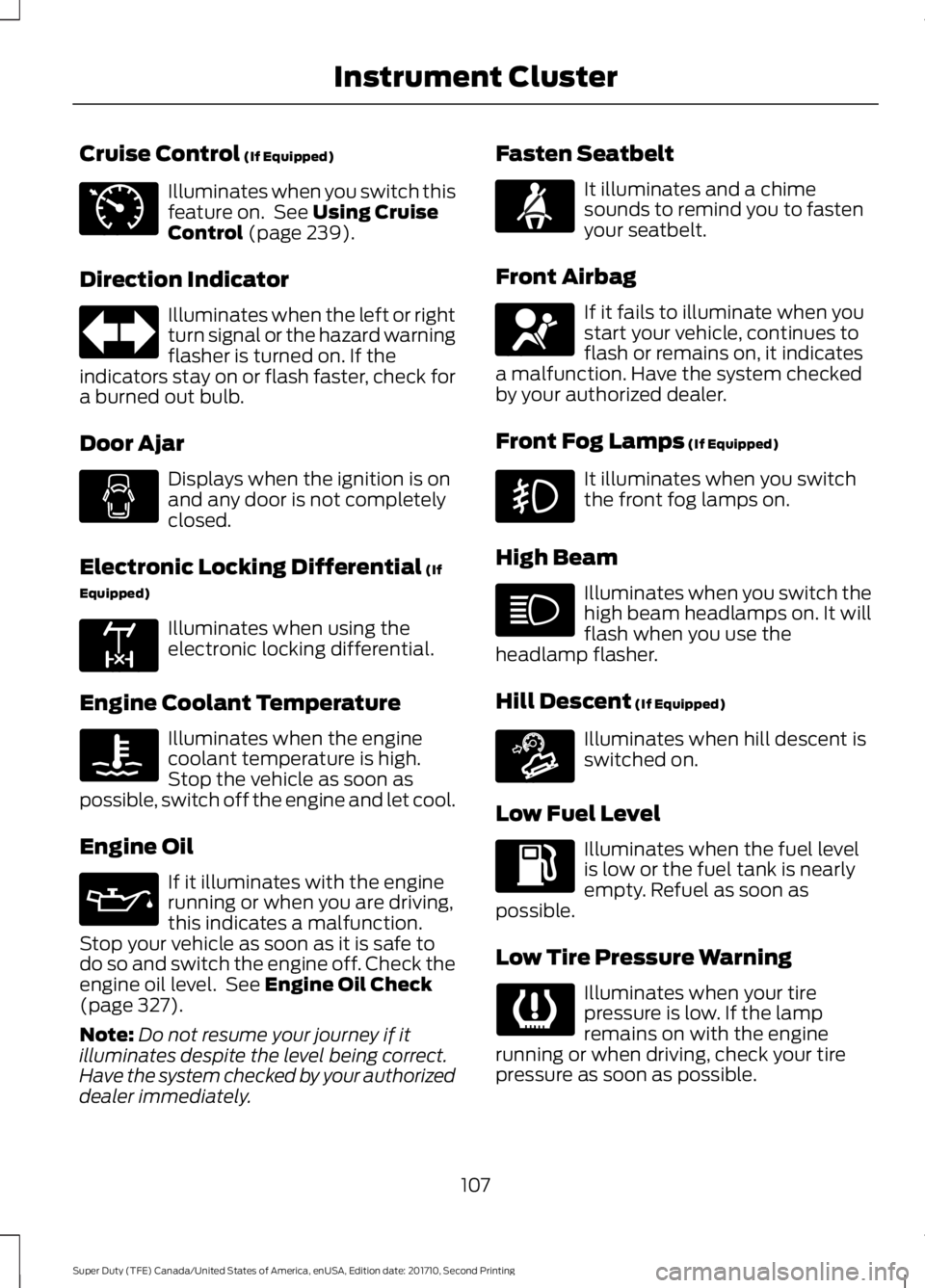
Cruise Control (If Equipped)
Illuminates when you switch thisfeature on. See Using CruiseControl (page 239).
Direction Indicator
Illuminates when the left or rightturn signal or the hazard warningflasher is turned on. If theindicators stay on or flash faster, check fora burned out bulb.
Door Ajar
Displays when the ignition is onand any door is not completelyclosed.
Electronic Locking Differential (If
Equipped)
Illuminates when using theelectronic locking differential.
Engine Coolant Temperature
Illuminates when the enginecoolant temperature is high.Stop the vehicle as soon aspossible, switch off the engine and let cool.
Engine Oil
If it illuminates with the enginerunning or when you are driving,this indicates a malfunction.Stop your vehicle as soon as it is safe todo so and switch the engine off. Check theengine oil level. See Engine Oil Check(page 327).
Note:Do not resume your journey if itilluminates despite the level being correct.Have the system checked by your authorizeddealer immediately.
Fasten Seatbelt
It illuminates and a chimesounds to remind you to fastenyour seatbelt.
Front Airbag
If it fails to illuminate when youstart your vehicle, continues toflash or remains on, it indicatesa malfunction. Have the system checkedby your authorized dealer.
Front Fog Lamps (If Equipped)
It illuminates when you switchthe front fog lamps on.
High Beam
Illuminates when you switch thehigh beam headlamps on. It willflash when you use theheadlamp flasher.
Hill Descent (If Equipped)
Illuminates when hill descent isswitched on.
Low Fuel Level
Illuminates when the fuel levelis low or the fuel tank is nearlyempty. Refuel as soon aspossible.
Low Tire Pressure Warning
Illuminates when your tirepressure is low. If the lampremains on with the enginerunning or when driving, check your tirepressure as soon as possible.
107
Super Duty (TFE) Canada/United States of America, enUSA, Edition date: 201710, Second Printing
Instrument ClusterE71340 E163170 E71880 E67017 E163171
Page 114 of 642
GENERAL INFORMATION
WARNING
Driving while distracted can result inloss of vehicle control, crash andinjury. We strongly recommend thatyou use extreme caution when using anydevice that may take your focus off theroad. Your primary responsibility is the safeoperation of your vehicle. We recommendagainst the use of any hand-held devicewhile driving and encourage the use ofvoice-operated systems when possible.Make sure you are aware of all applicablelocal laws that may affect the use ofelectronic devices while driving.
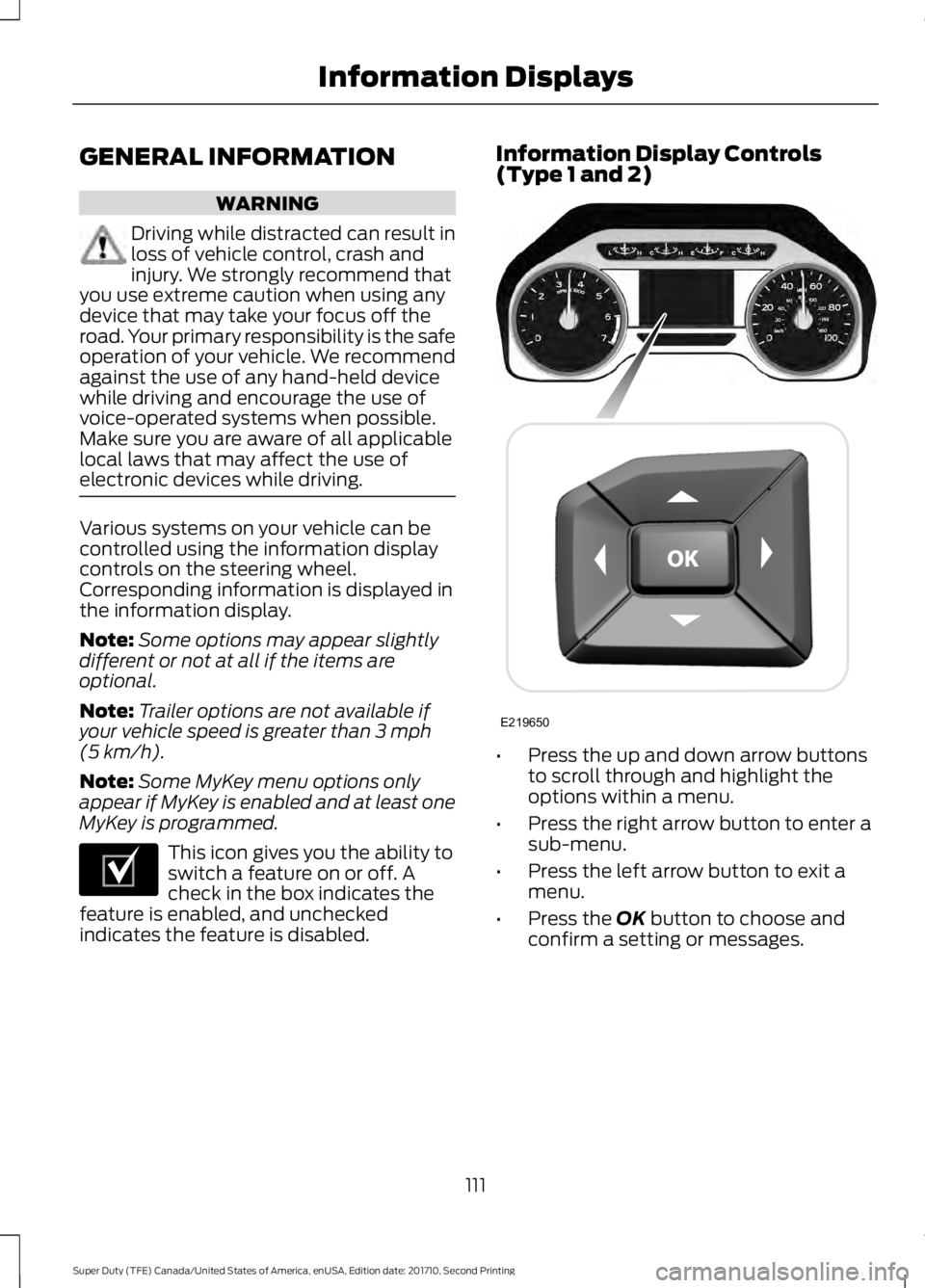
Various systems on your vehicle can becontrolled using the information displaycontrols on the steering wheel.Corresponding information is displayed inthe information display.
Note:Some options may appear slightlydifferent or not at all if the items areoptional.
Note:Trailer options are not available ifyour vehicle speed is greater than 3 mph(5 km/h).
Note:Some MyKey menu options onlyappear if MyKey is enabled and at least oneMyKey is programmed.
This icon gives you the ability toswitch a feature on or off. Acheck in the box indicates thefeature is enabled, and uncheckedindicates the feature is disabled.
Information Display Controls(Type 1 and 2)
•Press the up and down arrow buttonsto scroll through and highlight theoptions within a menu.
•Press the right arrow button to enter asub-menu.
•Press the left arrow button to exit amenu.
•Press the OK button to choose andconfirm a setting or messages.
111
Super Duty (TFE) Canada/United States of America, enUSA, Edition date: 201710, Second Printing
Information DisplaysE204495 E219650