climate settings FORD F250 SUPER DUTY 2017 User Guide
[x] Cancel search | Manufacturer: FORD, Model Year: 2017, Model line: F250 SUPER DUTY, Model: FORD F250 SUPER DUTY 2017Pages: 642, PDF Size: 12.35 MB
Page 165 of 642
Press the cooled seat symbol to cyclethrough the various cool settings and off.More indicator lights indicate coolersettings.
Note:The cooled seats may remain on afteryou remote start your vehicle, based on yourremote start settings. The heated seats mayalso turn on when you start your vehicle ifthey were on when you switched yourvehicle off.
Note:After 60 minutes of operation, thecooled seats switch off. Press the cooledseat symbol to switch the cooled seats on.
Climate Controlled Seat Air FilterReplacement
The climate controlled seat systemincludes air filters. You must replace themperiodically.
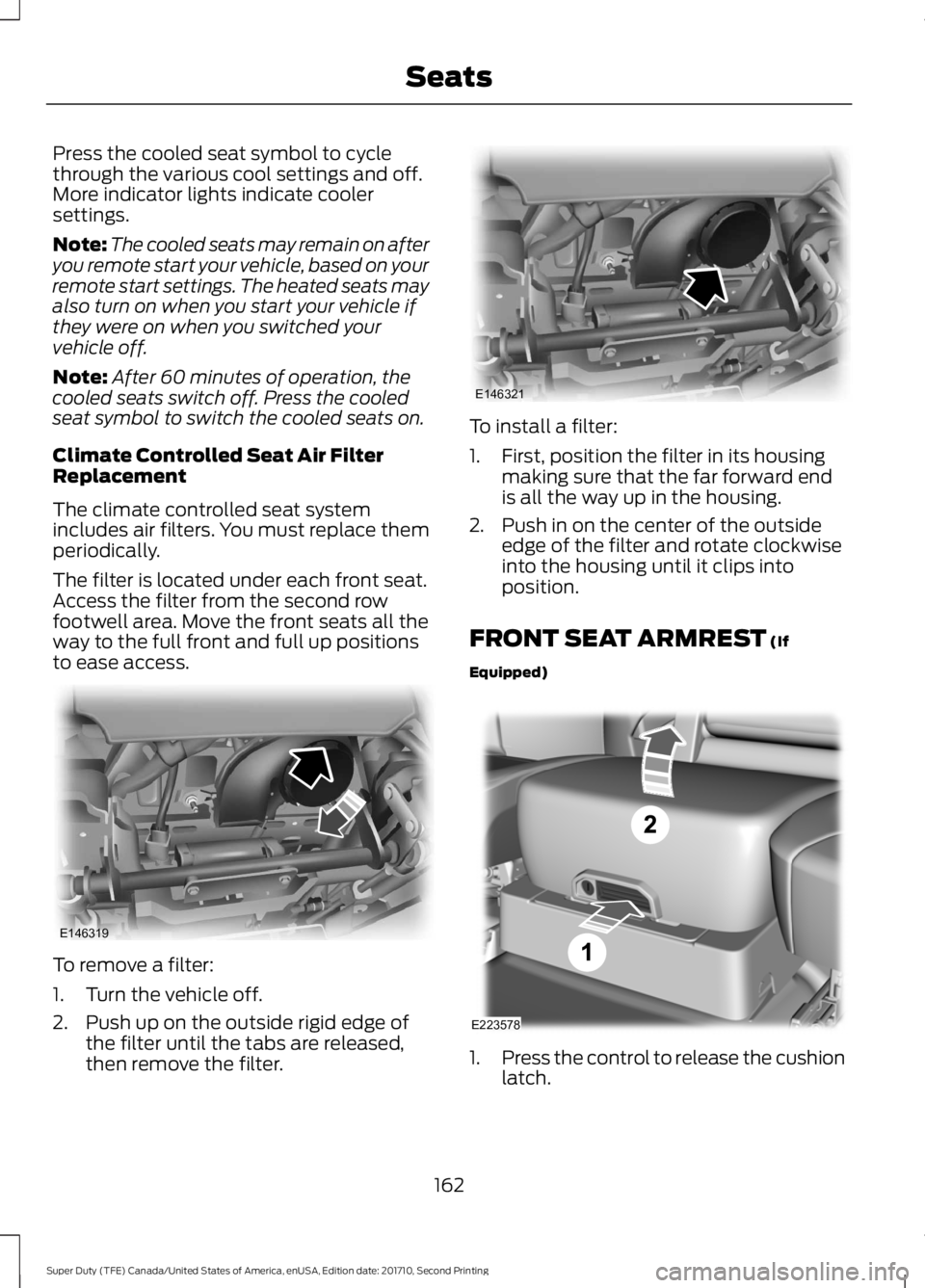
The filter is located under each front seat.Access the filter from the second rowfootwell area. Move the front seats all theway to the full front and full up positionsto ease access.
To remove a filter:
1. Turn the vehicle off.
2. Push up on the outside rigid edge ofthe filter until the tabs are released,then remove the filter.
To install a filter:
1. First, position the filter in its housingmaking sure that the far forward endis all the way up in the housing.
2. Push in on the center of the outsideedge of the filter and rotate clockwiseinto the housing until it clips intoposition.
FRONT SEAT ARMREST (If
Equipped)
1.Press the control to release the cushionlatch.
162
Super Duty (TFE) Canada/United States of America, enUSA, Edition date: 201710, Second Printing
SeatsE146319 E146321 E223578
Page 462 of 642
To adjust this setting press the voice button, when prompted say:
Action and DescriptionVoice Command
voice settings
Then any of the following:
When enabled, this feature will prompt youto confirm any voice initiated call commandprior to the call being placed.
phone confirmation on
The system will make a best guess; youmay still occasionally be asked to confirmsettings.
phone confirmation off
Changing the Voice Settings
In addition to using voice commands tochange the voice settings, you can also usethe menu in the audio display.
To change the voice settings press theMenu button then select:
Menu Item
SYNC-Settings
Voice settings
Note:Depending on the current climatecontrol settings, the fan speed mayautomatically go down while issuing voicecommands or while making and receivingphone calls via SYNC to reduce the amountof background noise in the vehicle. The fanspeed will automatically return to normaloperation once the voice session ends. Fanspeed can also be adjusted normally duringa voice session, simply press fan buttons (orturn fan knob) to increase or decrease fanspeed to desired setting.
To disable this automatic fan speedreduction feature during voice sessions,press and hold the climate control AC andRecirculated air buttons simultaneously,release and then increase fan speed within2 seconds. To re-enable this feature, repeatthe above sequence.
USING SYNC™ WITH YOUR
PHONE
Hands-free calling is one of the mainfeatures of SYNC. While the systemsupports a variety of features, many aredependent on your cellular phone'sfunctionality. At a minimum, most cellularphones with Bluetooth wireless technologysupport the following functions:
•Answering an incoming call.
•Ending a call.
•Using privacy mode.
•Dialing a number.
•Redialing.
•Call waiting notification.
•Caller ID.
459
Super Duty (TFE) Canada/United States of America, enUSA, Edition date: 201710, Second Printing
SYNC™ (If Equipped)
Page 497 of 642
Action and DescriptionMenu ItemItem
This bar displays icons and messages pertaining to currentsystem activities including climate settings, voicecommands and phone functions such as text messages.
Status BarA
This button is available on the main screens. Pressing ittakes you to the home screen view.HomeB
This shows the current time. You can set the clock manuallyor have it controlled by the vehicle's GPS location. SeeSettings (page 541).
ClockC
This displays the current outside temperature.OutsideTemperatureD
You can touch any of the buttons on this bar to select afeature.Feature BarE
The touchscreen allows you quick accessto all of your comfort, navigation,communication and entertainmentoptions. Using the status and feature baryou can quickly select the feature you wantto use.
Note:Your system is equipped with afeature that allows you to access andcontrol audio features for 10 minutes afteryou switch the ignition off (and no doorsopen).
The Status Bar
Additional icons also display in the statusbar depending on market, vehicle optionsand current operation. If a feature is notactive, the icon does not display. Certainicons may move to the left or rightdepending on what options are active.
494
Super Duty (TFE) Canada/United States of America, enUSA, Edition date: 201710, Second Printing
SYNC™ 3 (If Equipped)
Page 501 of 642
SEEK PREVIOUS:
•While in radio mode, press to seekbetween memory presets.
•While in USB, Bluetooth Audio or CDmode, press to seek between songs orpress and hold to fast seek.
PHONE ACCEPT: Press to answer a callor switch between calls.
PHONE REJECT: Press to end a call orreject an incoming call.
Note:On some models,SEEK NEXT maybe combined with PHONE REJECT andSEEK PREVIOUS may be combined withPHONE ACCEPT.
M:Touch the control repeatedly to switchbetween media sources (modes).
See Steering Wheel (page 80).
Using Your Bezel Controls
Depending on your vehicle and optionpackage, you may also have these controlson your instrument panel:
•Power: Switch the audio system onand off.
•VOL: Control the volume of playingaudio.
•Seek and Tune: Use as you normallywould in audio modes.
•Eject: Eject a CD from the audiosystem.
•SOURCE or MEDIA: Press repeatedlyto advance through available mediamodes.
•SOUND: Press to access the Soundmenu where you can adjust sound andother audio settings.
•1-6: Press and hold to store or press toselect an AM, FM or SIRIUS memorypreset. See Audio System (page 441).
•DISP: Switch the display on or off. Youcan also touch the screen to switch thedisplay back on.
•Temperature, fan and climatecontrol buttons: Control thetemperature, fan speed or settings ofthe climate control system. SeeClimate Control (page 145).
911 Assist
WARNINGS
Unless the 911 Assist setting is set onbefore a crash, the system will notdial for help which could delayresponse time, potentially increasing therisk of serious injury or death after a crash.
Do not wait for 911 Assist to make anemergency call if you can do ityourself. Dial emergency servicesimmediately to avoid delayed responsetime which could increase the risk ofserious injury or death after a crash. If youdo not hear 911 Assist within five secondsof the crash, the system or phone may bedamaged or non-functional.
Always place your phone in a securelocation in your vehicle so it does notbecome a projectile or get damagedin a crash. Failure to do so may causeserious injury to someone or damage thephone which could prevent 911 Assist fromworking properly.
Note:The SYNC 911 Assist feature must beset on before the incident.
Note:The SYNC 911 Assist feature onlyoperates in the U.S., Canada or in a territoryin which 911 is the emergency number.
Note:Before setting this feature on, makesure that you read the 911 Assist PrivacyNotice later in this section for importantinformation.
498
Super Duty (TFE) Canada/United States of America, enUSA, Edition date: 201710, Second Printing
SYNC™ 3 (If Equipped)
Page 510 of 642
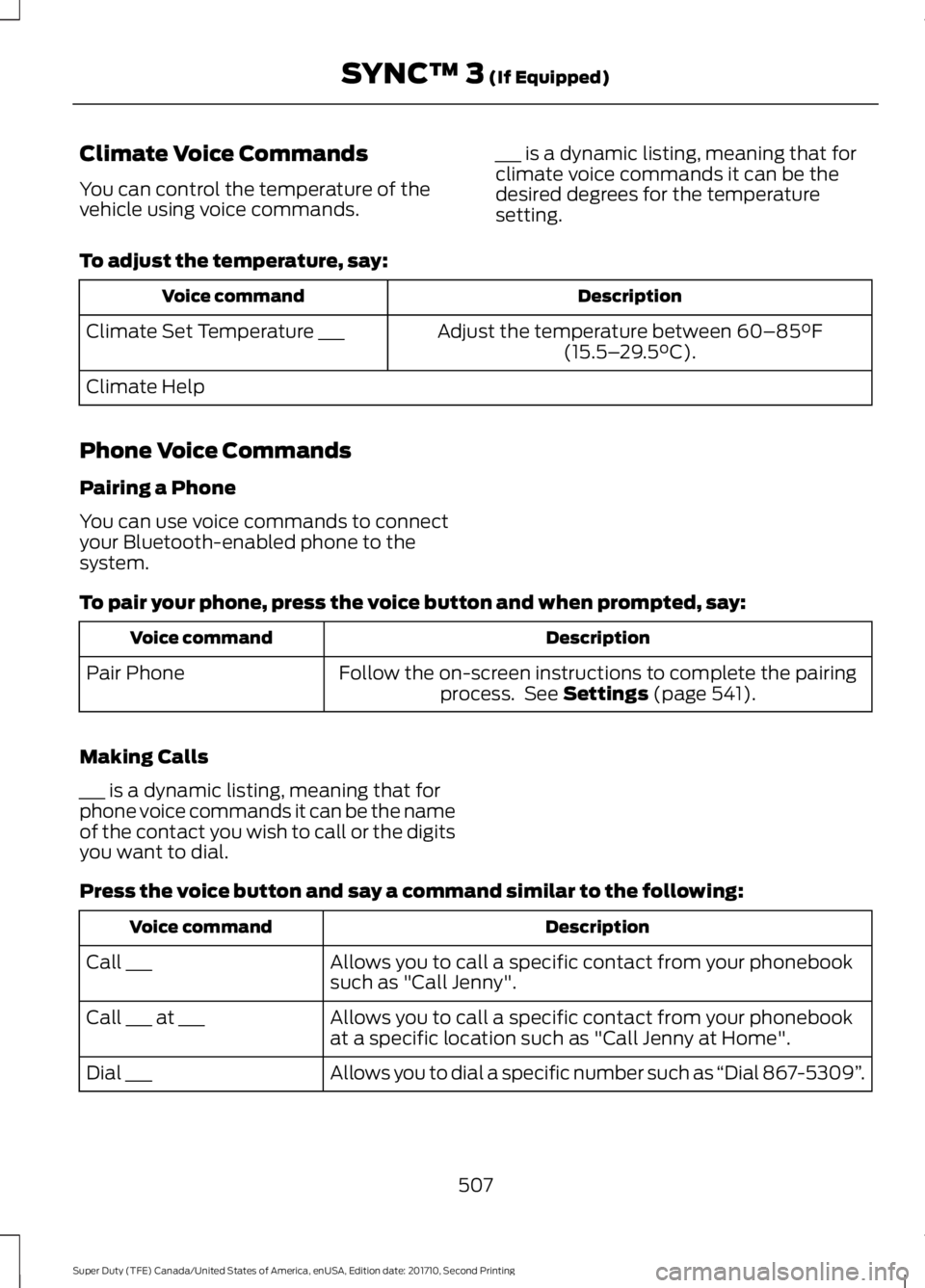
Climate Voice Commands
You can control the temperature of thevehicle using voice commands.
___ is a dynamic listing, meaning that forclimate voice commands it can be thedesired degrees for the temperaturesetting.
To adjust the temperature, say:
DescriptionVoice command
Adjust the temperature between 60–85°F(15.5–29.5°C).Climate Set Temperature ___
Climate Help
Phone Voice Commands
Pairing a Phone
You can use voice commands to connectyour Bluetooth-enabled phone to thesystem.
To pair your phone, press the voice button and when prompted, say:
DescriptionVoice command
Follow the on-screen instructions to complete the pairingprocess. See Settings (page 541).Pair Phone
Making Calls
___ is a dynamic listing, meaning that forphone voice commands it can be the nameof the contact you wish to call or the digitsyou want to dial.
Press the voice button and say a command similar to the following:
DescriptionVoice command
Allows you to call a specific contact from your phonebooksuch as "Call Jenny".Call ___
Allows you to call a specific contact from your phonebookat a specific location such as "Call Jenny at Home".Call ___ at ___
Allows you to dial a specific number such as “Dial 867-5309”.Dial ___
507
Super Duty (TFE) Canada/United States of America, enUSA, Edition date: 201710, Second Printing
SYNC™ 3 (If Equipped)
Page 514 of 642
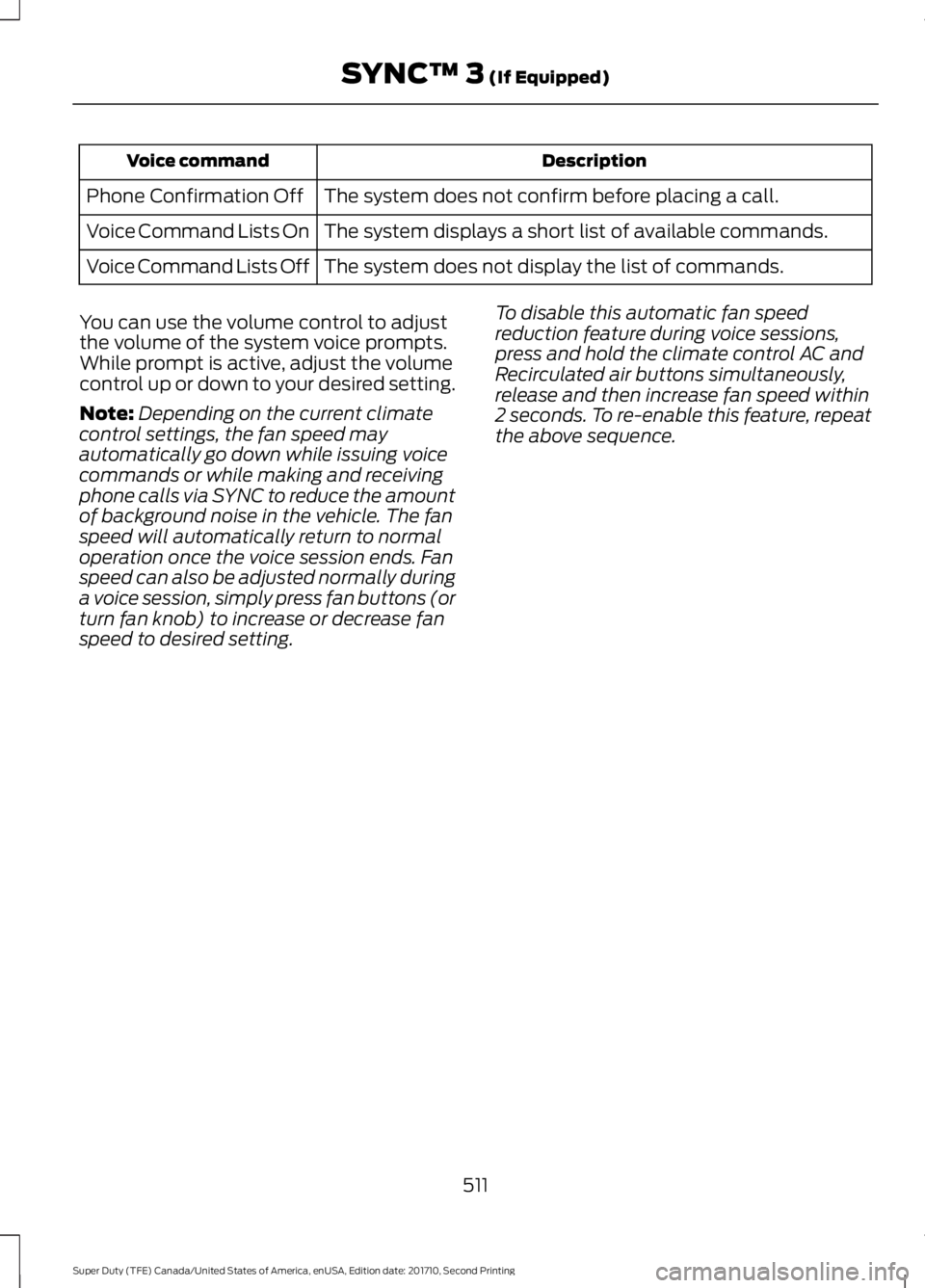
DescriptionVoice command
The system does not confirm before placing a call.Phone Confirmation Off
The system displays a short list of available commands.Voice Command Lists On
The system does not display the list of commands.Voice Command Lists Off
You can use the volume control to adjustthe volume of the system voice prompts.While prompt is active, adjust the volumecontrol up or down to your desired setting.
Note:Depending on the current climatecontrol settings, the fan speed mayautomatically go down while issuing voicecommands or while making and receivingphone calls via SYNC to reduce the amountof background noise in the vehicle. The fanspeed will automatically return to normaloperation once the voice session ends. Fanspeed can also be adjusted normally duringa voice session, simply press fan buttons (orturn fan knob) to increase or decrease fanspeed to desired setting.
To disable this automatic fan speedreduction feature during voice sessions,press and hold the climate control AC andRecirculated air buttons simultaneously,release and then increase fan speed within2 seconds. To re-enable this feature, repeatthe above sequence.
511
Super Duty (TFE) Canada/United States of America, enUSA, Edition date: 201710, Second Printing
SYNC™ 3 (If Equipped)
Page 525 of 642
Supported USB file systems include: FAT,exFAT, and NTFS.
SYNC 3 is also able to organize the mediafrom your USB device by metadata tags.Metadata tags, which are descriptivesoftware identifiers embedded in themedia files, provide information about thefile.
If your indexed media files contain noinformation embedded in these metadatatags, SYNC 3 may classify the emptymetadata tags as unknown.
SYNC 3 is capable of indexing up to50,000 songs per USB device, for up to 10devices.
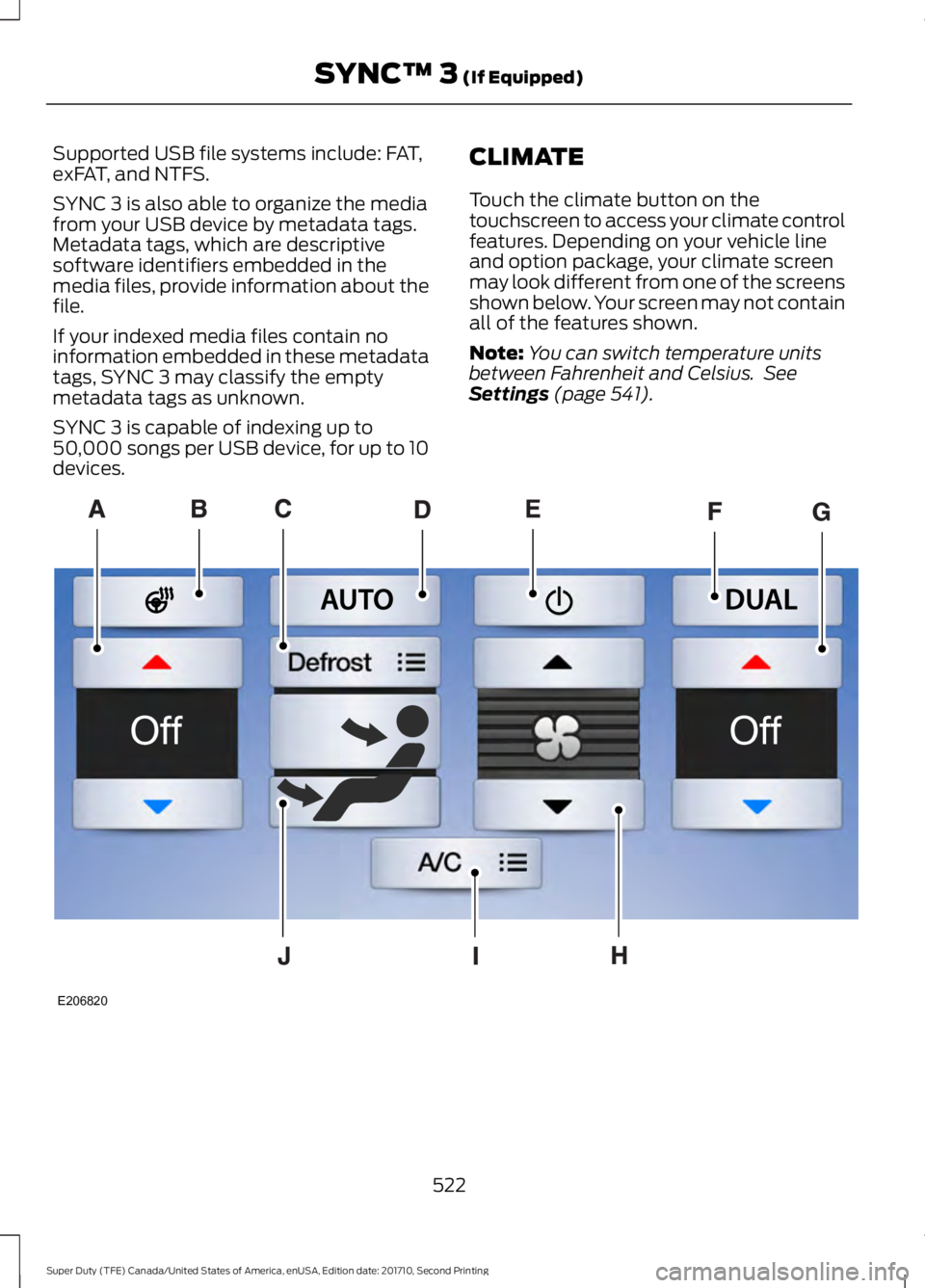
CLIMATE
Touch the climate button on thetouchscreen to access your climate controlfeatures. Depending on your vehicle lineand option package, your climate screenmay look different from one of the screensshown below. Your screen may not containall of the features shown.
Note:You can switch temperature unitsbetween Fahrenheit and Celsius. SeeSettings (page 541).
522
Super Duty (TFE) Canada/United States of America, enUSA, Edition date: 201710, Second Printing
SYNC™ 3 (If Equipped)E206820
Page 526 of 642
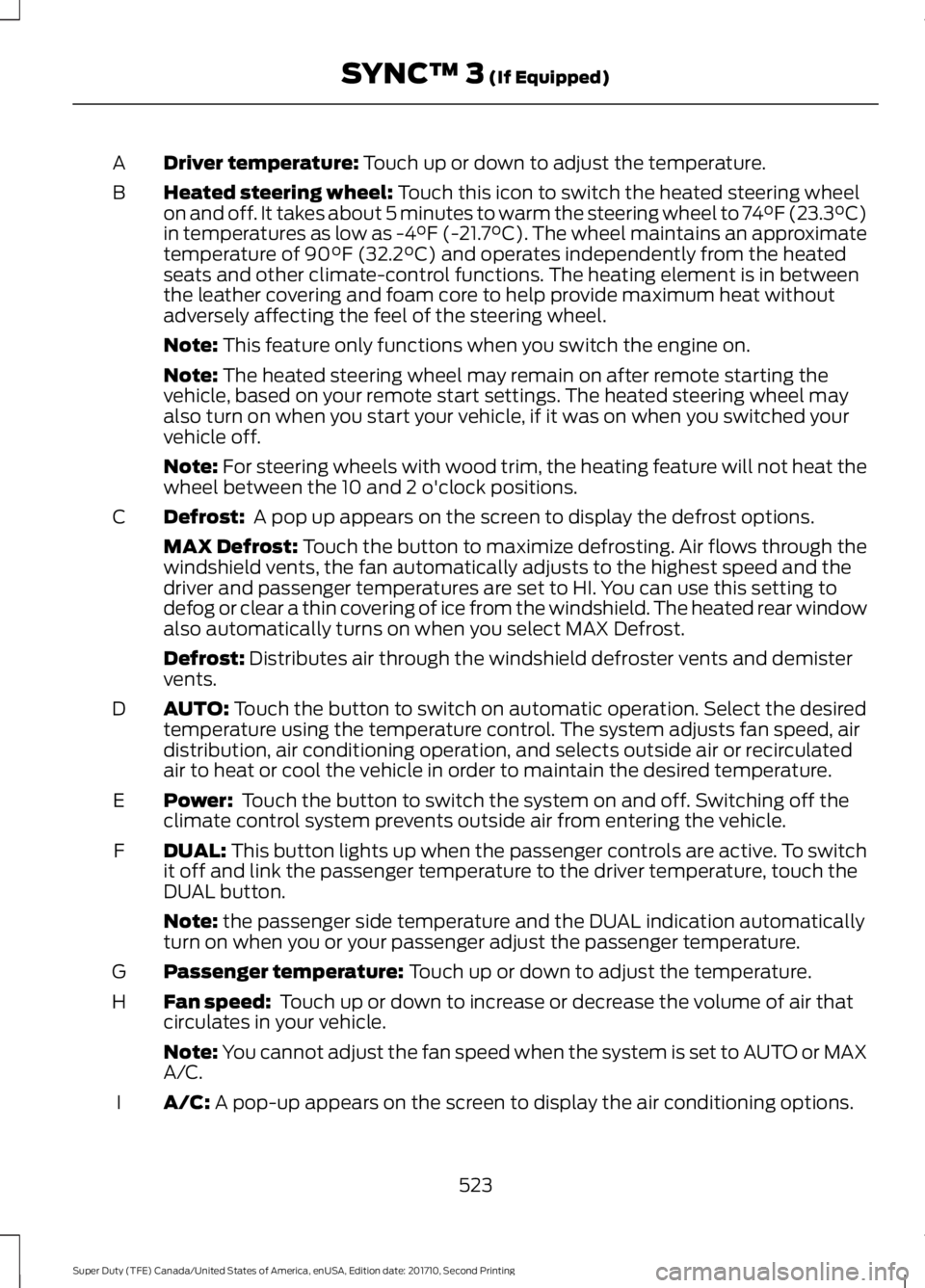
Driver temperature: Touch up or down to adjust the temperature.A
Heated steering wheel: Touch this icon to switch the heated steering wheelon and off. It takes about 5 minutes to warm the steering wheel to 74°F (23.3°C)in temperatures as low as -4°F (-21.7°C). The wheel maintains an approximatetemperature of 90°F (32.2°C) and operates independently from the heatedseats and other climate-control functions. The heating element is in betweenthe leather covering and foam core to help provide maximum heat withoutadversely affecting the feel of the steering wheel.
B
Note: This feature only functions when you switch the engine on.
Note: The heated steering wheel may remain on after remote starting thevehicle, based on your remote start settings. The heated steering wheel mayalso turn on when you start your vehicle, if it was on when you switched yourvehicle off.
Note: For steering wheels with wood trim, the heating feature will not heat thewheel between the 10 and 2 o'clock positions.
Defrost: A pop up appears on the screen to display the defrost options.C
MAX Defrost: Touch the button to maximize defrosting. Air flows through thewindshield vents, the fan automatically adjusts to the highest speed and thedriver and passenger temperatures are set to HI. You can use this setting todefog or clear a thin covering of ice from the windshield. The heated rear windowalso automatically turns on when you select MAX Defrost.
Defrost: Distributes air through the windshield defroster vents and demistervents.
AUTO: Touch the button to switch on automatic operation. Select the desiredtemperature using the temperature control. The system adjusts fan speed, airdistribution, air conditioning operation, and selects outside air or recirculatedair to heat or cool the vehicle in order to maintain the desired temperature.
D
Power: Touch the button to switch the system on and off. Switching off theclimate control system prevents outside air from entering the vehicle.E
DUAL: This button lights up when the passenger controls are active. To switchit off and link the passenger temperature to the driver temperature, touch theDUAL button.
F
Note: the passenger side temperature and the DUAL indication automaticallyturn on when you or your passenger adjust the passenger temperature.
Passenger temperature: Touch up or down to adjust the temperature.G
Fan speed: Touch up or down to increase or decrease the volume of air thatcirculates in your vehicle.H
Note: You cannot adjust the fan speed when the system is set to AUTO or MAXA/C.
A/C: A pop-up appears on the screen to display the air conditioning options.I
523
Super Duty (TFE) Canada/United States of America, enUSA, Edition date: 201710, Second Printing
SYNC™ 3 (If Equipped)
Page 632 of 642
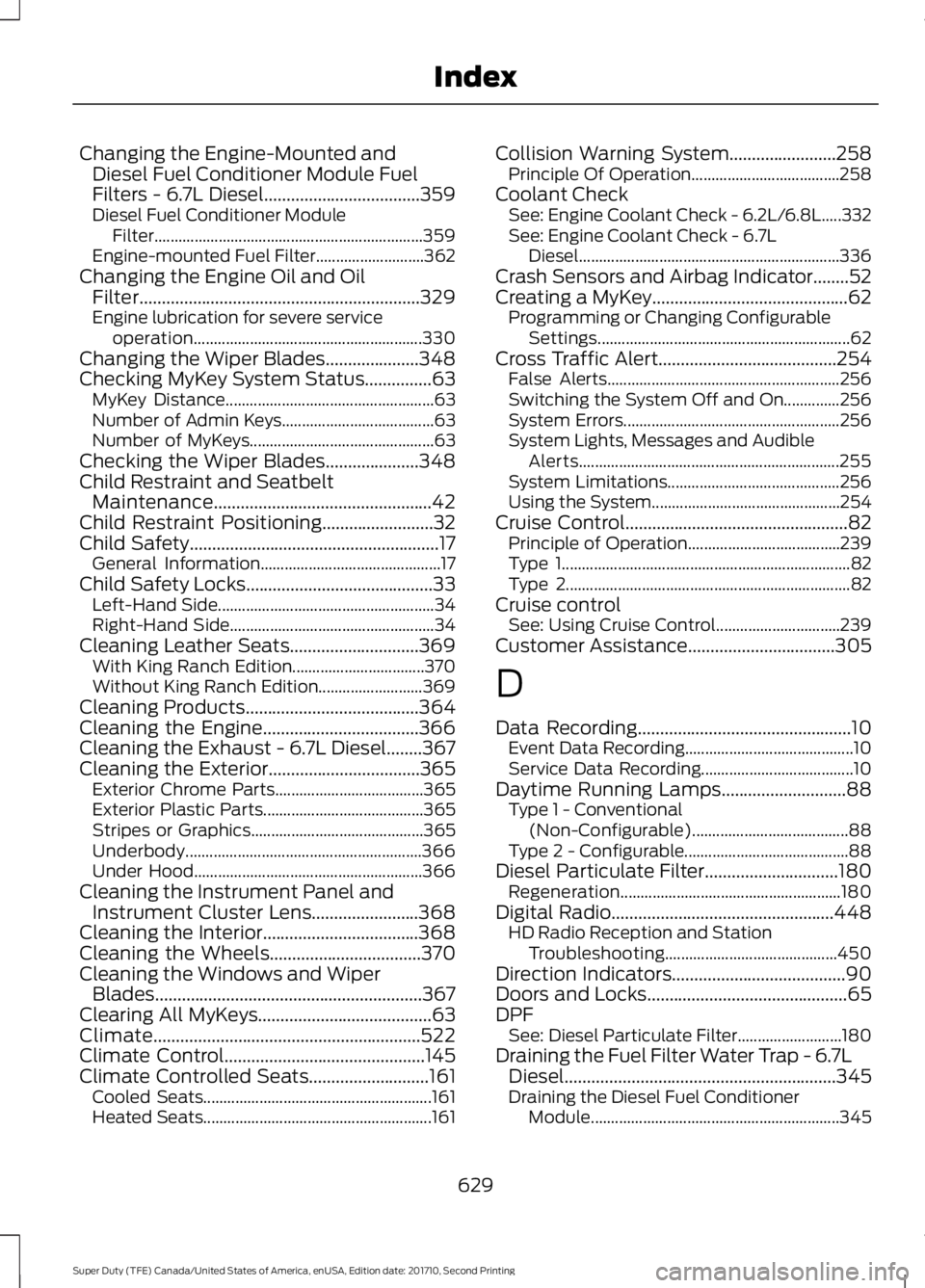
Changing the Engine-Mounted andDiesel Fuel Conditioner Module FuelFilters - 6.7L Diesel...................................359Diesel Fuel Conditioner ModuleFilter...................................................................359Engine-mounted Fuel Filter...........................362Changing the Engine Oil and OilFilter...............................................................329Engine lubrication for severe serviceoperation.........................................................330Changing the Wiper Blades.....................348Checking MyKey System Status...............63MyKey Distance....................................................63Number of Admin Keys......................................63Number of MyKeys..............................................63Checking the Wiper Blades.....................348Child Restraint and SeatbeltMaintenance.................................................42Child Restraint Positioning.........................32Child Safety........................................................17General Information.............................................17Child Safety Locks..........................................33Left-Hand Side......................................................34Right-Hand Side...................................................34Cleaning Leather Seats.............................369With King Ranch Edition.................................370Without King Ranch Edition..........................369Cleaning Products.......................................364Cleaning the Engine...................................366Cleaning the Exhaust - 6.7L Diesel........367Cleaning the Exterior..................................365Exterior Chrome Parts.....................................365Exterior Plastic Parts........................................365Stripes or Graphics...........................................365Underbody...........................................................366Under Hood.........................................................366Cleaning the Instrument Panel andInstrument Cluster Lens........................368Cleaning the Interior...................................368Cleaning the Wheels..................................370Cleaning the Windows and WiperBlades............................................................367Clearing All MyKeys.......................................63Climate............................................................522Climate Control.............................................145Climate Controlled Seats...........................161Cooled Seats.........................................................161Heated Seats.........................................................161
Collision Warning System........................258Principle Of Operation.....................................258Coolant CheckSee: Engine Coolant Check - 6.2L/6.8L.....332See: Engine Coolant Check - 6.7LDiesel.................................................................336Crash Sensors and Airbag Indicator........52Creating a MyKey............................................62Programming or Changing ConfigurableSettings...............................................................62Cross Traffic Alert........................................254False Alerts..........................................................256Switching the System Off and On..............256System Errors......................................................256System Lights, Messages and AudibleAlerts.................................................................255System Limitations...........................................256Using the System...............................................254Cruise Control..................................................82Principle of Operation......................................239Type 1........................................................................82Type 2.......................................................................82Cruise controlSee: Using Cruise Control...............................239Customer Assistance.................................305
D
Data Recording................................................10Event Data Recording..........................................10Service Data Recording......................................10Daytime Running Lamps............................88Type 1 - Conventional(Non-Configurable).......................................88Type 2 - Configurable.........................................88Diesel Particulate Filter..............................180Regeneration.......................................................180Digital Radio..................................................448HD Radio Reception and StationTroubleshooting...........................................450Direction Indicators.......................................90Doors and Locks.............................................65DPFSee: Diesel Particulate Filter..........................180Draining the Fuel Filter Water Trap - 6.7LDiesel.............................................................345Draining the Diesel Fuel ConditionerModule..............................................................345
629
Super Duty (TFE) Canada/United States of America, enUSA, Edition date: 201710, Second Printing
Index
Page 635 of 642
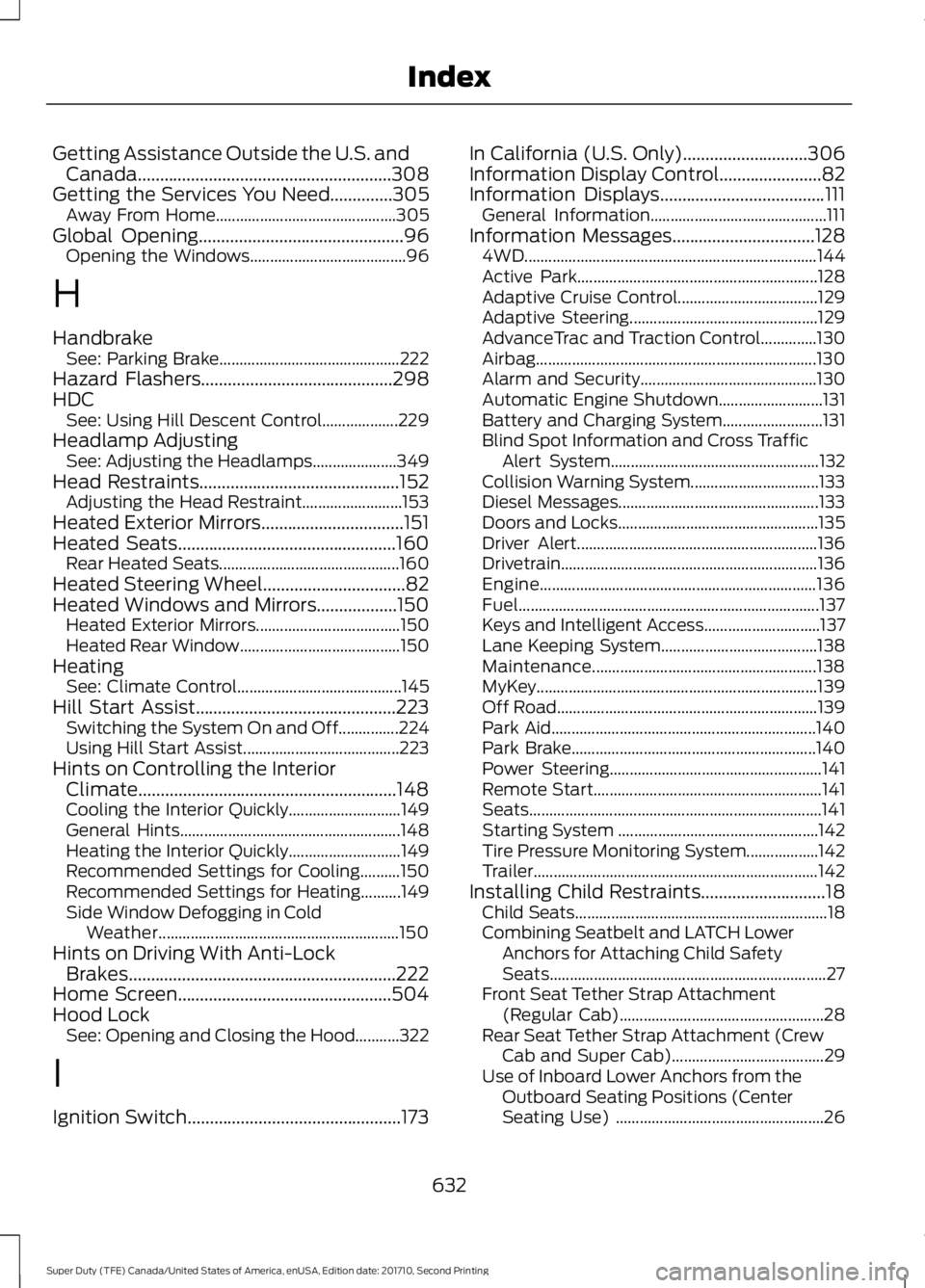
Getting Assistance Outside the U.S. andCanada.........................................................308Getting the Services You Need..............305Away From Home.............................................305Global Opening..............................................96Opening the Windows.......................................96
H
HandbrakeSee: Parking Brake.............................................222Hazard Flashers...........................................298HDCSee: Using Hill Descent Control...................229Headlamp AdjustingSee: Adjusting the Headlamps.....................349Head Restraints.............................................152Adjusting the Head Restraint.........................153Heated Exterior Mirrors................................151Heated Seats.................................................160Rear Heated Seats.............................................160Heated Steering Wheel................................82Heated Windows and Mirrors..................150Heated Exterior Mirrors....................................150Heated Rear Window........................................150HeatingSee: Climate Control.........................................145Hill Start Assist.............................................223Switching the System On and Off...............224Using Hill Start Assist.......................................223Hints on Controlling the InteriorClimate..........................................................148Cooling the Interior Quickly............................149General Hints.......................................................148Heating the Interior Quickly............................149Recommended Settings for Cooling..........150Recommended Settings for Heating..........149Side Window Defogging in ColdWeather............................................................150Hints on Driving With Anti-LockBrakes............................................................222Home Screen................................................504Hood LockSee: Opening and Closing the Hood...........322
I
Ignition Switch................................................173
In California (U.S. Only)............................306Information Display Control.......................82Information Displays.....................................111General Information............................................111Information Messages................................1284WD.........................................................................144Active Park............................................................128Adaptive Cruise Control...................................129Adaptive Steering...............................................129AdvanceTrac and Traction Control..............130Airbag......................................................................130Alarm and Security............................................130Automatic Engine Shutdown..........................131Battery and Charging System.........................131Blind Spot Information and Cross TrafficAlert System....................................................132Collision Warning System................................133Diesel Messages..................................................133Doors and Locks..................................................135Driver Alert............................................................136Drivetrain................................................................136Engine.....................................................................136Fuel...........................................................................137Keys and Intelligent Access.............................137Lane Keeping System.......................................138Maintenance........................................................138MyKey......................................................................139Off Road.................................................................139Park Aid..................................................................140Park Brake.............................................................140Power Steering.....................................................141Remote Start.........................................................141Seats.........................................................................141Starting System ..................................................142Tire Pressure Monitoring System..................142Trailer.......................................................................142Installing Child Restraints............................18Child Seats...............................................................18Combining Seatbelt and LATCH LowerAnchors for Attaching Child SafetySeats.....................................................................27Front Seat Tether Strap Attachment(Regular Cab)...................................................28Rear Seat Tether Strap Attachment (CrewCab and Super Cab)......................................29Use of Inboard Lower Anchors from theOutboard Seating Positions (CenterSeating Use) ....................................................26
632
Super Duty (TFE) Canada/United States of America, enUSA, Edition date: 201710, Second Printing
Index