remote control FORD F250 SUPER DUTY 2017 Owner's Manual
[x] Cancel search | Manufacturer: FORD, Model Year: 2017, Model line: F250 SUPER DUTY, Model: FORD F250 SUPER DUTY 2017Pages: 642, PDF Size: 12.35 MB
Page 94 of 642
Cargo and Trailer Hookup Lamps
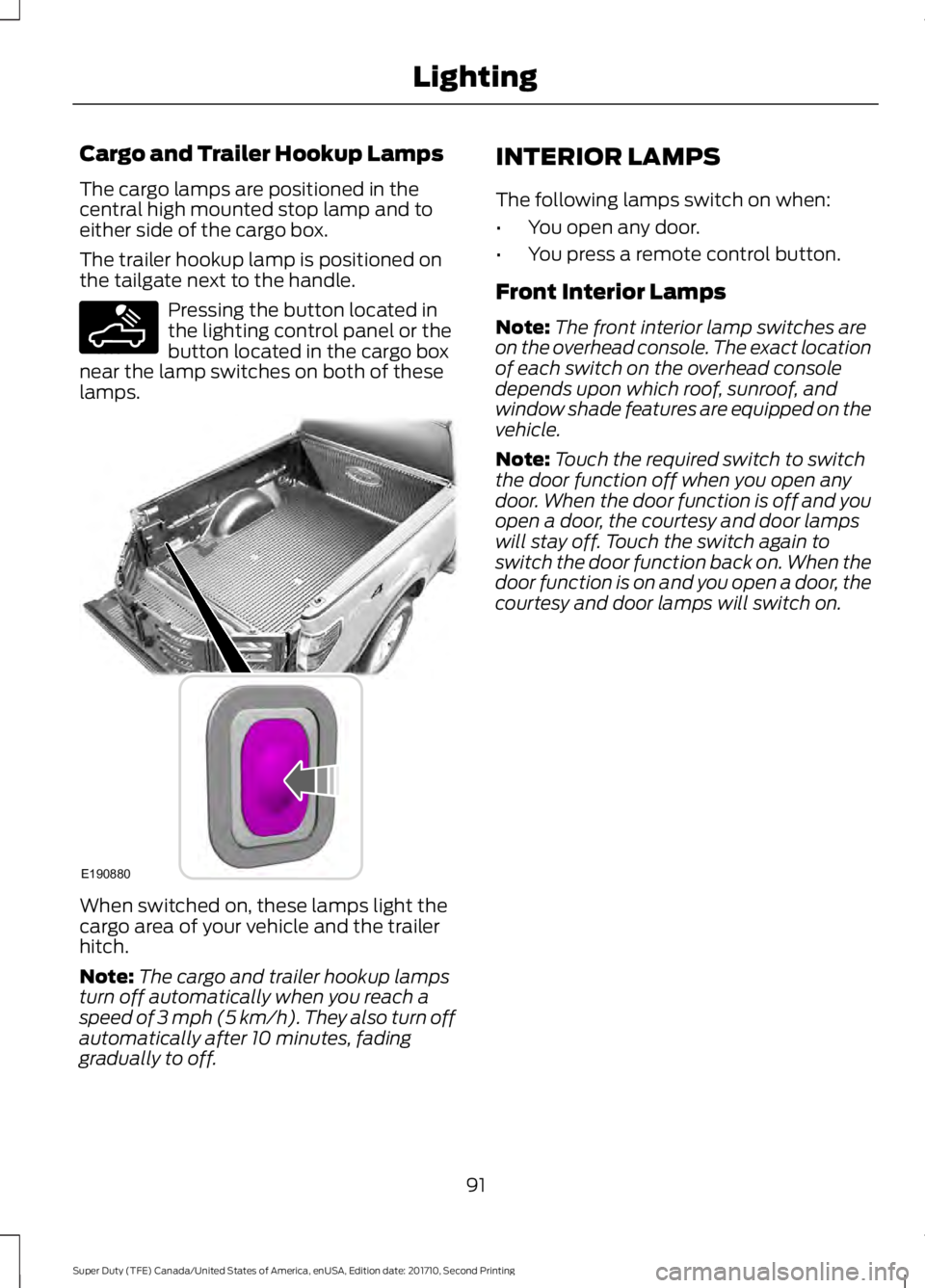
The cargo lamps are positioned in thecentral high mounted stop lamp and toeither side of the cargo box.
The trailer hookup lamp is positioned onthe tailgate next to the handle.
Pressing the button located inthe lighting control panel or thebutton located in the cargo boxnear the lamp switches on both of theselamps.
When switched on, these lamps light thecargo area of your vehicle and the trailerhitch.
Note:The cargo and trailer hookup lampsturn off automatically when you reach aspeed of 3 mph (5 km/h). They also turn offautomatically after 10 minutes, fadinggradually to off.
INTERIOR LAMPS
The following lamps switch on when:
•You open any door.
•You press a remote control button.
Front Interior Lamps
Note:The front interior lamp switches areon the overhead console. The exact locationof each switch on the overhead consoledepends upon which roof, sunroof, andwindow shade features are equipped on thevehicle.
Note:Touch the required switch to switchthe door function off when you open anydoor. When the door function is off and youopen a door, the courtesy and door lampswill stay off. Touch the switch again toswitch the door function back on. When thedoor function is on and you open a door, thecourtesy and door lamps will switch on.
91
Super Duty (TFE) Canada/United States of America, enUSA, Edition date: 201710, Second Printing
LightingE189587 E190880
Page 99 of 642
Window Lock (If Equipped)
Press the control to lock or unlock the rearwindow controls.
Accessory Delay (If Equipped)
The window switches remain operationalfor several minutes when you switch theignition off or until you open either frontdoor.
GLOBAL OPENING (If Equipped)
You can use the remote control to operatethe windows with the ignition off.
Note:To operate this feature, accessorydelay must not be active.
Opening the Windows
You can only open the windows for a shorttime after you unlock your vehicle with theremote control. After you unlock yourvehicle, press and hold the remote controlunlock button to open the windows.Release the button once movement starts.Press the lock or unlock button to stopmovement.
EXTERIOR MIRRORS
Power Exterior Mirrors (If Equipped)
WARNING
Do not adjust the mirrors when yourvehicle is moving. This could resultin the loss of control of your vehicle,serious personal injury or death.
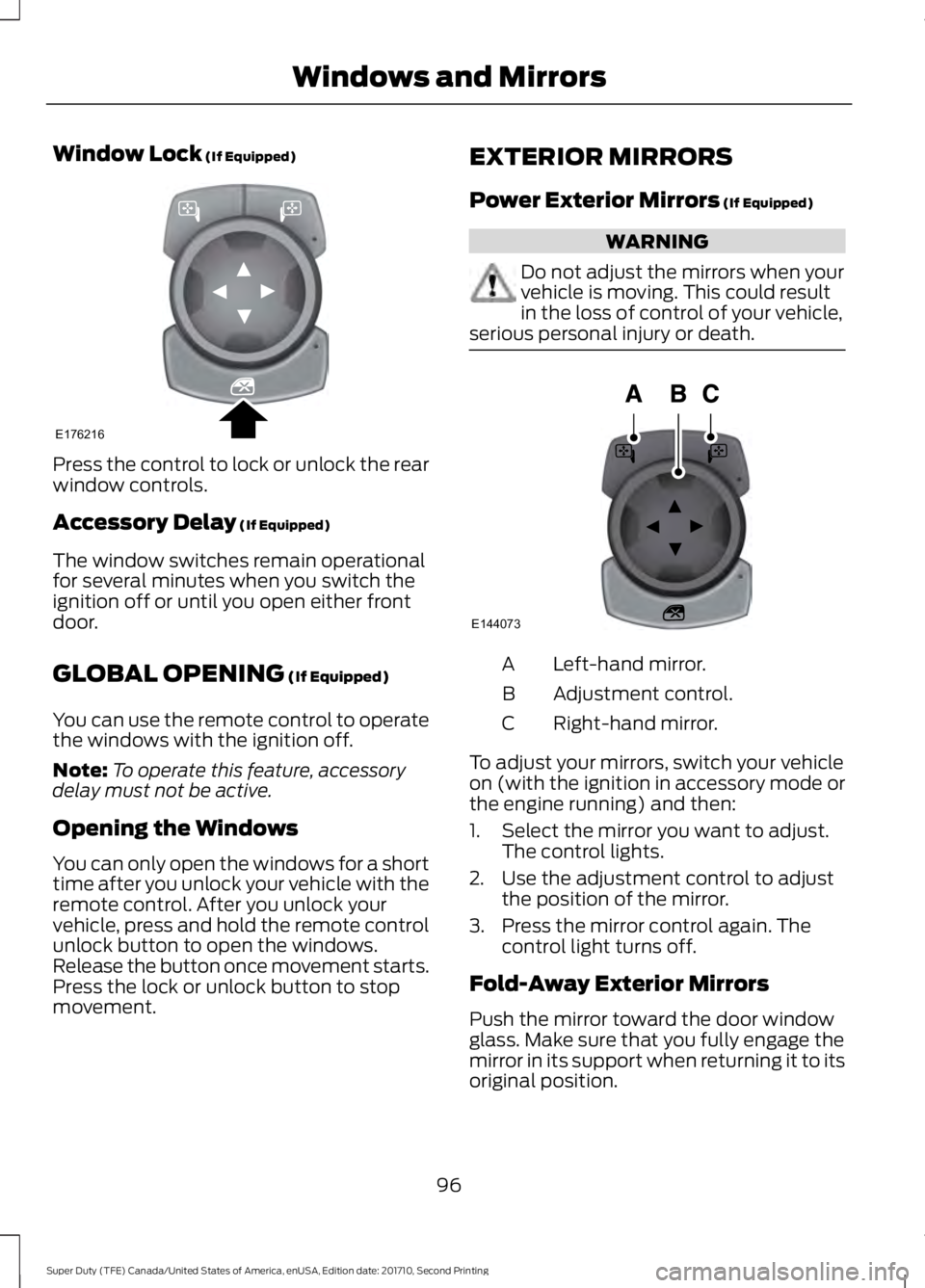
Left-hand mirror.A
Adjustment control.B
Right-hand mirror.C
To adjust your mirrors, switch your vehicleon (with the ignition in accessory mode orthe engine running) and then:
1. Select the mirror you want to adjust.The control lights.
2. Use the adjustment control to adjustthe position of the mirror.
3. Press the mirror control again. Thecontrol light turns off.
Fold-Away Exterior Mirrors
Push the mirror toward the door windowglass. Make sure that you fully engage themirror in its support when returning it to itsoriginal position.
96
Super Duty (TFE) Canada/United States of America, enUSA, Edition date: 201710, Second Printing
Windows and MirrorsE176216 E144073
Page 117 of 642
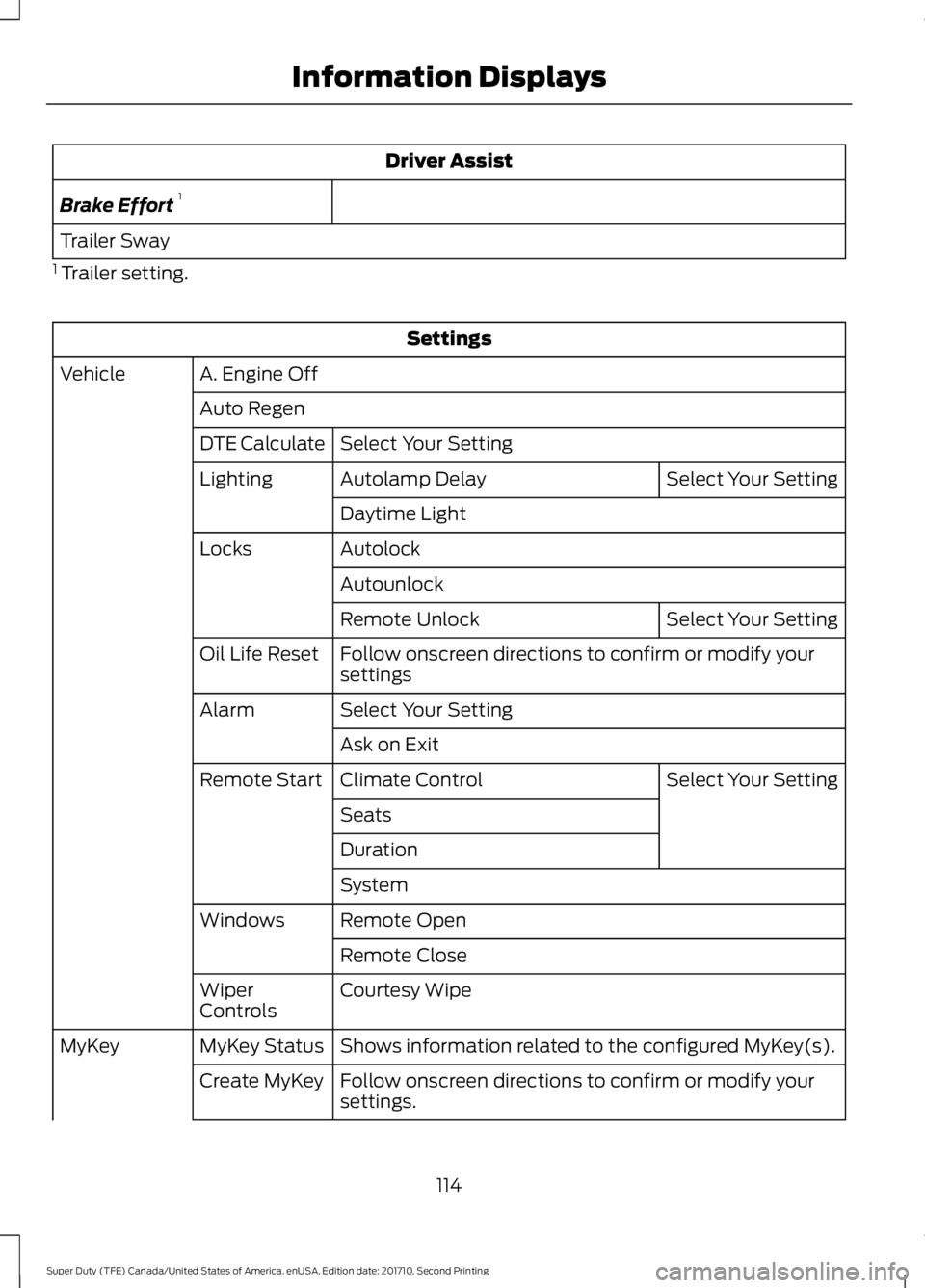
Driver Assist
Brake Effort1
Trailer Sway
1 Trailer setting.
Settings
A. Engine OffVehicle
Auto Regen
Select Your SettingDTE Calculate
Select Your SettingAutolamp DelayLighting
Daytime Light
AutolockLocks
Autounlock
Select Your SettingRemote Unlock
Follow onscreen directions to confirm or modify yoursettingsOil Life Reset
Select Your SettingAlarm
Ask on Exit
Select Your SettingClimate ControlRemote Start
Seats
Duration
System
Remote OpenWindows
Remote Close
Courtesy WipeWiperControls
Shows information related to the configured MyKey(s).MyKey StatusMyKey
Follow onscreen directions to confirm or modify yoursettings.Create MyKey
114
Super Duty (TFE) Canada/United States of America, enUSA, Edition date: 201710, Second Printing
Information Displays
Page 122 of 642
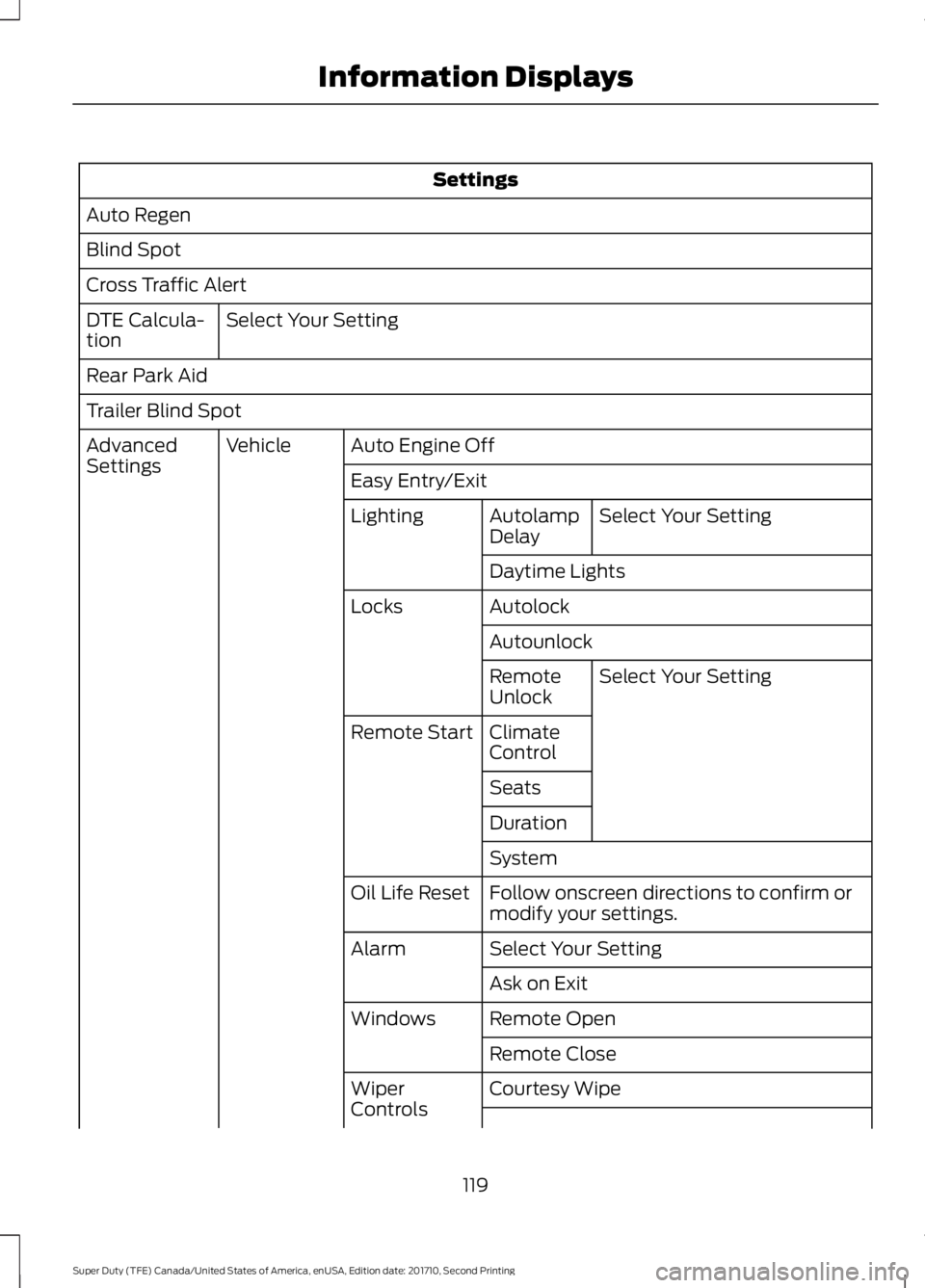
Settings
Auto Regen
Blind Spot
Cross Traffic Alert
Select Your SettingDTE Calcula-tion
Rear Park Aid
Trailer Blind Spot
Auto Engine OffVehicleAdvancedSettingsEasy Entry/Exit
Select Your SettingAutolampDelayLighting
Daytime Lights
AutolockLocks
Autounlock
Select Your SettingRemoteUnlock
ClimateControlRemote Start
Seats
Duration
System
Follow onscreen directions to confirm ormodify your settings.Oil Life Reset
Select Your SettingAlarm
Ask on Exit
Remote OpenWindows
Remote Close
Courtesy WipeWiperControls
119
Super Duty (TFE) Canada/United States of America, enUSA, Edition date: 201710, Second Printing
Information Displays
Page 130 of 642
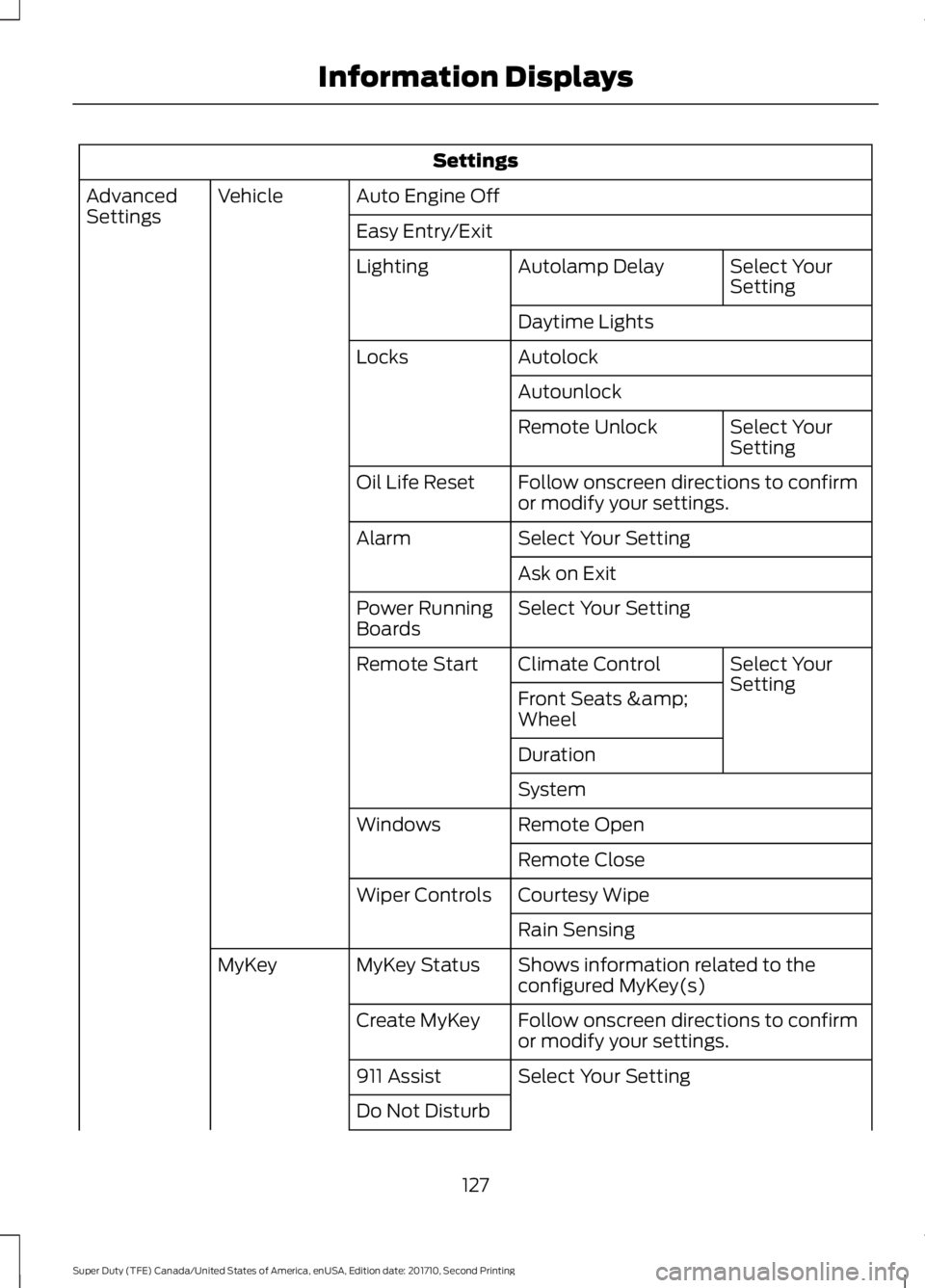
Settings
Auto Engine OffVehicleAdvancedSettingsEasy Entry/Exit
Select YourSettingAutolamp DelayLighting
Daytime Lights
AutolockLocks
Autounlock
Select YourSettingRemote Unlock
Follow onscreen directions to confirmor modify your settings.Oil Life Reset
Select Your SettingAlarm
Ask on Exit
Select Your SettingPower RunningBoards
Select YourSettingClimate ControlRemote Start
Front Seats &Wheel
Duration
System
Remote OpenWindows
Remote Close
Courtesy WipeWiper Controls
Rain Sensing
Shows information related to theconfigured MyKey(s)MyKey StatusMyKey
Follow onscreen directions to confirmor modify your settings.Create MyKey
Select Your Setting911 Assist
Do Not Disturb
127
Super Duty (TFE) Canada/United States of America, enUSA, Edition date: 201710, Second Printing
Information Displays
Page 154 of 642
Note:Do not clean the mirror housing orglass with harsh abrasives, fuel or otherpetroleum-based cleaning products.
HEATED EXTERIOR MIRRORS
Note:Do not remove ice from the mirrorswith a scraper or adjust the mirror glasswhen it is frozen in place.
Note:Do not clean the mirror housing orglass with harsh abrasives, fuel or otherpetroleum-based cleaning products.
The heated exterior mirrors will removeice, mist and fog.
CABIN AIR FILTER
Your vehicle is equipped with a cabin airfilter, which gives you and your passengersthe following benefits:
•It improves your driving comfort byreducing particle concentration.
•It improves the interior compartmentcleanliness.
•It protects the climate controlcomponents from particle deposits.
You can locate the cabin air filter behindthe glove box.
Note:Make sure you have a cabin air filterinstalled at all times. This prevents foreignobjects from entering the system. Runningthe system without a filter in place couldresult in degradation or damage to thesystem.
Replace the filter at regular intervals. SeeScheduled Maintenance (page 573).
For additional cabin air filter information,or to replace the filter, see an authorizeddealer.
REMOTE START (If Equipped)
You can switch this feature on or off andadjust the settings using the informationdisplay.
The system adjusts the interiortemperature depending on your chosensettings during remote start.
You cannot adjust the climate controlsetting during remote start operation.When you switch the ignition on, theclimate control system returns to theprevious settings. You can now makeadjustments.
You need to switch on certainvehicle-dependent features, such as:
•Heated seats.
•Cooled seats.
•Heated steering wheel.
•Heated mirrors.
•Heated rear window.
Automatic Settings
In hot weather, the system is set to 72°F(22°C). The cooled seats are set to high(if available, and selected to AUTO in theinformation display).
In moderate weather, the system eitherheats or cools (based on previoussettings). The rear defroster, heatedmirrors and heated or cooled seats do notautomatically turn on.
In cold weather, the system is set to 72°F(22°C). The heated seats are set to high(if available, and selected to AUTO in theinformation display). The heated rearwindow and heated mirrors automaticallyturn on.
151
Super Duty (TFE) Canada/United States of America, enUSA, Edition date: 201710, Second Printing
Climate Control
Page 161 of 642
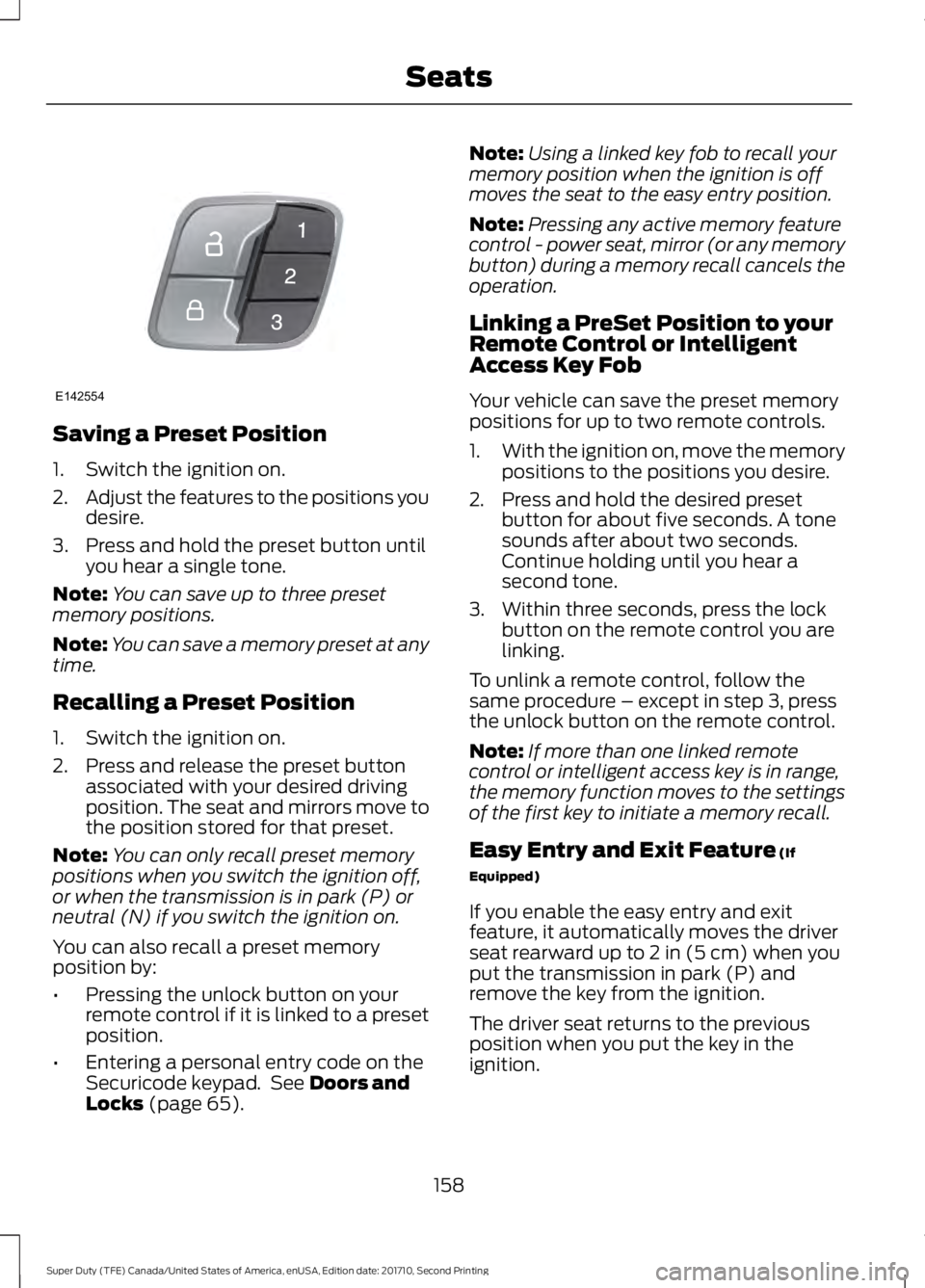
Saving a Preset Position
1. Switch the ignition on.
2.Adjust the features to the positions youdesire.
3. Press and hold the preset button untilyou hear a single tone.
Note:You can save up to three presetmemory positions.
Note:You can save a memory preset at anytime.
Recalling a Preset Position
1. Switch the ignition on.
2. Press and release the preset buttonassociated with your desired drivingposition. The seat and mirrors move tothe position stored for that preset.
Note:You can only recall preset memorypositions when you switch the ignition off,or when the transmission is in park (P) orneutral (N) if you switch the ignition on.
You can also recall a preset memoryposition by:
•Pressing the unlock button on yourremote control if it is linked to a presetposition.
•Entering a personal entry code on theSecuricode keypad. See Doors andLocks (page 65).
Note:Using a linked key fob to recall yourmemory position when the ignition is offmoves the seat to the easy entry position.
Note:Pressing any active memory featurecontrol - power seat, mirror (or any memorybutton) during a memory recall cancels theoperation.
Linking a PreSet Position to yourRemote Control or IntelligentAccess Key Fob
Your vehicle can save the preset memorypositions for up to two remote controls.
1.With the ignition on, move the memorypositions to the positions you desire.
2. Press and hold the desired presetbutton for about five seconds. A tonesounds after about two seconds.Continue holding until you hear asecond tone.
3. Within three seconds, press the lockbutton on the remote control you arelinking.
To unlink a remote control, follow thesame procedure – except in step 3, pressthe unlock button on the remote control.
Note:If more than one linked remotecontrol or intelligent access key is in range,the memory function moves to the settingsof the first key to initiate a memory recall.
Easy Entry and Exit Feature (If
Equipped)
If you enable the easy entry and exitfeature, it automatically moves the driverseat rearward up to 2 in (5 cm) when youput the transmission in park (P) andremove the key from the ignition.
The driver seat returns to the previousposition when you put the key in theignition.
158
Super Duty (TFE) Canada/United States of America, enUSA, Edition date: 201710, Second Printing
SeatsE142554
Page 162 of 642
You can enable or disable this featurethrough the information display. SeeInformation Displays (page 111).
REAR SEATS
Folding Up the Rear Seat Cushion
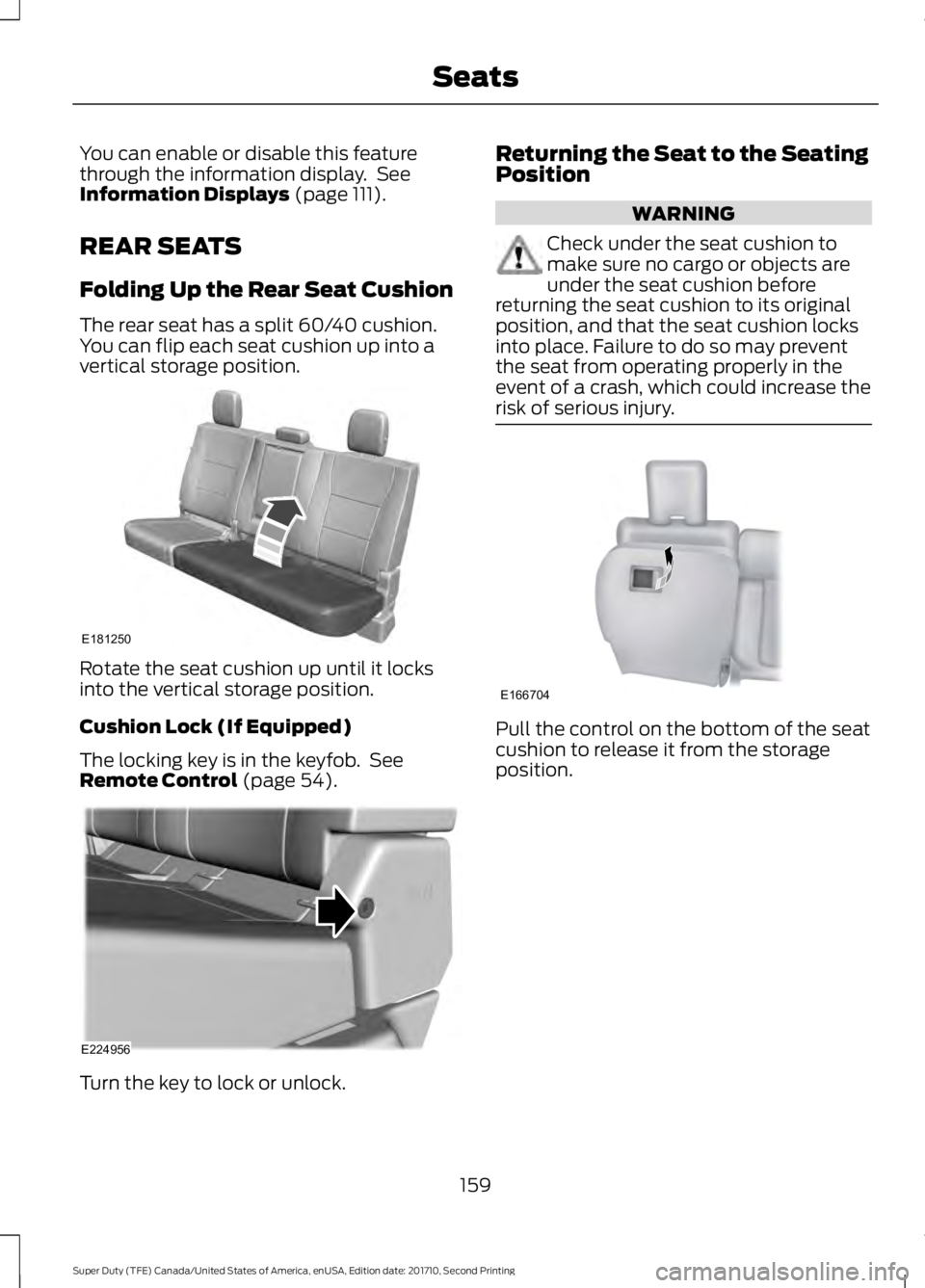
The rear seat has a split 60/40 cushion.You can flip each seat cushion up into avertical storage position.
Rotate the seat cushion up until it locksinto the vertical storage position.
Cushion Lock (If Equipped)
The locking key is in the keyfob. SeeRemote Control (page 54).
Turn the key to lock or unlock.
Returning the Seat to the SeatingPosition
WARNING
Check under the seat cushion tomake sure no cargo or objects areunder the seat cushion beforereturning the seat cushion to its originalposition, and that the seat cushion locksinto place. Failure to do so may preventthe seat from operating properly in theevent of a crash, which could increase therisk of serious injury.
Pull the control on the bottom of the seatcushion to release it from the storageposition.
159
Super Duty (TFE) Canada/United States of America, enUSA, Edition date: 201710, Second Printing
SeatsE181250 E224956 E166704
Page 163 of 642
HEATED SEATS (If Equipped)
WARNING
People who are unable to feel painto their skin because of advancedage, chronic illness, diabetes, spinalcord injury, medication, alcohol use,exhaustion or other physical conditions,must exercise care when using the heatedseat. The heated seat may cause burnseven at low temperatures, especially ifused for long periods of time. Do not placeanything on the seat that insulates againstheat, such as a blanket or cushion. Thismay cause the heated seat to overheat.Do not puncture the seat with pins, needlesor other pointed objects. This may damagethe heating element which may cause theheated seat to overheat. An overheatedseat may cause serious personal injury.
Do not do the following:
•Place heavy objects on the seat.
•Operate the heated seat if water or anyother liquid spills on the seat. Allow theseat to dry thoroughly.
Note:The engine must be running to usethis feature.
Press the heated seat symbol to cyclethrough the various heat settings and off.More indicator lights indicate warmersettings.
Note:The heated seats may remain onafter you remote start your vehicle, basedon your remote start settings. The heatedseats may also turn on when you start yourvehicle if they were on when you switchedyour vehicle off.
Rear Heated Seats (If Equipped)
WARNING
People who are unable to feel painto their skin because of advancedage, chronic illness, diabetes, spinalcord injury, medication, alcohol use,exhaustion or other physical conditions,must exercise care when using the heatedseat. The heated seat may cause burnseven at low temperatures, especially ifused for long periods of time. Do not placeanything on the seat that insulates againstheat, such as a blanket or cushion. Thismay cause the heated seat to overheat.Do not puncture the seat with pins, needlesor other pointed objects. This may damagethe heating element which may cause theheated seat to overheat. An overheatedseat may cause serious personal injury.
Do not do the following:
•Place heavy objects on the seat.
•Operate the heated seat if water or anyother liquid spills on the seat. Allow theseat to dry thoroughly.
Note:The engine must be running to usethis feature.
The rear seat heat controls are on the rearof the center console.
160
Super Duty (TFE) Canada/United States of America, enUSA, Edition date: 201710, Second Printing
SeatsE146322
Page 164 of 642
Press the heated seat symbol to cyclethrough the various heat settings and off.More indicator lights indicate warmersettings.
The heated seat module resets at everyignition run cycle. While the ignition is inthe on position, press the heated seatswitch to enable heating mode. Whenactivated, they turn off automatically whenyou switch off the engine.
CLIMATE CONTROLLED SEATS
(If Equipped)
Heated Seats
WARNING
People who are unable to feel painto their skin because of advancedage, chronic illness, diabetes, spinalcord injury, medication, alcohol use,exhaustion or other physical conditions,must exercise care when using the heatedseat. The heated seat may cause burnseven at low temperatures, especially ifused for long periods of time. Do not placeanything on the seat that insulates againstheat, such as a blanket or cushion. Thismay cause the heated seat to overheat.Do not puncture the seat with pins, needlesor other pointed objects. This may damagethe heating element which may cause theheated seat to overheat. An overheatedseat may cause serious personal injury.
Do not do the following:
•Place heavy objects on the seat.
•Operate the heated seat if water or anyother liquid spills on the seat. Allow theseat to dry thoroughly.
Note:The engine must be running to usethis feature.
Press the heated seat symbol to cyclethrough the various heat settings and off.More indicator lights indicate warmersettings.
Note:The heated seats may remain onafter you remote start your vehicle, basedon your remote start settings. The heatedseats may also turn on when you start yourvehicle if they were on when you switchedyour vehicle off.
Note:After 60 minutes of operation, theheated seats switch off. Press the heatedseat symbol to switch the heated seats on.
Cooled Seats
Note:The engine must be running to usethis feature.
161
Super Duty (TFE) Canada/United States of America, enUSA, Edition date: 201710, Second Printing
SeatsE146322 E146322 E146309