parking sensors FORD F250 SUPER DUTY 2017 Owners Manual
[x] Cancel search | Manufacturer: FORD, Model Year: 2017, Model line: F250 SUPER DUTY, Model: FORD F250 SUPER DUTY 2017Pages: 642, PDF Size: 12.35 MB
Page 226 of 642
Apply the parking brake whenever yourvehicle is parked. Press the pedaldownward to set the parking brake. Thebrake warning lamp in the instrumentcluster will illuminate and remainsilluminated until the parking brake isreleased.
To release, pull the brake release leverlocated at the lower left side of theinstrument panel.
If you are parking your vehicle on a gradeor with a trailer, press and hold the brakepedal down, then set the parking brake.There may be a little vehicle movement asthe parking brake sets to hold the vehicle'sweight. This is normal and should be noreason for concern. If needed, press andhold the service brake pedal down, thentry reapplying the parking brake. Chock thewheels if required. If the parking brakecannot hold the weight of the vehicle, theparking brake may need to be serviced orthe vehicle may be overloaded.
HILL START ASSIST
WARNINGS
The system does not replace theparking brake. When you leave yourvehicle, always apply the parkingbrake and shift the transmission into park(P) (automatic transmission) or first gear(1) (manual transmission).
You must remain in your vehicle onceyou have activated the system.
During all times, you are responsiblefor controlling your vehicle,supervising the system andintervening, if required.
If the engine is revved excessively, orif a malfunction is detected, thesystem will be deactivated.
The system makes it easier to pull awaywhen your vehicle is on a slope without theneed to use the parking brake.
When the system is active, your vehicle willremain stationary on the slope for two tothree seconds after you release the brakepedal. This allows you time to move yourfoot from the brake to the acceleratorpedal. The brakes release automaticallywhen the engine has sufficient torque toprevent your vehicle from rolling down thegrade. This is an advantage when pullingaway on a slope, for example from a carpark ramp, traffic lights or when reversinguphill into a parking space.
The system will activate automatically onany slope that will cause significant vehiclerollback. For vehicles with a manualtransmission, you can switch this featureoff using the information display. SeeInformation Displays (page 111). Thesystem will remain on or off depending onhow it was last set.
Note:There is no warning lamp to indicatethe system is either on or off.
Note:If your vehicle is equipped with AutoHold, Hill Start Assist will not be availablewhile Auto Hold is active.
Using Hill Start Assist
1. Bring your vehicle to a completestandstill. Keep the brake pedalpressed and select an uphill gear (forexample, first (1) when facing uphill orreverse (R) when facing downhill).
2. If the sensors detect that your vehicleis on a slope, the system will activateautomatically.
3. When you remove your foot from thebrake pedal, your vehicle will remainon the slope without rolling away forabout two or three seconds. This holdtime will automatically be extended ifyou are in the process of driving off.
223
Super Duty (TFE) Canada/United States of America, enUSA, Edition date: 201710, Second Printing
Brakes
Page 234 of 642
PRINCIPLE OF OPERATION
WARNINGS
To help avoid personal injury, pleaseread and understand the limitationsof the system as contained in thissection. Sensing is only an aid for some(generally large and fixed) objects whenmoving on a flat surface at parking speeds.Certain objects with surfaces that absorbultrasonic waves, surrounding vehicle'sparking aid systems, traffic controlsystems, fluorescent lamps, inclementweather, air brakes, and external motorsand fans may also affect the function ofthe sensing system. This may includereduced performance or a false activation.
To help avoid personal injury, alwaysuse caution when in reverse (R) andwhen using the sensing system.
This system is not designed toprevent contact with small or movingobjects. The system is designed toprovide a warning to assist the driver indetecting large stationary objects to avoiddamaging your vehicle. The system maynot detect smaller objects, particularlythose close to the ground.
Certain add-on devices such as largetrailer hitches, bike or surfboard racksand any device that may block thenormal detection zone of the system, maycreate false beeps.
Note:Keep the sensors, located on thebumper or fascia, free from snow, ice andlarge accumulations of dirt. If the sensorsare covered, the system’s accuracy can beaffected. Do not clean the sensors withsharp objects.
Note:If your vehicle sustains damage tothe bumper or fascia, leaving it misalignedor bent, the sensing zone may be alteredcausing inaccurate measurement ofobstacles or false alarms.
Note:The sensing system cannot be turnedoff when a MyKey is present. See Principleof Operation (page 61).
Note:If your vehicle is equipped with atrailer tow package and a trailer isconnected to your vehicle, the rear sensingsystem disables and you cannot switch thesystem on through the information display.
The sensing system warns the driver ofobstacles within a certain range of yourvehicle. The system turns on automaticallywhenever you switch the ignition on.
When receiving a detection warning, theradio volume reduces to a predeterminedlevel. After the warning goes away, theradio volume returns to the previous level.
You can turn the system on oroff by pressing the parking aidbutton. If your vehicle does nothave a parking aid button, the system canbe switched off through the informationdisplay menu or from the pop-up messagethat appears once you shift thetransmission into reverse (R). See GeneralInformation (page 111).
If a fault is present in the system, a warningmessage appears in the informationdisplay and you cannot switch the systemon through the pop-up message. SeeInformation Messages (page 128).
REAR PARKING AID
The rear sensors are only active when thetransmission is in reverse (R). As yourvehicle moves closer to the obstacle, therate of the audible warning increases.When the obstacle is less than 12 in(30 cm) away, the warning soundscontinuously. If the system detects a
231
Super Duty (TFE) Canada/United States of America, enUSA, Edition date: 201710, Second Printing
Parking AidsE139213
Page 237 of 642
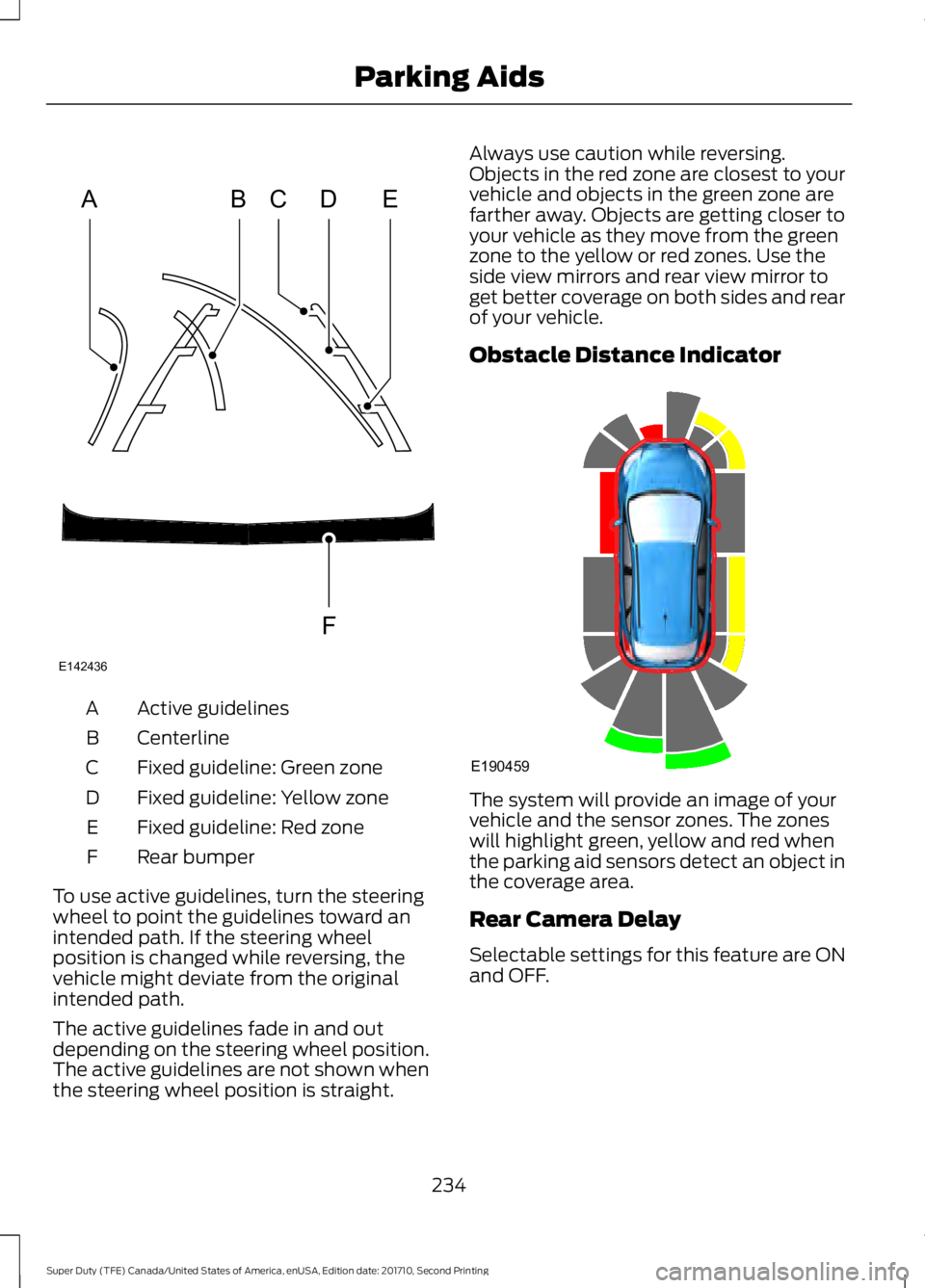
Active guidelinesA
CenterlineB
Fixed guideline: Green zoneC
Fixed guideline: Yellow zoneD
Fixed guideline: Red zoneE
Rear bumperF
To use active guidelines, turn the steeringwheel to point the guidelines toward anintended path. If the steering wheelposition is changed while reversing, thevehicle might deviate from the originalintended path.
The active guidelines fade in and outdepending on the steering wheel position.The active guidelines are not shown whenthe steering wheel position is straight.
Always use caution while reversing.Objects in the red zone are closest to yourvehicle and objects in the green zone arefarther away. Objects are getting closer toyour vehicle as they move from the greenzone to the yellow or red zones. Use theside view mirrors and rear view mirror toget better coverage on both sides and rearof your vehicle.
Obstacle Distance Indicator
The system will provide an image of yourvehicle and the sensor zones. The zoneswill highlight green, yellow and red whenthe parking aid sensors detect an object inthe coverage area.
Rear Camera Delay
Selectable settings for this feature are ONand OFF.
234
Super Duty (TFE) Canada/United States of America, enUSA, Edition date: 201710, Second Printing
Parking AidsABCD
F
E
E142436 E190459
Page 257 of 642
CROSS TRAFFIC ALERT (If
Equipped)
WARNING
Never use the Cross Traffic Alertsystem as a replacement for usingthe interior and exterior mirrors andlooking over your shoulder before backingout of a parking space. Cross Traffic Alertis not a replacement for careful driving.
Note:When a trailer is detected, CrossTraffic Alert automatically turns off.
Cross Traffic Alert is designed to warn youof vehicles approaching from the sideswhen the transmission is in reverse (R).
Using the System
Cross Traffic Alert turns on when you startthe engine and you shift into reverse (R).Once shifted out of reverse (R), CrossTraffic Alert turns off.
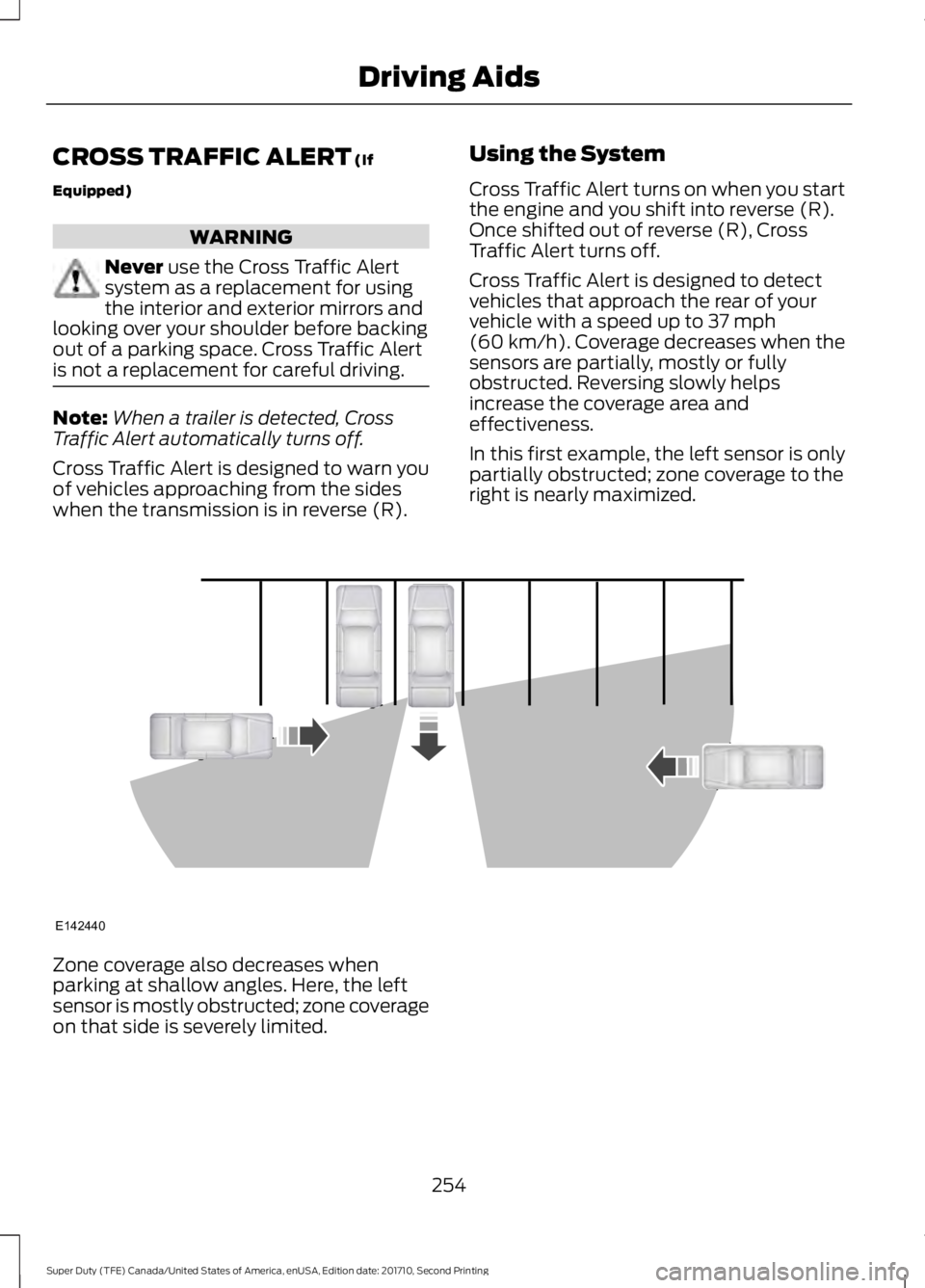
Cross Traffic Alert is designed to detectvehicles that approach the rear of yourvehicle with a speed up to 37 mph(60 km/h). Coverage decreases when thesensors are partially, mostly or fullyobstructed. Reversing slowly helpsincrease the coverage area andeffectiveness.
In this first example, the left sensor is onlypartially obstructed; zone coverage to theright is nearly maximized.
Zone coverage also decreases whenparking at shallow angles. Here, the leftsensor is mostly obstructed; zone coverageon that side is severely limited.
254
Super Duty (TFE) Canada/United States of America, enUSA, Edition date: 201710, Second Printing
Driving AidsE142440
Page 258 of 642
System Lights, Messages andAudible Alerts
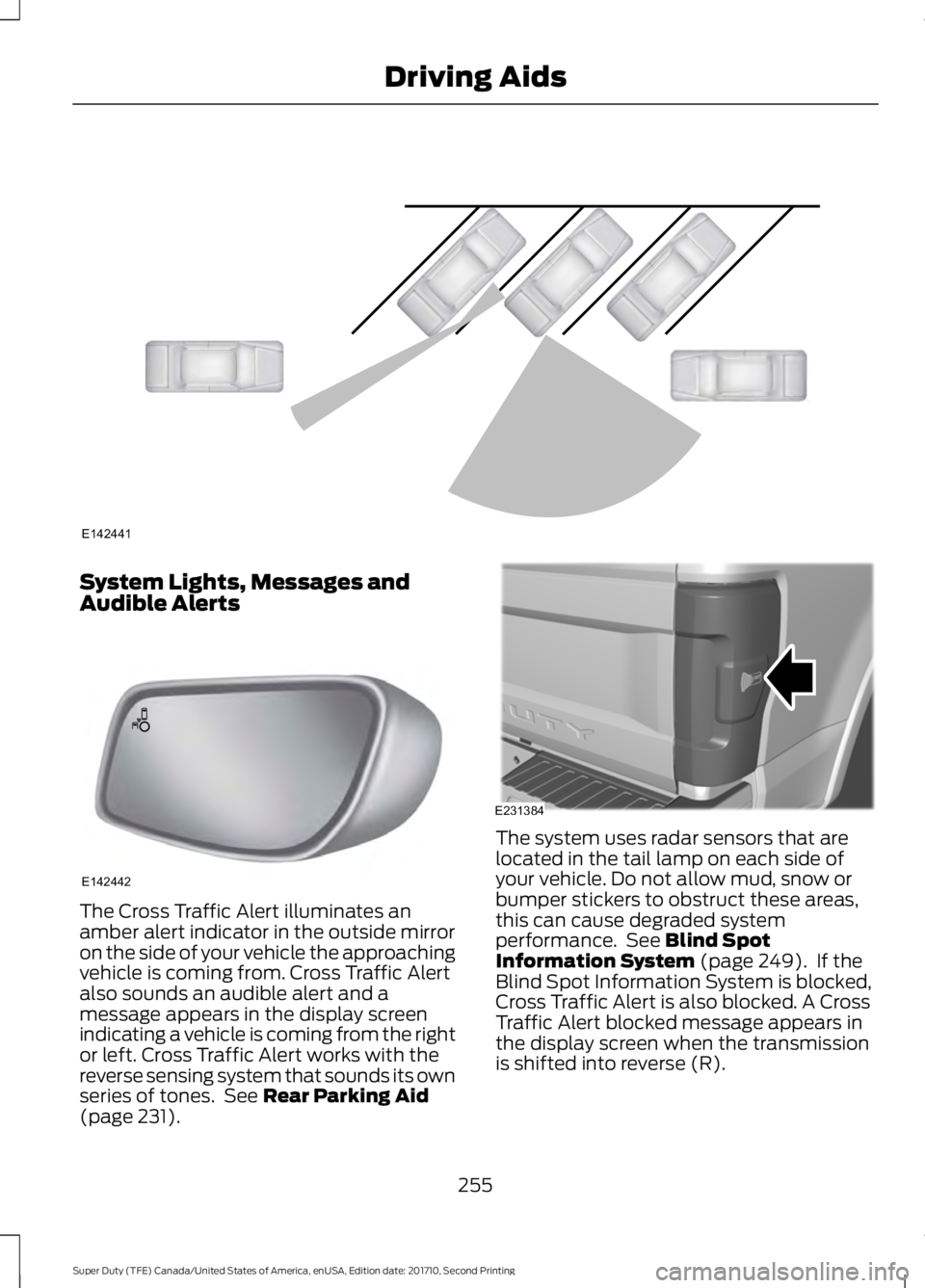
The Cross Traffic Alert illuminates anamber alert indicator in the outside mirroron the side of your vehicle the approachingvehicle is coming from. Cross Traffic Alertalso sounds an audible alert and amessage appears in the display screenindicating a vehicle is coming from the rightor left. Cross Traffic Alert works with thereverse sensing system that sounds its ownseries of tones. See Rear Parking Aid(page 231).
The system uses radar sensors that arelocated in the tail lamp on each side ofyour vehicle. Do not allow mud, snow orbumper stickers to obstruct these areas,this can cause degraded systemperformance. See Blind SpotInformation System (page 249). If theBlind Spot Information System is blocked,Cross Traffic Alert is also blocked. A CrossTraffic Alert blocked message appears inthe display screen when the transmissionis shifted into reverse (R).
255
Super Duty (TFE) Canada/United States of America, enUSA, Edition date: 201710, Second Printing
Driving AidsE142441 E142442 E231384
Page 259 of 642
System Limitations
Cross Traffic Alert has its limitations;situations such as severe weatherconditions or debris build-up on the sensorarea may limit vehicle detection.
The following are other situations that maylimit the Cross Traffic Alert performance:
•Adjacently parked vehicles or objectsobstructing the sensors.
•Approaching vehicles passing atspeeds greater than 37 mph(60 km/h).
•Driving in reverse faster than 7 mph(12 km/h).
•Backing out of an angled parking spot.
False Alerts
Note:If your vehicle has a tow bar with afactory equipped trailer tow module and itis towing a trailer, the sensors willautomatically turn the Cross Traffic Alertoff. If your vehicle has a tow bar but nofactory equipped trailer tow module, it isrecommended to turn the Cross Traffic Alertoff manually. Operating Cross Traffic Alertwith a trailer attached will cause poor CrossTraffic Alert performance.
There may be certain instances when thereis a false alert by the Cross Traffic Alertsystem that illuminates the alert indicatorwith no vehicle in the coverage zone. Someamount of false alerts are normal; they aretemporary and self-correct.
System Errors
If Cross Traffic Alert senses a problem withthe left or right sensor a message appearsin the display screen. See InformationMessages (page 128).
Switching the System Off and On
Note:The Cross Traffic Alert switches onwhenever the ignition is switched on andready to provide appropriate alerts whenthe transmission is in reverse (R). CrossTraffic Alert will not remember the lastselected on or off setting.
You can temporarily switch Cross TrafficAlert off in the information display. SeeGeneral Information (page 111). Whenyou switch Cross Traffic Alert off, you donot receive alerts and the display screenshows a system off message.
You can also have Cross Traffic Alertswitched off permanently at an authorizeddealer. Once switched off permanently,the system can only be switched back onat an authorized dealer.
STEERING
Power Steering
To help prevent damage to the powersteering system:
•Never hold the steering wheel at itsfurthest turning points (until it stops)for more than three seconds when theengine is running.
•Do not operate the vehicle with a lowpower steering pump fluid level (belowthe MIN mark on the reservoir).
•Some noise is normal during operation.If excessive, check for low powersteering pump fluid level beforeseeking service by your dealer.
•Heavy or uneven efforts may be causedby low power steering fluid. Check forlow power steering pump fluid levelbefore seeking service by your dealer.
•Do not fill the power steering pumpreservoir above the MAX mark on thereservoir, as this may result in leaksfrom the reservoir.
256
Super Duty (TFE) Canada/United States of America, enUSA, Edition date: 201710, Second Printing
Driving Aids
Page 569 of 642
For a complete listing of the accessoriesthat are available for your vehicle, pleasecontact your authorized dealer or visit theonline store web site:
Web Address (United States)
www.Accessories.Ford.com
Web Address (Canada)
www.Accessories.Ford.ca
Ford Custom Accessories are available foryour vehicle through an authorized dealer.Ford Motor Company will repair or replaceany properly authorized dealer-installedFord Original Accessory found to bedefective in factory-supplied materials orworkmanship during the warranty period,as well as any component damaged by thedefective accessories.
Ford Motor Company will warrant yourvehicle through the warranty that providesthe greatest benefit:
•24 months, unlimited mileage.
•The remainder of your new vehiclelimited warranty.
Contact an authorized dealer for detailsand a copy of the warranty.
Exterior style
•Bug shields.
•Commercial graphics*.
•Commercial LED warning strobe lights.
•Deflectors.
•Exhaust tip.
•Running boards.
•Splash guards.
•Stainless-steel wheel covers*.
•Step bars.
•Wheel well liners.
Interior style
•Ambient lighting.
•Cargo organizers.
•Custom seat covers*.
•Floor mats.
Lifestyle
•Ash cup/smoker's package.
•Bed cargo net, tie down plates andcleats.
•Bed extender.
•Bedliners and bedmats.
•Racks and carriers*.
•Sportliner cargo liner*.
•Tonneau covers*.
•Tow hooks.
•Trailer back-up camera.
•Trailer brake control.
•Trailer hitches, wiring harnesses andaccessories.
•Truck bed camping tent*.
Peace of mind
•Back-up alarm*.
•Bed hooks*.
•Bumper and hitch-mounted parkingsensors*.
•Ford Telematics.
•Keyless entry keypad.
•Protective seat covers*.
•Remote start and alarms.
•Cruise control.
•Tool or Cargo boxes*.
•Vehicle security system.
•Wheel locks.
566
Super Duty (TFE) Canada/United States of America, enUSA, Edition date: 201710, Second Printing
Accessories