climate control FORD F350 2008 User Guide
[x] Cancel search | Manufacturer: FORD, Model Year: 2008, Model line: F350, Model: FORD F350 2008Pages: 400, PDF Size: 3.83 MB
Page 105 of 400
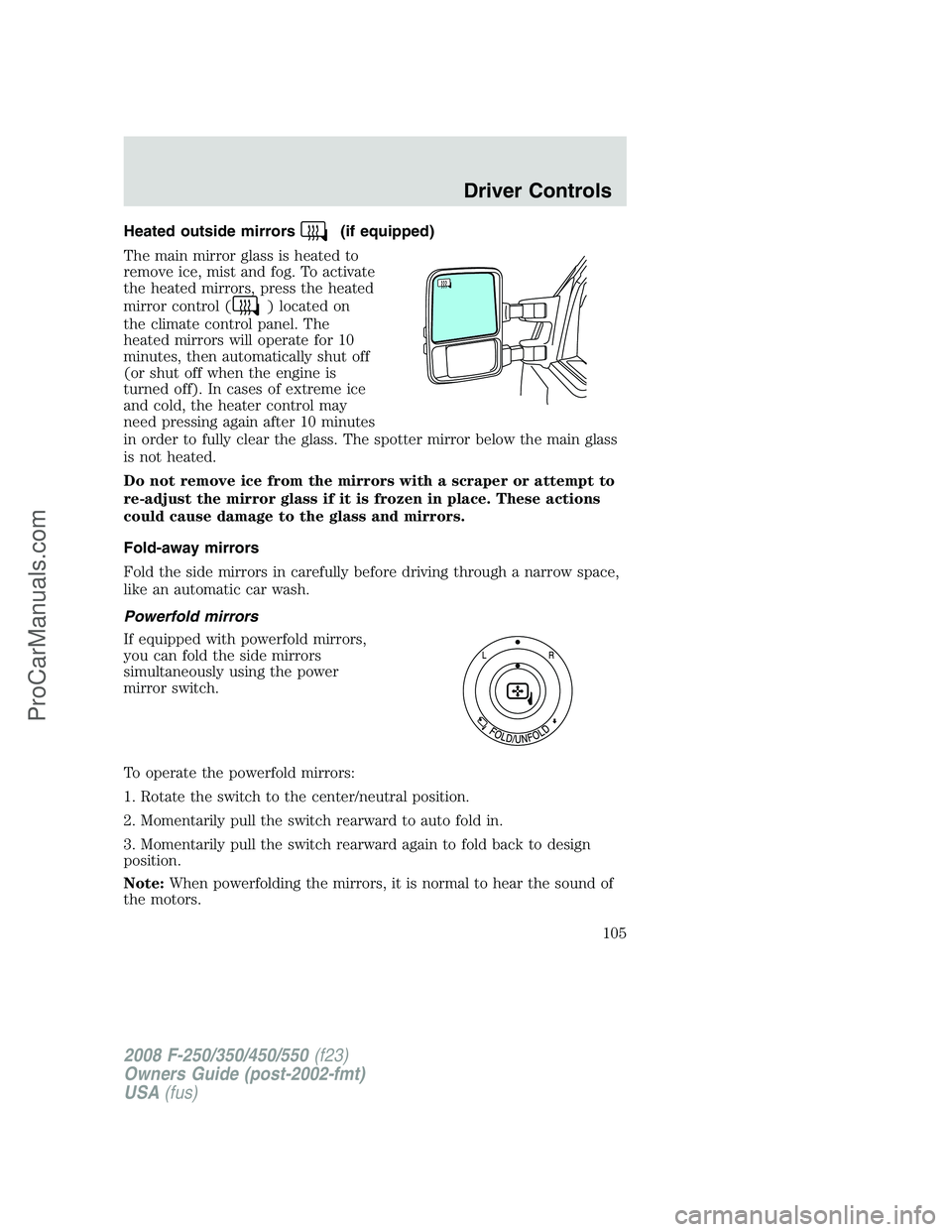
Heated outside mirrors(if equipped)
The main mirror glass is heated to
remove ice, mist and fog. To activate
the heated mirrors, press the heated
mirror control (
) located on
the climate control panel. The
heated mirrors will operate for 10
minutes, then automatically shut off
(or shut off when the engine is
turned off). In cases of extreme ice
and cold, the heater control may
need pressing again after 10 minutes
in order to fully clear the glass. The spotter mirror below the main glass
is not heated.
Do not remove ice from the mirrors with a scraper or attempt to
re-adjust the mirror glass if it is frozen in place. These actions
could cause damage to the glass and mirrors.
Fold-away mirrors
Fold the side mirrors in carefully before driving through a narrow space,
like an automatic car wash.
Powerfold mirrors
If equipped with powerfold mirrors,
you can fold the side mirrors
simultaneously using the power
mirror switch.
To operate the powerfold mirrors:
1. Rotate the switch to the center/neutral position.
2. Momentarily pull the switch rearward to auto fold in.
3. Momentarily pull the switch rearward again to fold back to design
position.
Note:When powerfolding the mirrors, it is normal to hear the sound of
the motors.
2008 F-250/350/450/550(f23)
Owners Guide (post-2002-fmt)
USA(fus)
Driver Controls
105
ProCarManuals.com
Page 112 of 400
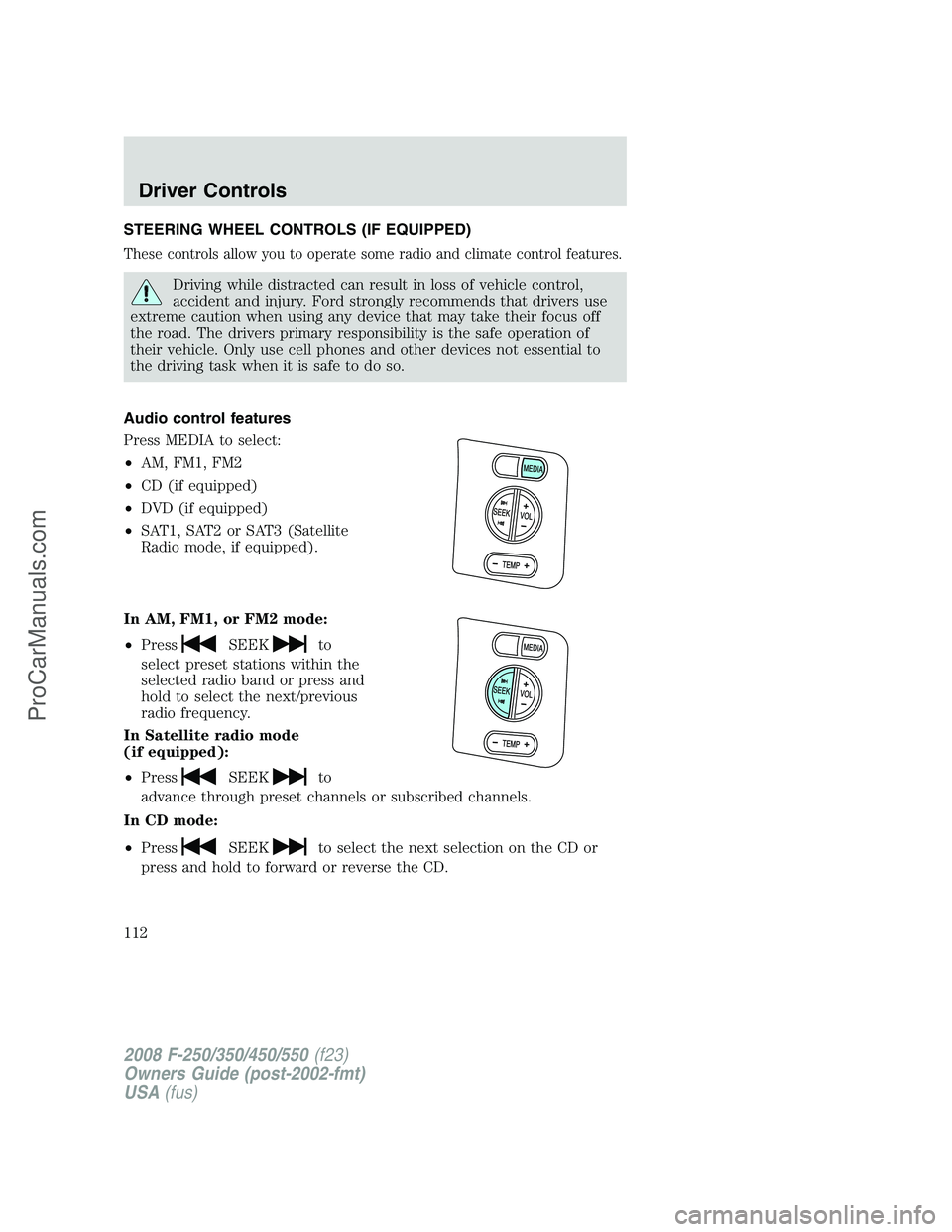
STEERING WHEEL CONTROLS (IF EQUIPPED)
These controls allow you to operate some radio and climate control features.
Driving while distracted can result in loss of vehicle control,
accident and injury. Ford strongly recommends that drivers use
extreme caution when using any device that may take their focus off
the road. The drivers primary responsibility is the safe operation of
their vehicle. Only use cell phones and other devices not essential to
the driving task when it is safe to do so.
Audio control features
Press MEDIA to select:
•AM, FM1, FM2
•CD (if equipped)
•DVD (if equipped)
•SAT1, SAT2 or SAT3 (Satellite
Radio mode, if equipped).
In AM, FM1, or FM2 mode:
•Press
SEEKto
select preset stations within the
selected radio band or press and
hold to select the next/previous
radio frequency.
In Satellite radio mode
(if equipped):
•Press
SEEKto
advance through preset channels or subscribed channels.
In CD mode:
•Press
SEEKto select the next selection on the CD or
press and hold to forward or reverse the CD.
2008 F-250/350/450/550(f23)
Owners Guide (post-2002-fmt)
USA(fus)
Driver Controls
112
ProCarManuals.com
Page 113 of 400
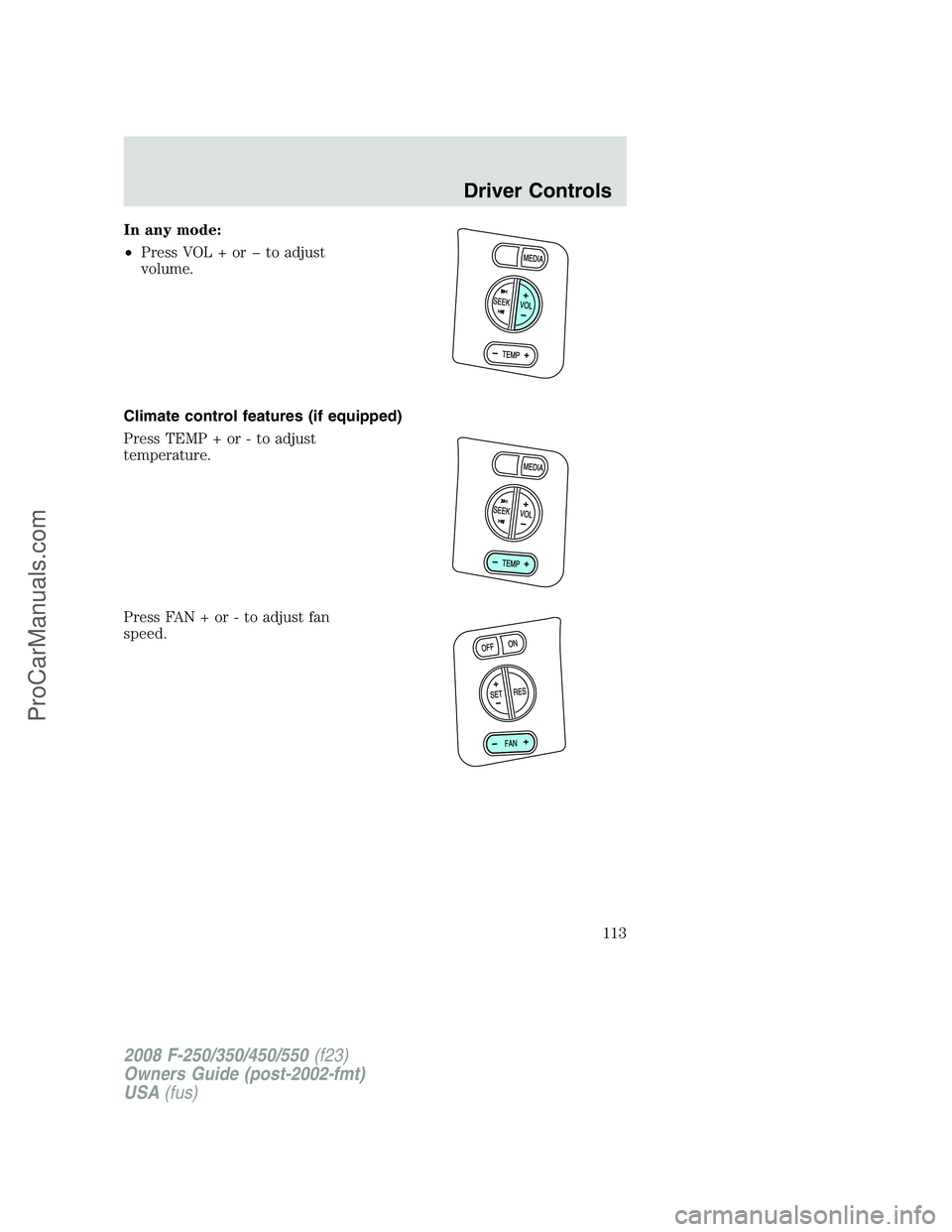
In any mode:
•Press VOL + or to adjust
volume.
Climate control features (if equipped)
Press TEMP + or - to adjust
temperature.
Press FAN + or - to adjust fan
speed.
2008 F-250/350/450/550(f23)
Owners Guide (post-2002-fmt)
USA(fus)
Driver Controls
113
ProCarManuals.com
Page 167 of 400
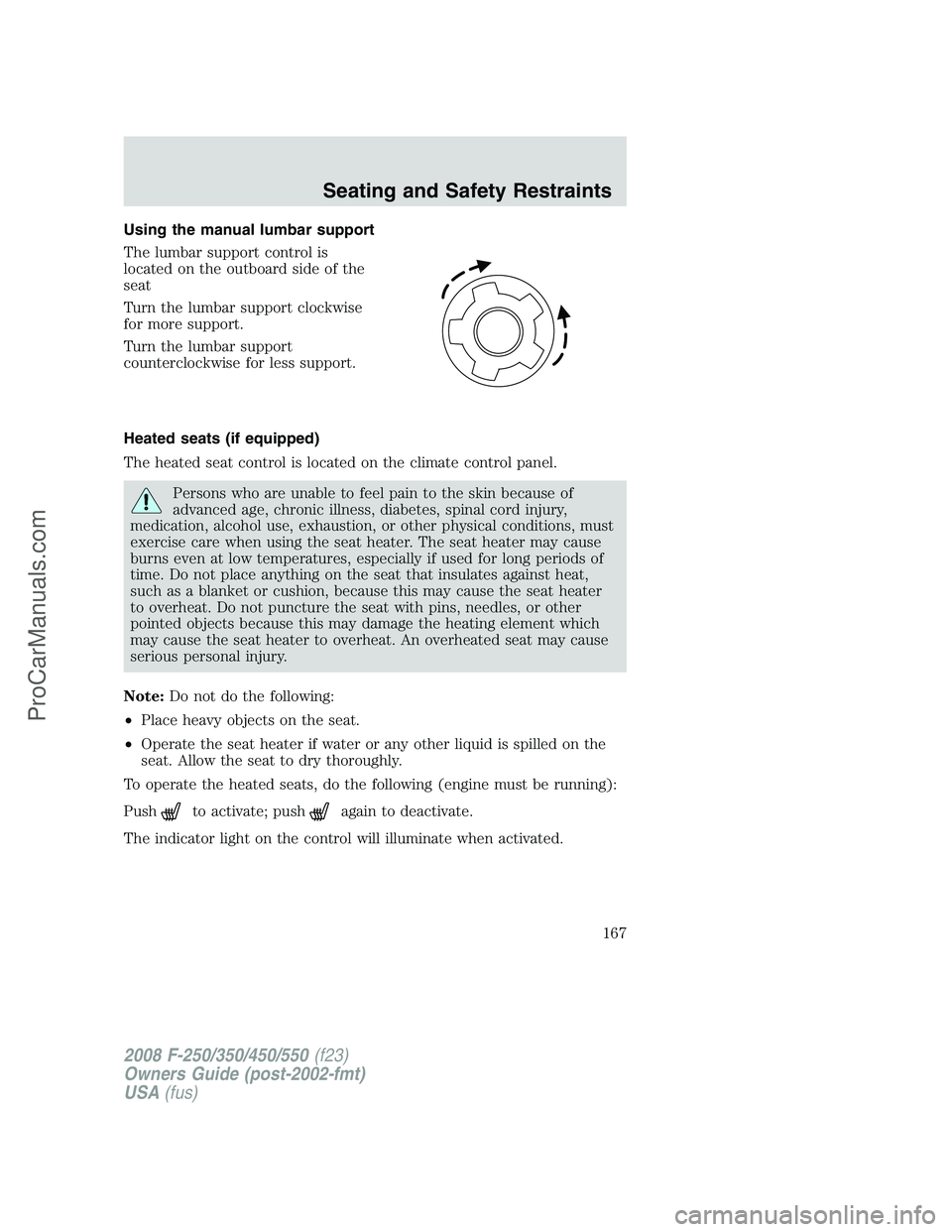
Using the manual lumbar support
The lumbar support control is
located on the outboard side of the
seat
Turn the lumbar support clockwise
for more support.
Turn the lumbar support
counterclockwise for less support.
Heated seats (if equipped)
The heated seat control is located on the climate control panel.
Persons who are unable to feel pain to the skin because of
advanced age, chronic illness, diabetes, spinal cord injury,
medication, alcohol use, exhaustion, or other physical conditions, must
exercise care when using the seat heater. The seat heater may cause
burns even at low temperatures, especially if used for long periods of
time. Do not place anything on the seat that insulates against heat,
such as a blanket or cushion, because this may cause the seat heater
to overheat. Do not puncture the seat with pins, needles, or other
pointed objects because this may damage the heating element which
may cause the seat heater to overheat. An overheated seat may cause
serious personal injury.
Note:Do not do the following:
•Place heavy objects on the seat.
•Operate the seat heater if water or any other liquid is spilled on the
seat. Allow the seat to dry thoroughly.
To operate the heated seats, do the following (engine must be running):
Push
to activate; pushagain to deactivate.
The indicator light on the control will illuminate when activated.
2008 F-250/350/450/550(f23)
Owners Guide (post-2002-fmt)
USA(fus)
Seating and Safety Restraints
167
ProCarManuals.com
Page 207 of 400
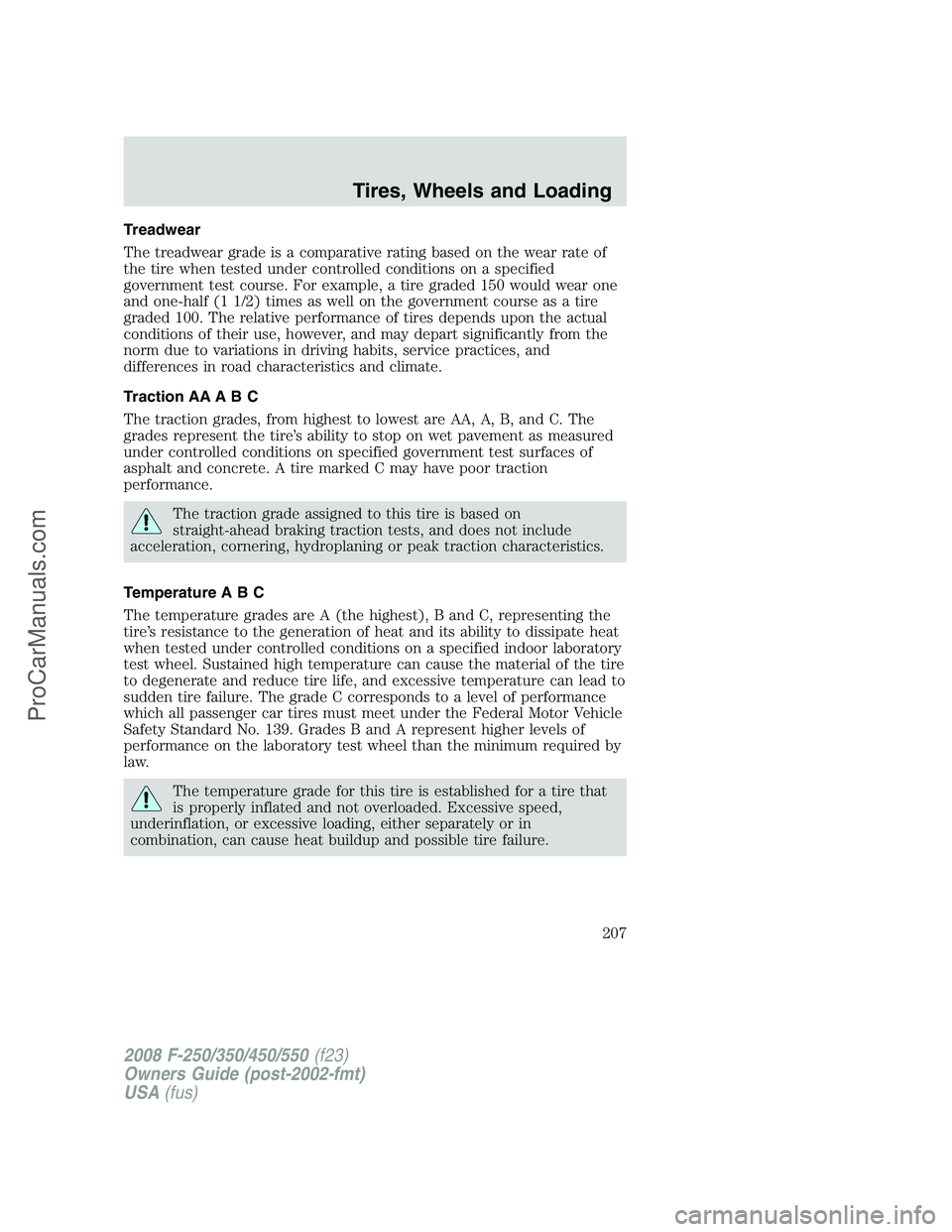
Treadwear
The treadwear grade is a comparative rating based on the wear rate of
the tire when tested under controlled conditions on a specified
government test course. For example, a tire graded 150 would wear one
and one-half (1 1/2) times as well on the government course as a tire
graded 100. The relative performance of tires depends upon the actual
conditions of their use, however, and may depart significantly from the
norm due to variations in driving habits, service practices, and
differences in road characteristics and climate.
Traction AA A B C
The traction grades, from highest to lowest are AA, A, B, and C. The
grades represent the tire’s ability to stop on wet pavement as measured
under controlled conditions on specified government test surfaces of
asphalt and concrete. A tire marked C may have poor traction
performance.
The traction grade assigned to this tire is based on
straight-ahead braking traction tests, and does not include
acceleration, cornering, hydroplaning or peak traction characteristics.
Temperature A B C
The temperature grades are A (the highest), B and C, representing the
tire’s resistance to the generation of heat and its ability to dissipate heat
when tested under controlled conditions on a specified indoor laboratory
test wheel. Sustained high temperature can cause the material of the tire
to degenerate and reduce tire life, and excessive temperature can lead to
sudden tire failure. The grade C corresponds to a level of performance
which all passenger car tires must meet under the Federal Motor Vehicle
Safety Standard No. 139. Grades B and A represent higher levels of
performance on the laboratory test wheel than the minimum required by
law.
The temperature grade for this tire is established for a tire that
is properly inflated and not overloaded. Excessive speed,
underinflation, or excessive loading, either separately or in
combination, can cause heat buildup and possible tire failure.
2008 F-250/350/450/550(f23)
Owners Guide (post-2002-fmt)
USA(fus)
Tires, Wheels and Loading
207
ProCarManuals.com
Page 263 of 400
into four-wheel drive mode (if equipped), the traction control system will
be automatically disabled. Traction control operation will resume when
the vehicle is placed back into two-wheel drive mode.
Aggressive driving in any road conditions can cause you to lose
control of your vehicle increasing the risk of severe personal
injury or property damage. The occurrence of a Traction Control™
event is an indication that at least some of the tires have exceeded
their ability to grip the road; this may lead to an increased risk of loss
of vehicle control, vehicle rollover, personal injury and death. If you
experience a severe road event, SLOW DOWN.
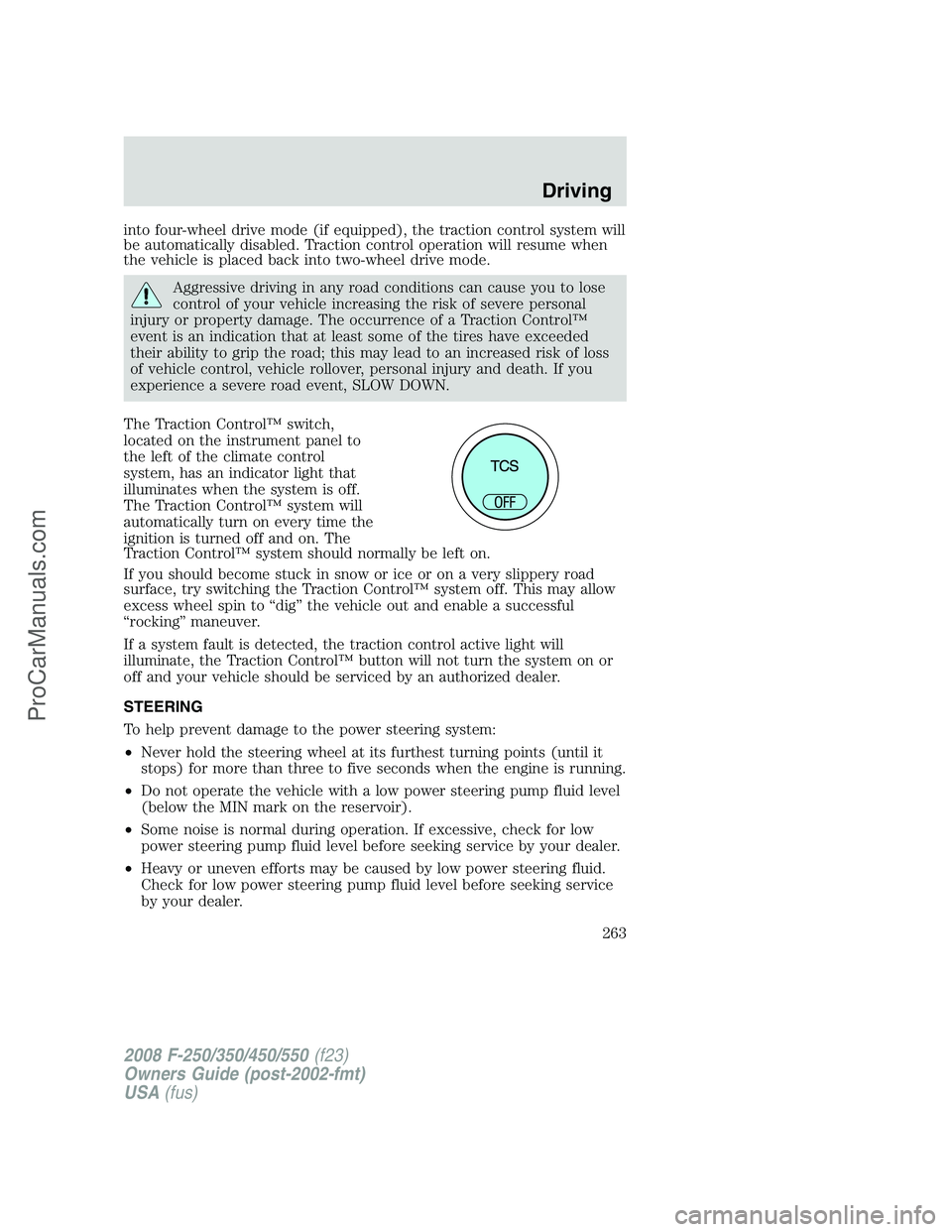
The Traction Control™ switch,
located on the instrument panel to
the left of the climate control
system, has an indicator light that
illuminates when the system is off.
The Traction Control™ system will
automatically turn on every time the
ignition is turned off and on. The
Traction Control™ system should normally be left on.
If you should become stuck in snow or ice or on a very slippery road
surface, try switching the Traction Control™ system off. This may allow
excess wheel spin to “dig” the vehicle out and enable a successful
“rocking” maneuver.
If a system fault is detected, the traction control active light will
illuminate, the Traction Control™ button will not turn the system on or
off and your vehicle should be serviced by an authorized dealer.
STEERING
To help prevent damage to the power steering system:
•Never hold the steering wheel at its furthest turning points (until it
stops) for more than three to five seconds when the engine is running.
•Do not operate the vehicle with a low power steering pump fluid level
(below the MIN mark on the reservoir).
•Some noise is normal during operation. If excessive, check for low
power steering pump fluid level before seeking service by your dealer.
•Heavy or uneven efforts may be caused by low power steering fluid.
Check for low power steering pump fluid level before seeking service
by your dealer.
2008 F-250/350/450/550(f23)
Owners Guide (post-2002-fmt)
USA(fus)
Driving
263
ProCarManuals.com
Page 301 of 400
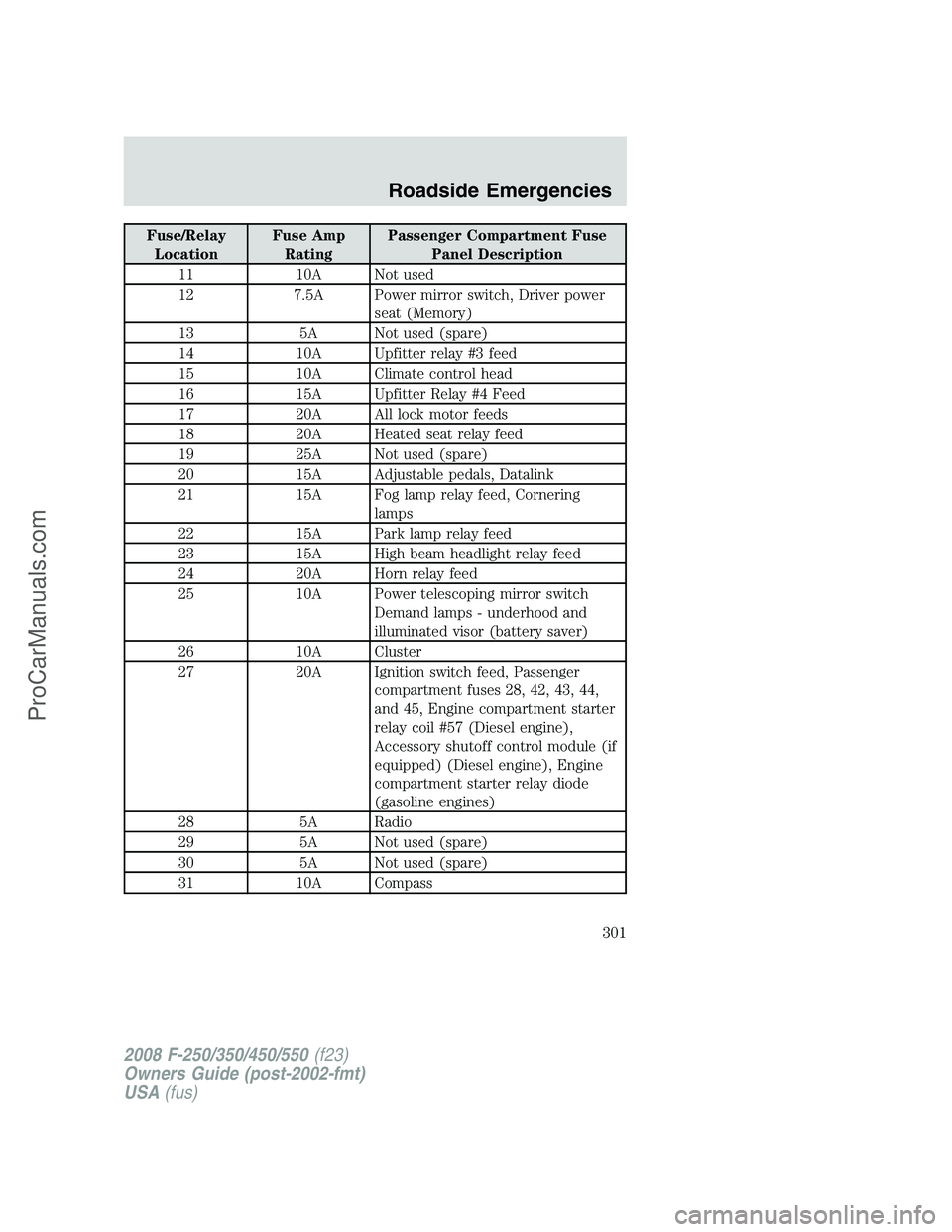
Fuse/Relay
LocationFuse Amp
RatingPassenger Compartment Fuse
Panel Description
11 10A Not used
12 7.5A Power mirror switch, Driver power
seat (Memory)
13 5A Not used (spare)
14 10A Upfitter relay #3 feed
15 10A Climate control head
16 15A Upfitter Relay #4 Feed
17 20A All lock motor feeds
18 20A Heated seat relay feed
19 25A Not used (spare)
20 15A Adjustable pedals, Datalink
21 15A Fog lamp relay feed, Cornering
lamps
22 15A Park lamp relay feed
23 15A High beam headlight relay feed
24 20A Horn relay feed
25 10A Power telescoping mirror switch
Demand lamps - underhood and
illuminated visor (battery saver)
26 10A Cluster
27 20A Ignition switch feed, Passenger
compartment fuses 28, 42, 43, 44,
and 45, Engine compartment starter
relay coil #57 (Diesel engine),
Accessory shutoff control module (if
equipped) (Diesel engine), Engine
compartment starter relay diode
(gasoline engines)
28 5A Radio
29 5A Not used (spare)
30 5A Not used (spare)
31 10A Compass
2008 F-250/350/450/550(f23)
Owners Guide (post-2002-fmt)
USA(fus)
Roadside Emergencies
301
ProCarManuals.com
Page 302 of 400
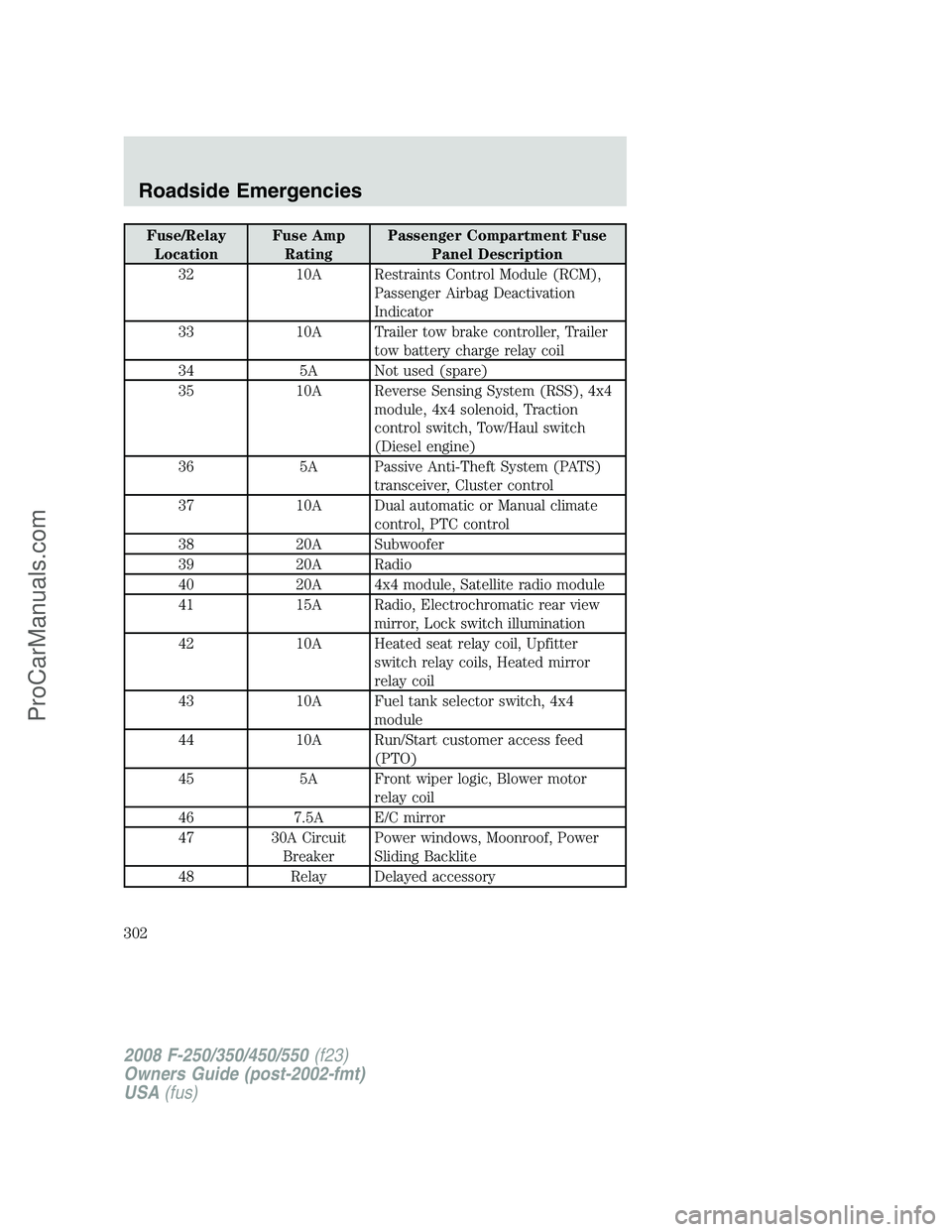
Fuse/Relay
LocationFuse Amp
RatingPassenger Compartment Fuse
Panel Description
32 10A Restraints Control Module (RCM),
Passenger Airbag Deactivation
Indicator
33 10A Trailer tow brake controller, Trailer
tow battery charge relay coil
34 5A Not used (spare)
35 10A Reverse Sensing System (RSS), 4x4
module, 4x4 solenoid, Traction
control switch, Tow/Haul switch
(Diesel engine)
36 5A Passive Anti-Theft System (PATS)
transceiver, Cluster control
37 10A Dual automatic or Manual climate
control, PTC control
38 20A Subwoofer
39 20A Radio
40 20A 4x4 module, Satellite radio module
41 15A Radio, Electrochromatic rear view
mirror, Lock switch illumination
42 10A Heated seat relay coil, Upfitter
switch relay coils, Heated mirror
relay coil
43 10A Fuel tank selector switch, 4x4
module
44 10A Run/Start customer access feed
(PTO)
45 5A Front wiper logic, Blower motor
relay coil
46 7.5A E/C mirror
47 30A Circuit
BreakerPower windows, Moonroof, Power
Sliding Backlite
48 Relay Delayed accessory
2008 F-250/350/450/550(f23)
Owners Guide (post-2002-fmt)
USA(fus)
Roadside Emergencies
302
ProCarManuals.com
Page 303 of 400
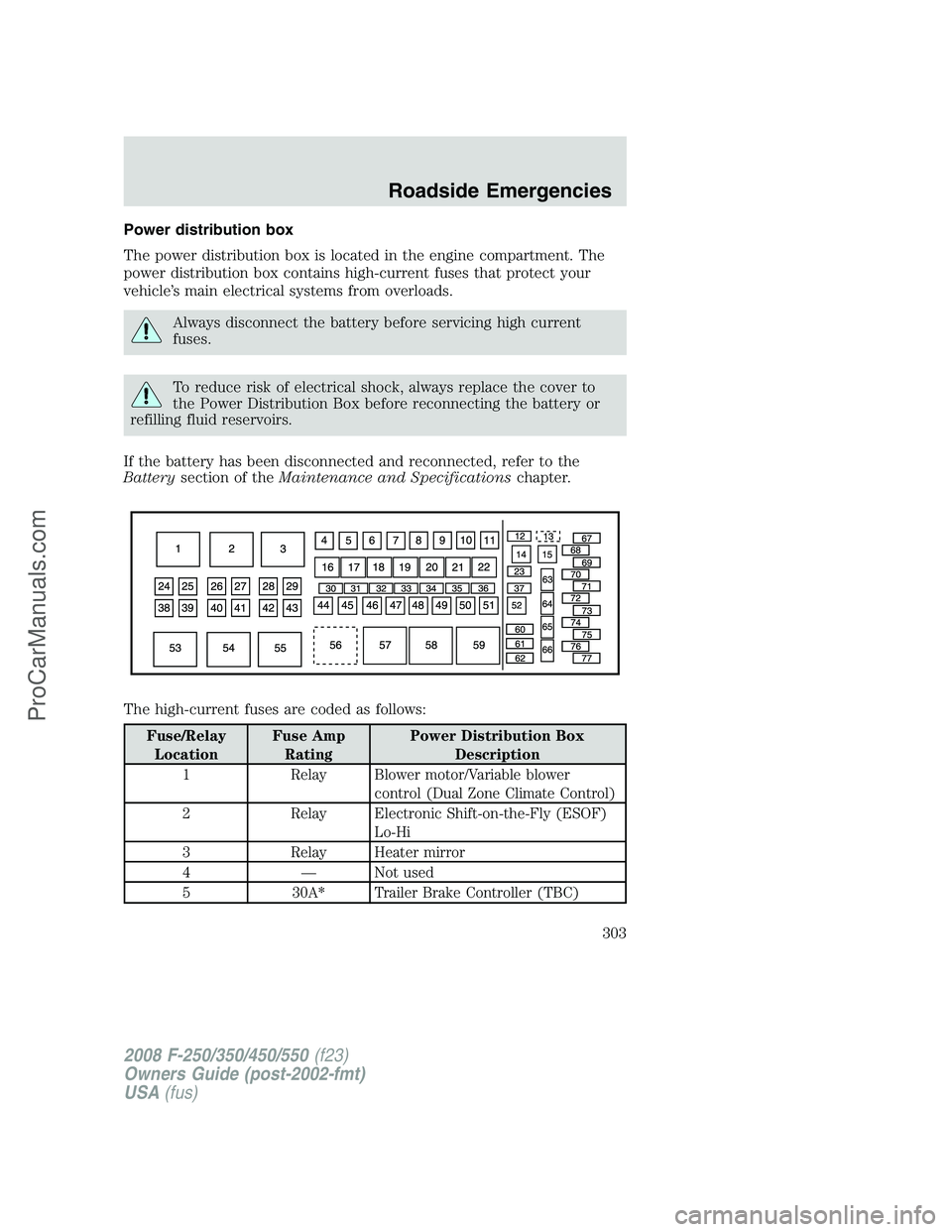
Power distribution box
The power distribution box is located in the engine compartment. The
power distribution box contains high-current fuses that protect your
vehicle’s main electrical systems from overloads.
Always disconnect the battery before servicing high current
fuses.
To reduce risk of electrical shock, always replace the cover to
the Power Distribution Box before reconnecting the battery or
refilling fluid reservoirs.
If the battery has been disconnected and reconnected, refer to the
Batterysection of theMaintenance and Specificationschapter.
The high-current fuses are coded as follows:
Fuse/Relay
LocationFuse Amp
RatingPower Distribution Box
Description
1 Relay Blower motor/Variable blower
control (Dual Zone Climate Control)
2 Relay Electronic Shift-on-the-Fly (ESOF)
Lo-Hi
3 Relay Heater mirror
4 — Not used
5 30A* Trailer Brake Controller (TBC)
2008 F-250/350/450/550(f23)
Owners Guide (post-2002-fmt)
USA(fus)
Roadside Emergencies
303
ProCarManuals.com
Page 393 of 400
Climate control (see Air
conditioning or Heating) ............80
Clock adjust
6-CD in dash .............................34
AM/FM/CD .................................28
Clutch
fluid ..........................................375
operation while driving ..........269
recommended shift speeds ....270
Compass, electronic
set zone adjustment
...............134
Console
......................................120
overhead
..................................100
Controls
power seat
...............................165
steering column
......................112
Coolant
checking and adding
..............356
refill capacities
................359, 383
Cruise control
(see Speed control)
..................109
Customer Assistance
................294
Ford accessories for your
vehicle
.....................................345
Ford Extended Service
Plan
..........................................333
Getting assistance outside the
U.S. and Canada
.....................334
Getting roadside assistance
...294
Getting the service you
need
.........................................329
Ordering additional owner’s
literature
.................................335
Utilizing the
Mediation/Arbitration
Program
...................................333D
Daytime running lamps
(see Lamps) ................................86
Dipstick
automatic transmission
fluid ..........................................375
engine oil .................................351
Driveline universal joint and
slip yoke ....................................380
Driving under special
conditions ..................269, 284, 288
sand .........................................286
snow and ice ...........................288
through water .................287, 290
DVD system .................................48
E
Electronic message
center .................................120, 129
Emergencies, roadside
jump-starting ..........................322
Emergency Flashers .................296
Emission control system ..........370
Engine ........................................387
cleaning ...................................338
coolant .....................................356
diesel ...........................................8
fail-safe cooling .......................360
idle speed control ...................354
refill capacities ........................383
service points ..................348–349
starting after a collision .........296
Engine oil ..................................351
checking and adding ..............351
dipstick ....................................351
filter, specifications ........353, 382
recommendations ...................353
refill capacities ........................383
Event data recording ....................6
Exhaust fumes ..........................258
F
Fail safe cooling ........................360
2008 F-250/350/450/550(f23)
Owners Guide (post-2002-fmt)
USA(fus)
Index
393
ProCarManuals.com