bluetooth FORD F450 SUPER DUTY 2016 Service Manual
[x] Cancel search | Manufacturer: FORD, Model Year: 2016, Model line: F450 SUPER DUTY, Model: FORD F450 SUPER DUTY 2016Pages: 507, PDF Size: 8.13 MB
Page 429 of 507
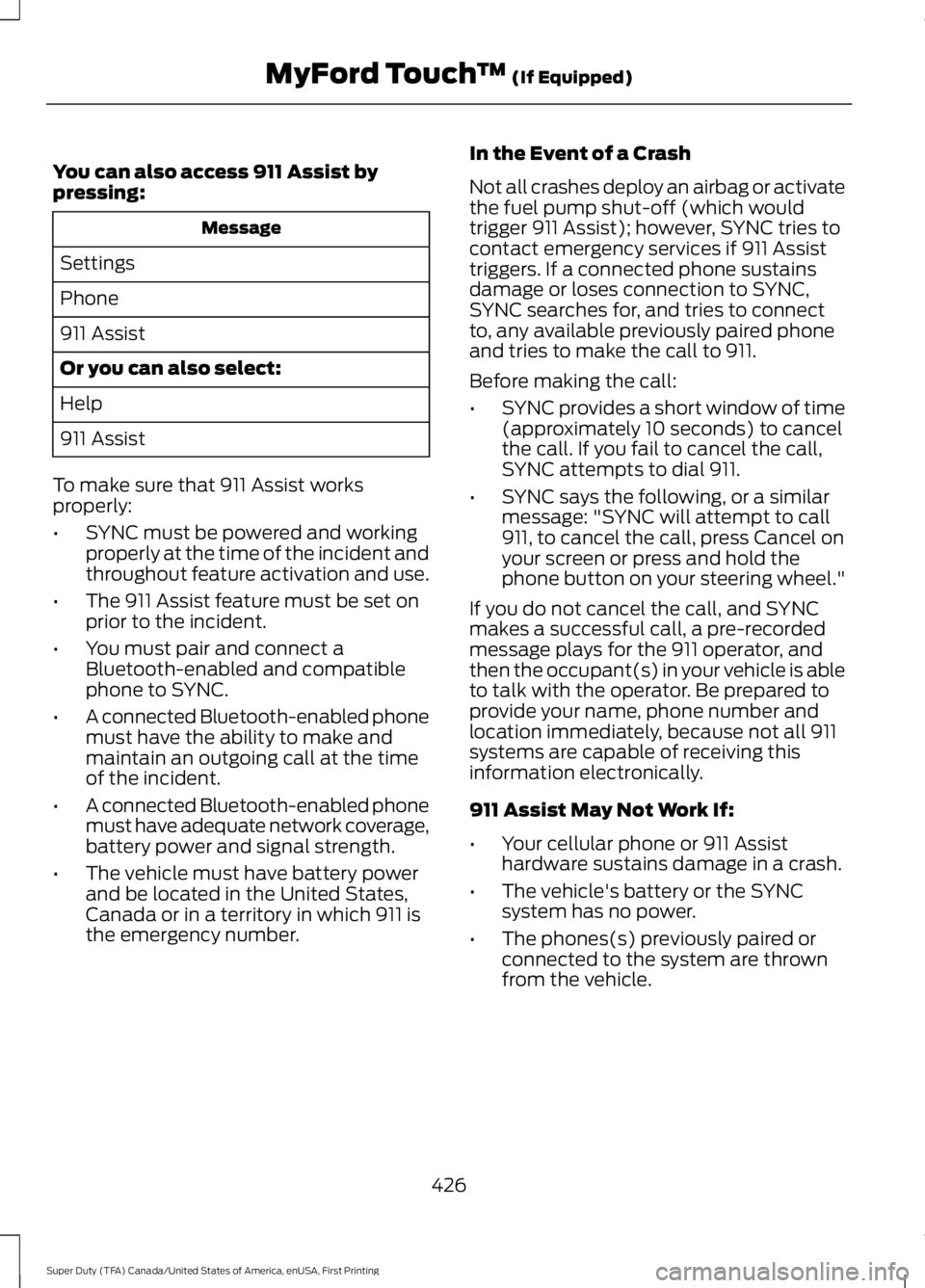
You can also access 911 Assist bypressing:
Message
Settings
Phone
911 Assist
Or you can also select:
Help
911 Assist
To make sure that 911 Assist worksproperly:
•SYNC must be powered and workingproperly at the time of the incident andthroughout feature activation and use.
•The 911 Assist feature must be set onprior to the incident.
•You must pair and connect aBluetooth-enabled and compatiblephone to SYNC.
•A connected Bluetooth-enabled phonemust have the ability to make andmaintain an outgoing call at the timeof the incident.
•A connected Bluetooth-enabled phonemust have adequate network coverage,battery power and signal strength.
•The vehicle must have battery powerand be located in the United States,Canada or in a territory in which 911 isthe emergency number.
In the Event of a Crash
Not all crashes deploy an airbag or activatethe fuel pump shut-off (which wouldtrigger 911 Assist); however, SYNC tries tocontact emergency services if 911 Assisttriggers. If a connected phone sustainsdamage or loses connection to SYNC,SYNC searches for, and tries to connectto, any available previously paired phoneand tries to make the call to 911.
Before making the call:
•SYNC provides a short window of time(approximately 10 seconds) to cancelthe call. If you fail to cancel the call,SYNC attempts to dial 911.
•SYNC says the following, or a similarmessage: "SYNC will attempt to call911, to cancel the call, press Cancel onyour screen or press and hold thephone button on your steering wheel."
If you do not cancel the call, and SYNCmakes a successful call, a pre-recordedmessage plays for the 911 operator, andthen the occupant(s) in your vehicle is ableto talk with the operator. Be prepared toprovide your name, phone number andlocation immediately, because not all 911systems are capable of receiving thisinformation electronically.
911 Assist May Not Work If:
•Your cellular phone or 911 Assisthardware sustains damage in a crash.
•The vehicle's battery or the SYNCsystem has no power.
•The phones(s) previously paired orconnected to the system are thrownfrom the vehicle.
426
Super Duty (TFA) Canada/United States of America, enUSA, First Printing
MyFord Touch™ (If Equipped)
Page 445 of 507
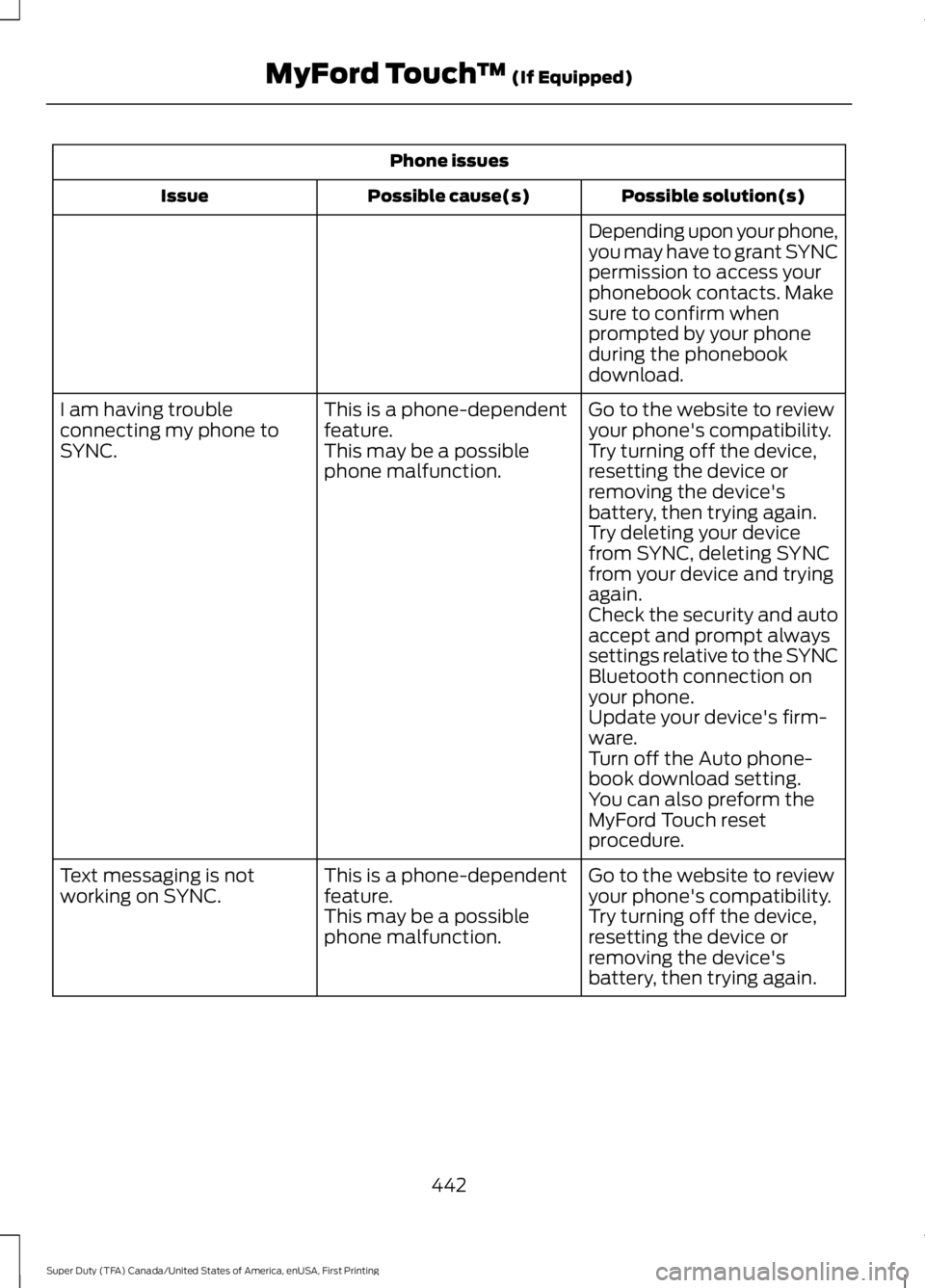
Phone issues
Possible solution(s)Possible cause(s)Issue
Depending upon your phone,you may have to grant SYNCpermission to access yourphonebook contacts. Makesure to confirm whenprompted by your phoneduring the phonebookdownload.
Go to the website to reviewyour phone's compatibility.This is a phone-dependentfeature.I am having troubleconnecting my phone toSYNC.Try turning off the device,resetting the device orremoving the device'sbattery, then trying again.
This may be a possiblephone malfunction.
Try deleting your devicefrom SYNC, deleting SYNCfrom your device and tryingagain.Check the security and autoaccept and prompt alwayssettings relative to the SYNCBluetooth connection onyour phone.Update your device's firm-ware.Turn off the Auto phone-book download setting.You can also preform theMyFord Touch resetprocedure.
Go to the website to reviewyour phone's compatibility.This is a phone-dependentfeature.Text messaging is notworking on SYNC.Try turning off the device,resetting the device orremoving the device'sbattery, then trying again.
This may be a possiblephone malfunction.
442
Super Duty (TFA) Canada/United States of America, enUSA, First Printing
MyFord Touch™ (If Equipped)
Page 446 of 507
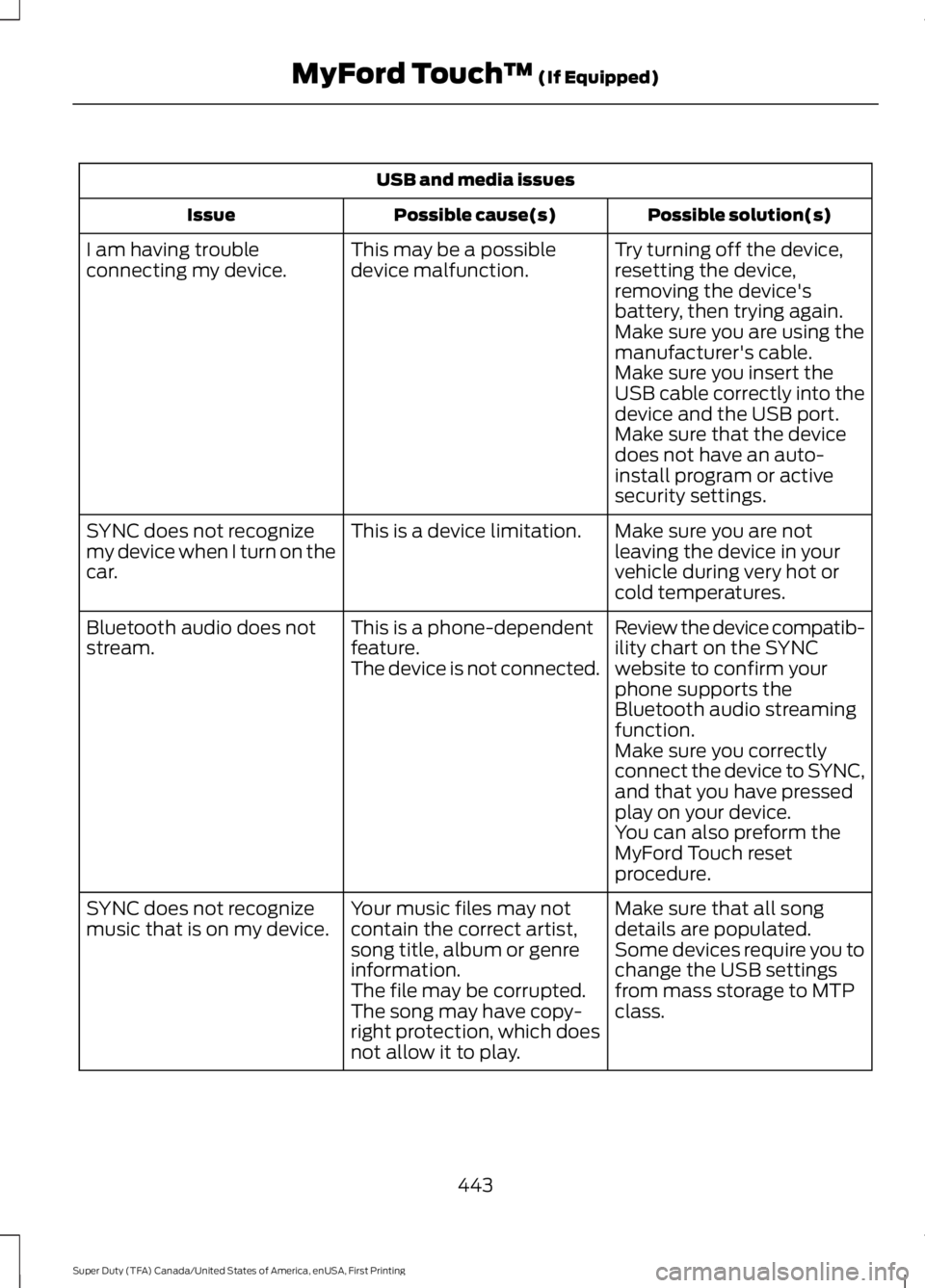
USB and media issues
Possible solution(s)Possible cause(s)Issue
Try turning off the device,resetting the device,removing the device'sbattery, then trying again.
This may be a possibledevice malfunction.I am having troubleconnecting my device.
Make sure you are using themanufacturer's cable.Make sure you insert theUSB cable correctly into thedevice and the USB port.Make sure that the devicedoes not have an auto-install program or activesecurity settings.
Make sure you are notleaving the device in yourvehicle during very hot orcold temperatures.
This is a device limitation.SYNC does not recognizemy device when I turn on thecar.
Review the device compatib-ility chart on the SYNCwebsite to confirm yourphone supports theBluetooth audio streamingfunction.
This is a phone-dependentfeature.The device is not connected.
Bluetooth audio does notstream.
Make sure you correctlyconnect the device to SYNC,and that you have pressedplay on your device.You can also preform theMyFord Touch resetprocedure.
Make sure that all songdetails are populated.Your music files may notcontain the correct artist,song title, album or genreinformation.
SYNC does not recognizemusic that is on my device.Some devices require you tochange the USB settingsfrom mass storage to MTPclass.The file may be corrupted.The song may have copy-right protection, which doesnot allow it to play.
443
Super Duty (TFA) Canada/United States of America, enUSA, First Printing
MyFord Touch™ (If Equipped)
Page 447 of 507
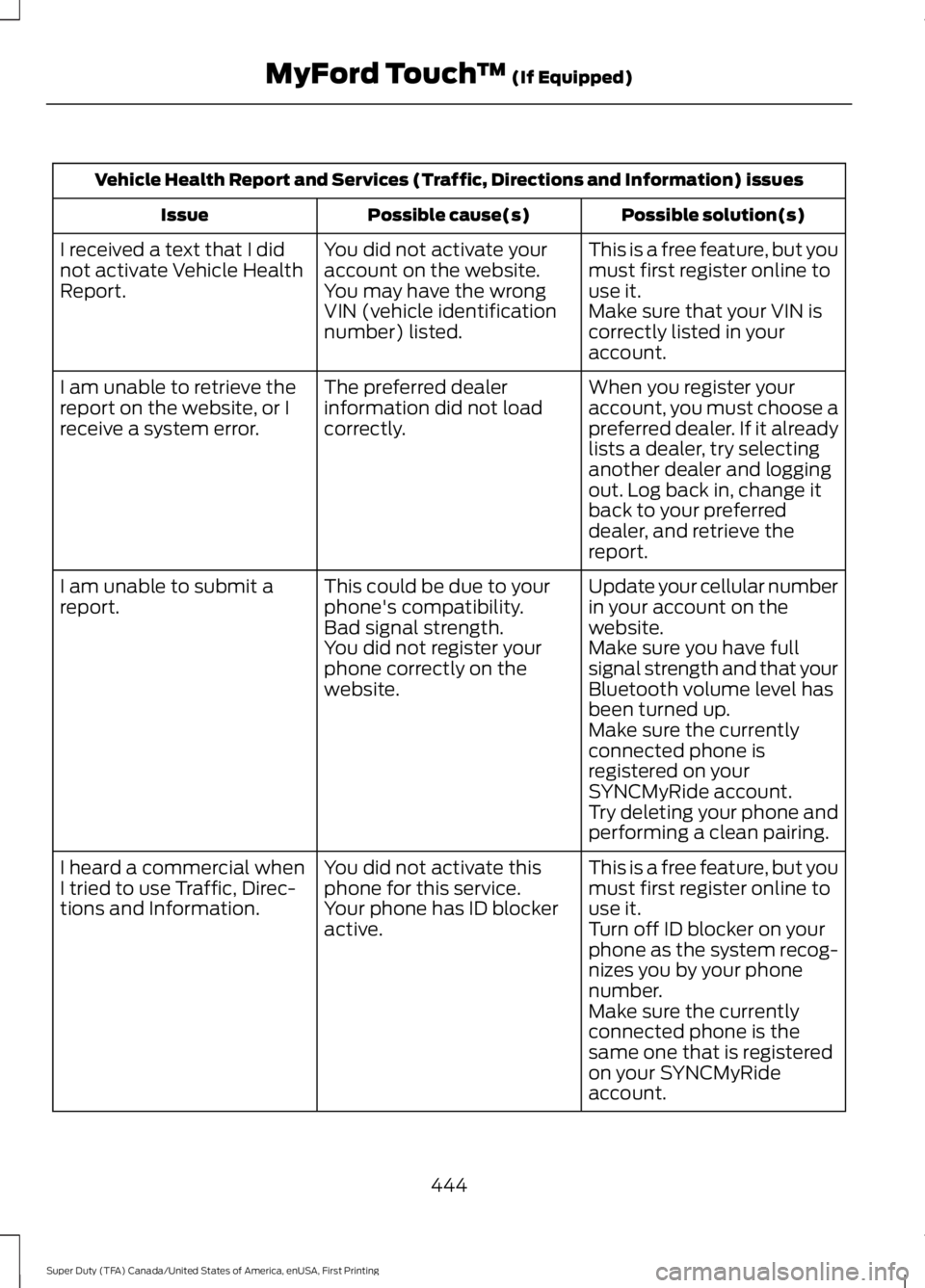
Vehicle Health Report and Services (Traffic, Directions and Information) issues
Possible solution(s)Possible cause(s)Issue
This is a free feature, but youmust first register online touse it.
You did not activate youraccount on the website.You may have the wrongVIN (vehicle identificationnumber) listed.
I received a text that I didnot activate Vehicle HealthReport.Make sure that your VIN iscorrectly listed in youraccount.
When you register youraccount, you must choose apreferred dealer. If it alreadylists a dealer, try selectinganother dealer and loggingout. Log back in, change itback to your preferreddealer, and retrieve thereport.
The preferred dealerinformation did not loadcorrectly.
I am unable to retrieve thereport on the website, or Ireceive a system error.
Update your cellular numberin your account on thewebsite.
This could be due to yourphone's compatibility.Bad signal strength.
I am unable to submit areport.
Make sure you have fullsignal strength and that yourBluetooth volume level hasbeen turned up.
You did not register yourphone correctly on thewebsite.
Make sure the currentlyconnected phone isregistered on yourSYNCMyRide account.Try deleting your phone andperforming a clean pairing.
This is a free feature, but youmust first register online touse it.
You did not activate thisphone for this service.Your phone has ID blockeractive.
I heard a commercial whenI tried to use Traffic, Direc-tions and Information.Turn off ID blocker on yourphone as the system recog-nizes you by your phonenumber.Make sure the currentlyconnected phone is thesame one that is registeredon your SYNCMyRideaccount.
444
Super Duty (TFA) Canada/United States of America, enUSA, First Printing
MyFord Touch™ (If Equipped)
Page 500 of 507
Driving Through Water..............................208DRLSee: Daytime Running Lamps.........................73
E
Economical Driving.....................................207Electronic Locking Differential.................167Activating the Electronic LockingDifferential........................................................167Emission Control System..........................148On-Board Diagnostics (OBD-II)...................149Readiness for Inspection/Maintenance(I/M) Testing...................................................150End User License Agreement..................472SYNC End User License Agreement(EULA)..............................................................472Engine Block Heater....................................142Using the Engine Block Heater......................143Engine Coolant Check...............................236Adding Engine Coolant....................................237Recycled Engine Coolant................................238Severe Climates.................................................238What You Should Know About Fail-SafeCooling..............................................................239Engine ImmobilizerSee: Passive Anti-Theft System.....................64Engine Oil Check..........................................235Adding Engine Oil..............................................235Engine Oil Dipstick......................................235Engine Specifications................................303Drivebelt Routing...............................................303Entertainment..............................................395AM/FM Radio......................................................395Bluetooth Audio..................................................410CD...........................................................................405SD Card Slot and USB Port...........................407SIRIUS® Satellite Radio (IfActivated)........................................................401Supported Media Players, Formats andMetadata Information.................................410Environment......................................................14
Essential Towing Checks...........................196Before Towing a Trailer....................................202Dynamic Hitching Using the Rear ViewCamera System..............................................197Hitches...................................................................198Integrated Trailer Brake Controller.............200Launching or Retrieving a Boat or PersonalWatercraft (PWC)........................................203Safety Chains.......................................................199Trailer Brakes.......................................................199Trailer Lamps.......................................................202Trailer Towing Connector.................................197When Towing a Trailer.....................................202Event Data RecordingSee: Data Recording..............................................9Export Unique Options..................................13Extended Service Plan (ESP)..................451SERVICE PLANS (CANADA ONLY)............452SERVICE PLANS (U.S. Only)..........................451Exterior Mirrors.................................................77Clearance Lamps.................................................78Fold-Away Exterior Mirrors................................77Heated Exterior Mirrors......................................78Memory Mirrors.....................................................78Power Exterior Mirrors.........................................77Telescoping Mirrors..............................................78
F
Fastening the Safety Belts.........................30Fastening the Cinch Tongue..............................31Safety Belt Extension Assembly.....................33Safety Belt Locking Modes...............................32Using Safety Belts During Pregnancy............31Using the Safety Belt with Cinch Tongue(Front Center and Rear Center SeatsOnly)....................................................................30Floor Mats......................................................208Fog Lamps - FrontSee: Front Fog Lamps.........................................73Foot PedalsSee: Adjusting the Pedals.................................69Ford Credit..........................................................11(U.S. Only).................................................................11Four-Wheel Drive.........................................158Front Fog Lamps.............................................73Front Seat Armrest.......................................127Fuel and Refueling.......................................144
497
Super Duty (TFA) Canada/United States of America, enUSA, First Printing
Index