brake FORD F450 SUPER DUTY 2017 User Guide
[x] Cancel search | Manufacturer: FORD, Model Year: 2017, Model line: F450 SUPER DUTY, Model: FORD F450 SUPER DUTY 2017Pages: 642, PDF Size: 12.35 MB
Page 91 of 642
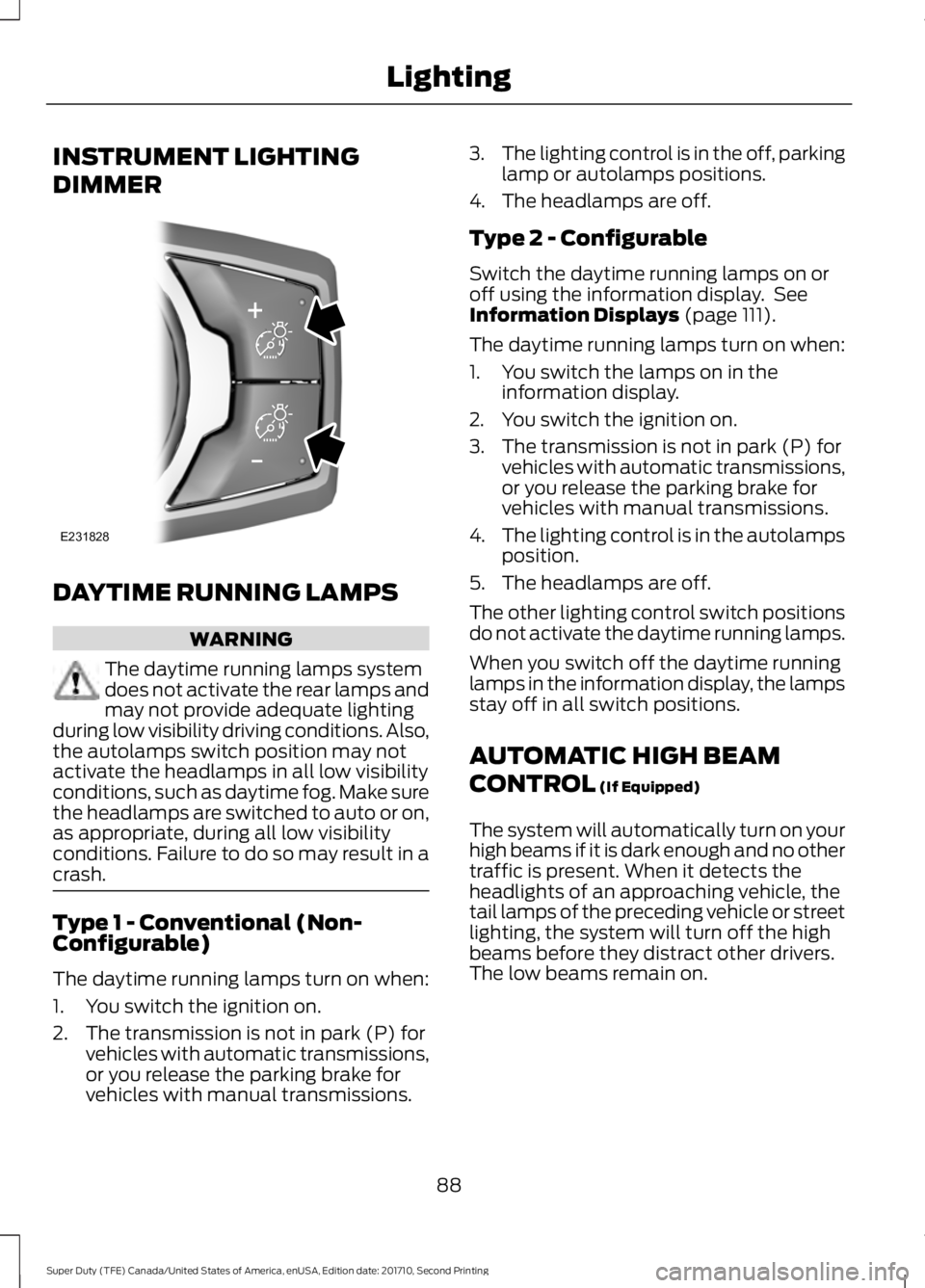
INSTRUMENT LIGHTING
DIMMER
DAYTIME RUNNING LAMPS
WARNING
The daytime running lamps systemdoes not activate the rear lamps andmay not provide adequate lightingduring low visibility driving conditions. Also,the autolamps switch position may notactivate the headlamps in all low visibilityconditions, such as daytime fog. Make surethe headlamps are switched to auto or on,as appropriate, during all low visibilityconditions. Failure to do so may result in acrash.
Type 1 - Conventional (Non-Configurable)
The daytime running lamps turn on when:
1. You switch the ignition on.
2. The transmission is not in park (P) forvehicles with automatic transmissions,or you release the parking brake forvehicles with manual transmissions.
3.The lighting control is in the off, parkinglamp or autolamps positions.
4. The headlamps are off.
Type 2 - Configurable
Switch the daytime running lamps on oroff using the information display. SeeInformation Displays (page 111).
The daytime running lamps turn on when:
1. You switch the lamps on in theinformation display.
2. You switch the ignition on.
3. The transmission is not in park (P) forvehicles with automatic transmissions,or you release the parking brake forvehicles with manual transmissions.
4.The lighting control is in the autolampsposition.
5. The headlamps are off.
The other lighting control switch positionsdo not activate the daytime running lamps.
When you switch off the daytime runninglamps in the information display, the lampsstay off in all switch positions.
AUTOMATIC HIGH BEAM
CONTROL (If Equipped)
The system will automatically turn on yourhigh beams if it is dark enough and no othertraffic is present. When it detects theheadlights of an approaching vehicle, thetail lamps of the preceding vehicle or streetlighting, the system will turn off the highbeams before they distract other drivers.The low beams remain on.
88
Super Duty (TFE) Canada/United States of America, enUSA, Edition date: 201710, Second Printing
LightingE231828
Page 109 of 642
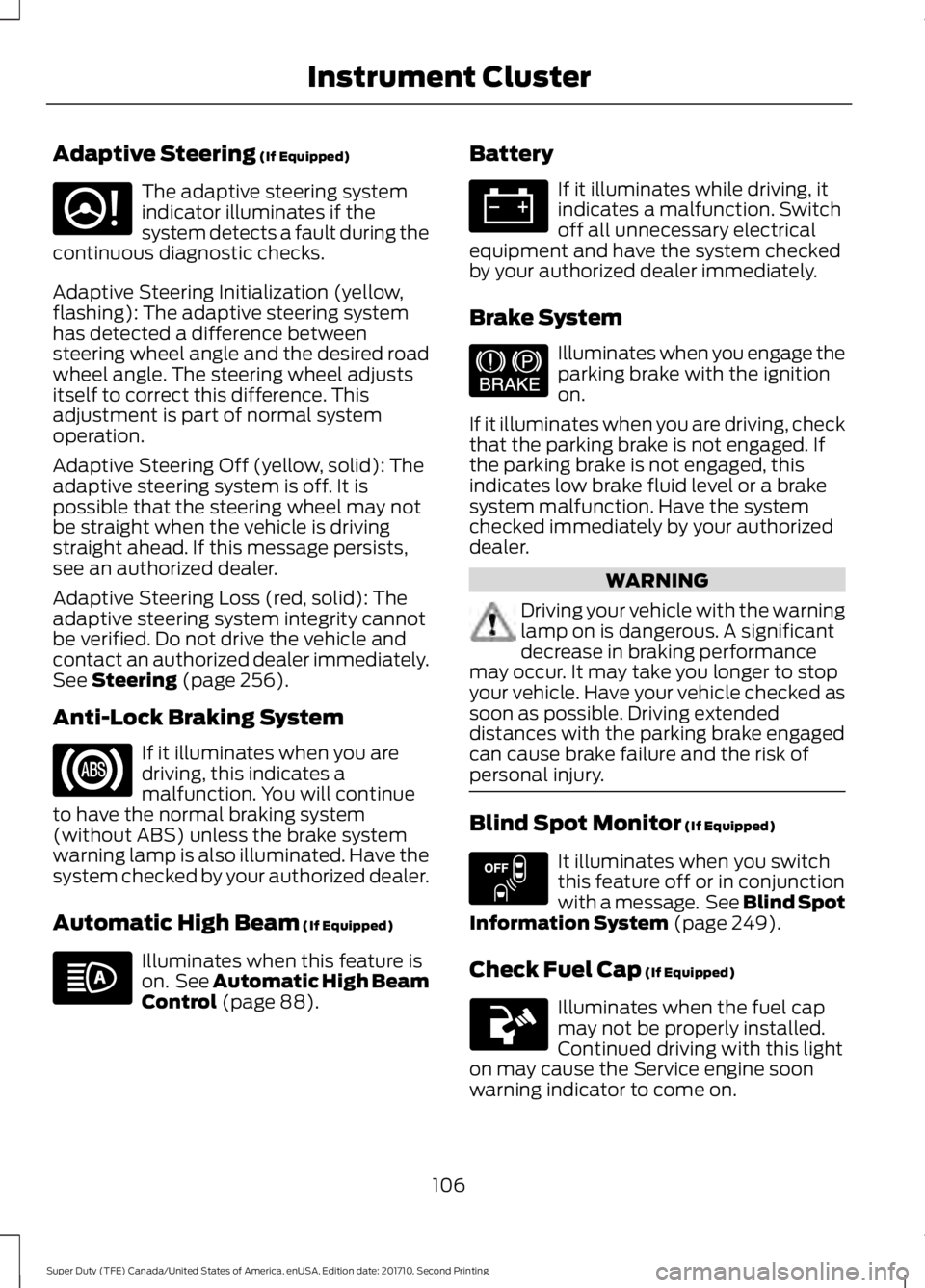
Adaptive Steering (If Equipped)
The adaptive steering systemindicator illuminates if thesystem detects a fault during thecontinuous diagnostic checks.
Adaptive Steering Initialization (yellow,flashing): The adaptive steering systemhas detected a difference betweensteering wheel angle and the desired roadwheel angle. The steering wheel adjustsitself to correct this difference. Thisadjustment is part of normal systemoperation.
Adaptive Steering Off (yellow, solid): Theadaptive steering system is off. It ispossible that the steering wheel may notbe straight when the vehicle is drivingstraight ahead. If this message persists,see an authorized dealer.
Adaptive Steering Loss (red, solid): Theadaptive steering system integrity cannotbe verified. Do not drive the vehicle andcontact an authorized dealer immediately.See Steering (page 256).
Anti-Lock Braking System
If it illuminates when you aredriving, this indicates amalfunction. You will continueto have the normal braking system(without ABS) unless the brake systemwarning lamp is also illuminated. Have thesystem checked by your authorized dealer.
Automatic High Beam (If Equipped)
Illuminates when this feature ison. See Automatic High BeamControl (page 88).
Battery
If it illuminates while driving, itindicates a malfunction. Switchoff all unnecessary electricalequipment and have the system checkedby your authorized dealer immediately.
Brake System
Illuminates when you engage theparking brake with the ignitionon.
If it illuminates when you are driving, checkthat the parking brake is not engaged. Ifthe parking brake is not engaged, thisindicates low brake fluid level or a brakesystem malfunction. Have the systemchecked immediately by your authorizeddealer.
WARNING
Driving your vehicle with the warninglamp on is dangerous. A significantdecrease in braking performancemay occur. It may take you longer to stopyour vehicle. Have your vehicle checked assoon as possible. Driving extendeddistances with the parking brake engagedcan cause brake failure and the risk ofpersonal injury.
Blind Spot Monitor (If Equipped)
It illuminates when you switchthis feature off or in conjunctionwith a message. See Blind SpotInformation System (page 249).
Check Fuel Cap (If Equipped)
Illuminates when the fuel capmay not be properly installed.Continued driving with this lighton may cause the Service engine soonwarning indicator to come on.
106
Super Duty (TFE) Canada/United States of America, enUSA, Edition date: 201710, Second Printing
Instrument ClusterE223375 E144522 E151262
Page 112 of 642
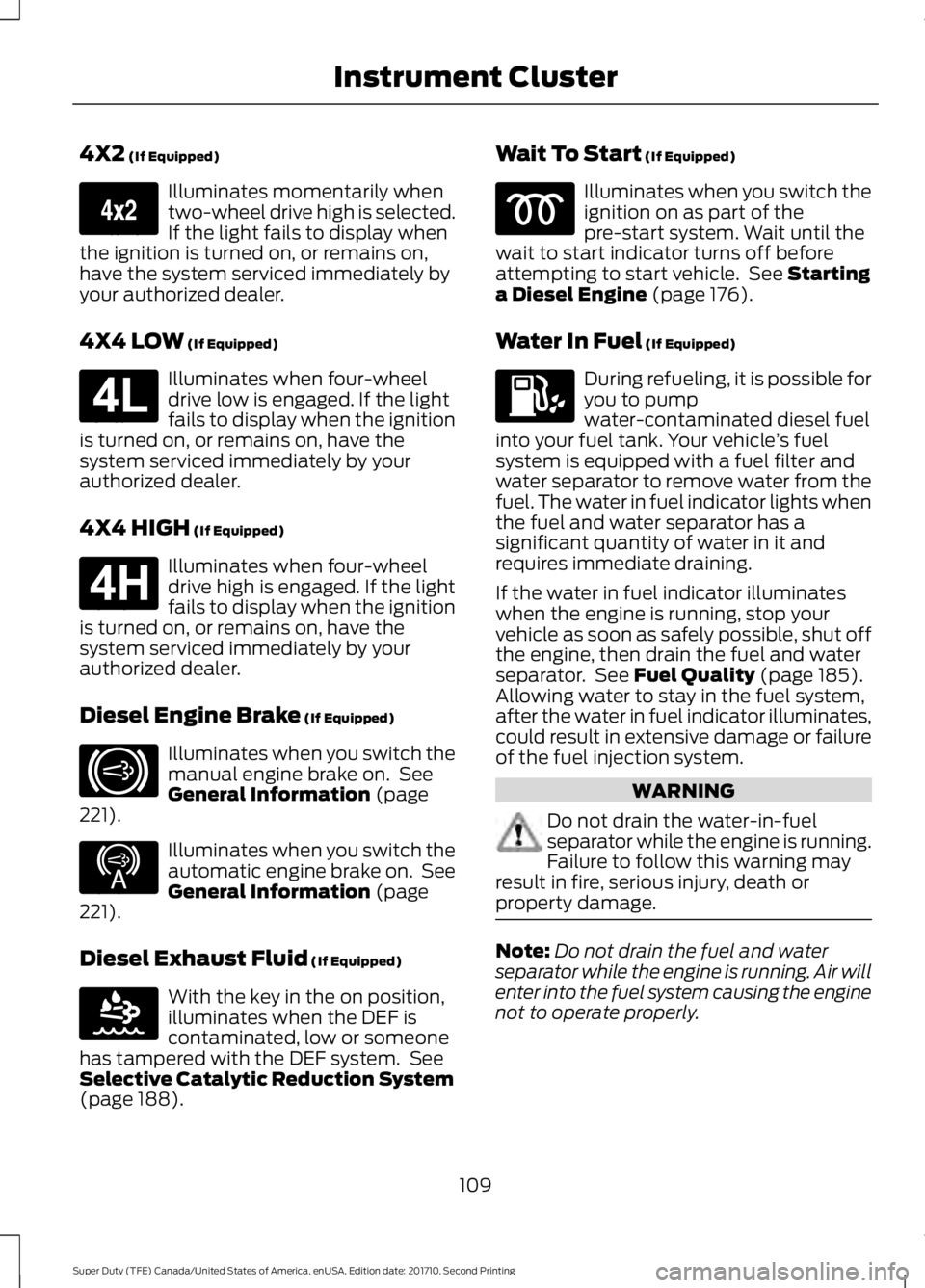
4X2 (If Equipped)
Illuminates momentarily whentwo-wheel drive high is selected.If the light fails to display whenthe ignition is turned on, or remains on,have the system serviced immediately byyour authorized dealer.
4X4 LOW (If Equipped)
Illuminates when four-wheeldrive low is engaged. If the lightfails to display when the ignitionis turned on, or remains on, have thesystem serviced immediately by yourauthorized dealer.
4X4 HIGH (If Equipped)
Illuminates when four-wheeldrive high is engaged. If the lightfails to display when the ignitionis turned on, or remains on, have thesystem serviced immediately by yourauthorized dealer.
Diesel Engine Brake (If Equipped)
Illuminates when you switch themanual engine brake on. SeeGeneral Information (page221).
Illuminates when you switch theautomatic engine brake on. SeeGeneral Information (page221).
Diesel Exhaust Fluid (If Equipped)
With the key in the on position,illuminates when the DEF iscontaminated, low or someonehas tampered with the DEF system. SeeSelective Catalytic Reduction System(page 188).
Wait To Start (If Equipped)
Illuminates when you switch theignition on as part of thepre-start system. Wait until thewait to start indicator turns off beforeattempting to start vehicle. See Startinga Diesel Engine (page 176).
Water In Fuel (If Equipped)
During refueling, it is possible foryou to pumpwater-contaminated diesel fuelinto your fuel tank. Your vehicle’s fuelsystem is equipped with a fuel filter andwater separator to remove water from thefuel. The water in fuel indicator lights whenthe fuel and water separator has asignificant quantity of water in it andrequires immediate draining.
If the water in fuel indicator illuminateswhen the engine is running, stop yourvehicle as soon as safely possible, shut offthe engine, then drain the fuel and waterseparator. See Fuel Quality (page 185).Allowing water to stay in the fuel system,after the water in fuel indicator illuminates,could result in extensive damage or failureof the fuel injection system.
WARNING
Do not drain the water-in-fuelseparator while the engine is running.Failure to follow this warning mayresult in fire, serious injury, death orproperty damage.
Note:Do not drain the fuel and waterseparator while the engine is running. Air willenter into the fuel system causing the enginenot to operate properly.
109
Super Duty (TFE) Canada/United States of America, enUSA, Edition date: 201710, Second Printing
Instrument ClusterE163173 E181780 E181779 E171217 E234452 E163176
Page 113 of 642
AUDIBLE WARNINGS AND
INDICATORS
Headlamps On Warning Chime
Sounds when you remove the key from theignition and open the driver's door and youhave left the headlamps or parking lampson.
Key in Ignition Warning Chime
Sounds when you open the driver's doorand you have left the key in the ignition.
Parking Brake On Warning Chime
Sounds when you have left the parkingbrake on and drive your vehicle. If thewarning chime remains on after you havereleased the parking brake, have thesystem checked by your authorized dealerimmediately.
110
Super Duty (TFE) Canada/United States of America, enUSA, Edition date: 201710, Second Printing
Instrument Cluster
Page 116 of 642
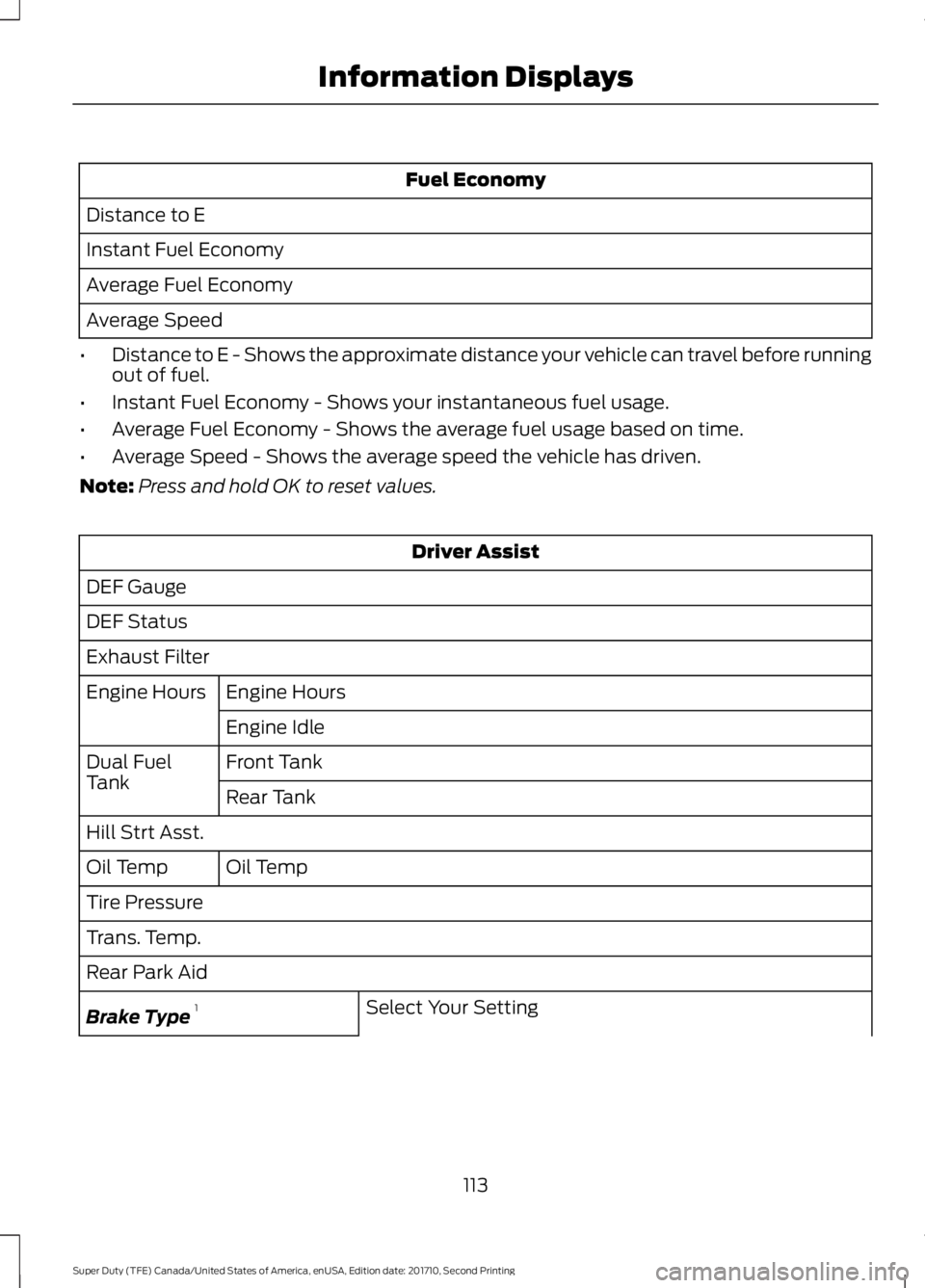
Fuel Economy
Distance to E
Instant Fuel Economy
Average Fuel Economy
Average Speed
•Distance to E - Shows the approximate distance your vehicle can travel before runningout of fuel.
•Instant Fuel Economy - Shows your instantaneous fuel usage.
•Average Fuel Economy - Shows the average fuel usage based on time.
•Average Speed - Shows the average speed the vehicle has driven.
Note:Press and hold OK to reset values.
Driver Assist
DEF Gauge
DEF Status
Exhaust Filter
Engine HoursEngine Hours
Engine Idle
Front TankDual FuelTankRear Tank
Hill Strt Asst.
Oil TempOil Temp
Tire Pressure
Trans. Temp.
Rear Park Aid
Select Your SettingBrake Type1
113
Super Duty (TFE) Canada/United States of America, enUSA, Edition date: 201710, Second Printing
Information Displays
Page 117 of 642
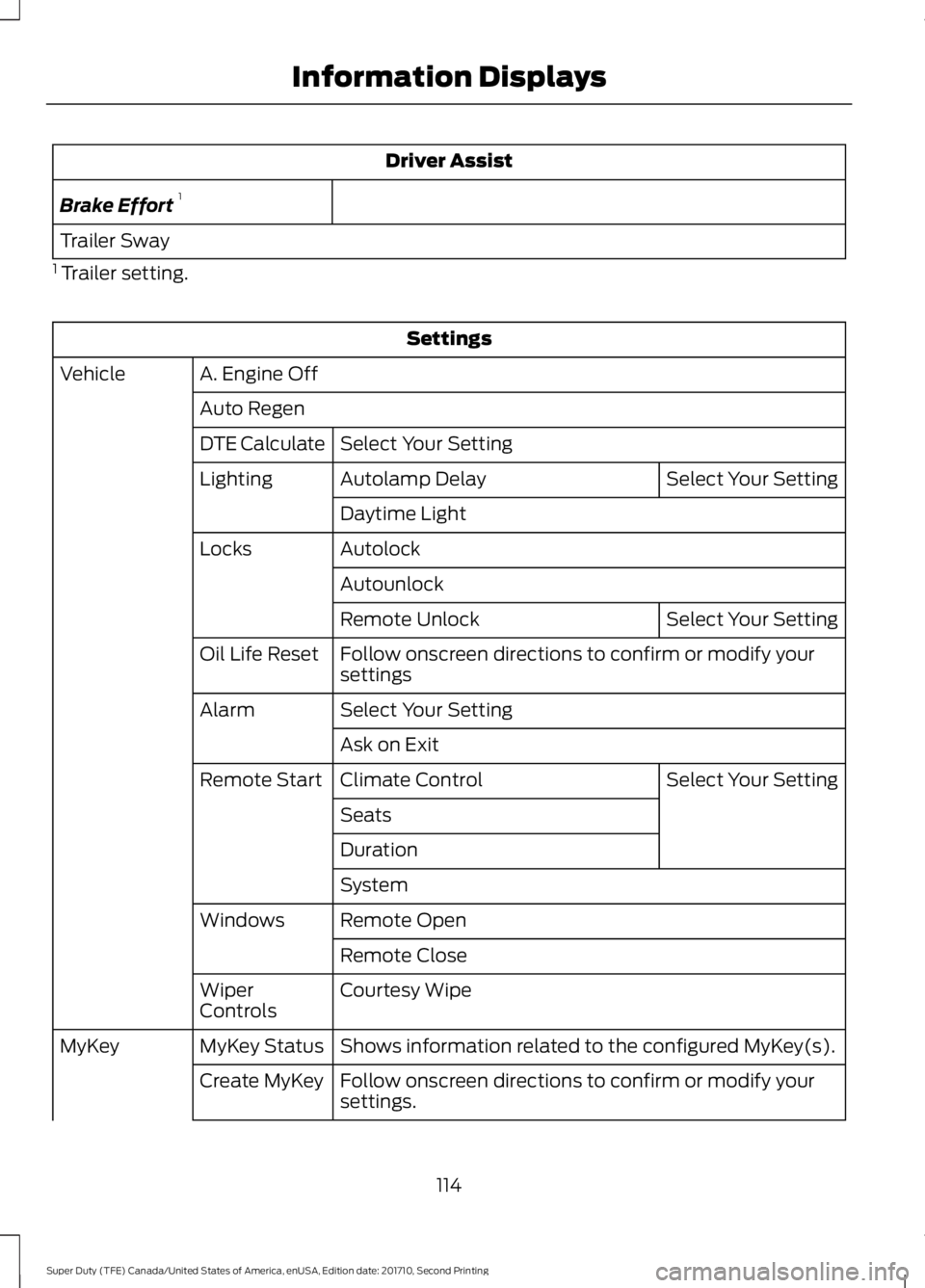
Driver Assist
Brake Effort1
Trailer Sway
1 Trailer setting.
Settings
A. Engine OffVehicle
Auto Regen
Select Your SettingDTE Calculate
Select Your SettingAutolamp DelayLighting
Daytime Light
AutolockLocks
Autounlock
Select Your SettingRemote Unlock
Follow onscreen directions to confirm or modify yoursettingsOil Life Reset
Select Your SettingAlarm
Ask on Exit
Select Your SettingClimate ControlRemote Start
Seats
Duration
System
Remote OpenWindows
Remote Close
Courtesy WipeWiperControls
Shows information related to the configured MyKey(s).MyKey StatusMyKey
Follow onscreen directions to confirm or modify yoursettings.Create MyKey
114
Super Duty (TFE) Canada/United States of America, enUSA, Edition date: 201710, Second Printing
Information Displays
Page 120 of 642
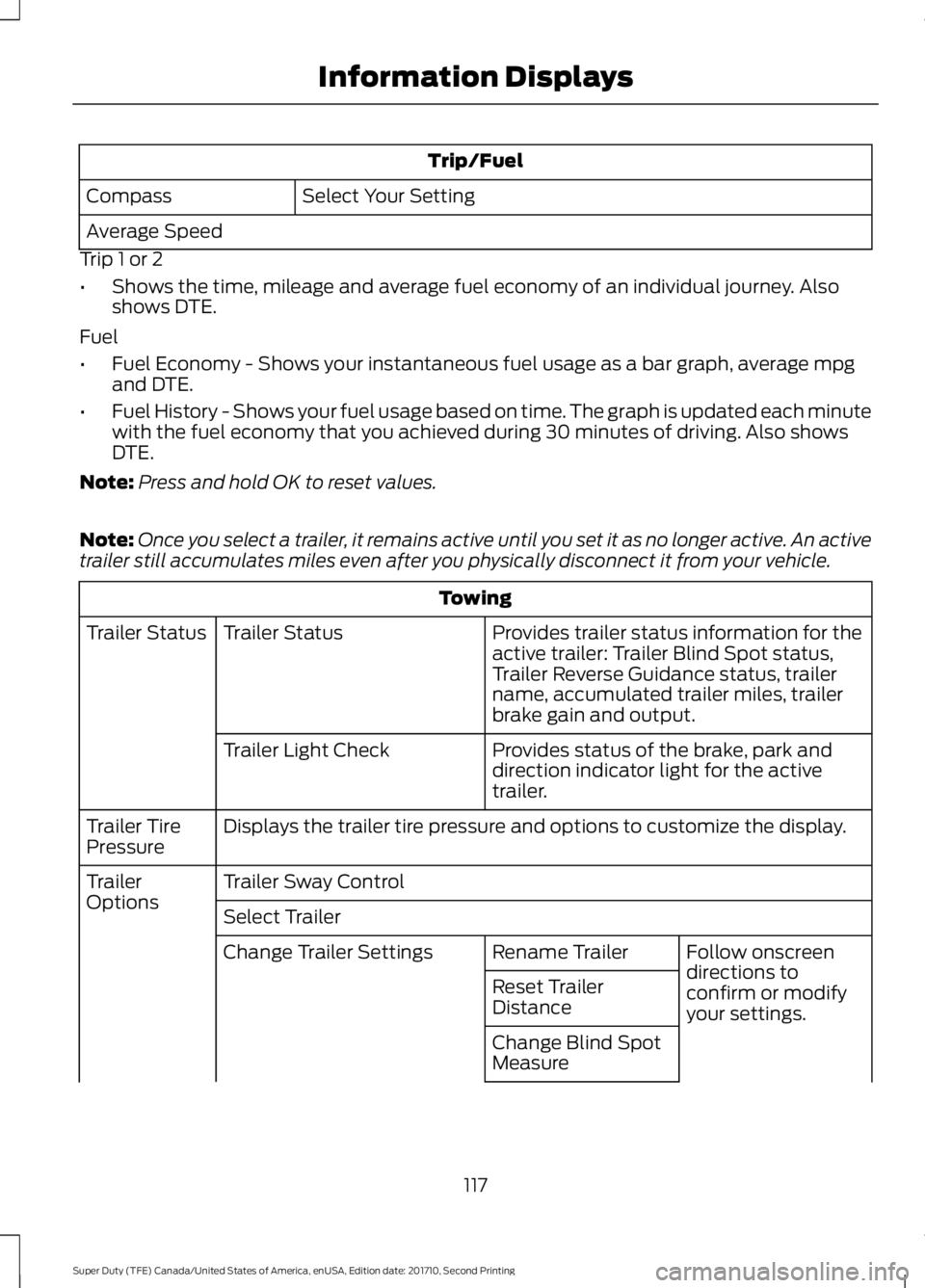
Trip/Fuel
Select Your SettingCompass
Average Speed
Trip 1 or 2
•Shows the time, mileage and average fuel economy of an individual journey. Alsoshows DTE.
Fuel
•Fuel Economy - Shows your instantaneous fuel usage as a bar graph, average mpgand DTE.
•Fuel History - Shows your fuel usage based on time. The graph is updated each minutewith the fuel economy that you achieved during 30 minutes of driving. Also showsDTE.
Note:Press and hold OK to reset values.
Note:Once you select a trailer, it remains active until you set it as no longer active. An activetrailer still accumulates miles even after you physically disconnect it from your vehicle.
Towing
Provides trailer status information for theactive trailer: Trailer Blind Spot status,Trailer Reverse Guidance status, trailername, accumulated trailer miles, trailerbrake gain and output.
Trailer StatusTrailer Status
Provides status of the brake, park anddirection indicator light for the activetrailer.
Trailer Light Check
Displays the trailer tire pressure and options to customize the display.Trailer TirePressure
Trailer Sway ControlTrailerOptionsSelect Trailer
Follow onscreendirections toconfirm or modifyyour settings.
Rename TrailerChange Trailer Settings
Reset TrailerDistance
Change Blind SpotMeasure
117
Super Duty (TFE) Canada/United States of America, enUSA, Edition date: 201710, Second Printing
Information Displays
Page 121 of 642
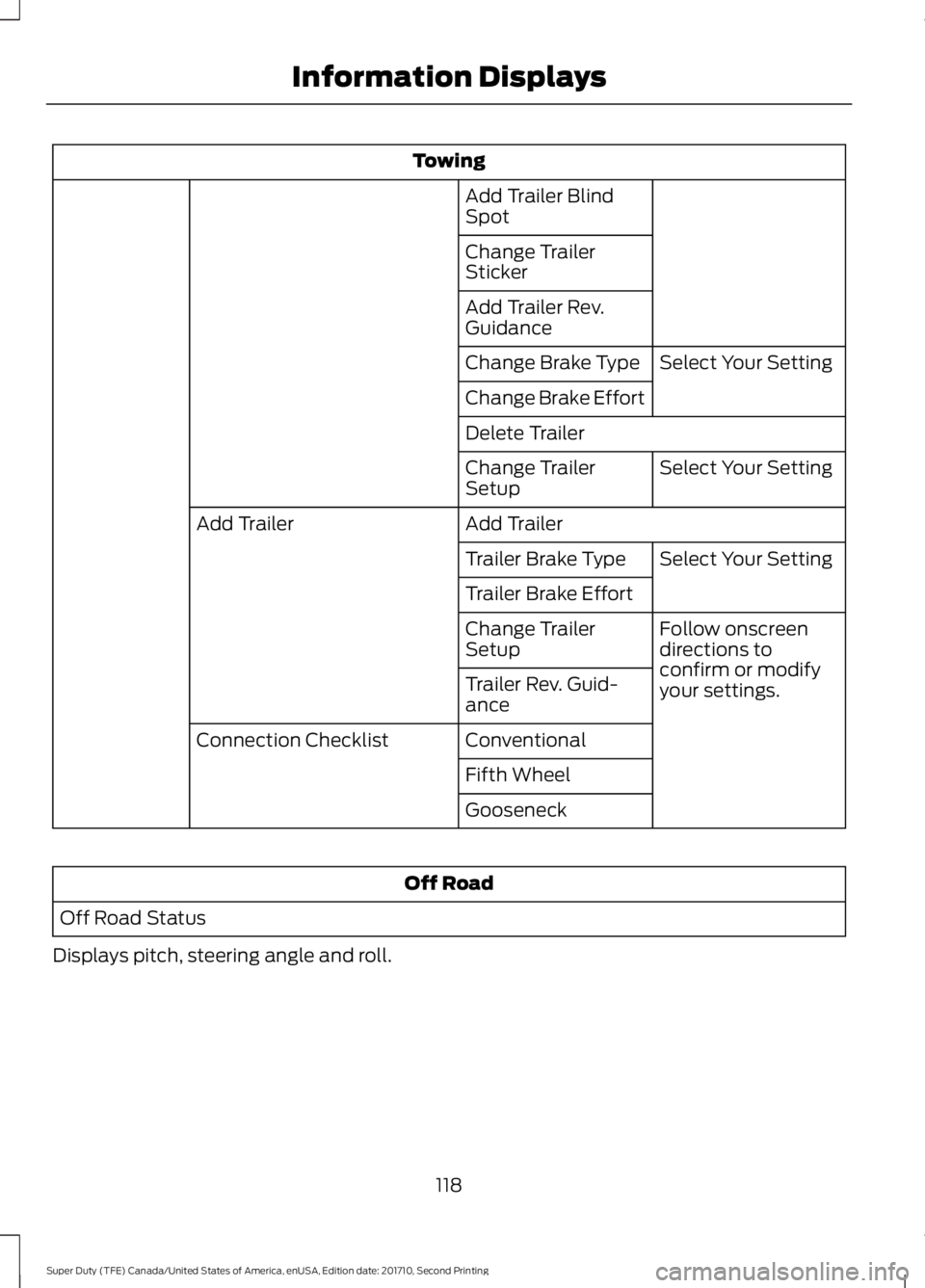
Towing
Add Trailer BlindSpot
Change TrailerSticker
Add Trailer Rev.Guidance
Select Your SettingChange Brake Type
Change Brake Effort
Delete Trailer
Select Your SettingChange TrailerSetup
Add TrailerAdd Trailer
Select Your SettingTrailer Brake Type
Trailer Brake Effort
Follow onscreendirections toconfirm or modifyyour settings.
Change TrailerSetup
Trailer Rev. Guid-ance
ConventionalConnection Checklist
Fifth Wheel
Gooseneck
Off Road
Off Road Status
Displays pitch, steering angle and roll.
118
Super Duty (TFE) Canada/United States of America, enUSA, Edition date: 201710, Second Printing
Information Displays
Page 128 of 642
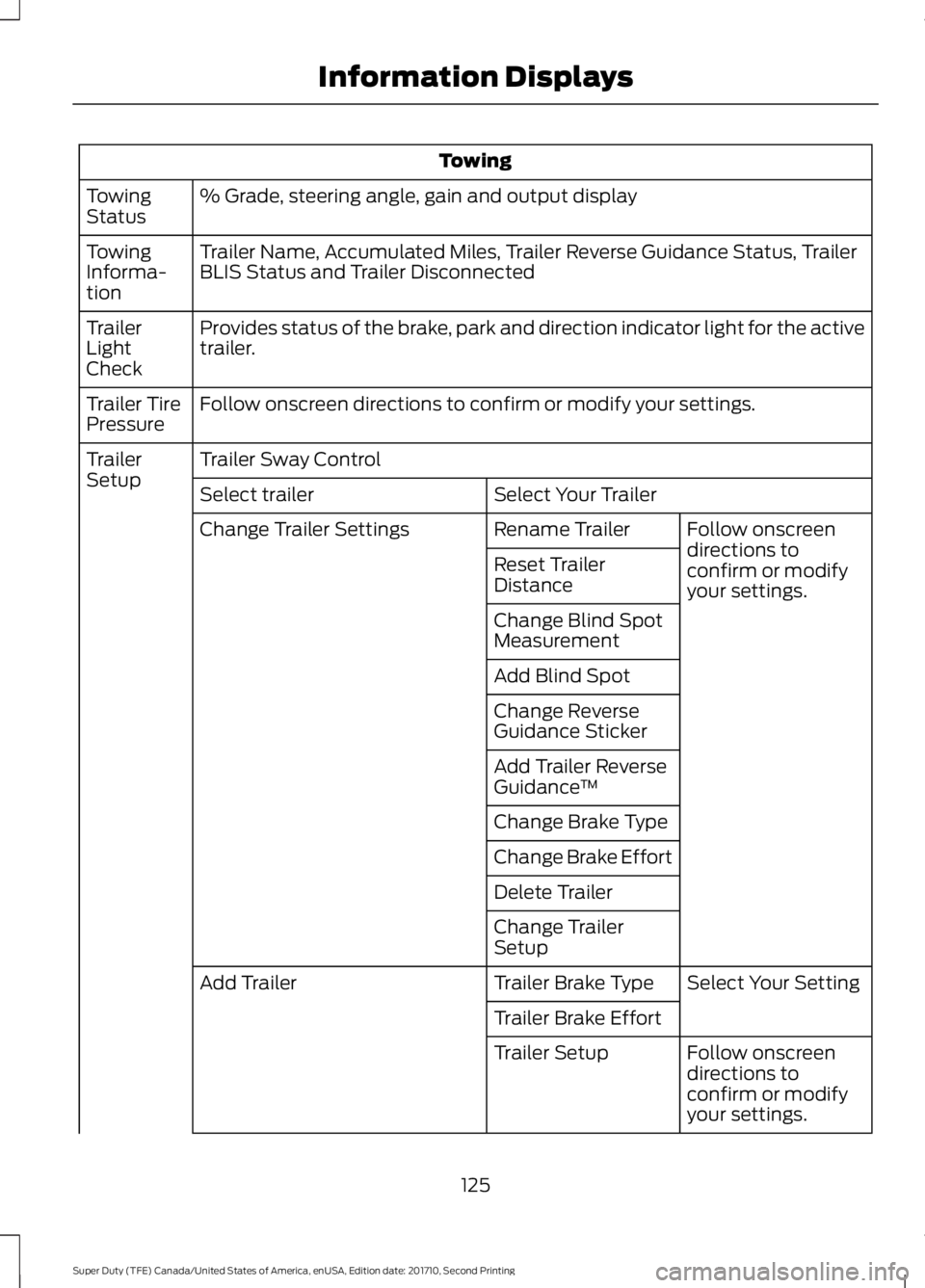
Towing
% Grade, steering angle, gain and output displayTowingStatus
Trailer Name, Accumulated Miles, Trailer Reverse Guidance Status, TrailerBLIS Status and Trailer DisconnectedTowingInforma-tion
Provides status of the brake, park and direction indicator light for the activetrailer.TrailerLightCheck
Follow onscreen directions to confirm or modify your settings.Trailer TirePressure
Trailer Sway ControlTrailerSetupSelect Your TrailerSelect trailer
Follow onscreendirections toconfirm or modifyyour settings.
Rename TrailerChange Trailer Settings
Reset TrailerDistance
Change Blind SpotMeasurement
Add Blind Spot
Change ReverseGuidance Sticker
Add Trailer ReverseGuidance™
Change Brake Type
Change Brake Effort
Delete Trailer
Change TrailerSetup
Select Your SettingTrailer Brake TypeAdd Trailer
Trailer Brake Effort
Follow onscreendirections toconfirm or modifyyour settings.
Trailer Setup
125
Super Duty (TFE) Canada/United States of America, enUSA, Edition date: 201710, Second Printing
Information Displays
Page 140 of 642
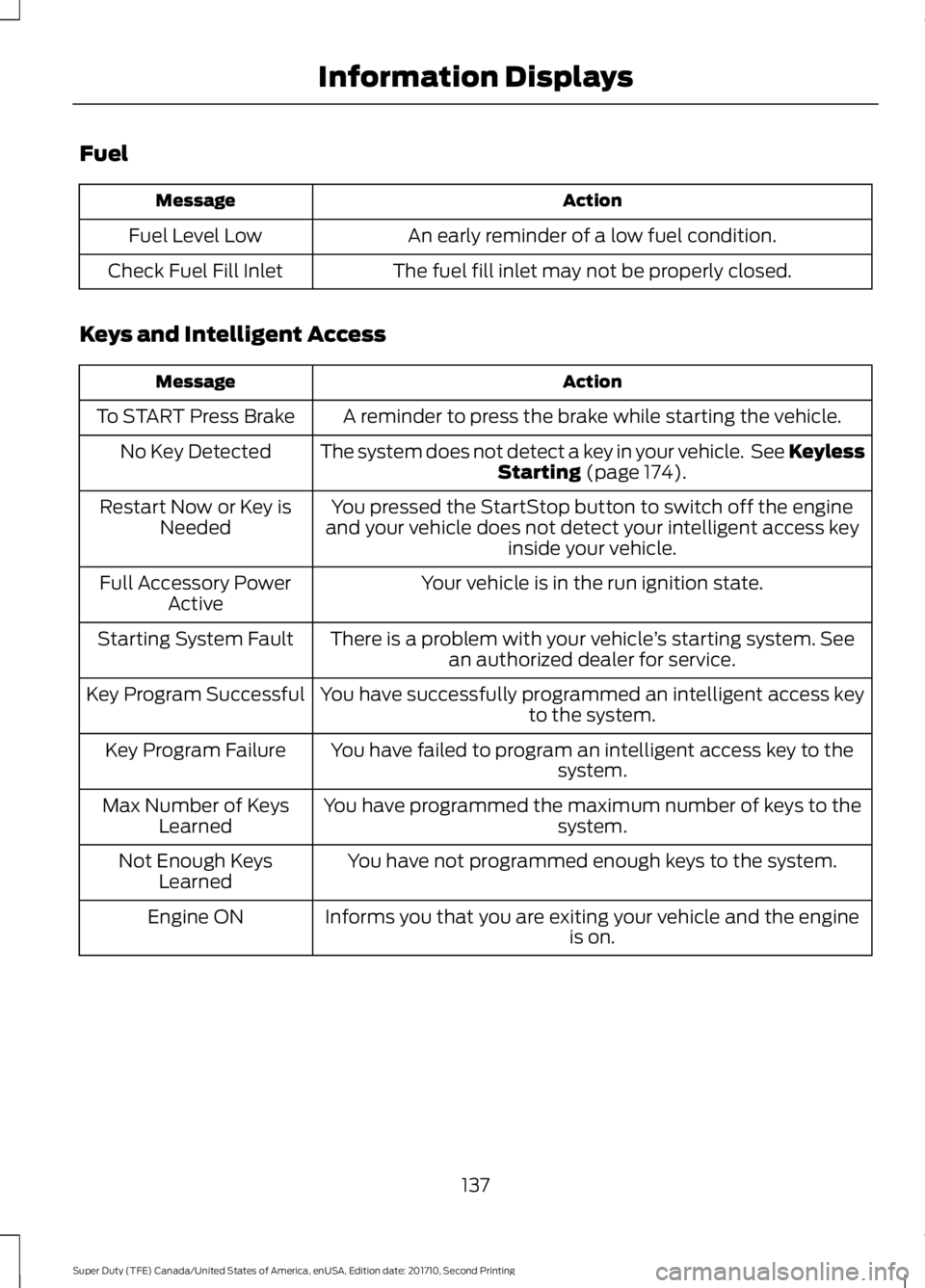
Fuel
ActionMessage
An early reminder of a low fuel condition.Fuel Level Low
The fuel fill inlet may not be properly closed.Check Fuel Fill Inlet
Keys and Intelligent Access
ActionMessage
A reminder to press the brake while starting the vehicle.To START Press Brake
The system does not detect a key in your vehicle. See KeylessStarting (page 174).No Key Detected
You pressed the StartStop button to switch off the engineand your vehicle does not detect your intelligent access keyinside your vehicle.
Restart Now or Key isNeeded
Your vehicle is in the run ignition state.Full Accessory PowerActive
There is a problem with your vehicle’s starting system. Seean authorized dealer for service.Starting System Fault
You have successfully programmed an intelligent access keyto the system.Key Program Successful
You have failed to program an intelligent access key to thesystem.Key Program Failure
You have programmed the maximum number of keys to thesystem.Max Number of KeysLearned
You have not programmed enough keys to the system.Not Enough KeysLearned
Informs you that you are exiting your vehicle and the engineis on.Engine ON
137
Super Duty (TFE) Canada/United States of America, enUSA, Edition date: 201710, Second Printing
Information Displays