change time FORD F450 SUPER DUTY 2017 User Guide
[x] Cancel search | Manufacturer: FORD, Model Year: 2017, Model line: F450 SUPER DUTY, Model: FORD F450 SUPER DUTY 2017Pages: 642, PDF Size: 12.35 MB
Page 217 of 642
If Shift Delayed Pull Forward appears inthe information display, transfer case geartooth blockage is present. To alleviate thiscondition, place the transmission in aforward gear, move the vehicle forwardapproximately 5 ft (1.5 m), and shift thetransmission back to neutral to allow thetransfer case to complete the range shift.
How Your Vehicle Differs FromOther Vehicles
WARNING
Vehicles with a higher center ofgravity (utility and four-wheel drivevehicles) handle differently thanvehicles with a lower center of gravity(passenger cars). Avoid sharp turns,excessive speed and abrupt steering inthese vehicles. Failure to drive cautiouslyincreases the risk of losing control of yourvehicle, vehicle rollover, personal injury anddeath.
Truck and utility vehicles can differ fromsome other vehicles. Your vehicle may behigher to allow it to travel over roughterrain without getting hung up ordamaging underbody components.
The differences that make your vehicle soversatile also make it handle differentlythan an ordinary passenger car.
Maintain steering wheel control at alltimes, especially in rough terrain. Sincesudden changes in terrain can result inabrupt steering wheel motion, make sureyou grip the steering wheel from theoutside. Do not grip the spokes.
Drive cautiously to avoid vehicle damagefrom concealed objects such as rocks andstumps.
You should either know the terrain orexamine maps of the area before driving.Map out your route before driving in thearea. To maintain steering and brakingcontrol of your vehicle, you must have allfour wheels on the ground and they mustbe rolling, not sliding or spinning.
Driving Off-Road With Truck andUtility Vehicles
Note:On some models, the initial shift fromtwo-wheel drive to four-wheel drive whilethe vehicle is moving can cause somemomentary clunk and ratcheting sounds.This is the front drivetrain coming up tospeed and the automatic locking hubsengaging and is not cause for concern.
Note:Your vehicle may be equipped witha front air dam that can become damaged(due to reduced ground clearance) whentaking your vehicle off-road. This air damcan be taken off by removing 15 bolts.
Four-wheel drive vehicles are speciallyequipped for driving on sand, snow, mudand rough terrain and have operatingcharacteristics that are somewhatdifferent from conventional vehicles, bothon and off the road.
Power is supplied to all four wheelsthrough a transfer case. On four-wheeldrive vehicles, the transfer case allows youto select 4WD when necessary.Information on transfer case operation andshifting procedures can be found in thischapter. Information on transfer casemaintenance can be found in theMaintenance chapter. You should becomethoroughly familiar with this informationbefore you operate your vehicle.
Four-wheel drive (when you select a 4WDmode) uses all four wheels to power thevehicle. This increases traction, enablingyou to drive over terrain and roadconditions that a conventional two-wheeldrive vehicle cannot.
214
Super Duty (TFE) Canada/United States of America, enUSA, Edition date: 201710, Second Printing
Four-Wheel Drive (If Equipped)
Page 229 of 642
PRINCIPLE OF OPERATION
WARNINGS
Vehicle modifications involvingbraking system, aftermarket roofracks, suspension, steering system,tire construction and wheel and tire sizemay change the handling characteristicsof your vehicle and may adversely affectthe performance of the electronic stabilitycontrol system. In addition, installing anystereo loudspeakers may interfere withand adversely affect the electronic stabilitycontrol system. Install any aftermarketstereo loudspeaker as far as possible fromthe front center console, the tunnel, andthe front seats in order to minimize the riskof interfering with the electronic stabilitycontrol sensors. Reducing theeffectiveness of the electronic stabilitycontrol system could lead to an increasedrisk of loss of vehicle control, vehiclerollover, personal injury and death.
Remember that even advancedtechnology cannot defy the laws ofphysics. It’s always possible to losecontrol of a vehicle due to inappropriatedriver input for the conditions. Aggressivedriving on any road condition can causeyou to lose control of your vehicleincreasing the risk of personal injury orproperty damage. Activation of theelectronic stability control system is anindication that at least some of the tireshave exceeded their ability to grip the road;this could reduce the operator’s ability tocontrol the vehicle potentially resulting ina loss of vehicle control, vehicle rollover,personal injury and death. If your electronicstability control system activates, SLOWDOWN.
The system automatically turns on eachtime you switch the ignition on.
If a fault occurs in either the stabilitycontrol or the traction control system, youmay experience the following conditions:
•The stability and traction control lightilluminates steadily.
•The stability control and tractioncontrol systems do not enhance yourvehicle's ability to maintain traction ofthe wheels.
•The Adaptive Steering system (ifequipped) automatically changes thesteering function to a fixed steeringratio. See Steering (page 256).
If a driving condition activates either thestability control or the traction controlsystem you may experience the followingconditions:
•The stability and traction control lightflashes.
•Your vehicle slows down.
•Reduced engine power.
•A vibration in the brake pedal.
•The brake pedal is stiffer than usual.
•If the driving condition is severe andyour foot is not on the brake, the brakepedal may move as the system applieshigher brake force.
The stability control system has severalfeatures built into it to help you maintaincontrol of your vehicle:
Electronic Stability Control
The system enhances your vehicle’s abilityto prevent skids or lateral slides byapplying brakes to one or more of thewheels individually and, if necessary,reducing engine power.
226
Super Duty (TFE) Canada/United States of America, enUSA, Edition date: 201710, Second Printing
Stability Control
Page 230 of 642
Roll Stability Control
The system enhances your vehicle’s abilityto prevent rollovers by detecting yourvehicle’s roll motion and the rate at whichit changes by applying the brakes to oneor more wheels individually.
Traction Control
The system enhances your vehicle’s abilityto maintain traction of the wheels bydetecting and controlling wheel spin. SeeUsing Traction Control (page 225).
Vehicle without stability controlskidding off its intended route.A
Vehicle with stability controlmaintaining control on a slipperysurface.
B
USING STABILITY CONTROL
AdvanceTrac® with Roll StabilityControl™ (RSC®)
The system automatically turns on eachtime you switch the ignition on.
The electronic stability control and rollstability control portions of the system canbe turned off.
When you shift the transmission intoreverse R, the systems disable.
Use the traction and stabilitycontrol switch on the instrumentpanel to switch the systems offor on.
You can switch the traction control portionof the system off independently.
If you cannot turn the systems off, see theMyKey chapter for more information.
227
Super Duty (TFE) Canada/United States of America, enUSA, Edition date: 201710, Second Printing
Stability ControlE72903A
AA
B
BB
B E130458
Page 243 of 642
•Press SET+ or SET- to change the setspeed in small increments.
•Press the accelerator or brake pedaluntil you reach the desired speed. PressSET+ or SET-.
•Press and hold SET+ or SET-. Releasethe control when you reach the desiredspeed.
Canceling the Set Speed
Press CNCL or tap the brake pedal. Theset speed does not erase.
Resuming the Set Speed
Press RES.
Switching Cruise Control Off
Note:You erase the set speed when youswitch the system off.
Press OFF when the system is in standbymode or switch the ignition off.
USING ADAPTIVE CRUISE
CONTROL (If Equipped)
WARNINGS
Always pay close attention tochanging road conditions when usingadaptive cruise control. The systemdoes not replace attentive driving. Failingto pay attention to the road may result ina crash, serious injury or death.
Adaptive cruise control is not a crashwarning or avoidance system.
Adaptive cruise control does notdetect stationary or slow movingvehicles below 6 mph (10 km/h).
Adaptive cruise control does notdetect pedestrians or objects in theroad.
WARNINGS
Adaptive cruise control does notdetect oncoming vehicles in thesame lane.
Do not use adaptive cruise controlon winding roads, in heavy traffic orwhen the road surface is slippery.This could result in loss of vehicle control,serious injury or death.
Do not use adaptive cruise controlwith a snow plow blade installed.
Do not use adaptive cruise controlwhen towing a trailer that has trailerbrakes. The auto-brake componentof the adaptive cruise control system doesnot operate the trailer brakes. Usingadaptive cruise control when towing atrailer that has trailer brakes may result inthe loss of vehicle control, which couldresult in serious injury.
Do not use tire sizes other than thoserecommended because this canaffect the normal operation of thesystem. Failure to do so may result in a lossof vehicle control, which could result inserious injury.
Note:It is your responsibility to stay alert,drive safely and control the vehicle at alltimes.
The system adjusts your speed to maintaina proper distance between you and thevehicle in front of you in the same lane. Youcan select from one of four gap settings.
240
Super Duty (TFE) Canada/United States of America, enUSA, Edition date: 201710, Second Printing
Cruise Control (If Equipped)
Page 246 of 642
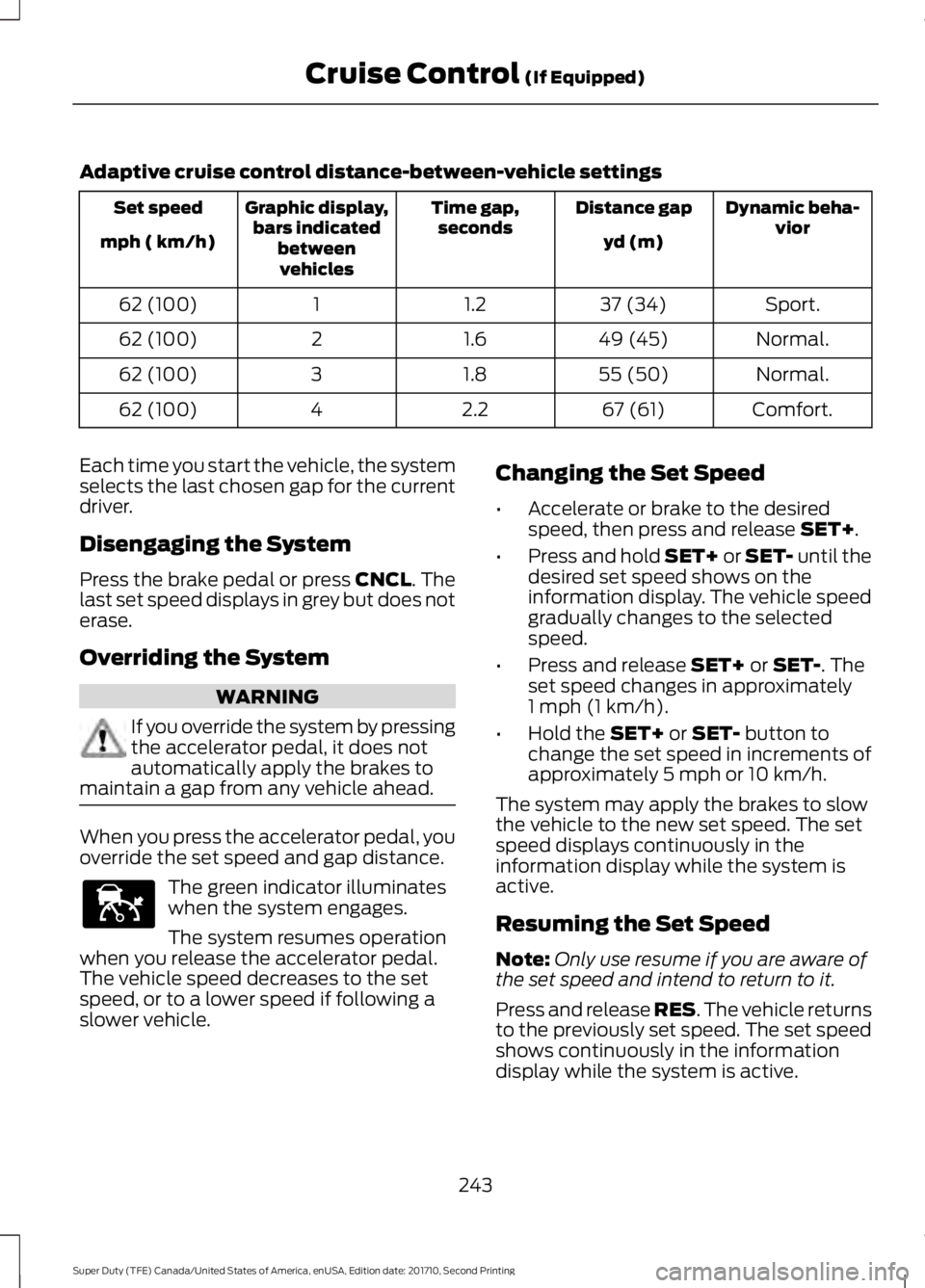
Adaptive cruise control distance-between-vehicle settings
Dynamic beha-viorDistance gapTime gap,secondsGraphic display,bars indicatedbetweenvehicles
Set speed
yd (m)mph ( km/h)
Sport.37 (34)1.2162 (100)
Normal.49 (45)1.6262 (100)
Normal.55 (50)1.8362 (100)
Comfort.67 (61)2.2462 (100)
Each time you start the vehicle, the systemselects the last chosen gap for the currentdriver.
Disengaging the System
Press the brake pedal or press CNCL. Thelast set speed displays in grey but does noterase.
Overriding the System
WARNING
If you override the system by pressingthe accelerator pedal, it does notautomatically apply the brakes tomaintain a gap from any vehicle ahead.
When you press the accelerator pedal, youoverride the set speed and gap distance.
The green indicator illuminateswhen the system engages.
The system resumes operationwhen you release the accelerator pedal.The vehicle speed decreases to the setspeed, or to a lower speed if following aslower vehicle.
Changing the Set Speed
•Accelerate or brake to the desiredspeed, then press and release SET+.
•Press and hold SET+ or SET- until thedesired set speed shows on theinformation display. The vehicle speedgradually changes to the selectedspeed.
•Press and release SET+ or SET-. Theset speed changes in approximately1 mph (1 km/h).
•Hold the SET+ or SET- button tochange the set speed in increments ofapproximately 5 mph or 10 km/h.
The system may apply the brakes to slowthe vehicle to the new set speed. The setspeed displays continuously in theinformation display while the system isactive.
Resuming the Set Speed
Note:Only use resume if you are aware ofthe set speed and intend to return to it.
Press and release RES. The vehicle returnsto the previously set speed. The set speedshows continuously in the informationdisplay while the system is active.
243
Super Duty (TFE) Canada/United States of America, enUSA, Edition date: 201710, Second Printing
Cruise Control (If Equipped)E144529
Page 249 of 642
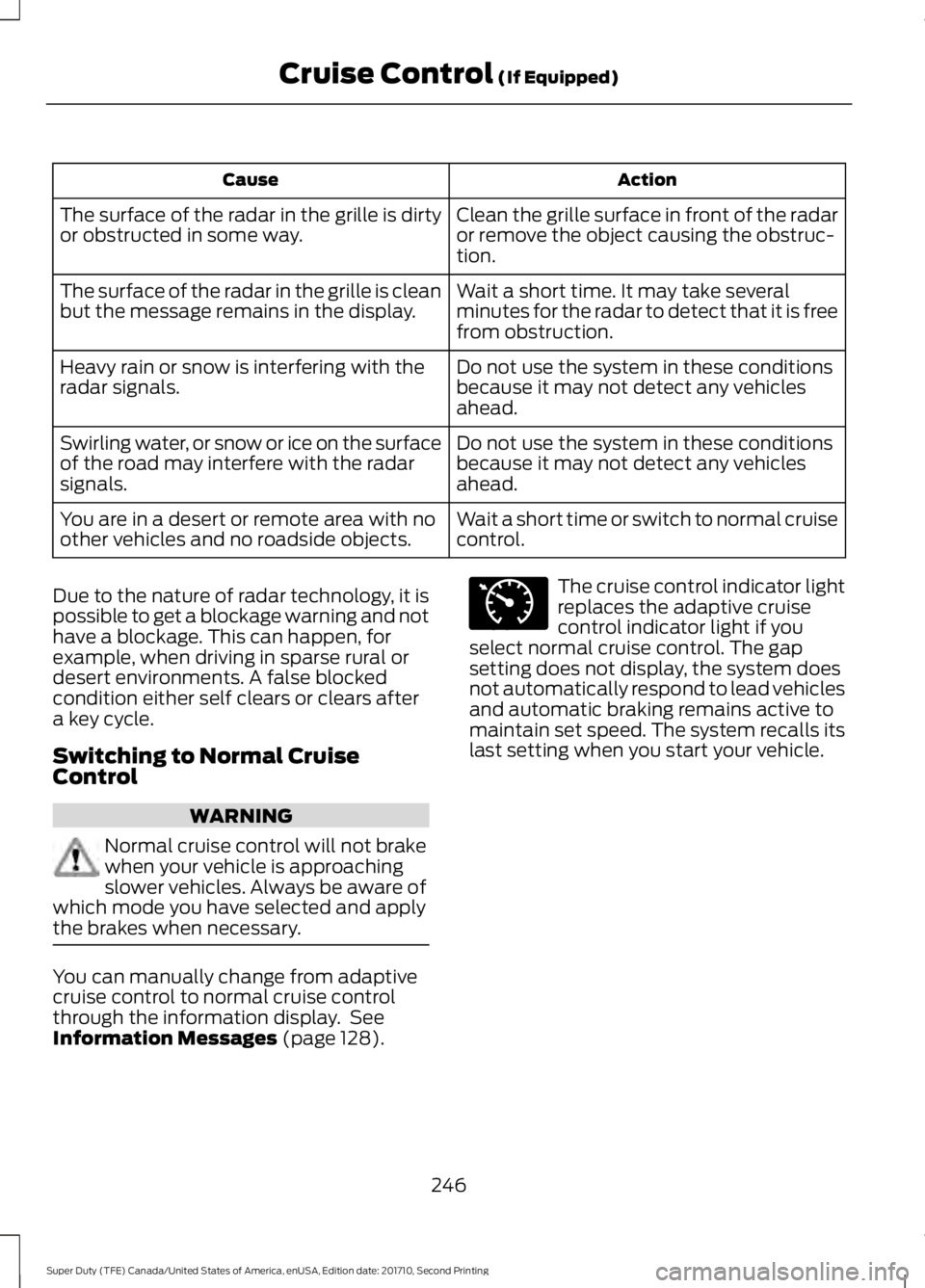
ActionCause
Clean the grille surface in front of the radaror remove the object causing the obstruc-tion.
The surface of the radar in the grille is dirtyor obstructed in some way.
Wait a short time. It may take severalminutes for the radar to detect that it is freefrom obstruction.
The surface of the radar in the grille is cleanbut the message remains in the display.
Do not use the system in these conditionsbecause it may not detect any vehiclesahead.
Heavy rain or snow is interfering with theradar signals.
Do not use the system in these conditionsbecause it may not detect any vehiclesahead.
Swirling water, or snow or ice on the surfaceof the road may interfere with the radarsignals.
Wait a short time or switch to normal cruisecontrol.You are in a desert or remote area with noother vehicles and no roadside objects.
Due to the nature of radar technology, it ispossible to get a blockage warning and nothave a blockage. This can happen, forexample, when driving in sparse rural ordesert environments. A false blockedcondition either self clears or clears aftera key cycle.
Switching to Normal CruiseControl
WARNING
Normal cruise control will not brakewhen your vehicle is approachingslower vehicles. Always be aware ofwhich mode you have selected and applythe brakes when necessary.
You can manually change from adaptivecruise control to normal cruise controlthrough the information display. SeeInformation Messages (page 128).
The cruise control indicator lightreplaces the adaptive cruisecontrol indicator light if youselect normal cruise control. The gapsetting does not display, the system doesnot automatically respond to lead vehiclesand automatic braking remains active tomaintain set speed. The system recalls itslast setting when you start your vehicle.
246
Super Duty (TFE) Canada/United States of America, enUSA, Edition date: 201710, Second Printing
Cruise Control (If Equipped)E71340
Page 250 of 642
LANE KEEPING SYSTEM (If
Equipped)
WARNING
The system is designed to aid thedriver. It is not intended to replaceyour attention and judgment. You arestill responsible to drive with due care andattention.
Note:The system works as long as thecamera can detect one lane marking at aspeed above 40 mph (64 km/h).
Note:The system may not function if thecamera is blocked or there is damage to thewindshield.
The Lane Keeping System automaticallydetects and tracks the road lane markingsusing a camera mounted behind theinterior review view mirror. The systemnotifies you to stay in your lane when thefront camera detects an unintentional lanechange is likely to occur.
Switching the System On and Off
Note:The system on or off setting is storeduntil it is manually changed, unless a MyKeyis detected. If the system detects a MyKey,it defaults to on and the mode is set to alert.
Note:If a MyKey is detected, pressing thebutton will not affect the on or off status ofthe system. You can only change the modeand intensity settings.
Press the button located on thecenter console to switch thesystem on or off.
System Settings
The system sensitivity and intensity canbe adjusted through the display screen.See General Information (page 111). Thesystem remembers the last selection. Youdo not need to readjust the setting eachtime you turn on your vehicle.
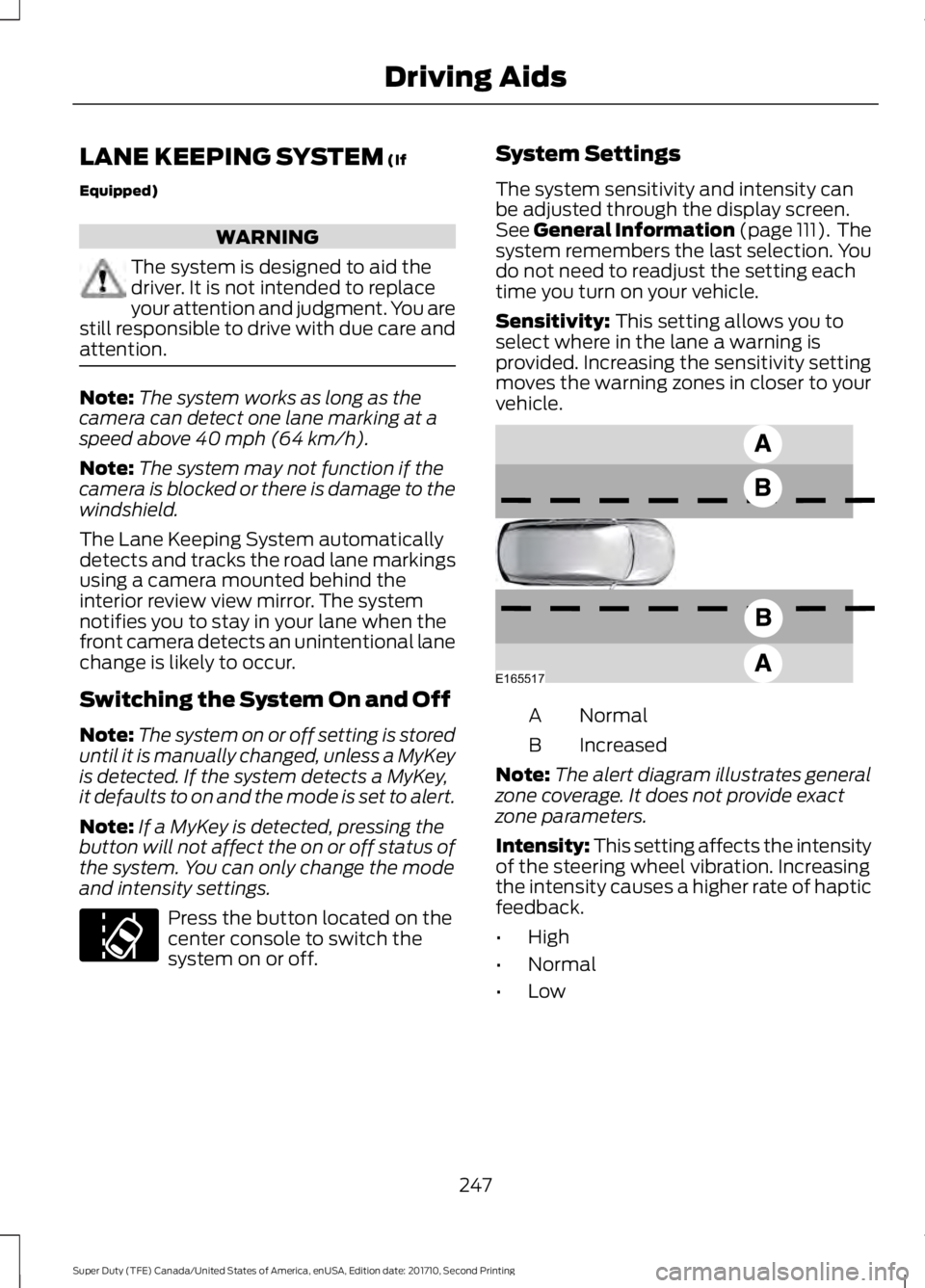
Sensitivity: This setting allows you toselect where in the lane a warning isprovided. Increasing the sensitivity settingmoves the warning zones in closer to yourvehicle.
NormalA
IncreasedB
Note:The alert diagram illustrates generalzone coverage. It does not provide exactzone parameters.
Intensity: This setting affects the intensityof the steering wheel vibration. Increasingthe intensity causes a higher rate of hapticfeedback.
•High
•Normal
•Low
247
Super Duty (TFE) Canada/United States of America, enUSA, Edition date: 201710, Second Printing
Driving AidsE173233 E165517
Page 251 of 642
System Display
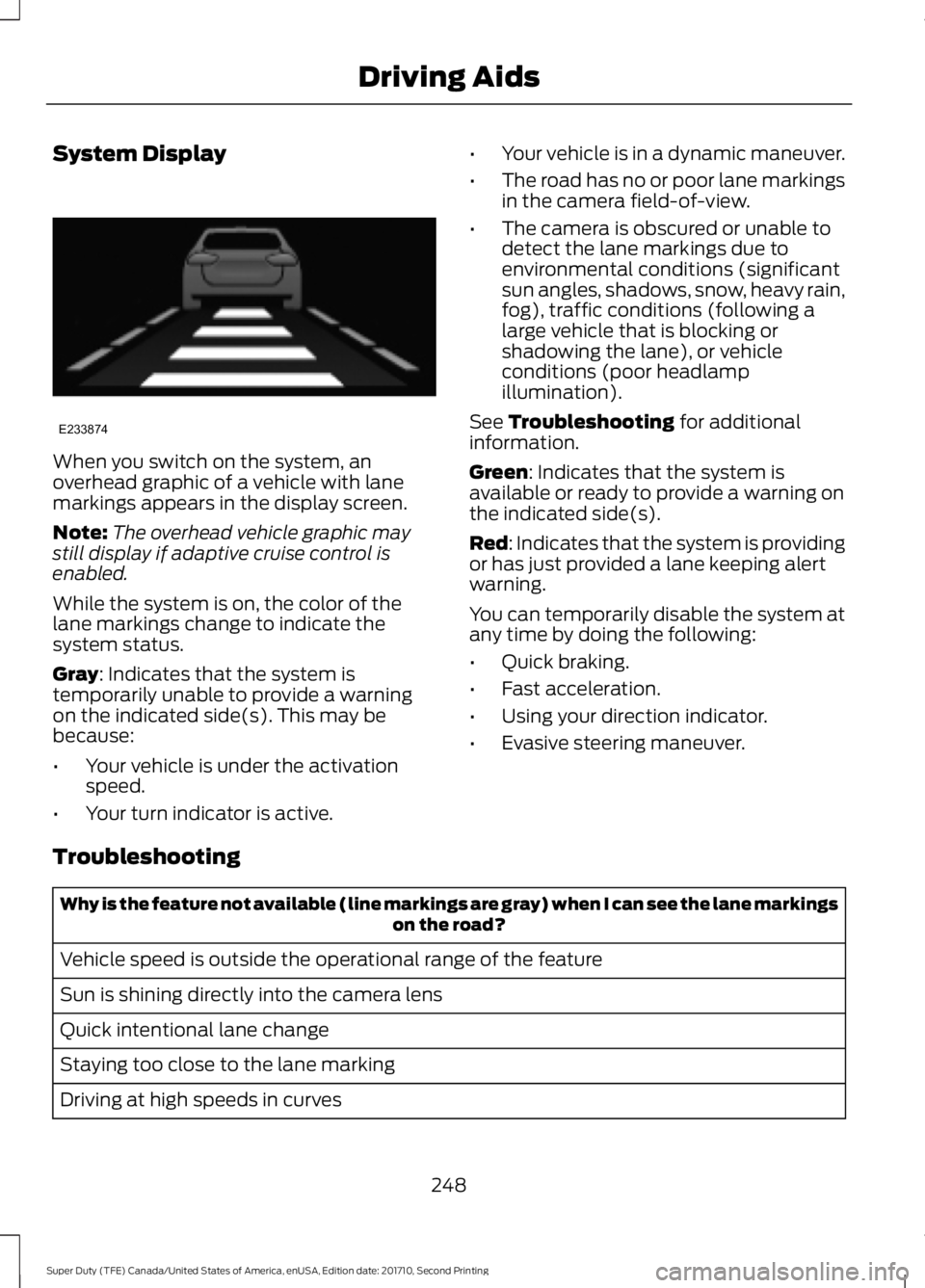
When you switch on the system, anoverhead graphic of a vehicle with lanemarkings appears in the display screen.
Note:The overhead vehicle graphic maystill display if adaptive cruise control isenabled.
While the system is on, the color of thelane markings change to indicate thesystem status.
Gray: Indicates that the system istemporarily unable to provide a warningon the indicated side(s). This may bebecause:
•Your vehicle is under the activationspeed.
•Your turn indicator is active.
•Your vehicle is in a dynamic maneuver.
•The road has no or poor lane markingsin the camera field-of-view.
•The camera is obscured or unable todetect the lane markings due toenvironmental conditions (significantsun angles, shadows, snow, heavy rain,fog), traffic conditions (following alarge vehicle that is blocking orshadowing the lane), or vehicleconditions (poor headlampillumination).
See Troubleshooting for additionalinformation.
Green: Indicates that the system isavailable or ready to provide a warning onthe indicated side(s).
Red: Indicates that the system is providingor has just provided a lane keeping alertwarning.
You can temporarily disable the system atany time by doing the following:
•Quick braking.
•Fast acceleration.
•Using your direction indicator.
•Evasive steering maneuver.
Troubleshooting
Why is the feature not available (line markings are gray) when I can see the lane markingson the road?
Vehicle speed is outside the operational range of the feature
Sun is shining directly into the camera lens
Quick intentional lane change
Staying too close to the lane marking
Driving at high speeds in curves
248
Super Duty (TFE) Canada/United States of America, enUSA, Edition date: 201710, Second Printing
Driving AidsE233874
Page 260 of 642
If the power steering system breaks down(or if the engine is turned off), you cansteer the vehicle manually, but it takesmore effort.
If the steering wanders or pulls, check for:
•an improperly inflated tire
•uneven tire wear
•loose or worn suspension components
•loose or worn steering components
•improper vehicle alignment
If any steering components are serviced orreplaced, install new fasteners (many arecoated with thread adhesive or haveprevailing torque features which may notbe re-used). Never re-use a bolt or nut.Torque fasteners to specifications.
A high crown in the road or high crosswindsmay also make the steering seem towander or pull.
Adaptive Steering (If Equipped)
WARNING
The adaptive steering system hasdiagnostic checks that continuouslymonitor the system. If a fault isdetected a message displays in theinformation display. Stop your vehicle assoon as it is safe to do so. This warningmessage may clear if the fault is no longerpresent. If an adaptive steering systemwarning message appears each time youstart your vehicle, have the systemchecked as soon as possible.
The adaptive steering system continuallychanges the steering ratio with changes tovehicle speed, optimizing the steeringresponse in all conditions. The system alsochanges when you switch on thetransmission tow/haul feature. When youselect the tow/haul button, the adaptivesteering system reduces vehicle sensitivityto steering inputs at higher vehicle speeds,while maintaining the ease of parking andmaneuverability at low speeds.
Note:The adaptive steering system isdesigned with a locking device. With thelock engaged, the adaptive steering systemremains mechanically locked at a fixedsteering ratio. You may also notice a clickwhen you switch the vehicle on or after youswitch it off, as the lock disengages orengages.
Note:If your vehicle loses electrical poweror detects a fault when you are driving, thesystem automatically shuts down and youretain normal steering function with a fixedsteering ratio. During this time it is possiblethat the steering wheel may not be straightwhen the vehicle is driving straight ahead.In addition, the driver may notice that thesteering wheel angle required to steer thevehicle may be different.
Note:During parking maneuvers, theadaptive steering system balances the driverwork load for various steering wheel inputsand vehicle loading conditions. Underextreme operating conditions the systemlocking device may engage. This strategyprevents overheating and permanentdamage to the adaptive steering system.Typical steering and driving maneuversallow the system to cool and return tonormal operation.
257
Super Duty (TFE) Canada/United States of America, enUSA, Edition date: 201710, Second Printing
Driving Aids
Page 275 of 642
Step 5: Enter Measurements Using theInformation Display
Using the recorded measurements, enterthe required data into the system. Followthe on screen prompts to enter each of themeasurements taken in step 4. Use theup/down arrows to increase or decreasethe numbers as needed. Press OK toconfirm each measurement. The screenprompts you to add the nextmeasurement. Once you add your lastmeasurement, the information displayshows you all of your enteredmeasurements. You can choose to confirmor change the measurements.
Step 6: Confirming the Sticker Location
Check the Rear View Camera display tosee if the sticker is identified by the systemand marked with a red circle.
Confirm that the red circle is correctlylocated over the sticker image in thedisplay. The on screen prompt will ask youto confirm this.
Note:If the system cannot locate thesticker try cleaning the camera lens, andalso make sure the sticker is within the zoneas indicated in step 3.
The information display shows aconfirmation message when yousuccessfully confirm the target.
Calibrating the System
To complete setup, drive your vehiclestraight forward between 4 mph (6 km/h)and 24 mph (39 km/h) as directed by theinformation display.
Note:Keep the steering wheel straightduring the calibration process. If the steeringwheel is in a turned position, then thecalibration pauses. The information displayprompts you to drive straight forward tocomplete the calibration.
The information display shows a messageduring calibration and after calibration iscomplete
Note:For best results, we do notrecommend that you calibrate the systemat night.
Using Trailer Reverse Guidance
1. Shift into reverse (R) if you are notalready in reverse. Press the rearcamera button to expand the menu.
2. Press the trailer icon .
3. Select your trailer on your informationdisplay.
4. While in TRG mode, you can see thecamera view on the side where yourtrailer is moving, or both sides whenthe trailer is straight behind you. Whenthe views change with the trailerdirection, it's called Auto Mode. Forexample, If you turn the trailer to theright, then you see the right side of yourvehicle and trailer. You can switch thisview manually at any time by using thearrow keys. To return to Auto Mode,press the Auto button.
Note:Auto Mode is your default setting.
Use the view that helps you the most whilebacking up your vehicle and trailer.
Normal rear view camera view.Use this feature when you wantto see your trailer hitch or whatis directly behind your vehicle.
Straight back-up mode. Use thisfeature when you want to keepyour trailer completely in linewith your truck. In this mode, a steeringwheel graphic shows you which way to turnyour steering wheel to keep your trailerstraight.
272
Super Duty (TFE) Canada/United States of America, enUSA, Edition date: 201710, Second Printing
TowingE224483 E224484