engine FORD F450 SUPER DUTY 2017 User Guide
[x] Cancel search | Manufacturer: FORD, Model Year: 2017, Model line: F450 SUPER DUTY, Model: FORD F450 SUPER DUTY 2017Pages: 642, PDF Size: 12.35 MB
Page 62 of 642
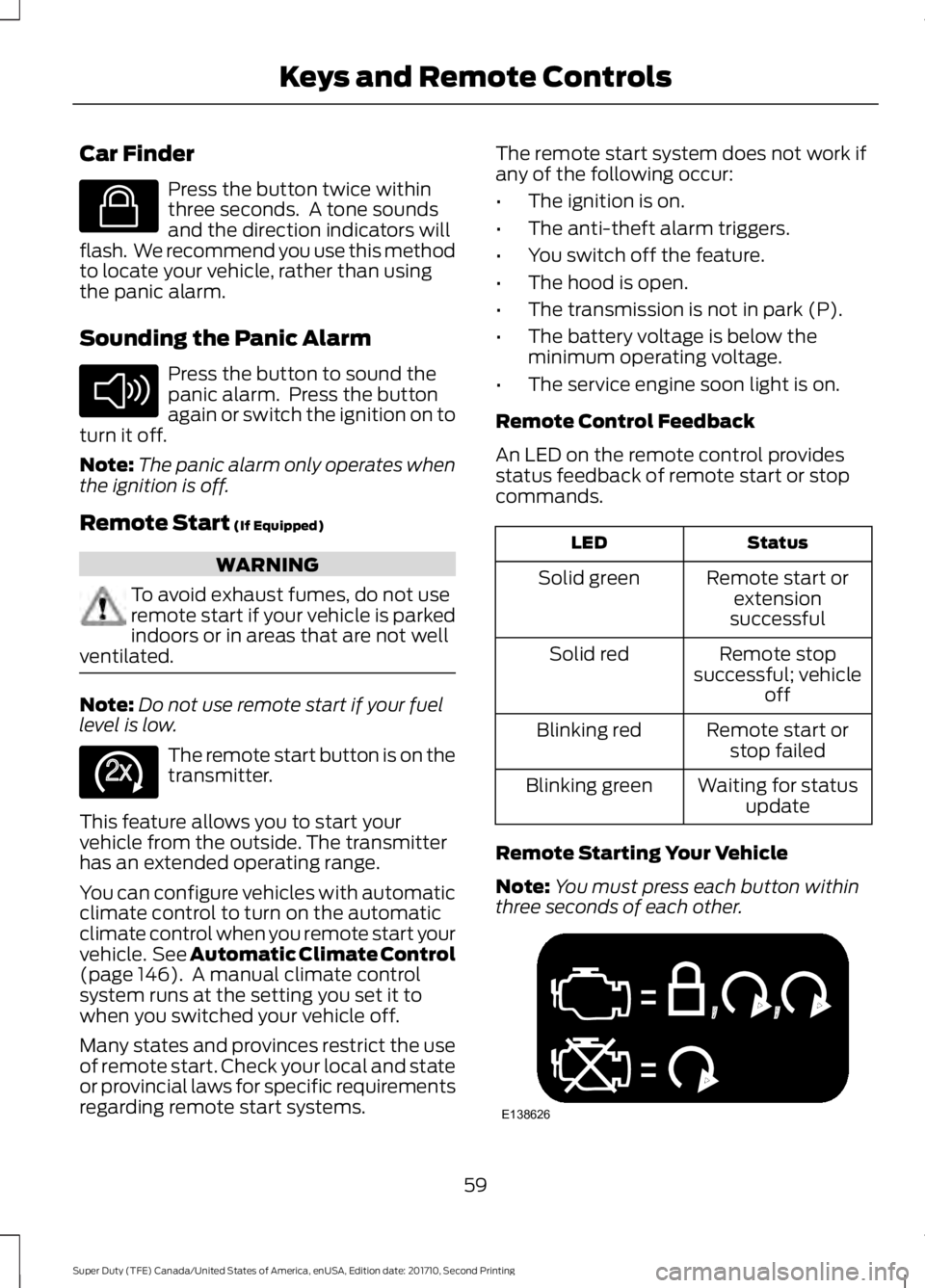
Car Finder
Press the button twice withinthree seconds. A tone soundsand the direction indicators willflash. We recommend you use this methodto locate your vehicle, rather than usingthe panic alarm.
Sounding the Panic Alarm
Press the button to sound thepanic alarm. Press the buttonagain or switch the ignition on toturn it off.
Note:The panic alarm only operates whenthe ignition is off.
Remote Start (If Equipped)
WARNING
To avoid exhaust fumes, do not useremote start if your vehicle is parkedindoors or in areas that are not wellventilated.
Note:Do not use remote start if your fuellevel is low.
The remote start button is on thetransmitter.
This feature allows you to start yourvehicle from the outside. The transmitterhas an extended operating range.
You can configure vehicles with automaticclimate control to turn on the automaticclimate control when you remote start yourvehicle. See Automatic Climate Control(page 146). A manual climate controlsystem runs at the setting you set it towhen you switched your vehicle off.
Many states and provinces restrict the useof remote start. Check your local and stateor provincial laws for specific requirementsregarding remote start systems.
The remote start system does not work ifany of the following occur:
•The ignition is on.
•The anti-theft alarm triggers.
•You switch off the feature.
•The hood is open.
•The transmission is not in park (P).
•The battery voltage is below theminimum operating voltage.
•The service engine soon light is on.
Remote Control Feedback
An LED on the remote control providesstatus feedback of remote start or stopcommands.
StatusLED
Remote start orextensionsuccessful
Solid green
Remote stopsuccessful; vehicleoff
Solid red
Remote start orstop failedBlinking red
Waiting for statusupdateBlinking green
Remote Starting Your Vehicle
Note:You must press each button withinthree seconds of each other.
59
Super Duty (TFE) Canada/United States of America, enUSA, Edition date: 201710, Second Printing
Keys and Remote ControlsE138623 E138624 E138625 E138626
Page 63 of 642
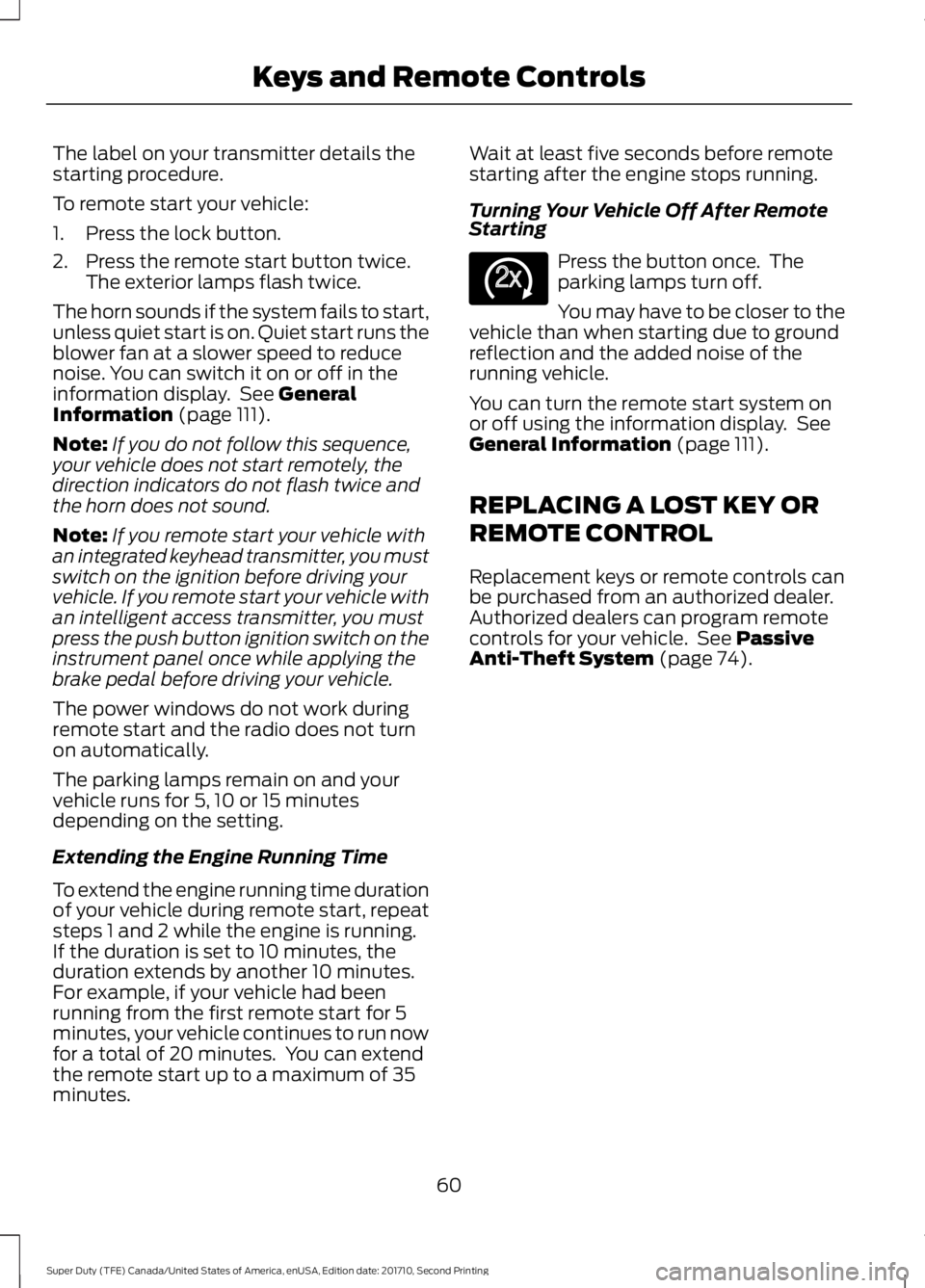
The label on your transmitter details thestarting procedure.
To remote start your vehicle:
1. Press the lock button.
2. Press the remote start button twice.The exterior lamps flash twice.
The horn sounds if the system fails to start,unless quiet start is on. Quiet start runs theblower fan at a slower speed to reducenoise. You can switch it on or off in theinformation display. See GeneralInformation (page 111).
Note:If you do not follow this sequence,your vehicle does not start remotely, thedirection indicators do not flash twice andthe horn does not sound.
Note:If you remote start your vehicle withan integrated keyhead transmitter, you mustswitch on the ignition before driving yourvehicle. If you remote start your vehicle withan intelligent access transmitter, you mustpress the push button ignition switch on theinstrument panel once while applying thebrake pedal before driving your vehicle.
The power windows do not work duringremote start and the radio does not turnon automatically.
The parking lamps remain on and yourvehicle runs for 5, 10 or 15 minutesdepending on the setting.
Extending the Engine Running Time
To extend the engine running time durationof your vehicle during remote start, repeatsteps 1 and 2 while the engine is running.If the duration is set to 10 minutes, theduration extends by another 10 minutes.For example, if your vehicle had beenrunning from the first remote start for 5minutes, your vehicle continues to run nowfor a total of 20 minutes. You can extendthe remote start up to a maximum of 35minutes.
Wait at least five seconds before remotestarting after the engine stops running.
Turning Your Vehicle Off After RemoteStarting
Press the button once. Theparking lamps turn off.
You may have to be closer to thevehicle than when starting due to groundreflection and the added noise of therunning vehicle.
You can turn the remote start system onor off using the information display. SeeGeneral Information (page 111).
REPLACING A LOST KEY OR
REMOTE CONTROL
Replacement keys or remote controls canbe purchased from an authorized dealer.Authorized dealers can program remotecontrols for your vehicle. See PassiveAnti-Theft System (page 74).
60
Super Duty (TFE) Canada/United States of America, enUSA, Edition date: 201710, Second Printing
Keys and Remote ControlsE138625
Page 66 of 642
Note: You can clear or change your MyKeysettings at any time during the same keycycle as you created the MyKey. If youswitch the engine off, you must use anadmin key to change or clear your optionalMyKey settings.
CLEARING ALL MYKEYS
When you clear your MyKeys, you removeall restrictions and return all MyKeys totheir original admin key status at once. Toclear all MyKeys of all MyKey settings, usethe information display.
1. Switch the ignition on using an adminkey.
2. Access the main menu in theinformation display and then scrollthrough the menus to begin clearingyour MyKey programming. SeeInformation Displays (page 111).
3. Follow the instructions in the display.
4.A confirmation message appears in thedisplay after you finish clearing yourMyKeys.
Note:When you clear your MyKeys, youremove all restrictions and return all MyKeysto their original admin key status. Youcannot remove the MyKey restrictionsindividually.
CHECKING MYKEY SYSTEM
STATUS
You can find information about yourprogrammed MyKeys by using theinformation display. See InformationDisplays (page 111).
MyKey Distance
Tracks the distance when drivers use aMyKey. The only way to delete theaccumulated distance is by using an adminkey to clear all MyKeys. If the distance doesnot accumulate as expected, then theintended user is not using the MyKey, or anadmin key user recently cleared and thenrecreated a MyKey.
Number of MyKeys
Indicates the number of MyKeysprogrammed to your vehicle. Use thisfeature to detect how many MyKeys youhave for your vehicle and determine whenall MyKeys have been deleted.
Number of Admin Keys
Indicates how many admin keys areprogrammed to your vehicle. Use thisfeature to determine how many adminkeys you have for your vehicle, and detectif an additional MyKey has beenprogrammed.
USING MYKEY WITH REMOTE
START SYSTEMS
MyKey is not compatible with nonFord-approved, aftermarket remote startsystems. If you choose to install a remotestart system, see an authorized dealer fora Ford-approved remote start system.
63
Super Duty (TFE) Canada/United States of America, enUSA, Edition date: 201710, Second Printing
MyKey™
Page 67 of 642
MYKEY TROUBLESHOOTING
Potential causesCondition
· The key or transmitter used to start thevehicle does not have admin privileges.I cannot create a MyKey.
· Vehicles with keyless start: Make sure youplace the transmitter into the backup posi-tion. See Starting a Gasoline Engine(page 174).· The key or transmitter used to start thevehicle is the only admin key. There alwayshas to be at least one admin key.· SecuriLock passive anti-theft system isdisabled or in unlimited mode.
· The key or transmitter used to start thevehicle does not have admin privileges.I cannot program the configurable settings.
· There are no MyKeys programmed to thevehicle. See Creating a MyKey (page 62).
· An admin transmitter is present when youstarted your vehicle.For vehicles with keyless start: No MyKeyrestrictions are available when starting thevehicle.· There are no MyKeys programmed to thevehicle. See Creating a MyKey (page 62).
· The key or transmitter used to start thevehicle does not have admin privileges.I cannot clear the MyKeys.
· No MyKeys are created. See Creating aMyKey (page 62).
· Purchase a new key or transmitter fromyour authorized dealer.I lost the only admin key.
· Program a spare key or transmitter. Youmay need to see your authorized dealer.See Passive Anti-Theft System (page74).
I lost a key.
· The MyKey user is not using the MyKey.MyKey distances do not accumulate.· An admin key holder cleared the MyKeysand created new MyKeys.· The key system has been reset.
64
Super Duty (TFE) Canada/United States of America, enUSA, Edition date: 201710, Second Printing
MyKey™
Page 77 of 642
PASSIVE ANTI-THEFT
SYSTEM
Note: The system is not compatible withnon-Ford aftermarket remote start systems.Use of these systems may result in enginestarting problems and a loss of securityprotection.
Note: Metallic objects, electronic devicesor a second coded key on the same keychain may result in vehicle startingproblems, especially if they are too close tothe key when starting your vehicle. Preventthese objects from touching the coded keywhen starting your vehicle. Switch theignition off, move all objects on the keychain away from the coded key and restartyour vehicle if a problem occurs.
Note: Do not leave a duplicate coded keyin your vehicle. Always take your keys andlock all doors when leaving your vehicle.
SecuriLock®
The system helps prevent the engine fromstarting unless you use a coded keyprogrammed to your vehicle. Using thewrong key may prevent your vehicle fromstarting. A message may appear in theinformation display.
If you are unable to start your vehicle witha coded key, it is not operating correctly.A message may appear in the informationdisplay.
Automatic Arming
The system arms when you switch theignition off.
Automatic Disarming
The system disarms when you switch theignition on with a coded key.
Replacement Keys
Note:Your vehicle comes with two keys.
The integrated keyhead transmitterfunctions as a programmed ignition keythat operates all the locks and starts yourvehicle, as well as a remote control.
The intelligent access key functions as aprogrammed key that operates the driverdoor lock and turns on the intelligentaccess with push button start system, aswell as a remote control.
If your coded keys are lost or stolen andyou do not have an extra coded key, youneed to erase the key codes from yourvehicle and program new coded keys.Contact an authorized dealer.
Store an extra programmed key away fromyour vehicle in a safe place. You canpurchase replacement keys or remotecontrols from an authorized dealer.
Programming a Spare IntegratedKeyhead Transmitter
Note:You can program a maximum of sixkeys to your vehicle. All six can be integratedkeyhead transmitters.
You can program your own integratedkeyhead transmitter or standardSecuriLock coded keys to your vehicle.This procedure programs both the vehicleimmobilizer keycode and the remotecontrol to your vehicle.
Only use integrated keyhead transmittersor standard SecuriLock keys.
You must have two previouslyprogrammed coded keys and the newunprogrammed key readily accessible.Contact an authorized dealer to have thespare key programmed if two previouslyprogrammed keys are not available.
Read and understand the entire procedurebefore you begin.
1.Insert the first previously programmedcoded key into the ignition.
74
Super Duty (TFE) Canada/United States of America, enUSA, Edition date: 201710, Second Printing
Security
Page 99 of 642
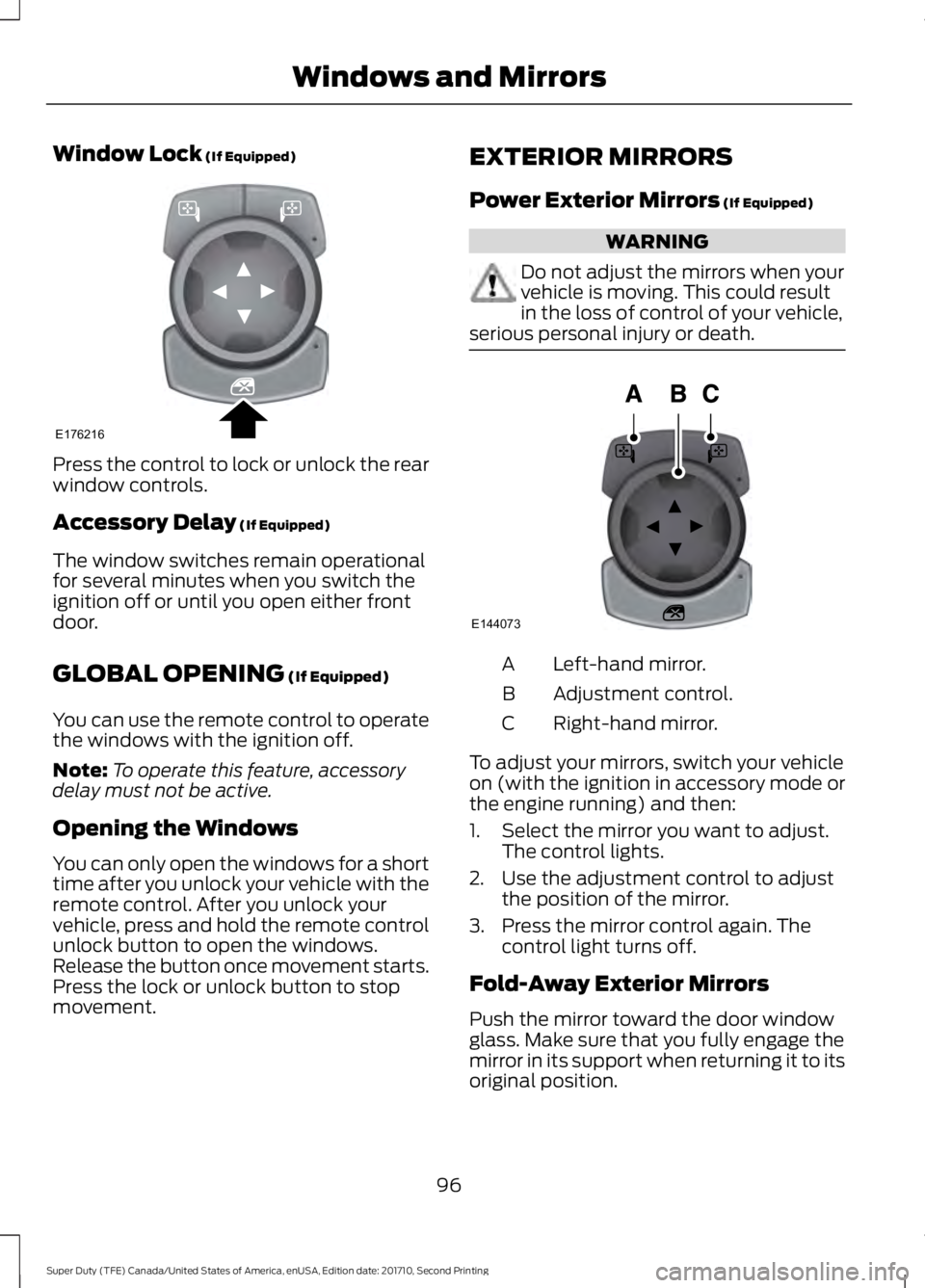
Window Lock (If Equipped)
Press the control to lock or unlock the rearwindow controls.
Accessory Delay (If Equipped)
The window switches remain operationalfor several minutes when you switch theignition off or until you open either frontdoor.
GLOBAL OPENING (If Equipped)
You can use the remote control to operatethe windows with the ignition off.
Note:To operate this feature, accessorydelay must not be active.
Opening the Windows
You can only open the windows for a shorttime after you unlock your vehicle with theremote control. After you unlock yourvehicle, press and hold the remote controlunlock button to open the windows.Release the button once movement starts.Press the lock or unlock button to stopmovement.
EXTERIOR MIRRORS
Power Exterior Mirrors (If Equipped)
WARNING
Do not adjust the mirrors when yourvehicle is moving. This could resultin the loss of control of your vehicle,serious personal injury or death.
Left-hand mirror.A
Adjustment control.B
Right-hand mirror.C
To adjust your mirrors, switch your vehicleon (with the ignition in accessory mode orthe engine running) and then:
1. Select the mirror you want to adjust.The control lights.
2. Use the adjustment control to adjustthe position of the mirror.
3. Press the mirror control again. Thecontrol light turns off.
Fold-Away Exterior Mirrors
Push the mirror toward the door windowglass. Make sure that you fully engage themirror in its support when returning it to itsoriginal position.
96
Super Duty (TFE) Canada/United States of America, enUSA, Edition date: 201710, Second Printing
Windows and MirrorsE176216 E144073
Page 100 of 642
Telescoping Mirrors
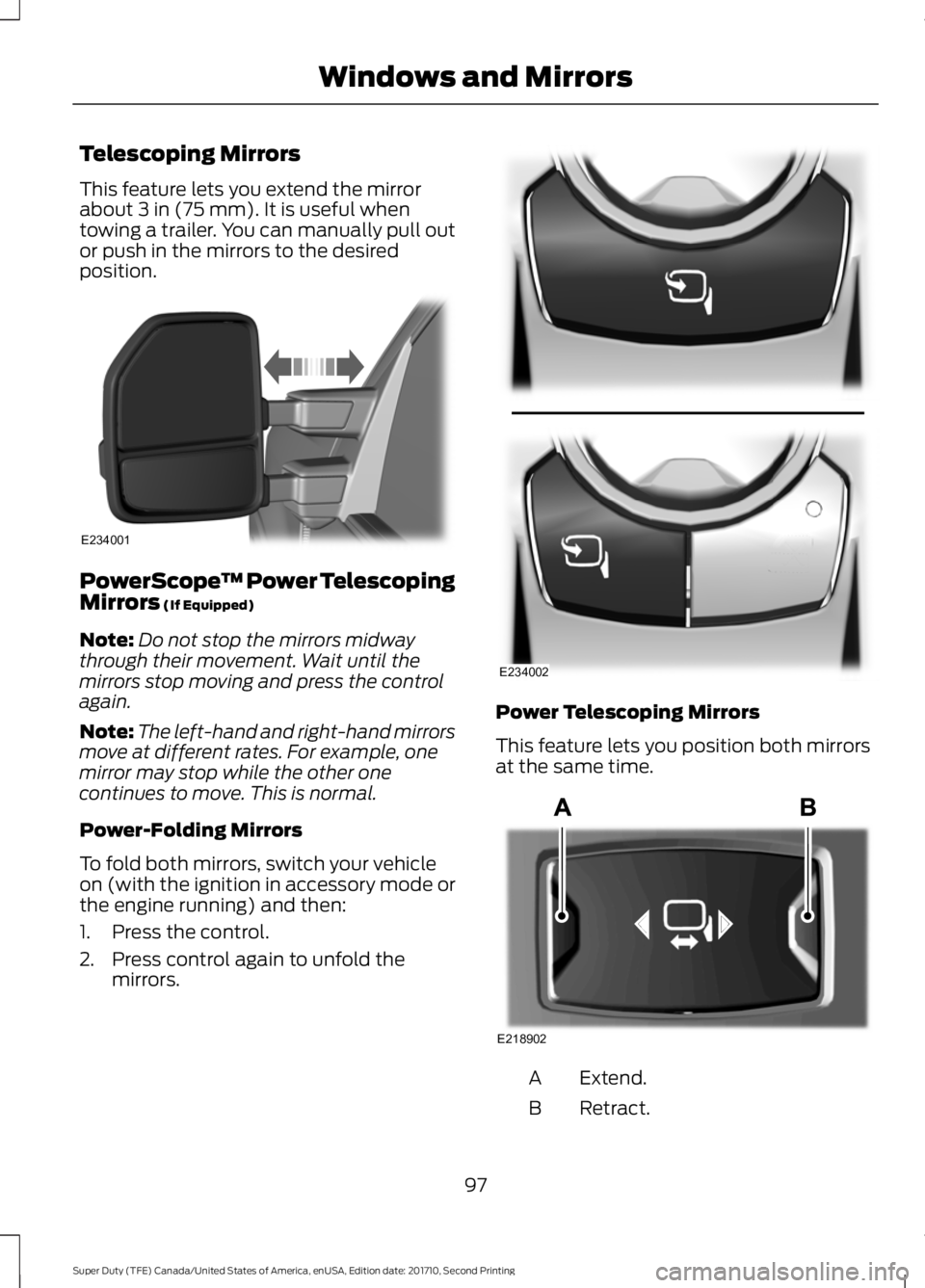
This feature lets you extend the mirrorabout 3 in (75 mm). It is useful whentowing a trailer. You can manually pull outor push in the mirrors to the desiredposition.
PowerScope™ Power TelescopingMirrors (If Equipped)
Note:Do not stop the mirrors midwaythrough their movement. Wait until themirrors stop moving and press the controlagain.
Note:The left-hand and right-hand mirrorsmove at different rates. For example, onemirror may stop while the other onecontinues to move. This is normal.
Power-Folding Mirrors
To fold both mirrors, switch your vehicleon (with the ignition in accessory mode orthe engine running) and then:
1. Press the control.
2. Press control again to unfold themirrors.
Power Telescoping Mirrors
This feature lets you position both mirrorsat the same time.
Extend.A
Retract.B
97
Super Duty (TFE) Canada/United States of America, enUSA, Edition date: 201710, Second Printing
Windows and MirrorsE234001 E234002 E218902
Page 101 of 642
To adjust your mirrors, make sure youswitch your vehicle on (with the ignition inaccessory mode or the engine running) andthen press the adjustment control toposition the mirrors.
Note:Moving the mirrors 10 or more timeswithin one minute, or repeated folding,unfolding and telescoping of the mirrorswhile holding the control down during fulltravel, may disable the system to protectthe motors from overheating. Waitapproximately three minutes with thevehicle running, and up to 10 minutes withthe vehicle off, for the system to reset andfor function to return to normal.
Loose Mirror
If your power-folding mirrors are manuallyfolded, they may not work properly evenafter you re-position them. You need toreset them if:
•The mirrors vibrate when you drive.
•The mirrors feel loose.
•The mirrors do not stay in the folded orunfolded position.
•One of the mirrors is not in its normaldriving position.
To reset the power-fold feature, use thepower-folding mirror control to fold andunfold the mirrors. You may hear a loudnoise as you reset the power-foldingmirrors. This sound is normal. Repeat thisprocess as needed each time the mirrorsare manually folded.
Heated Exterior Mirrors (If Equipped)
See Heated Windows and Mirrors (page150).
Memory Mirrors (If Equipped)
You can save and recall the mirrorpositions through the memory function.See Memory Function (page 157).
Direction Indicator Mirrors (If Equipped)
While the vehicle is running, theforward-facing portion of the appropriatemirror housing blinks when you switch onthe direction indicator.
Puddle Lamps (If Equipped)
The lamps on the bottom part of the mirrorhousing light when you use yourtransmitter to unlock the doors or whenyou open a door.
Clearance Lamps (If Equipped)
The lower, outer part of the mirror housingslight when you switch the headlamps orparking lamps on.
Spot Lamps (If Equipped)
The area lights are on the forward-facingportion of the mirror housing. You canswitch them on and off by using thecontrols located on the instrument panel.See Lighting (page 86).
Trailer Towing Camera System (If
Equipped)
See Rear View Camera (page 232).
Blind Spot Information System (If
Equipped)
See Blind Spot Information System(page 249).
INTERIOR MIRROR
WARNING
Do not adjust the mirror when yourvehicle is moving.
98
Super Duty (TFE) Canada/United States of America, enUSA, Edition date: 201710, Second Printing
Windows and Mirrors
Page 105 of 642
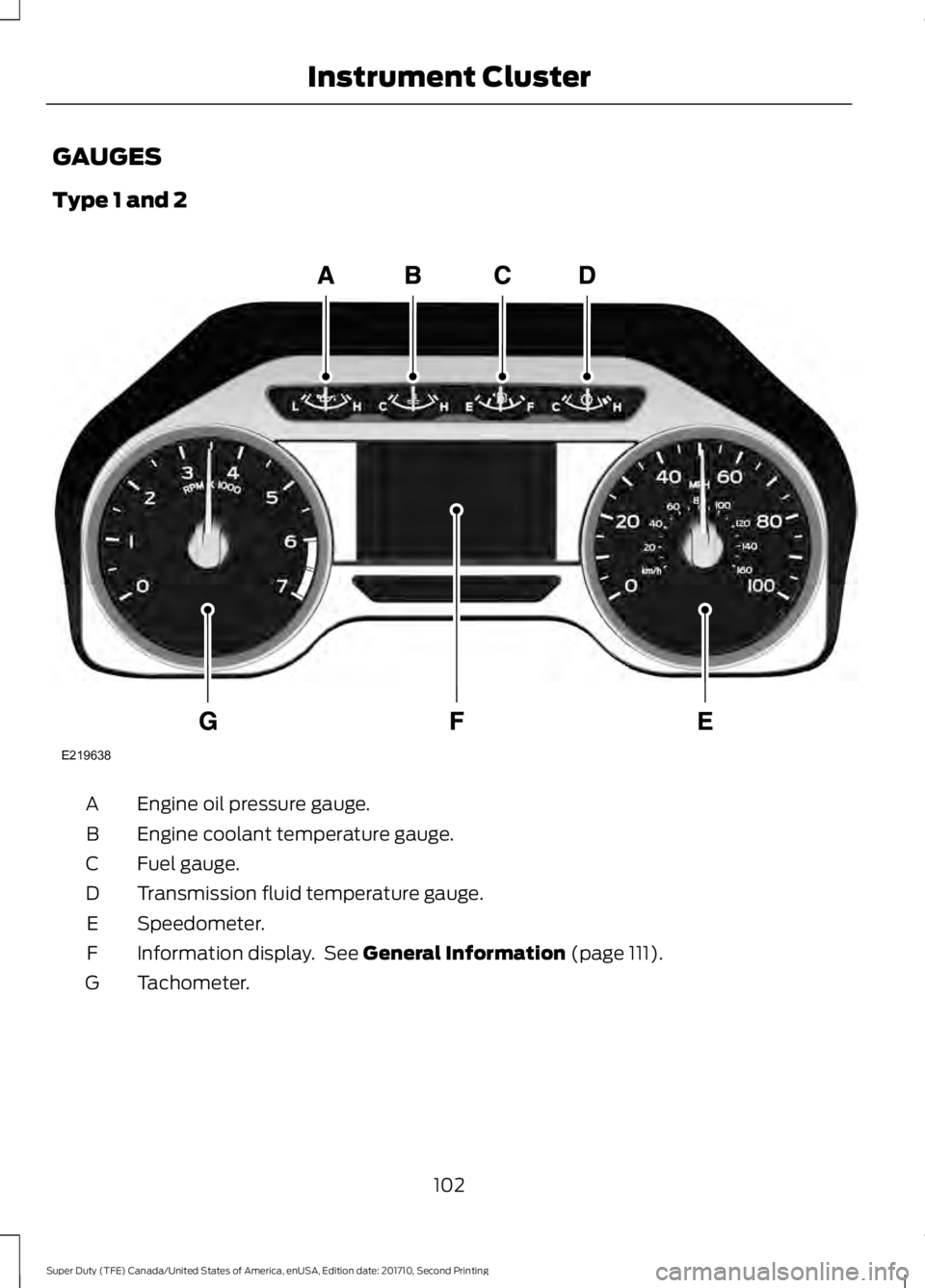
GAUGES
Type 1 and 2
Engine oil pressure gauge.A
Engine coolant temperature gauge.B
Fuel gauge.C
Transmission fluid temperature gauge.D
Speedometer.E
Information display. See General Information (page 111).F
Tachometer.G
102
Super Duty (TFE) Canada/United States of America, enUSA, Edition date: 201710, Second Printing
Instrument ClusterE219638
Page 106 of 642
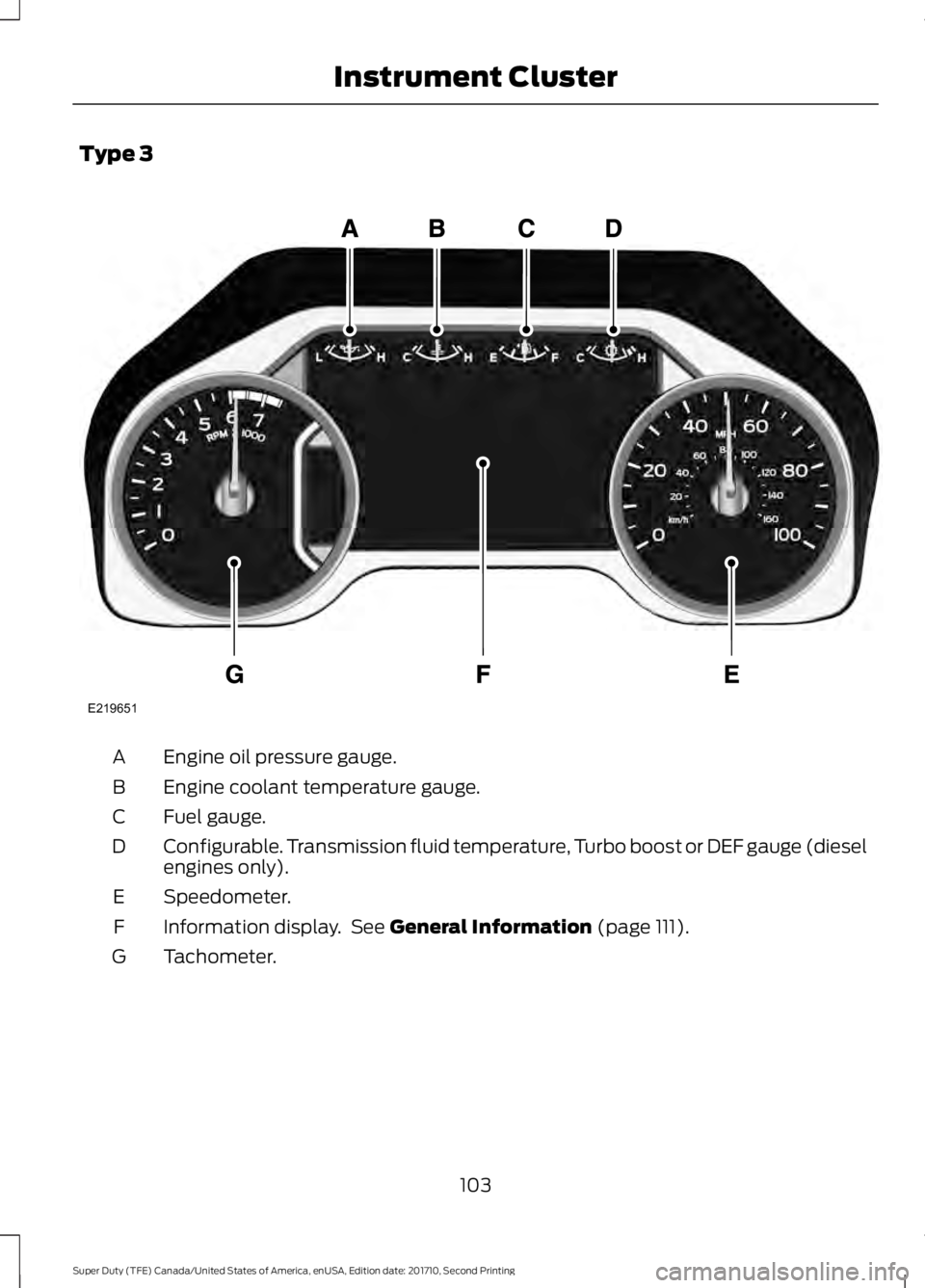
Type 3
Engine oil pressure gauge.A
Engine coolant temperature gauge.B
Fuel gauge.C
Configurable. Transmission fluid temperature, Turbo boost or DEF gauge (dieselengines only).D
Speedometer.E
Information display. See General Information (page 111).F
Tachometer.G
103
Super Duty (TFE) Canada/United States of America, enUSA, Edition date: 201710, Second Printing
Instrument ClusterE219651