start stop button FORD F450 SUPER DUTY 2017 User Guide
[x] Cancel search | Manufacturer: FORD, Model Year: 2017, Model line: F450 SUPER DUTY, Model: FORD F450 SUPER DUTY 2017Pages: 642, PDF Size: 12.35 MB
Page 293 of 642
Four-wheel Drive Vehicles Equippedwith a Manual-shift Transfer Case
1. Put the transmission in neutral (N).
2. Put the transfer case in neutral (N).
3.Put the hub locks in the FREE position.Always make sure that both hub locksare set to the same position.
Four-wheel Drive Vehicles Equippedwith an Electronic-shift Transfer Case
Only tow a four-wheel drive vehicle thathas an electronic-shift transfer case withall wheels on the ground. To do this, placethe transfer case in its neutral position andengage the four-wheel-down towingfeature.
Perform the steps in the following sectionafter positioning your vehicle behind thetow vehicle and properly securing themtogether.
Note:Make sure you properly secure yourvehicle to the tow vehicle.
Four-wheel-down Towing
1. Put the ignition in the on position, butdo not start the engine. If your vehiclehas an ignition key, turn the key to on.If your vehicle has intelligent access,press the engine START/STOP buttononce without pressing the brake pedal.
2. Press and hold the brake pedal.
3. Rotate the four-wheel drive switch to2H.
4. Shift the transmission to neutral (N).
5. Rotate the four-wheel drive switchfrom 2H to 4L and back to 2H fivetimes within seven seconds.
Note:If completed successfully, theinformation display shows a messageindicating that your vehicle is safe to towwith all wheels on the ground.
Note:If you do not see the message in thedisplay, you must perform the procedureagain from the beginning.
Note:You may hear an audible noise as thetransfer case shifts into its neutral position.This is normal.
6. Leave the transmission in neutral (N)and turn the ignition as far as it will gotoward the off position (it will not turnfully off when the transmission is inneutral). If your vehicle has an ignitionkey, you must leave the key in theignition while towing. To lock andunlock your vehicle, use the keylessentry keypad or extra set of keys. If yourvehicle has intelligent access, press theengine START/STOP button oncewithout pressing the brake pedal. Youdo not need to leave your keys in thevehicle. You can lock and unlock yourvehicle as you normally do.
7. Release the brake pedal.
WARNINGS
Do not disconnect the battery duringrecreational towing. It prevents thetransfer case from shifting properlyand may cause the vehicle to roll, even ifthe transmission is in park (P).
Shifting the transfer case to itsneutral position for recreationaltowing may cause the vehicle to roll,even if the transmission is in park (P). Itmay injure the driver and others. Make sureyou press the foot brake and the vehicle isin a secure, safe position when you shift toneutral (N).
Note:Failing to put the transfer case in itsneutral position while towing with all fourwheels on the ground will damage vehiclecomponents.
290
Super Duty (TFE) Canada/United States of America, enUSA, Edition date: 201710, Second Printing
Towing
Page 294 of 642
Note:You can check four-wheel-downtowing status at any time by opening thedriver's door or turning the ignition to theaccessory or on position and verifying amessage displays in the cluster.
To exit four-wheel-down towing and returnthe transfer case to its 2H position:
1.With your vehicle still properly securedto the tow vehicle, put the ignition inthe on position, but do not start theengine. If your vehicle has an ignitionkey, switch the key to on. If your vehiclehas intelligent access, press the engineSTART/STOP button once withoutpressing the brake pedal.
2. Press and hold the brake pedal.
3. Shift the transmission out of neutral(N) and into any other gear.
4. Release the brake pedal.
Note:If completed successfully, the 2Hindicator light illuminates and aconfirmation message displays in theinstrument cluster.
Note:If the indicator light and message donot display, you must perform the procedureagain from the beginning.
Note:You may hear an audible noise as thetransfer case shifts out of its neutralposition. This is normal.
Note:If a message displays in theinstrument cluster stating there is a shiftdelay, transfer case gear tooth blockagemay be present. See Resolving the ShiftDelay Issue after this section.
5.Apply the parking brake and disconnectthe vehicle from the tow vehicle.
6. Release the parking brake, start theengine and shift the transmission todrive (D) to make sure the transfercase is out of neutral (N).
7. If the transfer case does notsuccessfully shift out of neutral (N),set the parking brake until you can haveyour vehicle serviced.
Resolving the Shift Delay Issue
If the instrument cluster displays a shiftdelay message, See InformationMessages (page 128). You need toperform the following steps:
1. Press and hold the brake pedal.
2. Put the transmission into neutral (N),and then start the engine.
3. With the engine running, shift thetransmission to drive (D) and let thevehicle roll forward, up to 3 ft (1 m).You may hear an audible noise as thetransfer case shifts out of its neutralposition. This is normal.
4. When the issue is resolved, theinstrument cluster displays a messagestating neutral tow is disabled.
291
Super Duty (TFE) Canada/United States of America, enUSA, Edition date: 201710, Second Printing
Towing
Page 301 of 642
This program is separate from the NewVehicle Limited Warranty, but the coverageis concurrent with the powertrain coverageperiod of your vehicle.
Canadian customers who require roadsideassistance, call 1-800-665-2006.
Vehicles Sold in Canada: UsingRoadside Assistance
Complete the roadside assistanceidentification card and place it in yourwallet for quick reference.
In Canada, this card is found in theWarranty Guide in the glove compartmentof your vehicle.
Vehicles Sold in Canada: RoadsideAssistance Program Coverage
The service is available 24 hours a day,seven days a week.
Canadian roadside coverage and benefitsmay differ from the U.S. coverage.
For complete program coverage detailsyou may contact your dealer, you can callus in Canada at 1-800-665-2006, or visitour website at www.ford.ca.
HAZARD FLASHERS
Note:The hazard flashers operate whenthe ignition is in any position, or if the key isnot in the ignition. If used when the vehicleis not running, the battery loses charge. Asa result, there may be insufficient power torestart your vehicle.
The flasher control is on theinstrument panel. Use yourhazard flashers when yourvehicle is creating a safety hazard for othermotorists.
•Press the flasher control and all frontand rear direction indicators flash.
•Press the button again to switch themoff.
FUEL SHUTOFF - 6.2L/6.8L
Note:If your vehicle is involved in a crash,have a qualified technician check the fuelsystem.
Note: When you try to restart your vehicleafter a fuel shutoff, the vehicle makes surethat various systems are safe to restart.Once the vehicle determines the systemsare safe, then the vehicle allows you torestart.
Note: In the event that your vehicle doesnot restart after your third attempt, contacta qualified technician.
The fuel pump shutoff stops the flow offuel to the engine in the event of amoderate to severe crash. Not everyimpact causes a shutoff.
If your vehicle has a key system:
1. Switch off the vehicle.
2. Switch on the vehicle.
3. Repeat steps 1 and 2 to re-enable thefuel pump.
FUEL SHUTOFF - 6.7L DIESEL
WARNING
Failure to inspect and, if necessary,repair fuel leaks after a collision mayincrease the risk of fire and seriousinjury. Ford Motor Company recommendsthat the fuel system be inspected by anauthorized dealer after any collision.
298
Super Duty (TFE) Canada/United States of America, enUSA, Edition date: 201710, Second Printing
Roadside Emergencies
Page 302 of 642
Note:When you try to restart your vehicleafter a fuel shutoff, your vehicle makes surethat various systems are safe to restart.Once your vehicle determines that thesystems are safe, then your vehicle willallow you to restart.
In the event of a moderate to severecollision, your vehicle is equipped with afuel pump shut-off feature that stops theflow of fuel to the engine. Not every impactwill cause a shutoff.
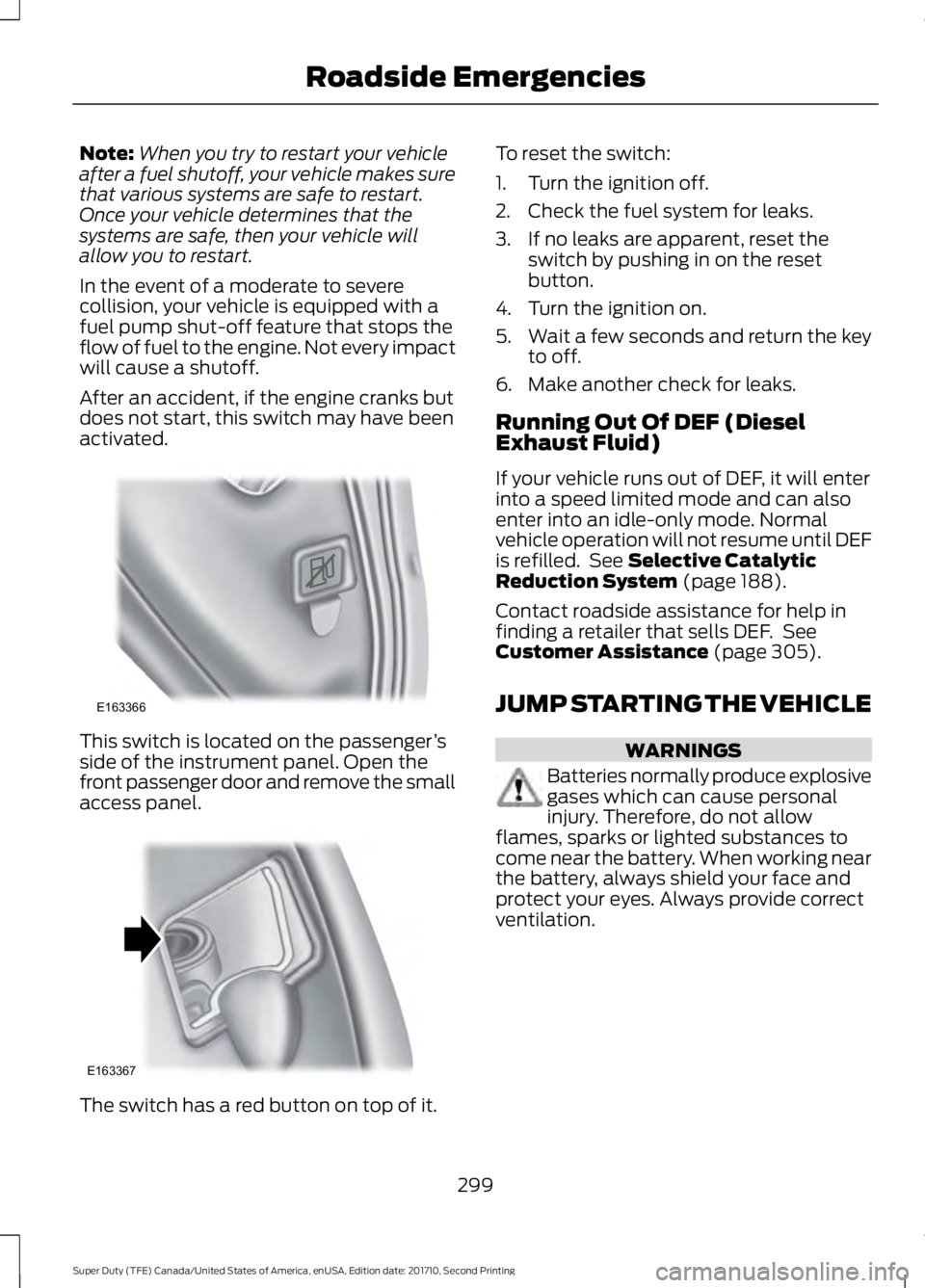
After an accident, if the engine cranks butdoes not start, this switch may have beenactivated.
This switch is located on the passenger’sside of the instrument panel. Open thefront passenger door and remove the smallaccess panel.
The switch has a red button on top of it.
To reset the switch:
1. Turn the ignition off.
2. Check the fuel system for leaks.
3. If no leaks are apparent, reset theswitch by pushing in on the resetbutton.
4. Turn the ignition on.
5.Wait a few seconds and return the keyto off.
6. Make another check for leaks.
Running Out Of DEF (DieselExhaust Fluid)
If your vehicle runs out of DEF, it will enterinto a speed limited mode and can alsoenter into an idle-only mode. Normalvehicle operation will not resume until DEFis refilled. See Selective CatalyticReduction System (page 188).
Contact roadside assistance for help infinding a retailer that sells DEF. SeeCustomer Assistance (page 305).
JUMP STARTING THE VEHICLE
WARNINGS
Batteries normally produce explosivegases which can cause personalinjury. Therefore, do not allowflames, sparks or lighted substances tocome near the battery. When working nearthe battery, always shield your face andprotect your eyes. Always provide correctventilation.
299
Super Duty (TFE) Canada/United States of America, enUSA, Edition date: 201710, Second Printing
Roadside EmergenciesE163366 E163367
Page 494 of 642
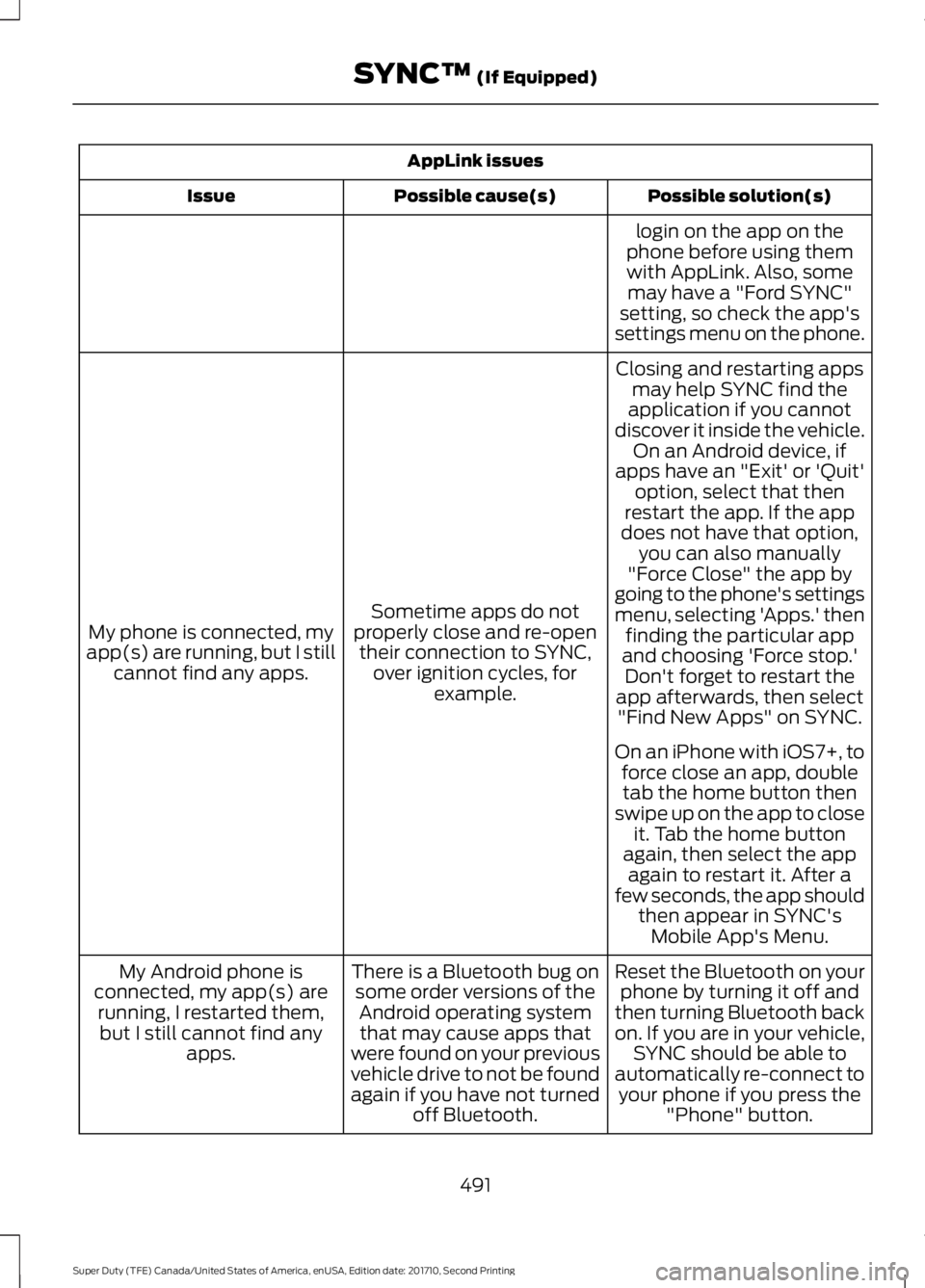
AppLink issues
Possible solution(s)Possible cause(s)Issue
login on the app on thephone before using themwith AppLink. Also, somemay have a "Ford SYNC"setting, so check the app'ssettings menu on the phone.
Closing and restarting appsmay help SYNC find theapplication if you cannotdiscover it inside the vehicle.On an Android device, ifapps have an "Exit' or 'Quit'
Sometime apps do notproperly close and re-opentheir connection to SYNC,over ignition cycles, forexample.
My phone is connected, myapp(s) are running, but I stillcannot find any apps.
option, select that thenrestart the app. If the appdoes not have that option,you can also manually"Force Close" the app bygoing to the phone's settingsmenu, selecting 'Apps.' thenfinding the particular appand choosing 'Force stop.'Don't forget to restart theapp afterwards, then select"Find New Apps" on SYNC.
On an iPhone with iOS7+, toforce close an app, doubletab the home button thenswipe up on the app to closeit. Tab the home buttonagain, then select the appagain to restart it. After afew seconds, the app shouldthen appear in SYNC'sMobile App's Menu.
Reset the Bluetooth on yourphone by turning it off andthen turning Bluetooth backon. If you are in your vehicle,SYNC should be able toautomatically re-connect toyour phone if you press the"Phone" button.
There is a Bluetooth bug onsome order versions of theAndroid operating systemthat may cause apps thatwere found on your previousvehicle drive to not be foundagain if you have not turnedoff Bluetooth.
My Android phone isconnected, my app(s) arerunning, I restarted them,but I still cannot find anyapps.
491
Super Duty (TFE) Canada/United States of America, enUSA, Edition date: 201710, Second Printing
SYNC™ (If Equipped)
Page 534 of 642
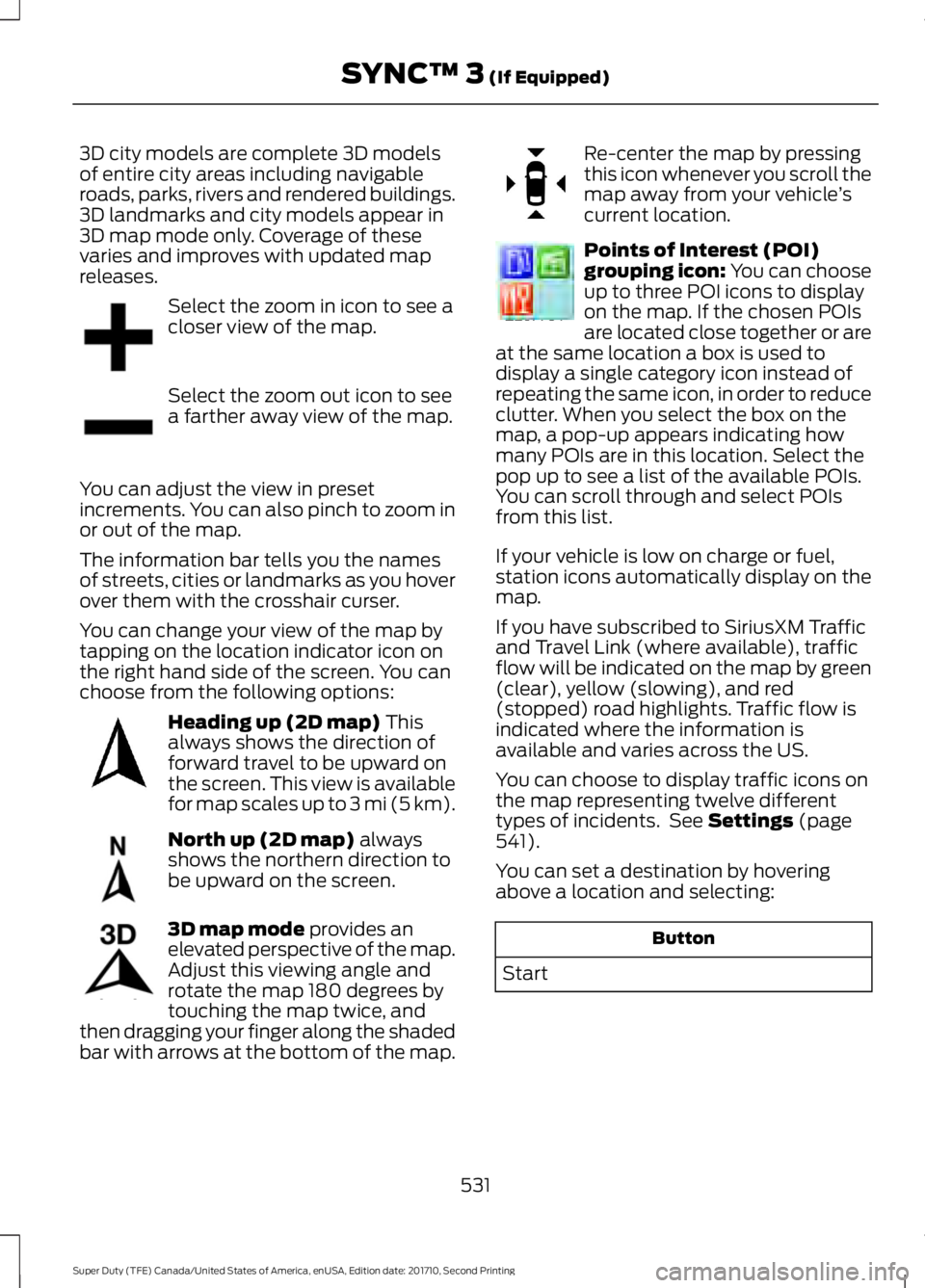
3D city models are complete 3D modelsof entire city areas including navigableroads, parks, rivers and rendered buildings.3D landmarks and city models appear in3D map mode only. Coverage of thesevaries and improves with updated mapreleases.
Select the zoom in icon to see acloser view of the map.
Select the zoom out icon to seea farther away view of the map.
You can adjust the view in presetincrements. You can also pinch to zoom inor out of the map.
The information bar tells you the namesof streets, cities or landmarks as you hoverover them with the crosshair curser.
You can change your view of the map bytapping on the location indicator icon onthe right hand side of the screen. You canchoose from the following options:
Heading up (2D map) Thisalways shows the direction offorward travel to be upward onthe screen. This view is availablefor map scales up to 3 mi (5 km).
North up (2D map) alwaysshows the northern direction tobe upward on the screen.
3D map mode provides anelevated perspective of the map.Adjust this viewing angle androtate the map 180 degrees bytouching the map twice, andthen dragging your finger along the shadedbar with arrows at the bottom of the map.
Re-center the map by pressingthis icon whenever you scroll themap away from your vehicle’scurrent location.
Points of Interest (POI)grouping icon: You can chooseup to three POI icons to displayon the map. If the chosen POIsare located close together or areat the same location a box is used todisplay a single category icon instead ofrepeating the same icon, in order to reduceclutter. When you select the box on themap, a pop-up appears indicating howmany POIs are in this location. Select thepop up to see a list of the available POIs.You can scroll through and select POIsfrom this list.
If your vehicle is low on charge or fuel,station icons automatically display on themap.
If you have subscribed to SiriusXM Trafficand Travel Link (where available), trafficflow will be indicated on the map by green(clear), yellow (slowing), and red(stopped) road highlights. Traffic flow isindicated where the information isavailable and varies across the US.
You can choose to display traffic icons onthe map representing twelve differenttypes of incidents. See Settings (page541).
You can set a destination by hoveringabove a location and selecting:
Button
Start
531
Super Duty (TFE) Canada/United States of America, enUSA, Edition date: 201710, Second Printing
SYNC™ 3 (If Equipped)E207752 E207753 E207750 E207749 E207748 E207751 E207754