fuel FORD F450 SUPER DUTY 2017 Owner's Manual
[x] Cancel search | Manufacturer: FORD, Model Year: 2017, Model line: F450 SUPER DUTY, Model: FORD F450 SUPER DUTY 2017Pages: 642, PDF Size: 12.35 MB
Page 118 of 642
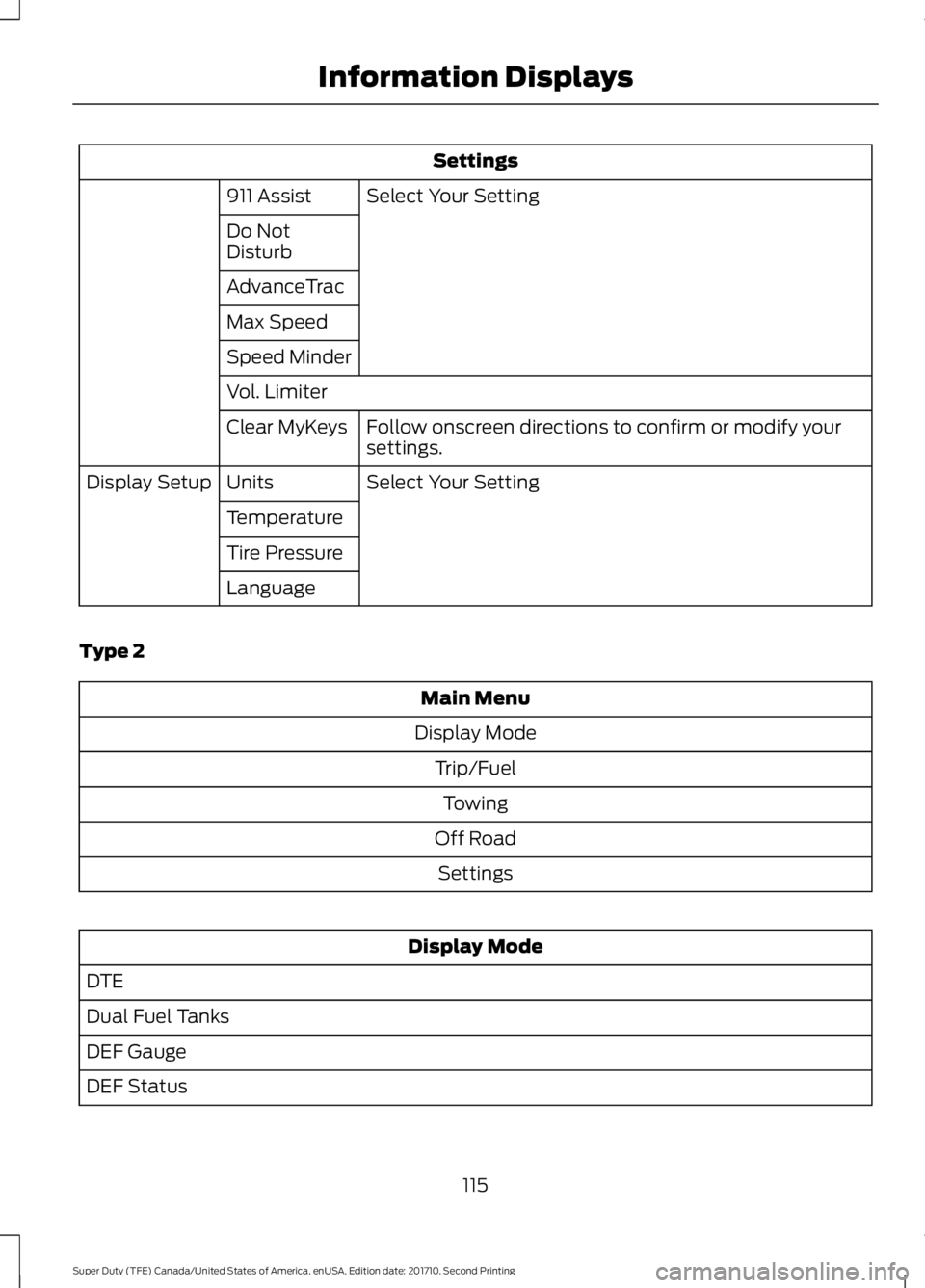
Settings
Select Your Setting911 Assist
Do NotDisturb
AdvanceTrac
Max Speed
Speed Minder
Vol. Limiter
Follow onscreen directions to confirm or modify yoursettings.Clear MyKeys
Select Your SettingUnitsDisplay Setup
Temperature
Tire Pressure
Language
Type 2
Main Menu
Display Mode
Trip/Fuel
Towing
Off Road
Settings
Display Mode
DTE
Dual Fuel Tanks
DEF Gauge
DEF Status
115
Super Duty (TFE) Canada/United States of America, enUSA, Edition date: 201710, Second Printing
Information Displays
Page 119 of 642
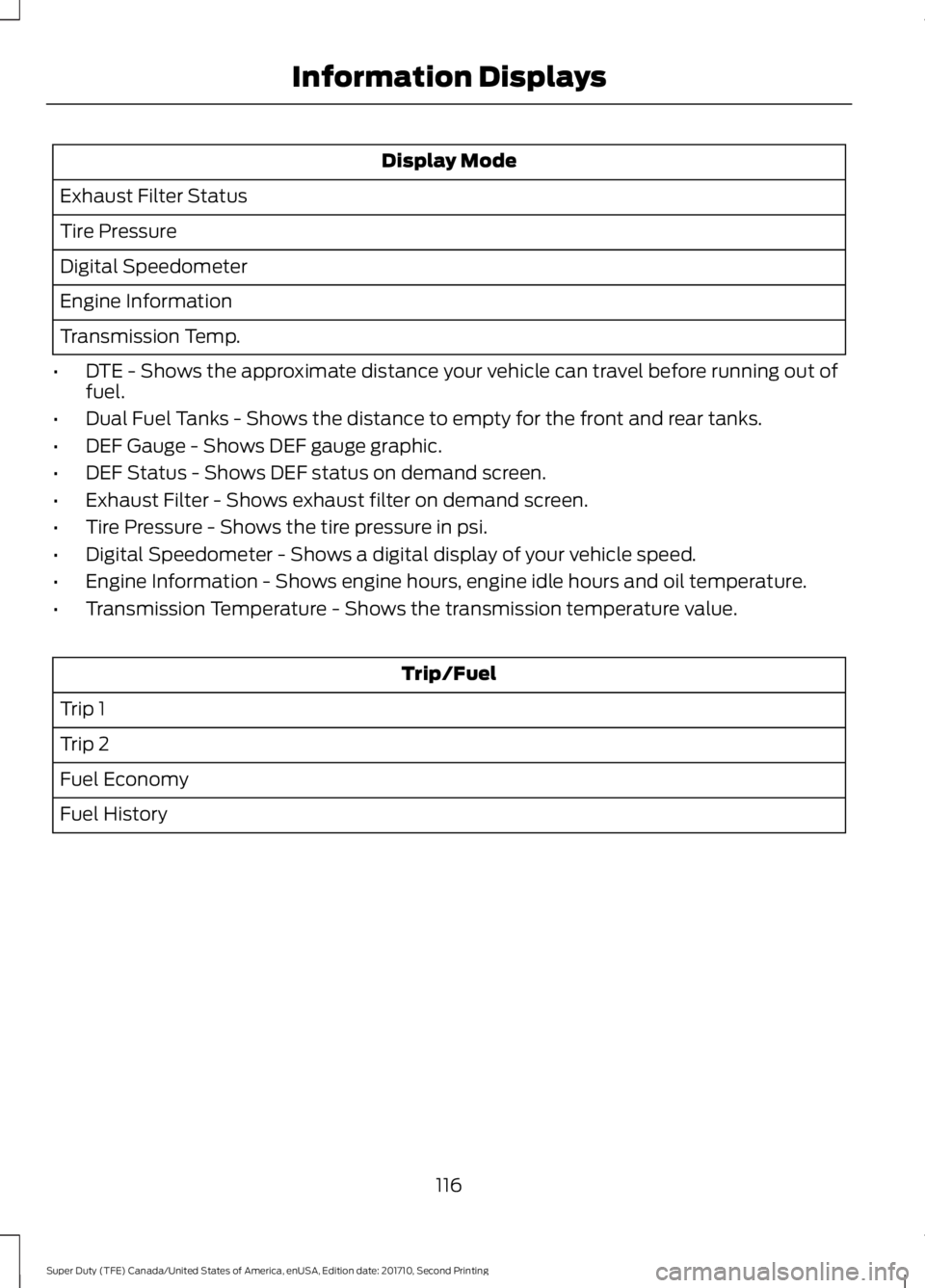
Display Mode
Exhaust Filter Status
Tire Pressure
Digital Speedometer
Engine Information
Transmission Temp.
•DTE - Shows the approximate distance your vehicle can travel before running out offuel.
•Dual Fuel Tanks - Shows the distance to empty for the front and rear tanks.
•DEF Gauge - Shows DEF gauge graphic.
•DEF Status - Shows DEF status on demand screen.
•Exhaust Filter - Shows exhaust filter on demand screen.
•Tire Pressure - Shows the tire pressure in psi.
•Digital Speedometer - Shows a digital display of your vehicle speed.
•Engine Information - Shows engine hours, engine idle hours and oil temperature.
•Transmission Temperature - Shows the transmission temperature value.
Trip/Fuel
Trip 1
Trip 2
Fuel Economy
Fuel History
116
Super Duty (TFE) Canada/United States of America, enUSA, Edition date: 201710, Second Printing
Information Displays
Page 120 of 642
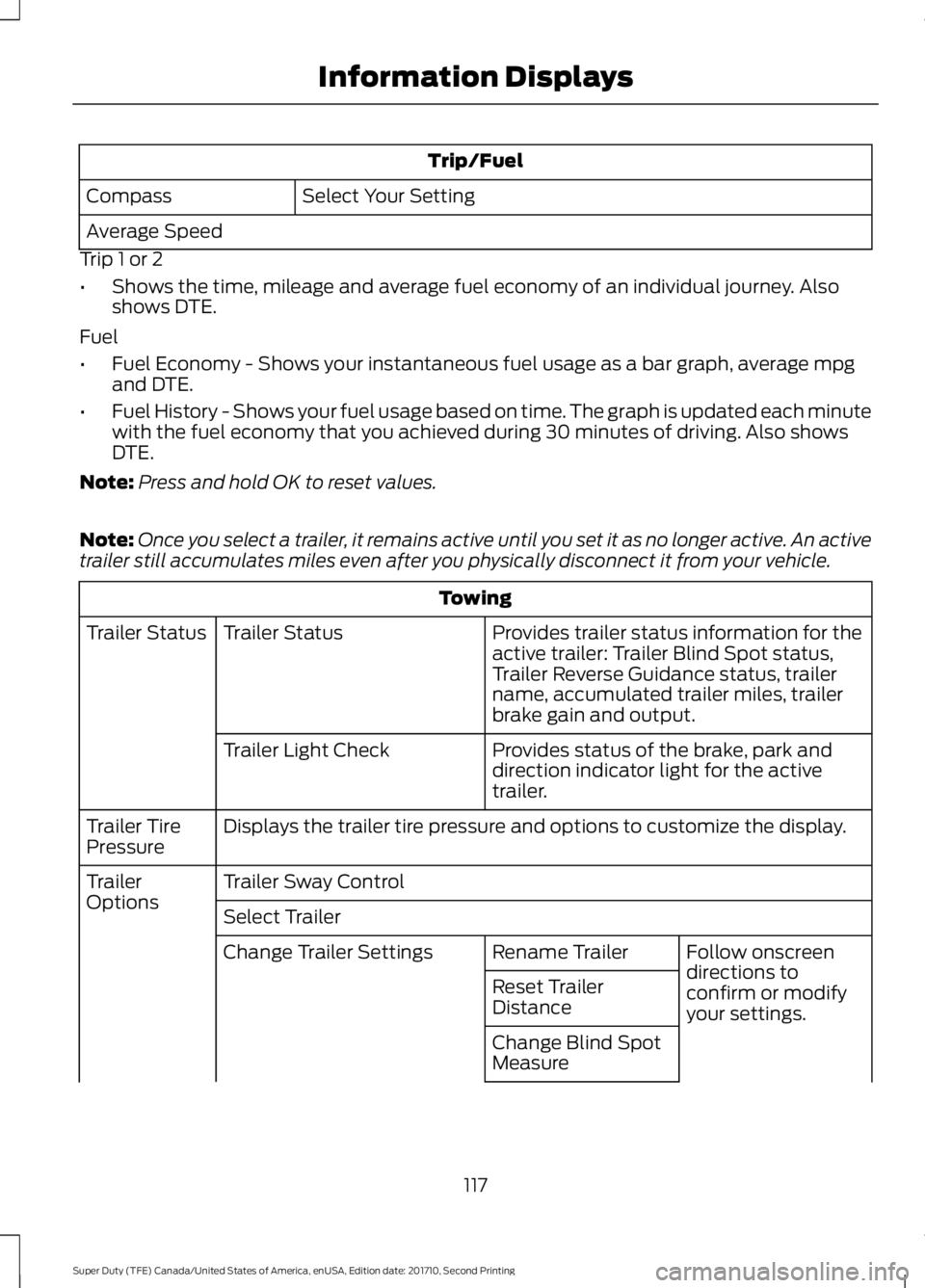
Trip/Fuel
Select Your SettingCompass
Average Speed
Trip 1 or 2
•Shows the time, mileage and average fuel economy of an individual journey. Alsoshows DTE.
Fuel
•Fuel Economy - Shows your instantaneous fuel usage as a bar graph, average mpgand DTE.
•Fuel History - Shows your fuel usage based on time. The graph is updated each minutewith the fuel economy that you achieved during 30 minutes of driving. Also showsDTE.
Note:Press and hold OK to reset values.
Note:Once you select a trailer, it remains active until you set it as no longer active. An activetrailer still accumulates miles even after you physically disconnect it from your vehicle.
Towing
Provides trailer status information for theactive trailer: Trailer Blind Spot status,Trailer Reverse Guidance status, trailername, accumulated trailer miles, trailerbrake gain and output.
Trailer StatusTrailer Status
Provides status of the brake, park anddirection indicator light for the activetrailer.
Trailer Light Check
Displays the trailer tire pressure and options to customize the display.Trailer TirePressure
Trailer Sway ControlTrailerOptionsSelect Trailer
Follow onscreendirections toconfirm or modifyyour settings.
Rename TrailerChange Trailer Settings
Reset TrailerDistance
Change Blind SpotMeasure
117
Super Duty (TFE) Canada/United States of America, enUSA, Edition date: 201710, Second Printing
Information Displays
Page 124 of 642
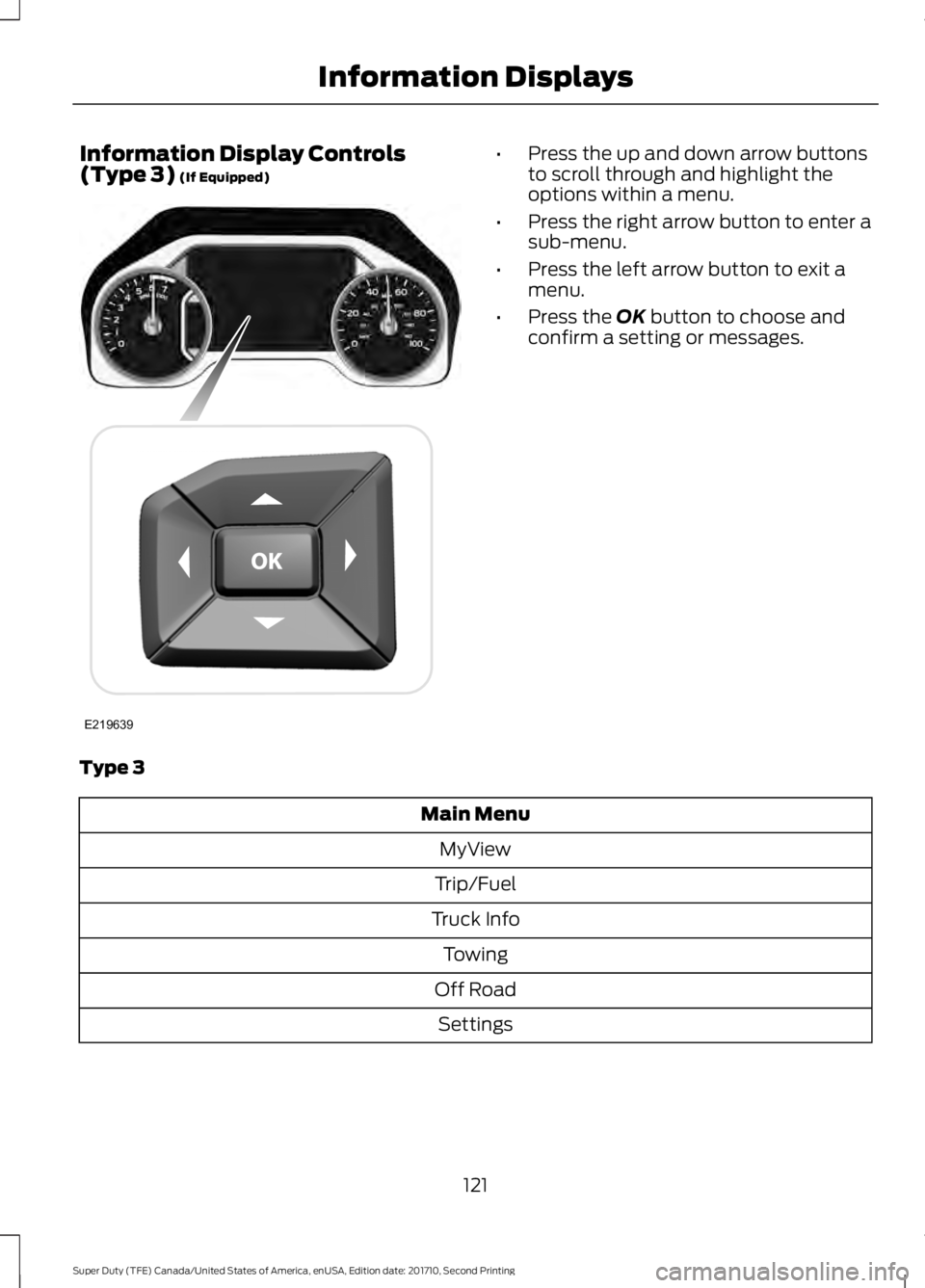
Information Display Controls(Type 3) (If Equipped)•Press the up and down arrow buttonsto scroll through and highlight theoptions within a menu.
•Press the right arrow button to enter asub-menu.
•Press the left arrow button to exit amenu.
•Press the OK button to choose andconfirm a setting or messages.
Type 3
Main Menu
MyView
Trip/Fuel
Truck Info
Towing
Off Road
Settings
121
Super Duty (TFE) Canada/United States of America, enUSA, Edition date: 201710, Second Printing
Information DisplaysE219639
Page 125 of 642
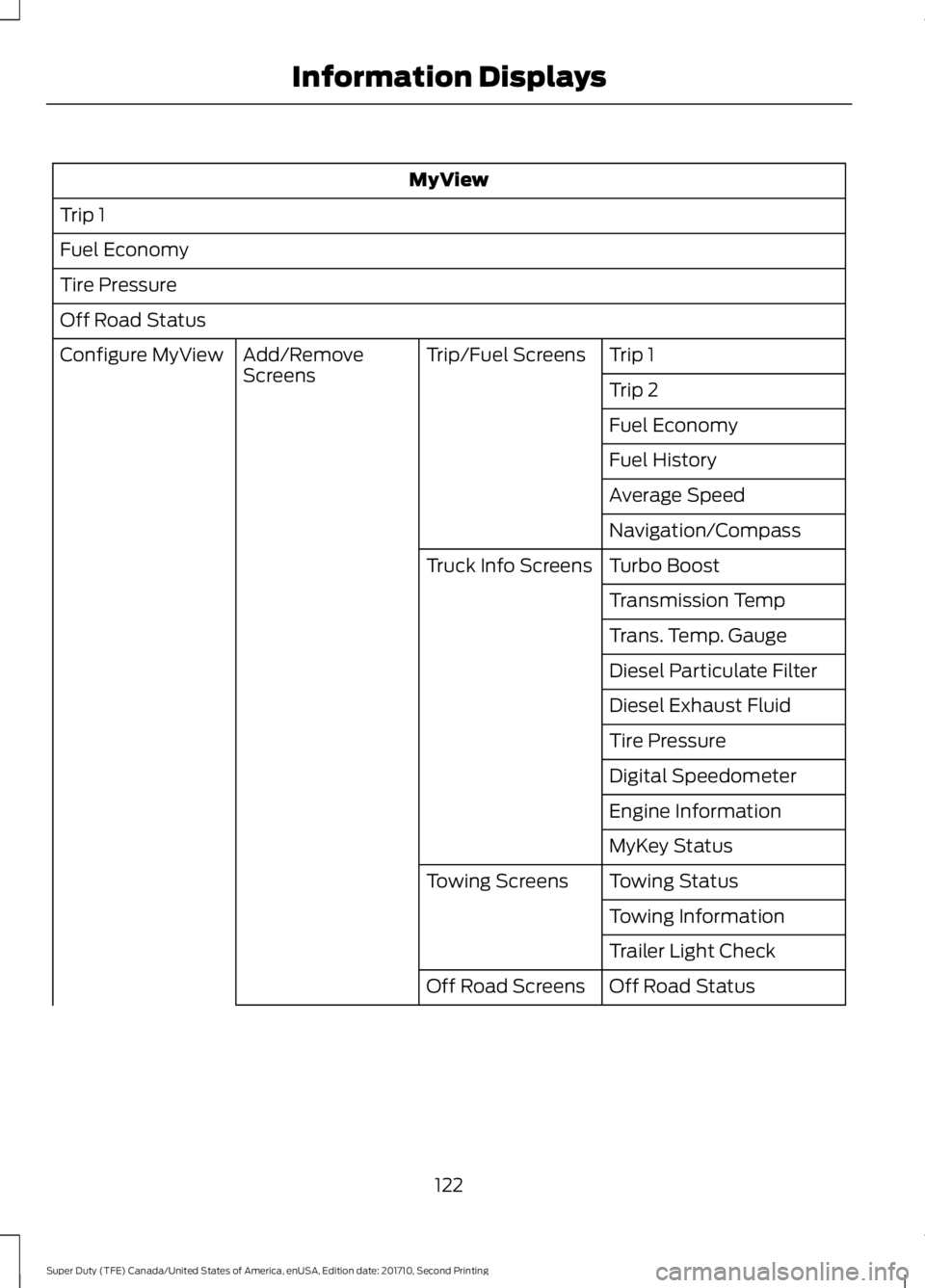
MyView
Trip 1
Fuel Economy
Tire Pressure
Off Road Status
Trip 1Trip/Fuel ScreensAdd/RemoveScreensConfigure MyView
Trip 2
Fuel Economy
Fuel History
Average Speed
Navigation/Compass
Turbo BoostTruck Info Screens
Transmission Temp
Trans. Temp. Gauge
Diesel Particulate Filter
Diesel Exhaust Fluid
Tire Pressure
Digital Speedometer
Engine Information
MyKey Status
Towing StatusTowing Screens
Towing Information
Trailer Light Check
Off Road StatusOff Road Screens
122
Super Duty (TFE) Canada/United States of America, enUSA, Edition date: 201710, Second Printing
Information Displays
Page 126 of 642
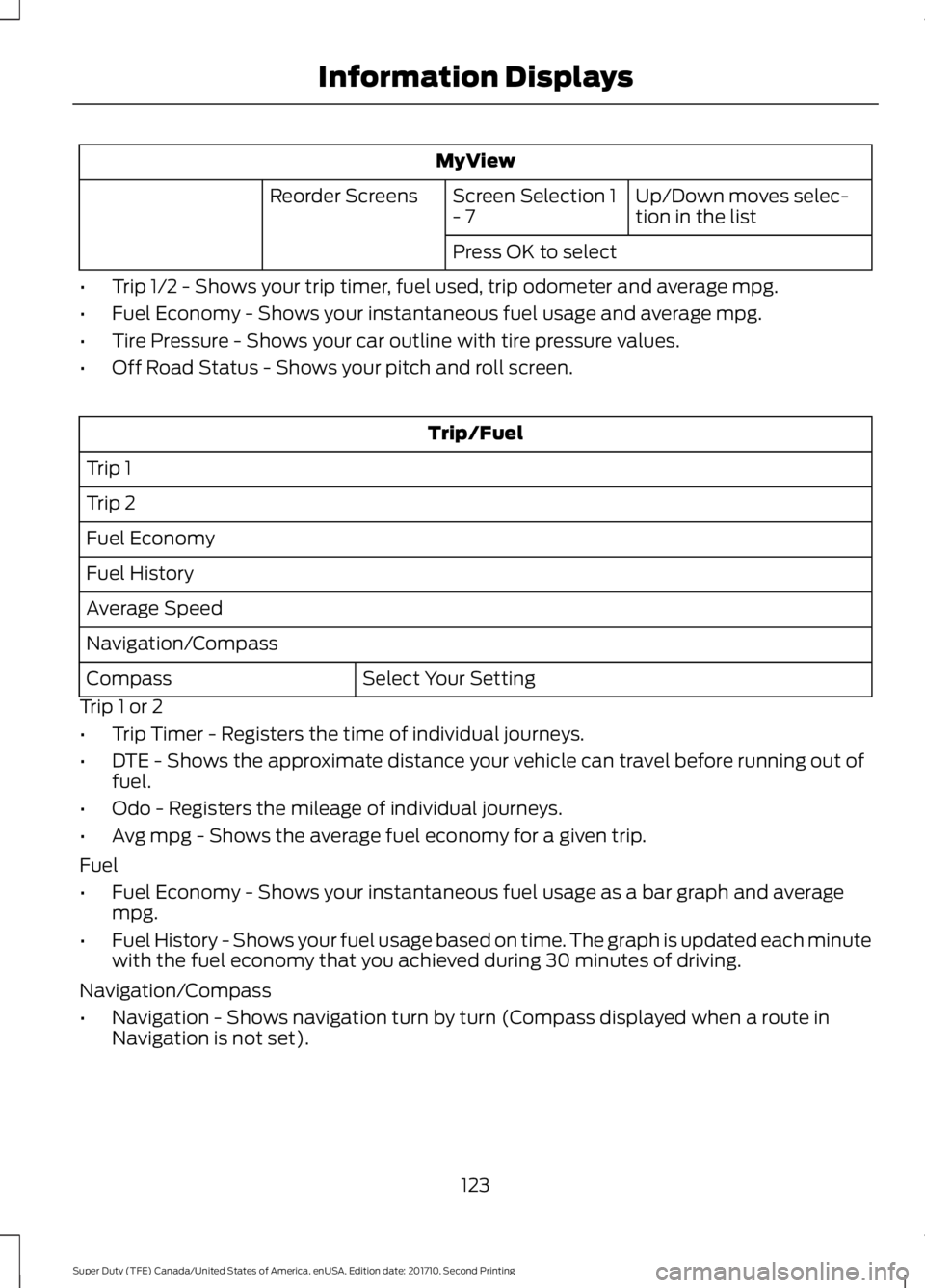
MyView
Up/Down moves selec-tion in the listScreen Selection 1- 7Reorder Screens
Press OK to select
•Trip 1/2 - Shows your trip timer, fuel used, trip odometer and average mpg.
•Fuel Economy - Shows your instantaneous fuel usage and average mpg.
•Tire Pressure - Shows your car outline with tire pressure values.
•Off Road Status - Shows your pitch and roll screen.
Trip/Fuel
Trip 1
Trip 2
Fuel Economy
Fuel History
Average Speed
Navigation/Compass
Select Your SettingCompass
Trip 1 or 2
•Trip Timer - Registers the time of individual journeys.
•DTE - Shows the approximate distance your vehicle can travel before running out offuel.
•Odo - Registers the mileage of individual journeys.
•Avg mpg - Shows the average fuel economy for a given trip.
Fuel
•Fuel Economy - Shows your instantaneous fuel usage as a bar graph and averagempg.
•Fuel History - Shows your fuel usage based on time. The graph is updated each minutewith the fuel economy that you achieved during 30 minutes of driving.
Navigation/Compass
•Navigation - Shows navigation turn by turn (Compass displayed when a route inNavigation is not set).
123
Super Duty (TFE) Canada/United States of America, enUSA, Edition date: 201710, Second Printing
Information Displays
Page 127 of 642
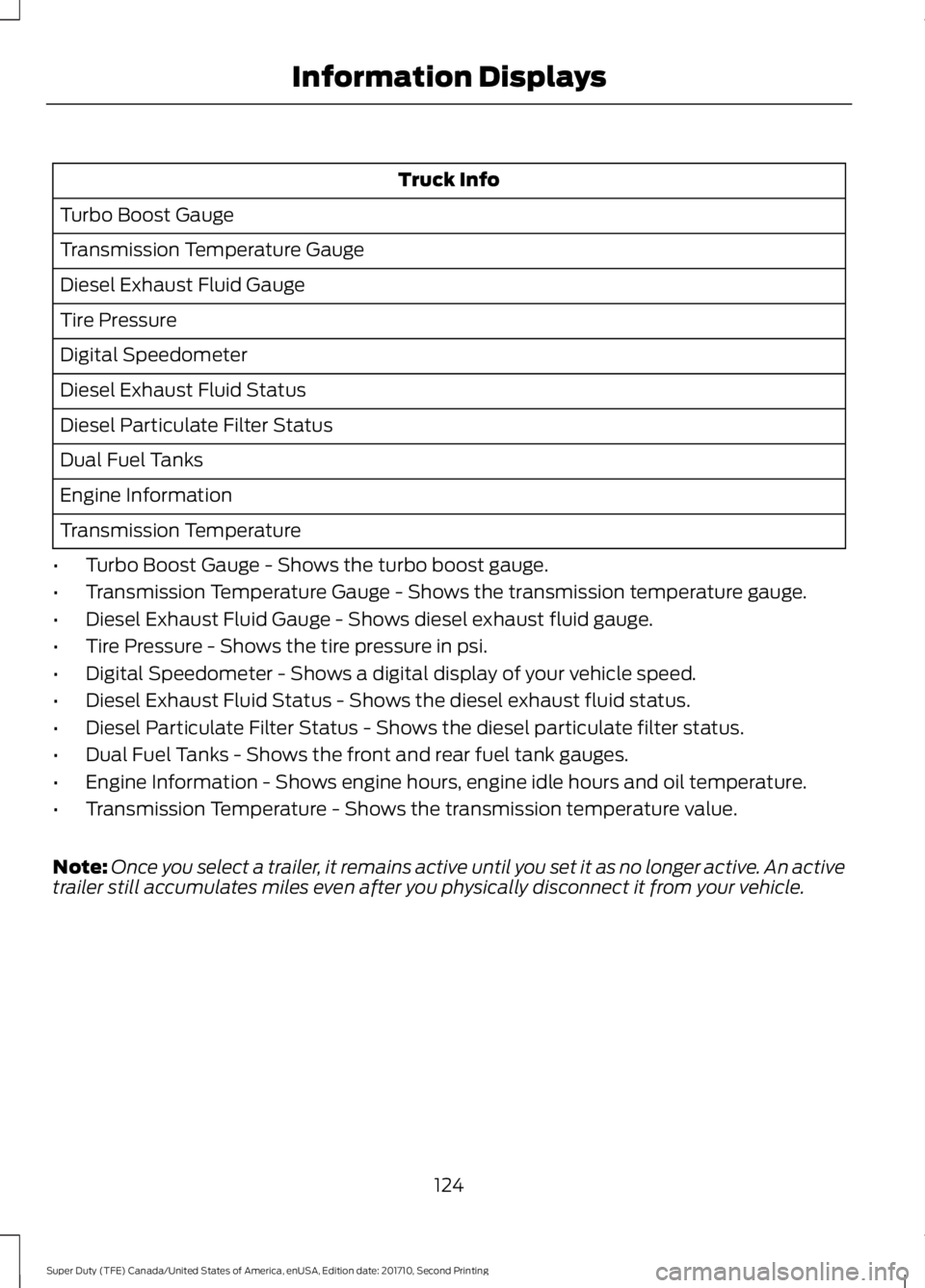
Truck Info
Turbo Boost Gauge
Transmission Temperature Gauge
Diesel Exhaust Fluid Gauge
Tire Pressure
Digital Speedometer
Diesel Exhaust Fluid Status
Diesel Particulate Filter Status
Dual Fuel Tanks
Engine Information
Transmission Temperature
•Turbo Boost Gauge - Shows the turbo boost gauge.
•Transmission Temperature Gauge - Shows the transmission temperature gauge.
•Diesel Exhaust Fluid Gauge - Shows diesel exhaust fluid gauge.
•Tire Pressure - Shows the tire pressure in psi.
•Digital Speedometer - Shows a digital display of your vehicle speed.
•Diesel Exhaust Fluid Status - Shows the diesel exhaust fluid status.
•Diesel Particulate Filter Status - Shows the diesel particulate filter status.
•Dual Fuel Tanks - Shows the front and rear fuel tank gauges.
•Engine Information - Shows engine hours, engine idle hours and oil temperature.
•Transmission Temperature - Shows the transmission temperature value.
Note:Once you select a trailer, it remains active until you set it as no longer active. An activetrailer still accumulates miles even after you physically disconnect it from your vehicle.
124
Super Duty (TFE) Canada/United States of America, enUSA, Edition date: 201710, Second Printing
Information Displays
Page 134 of 642
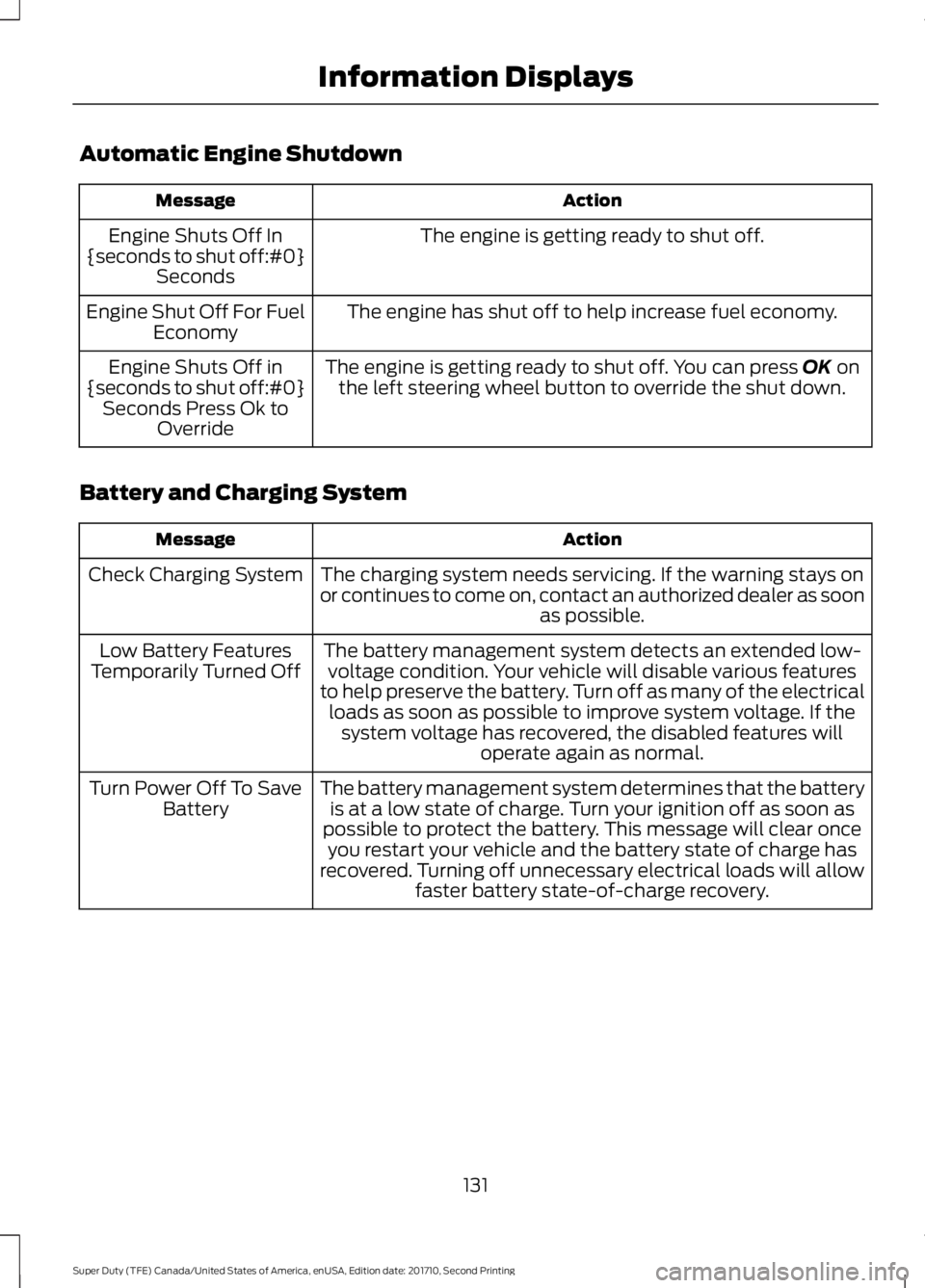
Automatic Engine Shutdown
ActionMessage
The engine is getting ready to shut off.Engine Shuts Off In{seconds to shut off:#0}Seconds
The engine has shut off to help increase fuel economy.Engine Shut Off For FuelEconomy
The engine is getting ready to shut off. You can press OK onthe left steering wheel button to override the shut down.Engine Shuts Off in{seconds to shut off:#0}Seconds Press Ok toOverride
Battery and Charging System
ActionMessage
The charging system needs servicing. If the warning stays onor continues to come on, contact an authorized dealer as soonas possible.
Check Charging System
The battery management system detects an extended low-voltage condition. Your vehicle will disable various featuresto help preserve the battery. Turn off as many of the electricalloads as soon as possible to improve system voltage. If thesystem voltage has recovered, the disabled features willoperate again as normal.
Low Battery FeaturesTemporarily Turned Off
The battery management system determines that the batteryis at a low state of charge. Turn your ignition off as soon aspossible to protect the battery. This message will clear onceyou restart your vehicle and the battery state of charge hasrecovered. Turning off unnecessary electrical loads will allowfaster battery state-of-charge recovery.
Turn Power Off To SaveBattery
131
Super Duty (TFE) Canada/United States of America, enUSA, Edition date: 201710, Second Printing
Information Displays
Page 138 of 642
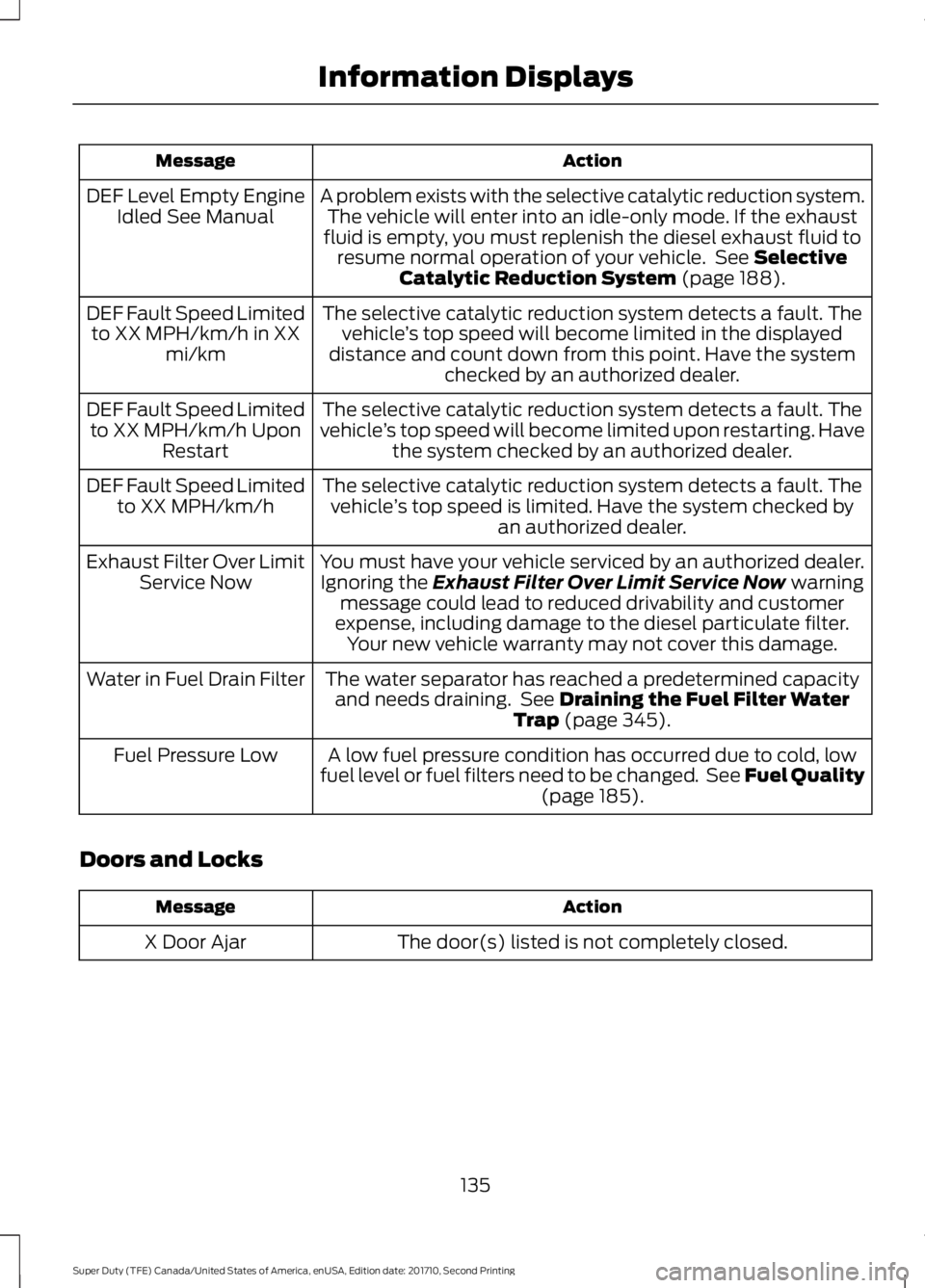
ActionMessage
A problem exists with the selective catalytic reduction system.The vehicle will enter into an idle-only mode. If the exhaustfluid is empty, you must replenish the diesel exhaust fluid toresume normal operation of your vehicle. See SelectiveCatalytic Reduction System (page 188).
DEF Level Empty EngineIdled See Manual
The selective catalytic reduction system detects a fault. Thevehicle’s top speed will become limited in the displayeddistance and count down from this point. Have the systemchecked by an authorized dealer.
DEF Fault Speed Limitedto XX MPH/km/h in XXmi/km
The selective catalytic reduction system detects a fault. Thevehicle’s top speed will become limited upon restarting. Havethe system checked by an authorized dealer.
DEF Fault Speed Limitedto XX MPH/km/h UponRestart
The selective catalytic reduction system detects a fault. Thevehicle’s top speed is limited. Have the system checked byan authorized dealer.
DEF Fault Speed Limitedto XX MPH/km/h
You must have your vehicle serviced by an authorized dealer.Ignoring the Exhaust Filter Over Limit Service Now warningmessage could lead to reduced drivability and customerexpense, including damage to the diesel particulate filter.Your new vehicle warranty may not cover this damage.
Exhaust Filter Over LimitService Now
The water separator has reached a predetermined capacityand needs draining. See Draining the Fuel Filter WaterTrap (page 345).
Water in Fuel Drain Filter
A low fuel pressure condition has occurred due to cold, lowfuel level or fuel filters need to be changed. See Fuel Quality(page 185).
Fuel Pressure Low
Doors and Locks
ActionMessage
The door(s) listed is not completely closed.X Door Ajar
135
Super Duty (TFE) Canada/United States of America, enUSA, Edition date: 201710, Second Printing
Information Displays
Page 140 of 642
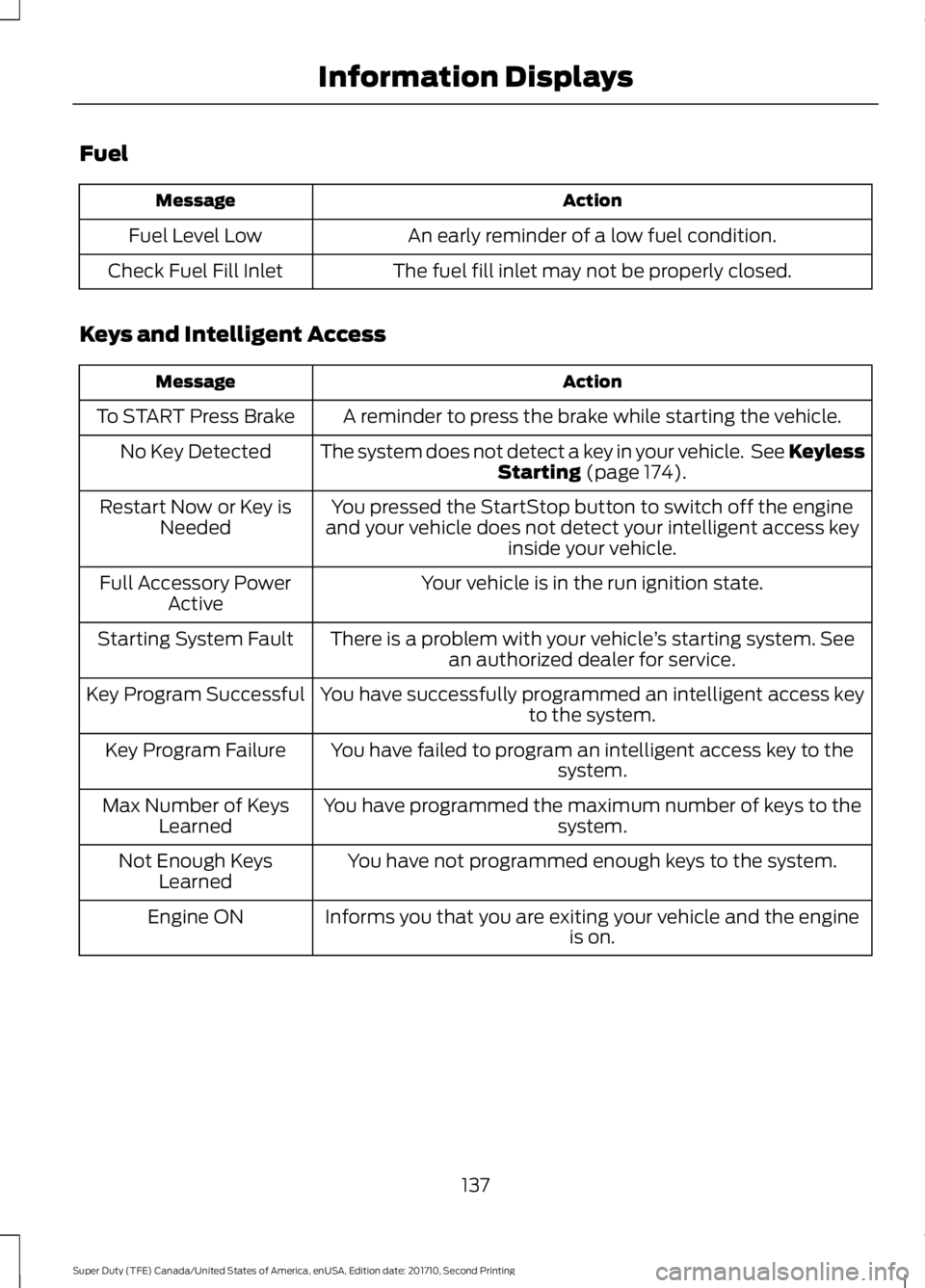
Fuel
ActionMessage
An early reminder of a low fuel condition.Fuel Level Low
The fuel fill inlet may not be properly closed.Check Fuel Fill Inlet
Keys and Intelligent Access
ActionMessage
A reminder to press the brake while starting the vehicle.To START Press Brake
The system does not detect a key in your vehicle. See KeylessStarting (page 174).No Key Detected
You pressed the StartStop button to switch off the engineand your vehicle does not detect your intelligent access keyinside your vehicle.
Restart Now or Key isNeeded
Your vehicle is in the run ignition state.Full Accessory PowerActive
There is a problem with your vehicle’s starting system. Seean authorized dealer for service.Starting System Fault
You have successfully programmed an intelligent access keyto the system.Key Program Successful
You have failed to program an intelligent access key to thesystem.Key Program Failure
You have programmed the maximum number of keys to thesystem.Max Number of KeysLearned
You have not programmed enough keys to the system.Not Enough KeysLearned
Informs you that you are exiting your vehicle and the engineis on.Engine ON
137
Super Duty (TFE) Canada/United States of America, enUSA, Edition date: 201710, Second Printing
Information Displays