climate settings FORD F450 SUPER DUTY 2017 Owners Manual
[x] Cancel search | Manufacturer: FORD, Model Year: 2017, Model line: F450 SUPER DUTY, Model: FORD F450 SUPER DUTY 2017Pages: 642, PDF Size: 12.35 MB
Page 8 of 642
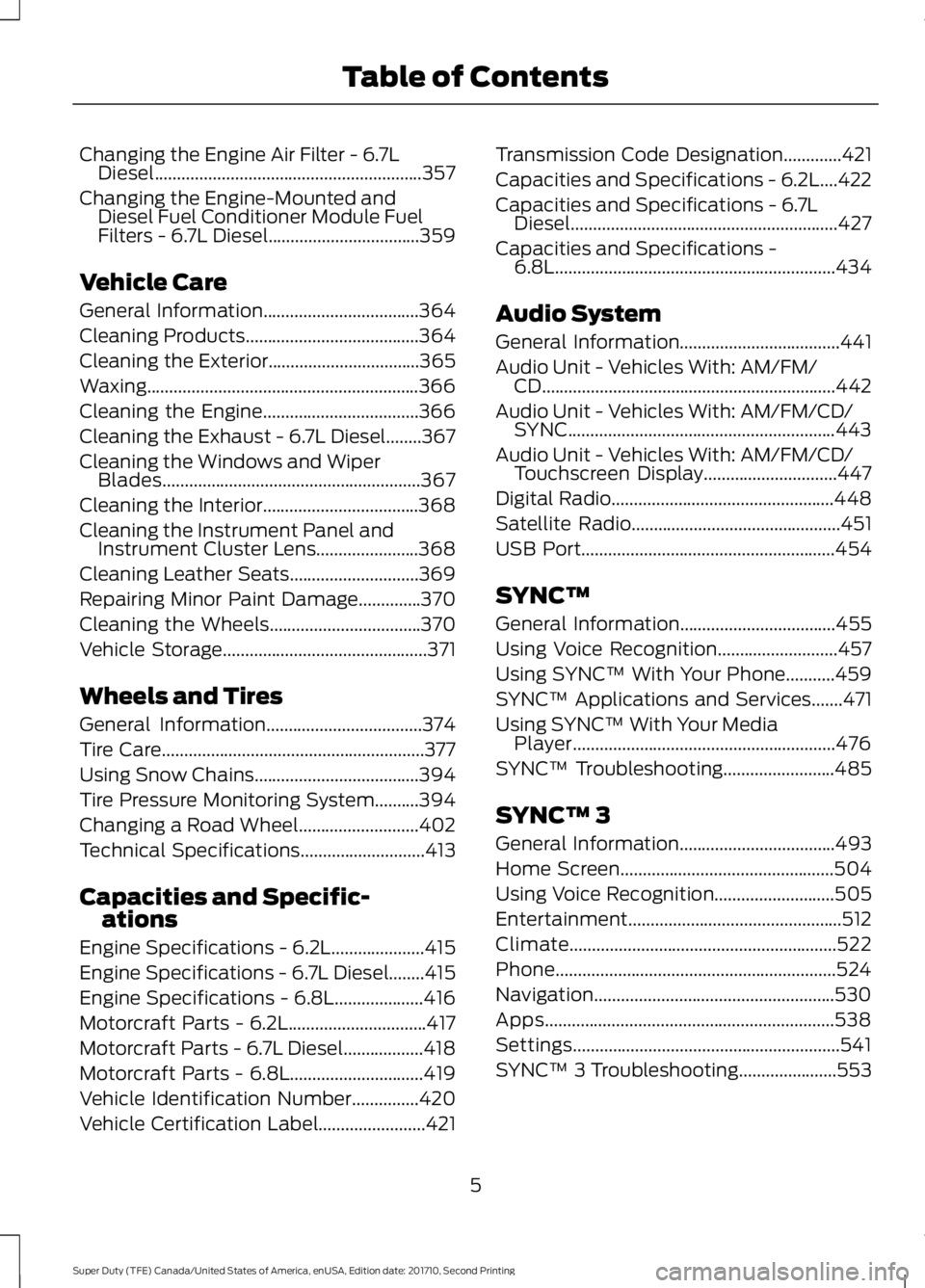
Changing the Engine Air Filter - 6.7LDiesel............................................................357
Changing the Engine-Mounted andDiesel Fuel Conditioner Module FuelFilters - 6.7L Diesel..................................359
Vehicle Care
General Information...................................364
Cleaning Products.......................................364
Cleaning the Exterior..................................365
Waxing.............................................................366
Cleaning the Engine...................................366
Cleaning the Exhaust - 6.7L Diesel........367
Cleaning the Windows and WiperBlades..........................................................367
Cleaning the Interior...................................368
Cleaning the Instrument Panel andInstrument Cluster Lens.......................368
Cleaning Leather Seats.............................369
Repairing Minor Paint Damage..............370
Cleaning the Wheels..................................370
Vehicle Storage..............................................371
Wheels and Tires
General Information...................................374
Tire Care...........................................................377
Using Snow Chains.....................................394
Tire Pressure Monitoring System..........394
Changing a Road Wheel...........................402
Technical Specifications............................413
Capacities and Specific-ations
Engine Specifications - 6.2L.....................415
Engine Specifications - 6.7L Diesel........415
Engine Specifications - 6.8L....................416
Motorcraft Parts - 6.2L...............................417
Motorcraft Parts - 6.7L Diesel..................418
Motorcraft Parts - 6.8L..............................419
Vehicle Identification Number...............420
Vehicle Certification Label........................421
Transmission Code Designation.............421
Capacities and Specifications - 6.2L....422
Capacities and Specifications - 6.7LDiesel............................................................427
Capacities and Specifications -6.8L...............................................................434
Audio System
General Information....................................441
Audio Unit - Vehicles With: AM/FM/CD..................................................................442
Audio Unit - Vehicles With: AM/FM/CD/SYNC............................................................443
Audio Unit - Vehicles With: AM/FM/CD/Touchscreen Display..............................447
Digital Radio..................................................448
Satellite Radio...............................................451
USB Port.........................................................454
SYNC™
General Information...................................455
Using Voice Recognition...........................457
Using SYNC™ With Your Phone...........459
SYNC™ Applications and Services.......471
Using SYNC™ With Your MediaPlayer...........................................................476
SYNC™ Troubleshooting.........................485
SYNC™ 3
General Information...................................493
Home Screen................................................504
Using Voice Recognition...........................505
Entertainment................................................512
Climate............................................................522
Phone...............................................................524
Navigation......................................................530
Apps.................................................................538
Settings............................................................541
SYNC™ 3 Troubleshooting......................553
5
Super Duty (TFE) Canada/United States of America, enUSA, Edition date: 201710, Second Printing
Table of Contents
Page 117 of 642
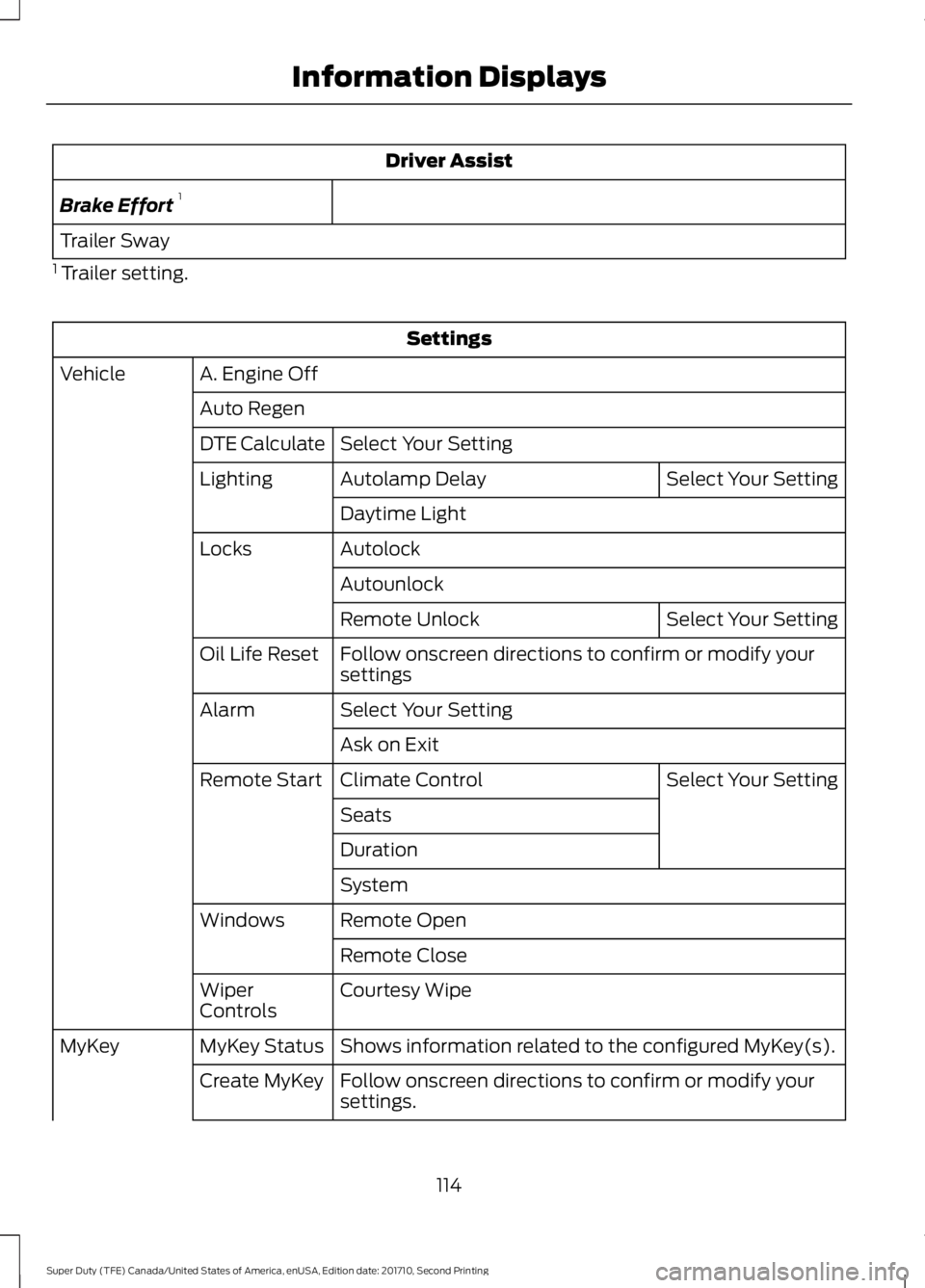
Driver Assist
Brake Effort1
Trailer Sway
1 Trailer setting.
Settings
A. Engine OffVehicle
Auto Regen
Select Your SettingDTE Calculate
Select Your SettingAutolamp DelayLighting
Daytime Light
AutolockLocks
Autounlock
Select Your SettingRemote Unlock
Follow onscreen directions to confirm or modify yoursettingsOil Life Reset
Select Your SettingAlarm
Ask on Exit
Select Your SettingClimate ControlRemote Start
Seats
Duration
System
Remote OpenWindows
Remote Close
Courtesy WipeWiperControls
Shows information related to the configured MyKey(s).MyKey StatusMyKey
Follow onscreen directions to confirm or modify yoursettings.Create MyKey
114
Super Duty (TFE) Canada/United States of America, enUSA, Edition date: 201710, Second Printing
Information Displays
Page 122 of 642
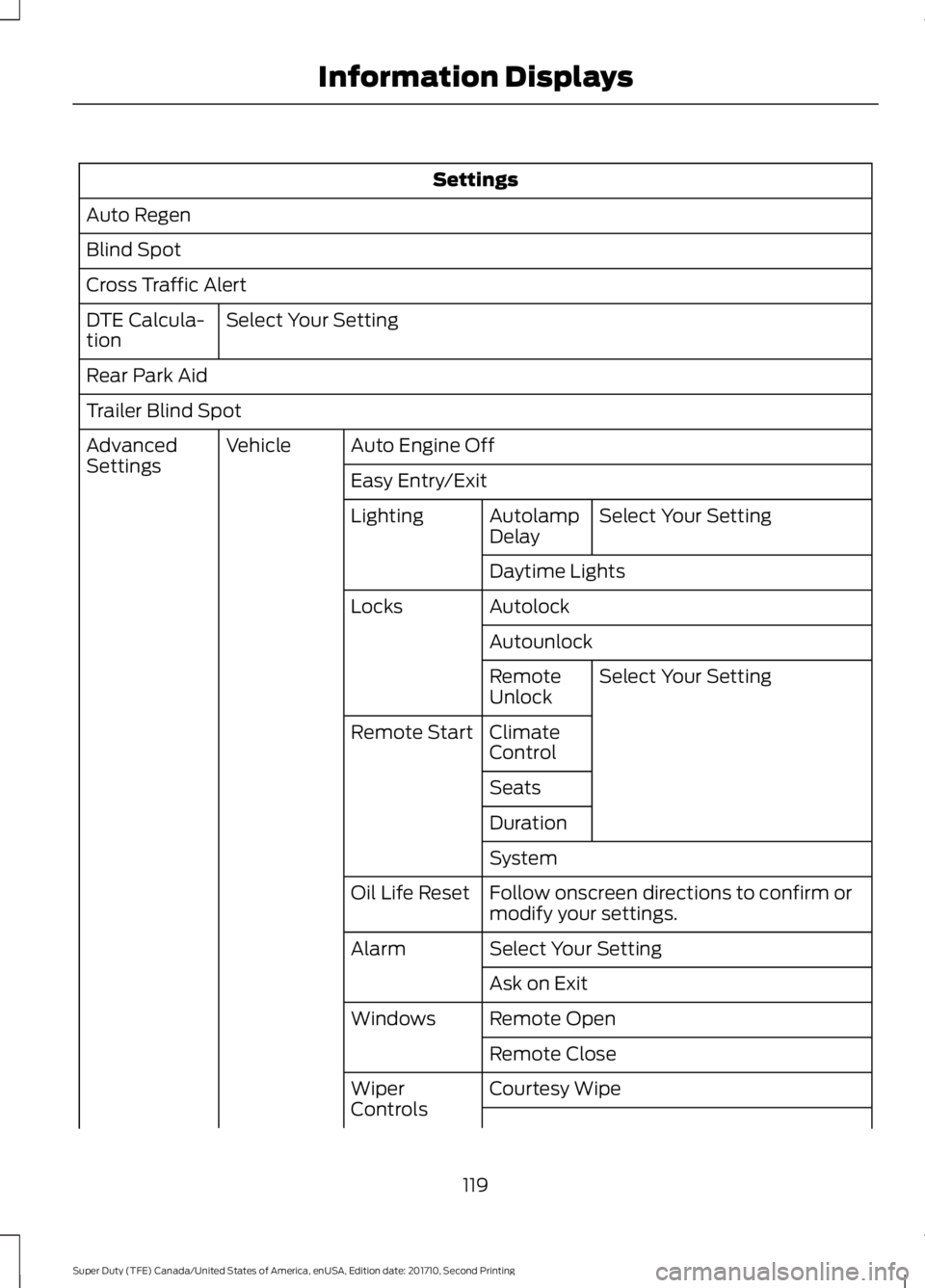
Settings
Auto Regen
Blind Spot
Cross Traffic Alert
Select Your SettingDTE Calcula-tion
Rear Park Aid
Trailer Blind Spot
Auto Engine OffVehicleAdvancedSettingsEasy Entry/Exit
Select Your SettingAutolampDelayLighting
Daytime Lights
AutolockLocks
Autounlock
Select Your SettingRemoteUnlock
ClimateControlRemote Start
Seats
Duration
System
Follow onscreen directions to confirm ormodify your settings.Oil Life Reset
Select Your SettingAlarm
Ask on Exit
Remote OpenWindows
Remote Close
Courtesy WipeWiperControls
119
Super Duty (TFE) Canada/United States of America, enUSA, Edition date: 201710, Second Printing
Information Displays
Page 130 of 642
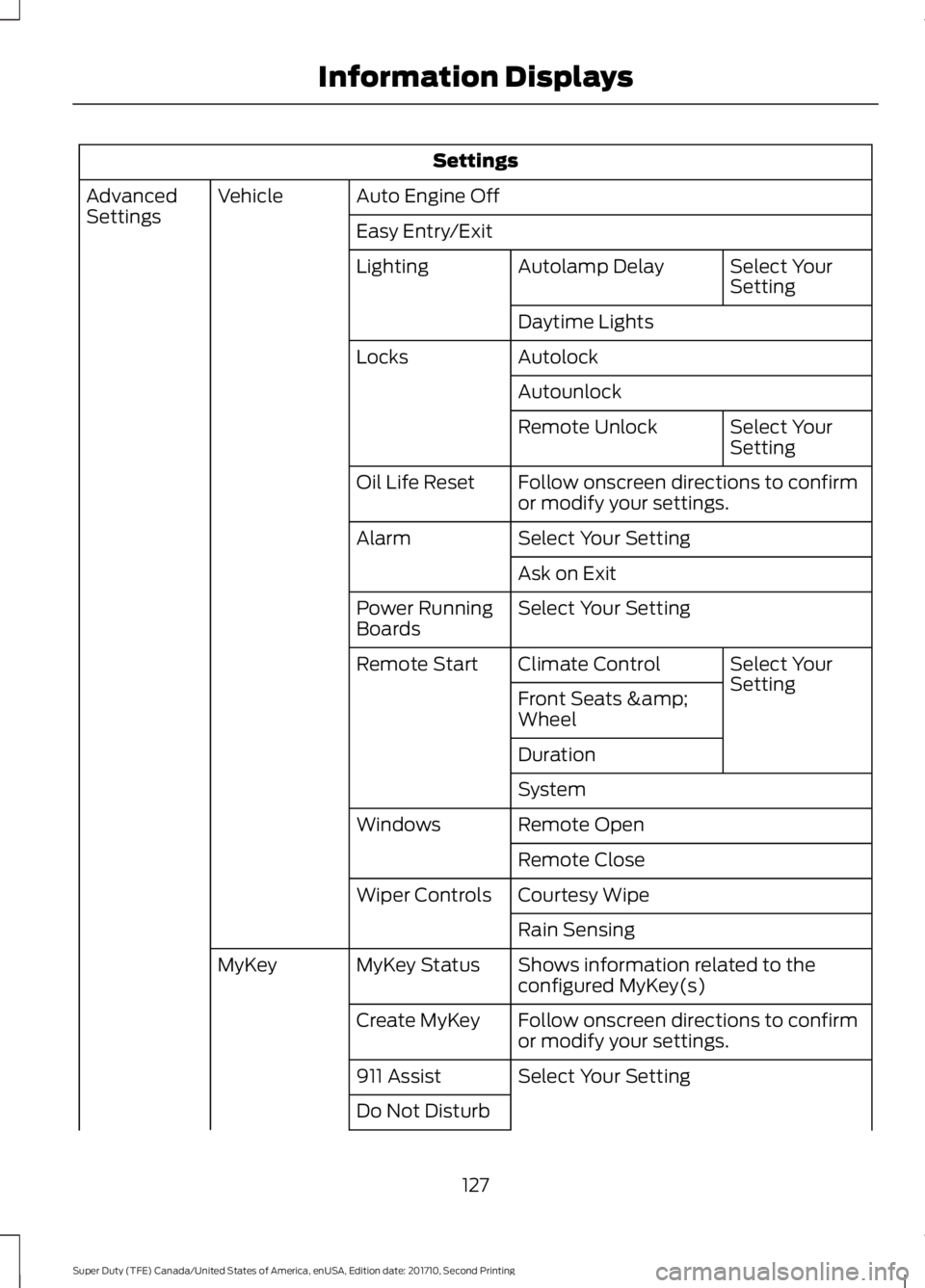
Settings
Auto Engine OffVehicleAdvancedSettingsEasy Entry/Exit
Select YourSettingAutolamp DelayLighting
Daytime Lights
AutolockLocks
Autounlock
Select YourSettingRemote Unlock
Follow onscreen directions to confirmor modify your settings.Oil Life Reset
Select Your SettingAlarm
Ask on Exit
Select Your SettingPower RunningBoards
Select YourSettingClimate ControlRemote Start
Front Seats &Wheel
Duration
System
Remote OpenWindows
Remote Close
Courtesy WipeWiper Controls
Rain Sensing
Shows information related to theconfigured MyKey(s)MyKey StatusMyKey
Follow onscreen directions to confirmor modify your settings.Create MyKey
Select Your Setting911 Assist
Do Not Disturb
127
Super Duty (TFE) Canada/United States of America, enUSA, Edition date: 201710, Second Printing
Information Displays
Page 150 of 642
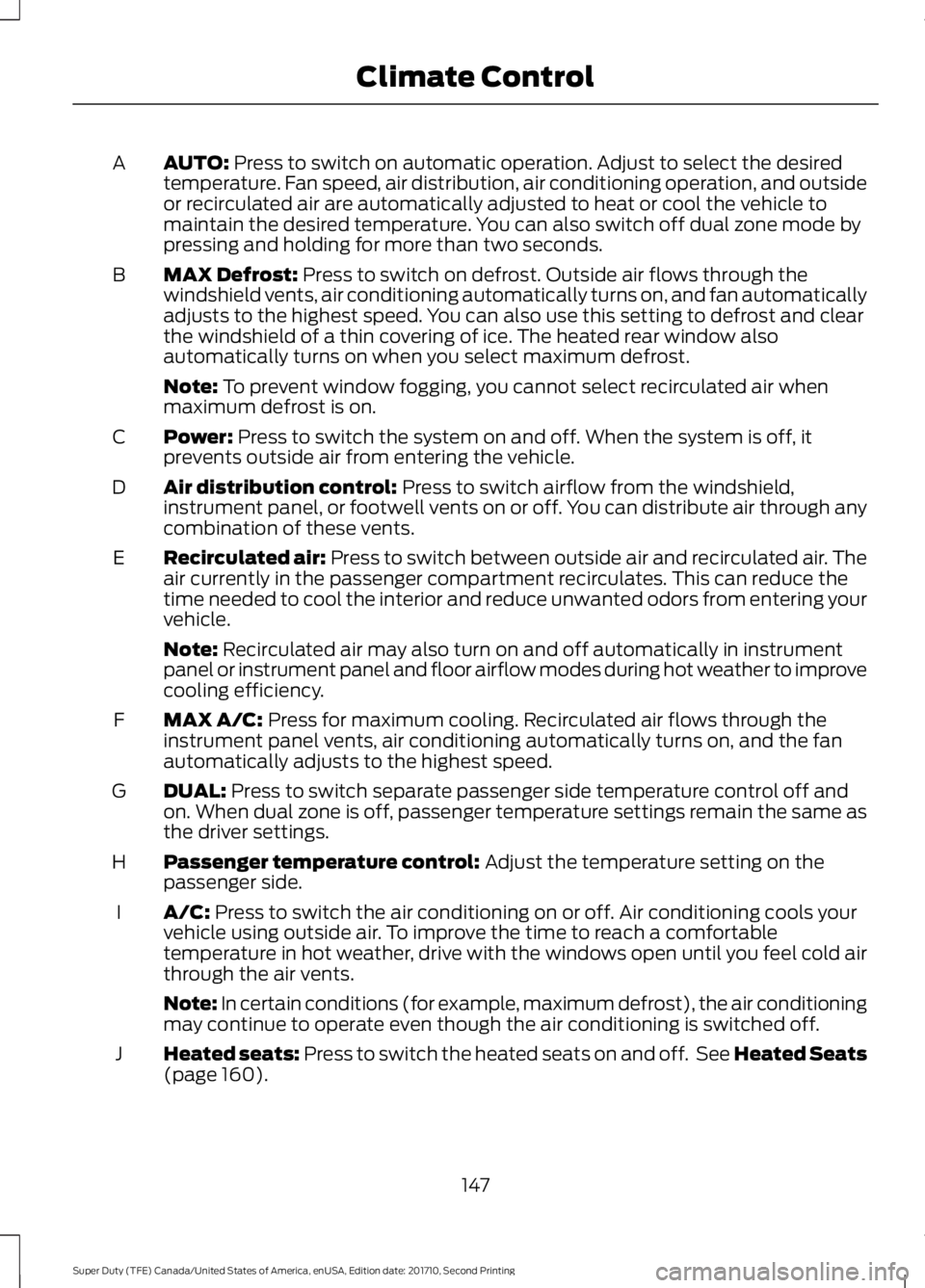
AUTO: Press to switch on automatic operation. Adjust to select the desiredtemperature. Fan speed, air distribution, air conditioning operation, and outsideor recirculated air are automatically adjusted to heat or cool the vehicle tomaintain the desired temperature. You can also switch off dual zone mode bypressing and holding for more than two seconds.
A
MAX Defrost: Press to switch on defrost. Outside air flows through thewindshield vents, air conditioning automatically turns on, and fan automaticallyadjusts to the highest speed. You can also use this setting to defrost and clearthe windshield of a thin covering of ice. The heated rear window alsoautomatically turns on when you select maximum defrost.
B
Note: To prevent window fogging, you cannot select recirculated air whenmaximum defrost is on.
Power: Press to switch the system on and off. When the system is off, itprevents outside air from entering the vehicle.C
Air distribution control: Press to switch airflow from the windshield,instrument panel, or footwell vents on or off. You can distribute air through anycombination of these vents.
D
Recirculated air: Press to switch between outside air and recirculated air. Theair currently in the passenger compartment recirculates. This can reduce thetime needed to cool the interior and reduce unwanted odors from entering yourvehicle.
E
Note: Recirculated air may also turn on and off automatically in instrumentpanel or instrument panel and floor airflow modes during hot weather to improvecooling efficiency.
MAX A/C: Press for maximum cooling. Recirculated air flows through theinstrument panel vents, air conditioning automatically turns on, and the fanautomatically adjusts to the highest speed.
F
DUAL: Press to switch separate passenger side temperature control off andon. When dual zone is off, passenger temperature settings remain the same asthe driver settings.
G
Passenger temperature control: Adjust the temperature setting on thepassenger side.H
A/C: Press to switch the air conditioning on or off. Air conditioning cools yourvehicle using outside air. To improve the time to reach a comfortabletemperature in hot weather, drive with the windows open until you feel cold airthrough the air vents.
I
Note: In certain conditions (for example, maximum defrost), the air conditioningmay continue to operate even though the air conditioning is switched off.
Heated seats: Press to switch the heated seats on and off. See Heated Seats(page 160).J
147
Super Duty (TFE) Canada/United States of America, enUSA, Edition date: 201710, Second Printing
Climate Control
Page 151 of 642
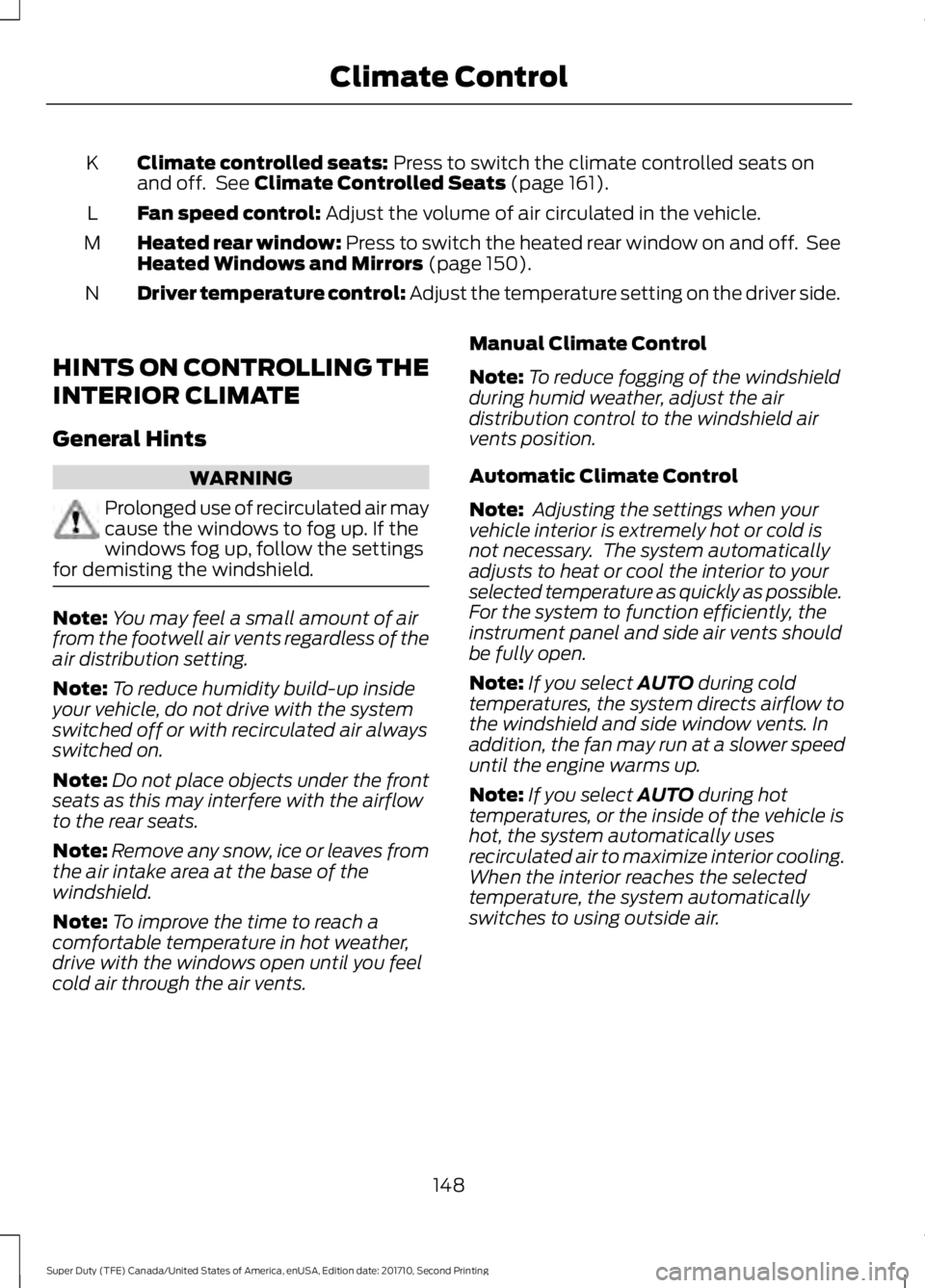
Climate controlled seats: Press to switch the climate controlled seats onand off. See Climate Controlled Seats (page 161).K
Fan speed control: Adjust the volume of air circulated in the vehicle.L
Heated rear window: Press to switch the heated rear window on and off. SeeHeated Windows and Mirrors (page 150).M
Driver temperature control: Adjust the temperature setting on the driver side.N
HINTS ON CONTROLLING THE
INTERIOR CLIMATE
General Hints
WARNING
Prolonged use of recirculated air maycause the windows to fog up. If thewindows fog up, follow the settingsfor demisting the windshield.
Note:You may feel a small amount of airfrom the footwell air vents regardless of theair distribution setting.
Note:To reduce humidity build-up insideyour vehicle, do not drive with the systemswitched off or with recirculated air alwaysswitched on.
Note:Do not place objects under the frontseats as this may interfere with the airflowto the rear seats.
Note:Remove any snow, ice or leaves fromthe air intake area at the base of thewindshield.
Note:To improve the time to reach acomfortable temperature in hot weather,drive with the windows open until you feelcold air through the air vents.
Manual Climate Control
Note:To reduce fogging of the windshieldduring humid weather, adjust the airdistribution control to the windshield airvents position.
Automatic Climate Control
Note: Adjusting the settings when yourvehicle interior is extremely hot or cold isnot necessary. The system automaticallyadjusts to heat or cool the interior to yourselected temperature as quickly as possible.For the system to function efficiently, theinstrument panel and side air vents shouldbe fully open.
Note:If you select AUTO during coldtemperatures, the system directs airflow tothe windshield and side window vents. Inaddition, the fan may run at a slower speeduntil the engine warms up.
Note:If you select AUTO during hottemperatures, or the inside of the vehicle ishot, the system automatically usesrecirculated air to maximize interior cooling.When the interior reaches the selectedtemperature, the system automaticallyswitches to using outside air.
148
Super Duty (TFE) Canada/United States of America, enUSA, Edition date: 201710, Second Printing
Climate Control
Page 152 of 642
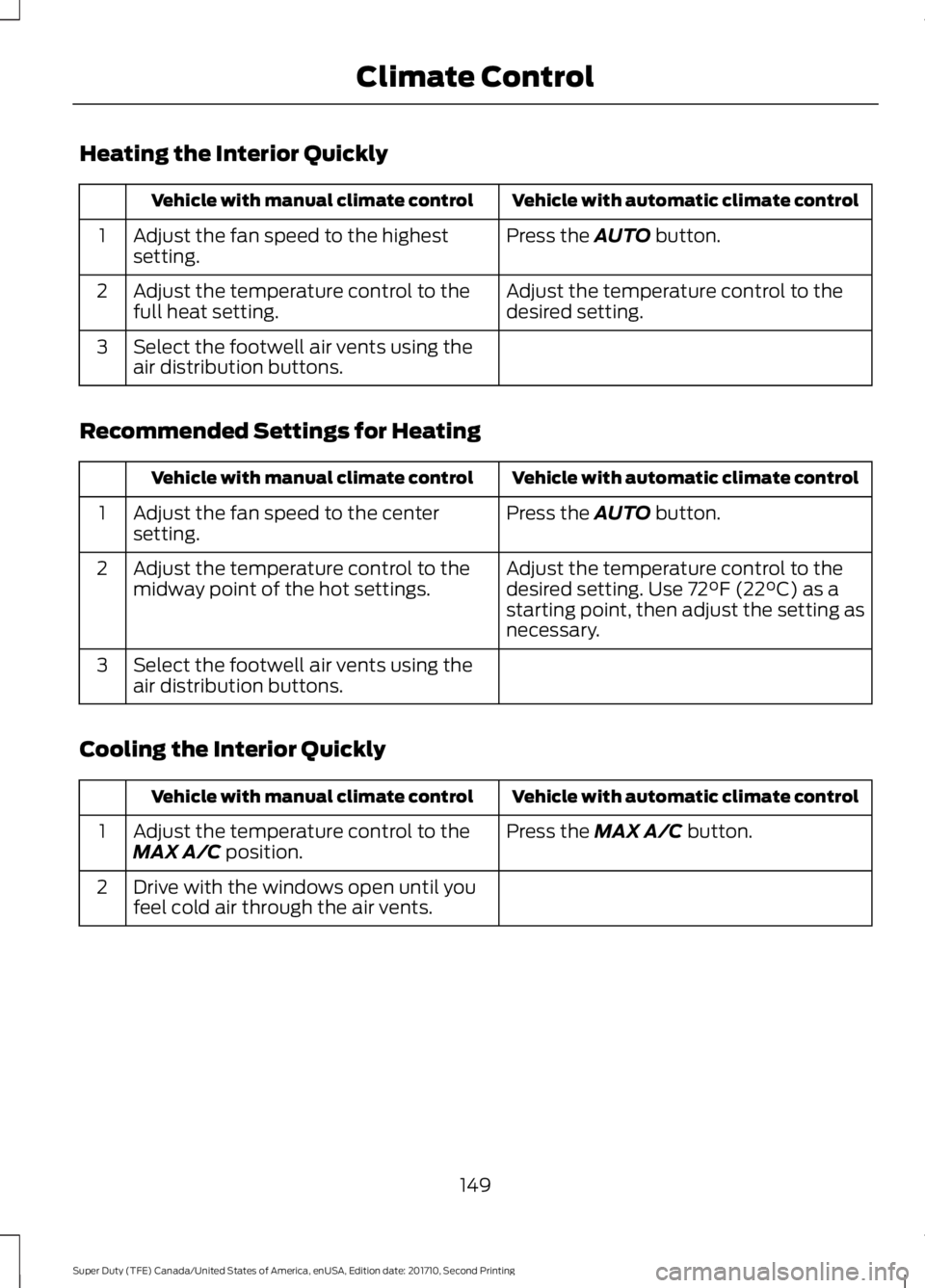
Heating the Interior Quickly
Vehicle with automatic climate controlVehicle with manual climate control
Press the AUTO button.Adjust the fan speed to the highestsetting.1
Adjust the temperature control to thedesired setting.Adjust the temperature control to thefull heat setting.2
Select the footwell air vents using theair distribution buttons.3
Recommended Settings for Heating
Vehicle with automatic climate controlVehicle with manual climate control
Press the AUTO button.Adjust the fan speed to the centersetting.1
Adjust the temperature control to thedesired setting. Use 72°F (22°C) as astarting point, then adjust the setting asnecessary.
Adjust the temperature control to themidway point of the hot settings.2
Select the footwell air vents using theair distribution buttons.3
Cooling the Interior Quickly
Vehicle with automatic climate controlVehicle with manual climate control
Press the MAX A/C button.Adjust the temperature control to theMAX A/C position.1
Drive with the windows open until youfeel cold air through the air vents.2
149
Super Duty (TFE) Canada/United States of America, enUSA, Edition date: 201710, Second Printing
Climate Control
Page 153 of 642
Recommended Settings for Cooling
Vehicle with automatic climate controlVehicle with manual climate control
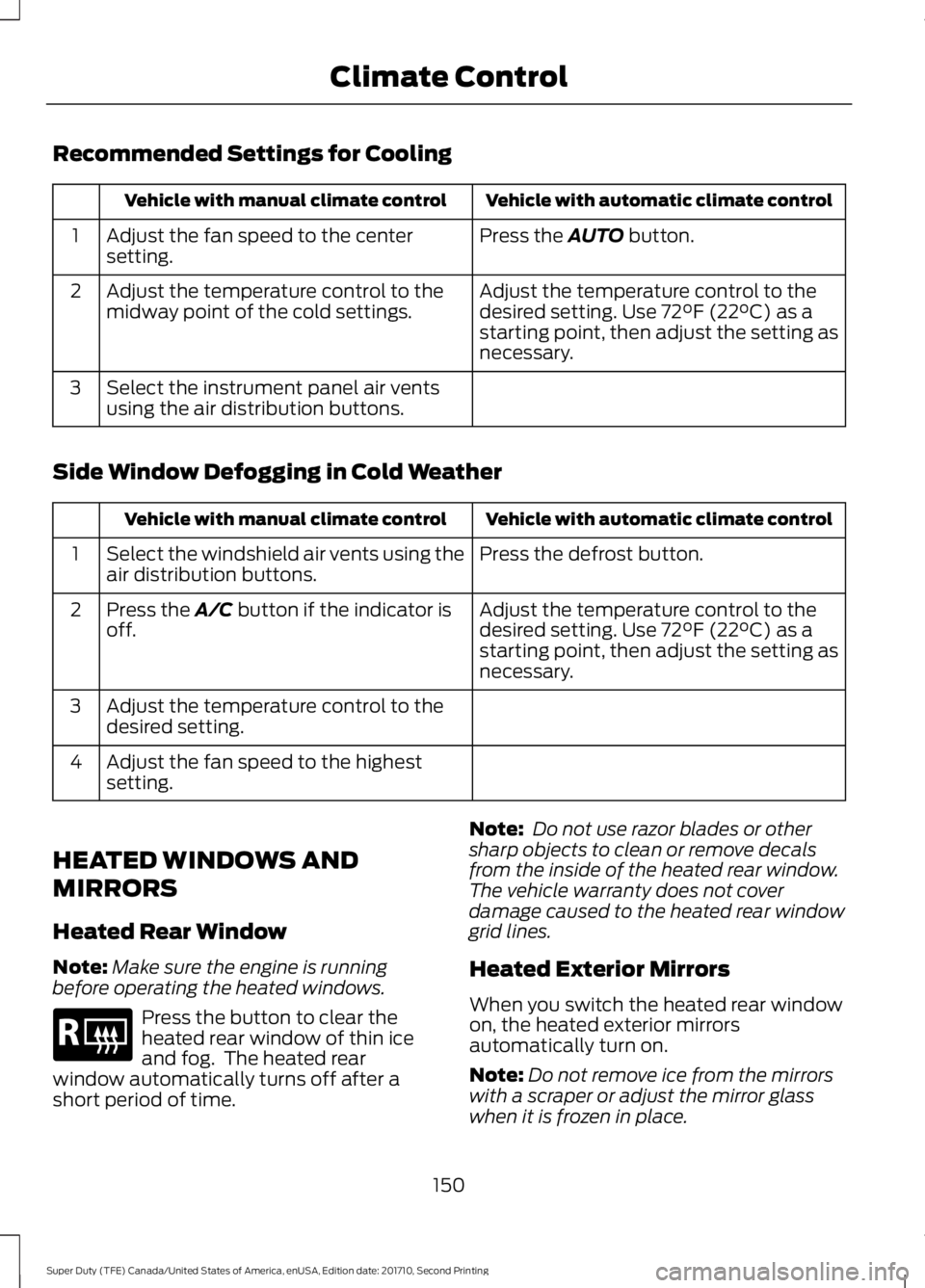
Press the AUTO button.Adjust the fan speed to the centersetting.1
Adjust the temperature control to thedesired setting. Use 72°F (22°C) as astarting point, then adjust the setting asnecessary.
Adjust the temperature control to themidway point of the cold settings.2
Select the instrument panel air ventsusing the air distribution buttons.3
Side Window Defogging in Cold Weather
Vehicle with automatic climate controlVehicle with manual climate control
Press the defrost button.Select the windshield air vents using theair distribution buttons.1
Adjust the temperature control to thedesired setting. Use 72°F (22°C) as astarting point, then adjust the setting asnecessary.
Press the A/C button if the indicator isoff.2
Adjust the temperature control to thedesired setting.3
Adjust the fan speed to the highestsetting.4
HEATED WINDOWS AND
MIRRORS
Heated Rear Window
Note:Make sure the engine is runningbefore operating the heated windows.
Press the button to clear theheated rear window of thin iceand fog. The heated rearwindow automatically turns off after ashort period of time.
Note: Do not use razor blades or othersharp objects to clean or remove decalsfrom the inside of the heated rear window.The vehicle warranty does not coverdamage caused to the heated rear windowgrid lines.
Heated Exterior Mirrors
When you switch the heated rear windowon, the heated exterior mirrorsautomatically turn on.
Note:Do not remove ice from the mirrorswith a scraper or adjust the mirror glasswhen it is frozen in place.
150
Super Duty (TFE) Canada/United States of America, enUSA, Edition date: 201710, Second Printing
Climate ControlE184884
Page 154 of 642
Note:Do not clean the mirror housing orglass with harsh abrasives, fuel or otherpetroleum-based cleaning products.
HEATED EXTERIOR MIRRORS
Note:Do not remove ice from the mirrorswith a scraper or adjust the mirror glasswhen it is frozen in place.
Note:Do not clean the mirror housing orglass with harsh abrasives, fuel or otherpetroleum-based cleaning products.
The heated exterior mirrors will removeice, mist and fog.
CABIN AIR FILTER
Your vehicle is equipped with a cabin airfilter, which gives you and your passengersthe following benefits:
•It improves your driving comfort byreducing particle concentration.
•It improves the interior compartmentcleanliness.
•It protects the climate controlcomponents from particle deposits.
You can locate the cabin air filter behindthe glove box.
Note:Make sure you have a cabin air filterinstalled at all times. This prevents foreignobjects from entering the system. Runningthe system without a filter in place couldresult in degradation or damage to thesystem.
Replace the filter at regular intervals. SeeScheduled Maintenance (page 573).
For additional cabin air filter information,or to replace the filter, see an authorizeddealer.
REMOTE START (If Equipped)
You can switch this feature on or off andadjust the settings using the informationdisplay.
The system adjusts the interiortemperature depending on your chosensettings during remote start.
You cannot adjust the climate controlsetting during remote start operation.When you switch the ignition on, theclimate control system returns to theprevious settings. You can now makeadjustments.
You need to switch on certainvehicle-dependent features, such as:
•Heated seats.
•Cooled seats.
•Heated steering wheel.
•Heated mirrors.
•Heated rear window.
Automatic Settings
In hot weather, the system is set to 72°F(22°C). The cooled seats are set to high(if available, and selected to AUTO in theinformation display).
In moderate weather, the system eitherheats or cools (based on previoussettings). The rear defroster, heatedmirrors and heated or cooled seats do notautomatically turn on.
In cold weather, the system is set to 72°F(22°C). The heated seats are set to high(if available, and selected to AUTO in theinformation display). The heated rearwindow and heated mirrors automaticallyturn on.
151
Super Duty (TFE) Canada/United States of America, enUSA, Edition date: 201710, Second Printing
Climate Control
Page 164 of 642
Press the heated seat symbol to cyclethrough the various heat settings and off.More indicator lights indicate warmersettings.
The heated seat module resets at everyignition run cycle. While the ignition is inthe on position, press the heated seatswitch to enable heating mode. Whenactivated, they turn off automatically whenyou switch off the engine.
CLIMATE CONTROLLED SEATS
(If Equipped)
Heated Seats
WARNING
People who are unable to feel painto their skin because of advancedage, chronic illness, diabetes, spinalcord injury, medication, alcohol use,exhaustion or other physical conditions,must exercise care when using the heatedseat. The heated seat may cause burnseven at low temperatures, especially ifused for long periods of time. Do not placeanything on the seat that insulates againstheat, such as a blanket or cushion. Thismay cause the heated seat to overheat.Do not puncture the seat with pins, needlesor other pointed objects. This may damagethe heating element which may cause theheated seat to overheat. An overheatedseat may cause serious personal injury.
Do not do the following:
•Place heavy objects on the seat.
•Operate the heated seat if water or anyother liquid spills on the seat. Allow theseat to dry thoroughly.
Note:The engine must be running to usethis feature.
Press the heated seat symbol to cyclethrough the various heat settings and off.More indicator lights indicate warmersettings.
Note:The heated seats may remain onafter you remote start your vehicle, basedon your remote start settings. The heatedseats may also turn on when you start yourvehicle if they were on when you switchedyour vehicle off.
Note:After 60 minutes of operation, theheated seats switch off. Press the heatedseat symbol to switch the heated seats on.
Cooled Seats
Note:The engine must be running to usethis feature.
161
Super Duty (TFE) Canada/United States of America, enUSA, Edition date: 201710, Second Printing
SeatsE146322 E146322 E146309