length FORD F450 SUPER DUTY 2017 Owners Manual
[x] Cancel search | Manufacturer: FORD, Model Year: 2017, Model line: F450 SUPER DUTY, Model: FORD F450 SUPER DUTY 2017Pages: 642, PDF Size: 12.35 MB
Page 39 of 642
The seatbelt pretensioners at the frontseating positions are designed to tightenthe seatbelts when activated. In frontaland near-frontal crashes, the seatbeltpretensioners may be activated alone or,if the crash is of sufficient severity, togetherwith the front airbags. In side crashes androllovers, the seatbelt pretensionersactivate when the Safety Canopy isactivated.
FASTENING THE SEATBELTS
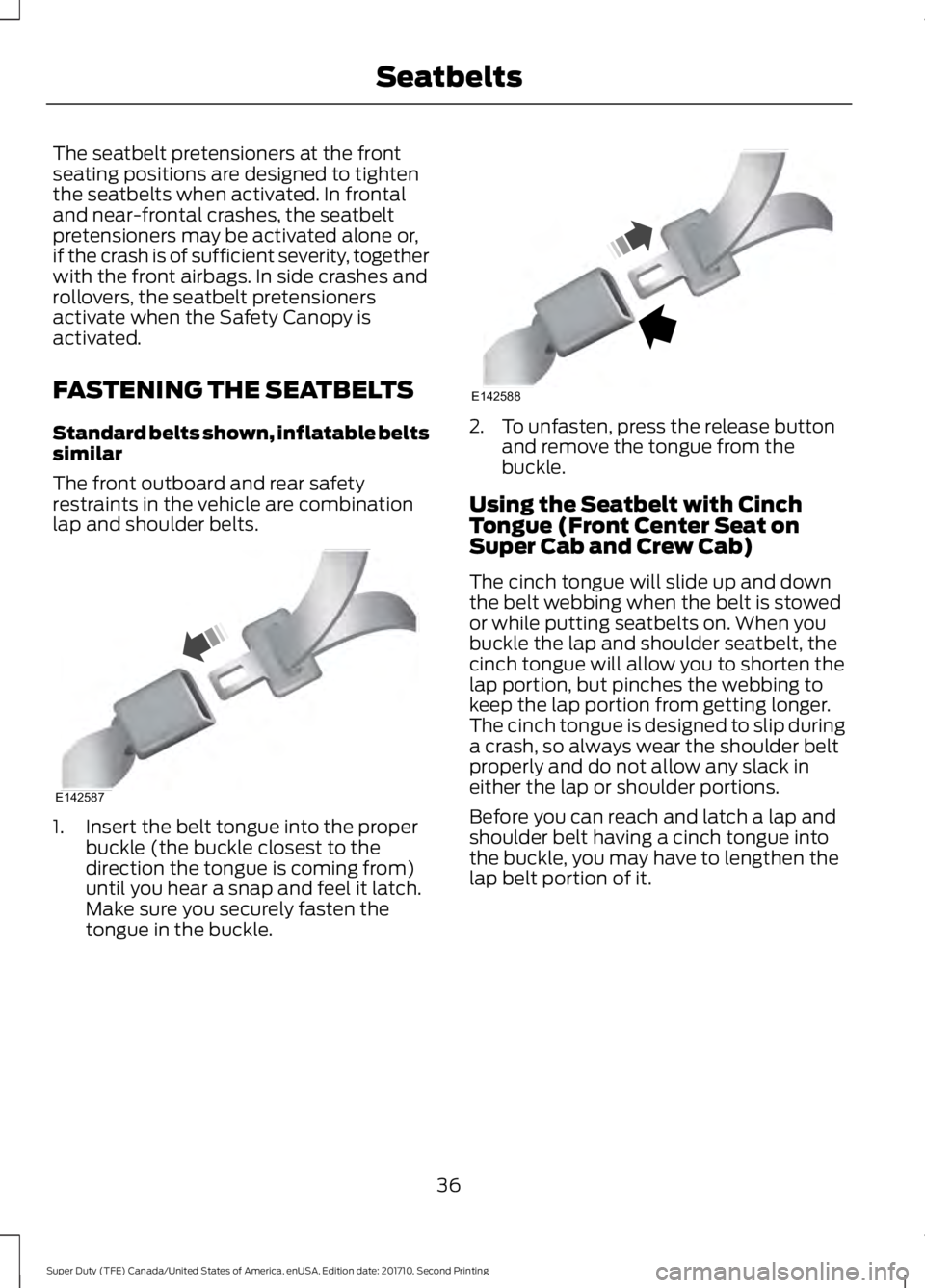
Standard belts shown, inflatable beltssimilar
The front outboard and rear safetyrestraints in the vehicle are combinationlap and shoulder belts.
1. Insert the belt tongue into the properbuckle (the buckle closest to thedirection the tongue is coming from)until you hear a snap and feel it latch.Make sure you securely fasten thetongue in the buckle.
2. To unfasten, press the release buttonand remove the tongue from thebuckle.
Using the Seatbelt with CinchTongue (Front Center Seat onSuper Cab and Crew Cab)
The cinch tongue will slide up and downthe belt webbing when the belt is stowedor while putting seatbelts on. When youbuckle the lap and shoulder seatbelt, thecinch tongue will allow you to shorten thelap portion, but pinches the webbing tokeep the lap portion from getting longer.The cinch tongue is designed to slip duringa crash, so always wear the shoulder beltproperly and do not allow any slack ineither the lap or shoulder portions.
Before you can reach and latch a lap andshoulder belt having a cinch tongue intothe buckle, you may have to lengthen thelap belt portion of it.
36
Super Duty (TFE) Canada/United States of America, enUSA, Edition date: 201710, Second Printing
SeatbeltsE142587 E142588
Page 40 of 642
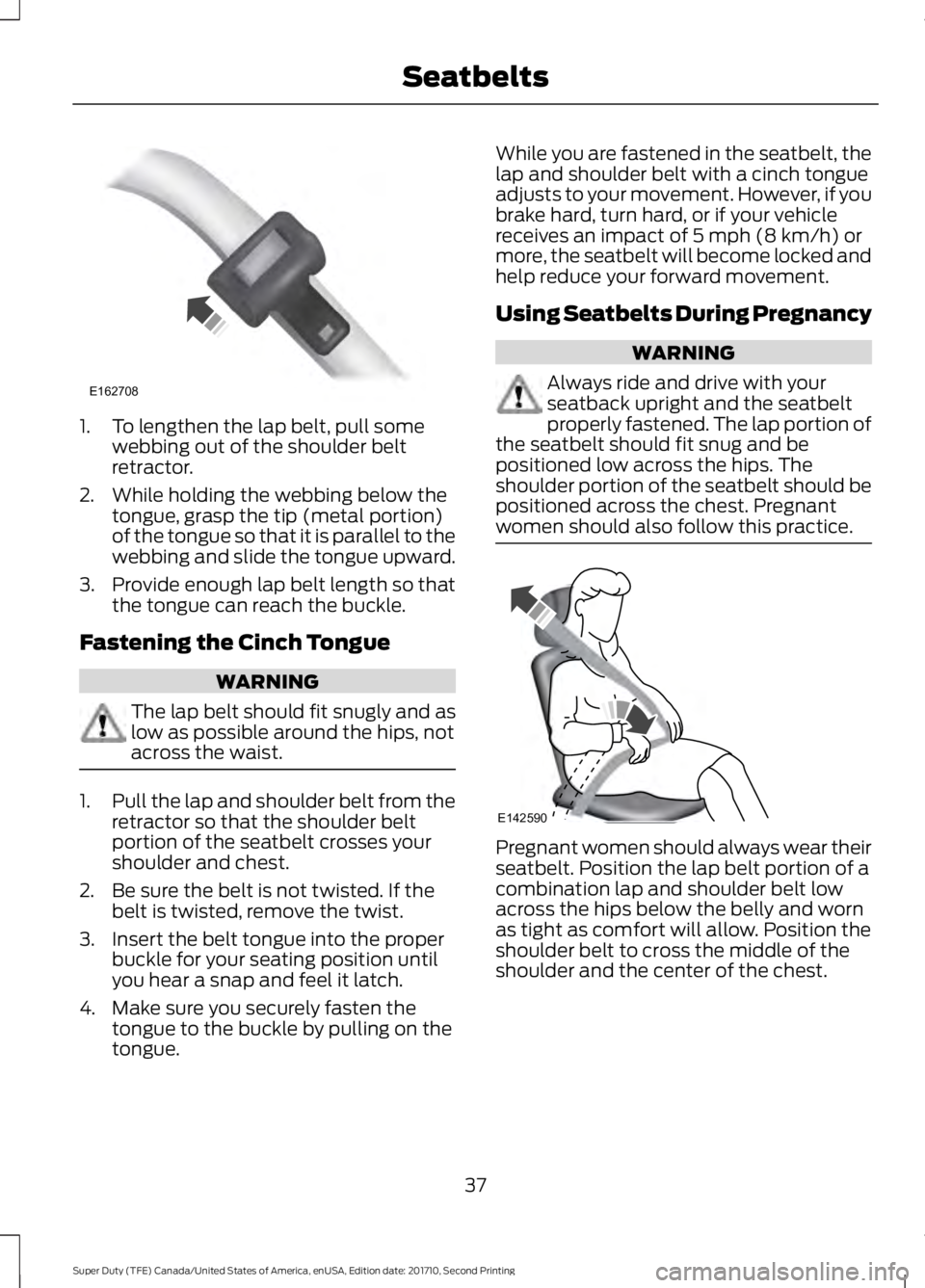
1. To lengthen the lap belt, pull somewebbing out of the shoulder beltretractor.
2. While holding the webbing below thetongue, grasp the tip (metal portion)of the tongue so that it is parallel to thewebbing and slide the tongue upward.
3.Provide enough lap belt length so thatthe tongue can reach the buckle.
Fastening the Cinch Tongue
WARNING
The lap belt should fit snugly and aslow as possible around the hips, notacross the waist.
1.Pull the lap and shoulder belt from theretractor so that the shoulder beltportion of the seatbelt crosses yourshoulder and chest.
2. Be sure the belt is not twisted. If thebelt is twisted, remove the twist.
3. Insert the belt tongue into the properbuckle for your seating position untilyou hear a snap and feel it latch.
4. Make sure you securely fasten thetongue to the buckle by pulling on thetongue.
While you are fastened in the seatbelt, thelap and shoulder belt with a cinch tongueadjusts to your movement. However, if youbrake hard, turn hard, or if your vehiclereceives an impact of 5 mph (8 km/h) ormore, the seatbelt will become locked andhelp reduce your forward movement.
Using Seatbelts During Pregnancy
WARNING
Always ride and drive with yourseatback upright and the seatbeltproperly fastened. The lap portion ofthe seatbelt should fit snug and bepositioned low across the hips. Theshoulder portion of the seatbelt should bepositioned across the chest. Pregnantwomen should also follow this practice.
Pregnant women should always wear theirseatbelt. Position the lap belt portion of acombination lap and shoulder belt lowacross the hips below the belly and wornas tight as comfort will allow. Position theshoulder belt to cross the middle of theshoulder and the center of the chest.
37
Super Duty (TFE) Canada/United States of America, enUSA, Edition date: 201710, Second Printing
SeatbeltsE162708 E142590
Page 41 of 642
Seatbelt Locking Modes
WARNINGS
After any vehicle crash, the seatbeltsystem at all passenger seatingpositions must be checked by anauthorized dealer to verify that theautomatic locking retractor feature forchild seats is still functioning properly. Inaddition, all seatbelts should be checkedfor proper function.
The belt and retractor must bereplaced if the seatbelt assemblyautomatic locking retractor featureor any other seatbelt function is notoperating properly when checked by anauthorized dealer. Failure to replace thebelt and retractor assembly could increasethe risk of injury in crashes.
All safety restraints in the vehicle arecombination lap and shoulder belts. Thedriver seatbelt has the first type of lockingmode, and the front outboard passengerand rear seat seatbelts have both types oflocking modes described as follows:
Vehicle Sensitive Mode
This is the normal retractor mode, whichallows free shoulder belt lengthadjustment to your movements andlocking in response to vehicle movement.For example, if the driver brakes suddenly,turns a corner sharply, or the vehiclereceives an impact of about 5 mph(8 km/h) or more, the combinationseatbelts will lock to help reduce forwardmovement of the driver and passengers.
In addition, the retractor is designed to lockif the webbing is pulled out too quickly. Ifthis occurs, let the belt retract slightly andpull webbing out again in a slow andcontrolled manner.
Automatic Locking Mode
In this mode, the shoulder belt isautomatically pre-locked. The belt will stillretract to remove any slack in the shoulderbelt. The automatic locking mode is notavailable on the driver seatbelt.
When to Use the Automatic LockingMode
Use this mode any time you install a childsafety seat in a front outboard passengerseating position in a Regular Cab,SuperCab, SuperCrew or any rear seatingposition of a SuperCab or SuperCrew. Theoptional front seat's center seatbelt has acinch mechanism. Children 12 years oldand under should be properly restrained ina rear seat whenever possible. See ChildSafety (page 17).
How to Use the Automatic LockingMode
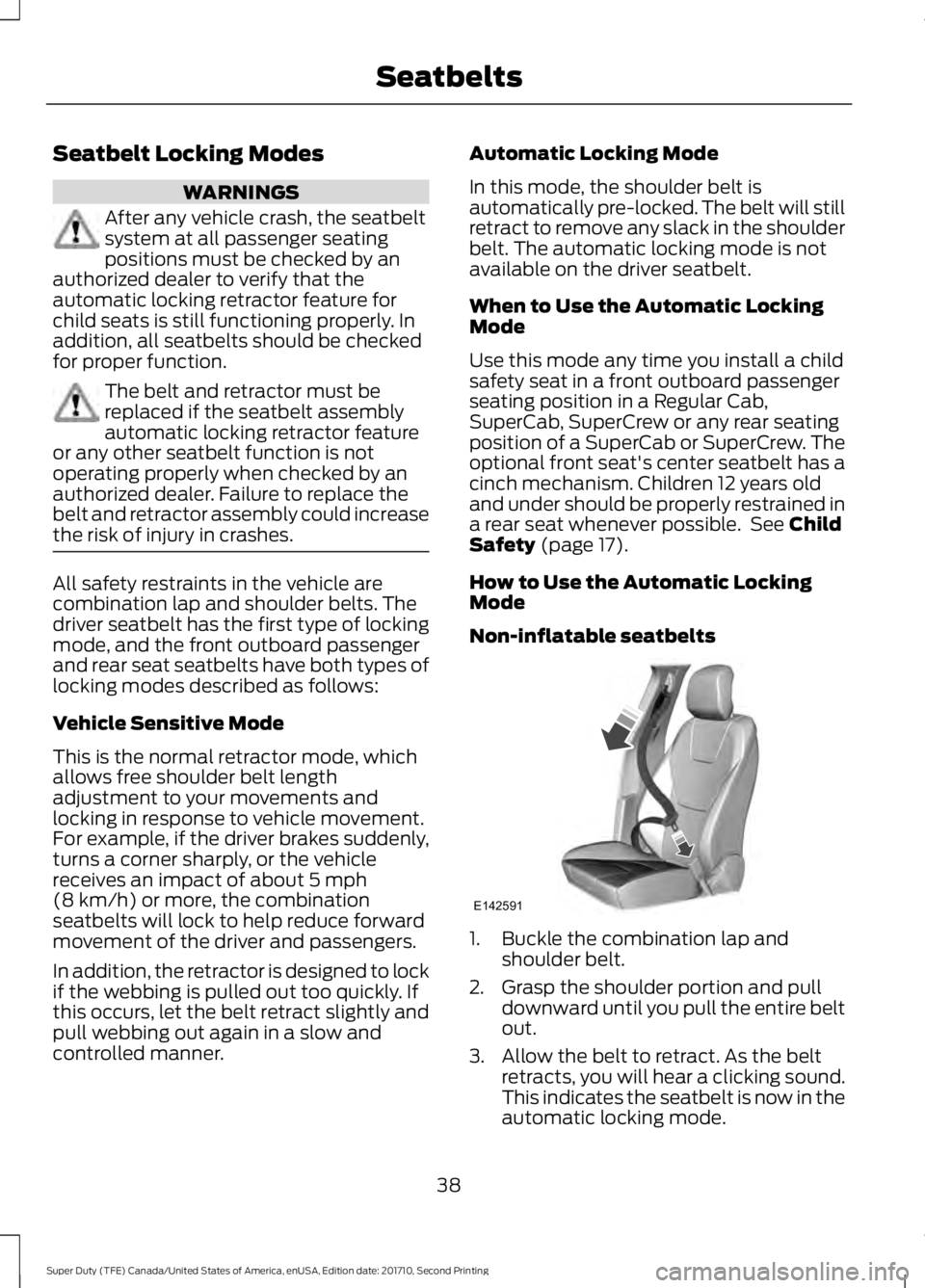
Non-inflatable seatbelts
1. Buckle the combination lap andshoulder belt.
2. Grasp the shoulder portion and pulldownward until you pull the entire beltout.
3. Allow the belt to retract. As the beltretracts, you will hear a clicking sound.This indicates the seatbelt is now in theautomatic locking mode.
38
Super Duty (TFE) Canada/United States of America, enUSA, Edition date: 201710, Second Printing
SeatbeltsE142591
Page 177 of 642
KEYLESS STARTING (If Equipped)
Note:The system may not function if thepassive key is close to metal objects orelectronic devices, for example keys or a cellphone.
Note:A valid passive key must be locatedinside your vehicle to switch the ignition onand start your vehicle.
Ignition Modes
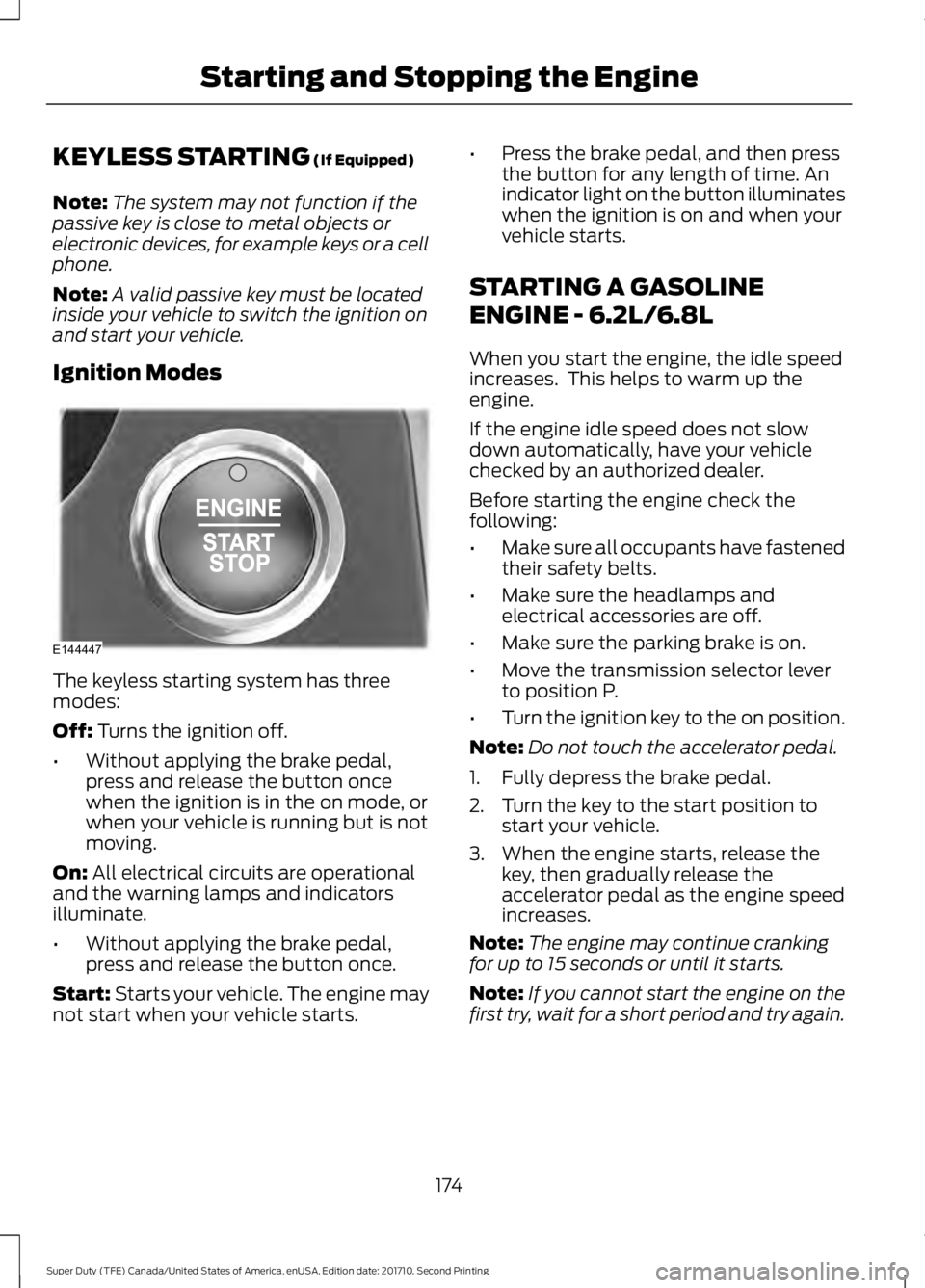
The keyless starting system has threemodes:
Off: Turns the ignition off.
•Without applying the brake pedal,press and release the button oncewhen the ignition is in the on mode, orwhen your vehicle is running but is notmoving.
On: All electrical circuits are operationaland the warning lamps and indicatorsilluminate.
•Without applying the brake pedal,press and release the button once.
Start: Starts your vehicle. The engine maynot start when your vehicle starts.
•Press the brake pedal, and then pressthe button for any length of time. Anindicator light on the button illuminateswhen the ignition is on and when yourvehicle starts.
STARTING A GASOLINE
ENGINE - 6.2L/6.8L
When you start the engine, the idle speedincreases. This helps to warm up theengine.
If the engine idle speed does not slowdown automatically, have your vehiclechecked by an authorized dealer.
Before starting the engine check thefollowing:
•Make sure all occupants have fastenedtheir safety belts.
•Make sure the headlamps andelectrical accessories are off.
•Make sure the parking brake is on.
•Move the transmission selector leverto position P.
•Turn the ignition key to the on position.
Note:Do not touch the accelerator pedal.
1. Fully depress the brake pedal.
2. Turn the key to the start position tostart your vehicle.
3. When the engine starts, release thekey, then gradually release theaccelerator pedal as the engine speedincreases.
Note:The engine may continue crankingfor up to 15 seconds or until it starts.
Note:If you cannot start the engine on thefirst try, wait for a short period and try again.
174
Super Duty (TFE) Canada/United States of America, enUSA, Edition date: 201710, Second Printing
Starting and Stopping the EngineE144447
Page 241 of 642
Auxiliary Camera (If Equipped)
Note:The auxiliary camera works withtrailers up to 50 ft (15 m) in length.
Access the auxiliary camera viewby pressing the button on thedisplay screen when in reverse(R).
The auxiliary camera system is a variantof the rear view camera, comprised of acamera with a built in amplifier. It isdesigned to display a rear view image fromthe back of a trailer while reversing. Theauxiliary camera is not meant as analternative to the rear view camera.
238
Super Duty (TFE) Canada/United States of America, enUSA, Edition date: 201710, Second Printing
Parking AidsE233727
Page 255 of 642
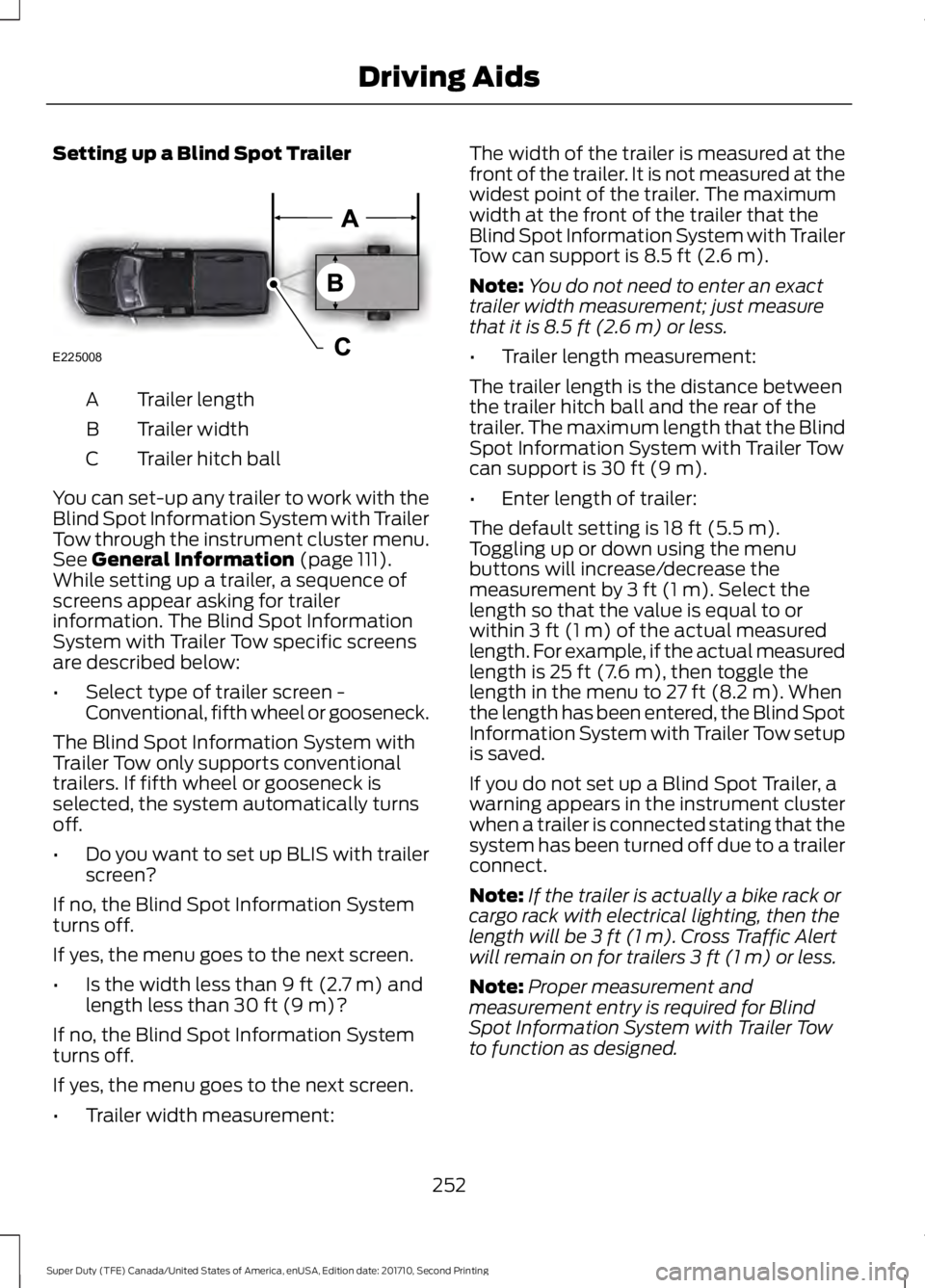
Setting up a Blind Spot Trailer
Trailer lengthA
Trailer widthB
Trailer hitch ballC
You can set-up any trailer to work with theBlind Spot Information System with TrailerTow through the instrument cluster menu.See General Information (page 111).While setting up a trailer, a sequence ofscreens appear asking for trailerinformation. The Blind Spot InformationSystem with Trailer Tow specific screensare described below:
•Select type of trailer screen -Conventional, fifth wheel or gooseneck.
The Blind Spot Information System withTrailer Tow only supports conventionaltrailers. If fifth wheel or gooseneck isselected, the system automatically turnsoff.
•Do you want to set up BLIS with trailerscreen?
If no, the Blind Spot Information Systemturns off.
If yes, the menu goes to the next screen.
•Is the width less than 9 ft (2.7 m) andlength less than 30 ft (9 m)?
If no, the Blind Spot Information Systemturns off.
If yes, the menu goes to the next screen.
•Trailer width measurement:
The width of the trailer is measured at thefront of the trailer. It is not measured at thewidest point of the trailer. The maximumwidth at the front of the trailer that theBlind Spot Information System with TrailerTow can support is 8.5 ft (2.6 m).
Note:You do not need to enter an exacttrailer width measurement; just measurethat it is 8.5 ft (2.6 m) or less.
•Trailer length measurement:
The trailer length is the distance betweenthe trailer hitch ball and the rear of thetrailer. The maximum length that the BlindSpot Information System with Trailer Towcan support is 30 ft (9 m).
•Enter length of trailer:
The default setting is 18 ft (5.5 m).Toggling up or down using the menubuttons will increase/decrease themeasurement by 3 ft (1 m). Select thelength so that the value is equal to orwithin 3 ft (1 m) of the actual measuredlength. For example, if the actual measuredlength is 25 ft (7.6 m), then toggle thelength in the menu to 27 ft (8.2 m). Whenthe length has been entered, the Blind SpotInformation System with Trailer Tow setupis saved.
If you do not set up a Blind Spot Trailer, awarning appears in the instrument clusterwhen a trailer is connected stating that thesystem has been turned off due to a trailerconnect.
Note:If the trailer is actually a bike rack orcargo rack with electrical lighting, then thelength will be 3 ft (1 m). Cross Traffic Alertwill remain on for trailers 3 ft (1 m) or less.
Note:Proper measurement andmeasurement entry is required for BlindSpot Information System with Trailer Towto function as designed.
252
Super Duty (TFE) Canada/United States of America, enUSA, Edition date: 201710, Second Printing
Driving AidsE225008
Page 256 of 642
System Operation
If you select a trailer in the display screenprior to connecting the trailer, the systemwill load that configuration and theinformation cluster displays a messagewhen the trailer is connected. A secondmessage appears stating Cross TrafficAlert has been turned off; the Blind SpotInformation System with Trailer Tow stillfunctions normally when driving forward.
If no trailer has been set up and a trailer isconnected, the instrument cluster providesa message indicating a trailer is connectedfollowed by a message asking to select atrailer from the existing list of trailers or toadd a trailer. In order for the Blind SpotInformation System with Trailer Tow tofunction, an existing trailer must beselected or a new trailer must be added. Ifthe request is ignored or if you exit thescreen, a message appears prompting youthat the system has been turned off dueto a trailer connect. This message may notappear until your vehicle speed reaches22 mph (35 km/h).
The Blind Spot Information System withTrailer Tow activates when driving forwardfor that particular trailer set up. If theignition is cycled, the Blind SpotInformation System with Trailer Towcontinues to function using the last trailerselected.
Trailer Considerations
The Blind Spot Information System withTrailer Tow is designed to work with anytrailer whose front width is 8.5 ft (2.6 m)or less and total length from the trailerhitch ball to the rear of the trailer is 30 ft(9 m) or less. Different trailers may causea slight change in performance as outlinedbelow.
Large box trailers may cause false alertsto trigger when driving next to buildings ornear parking cars. A false alert may alsooccur while making a 90-degree turn.
Trailers that are 8.5 ft (2.6 m) wide at thefront and have a total length greater than20 ft (6 m) may have delayed alerts frompassing vehicles when the vehicle ispassing at high speed.
A box trailer whose front width is 8.5 ft(2.6 m) may cause early alerts when youare over taking a vehicle.
When towing a clam shell or V-Nose boxtrailer with a front width of 8.5 ft (2.6 m),delayed alerts on merging vehicles that aretraveling the same speed as your vehiclemay occur.
System Errors
If the system senses a problem with theleft or right sensor, the telltale illuminatesand a message appears in the displayscreen. See Information Messages(page 128).
Switching the System Off and On
You can temporarily switch the Blind SpotInformation System off in the displayscreen. See General Information (page111). When the Blind Spot InformationSystem switches off, you do not receivealerts and the display screen shows asystem off message. The telltale in thecluster also illuminates. When you switchthe Blind Spot Information System on oroff, the alert indicators flash twice.
Note:The Blind Spot Information Systemremembers the last selected on or offsetting.
You can also have the Blind SpotInformation System switched offpermanently at an authorized dealer. Onceswitched off permanently, the system canonly be switched back on at an authorizeddealer.
253
Super Duty (TFE) Canada/United States of America, enUSA, Edition date: 201710, Second Printing
Driving Aids
Page 274 of 642
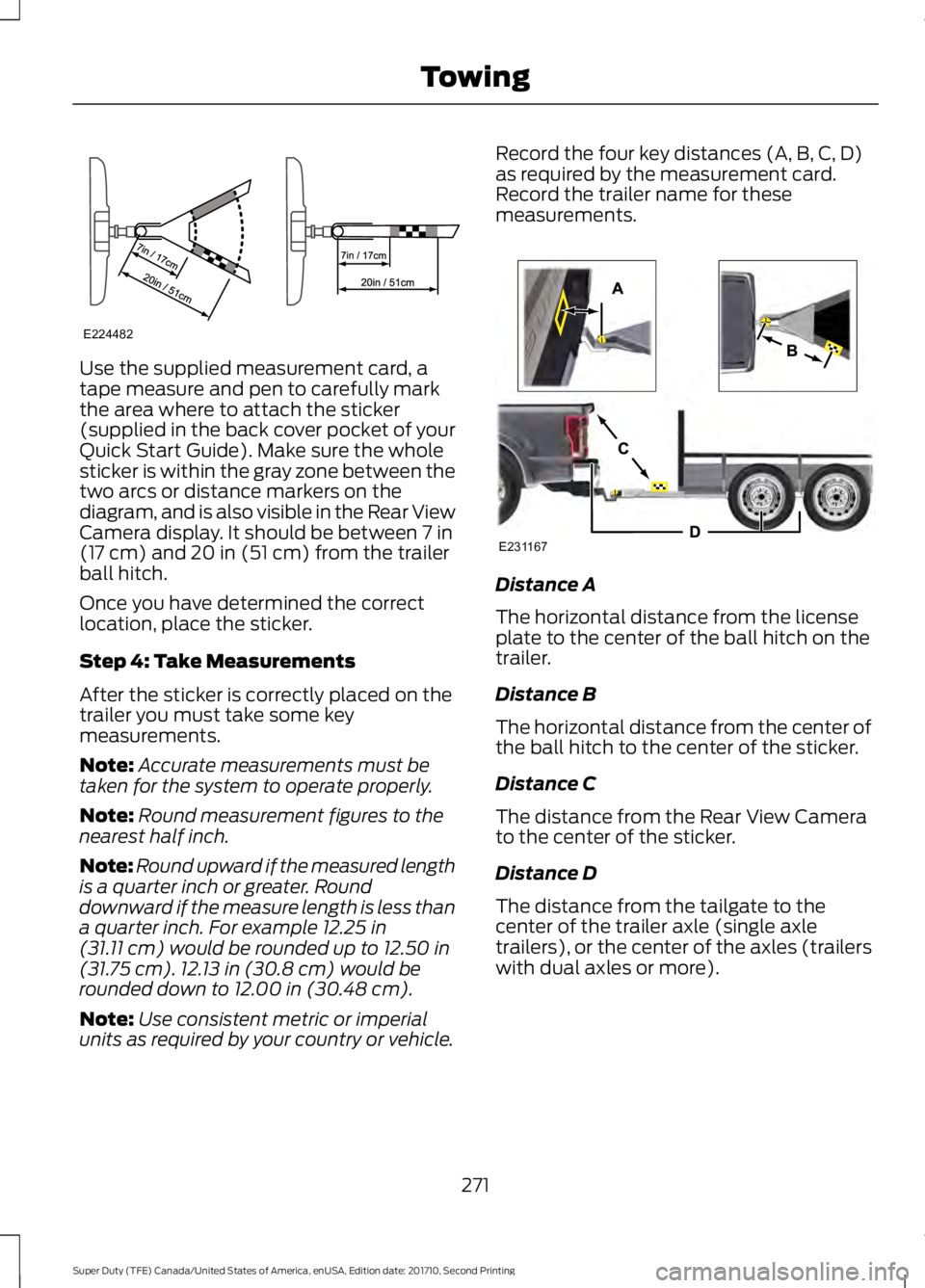
Use the supplied measurement card, atape measure and pen to carefully markthe area where to attach the sticker(supplied in the back cover pocket of yourQuick Start Guide). Make sure the wholesticker is within the gray zone between thetwo arcs or distance markers on thediagram, and is also visible in the Rear ViewCamera display. It should be between 7 in(17 cm) and 20 in (51 cm) from the trailerball hitch.
Once you have determined the correctlocation, place the sticker.
Step 4: Take Measurements
After the sticker is correctly placed on thetrailer you must take some keymeasurements.
Note:Accurate measurements must betaken for the system to operate properly.
Note:Round measurement figures to thenearest half inch.
Note:Round upward if the measured lengthis a quarter inch or greater. Rounddownward if the measure length is less thana quarter inch. For example 12.25 in(31.11 cm) would be rounded up to 12.50 in(31.75 cm). 12.13 in (30.8 cm) would berounded down to 12.00 in (30.48 cm).
Note:Use consistent metric or imperialunits as required by your country or vehicle.
Record the four key distances (A, B, C, D)as required by the measurement card.Record the trailer name for thesemeasurements.
Distance A
The horizontal distance from the licenseplate to the center of the ball hitch on thetrailer.
Distance B
The horizontal distance from the center ofthe ball hitch to the center of the sticker.
Distance C
The distance from the Rear View Camerato the center of the sticker.
Distance D
The distance from the tailgate to thecenter of the trailer axle (single axletrailers), or the center of the axles (trailerswith dual axles or more).
271
Super Duty (TFE) Canada/United States of America, enUSA, Edition date: 201710, Second Printing
TowingE224482 E231167
Page 277 of 642
Accurate measurements are critical tocorrect system function. If you need tocheck measurements entered or changethem you can access them through thetrailer menus in the information display.Choose the option to change the stickerfrom the change trailer settings menu. It isnot necessary to remove the sticker if youare just reviewing or changingmeasurements.
The following menu warnings or difficultiesmay occur during setup. Tips to resolvethem are listed below.
Measurement A has reached maximum orminimum value:
•The system is designed to work withdrawbars that have a license plate tohitch ball center measurement of 9 in(229 mm) to 16 in (406 mm) wheninstalled. Do not attempt to usedrawbars that have a length outsidethis range as the system performancewill be degraded and could causeimproper system function.
•Make sure that the measurement beingmade is the horizontal distance onlyfrom license plate and the hitch ballcenter. A straight line distance thatincludes any vertical rise or drop willincrease the measurement and makeit inaccurate. Inaccuratemeasurements will degrade systemperformance and could cause impropersystem function. See step 4 of thesetup instruction to reviewmeasurement instructions.
Measurement B has reached maximum orminimum value:
•Make sure that the sticker placementinstruction in step 3 of the setup hasbeen followed. Stickers placed outsidethe allowed zone will adversely affectthe system performance and couldcause improper feature function.
•Make sure that the measurement beingmade is the horizontal distance onlyfrom center of sticker to the hitch ballcenter. A straight line distance thatincludes any vertical rise or drop willincrease the measurement and causean inaccurate value to be entered intothe system. See step 4 of the setup foradditional measurement instructions.
Measurement C has reached maximum orminimum value:
•Make sure that the sticker placementinstructions in step 3 of the setup havebeen followed. Stickers placed outsidethe allowed zone will adversely affectthe system performance and couldcause improper feature function. If youhave met all the criteria for stickerplacement and you see this messagethis sticker is either too far below or tooclose to the camera to properlyrecognize the sticker. In order for thesystem to operate correctly the stickerheight must be lowered if you receivethe minimum warning or the stickerheight must be raised if you receive themaximum warning.
•Only one sticker can be placed onthe trailer for correct systemfunction. The previous sticker mustbe removed or covered so only onesticker is visible to the camera.
•Measurement B and C must bemeasured again if a new sticker isplaced on the trailer.
274
Super Duty (TFE) Canada/United States of America, enUSA, Edition date: 201710, Second Printing
Towing
Page 278 of 642
Measurement D has reached maximum orminimum value:
•Make sure that the measurement beingmade is the horizontal distance onlyfrom tailgate to the center of the singleaxle or the center of all the axles on thetrailer. See step 4 of the setup foradditional measurement instructions.The TBA system does not supporttrailer lengths outside the rangeallowed by the information display.
System is circling something beside thesticker or system cannot find the sticker:
•Make sure the rear camera is clean andthe sticker is clearly visible in thecamera image. Clean the camera andsticker if necessary.
•The camera system uses the enteredmeasurements to help locate thesticker. Inaccurate stickermeasurements will degrade thesystem’s ability to locate the sticker.Verify the measurements entered intothe system are accurate.
•Remove the incorrectly circled label ordecal if possible.
•If you cannot resolve the issue a newsticker location should be tried. Thesticker location must still meet therequirements noted in step 3 of thesetup instructions. Only one sticker canbe placed on the trailer for correctsystem function. The previous stickermust be removed or covered so onlyone sticker is visible to the camera.
Calibration
The system monitors various vehicleparameters to ensure your vehicle is beingdriven straight and the trailer straightbehind your vehicle. Any steering input ortrailer movement will pause the calibration.
For best results:
•Use a long, straight and smooth roadwhen attempting to calibrate.
•Drive straight forward.
•Drive between 4 mph (6 km/h) and24 mph (39 km/h).
System Operation
The following warnings or difficulties mayoccur during feature operation. Tips toresolve them are listed below.
The system is not available:
•The system relies on manysub-systems in your vehicle to operatecorrectly. If those sub-systems are notoperating correctly the system may notbe available.
•Low battery voltage is a conditionwhich will prevent the system fromoperating. Please make sure thebattery is correctly charged if thesystem is not available.
•You may need to drive your vehiclestraight forward above 25 mph(40 km/h) before the system isavailable again.
•If the message still displays take yourvehicle to an authorized dealer forservice.
275
Super Duty (TFE) Canada/United States of America, enUSA, Edition date: 201710, Second Printing
Towing