key FORD F450 SUPER DUTY 2018 Owners Manual
[x] Cancel search | Manufacturer: FORD, Model Year: 2018, Model line: F450 SUPER DUTY, Model: FORD F450 SUPER DUTY 2018Pages: 656, PDF Size: 9.34 MB
Page 4 of 656
Introduction
About This Manual...........................................7
Symbols Glossary.............................................8
Data Recording
................................................10
California Proposition 65
.............................12
Perchlorate.........................................................12
Ford Credit
.........................................................12
Replacement Parts Recommendation.......................................12
Special Notices
................................................13
Mobile Communications Equipment.....................................................14
Export Unique Options
.................................14
Environment
Protecting the Environment........................16
At a Glance
Instrument Panel Overview.........................17
Child Safety
General Information
.......................................19
Installing Child Restraints...........................20
Booster Seats
..................................................32
Child Restraint Positioning
.........................34
Child Safety Locks
.........................................35
Seatbelts
Principle of Operation...................................37
Fastening the Seatbelts..............................38
Seatbelt Height Adjustment
......................42
Seatbelt Warning Lamp and Indicator Chime
.............................................................42
Seatbelt Reminder
........................................43
Child Restraint and Seatbelt Maintenance................................................44
Seatbelt Extension........................................45 Supplementary Restraints
System
Principle of Operation..................................46
Driver and Passenger Airbags....................47
Side Airbags.....................................................52
Safety Canopy ™
.............................................53
Crash Sensors and Airbag Indicator.......54
Airbag Disposal...............................................55
Keys and Remote Controls
General Information on Radio Frequencies..................................................56
Remote Control
..............................................56
Replacing a Lost Key or Remote Control...........................................................62
MyKey ™
Principle of Operation..................................63
Creating a MyKey...........................................64
Clearing All MyKeys
.......................................65
Checking MyKey System Status...............65
Using MyKey With Remote Start Systems.........................................................65
MyKey Troubleshooting
...............................66
Doors and Locks
Locking and Unlocking.................................67
Keyless Entry
....................................................70
Tailgate
Tailgate Lock
.....................................................72
Removing the Tailgate..................................72
Tailgate Step
....................................................73
Bed Extender
....................................................74
Security
Passive Anti-Theft System
.........................76
Anti-Theft Alarm............................................78
1
Super Duty (TFE) Canada/United States of America, enUSA, Edition date: 201709, First Printing Table of Contents
Page 6 of 656
Auxiliary Power Points
Auxiliary Power Points.................................172
Storage Compartments
Center Console..............................................174
Overhead Console........................................174
Under Seat Storage.....................................174
Starting and Stopping the Engine
General Information
.....................................177
Ignition Switch................................................177
Keyless Starting
.............................................178
Starting a Gasoline Engine - 6.2L/ 6.8L................................................................178
Starting a Diesel Engine - 6.7L Diesel............................................................180
Switching Off the Engine - 6.7L Diesel
............................................................185
Engine Idle Shutdown................................185
Engine Block Heater....................................185
Fuel and Refueling
Safety Precautions
.......................................187
Fuel Quality - E85........................................188
Fuel Quality - Diesel....................................189
Fuel Quality - Gasoline................................191
Running Out of Fuel.....................................192
Refueling - Gasoline....................................192
Refueling - Diesel.........................................193
Fuel Consumption.......................................195
Engine Emission Control
Emission Law.................................................197
Catalytic Converter......................................198
Selective Catalytic Reductant System - Diesel...........................................................200
Diesel Particulate Filter
.............................204 Transmission
Automatic Transmission
...........................210
Power Take-Off
.............................................215
Four-Wheel Drive
Using Four-Wheel Drive.............................216
Rear Axle
Limited Slip Differential............................225
Electronic Locking Differential
................225
Brakes
General Information
....................................227
Hints on Driving With Anti-Lock Brakes..........................................................229
Parking Brake................................................229
Hill Start Assist.............................................229
Traction Control
Principle of Operation.................................231
Using Traction Control................................231
Stability Control
Principle of Operation
................................232
Using Stability Control...............................233
Terrain Control
Principle of Operation................................235
Using Hill Descent Control.......................235
Parking Aids
Principle of Operation
................................237
Rear Parking Aid...........................................237
Rear View Camera.......................................238
360 Degree Camera....................................241
Cruise Control
Principle of Operation................................245
Using Cruise Control...................................245
3
Super Duty (TFE) Canada/United States of America, enUSA, Edition date: 201709, First Printing Table of Contents
Page 20 of 656
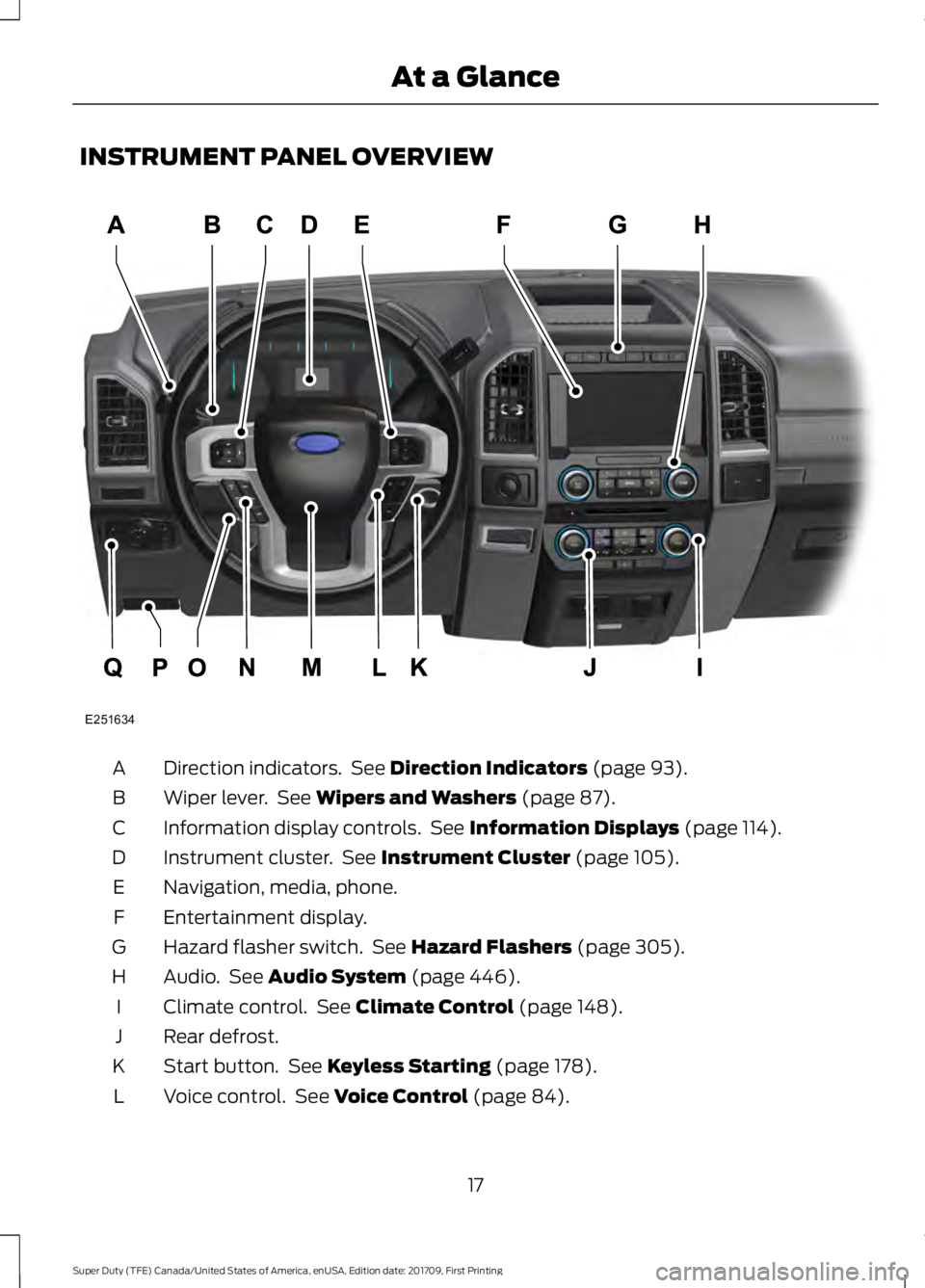
INSTRUMENT PANEL OVERVIEW
Direction indicators. See Direction Indicators (page 93).
A
Wiper lever. See
Wipers and Washers (page 87).
B
Information display controls. See
Information Displays (page 114).
C
Instrument cluster. See
Instrument Cluster (page 105).
D
Navigation, media, phone.
E
Entertainment display.
F
Hazard flasher switch. See
Hazard Flashers (page 305).
G
Audio. See
Audio System (page 446).
H
Climate control. See
Climate Control (page 148).
I
Rear defrost.
J
Start button. See
Keyless Starting (page 178).
K
Voice control. See
Voice Control (page 84).
L
17
Super Duty (TFE) Canada/United States of America, enUSA, Edition date: 201709, First Printing At a GlanceE251634
Page 47 of 656
Deactivating and Activating the
Belt-Minder Feature (Driver only)
WARNING
While the system allows you to
deactivate it, this system is designed
to improve your chances of being
safely belted and surviving an accident.
We recommend you leave the system
activated for yourself and others who may
use the vehicle. To reduce the risk of injury,
do not deactivate or activate the system
while driving the vehicle. Note:
If you are using MyKey, you cannot
disable the Belt-Minder. Also, if the
Belt-Minder has been previously disabled,
it will be re-enabled during the use of
MyKey. See MyKey ™ (page 63).
Read Steps 1 - 4 thoroughly before
proceeding with the programming
procedure.
Before following the procedure, make sure
that:
• The parking brake is set.
• The transmission is in park (P).
• The ignition is off.
• All vehicle doors are closed.
• The driver seatbelt is unbuckled.
1. Switch the ignition on. Do not start the
engine.
2. Wait until the seatbelt warning light turns off (about one minute). You must
complete Step 3 within 30 seconds
after the seatbelt warning light turns
off.
3. Buckle then unbuckle the seatbelt three times at a moderate speed,
ending with the seatbelt in the
unbuckled state. After Step 3, the
seatbelt warning light turns on. 4. While the seatbelt warning light is on,
buckle then unbuckle the seatbelt.
After Step 4, the seatbelt warning light
flashes for confirmation.
• This will switch the feature off if it is
currently on.
• This will switch the feature on if it is
currently off.
CHILD RESTRAINT AND
SEATBELT MAINTENANCE
Inspect the vehicle safety belts and child
safety seat systems periodically to make
sure they work properly and are not
damaged. Inspect the vehicle and child
seat safety belts to make sure there are no
nicks, tears or cuts. Replace if necessary.
All vehicle safety belt assemblies, including
retractors, buckles, front safety belt buckle
assemblies, buckle support assemblies
(slide bar-if equipped), shoulder belt
height adjusters (if equipped), shoulder
belt guide on seat back (if equipped), child
safety seat LATCH and tether anchors, and
attaching hardware, should be inspected
after a crash. Read the child restraint
manufacturer's instructions for additional
inspection and maintenance information
specific to the child restraint.
Ford Motor Company recommends that
all safety belt assemblies in use in vehicles
involved in a crash be replaced. However,
if the crash was minor and an authorized
dealer finds that the belts do not show
damage and continue to operate properly,
they do not need to be replaced. Safety
belt assemblies not in use during a crash
should also be inspected and replaced if
either damage or improper operation is
noted.
Properly care for safety belts. See Vehicle
Care
(page 371).
44
Super Duty (TFE) Canada/United States of America, enUSA, Edition date: 201709, First Printing Seatbelts
Page 51 of 656
Passenger airbag
Passenger airbag status
indicator
Switch position
Disabled
OFF: Lit
Off
ON: Unlit Enabled
OFF: Unlit
On
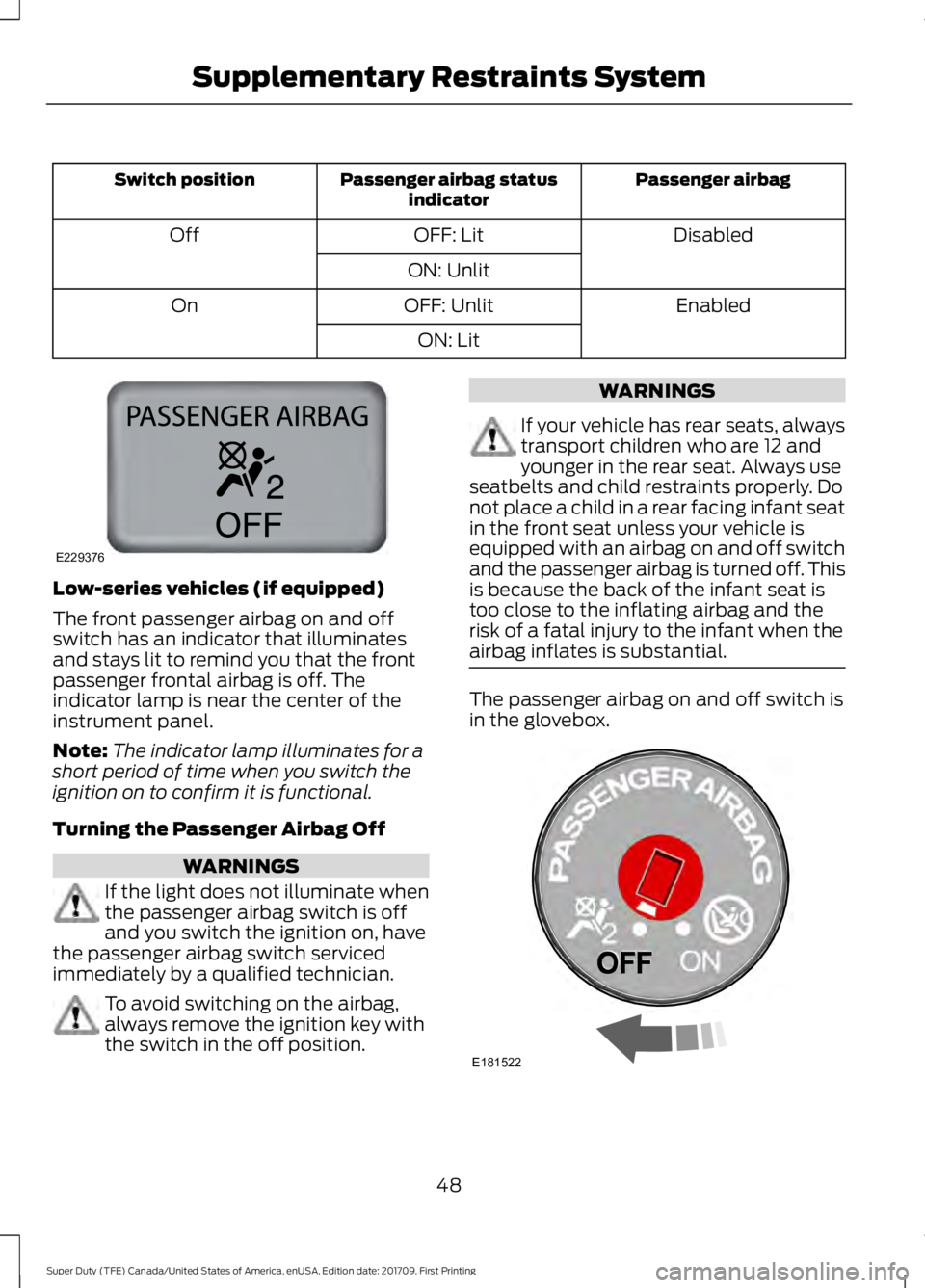
ON: LitLow-series vehicles (if equipped)
The front passenger airbag on and off
switch has an indicator that illuminates
and stays lit to remind you that the front
passenger frontal airbag is off. The
indicator lamp is near the center of the
instrument panel.
Note:
The indicator lamp illuminates for a
short period of time when you switch the
ignition on to confirm it is functional.
Turning the Passenger Airbag Off WARNINGS
If the light does not illuminate when
the passenger airbag switch is off
and you switch the ignition on, have
the passenger airbag switch serviced
immediately by a qualified technician. To avoid switching on the airbag,
always remove the ignition key with
the switch in the off position. WARNINGS
If your vehicle has rear seats, always
transport children who are 12 and
younger in the rear seat. Always use
seatbelts and child restraints properly. Do
not place a child in a rear facing infant seat
in the front seat unless your vehicle is
equipped with an airbag on and off switch
and the passenger airbag is turned off. This
is because the back of the infant seat is
too close to the inflating airbag and the
risk of a fatal injury to the infant when the
airbag inflates is substantial. The passenger airbag on and off switch is
in the glovebox.
48
Super Duty (TFE) Canada/United States of America, enUSA, Edition date: 201709, First Printing Supplementary Restraints SystemE229376 E181522
Page 52 of 656
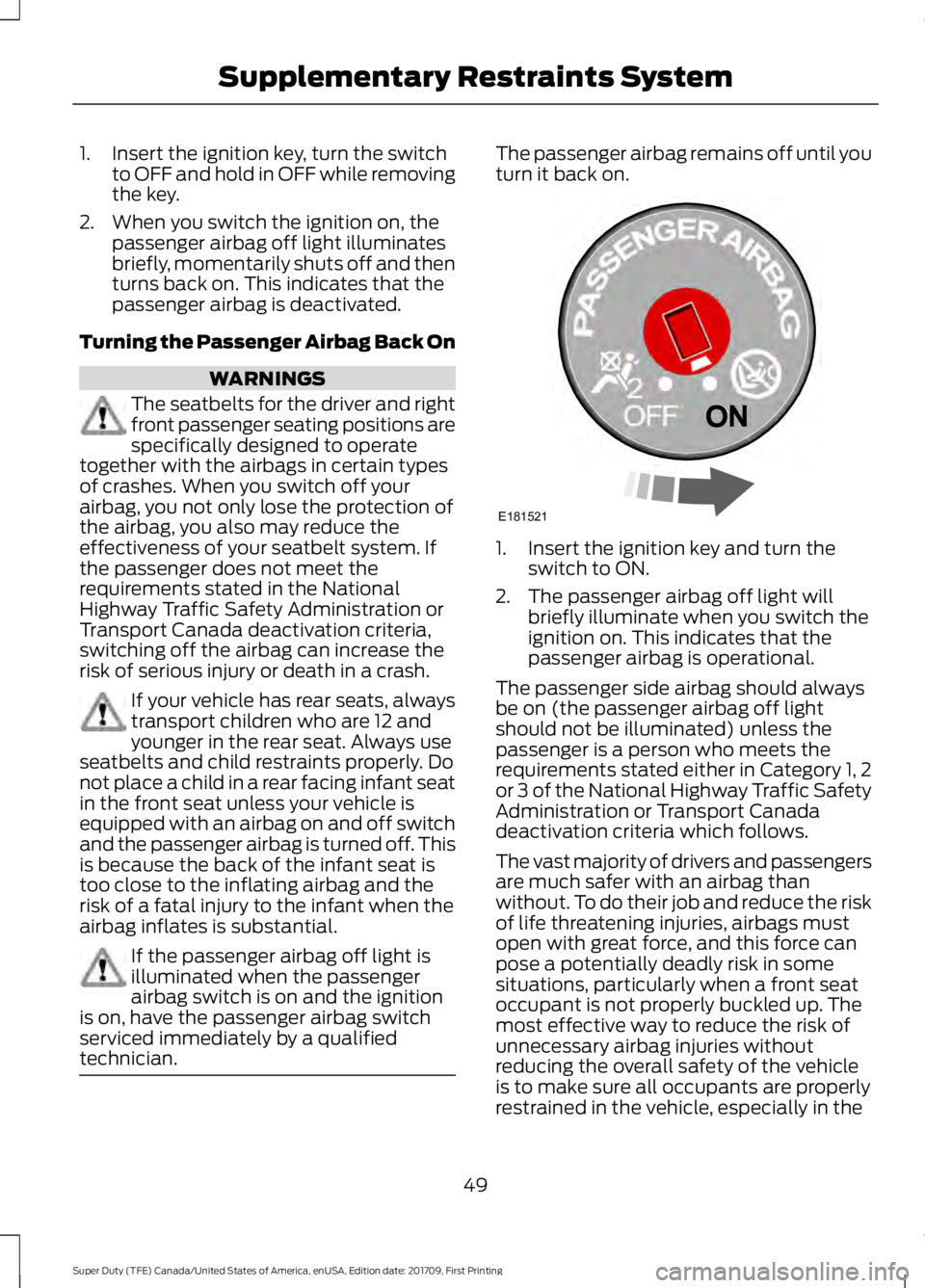
1. Insert the ignition key, turn the switch
to OFF and hold in OFF while removing
the key.
2. When you switch the ignition on, the passenger airbag off light illuminates
briefly, momentarily shuts off and then
turns back on. This indicates that the
passenger airbag is deactivated.
Turning the Passenger Airbag Back On WARNINGS
The seatbelts for the driver and right
front passenger seating positions are
specifically designed to operate
together with the airbags in certain types
of crashes. When you switch off your
airbag, you not only lose the protection of
the airbag, you also may reduce the
effectiveness of your seatbelt system. If
the passenger does not meet the
requirements stated in the National
Highway Traffic Safety Administration or
Transport Canada deactivation criteria,
switching off the airbag can increase the
risk of serious injury or death in a crash. If your vehicle has rear seats, always
transport children who are 12 and
younger in the rear seat. Always use
seatbelts and child restraints properly. Do
not place a child in a rear facing infant seat
in the front seat unless your vehicle is
equipped with an airbag on and off switch
and the passenger airbag is turned off. This
is because the back of the infant seat is
too close to the inflating airbag and the
risk of a fatal injury to the infant when the
airbag inflates is substantial. If the passenger airbag off light is
illuminated when the passenger
airbag switch is on and the ignition
is on, have the passenger airbag switch
serviced immediately by a qualified
technician. The passenger airbag remains off until you
turn it back on.
1. Insert the ignition key and turn the
switch to ON.
2. The passenger airbag off light will briefly illuminate when you switch the
ignition on. This indicates that the
passenger airbag is operational.
The passenger side airbag should always
be on (the passenger airbag off light
should not be illuminated) unless the
passenger is a person who meets the
requirements stated either in Category 1, 2
or 3 of the National Highway Traffic Safety
Administration or Transport Canada
deactivation criteria which follows.
The vast majority of drivers and passengers
are much safer with an airbag than
without. To do their job and reduce the risk
of life threatening injuries, airbags must
open with great force, and this force can
pose a potentially deadly risk in some
situations, particularly when a front seat
occupant is not properly buckled up. The
most effective way to reduce the risk of
unnecessary airbag injuries without
reducing the overall safety of the vehicle
is to make sure all occupants are properly
restrained in the vehicle, especially in the
49
Super Duty (TFE) Canada/United States of America, enUSA, Edition date: 201709, First Printing Supplementary Restraints SystemE181521
Page 59 of 656
GENERAL INFORMATION ON
RADIO FREQUENCIES
This device complies with Part 15 of the
FCC Rules and with Industry Canada
license-exempt RSS standard(s).
Operation is subject to the following two
conditions: (1) This device may not cause
harmful interference, and (2) This device
must accept any interference received,
including interference that may cause
undesired operation.
Note:
Changes or modifications not
expressively approved by the party
responsible for compliance could void the
user's authority to operate the equipment.
The term "IC:" before the radio certification
number only signifies that Industry Canada
technical specifications were met.
The typical operating range for your
transmitter is approximately 33 ft (10 m).
Vehicles with the remote start feature will
have a greater range. One of the following
could cause a decrease in operating range:
• Weather conditions.
• Nearby radio towers.
• Structures around the vehicle.
• Other vehicles parked next to your
vehicle.
Other short-distance radio transmitters,
such as amateur radios, medical
equipment, wireless headphones, remote
controls and alarm systems may operate
on the same frequency as your remote
control. If other transmitters are operating
on those frequencies, you may not be able
to use your remote control. Using your
remote control near some types of
electronic equipment, such as USB devices,
computers or cell phones can interfere with
remote operation. Operating your remote
control near metal or metallic-finished
purses, bags or clothing can interfere with
remote operation. You can lock and unlock
the doors with the key. Note:
Make sure to lock your vehicle before
leaving it unattended.
Note: If you are in range, the remote control
still operates if you press any button
unintentionally.
Intelligent Access
(If Equipped)
The system uses a radio frequency signal
to communicate with your vehicle and
authorize your vehicle to unlock when one
of the following conditions are met:
• You touch the inside of the front
exterior door handle within
3 ft (1 m)
proximity of an intelligent access key.
• You press the tailgate release button.
• You press a button on the remote
control.
If excessive radio frequency interference
is present in the area or if the remote
control battery is low, you may need to
mechanically unlock your door. You can
use the mechanical key blade in your
intelligent access key to open the driver
door in this situation. See Remote Control
(page
56).
REMOTE CONTROL
Integrated Keyhead Transmitter (If
Equipped)
Use the key blade to start your vehicle and
unlock or lock the driver door from outside
your vehicle. The integrated keyhead
transmitter functions as a programmed
ignition key that operates all the locks and
starts your vehicle, as well as a remote
control.
56
Super Duty (TFE) Canada/United States of America, enUSA, Edition date: 201709, First Printing Keys and Remote Controls
Page 60 of 656
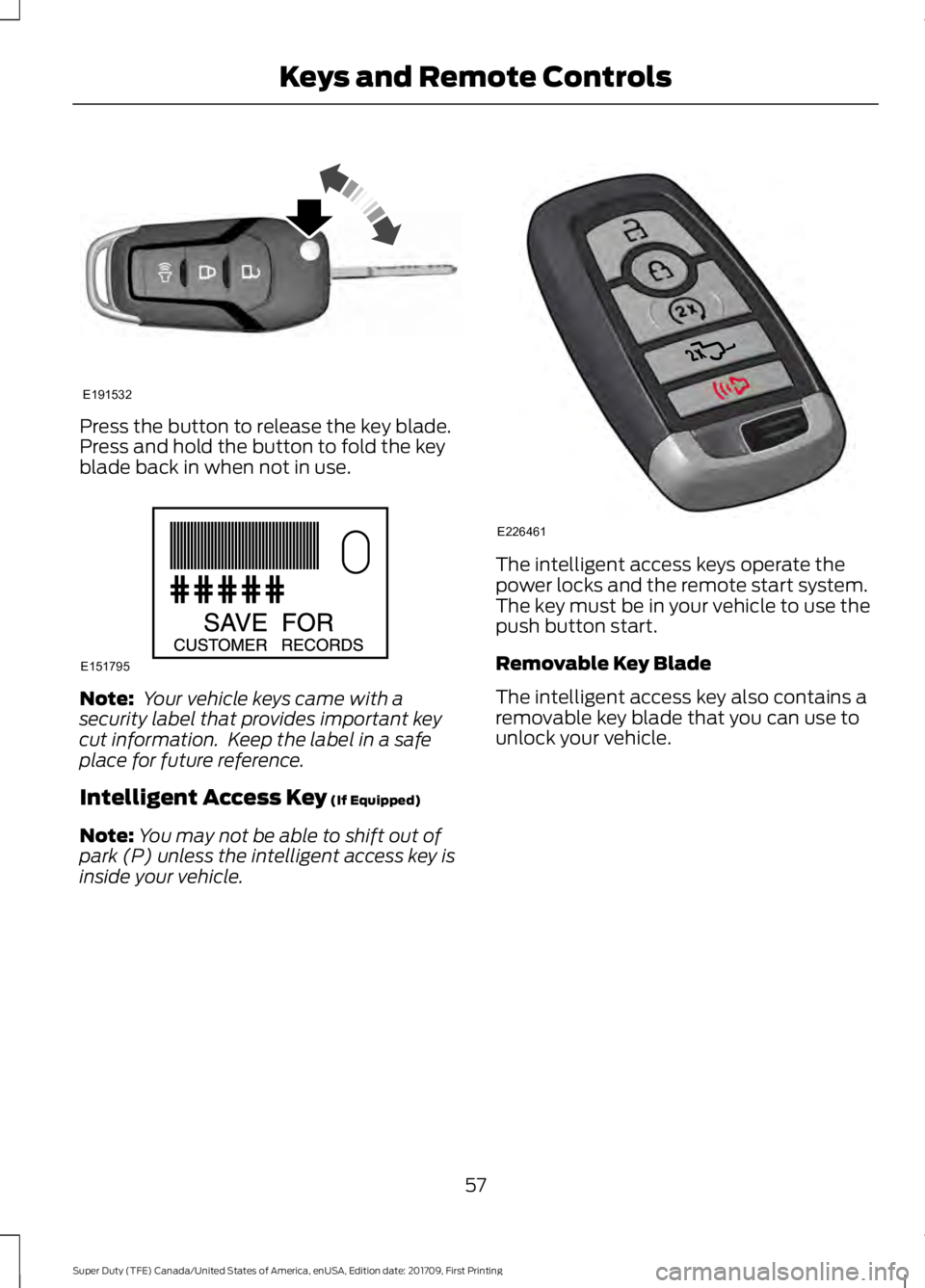
Press the button to release the key blade.
Press and hold the button to fold the key
blade back in when not in use.
Note:
Your vehicle keys came with a
security label that provides important key
cut information. Keep the label in a safe
place for future reference.
Intelligent Access Key (If Equipped)
Note: You may not be able to shift out of
park (P) unless the intelligent access key is
inside your vehicle. The intelligent access keys operate the
power locks and the remote start system.
The key must be in your vehicle to use the
push button start.
Removable Key Blade
The intelligent access key also contains a
removable key blade that you can use to
unlock your vehicle.
57
Super Duty (TFE) Canada/United States of America, enUSA, Edition date: 201709, First Printing Keys and Remote ControlsE191532 E151795 E226461
Page 61 of 656
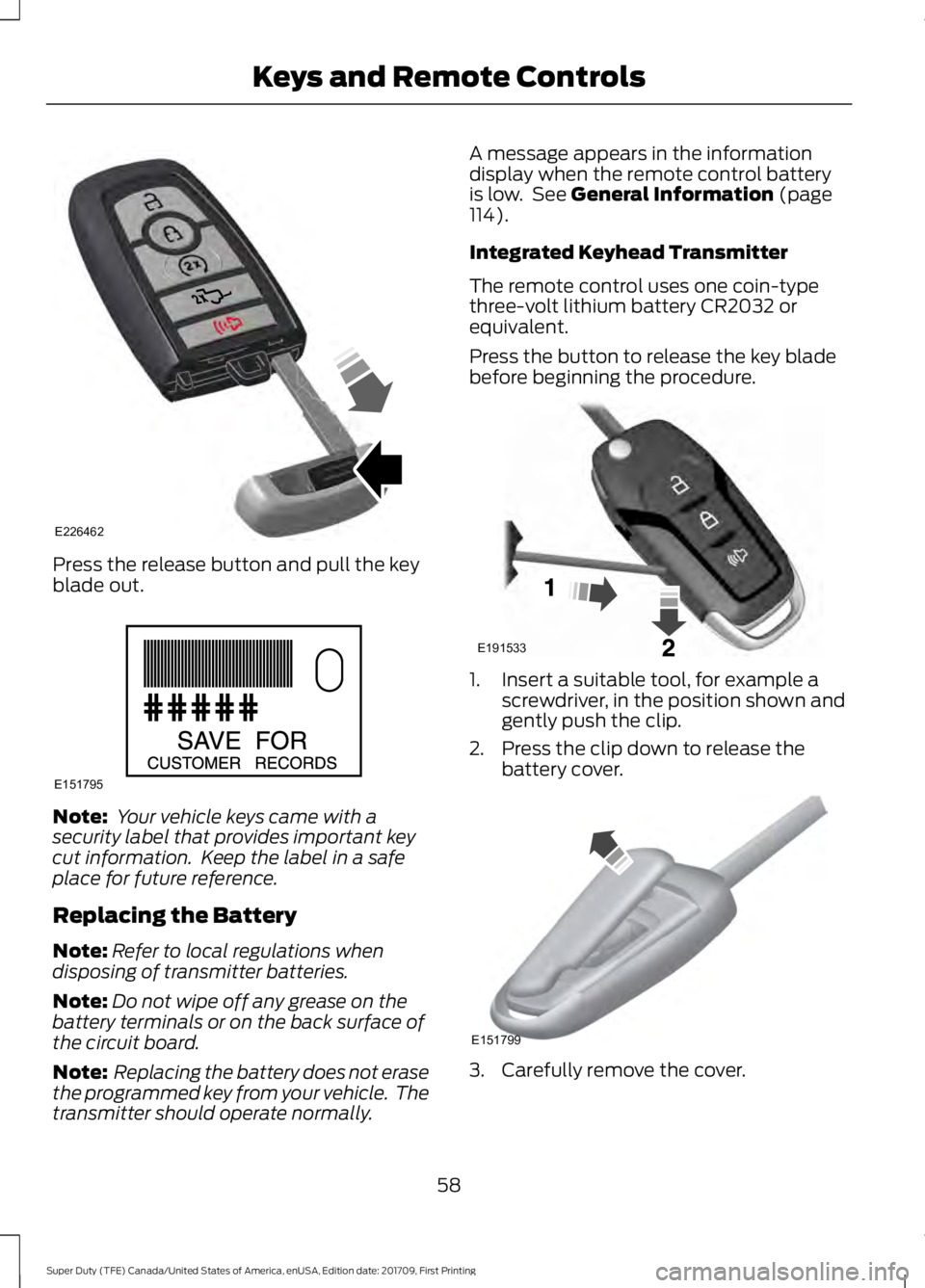
Press the release button and pull the key
blade out.
Note:
Your vehicle keys came with a
security label that provides important key
cut information. Keep the label in a safe
place for future reference.
Replacing the Battery
Note: Refer to local regulations when
disposing of transmitter batteries.
Note: Do not wipe off any grease on the
battery terminals or on the back surface of
the circuit board.
Note: Replacing the battery does not erase
the programmed key from your vehicle. The
transmitter should operate normally. A message appears in the information
display when the remote control battery
is low. See General Information (page
114).
Integrated Keyhead Transmitter
The remote control uses one coin-type
three-volt lithium battery CR2032 or
equivalent.
Press the button to release the key blade
before beginning the procedure. 1. Insert a suitable tool, for example a
screwdriver, in the position shown and
gently push the clip.
2. Press the clip down to release the battery cover. 3. Carefully remove the cover.
58
Super Duty (TFE) Canada/United States of America, enUSA, Edition date: 201709, First Printing Keys and Remote ControlsE226462 E151795 E191533 E151799
Page 62 of 656
Note:
Do not touch the battery contacts or
the printed circuit board with the
screwdriver.
4. Insert a suitable tool, for example a screwdriver, in the position shown to
release the battery. 5. Remove the battery.
6. Insert a new battery with the + facing
upward.
7. Reinstall the battery housing cover onto the transmitter.
Intelligent Access Key
The remote control uses one coin-type
three-volt lithium battery CR2032 or
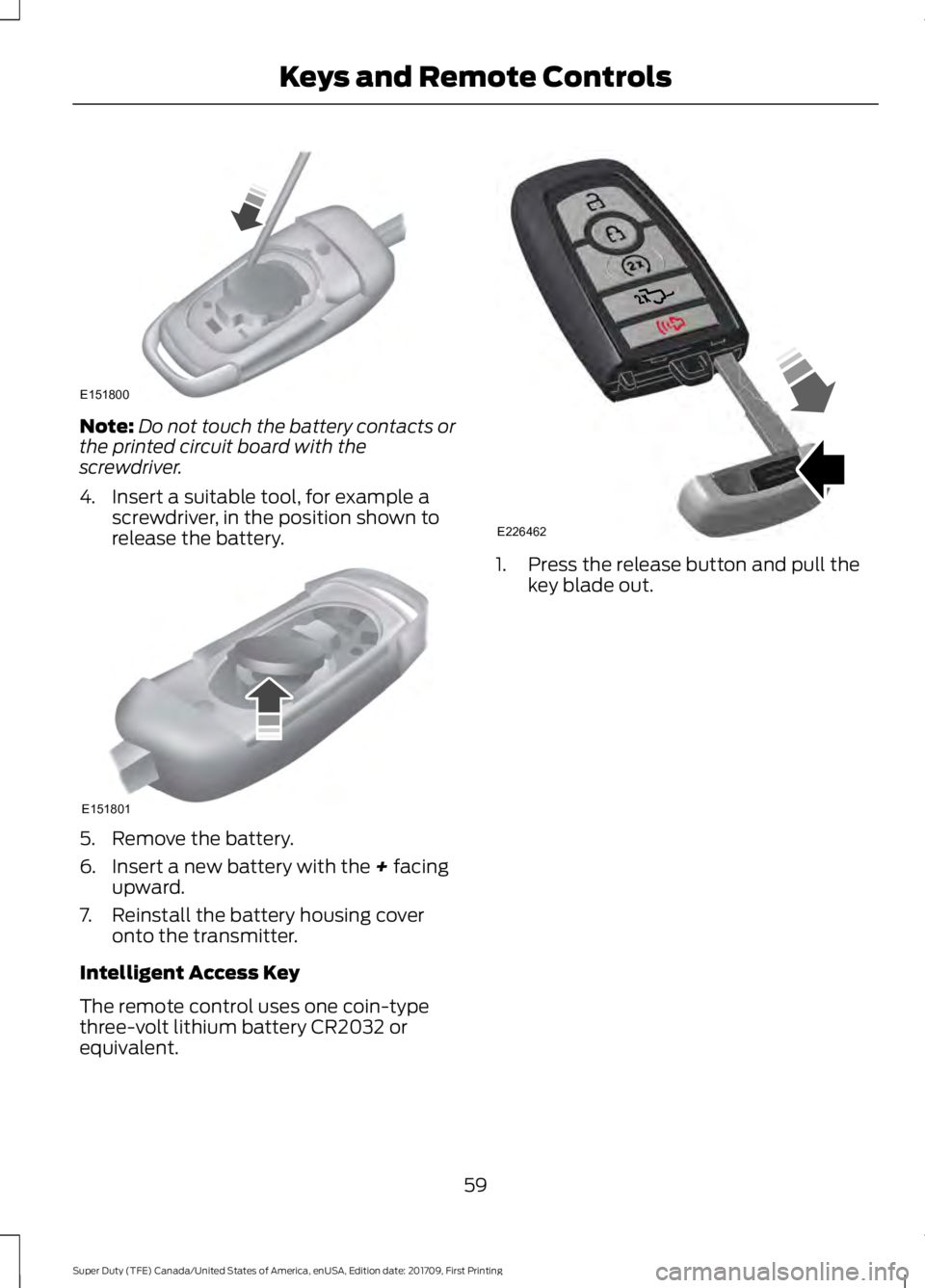
equivalent. 1. Press the release button and pull the
key blade out.
59
Super Duty (TFE) Canada/United States of America, enUSA, Edition date: 201709, First Printing Keys and Remote ControlsE151800 E151801 E226462