display FORD F450 SUPER DUTY 2020 Workshop Manual
[x] Cancel search | Manufacturer: FORD, Model Year: 2020, Model line: F450 SUPER DUTY, Model: FORD F450 SUPER DUTY 2020Pages: 633, PDF Size: 9.18 MB
Page 137 of 633
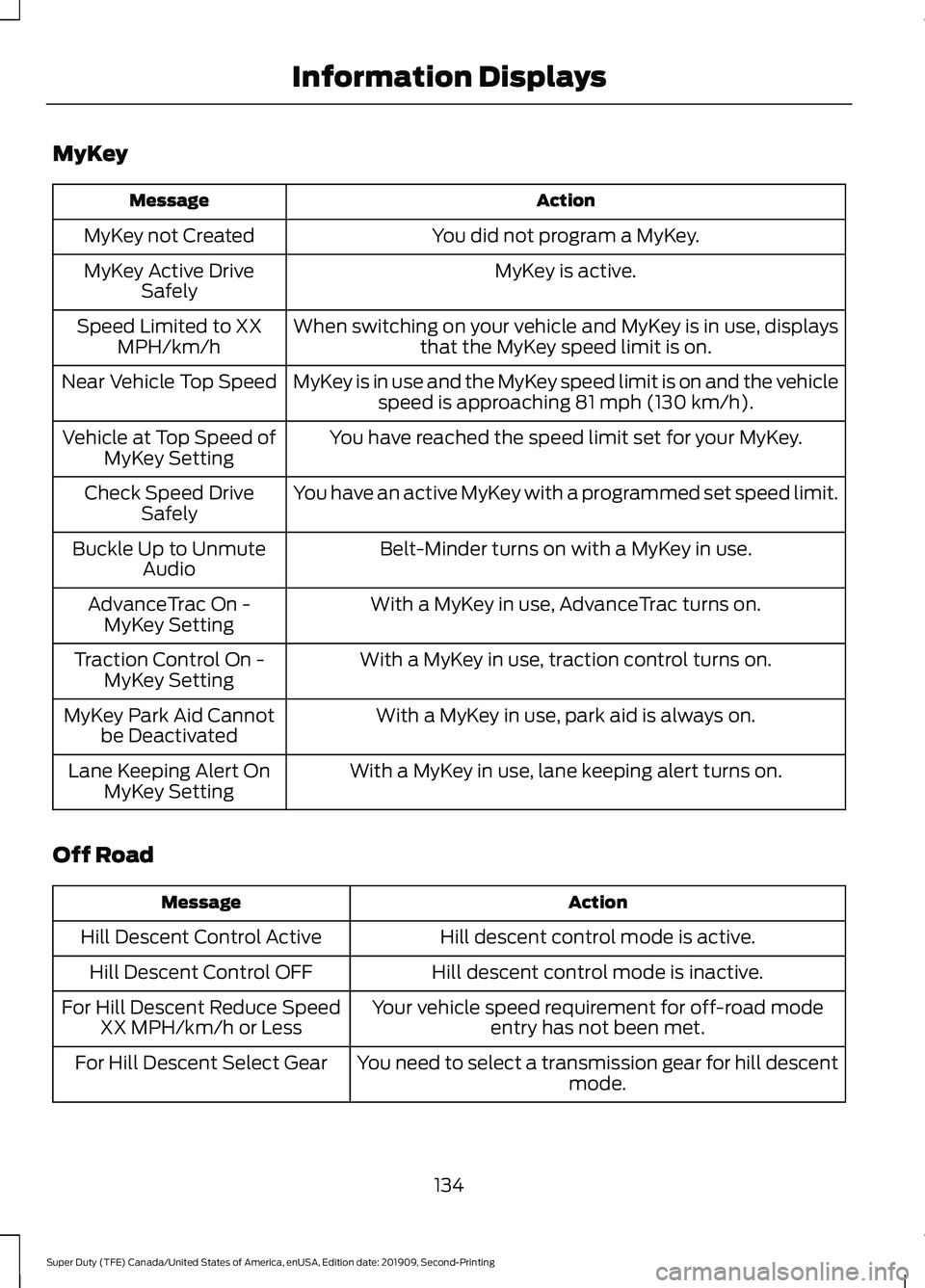
MyKey
Action
Message
You did not program a MyKey.
MyKey not Created
MyKey is active.
MyKey Active Drive
Safely
When switching on your vehicle and MyKey is in use, displaysthat the MyKey speed limit is on.
Speed Limited to XX
MPH/km/h
MyKey is in use and the MyKey speed limit is on and the vehiclespeed is approaching 81 mph (130 km/h).
Near Vehicle Top Speed
You have reached the speed limit set for your MyKey.
Vehicle at Top Speed of
MyKey Setting
You have an active MyKey with a programmed set speed limit.
Check Speed Drive
Safely
Belt-Minder turns on with a MyKey in use.
Buckle Up to Unmute
Audio
With a MyKey in use, AdvanceTrac turns on.
AdvanceTrac On -
MyKey Setting
With a MyKey in use, traction control turns on.
Traction Control On -
MyKey Setting
With a MyKey in use, park aid is always on.
MyKey Park Aid Cannot
be Deactivated
With a MyKey in use, lane keeping alert turns on.
Lane Keeping Alert On
MyKey Setting
Off Road Action
Message
Hill descent control mode is active.
Hill Descent Control Active
Hill descent control mode is inactive.
Hill Descent Control OFF
Your vehicle speed requirement for off-road modeentry has not been met.
For Hill Descent Reduce Speed
XX MPH/km/h or Less
You need to select a transmission gear for hill descentmode.
For Hill Descent Select Gear
134
Super Duty (TFE) Canada/United States of America, enUSA, Edition date: 201909, Second-Printing Information Displays
Page 138 of 633
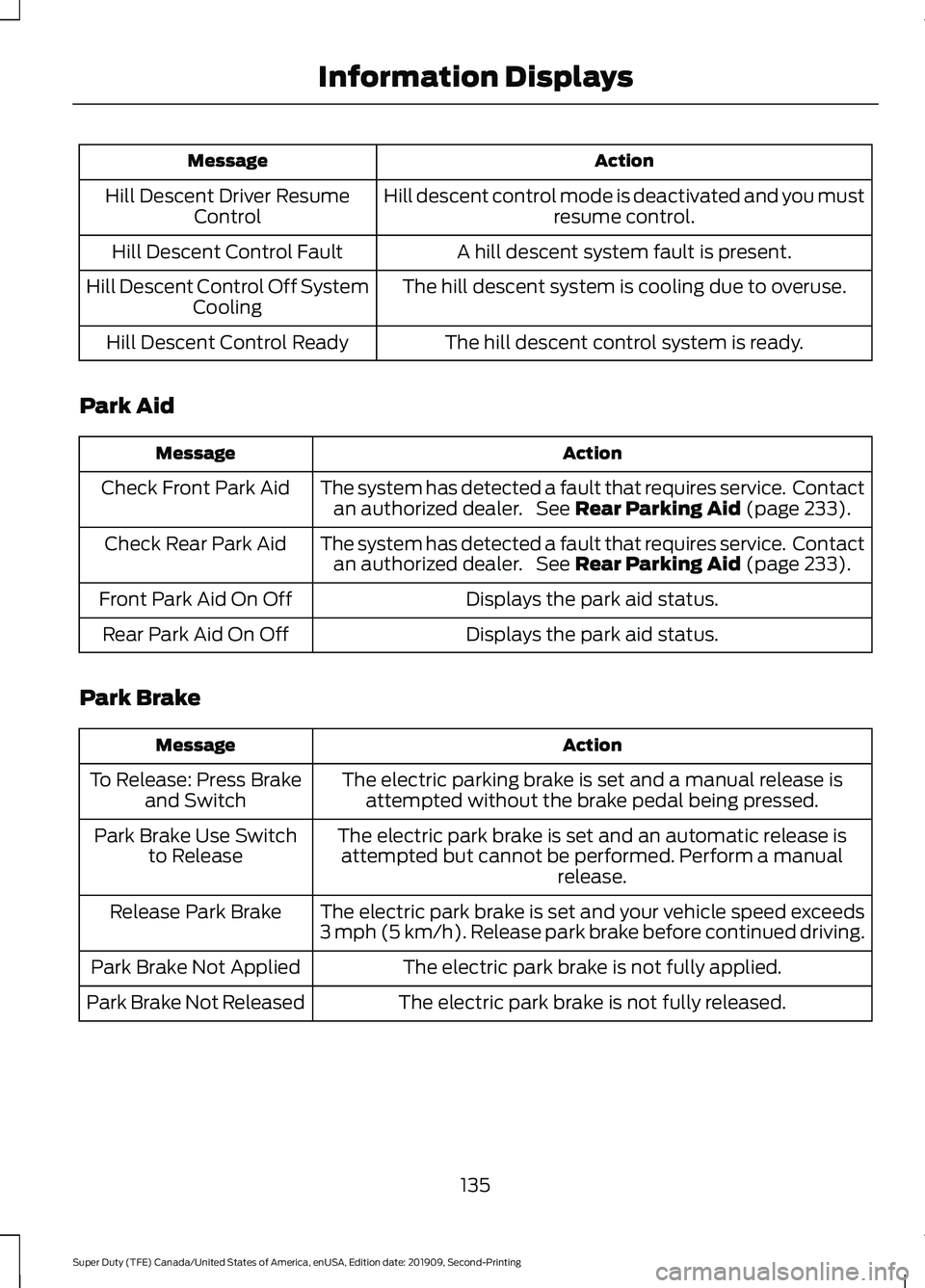
Action
Message
Hill descent control mode is deactivated and you mustresume control.
Hill Descent Driver Resume
Control
A hill descent system fault is present.
Hill Descent Control Fault
The hill descent system is cooling due to overuse.
Hill Descent Control Off System
Cooling
The hill descent control system is ready.
Hill Descent Control Ready
Park Aid Action
Message
The system has detected a fault that requires service. Contactan authorized dealer. See Rear Parking Aid (page 233).
Check Front Park Aid
The system has detected a fault that requires service. Contactan authorized dealer. See
Rear Parking Aid (page 233).
Check Rear Park Aid
Displays the park aid status.
Front Park Aid On Off
Displays the park aid status.
Rear Park Aid On Off
Park Brake Action
Message
The electric parking brake is set and a manual release isattempted without the brake pedal being pressed.
To Release: Press Brake
and Switch
The electric park brake is set and an automatic release isattempted but cannot be performed. Perform a manual release.
Park Brake Use Switch
to Release
The electric park brake is set and your vehicle speed exceeds
3 mph (5 km/h). Release park brake before continued driving.
Release Park Brake
The electric park brake is not fully applied.
Park Brake Not Applied
The electric park brake is not fully released.
Park Brake Not Released
135
Super Duty (TFE) Canada/United States of America, enUSA, Edition date: 201909, Second-Printing Information Displays
Page 139 of 633
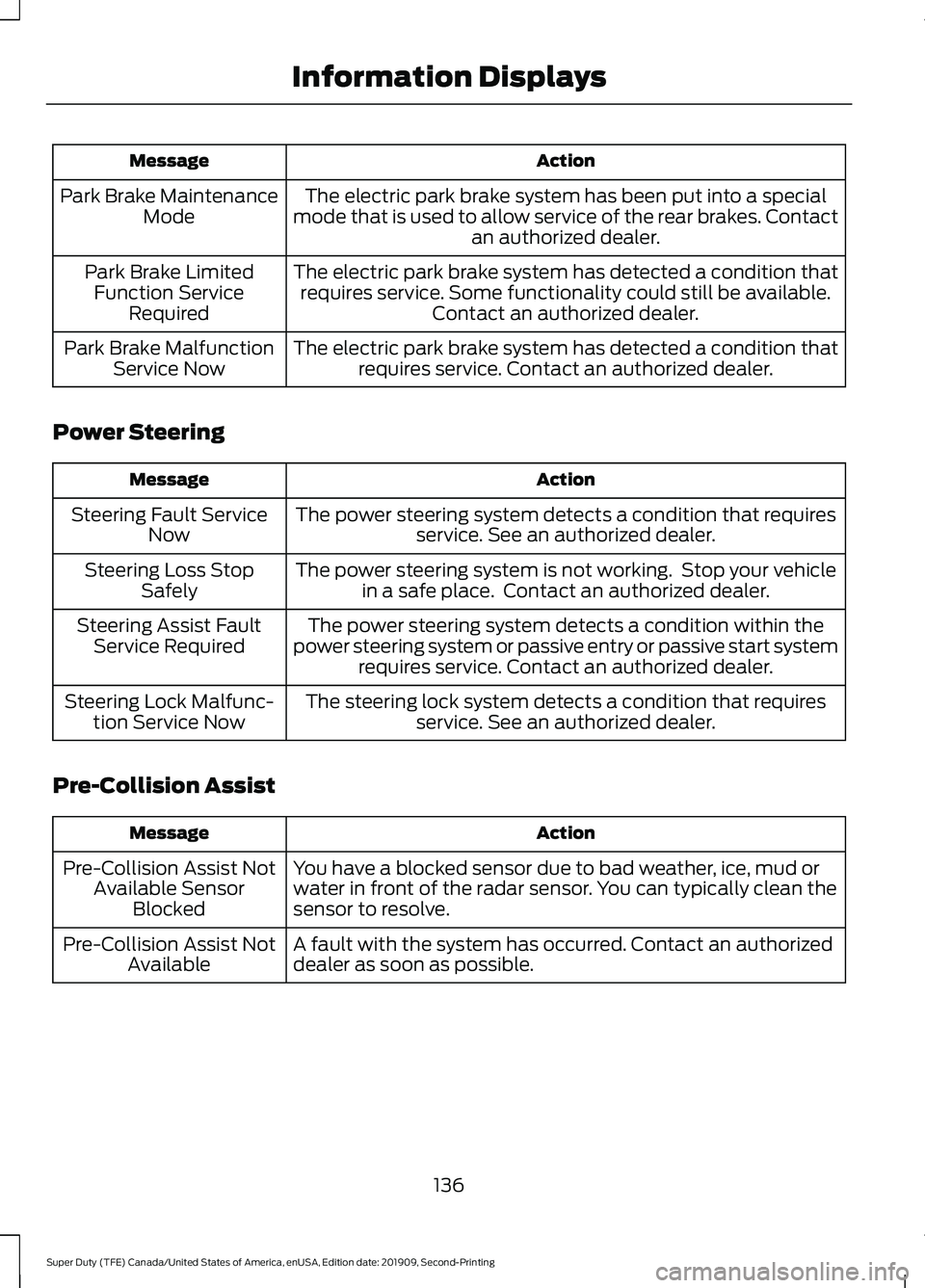
Action
Message
The electric park brake system has been put into a special
mode that is used to allow service of the rear brakes. Contact an authorized dealer.
Park Brake Maintenance
Mode
The electric park brake system has detected a condition thatrequires service. Some functionality could still be available. Contact an authorized dealer.
Park Brake Limited
Function Service Required
The electric park brake system has detected a condition thatrequires service. Contact an authorized dealer.
Park Brake Malfunction
Service Now
Power Steering Action
Message
The power steering system detects a condition that requiresservice. See an authorized dealer.
Steering Fault Service
Now
The power steering system is not working. Stop your vehiclein a safe place. Contact an authorized dealer.
Steering Loss Stop
Safely
The power steering system detects a condition within the
power steering system or passive entry or passive start system requires service. Contact an authorized dealer.
Steering Assist Fault
Service Required
The steering lock system detects a condition that requiresservice. See an authorized dealer.
Steering Lock Malfunc-
tion Service Now
Pre-Collision Assist Action
Message
You have a blocked sensor due to bad weather, ice, mud or
water in front of the radar sensor. You can typically clean the
sensor to resolve.
Pre-Collision Assist Not
Available Sensor Blocked
A fault with the system has occurred. Contact an authorized
dealer as soon as possible.
Pre-Collision Assist Not
Available
136
Super Duty (TFE) Canada/United States of America, enUSA, Edition date: 201909, Second-Printing Information Displays
Page 140 of 633
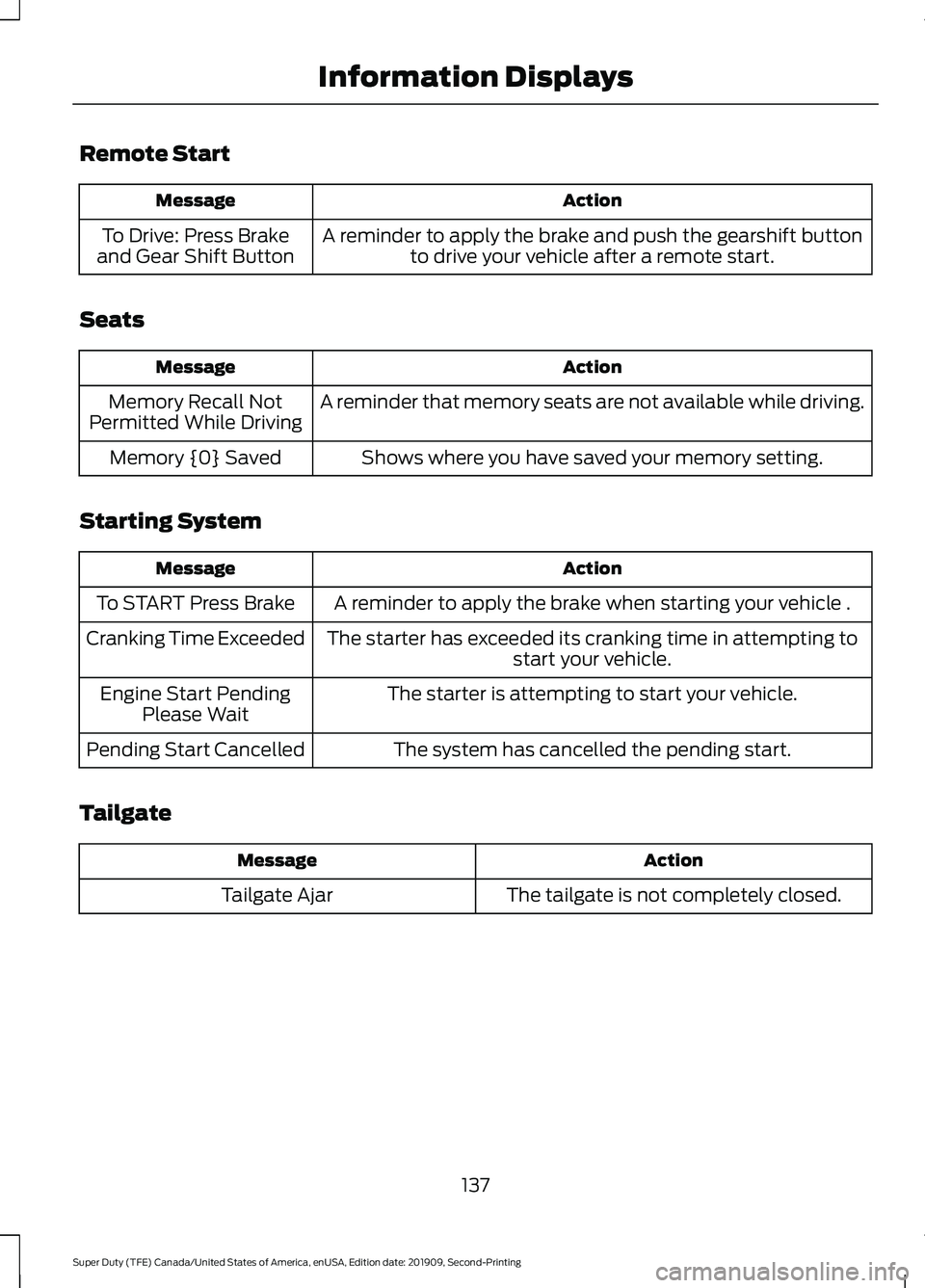
Remote Start
Action
Message
A reminder to apply the brake and push the gearshift buttonto drive your vehicle after a remote start.
To Drive: Press Brake
and Gear Shift Button
Seats Action
Message
A reminder that memory seats are not available while driving.
Memory Recall Not
Permitted While Driving
Shows where you have saved your memory setting.
Memory {0} Saved
Starting System Action
Message
A reminder to apply the brake when starting your vehicle .
To START Press Brake
The starter has exceeded its cranking time in attempting tostart your vehicle.
Cranking Time Exceeded
The starter is attempting to start your vehicle.
Engine Start Pending
Please Wait
The system has cancelled the pending start.
Pending Start Cancelled
Tailgate Action
Message
The tailgate is not completely closed.
Tailgate Ajar
137
Super Duty (TFE) Canada/United States of America, enUSA, Edition date: 201909, Second-Printing Information Displays
Page 141 of 633
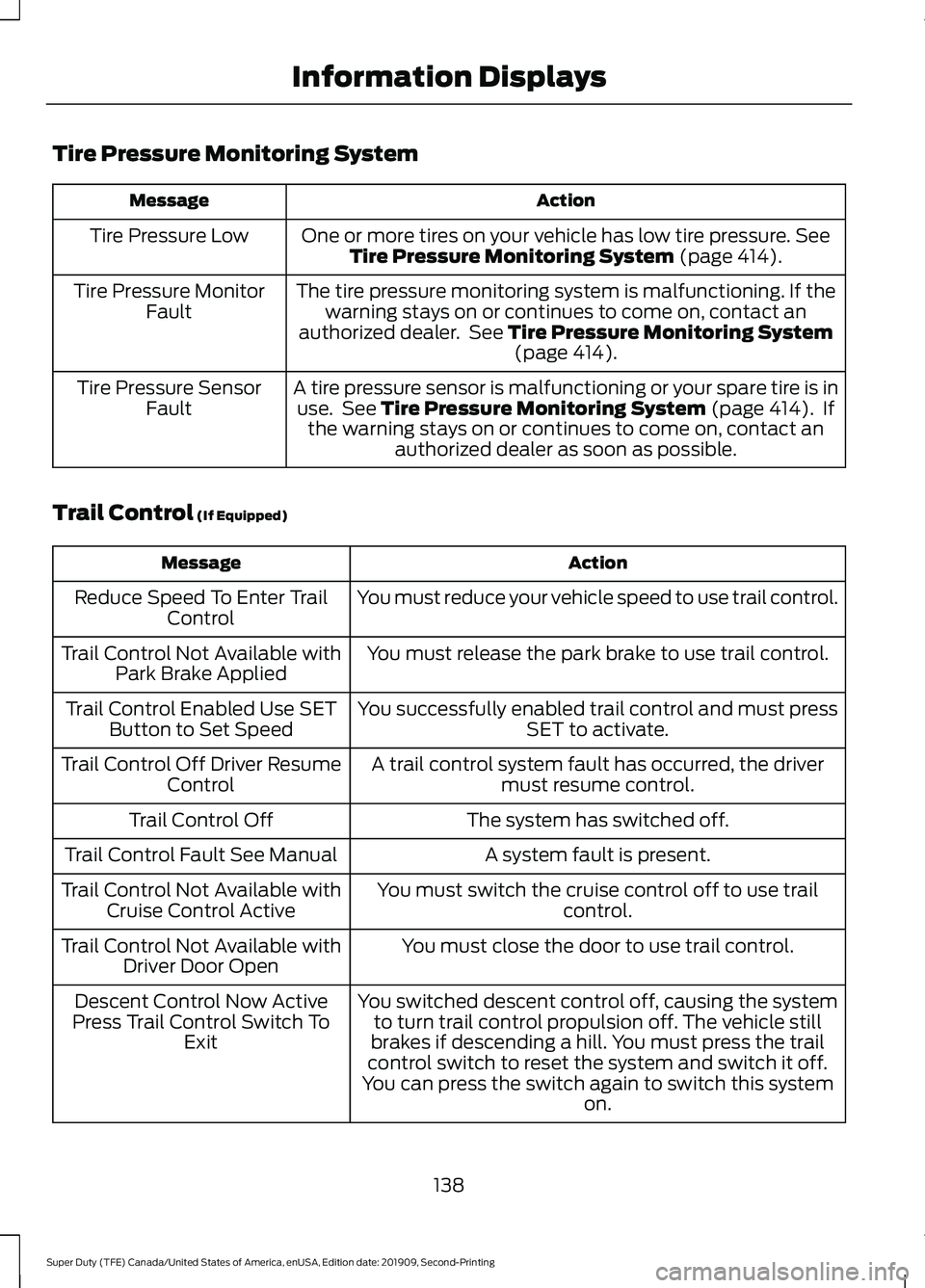
Tire Pressure Monitoring System
Action
Message
One or more tires on your vehicle has low tire pressure. See
Tire Pressure Monitoring System (page 414).
Tire Pressure Low
The tire pressure monitoring system is malfunctioning. If thewarning stays on or continues to come on, contact an
authorized dealer. See
Tire Pressure Monitoring System (page 414).
Tire Pressure Monitor
Fault
A tire pressure sensor is malfunctioning or your spare tire is inuse. See
Tire Pressure Monitoring System (page 414). If
the warning stays on or continues to come on, contact an authorized dealer as soon as possible.
Tire Pressure Sensor
Fault
Trail Control
(If Equipped) Action
Message
You must reduce your vehicle speed to use trail control.
Reduce Speed To Enter Trail
Control
You must release the park brake to use trail control.
Trail Control Not Available with
Park Brake Applied
You successfully enabled trail control and must pressSET to activate.
Trail Control Enabled Use SET
Button to Set Speed
A trail control system fault has occurred, the drivermust resume control.
Trail Control Off Driver Resume
Control
The system has switched off.
Trail Control Off
A system fault is present.
Trail Control Fault See Manual
You must switch the cruise control off to use trailcontrol.
Trail Control Not Available with
Cruise Control Active
You must close the door to use trail control.
Trail Control Not Available with
Driver Door Open
You switched descent control off, causing the systemto turn trail control propulsion off. The vehicle still
brakes if descending a hill. You must press the trail
control switch to reset the system and switch it off.
You can press the switch again to switch this system on.
Descent Control Now Active
Press Trail Control Switch To Exit
138
Super Duty (TFE) Canada/United States of America, enUSA, Edition date: 201909, Second-Printing Information Displays
Page 142 of 633
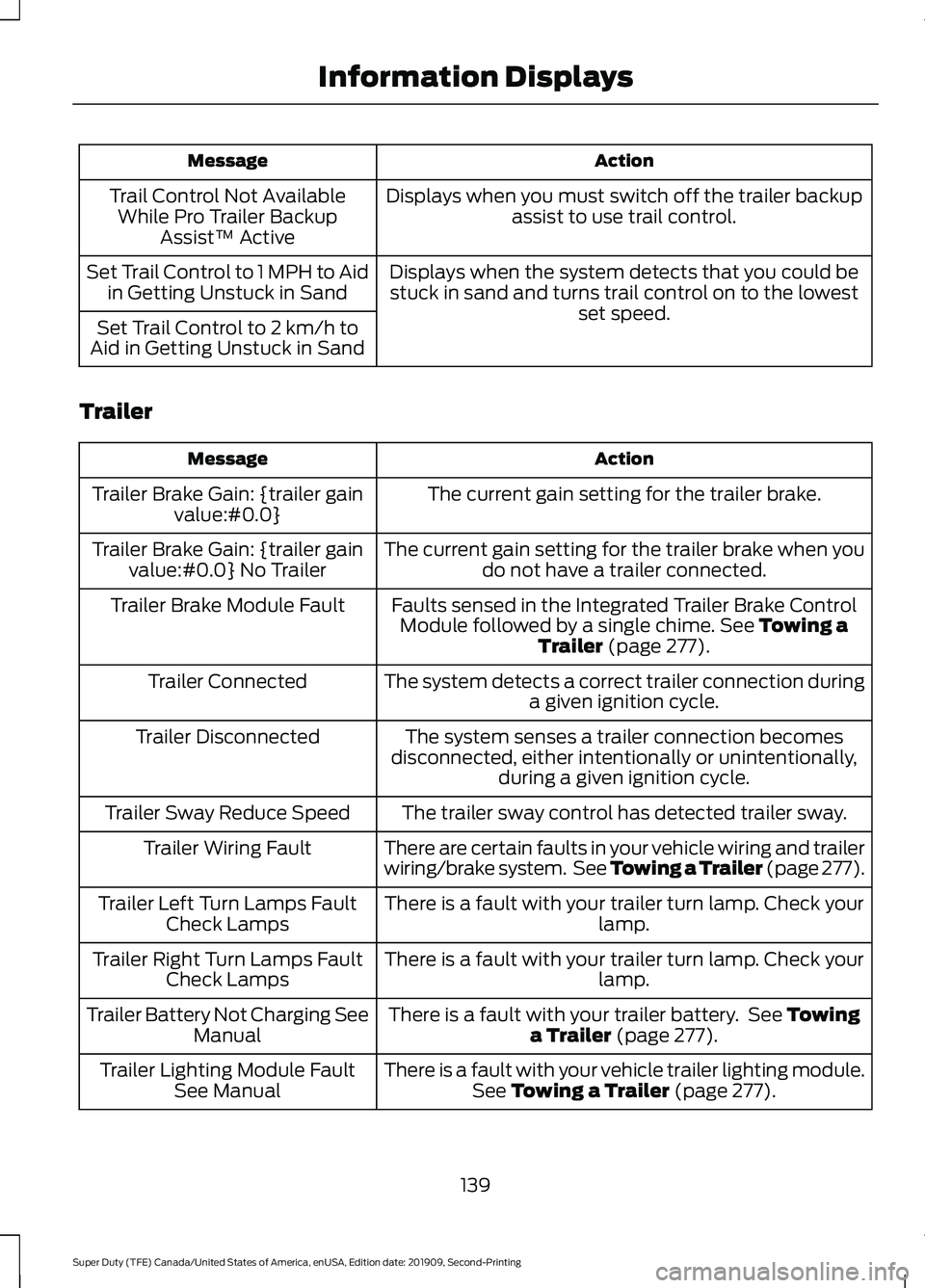
Action
Message
Displays when you must switch off the trailer backupassist to use trail control.
Trail Control Not Available
While Pro Trailer Backup Assist™ Active
Displays when the system detects that you could bestuck in sand and turns trail control on to the lowest set speed.
Set Trail Control to 1 MPH to Aid
in Getting Unstuck in Sand
Set Trail Control to 2 km/h to
Aid in Getting Unstuck in Sand
Trailer Action
Message
The current gain setting for the trailer brake.
Trailer Brake Gain: {trailer gain
value:#0.0}
The current gain setting for the trailer brake when youdo not have a trailer connected.
Trailer Brake Gain: {trailer gain
value:#0.0} No Trailer
Faults sensed in the Integrated Trailer Brake ControlModule followed by a single chime. See Towing a
Trailer (page 277).
Trailer Brake Module Fault
The system detects a correct trailer connection duringa given ignition cycle.
Trailer Connected
The system senses a trailer connection becomes
disconnected, either intentionally or unintentionally, during a given ignition cycle.
Trailer Disconnected
The trailer sway control has detected trailer sway.
Trailer Sway Reduce Speed
There are certain faults in your vehicle wiring and trailer
wiring/brake system. See
Towing a Trailer (page 277).
Trailer Wiring Fault
There is a fault with your trailer turn lamp. Check yourlamp.
Trailer Left Turn Lamps Fault
Check Lamps
There is a fault with your trailer turn lamp. Check yourlamp.
Trailer Right Turn Lamps Fault
Check Lamps
There is a fault with your trailer battery. See
Towing
a Trailer (page 277).
Trailer Battery Not Charging See
Manual
There is a fault with your vehicle trailer lighting module.See
Towing a Trailer (page 277).
Trailer Lighting Module Fault
See Manual
139
Super Duty (TFE) Canada/United States of America, enUSA, Edition date: 201909, Second-Printing Information Displays
Page 143 of 633
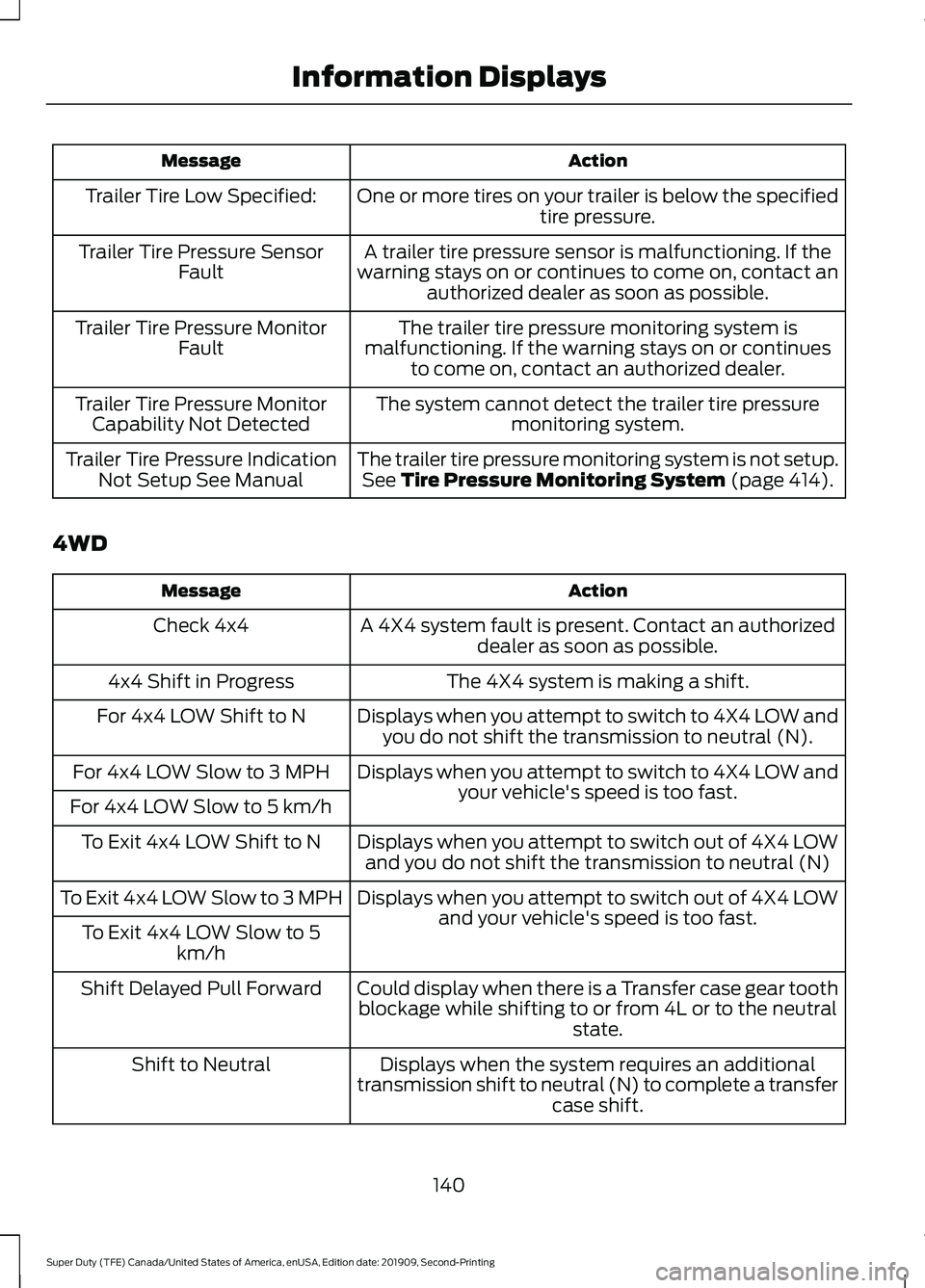
Action
Message
One or more tires on your trailer is below the specifiedtire pressure.
Trailer Tire Low Specified:
A trailer tire pressure sensor is malfunctioning. If the
warning stays on or continues to come on, contact an authorized dealer as soon as possible.
Trailer Tire Pressure Sensor
Fault
The trailer tire pressure monitoring system is
malfunctioning. If the warning stays on or continues to come on, contact an authorized dealer.
Trailer Tire Pressure Monitor
Fault
The system cannot detect the trailer tire pressuremonitoring system.
Trailer Tire Pressure Monitor
Capability Not Detected
The trailer tire pressure monitoring system is not setup.See Tire Pressure Monitoring System (page 414).
Trailer Tire Pressure Indication
Not Setup See Manual
4WD Action
Message
A 4X4 system fault is present. Contact an authorizeddealer as soon as possible.
Check 4x4
The 4X4 system is making a shift.
4x4 Shift in Progress
Displays when you attempt to switch to 4X4 LOW andyou do not shift the transmission to neutral (N).
For 4x4 LOW Shift to N
Displays when you attempt to switch to 4X4 LOW andyour vehicle's speed is too fast.
For 4x4 LOW Slow to 3 MPH
For 4x4 LOW Slow to 5 km/h Displays when you attempt to switch out of 4X4 LOWand you do not shift the transmission to neutral (N)
To Exit 4x4 LOW Shift to N
Displays when you attempt to switch out of 4X4 LOWand your vehicle's speed is too fast.
To Exit 4x4 LOW Slow to 3 MPH
To Exit 4x4 LOW Slow to 5 km/h
Could display when there is a Transfer case gear toothblockage while shifting to or from 4L or to the neutral state.
Shift Delayed Pull Forward
Displays when the system requires an additional
transmission shift to neutral (N) to complete a transfer case shift.
Shift to Neutral
140
Super Duty (TFE) Canada/United States of America, enUSA, Edition date: 201909, Second-Printing Information Displays
Page 144 of 633
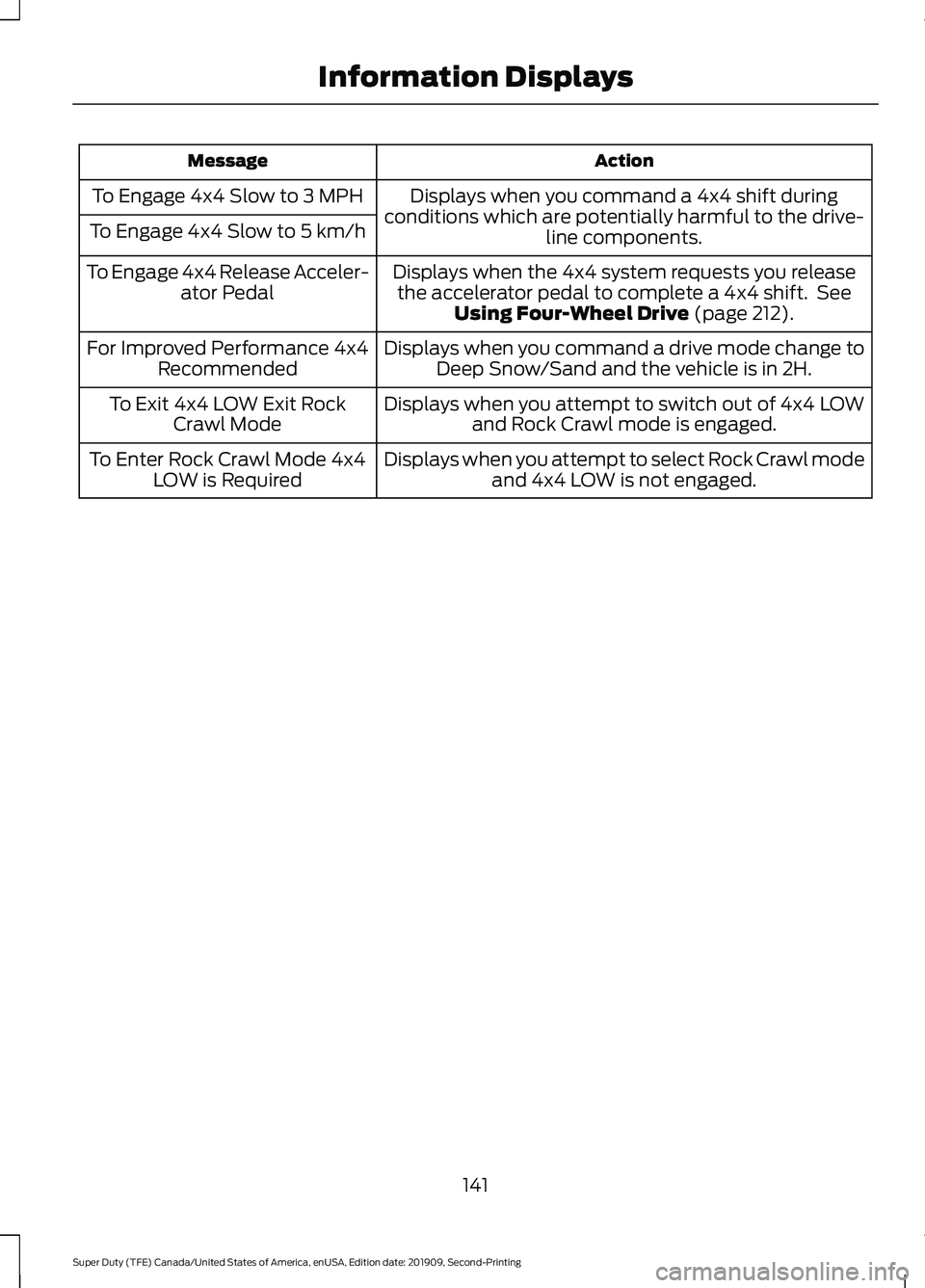
Action
Message
Displays when you command a 4x4 shift during
conditions which are potentially harmful to the drive- line components.
To Engage 4x4 Slow to 3 MPH
To Engage 4x4 Slow to 5 km/h
Displays when the 4x4 system requests you releasethe accelerator pedal to complete a 4x4 shift. See Using Four-Wheel Drive (page 212).
To Engage 4x4 Release Acceler-
ator Pedal
Displays when you command a drive mode change toDeep Snow/Sand and the vehicle is in 2H.
For Improved Performance 4x4
Recommended
Displays when you attempt to switch out of 4x4 LOWand Rock Crawl mode is engaged.
To Exit 4x4 LOW Exit Rock
Crawl Mode
Displays when you attempt to select Rock Crawl modeand 4x4 LOW is not engaged.
To Enter Rock Crawl Mode 4x4
LOW is Required
141
Super Duty (TFE) Canada/United States of America, enUSA, Edition date: 201909, Second-Printing Information Displays
Page 150 of 633
3. Direct air to the instrument panel air
vents.
Vehicle Stationary for Extended
Periods During Extreme High
Ambient Temperatures
1. Apply the parking brake.
2. Place your vehicle in park (P) or neutral.
3. Select MAX A/C.
4. Adjust the blower motor speed to the lowest speed setting.
Defogging the Side Windows in
Cold Weather
1. Direct air to the instrument panel and windshield air vents.
2. Press and release
A/C.
3. Adjust the temperature control to the setting you prefer.
4. Adjust the blower motor speed to the highest setting.
5. Direct air toward the side windows.
6. Close the instrument panel air vents.
HEATED WINDSHIELD
(IF
EQUIPPED)
Windshield Wiper De-Icer When you switch the heated rear
window on, the windshield wiper
de-icer turns on.
HEATED REAR WINDOW
(IF
EQUIPPED) Press the button to clear the rear
window of thin ice and fog. The
heated rear window turns off
after a short period of time. Note:
Do not use harsh chemicals, razor
blades or other sharp objects to clean or
remove decals from the inside of the heated
rear window. The vehicle warranty may not
cover damage to the heated rear window
grid lines.
HEATED EXTERIOR MIRRORS
(IF EQUIPPED) Press the button to clear the
exterior mirrors of thin ice and
fog. Press the button again to
switch them off. They switch off after a
short period of time.
Note: Do not remove ice from the mirrors
with a scraper or adjust the mirror glass
when it is frozen in place. These actions
could cause damage to the glass and
mirrors.
Note: Do not clean the mirror housing or
glass with harsh abrasives, fuel or other
petroleum-based cleaning products.
REMOTE START
(IF EQUIPPED)
You can switch this feature on or off and
adjust the settings in the information
display.
The system adjusts the interior
temperature depending on your chosen
settings during remote start.
You cannot adjust the climate control
setting during remote start operation. The
information display and the indicators do
not turn on during remote start. When you
switch the ignition on, the climate control
system returns to the previous settings.
You can now make adjustments.
You need to switch on certain
vehicle-dependent features, such as:
• Heated seats.
• Cooled seats.
147
Super Duty (TFE) Canada/United States of America, enUSA, Edition date: 201909, Second-Printing Climate ControlE184884 E184884
Page 151 of 633
•
Heated steering wheel.
• Heated mirrors.
• Heated rear window.
Automatic Settings
In hot weather, the system sets to 72°F
(22°C). The cooled seats are set to high,
if available, and AUTO is on in the
information display.
In moderate weather, the system either
heats or cools, based on pre-selected
settings. The rear defroster, heated mirrors
and heated or cooled seats do not turn on.
In cold weather, the system sets to
72°F
(22°C). The heated seats are set to high,
if available, and AUTO is on in the
information display. The heated rear
window and heated mirrors turn on.
148
Super Duty (TFE) Canada/United States of America, enUSA, Edition date: 201909, Second-Printing Climate Control