display FORD F53 2017 Owners Manual
[x] Cancel search | Manufacturer: FORD, Model Year: 2017, Model line: F53, Model: FORD F53 2017Pages: 164, PDF Size: 2.57 MB
Page 4 of 164
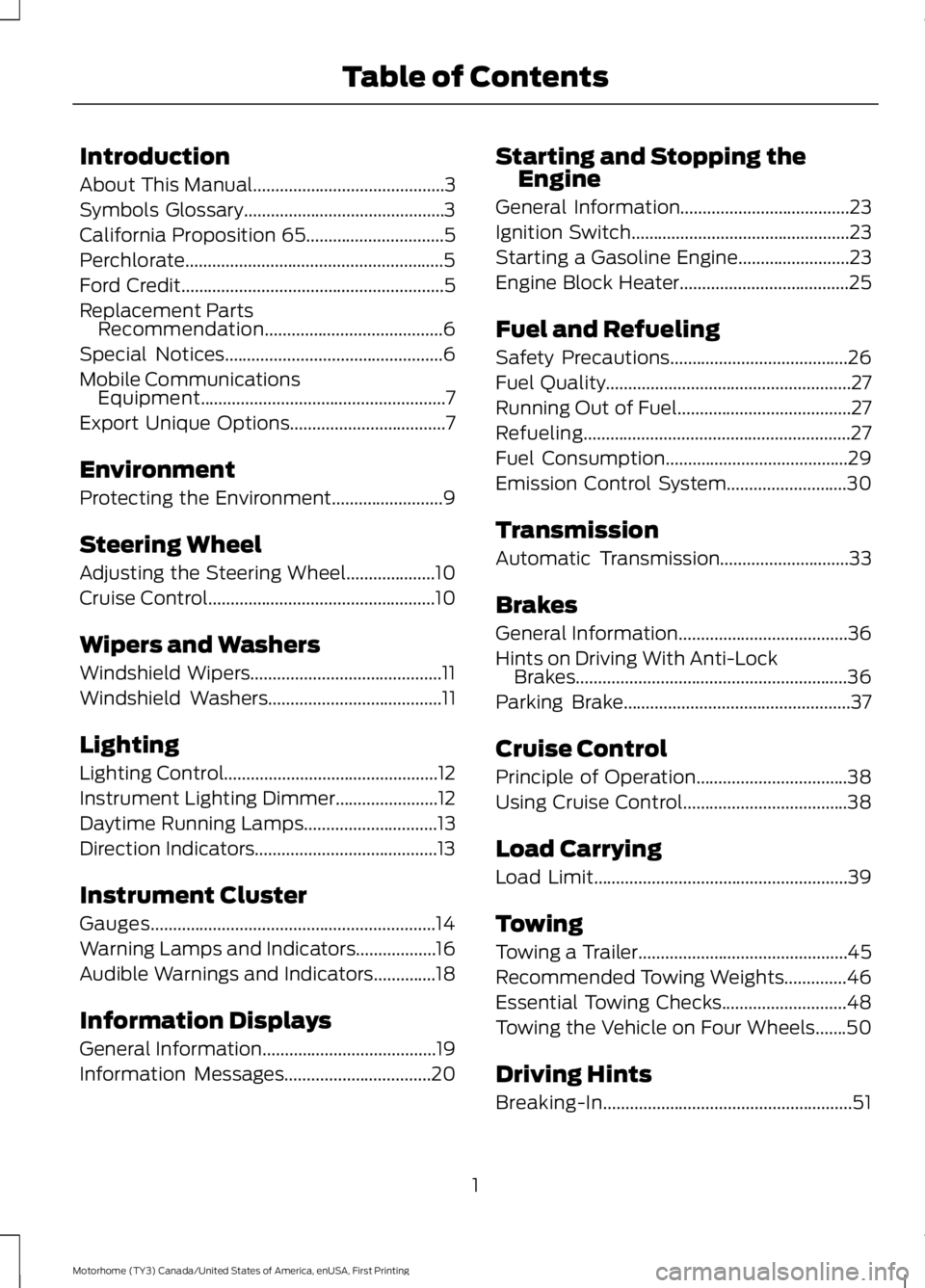
Introduction
About This Manual...........................................3
Symbols Glossary.............................................3
California Proposition 65
...............................5
Perchlorate..........................................................5
Ford Credit...........................................................5
Replacement Parts Recommendation........................................6
Special Notices
.................................................6
Mobile Communications Equipment.......................................................7
Export Unique Options
...................................7
Environment
Protecting the Environment
.........................9
Steering Wheel
Adjusting the Steering Wheel
....................10
Cruise Control
...................................................10
Wipers and Washers
Windshield Wipers...........................................11
Windshield Washers
.......................................11
Lighting
Lighting Control................................................12
Instrument Lighting Dimmer.......................12
Daytime Running Lamps
..............................13
Direction Indicators.........................................13
Instrument Cluster
Gauges................................................................14
Warning Lamps and Indicators..................16
Audible Warnings and Indicators
..............18
Information Displays
General Information
.......................................19
Information Messages
.................................20 Starting and Stopping the
Engine
General Information
......................................23
Ignition Switch
.................................................23
Starting a Gasoline Engine.........................23
Engine Block Heater......................................25
Fuel and Refueling
Safety Precautions........................................26
Fuel Quality
.......................................................27
Running Out of Fuel.......................................27
Refueling............................................................27
Fuel Consumption
.........................................29
Emission Control System
...........................30
Transmission
Automatic Transmission.............................33
Brakes
General Information
......................................36
Hints on Driving With Anti-Lock Brakes.............................................................36
Parking Brake
...................................................37
Cruise Control
Principle of Operation..................................38
Using Cruise Control.....................................38
Load Carrying
Load Limit.........................................................39
Towing
Towing a Trailer...............................................45
Recommended Towing Weights
..............46
Essential Towing Checks............................48
Towing the Vehicle on Four Wheels.......50
Driving Hints
Breaking-In........................................................51
1
Motorhome (TY3) Canada/United States of America, enUSA, First Printing Table of Contents
Page 17 of 164
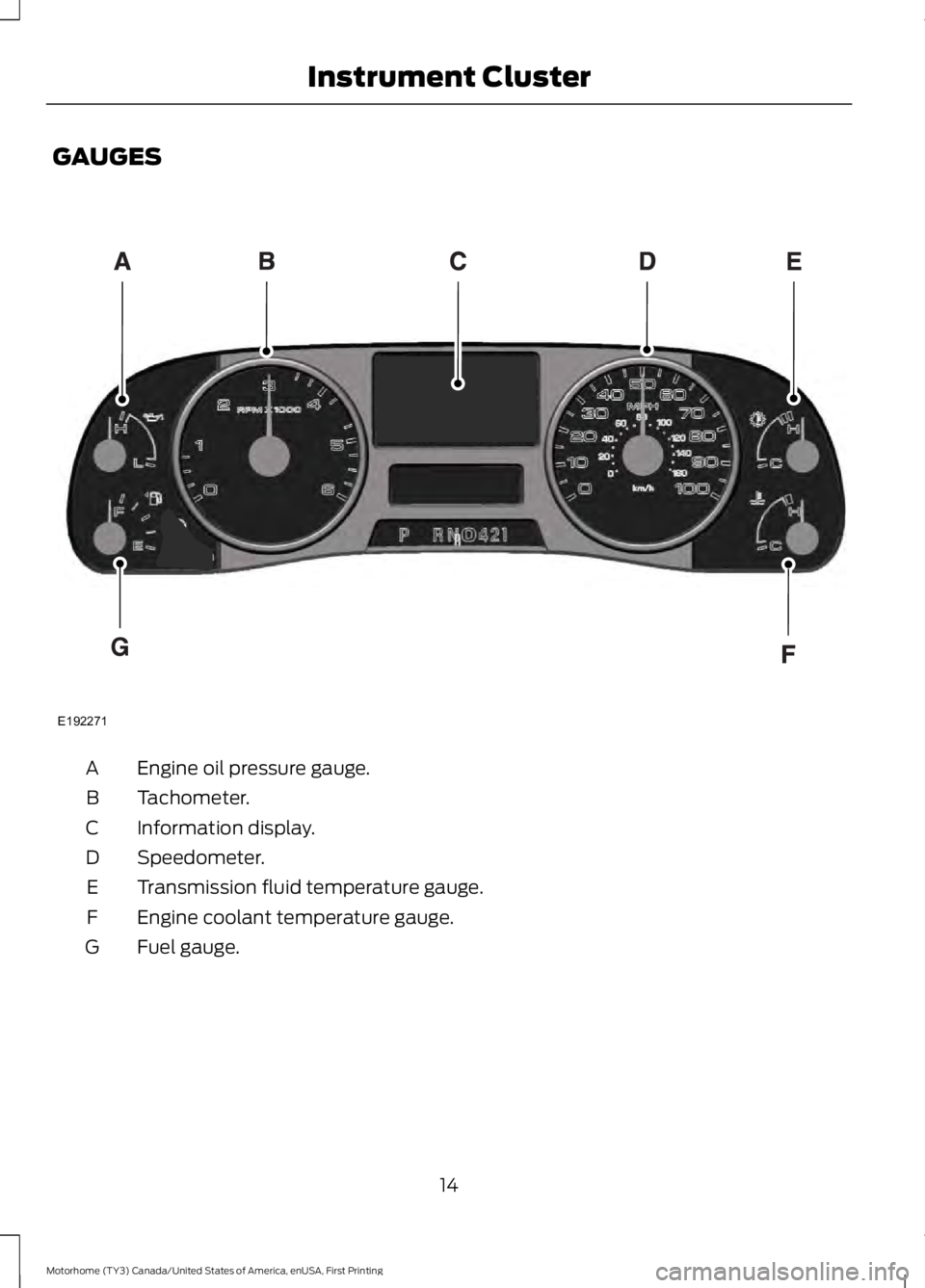
GAUGES
Engine oil pressure gauge.
A
Tachometer.
B
Information display.
C
Speedometer.
D
Transmission fluid temperature gauge.
E
Engine coolant temperature gauge.
F
Fuel gauge.
G
14
Motorhome (TY3) Canada/United States of America, enUSA, First Printing Instrument ClusterE192271
Page 19 of 164
•
It may take a short time for the needle
to reach F after leaving the gas station.
This is normal and depends upon the
slope of the pavement at the gas
station.
• The fuel amount dispensed into the
tank is a little less or more than the
gauge indicated. This is normal and
depends upon the slope of the
pavement at the gas station. •
If the gas station nozzle shuts off
before the tank is full, try a different
gas pump nozzle.
• There is a small reserve left in the tank
when the fuel gauge reaches empty.
Low Fuel Reminder
A low fuel reminder triggers when the fuel
gauge needle is at one-sixteenth or about
50 miles (80 km) to empty, whichever
occurs first.
Variations:
Note: The low fuel warning and distance-to-empty warning can appear at different fuel
gauge positions depending on fuel economy conditions. This variation is normal. Distance-to-empty
Fuel gauge position
Driving type (fuel economy
conditions)
30 miles to 80 miles (48 kmto 129 km)
1/16th
Highway driving
10 miles to 35 miles (16 kmto 56 km)
1/16th-1/4
Severe duty driving (trailer
towing, extended idle)
WARNING LAMPS AND
INDICATORS
The following warning lamps and
indicators will alert you to a vehicle
condition that may become serious. Some
lamps will illuminate when you start your
vehicle to make sure they work. If any
lamps remain on after starting your vehicle,
refer to the respective system warning
lamp for further information.
Note: Some warning indicators appear in
the information display and function the
same as a warning lamp but do not display
when you start your vehicle. Anti-Lock Braking System If it illuminates when you are
driving, this indicates a
malfunction. You will continue
to have the normal braking system
(without ABS) unless the brake system
warning lamp is also illuminated. Have the
system checked by your authorized dealer.
Battery If it illuminates while driving, it
indicates a malfunction. Switch
off all unnecessary electrical
equipment and have the system checked
by your authorized dealer immediately.
16
Motorhome (TY3) Canada/United States of America, enUSA, First Printing Instrument Cluster
Page 22 of 164

GENERAL INFORMATION
WARNING
Driving while distracted can result in
loss of vehicle control, crash and
injury. We strongly recommend that
you use extreme caution when using any
device that may take your focus off the
road. Your primary responsibility is the safe
operation of your vehicle. We recommend
against the use of any hand-held device
while driving and encourage the use of
voice-operated systems when possible.
Make sure you are aware of all applicable
local laws that may affect the use of
electronic devices while driving. Various systems on your vehicle can be
controlled using the information display
controls on the steering wheel.
Corresponding information is displayed in
the information display.
Information Display Controls •
Press the info button to scroll through
trip, outside air temperature, engine
hours and miles to empty.
• Press the setup button to scroll
through various vehicle feature
settings.
• Press the reset button to choose
settings, reset information and confirm
messages.
Info Press the INFO button repeatedly to cycle
through the following features:
TRIP
Registers the distance of individual
journeys. Press and release the INFO
button until the TRIP appears in the
display. Press and hold the RESET button
to reset
XXX° (outside air temperature)
This displays the outside temperature.
MILES (km) TO E
This displays an estimate of approximately
how far you can drive with the fuel
remaining in your tank under normal driving
conditions. Remember to turn the ignition
off when refueling to allow this feature to
correctly detect the added fuel.
19
Motorhome (TY3) Canada/United States of America, enUSA, First Printing Information DisplaysE197545 E161507
Page 23 of 164
The DTE function will display a message
in the information display when you have
approximately 50 miles (80 km), to empty.
Press RESET to clear this warning
message. It will return at approximately 25
miles (40 km), 10 miles (16 km) and 0
miles (0 km) miles to empty.
DTE is calculated using a running average
fuel economy, which is based on your
recent driving history of 500 miles (800
km).
ENG HRS
Registers the accumulated time the engine
has been running.
System check and vehicle feature
customization
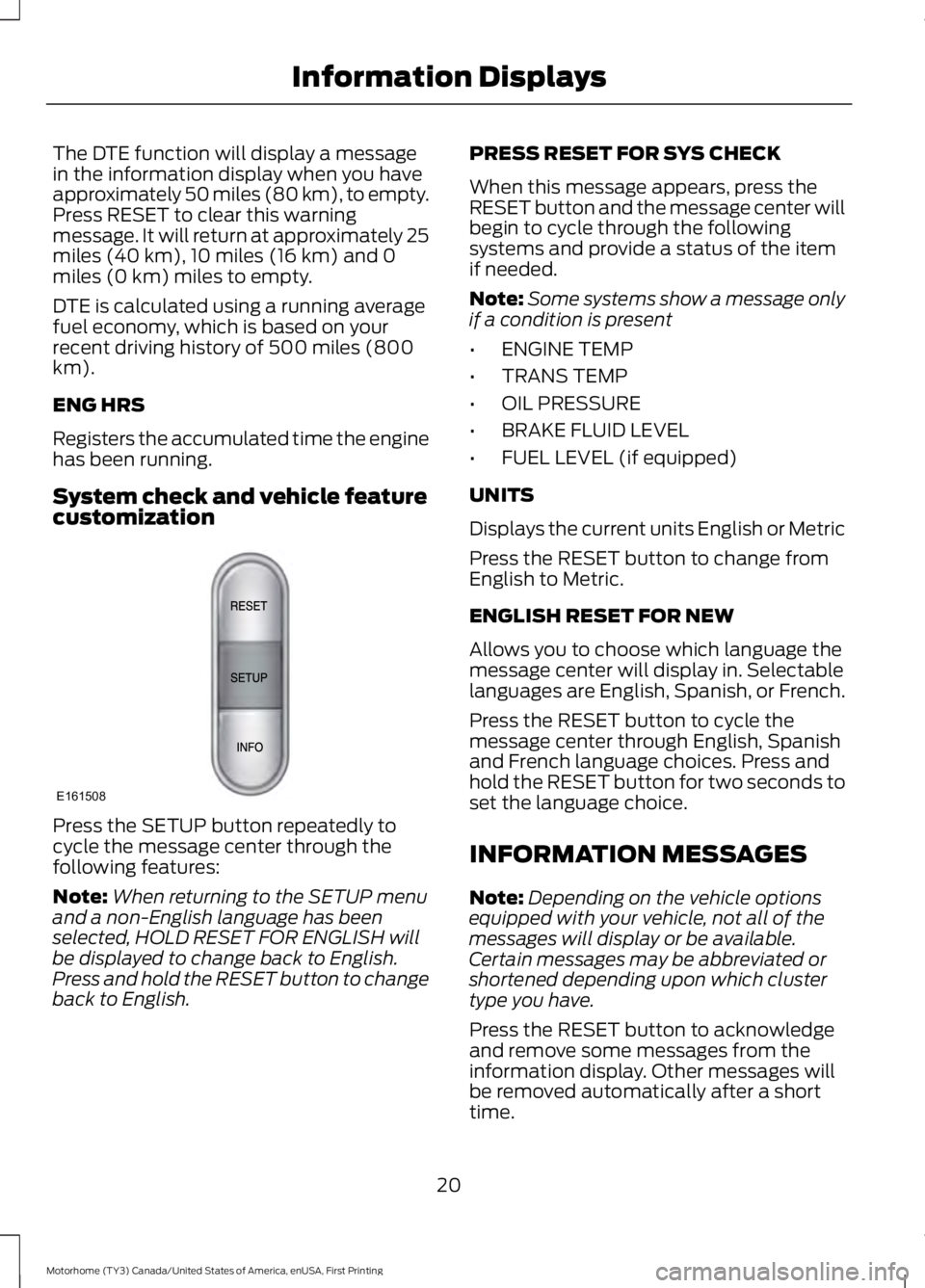
Press the SETUP button repeatedly to
cycle the message center through the
following features:
Note:
When returning to the SETUP menu
and a non-English language has been
selected, HOLD RESET FOR ENGLISH will
be displayed to change back to English.
Press and hold the RESET button to change
back to English. PRESS RESET FOR SYS CHECK
When this message appears, press the
RESET button and the message center will
begin to cycle through the following
systems and provide a status of the item
if needed.
Note:
Some systems show a message only
if a condition is present
• ENGINE TEMP
• TRANS TEMP
• OIL PRESSURE
• BRAKE FLUID LEVEL
• FUEL LEVEL (if equipped)
UNITS
Displays the current units English or Metric
Press the RESET button to change from
English to Metric.
ENGLISH RESET FOR NEW
Allows you to choose which language the
message center will display in. Selectable
languages are English, Spanish, or French.
Press the RESET button to cycle the
message center through English, Spanish
and French language choices. Press and
hold the RESET button for two seconds to
set the language choice.
INFORMATION MESSAGES
Note: Depending on the vehicle options
equipped with your vehicle, not all of the
messages will display or be available.
Certain messages may be abbreviated or
shortened depending upon which cluster
type you have.
Press the RESET button to acknowledge
and remove some messages from the
information display. Other messages will
be removed automatically after a short
time.
20
Motorhome (TY3) Canada/United States of America, enUSA, First Printing Information DisplaysE161508
Page 24 of 164
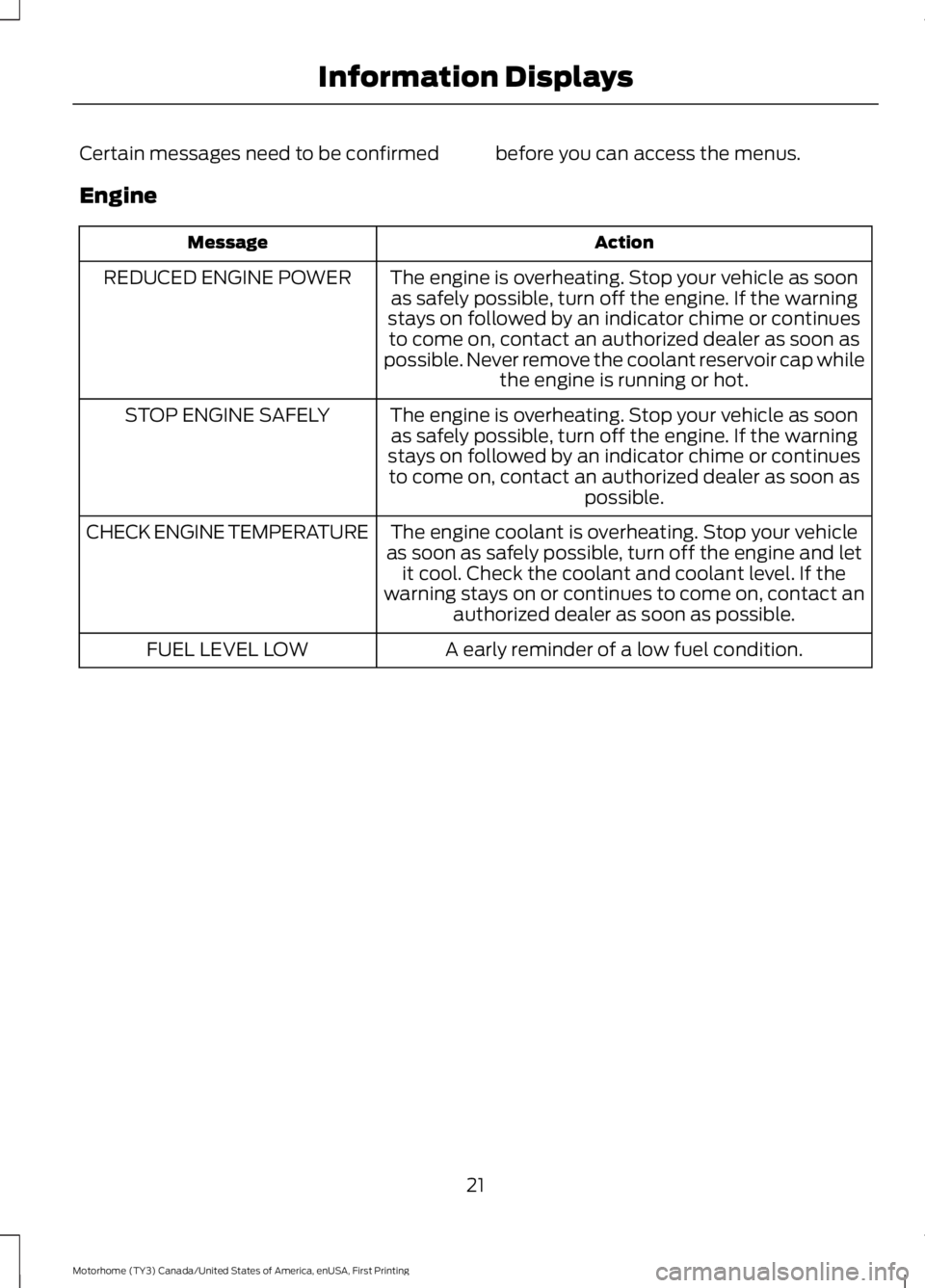
Certain messages need to be confirmed before you can access the menus.
Engine
Action
Message
The engine is overheating. Stop your vehicle as soonas safely possible, turn off the engine. If the warning
stays on followed by an indicator chime or continues to come on, contact an authorized dealer as soon as
possible. Never remove the coolant reservoir cap while the engine is running or hot.
REDUCED ENGINE POWER
The engine is overheating. Stop your vehicle as soonas safely possible, turn off the engine. If the warning
stays on followed by an indicator chime or continues to come on, contact an authorized dealer as soon as possible.
STOP ENGINE SAFELY
The engine coolant is overheating. Stop your vehicle
as soon as safely possible, turn off the engine and let it cool. Check the coolant and coolant level. If the
warning stays on or continues to come on, contact an authorized dealer as soon as possible.
CHECK ENGINE TEMPERATURE
A early reminder of a low fuel condition.
FUEL LEVEL LOW
21
Motorhome (TY3) Canada/United States of America, enUSA, First Printing Information Displays
Page 25 of 164
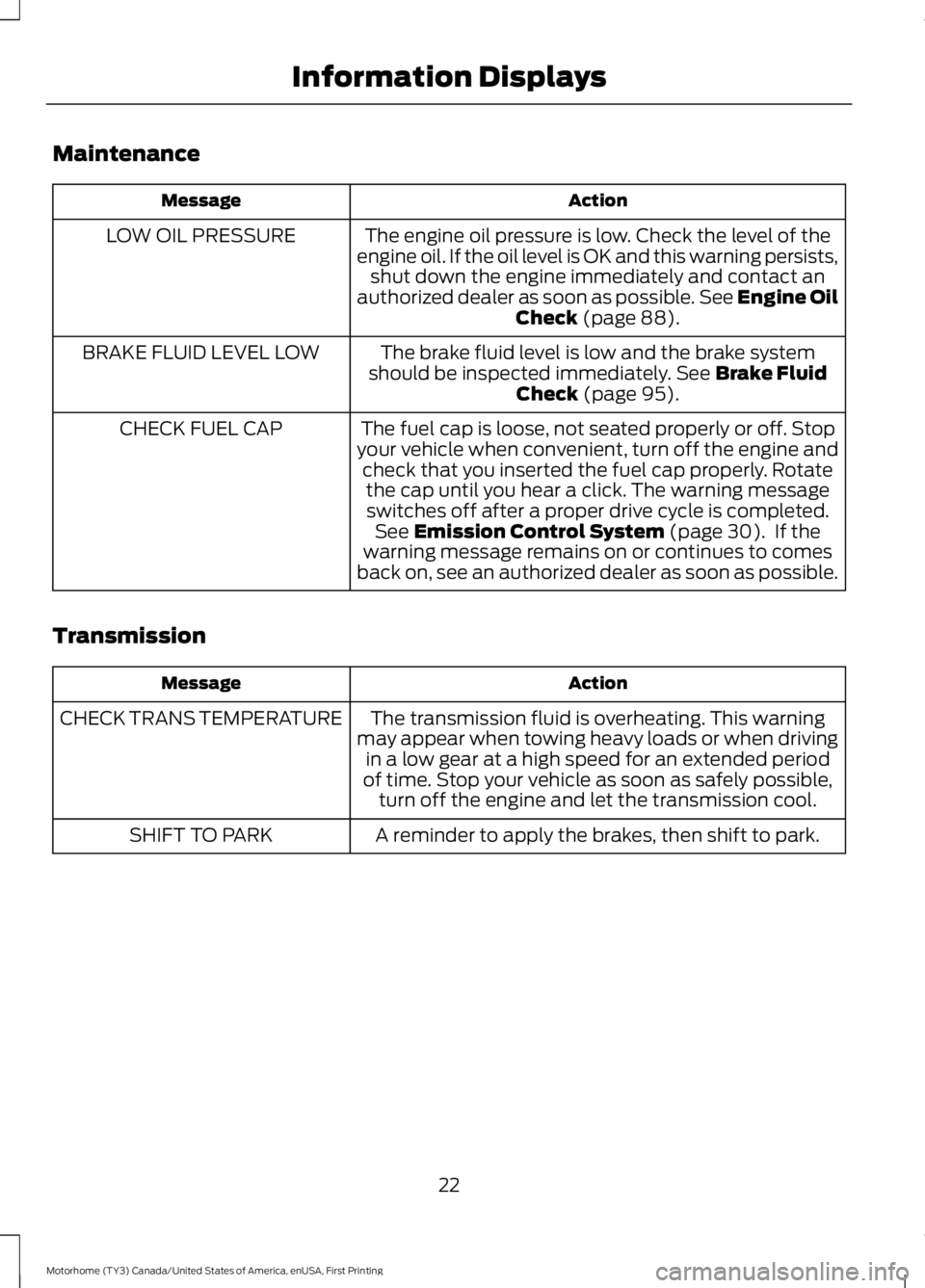
Maintenance
Action
Message
The engine oil pressure is low. Check the level of the
engine oil. If the oil level is OK and this warning persists, shut down the engine immediately and contact an
authorized dealer as soon as possible. See Engine Oil
Check (page 88).
LOW OIL PRESSURE
The brake fluid level is low and the brake system
should be inspected immediately.
See Brake Fluid
Check (page 95).
BRAKE FLUID LEVEL LOW
The fuel cap is loose, not seated properly or off. Stop
your vehicle when convenient, turn off the engine and check that you inserted the fuel cap properly. Rotatethe cap until you hear a click. The warning messageswitches off after a proper drive cycle is completed. See
Emission Control System (page 30). If the
warning message remains on or continues to comes
back on, see an authorized dealer as soon as possible.
CHECK FUEL CAP
Transmission Action
Message
The transmission fluid is overheating. This warning
may appear when towing heavy loads or when driving in a low gear at a high speed for an extended period
of time. Stop your vehicle as soon as safely possible, turn off the engine and let the transmission cool.
CHECK TRANS TEMPERATURE
A reminder to apply the brakes, then shift to park.
SHIFT TO PARK
22
Motorhome (TY3) Canada/United States of America, enUSA, First Printing Information Displays
Page 41 of 164
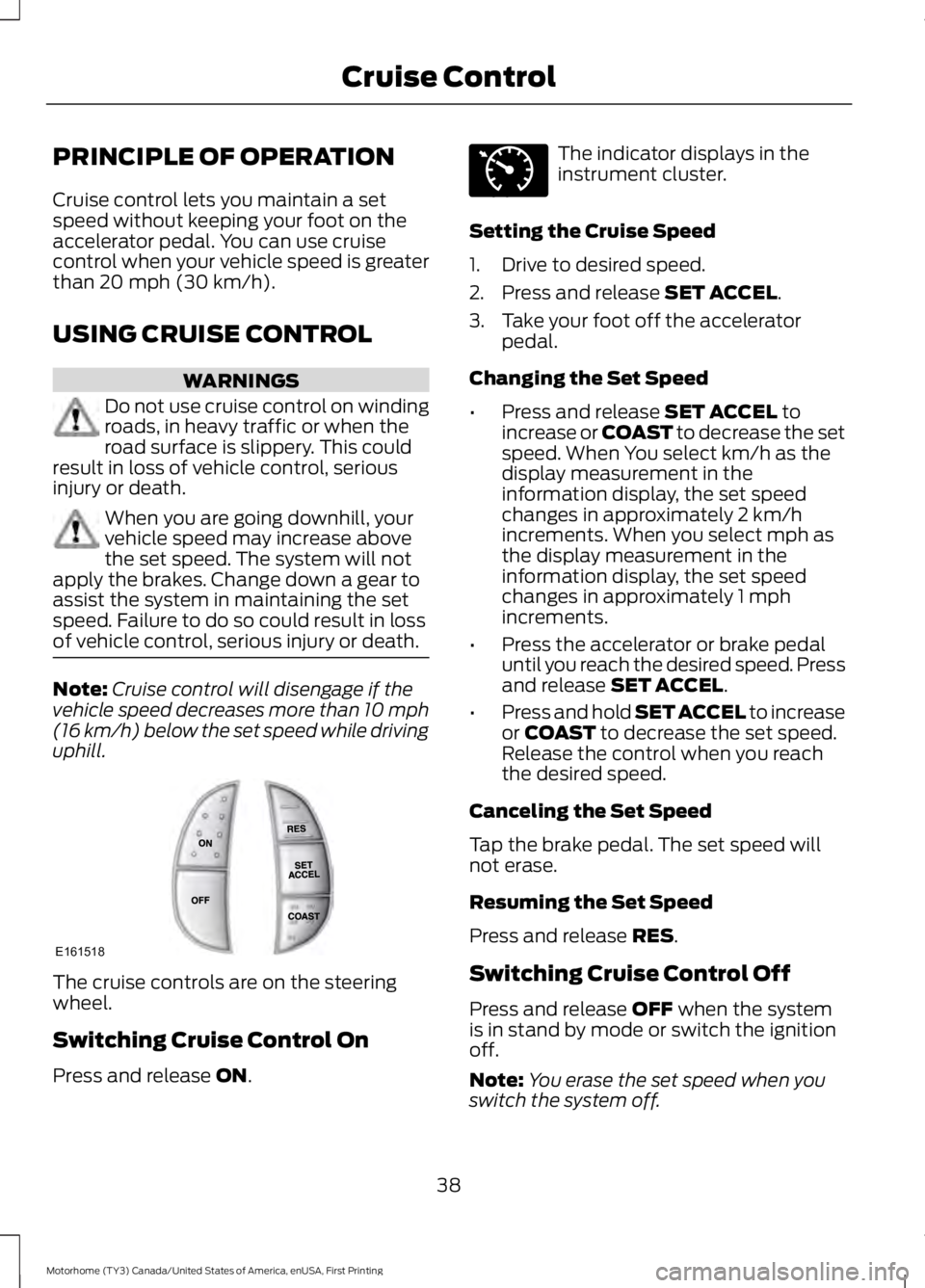
PRINCIPLE OF OPERATION
Cruise control lets you maintain a set
speed without keeping your foot on the
accelerator pedal. You can use cruise
control when your vehicle speed is greater
than 20 mph (30 km/h).
USING CRUISE CONTROL WARNINGS
Do not use cruise control on winding
roads, in heavy traffic or when the
road surface is slippery. This could
result in loss of vehicle control, serious
injury or death. When you are going downhill, your
vehicle speed may increase above
the set speed. The system will not
apply the brakes. Change down a gear to
assist the system in maintaining the set
speed. Failure to do so could result in loss
of vehicle control, serious injury or death. Note:
Cruise control will disengage if the
vehicle speed decreases more than 10 mph
(16 km/h) below the set speed while driving
uphill. The cruise controls are on the steering
wheel.
Switching Cruise Control On
Press and release
ON. The indicator displays in the
instrument cluster.
Setting the Cruise Speed
1. Drive to desired speed.
2. Press and release
SET ACCEL.
3. Take your foot off the accelerator pedal.
Changing the Set Speed
• Press and release
SET ACCEL to
increase or COAST to decrease the set
speed. When You select km/h as the
display measurement in the
information display, the set speed
changes in approximately 2 km/h
increments. When you select mph as
the display measurement in the
information display, the set speed
changes in approximately 1 mph
increments.
• Press the accelerator or brake pedal
until you reach the desired speed. Press
and release
SET ACCEL.
• Press and hold SET ACCEL to increase
or
COAST to decrease the set speed.
Release the control when you reach
the desired speed.
Canceling the Set Speed
Tap the brake pedal. The set speed will
not erase.
Resuming the Set Speed
Press and release
RES.
Switching Cruise Control Off
Press and release
OFF when the system
is in stand by mode or switch the ignition
off.
Note: You erase the set speed when you
switch the system off.
38
Motorhome (TY3) Canada/United States of America, enUSA, First Printing Cruise ControlE161518 E71340
Page 92 of 164
Only use oils certified for gasoline engines
by the American Petroleum Institute (API).
An oil with this trademark symbol
conforms to the current engine and
emission system protection standards and
fuel economy requirements of the
International Lubricants Specification
Advisory Committee (ILSAC), comprised
of U.S. and Japanese automobile
manufacturers.
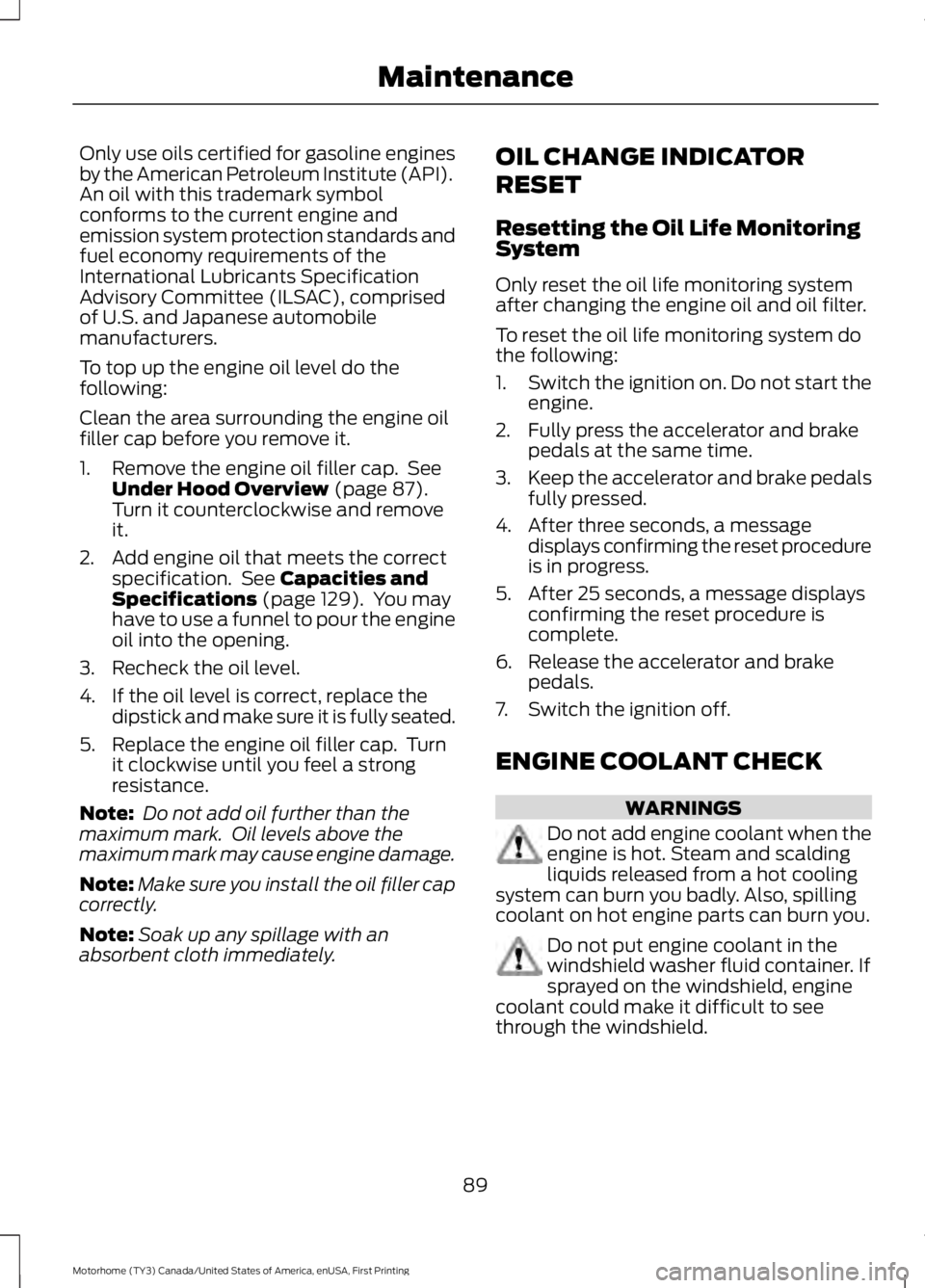
To top up the engine oil level do the
following:
Clean the area surrounding the engine oil
filler cap before you remove it.
1. Remove the engine oil filler cap. See
Under Hood Overview (page 87).
Turn it counterclockwise and remove
it.
2. Add engine oil that meets the correct specification. See
Capacities and
Specifications (page 129). You may
have to use a funnel to pour the engine
oil into the opening.
3. Recheck the oil level.
4. If the oil level is correct, replace the dipstick and make sure it is fully seated.
5. Replace the engine oil filler cap. Turn it clockwise until you feel a strong
resistance.
Note: Do not add oil further than the
maximum mark. Oil levels above the
maximum mark may cause engine damage.
Note: Make sure you install the oil filler cap
correctly.
Note: Soak up any spillage with an
absorbent cloth immediately. OIL CHANGE INDICATOR
RESET
Resetting the Oil Life Monitoring
System
Only reset the oil life monitoring system
after changing the engine oil and oil filter.
To reset the oil life monitoring system do
the following:
1.
Switch the ignition on. Do not start the
engine.
2. Fully press the accelerator and brake pedals at the same time.
3. Keep the accelerator and brake pedals
fully pressed.
4. After three seconds, a message displays confirming the reset procedure
is in progress.
5. After 25 seconds, a message displays confirming the reset procedure is
complete.
6. Release the accelerator and brake pedals.
7. Switch the ignition off.
ENGINE COOLANT CHECK WARNINGS
Do not add engine coolant when the
engine is hot. Steam and scalding
liquids released from a hot cooling
system can burn you badly. Also, spilling
coolant on hot engine parts can burn you. Do not put engine coolant in the
windshield washer fluid container. If
sprayed on the windshield, engine
coolant could make it difficult to see
through the windshield.
89
Motorhome (TY3) Canada/United States of America, enUSA, First Printing Maintenance
Page 95 of 164
Coolant Change
At specific mileage intervals, as listed in
the scheduled maintenance information,
the coolant should be changed. Add
prediluted coolant approved to the correct
specification. See Capacities and
Specifications (page 129).
Fail-Safe Cooling
Fail-safe cooling allows you to temporarily
drive your vehicle before any incremental
component damage occurs. The fail-safe
distance depends on ambient
temperature, vehicle load and terrain.
How Fail-Safe Cooling Works
If the engine begins to overheat, the
coolant temperature gauge moves toward
the red zone: A warning lamp illuminates and
a message may appear in the
information display.
If the engine reaches a preset
over-temperature condition, the engine
automatically switches to alternating
cylinder operation. Each disabled cylinder
acts as an air pump and cools the engine.
When this occurs, your vehicle still
operates, however:
• Engine power is limited.
• The air conditioning system turns off.
Continued operation increases the engine
temperature, causing the engine to
completely shut down. Your steering and
braking effort increases in this situation.
When the engine temperature cools, you
can re-start the engine. Have your vehicle
checked as soon as possible to minimize
engine damage. When Fail-Safe Mode Is Activated WARNINGS
Fail-safe mode is for use during
emergencies only. Operate your
vehicle in fail-safe mode only as long
as necessary to bring your vehicle to rest
in a safe location and seek immediate
repairs. When in fail-safe mode, your
vehicle will have limited power, will not be
able to maintain high-speed operation, and
may completely shut down without
warning, potentially losing engine power,
power steering assist, and power brake
assist, which may increase the possibility
of a crash resulting in serious injury. Never remove the coolant reservoir
cap while the engine is running or hot.
Your vehicle has limited engine power
when in the fail-safe mode, drive your
vehicle with caution. Your vehicle does not
maintain high-speed operation and the
engine may operate poorly.
Remember that the engine is capable of
automatically shutting down to prevent
engine damage. In this situation:
1. Pull off the road as soon as safely
possible and switch the engine off.
2. If you are a member of a roadside assistance program, we recommend
that you contact your roadside
assistance service provider.
3. If this is not possible, wait a short period for the engine to cool.
4. Check the coolant level. If the coolant level is at or below the minimum mark,
add prediluted coolant immediately.
5. When the engine temperature cools, you can re-start the engine. Have your
vehicle checked as soon as possible to
minimize engine damage.
Note: Driving your vehicle without repair
increases the chance of engine damage.
92
Motorhome (TY3) Canada/United States of America, enUSA, First Printing Maintenance