lock FORD F550 2012 Repair Manual
[x] Cancel search | Manufacturer: FORD, Model Year: 2012, Model line: F550, Model: FORD F550 2012Pages: 448, PDF Size: 6.01 MB
Page 151 of 448
3. After three seconds but within 10 seconds of removing the first coded
key, insert the second previously programmed coded key into the
ignition and turn the ignition from the 1 (off) position to the 3 (on)
position (maintain ignition in the 3 (on) position for at least one second
but no more than 10 seconds).
4. Turn the ignition from the 3 (on) position back to the 1 (off) position
in order to remove the second coded key from the ignition.
5. After three seconds but within 10 seconds of removing the second
coded key, insert the new unprogrammed key (new key/valet key) into
the ignition and turn the ignition from the 1 (off) position to the 3 (on)
position (maintain ignition in the 3 (on) position for at least one second,
but no more than 10 seconds). This step will program your new key to a
coded key.
6. To program additional new unprogrammed key(s), repeat Steps 1
through 5.
If successful, the new coded key(s) will start the vehicle’s engine.
If not successful, the new coded key(s) will not start the vehicle’s engine
and you may repeat Steps 1 through 5. If failure repeats, bring your vehicle
to your authorized dealer to have the new spare key(s) programmed.
PERIMETER ALARM SYSTEM (IF EQUIPPED)
The perimeter anti-theft system will warn you in the event of an
unauthorized entry to your vehicle.
If there is any potential perimeter anti-theft problem with your vehicle,
ensure ALL remote entry transmitters are taken to the authorized
dealer to aid in troubleshooting.
Arming the system
When armed, this system will respond if unauthorized entry is
attempted. When unauthorized entry occurs, the system will flash the
park/turn lamps and will sound the horn.
The system is ready to arm whenever the key is removed from the
ignition. Either of the following actions will prearm the alarm system:
• Press the control on the remote entry transmitter.
• Open a door and press the power door lock control to lock all the
doors, and then close the door.
• Press and hold the 7 • 8 and 9 • 0 controls on the keyless entry pad
at the same time to lock the doors (driver’s door must be closed). Locks and Security
151
2012 F-250/350/450/550 (f23)
Owners Guide, 4th Printing
USA (fus)
Page 152 of 448
There is a 20 second countdown when any of the above actions occur
before the vehicle becomes armed.
Each door and the hood is armed individually, and if any are open, they
must be closed before the open entry point can enter the 20 second
countdown.
The turn signal lamps will flash once when all doors and the hood are
closed indicating the vehicle is locked and entering the 20 second
countdown.
Disarming the system
You can disarm the system by any of the following actions:
• Unlock the doors by pressing the control on your remote entry
transmitter.
• Turn the ignition to the on position with a programmed coded ignition
key.
• Unlock the doors by using your keyless entry pad.
• If using a key in the driver’s door to unlock the vehicle, a chime will
sound when you open the door and you will have 12 seconds to
disarm the alarm system using any of the actions above, otherwise the
alarm will trigger.
Pressing the power door unlock control within the 20 second prearmed
mode will return the vehicle to a disarmed state.
Triggering the anti-theft system
The armed system will be triggered if any door or hood is opened
without using the key or the remote entry transmitter.Locks and Security
152
2012 F-250/350/450/550 (f23)
Owners Guide, 4th Printing
USA (fus)
Page 154 of 448
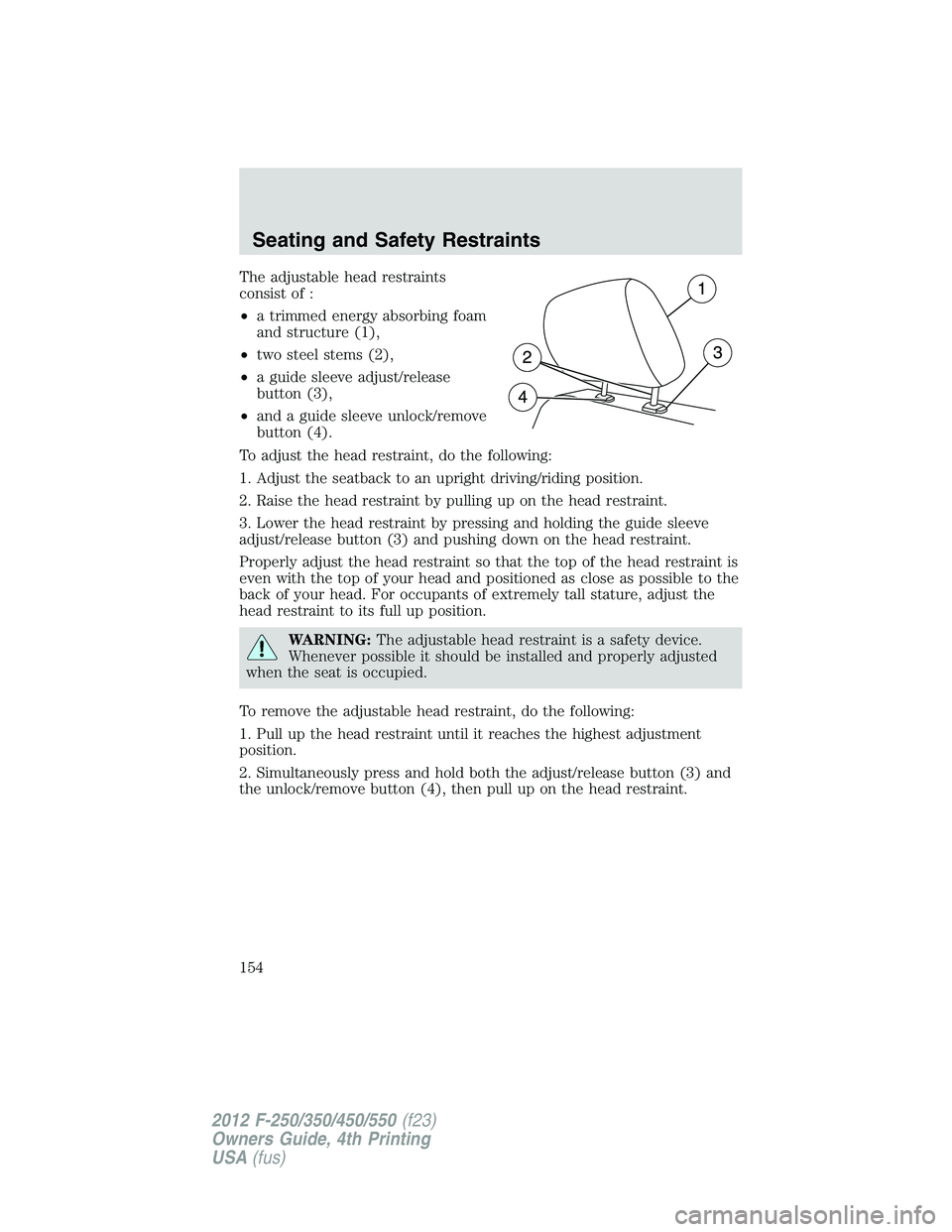
The adjustable head restraints
consist of :
• a trimmed energy absorbing foam
and structure (1),
• two steel stems (2),
• a guide sleeve adjust/release
button (3),
• and a guide sleeve unlock/remove
button (4).
To adjust the head restraint, do the following:
1. Adjust the seatback to an upright driving/riding position.
2. Raise the head restraint by pulling up on the head restraint.
3. Lower the head restraint by pressing and holding the guide sleeve
adjust/release button (3) and pushing down on the head restraint.
Properly adjust the head restraint so that the top of the head restraint is
even with the top of your head and positioned as close as possible to the
back of your head. For occupants of extremely tall stature, adjust the
head restraint to its full up position.
WARNING: The adjustable head restraint is a safety device.
Whenever possible it should be installed and properly adjusted
when the seat is occupied.
To remove the adjustable head restraint, do the following:
1. Pull up the head restraint until it reaches the highest adjustment
position.
2. Simultaneously press and hold both the adjust/release button (3) and
the unlock/remove button (4), then pull up on the head restraint.Seating and Safety Restraints
154
2012 F-250/350/450/550 (f23)
Owners Guide, 4th Printing
USA (fus)
Page 155 of 448
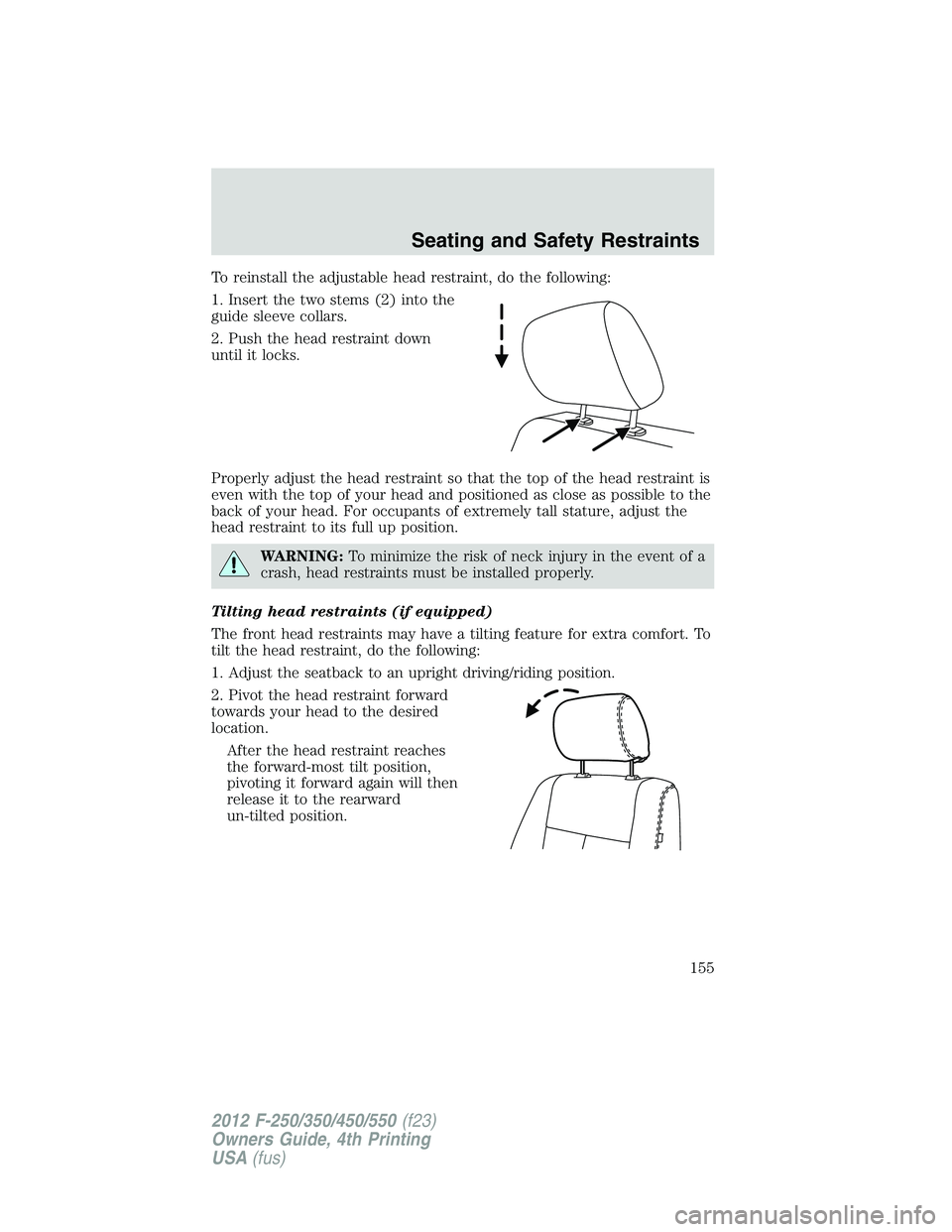
To reinstall the adjustable head restraint, do the following:
1. Insert the two stems (2) into the
guide sleeve collars.
2. Push the head restraint down
until it locks.
Properly adjust the head restraint so that the top of the head restraint is
even with the top of your head and positioned as close as possible to the
back of your head. For occupants of extremely tall stature, adjust the
head restraint to its full up position.
WARNING: To minimize the risk of neck injury in the event of a
crash, head restraints must be installed properly.
Tilting head restraints (if equipped)
The front head restraints may have a tilting feature for extra comfort. To
tilt the head restraint, do the following:
1. Adjust the seatback to an upright driving/riding position.
2. Pivot the head restraint forward
towards your head to the desired
location.
After the head restraint reaches
the forward-most tilt position,
pivoting it forward again will then
release it to the rearward
un-tilted position. Seating and Safety Restraints
155
2012 F-250/350/450/550 (f23)
Owners Guide, 4th Printing
USA (fus)
Page 156 of 448
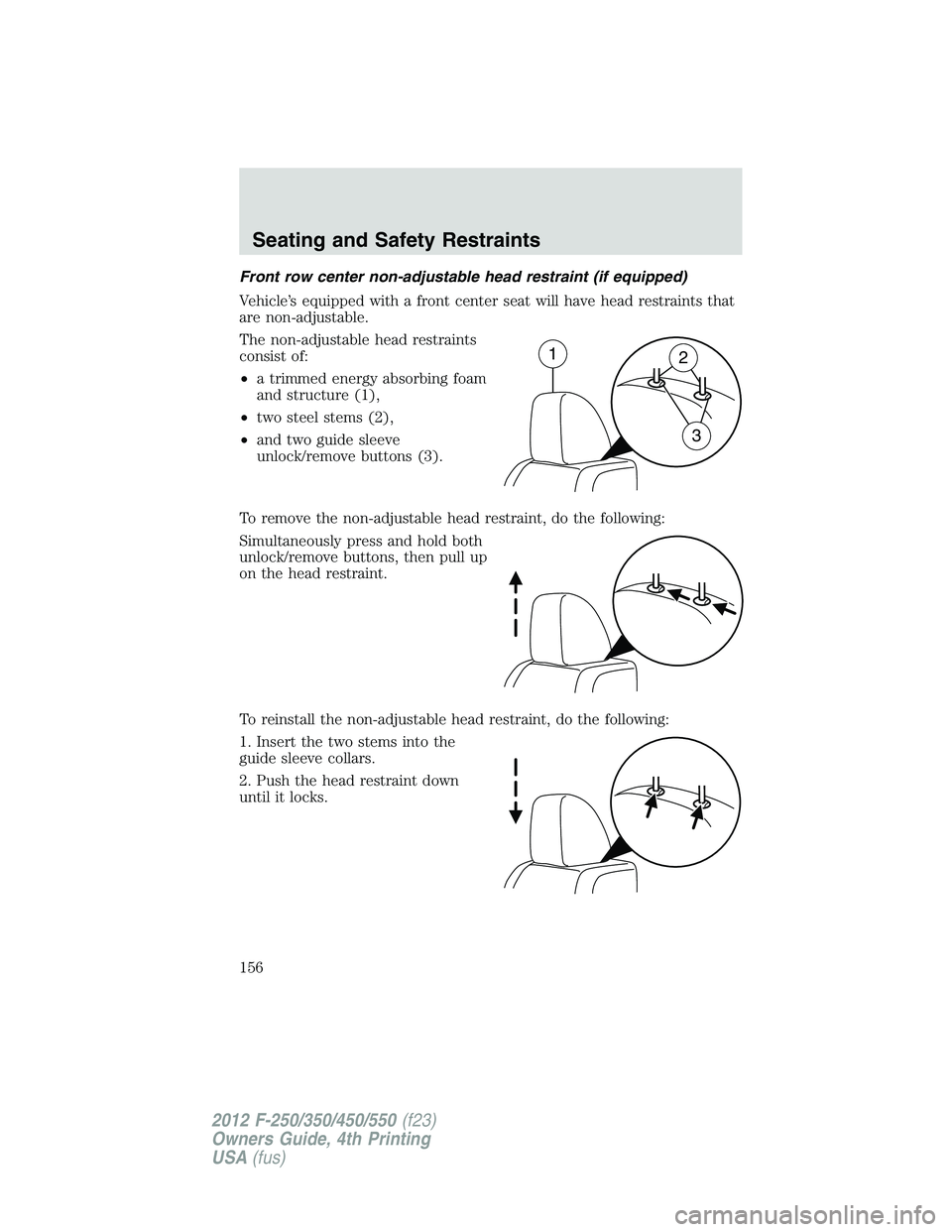
Front row center non-adjustable head restraint (if equipped)
Vehicle’s equipped with a front center seat will have head restraints that
are non-adjustable.
The non-adjustable head restraints
consist of:
• a trimmed energy absorbing foam
and structure (1),
• two steel stems (2),
• and two guide sleeve
unlock/remove buttons (3).
To remove the non-adjustable head restraint, do the following:
Simultaneously press and hold both
unlock/remove buttons, then pull up
on the head restraint.
To reinstall the non-adjustable head restraint, do the following:
1. Insert the two stems into the
guide sleeve collars.
2. Push the head restraint down
until it locks. 1
2
3Seating and Safety Restraints
156
2012 F-250/350/450/550 (f23)
Owners Guide, 4th Printing
USA (fus)
Page 159 of 448
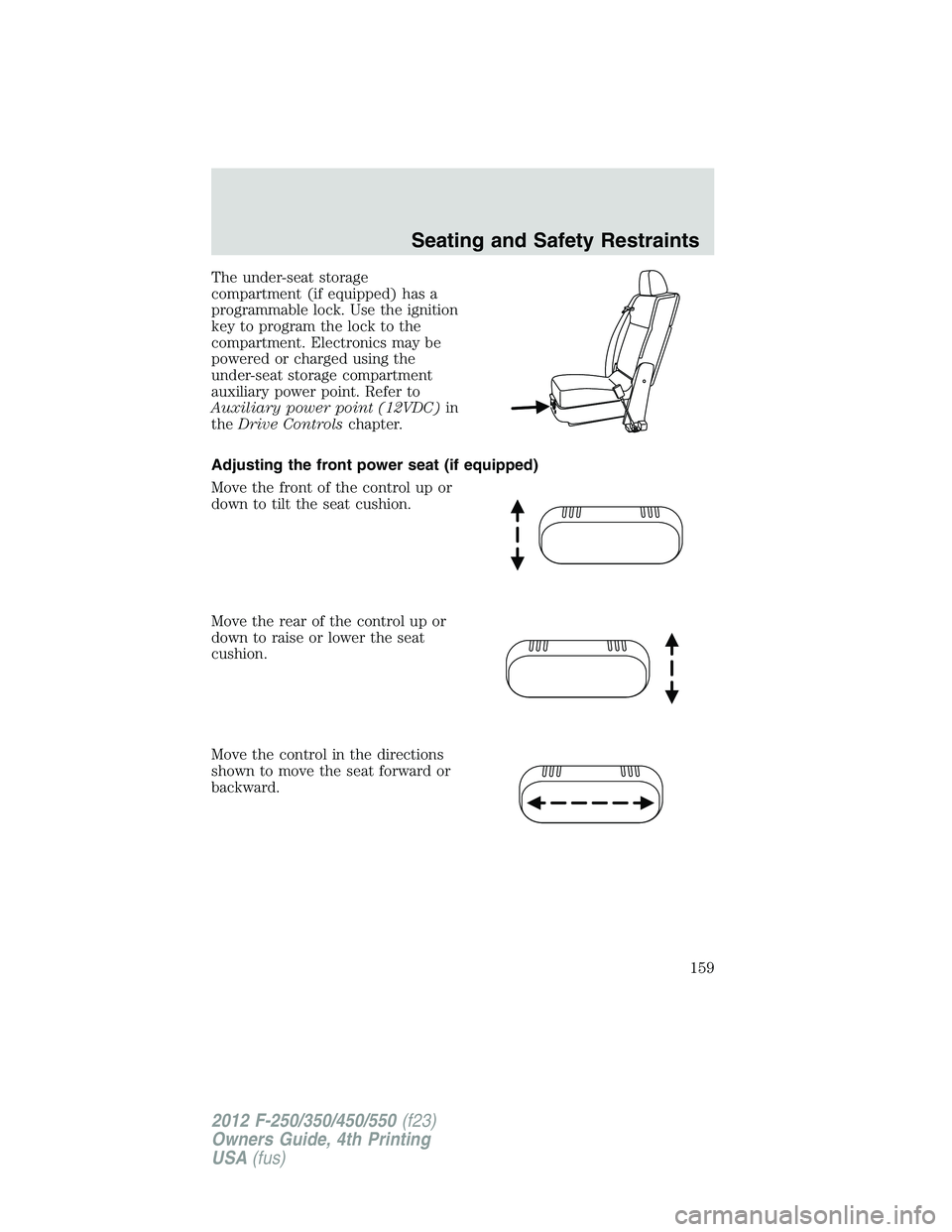
The under-seat storage
compartment (if equipped) has a
programmable lock. Use the ignition
key to program the lock to the
compartment. Electronics may be
powered or charged using the
under-seat storage compartment
auxiliary power point. Refer to
Auxiliary power point (12VDC) in
the Drive Controls chapter.
Adjusting the front power seat (if equipped)
Move the front of the control up or
down to tilt the seat cushion.
Move the rear of the control up or
down to raise or lower the seat
cushion.
Move the control in the directions
shown to move the seat forward or
backward. Seating and Safety Restraints
159
2012 F-250/350/450/550 (f23)
Owners Guide, 4th Printing
USA (fus)
Page 163 of 448
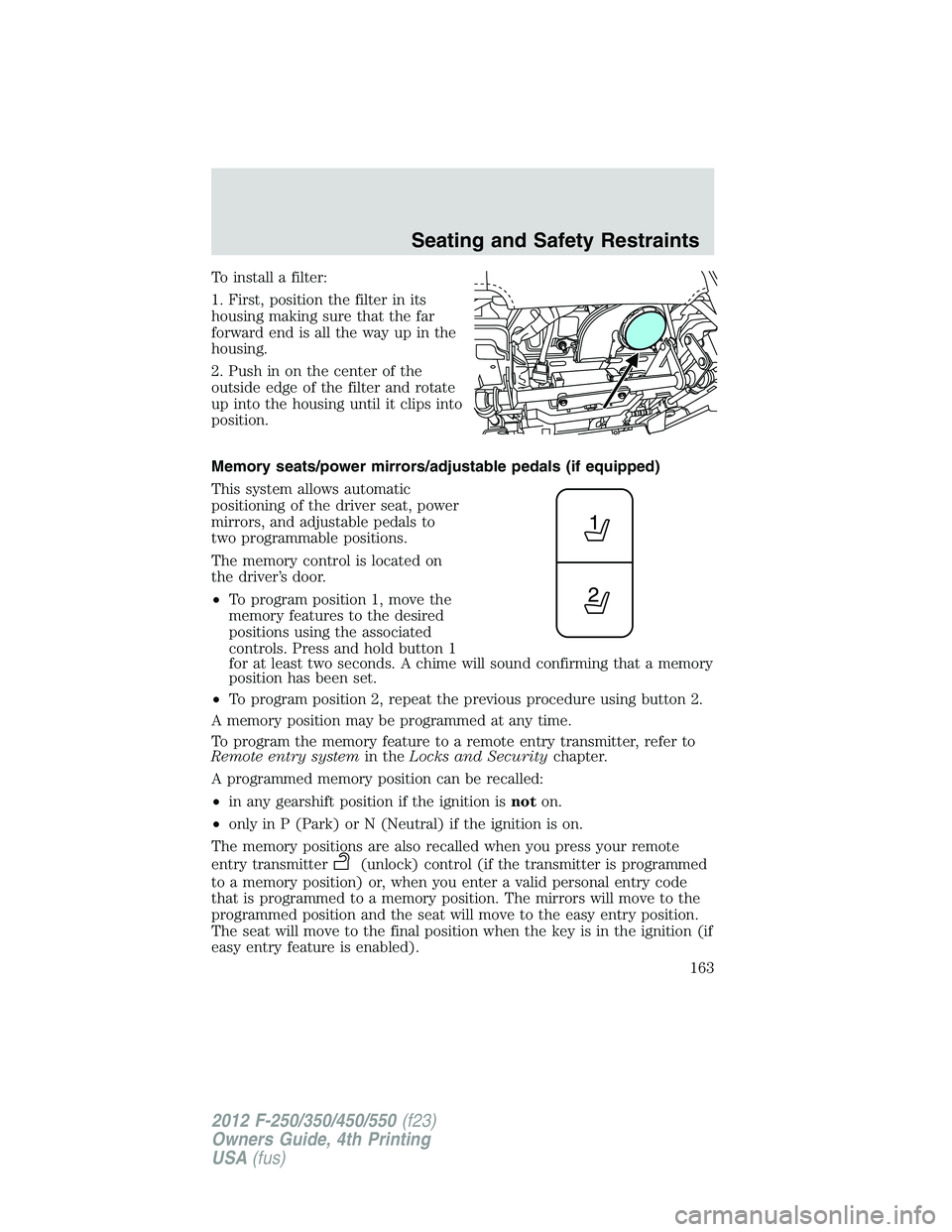
To install a filter:
1. First, position the filter in its
housing making sure that the far
forward end is all the way up in the
housing.
2. Push in on the center of the
outside edge of the filter and rotate
up into the housing until it clips into
position.
Memory seats/power mirrors/adjustable pedals (if equipped)
This system allows automatic
positioning of the driver seat, power
mirrors, and adjustable pedals to
two programmable positions.
The memory control is located on
the driver’s door.
• To program position 1, move the
memory features to the desired
positions using the associated
controls. Press and hold button 1
for at least two seconds. A chime will sound confirming that a memory
position has been set.
• To program position 2, repeat the previous procedure using button 2.
A memory position may be programmed at any time.
To program the memory feature to a remote entry transmitter, refer to
Remote entry system in the Locks and Security chapter.
A programmed memory position can be recalled:
• in any gearshift position if the ignition is not on.
• only in P (Park) or N (Neutral) if the ignition is on.
The memory positions are also recalled when you press your remote
entry transmitter (unlock) control (if the transmitter is programmed
to a memory position) or, when you enter a valid personal entry code
that is programmed to a memory position. The mirrors will move to the
programmed position and the seat will move to the easy entry position.
The seat will move to the final position when the key is in the ignition (if
easy entry feature is enabled). Seating and Safety Restraints
163
2012 F-250/350/450/550 (f23)
Owners Guide, 4th Printing
USA (fus)
Page 164 of 448
Easy-access/easy-out feature (if equipped)
The easy entry feature can be turned off or on through the vehicle
message center. Refer to Message center in the Instrument Cluster
chapter.
The easy entry feature automatically moves the driver’s seat 2 inches
(5 cm) forward when:
• the transmission is in P (Park)
• the key is inserted into the ignition cylinder
(If the seat is located less than 2 inches [5 cm] from the front of the seat
track, the seat will travel up to 1
4
inch (6 mm) to the front of the seat
track).
The easy out feature automatically moves the driver’s seat 2 inches
(5 cm) backward when:
• the transmission is in P (Park)
• the key is removed from the ignition cylinder
(If the seat is located less than 2 inches (5 cm) from the rear of the seat
track, the seat will travel up to 1
4
inch (6 mm) to the rear of the seat
track).
If the memory setting is programmed through the remote transmitter,
upon unlocking the door via remote entry system, the seat position will
travel to the desired memory setting less 2 inches (5 cm). Once entering
the vehicle and inserting the key in the ignition while in P (Park), the
easy entry feature will move the seat an additional 2 inches (5 cm) to
the desired memory location. See Locks and Security for activating the
memory seat feature through the remote entry system.
REAR SEATS
Non-adjustable second-row head restraints
Your vehicle is equipped with second row head restraints that are
non-adjustable.
WARNING: To minimize the risk of neck injury in the event of a
crash, the driver and passenger occupants should not sit in
and/or operate the vehicle, until the head restraint is placed in its
proper position. The driver should never adjust the head restraint
while the vehicle is in motion.Seating and Safety Restraints
164
2012 F-250/350/450/550 (f23)
Owners Guide, 4th Printing
USA (fus)
Page 165 of 448
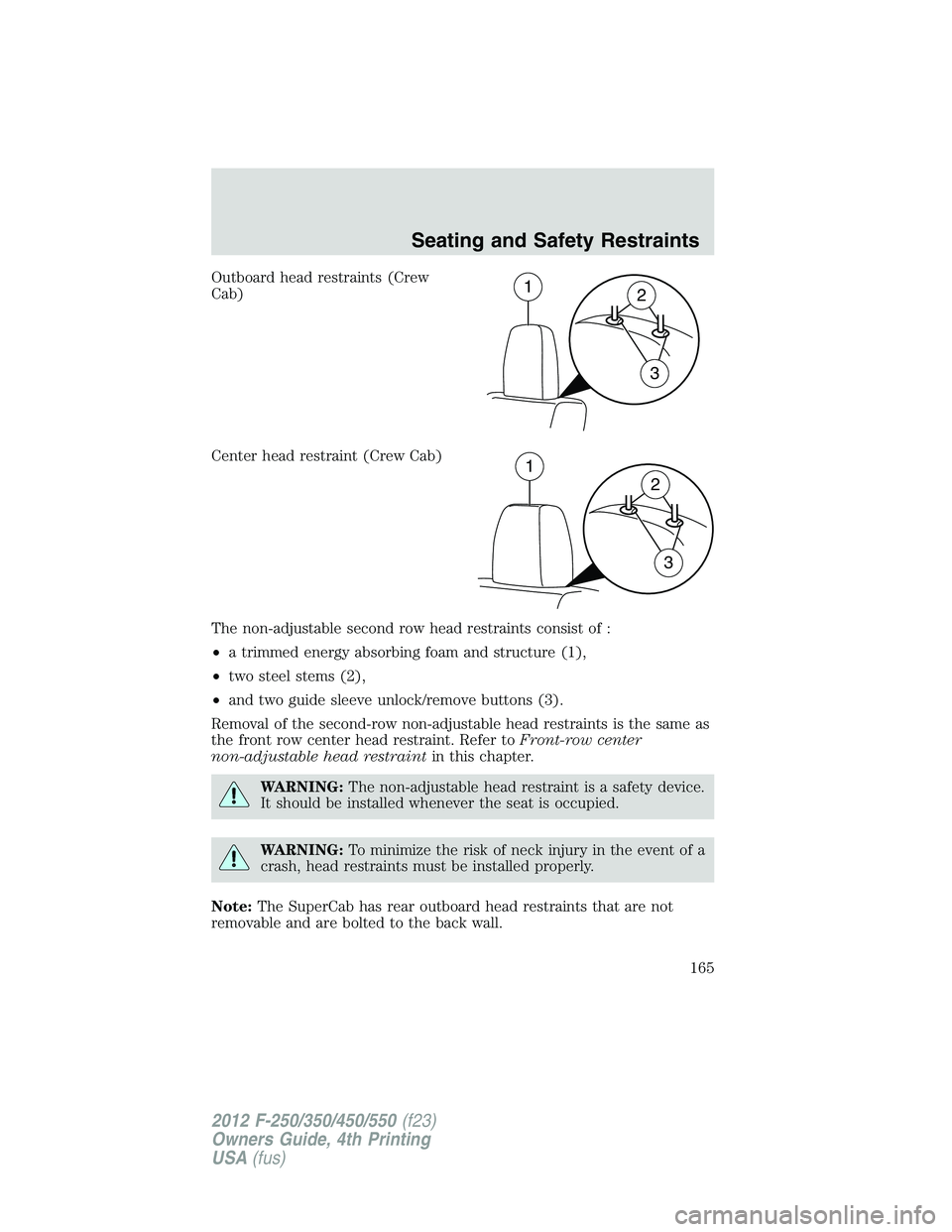
Outboard head restraints (Crew
Cab)
Center head restraint (Crew Cab)
The non-adjustable second row head restraints consist of :
• a trimmed energy absorbing foam and structure (1),
• two steel stems (2),
• and two guide sleeve unlock/remove buttons (3).
Removal of the second-row non-adjustable head restraints is the same as
the front row center head restraint. Refer to Front-row center
non-adjustable head restraint in this chapter.
WARNING: The non-adjustable head restraint is a safety device.
It should be installed whenever the seat is occupied.
WARNING: To minimize the risk of neck injury in the event of a
crash, head restraints must be installed properly.
Note: The SuperCab has rear outboard head restraints that are not
removable and are bolted to the back wall. 1
2
3
1
2
3Seating and Safety Restraints
165
2012 F-250/350/450/550 (f23)
Owners Guide, 4th Printing
USA (fus)
Page 166 of 448
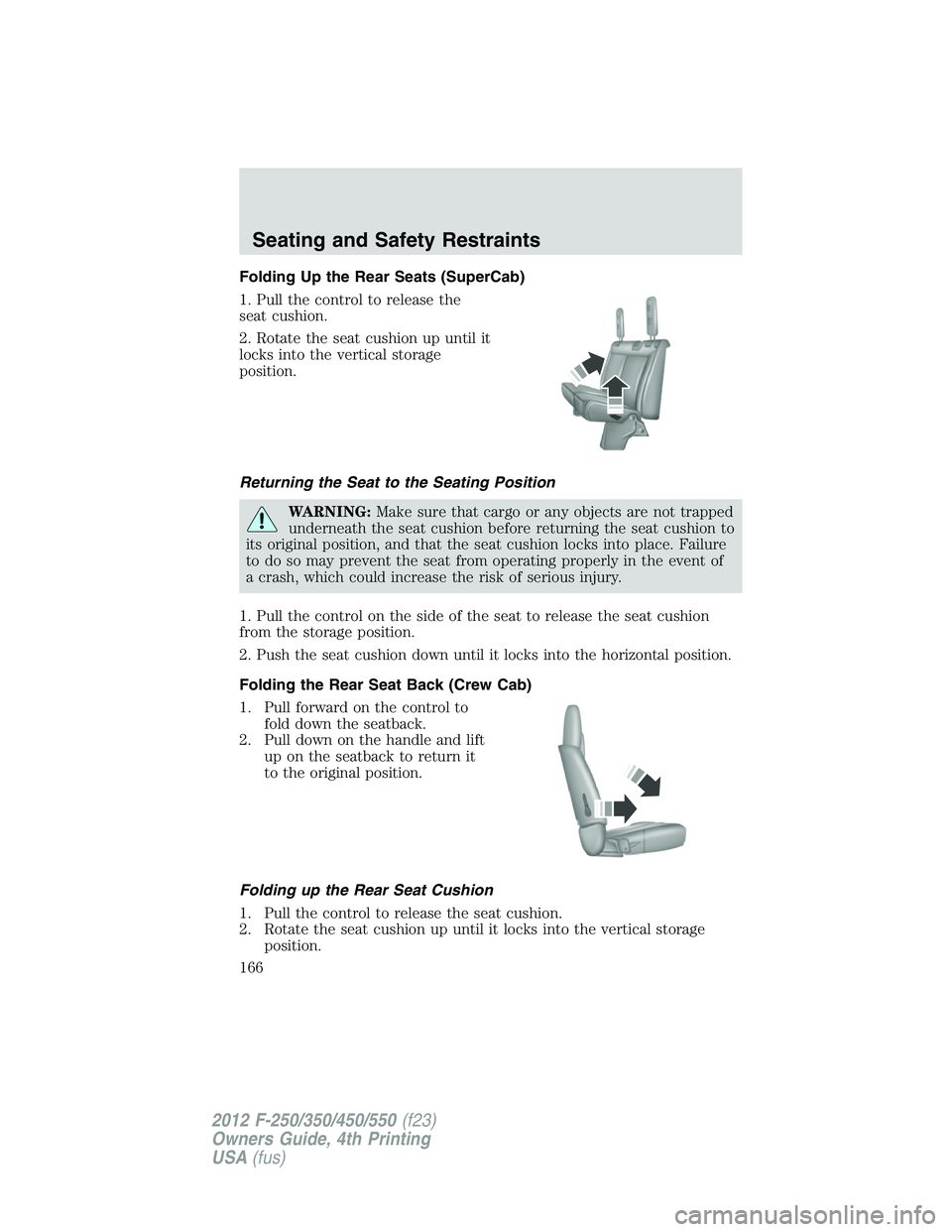
Folding Up the Rear Seats (SuperCab)
1. Pull the control to release the
seat cushion.
2. Rotate the seat cushion up until it
locks into the vertical storage
position.
Returning the Seat to the Seating Position
WARNING: Make sure that cargo or any objects are not trapped
underneath the seat cushion before returning the seat cushion to
its original position, and that the seat cushion locks into place. Failure
to do so may prevent the seat from operating properly in the event of
a crash, which could increase the risk of serious injury.
1. Pull the control on the side of the seat to release the seat cushion
from the storage position.
2. Push the seat cushion down until it locks into the horizontal position.
Folding the Rear Seat Back (Crew Cab)
1. Pull forward on the control to
fold down the seatback.
2. Pull down on the handle and lift
up on the seatback to return it
to the original position.
Folding up the Rear Seat Cushion
1. Pull the control to release the seat cushion.
2. Rotate the seat cushion up until it locks into the vertical storage
position.Seating and Safety Restraints
166
2012 F-250/350/450/550 (f23)
Owners Guide, 4th Printing
USA (fus)