ignition FORD F650 2013 12.G Owner's Guide
[x] Cancel search | Manufacturer: FORD, Model Year: 2013, Model line: F650, Model: FORD F650 2013 12.GPages: 378, PDF Size: 3.82 MB
Page 173 of 378
The upper portion of the switch must be pressed before operating with a
trailer or operating in the bobtail mode.
Suspension Conversions
WARNING:When operating a loaded vehicle, the driver must
keep all adjustable axles on the ground at all times, supporting
their share of the vehicle’s load. Failure to do so can overload other
axles, tires, wheels, springs, steering components, brakes and frames,
resulting in early component failure, loss of vehicle control, possible
property damage and personal injury.
It is not recommended, or approved, that suspension conversions be
performed. However, it is understood that, on occasion, aftermarket
add-on suspensions are installed by others on the truck chassis which
allow operator control for weight transfer from other axles (i.e., air lift
axles).
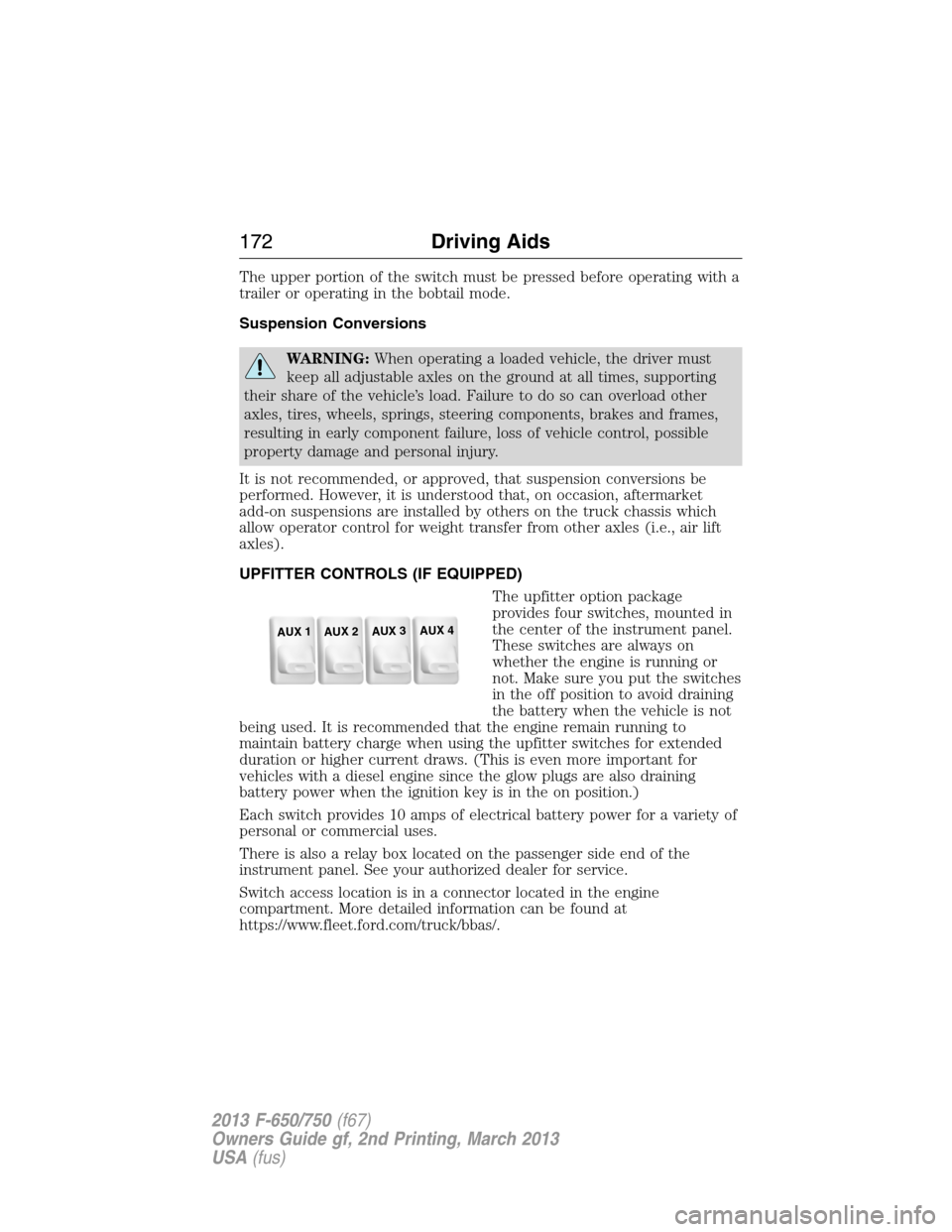
UPFITTER CONTROLS (IF EQUIPPED)
The upfitter option package
provides four switches, mounted in
the center of the instrument panel.
These switches are always on
whether the engine is running or
not. Make sure you put the switches
in the off position to avoid draining
the battery when the vehicle is not
being used. It is recommended that the engine remain running to
maintain battery charge when using the upfitter switches for extended
duration or higher current draws. (This is even more important for
vehicles with a diesel engine since the glow plugs are also draining
battery power when the ignition key is in the on position.)
Each switch provides 10 amps of electrical battery power for a variety of
personal or commercial uses.
There is also a relay box located on the passenger side end of the
instrument panel. See your authorized dealer for service.
Switch access location is in a connector located in the engine
compartment. More detailed information can be found at
https://www.fleet.ford.com/truck/bbas/.
AUX 1
AUX 2
AUX 3
AUX 4
172Driving Aids
2013 F-650/750(f67)
Owners Guide gf, 2nd Printing, March 2013
USA(fus)
Page 186 of 378
Vehicles Sold in Canada: Getting Roadside Assistance
Canadian customers who require roadside assistance, call:
1–800–665–2006.
Vehicles Sold Canada: Using Roadside Assistance
Complete the roadside assistance identification card and place it in your
wallet for quick reference. In Canada, the card is found in the warranty
information in the glove box.
Canadian Roadside coverage and benefits may differ from the U.S.
coverage. Please see your warranty information or visit our website at
www.ford.ca for information on Canadian services and benefits.
Canadian customers who need to obtain roadside information, call
1-800-665-2006 or visit our website at www.ford.ca.
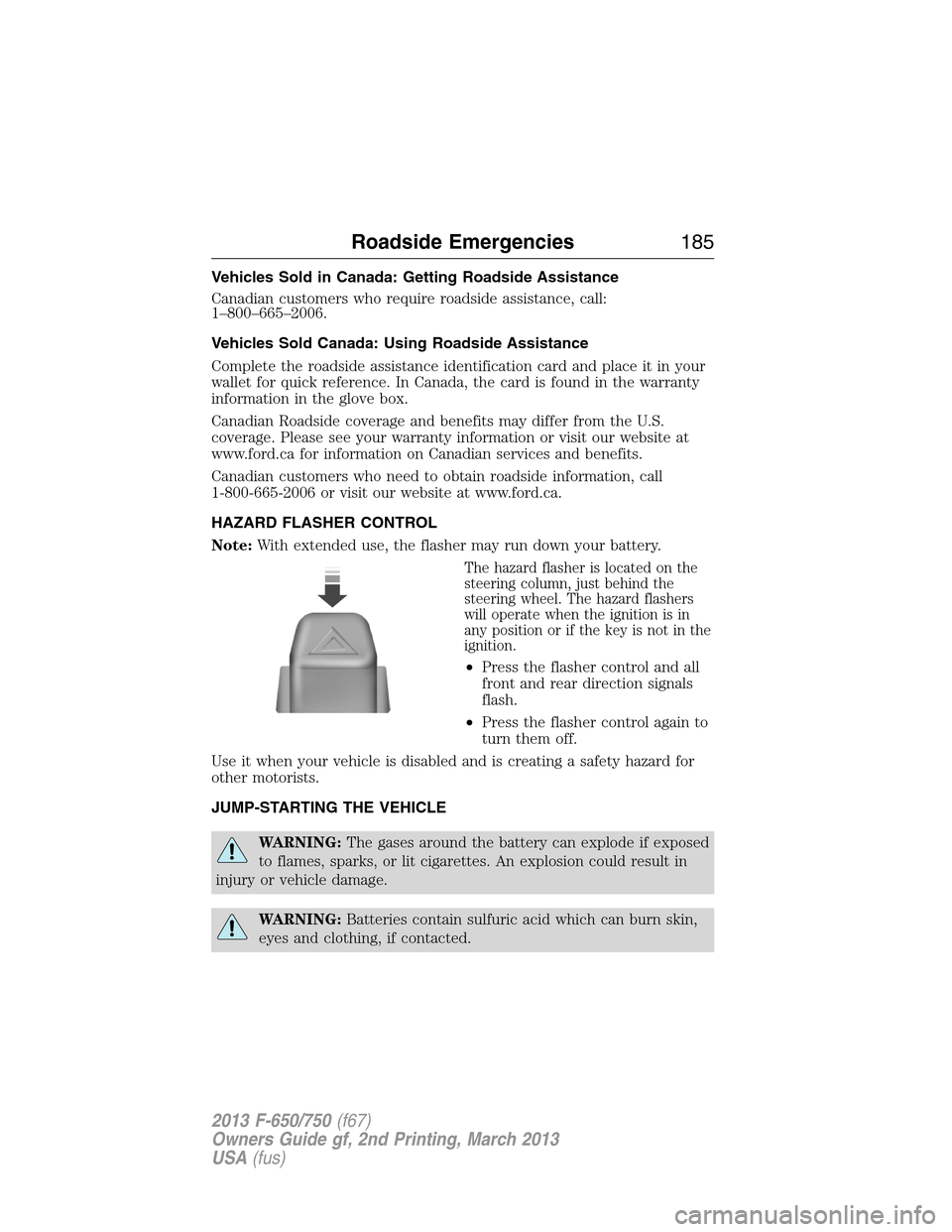
HAZARD FLASHER CONTROL
Note:With extended use, the flasher may run down your battery.
The hazard flasher is located on the
steering column, just behind the
steering wheel. The hazard flashers
will operate when the ignition is in
any position or if the key is not in the
ignition.
•Press the flasher control and all
front and rear direction signals
flash.
•Press the flasher control again to
turn them off.
Use it when your vehicle is disabled and is creating a safety hazard for
other motorists.
JUMP-STARTING THE VEHICLE
WARNING:The gases around the battery can explode if exposed
to flames, sparks, or lit cigarettes. An explosion could result in
injury or vehicle damage.
WARNING:Batteries contain sulfuric acid which can burn skin,
eyes and clothing, if contacted.
Roadside Emergencies185
2013 F-650/750(f67)
Owners Guide gf, 2nd Printing, March 2013
USA(fus)
Page 197 of 378
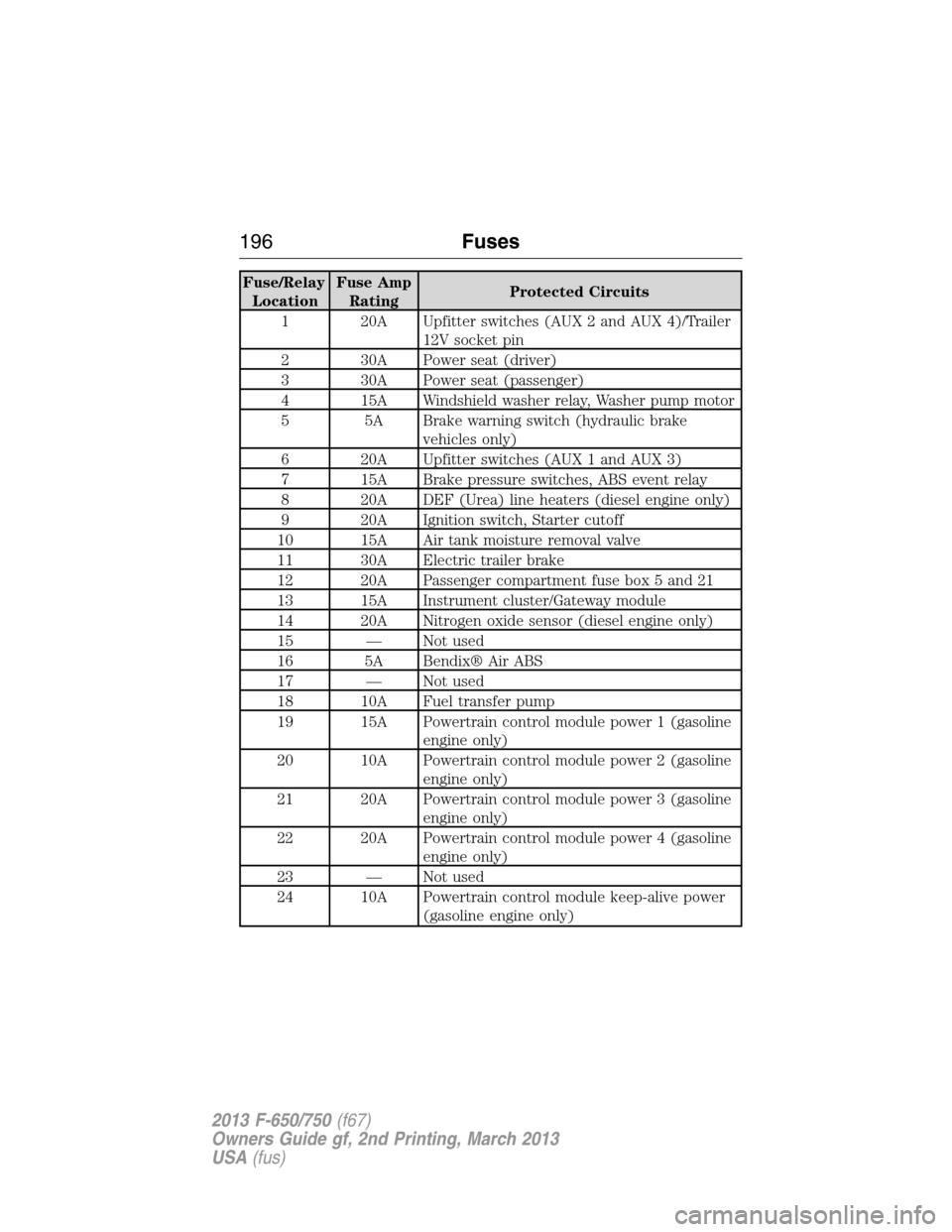
Fuse/Relay
LocationFuse Amp
RatingProtected Circuits
1 20A Upfitter switches (AUX 2 and AUX 4)/Trailer
12V socket pin
2 30A Power seat (driver)
3 30A Power seat (passenger)
4 15A Windshield washer relay, Washer pump motor
5 5A Brake warning switch (hydraulic brake
vehicles only)
6 20A Upfitter switches (AUX 1 and AUX 3)
7 15A Brake pressure switches, ABS event relay
8 20A DEF (Urea) line heaters (diesel engine only)
9 20A Ignition switch, Starter cutoff
10 15A Air tank moisture removal valve
11 30A Electric trailer brake
12 20A Passenger compartment fuse box 5 and 21
13 15A Instrument cluster/Gateway module
14 20A Nitrogen oxide sensor (diesel engine only)
15 — Not used
16 5A Bendix® Air ABS
17 — Not used
18 10A Fuel transfer pump
19 15A Powertrain control module power 1 (gasoline
engine only)
20 10A Powertrain control module power 2 (gasoline
engine only)
21 20A Powertrain control module power 3 (gasoline
engine only)
22 20A Powertrain control module power 4 (gasoline
engine only)
23 — Not used
24 10A Powertrain control module keep-alive power
(gasoline engine only)
196Fuses
2013 F-650/750(f67)
Owners Guide gf, 2nd Printing, March 2013
USA(fus)
Page 198 of 378
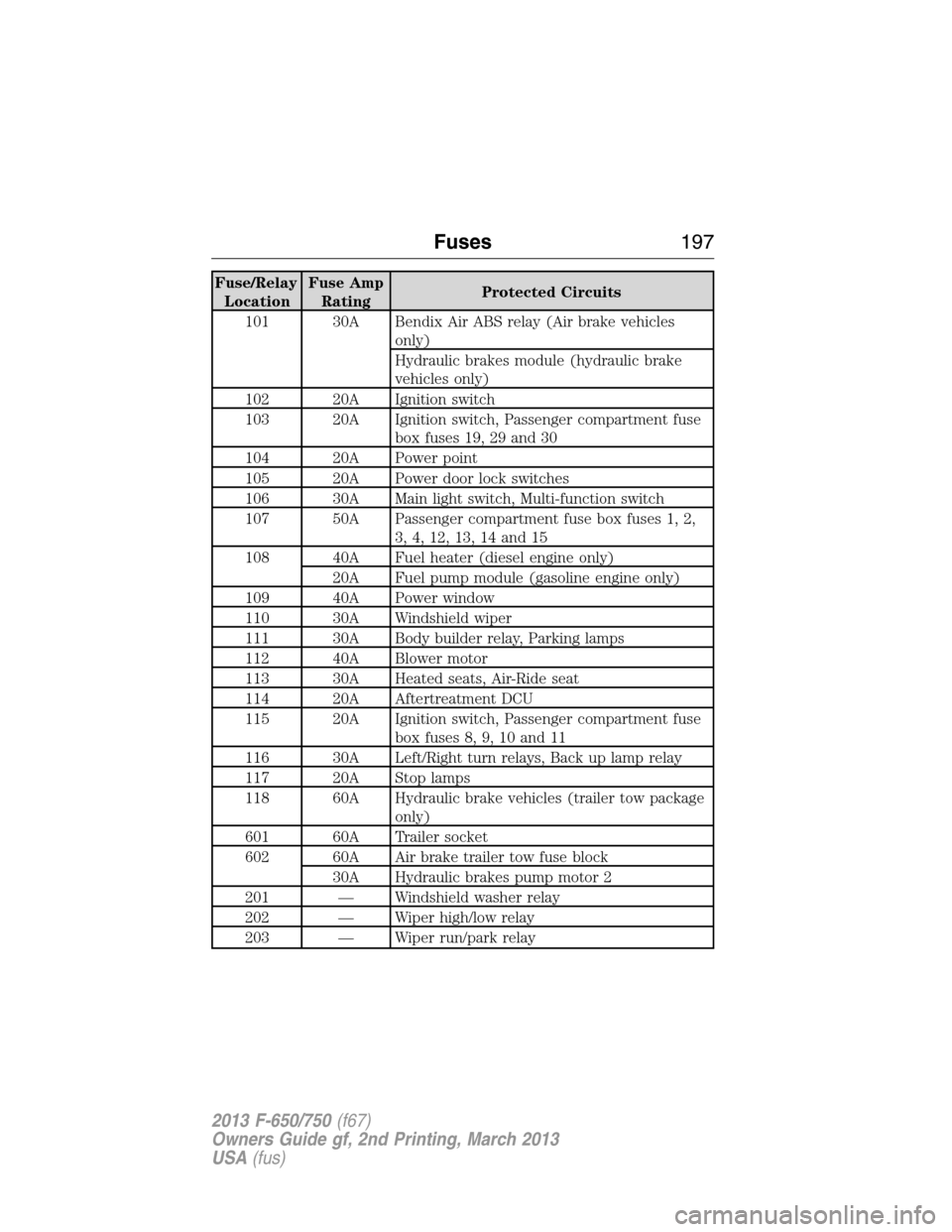
Fuse/Relay
LocationFuse Amp
RatingProtected Circuits
101 30A Bendix Air ABS relay (Air brake vehicles
only)
Hydraulic brakes module (hydraulic brake
vehicles only)
102 20A Ignition switch
103 20A Ignition switch, Passenger compartment fuse
box fuses 19, 29 and 30
104 20A Power point
105 20A Power door lock switches
106 30A Main light switch, Multi-function switch
107 50A Passenger compartment fuse box fuses 1, 2,
3, 4, 12, 13, 14 and 15
108 40A Fuel heater (diesel engine only)
20A Fuel pump module (gasoline engine only)
109 40A Power window
110 30A Windshield wiper
111 30A Body builder relay, Parking lamps
112 40A Blower motor
113 30A Heated seats, Air-Ride seat
114 20A Aftertreatment DCU
115 20A Ignition switch, Passenger compartment fuse
box fuses 8, 9, 10 and 11
116 30A Left/Right turn relays, Back up lamp relay
117 20A Stop lamps
118 60A Hydraulic brake vehicles (trailer tow package
only)
601 60A Trailer socket
602 60A Air brake trailer tow fuse block
30A Hydraulic brakes pump motor 2
201 — Windshield washer relay
202 — Wiper high/low relay
203 — Wiper run/park relay
Fuses197
2013 F-650/750(f67)
Owners Guide gf, 2nd Printing, March 2013
USA(fus)
Page 205 of 378
GENERAL INFORMATION
WARNING:Making modifications to various parts, components
and systems of the vehicle, such as brake and steering systems,
can adversely affect the quality, reliability and operation of your vehicle
and could result in property damage, personal injury or death. Such
modifications must be avoided.
WARNING:Failure to properly perform maintenance and
servicing procedures could result in vehicle damage, personal
injury or death.
WARNING:Take care when performing any maintenance,
system check or service on your vehicle. Some of the materials
may also be hazardous if used, serviced or handled improperly and
could result in property damage, personal injury or death.
Always use care when performing vehicle maintenance, repairs or system
checks. Improper or incomplete service could result in the vehicle not
working properly which may result in personal injury or damage to the
vehicle or equipment. It is the operator’s responsibility to see that the
vehicle receives proper care and maintenance. If you have any questions
about performing service, have the service done by a qualified technician.
Servicing Guidelines
When servicing your vehicle:
•always wear safety glasses for eye protection.
•always set the parking brake or chock the wheels.
•always use support stands, not a jack, when working under a raised
vehicle.
•always turn off the ignition unless a procedure requires the engine to
be running.
•always avoid contact with hot metal parts. Allow the components to
cool before working with, or around, them.
•always operate the engine in a well-ventilated area.
•do not wear loose-fitting clothing, hanging jewelry, watches or rings.
•do not smoke.
•do not work on the brakes or the clutch unless the proper
precautions are taken to avoid inhaling friction material dust.
Quality service parts are available through your dealer. If dealer parts are
not used, make sure the replacement parts are of equivalent quality.
204Maintenance
2013 F-650/750(f67)
Owners Guide gf, 2nd Printing, March 2013
USA(fus)
Page 264 of 378
ENGINE SPECIFICATIONS (GASOLINE ENGINE ONLY)
Engine 6.8L V10 engine
Cubic inches 413
Required fuel Minimum 87 octane
Firing order 1-6-5-10-2-7-3-8-4-9
Spark plug gap 0.039–0.043 inch (1.0–1.1 mm)
Ignition system Coil on plug
Compression ratio 9.2:1
Engine Drivebelt Routing
6.8L V10 engine with A/C
6.8L V10 engine - without A/C
Capacities and Specifications263
2013 F-650/750(f67)
Owners Guide gf, 2nd Printing, March 2013
USA(fus)
Page 289 of 378
Observation Maintenance Operation
Cleaning the wiper blades with a
clean cloth and mild detergent and
washing with a cleaner does not
restore a clean wipe.Replace wiper blades.
Noisy or difficult to operate. Lubricate body lock cylinders.
Headlamp beams in wrong position
when vehicle operating loaded.Check headlamp alignment.
Windshield washers do not spray
when operated.Check windshield washer fluid
level. Add fluid if required.
1During maintenance and repair, protect the fuel tube and the hose
assemblies, power steering lines, and brake lines from external heat,
acids and abrasions that could damage them.
2Check for (free) linkage action and make sure that (return) spring force
is adequate to maintain pedal free play.
3Adjust, repair or replace, as required, with the same or equivalent parts.
Emissions Control System
WARNING:Because of high engine compartment and exhaust
system temperatures resulting from emissions equipment, do not
park, idle or operate your vehicle in dry grass or other dry ground
cover where the possibility of ground fire exists.
To make sure the emissions control systems operate effectively, you
should have the services listed in the maintenance schedule performed at
the specified time and mileage intervals. You should avoid running out of
fuel or turning off the ignition while the vehicle is in motion, especially
at high speeds.
Do not make unauthorized modifications to the engine or vehicle.
Modifications causing increased amounts of unburned fuel to reach the
exhaust system can significantly increase the temperature of the engine
compartment and the exhaust system.
Avoid driving your vehicle if it does not operate properly. If the engine
diesels (more than five seconds of engine run-on after shut-off), misfires,
surges, stalls or backfires, see your dealer. Be alert for fluid leakage, odor,
smoke, loss of oil pressure, or charge indicator or over temperature warning.
288Scheduled Maintenance
2013 F-650/750(f67)
Owners Guide gf, 2nd Printing, March 2013
USA(fus)
Page 325 of 378
USING SYNC WITH YOUR PHONE
Hands-free calling is one of the main features of SYNC. While the system
supports a variety of features, many are dependent on your cellular
phone’s functionality. At a minimum, most cellular phones with Bluetooth
wireless technology support the following functions:
•Answering an incoming call
•Ending a call
•Using privacy mode
•Dialing a number
•Redialing
•Call waiting notification
•Caller ID.
Other features, such as text messaging using Bluetooth and automatic
phonebook download, are phone-dependent features. To check your
phone’s compatibility, see your phone’s user manual and visit
www.SYNCMyRide.com, www.SYNCMyRide.ca or www.syncmaroute.ca.
Pairing a Phone for the First Time
Note:SYNC can support downloading up to approximately 1000 entries
per Bluetooth-enabled cellular phone.
Note:Make sure the vehicle ignition and radio are turned on and the
transmission is in positionP.
Note:To scroll through the menus, press the up and down arrows on
your audio system.
Wirelessly pairing your phone with SYNC allows you to make and receive
hands-free calls.
1. Press the phone button; when the display indicates no phone is
paired, pressOK.
2. WhenFind SYNCappears in the display, pressOK.
3. Put your phone into Bluetooth discovery mode. See your phone’s
user guide if necessary.
4. When prompted on your phone’s display, enter the six-digit PIN
provided by SYNC in the radio display.
5. The display indicates when the pairing is successful.
Depending on your phone’s capability and your market, the system may
prompt you with questions such as setting the current phone as the
primary phone (the phone SYNC automatically tries to connect with first
upon vehicle start-up), downloading your phone book, etc.
324SYNC®
2013 F-650/750(f67)
Owners Guide gf, 2nd Printing, March 2013
USA(fus)
Page 326 of 378
Pairing Subsequent Phones
Note:To scroll through the menus, press the up and down arrows on
your audio system.
Note:Make sure the vehicle ignition and radio are turned on and that
the transmission is in positionP.
1. Press the phone button and scroll until System Settings is selected.
2. Press OK and scroll until Bluetooth Devices is selected and press OK.
3. Scroll until Add Bluetooth Device is selected and press OK.
4. When Find SYNC appears in the display, press OK.
5. Put your phone into Bluetooth discovery mode. See your phone’s
user guide if necessary.
6. When prompted on your phone’s display, enter the six-digit PIN
provided by SYNC in the radio display. The display indicates when
the pairing is successful.
7. The system then prompts with questions such as if you would like to
set the current phone as the primary phone (the phone SYNC
automatically tries to connect with first upon vehicle start-up),
download your phone book, etc.
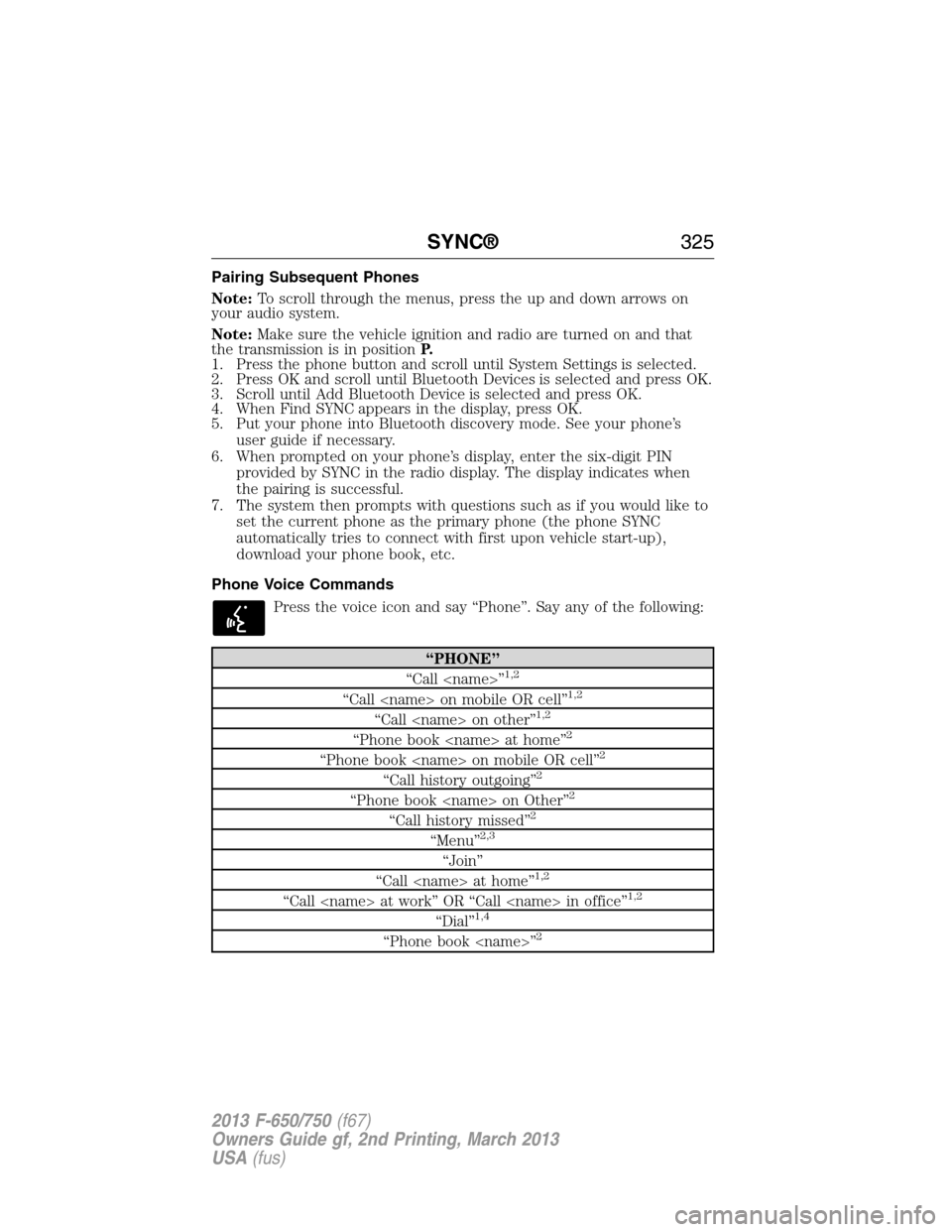
Phone Voice Commands
Press the voice icon and say “Phone”. Say any of the following:
“PHONE”
“Call
“Call
“Call
“Phone book
“Phone book
“Call history outgoing”2
“Phone book
“Call history missed”2
“Menu”2,3
“Join”
“Call
“Call
“Dial”1,4
“Phone book
SYNC®325
2013 F-650/750(f67)
Owners Guide gf, 2nd Printing, March 2013
USA(fus)
Page 333 of 378
Delete All Messages?allows you to delete current text messages from
SYNC (not your phone). To delete the messages, press OK to select. The
display indicates when all your text messages have been deleted and
SYNC returns you to the text message menu.
Note:SYNC does not automatically download all of your unread text
messages at every ignition cycle (as it does with call history and
phonebook if automatic download is set to on).
Returnexits the current menu when you press OK.
If you selectSend Text Message?:
1. Press OK to select. If the system detects your phone does not
support this feature, Unsupported appears in the display and SYNC
returns to the main menu.
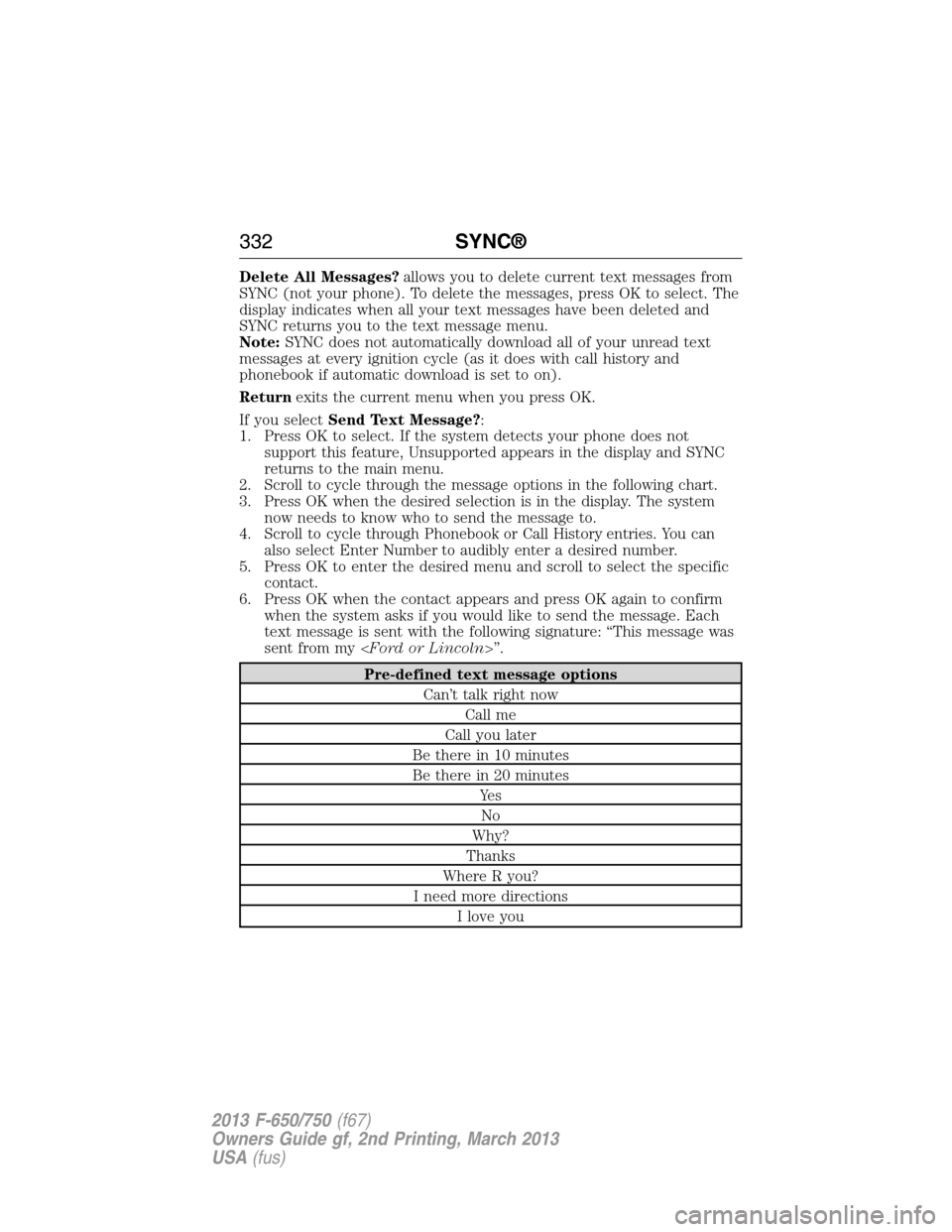
2. Scroll to cycle through the message options in the following chart.
3. Press OK when the desired selection is in the display. The system
now needs to know who to send the message to.
4. Scroll to cycle through Phonebook or Call History entries. You can
also select Enter Number to audibly enter a desired number.
5. Press OK to enter the desired menu and scroll to select the specific
contact.
6. Press OK when the contact appears and press OK again to confirm
when the system asks if you would like to send the message. Each
text message is sent with the following signature: “This message was
sent from my
Pre-defined text message options
Can’t talk right now
Call me
Call you later
Be there in 10 minutes
Be there in 20 minutes
Ye s
No
Why?
Thanks
Where R you?
I need more directions
I love you
332SYNC®
2013 F-650/750(f67)
Owners Guide gf, 2nd Printing, March 2013
USA(fus)