oil change FORD F650 2016 13.G Owners Manual
[x] Cancel search | Manufacturer: FORD, Model Year: 2016, Model line: F650, Model: FORD F650 2016 13.GPages: 379, PDF Size: 4.8 MB
Page 6 of 379
Using Traction Control - Vehicles With:
Hydraulic Brakes.......................................132
Cruise Control
Principle of Operation.................................134
Using Cruise Control
....................................134
Driving Aids
Steering............................................................136
Load Carrying
Load Limit........................................................137
Air Suspension
...............................................138
Towing
Towing a Trailer.............................................140
Recommended Towing Weights.............141
Essential Towing Checks...........................142
Transporting the Vehicle............................143
Fifth Wheel Operation
................................144
Driving Hints
Breaking-In.....................................................146
General Driving Points................................146
Economical Driving
......................................147
Cold Weather Precautions
........................148
Driving Through Water...............................150
Roadside Emergencies
Roadside Assistance
....................................151
Hazard Warning Flashers...........................152
Fuel Shutoff....................................................152
Jump Starting the Vehicle
.........................153
Customer Assistance
Getting the Services You Need
...............156
In California (U.S. Only)
..............................157
The Better Business Bureau (BBB) Auto Line Program (U.S. Only)......................158 Utilizing the Mediation/Arbitration
Program (Canada Only)
........................158
Getting Assistance Outside the U.S. and Canada.........................................................159
Ordering Additional Owner's Literature.....................................................160
Reporting Safety Defects (U.S. Only).............................................................160
Reporting Safety Defects (Canada Only)..............................................................161
Fuses
Fuse Specification Chart...........................162
Changing a Fuse...........................................170
Vehicle Inspection Guide
Vehicle Inspection Information.................171
Maintenance
General Information....................................180
Opening and Closing the Hood................181
Under Hood Overview - 6.8L...................183
Under Hood Overview - 6.7L Diesel......184
Engine Oil Dipstick - 6.8L..........................185
Engine Oil Dipstick - 6.7L Diesel.............185
Engine Oil Check - 6.8L
..............................185
Engine Oil Check - 6.7L Diesel.................186
Changing the Engine Oil and Oil Filter..............................................................188
Changing the Coalescer Filter Element.......................................................189
Oil Change Indicator Reset.......................190
Engine Coolant Check - 6.8L
...................190
Engine Coolant Check - 6.7L Diesel.......195
Automatic Transmission Fluid Check...........................................................200
Brake Fluid Check.........................................201
Power Steering Fluid Check.....................202
Washer Fluid Check....................................202
Draining the Fuel Filter Water Trap - 6.7L Diesel
...........................................................203
3
F650750 (TBC), enUSA, First Printing Table of Contents
Page 11 of 379
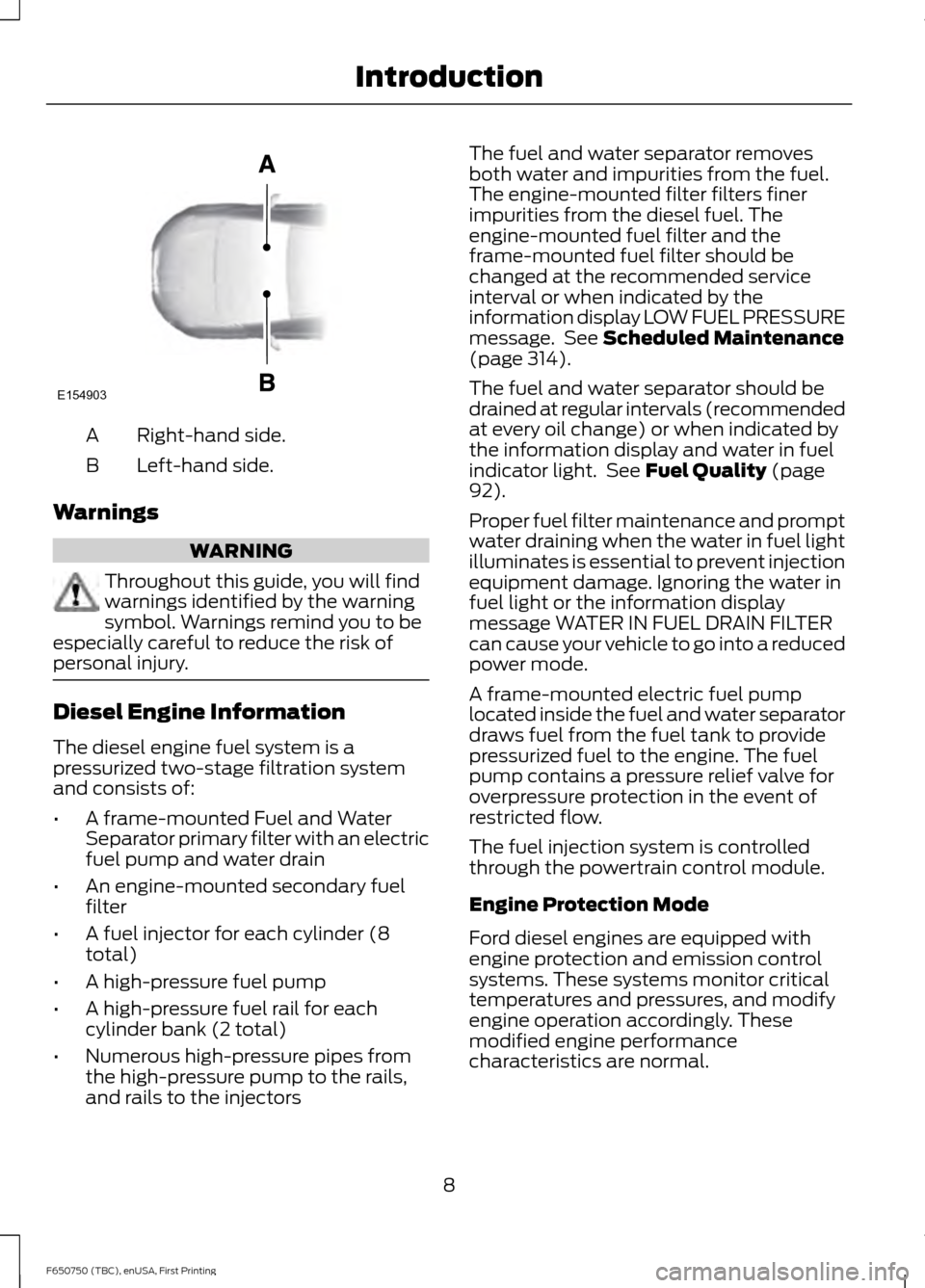
Right-hand side.
A
Left-hand side.
B
Warnings WARNING
Throughout this guide, you will find
warnings identified by the warning
symbol. Warnings remind you to be
especially careful to reduce the risk of
personal injury. Diesel Engine Information
The diesel engine fuel system is a
pressurized two-stage filtration system
and consists of:
•
A frame-mounted Fuel and Water
Separator primary filter with an electric
fuel pump and water drain
• An engine-mounted secondary fuel
filter
• A fuel injector for each cylinder (8
total)
• A high-pressure fuel pump
• A high-pressure fuel rail for each
cylinder bank (2 total)
• Numerous high-pressure pipes from
the high-pressure pump to the rails,
and rails to the injectors The fuel and water separator removes
both water and impurities from the fuel.
The engine-mounted filter filters finer
impurities from the diesel fuel. The
engine-mounted fuel filter and the
frame-mounted fuel filter should be
changed at the recommended service
interval or when indicated by the
information display LOW FUEL PRESSURE
message. See Scheduled Maintenance
(page 314).
The fuel and water separator should be
drained at regular intervals (recommended
at every oil change) or when indicated by
the information display and water in fuel
indicator light. See
Fuel Quality (page
92).
Proper fuel filter maintenance and prompt
water draining when the water in fuel light
illuminates is essential to prevent injection
equipment damage. Ignoring the water in
fuel light or the information display
message WATER IN FUEL DRAIN FILTER
can cause your vehicle to go into a reduced
power mode.
A frame-mounted electric fuel pump
located inside the fuel and water separator
draws fuel from the fuel tank to provide
pressurized fuel to the engine. The fuel
pump contains a pressure relief valve for
overpressure protection in the event of
restricted flow.
The fuel injection system is controlled
through the powertrain control module.
Engine Protection Mode
Ford diesel engines are equipped with
engine protection and emission control
systems. These systems monitor critical
temperatures and pressures, and modify
engine operation accordingly. These
modified engine performance
characteristics are normal.
8
F650750 (TBC), enUSA, First Printing IntroductionE154903
Page 12 of 379
If these modified engine performance
characteristics persist for an extended
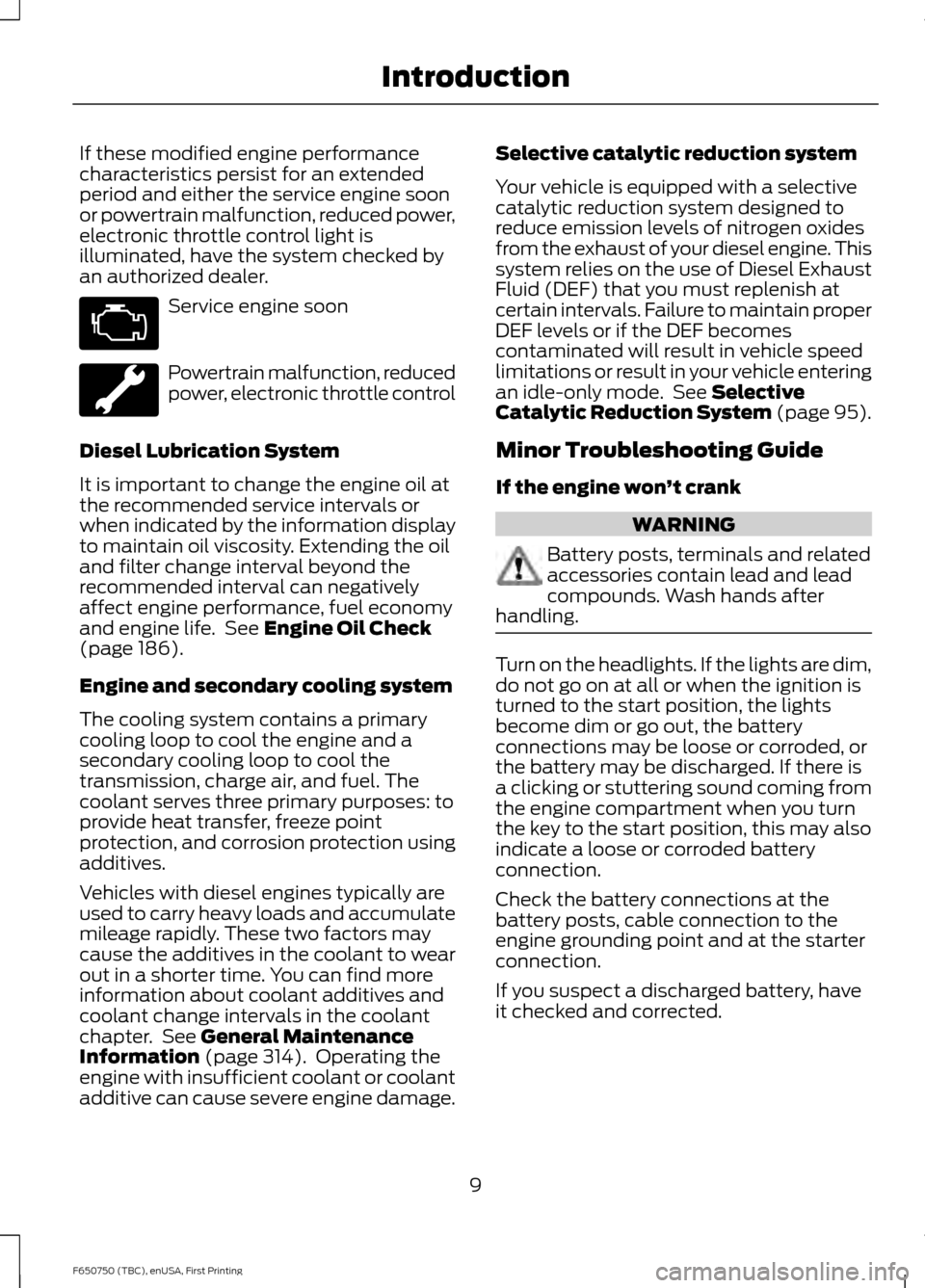
period and either the service engine soon
or powertrain malfunction, reduced power,
electronic throttle control light is
illuminated, have the system checked by
an authorized dealer.
Service engine soon
Powertrain malfunction, reduced
power, electronic throttle control
Diesel Lubrication System
It is important to change the engine oil at
the recommended service intervals or
when indicated by the information display
to maintain oil viscosity. Extending the oil
and filter change interval beyond the
recommended interval can negatively
affect engine performance, fuel economy
and engine life. See Engine Oil Check
(page 186).
Engine and secondary cooling system
The cooling system contains a primary
cooling loop to cool the engine and a
secondary cooling loop to cool the
transmission, charge air, and fuel. The
coolant serves three primary purposes: to
provide heat transfer, freeze point
protection, and corrosion protection using
additives.
Vehicles with diesel engines typically are
used to carry heavy loads and accumulate
mileage rapidly. These two factors may
cause the additives in the coolant to wear
out in a shorter time. You can find more
information about coolant additives and
coolant change intervals in the coolant
chapter. See
General Maintenance
Information (page 314). Operating the
engine with insufficient coolant or coolant
additive can cause severe engine damage. Selective catalytic reduction system
Your vehicle is equipped with a selective
catalytic reduction system designed to
reduce emission levels of nitrogen oxides
from the exhaust of your diesel engine. This
system relies on the use of Diesel Exhaust
Fluid (DEF) that you must replenish at
certain intervals. Failure to maintain proper
DEF levels or if the DEF becomes
contaminated will result in vehicle speed
limitations or result in your vehicle entering
an idle-only mode. See
Selective
Catalytic Reduction System (page 95).
Minor Troubleshooting Guide
If the engine won ’t crank WARNING
Battery posts, terminals and related
accessories contain lead and lead
compounds. Wash hands after
handling. Turn on the headlights. If the lights are dim,
do not go on at all or when the ignition is
turned to the start position, the lights
become dim or go out, the battery
connections may be loose or corroded, or
the battery may be discharged. If there is
a clicking or stuttering sound coming from
the engine compartment when you turn
the key to the start position, this may also
indicate a loose or corroded battery
connection.
Check the battery connections at the
battery posts, cable connection to the
engine grounding point and at the starter
connection.
If you suspect a discharged battery, have
it checked and corrected.
9
F650750 (TBC), enUSA, First Printing Introduction
Page 19 of 379
PROTECTING THE
ENVIRONMENT
You must play your part in protecting the
environment. Correct vehicle usage and
the authorized disposal of waste, cleaning
and lubrication materials are significant
steps toward this aim.
NOISE POLLUTION CONTROL
In order to keep to the federal exterior
noise regulations, your vehicle may be
equipped with noise emission items.
Depending on your vehicle configuration,
it may have all or some of the following
items:
Air Intake System
Inspect the air cleaner. Do not alter its
location. Do not alter inlet and outlet
piping.
Body
Inspect wheel well splash shields, cab
shields and under hood insulation for
deterioration, dislocation and orientation.
Cooling System
•
Inspect the fan for blade damage. If
you find any damage, replace with the
recommended parts. Inspect for
fan-to-shroud interference and any
damage to shroud, such as cracks and
holes.
• Do not change fan ratio or alter fan
spacer dimensions and positions.
• Inspect fan clutch for proper operation.
Make sure the fan is disengaged when
cooling of the engine is not required.
• Inspect radiator shutters (if equipped)
for proper operation. The shutters
should be open during normal
operating temperatures. Engine
Valve covers and block covers damp-out
engine mechanical noise. If they need
replacing, make sure to replace them with
the recommended parts. Check for
mechanical isolations.
Transmission Enclosure
Inspect for cracks, holes and tears. Clean
any deposits, such as oil, dirt and stones.
Exhaust System
•
Inspect for leaks at various joint
connections and loose clamps.
• Perform a visual inspection for cracks
or holes in the muffler and tail pipe.
• Always use the recommended
replacement parts.
• Do not change the tail pipe elbow or
offset tail pipe orientation from the
standard position as originally received.
• To avoid abnormal changes in vehicle
sound levels, it is necessary for the
owner to perform inspections and
necessary maintenance at specified
intervals. See Scheduled
Maintenance (page 314).
16
F650750 (TBC), enUSA, First Printing Environment
Page 66 of 379
TRIP A/B
Registers the distance of individual
journeys. Press and release the INFO
button until TRIP A/B appears in the
display (this represents the trip mode).
Press and hold the RESET button to reset.
XXX MILES (km) TO E
This displays an estimate of approximately
how far you can drive with the fuel
remaining in your tank under normal driving
conditions. Remember to turn the ignition
off when refueling to allow this feature to
detect the correct amount of added fuel.
The system calculates the distance to
empty by using a running average fuel
economy, which uses your recent driving
history of 500 miles (800 km).
This value is not the same as the average
fuel economy display. The running average
fuel economy resets to a factory default
value if the battery is disconnected.
XX.X AVG MPG (L/100km)
Average fuel economy displays your
average fuel economy in miles per gallon
or liters/100 km.
MPG (L/km)
Displays the instantaneous fuel economy
as a bar graph. Your vehicle must be
moving to calculate instantaneous fuel
economy. You cannot reset the
instantaneous fuel economy.
TIMER
Displays the trip elapsed drive time. Press
and release RESET to pause the timer.
Press and hold RESET to reset the timer.
EXHAUST FILTER
Displays information about the status of
the exhaust filter.
System Check and Vehicle Feature
Customization
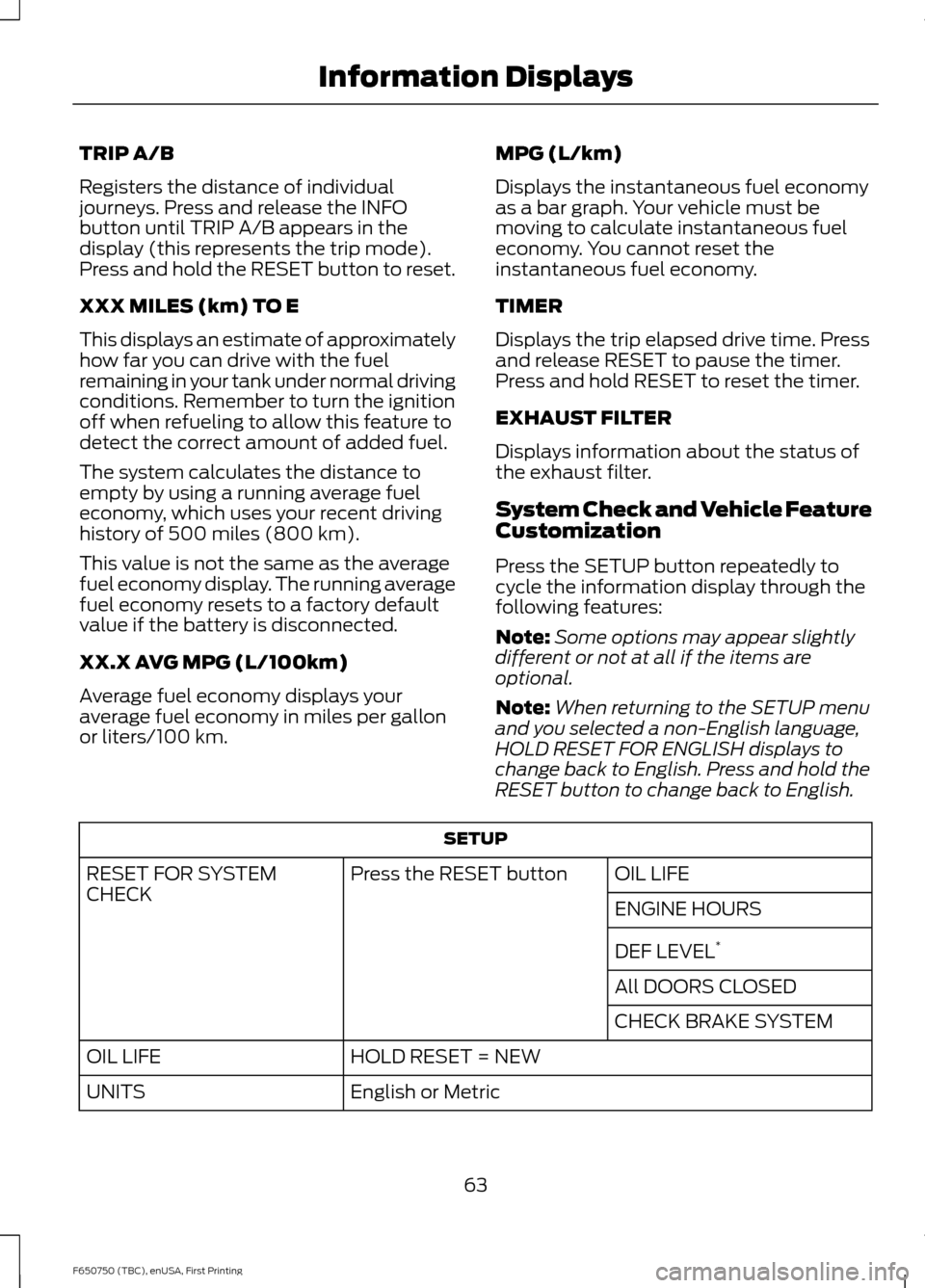
Press the SETUP button repeatedly to
cycle the information display through the
following features:
Note:
Some options may appear slightly
different or not at all if the items are
optional.
Note: When returning to the SETUP menu
and you selected a non-English language,
HOLD RESET FOR ENGLISH displays to
change back to English. Press and hold the
RESET button to change back to English. SETUP
OIL LIFE
Press the RESET button
RESET FOR SYSTEM
CHECK
ENGINE HOURS
DEF LEVEL*
All DOORS CLOSED
CHECK BRAKE SYSTEM
HOLD RESET = NEW
OIL LIFE
English or Metric
UNITS
63
F650750 (TBC), enUSA, First Printing Information Displays
Page 67 of 379
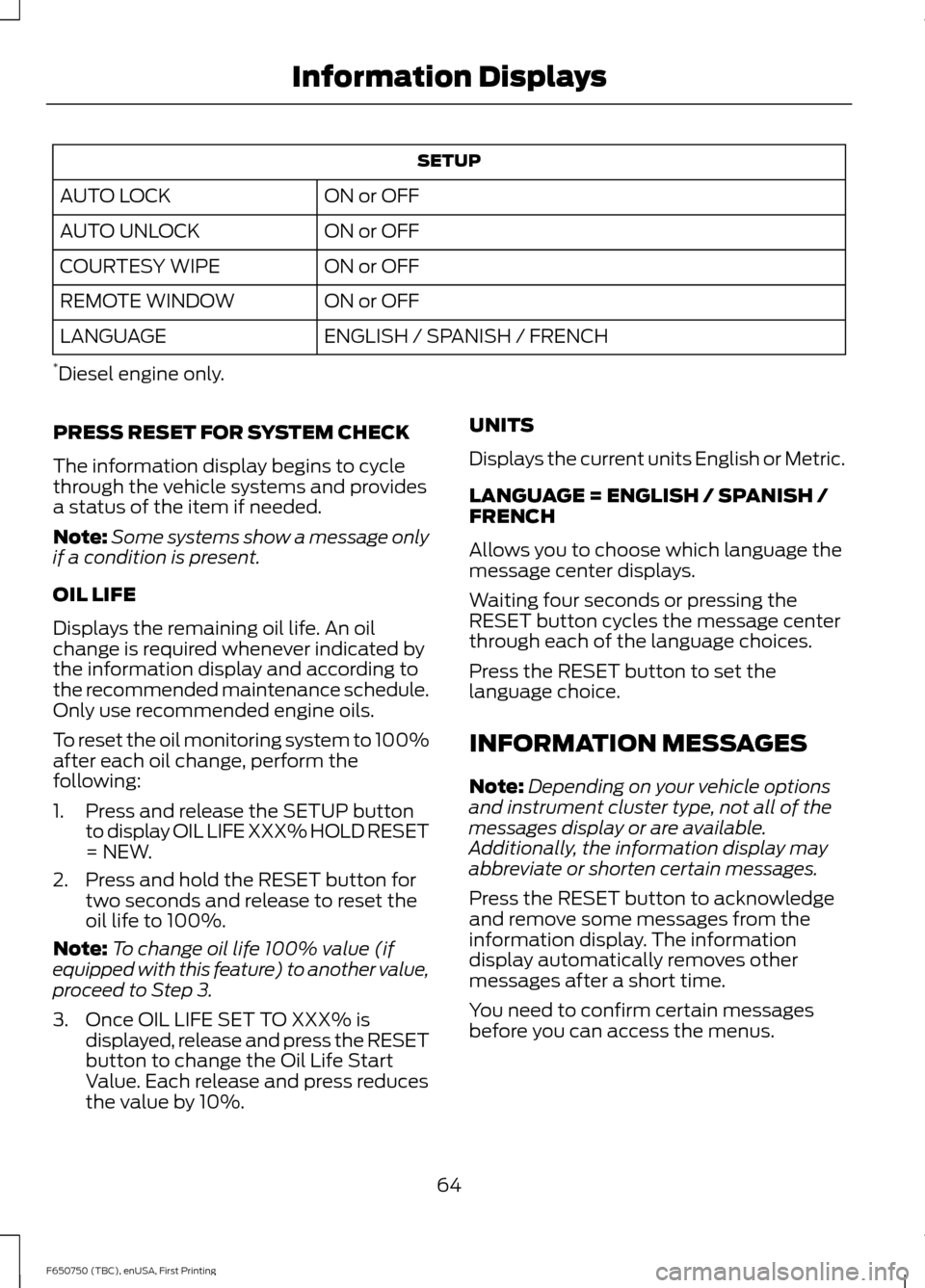
SETUP
ON or OFF
AUTO LOCK
ON or OFF
AUTO UNLOCK
ON or OFF
COURTESY WIPE
ON or OFF
REMOTE WINDOW
ENGLISH / SPANISH / FRENCH
LANGUAGE
* Diesel engine only.
PRESS RESET FOR SYSTEM CHECK
The information display begins to cycle
through the vehicle systems and provides
a status of the item if needed.
Note: Some systems show a message only
if a condition is present.
OIL LIFE
Displays the remaining oil life. An oil
change is required whenever indicated by
the information display and according to
the recommended maintenance schedule.
Only use recommended engine oils.
To reset the oil monitoring system to 100%
after each oil change, perform the
following:
1. Press and release the SETUP button to display OIL LIFE XXX% HOLD RESET
= NEW.
2. Press and hold the RESET button for two seconds and release to reset the
oil life to 100%.
Note: To change oil life 100% value (if
equipped with this feature) to another value,
proceed to Step 3.
3. Once OIL LIFE SET TO XXX% is displayed, release and press the RESET
button to change the Oil Life Start
Value. Each release and press reduces
the value by 10%. UNITS
Displays the current units English or Metric.
LANGUAGE = ENGLISH / SPANISH /
FRENCH
Allows you to choose which language the
message center displays.
Waiting four seconds or pressing the
RESET button cycles the message center
through each of the language choices.
Press the RESET button to set the
language choice.
INFORMATION MESSAGES
Note:
Depending on your vehicle options
and instrument cluster type, not all of the
messages display or are available.
Additionally, the information display may
abbreviate or shorten certain messages.
Press the RESET button to acknowledge
and remove some messages from the
information display. The information
display automatically removes other
messages after a short time.
You need to confirm certain messages
before you can access the menus.
64
F650750 (TBC), enUSA, First Printing Information Displays
Page 68 of 379
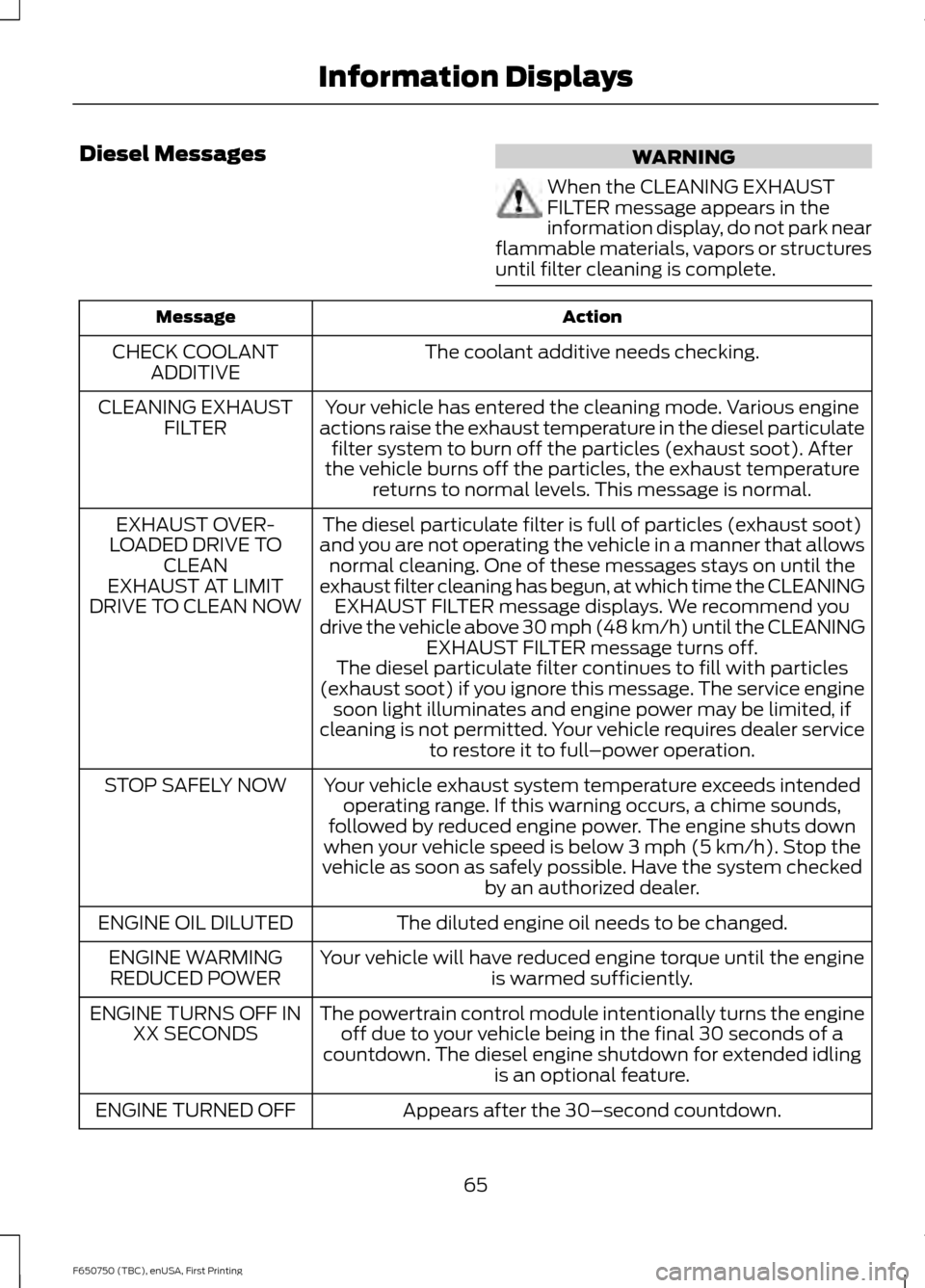
Diesel Messages
WARNING
When the CLEANING EXHAUST
FILTER message appears in the
information display, do not park near
flammable materials, vapors or structures
until filter cleaning is complete. Action
Message
The coolant additive needs checking.
CHECK COOLANT
ADDITIVE
Your vehicle has entered the cleaning mode. Various engine
actions raise the exhaust temperature in the diesel particulate filter system to burn off the particles (exhaust soot). After
the vehicle burns off the particles, the exhaust temperature returns to normal levels. This message is normal.
CLEANING EXHAUST
FILTER
The diesel particulate filter is full of particles (exhaust soot)
and you are not operating the vehicle in a manner that allows normal cleaning. One of these messages stays on until the
exhaust filter cleaning has begun, at which time the CLEANING EXHAUST FILTER message displays. We recommend you
drive the vehicle above 30 mph (48 km/h) until the CLEANING EXHAUST FILTER message turns off.
EXHAUST OVER-
LOADED DRIVE TO CLEAN
EXHAUST AT LIMIT
DRIVE TO CLEAN NOW
The diesel particulate filter continues to fill with particles
(exhaust soot) if you ignore this message. The service engine soon light illuminates and engine power may be limited, if
cleaning is not permitted. Your vehicle requires dealer service to restore it to full –power operation.
Your vehicle exhaust system temperature exceeds intended operating range. If this warning occurs, a chime sounds,
followed by reduced engine power. The engine shuts down
when your vehicle speed is below 3 mph (5 km/h). Stop the
vehicle as soon as safely possible. Have the system checked by an authorized dealer.
STOP SAFELY NOW
The diluted engine oil needs to be changed.
ENGINE OIL DILUTED
Your vehicle will have reduced engine torque until the engineis warmed sufficiently.
ENGINE WARMING
REDUCED POWER
The powertrain control module intentionally turns the engineoff due to your vehicle being in the final 30 seconds of a
countdown. The diesel engine shutdown for extended idling is an optional feature.
ENGINE TURNS OFF IN
XX SECONDS
Appears after the 30–second countdown.
ENGINE TURNED OFF
65
F650750 (TBC), enUSA, First Printing Information Displays
Page 71 of 379
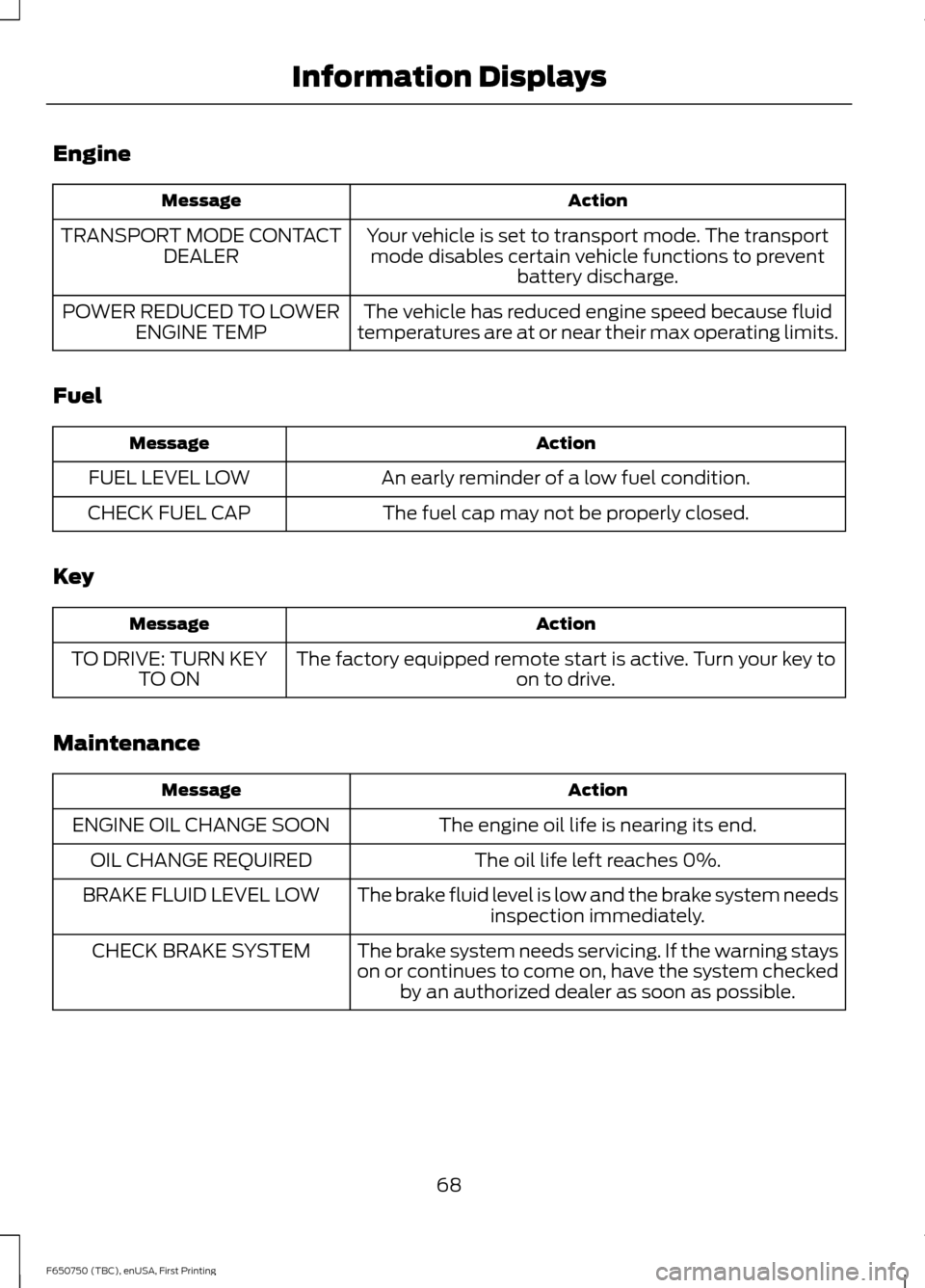
Engine
Action
Message
Your vehicle is set to transport mode. The transportmode disables certain vehicle functions to prevent battery discharge.
TRANSPORT MODE CONTACT
DEALER
The vehicle has reduced engine speed because fluid
temperatures are at or near their max operating limits.
POWER REDUCED TO LOWER
ENGINE TEMP
Fuel Action
Message
An early reminder of a low fuel condition.
FUEL LEVEL LOW
The fuel cap may not be properly closed.
CHECK FUEL CAP
Key Action
Message
The factory equipped remote start is active. Turn your key to on to drive.
TO DRIVE: TURN KEY
TO ON
Maintenance Action
Message
The engine oil life is nearing its end.
ENGINE OIL CHANGE SOON
The oil life left reaches 0%.
OIL CHANGE REQUIRED
The brake fluid level is low and the brake system needsinspection immediately.
BRAKE FLUID LEVEL LOW
The brake system needs servicing. If the warning stays
on or continues to come on, have the system checkedby an authorized dealer as soon as possible.
CHECK BRAKE SYSTEM
68
F650750 (TBC), enUSA, First Printing Information Displays
Page 90 of 379
We recommend using the engine block
heater for starting when the ambient
temperature is at or below-9°F (-23°C)
See Engine Block Heater (page 88).
When operating in cold weather, you can
use Motorcraft® cetane improvers or
non-alcohol-based cetane improvers from
a reputable manufacturer as needed.
Do not crank the engine for more than 10
seconds as starter damage may occur. If
the engine fails to start, turn the key to the
off position and wait 30 seconds before
trying again.
Your vehicle may be equipped with a cold
weather starting strategy that prevents
severe engine damage by assisting in
engine lubrication warm-up. In extremely
cold ambient temperatures, this strategy
activates and prevents the accelerator
pedal use for 30 seconds after starting
your vehicle. A message appears in the
information display as your vehicle warms
up. By not allowing the accelerator pedal
use, the engine oil can properly lubricate
the bearings preventing engine damage
due to lack of proper lubrication. After the
30-second warm-up period, the
accelerator pedal is operational again and
a message appears informing you that your
vehicle is ok to drive.
When starting the engine in extremely cold
temperatures, for example
-15°F (-26°C),
we recommend you allow the engine to
idle for several minutes before driving your
vehicle. Illuminates when you switch the
ignition on as part of the
pre-starting system.
1. Turn the key to the on position without
turning the key to the start position. Do
not start the engine until the wait to
start indicator turns off. 2. When the wait to start indicator turns
off, turn the key to the start position
and release the key as soon as the
engine starts. After starting the engine,
the glow plugs may remain on for a
period. If you do not start the engine
before the glow plug activation time
ends, you need to reset the glow plugs
by turning the key to the off position.
3. After the engine starts, allow it to idle for about 15 seconds. This is to protect
the engine. Do not increase engine
speed until the oil pressure gauge
indicates normal pressure.
DIESEL PARTICULATE FILTER
Your vehicle is equipped with a diesel
particulate filter. The diesel particulate
filter is an inline filter in the exhaust system
that reduces carbon emissions by trapping
exhaust particles before they reach the
tailpipe. The diesel particulate filter looks
similar to a traditional exhaust catalyst,
except larger, and is part of the exhaust
system under your vehicle. The filter
couples to a diesel oxidation catalyst that
reduces the amount of harmful exhaust
emitted from the tailpipe. As soot gathers
in the system, it begins to restrict the filter.
Periodically, you need to clean the soot
that gathers inside the filter. You can clean
the soot in two different ways, passive
regeneration and active regeneration. See
Emission Control System
(page 105).
Both methods occur automatically and
require no actions from the driver. During
either one of these regeneration methods,
you may notice a change in exhaust tone.
At certain times, various messages related
to the diesel particulate filter appear in the
information displays.
87
F650750 (TBC), enUSA, First Printing Starting and Stopping the Engine
Page 97 of 379
To help achieve acceptable engine
performance and durability when using
biodiesel in your vehicle:
•
Confirm the biodiesel content of the
fuel to be B20 (20% biodiesel) or less
• Only use biodiesel fuel of good quality
that complies with industry standards
• Follow the recommended service
maintenance intervals. See
Scheduled Maintenance (page 314).
• Do not store biodiesel fuel in the fuel
tank for more than 1 month
• Consider changing brands or reducing
biodiesel content if you have cold
temperature fuel gelling issues or a
frequent LOW FUEL PRESSURE
message appearing
• Do NOT use raw oils, fats or waste
cooking greases
Use of biodiesel in concentrations greater
than 20% may cause damage to your
vehicle, including engine and/or exhaust
after-treatment hardware (exhaust
catalyst and particulate filter) failures.
Concentrations greater than 20% can also
cause fuel filter restrictions that may result
in a lack of power or damage to fuel
system components, including fuel pump
and fuel injector failures.
SAE 5W-40 or SAE 15W-40 oil is
recommended for fuels with greater than
5% biodiesel (B5). Refer to the Special
operating conditions section under the
Schedule Maintenance chapter for more
information about oil change intervals and
other maintenance when operating on
biodiesel. Look for a label on the fuel pump to
confirm the amount of biodiesel contained
in a diesel fuel. Biodiesel content is often
indicated with the letter B followed by the
percent of biodiesel in the fuel. For
example, B20 indicates a fuel containing
20% biodiesel. Ask the service station
attendant to confirm the biodiesel content
of a diesel fuel if you do not see a label on
the fuel pump.
Biodiesel fuels degrade more easily than
diesel fuels not containing biodiesel and
should not be stored in the fuel tank for
more than 1 month. If you plan to park or
store your vehicle for more than 1 month,
then you should empty your vehicle fuel
tank of biodiesel fuel. You should fill the
tank with a pure petroleum-based diesel
fuel and run your vehicle for a minimum of
30 minutes.
Note:
Degraded or oxidized biodiesel can
damage fuel system seals and plastics and
corrode steel parts.
During cold weather, if you have problems
operating on biodiesel, you may need to
use a diesel fuel with lower biodiesel
content, try another brand, or discontinue
the use of biodiesel.
Diesel Fuel Additives
It should not be necessary to add any
aftermarket additives to your fuel if you
use a high quality diesel fuel that conforms
to ASTM industry specifications.
Aftermarket additives can damage the fuel
injector system or engine.
Use Motorcraft® cetane booster or an
equivalent cetane booster additive if you
suspect fuel has low cetane. Use
Motorcraft® anti-gel & performance
improver or an equivalent additive if there
is fuel gelling.
94
F650750 (TBC), enUSA, First Printing Fuel and Refueling