fuel filter FORD F650 2017 13.G User Guide
[x] Cancel search | Manufacturer: FORD, Model Year: 2017, Model line: F650, Model: FORD F650 2017 13.GPages: 382, PDF Size: 5.18 MB
Page 66 of 382
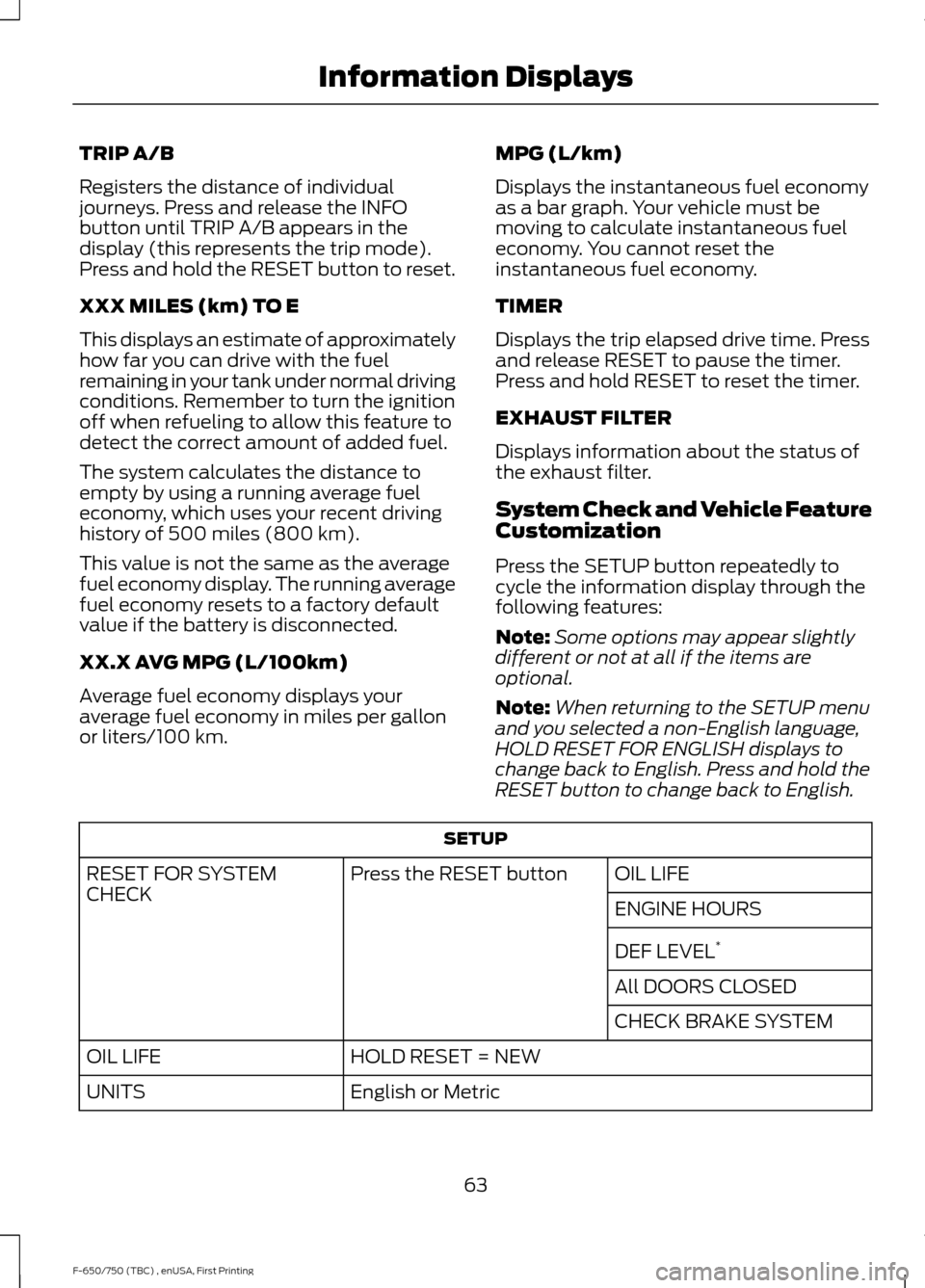
TRIP A/B
Registers the distance of individual
journeys. Press and release the INFO
button until TRIP A/B appears in the
display (this represents the trip mode).
Press and hold the RESET button to reset.
XXX MILES (km) TO E
This displays an estimate of approximately
how far you can drive with the fuel
remaining in your tank under normal driving
conditions. Remember to turn the ignition
off when refueling to allow this feature to
detect the correct amount of added fuel.
The system calculates the distance to
empty by using a running average fuel
economy, which uses your recent driving
history of 500 miles (800 km).
This value is not the same as the average
fuel economy display. The running average
fuel economy resets to a factory default
value if the battery is disconnected.
XX.X AVG MPG (L/100km)
Average fuel economy displays your
average fuel economy in miles per gallon
or liters/100 km.
MPG (L/km)
Displays the instantaneous fuel economy
as a bar graph. Your vehicle must be
moving to calculate instantaneous fuel
economy. You cannot reset the
instantaneous fuel economy.
TIMER
Displays the trip elapsed drive time. Press
and release RESET to pause the timer.
Press and hold RESET to reset the timer.
EXHAUST FILTER
Displays information about the status of
the exhaust filter.
System Check and Vehicle Feature
Customization
Press the SETUP button repeatedly to
cycle the information display through the
following features:
Note:
Some options may appear slightly
different or not at all if the items are
optional.
Note: When returning to the SETUP menu
and you selected a non-English language,
HOLD RESET FOR ENGLISH displays to
change back to English. Press and hold the
RESET button to change back to English. SETUP
OIL LIFE
Press the RESET button
RESET FOR SYSTEM
CHECK
ENGINE HOURS
DEF LEVEL*
All DOORS CLOSED
CHECK BRAKE SYSTEM
HOLD RESET = NEW
OIL LIFE
English or Metric
UNITS
63
F-650/750 (TBC) , enUSA, First Printing Information Displays
Page 70 of 382
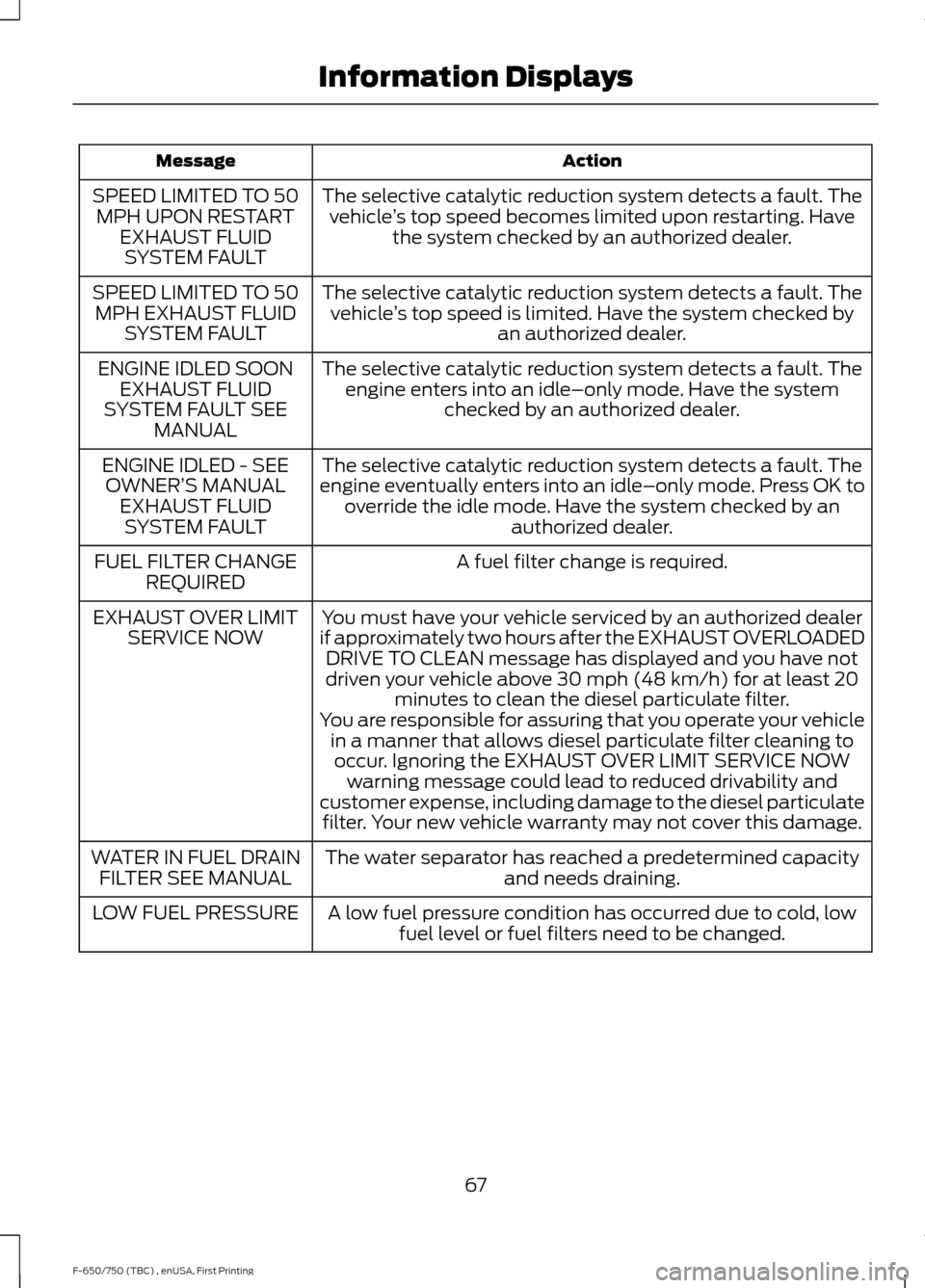
Action
Message
The selective catalytic reduction system detects a fault. Thevehicle ’s top speed becomes limited upon restarting. Have
the system checked by an authorized dealer.
SPEED LIMITED TO 50
MPH UPON RESTART EXHAUST FLUIDSYSTEM FAULT
The selective catalytic reduction system detects a fault. Thevehicle ’s top speed is limited. Have the system checked by
an authorized dealer.
SPEED LIMITED TO 50
MPH EXHAUST FLUID SYSTEM FAULT
The selective catalytic reduction system detects a fault. Theengine enters into an idle–only mode. Have the system checked by an authorized dealer.
ENGINE IDLED SOON
EXHAUST FLUID
SYSTEM FAULT SEE MANUAL
The selective catalytic reduction system detects a fault. The
engine eventually enters into an idle–only mode. Press OK to override the idle mode. Have the system checked by an authorized dealer.
ENGINE IDLED - SEE
OWNER’ S MANUAL
EXHAUST FLUID SYSTEM FAULT
A fuel filter change is required.
FUEL FILTER CHANGE
REQUIRED
You must have your vehicle serviced by an authorized dealer
if approximately two hours after the EXHAUST OVERLOADED DRIVE TO CLEAN message has displayed and you have not
driven your vehicle above 30 mph (48 km/h) for at least 20
minutes to clean the diesel particulate filter.
EXHAUST OVER LIMIT
SERVICE NOW
You are responsible for assuring that you operate your vehiclein a manner that allows diesel particulate filter cleaning tooccur. Ignoring the EXHAUST OVER LIMIT SERVICE NOW warning message could lead to reduced drivability and
customer expense, including damage to the diesel particulate filter. Your new vehicle warranty may not cover this damage.
The water separator has reached a predetermined capacity and needs draining.
WATER IN FUEL DRAIN
FILTER SEE MANUAL
A low fuel pressure condition has occurred due to cold, lowfuel level or fuel filters need to be changed.
LOW FUEL PRESSURE
67
F-650/750 (TBC) , enUSA, First Printing Information Displays
Page 89 of 382
•
Open the windows at least 1 in (3 cm).
• Set your climate control to outside air.
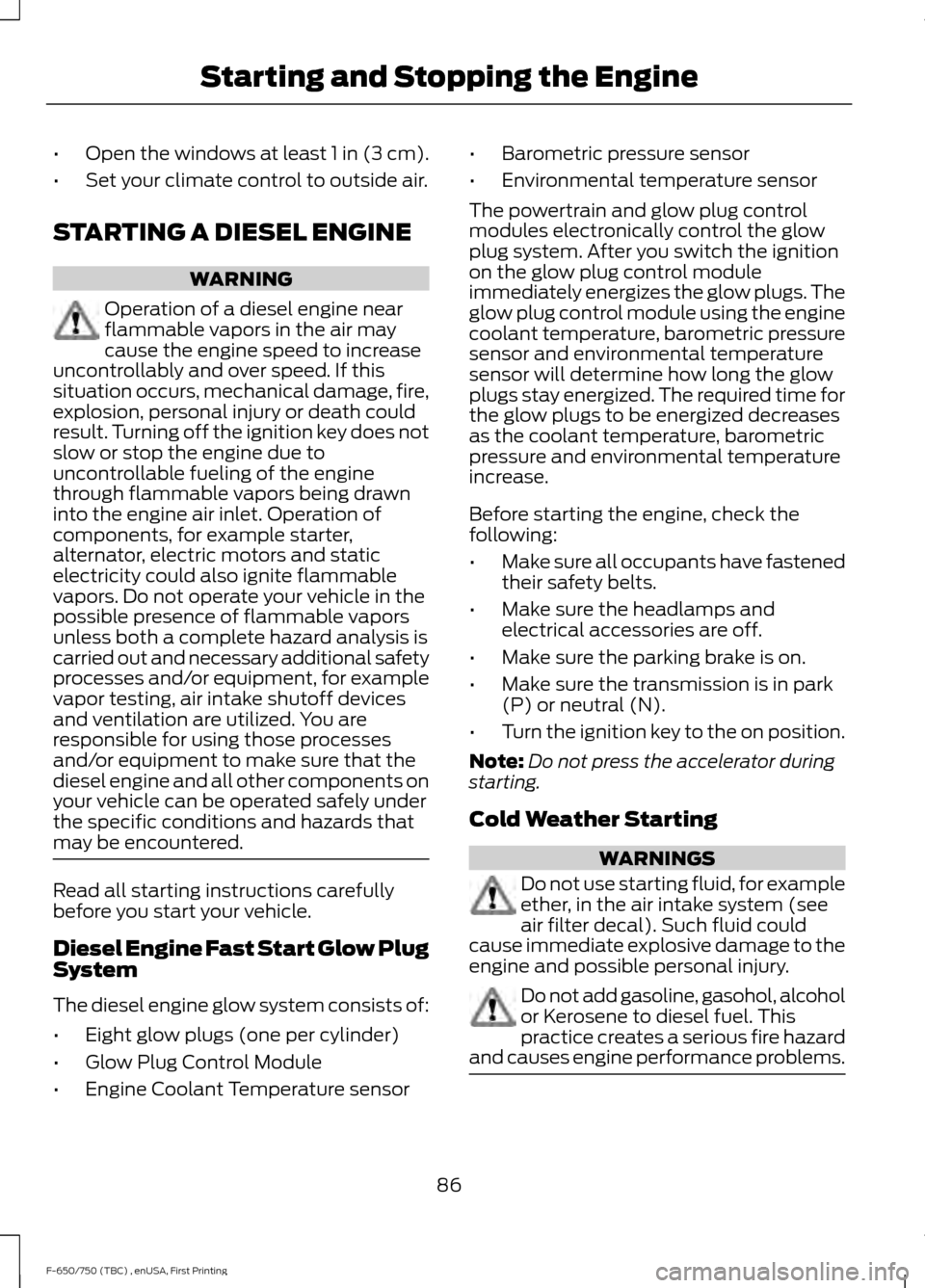
STARTING A DIESEL ENGINE WARNING
Operation of a diesel engine near
flammable vapors in the air may
cause the engine speed to increase
uncontrollably and over speed. If this
situation occurs, mechanical damage, fire,
explosion, personal injury or death could
result. Turning off the ignition key does not
slow or stop the engine due to
uncontrollable fueling of the engine
through flammable vapors being drawn
into the engine air inlet. Operation of
components, for example starter,
alternator, electric motors and static
electricity could also ignite flammable
vapors. Do not operate your vehicle in the
possible presence of flammable vapors
unless both a complete hazard analysis is
carried out and necessary additional safety
processes and/or equipment, for example
vapor testing, air intake shutoff devices
and ventilation are utilized. You are
responsible for using those processes
and/or equipment to make sure that the
diesel engine and all other components on
your vehicle can be operated safely under
the specific conditions and hazards that
may be encountered. Read all starting instructions carefully
before you start your vehicle.
Diesel Engine Fast Start Glow Plug
System
The diesel engine glow system consists of:
•
Eight glow plugs (one per cylinder)
• Glow Plug Control Module
• Engine Coolant Temperature sensor •
Barometric pressure sensor
• Environmental temperature sensor
The powertrain and glow plug control
modules electronically control the glow
plug system. After you switch the ignition
on the glow plug control module
immediately energizes the glow plugs. The
glow plug control module using the engine
coolant temperature, barometric pressure
sensor and environmental temperature
sensor will determine how long the glow
plugs stay energized. The required time for
the glow plugs to be energized decreases
as the coolant temperature, barometric
pressure and environmental temperature
increase.
Before starting the engine, check the
following:
• Make sure all occupants have fastened
their safety belts.
• Make sure the headlamps and
electrical accessories are off.
• Make sure the parking brake is on.
• Make sure the transmission is in park
(P) or neutral (N).
• Turn the ignition key to the on position.
Note: Do not press the accelerator during
starting.
Cold Weather Starting WARNINGS
Do not use starting fluid, for example
ether, in the air intake system (see
air filter decal). Such fluid could
cause immediate explosive damage to the
engine and possible personal injury. Do not add gasoline, gasohol, alcohol
or Kerosene to diesel fuel. This
practice creates a serious fire hazard
and causes engine performance problems. 86
F-650/750 (TBC) , enUSA, First Printing Starting and Stopping the Engine
Page 94 of 382
personal injury or sickness may result.
If you splash fuel on your skin, promptly
wash your skin thoroughly with soap
and water. Consult a physician
immediately if you experience an
adverse reaction.
Low Fuel Pressure (If Equipped)
Diesel engine vehicles have a low fuel
pressure detection system.
The following are possible causes for a low
fuel pressure warning message to appear
in the information display:
• Cold start or during cold operation
below
32°F (0°C). If the low fuel
pressure message appears during a
cold start or up to 10 minutes after the
initial cold start, monitor the
information display. If the low fuel
pressure message disappears and does
not re-appear after the engine has fully
warmed up, waxed or gelled fuel is
what most likely caused the message.
Do not use alcohol based additives to
correct fuel gelling. This may result in
damage to the fuel injectors and
systems. Use an anti-gel additive. See
Capacities and Specifications (page
258
).
Note: The vehicle Warranty may be void if
you use additives that do not meet or
exceed Ford specifications. If the low fuel
pressure message persistently appears after
re-fueling and then disappears when the
engine has fully warmed up, consider using
different fuel sources. •
Low fuel operation: If the low fuel
pressure message appears when your
vehicle is warm and during low fuel
tank level operation (near empty),
refuel your vehicle. If the message
reappears after fueling, see below. If
the message does not come back, the
low fuel pressure condition was due to
low fuel levels in the fuel tank.
• Normal operation: If the low fuel
pressure message appears during
normal operation when the engine is
fully warm, and fuel level is not low,
you must change the fuel filters
regardless of the maintenance
schedule interval.
• If replacement of the fuel filter does
not remedy the low fuel pressure
message during normal operation as
defined above, take the vehicle to an
authorized dealer.
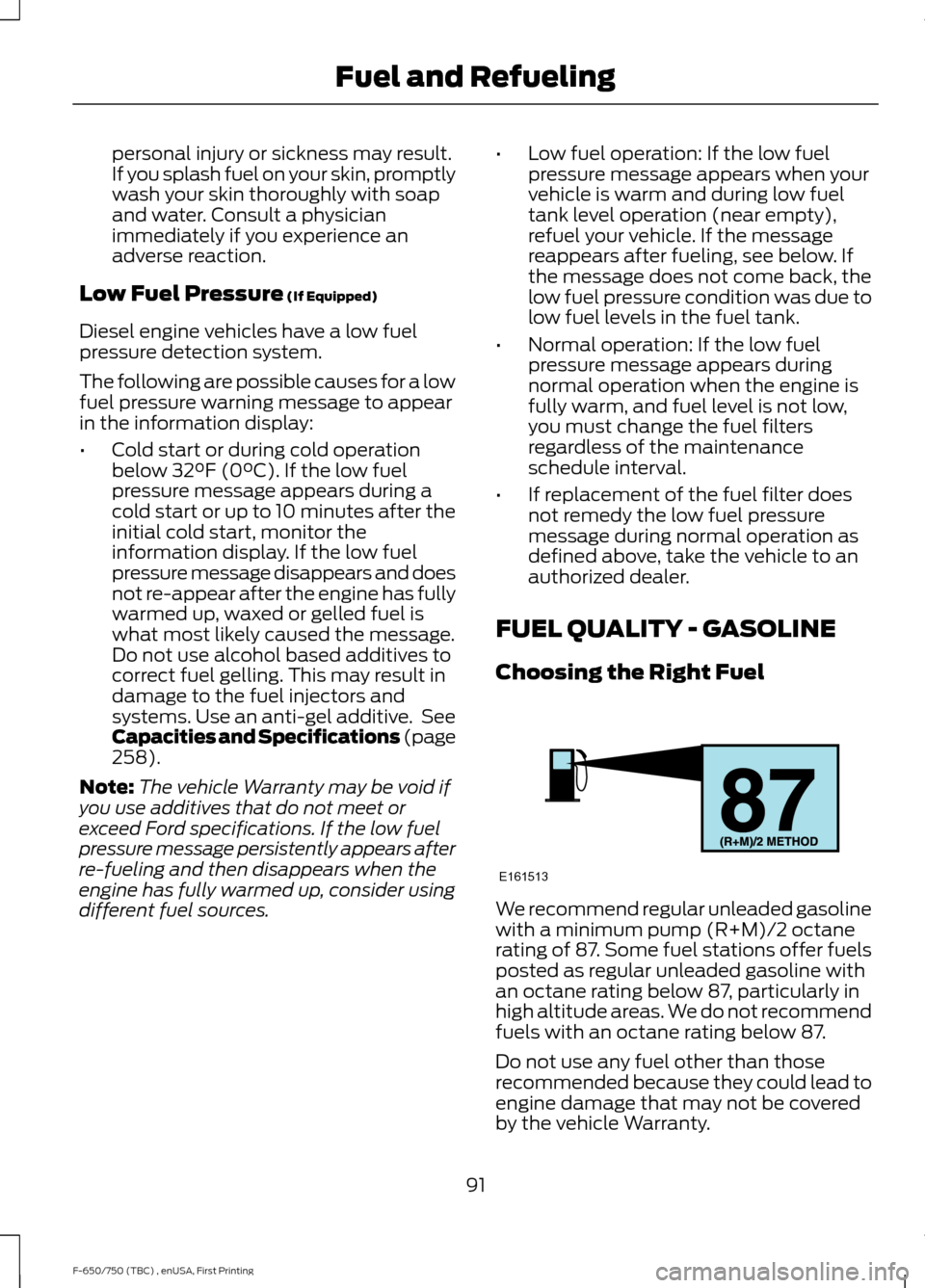
FUEL QUALITY - GASOLINE
Choosing the Right Fuel We recommend regular unleaded gasoline
with a minimum pump (R+M)/2 octane
rating of 87. Some fuel stations offer fuels
posted as regular unleaded gasoline with
an octane rating below 87, particularly in
high altitude areas. We do not recommend
fuels with an octane rating below 87.
Do not use any fuel other than those
recommended because they could lead to
engine damage that may not be covered
by the vehicle Warranty.
91
F-650/750 (TBC) , enUSA, First Printing Fuel and RefuelingE161513
Page 96 of 382
Fuel Requirements - Choosing The
Right Fuel: Vehicles Operated
Where Ultra Low Sulfur Diesel Fuel
Is Not Required
For the engine to operate reliably on
low-sulfur or high-sulfur diesel fuel, the
engine must be a factory built high-sulfur
engine (available as a dealer order option
for select markets) or an ultra low sulfur
diesel fuel configured engine that has been
retrofitted for high-sulfur diesel fuel using
Ford Motor Company dealer service parts.
Failure to use retrofit components other
than those available through your
authorized dealer will result in coolant
system damage, engine overheating,
selective catalyst reduction system or
diesel particulate filter damage and
possible base engine damage.
Use only a diesel engine configured for use
with high sulfur diesel fuel in markets with
diesel fuel that has sulfur content greater
than 15 ppm. Using low sulfur diesel fuel
(16–500 ppm) or high sulfur diesel fuel
(greater than 500 ppm) in a diesel engine
designed to use only Ultra Low Sulfur
Diesel fuel may result in damage to engine
emission control devices and the
aftertreatment system, potentially
rendering the vehicle inoperable.
Vehicles with engines configured for use
with high sulfur diesel fuel are only
available for sale in countries where ultra
low sulfur diesel fuel is generally not
available or mandated by the government.
Vehicles originally sold in a ultra low sulfur
diesel fuel market that are subsequently
exported to non- ultra low sulfur diesel fuel
markets will need to be retrofitted (at the
customer
’s expense using Ford authorized
dealer service parts) in order to be reliably
operated on non- ultra low sulfur diesel
fuel. Biodiesel WARNINGS
Do not use home heating oil,
agricultural fuel, raw fats and oils,
waste cooking greases, biodiesel
fuels greater than 20% or any diesel fuel
not intended for highway use. Damage to
the fuel injection system, engine and
exhaust catalyst can occur if an improper
fuel is used. Do not add gasoline, gasohol
or alcohol to diesel fuel. This practice
creates a serious fire hazard and engine
performance problems. Do not mix diesel fuel with gasoline,
gasohol or alcohol. This could cause
an explosion resulting in personal
injury. Do not add gasoline, gasohol or
alcohol to diesel fuel. This practice
creates a serious fire hazard resulting
in personal injury and engine performance
problems. Do not use home heating oil or any
diesel fuel not intended for highway
use. Damage to the fuel injection
system, engine, exhaust catalyst and diesel
particulate filter can occur if an improper
fuel is used. Red dye is used to identify
fuels intended for agricultural and
non-highway use. You may operate your vehicle on diesel
fuels containing up to 20% biodiesel, also
known as B20.
Biodiesel fuel is a chemically converted
product from renewable fuel sources, such
as vegetable oils, animal fats and waste
cooking greases.
93
F-650/750 (TBC) , enUSA, First Printing Fuel and Refueling
Page 97 of 382
To help achieve acceptable engine
performance and durability when using
biodiesel in your vehicle:
•
Confirm the biodiesel content of the
fuel to be B20 (20% biodiesel) or less
• Only use biodiesel fuel of good quality
that complies with industry standards
• Follow the recommended service
maintenance intervals. See
Scheduled Maintenance (page 316).
• Do not store biodiesel fuel in the fuel
tank for more than 1 month
• Consider changing brands or reducing
biodiesel content if you have cold
temperature fuel gelling issues or a
frequent LOW FUEL PRESSURE
message appearing
• Do NOT use raw oils, fats or waste
cooking greases
Use of biodiesel in concentrations greater
than 20% may cause damage to your
vehicle, including engine and/or exhaust
after-treatment hardware (exhaust
catalyst and particulate filter) failures.
Concentrations greater than 20% can also
cause fuel filter restrictions that may result
in a lack of power or damage to fuel
system components, including fuel pump
and fuel injector failures.
SAE 5W-40 or SAE 15W-40 oil is
recommended for fuels with greater than
5% biodiesel (B5). Refer to the Special
operating conditions section under the
Schedule Maintenance chapter for more
information about oil change intervals and
other maintenance when operating on
biodiesel. Look for a label on the fuel pump to
confirm the amount of biodiesel contained
in a diesel fuel. Biodiesel content is often
indicated with the letter B followed by the
percent of biodiesel in the fuel. For
example, B20 indicates a fuel containing
20% biodiesel. Ask the service station
attendant to confirm the biodiesel content
of a diesel fuel if you do not see a label on
the fuel pump.
Biodiesel fuels degrade more easily than
diesel fuels not containing biodiesel and
should not be stored in the fuel tank for
more than 1 month. If you plan to park or
store your vehicle for more than 1 month,
then you should empty your vehicle fuel
tank of biodiesel fuel. You should fill the
tank with a pure petroleum-based diesel
fuel and run your vehicle for a minimum of
30 minutes.
Note:
Degraded or oxidized biodiesel can
damage fuel system seals and plastics and
corrode steel parts.
During cold weather, if you have problems
operating on biodiesel, you may need to
use a diesel fuel with lower biodiesel
content, try another brand, or discontinue
the use of biodiesel.
Diesel Fuel Additives
It should not be necessary to add any
aftermarket additives to your fuel if you
use a high quality diesel fuel that conforms
to ASTM industry specifications.
Aftermarket additives can damage the fuel
injector system or engine.
Use Motorcraft® cetane booster or an
equivalent cetane booster additive if you
suspect fuel has low cetane. Use
Motorcraft® anti-gel & performance
improver or an equivalent additive if there
is fuel gelling.
94
F-650/750 (TBC) , enUSA, First Printing Fuel and Refueling
Page 108 of 382
Readiness for Inspection and
Maintenance (I/M) Testing
Some state and provincial and local
governments may have
Inspection/Maintenance (I/M) programs
to inspect the emission control equipment
on your vehicle. Failure to pass this
inspection could prevent you from getting
a vehicle registration.
If the service engine soon
indicator is on or the bulb does
not work, your vehicle may need
service. See On-Board Diagnostics.
Your vehicle may not pass the I/M test if
the service engine soon indicator is on or
not working properly (bulb is burned out),
or if the OBD-II system has determined
that some of the emission control systems
have not been properly checked. In this
case, the vehicle is not ready for I/M
testing.
If the vehicle ’s engine or transmission has
just been serviced, or the battery has
recently run down or been replaced, the
OBD-II system may indicate that the
vehicle is not ready for I/M testing. To
determine if the vehicle is ready for I/M
testing, turn the ignition key to the on
position for 15 seconds without cranking
the engine. If the service engine soon
indicator blinks eight times, it means that
the vehicle is not ready for I/M testing; if
the service engine soon indicator stays on
solid, it means that your vehicle is ready
for I/M testing.
The OBD-II system checks the emission
control system during normal driving. A
complete check may take several days.
If the vehicle is not ready for I/M testing,
you can perform the following driving cycle
consisting of mixed city and highway
driving: 1. 15 minutes of steady driving on an
expressway or highway followed by 20
minutes of stop-and-go driving with at
least four 30-second idle periods.
2. Allow your vehicle to sit for at least eight hours with the ignition off. Then,
start the vehicle and complete the
above driving cycle. The vehicle must
warm up to its normal operating
temperature. Once started, do not turn
off the vehicle until the above driving
cycle is complete.
If the vehicle is still not ready for I/M
testing, you need to repeat the above
driving cycle.
EMISSION CONTROL SYSTEM
- DIESEL
Oxidation Catalytic Converter and
Diesel Particulate Filter System (If
Equipped) WARNING
The normal operating temperature
of the exhaust system is very high.
Never work around or attempt to
repair any part of the exhaust system until
it has cooled. Use special care when
working around the diesel oxidation
catalytic converter or the diesel particulate
filter. The diesel oxidation catalytic
converter and the diesel particulate filter
heat up to very high temperatures after
only a short period of engine operation and
remain hot after you switch the engine off. Your vehicle has a diesel particulate filter.
The diesel particulate filter is an inline filter
in the exhaust system that reduces carbon
emissions by trapping exhaust particles
before they reach the tailpipe. The diesel
particulate filter looks similar to a
traditional exhaust catalyst and is part of
the exhaust system under your vehicle. The
105
F-650/750 (TBC) , enUSA, First Printing Fuel and Refueling
Page 109 of 382
filter couples to a diesel oxidation catalyst
that reduces the amount of harmful
exhaust emitted from the tailpipe. As soot
gathers in the system, it begins to restrict
the filter. The system must periodically
clean the soot that gathers inside the filter.
This is carried out in two ways, passive
regeneration and active regeneration. Both
methods occur automatically and require
no actions from the driver. During either
one of these regeneration methods,
although you may notice a change in
exhaust tone. At certain times, the
information display shows various
messages related to the diesel particulate
filter. See Information Messages (page
64).
Diesel Particulate Filter Maintenance
You must properly maintain your vehicle's
diesel particulate filter in order for it to
function properly.
Do not disregard maintenance messages
that appear in the information display.
Failure to follow the instructions of an
information message may degrade vehicle
performance and could lead to engine
damage that may not be covered by the
vehicle Warranty.
Failure to perform active or operator
commanded regeneration when instructed
could result in a clogged diesel particulate
filter. If the diesel particulate filter fills
beyond the regeneration threshold, your
vehicle disables the ability for active and
operator commanded regeneration. This
could result in irreversible damage to the
diesel particulate filter requiring
replacement that may not be covered by
the vehicle Warranty. Passive Regeneration
In passive regeneration, the exhaust
system temperature and constituents
automatically clean the filter by oxidizing
the soot. Cleaning automatically occurs
during normal vehicle operating conditions
due to driving patterns.
Active Regeneration
Once the diesel particulate filter is full of
exhaust particles, the engine control
module commands the exhaust system to
clean the filter through active regeneration.
Active regeneration requires the engine
computer to raise the exhaust temperature
to eliminate the particles. During cleaning,
the particles convert to harmless gasses.
Once cleaned the diesel particulate filter
continues trapping exhaust particles.
The regeneration process operates more
efficiently when you drive your vehicle at
a constant speed above30 mph (48 km/h)
and at a steady engine speed for
approximately 20 minutes. The frequency
and duration of regeneration fluctuates by
how you drive your vehicle, outside air
temperature and altitude. For most driving,
regeneration frequency varies from
100–500 mi (160–805 km)
between
occurrences and each occurrence lasts
9– 35 minutes. You can usually reduce the
duration of regeneration if you maintain a
constant speed above 30 mph (48 km/h).
When the engine control module detects
that the diesel particulate filter is nearly
full of particulates and you are not
operating your vehicle in a manner to allow
effective automatic regeneration,
messages appear in the information
display as a reminder for you to drive your
vehicle in order to clean the diesel
particulate filter. If you drive your vehicle
in a manner to allow effective automatic
regeneration, the information display
106
F-650/750 (TBC) , enUSA, First Printing Fuel and Refueling
Page 110 of 382
shows a cleaning exhaust filter message,
which is the normal regeneration process.
You can also choose operator commanded
regeneration to clean the exhaust system
at this point. See Information Messages
(page 64).
If you are not able to drive in a manner that
allows effective automatic active
regeneration or you choose to perform
regeneration of the diesel particulate filter
while at idle, then operator commanded
regeneration would need to be performed.
Operator Commanded Regeneration
(If Equipped)
If your vehicle is operated with significant
stationary operation, low speed drive
cycles less than
25 mph (40 km/h), short
drive cycles, a drive time is less than 10 -
15 minutes or the vehicle does not fully
warm up, passive and active regeneration
may not sufficiently clean the diesel
particulate filter system. Operator
commanded regeneration allows you to
manually start regeneration of the diesel
particulate filter at idle to clean the filter.
If you are not sure whether your vehicle has
this feature, contact an authorized dealer.
When to Carry Out Operator Commanded
Regeneration
You can use the operator commanded
regeneration feature when a message
appears in the information display and you
are not able to drive in a manner that
allows effective automatic active
regeneration or if you choose to manually
start the regeneration of the diesel
particulate filter manually while the vehicle
is idle. See
Information Messages (page
64). Operator Commanded Regeneration
Precautions and Safe Exhaust Position WARNING
Failure to comply with the following
instructions for Operator
Commanded Regeneration may
result in fire, serious injury, death or
property damage. Make sure that the louvers located at the
tip of the exhaust are clear of any
obstructions as they are used to introduce
fresh air into the tailpipe to cool the
exhaust gases as they leave the exhaust
system.
Before you start operator commanded
regeneration, do the following:
•
Shift into park (P) and apply the
parking brake on stable, level ground.
• Park your vehicle outside of any
structure.
• Park your vehicle
10– 15 ft (3–5 m)
away from any obstructions and away
from materials that can easily combust
or melt, for example paper, leaves,
petroleum products, fuels, plastics and
other dry organic material.
• Make sure there is a minimum of 1/8
tank of fuel.
• Make sure all fluids are at proper levels.
How to Start Operator Commanded
Regeneration WARNING
Stay clear of exhaust tip during
regeneration. Hot exhaust gases can
burn you badly.
107
F-650/750 (TBC) , enUSA, First Printing Fuel and Refueling
Page 111 of 382
Note:
You cannot use the operator
commanded regeneration until the diesel
particulate filter load percentage has
reached 100%. The diesel particulate filter
load percentage fluctuates up and down
when driving your vehicle due to active and
passive regenerations.
Note: During the use of operator
commanded regeneration, you may observe
a light amount of white smoke. This is
normal. You may not be able to use
operator commanded
regeneration if the service engine
soon warning lamp appears in the
information display
Information Display Procedure
Start with your vehicle engine and when it
has reached the normal operating
temperature, press the information display
control button on the steering wheel. See
Information Display Control (page 45).
If a message advising that the exhaust
filter is full appears in the information
display, press the OK button to set the
display to Y. Answer yes to this prompt
and then follow the next prompts
regarding exhaust position required to
initiate operator commanded regeneration.
Be sure to understand each prompt. If you
are not sure what is being asked by each
prompt, contact an authorized dealer. The
display confirms the operation has started
and when it has finished.
If the diesel particulate filter is near or at
saturation, a message requesting
permission to initiate filter cleaning
appears in the information display. See
Information Messages
(page 64).
Answer yes to this prompt and then follow
the next prompts regarding exhaust
position required to initiate operator
commanded regeneration. Be sure to understand each prompt. If you are not
sure what is being asked by each prompt,
contact an authorized dealer. The display
confirms the operation has started and
when it has finished. You can also drive to
clean the filter. When the system is at the point
of oversaturation, the service
engine warning lamp illuminates
and a message appears in the information
display. You cannot initiate filter cleaning.
You must have your vehicle checked as
soon as possible.
Once operator commanded regeneration
starts, engine speed increases to
approximately 2000– 2500 rpm and the
cooling fan speed increases. You will hear
a change in audible sound due to engine
speed and cooling fan speed increases.
It is not necessary to open the hood on the
engine compartment. Once operator
commanded regeneration completes, the
engine speed returns to normal idling. The
exhaust system remains very hot for
several minutes even after regeneration is
complete. Do not reposition the vehicle
over materials that could burn until the
exhaust system has had sufficient time to
cool. Depending on the amount of soot
collected by the diesel particulate filter,
ambient temperature and altitude,
operator commanded regeneration lasts
approximately 30 minutes.
Operator Commanded Regeneration
with Automatic Regeneration Control
(If Equipped)
If your vehicle is operated with significant
stationary operation, low speed drive
cycles less than 25 mph (40 km/h), short
drive cycles, drive time less than 15 minutes
or the vehicle does not fully warm up,
passive and active regeneration may not
sufficiently clean the diesel particulate
108
F-650/750 (TBC) , enUSA, First Printing Fuel and Refueling