phone FORD F650 2017 13.G Owner's Manual
[x] Cancel search | Manufacturer: FORD, Model Year: 2017, Model line: F650, Model: FORD F650 2017 13.GPages: 382, PDF Size: 5.18 MB
Page 292 of 382
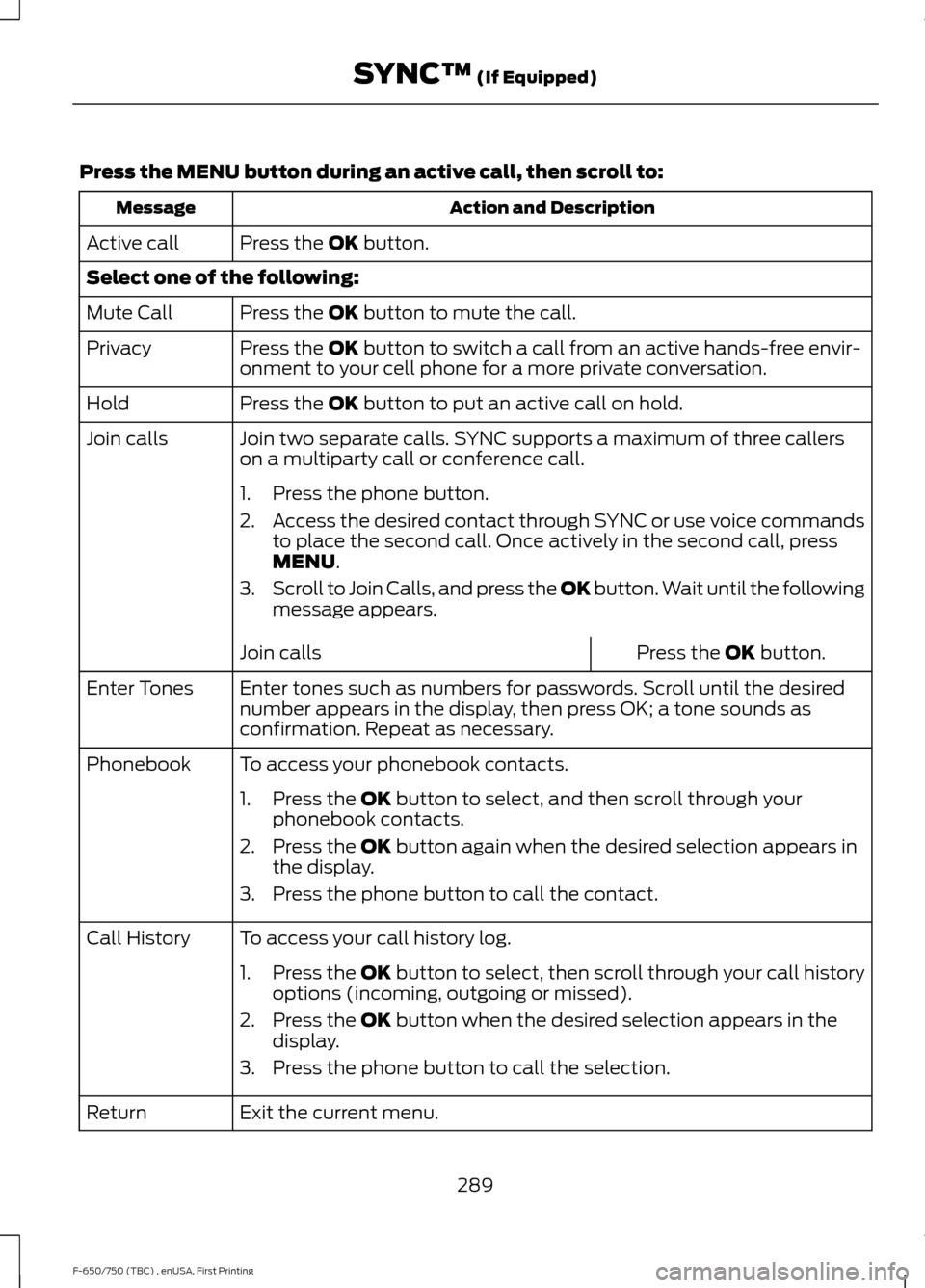
Press the MENU button during an active call, then scroll to:
Action and Description
Message
Press the
OK button.
Active call
Select one of the following:
Press the
OK button to mute the call.
Mute Call
Press the
OK button to switch a call from an active hands-free envir-
onment to your cell phone for a more private conversation.
Privacy
Press the
OK button to put an active call on hold.
Hold
Join two separate calls. SYNC supports a maximum of three callers
on a multiparty call or conference call.
Join calls
1. Press the phone button.
2.Access the desired contact through SYNC or use voice commands
to place the second call. Once actively in the second call, press
MENU
.
3. Scroll to Join Calls, and press the
OK button. Wait until the following
message appears.
Press the
OK button.
Join calls
Enter tones such as numbers for passwords. Scroll until the desired
number appears in the display, then press OK; a tone sounds as
confirmation. Repeat as necessary.
Enter Tones
To access your phonebook contacts.
Phonebook
1. Press the
OK button to select, and then scroll through your
phonebook contacts.
2. Press the
OK button again when the desired selection appears in
the display.
3. Press the phone button to call the contact.
To access your call history log.
Call History
1.Press the OK button to select, then scroll through your call history
options (incoming, outgoing or missed).
2. Press the
OK button when the desired selection appears in the
display.
3. Press the phone button to call the selection.
Exit the current menu.
Return
289
F-650/750 (TBC) , enUSA, First Printing SYNC™
(If Equipped)
Page 293 of 382
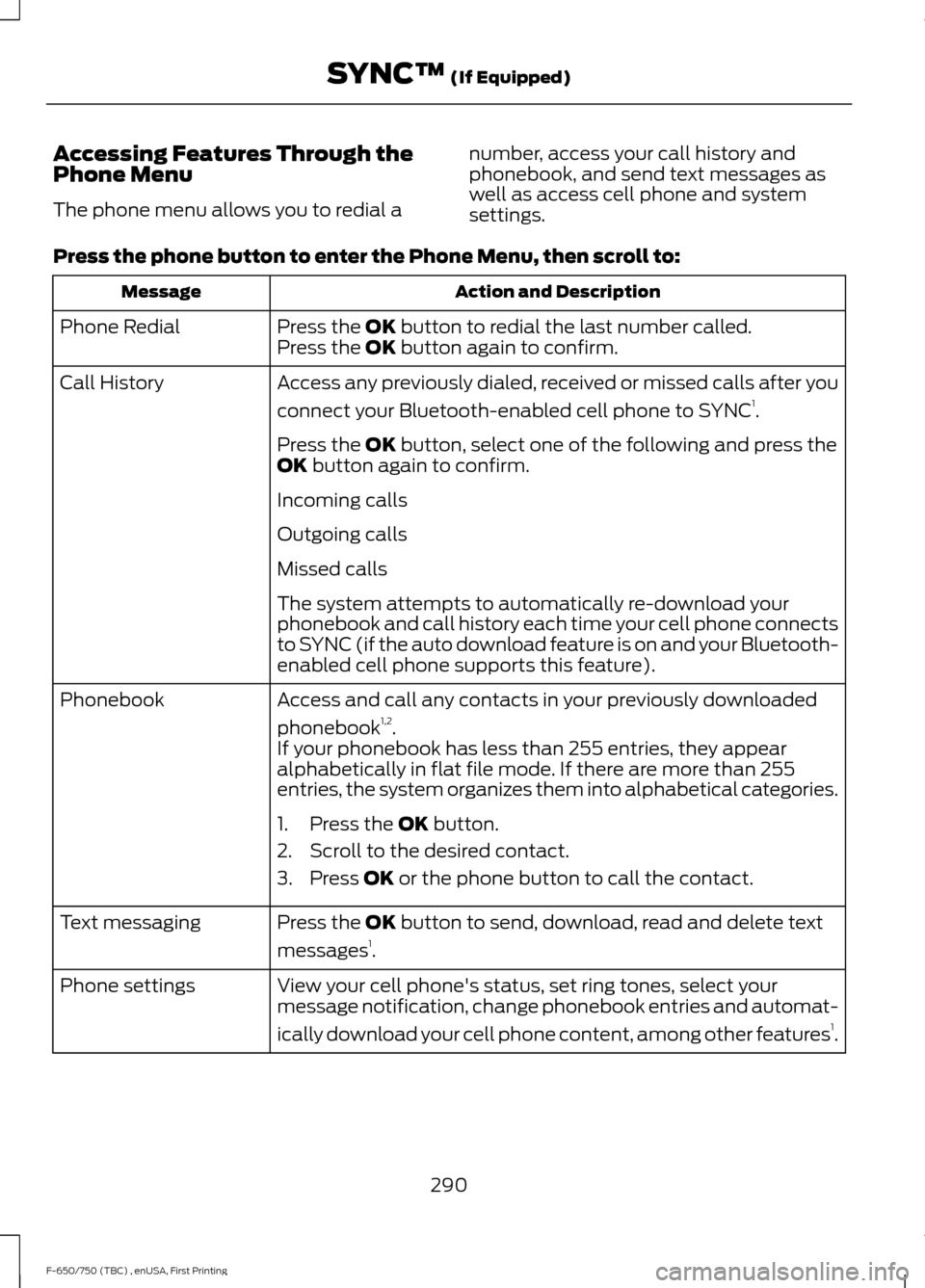
Accessing Features Through the
Phone Menu
The phone menu allows you to redial a
number, access your call history and
phonebook, and send text messages as
well as access cell phone and system
settings.
Press the phone button to enter the Phone Menu, then scroll to: Action and Description
Message
Press the OK button to redial the last number called.
Phone Redial
Press the OK button again to confirm.
Access any previously dialed, received or missed calls after you
connect your Bluetooth-enabled cell phone to SYNC 1
.
Call History
Press the
OK button, select one of the following and press the
OK button again to confirm.
Incoming calls
Outgoing calls
Missed calls
The system attempts to automatically re-download your
phonebook and call history each time your cell phone connects
to SYNC (if the auto download feature is on and your Bluetooth-
enabled cell phone supports this feature).
Access and call any contacts in your previously downloaded
phonebook 1,2
.
Phonebook
If your phonebook has less than 255 entries, they appear
alphabetically in flat file mode. If there are more than 255
entries, the system organizes them into alphabetical categories.
1. Press the
OK button.
2. Scroll to the desired contact.
3. Press
OK or the phone button to call the contact.
Press the
OK button to send, download, read and delete text
messages 1
.
Text messaging
View your cell phone's status, set ring tones, select your
message notification, change phonebook entries and automat-
ically download your cell phone content, among other features 1
.
Phone settings
290
F-650/750 (TBC) , enUSA, First Printing SYNC™
(If Equipped)
Page 294 of 382
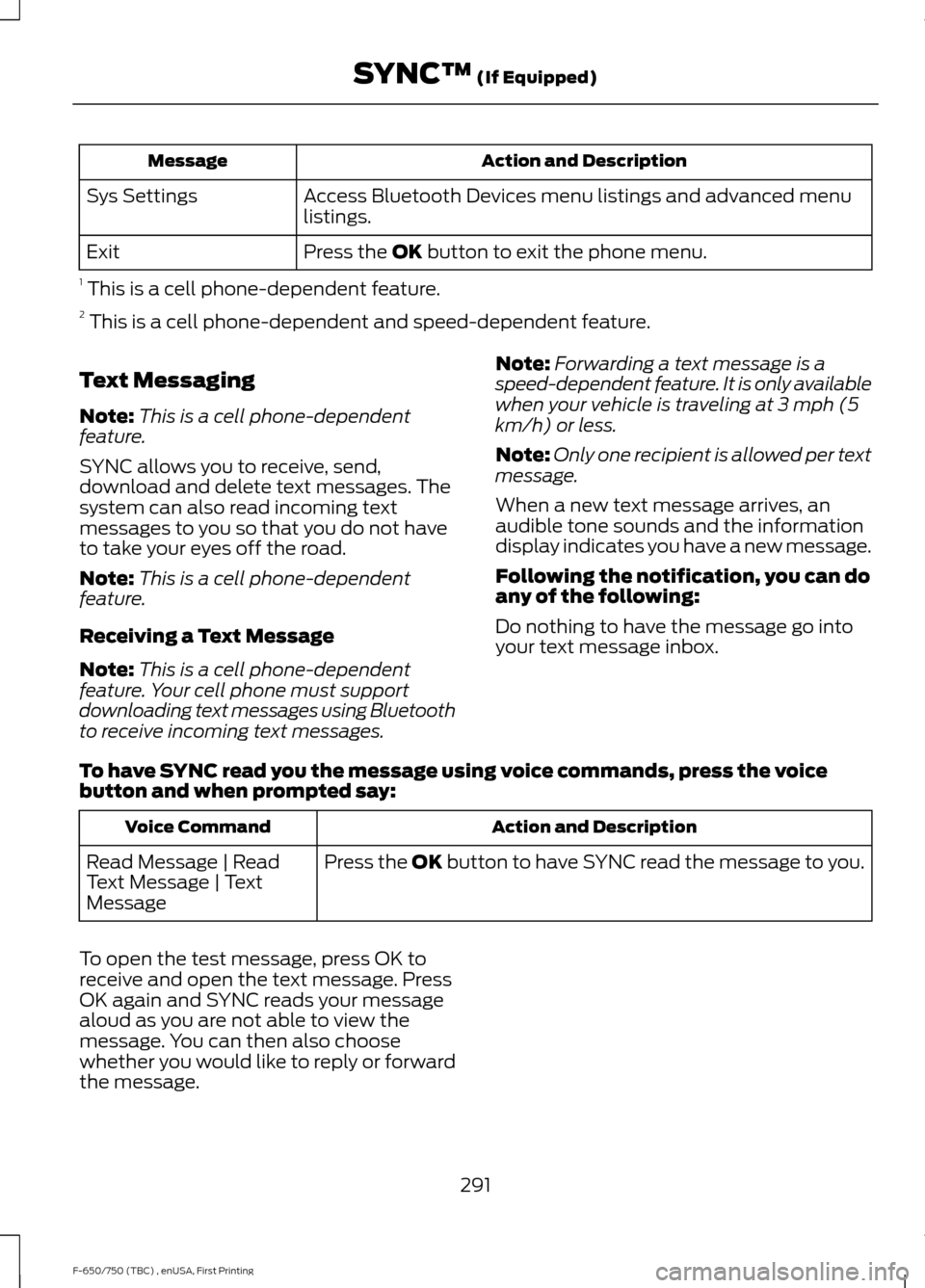
Action and Description
Message
Access Bluetooth Devices menu listings and advanced menu
listings.
Sys Settings
Press the OK button to exit the phone menu.
Exit
1 This is a cell phone-dependent feature.
2 This is a cell phone-dependent and speed-dependent feature.
Text Messaging
Note: This is a cell phone-dependent
feature.
SYNC allows you to receive, send,
download and delete text messages. The
system can also read incoming text
messages to you so that you do not have
to take your eyes off the road.
Note: This is a cell phone-dependent
feature.
Receiving a Text Message
Note: This is a cell phone-dependent
feature. Your cell phone must support
downloading text messages using Bluetooth
to receive incoming text messages. Note:
Forwarding a text message is a
speed-dependent feature. It is only available
when your vehicle is traveling at 3 mph (5
km/h) or less.
Note: Only one recipient is allowed per text
message.
When a new text message arrives, an
audible tone sounds and the information
display indicates you have a new message.
Following the notification, you can do
any of the following:
Do nothing to have the message go into
your text message inbox.
To have SYNC read you the message using voice commands, press the voice
button and when prompted say: Action and Description
Voice Command
Press the
OK button to have SYNC read the message to you.
Read Message | Read
Text Message | Text
Message
To open the test message, press OK to
receive and open the text message. Press
OK again and SYNC reads your message
aloud as you are not able to view the
message. You can then also choose
whether you would like to reply or forward
the message.
291
F-650/750 (TBC) , enUSA, First Printing SYNC™
(If Equipped)
Page 295 of 382
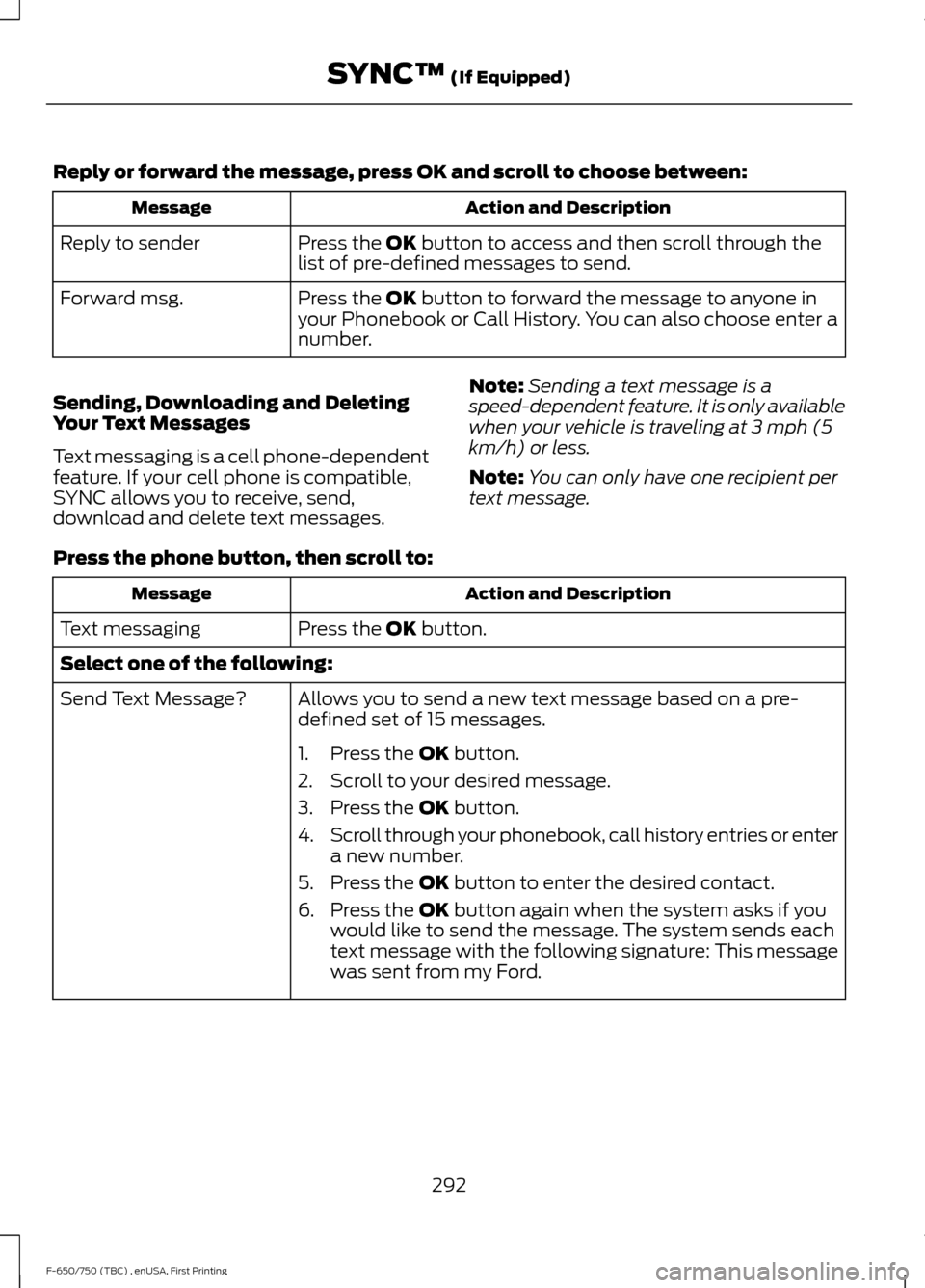
Reply or forward the message, press OK and scroll to choose between:
Action and Description
Message
Press the OK button to access and then scroll through the
list of pre-defined messages to send.
Reply to sender
Press the
OK button to forward the message to anyone in
your Phonebook or Call History. You can also choose enter a
number.
Forward msg.
Sending, Downloading and Deleting
Your Text Messages
Text messaging is a cell phone-dependent
feature. If your cell phone is compatible,
SYNC allows you to receive, send,
download and delete text messages. Note:
Sending a text message is a
speed-dependent feature. It is only available
when your vehicle is traveling at 3 mph (5
km/h) or less.
Note: You can only have one recipient per
text message.
Press the phone button, then scroll to: Action and Description
Message
Press the
OK button.
Text messaging
Select one of the following:
Allows you to send a new text message based on a pre-
defined set of 15 messages.
Send Text Message?
1. Press the
OK button.
2. Scroll to your desired message.
3. Press the
OK button.
4. Scroll through your phonebook, call history entries or enter
a new number.
5. Press the
OK button to enter the desired contact.
6. Press the
OK button again when the system asks if you
would like to send the message. The system sends each
text message with the following signature: This message
was sent from my Ford.
292
F-650/750 (TBC) , enUSA, First Printing SYNC™
(If Equipped)
Page 296 of 382
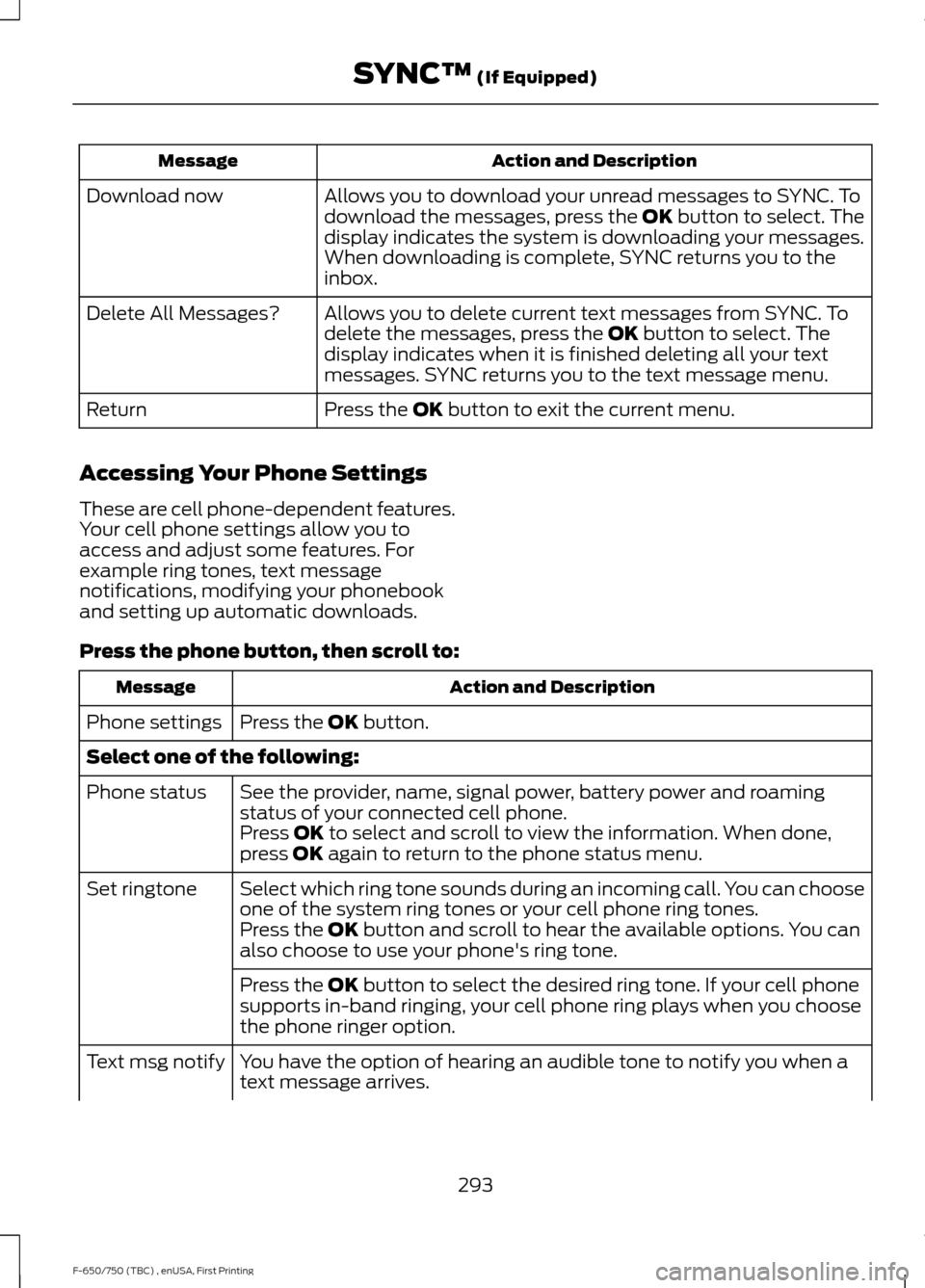
Action and Description
Message
Allows you to download your unread messages to SYNC. To
download the messages, press the OK button to select. The
display indicates the system is downloading your messages.
When downloading is complete, SYNC returns you to the
inbox.
Download now
Allows you to delete current text messages from SYNC. To
delete the messages, press the
OK button to select. The
display indicates when it is finished deleting all your text
messages. SYNC returns you to the text message menu.
Delete All Messages?
Press the
OK button to exit the current menu.
Return
Accessing Your Phone Settings
These are cell phone-dependent features.
Your cell phone settings allow you to
access and adjust some features. For
example ring tones, text message
notifications, modifying your phonebook
and setting up automatic downloads.
Press the phone button, then scroll to: Action and Description
Message
Press the
OK button.
Phone settings
Select one of the following:
See the provider, name, signal power, battery power and roaming
status of your connected cell phone.
Phone status
Press
OK to select and scroll to view the information. When done,
press OK again to return to the phone status menu.
Select which ring tone sounds during an incoming call. You can choose
one of the system ring tones or your cell phone ring tones.
Set ringtone
Press the
OK button and scroll to hear the available options. You can
also choose to use your phone's ring tone.
Press the
OK button to select the desired ring tone. If your cell phone
supports in-band ringing, your cell phone ring plays when you choose
the phone ringer option.
You have the option of hearing an audible tone to notify you when a
text message arrives.
Text msg notify
293
F-650/750 (TBC) , enUSA, First Printing SYNC™
(If Equipped)
Page 297 of 382
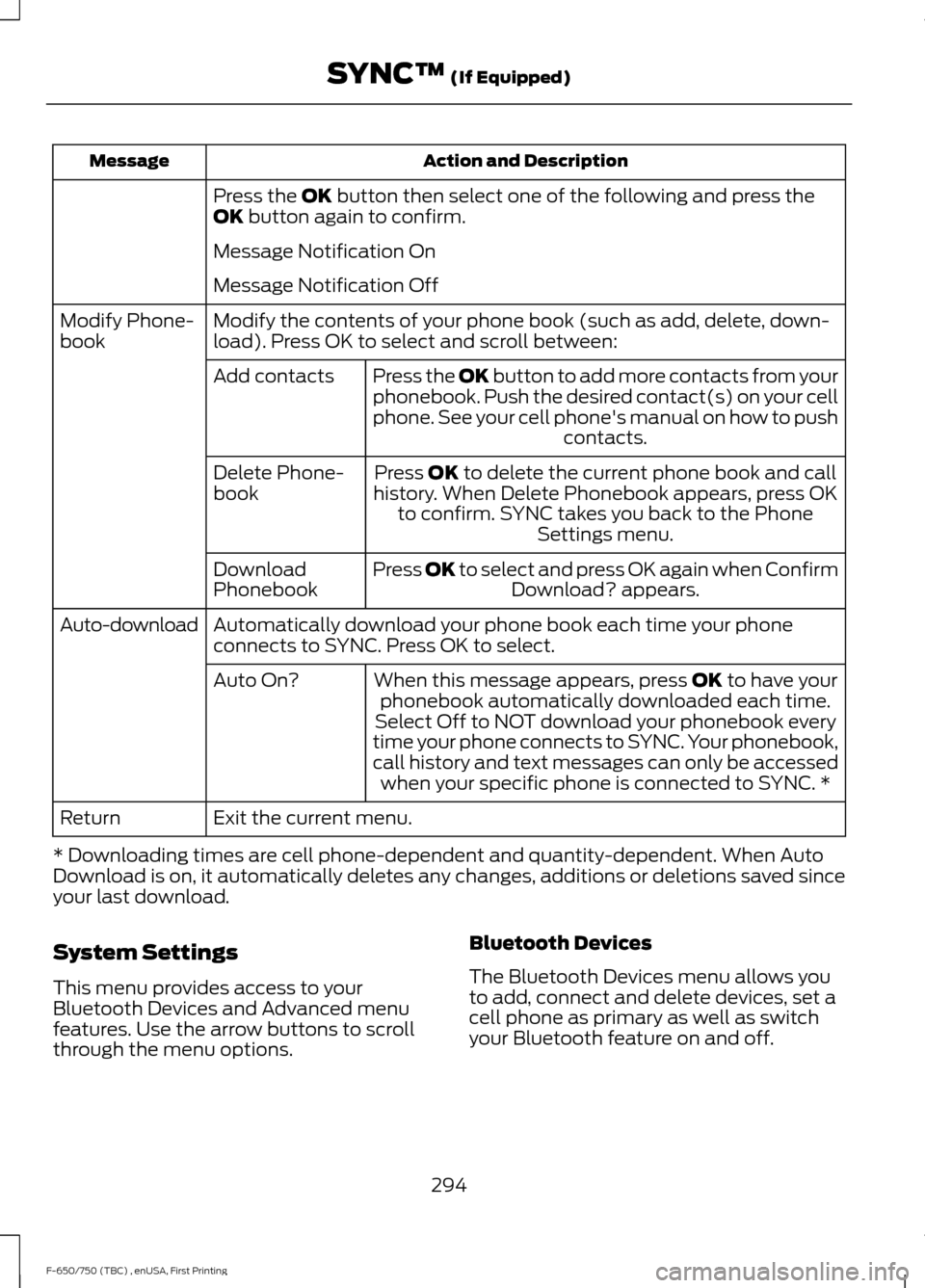
Action and Description
Message
Press the OK button then select one of the following and press the
OK button again to confirm.
Message Notification On
Message Notification Off
Modify the contents of your phone book (such as add, delete, down-
load). Press OK to select and scroll between:
Modify Phone-
book
Press the
OK button to add more contacts from your
phonebook. Push the desired contact(s) on your cell
phone. See your cell phone's manual on how to push contacts.
Add contacts
Press
OK to delete the current phone book and call
history. When Delete Phonebook appears, press OK to confirm. SYNC takes you back to the Phone Settings menu.
Delete Phone-
book
Press
OK to select and press OK again when ConfirmDownload? appears.
Download
Phonebook
Automatically download your phone book each time your phone
connects to SYNC. Press OK to select.
Auto-download
When this message appears, press
OK to have your
phonebook automatically downloaded each time.
Auto On?
Select Off to NOT download your phonebook every
time your phone connects to SYNC. Your phonebook,
call history and text messages can only be accessed when your specific phone is connected to SYNC. *
Exit the current menu.
Return
* Downloading times are cell phone-dependent and quantity-dependent. When Auto
Download is on, it automatically deletes any changes, additions or deletions saved since
your last download.
System Settings
This menu provides access to your
Bluetooth Devices and Advanced menu
features. Use the arrow buttons to scroll
through the menu options. Bluetooth Devices
The Bluetooth Devices menu allows you
to add, connect and delete devices, set a
cell phone as primary as well as switch
your Bluetooth feature on and off.
294
F-650/750 (TBC) , enUSA, First Printing SYNC™
(If Equipped)
Page 298 of 382
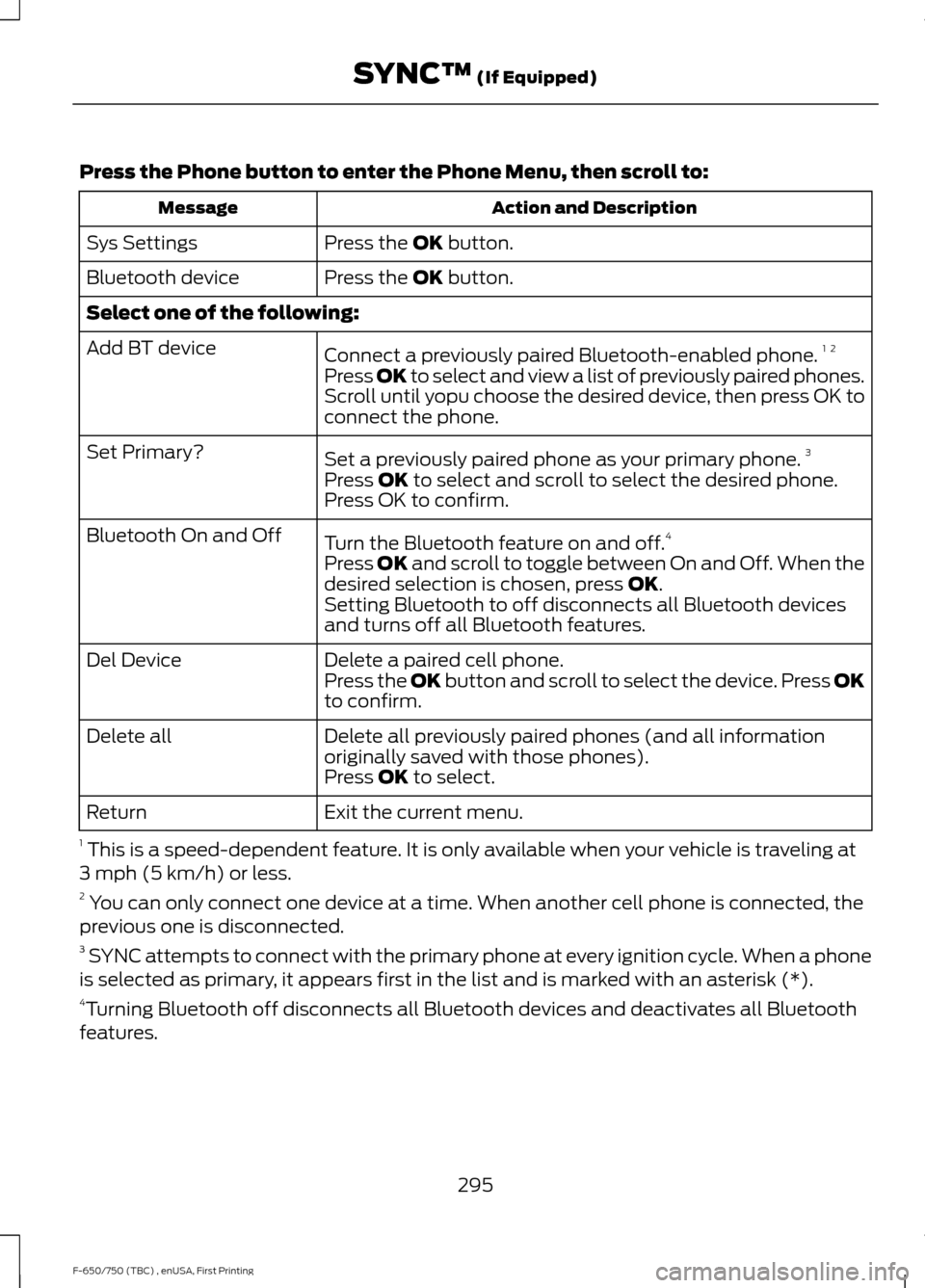
Press the Phone button to enter the Phone Menu, then scroll to:
Action and Description
Message
Press the OK button.
Sys Settings
Press the
OK button.
Bluetooth device
Select one of the following:
Connect a previously paired Bluetooth-enabled phone. 1 2
Add BT device
Press OK to select and view a list of previously paired phones.
Scroll until yopu choose the desired device, then press OK to
connect the phone.
Set a previously paired phone as your primary phone. 3
Set Primary?
Press
OK to select and scroll to select the desired phone.
Press OK to confirm.
Turn the Bluetooth feature on and off. 4
Bluetooth On and Off
Press
OK and scroll to toggle between On and Off. When the
desired selection is chosen, press OK.
Setting Bluetooth to off disconnects all Bluetooth devices
and turns off all Bluetooth features.
Delete a paired cell phone.
Del Device
Press the OK button and scroll to select the device. Press OK
to confirm.
Delete all previously paired phones (and all information
originally saved with those phones).
Delete all
Press
OK to select.
Exit the current menu.
Return
1 This is a speed-dependent feature. It is only available when your vehicle is traveling at
3 mph (5 km/h) or less.
2 You can only connect one device at a time. When another cell phone is connected, the
previous one is disconnected.
3 SYNC attempts to connect with the primary phone at every ignition cycle. When a phone
is selected as primary, it appears first in the list and is marked with an asterisk (*).
4 Turning Bluetooth off disconnects all Bluetooth devices and deactivates all Bluetooth
features.
295
F-650/750 (TBC) , enUSA, First Printing SYNC™
(If Equipped)
Page 299 of 382
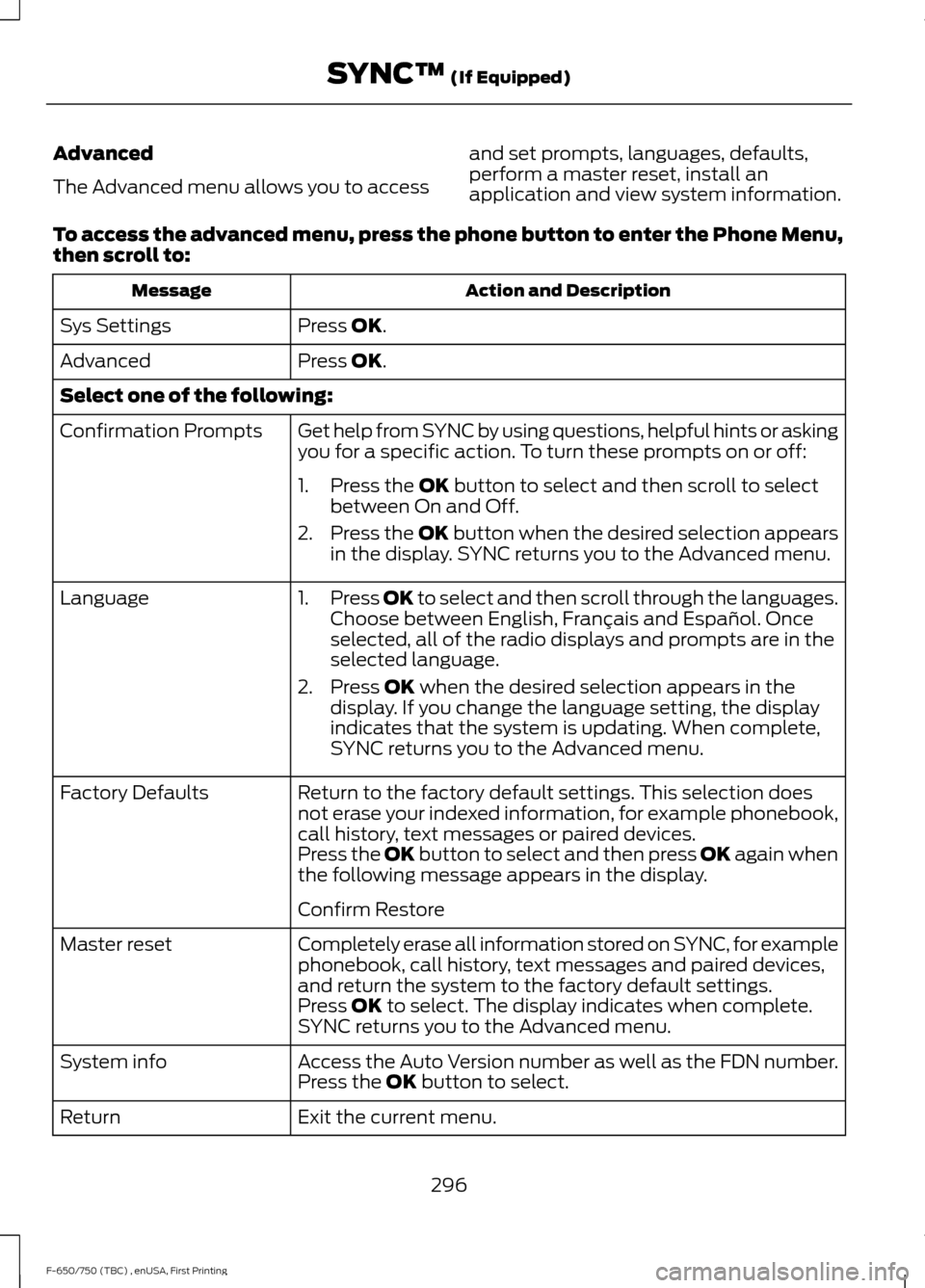
Advanced
The Advanced menu allows you to access
and set prompts, languages, defaults,
perform a master reset, install an
application and view system information.
To access the advanced menu, press the phone button to enter the Phone Menu,
then scroll to: Action and Description
Message
Press OK.
Sys Settings
Press
OK.
Advanced
Select one of the following:
Get help from SYNC by using questions, helpful hints or asking
you for a specific action. To turn these prompts on or off:
Confirmation Prompts
1. Press the
OK button to select and then scroll to select
between On and Off.
2. Press the
OK button when the desired selection appears
in the display. SYNC returns you to the Advanced menu.
1. Press
OK to select and then scroll through the languages.
Choose between English, Français and Español. Once
selected, all of the radio displays and prompts are in the
selected language.
2. Press
OK when the desired selection appears in the
display. If you change the language setting, the display
indicates that the system is updating. When complete,
SYNC returns you to the Advanced menu.
Language
Return to the factory default settings. This selection does
not erase your indexed information, for example phonebook,
call history, text messages or paired devices.
Factory Defaults
Press the OK button to select and then press OK again when
the following message appears in the display.
Confirm Restore
Completely erase all information stored on SYNC, for example
phonebook, call history, text messages and paired devices,
and return the system to the factory default settings.
Master reset
Press
OK to select. The display indicates when complete.
SYNC returns you to the Advanced menu.
Access the Auto Version number as well as the FDN number.
System info
Press the
OK button to select.
Exit the current menu.
Return
296
F-650/750 (TBC) , enUSA, First Printing SYNC™
(If Equipped)
Page 302 of 382
![FORD F650 2017 13.G Owners Manual Media Voice Commands
Press the voice button and when
prompted say any of the following:
Voice command
USB [1]
You can then say any of the following
[Phone] Connections | [Media] Connec-
tions | [Bluet](/img/11/5082/w960_5082-301.png "FORD F650 2017 13.G Owners Manual Media Voice Commands
Press the voice button and when
prompted say any of the following:
Voice command
USB [1]
You can then say any of the following
[Phone] Connections | [Media] Connec-
tions | [Bluet")
Media Voice Commands
Press the voice button and when
prompted say any of the following:
Voice command
USB [1]
You can then say any of the following
[Phone] Connections | [Media] Connec-
tions | [Bluetooth] Connections
Pause
Play
Play All 1,2
Play Artist ___
1,2
Play Album ___
1,2
Play Genre ___
3
[Play] Next Folder
[Play] Next Track | [Play] Next Song
1,2
Play Playlist ___
3
[Play] Previous Folder
[Play] Previous Track | [Play] Previous
Song
1,2
[Play] Next Track | [Play] Next Song
Repeat [On]
Repeat Off
Shuffle [On]
Shuffle Off
1,2
Search Album ___
1,2
Search Artist ___ Voice command
1,2
The system searches all
the data from your
indexed music and, if
available, begins to play
the chosen type of music.
You can only play genres
of music which are present
in the GENRE metadata
tags that you have on your
digital media player.
Search
Genre ___
1,2
The system searches for a
specific artist/track/album
from the music indexed
through the USB port.
Search
Track ___
| Search
Song ___
1,2
This allows you to make
your previous command
more specific. By using this
command you can filter
though a previous selec-
tion, such as an artist to
play only specific album.
Refine
album ___
The system compiles a
playlist and then plays similar
music to what is currently
playing from the USB port
using indexed metadata
information.
Similar
Music
299
F-650/750 (TBC) , enUSA, First Printing SYNC™ (If Equipped)
Page 303 of 382
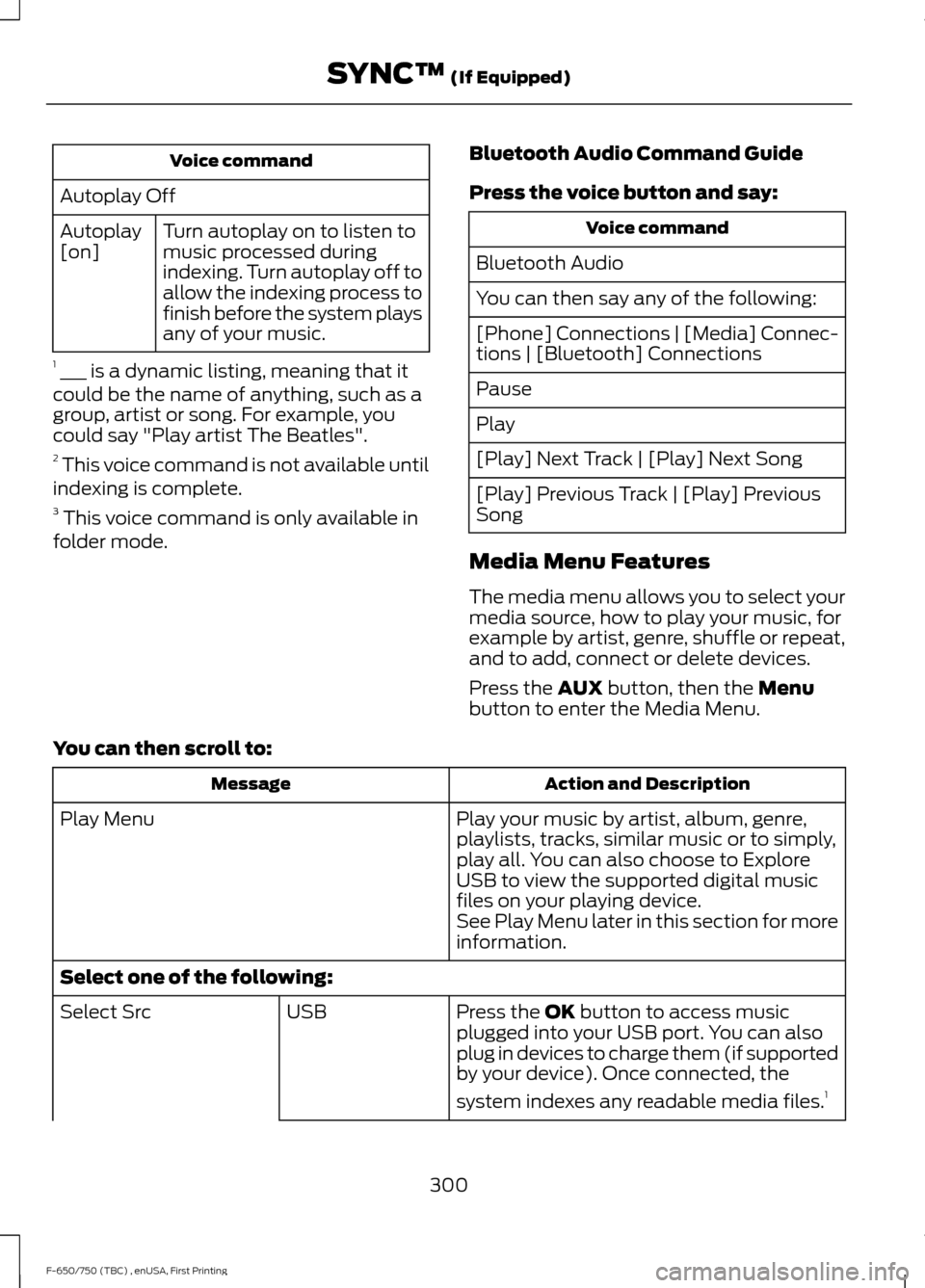
Voice command
Autoplay Off Turn autoplay on to listen to
music processed during
indexing. Turn autoplay off to
allow the indexing process to
finish before the system plays
any of your music.
Autoplay
[on]
1 ___ is a dynamic listing, meaning that it
could be the name of anything, such as a
group, artist or song. For example, you
could say "Play artist The Beatles".
2 This voice command is not available until
indexing is complete.
3 This voice command is only available in
folder mode. Bluetooth Audio Command Guide
Press the voice button and say: Voice command
Bluetooth Audio
You can then say any of the following:
[Phone] Connections | [Media] Connec-
tions | [Bluetooth] Connections
Pause
Play
[Play] Next Track | [Play] Next Song
[Play] Previous Track | [Play] Previous
Song
Media Menu Features
The media menu allows you to select your
media source, how to play your music, for
example by artist, genre, shuffle or repeat,
and to add, connect or delete devices.
Press the AUX button, then the Menu
button to enter the Media Menu.
You can then scroll to: Action and Description
Message
Play your music by artist, album, genre,
playlists, tracks, similar music or to simply,
play all. You can also choose to Explore
USB to view the supported digital music
files on your playing device.
Play Menu
See Play Menu later in this section for more
information.
Select one of the following: Press the
OK button to access music
plugged into your USB port. You can also
plug in devices to charge them (if supported
by your device). Once connected, the
system indexes any readable media files. 1
USB
Select Src
300
F-650/750 (TBC) , enUSA, First Printing SYNC™
(If Equipped)