ignition FORD F650/750 2019 Workshop Manual
[x] Cancel search | Manufacturer: FORD, Model Year: 2019, Model line: F650/750, Model: FORD F650/750 2019Pages: 387, PDF Size: 4.78 MB
Page 224 of 387
2.
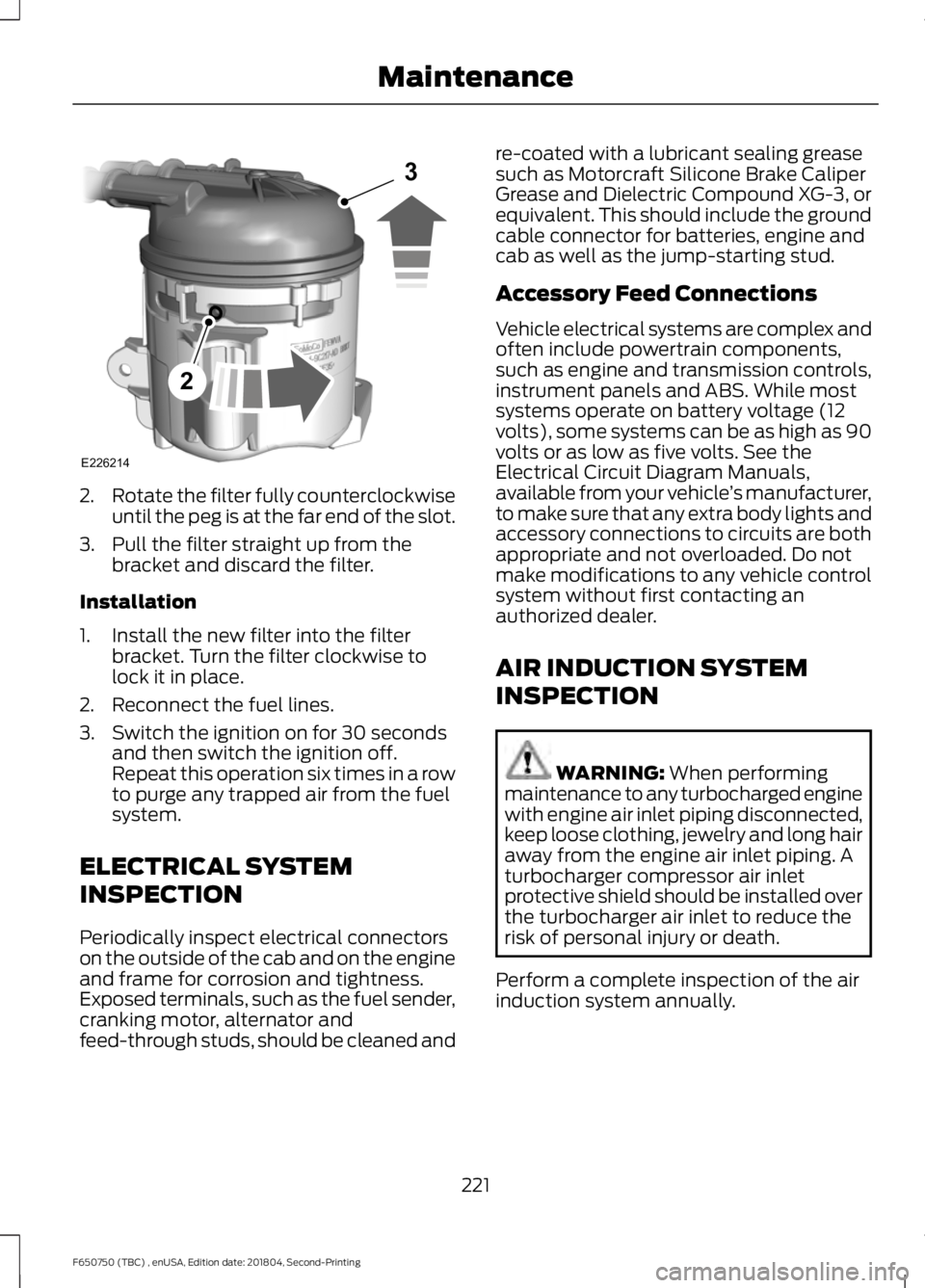
Rotate the filter fully counterclockwise
until the peg is at the far end of the slot.
3. Pull the filter straight up from the bracket and discard the filter.
Installation
1. Install the new filter into the filter bracket. Turn the filter clockwise to
lock it in place.
2. Reconnect the fuel lines.
3. Switch the ignition on for 30 seconds and then switch the ignition off.
Repeat this operation six times in a row
to purge any trapped air from the fuel
system.
ELECTRICAL SYSTEM
INSPECTION
Periodically inspect electrical connectors
on the outside of the cab and on the engine
and frame for corrosion and tightness.
Exposed terminals, such as the fuel sender,
cranking motor, alternator and
feed-through studs, should be cleaned and re-coated with a lubricant sealing grease
such as Motorcraft Silicone Brake Caliper
Grease and Dielectric Compound XG-3, or
equivalent. This should include the ground
cable connector for batteries, engine and
cab as well as the jump-starting stud.
Accessory Feed Connections
Vehicle electrical systems are complex and
often include powertrain components,
such as engine and transmission controls,
instrument panels and ABS. While most
systems operate on battery voltage (12
volts), some systems can be as high as 90
volts or as low as five volts. See the
Electrical Circuit Diagram Manuals,
available from your vehicle
’s manufacturer,
to make sure that any extra body lights and
accessory connections to circuits are both
appropriate and not overloaded. Do not
make modifications to any vehicle control
system without first contacting an
authorized dealer.
AIR INDUCTION SYSTEM
INSPECTION WARNING: When performing
maintenance to any turbocharged engine
with engine air inlet piping disconnected,
keep loose clothing, jewelry and long hair
away from the engine air inlet piping. A
turbocharger compressor air inlet
protective shield should be installed over
the turbocharger air inlet to reduce the
risk of personal injury or death.
Perform a complete inspection of the air
induction system annually.
221
F650750 (TBC) , enUSA, Edition date: 201804, Second-Printing MaintenanceE226214
2
3
Page 234 of 387
WAXING
Regular waxing is necessary to protect your
car's paint from the elements. We
recommend that you wash and wax the
painted surface once or twice a year.
When washing and waxing, park your
vehicle in a shaded area out of direct
sunlight. Always wash your vehicle before
applying wax.
•
Use a quality wax that does not contain
abrasives.
• Follow the manufacturer ’s instructions
to apply and remove the wax.
• Apply a small amount of wax in a
back-and-forth motion, not in circles.
• Do not allow wax to come in contact
with any non-body (low-gloss black)
colored trim. The wax will discolor or
stain the parts over time.
•Roof racks.
• Bumpers.
• Grained door handles.
• Side moldings.
• Mirror housings.
• Windshield cowl area.
• Do not apply wax to glass areas.
• After waxing, your car's paint should
feel smooth, and be free of streaks and
smudges.
CLEANING THE ENGINE
Engines are more efficient when they are
clean because grease and dirt buildup keep
the engine warmer than normal. When washing:
•
Take care when using a power washer
to clean the engine. The high-pressure
fluid could penetrate the sealed parts
and cause damage.
• Do not spray a hot engine with cold
water to avoid cracking the engine
block or other engine components.
• Spray Motorcraft Engine Shampoo and
Degreaser on all parts that require
cleaning and pressure rinse clean. In
Canada, use Motorcraft Engine
Shampoo.
Note: If your vehicle has an engine cover
remove the cover before application of
Motorcraft Engine Shampoo and Degreaser.
Immediately rinse away any over spray.
• Never wash or rinse the engine while it
is hot or running; water in the running
engine may cause internal damage.
• Never wash or rinse any ignition coil,
spark plug wire or spark plug well, or
the area in and around these locations.
• Cover the battery, power distribution
box, and air filter assembly to prevent
water damage when cleaning the
engine.
CLEANING THE WINDOWS AND
WIPER BLADES
Car wash chemicals and environmental
fallout can result in windshield and wiper
blade contamination. Dirty windshield and
wipers will result in poor windshield wiper
operation. Keep the windshield and wiper
blades clean to maintain windshield wiper
performance.
231
F650750 (TBC) , enUSA, Edition date: 201804, Second-Printing Vehicle Care
Page 259 of 387
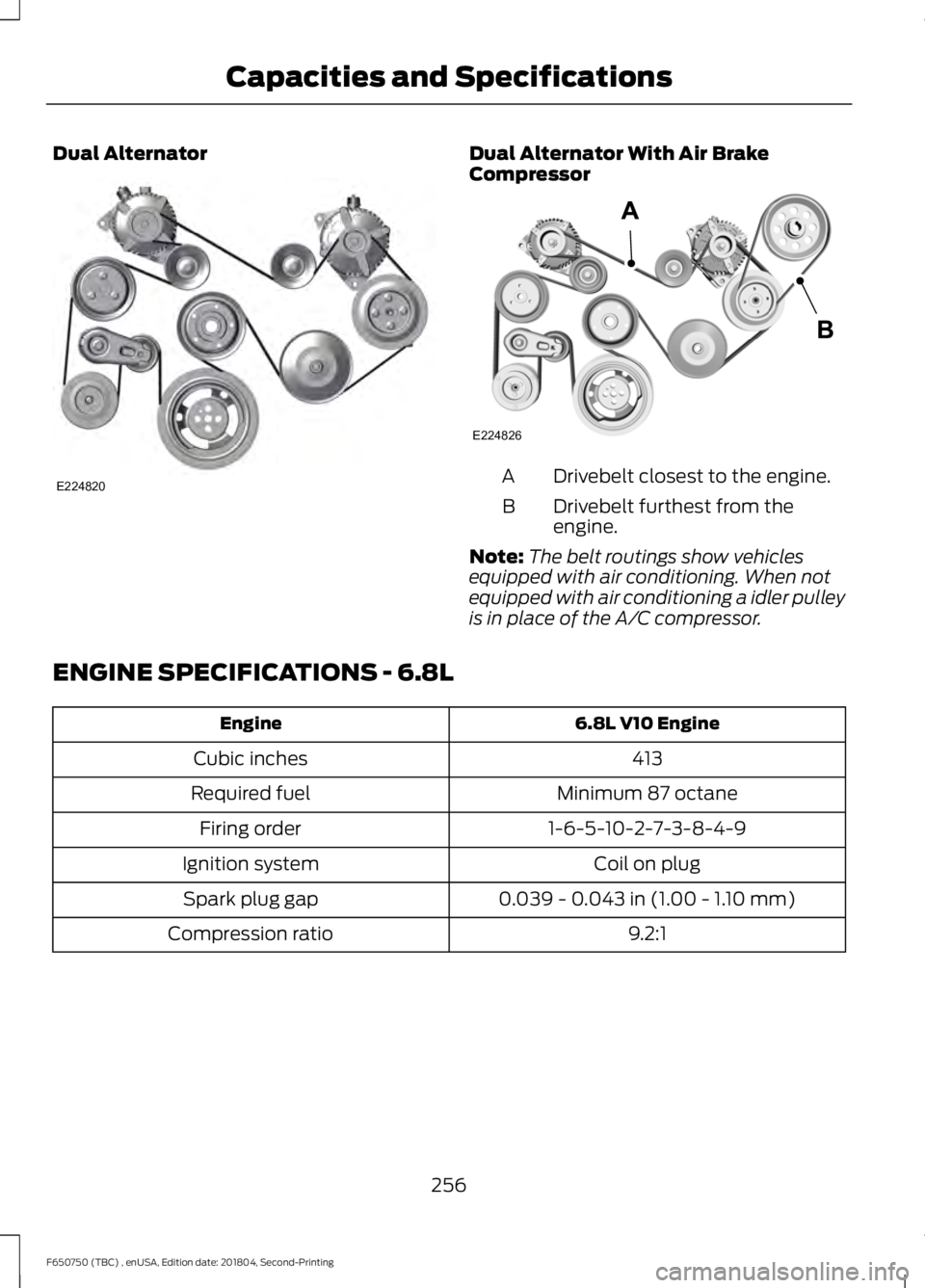
Dual Alternator Dual Alternator With Air Brake
Compressor
Drivebelt closest to the engine.
A
Drivebelt furthest from the
engine.
B
Note: The belt routings show vehicles
equipped with air conditioning. When not
equipped with air conditioning a idler pulley
is in place of the A/C compressor.
ENGINE SPECIFICATIONS - 6.8L 6.8L V10 Engine
Engine
413
Cubic inches
Minimum 87 octane
Required fuel
1-6-5-10-2-7-3-8-4-9
Firing order
Coil on plug
Ignition system
0.039 - 0.043 in (1.00 - 1.10 mm)
Spark plug gap
9.2:1
Compression ratio
256
F650750 (TBC) , enUSA, Edition date: 201804, Second-Printing Capacities and SpecificationsE224820 E224826
Page 294 of 387
The system creates candidate lists when
it has the same confidence level of several
options based on your voice command.
When turned on, it may prompt you with
as many as four possibilities for
clarification.
For example, say "Say 1 after the tone to
call John Doe at home. Say 2 after the tone
to call Johnny Doe on mobile. Say 3 after
the tone to call Jane Doe at home." You
could also say "Say 1 after the tone to play
John Doe, Say 2 after the tone to play
Johnny Doe."If you want the system to carry out the following
Voice command
Make a best guess from the media candidate list. You may
still occasionally be asked questions.
Media Candidate Lists
Off
Clarify your voice command for media candidates.
Media Candidate Lists On
Make a best guess from the phone candidate list. You may
still occasionally be asked questions.
Phone Candidate Lists
Off
Clarify your voice command for phone candidates.
Phone Candidate Lists
On
USING SYNC™ WITH YOUR
PHONE
Hands-free calling is one of the main
features of SYNC. While the system
supports a variety of features, many are
dependent on your cell phone's
functionality. At a minimum, most cell
phones with Bluetooth wireless technology
support the following functions:
• Answering an incoming call.
• Ending a call.
• Using privacy mode.
• Dialing a number.
• Redialing.
• Call waiting notification.
• Caller ID. Other features, such as text messaging
using Bluetooth and automatic phonebook
download, are cell phone-dependent
features. To check your cell phone's
compatibility, see your cell phone's manual
and visit www.SYNCMyRide.com,
www.SYNCMyRide.ca or
www.syncmaroute.ca.
Pairing a Cell Phone for the First
Time
Note:
SYNC can support downloading up
to approximately 1000 entries per
Bluetooth-enabled cell phone.
Note: Make sure to switch on the ignition
and the radio. Put the transmission in
position park (P).
Note: To scroll through the menus, press
the up and down arrows on your audio
system.
Wirelessly pairing your cell phone with
SYNC allows you to make and receive
hands-free calls.
291
F650750 (TBC) , enUSA, Edition date: 201804, Second-Printing SYNC™
Page 295 of 387
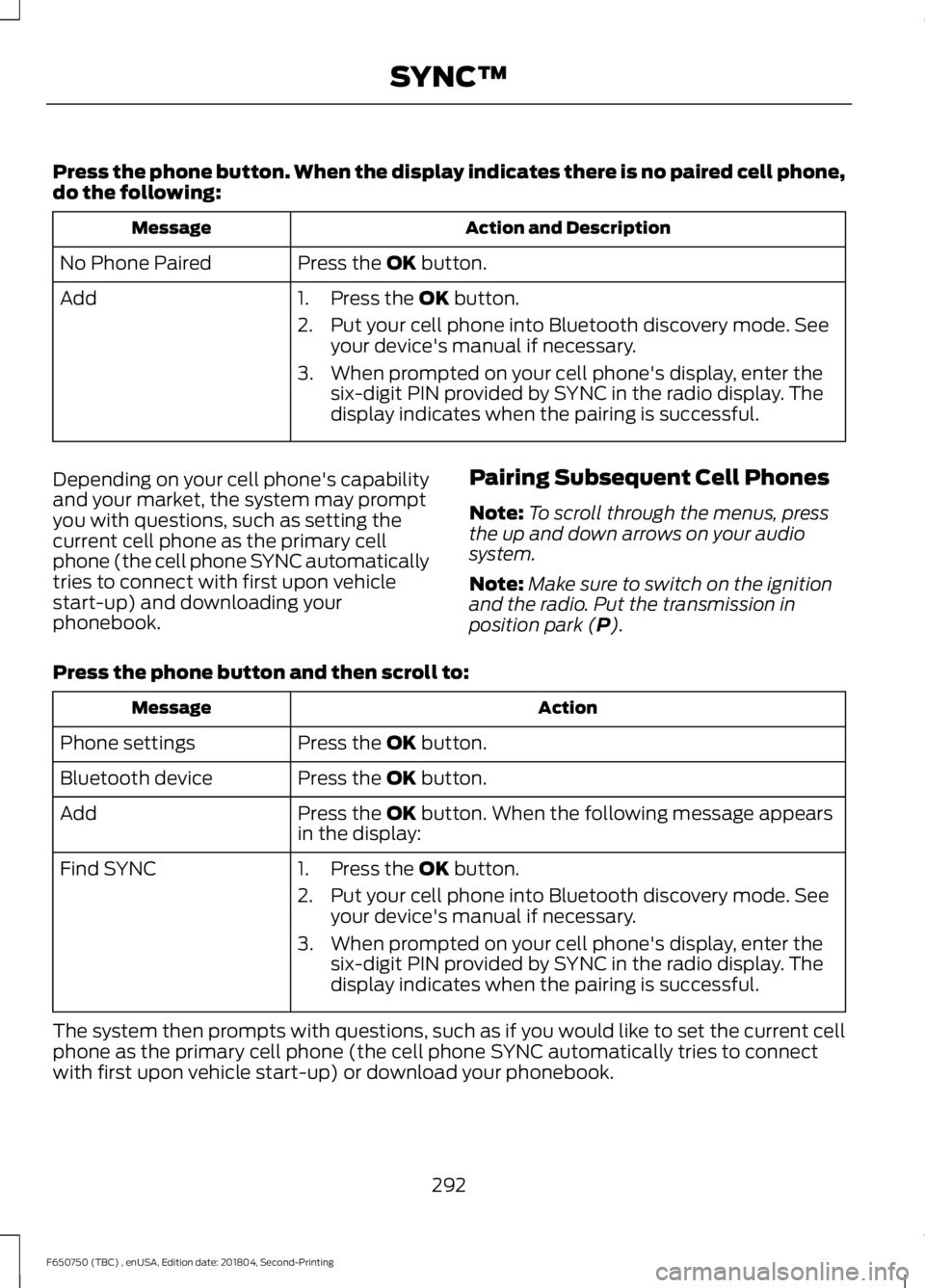
Press the phone button. When the display indicates there is no paired cell phone,
do the following:
Action and Description
Message
Press the OK button.
No Phone Paired
Add 1. Press the
OK button.
2. Put your cell phone into Bluetooth discovery mode. See your device's manual if necessary.
3. When prompted on your cell phone's display, enter the six-digit PIN provided by SYNC in the radio display. The
display indicates when the pairing is successful.
Depending on your cell phone's capability
and your market, the system may prompt
you with questions, such as setting the
current cell phone as the primary cell
phone (the cell phone SYNC automatically
tries to connect with first upon vehicle
start-up) and downloading your
phonebook. Pairing Subsequent Cell Phones
Note:
To scroll through the menus, press
the up and down arrows on your audio
system.
Note: Make sure to switch on the ignition
and the radio. Put the transmission in
position park (
P).
Press the phone button and then scroll to: Action
Message
Press the
OK button.
Phone settings
Press the
OK button.
Bluetooth device
Press the
OK button. When the following message appears
in the display:
Add
Find SYNC
1. Press the
OK button.
2. Put your cell phone into Bluetooth discovery mode. See your device's manual if necessary.
3. When prompted on your cell phone's display, enter the six-digit PIN provided by SYNC in the radio display. The
display indicates when the pairing is successful.
The system then prompts with questions, such as if you would like to set the current cell
phone as the primary cell phone (the cell phone SYNC automatically tries to connect
with first upon vehicle start-up) or download your phonebook.
292
F650750 (TBC) , enUSA, Edition date: 201804, Second-Printing SYNC™
Page 304 of 387
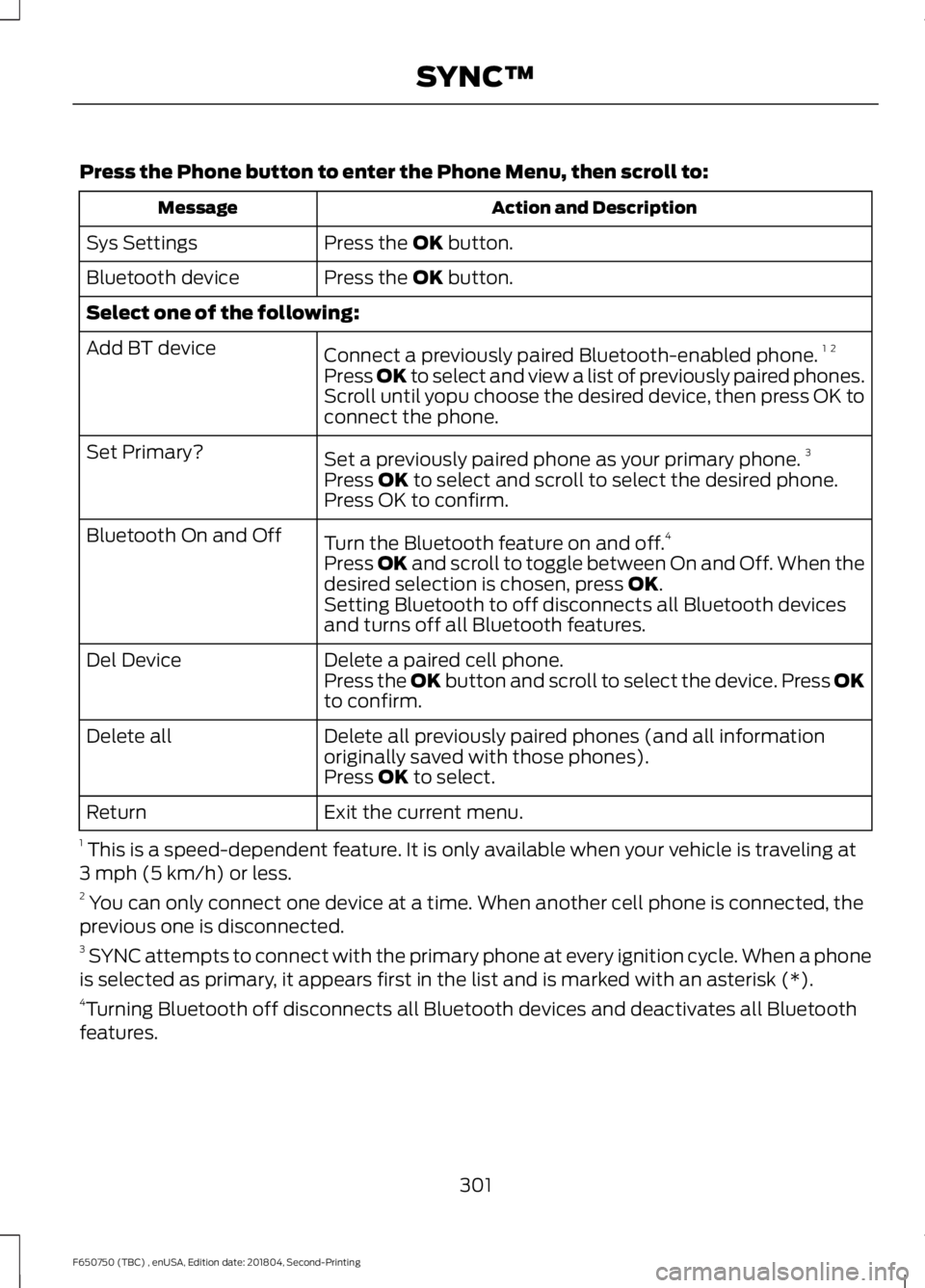
Press the Phone button to enter the Phone Menu, then scroll to:
Action and Description
Message
Press the OK button.
Sys Settings
Press the
OK button.
Bluetooth device
Select one of the following:
Connect a previously paired Bluetooth-enabled phone. 1 2
Add BT device
Press OK to select and view a list of previously paired phones.
Scroll until yopu choose the desired device, then press OK to
connect the phone.
Set a previously paired phone as your primary phone. 3
Set Primary?
Press
OK to select and scroll to select the desired phone.
Press OK to confirm.
Turn the Bluetooth feature on and off. 4
Bluetooth On and Off
Press
OK and scroll to toggle between On and Off. When the
desired selection is chosen, press OK.
Setting Bluetooth to off disconnects all Bluetooth devices
and turns off all Bluetooth features.
Delete a paired cell phone.
Del Device
Press the OK button and scroll to select the device. Press OK
to confirm.
Delete all previously paired phones (and all information
originally saved with those phones).
Delete all
Press
OK to select.
Exit the current menu.
Return
1 This is a speed-dependent feature. It is only available when your vehicle is traveling at
3 mph (5 km/h) or less.
2 You can only connect one device at a time. When another cell phone is connected, the
previous one is disconnected.
3 SYNC attempts to connect with the primary phone at every ignition cycle. When a phone
is selected as primary, it appears first in the list and is marked with an asterisk (*).
4 Turning Bluetooth off disconnects all Bluetooth devices and deactivates all Bluetooth
features.
301
F650750 (TBC) , enUSA, Edition date: 201804, Second-Printing SYNC™
Page 321 of 387
AUXILIARY SWITCHES
For maximum vehicle performance, keep
the following information in mind when
adding accessories or equipment to your
vehicle:
•
When adding accessories, equipment,
passengers and luggage to your
vehicle, do not exceed the total weight
capacity of the vehicle or of the front
or rear axle (GVWR or GAWR as
indicated on the Safety Compliance
Certification label). Ask an authorized
dealer for specific weight information.
• The Federal Communications
Commission (FCC) and Canadian
Radio Telecommunications
Commission (CRTC) regulate the use
of mobile communications systems
equipped with radio transmitters, for
example, two-way radios, telephones
and theft alarms. Any such equipment
installed in your vehicle should comply
with Federal Communications
Commission (FCC) and Canadian
Radio Telecommunications
Commission (CRTC) regulations, and
should be installed by an authorized
dealer.
• An authorized dealer needs to install
mobile communications systems.
Improper installation may harm the
operation of your vehicle, particularly
if the manufacturer did not design the
mobile communication system
specifically for automotive use.
• If you or an authorized Ford dealer add
any non-Ford electrical or electronic
accessories or components to your
vehicle, you may adversely affect
battery performance and durability. In
addition, you may also adversely affect
the performance of other electrical
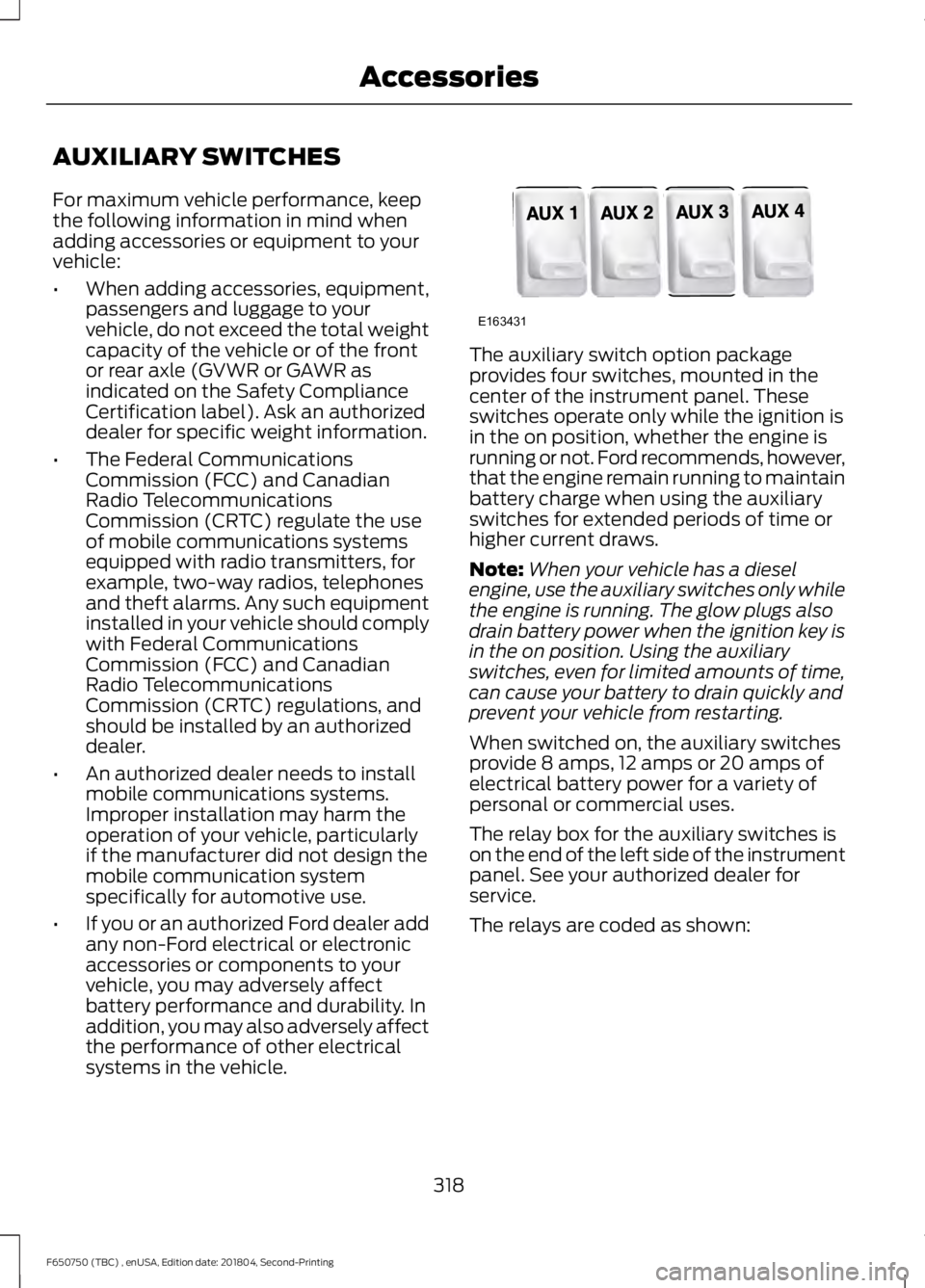
systems in the vehicle. The auxiliary switch option package
provides four switches, mounted in the
center of the instrument panel. These
switches operate only while the ignition is
in the on position, whether the engine is
running or not. Ford recommends, however,
that the engine remain running to maintain
battery charge when using the auxiliary
switches for extended periods of time or
higher current draws.
Note:
When your vehicle has a diesel
engine, use the auxiliary switches only while
the engine is running. The glow plugs also
drain battery power when the ignition key is
in the on position. Using the auxiliary
switches, even for limited amounts of time,
can cause your battery to drain quickly and
prevent your vehicle from restarting.
When switched on, the auxiliary switches
provide 8 amps, 12 amps or 20 amps of
electrical battery power for a variety of
personal or commercial uses.
The relay box for the auxiliary switches is
on the end of the left side of the instrument
panel. See your authorized dealer for
service.
The relays are coded as shown:
318
F650750 (TBC) , enUSA, Edition date: 201804, Second-Printing AccessoriesE163431
Page 356 of 387
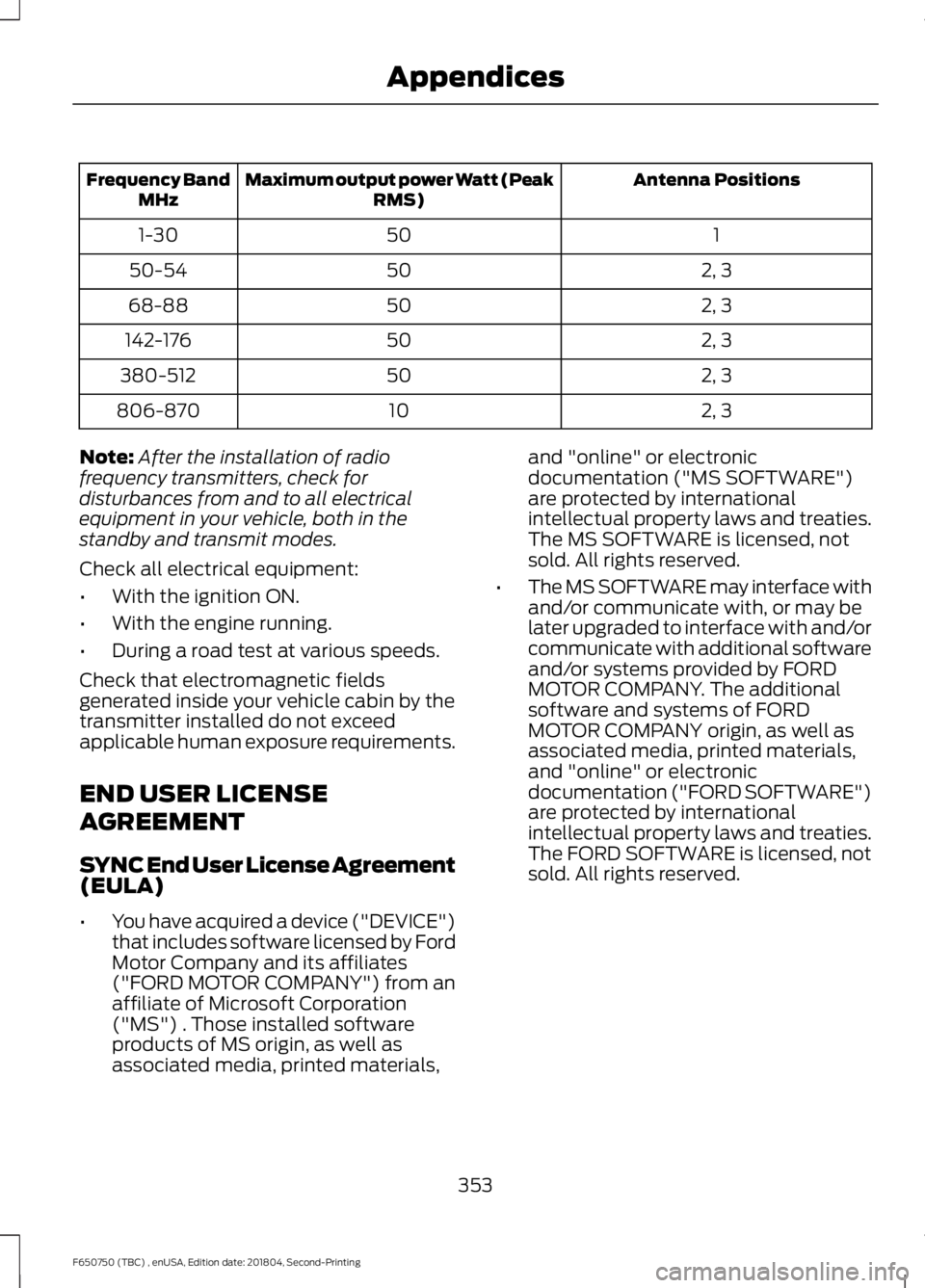
Antenna Positions
Maximum output power Watt (Peak
RMS)
Frequency Band
MHz
1
50
1-30
2, 3
50
50-54
2, 3
50
68-88
2, 3
50
142-176
2, 3
50
380-512
2, 3
10
806-870
Note: After the installation of radio
frequency transmitters, check for
disturbances from and to all electrical
equipment in your vehicle, both in the
standby and transmit modes.
Check all electrical equipment:
• With the ignition ON.
• With the engine running.
• During a road test at various speeds.
Check that electromagnetic fields
generated inside your vehicle cabin by the
transmitter installed do not exceed
applicable human exposure requirements.
END USER LICENSE
AGREEMENT
SYNC End User License Agreement
(EULA)
• You have acquired a device ("DEVICE")
that includes software licensed by Ford
Motor Company and its affiliates
("FORD MOTOR COMPANY") from an
affiliate of Microsoft Corporation
("MS") . Those installed software
products of MS origin, as well as
associated media, printed materials, and "online" or electronic
documentation ("MS SOFTWARE")
are protected by international
intellectual property laws and treaties.
The MS SOFTWARE is licensed, not
sold. All rights reserved.
• The MS SOFTWARE may interface with
and/or communicate with, or may be
later upgraded to interface with and/or
communicate with additional software
and/or systems provided by FORD
MOTOR COMPANY. The additional
software and systems of FORD
MOTOR COMPANY origin, as well as
associated media, printed materials,
and "online" or electronic
documentation ("FORD SOFTWARE")
are protected by international
intellectual property laws and treaties.
The FORD SOFTWARE is licensed, not
sold. All rights reserved.
353
F650750 (TBC) , enUSA, Edition date: 201804, Second-Printing Appendices
Page 378 of 387
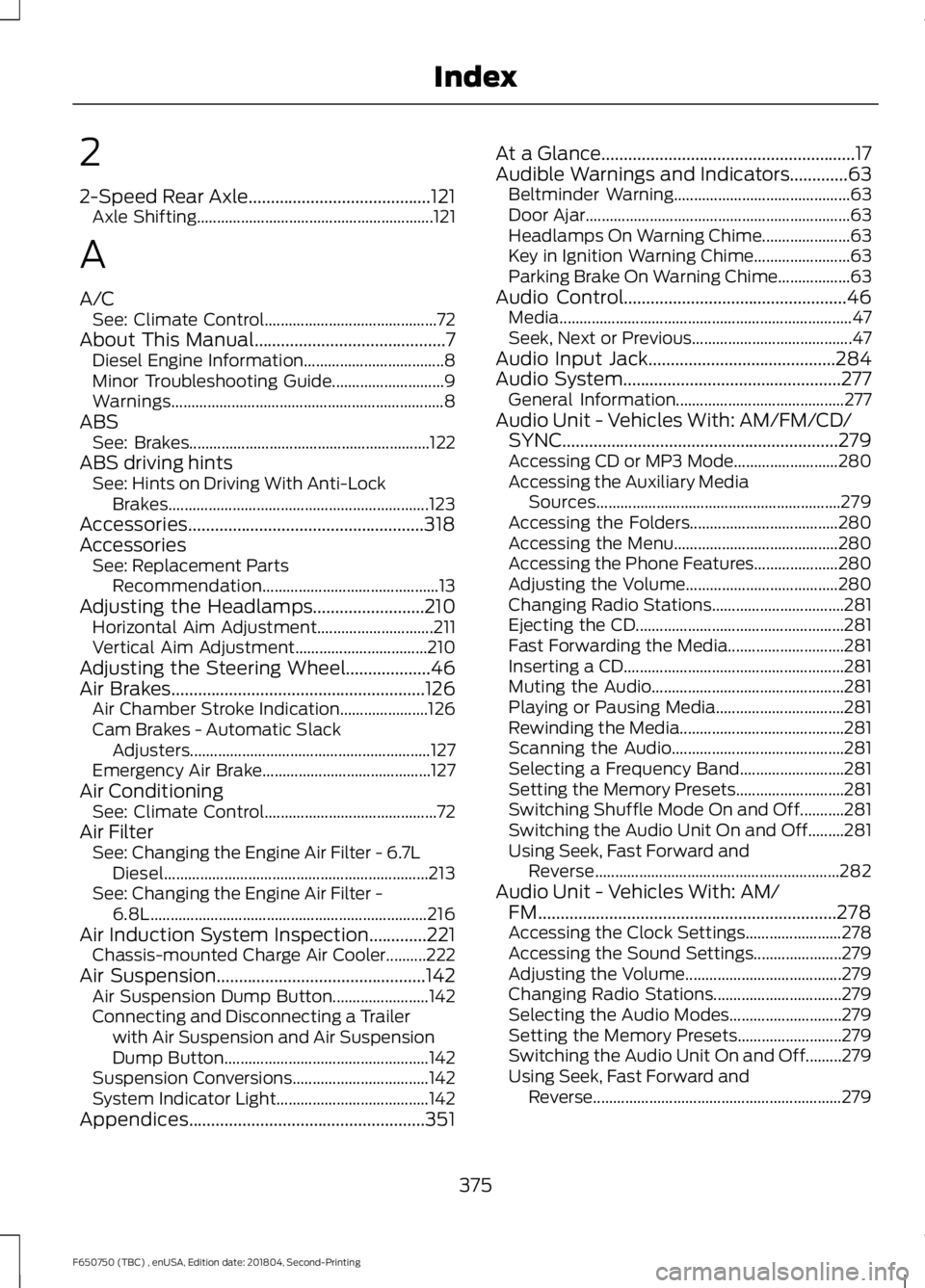
2
2-Speed Rear Axle.........................................121
Axle Shifting........................................................... 121
A
A/C See: Climate Control........................................... 72
About This Manual...........................................7
Diesel Engine Information................................... 8
Minor Troubleshooting Guide............................ 9
Warnings.................................................................... 8
ABS See: Brakes............................................................ 122
ABS driving hints See: Hints on Driving With Anti-Lock
Brakes................................................................. 123
Accessories.....................................................318
Accessories See: Replacement Parts
Recommendation............................................ 13
Adjusting the Headlamps
.........................210
Horizontal Aim Adjustment............................. 211
Vertical Aim Adjustment................................. 210
Adjusting the Steering Wheel...................46
Air Brakes
.........................................................126
Air Chamber Stroke Indication...................... 126
Cam Brakes - Automatic Slack Adjusters............................................................ 127
Emergency Air Brake.......................................... 127
Air Conditioning See: Climate Control........................................... 72
Air Filter See: Changing the Engine Air Filter - 6.7L
Diesel.................................................................. 213
See: Changing the Engine Air Filter - 6.8L..................................................................... 216
Air Induction System Inspection.............221 Chassis-mounted Charge Air Cooler..........222
Air Suspension...............................................142 Air Suspension Dump Button........................ 142
Connecting and Disconnecting a Trailer with Air Suspension and Air Suspension
Dump Button................................................... 142
Suspension Conversions.................................. 142
System Indicator Light...................................... 142
Appendices.....................................................351 At a Glance
.........................................................17
Audible Warnings and Indicators.............63 Beltminder Warning............................................ 63
Door Ajar.................................................................. 63
Headlamps On Warning Chime...................... 63
Key in Ignition Warning Chime........................ 63
Parking Brake On Warning Chime.................. 63
Audio Control..................................................46 Media........................................................................\
. 47
Seek, Next or Previous........................................ 47
Audio Input Jack..........................................284
Audio System.................................................277 General Information.......................................... 277
Audio Unit - Vehicles With: AM/FM/CD/ SYNC..............................................................279
Accessing CD or MP3 Mode.......................... 280
Accessing the Auxiliary Media Sources............................................................. 279
Accessing the Folders..................................... 280
Accessing the Menu......................................... 280
Accessing the Phone Features..................... 280
Adjusting the Volume...................................... 280
Changing Radio Stations................................. 281
Ejecting the CD.................................................... 281
Fast Forwarding the Media............................. 281
Inserting a CD....................................................... 281
Muting the Audio................................................ 281
Playing or Pausing Media................................ 281
Rewinding the Media......................................... 281
Scanning the Audio........................................... 281
Selecting a Frequency Band.......................... 281
Setting the Memory Presets........................... 281
Switching Shuffle Mode On and Off...........281
Switching the Audio Unit On and Off.........281
Using Seek, Fast Forward and Reverse............................................................. 282
Audio Unit - Vehicles With: AM/ FM...................................................................278
Accessing the Clock Settings........................ 278
Accessing the Sound Settings...................... 279
Adjusting the Volume....................................... 279
Changing Radio Stations................................ 279
Selecting the Audio Modes............................ 279
Setting the Memory Presets.......................... 279
Switching the Audio Unit On and Off.........279
Using Seek, Fast Forward and Reverse.............................................................. 279
375
F650750 (TBC) , enUSA, Edition date: 201804, Second-Printing Index
Page 382 of 387
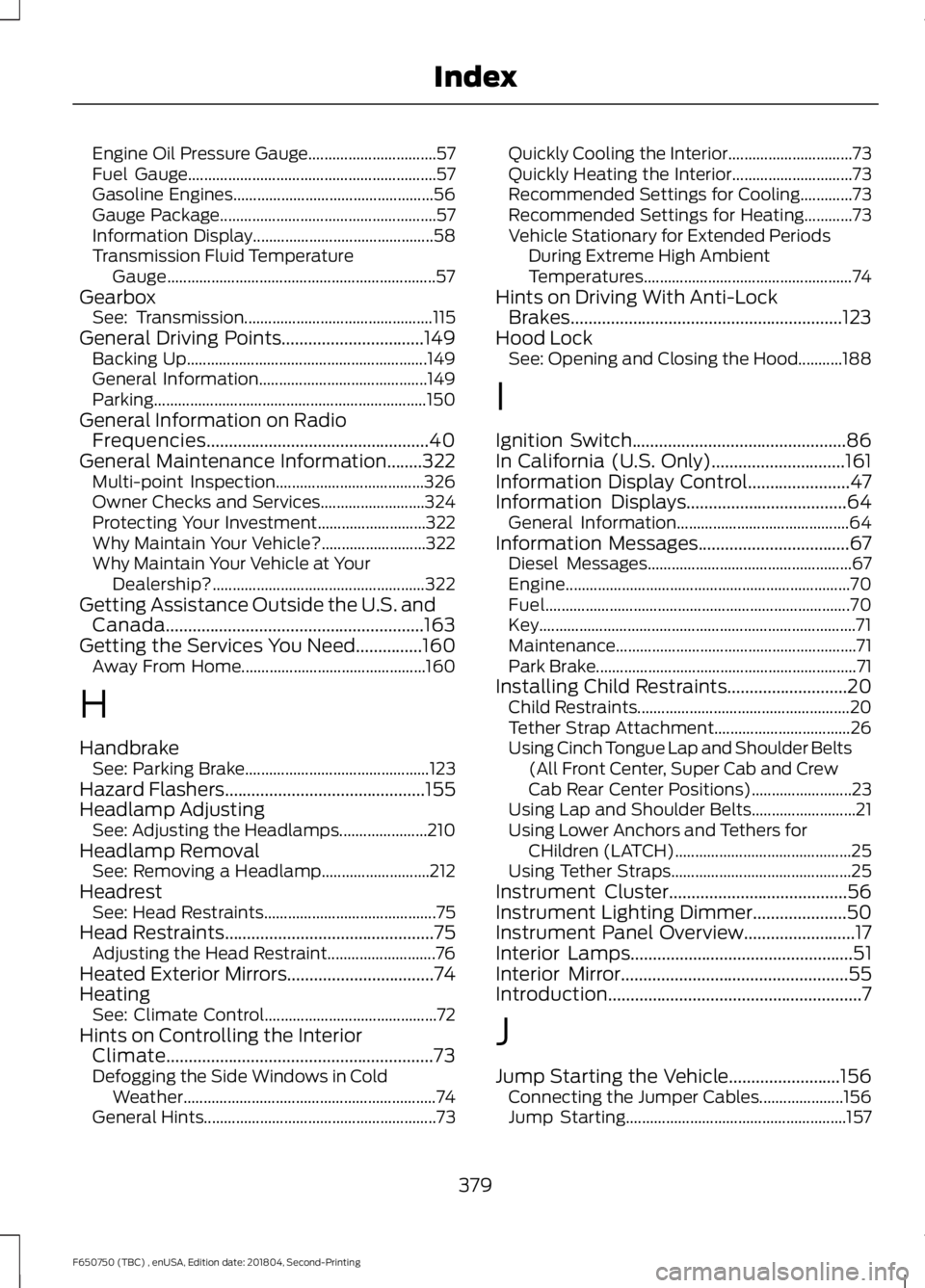
Engine Oil Pressure Gauge................................
57
Fuel Gauge.............................................................. 57
Gasoline Engines.................................................. 56
Gauge Package...................................................... 57
Information Display............................................. 58
Transmission Fluid Temperature Gauge................................................................... 57
Gearbox See: Transmission............................................... 115
General Driving Points................................149
Backing Up............................................................ 149
General Information.......................................... 149
Parking .................................................................... 150
General Information on Radio Frequencies..................................................40
General Maintenance Information
........322
Multi-point Inspection..................................... 326
Owner Checks and Services.......................... 324
Protecting Your Investment........................... 322
Why Maintain Your Vehicle?.......................... 322
Why Maintain Your Vehicle at Your Dealership?..................................................... 322
Getting Assistance Outside the U.S. and Canada..........................................................163
Getting the Services You Need...............160 Away From Home.............................................. 160
H
Handbrake See: Parking Brake.............................................. 123
Hazard Flashers
.............................................155
Headlamp Adjusting See: Adjusting the Headlamps...................... 210
Headlamp Removal See: Removing a Headlamp........................... 212
Headrest See: Head Restraints........................................... 75
Head Restraints...............................................75 Adjusting the Head Restraint........................... 76
Heated Exterior Mirrors.................................74
Heating See: Climate Control........................................... 72
Hints on Controlling the Interior Climate
............................................................73
Defogging the Side Windows in Cold
Weather............................................................... 74
General Hints.......................................................... 73Quickly Cooling the Interior...............................
73
Quickly Heating the Interior.............................. 73
Recommended Settings for Cooling.............73
Recommended Settings for Heating............73
Vehicle Stationary for Extended Periods During Extreme High Ambient
Temperatures.................................................... 74
Hints on Driving With Anti-Lock Brakes.............................................................123
Hood Lock See: Opening and Closing the Hood...........188
I
Ignition Switch
................................................86
In California (U.S. Only)..............................161
Information Display Control.......................47
Information Displays
....................................64
General Information........................................... 64
Information Messages
..................................67
Diesel Messages................................................... 67
Engine....................................................................... 70
Fuel........................................................................\
.... 70
Key........................................................................\
....... 71
Maintenance............................................................ 71
Park Brake................................................................. 71
Installing Child Restraints...........................20 Child Restraints..................................................... 20
Tether Strap Attachment.................................. 26
Using Cinch Tongue Lap and Shoulder Belts (All Front Center, Super Cab and Crew
Cab Rear Center Positions)......................... 23
Using Lap and Shoulder Belts.......................... 21
Using Lower Anchors and Tethers for CHildren (LATCH)............................................ 25
Using Tether Straps............................................. 25
Instrument Cluster
........................................56
Instrument Lighting Dimmer.....................50
Instrument Panel Overview.........................17
Interior Lamps
..................................................51
Interior Mirror...................................................55
Introduction.........................................................7
J
Jump Starting the Vehicle.........................156 Connecting the Jumper Cables..................... 156
Jump Starting....................................................... 157
379
F650750 (TBC) , enUSA, Edition date: 201804, Second-Printing Index