parking brake FORD F750 2016 13.G User Guide
[x] Cancel search | Manufacturer: FORD, Model Year: 2016, Model line: F750, Model: FORD F750 2016 13.GPages: 379, PDF Size: 4.8 MB
Page 105 of 379
1. When your vehicle has stopped, shift
into neutral (N) or park (P).
2. Apply the parking brake and switch the
ignition off.
3. Turn the fuel filler cap counterclockwise and remove it.
4. Refuel your vehicle as required.
5. Replace the fuel filler cap, turn it clockwise until you feel a strong
resistance.
If the fuel cap warning lamp or a warning
message appears in the instrument cluster,
you may not have installed the fuel filler
cap correctly.
If the fuel cap warning lamp remains on,
at the next opportunity, safely pull off of
the road, remove the fuel filler cap, align
the cap properly and reinstall it. The check
fuel cap warning lamp or warning message
may not reset immediately. It may take
several driving cycles for the indicators to
turn off. A driving cycle consists of an
engine start-up (after four or more hours
with the engine off) followed by normal
city and highway driving.
Fuel Fill Rate
Your vehicle has a fuel fill pipe that is able
to accept fuel up to 20 gal (75 L) per
minute from a fuel-dispensing nozzle.
Pumping fuel at greater flow rates may
result in premature nozzle shut-off or spit
back.
Truck stops have fuel pumps and nozzles
designed for larger, heavy-duty trucks. If
you are refueling your vehicle at a truck
stop and the nozzle shuts off repeatedly,
wait 5-10 seconds, then use a slower fill
rate. FUEL CONSUMPTION
Real world fuel consumption is governed
by many factors, for example driving style,
high speed driving, stop-start driving, air
conditioning usage, the accessories fitted,
payload and towing.
•
The usable capacity of the fuel tank is
the amount of fuel that can be added
into the tank after the gauge indicates
empty.
• The advertised capacity is the total fuel
tank size. See
Capacities and
Specifications (page 251). It is the
combined usable capacity plus the
empty reserve.
• Due to the empty reserve, you may not
be able to refuel the full amount of the
advertised capacity of the fuel tank
even when the fuel gauge reads empty.
Empty reserve is the amount of fuel
remaining in the tank after the fuel gauge
indicates empty. The amount of usable
fuel in the empty reserve varies and should
not be relied upon to increase driving range.
Filling the Tank
For consistent results when filling the fuel
tank:
• Turn the ignition off before refueling
your vehicle; a temporary inaccurate
reading may result if the engine is left
on when refueling your vehicle.
• Use the same fill rate
(low-medium-high) each time the tank
is refueled.
• Allow no more than two automatic
click-offs when refueling your vehicle.
Results are most accurate when the filling
method is consistent.
102
F650750 (TBC), enUSA, First Printing Fuel and Refueling
Page 111 of 379
Operator Commanded Regeneration
Precautions and Safe Exhaust Position
WARNING
Failure to comply with the following
instructions for Operator
Commanded Regeneration may
result in fire, serious injury, death or
property damage. Before you start operator commanded
regeneration, do the following:
•
Place your vehicle in Park (P) with the
parking brake set on stable, level
ground.
• You must park your vehicle outside of
any structure.
• Your vehicle must be 10– 15 feet (3–5
meters) away from any obstructions
and must be away from materials that
can easily combust or melt (for
example, paper, leaves, petroleum
products, fuels, plastics and other dry
organic material). •
Make sure there is a minimum of 1/8
tank of fuel.
• Make sure all fluids are at proper levels.
How to Start Operator Commanded
Regeneration WARNING
Stay clear of exhaust tip during
regeneration. You or others can be
burned.
Note:
You cannot use the Operator
Commanded Regeneration until the diesel
particulate filter load percentage has
reached 100% (Full). The diesel particulate
filter load percentage fluctuates up and
down when driving your vehicle due to active
and passive regenerations.
Note: During the use of Operator
Commanded Regeneration, you may
observe a light amount of white smoke. This
is normal. You cannot use the Operator
Commanded Regeneration if the
service engine soon light is
illuminated.
Information Display Procedure
Start with your vehicle engine and when fully warmed press the
Info button on
the steering wheel until the following message appears in the information display: Action and Description
Message
Press the Reset Button to switch the display to
Y to answer
yes to this prompt and then follow the prompts regarding
exhaust position as needed to initiate Operator Commanded
Regeneration. Be sure to understand each prompt. If you are
not sure what is being asked by each prompt, contact an
authorized dealer. The display confirms the operation has
started and when it has finished.
Exhaust filter at limit
Clean now
108
F650750 (TBC), enUSA, First Printing Fuel and Refueling
Page 116 of 379
AUTOMATIC TRANSMISSION
WARNING
Always set the parking brake fully
and make sure the gearshift is
latched in park (P) (if equipped).
Turn the ignition to the off position and
remove the key whenever you leave your
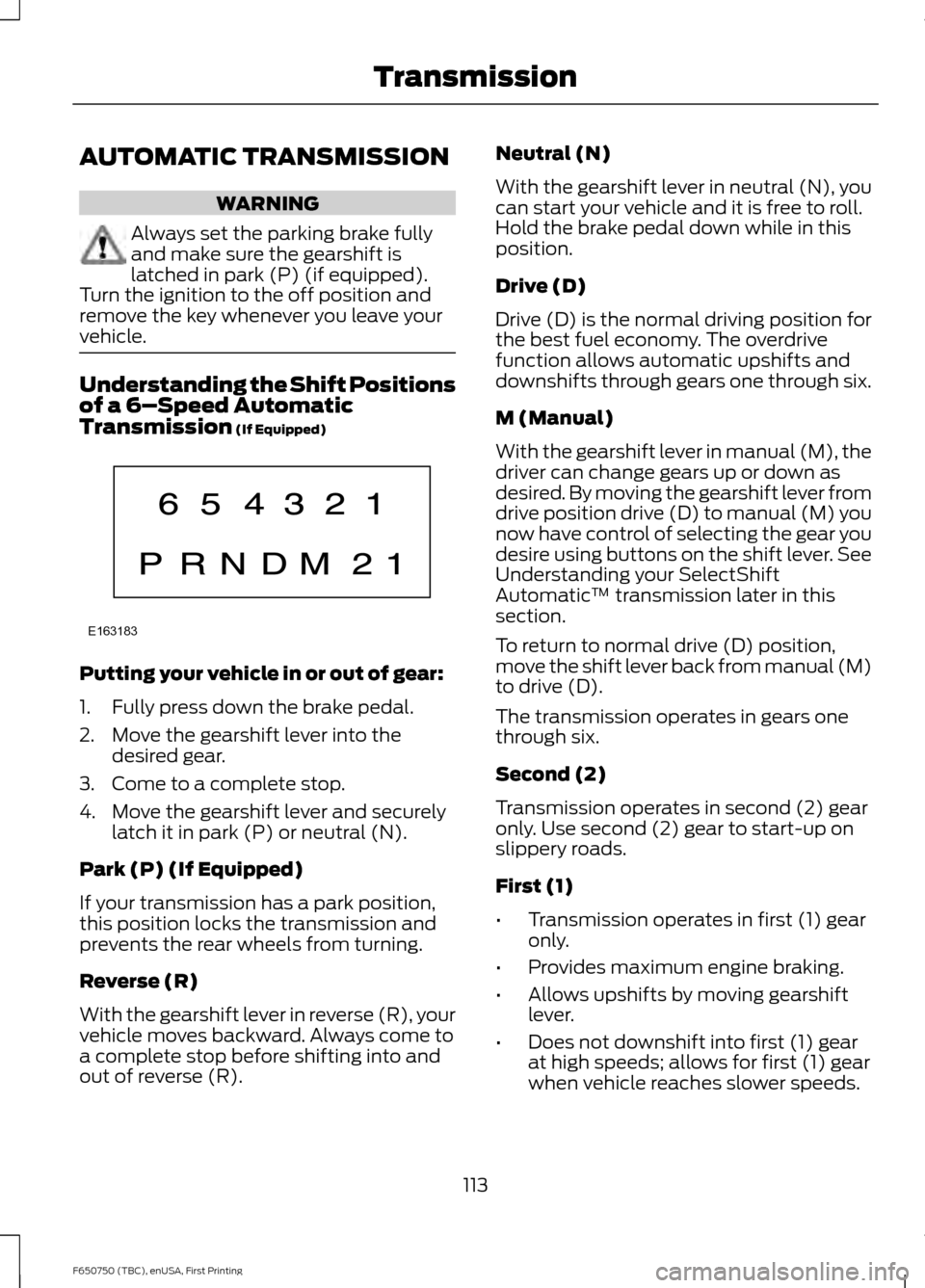
vehicle. Understanding the Shift Positions
of a 6–
Speed Automatic
Transmission (If Equipped) Putting your vehicle in or out of gear:
1. Fully press down the brake pedal.
2. Move the gearshift lever into the
desired gear.
3. Come to a complete stop.
4. Move the gearshift lever and securely latch it in park (P) or neutral (N).
Park (P) (If Equipped)
If your transmission has a park position,
this position locks the transmission and
prevents the rear wheels from turning.
Reverse (R)
With the gearshift lever in reverse (R), your
vehicle moves backward. Always come to
a complete stop before shifting into and
out of reverse (R). Neutral (N)
With the gearshift lever in neutral (N), you
can start your vehicle and it is free to roll.
Hold the brake pedal down while in this
position.
Drive (D)
Drive (D) is the normal driving position for
the best fuel economy. The overdrive
function allows automatic upshifts and
downshifts through gears one through six.
M (Manual)
With the gearshift lever in manual (M), the
driver can change gears up or down as
desired. By moving the gearshift lever from
drive position drive (D) to manual (M) you
now have control of selecting the gear you
desire using buttons on the shift lever. See
Understanding your SelectShift
Automatic
™ transmission later in this
section.
To return to normal drive (D) position,
move the shift lever back from manual (M)
to drive (D).
The transmission operates in gears one
through six.
Second (2)
Transmission operates in second (2) gear
only. Use second (2) gear to start-up on
slippery roads.
First (1)
• Transmission operates in first (1) gear
only.
• Provides maximum engine braking.
• Allows upshifts by moving gearshift
lever.
• Does not downshift into first (1) gear
at high speeds; allows for first (1) gear
when vehicle reaches slower speeds.
113
F650750 (TBC), enUSA, First Printing TransmissionE163183
Page 119 of 379
Brake-Shift Interlock (If Equipped)
WARNINGS
Do not drive your vehicle until you
verify that the brake lamps are
working.
When doing this procedure, you will
be taking your vehicle out of park
which means your vehicle can roll
freely. To avoid unwanted vehicle
movement, always fully set the parking
brake prior to doing this procedure. Use
wheel chocks if appropriate. If the parking brake is fully released,
but the brake warning lamp remains
illuminated, the brakes may not be
working properly. See your authorized
dealer. Your vehicle is equipped with a brake-shift
interlock feature that prevents the
gearshift lever from moving from park (P)
when the ignition is in the 3 (on) position
and the brake pedal is not pressed.
If you cannot move the gearshift lever out
of park (P) position with the ignition in the
4 (on) position and the brake pedal
pressed, a malfunction may have occurred.
It is possible that a fuse has blown or your
vehicle
’s brake lamps are not operating
properly. See
Fuse Specification Chart
(page 162).
If the fuse is not blown and the brake
lamps are working properly, the following
procedure allows you to move the gearshift
lever from park (P):
1. Apply the parking brake. Switch the ignition key to 1 (off), then remove the
key.
2. Move the steering column to the full down and full rearward position
(toward the driver ’s seat).
3. Remove the gearshift lever boot. 4. Place fingers into hole where you
removed the gearshift lever boot and
pull top half of shroud up and forward
to separate it from the lower half of the
shroud. There is a hinge at the forward
edge of the top shroud. Roll the top
half of the shroud upward on the hinge
point to clear the hazard flasher button,
then pull straight rearward toward the
driver ’s seat to remove.
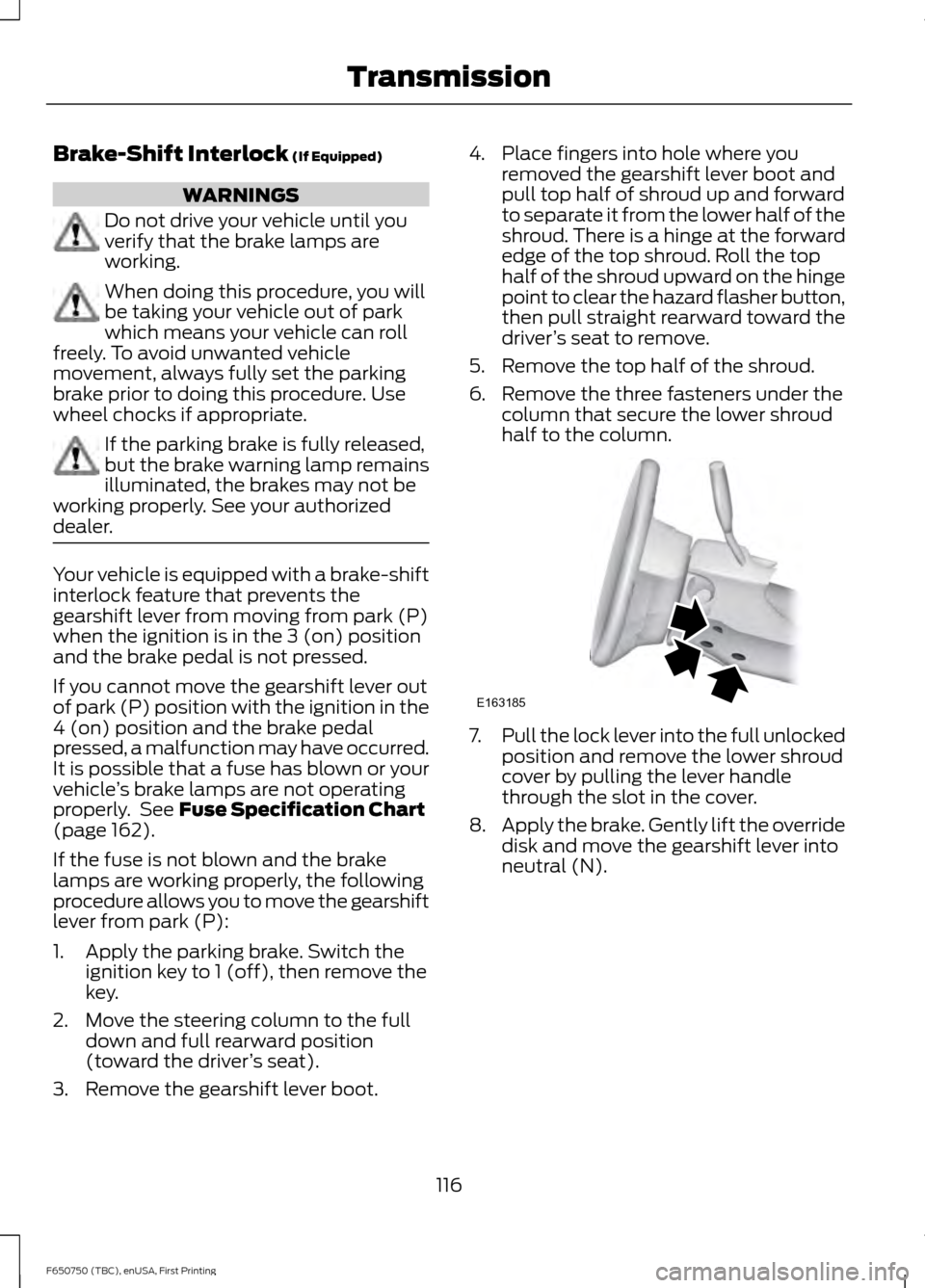
5. Remove the top half of the shroud.
6. Remove the three fasteners under the column that secure the lower shroud
half to the column. 7.
Pull the lock lever into the full unlocked
position and remove the lower shroud
cover by pulling the lever handle
through the slot in the cover.
8. Apply the brake. Gently lift the override
disk and move the gearshift lever into
neutral (N).
116
F650750 (TBC), enUSA, First Printing TransmissionE163185
Page 123 of 379
GENERAL INFORMATION
WARNINGS
Do not drive with your foot resting on
the brake pedal. This results in
abnormally high brake temperatures,
excessive lining wear and increased
stopping distance. Continuous application of the brakes
causes the brakes to overheat,
resulting in temporary loss of braking.
Note:
Occasional brake noise is normal. If
a metal-to-metal, continuous grinding or
continuous squeal sound is present, the
brake linings may be worn-out. Have the
system checked by an authorized dealer. If
your vehicle has continuous vibration or
shudder in the steering wheel while braking,
have it checked by an authorized dealer.
All standard equipment brakes are
self-adjusting. Automatic adjustment,
when required, occurs whenever you apply
and release the brakes during forward or
reverse operation.
Know the required stopping distances for
all driving conditions you may encounter.
For longer brake lining life, take full
advantage of engine braking power when
coming to a stop. See Warning Lamps and
Indicators (page 58).
Wet brakes result in reduced braking
efficiency. Gently press the brake pedal a
few times when driving from a car wash or
standing water to dry the brakes.
If brakes do not grip well:
• Check brake adjustment.
• Check brake linings for excessive wear.
• Check system air pressure on vehicle
equipped with air brakes. •
Let the brakes cool if you have been
using them excessively, as in mountain
driving or after several fast, high-speed
stops.
• If you have been driving through deep
water, gently apply the brakes several
times while your vehicle is moving
slowly.
Anti-lock Brake System
This system helps you maintain steering
control during emergency stops by keeping
the brakes from locking. This lamp momentarily
illuminates when you turn the
ignition on. If the light does not
illuminate during start up, remains on or
flashes, the system may be disabled. Have
the system checked by an authorized
dealer. If the system is disabled, normal
braking is still effective. If the
brake warning lamp illuminates
when you release the parking brake, have
the system checked by an authorized
dealer. If you connect a PLC trailer with
the ignition on, the trailer ABS
light also illuminates. If the light
fails to illuminate, if it remains on after you
start the vehicle or continues to flash, have
the system serviced immediately.
HINTS ON DRIVING WITH
ANTI-LOCK BRAKES
Note: When the system is operating, the
brake pedal may pulse and may travel
further. Maintain pressure on the brake
pedal. You may also hear a noise from the
system. This is normal.
120
F650750 (TBC), enUSA, First Printing BrakesE209041 E209041 E210335
Page 124 of 379
The anti-lock braking system will not
eliminate the risks when:
•
You drive too closely to the vehicle in
front of you.
• Your vehicle is hydroplaning.
• You take corners too fast.
• The road surface is poor.
PARKING BRAKE
Hydraulic Brakes WARNINGS
Do not use the gearshift selector in
place of the parking brake. Always
set the parking brake fully AND make
sure the transmission is in park (P) or
neutral (N). Use of wheel chocks is also
recommended in hilly or off-road usage.
Unexpected and possible sudden vehicle
movement may occur if these precautions
are not taken. If the parking brake is fully released
but the parking brake warning lamp
remains illuminated, the brakes may
not be working properly. See your dealer
or a qualified service technician. Apply the parking brake whenever the
vehicle is parked. To set the parking brake,
pull the handle up until it snaps into the
locked position.
When the parking brake is out of
adjustment, seek service immediately.
The parking brake warning lamp
in the instrument cluster
illuminates, and remains
illuminated (when you switch on the
ignition), until you release the parking
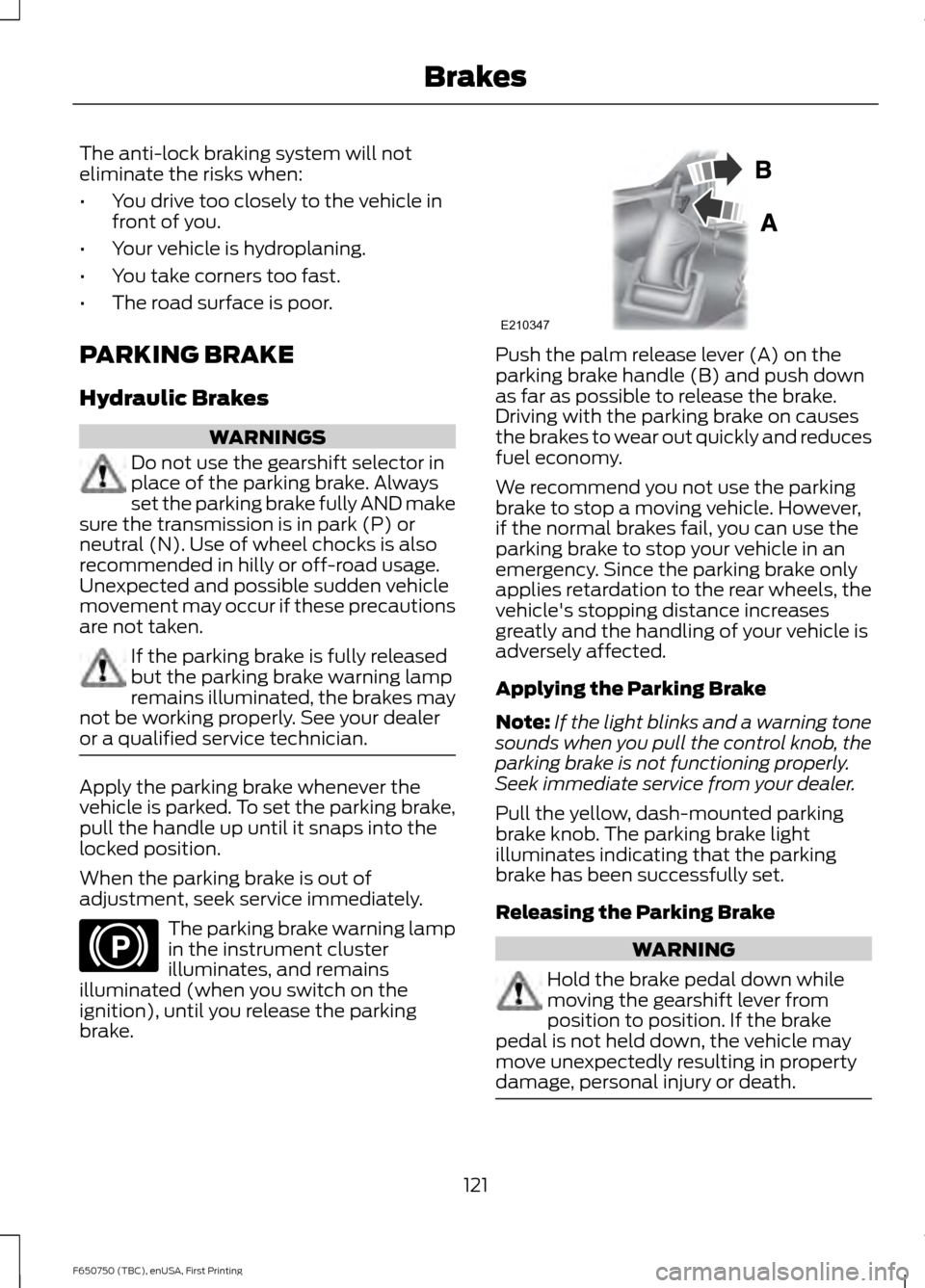
brake. Push the palm release lever (A) on the
parking brake handle (B) and push down
as far as possible to release the brake.
Driving with the parking brake on causes
the brakes to wear out quickly and reduces
fuel economy.
We recommend you not use the parking
brake to stop a moving vehicle. However,
if the normal brakes fail, you can use the
parking brake to stop your vehicle in an
emergency. Since the parking brake only
applies retardation to the rear wheels, the
vehicle's stopping distance increases
greatly and the handling of your vehicle is
adversely affected.
Applying the Parking Brake
Note:
If the light blinks and a warning tone
sounds when you pull the control knob, the
parking brake is not functioning properly.
Seek immediate service from your dealer.
Pull the yellow, dash-mounted parking
brake knob. The parking brake light
illuminates indicating that the parking
brake has been successfully set.
Releasing the Parking Brake WARNING
Hold the brake pedal down while
moving the gearshift lever from
position to position. If the brake
pedal is not held down, the vehicle may
move unexpectedly resulting in property
damage, personal injury or death. 121
F650750 (TBC), enUSA, First Printing BrakesE210346 E210347
Page 125 of 379
Note:
Read and understand the following
steps and perform them whenever you
prepare to drive the vehicle.
Note: The parking brake does not disengage
unless sufficient system air pressure is
available.
1. Press and hold the service brake pedal
while the engine is running.
2. Select the appropriate drive gear.
3. Push and hold the yellow dash-mounted parking brake knob until
the parking brake light turns off, then
release.
Parking Brake Light Illumination due
to Low Air Pressure
If the air pressure becomes too low at any
time during vehicle operation, the parking
brake may apply and the parking brake
light turns on.
If the parking brake applies due to low air
pressure, immediate service is required to
the parking brake system.
Parking Brake Warning System
If the parking brake light blinks and a tone
sounds when pulling the yellow control
knob out, this indicates the parking brake
is not functioning properly. Seek service for
the parking brake immediately.
With the ignition key not in the run position:
• A tone sounds if the parking brake
remains released (or in an unknown
state). The tone stops after
approximately 8 minutes or until the
parking brake is applied. Seek service
for the parking brake immediately. Diesel engines: Parking brake light
operation (the light only works when the
ignition key is in the run position):
• On:
Parking brake applied.
• Off:
Parking brake released and no
faults or malfunctions detected.
• Blink and tone:
Parking brake
released (or in an unknown state) and
faults or malfunctions detected.
Releasing Spring Manually WARNINGS
Do not attempt to disassemble the
parking brake chamber under any
circumstances. The high spring load
may cause serious injury. Block the wheels to help prevent the
vehicle from moving.
Unexpected and possibly sudden
vehicle movement may occur if these
precautions are not taken.
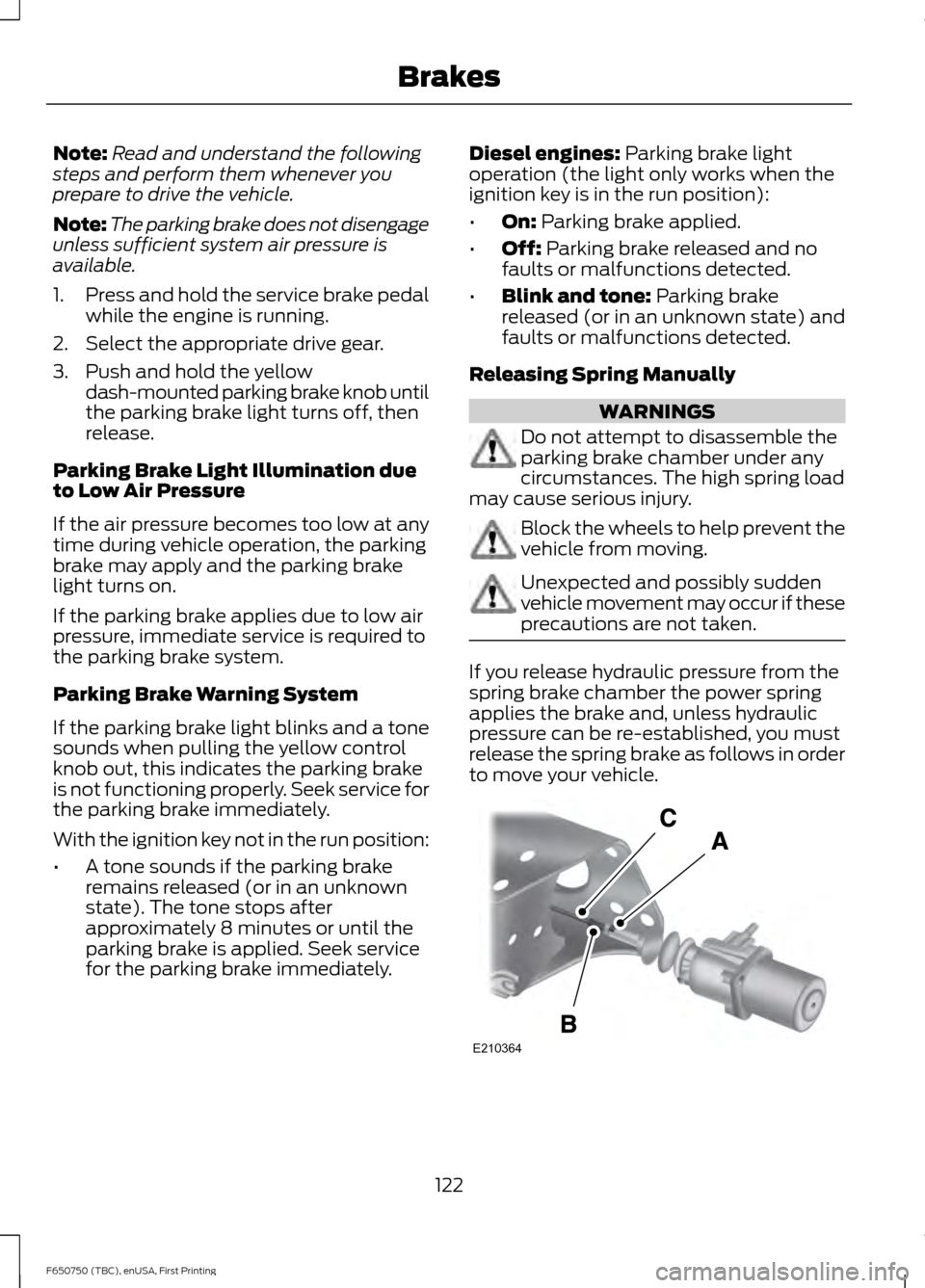
If you release hydraulic pressure from the
spring brake chamber the power spring
applies the brake and, unless hydraulic
pressure can be re-established, you must
release the spring brake as follows in order
to move your vehicle.
122
F650750 (TBC), enUSA, First Printing BrakesE210364
Page 126 of 379
Loosen the jam nut (A) and un-thread the
adjustment rod (B) from the chamber to
reduce tension on the cable (C). Continue
to un-thread the adjustment rod all the
way and remove it from the chamber.
Air Brakes
WARNING
This control is used for parking only.
Do not leave the vehicle unattended
after setting the parking brake
without placing the transmission park (P).
Use of wheel chocks is also recommended
in hilly or off-road usage. If the service brakes should fail to operate
while your vehicle is moving, you can make
an emergency stop with the parking brake.
Since the parking brake only applies
stopping power to the rear wheels, your
vehicle
’s stopping distance greatly
increases and the handling of your vehicle
is adversely affected. Make repairs
immediately to an inoperative air brake
system circuit. Pull the yellow parking brake knob out to
apply the parking brake. Push the knob in
to release the parking brake.
The parking brake light
illuminates and remains
illuminated (when you switch
the ignition to the on position) until you
release the parking brake. Releasing Spring Brake with Air
Pressure
The air system in all vehicles with
spring-actuated rear wheel parking brakes
is equipped with a valve located on the
governor for connection to an outside air
supply. The valve lets you recharge the
system with air from an outside source,
releasing the spring-actuated parking
brakes. Your vehicle is now ready to tow in
an emergency.
You can only use an outside air source if
the protected system is in operating
condition. If you cannot restore air pressure
in the protected air system, you must
release the spring-actuated brakes
manually.
Releasing Spring Manually
WARNINGS
Do not attempt to disassemble the
parking brake chamber under any
circumstances. The high spring load
may cause serious injury if the chamber
clamps are removed. Block the wheels to help prevent the
vehicle from moving.
Unexpected and possibly sudden
vehicle movement may occur if these
precautions are not taken.
If you release air pressure from the spring
brake chamber, the power spring applies
the brake and, unless air pressure can be
re-established, you must release the spring
brake as follows in order to move your
vehicle.
Do not use impact wrenches as they may
damage the piston and prevent proper
caging of the spring. Do not apply more
than 50 lb.ft (68 Nm) to the release bolt
nut.
123
F650750 (TBC), enUSA, First Printing BrakesE210341 E210346
Page 131 of 379
TRAILER BRAKES
Trailer Brake Hand Control (If Equipped)
WARNING
The hand control should never be
used to apply the brakes when the
tractor and trailer are parked
unattended. Air may leak from the system
and the vehicle could possibly move,
resulting in possible property damage,
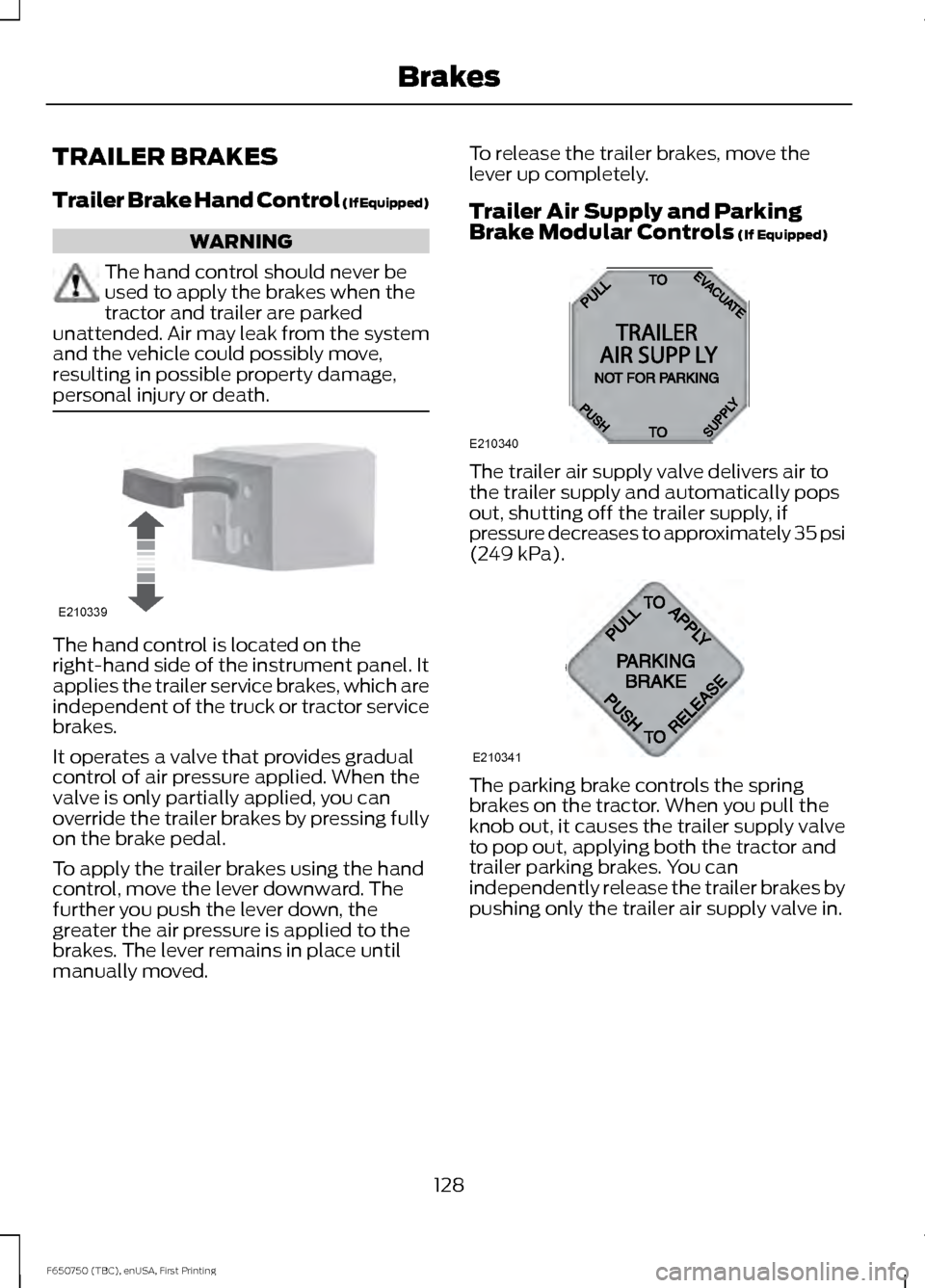
personal injury or death. The hand control is located on the
right-hand side of the instrument panel. It
applies the trailer service brakes, which are
independent of the truck or tractor service
brakes.
It operates a valve that provides gradual
control of air pressure applied. When the
valve is only partially applied, you can
override the trailer brakes by pressing fully
on the brake pedal.
To apply the trailer brakes using the hand
control, move the lever downward. The
further you push the lever down, the
greater the air pressure is applied to the
brakes. The lever remains in place until
manually moved. To release the trailer brakes, move the
lever up completely.
Trailer Air Supply and Parking
Brake Modular Controls (If Equipped)
The trailer air supply valve delivers air to
the trailer supply and automatically pops
out, shutting off the trailer supply, if
pressure decreases to approximately 35 psi
(249 kPa)
.
The parking brake controls the spring
brakes on the tractor. When you pull the
knob out, it causes the trailer supply valve
to pop out, applying both the tractor and
trailer parking brakes. You can
independently release the trailer brakes by
pushing only the trailer air supply valve in.
128
F650750 (TBC), enUSA, First Printing BrakesE210339 E210340
A
B
12
A320
A E210341
Page 132 of 379
Initial Charge
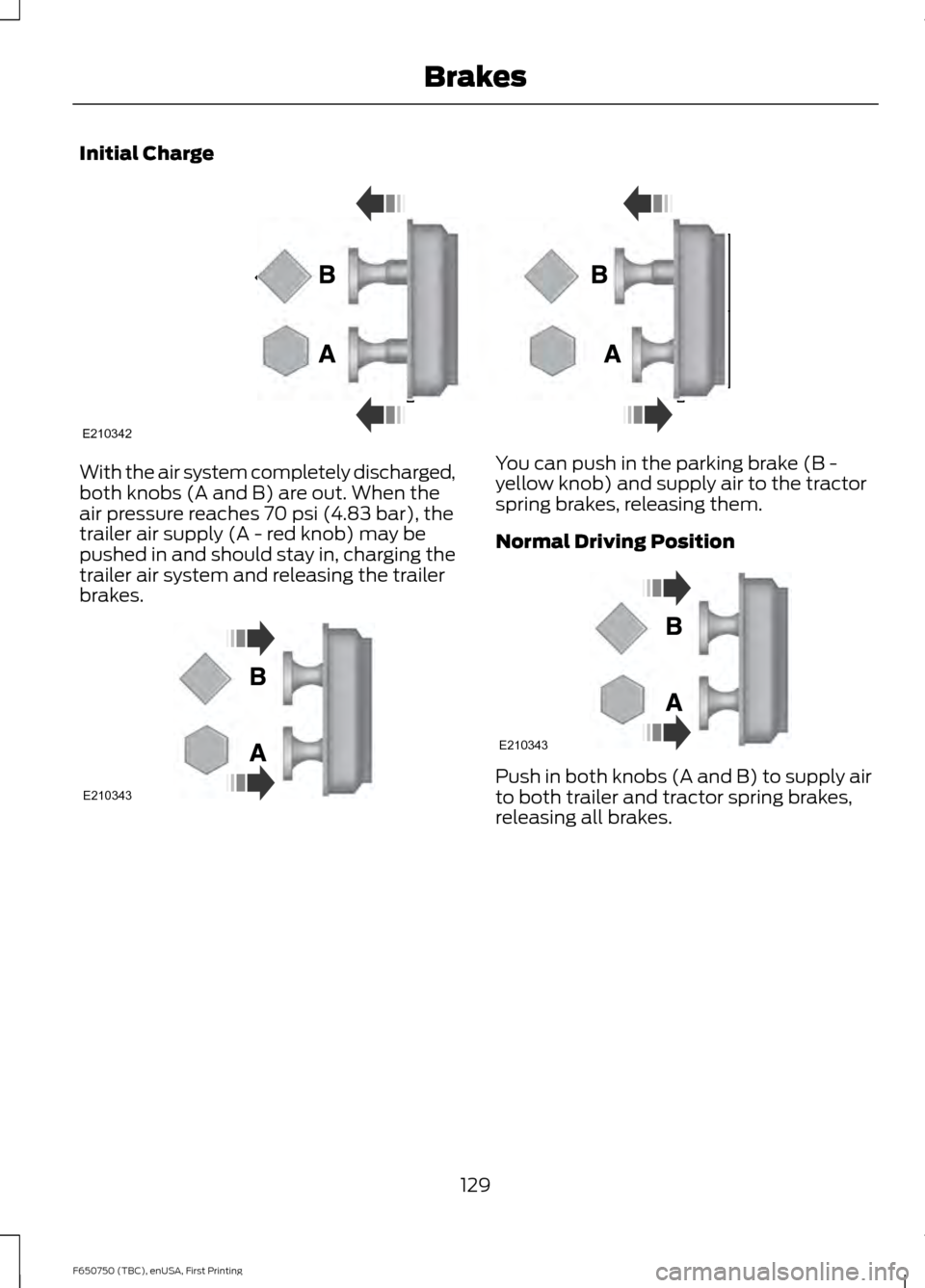
With the air system completely discharged,
both knobs (A and B) are out. When the
air pressure reaches 70 psi (4.83 bar), the
trailer air supply (A - red knob) may be
pushed in and should stay in, charging the
trailer air system and releasing the trailer
brakes. You can push in the parking brake (B -
yellow knob) and supply air to the tractor
spring brakes, releasing them.
Normal Driving Position
Push in both knobs (A and B) to supply air
to both trailer and tractor spring brakes,
releasing all brakes.
129
F650750 (TBC), enUSA, First Printing BrakesE210342 E210343 E210343