ecu located FORD FESTIVA 1991 Service Manual
[x] Cancel search | Manufacturer: FORD, Model Year: 1991, Model line: FESTIVA, Model: FORD FESTIVA 1991Pages: 454, PDF Size: 9.53 MB
Page 9 of 454
Black/White and Black wire terminals of relay. Check continuity of relay across 2 Black/Yellow wire terminals of relay. Continuity should
exist when relay is energized. When relay is de-energized, continuity should not exist.
FILAMENT TESTING
1. To locate breaks in grid wire filaments, attach a voltmeter to middle portion of each filament. Attach other meter probe to vertical
section of window grid.
2. If a grid is broken, meter will register either zero volt or battery voltage, depending on if grid is broken between or outside test leads. If
wire is not broken, meter will register about one half of battery voltage. To locate break, move probe along wire until meter needle
mo ves ab ru p t l y.
REMOVAL & INSTALLATION
REAR DEFOGGER SWITCH
Removal & Installation (Capri)
1. Disconnect negative battery cable. Pull out center storage compartment. Remove 2 nuts, 2 lower screws, and heater/radio bezel. Pull
outward and remove 2 trim covers, one located on each side of steering column.
2. Remove instrument panel bezel retaining screws and pull instrument bezel from dash. Disconnect electrical connector from rear
defogger switch. Depress tangs on both sides of switch and remove switch. To install, reverse removal procedure.
Removal & Installation (Festiva)
Disconnect negative battery cable. Remove steering column covers. Remove screws securing instrument panel bezel to instrument panel. Pull
instrument bezel away from instrument panel. Disconnect electrical connectors from switches in bezel. Compress rear defogger switch lock
tabs and remove switch from bezel. To install, reverse removal procedure.
WIRING DIAGRAMS
See appropriate chassis wiring diagram in the WIRING DIAGRAMS Section.
Copyr ight 2009 Mitchell Repair Information Company, LLC. All Rights Reserved.
Article GUID: A00028302
Page 3 of 3 MITCHELL 1 ARTICLE - DEFOGGER - REAR WINDOW 1991 ACCESSORIES & SAFETY EQUIPMENT Rear Window D
...
3/10/2009 http://www.eautorepair.net/app/PrintItems.asp?S0=2097152&S1=0&SG=%7B7DD6473C%2DB5BB%2D4F20%2D9D70%2D
...
Page 10 of 454
Back To Article
1990-92 ACCESSORIES & EQUIPMENT
Power Mirrors - Festiva
DESCRIPTION & OPERATION
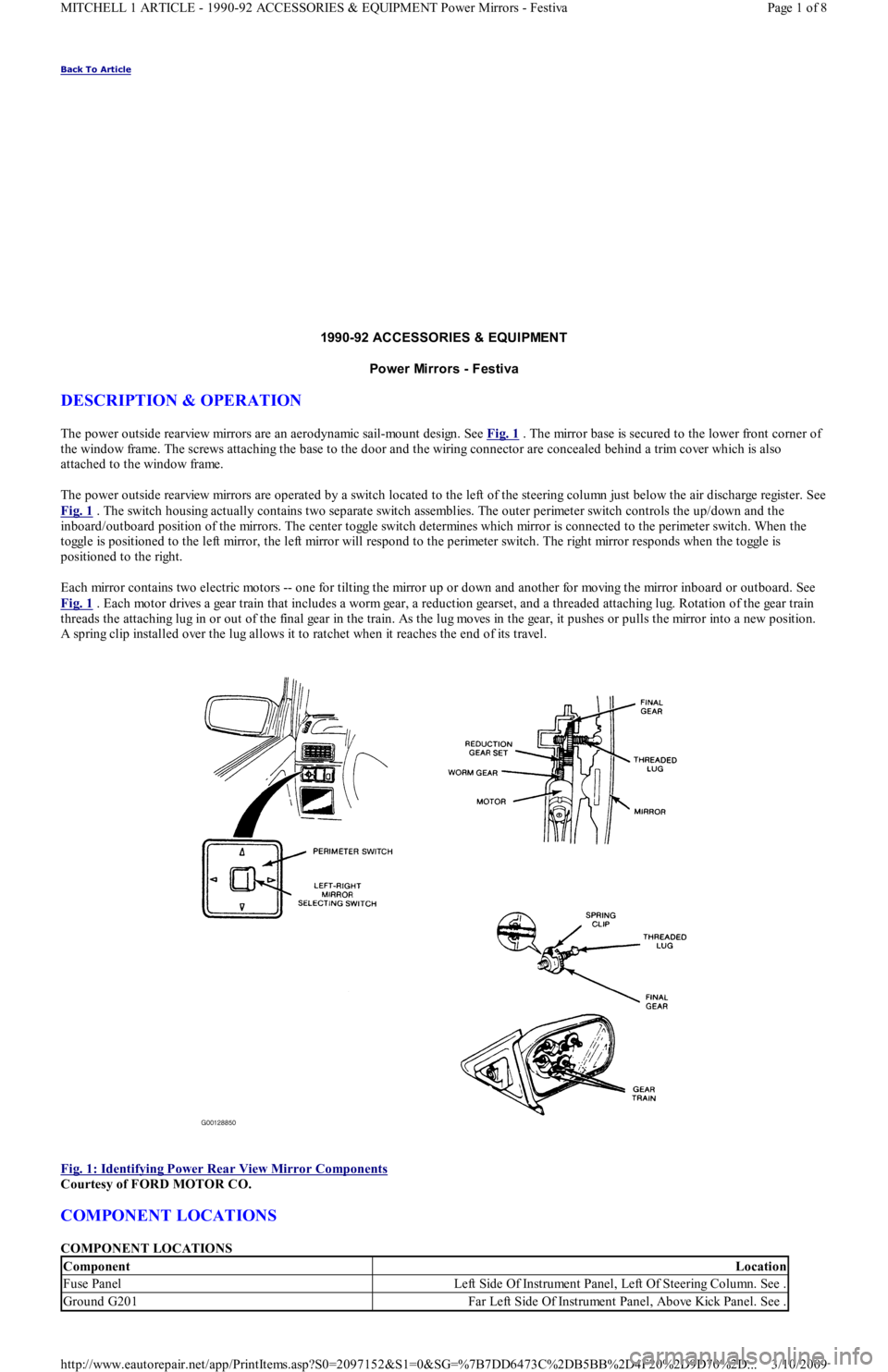
The power outside rearview mirrors are an aerodynamic sail-mount design. See Fig. 1 . The mirror base is secured to the lower front corner of
the window frame. The screws attaching the base to the door and the wiring connector are concealed behind a trim cover which is also
attached to the window frame.
The power outside rearview mirrors are operated by a switch located to the left of the steering column just below the air discharge register. See
Fig. 1
. The switch housing actually contains two separate switch assemblies. The outer perimeter switch controls the up/down and the
inboard/outboard position of the mirrors. The center toggle switch determines which mirror is connected to the perimeter switch. When the
toggle is positioned to the left mirror, the left mirror will respond to the perimeter switch. The right mirror responds when the toggle is
positioned to the right.
Each mirror contains two electric motors -- one for tilting the mirror up or down and another for moving the mirror inboard or outboard. See
Fig. 1
. Each motor drives a gear train that includes a worm gear, a reduction gearset, and a threaded attaching lug. Rotation of the gear train
threads the attaching lug in or out of the final gear in the train. As the lug moves in the gear, it pushes or pulls the mirror into a new position.
A spring clip installed over the lug allows it to ratchet when it reaches the end of its travel.
Fig. 1: Identifying Power Rear View Mirror Components
Courtesy of FORD MOTOR CO.
COMPONENT LOCATIONS
COMPONENT LOCATIONS
ComponentLocation
Fuse PanelLeft Side Of Instrument Panel, Left Of Steering Column. See .
Ground G201Far Left Side Of Instrument Panel, Above Kick Panel. See .
Page 1 of 8 MITCHELL 1 ARTICLE - 1990-92 ACCESSORIES & EQUIPMENT Power Mirrors - Festiva
3/10/2009 http://www.eautorepair.net/app/PrintItems.asp?S0=2097152&S1=0&SG=%7B7DD6473C%2DB5BB%2D4F20%2D9D70%2D
...
Page 21 of 454
3. Position Steering Wheel Remover (T67L-3600-A) on steering wheel. Tighten bolt on remover until steering wheel is loose. Remove
steering wheel puller, steering wheel retaining bolt, and steering wheel.
Installation
1. Ensure front wheels are in straight-ahead position. Route clockspring wiring harness through steering wheel opening. Position steering
wheel on steering shaft and align reference marks.
2. Ensure clockspring wire is not pinched when positioning steering wheel. Install new steering wheel retaining bolt and tighten to
specification. See TORQUE SPECIFICATIONS table at end of article. Connect horn and speed control wiring connectors (if equipped)
to steering wheel.
3. Connect air bag module-to-clockspring connector. Install air bag module. Tighten air bag module retaining nuts to specification.
Activate SRS. See SAFETY PRECAUTIONS. Check AIR BAG light to ensure system is functioning properly.
Removal (Festiva)
From back of steering wheel, remove 2 screws securing horn pad. Disconnect horn wire from horn pad and remove pad. Remove steering
wheel nut. Scribe reference mark on steering shaft and steering wheel hub for reassembly. Using Steering Wheel Puller (T67L-3600-A),
remove steering wheel.
Installation
Position steering wheel on steering shaft and align reference marks. Be sure cutouts in rear cover engage turn signal canceling cam. To
complete installation, reverse removal procedure.
COMBINATION SW ITCH
Removal (Capri)
1. Disconnect negative battery cable. Remove lower steering column cover. Remove center access panel and trim cover under steering
column. Remove left side defroster connector tube. Remove steering column upper retaining bolts. Column will pivot downward and
rest on instrument panel brace.
2. Remove 2 switch retaining screws and remove switch. Grasp switch and lever and pull lever out of switch. Disconnect switch electrical
connectors and remove switch.
Installation
Align key with slot and install lever in switch assembly. Position switch on steering column and install retaining screws. To complete
installation, reverse removal procedure.
Removal (Festiva)
1. Disconnect negative battery cable. Remove steering wheel. See STEERING WHEEL & HORN PAD under REMOVAL &
INSTALLATION. Remove 4 screws from upper half of lower steering column cover and remove cover. Remove upper steering column
cover. Remove 5 clips from lower half of lower steering column cover and remove cover.
2. Release wiring harness clip and unplug 4 harness connectors from back of combination switch. From below steering column, loosen
band clamp securing switch hub to steering column jacket. Pull switch assembly from steering column.
Installation
Slide combination switch assembly onto steering column. Make sure switch assembly is seated and level against end of column jacket. To
complete installation, reverse removal procedure.
HEADLIGHT SWITCH
Removal & Installation (Capri)
1. Headlight off/on switch is located on left side of instrument panel bezel. Disconnect negative battery cable. Pull out center storage
compartment. Remove 2 upper screws, 2 lower screws and heater/radio bezel. Pull outward and remove trim covers located on both
sides of steering column.
2. Remove retaining screws and carefully pull instrument panel bezel partially away from dash. Disconnect electrical connector from
headlight switch. Depress tangs on both sides of switch and remove switch from bezel. To install, reverse removal procedure.
IGNITION SWITCH & LOCK CYLINDER
Removal (Capri)
1. Disconnect negative battery cable. Remove lower steering column cover. Remove center access panel and trim cover under steering
column. Remove left side defroster connector tube. Remove steering column upper retaining bolts. Column will pivot downward and
rest on instrument panel brace. steering colum n.
CAUT ION: Rem ove steering wheel carefully to avoid dam aging clockspring wiring, air bag m odule connector, or
accidentally turning clockspring. After steering wheel rem oval, tape clockspring in position to prevent
dam age and keep it from being turned accidentally.
CAUTION: Ensure that no wiring is pinched beneath steering colum n when lowered.
Page 4 of 5 MITCHELL 1 ARTICLE - STEERING COLUMN SWITCHES 1991 ACCESSORIES & SAFETY EQUIPMENT Ford Motor C
...
3/10/2009 http://www.eautorepair.net/app/PrintItems.asp?S0=2097152&S1=0&SG=%7B7DD6473C%2DB5BB%2D4F20%2D9D70%2D
...
Page 51 of 454
CATALYTIC CONVERTER
Continued operation of vehicle with a severe malfunction could cause converter to overheat, resulting in possible damage to converter and
ve h ic l e .
Any modification to the exhaust system on turbo models, which reduces exhaust backpressure, will lead to lean fuel mixtures and excessive
spark advance. This could cause serious engine damage.
ELECTROSTATIC DISCHARGE SENSITIVE (ESD) PARTS
ENGINE OIL
FUEL PUMP SHUTOFF SWITCH
This switch stops flow of fuel to engine after a collision. The impact does not have to be great for switch to be triggered. Switch must be reset
after collision. Switch is located under left rear speaker in luggage compartment. Press button to reset switch.
FUEL SYSTEM SERVICE
HALOGEN BULBS
PASSIVE RESTRAINTS
RADIATOR CAP
RADIATOR FAN WARNING:Many solid state electrical com ponents can be dam aged by static electricity (ESD). Som e will display a
warning label, but m any will not. Discharge personal static electricity by touching a m etal ground point
on the vehicle prior to servicing any ESD sensitive com ponent.
CAUT ION: Never use non-detergent or straight m ineral oil.
WARNING:Relieve fuel system pressure prior to servicing any fuel system com ponent (fuel injection m odels).
WARNING:Halogen bulbs contain pressurized gas which m ay explode if overheated. DO NOT touch glass portion
of bulb with bare hands. Eye protection should be worn when handling or working around halogen
bulbs.
CAUT ION: Before operating vehicle, securely fasten passive shoulder restraints to the em ergency release buckles.
T he buckle fits in only one way. Ensure to position it properly.
CAUT ION: Always disconnect the fan m otor when working near the radiator fan. T he fan is tem perature controlled
and could start at any tim e even when the ignition key is in the OFF position. DO NOT loosen or rem ove
radiator cap when cooling system is hot.
WARNING:Keep hands away from radiator fan. Fan is controlled by a therm ostatic switch which m ay com e on or
run for up to 15 m inutes even after engine is turned off.
Copyr ight 2009 Mitchell Repair Information Company, LLC. All Rights Reserved.
Article GUID: A00058075
Page 3 of 3 MITCHELL 1 ARTICLE - FUSES & CIRCUIT BREAKERS Fuses & Circuit Breakers 1988-93 Festiva
3/10/2009 http://www.eautorepair.net/app/PrintItems.asp?S0=2097152&S1=0&SG=%7B7DD6473C%2DB5BB%2D4F20%2D9D70%2D
...
Page 196 of 454
gases into harmless substances.
PCV VALVE
The Positive Crankcase Ventilation (PCV) valve, located in the valve cover, controls the flow of blow-by gas from the crankcase to the intake
man ifo l d .
SELF-DIAGNOSTIC SYSTEM
The ECA monitors its inputs and outputs. When it detects a malfunction, it sets a code in the ECA and sends a signal to the CHECK ENGINE
warning light. The light remains on until the malfunction is repaired. Trouble codes may be accessed at the Self-Test Output (STO) and Self-
Test Input (STI) connectors, near the battery.
If a sensor fails, the ECA will use a substitute value in its calculations to permit continued engine operation. In this condition, the vehicle will
run, but driveability may be poor. Intermittent failures may result in the CHECK ENGINE warning light flickering or going out after the fault
goes away. The corresponding trouble code, however, will be stored in the ECA. If fault does not recur, the related code will be erased from
ECA memory.
CHECK ENGINE LIGHT
Hard failures cause the CHECK ENGINE warning light to come on and remain on until the malfunction is repaired. If the warning light comes
on and stays on during vehicle operation, determine and correct the cause of the malfunction. NOTE:For additional inform ation and operating procedures for the self-diagnostic system , refer to T EST S
W/CODES article in the ENGINE PERFORMANCE Section.
Copyr ight 2009 Mitchell Repair Information Company, LLC. All Rights Reserved.
Article GUID: A00022697
Page 6 of 6 MITCHELL 1 ARTICLE - E - THEORY/OPERATION 1991 ENGINE PERFORMANCE Ford/Mercury Theory & Operation
3/10/2009 http://www.eautorepair.net/app/PrintItems.asp?S0=2097152&S1=0&SG=%7B7DD6473C%2DB5BB%2D4F20%2D9D70%2D
...
Page 346 of 454
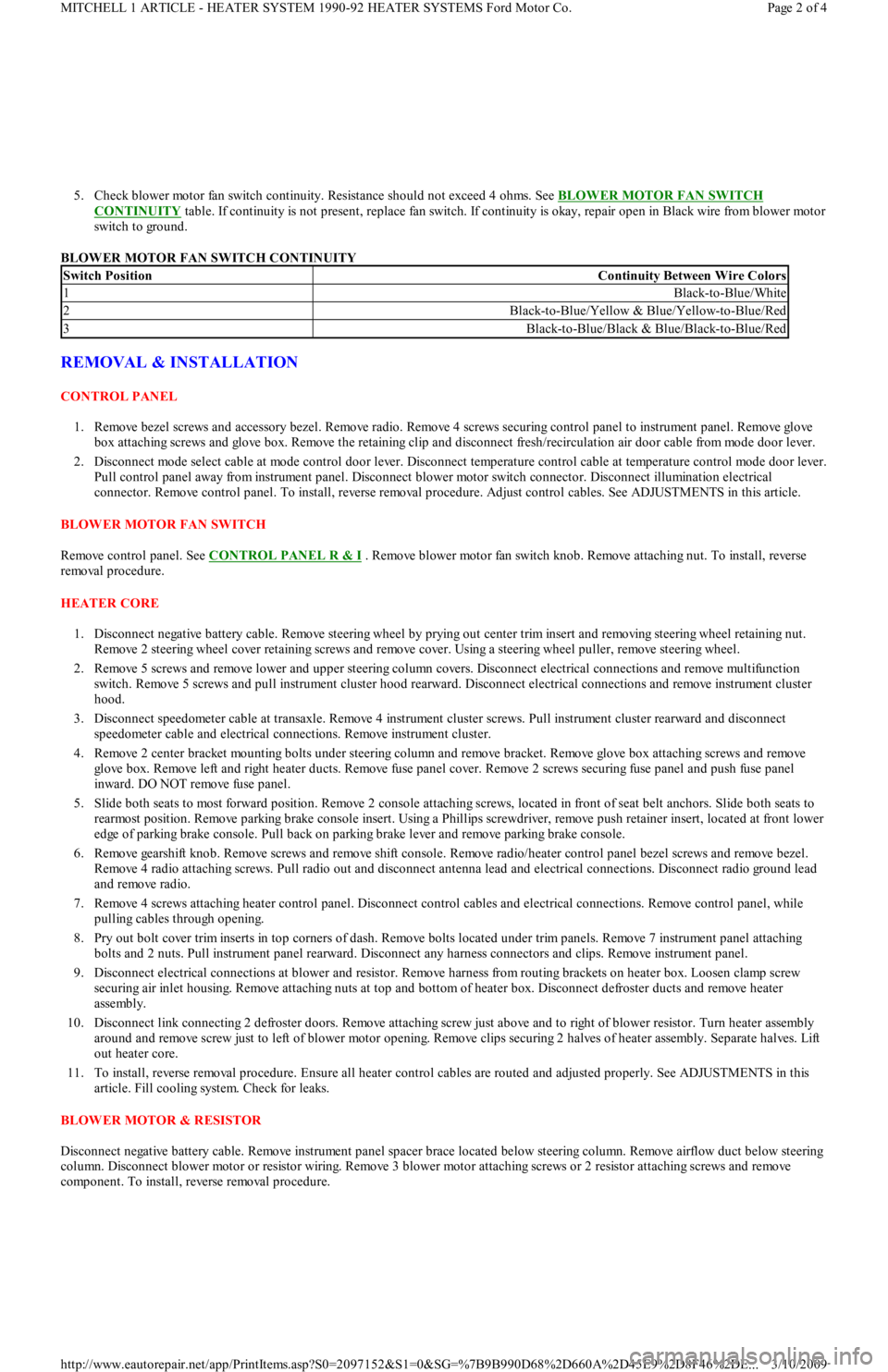
5. Check blower motor fan switch continuity. Resistance should not exceed 4 ohms. See BLOWER MOTOR FAN SWITCH
CONTINUITY table. If continuity is not present, replace fan switch. If continuity is okay, repair open in Black wire from blower motor
switch to ground.
BLOWER MOTOR FAN SWITCH CONTINUITY
REMOVAL & INSTALLATION
CONTROL PANEL
1. Remove bezel screws and accessory bezel. Remove radio. Remove 4 screws securing control panel to instrument panel. Remove glove
box attaching screws and glove box. Remove the retaining clip and disconnect fresh/recirculation air door cable from mode door lever.
2. Disconnect mode select cable at mode control door lever. Disconnect temperature control cable at temperature control mode door lever.
Pull control panel away from instrument panel. Disconnect blower motor switch connector. Disconnect illumination electrical
connector. Remove control panel. To install, reverse removal procedure. Adjust control cables. See ADJUSTMENTS in this article.
BLOWER MOTOR FAN SWITCH
Remove control panel. See CONTROL PANEL R & I
. Remove blower motor fan switch knob. Remove attaching nut. To install, reverse
removal procedure.
HEATER CORE
1. Disconnect negative battery cable. Remove steering wheel by prying out center trim insert and removing steering wheel retaining nut.
Remove 2 steering wheel cover retaining screws and remove cover. Using a steering wheel puller, remove steering wheel.
2. Remove 5 screws and remove lower and upper steering column covers. Disconnect electrical connections and remove multifunction
switch. Remove 5 screws and pull instrument cluster hood rearward. Disconnect electrical connections and remove instrument cluster
hood.
3. Disconnect speedometer cable at transaxle. Remove 4 instrument cluster screws. Pull instrument cluster rearward and disconnect
speedometer cable and electrical connections. Remove instrument cluster.
4. Remove 2 center bracket mounting bolts under steering column and remove bracket. Remove glove box attaching screws and remove
glove box. Remove left and right heater ducts. Remove fuse panel cover. Remove 2 screws securing fuse panel and push fuse panel
inward. DO NOT remove fuse panel.
5. Slide both seats to most forward position. Remove 2 console attaching screws, located in front of seat belt anchors. Slide both seats to
rearmost position. Remove parking brake console insert. Using a Phillips screwdriver, remove push retainer insert, located at front lower
edge of parking brake console. Pull back on parking brake lever and remove parking brake console.
6. Remove gearshift knob. Remove screws and remove shift console. Remove radio/heater control panel bezel screws and remove bezel.
Remove 4 radio attaching screws. Pull radio out and disconnect antenna lead and electrical connections. Disconnect radio ground lead
and remove radio.
7. Remove 4 screws attaching heater control panel. Disconnect control cables and electrical connections. Remove control panel, while
pulling cables through opening.
8. Pry out bolt cover trim inserts in top corners of dash. Remove bolts located under trim panels. Remove 7 instrument panel attaching
bolts and 2 nuts. Pull instrument panel rearward. Disconnect any harness connectors and clips. Remove instrument panel.
9. Disconnect electrical connections at blower and resistor. Remove harness from routing brackets on heater box. Loosen clamp screw
securing air inlet housing. Remove attaching nuts at top and bottom of heater box. Disconnect defroster ducts and remove heater
assembly.
10. Disconnect link connecting 2 defroster doors. Remove attaching screw just above and to right of blower resistor. Turn heater assembly
around and remove screw just to left of blower motor opening. Remove clips securing 2 halves of heater assembly. Separate halves. Lift
out heater core.
11. To install, reverse removal procedure. Ensure all heater control cables are routed and adjusted properly. See ADJUSTMENTS in this
article. Fill cooling system. Check for leaks.
BLOWER MOTOR & RESISTOR
Disconnect negative battery cable. Remove instrument panel spacer brace located below steering column. Remove airflow duct below steering
column. Disconnect blower motor or resistor wiring. Remove 3 blower motor attaching screws or 2 resistor attaching screws and remove
component. To install, reverse removal procedure.
Switch PositionContinuity Between Wire Colors
1Black-to-Blue/White
2Black-to-Blue/Yellow & Blue/Yellow-to-Blue/Red
3Black-to-Blue/Black & Blue/Black-to-Blue/Red
Page 2 of 4 MITCHELL 1 ARTICLE - HEATER SYSTEM 1990-92 HEATER SYSTEMS Ford Motor Co.
3/10/2009 http://www.eautorepair.net/app/PrintItems.asp?S0=2097152&S1=0&SG=%7B9B990D68%2D660A%2D45E9%2D8F46%2DE
...
Page 351 of 454
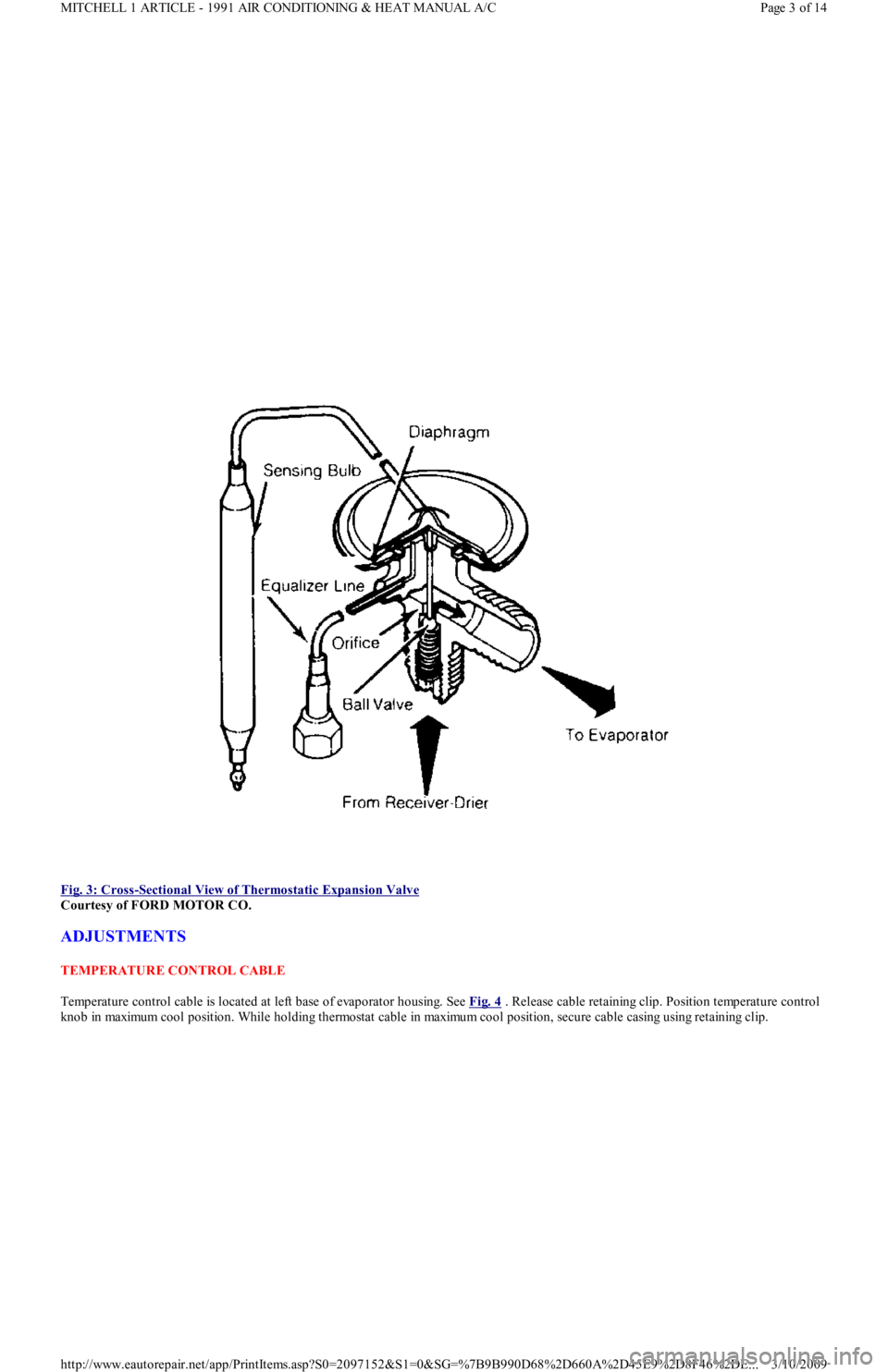
Fig. 3: Cross
-Sectional View of Thermostatic Expansion Valve
Courtesy of FORD MOTOR CO.
ADJUSTMENTS
TEMPERATURE CONTROL CABLE
Temperature control cable is located at left base of evaporator housing. See Fig. 4
. Release cable retaining clip. Position temperature control
knob in maximum cool position. While holding thermostat cable in maximum cool position, secure cable casing using retaining clip.
Page 3 of 14 MITCHELL 1 ARTICLE - 1991 AIR CONDITIONING & HEAT MANUAL A/C
3/10/2009 http://www.eautorepair.net/app/PrintItems.asp?S0=2097152&S1=0&SG=%7B9B990D68%2D660A%2D45E9%2D8F46%2DE
...
Page 370 of 454
BRAKE PAD WEAR INDICATOR
CATALYTIC CONVERTER
COOLANT (PROPYLENE-GLYCOL FORMULATIONS)
ELECTROSTATIC DISCHARGE SENSITIVE (ESD) PARTS
ENGINE OIL
FUEL PUMP SHUTOFF SWITCH
This switch stops flow of fuel to engine after a collision. The impact does not have to be great for switch to be triggered. Switch must be reset
after collision. Switch is located under left rear speaker in luggage compartment. Press button to reset switch.
FUEL SYSTEM SERVICE
HALOGEN BULBS
PASSIVE RESTRAINTS
RADIATOR CAP
RADIATOR FAN
WARRANTY INFORMATION
BASIC NEW CAR LIMITED WARRANTY
All parts of the vehicle, except tires, are covered against defects in factory-supplied materials and workmanship for 12 months or 12,000 miles, CAUT ION: Indicator will cause a squealing or scraping noise, warning that brake pads need replacem ent.
CAUT ION: Continued operation of vehicle with a severe m alfunction could cause converter to overheat, resulting
in possible dam age to converter and vehicle.
CAUT ION: T o avoid possible dam age to vehicle use only ethylene-glycol based coolants with a m ixture ratio from
44-68% anti-freeze. DO NOT use 100% anti-freeze as it will cause the form ation of cooling system
deposits. T his results in coolant tem peratures of over 300° F (149°C) which can m elt plastics. 100% anti-
freeze has a freeze point of only -8° F (-22°C).
CAUT ION: Propylene-Glycol Mixtures has a sm aller tem perature range than Ethylene-Glycol. T he tem perature
range (freeze-boil) of a 50/50 Anti-Freeze/Water Mix is as follows: Propylene-Glycol -26° F (-32°C) - 257° F
(125°C) Ethylene-Glycol -35° F (-37°C) - 263° F (128°C)
CAUT ION: Propylene-Glycol/Ethylene-Glycol Mixtures can cause the destabilization of various corrosion inhibitors.
Also Propylene-Glycol/Ethylene-Glycol has a different specific gravity than Ethylene-Glycol coolant,
which will result in inaccurate freeze point calculations.
WARNING:Many solid state electrical com ponents can be dam aged by static electricity (ESD). Som e will display a
warning label, but m any will not. Discharge personal static electricity by touching a m etal ground point
on the vehicle prior to servicing any ESD sensitive com ponent.
CAUT ION: Never use non-detergent or straight m ineral oil.
WARNING:Relieve fuel system pressure prior to servicing any fuel system com ponent (fuel injection m odels).
WARNING:Halogen bulbs contain pressurized gas which m ay explode if overheated. DO NOT touch glass portion
of bulb with bare hands. Eye protection should be worn when handling or working around halogen
bulbs.
CAUT ION: Before operating vehicle, securely fasten passive shoulder restraints to the em ergency release buckles.
T he buckle fits in only one way. Ensure to position it properly.
CAUT ION: Always disconnect the fan m otor when working near the radiator fan. T he fan is tem perature controlled
and could start at any tim e even when the ignition key is in the OFF position. DO NOT loosen or rem ove
radiator cap when cooling system is hot.
WARNING:Keep hands away from radiator fan. Fan is controlled by a therm ostatic switch which m ay com e on or
run for up to 15 m inutes even after engine is turned off.
CAUT ION: Due to the different warranties offered in various regions and the variety of after-m arket extended
warranties available, please refer to the warranty package that cam e with the vehicle to verify all
warranty options.
Page 6 of 9 MITCHELL 1 ARTICLE - MAINTENANCE INFORMATION 1988-93 MAINTENANCE Ford Motor Co. Maintenance Inform...
3/10/2009 http://www.eautorepair.net/app/PrintItems.asp?S0=2097152&S1=0&SG=%7B9B990D68%2D660A%2D45E9%2D8F46%2DE
...
Page 376 of 454
the WHEEL ALIGNMENT section.
OVERHAUL
STEERING GEAR
Disassembly
1. With steering gear removed from vehicle, place steering gear in a soft-jawed vise. Mark threaded portion of tie rod for reassembly.
Remove tie rod ends. Remove tie rod boots. Remove lock pins from both ends of rack. See Fig. 1
.
2. Remove tie rod ball socket from end of rack. Remove both tie rods. Remove lock nut from yoke plug. Remove yoke plug, spring and
yoke support. Use a small screwdriver to remove pinion oil seal from pinion shaft. Remove pinion bearing snap ring.
3. Remove pinion and bearing assembly. If necessary use Valve Body Puller (T78P-3504-B) to remove pinion and bearing assembly.
Remove rack from pinion side of housing. If lower pinion bearing needs replacing, use Blind Hole Bearing Puller (D80L-100-L) and
Slide Hammer (T50T-100-A) to remove.
4. Press bushing lock tabs into the 3 slots located at end of rack housing. Use Blind Hole Bearing Puller (D80L-100-L), to remove rack
support bushing from right end of rack housing.
Inspection
1. Check rubber boots, ball bearings and tooth surface of rack for wear or damage. Using a dial indicator and "V" blocks, check rack for
straightness. Maximum allowable runout is 0.012" (0.3 mm). If rack support bushings are worn, use a screwdriver to release the tab lock
on the side opposite the pinion. Use blind hole Bearing Puller (D80L-100R) with slide hammer to remove bushing.
2. Check tie rod ball joints for smooth operation. Replace parts as necessary. Check sliding surface of rack support and gear housing for
cracks or damage. Check rack bushing for excessive wear. Replace entire gear housing assembly if any of these parts are worn or
damaged.
Reassembly
1. Apply lithium grease to ball bearing, roller bearing, inside of gear housing, lip of oil seal, sliding surface and back of rack support,
sliding surface of rack bushing, rack pinion teeth and ball joints. Install rack support bushing into right end of rack housing. Ensure lock
tabs engage with slots in housing.
2. If previously removed, install a new lower pinion bearing using a bushing installer or a piece of wooden dowel stock. Carefully insert
non-toothed side of rack into left end of rack housing, with rack teeth facing pinion bore. Position rack in housing so rack protrudes
2.4" (62 mm) from the left side of housing. Install pinion and upper bearing assembly so that when bearing is seated, notch (for "U" joint
clamp bolt) in pinion splines forms a 35-55 degree angle with the centerline of the housing. See Fig. 2
.
Fig. 2: Removing & Installing Rack Components
Courtesy of FORD MOTOR CO.
3. Install snap ring and spacer, with beveled side of snap ring facing upward (toward oil seal). Install oil seal spacer with tab side down,
locating tab in snap ring gap. Protect pinion shaft splines with tape. Coat tape with a thin coat of grease and install new seal. Using a soft
hammer, tap lightly on seal until it is flush with end surface of housing. Remove protective tape.
4. Mount rack in a soft-jawed vise and install new lock tabs and tie rods. Tighten tie rod with a "crows foot" wrench to 44-58 ft. lbs. (59-
78 N.m). Use a center punch to stake lock tabs washer in 2 places. Slide tie rod boot over tie rod and position on rack. Secure with
mechanic's tie wire. Install other boot and other boot clamps.
5. Center rack so that tie rods are equally extended. Grease rack support yoke. Install rack support yoke, spacer and spring in housing.
Apply sealer to adjusting cover (yoke plug) threads and install in housing. Install adjusting bolt and lock nut.
6. Tighten adjusting cover to 80-97 INCH lbs. (9-11 N.m). Slowly cycle rack back and forth 5 times through 90 percent of its full stroke.
Center rack so tie rods are equally extended. Loosen adjusting cover and retighten to 22-30 INCH lbs. (2.5-3.4 N.m). Using a spring pull
scale, measure force needed to turn pinion 180 degrees from center rack position.
7. Adjust pinion to position where most force was needed to turn it. Tighten adjusting cover to 48 INCH lbs. (5.4 N.m), then back off 5-10
degrees. Hold adjusting bolt with a wrench and tighten the lock nut with a "crows foot" to 29-36 ft. lbs. (39-49 N.m). 8) To comp l et e
reassembly, reverse disassembly procedure. Install tie rod ends and jam nuts. Ensure index marks align. See Fig. 1
. CAUT ION: If rack is taken out of wrong side, dam age m ay result to rack bushing.
NOTE:If fit between housing and bearing is too tight, strike outer ring of bearing lightly while checking
m esh of rack and pinion.
Page 2 of 3 MITCHELL 1 ARTICLE - STEERING SYSTEM - MANUAL 1991 STEERING Ford Motor Co. - Steering - Manual Rack & Pi
...
3/10/2009 http://www.eautorepair.net/app/PrintItems.asp?S0=2097152&S1=0&SG=%7B9B990D68%2D660A%2D45E9%2D8F46%2DE
...
Page 389 of 454
and disconnect cable from lock housing. Using slim-nose locking pliers, grip and remove round headed shear screws securing column
lock housing and cap to column jacket. See Fig. 2
.
2. Remove lock housing. To install lock housing, position lock cylinder and cap on column jacket. Using new screws, tighten only enough
to hold lock housing in position. Use ignition key to ensure lock works correctly without binding. Adjust switch if necessary. Tighten
shear screws until heads break off. Install ignition switch in cylinder. Reverse removal procedures to complete installation.
STEERING COLUMN
Removal & Installation (Capri)
1. Place wheels in a straight-ahead position. Remove ignition key and lock steering wheel. Disconnect negative battery cable and air bag
back-up power supply. Back-up power supply is a Blue rectangular unit located behind glove box, attached to instrument panel.
2. Remove air bag module from steering wheel. Remove steering column access cover and trim panel. Remove defroster duct connecting
hose. Remove steering column lower shroud. Loosen lower steering c o l u mn r e t a in in g n u t s. R e mo ve st e e r in g c o l u mn u p p e r r e t a in in g
nuts.
3. Remove ignition lock shield and ignition switch mount screw. Disconnect all necessary electrical connectors. Mark and remove steering
shaft universal joint bolt. Remove steering column from instrument panel. To install, reverse removal procedure. Once steering column
is completely installed, check all switches and functions for proper operation.
Removal (Festiva)
1. Disconnect battery ground cable. Place wheels in a straight-ahead position. Remove steering wheel, upper and lower column covers,
combination switch, ignition switch and harness connectors.
2. Remove steering column shield and air duct from below steering column. Remove 2 steering column upper mounting bracket-to-
instrument panel crossmember nuts.
3. Lower upper end of column as necessary to gain access to intermediate shaft upper "U" joint. Mark steering shaft and upper "U" jo in t fo r
reassembly reference.
4. Remove "U" joint attaching bolt. Loosen 2 steering column hinge bracket-to-clutch/brake pedal support nuts. Remove steering column
with upper "U" joint by pulling toward passenger compartment.
Installation (Festiva)
1. Align marks made during removal and install column with intermediate shaft upper "U" joint over intermediate shaft. Install, but do not
tighten, "U" joint clamp bolt.
2. Install and tighten hinge bracket nuts. Install shim clips on column upper bracket flanges (if removed). Position upper end of steering
column to instrument panel mounting studs.
3. Install upper bracket retaining nuts. Turn steering wheel lock-to-lock several times to align "U" joint splines. Tighten "U" joint clamp
bolt.
4. Install air duct and instrument panel brace. Install harness connectors, ignition switch, combination switch, upper and lower column
covers and steering wheel.
OVERHAUL
STEERING COLUMN
Disassembly & Reassembly (Capri)
1. Remove steering column. See STEERING COLUMN under REMOVAL & INSTALLATION. Position steering column in soft-jawed
vise. Using Steering Wheel Remover (T67L-3600-A), remove steering wheel. Put 2 strips of tape on air bag clockspring, to avoid
rotation.
2. Remove 3 clockspring retaining screws and remove clockspring. With ignition key installed, rotate tumbler to Run position while
pushing tumbler release pin with .125" (3.17 mm) drift. Remove tumbler and upper column shroud. Remove key warning switch.
3. Remove bearing plate. Remove and discard snap ring located at front end of steering column. Remove multifunction switch. Remove
column lock and upper bearing using a suitable bearing puller. To reassemble, reverse disassembly procedure.
Disassembly (Festiva)
Disassembly of steering column assembly is not recommended by manufacturer. If any components are found defective, replace steering
column assembly.
Inspection (Festiva)
1. Measure steering shaft for signs of collapse. Steering shaft length should be between 23.86-23.94" (606-608 mm). If measurement is not
within specification, replace steering column assembly.
2. Check for steering shaft side play. Any detectable side play can adversely affect steering control. If side play in excess of .03" (.75 mm)
is present, bearings are badly worn. Replace steering column assembly.
Reassembly (Festiva)
NOTE:If steering rack and interm ediate shaft are also rem oved, "U" joints and interm ediate shaft m ust be
m arked for reassem bly reference. Both ends of shaft are identical.
CAUT ION: If steering shaft shear pins break during housing or bearing rem oval, the com plete shaft and colum n
m ust be replaced. T o determ ine if pins have sheared, m easure steering shaft from top end of shaft to
center of U-
joint bearing. If length is less than 24.23" (615.7 m m ) or greater than 24.66" (617.7 m m ), pins
have sheared.
Page 3 of 4 MITCHELL 1 ARTICLE - STEERING COLUMN 1991 STEERING Ford Motor Co. - Steering Columns
3/10/2009 http://www.eautorepair.net/app/PrintItems.asp?S0=2097152&S1=0&SG=%7B9B990D68%2D660A%2D45E9%2D8F46%2DE
...