trunk FORD FIESTA 2012 Owners Manual
[x] Cancel search | Manufacturer: FORD, Model Year: 2012, Model line: FIESTA, Model: FORD FIESTA 2012Pages: 360, PDF Size: 3.39 MB
Page 21 of 360
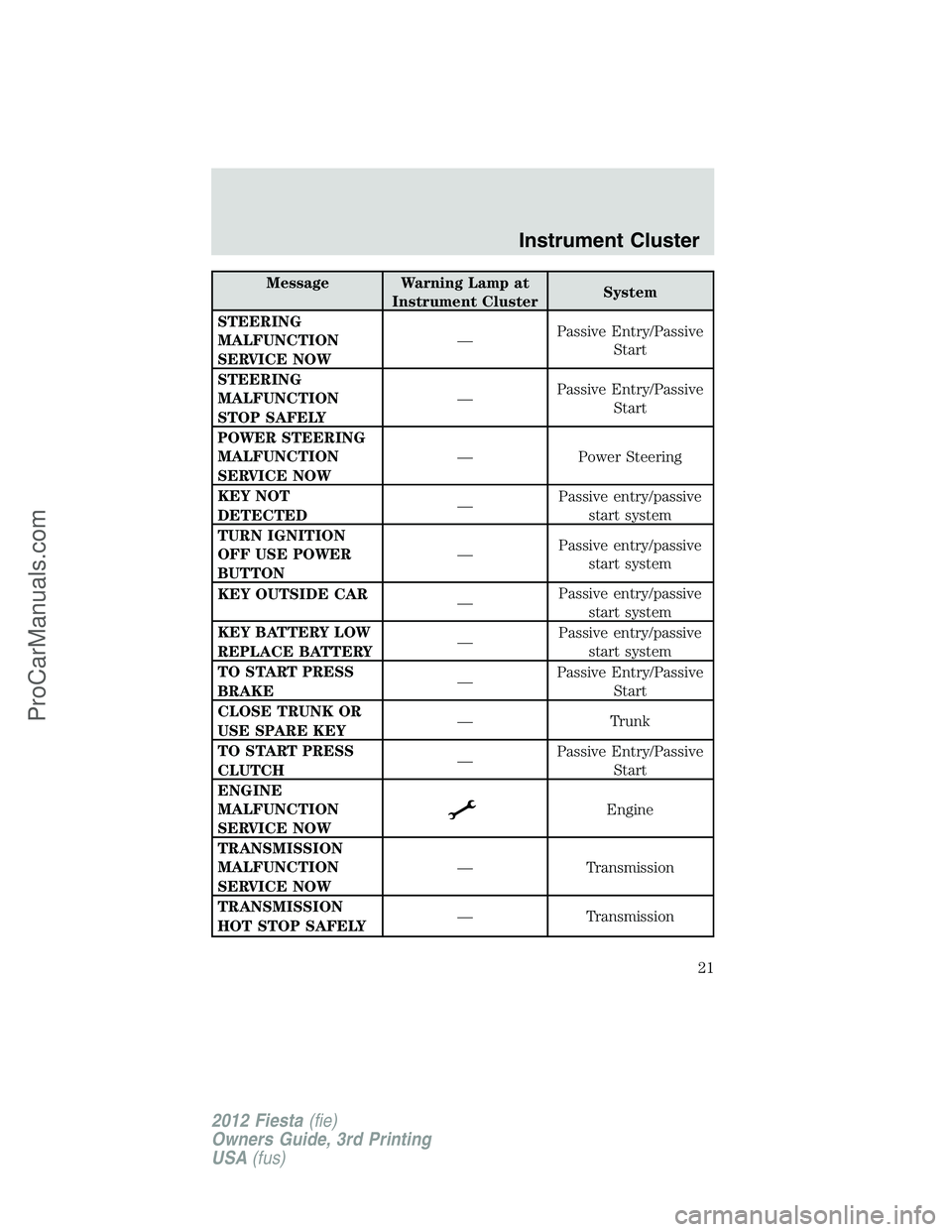
Message Warning Lamp at
Instrument ClusterSystem
STEERING
MALFUNCTION
SERVICE NOW—Passive Entry/Passive
Start
STEERING
MALFUNCTION
STOP SAFELY—Passive Entry/Passive
Start
POWER STEERING
MALFUNCTION
SERVICE NOW— Power Steering
KEY NOT
DETECTED—Passive entry/passive
start system
TURN IGNITION
OFF USE POWER
BUTTON—Passive entry/passive
start system
KEY OUTSIDE CAR
—Passive entry/passive
start system
KEY BATTERY LOW
REPLACE BATTERY—Passive entry/passive
start system
TO START PRESS
BRAKE—Passive Entry/Passive
Start
CLOSE TRUNK OR
USE SPARE KEY— Trunk
TO START PRESS
CLUTCH—Passive Entry/Passive
Start
ENGINE
MALFUNCTION
SERVICE NOW
Engine
TRANSMISSION
MALFUNCTION
SERVICE NOW— Transmission
TRANSMISSION
HOT STOP SAFELY— Transmission
Instrument Cluster
21
2012 Fiesta(fie)
Owners Guide, 3rd Printing
USA(fus)
ProCarManuals.com
Page 22 of 360
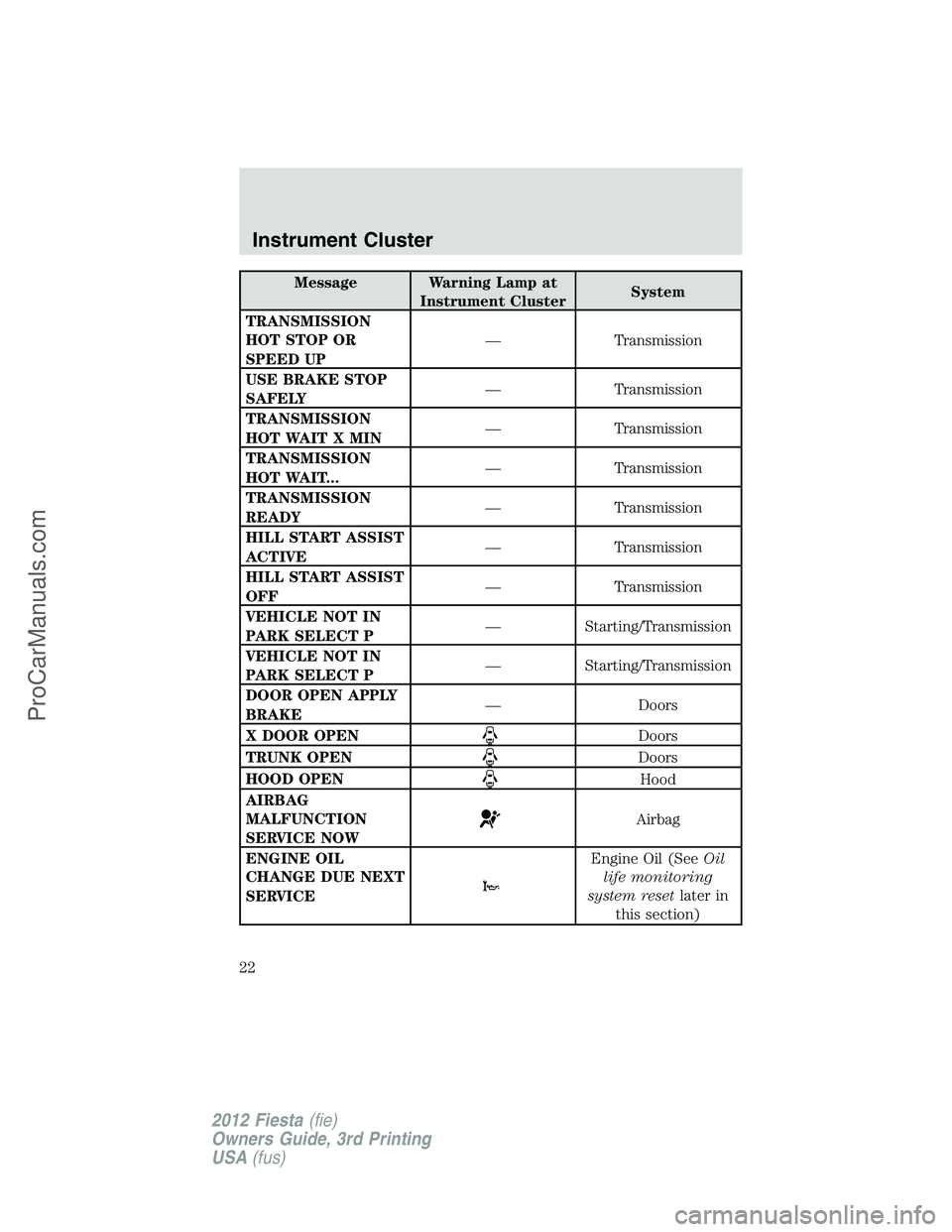
Message Warning Lamp atInstrument Cluster System
TRANSMISSION
HOT STOP OR
SPEED UP — Transmission
USE BRAKE STOP
SAFELY — Transmission
TRANSMISSION
HOT WAIT X MIN — Transmission
TRANSMISSION
HOT WAIT... — Transmission
TRANSMISSION
READY — Transmission
HILL START ASSIST
ACTIVE — Transmission
HILL START ASSIST
OFF — Transmission
VEHICLE NOT IN
PARK SELECT P — Starting/Transmission
VEHICLE NOT IN
PARK SELECT P — Starting/Transmission
DOOR OPEN APPLY
BRAKE — Doors
X DOOR OPEN
Doors
TRUNK OPEN
Doors
HOOD OPEN
Hood
AIRBAG
MALFUNCTION
SERVICE NOW
Airbag
ENGINE OIL
CHANGE DUE NEXT
SERVICE
Engine Oil (See Oil
life monitoring
system reset later in
this section)
Instrument Cluster
22
2012 Fiesta (fie)
Owners Guide, 3rd Printing
USA (fus)
ProCarManuals.com
Page 133 of 360
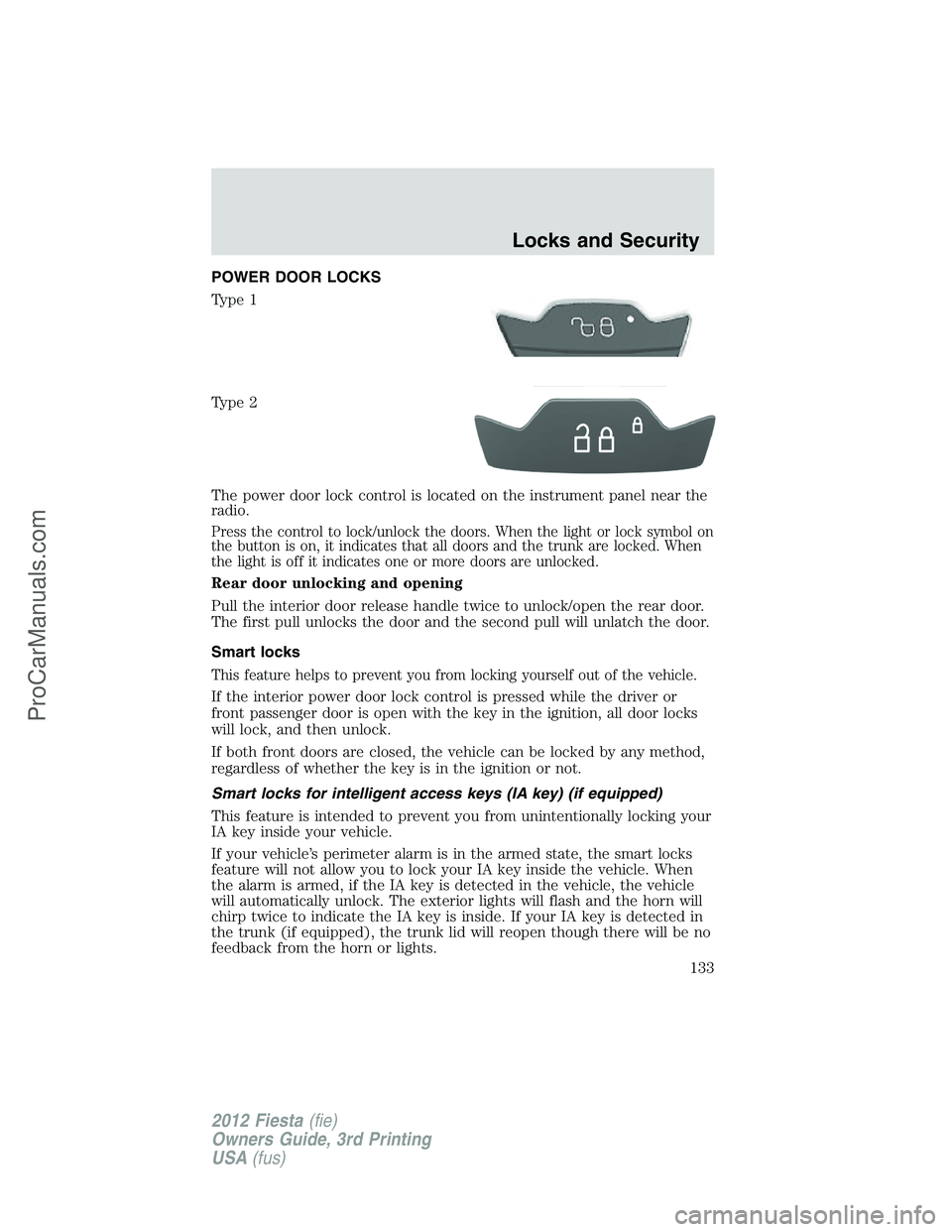
POWER DOOR LOCKS
Type 1
Type 2
The power door lock control is located on the instrument panel near the
radio.
Press the control to lock/unlock the doors. When the light or lock symbol on
the button is on, it indicates that all doors and the trunk are locked. When
the light is off it indicates one or more doors are unlocked.
Rear door unlocking and opening
Pull the interior door release handle twice to unlock/open the rear door.
The first pull unlocks the door and the second pull will unlatch the door.
Smart locks
This feature helps to prevent you from locking yourself out of the vehicle.
If the interior power door lock control is pressed while the driver or
front passenger door is open with the key in the ignition, all door locks
will lock, and then unlock.
If both front doors are closed, the vehicle can be locked by any method,
regardless of whether the key is in the ignition or not.
Smart locks for intelligent access keys (IA key) (if equipped)
This feature is intended to prevent you from unintentionally locking your
IA key inside your vehicle.
If your vehicle’s perimeter alarm is in the armed state, the smart locks
feature will not allow you to lock your IA key inside the vehicle. When
the alarm is armed, if the IA key is detected in the vehicle, the vehicle
will automatically unlock. The exterior lights will flash and the horn will
chirp twice to indicate the IA key is inside. If your IA key is detected in
the trunk (if equipped), the trunk lid will reopen though there will be no
feedback from the horn or lights.
Locks and Security
133
2012 Fiesta(fie)
Owners Guide, 3rd Printing
USA(fus)
ProCarManuals.com
Page 137 of 360
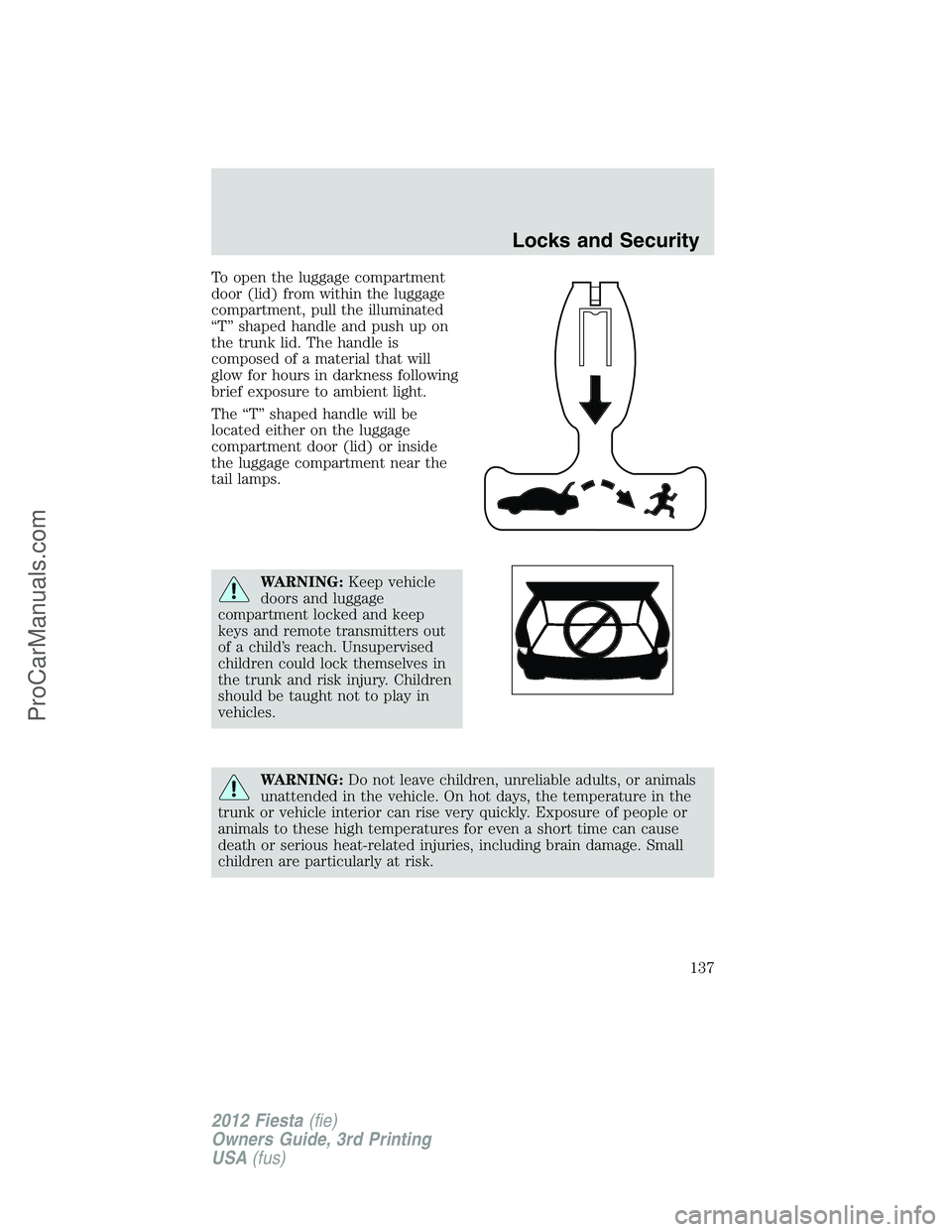
To open the luggage compartment
door (lid) from within the luggage
compartment, pull the illuminated
“T” shaped handle and push up on
the trunk lid. The handle is
composed of a material that will
glow for hours in darkness following
brief exposure to ambient light.
The “T” shaped handle will be
located either on the luggage
compartment door (lid) or inside
the luggage compartment near the
tail lamps.
WARNING:Keep vehicle
doors and luggage
compartment locked and keep
keys and remote transmitters out
of a child’s reach. Unsupervised
children could lock themselves in
the trunk and risk injury. Children
should be taught not to play in
vehicles.
WARNING:Do not leave children, unreliable adults, or animals
unattended in the vehicle. On hot days, the temperature in the
trunk or vehicle interior can rise very quickly. Exposure of people or
animals to these high temperatures for even a short time can cause
death or serious heat-related injuries, including brain damage. Small
children are particularly at risk.
Locks and Security
137
2012 Fiesta(fie)
Owners Guide, 3rd Printing
USA(fus)
ProCarManuals.com
Page 138 of 360
REMOTE ENTRY SYSTEM (IF EQUIPPED)
FCC ID: LXP-RX4318 IC: 2298A-RX4318
The integrated keyhead transmitters (IKTs) and intelligent access keys
(IA key) comply with part 15 of the FCC rules and with RSS-210 of
Industry Canada. Operation is subject to the following two conditions:
(1) This device may not cause harmful interference, and (2) This device
must accept any interference received, including interference that may
cause undesired operation.
Changes or modifications not expressly approved by the party
responsible for compliance could void the user’s authority to
operate the equipment.
The typical operating range for your transmitter is approximately 33 feet
(10 meters). A decrease in operating range could be caused by:
•weather conditions,
•nearby radio towers,
•structures around the vehicle, or
•other vehicles parked next to your vehicle.
The transmitter allows you to:
•remotely unlock the vehicle doors.
•remotely lock all the vehicle doors.
•remotely open the trunk.
•arm and disarm the perimeter anti-theft system.
•operate the illuminated entry feature.
The remote entry lock/unlock feature operates in any ignition position
except when the engine is running and vehicle speed is more than 4 mph
(7 km/h).
If there are problems with the remote entry system, make sure to take
ALL integrated keyhead transmitters or intelligent access keys
with you to the authorized dealer in order to aid in troubleshooting the
problem.
Intelligent Access (if equipped)
Your vehicle will allow you to unlock and enter your vehicle without
actively using a key or transmitter. You can use the intelligent access
feature at the driver door, passenger front door or at the trunk. You can
activate the intelligent access feature as long as you have one of your
intelligent access keys within range of the driver door, passenger front
door or the trunk.
Locks and Security
138
2012 Fiesta(fie)
Owners Guide, 3rd Printing
USA(fus)
ProCarManuals.com
Page 139 of 360
Activating intelligent access at
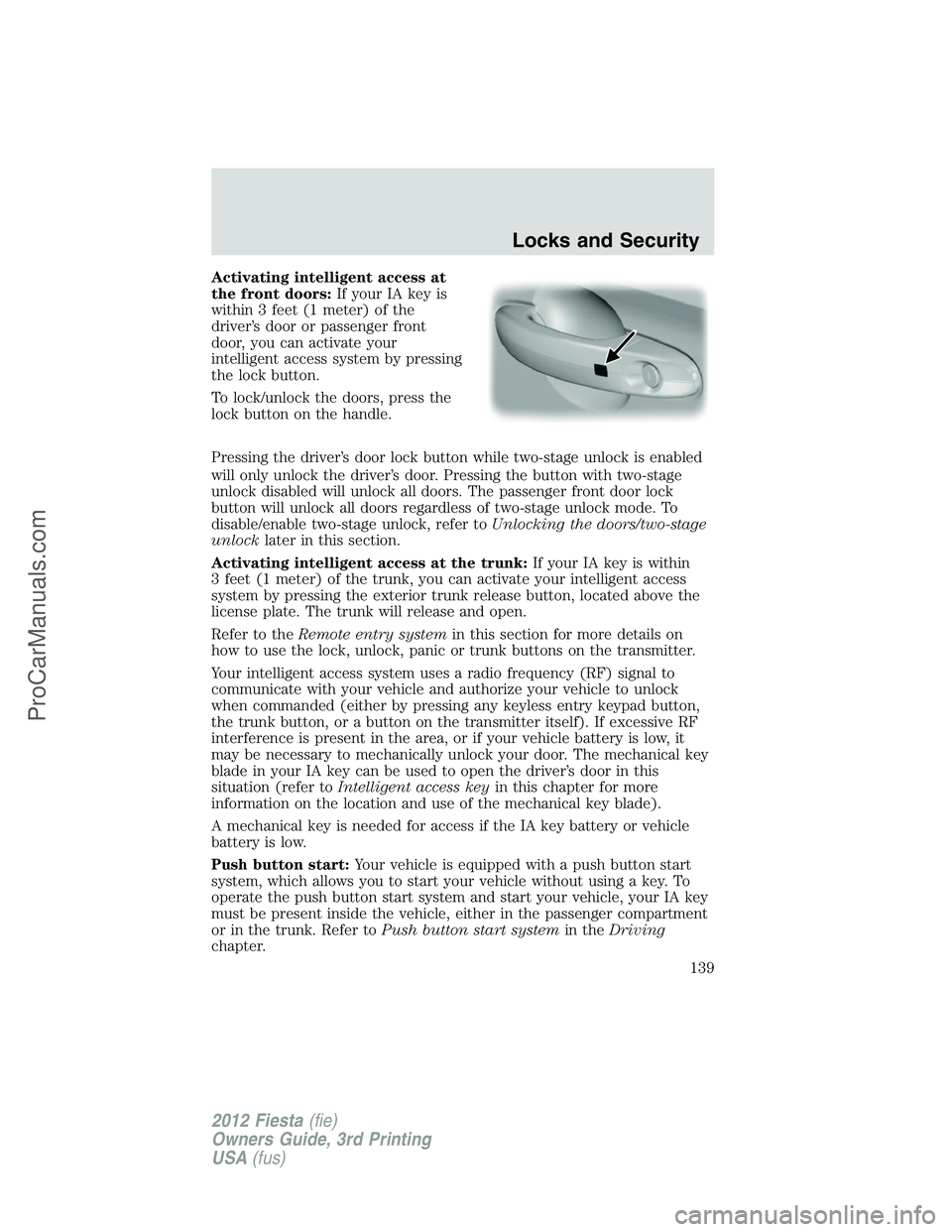
the front doors:If your IA key is
within 3 feet (1 meter) of the
driver’s door or passenger front
door, you can activate your
intelligent access system by pressing
the lock button.
To lock/unlock the doors, press the
lock button on the handle.
Pressing the driver’s door lock button while two-stage unlock is enabled
will only unlock the driver’s door. Pressing the button with two-stage
unlock disabled will unlock all doors. The passenger front door lock
button will unlock all doors regardless of two-stage unlock mode. To
disable/enable two-stage unlock, refer toUnlocking the doors/two-stage
unlocklater in this section.
Activating intelligent access at the trunk:If your IA key is within
3 feet (1 meter) of the trunk, you can activate your intelligent access
system by pressing the exterior trunk release button, located above the
license plate. The trunk will release and open.
Refer to theRemote entry systemin this section for more details on
how to use the lock, unlock, panic or trunk buttons on the transmitter.
Your intelligent access system uses a radio frequency (RF) signal to
communicate with your vehicle and authorize your vehicle to unlock
when commanded (either by pressing any keyless entry keypad button,
the trunk button, or a button on the transmitter itself). If excessive RF
interference is present in the area, or if your vehicle battery is low, it
may be necessary to mechanically unlock your door. The mechanical key
blade in your IA key can be used to open the driver’s door in this
situation (refer toIntelligent access keyin this chapter for more
information on the location and use of the mechanical key blade).
A mechanical key is needed for access if the IA key battery or vehicle
battery is low.
Push button start:Your vehicle is equipped with a push button start
system, which allows you to start your vehicle without using a key. To
operate the push button start system and start your vehicle, your IA key
must be present inside the vehicle, either in the passenger compartment
or in the trunk. Refer toPush button start systemin theDriving
chapter.
Locks and Security
139
2012 Fiesta(fie)
Owners Guide, 3rd Printing
USA(fus)
ProCarManuals.com
Page 140 of 360
Unlocking the doors/two-stage unlock
1. Press
and release to unlock the driver’s door.Note:The interior
lamps will illuminate and the parking lamps will flash.
2. Press
and release again within three seconds to unlock all the
doors.
Two-stage unlock disable
Disabling two-stage unlock allows all vehicle doors to unlock
simultaneously.
Two-stage unlocking may be disabled or re-enabled by simultaneously
pressing the
andcontrols on the transmitter for three seconds.
The park lamps will illuminate twice to indicate that two-stage unlock
was enabled or disabled.
Locking the doors
•Pressand release to lock all the doors. If all doors are closed the
turn signal lamps will flash twice.
Opening the luggage compartment
Press twice (within 3 seconds) to
open the luggage compartment.
Note:This feature will not operate when the engine is running and
vehicle speed is more than 4 mph (7 km/h).
Ensure that the trunk is closed and latched before driving your vehicle.
Failure to properly latch the trunk may cause objects to fall out or block
the driver’s rear view.
Replacing the battery
The remote entry transmitter uses one coin type three-volt lithium
battery CR2032 or equivalent.
To replace the battery:
Integrated Keyhead Transmitter
(IKT)
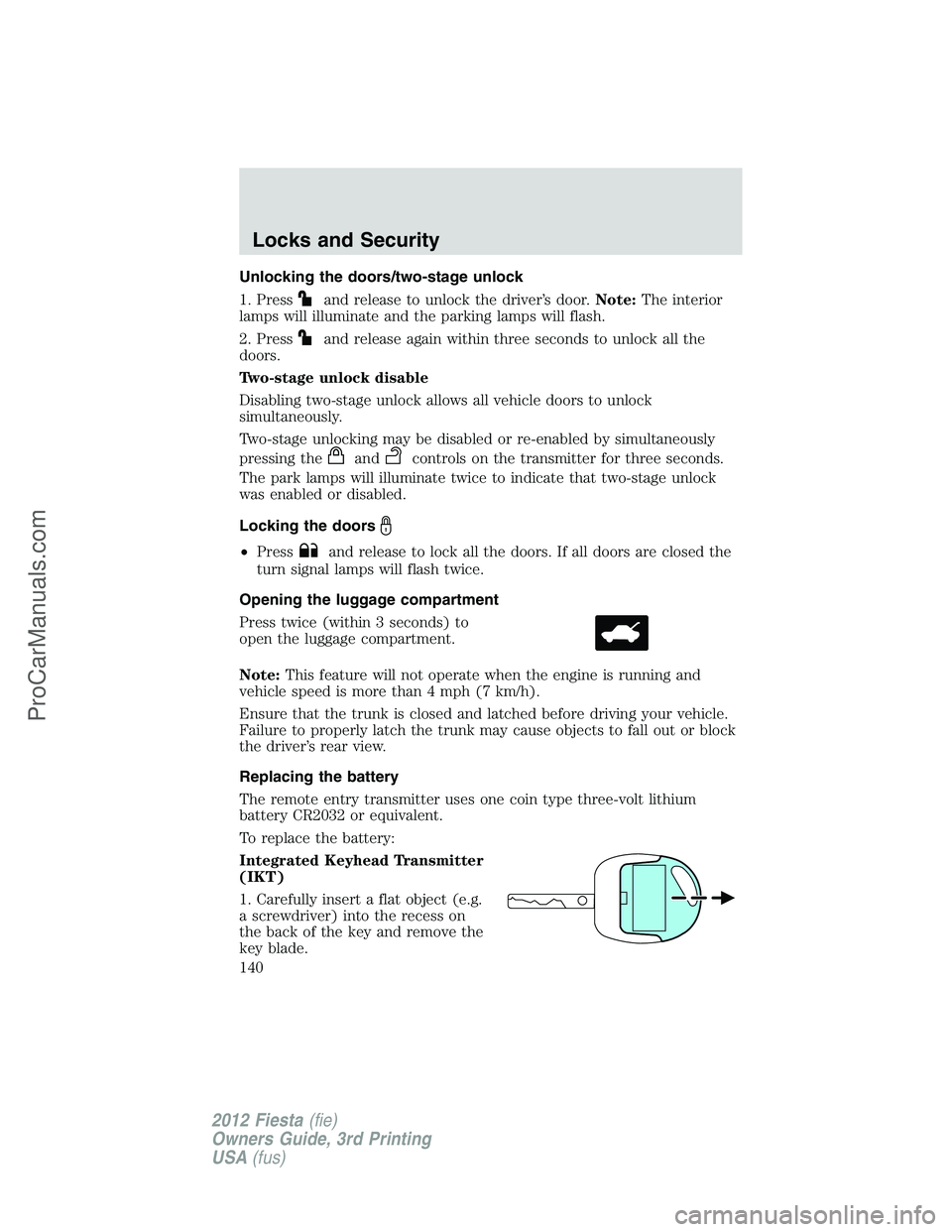
1. Carefully insert a flat object (e.g.
a screwdriver) into the recess on
the back of the key and remove the
key blade.
Locks and Security
140
2012 Fiesta(fie)
Owners Guide, 3rd Printing
USA(fus)
ProCarManuals.com
Page 146 of 360
Replacement keys
If your keys are lost or stolen and you don’t have an extra coded key,
you will need to have your vehicle towed to an authorized dealer. The
key codes need to be erased from your vehicle and new coded keys will
need to be programmed.
Replacing coded keys can be very costly. Store an extra programmed key
away from the vehicle in a safe place to help prevent any
inconveniences. Please visit an authorized dealer to purchase additional
spare or replacement keys.
PERIMETER ALARM SYSTEM (IF EQUIPPED)
The perimeter anti-theft system will warn you in the event of an
unauthorized entry to your vehicle.
If there is any potential perimeter anti-theft problem with your vehicle,
ensureALL remote entry transmittersare taken to the authorized
dealer to aid in troubleshooting.
Arming the system
When armed, this system will respond if unauthorized entry is
attempted. When unauthorized entry occurs, the system will flash the
park/turn lamps and will sound the horn.
The system is ready to arm whenever the key is removed from the
ignition. Either of the following actions will prearm the alarm system:
•Press the lock control on the remote entry transmitter.
•Open a door and press the power door lock control to lock all the
doors, and then close the door.
Disarming the system
You can disarm the system by any of the following actions:
•Unlock the doors by pressing the
control on your remote entry
transmitter.
•Unlock the doors with a key. Turn the key full travel (toward the front
of the vehicle) to ensure the alarm disarms.
•Turn the ignition to the on or start position with a programmed coded
ignition key.
Pressing the power door unlock control within the 20 second pre-armed
mode will return the vehicle to a disarmed state.
Triggering the anti-theft system
The armed system will be triggered if any door, trunk or the hood is
opened without using the key or the remote entry transmitter.
Locks and Security
146
2012 Fiesta(fie)
Owners Guide, 3rd Printing
USA(fus)
ProCarManuals.com
Page 154 of 360
To adjust the head restraint, do the following:
1. Pull up on the head restraint to raise it.
2. Lower the head restraint by pressing and holding the guide sleeve
adjust button (3) while you push down on the head restraint.
Properly adjust the head restraint so that the top of the head restraint is
even with the top of your head and positioned as close as possible to the
back of your head. For occupants of extremely tall stature, adjust the
head restraint to its full up position.
WARNING:The adjustable head restraint is a safety device.
Whenever possible, it should be installed and properly adjusted
when the seat is occupied.
To remove the adjustable head restraint, do the following:
1. Pull up on the head restraint until it reaches its highest adjustment
position.
2. Simultaneously press and hold both the adjust/release button (3) and
the unlock/remove button (4), then pull up on the head restraint.
3. Store the head restraint in a secure location, such as the trunk of the
vehicle.
To reinstall the adjustable head restraint, do the following:
1. Insert the two stems into the guide sleeve collars and push the head
restraint down until it locks.
2. Properly adjust the head restraint as mentioned earlier in this section.
Folding down the rear seat
Note:Before lowering the seatbacks, lower, or remove, the outboard
head restraints to the lowest position.
One or both rear seatbacks can be folded down to provide additional
cargo space.
To lower the seatback(s) from inside the vehicle:
Seating and Safety Restraints
154
2012 Fiesta(fie)
Owners Guide, 3rd Printing
USA(fus)
ProCarManuals.com
Page 322 of 360
•Touch-up raw or primed metal to prevent rust.
•Cover chrome and stainless steel parts with a thick coat of auto wax
to prevent discoloration. Re-wax as necessary when the vehicle is
washed. See theCleaningchapter for more information.
•Lubricate all hood, door and trunk lid hinges, and latches with a light
grade oil. See theCleaningchapter for more information.
•Cover interior trim to prevent fading.
•Keep all rubber parts free from oil and solvents.
Engine
•The engine oil and filter should be changed prior to storage, as used
engine oil contain contaminates that may cause engine damage.
•Start the engine every 15 days. Run at fast idle until it reaches normal
operating temperature.
•With your foot on the brake, shift through all the gears while the
engine is running.
Fuel system
•Fill the fuel tank with high-quality fuel until the first automatic shutoff
of the fuel pump nozzle.
Note:During extended periods of vehicle storage (30 days or more),
fuel may deteriorate due to oxidation. Add a quality gas stabilizer
product to the vehicle fuel system whenever actual or expected storage
periods exceed 30 days. Follow the instructions on the additive label.
The vehicle should then be operated at idle speed to circulate the
additive throughout the fuel system.
Cooling system
•Protect against freezing temperatures.
•When removing vehicle from storage, check coolant fluid level.
Confirm there are no cooling system leaks, and fluid is at the
recommended level.
Battery
•Check and recharge as necessary. Keep connections clean.
•If storing your vehicle for more than 30 days without recharging the
battery, it may be advisable to disconnect the battery cables to ensure
battery charge is maintained for quick starting.
Note:If battery cables are disconnected, it will be necessary to reset
memory features.
Maintenance and Specifications
322
2012 Fiesta(fie)
Owners Guide, 3rd Printing
USA(fus)
ProCarManuals.com