ECU FORD FIESTA 2013 User Guide
[x] Cancel search | Manufacturer: FORD, Model Year: 2013, Model line: FIESTA, Model: FORD FIESTA 2013Pages: 346, PDF Size: 5.27 MB
Page 51 of 346
•Other passengers pushing or pulling on the seat
•Rear passenger feet and knees resting or pushing on the seat
The conditions listed above may cause the weight of a properly seated
occupant to be incorrectly interpreted by the passenger sensing system.
The person in the front passenger seat may appear heavier or lighter due
to the conditions described in the list above.
To know if the front passenger sensing system is operating
properly, seeCrash Sensors and Airbag Indicatorin this
chapter.
If the airbag readiness lamp is lit, do the following:
The driver or adult passengers should check for any objects that may be
lodged underneath the front passenger seat or cargo interfering with the
seat.
If objects are lodged or cargo is interfering with the seat; please take the
following steps to remove the obstruction:
•Pull the vehicle over.
•Turn the vehicle off.
•Driver or adult passengers should check for any objects lodged
underneath the front passenger seat or cargo interfering with the seat.
•Remove the obstruction(s) (if found).
•Restart the vehicle.
•Wait at least two minutes and verify that the airbag readiness lamp is
no longer illuminated
•If the airbag readiness lamp remains illuminated, this may or may/not
be a problem due to the front passenger sensing system.
DO NOT attempt to repair or service the system; take your vehicle
immediately to an authorized dealer.
If it is necessary to modify an advanced front airbag system to
accommodate a person with disabilities, contact the Ford Customer
Relationship Center at the phone number shown in theCustomer
Assistancesection of this owner’s guide.
50Supplementary Restraints System
2013 Fiesta(fie)
Owners Guide gf, 2nd Printing
USA(fus)
ProCarManuals.com
Page 58 of 346
Intelligent Access (If Equipped)
The system uses a radio frequency signal to communicate with your
vehicle and authorize your vehicle to unlock when one of the following
conditions are met:
•You touch the inside of the front exterior door handle.
•You press the luggage compartment button.
•You press a button on the transmitter.
If excessive radio frequency interference is present in the area or if the
transmitter battery is low, it may be necessary to mechanically unlock
your door. You can use the mechanical key blade in your intelligent
access key open the driver door in this situation. Refer toRemote
Controlin this chapter for more information on the location and use of
the mechanical key blade.
REMOTE CONTROL
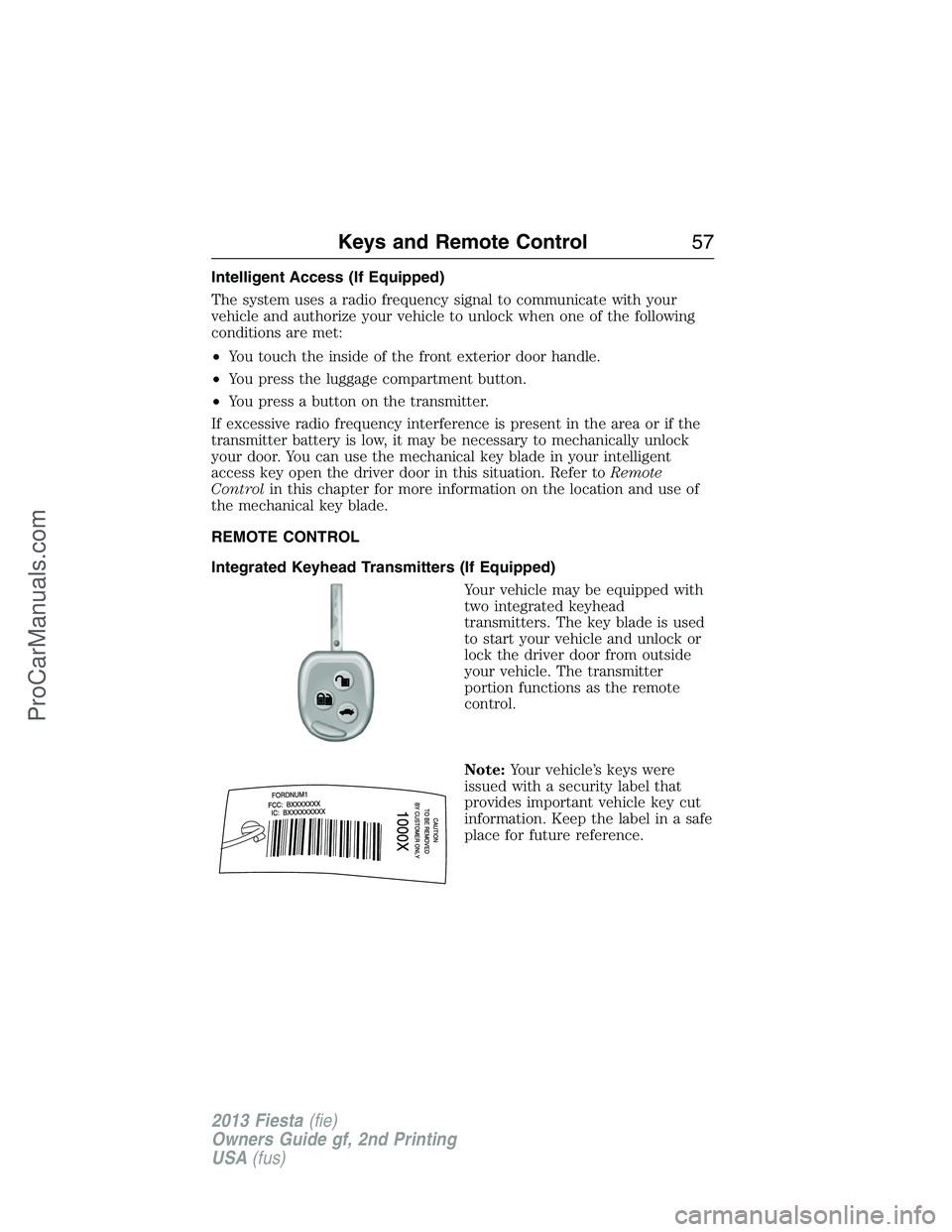
Integrated Keyhead Transmitters (If Equipped)
Your vehicle may be equipped with
two integrated keyhead
transmitters. The key blade is used
to start your vehicle and unlock or
lock the driver door from outside
your vehicle. The transmitter
portion functions as the remote
control.
Note:Your vehicle’s keys were
issued with a security label that
provides important vehicle key cut
information. Keep the label in a safe
place for future reference.
Keys and Remote Control57
2013 Fiesta(fie)
Owners Guide gf, 2nd Printing
USA(fus)
ProCarManuals.com
Page 59 of 346
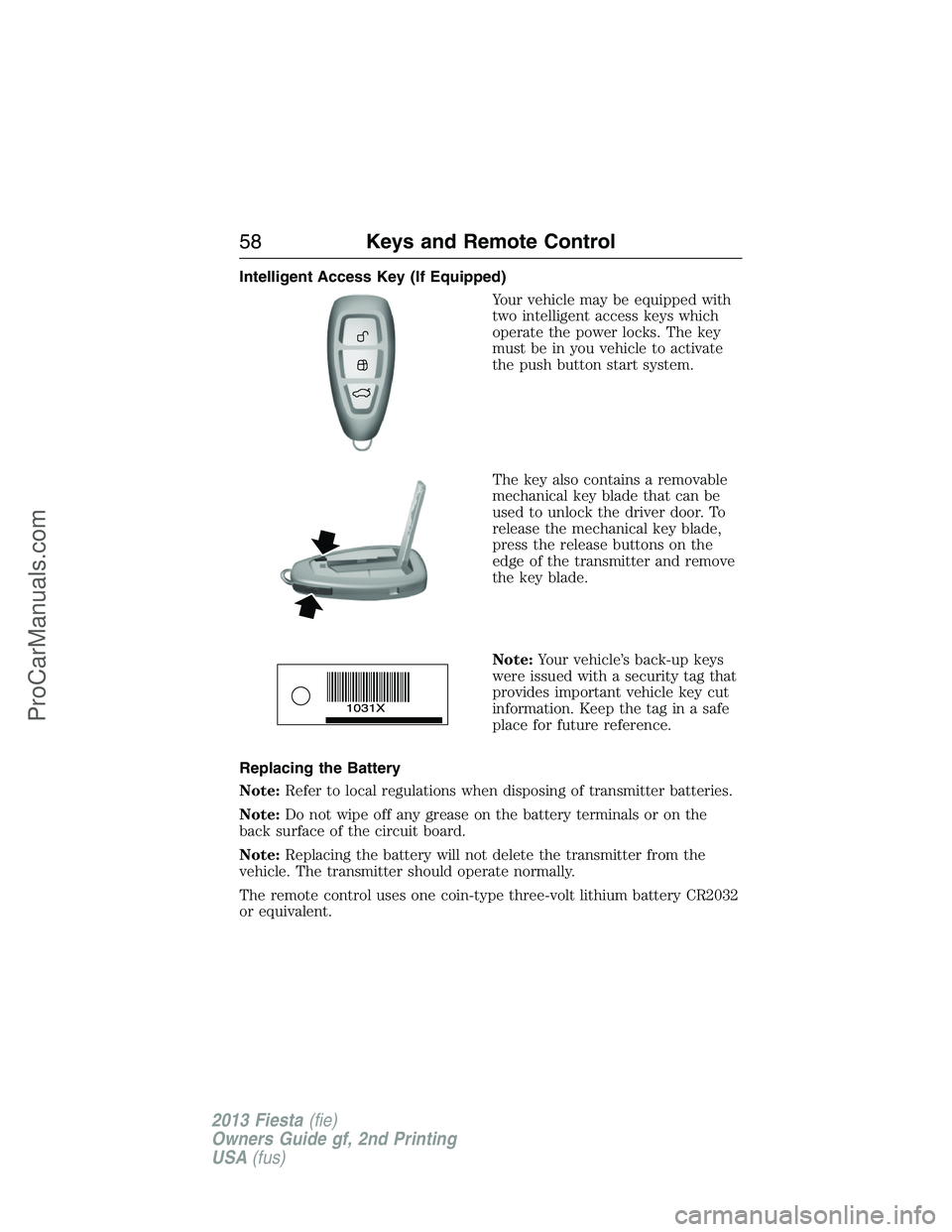
Intelligent Access Key (If Equipped)
Your vehicle may be equipped with
two intelligent access keys which
operate the power locks. The key
must be in you vehicle to activate
the push button start system.
The key also contains a removable
mechanical key blade that can be
used to unlock the driver door. To
release the mechanical key blade,
press the release buttons on the
edge of the transmitter and remove
the key blade.
Note:Your vehicle’s back-up keys
were issued with a security tag that
provides important vehicle key cut
information. Keep the tag in a safe
place for future reference.
Replacing the Battery
Note:Refer to local regulations when disposing of transmitter batteries.
Note:Do not wipe off any grease on the battery terminals or on the
back surface of the circuit board.
Note:Replacing the battery will not delete the transmitter from the
vehicle. The transmitter should operate normally.
The remote control uses one coin-type three-volt lithium battery CR2032
or equivalent.
58Keys and Remote Control
2013 Fiesta(fie)
Owners Guide gf, 2nd Printing
USA(fus)
ProCarManuals.com
Page 62 of 346
Car Finder
Press the lock button on the key twice within three seconds. The horn
will sound and the turn signals will flash. We recommend you use this
method to locate your vehicle, rather than using the panic alarm.
REPLACING A LOST KEY OR REMOTE CONTROL
Replacement or additional keys or remote controls can be purchased
from your authorized dealer. Your dealer can program the transmitters to
your vehicle or you may be able to program them yourself. See the
Securitychapter for information on programming your keys.
Reprogramming Your Remote Control
Note:You can only program an integrated keyhead transmitter. See your
authorized dealer to have an intelligent access transmitter programmed.
You must have all remote controls available before beginning this
procedure. If all remote controls are not present during programming,
the ones missing will no longer operate the vehicle.
To reprogram the remote control:
1. Turn the ignition switch from off to run four times in rapid succession
(within six seconds), with the fourth turn ending in off. If the program
mode is successfully entered, a chime will sound.
Note:If no action is taken within 10 seconds after a transmitter has
been programmed, the programming sequence ends.
2. Within 10 seconds, press any button on the transmitter to be
programmed. A chime will sound to confirm that the transmitter is
programmed. Repeat this step for each transmitter.
Note:There is no chime or any other confirmation upon exiting the
programming mode.
3. Exiting the programming mode is accomplished if one of the following
occurs:
•The ignition is turned on.
•Ten seconds have passed since entering the programming mode or
since the last transmitter was programmed.
•The maximum number (eight) of transmitters has been programmed.
Keys and Remote Control61
2013 Fiesta(fie)
Owners Guide gf, 2nd Printing
USA(fus)
ProCarManuals.com
Page 71 of 346
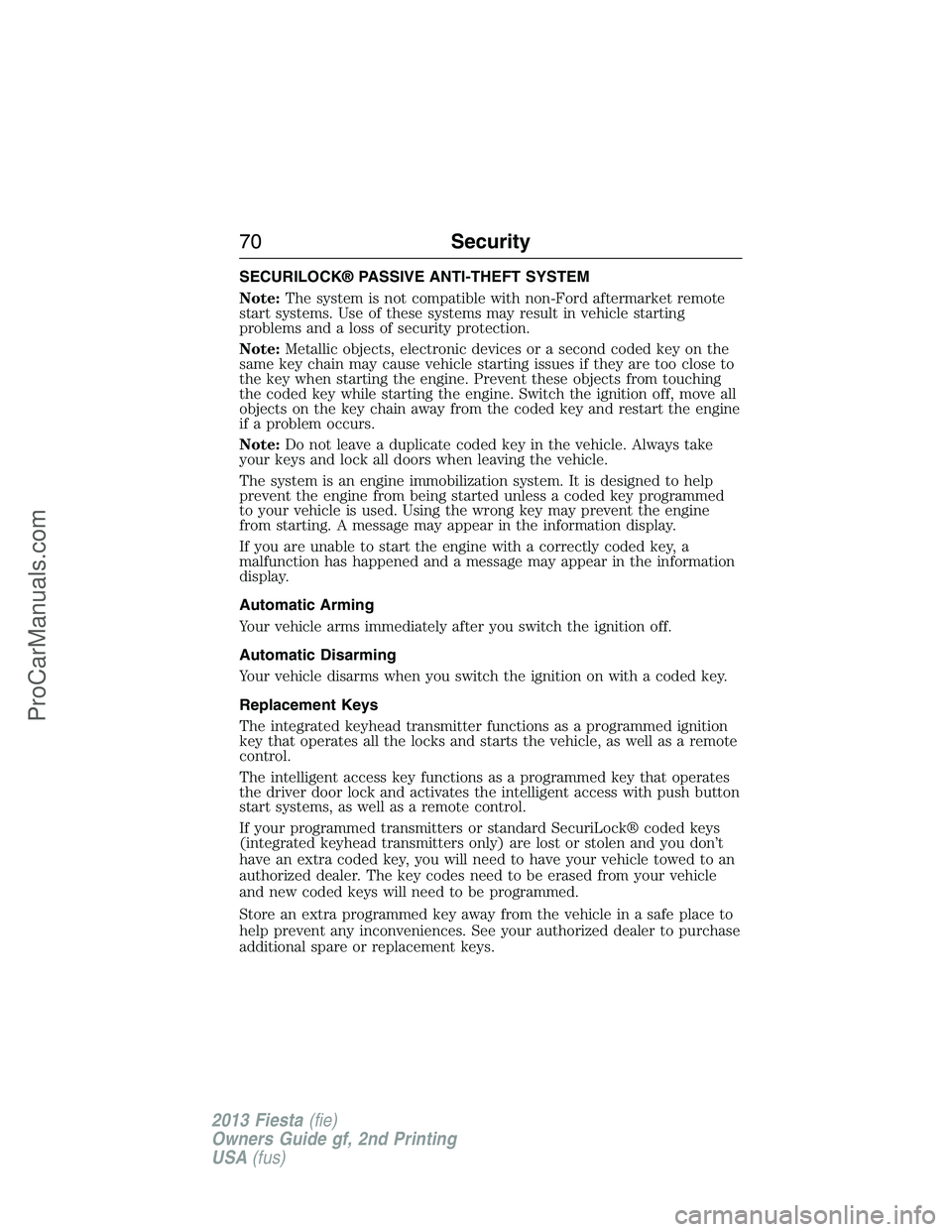
SECURILOCK® PASSIVE ANTI-THEFT SYSTEM
Note:The system is not compatible with non-Ford aftermarket remote
start systems. Use of these systems may result in vehicle starting
problems and a loss of security protection.
Note:Metallic objects, electronic devices or a second coded key on the
same key chain may cause vehicle starting issues if they are too close to
the key when starting the engine. Prevent these objects from touching
the coded key while starting the engine. Switch the ignition off, move all
objects on the key chain away from the coded key and restart the engine
if a problem occurs.
Note:Do not leave a duplicate coded key in the vehicle. Always take
your keys and lock all doors when leaving the vehicle.
The system is an engine immobilization system. It is designed to help
prevent the engine from being started unless a coded key programmed
to your vehicle is used. Using the wrong key may prevent the engine
from starting. A message may appear in the information display.
If you are unable to start the engine with a correctly coded key, a
malfunction has happened and a message may appear in the information
display.
Automatic Arming
Your vehicle arms immediately after you switch the ignition off.
Automatic Disarming
Your vehicle disarms when you switch the ignition on with a coded key.
Replacement Keys
The integrated keyhead transmitter functions as a programmed ignition
key that operates all the locks and starts the vehicle, as well as a remote
control.
The intelligent access key functions as a programmed key that operates
the driver door lock and activates the intelligent access with push button
start systems, as well as a remote control.
If your programmed transmitters or standard SecuriLock® coded keys
(integrated keyhead transmitters only) are lost or stolen and you don’t
have an extra coded key, you will need to have your vehicle towed to an
authorized dealer. The key codes need to be erased from your vehicle
and new coded keys will need to be programmed.
Store an extra programmed key away from the vehicle in a safe place to
help prevent any inconveniences. See your authorized dealer to purchase
additional spare or replacement keys.
70Security
2013 Fiesta(fie)
Owners Guide gf, 2nd Printing
USA(fus)
ProCarManuals.com
Page 72 of 346
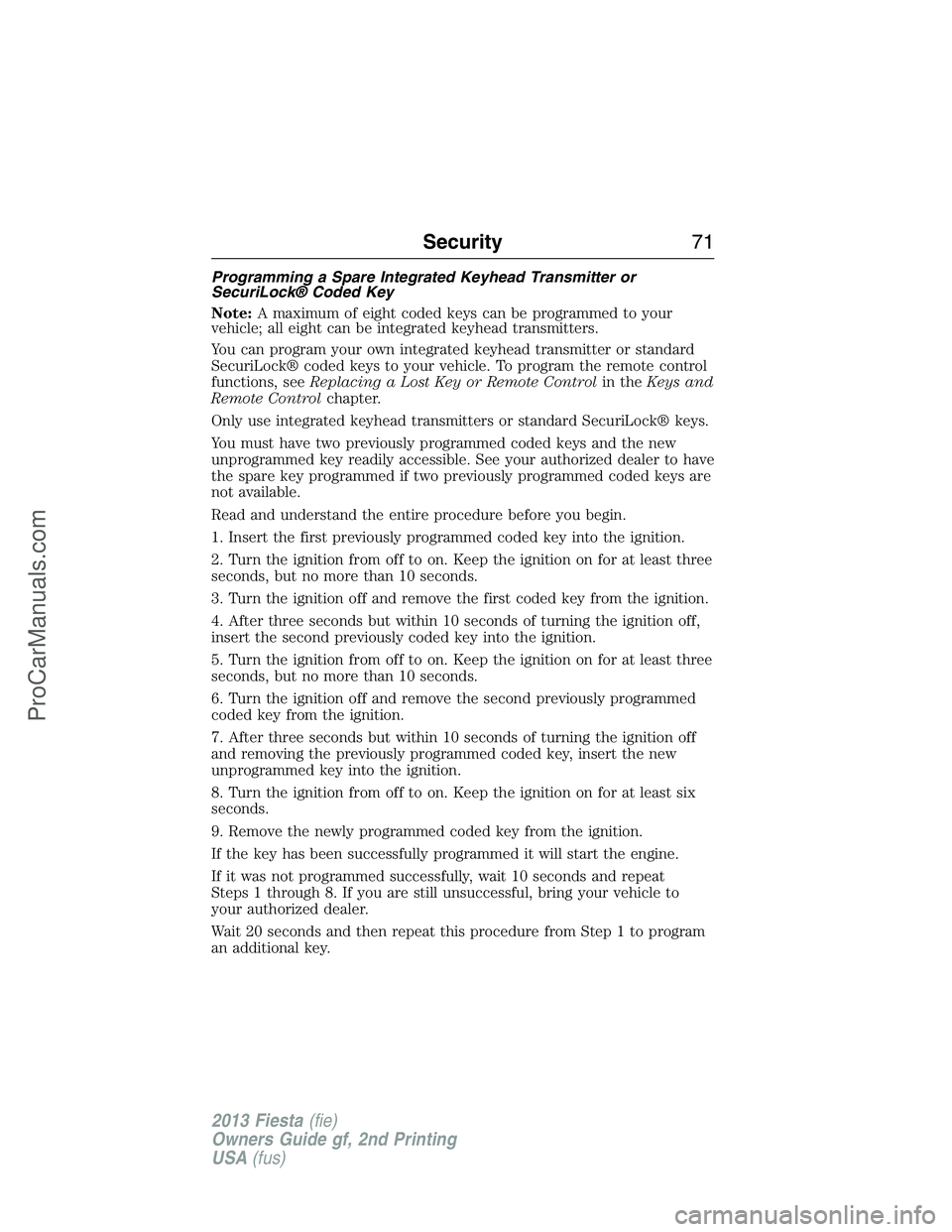
Programming a Spare Integrated Keyhead Transmitter or
SecuriLock® Coded Key
Note:A maximum of eight coded keys can be programmed to your
vehicle; all eight can be integrated keyhead transmitters.
You can program your own integrated keyhead transmitter or standard
SecuriLock® coded keys to your vehicle. To program the remote control
functions, seeReplacing a Lost Key or Remote Controlin theKeys and
Remote Controlchapter.
Only use integrated keyhead transmitters or standard SecuriLock® keys.
You must have two previously programmed coded keys and the new
unprogrammed key readily accessible. See your authorized dealer to have
the spare key programmed if two previously programmed coded keys are
not available.
Read and understand the entire procedure before you begin.
1. Insert the first previously programmed coded key into the ignition.
2. Turn the ignition from off to on. Keep the ignition on for at least three
seconds, but no more than 10 seconds.
3. Turn the ignition off and remove the first coded key from the ignition.
4. After three seconds but within 10 seconds of turning the ignition off,
insert the second previously coded key into the ignition.
5. Turn the ignition from off to on. Keep the ignition on for at least three
seconds, but no more than 10 seconds.
6. Turn the ignition off and remove the second previously programmed
coded key from the ignition.
7. After three seconds but within 10 seconds of turning the ignition off
and removing the previously programmed coded key, insert the new
unprogrammed key into the ignition.
8. Turn the ignition from off to on. Keep the ignition on for at least six
seconds.
9. Remove the newly programmed coded key from the ignition.
If the key has been successfully programmed it will start the engine.
If it was not programmed successfully, wait 10 seconds and repeat
Steps 1 through 8. If you are still unsuccessful, bring your vehicle to
your authorized dealer.
Wait 20 seconds and then repeat this procedure from Step 1 to program
an additional key.
Security71
2013 Fiesta(fie)
Owners Guide gf, 2nd Printing
USA(fus)
ProCarManuals.com
Page 73 of 346
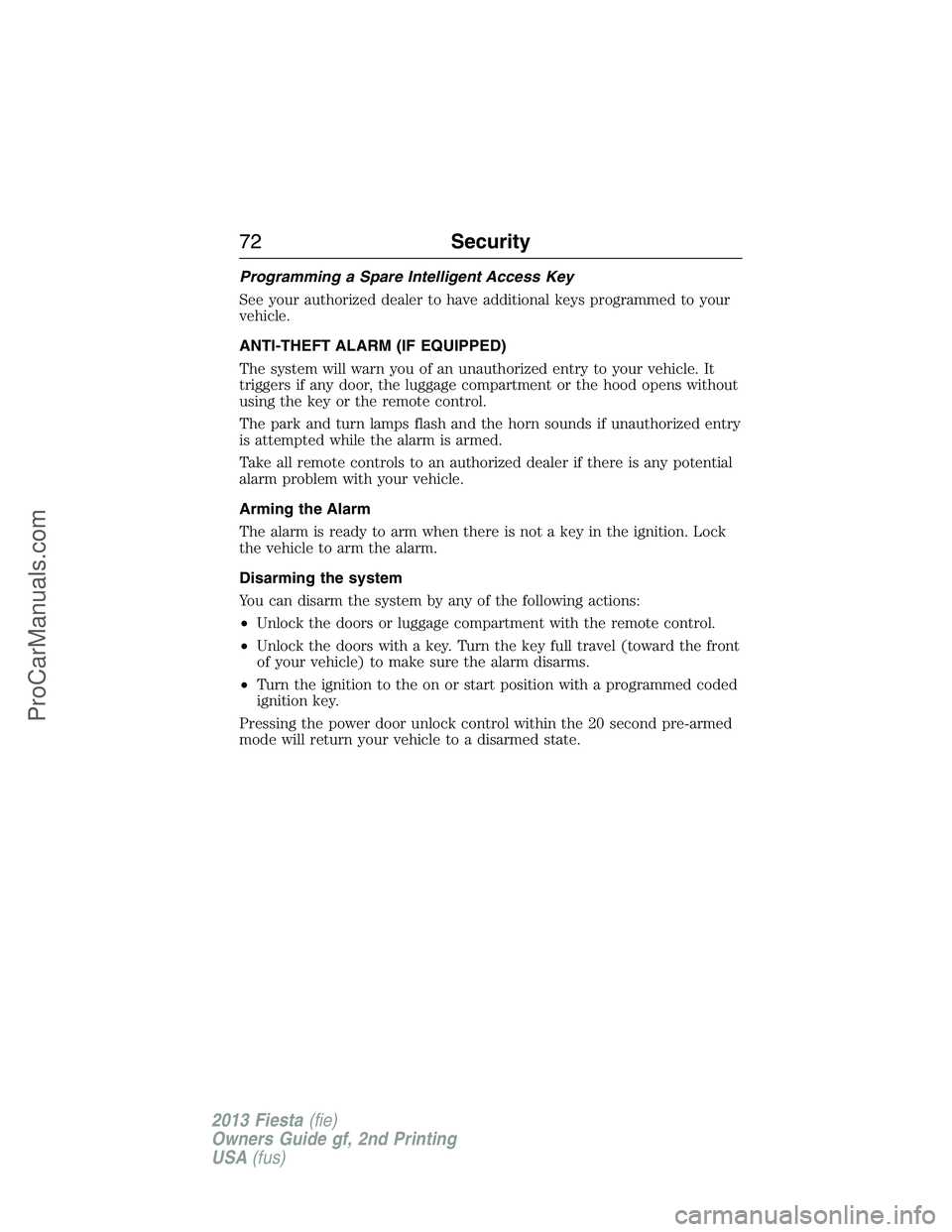
Programming a Spare Intelligent Access Key
See your authorized dealer to have additional keys programmed to your
vehicle.
ANTI-THEFT ALARM (IF EQUIPPED)
The system will warn you of an unauthorized entry to your vehicle. It
triggers if any door, the luggage compartment or the hood opens without
using the key or the remote control.
The park and turn lamps flash and the horn sounds if unauthorized entry
is attempted while the alarm is armed.
Take all remote controls to an authorized dealer if there is any potential
alarm problem with your vehicle.
Arming the Alarm
The alarm is ready to arm when there is not a key in the ignition. Lock
the vehicle to arm the alarm.
Disarming the system
You can disarm the system by any of the following actions:
•Unlock the doors or luggage compartment with the remote control.
•Unlock the doors with a key. Turn the key full travel (toward the front
of your vehicle) to make sure the alarm disarms.
•Turn the ignition to the on or start position with a programmed coded
ignition key.
Pressing the power door unlock control within the 20 second pre-armed
mode will return your vehicle to a disarmed state.
72Security
2013 Fiesta(fie)
Owners Guide gf, 2nd Printing
USA(fus)
ProCarManuals.com
Page 97 of 346
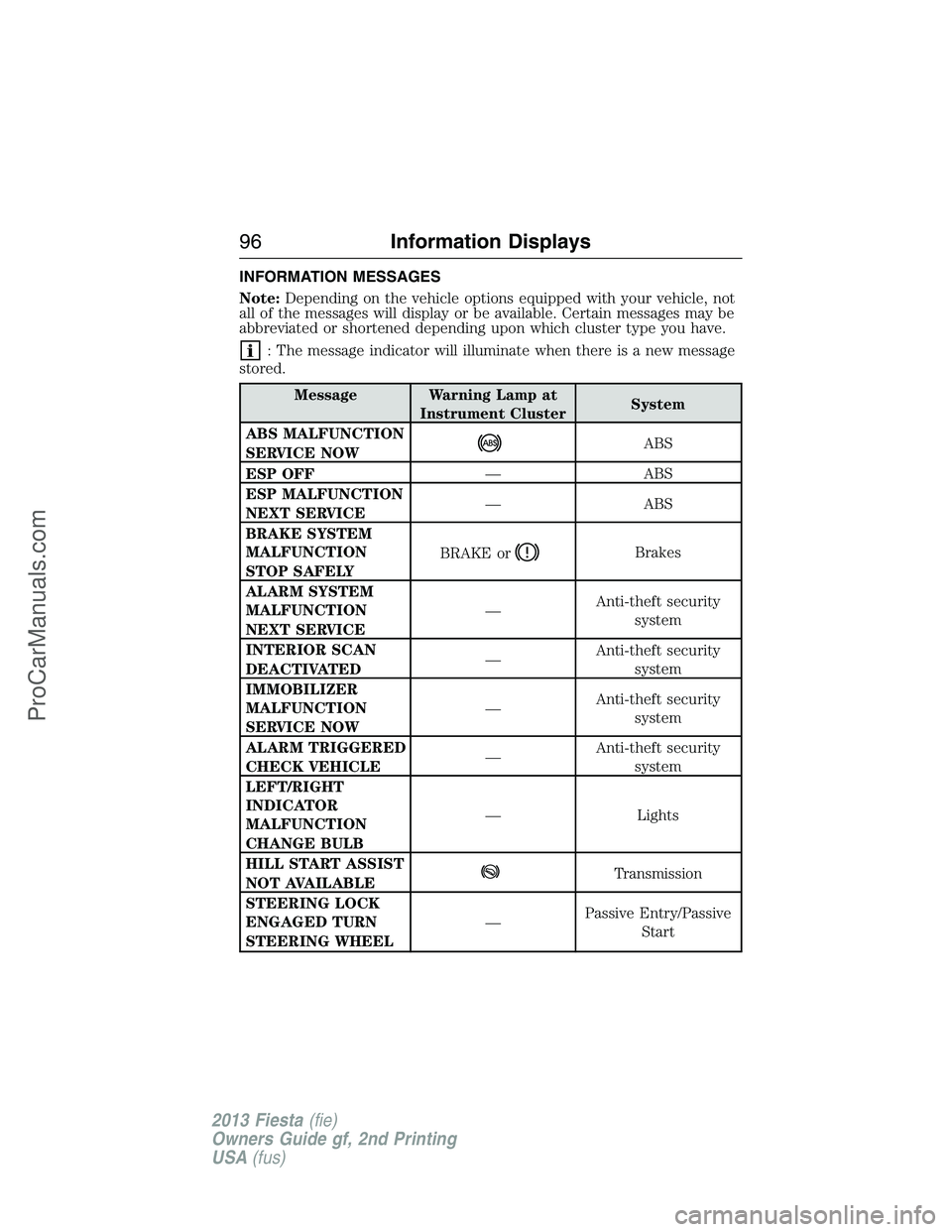
INFORMATION MESSAGES
Note:Depending on the vehicle options equipped with your vehicle, not
all of the messages will display or be available. Certain messages may be
abbreviated or shortened depending upon which cluster type you have.
: The message indicator will illuminate when there is a new message
stored.
Message Warning Lamp at
Instrument ClusterSystem
ABS MALFUNCTION
SERVICE NOW
ABS
ESP OFF— ABS
ESP MALFUNCTION
NEXT SERVICE— ABS
BRAKE SYSTEM
MALFUNCTION
STOP SAFELYBRAKE or
Brakes
ALARM SYSTEM
MALFUNCTION
NEXT SERVICE—Anti-theft security
system
INTERIOR SCAN
DEACTIVATED—Anti-theft security
system
IMMOBILIZER
MALFUNCTION
SERVICE NOW—Anti-theft security
system
ALARM TRIGGERED
CHECK VEHICLE—Anti-theft security
system
LEFT/RIGHT
INDICATOR
MALFUNCTION
CHANGE BULB— Lights
HILL START ASSIST
NOT AVAILABLE
Transmission
STEERING LOCK
ENGAGED TURN
STEERING WHEEL—Passive Entry/Passive
Start
96Information Displays
2013 Fiesta(fie)
Owners Guide gf, 2nd Printing
USA(fus)
ProCarManuals.com
Page 110 of 346
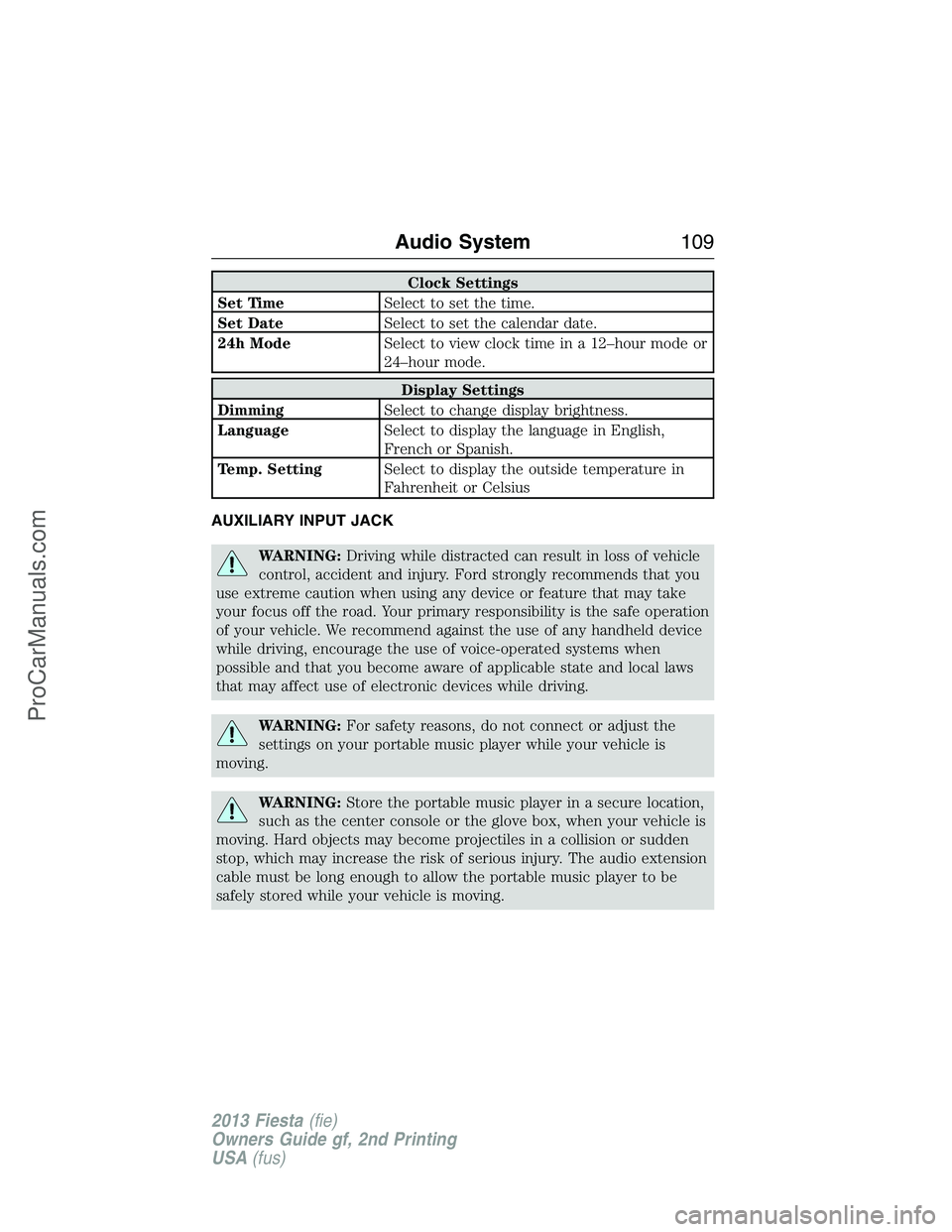
Clock Settings
Set TimeSelect to set the time.
Set DateSelect to set the calendar date.
24h ModeSelect to view clock time in a 12–hour mode or
24–hour mode.
Display Settings
DimmingSelect to change display brightness.
LanguageSelect to display the language in English,
French or Spanish.
Temp. SettingSelect to display the outside temperature in
Fahrenheit or Celsius
AUXILIARY INPUT JACK
WARNING:Driving while distracted can result in loss of vehicle
control, accident and injury. Ford strongly recommends that you
use extreme caution when using any device or feature that may take
your focus off the road. Your primary responsibility is the safe operation
of your vehicle. We recommend against the use of any handheld device
while driving, encourage the use of voice-operated systems when
possible and that you become aware of applicable state and local laws
that may affect use of electronic devices while driving.
WARNING:For safety reasons, do not connect or adjust the
settings on your portable music player while your vehicle is
moving.
WARNING:Store the portable music player in a secure location,
such as the center console or the glove box, when your vehicle is
moving. Hard objects may become projectiles in a collision or sudden
stop, which may increase the risk of serious injury. The audio extension
cable must be long enough to allow the portable music player to be
safely stored while your vehicle is moving.
Audio System109
2013 Fiesta(fie)
Owners Guide gf, 2nd Printing
USA(fus)
ProCarManuals.com
Page 147 of 346
AUTOMATIC TRANSMISSION (IF EQUIPPED)
WARNING:Do not apply the brake pedal and accelerator pedal
simultaneously. Applying both pedals simultaneously for more
than three seconds will limit engine rpm, which may result in difficulty
maintaining speed in traffic and could lead to serious injury.
WARNING:Always set the parking brake fully and make sure
the gearshift is latched in P (Park). Turn the ignition to the off
position and remove the key whenever you leave your vehicle.
Note:The automatic transmission performs a series of automated checks
when the ignition is turned to the off position. A slight clicking sound
may be heard and is considered a normal part of operation.
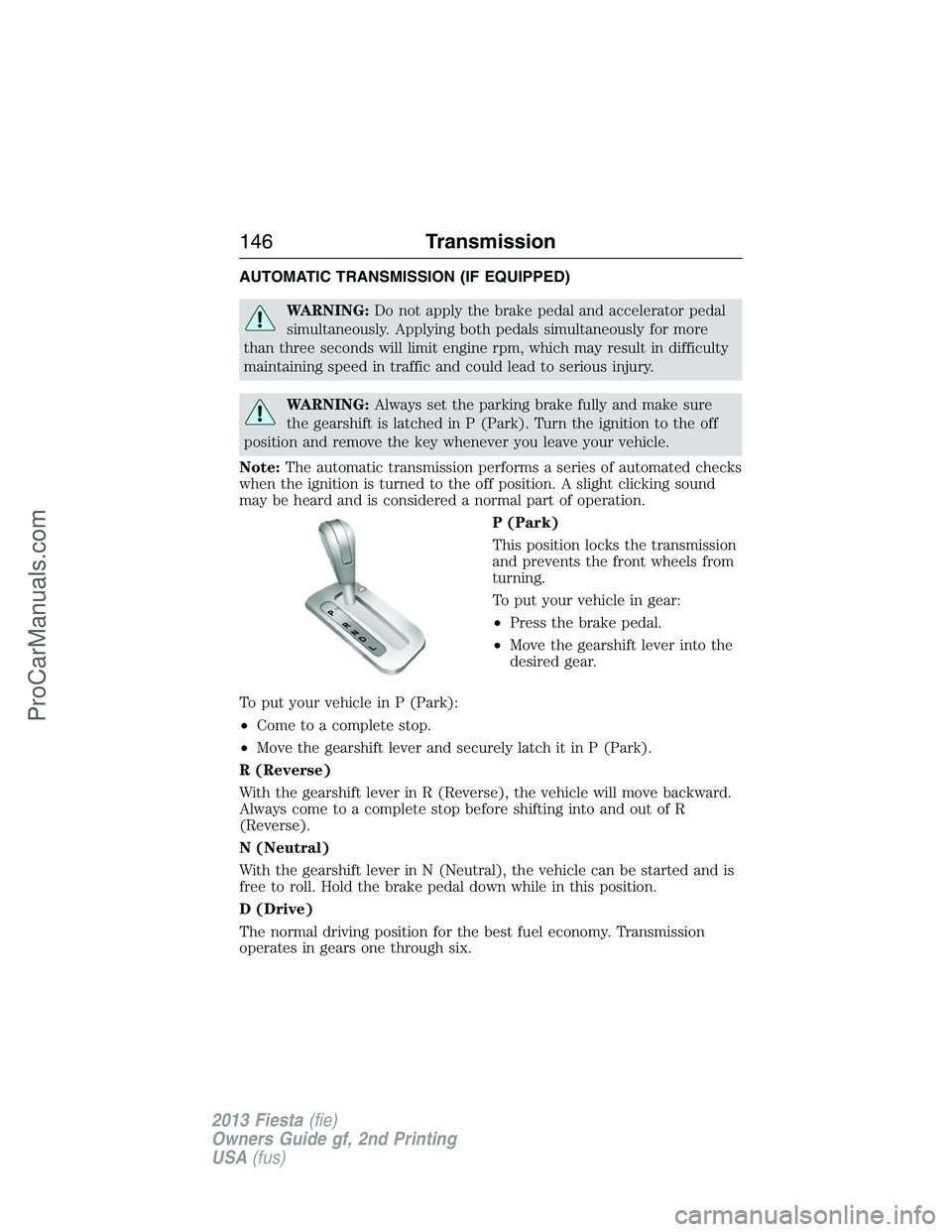
P (Park)
This position locks the transmission
and prevents the front wheels from
turning.
To put your vehicle in gear:
•Press the brake pedal.
•Move the gearshift lever into the
desired gear.
To put your vehicle in P (Park):
•Come to a complete stop.
•Move the gearshift lever and securely latch it in P (Park).
R (Reverse)
With the gearshift lever in R (Reverse), the vehicle will move backward.
Always come to a complete stop before shifting into and out of R
(Reverse).
N (Neutral)
With the gearshift lever in N (Neutral), the vehicle can be started and is
free to roll. Hold the brake pedal down while in this position.
D (Drive)
The normal driving position for the best fuel economy. Transmission
operates in gears one through six.
146Transmission
2013 Fiesta(fie)
Owners Guide gf, 2nd Printing
USA(fus)
ProCarManuals.com