ECO mode FORD FIESTA 2014 Owner's Guide
[x] Cancel search | Manufacturer: FORD, Model Year: 2014, Model line: FIESTA, Model: FORD FIESTA 2014Pages: 398, PDF Size: 6.09 MB
Page 300 of 398
Using the Touch-Sensitive
Controls
To turn a feature on or off using the
touch-sensitive controls:
•
Make sure your hands are clean and
dry.
• Press firmly on the center of a control
graphic or menu item.
• Keep metal objects or other conductive
material away from the surface of the
touchscreen.
Depending on your vehicle ’s option
package and software, it may also have
the following controls:
• Power: Switch the media features on
or off.
• VOL:
Adjust the volume of playing
media.
• Seek:
Use as you normally would in
media modes.
• Tune:
Use as you normally would in
media modes.
• Eject:
Eject a CD from the
entertainment system.
• SOURCE:
Touch the control
repeatedly to switch between media
modes.
• SOUND:
Adjust the settings for:
• Bass
• Treble
• Midrange
• Balance
• Fade
• DSP (Digital Signal Processing)
• Occupancy Mode
• Speed Compensated Volume.
• Hazard warning flasher:
Switch the
hazard warning flashers on or off. Cleaning the Touchscreen Display
Use a dry, clean, soft cloth. If dirt or
fingerprints are still visible, apply a small
amount of alcohol to the cloth. Do not pour
or spray alcohol onto the display. Do not
use detergent or any type of solvent to
clean the display.
Support
The SYNC support team is available:
•
Monday-Saturday, 8:30am-8:00pm
EST.
• United States: 1-888-270-1055
• Canada: 1-800-565-3673
Note: Times are subject to change due to
holidays.
Safety Information WARNING
Driving while distracted can result in
loss of vehicle control, crash and
injury. We strongly recommend that
you use extreme caution when using any
device that may take your focus off the
road. Your primary responsibility is the safe
operation of your vehicle. We recommend
against the use of any handheld device
while driving and encourage the use of
voice-operated systems when possible.
Make sure you are aware of all applicable
local laws that may affect the use of
electronic devices while driving •
Do not attempt to service or repair the
system. Have your vehicle checked by
an authorized dealer.
• Do not operate media devices if the
power cables are broken or damaged.
297
Fiesta (CCT) Vehicles Built From: 01-04-2013, Vehicles Built Up To: 31-12-2013 MyFord Touch
™
(If Equipped)
ProCarManuals.com
Page 307 of 398
From this screen, you can also make other
adjustments such as 12-hour or 24-hour
mode, activate GPS time synchronization
and have the system automatically update
new time zones.
You can also turn the outside air
temperature display off and on. It appears
at the top center of the touchscreen, next
to the time and date.
The system automatically saves any
updates you make to the settings.
Display
You can adjust the touchscreen display
through the touchscreen or by pressing the
voice button on the steering wheel controls
and when prompted, say, "Display
settings".
To make adjustments using the
touchscreen, press:
1. Settings icon.
2. Display
.
Then select from the following:
• Brightness
allows you to make the
screen display brighter or dimmer.
• Mode
allows you to set the screen to
a certain brightness or have the system
automatically change based on the
outside light level.
• If you select
AUTO or NIGHT, you
have the options of turning the
display's Auto Dim feature on or off
and changing the Auto Dim Manual
Offset feature.
• Edit Wallpaper
allows you to display
the default photo or upload your own. Uploading Photos for Your Home
Screen Wallpaper
Note:
You cannot load photos directly from
your camera. You must access the photos
either from your USB mass storage device
or from an SD card.
Note: Photographs with extremely large
dimensions (such as 2048 x 1536) may not
be compatible and appear as a blank
(black) image on the display.
Your system allows you to upload and view
up to 32 photos. To access, press:
1. Settings
icon.
2. Display
.
3. Edit Wallpaper
.
4. follow the system prompts to upload your photographs.
Only the photograph(s), which meets the
following conditions, display:
• Compatible file formats are as follows:
.jpg, .gif, .png, .bmp
• Each file must be 1.5 MB or less.
• Recommended dimensions: 800 x 384
Sound To make adjustments using the
touchscreen, press:
1. Settings
icon.
2. Sound
.
Then select from the following:
• Bass
• Midrange
• Treble
• Set Balance and Fade
• Occupancy Mode
304
Fiesta (CCT) Vehicles Built From: 01-04-2013, Vehicles Built Up To: 31-12-2013 MyFord Touch
™
(If Equipped)
ProCarManuals.comE142607 E142607 E142607
Page 330 of 398
This feature allows you to plug in media
playing devices, memory sticks, flash drives
or thumb drives, and charge devices if they
support this feature.
In order to playback video from your iPod®
or iPhone®, you must have a special
combination USB/RCA composite video
cable (which you can buy from Apple®).
When the cable is connected to your iPod®
or iPhone®, plug the other end into both
the RCA jacks and the USB port.
Playing Music from Your Device
Insert your device and select the
SD Card or USB tab once the
system recognizes it. You can
then select from the following options:
Repeat
This feature replays the currently playing
song or album.
Shuffle
Touch this button to play music on the
selected album or folder in random order.
Similar Music
This feature allows you to choose music
similar to what is currently playing.
More Info
Touch this button to see disc information
such as current track, artist name, album
and genre.
Options
Touch this button to view and adjust
various media settings.
Sound Settings
allows you to adjust
settings for:
• Bass
• Midrange •
Treble
• Balance and Fade
• DSP (Digital Signal processing)
• Occupancy Mode
• Speed Compensated Volume.
Note: Your vehicle may not have all these
sound settings.
Media Player Settings
allows you to
select more settings, which is under Media
Player. See
Settings (page 303).
Device Information
displays software
and firmware information about the
currently connected media device.
Update Media Index indexes your device
each time you connect it to make sure you
have the latest voice commands available
for all media on the device.
Browse
This feature allows you to view the
contents of the device. It also allows you
to search by categories, such as genre,
artist or album.
If you want to view song information such
as Title, Artist, File, Folder, Album, and
Genre, touch the on-screen album art.
You can also touch
What’ s Playing to
hear how the system pronounces the
current band and song. This can be helpful
when using voice commands to make sure
the system correctly plays your request.
SD Card and USB Voice Commands If you are listening to a USB
device or an SD card, press the
voice button on the steering
wheel controls. When prompted, say any
of the following commands.
If you are not listening to a USB device or
an SD card, press the voice button and,
after the tone, say "USB" or "SD card",
then any of the following commands.
327
Fiesta (CCT) Vehicles Built From: 01-04-2013, Vehicles Built Up To: 31-12-2013 MyFord Touch
™
(If Equipped)
ProCarManuals.comE142611 E142599
Page 334 of 398
•
Call waiting notification
• Caller ID.
Other features, such as text messaging
using Bluetooth and automatic phonebook
download, are phone-dependent features.
To check your phone ’s compatibility, see
your phone ’s user manual and visit
www.SYNCMyRide.com,
www.SYNCMyRide.ca or
www.syncmaroute.ca.
Pairing Your Phone for the First
Time WARNING
Driving while distracted can result in
loss of vehicle control, crash and
injury. We strongly recommend that
you use extreme caution when using any
device that may take your focus off the
road. Your primary responsibility is the safe
operation of your vehicle. We recommend
against the use of any handheld device
while driving and encourage the use of
voice-operated systems when possible.
Make sure you are aware of all applicable
local laws that may affect the use of
electronic devices while driving. The first thing you must do to use the
phone features of SYNC is to pair your
Bluetooth-enabled cellular phone with
SYNC. This allows you to use your phone
in a hands-free manner.
Note:
Put the transmission in position P.
Turn on your vehicle ignition and the radio.
1. Touch
Add Phone in the upper left
corner of the touchscreen. Find SYNC
appears on the screen, and instructs
you to begin the pairing process from
your device.
2. Make sure that Bluetooth is set to
On
and that your cellular phone is in the
proper mode. See your phone ’s manual
if necessary. Note:
Select
SYNC, and a six-digit PIN
appears on your device.
3. If you are prompted to enter a PIN on your device, it does not support Secure
Simple Pairing. To pair, enter the PIN
displayed on the touchscreen. Skip the
next step.
4. When prompted on your phone ’s
display, confirm that the PIN provided
by SYNC matches the PIN displayed
on your cellular phone.
5. The display indicates when the pairing
is successful.
SYNC may prompt you with more phone
options. For more information on your
phone's capability, see your phone's
manual and visit the website.
Pairing Subsequent Phones
Note: Put the transmission in position
P.
Turn on your vehicle ignition and the radio.
Make sure that Bluetooth is set to
On and
that your cellular phone is in the proper
mode. See your device's manual if
necessary. To pair a subsequent phone,
press:
1. Phone
.
2. Settings
.
3. BT Devices
.
4. Add Device
.
5. When prompted on your phone's display, enter the six-digit PIN provided
by SYNC on the screen. The display
indicates when the pairing is
successful.
SYNC may prompt you with more phone
options. For more information on your
phone's capability, see your phone's
manual and visit the website.
331
Fiesta (CCT) Vehicles Built From: 01-04-2013, Vehicles Built Up To: 31-12-2013 MyFord Touch
™
(If Equipped)
ProCarManuals.com
Page 353 of 398
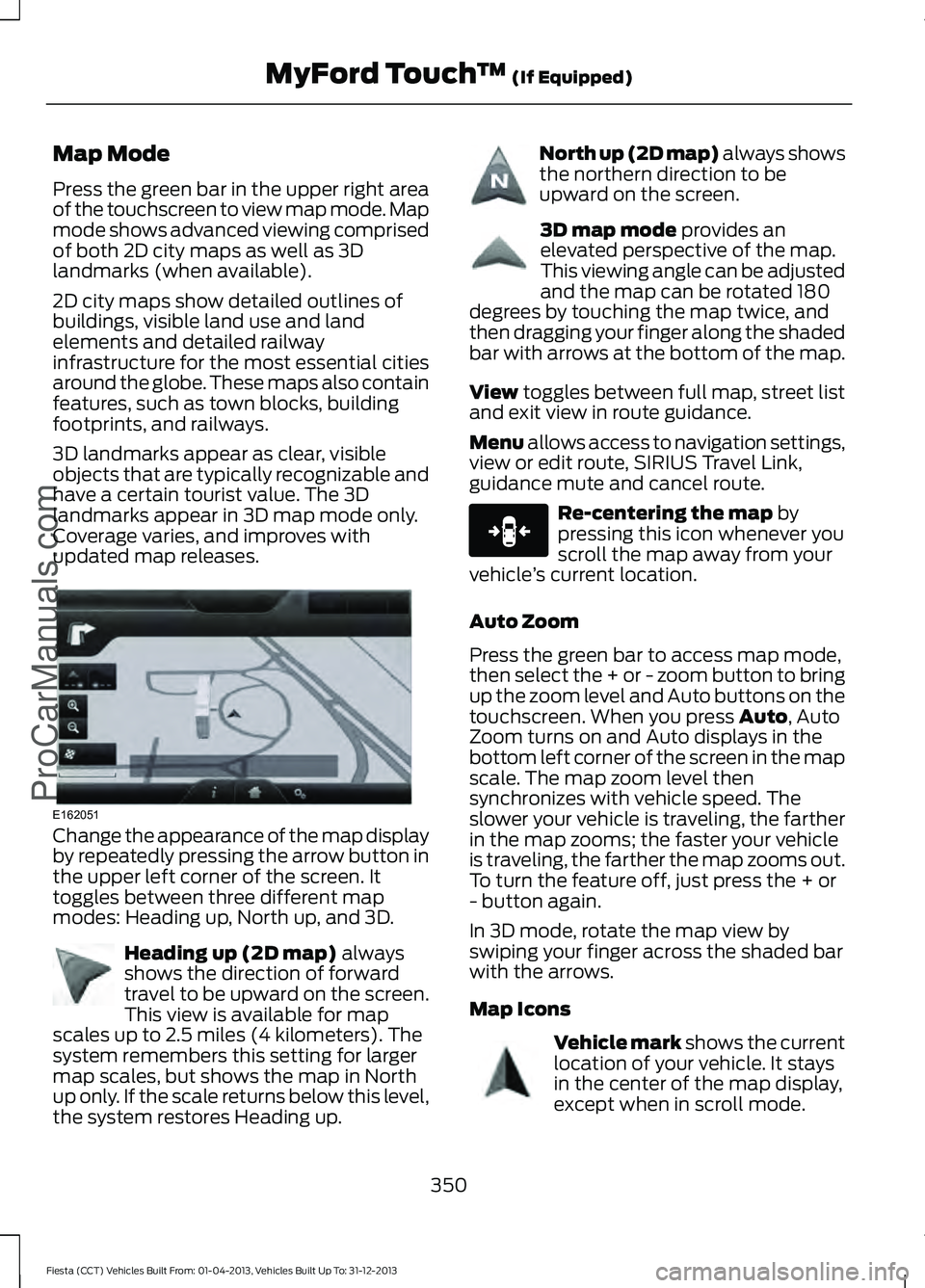
Map Mode
Press the green bar in the upper right area
of the touchscreen to view map mode. Map
mode shows advanced viewing comprised
of both 2D city maps as well as 3D
landmarks (when available).
2D city maps show detailed outlines of
buildings, visible land use and land
elements and detailed railway
infrastructure for the most essential cities
around the globe. These maps also contain
features, such as town blocks, building
footprints, and railways.
3D landmarks appear as clear, visible
objects that are typically recognizable and
have a certain tourist value. The 3D
landmarks appear in 3D map mode only.
Coverage varies, and improves with
updated map releases.
Change the appearance of the map display
by repeatedly pressing the arrow button in
the upper left corner of the screen. It
toggles between three different map
modes: Heading up, North up, and 3D.
Heading up (2D map) always
shows the direction of forward
travel to be upward on the screen.
This view is available for map
scales up to 2.5 miles (4 kilometers). The
system remembers this setting for larger
map scales, but shows the map in North
up only. If the scale returns below this level,
the system restores Heading up. North up (2D map) always shows
the northern direction to be
upward on the screen.
3D map mode
provides an
elevated perspective of the map.
This viewing angle can be adjusted
and the map can be rotated 180
degrees by touching the map twice, and
then dragging your finger along the shaded
bar with arrows at the bottom of the map.
View
toggles between full map, street list
and exit view in route guidance.
Menu allows access to navigation settings,
view or edit route, SIRIUS Travel Link,
guidance mute and cancel route. Re-centering the map
by
pressing this icon whenever you
scroll the map away from your
vehicle ’s current location.
Auto Zoom
Press the green bar to access map mode,
then select the + or - zoom button to bring
up the zoom level and Auto buttons on the
touchscreen. When you press
Auto, Auto
Zoom turns on and Auto displays in the
bottom left corner of the screen in the map
scale. The map zoom level then
synchronizes with vehicle speed. The
slower your vehicle is traveling, the farther
in the map zooms; the faster your vehicle
is traveling, the farther the map zooms out.
To turn the feature off, just press the + or
- button again.
In 3D mode, rotate the map view by
swiping your finger across the shaded bar
with the arrows.
Map Icons Vehicle mark
shows the current
location of your vehicle. It stays
in the center of the map display,
except when in scroll mode.
350
Fiesta (CCT) Vehicles Built From: 01-04-2013, Vehicles Built Up To: 31-12-2013 MyFord Touch
™
(If Equipped)
ProCarManuals.comE162051 E142642 E142643 E142644 E146188 E142646
Page 388 of 398
A
A/C
See: Climate Control........................................... 97
About This Manual...........................................7
Protecting the Environment................................ 7
ABS See: Brakes............................................................ 134
ABS driving hints See: Hints on Driving With Anti-Lock
Brakes.................................................................134
Accessories....................................................239 Exterior style........................................................ 239
Interior style......................................................... 239
Lifestyle................................................................. 239
Peace of mind..................................................... 239
Accessories See: Replacement Parts
Recommendation.............................................. 9
Adjusting the Headlamps.........................188 Horizontal Aim Adjustment............................ 189
Vertical Aim Adjustment................................. 188
Adjusting the Steering Wheel
....................63
Airbag Disposal...............................................42
Air Conditioning See: Climate Control........................................... 97
Air Vents
.............................................................97
Center Air Vents.................................................... 97
Side Air Vent........................................................... 97
Alarm See: Anti-Theft Alarm......................................... 61
Ambient Lighting
.............................................71
Anti-Theft Alarm.............................................61
Alarm System......................................................... 61
Arming the Alarm.................................................. 61
Disarming the Alarm............................................ 61
Triggering the Alarm............................................. 61
Appendices....................................................355
Audible Warnings and Indicators.............84 Automatic Transmission................................... 84
Headlamps On...................................................... 84
Key Outside Car.................................................... 84
Low Fuel.................................................................. 84
Safety Belt Minder............................................... 84
Audio Control
...................................................63
........................................................................\
............. 63
Audio System................................................244 General Information......................................... 244Audio Troubleshooting
..............................258
Audio unit - Vehicles With: AM/FM/CD/SYNC....................................249
Alternative Frequencies................................... 253
Automatic Volume Control............................ 252
Autostore Control.............................................. 252
News Broadcasts............................................... 253
Regional Mode.................................................... 253
Sound Button....................................................... 251
Station Preset Buttons.................................... 252
Station Tuning Control..................................... 252
Waveband Button.............................................. 252
Audio unit - Vehicles With: AM/FM/CD..................................................245
Alternative Frequencies.................................. 248
Automatic Volume Control............................ 248
Autostore Control.............................................. 248
News Broadcasts.............................................. 248
Regional Mode.................................................... 249
Sound Button...................................................... 247
Station Preset Buttons.................................... 248
Station Tuning Control..................................... 247
Waveband Button.............................................. 247
Audio unit - Vehicles With: Sony Audio System/Touchscreen Display
..............255
Audio unit - Vehicles With: Touchscreen Display
..........................................................254
Autolamps........................................................68
Automatic Climate Control........................99 Temperature Control........................................ 100
Automatic Transmission
............................128
Emergency Park Position Release
Lever..................................................................... 131
Hints on Driving with an Automatic Transmission.................................................... 131
Selector Lever Positions................................... 129
Sport Mode and Manual Shifting.................130
Automatic Transmission Fluid Check.............................................................185
Auxiliary Input Jack......................................257
Auxiliary Power Points..................................111 12 Volt DC Power Point....................................... 111
Location.................................................................... 111
B
Bonnet Lock See: Opening and Closing the Hood............177
385
Fiesta (CCT) Vehicles Built From: 01-04-2013, Vehicles Built Up To: 31-12-2013 Index
ProCarManuals.com
Page 390 of 398
Creating a MyKey...........................................48
Programming or Changing Configurable
Settings............................................................... 49
Cruise Control.................................................64 Principle of Operation....................................... 142
Cruise control See: Using Cruise Control................................ 142
Cup Holders.....................................................112
Customer Assistance.................................160
D
Data Recording
................................................10
Event Data Recording.......................................... 10
Service Data Recording...................................... 10
Daytime Running Lamps............................69
Direction Indicators.......................................69
Driver and Passenger Airbags....................35 Children and Airbags........................................... 35
Proper Driver and Front Passenger Seating Adjustment........................................................ 35
Driver Knee Airbag.........................................39
Driving Aids
.....................................................144
Driving Hints....................................................157
Driving Through Water................................157
DRL See: Daytime Running Lamps......................... 69
E
Economical Driving
.......................................157
Emission Control System...........................123 On-Board Diagnostics (OBD-II).................... 124
Readiness for Inspection/Maintenance (I/M) Testing.................................................... 124
End User License Agreement..................355 SYNC® End User License Agreement
(EULA).............................................................. 355
Engine Block Heater.....................................116 Using the Engine Block Heater........................ 117
Engine Coolant Check................................183 Adding Engine Coolant.................................... 184
Checking the Engine Coolant......................... 183
Recycled Engine Coolant................................. 185
Severe Climates.................................................. 185
Engine Immobilizer See: Passive Anti-Theft System.................... 60Engine Oil Check...........................................182
Adding Engine Oil............................................... 182
Resetting the Oil Life Monitoring System............................................................... 183
Engine Oil Dipstick - 1.0L EcoBoost™..................................................182
Engine Oil Dipstick - 1.6L Duratec-16V Ti-VCT (88kW/120PS) - Sigma..........182
Engine Oil Dipstick - 1.6L EcoBoost™..................................................182
Engine Specifications.................................235 Drivebelt Routing............................................... 235
Entertainment................................................313 AM/FM Radio....................................................... 314
Bluetooth Audio................................................. 329
Browsing Device Content................................. 313
CD........................................................................\
.... 325
SD Card Slot and USB Port........................... 326
SIRIUS® Satellite Radio (If Activated)........................................................ 320
Supported Media Players, Formats and Metadata Information................................ 329
Event Data Recording See: Data Recording............................................ 10
Export Unique Options
..................................12
Exterior Mirrors.................................................74
Fold-Away Exterior Mirrors................................ 75
Integrated Blind Spot Mirrors........................... 75
Power Exterior Mirrors......................................... 74
F
Fastening the Safety Belts..........................27 Restraint of Pregnant Women......................... 27
Safety Belt Extension Assembly.................... 29
Safety Belt Locking Modes............................... 28
Floor Mats
.......................................................158
Fog Lamps - Front See: Front Fog Lamps........................................ 69
Ford Credit
.........................................................12
(U.S. Only)................................................................ 12
Ford Extended Service Plan (ESP)........241 SERVICE PLANS (CANADA ONLY).............243
SERVICE PLANS (U.S. Only).......................... 241
Front Fog Lamps............................................69
Front Passenger Sensing System............36
Fuel and Refueling........................................118
387
Fiesta (CCT) Vehicles Built From: 01-04-2013, Vehicles Built Up To: 31-12-2013 Index
ProCarManuals.com
Page 393 of 398
Manual Transmission..................................126
Parking Your Vehicle........................................... 127
Recommended Shift Speeds......................... 126
Reverse................................................................... 126
Using the Clutch.................................................. 126
Message Center See: Information Displays................................. 85
Mirrors See: Heated Windows and Mirrors..............103
See: Windows and Mirrors................................. 72
Mobile Communications Equipment......................................................10
Moonroof...........................................................76 Moonroof Sliding Shade.................................... 76
Opening and Closing the Moonroof..............76
Venting the Moonroof......................................... 76
Motorcraft Parts
...........................................236
MyFord Touch ™...........................................295
General Information......................................... 295
MyKey Troubleshooting
...............................50
MyKey ™............................................................48
Principle of Operation........................................ 48
N
Navigation
......................................................345
cityseekr................................................................. 347
Map Mode............................................................ 350
Navigation Map Updates................................ 352
Navigation Voice Commands....................... 352
Point of Interest (POI) Categories...............347
Quick-touch Buttons......................................... 351
Setting a Destination....................................... 345
Setting Your Navigation Preferences.........348
O
Oil Check See: Engine Oil Check....................................... 182
Opening and Closing the Hood
................177
Closing the Hood................................................ 178
Opening the Hood............................................... 177
Ordering Additional Owner's Literature......................................................164
Obtaining a French Owner ’s Manual..........164 P
Parking Aid
......................................................138
Rear Sensing System........................................ 139
Parking Aids....................................................138 Principle of Operation....................................... 138
Parking Brake
.................................................134
All Vehicles............................................................ 135
Vehicles With Automatic Transmission................................................... 134
Vehicles With Manual Transmission...........134
Passive Anti-Theft System
........................60
SecuriLock®.......................................................... 60
PATS See: Passive Anti-Theft System.................... 60
Perchlorate.........................................................12
Personalized Settings..................................89 Measure Units....................................................... 89
Switching Chimes Off........................................ 89
Personal Safety System ™
..........................33
How Does the Personal Safety System
Work?................................................................... 33
Phone...............................................................330 Making Calls......................................................... 332
Pairing Subsequent Phones........................... 331
Pairing Your Phone for the First Time.........331
Phone Menu Options........................................ 332
Phone Settings................................................... 334
Phone Voice Commands................................ 335
Receiving Calls.................................................... 332
Text Messaging................................................... 333
Power Door Locks See: Locking and Unlocking............................. 52
Power Steering Fluid Check.....................185
Power Windows..............................................72 Accessory Delay.................................................... 73
Bounce-Back.......................................................... 72
One-Touch Down................................................. 72
One-Touch Up....................................................... 72
Window Lock.......................................................... 72
R
Rear Seats
......................................................108
Folding the Seatback....................................... 108
Unfolding the Seatback................................... 109
Rear Under Floor Storage..........................152 Adjustable Load Floor....................................... 152
390
Fiesta (CCT) Vehicles Built From: 01-04-2013, Vehicles Built Up To: 31-12-2013 Index
ProCarManuals.com
Page 395 of 398
Starting and Stopping the Engine...........113
General Information........................................... 113
Steering............................................................144 Electric Power Steering.................................... 144
Steering Wheel...............................................63
Storage Compartments..............................112
Sunroof See: Moonroof....................................................... 76
Supplementary Restraints System.........34 Principle of Operation........................................ 34
Switching Off the Engine............................116 Vehicles With a Turbocharger......................... 116
Symbols Glossary
.............................................7
SYNC™ Applications and Services.......274 911 Assist................................................................ 274
SYNC AppLink.................................................... 280
SYNC Services: Traffic, Directions & Information (TDI).......................................... 277
Vehicle Health Report...................................... 276
SYNC™............................................................259 General Information......................................... 259
SYNC™ Troubleshooting
.........................289
T
Tailgate See: Manual Liftgate........................................... 55
Technical Specifications - 1.0L EcoBoost™................................................200
Capacities............................................................ 200
Specifications..................................................... 200
Technical Specifications - 1.6L Duratec-16V Ti-VCT (Sigma)
..............202
Capacities............................................................. 202
Specifications..................................................... 203
Technical Specifications - 1.6L EcoBoost™
..................................................201
Capacities.............................................................. 201
Specifications...................................................... 201
Technical Specifications See: Capacities and Specifications............235
The Better Business Bureau (BBB) Auto Line Program (U.S. Only)........................162 Tire Care
............................................................211
Glossary of Tire Terminology.......................... 213
Information About Uniform Tire Quality Grading................................................................ 211
Information Contained on the Tire Sidewall............................................................. 214
Temperature A B C............................................. 212
Traction AA A B C................................................ 212
Treadwear.............................................................. 212
Tire Pressure Monitoring System...........226 Changing Tires With a Tire Pressure
Monitoring System........................................ 227
Understanding Your Tire Pressure Monitoring System ....................................... 227
Tires See: Wheels and Tires........................................ 211
Towing a Trailer
.............................................154
Towing the Vehicle on Four Wheels...........................................................154
Emergency Towing............................................. 154
Recreational Towing.......................................... 154
Towing..............................................................154
Transmission Code Designation............238
Transmission..................................................126
Transmission See: Transmission.............................................. 126
Transporting the Vehicle............................154
Trip Computer
.................................................88
........................................................................\
............ 88
U
Under Hood Overview - 1.0L EcoBoost™..................................................179
Under Hood Overview - 1.6L Duratec-16V Ti-VCT (88kW/120PS) - Sigma..........180
Under Hood Overview - 1.6L EcoBoost™...................................................181
Using Cruise Control....................................142 Switching Cruise Control Off.......................... 143
Switching Cruise Control On.......................... 142
Using MyKey With Remote Start Systems..........................................................50
Using Snow Chains.....................................226
Using Stability Control - 1.6L EcoBoost™...................................................137
Switching Sport Mode On................................ 137
Switching the System Off................................ 137
392
Fiesta (CCT) Vehicles Built From: 01-04-2013, Vehicles Built Up To: 31-12-2013 Index
ProCarManuals.com