ECU FORD FIESTA 2014 Owner's Guide
[x] Cancel search | Manufacturer: FORD, Model Year: 2014, Model line: FIESTA, Model: FORD FIESTA 2014Pages: 398, PDF Size: 6.09 MB
Page 293 of 398
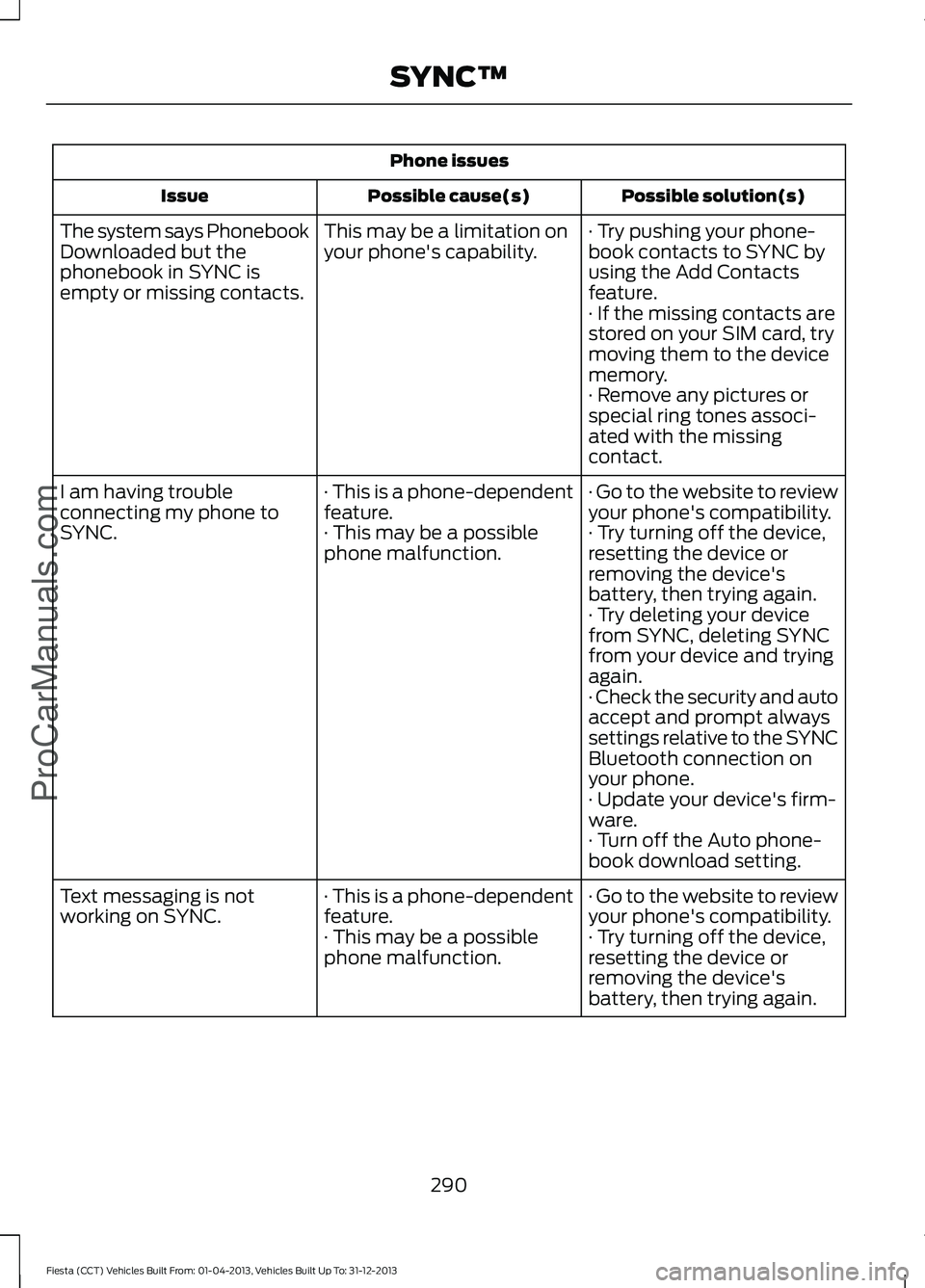
Phone issues
Possible solution(s)
Possible cause(s)
Issue
· Try pushing your phone-
book contacts to SYNC by
using the Add Contacts
feature.
This may be a limitation on
your phone's capability.
The system says Phonebook
Downloaded but the
phonebook in SYNC is
empty or missing contacts.
· If the missing contacts are
stored on your SIM card, try
moving them to the device
memory.
· Remove any pictures or
special ring tones associ-
ated with the missing
contact.
· Go to the website to review
your phone's compatibility.
· This is a phone-dependent
feature.
I am having trouble
connecting my phone to
SYNC.
· Try turning off the device,
resetting the device or
removing the device's
battery, then trying again.
· This may be a possible
phone malfunction.
· Try deleting your device
from SYNC, deleting SYNC
from your device and trying
again.
· Check the security and auto
accept and prompt always
settings relative to the SYNC
Bluetooth connection on
your phone.
· Update your device's firm-
ware.
· Turn off the Auto phone-
book download setting.
· Go to the website to review
your phone's compatibility.
· This is a phone-dependent
feature.
Text messaging is not
working on SYNC.
· Try turning off the device,
resetting the device or
removing the device's
battery, then trying again.
· This may be a possible
phone malfunction.
290
Fiesta (CCT) Vehicles Built From: 01-04-2013, Vehicles Built Up To: 31-12-2013 SYNC™ProCarManuals.com
Page 294 of 398
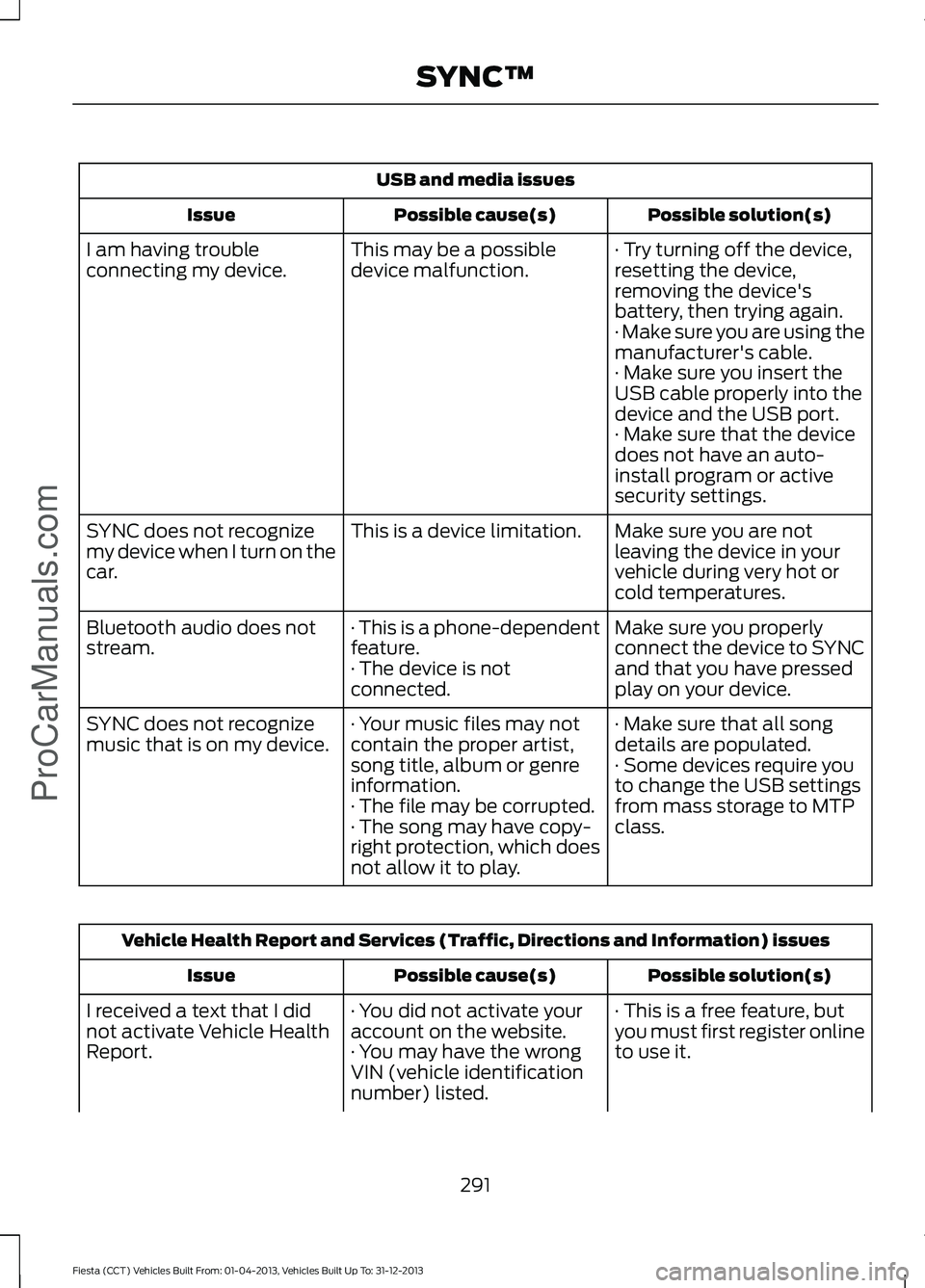
USB and media issues
Possible solution(s)
Possible cause(s)
Issue
· Try turning off the device,
resetting the device,
removing the device's
battery, then trying again.
This may be a possible
device malfunction.
I am having trouble
connecting my device.
· Make sure you are using the
manufacturer's cable.
· Make sure you insert the
USB cable properly into the
device and the USB port.
· Make sure that the device
does not have an auto-
install program or active
security settings.
Make sure you are not
leaving the device in your
vehicle during very hot or
cold temperatures.
This is a device limitation.
SYNC does not recognize
my device when I turn on the
car.
Make sure you properly
connect the device to SYNC
and that you have pressed
play on your device.
· This is a phone-dependent
feature.
· The device is not
connected.
Bluetooth audio does not
stream.
· Make sure that all song
details are populated.
· Your music files may not
contain the proper artist,
song title, album or genre
information.
SYNC does not recognize
music that is on my device.
· Some devices require you
to change the USB settings
from mass storage to MTP
class.
· The file may be corrupted.
· The song may have copy-
right protection, which does
not allow it to play. Vehicle Health Report and Services (Traffic, Directions and Information) issues
Possible solution(s)
Possible cause(s)
Issue
· This is a free feature, but
you must first register online
to use it.
· You did not activate your
account on the website.
· You may have the wrong
VIN (vehicle identification
number) listed.
I received a text that I did
not activate Vehicle Health
Report.
291
Fiesta (CCT) Vehicles Built From: 01-04-2013, Vehicles Built Up To: 31-12-2013 SYNC™ProCarManuals.com
Page 334 of 398
•
Call waiting notification
• Caller ID.
Other features, such as text messaging
using Bluetooth and automatic phonebook
download, are phone-dependent features.
To check your phone ’s compatibility, see
your phone ’s user manual and visit
www.SYNCMyRide.com,
www.SYNCMyRide.ca or
www.syncmaroute.ca.
Pairing Your Phone for the First
Time WARNING
Driving while distracted can result in
loss of vehicle control, crash and
injury. We strongly recommend that
you use extreme caution when using any
device that may take your focus off the
road. Your primary responsibility is the safe
operation of your vehicle. We recommend
against the use of any handheld device
while driving and encourage the use of
voice-operated systems when possible.
Make sure you are aware of all applicable
local laws that may affect the use of
electronic devices while driving. The first thing you must do to use the
phone features of SYNC is to pair your
Bluetooth-enabled cellular phone with
SYNC. This allows you to use your phone
in a hands-free manner.
Note:
Put the transmission in position P.
Turn on your vehicle ignition and the radio.
1. Touch
Add Phone in the upper left
corner of the touchscreen. Find SYNC
appears on the screen, and instructs
you to begin the pairing process from
your device.
2. Make sure that Bluetooth is set to
On
and that your cellular phone is in the
proper mode. See your phone ’s manual
if necessary. Note:
Select
SYNC, and a six-digit PIN
appears on your device.
3. If you are prompted to enter a PIN on your device, it does not support Secure
Simple Pairing. To pair, enter the PIN
displayed on the touchscreen. Skip the
next step.
4. When prompted on your phone ’s
display, confirm that the PIN provided
by SYNC matches the PIN displayed
on your cellular phone.
5. The display indicates when the pairing
is successful.
SYNC may prompt you with more phone
options. For more information on your
phone's capability, see your phone's
manual and visit the website.
Pairing Subsequent Phones
Note: Put the transmission in position
P.
Turn on your vehicle ignition and the radio.
Make sure that Bluetooth is set to
On and
that your cellular phone is in the proper
mode. See your device's manual if
necessary. To pair a subsequent phone,
press:
1. Phone
.
2. Settings
.
3. BT Devices
.
4. Add Device
.
5. When prompted on your phone's display, enter the six-digit PIN provided
by SYNC on the screen. The display
indicates when the pairing is
successful.
SYNC may prompt you with more phone
options. For more information on your
phone's capability, see your phone's
manual and visit the website.
331
Fiesta (CCT) Vehicles Built From: 01-04-2013, Vehicles Built Up To: 31-12-2013 MyFord Touch
™
(If Equipped)
ProCarManuals.com
Page 345 of 398
Additional sports-related voice
commands
"My teams schedule" "My teams scores""NBA headlines""NBA schedule" "NBA scores"
"NFL headlines" "NFL schedule" "NFL scores"
"NHL headlines" "NHL schedule" "NHL scores"
"WNBA headlines" "WNBA schedule" "WNBA scores" "Help"
Alerts If your vehicle is equipped with
Navigation, touch the i
(Information) button to access
these features. If your vehicle is not
equipped with Navigation, touch the corner
of the touchscreen with the green tab.
Press Alerts, and then choose from any
of the following services:
• View
the complete message.
• Delete
the message.
• Delete All
messages.
This screen displays any system messages
(such as an SD card fault). Note:
The system alerts you to any
messages by turning the information icon
yellow. After you read or delete the
messages, the icon returns to white.
Calendar If your vehicle is equipped with
Navigation, touch the i
(Information) button to access
these features. If your vehicle is not
equipped with Navigation, touch the corner
of the touchscreen with the green tab.
Press
Calendar. You can view the current
calendar by day, week or month.
911 Assist
(If Equipped) WARNINGS
Unless the 911 Assist setting is set on
before a crash, the system will not
dial for help, which could delay
response time, potentially increasing the
risk of serious injury or death after a crash. Do not wait for 911 Assist to make an
emergency call if you can do it
yourself. Dial emergency services
immediately to avoid delayed response
time, which could increase the risk of
serious injury or death after a crash. If you
do not hear 911 Assist within five seconds
of the crash, the system or phone may be
damaged or non-functional. Always place your phone in a secure
location in your vehicle so it does not
become a projectile or damaged in
a crash. Failure to do so may cause serious
injury to someone or damage the phone,
which could prevent 911 Assist from
working properly. Note:
The SYNC 911 Assist feature must be
set on prior to the incident.
342
Fiesta (CCT) Vehicles Built From: 01-04-2013, Vehicles Built Up To: 31-12-2013 MyFord Touch
™
(If Equipped)
ProCarManuals.comE142608 E142608
Page 359 of 398
Description of Other Rights and
Limitations
•
Speech Recognition: If the
SOFTWARE includes speech
recognition component(s), you should
understand that speech recognition is
an inherently statistical process and
that recognition errors are inherent in
the process. Neither FORD MOTOR
COMPANY nor its suppliers shall be
liable for any damages arising out of
errors in the speech recognition
process.
• Limitations on Reverse Engineering,
Decompilation and Disassembly:
You may not reverse engineer,
decompile, or disassemble nor permit
others to reverse engineer, decompile
or disassemble the SOFTWARE, except
and only to the extent that such activity
is expressly permitted by applicable
law notwithstanding this limitation.
• Limitations on Distributing,
Copying, Modifying and Creating
Derivative Works:
You may not
distribute, copy, make modifications
to or create derivative works based on
the SOFTWARE, except and only to the
extent that such activity is expressly
permitted by applicable law
notwithstanding this limitation.
• Single EULA:
The end user
documentation for the DEVICE and
related systems and services may
contain multiple EULAs, such as
multiple translations and/or multiple
media versions (e.g., in the user
documentation and in the software).
Even if you receive multiple EULAs, you
are licensed to use only one (1) copy of
the SOFTWARE. •
SOFTWARE Transfer:
You may
permanently transfer your rights under
this EULA only as part of a sale or
transfer of the DEVICE, provided you
retain no copies, you transfer all of the
SOFTWARE (including all component
parts, the media and printed materials,
any upgrades, and, if applicable, the
Certificate(s) of Authenticity), and the
recipient agrees to the terms of this
EULA. If the SOFTWARE is an upgrade,
any transfer must include all prior
versions of the SOFTWARE.
• Termination: Without prejudice to any
other rights, FORD MOTOR COMPANY
or MS may terminate this EULA if you
fail to comply with the terms and
conditions of this EULA.
• Security Updates/Digital Rights
Management:
Content owners use
the WMDRM technology included in
your DEVICE to protect their
intellectual property, included
copyrighted content. Portions of the
SOFTWARE on your DEVICE use
WMDRM software to access
WMDRM-protected content. If the
WMDRM software fails to protect the
content, content owners may ask
Microsoft to revoke the SOFTWARE's
ability to use WMDRM to play or copy
protected content. This action does
not affect unprotected content. When
your DEVICE downloads licenses for
protected content, you agree that
Microsoft may include a revocation list
with the licenses. Content owners may
require you to upgrade the SOFTWARE
on your DEVICE to access their content.
If you decline an upgrade, you will not
be able to access content that requires
the upgrade.
356
Fiesta (CCT) Vehicles Built From: 01-04-2013, Vehicles Built Up To: 31-12-2013 Appendices
ProCarManuals.com
Page 364 of 398
Potential Map Inaccuracy: Maps used
by this system may be inaccurate because
of changes in roads, traffic controls or
driving conditions. Always use good
judgment and common sense when
following the suggested routes.
Emergency Services:
Do not rely on any
navigation features included in the system
to route you to emergency services. Ask
local authorities or an emergency services
operator for these locations. Not all
emergency services such as police, fire
stations, hospitals and clinics are likely to
be contained in the map database for such
navigation features.
TeleNav Software End User License
Agreement
Please read these terms and conditions
carefully before you use the TeleNav
Software. Your use of the TeleNav
Software indicates that you accept these
terms and conditions. If you do not accept
these terms and conditions, do not break
the seal of the package, launch, or
otherwise use the TeleNav Software.
TeleNav may revise this Agreement and
the privacy policy at any time, with or
without notice to you. You agree to visit
http://www.telenav.com from time to time
to review the then current version of this
Agreement and of the privacy policy.
1. Safe and Lawful Use
You acknowledge that devoting attention
to the TeleNav Software may pose a risk
of injury or death to you and others in
situations that otherwise require your
undivided attention, and you therefore
agree to comply with the following when
using the TeleNav Software: (a) observe
all traffic laws and otherwise drive safely;
(b) use your own personal judgment while
driving. If you feel that a route suggested
by the TeleNav Software instructs you to
perform an unsafe or illegal maneuver, places you in an unsafe situation, or directs
you into an area that you consider to be
unsafe, do not follow such instructions; (c)
do not input destinations, or otherwise
manipulate the TeleNav Software, unless
your vehicle is stationary and parked; (d)
do not use the TeleNav Software for any
illegal, unauthorized, unintended, unsafe,
hazardous, or unlawful purposes, or in any
manner inconsistent with this Agreement;
(e) arrange all GPS and wireless devices
and cables necessary for use of the
TeleNav Software in a secure manner in
your vehicle so that they will not interfere
with your driving and will not prevent the
operation of any safety device (such as an
airbag).
You agree to indemnify and hold TeleNav
harmless against all claims resulting from
any dangerous or otherwise inappropriate
use of the TeleNav Software in any moving
vehicle, including as a result of your failure
to comply with the directions above.
2. Account Information
You agree: (a) when registering the
TeleNav Software, to provide TeleNav with
true, accurate, current, and complete
information about yourself, and (b) to
inform TeleNav promptly of any changes
to such information, and to keep it true,
accurate, current and complete.
3. Software License
Subject to your compliance with the terms
of this Agreement, TeleNav hereby grants
to you a personal, non-exclusive,
non-transferable license (except as
expressly permitted below in connection
with your permanent transfer of the
TeleNav Software license), without the
right to sublicense, to use the TeleNav
Software (in object code form only) in
order to access and use the TeleNav
Software. This license shall terminate upon
361
Fiesta (CCT) Vehicles Built From: 01-04-2013, Vehicles Built Up To: 31-12-2013 Appendices
ProCarManuals.com
Page 369 of 398
WARNING
This Data may contain inaccurate or
incomplete information due to the
passage of time, changing
circumstances, sources used and the
nature of collecting comprehensive
geographic Data, any of which may lead
to incorrect results. No Warranty: This Data is provided to you
"as is" , and you agree to use it at your own
risk. NT and its licensors (and their
licensors and suppliers) make no
guarantees, representations or warranties
of any kind, express or implied, arising by
law or otherwise, including but not limited
to, content, quality, accuracy,
completeness, effectiveness, reliability,
fitness for a particular purpose, usefulness,
use or results to be obtained from this
Data, or that the Data or server will be
uninterrupted or error free.
Disclaimer of Warranty:
NT AND ITS
LICENSORS (INCLUDING THEIR
LICENSORS AND SUPPLIERS) DISCLAIM
ANY WARRANTIES, EXPRESS OR IMPLIED,
OF QUALITY, PERFORMANCE,
MERCHANTABILITY, FITNESS FOR A
PARTICULAR PURPOSE OR
NON-INFRINGEMENT. Some States,
Territories and Countries do not allow
certain warranty exclusions, so to that
extent the above exclusion may not apply
to you.
Disclaimer of Liability:
NT AND ITS
LICENSORS (INCLUDING THEIR
LICENSORS AND SUPPLIERS) SHALL NOT
BE LIABLE TO YOU IN RESPECT OF ANY
CLAIM, DEMAND OR ACTION,
IRRESPECTIVE OF THE NATURE OF THE
CAUSE OF THE CLAIM, DEMAND OR
ACTION ALLEGING ANY LOSS, INJURY OR
DAMAGES, DIRECT OR INDIRECT, WHICH
MAY RESULT FROM THE USE OR
POSSESSION OF THIS DATA; OR FOR ANY
LOSS OF PROFIT, REVENUE, CONTRACTS OR SAVINGS, OR ANY OTHER DIRECT,
INDIRECT, INCIDENTAL, SPECIAL OR
CONSEQUENTIAL DAMAGES ARISING
OUT OF YOUR USE OF OR INABILITY TO
USE THIS DATA, ANY DEFECT IN THIS
DATA, OR THE BREACH OF THESE TERMS
OR CONDITIONS, WHETHER IN AN
ACTION IN CONTRACT OR TORT OR
BASED ON A WARRANTY, EVEN IF NT OR
ITS LICENSORS HAVE BEEN ADVISED OF
THE POSSIBILITY OF SUCH DAMAGES.
Some States, Territories and Countries do
not allow certain liability exclusions or
damages limitations, so to that extent the
above may not apply to you.
Export Control:
You agree not to export
from anywhere any part of the Data or any
direct product thereof except in
compliance with, and with all licenses and
approvals required under, applicable
export laws, rules and regulations,
including but not limited to the laws, rules
and regulations administered by the Office
of Foreign Assets Control of the U.S.
Department of Commerce and the Bureau
of Industry and Security of the U.S.
Department of Commerce. To the extent
that any such export laws, rules or
regulations prohibit NT from complying
with any of its obligations hereunder to
deliver or distribute Data, such failure shall
be excused and shall not constitute a
breach of this Agreement.
Entire Agreement:
These terms and
conditions constitute the entire agreement
between NT (and its licensors, including
their licensors and suppliers) and you
pertaining to the subject matter hereof,
and supersedes in their entirety any and
all written or oral agreements previously
existing between us with respect to such
subject matter.
366
Fiesta (CCT) Vehicles Built From: 01-04-2013, Vehicles Built Up To: 31-12-2013 Appendices
ProCarManuals.com
Page 393 of 398
Manual Transmission..................................126
Parking Your Vehicle........................................... 127
Recommended Shift Speeds......................... 126
Reverse................................................................... 126
Using the Clutch.................................................. 126
Message Center See: Information Displays................................. 85
Mirrors See: Heated Windows and Mirrors..............103
See: Windows and Mirrors................................. 72
Mobile Communications Equipment......................................................10
Moonroof...........................................................76 Moonroof Sliding Shade.................................... 76
Opening and Closing the Moonroof..............76
Venting the Moonroof......................................... 76
Motorcraft Parts
...........................................236
MyFord Touch ™...........................................295
General Information......................................... 295
MyKey Troubleshooting
...............................50
MyKey ™............................................................48
Principle of Operation........................................ 48
N
Navigation
......................................................345
cityseekr................................................................. 347
Map Mode............................................................ 350
Navigation Map Updates................................ 352
Navigation Voice Commands....................... 352
Point of Interest (POI) Categories...............347
Quick-touch Buttons......................................... 351
Setting a Destination....................................... 345
Setting Your Navigation Preferences.........348
O
Oil Check See: Engine Oil Check....................................... 182
Opening and Closing the Hood
................177
Closing the Hood................................................ 178
Opening the Hood............................................... 177
Ordering Additional Owner's Literature......................................................164
Obtaining a French Owner ’s Manual..........164 P
Parking Aid
......................................................138
Rear Sensing System........................................ 139
Parking Aids....................................................138 Principle of Operation....................................... 138
Parking Brake
.................................................134
All Vehicles............................................................ 135
Vehicles With Automatic Transmission................................................... 134
Vehicles With Manual Transmission...........134
Passive Anti-Theft System
........................60
SecuriLock®.......................................................... 60
PATS See: Passive Anti-Theft System.................... 60
Perchlorate.........................................................12
Personalized Settings..................................89 Measure Units....................................................... 89
Switching Chimes Off........................................ 89
Personal Safety System ™
..........................33
How Does the Personal Safety System
Work?................................................................... 33
Phone...............................................................330 Making Calls......................................................... 332
Pairing Subsequent Phones........................... 331
Pairing Your Phone for the First Time.........331
Phone Menu Options........................................ 332
Phone Settings................................................... 334
Phone Voice Commands................................ 335
Receiving Calls.................................................... 332
Text Messaging................................................... 333
Power Door Locks See: Locking and Unlocking............................. 52
Power Steering Fluid Check.....................185
Power Windows..............................................72 Accessory Delay.................................................... 73
Bounce-Back.......................................................... 72
One-Touch Down................................................. 72
One-Touch Up....................................................... 72
Window Lock.......................................................... 72
R
Rear Seats
......................................................108
Folding the Seatback....................................... 108
Unfolding the Seatback................................... 109
Rear Under Floor Storage..........................152 Adjustable Load Floor....................................... 152
390
Fiesta (CCT) Vehicles Built From: 01-04-2013, Vehicles Built Up To: 31-12-2013 Index
ProCarManuals.com
Page 394 of 398
Rear View Camera.......................................139
Switching the Rear View Camera Off..........141
Switching the Rear View Camera On.........140
Using the Display................................................ 140
Vehicles with Parking Aid................................. 141
Rear View Camera See: Rear View Camera.................................... 139
Rear Window Wiper and Washers..........66 Intermittent Wipe................................................ 66
Rear Window Washer......................................... 66
Reverse Gear Wipe.............................................. 66
Refueling..........................................................120 Easy Fuel ™ Capless Fuel System.................121
Remote Control..............................................43 Car Finder................................................................ 47
Integrated Keyhead Transmitter..................... 43
Intelligent Access Transmitter........................ 44
Replacing the Battery......................................... 44
Reprogramming the Unlocking Function.............................................................. 44
Sounding a Panic Alarm.................................... 47
Removing a Headlamp
..............................189
Repairing Minor Paint Damage...............207
Replacement Parts Recommendation.........................................9
Collision Repairs...................................................... 9
Scheduled Maintenance and Mechanical Repairs................................................................... 9
Warranty on Replacement Parts.................... 10
Replacing a Lost Key or Remote Control.............................................................47
Reporting Safety Defects (Canada Only)...............................................................165
Reporting Safety Defects (U.S. Only)..............................................................164
Roadside Assistance
..................................166
Vehicles Sold In Canada : Getting Roadside
Assistance........................................................ 166
Vehicles Sold In Canada : Using Roadside Assistance........................................................ 166
Vehicles Sold In The U.S.: Getting Roadside Assistance........................................................ 166
Vehicles Sold In The U.S. : Using Roadside Assistance........................................................ 166
Roadside Emergencies
..............................166
Running-In See: Breaking-In................................................... 157Running Out of Fuel.....................................119
Refilling With a Portable Fuel
Container.......................................................... 120
S
Safety Belt Height Adjustment.................29
Safety Belt Minder.........................................30 Belt-Minder®......................................................... 30
Safety Belts......................................................26 Principle of Operation........................................ 26
Safety Belt Warning Lamp and Indicator Chime..............................................................30
Conditions of operation..................................... 30
Safety Precautions.......................................118
Scheduled Maintenance
...........................370
Engine Coolant Change Record................... 383
Exceptions............................................................ 382
General Maintenance Information..............370
Normal Scheduled Maintenance.................373
Special Operating Conditions....................... 378
Seats.................................................................105
Security.............................................................60
Settings...........................................................303 Clock....................................................................... 303
Display................................................................... 304
Settings................................................................. 305
Sound.................................................................... 304
Vehicle................................................................... 305
Side Airbags
.....................................................38
Side Curtain Airbags.....................................39
Sitting in the Correct Position
..................105
Snow Chains See: Using Snow Chains................................. 226
Special Notices................................................12 New Vehicle Limited Warranty......................... 12
Special Instructions.............................................. 12
Speed Control See: Cruise Control............................................. 142
Stability Control
............................................136
Principle of Operation....................................... 136
Starter Switch See: Ignition Switch............................................ 113
Starting a Gasoline Engine.........................115 Cold or Hot Engine.............................................. 115
Engine Idle Speed after Starting.................... 116
Failure to Start...................................................... 116
Flooded Engine..................................................... 116
391
Fiesta (CCT) Vehicles Built From: 01-04-2013, Vehicles Built Up To: 31-12-2013 Index
ProCarManuals.com