pairing phone FORD FIESTA 2014 Owners Manual
[x] Cancel search | Manufacturer: FORD, Model Year: 2014, Model line: FIESTA, Model: FORD FIESTA 2014Pages: 398, PDF Size: 6.09 MB
Page 267 of 398
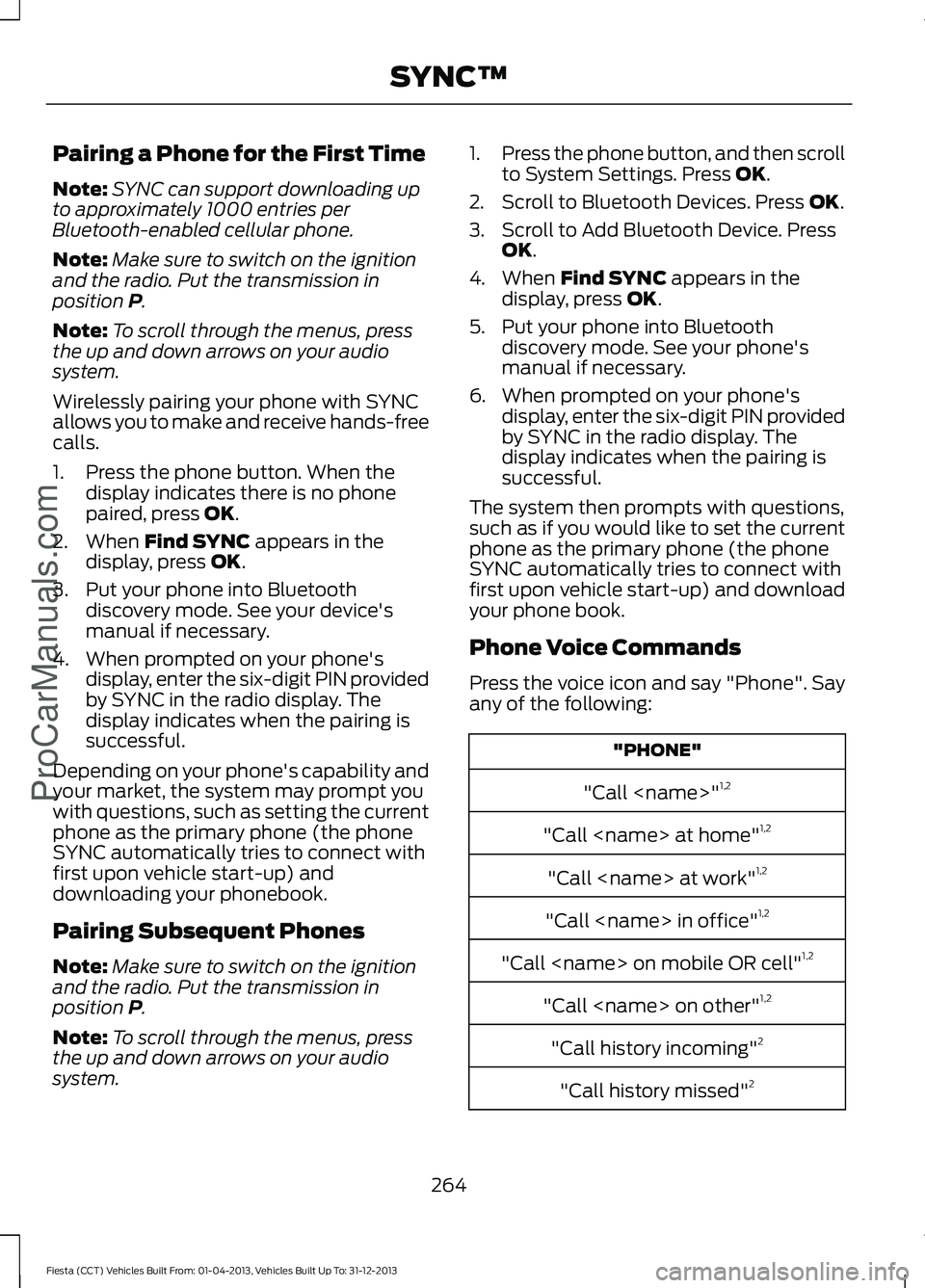
Pairing a Phone for the First Time
Note:
SYNC can support downloading up
to approximately 1000 entries per
Bluetooth-enabled cellular phone.
Note: Make sure to switch on the ignition
and the radio. Put the transmission in
position P.
Note: To scroll through the menus, press
the up and down arrows on your audio
system.
Wirelessly pairing your phone with SYNC
allows you to make and receive hands-free
calls.
1. Press the phone button. When the display indicates there is no phone
paired, press
OK.
2. When
Find SYNC appears in the
display, press OK.
3. Put your phone into Bluetooth discovery mode. See your device's
manual if necessary.
4. When prompted on your phone's display, enter the six-digit PIN provided
by SYNC in the radio display. The
display indicates when the pairing is
successful.
Depending on your phone's capability and
your market, the system may prompt you
with questions, such as setting the current
phone as the primary phone (the phone
SYNC automatically tries to connect with
first upon vehicle start-up) and
downloading your phonebook.
Pairing Subsequent Phones
Note: Make sure to switch on the ignition
and the radio. Put the transmission in
position
P.
Note: To scroll through the menus, press
the up and down arrows on your audio
system. 1.
Press the phone button, and then scroll
to System Settings. Press
OK.
2. Scroll to Bluetooth Devices. Press
OK.
3. Scroll to Add Bluetooth Device. Press OK
.
4. When
Find SYNC appears in the
display, press OK.
5. Put your phone into Bluetooth discovery mode. See your phone's
manual if necessary.
6. When prompted on your phone's display, enter the six-digit PIN provided
by SYNC in the radio display. The
display indicates when the pairing is
successful.
The system then prompts with questions,
such as if you would like to set the current
phone as the primary phone (the phone
SYNC automatically tries to connect with
first upon vehicle start-up) and download
your phone book.
Phone Voice Commands
Press the voice icon and say "Phone". Say
any of the following: "PHONE"
"Call
"Call
"Call
"Call
"Call
"Call
"Call history incoming" 2
"Call history missed" 2
264
Fiesta (CCT) Vehicles Built From: 01-04-2013, Vehicles Built Up To: 31-12-2013 SYNC™
ProCarManuals.com
Page 295 of 398
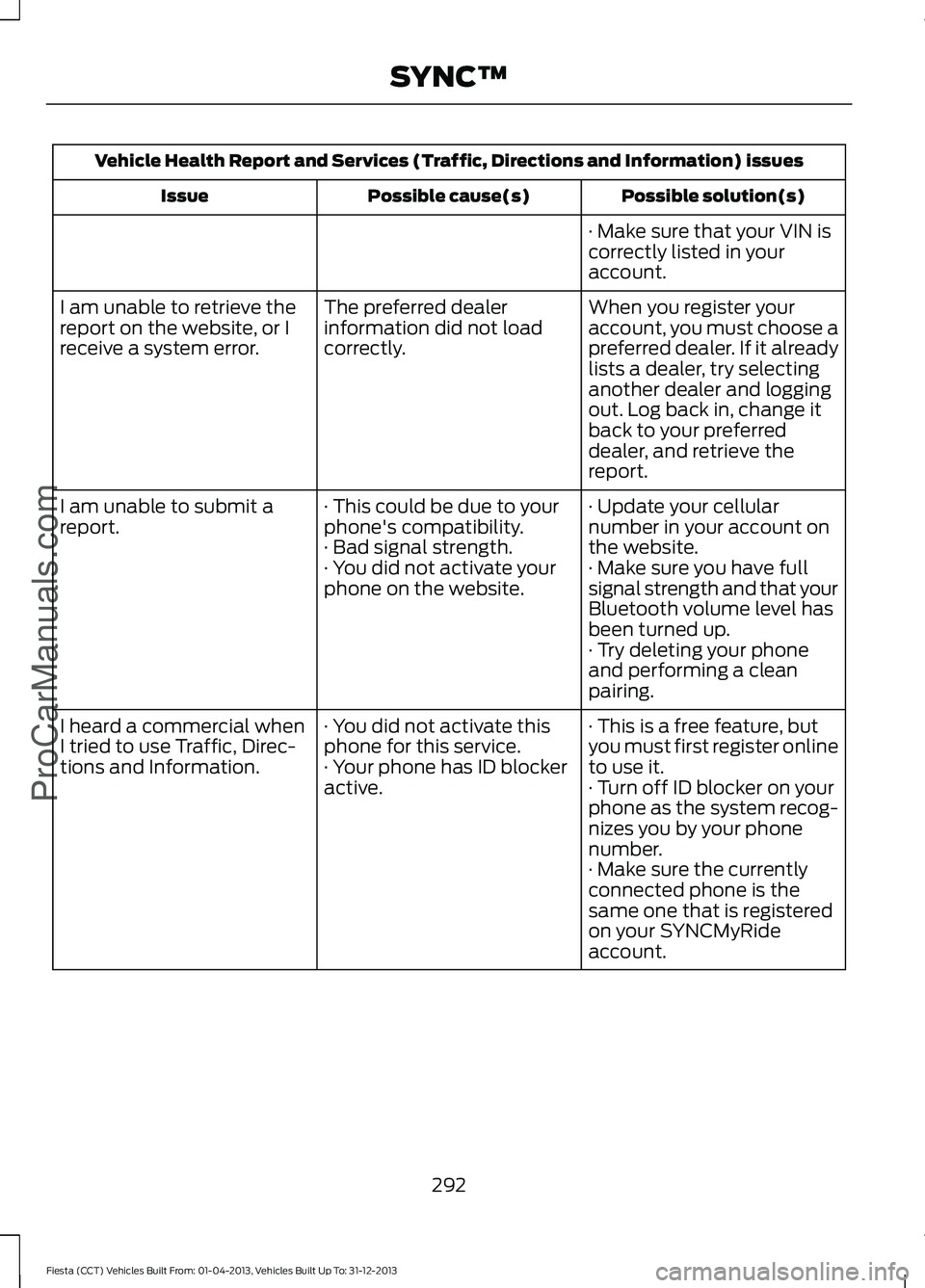
Vehicle Health Report and Services (Traffic, Directions and Information) issues
Possible solution(s)
Possible cause(s)
Issue
· Make sure that your VIN is
correctly listed in your
account.
When you register your
account, you must choose a
preferred dealer. If it already
lists a dealer, try selecting
another dealer and logging
out. Log back in, change it
back to your preferred
dealer, and retrieve the
report.
The preferred dealer
information did not load
correctly.
I am unable to retrieve the
report on the website, or I
receive a system error.
· Update your cellular
number in your account on
the website.
· This could be due to your
phone's compatibility.
· Bad signal strength.
I am unable to submit a
report.
· Make sure you have full
signal strength and that your
Bluetooth volume level has
been turned up.
· You did not activate your
phone on the website.
· Try deleting your phone
and performing a clean
pairing.
· This is a free feature, but
you must first register online
to use it.
· You did not activate this
phone for this service.
· Your phone has ID blocker
active.
I heard a commercial when
I tried to use Traffic, Direc-
tions and Information.
· Turn off ID blocker on your
phone as the system recog-
nizes you by your phone
number.
· Make sure the currently
connected phone is the
same one that is registered
on your SYNCMyRide
account.
292
Fiesta (CCT) Vehicles Built From: 01-04-2013, Vehicles Built Up To: 31-12-2013 SYNC™ProCarManuals.com
Page 301 of 398
•
Make sure the power cables do not
interfere with the safe operation of your
vehicle's controls or affect your safe
driving abilities.
• Some SYNC functions are
speed-dependent. Their use is limited
to when your vehicle is travelling at
speeds below 3 mph (5 km/h).
Make sure that you review your device's
manual before using it with SYNC. Speed-restricted Features
Some features of this system are restricted
from use unless your vehicle is stationary.
•
Screens crowded with information, for
example:
•Point of Interest reviews and ratings
• SIRIUS Travel Link sports scores
• Movie times
• Ski conditions.
• Any action that requires keyboard use,
for example: entering a navigation
destination or editing information.
• All lists are limited, for example: phone
contacts.
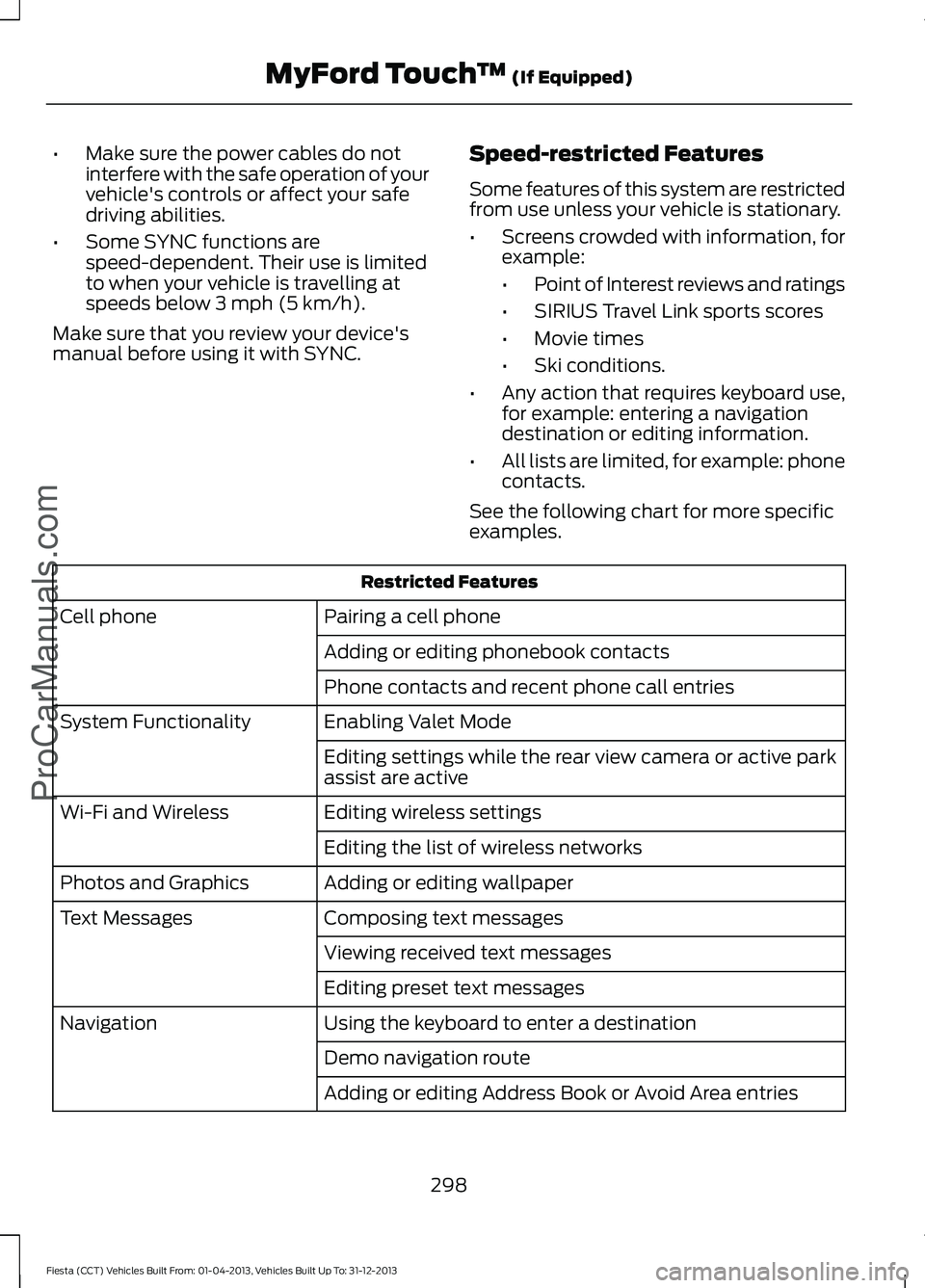
See the following chart for more specific
examples. Restricted Features
Pairing a cell phone
Cell phone
Adding or editing phonebook contacts
Phone contacts and recent phone call entries
Enabling Valet Mode
System Functionality
Editing settings while the rear view camera or active park
assist are active
Editing wireless settings
Wi-Fi and Wireless
Editing the list of wireless networks
Adding or editing wallpaper
Photos and Graphics
Composing text messages
Text Messages
Viewing received text messages
Editing preset text messages
Using the keyboard to enter a destination
Navigation
Demo navigation route
Adding or editing Address Book or Avoid Area entries
298
Fiesta (CCT) Vehicles Built From: 01-04-2013, Vehicles Built Up To: 31-12-2013 MyFord Touch
™ (If Equipped)
ProCarManuals.com
Page 334 of 398
•
Call waiting notification
• Caller ID.
Other features, such as text messaging
using Bluetooth and automatic phonebook
download, are phone-dependent features.
To check your phone ’s compatibility, see
your phone ’s user manual and visit
www.SYNCMyRide.com,
www.SYNCMyRide.ca or
www.syncmaroute.ca.
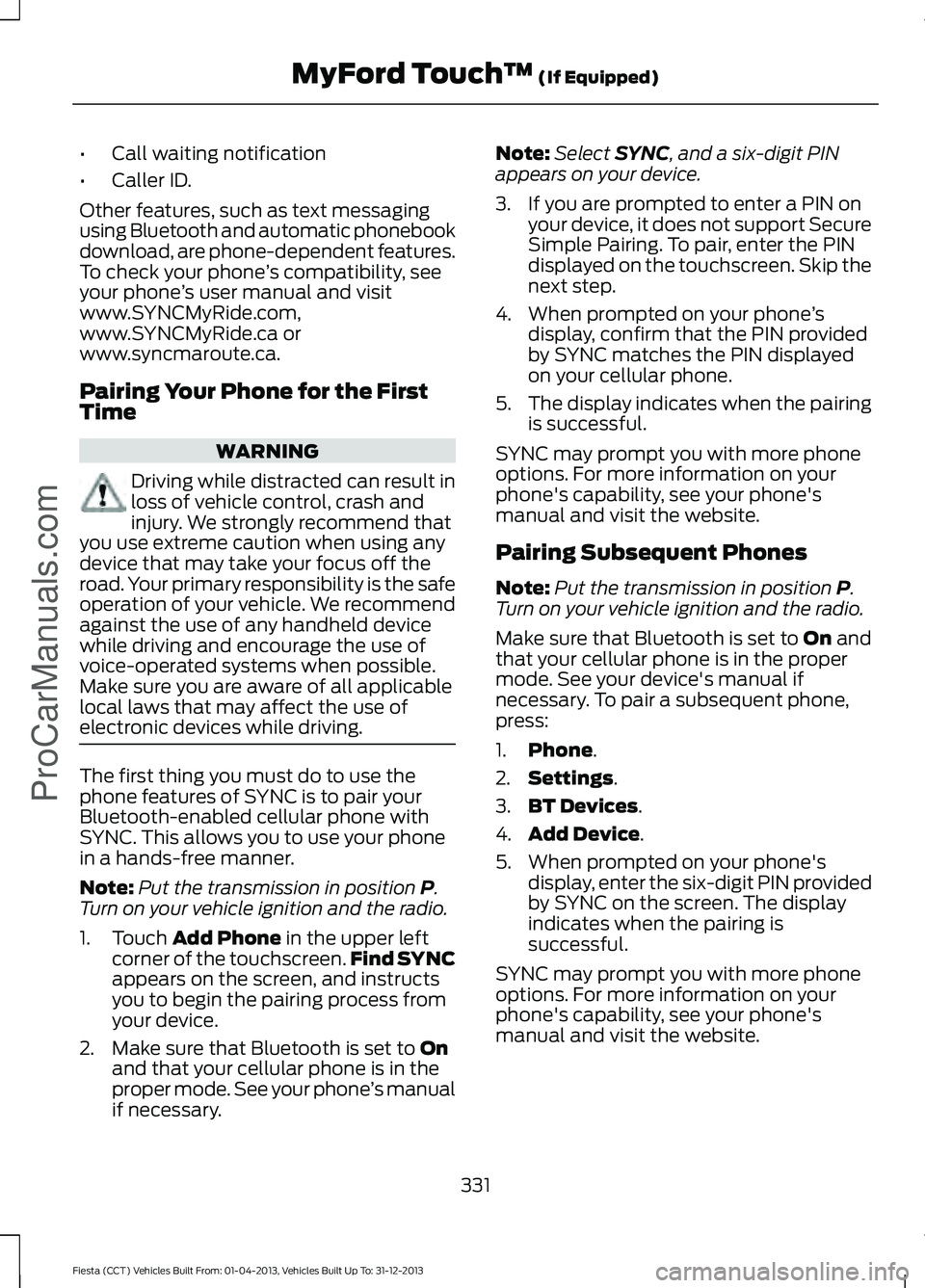
Pairing Your Phone for the First
Time WARNING
Driving while distracted can result in
loss of vehicle control, crash and
injury. We strongly recommend that
you use extreme caution when using any
device that may take your focus off the
road. Your primary responsibility is the safe
operation of your vehicle. We recommend
against the use of any handheld device
while driving and encourage the use of
voice-operated systems when possible.
Make sure you are aware of all applicable
local laws that may affect the use of
electronic devices while driving. The first thing you must do to use the
phone features of SYNC is to pair your
Bluetooth-enabled cellular phone with
SYNC. This allows you to use your phone
in a hands-free manner.
Note:
Put the transmission in position P.
Turn on your vehicle ignition and the radio.
1. Touch
Add Phone in the upper left
corner of the touchscreen. Find SYNC
appears on the screen, and instructs
you to begin the pairing process from
your device.
2. Make sure that Bluetooth is set to
On
and that your cellular phone is in the
proper mode. See your phone ’s manual
if necessary. Note:
Select
SYNC, and a six-digit PIN
appears on your device.
3. If you are prompted to enter a PIN on your device, it does not support Secure
Simple Pairing. To pair, enter the PIN
displayed on the touchscreen. Skip the
next step.
4. When prompted on your phone ’s
display, confirm that the PIN provided
by SYNC matches the PIN displayed
on your cellular phone.
5. The display indicates when the pairing
is successful.
SYNC may prompt you with more phone
options. For more information on your
phone's capability, see your phone's
manual and visit the website.
Pairing Subsequent Phones
Note: Put the transmission in position
P.
Turn on your vehicle ignition and the radio.
Make sure that Bluetooth is set to
On and
that your cellular phone is in the proper
mode. See your device's manual if
necessary. To pair a subsequent phone,
press:
1. Phone
.
2. Settings
.
3. BT Devices
.
4. Add Device
.
5. When prompted on your phone's display, enter the six-digit PIN provided
by SYNC on the screen. The display
indicates when the pairing is
successful.
SYNC may prompt you with more phone
options. For more information on your
phone's capability, see your phone's
manual and visit the website.
331
Fiesta (CCT) Vehicles Built From: 01-04-2013, Vehicles Built Up To: 31-12-2013 MyFord Touch
™
(If Equipped)
ProCarManuals.com
Page 393 of 398
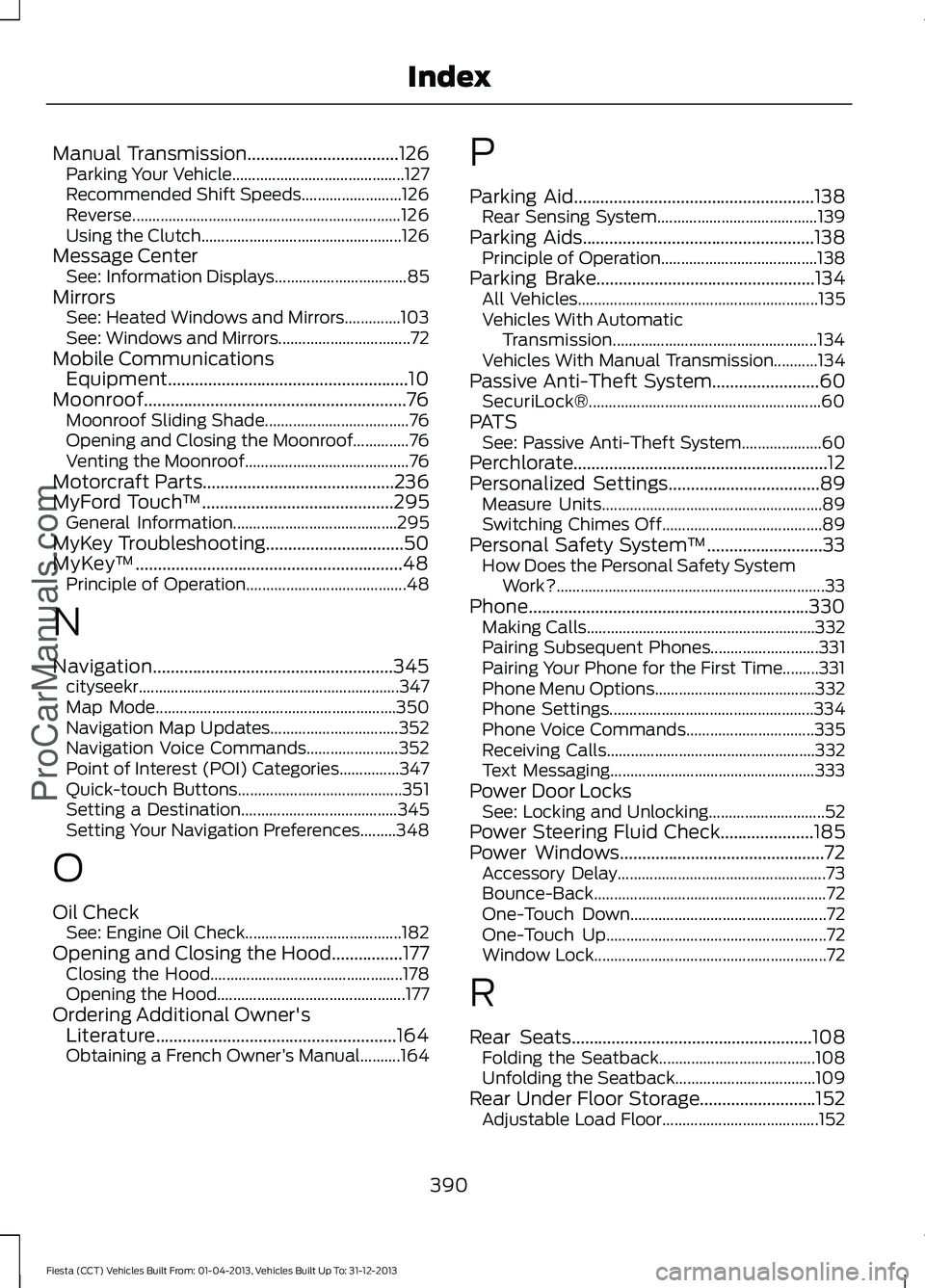
Manual Transmission..................................126
Parking Your Vehicle........................................... 127
Recommended Shift Speeds......................... 126
Reverse................................................................... 126
Using the Clutch.................................................. 126
Message Center See: Information Displays................................. 85
Mirrors See: Heated Windows and Mirrors..............103
See: Windows and Mirrors................................. 72
Mobile Communications Equipment......................................................10
Moonroof...........................................................76 Moonroof Sliding Shade.................................... 76
Opening and Closing the Moonroof..............76
Venting the Moonroof......................................... 76
Motorcraft Parts
...........................................236
MyFord Touch ™...........................................295
General Information......................................... 295
MyKey Troubleshooting
...............................50
MyKey ™............................................................48
Principle of Operation........................................ 48
N
Navigation
......................................................345
cityseekr................................................................. 347
Map Mode............................................................ 350
Navigation Map Updates................................ 352
Navigation Voice Commands....................... 352
Point of Interest (POI) Categories...............347
Quick-touch Buttons......................................... 351
Setting a Destination....................................... 345
Setting Your Navigation Preferences.........348
O
Oil Check See: Engine Oil Check....................................... 182
Opening and Closing the Hood
................177
Closing the Hood................................................ 178
Opening the Hood............................................... 177
Ordering Additional Owner's Literature......................................................164
Obtaining a French Owner ’s Manual..........164 P
Parking Aid
......................................................138
Rear Sensing System........................................ 139
Parking Aids....................................................138 Principle of Operation....................................... 138
Parking Brake
.................................................134
All Vehicles............................................................ 135
Vehicles With Automatic Transmission................................................... 134
Vehicles With Manual Transmission...........134
Passive Anti-Theft System
........................60
SecuriLock®.......................................................... 60
PATS See: Passive Anti-Theft System.................... 60
Perchlorate.........................................................12
Personalized Settings..................................89 Measure Units....................................................... 89
Switching Chimes Off........................................ 89
Personal Safety System ™
..........................33
How Does the Personal Safety System
Work?................................................................... 33
Phone...............................................................330 Making Calls......................................................... 332
Pairing Subsequent Phones........................... 331
Pairing Your Phone for the First Time.........331
Phone Menu Options........................................ 332
Phone Settings................................................... 334
Phone Voice Commands................................ 335
Receiving Calls.................................................... 332
Text Messaging................................................... 333
Power Door Locks See: Locking and Unlocking............................. 52
Power Steering Fluid Check.....................185
Power Windows..............................................72 Accessory Delay.................................................... 73
Bounce-Back.......................................................... 72
One-Touch Down................................................. 72
One-Touch Up....................................................... 72
Window Lock.......................................................... 72
R
Rear Seats
......................................................108
Folding the Seatback....................................... 108
Unfolding the Seatback................................... 109
Rear Under Floor Storage..........................152 Adjustable Load Floor....................................... 152
390
Fiesta (CCT) Vehicles Built From: 01-04-2013, Vehicles Built Up To: 31-12-2013 Index
ProCarManuals.com
Page 396 of 398

Using Stability Control................................137
........................................................................\
............ 137
Using SYNC™ With Your Media Player.............................................................281
Accessing Your Play Menu............................. 285
Connecting Your Digital Media Player to the USB Port........................................................... 281
Media Menu Features...................................... 283
Media Voice Commands.................................. 281
System Settings................................................. 287
What's Playing?.................................................. 281
Using SYNC™ With Your Phone............263 Accessing Features through the Phone
Menu.................................................................. 267
Accessing Your Phone Settings.................... 270
Making Calls........................................................ 266
Pairing a Phone for the First Time...............264
Pairing Subsequent Phones.......................... 264
Phone Options during an Active Call.........266
Phone Voice Commands................................ 264
Receiving Calls................................................... 266
System Settings................................................... 271
Text Messaging................................................... 269
Using Voice Recognition............................261
Initiating a Voice Session................................. 261
System Interaction and Feedback..............262
Using Winter Tires.......................................226
Utilizing the Mediation/Arbitration Program (Canada Only).........................162
V
Vehicle Care
..................................................204
Vehicle Certification Label........................237
Vehicle Identification Number
................237
Vehicle Storage............................................209 Battery................................................................... 209
Body....................................................................... 209
Brakes.................................................................... 209
Cooling system................................................... 209
Engine.................................................................... 209
Fuel system......................................................... 209
General.................................................................. 209
Miscellaneous...................................................... 210
Removing Vehicle From Storage.................. 210
Tires........................................................................\
209
Ventilation See: Climate Control........................................... 97Vents
See: Air Vents......................................................... 97
VIN See: Vehicle Identification Number.............237
Voice Control
...................................................64
W
Warning Lamps and Indicators - 1.6L EcoBoost™....................................................81
Anti-lock Braking System Warning Lamp..................................................................... 81
Brake System Warning Lamp........................... 81
Cruise Control Indicator...................................... 81
Direction Indicator................................................ 82
Door Ajar Warning Lamp................................... 82
Engine Coolant Temperature Warning Lamp.................................................................... 82
Engine Oil Warning Lamp................................. 82
Engine Warning Lamps...................................... 82
Front Airbag Warning Lamp............................. 83
Front Fog Lamps Indicator............................... 83
Headlamp Indicator............................................ 83
High Beam Indicator........................................... 83
Ignition Warning Lamp....................................... 83
Information Indicator.......................................... 83
Low Fuel Level Warning Lamp........................ 83
Low Tire Pressure Warning............................... 83
Safety Belt Minder Warning Lamp................83
Service Engine Soon........................................... 83
Shift Indicator........................................................ 84
393
Fiesta (CCT) Vehicles Built From: 01-04-2013, Vehicles Built Up To: 31-12-2013 Index
ProCarManuals.com